media BMW X1 2014 E84 Service Manual
[x] Cancel search | Manufacturer: BMW, Model Year: 2014, Model line: X1, Model: BMW X1 2014 E84Pages: 297, PDF Size: 7 MB
Page 246 of 297
Requirements▷The engine must be running and warm af‐
ter the vehicle has been driven for at least
6.2 miles/10 km.▷The vehicle is stopped or being driven on a
level roadway.
Display in the instrument cluster
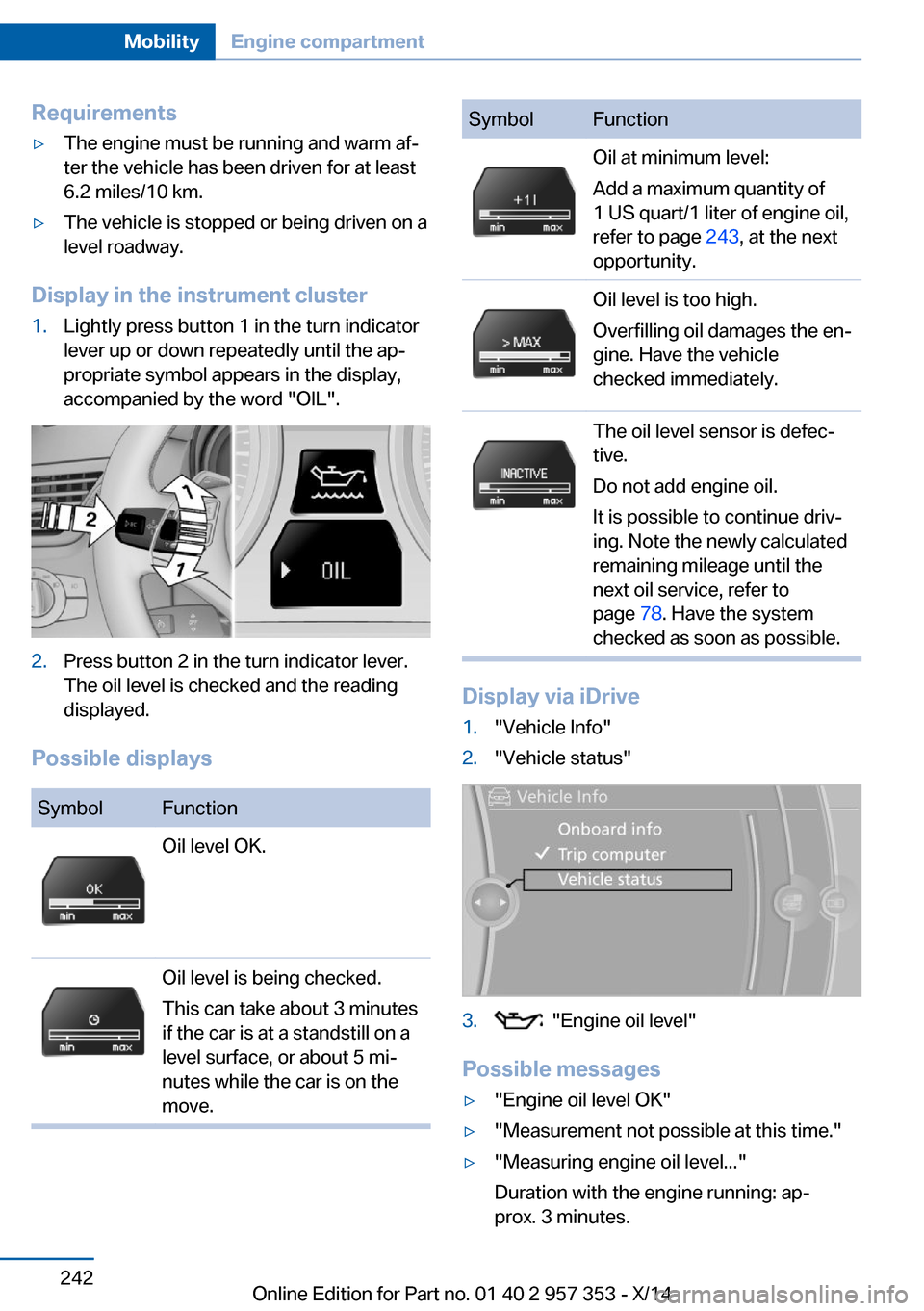
1.Lightly press button 1 in the turn indicator
lever up or down repeatedly until the ap‐
propriate symbol appears in the display,
accompanied by the word "OIL".2.Press button 2 in the turn indicator lever.
The oil level is checked and the reading
displayed.
Possible displays
SymbolFunctionOil level OK.Oil level is being checked.
This can take about 3 minutes
if the car is at a standstill on a
level surface, or about 5 mi‐
nutes while the car is on the
move.SymbolFunctionOil at minimum level:
Add a maximum quantity of
1 US quart/1 liter of engine oil,
refer to page 243, at the next
opportunity.Oil level is too high.
Overfilling oil damages the en‐
gine. Have the vehicle
checked immediately.The oil level sensor is defec‐
tive.
Do not add engine oil.
It is possible to continue driv‐
ing. Note the newly calculated
remaining mileage until the
next oil service, refer to
page 78. Have the system
checked as soon as possible.
Display via iDrive
1."Vehicle Info"2."Vehicle status"3. "Engine oil level"
Possible messages
▷"Engine oil level OK"▷"Measurement not possible at this time."▷"Measuring engine oil level..."
Duration with the engine running: ap‐
prox. 3 minutes.Seite 242MobilityEngine compartment242
Online Edition for Part no. 01 40 2 957 353 - X/14
Page 247 of 297
Duration while driving: approx. 5 minutes.
If engine oil was added, it may take up to
30 minutes to obtain an oil level reading.▷"Engine oil level below minimum. Add 1
quart!"
Add a maximum quantity of 1 US quart/1 li‐
ter of engine oil at the next opportunity, re‐
fer also to Adding engine oil below.▷"Engine oil level too high! Have this
checked."
Too much engine oil
Have the vehicle checked immedi‐
ately; otherwise, surplus oil can lead to en‐
gine damage.◀▷"Measurement inactive. Have this
checked." Do not add engine oil. It is possi‐
ble to continue driving. Note the newly cal‐
culated remaining mileage until the next oil
service, refer to page 78. Have the system
checked as soon as possible.
Adding engine oil
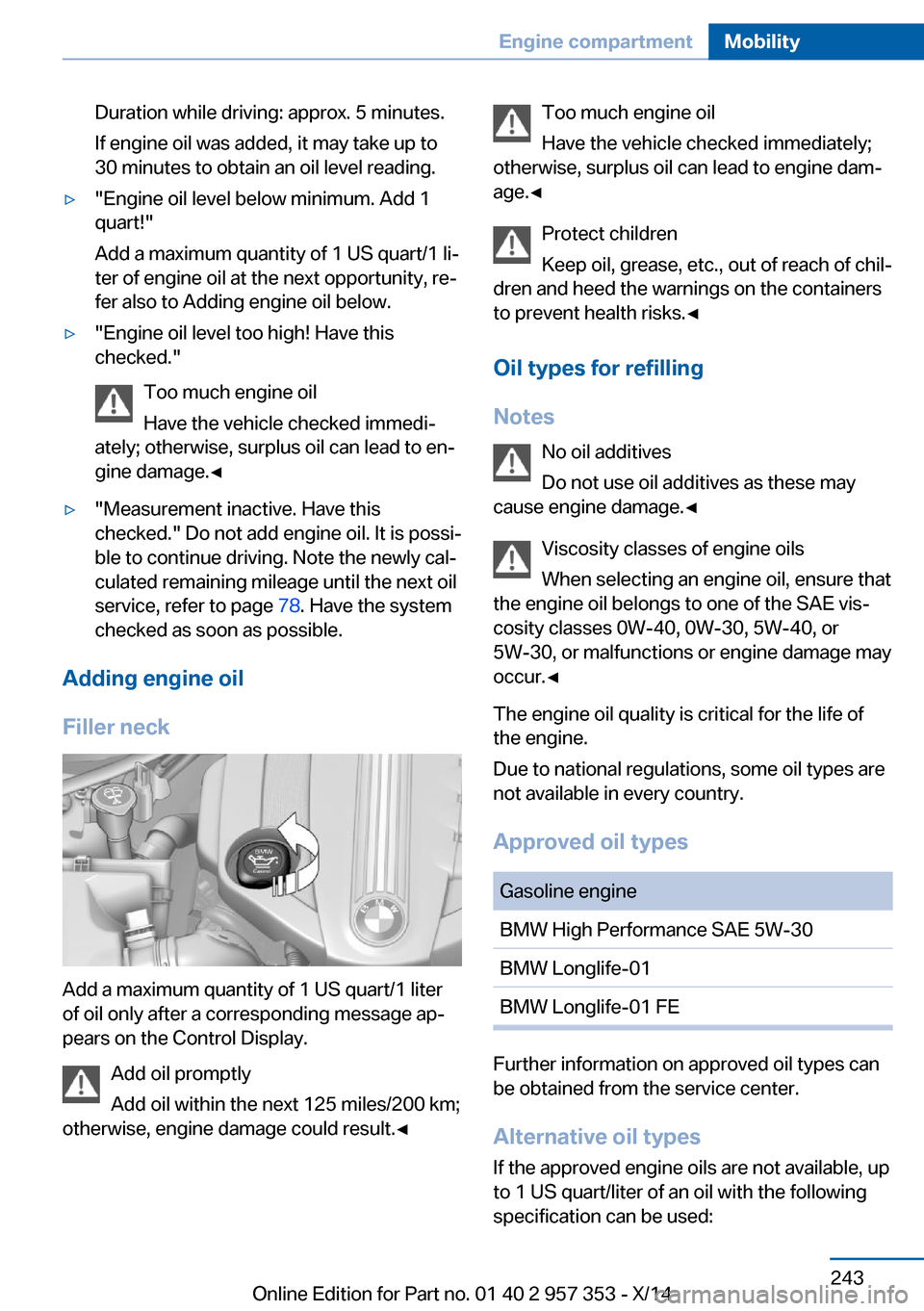
Filler neck
Add a maximum quantity of 1 US quart/1 liter
of oil only after a corresponding message ap‐
pears on the Control Display.
Add oil promptly
Add oil within the next 125 miles/200 km;
otherwise, engine damage could result.◀
Too much engine oil
Have the vehicle checked immediately;
otherwise, surplus oil can lead to engine dam‐
age.◀
Protect children
Keep oil, grease, etc., out of reach of chil‐
dren and heed the warnings on the containers
to prevent health risks.◀
Oil types for refilling
Notes No oil additives
Do not use oil additives as these may
cause engine damage.◀
Viscosity classes of engine oils
When selecting an engine oil, ensure that
the engine oil belongs to one of the SAE vis‐
cosity classes 0W-40, 0W-30, 5W-40, or
5W-30, or malfunctions or engine damage may
occur.◀
The engine oil quality is critical for the life of
the engine.
Due to national regulations, some oil types are
not available in every country.
Approved oil typesGasoline engineBMW High Performance SAE 5W-30BMW Longlife-01BMW Longlife-01 FE
Further information on approved oil types can
be obtained from the service center.
Alternative oil types If the approved engine oils are not available, up
to 1 US quart/liter of an oil with the following
specification can be used:
Seite 243Engine compartmentMobility243
Online Edition for Part no. 01 40 2 957 353 - X/14
Page 250 of 297
and Service Guide Booklet for Canadian mod‐
els for additional information on service re‐
quirements.
Maintenance and repair should be performed
by your service center. Make sure to have reg‐
ular maintenance procedures recorded in the
vehicle's Service and Warranty Information
Booklet for US models, and in the Warranty
and Service Guide Booklet for Canadian mod‐
els. These entries are proof of regular mainte‐
nance.
Socket for OBD Onboard
Diagnosis
Socket for Onboard Diagnosis
The socket for Onboard Diagnosis may
only be used by the service center, by work‐
shops that operate according to the specifica‐
tions of the vehicle manufacturer with appro‐
priately trained personnel, and by other
authorized persons. Otherwise, its use may
lead to vehicle malfunctions.◀
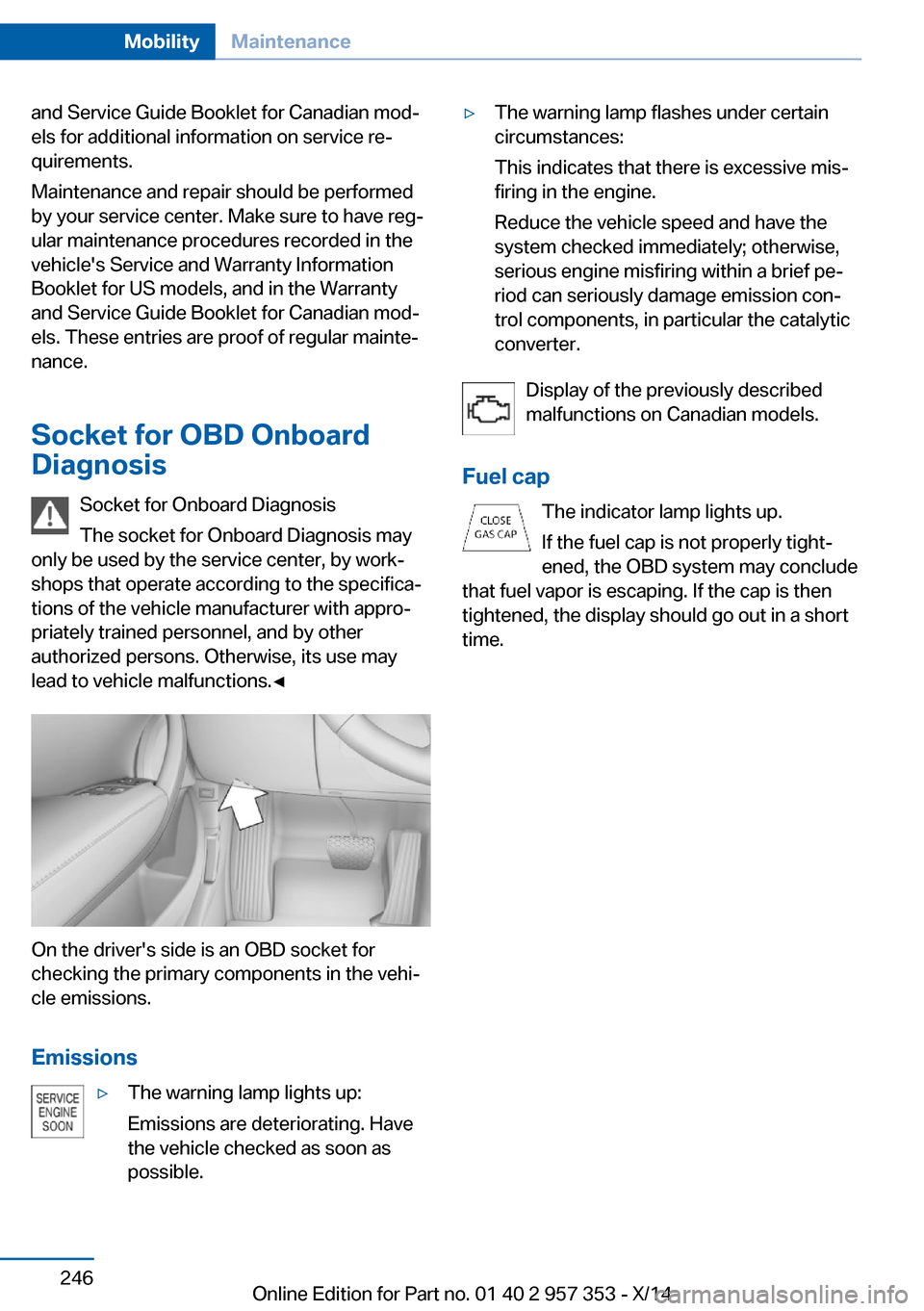
On the driver's side is an OBD socket for
checking the primary components in the vehi‐
cle emissions.
Emissions
▷The warning lamp lights up:
Emissions are deteriorating. Have
the vehicle checked as soon as
possible.▷The warning lamp flashes under certain
circumstances:
This indicates that there is excessive mis‐
firing in the engine.
Reduce the vehicle speed and have the
system checked immediately; otherwise,
serious engine misfiring within a brief pe‐
riod can seriously damage emission con‐
trol components, in particular the catalytic
converter.
Display of the previously described
malfunctions on Canadian models.
Fuel cap The indicator lamp lights up.
If the fuel cap is not properly tight‐
ened, the OBD system may conclude
that fuel vapor is escaping. If the cap is then
tightened, the display should go out in a short
time.
Seite 246MobilityMaintenance246
Online Edition for Part no. 01 40 2 957 353 - X/14
Page 257 of 297
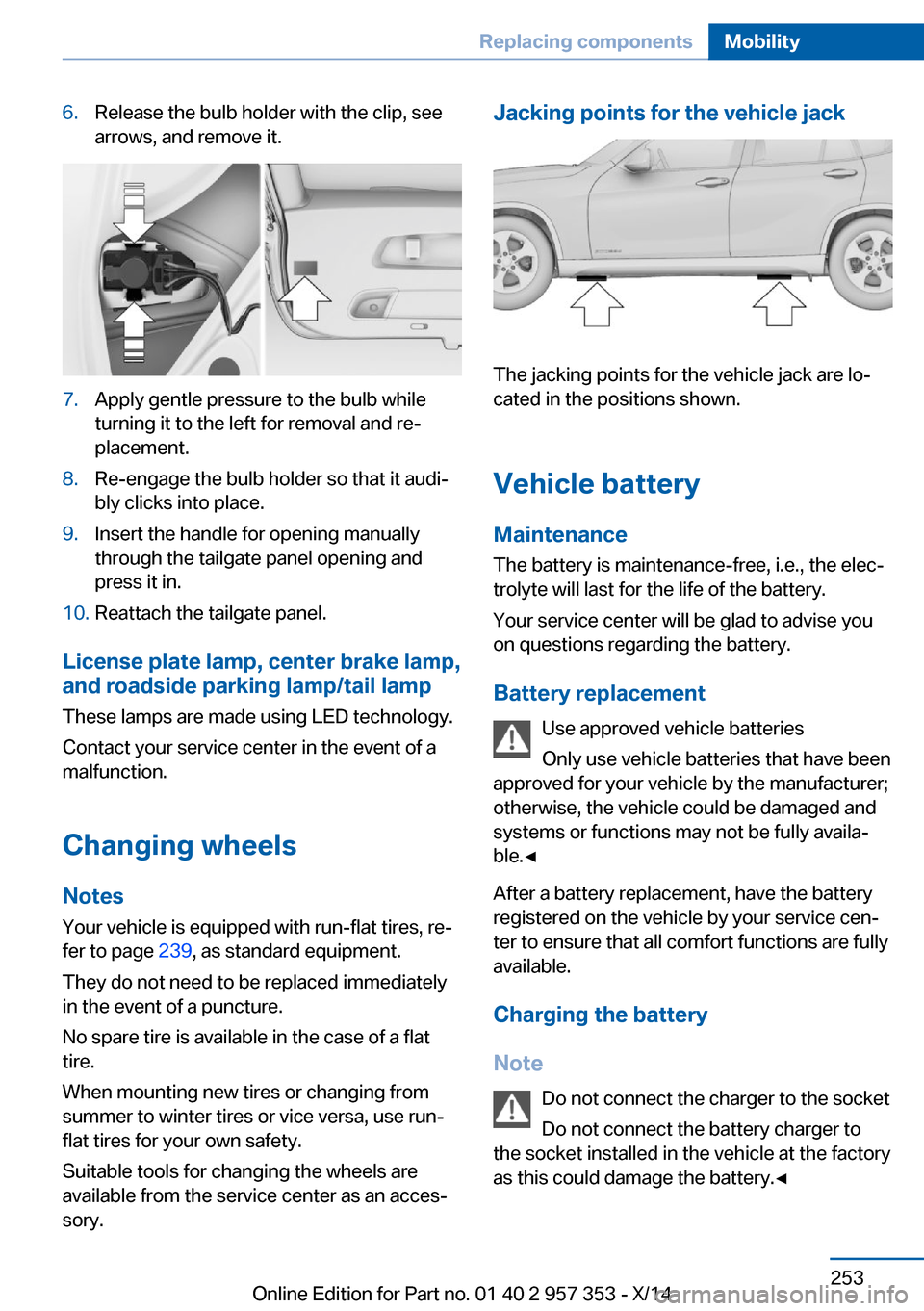
6.Release the bulb holder with the clip, see
arrows, and remove it.7.Apply gentle pressure to the bulb while
turning it to the left for removal and re‐
placement.8.Re-engage the bulb holder so that it audi‐
bly clicks into place.9.Insert the handle for opening manually
through the tailgate panel opening and
press it in.10.Reattach the tailgate panel.
License plate lamp, center brake lamp, and roadside parking lamp/tail lamp
These lamps are made using LED technology.
Contact your service center in the event of a
malfunction.
Changing wheels
Notes
Your vehicle is equipped with run-flat tires, re‐
fer to page 239, as standard equipment.
They do not need to be replaced immediately
in the event of a puncture.
No spare tire is available in the case of a flat
tire.
When mounting new tires or changing from
summer to winter tires or vice versa, use run-
flat tires for your own safety.
Suitable tools for changing the wheels are
available from the service center as an acces‐
sory.
Jacking points for the vehicle jack
The jacking points for the vehicle jack are lo‐
cated in the positions shown.
Vehicle battery
Maintenance
The battery is maintenance-free, i.e., the elec‐ trolyte will last for the life of the battery.
Your service center will be glad to advise you
on questions regarding the battery.
Battery replacement Use approved vehicle batteries
Only use vehicle batteries that have been
approved for your vehicle by the manufacturer;
otherwise, the vehicle could be damaged and
systems or functions may not be fully availa‐
ble.◀
After a battery replacement, have the battery
registered on the vehicle by your service cen‐
ter to ensure that all comfort functions are fully
available.
Charging the battery
Note Do not connect the charger to the socket
Do not connect the battery charger to
the socket installed in the vehicle at the factory
as this could damage the battery.◀
Seite 253Replacing componentsMobility253
Online Edition for Part no. 01 40 2 957 353 - X/14
Page 260 of 297
For this purpose, data that are used to de‐
termine the necessary rescue measures,
such as the current position of the vehicle
if it can be established, are transmitted to
the BMW Response Center.▷If the LED is flashing but the BMW Re‐
sponse Center cannot be heard on the
hands-free system, the hands-free system
may be malfunctioning. However, the
BMW Response Center may still be able to
hear you.
Initiating an Emergency Request
automatically
Under certain conditions, an Emergency Re‐
quest is automatically initiated immediately af‐
ter a severe accident. Automatic Collision Noti‐
fication is not affected by pressing the SOS
button.
Warning triangle
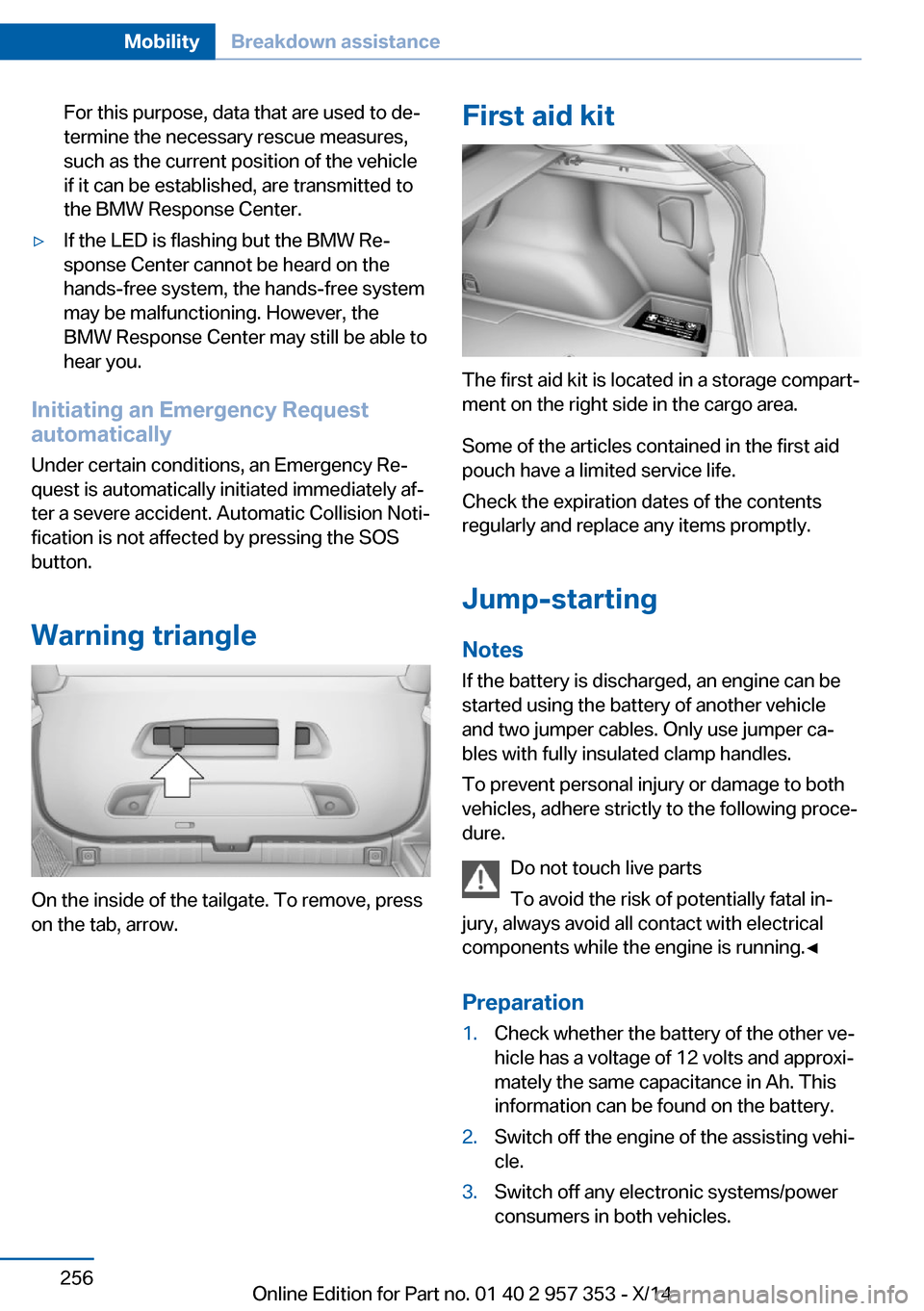
On the inside of the tailgate. To remove, press
on the tab, arrow.
First aid kit
The first aid kit is located in a storage compart‐
ment on the right side in the cargo area.
Some of the articles contained in the first aid
pouch have a limited service life.
Check the expiration dates of the contents
regularly and replace any items promptly.
Jump-starting
Notes If the battery is discharged, an engine can be
started using the battery of another vehicle
and two jumper cables. Only use jumper ca‐
bles with fully insulated clamp handles.
To prevent personal injury or damage to both
vehicles, adhere strictly to the following proce‐
dure.
Do not touch live parts
To avoid the risk of potentially fatal in‐
jury, always avoid all contact with electrical
components while the engine is running.◀
Preparation
1.Check whether the battery of the other ve‐
hicle has a voltage of 12 volts and approxi‐
mately the same capacitance in Ah. This
information can be found on the battery.2.Switch off the engine of the assisting vehi‐
cle.3.Switch off any electronic systems/power
consumers in both vehicles.Seite 256MobilityBreakdown assistance256
Online Edition for Part no. 01 40 2 957 353 - X/14
Page 266 of 297
Automatic transmission1.Release the parking brake, refer to
page 61.2.Drive into the car wash.3.Depress the brake pedal if necessary.4.Engage the selector lever or transmission
position N.5.Switch the engine off.6.Leave the remote control in the ignition
lock so that the vehicle can roll.
In 8-gear automatic transmissions, transmis‐
sion position P is engaged automatically:
▷Automatically after approx. 30 minutes.▷When the remote control is removed from
the ignition lock.
Headlights
▷Do not rub dry and do not use abrasive or
caustic cleansers.▷Soak areas that have been soiled e.g. due
to insects, with shampoo and wash off with
water.▷Thaw ice with de-icing spray; do not use an
ice scraper.
After washing the vehicle
After washing the vehicle, apply the brakes
briefly to dry them; otherwise, braking action
can be reduced and corrosion of the brake
discs can occur.
Fully remove any residue from the windows to
prevent obstruction of view from streaking,
wiping noises, and wiper wear.
Vehicle careCar care productsBMW recommends using cleaning and care
products from BMW, since these have been
tested and approved.
Car care and cleaning products
Follow the instructions on the container.
When cleaning the interior, open the doors or
windows.
Only use products intended for cleaning vehi‐
cles.
Cleansers can contain substances that are
dangerous and harmful to your health.◀
Vehicle paint Regular care contributes to driving safety and
value retention. Environmental influences in
areas with high air pollution or natural contami‐
nants, such as tree resin or pollen, can have an
impact on the vehicle paint. Tailor the fre‐
quency and extent of your car care to these in‐
fluences.
Immediately remove aggressive substances,
such as spilled fuel, oil, grease, or bird drop‐
pings, to prevent damage to or discoloration of
the paintwork.
Leather care
Remove dust from the leather often, using a
cloth or vacuum cleaner.
Otherwise, particles of dust and road grime
chafe in pores and folds, and lead to increased
wear and premature degradation of the leather
surface.
To guard against discoloration, such as from
clothing, provide leather care roughly every
two months.
Clean light-colored leather more frequently as
dust and dirt are more noticeable.
Use leather care products; otherwise, dirt and
grease will gradually break down the protective
layer of the leather surface.
Suitable care products are available from the
service center.
Upholstery material care Vacuum regularly with a vacuum cleaner.Seite 262MobilityCare262
Online Edition for Part no. 01 40 2 957 353 - X/14
Page 277 of 297
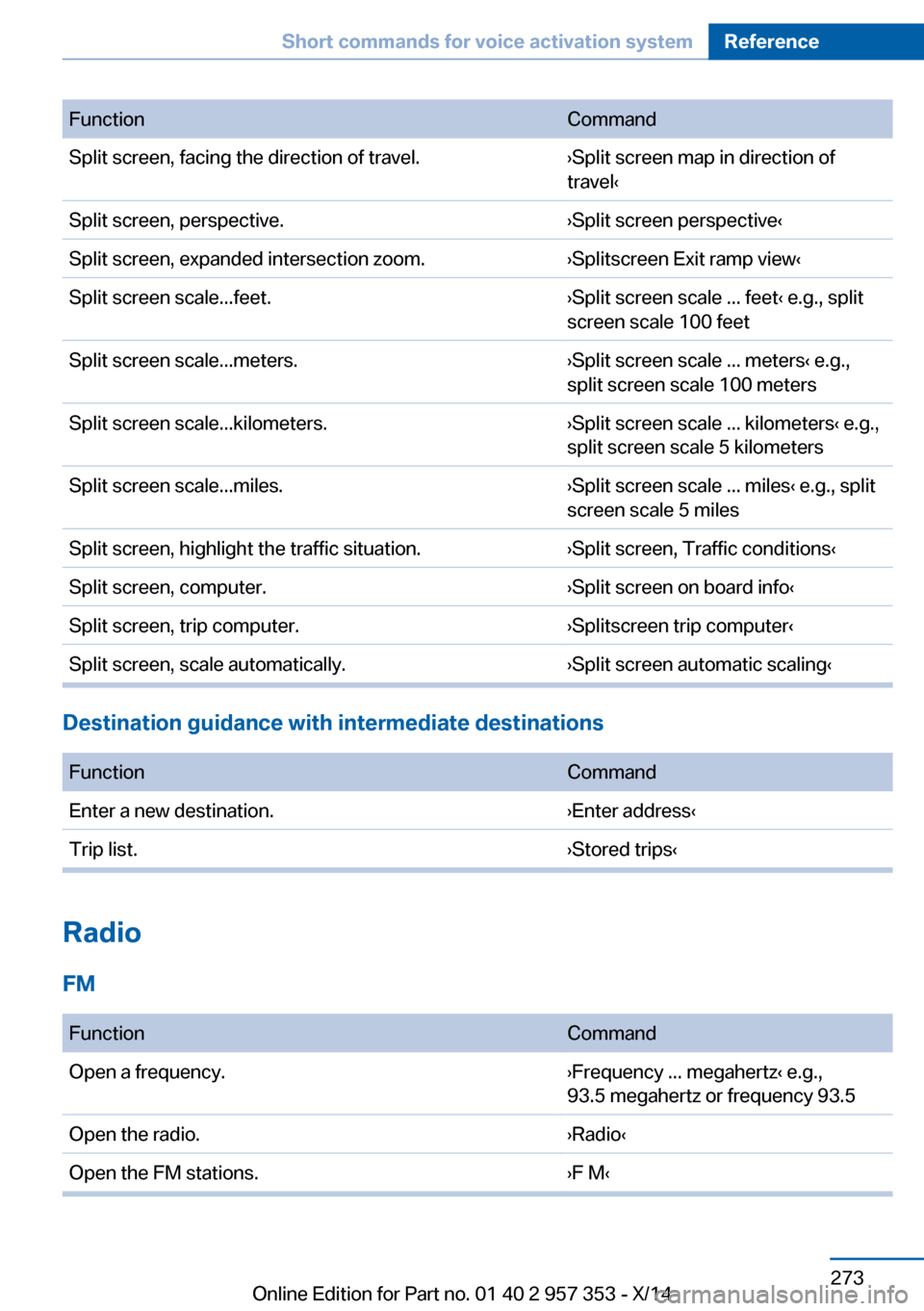
FunctionCommandSplit screen, facing the direction of travel.›Split screen map in direction of
travel‹Split screen, perspective.›Split screen perspective‹Split screen, expanded intersection zoom.›Splitscreen Exit ramp view‹Split screen scale...feet.›Split screen scale ... feet‹ e.g., split
screen scale 100 feetSplit screen scale...meters.›Split screen scale ... meters‹ e.g.,
split screen scale 100 metersSplit screen scale...kilometers.›Split screen scale ... kilometers‹ e.g.,
split screen scale 5 kilometersSplit screen scale...miles.›Split screen scale ... miles‹ e.g., split
screen scale 5 milesSplit screen, highlight the traffic situation.›Split screen, Traffic conditions‹Split screen, computer.›Split screen on board info‹Split screen, trip computer.›Splitscreen trip computer‹Split screen, scale automatically.›Split screen automatic scaling‹
Destination guidance with intermediate destinations
FunctionCommandEnter a new destination.›Enter address‹Trip list.›Stored trips‹
Radio
FM
FunctionCommandOpen a frequency.›Frequency ... megahertz‹ e.g.,
93.5 megahertz or frequency 93.5Open the radio.›Radio‹Open the FM stations.›F M‹Seite 273Short commands for voice activation systemReference273
Online Edition for Part no. 01 40 2 957 353 - X/14
Page 279 of 297
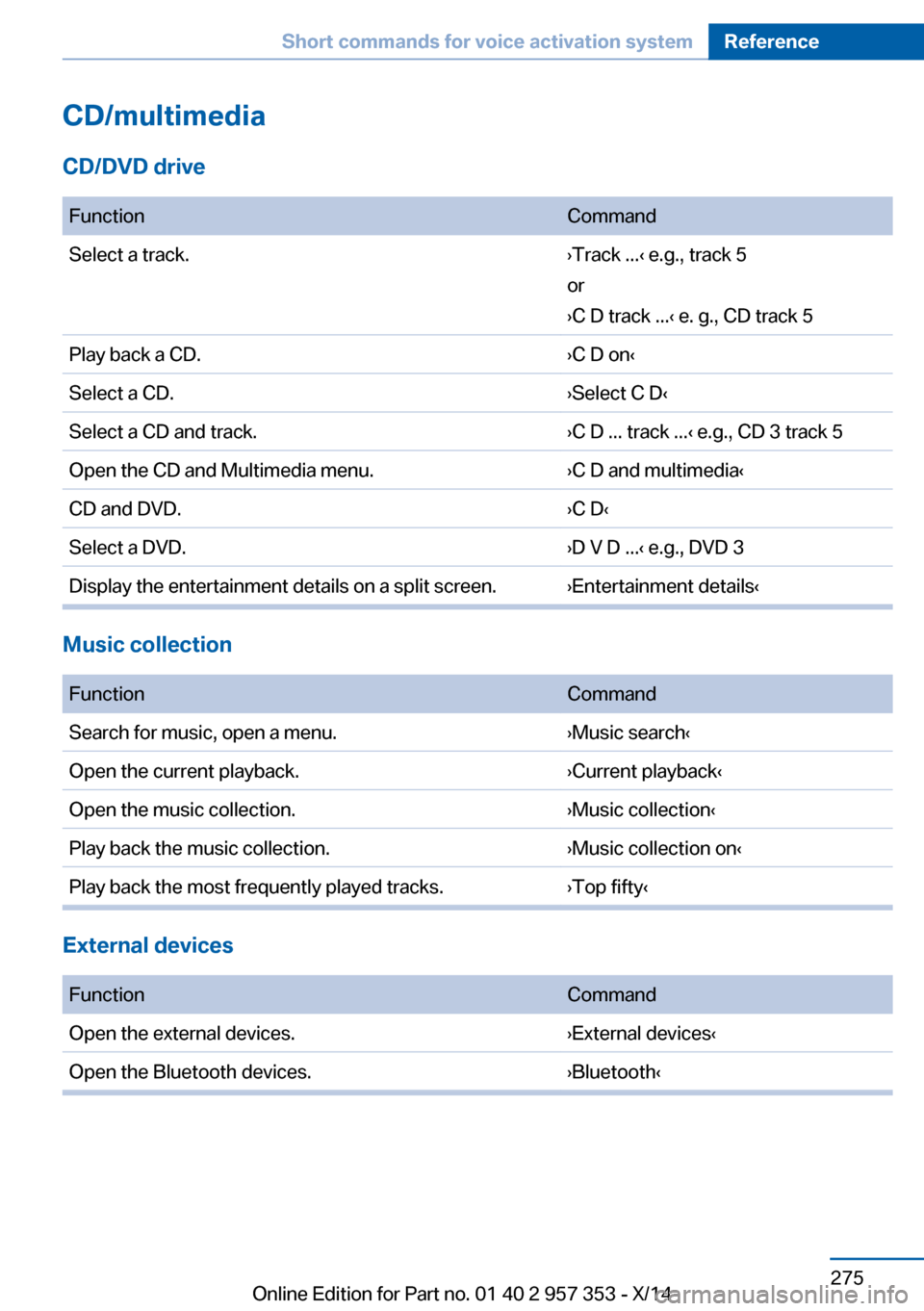
CD/multimedia
CD/DVD drive
FunctionCommandSelect a track.›Track ...‹ e.g., track 5
or
›C D track ...‹ e. g., CD track 5Play back a CD.›C D on‹Select a CD.›Select C D‹Select a CD and track.›C D ... track ...‹ e.g., CD 3 track 5Open the CD and Multimedia menu.›C D and multimedia‹CD and DVD.›C D‹Select a DVD.›D V D ...‹ e.g., DVD 3Display the entertainment details on a split screen.›Entertainment details‹
Music collection
FunctionCommandSearch for music, open a menu.›Music search‹Open the current playback.›Current playback‹Open the music collection.›Music collection‹Play back the music collection.›Music collection on‹Play back the most frequently played tracks.›Top fifty‹
External devices
FunctionCommandOpen the external devices.›External devices‹Open the Bluetooth devices.›Bluetooth‹Seite 275Short commands for voice activation systemReference275
Online Edition for Part no. 01 40 2 957 353 - X/14
Page 285 of 297
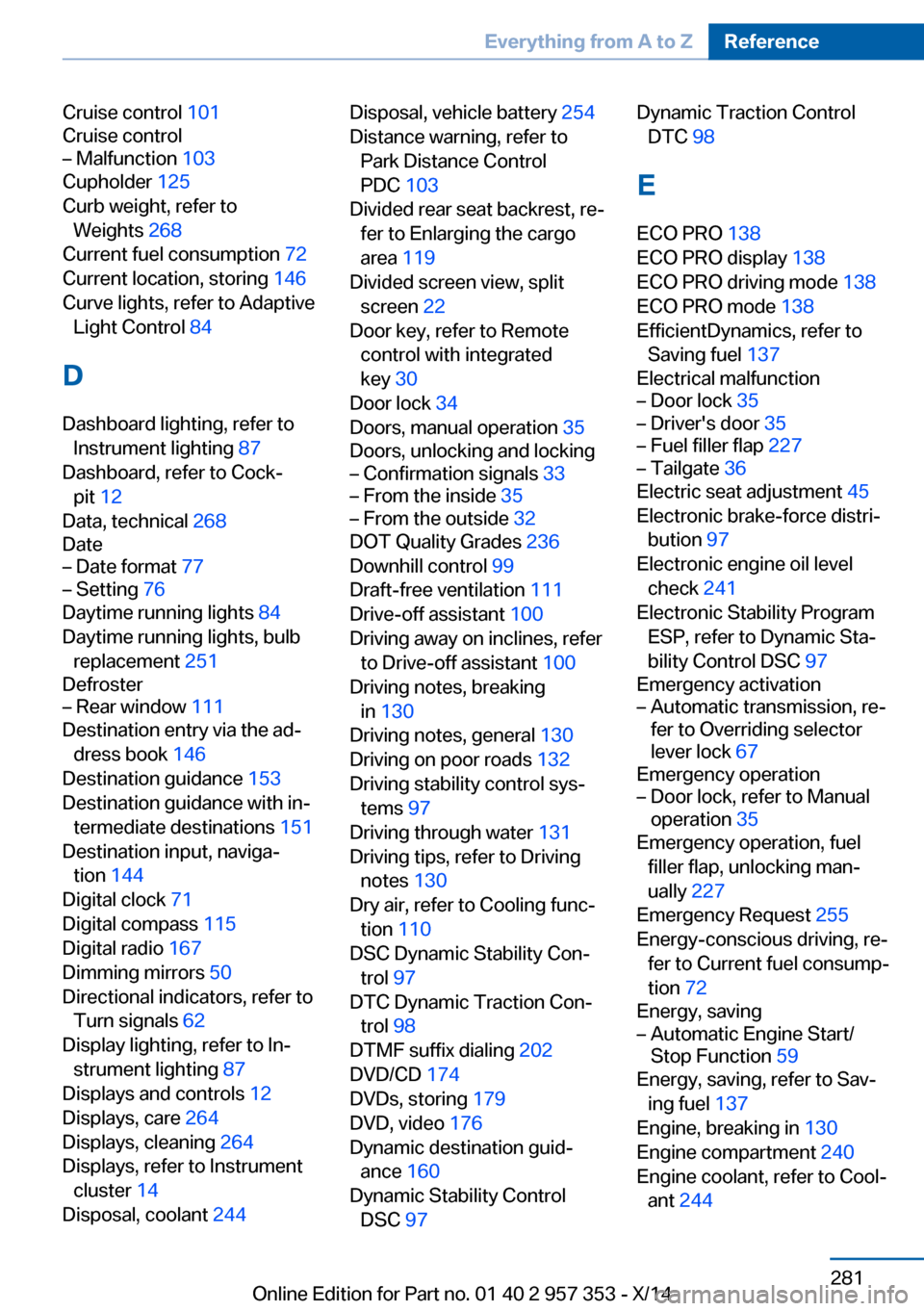
Cruise control 101
Cruise control– Malfunction 103
Cupholder 125
Curb weight, refer to Weights 268
Current fuel consumption 72
Current location, storing 146
Curve lights, refer to Adaptive Light Control 84
D
Dashboard lighting, refer to Instrument lighting 87
Dashboard, refer to Cock‐ pit 12
Data, technical 268
Date
– Date format 77– Setting 76
Daytime running lights 84
Daytime running lights, bulb replacement 251
Defroster
– Rear window 111
Destination entry via the ad‐
dress book 146
Destination guidance 153
Destination guidance with in‐ termediate destinations 151
Destination input, naviga‐ tion 144
Digital clock 71
Digital compass 115
Digital radio 167
Dimming mirrors 50
Directional indicators, refer to Turn signals 62
Display lighting, refer to In‐ strument lighting 87
Displays and controls 12
Displays, care 264
Displays, cleaning 264
Displays, refer to Instrument cluster 14
Disposal, coolant 244
Disposal, vehicle battery 254
Distance warning, refer to Park Distance Control
PDC 103
Divided rear seat backrest, re‐ fer to Enlarging the cargo
area 119
Divided screen view, split screen 22
Door key, refer to Remote control with integrated
key 30
Door lock 34
Doors, manual operation 35
Doors, unlocking and locking– Confirmation signals 33– From the inside 35– From the outside 32
DOT Quality Grades 236
Downhill control 99
Draft-free ventilation 111
Drive-off assistant 100
Driving away on inclines, refer to Drive-off assistant 100
Driving notes, breaking in 130
Driving notes, general 130
Driving on poor roads 132
Driving stability control sys‐ tems 97
Driving through water 131
Driving tips, refer to Driving notes 130
Dry air, refer to Cooling func‐ tion 110
DSC Dynamic Stability Con‐ trol 97
DTC Dynamic Traction Con‐ trol 98
DTMF suffix dialing 202
DVD/CD 174
DVDs, storing 179
DVD, video 176
Dynamic destination guid‐ ance 160
Dynamic Stability Control DSC 97
Dynamic Traction Control
DTC 98
E
ECO PRO 138
ECO PRO display 138
ECO PRO driving mode 138
ECO PRO mode 138
EfficientDynamics, refer to Saving fuel 137
Electrical malfunction– Door lock 35– Driver's door 35– Fuel filler flap 227– Tailgate 36
Electric seat adjustment 45
Electronic brake-force distri‐ bution 97
Electronic engine oil level check 241
Electronic Stability Program ESP, refer to Dynamic Sta‐
bility Control DSC 97
Emergency activation
– Automatic transmission, re‐
fer to Overriding selector
lever lock 67
Emergency operation
– Door lock, refer to Manual
operation 35
Emergency operation, fuel
filler flap, unlocking man‐
ually 227
Emergency Request 255
Energy-conscious driving, re‐ fer to Current fuel consump‐
tion 72
Energy, saving
– Automatic Engine Start/
Stop Function 59
Energy, saving, refer to Sav‐
ing fuel 137
Engine, breaking in 130
Engine compartment 240
Engine coolant, refer to Cool‐ ant 244
Seite 281Everything from A to ZReference281
Online Edition for Part no. 01 40 2 957 353 - X/14
Page 288 of 297
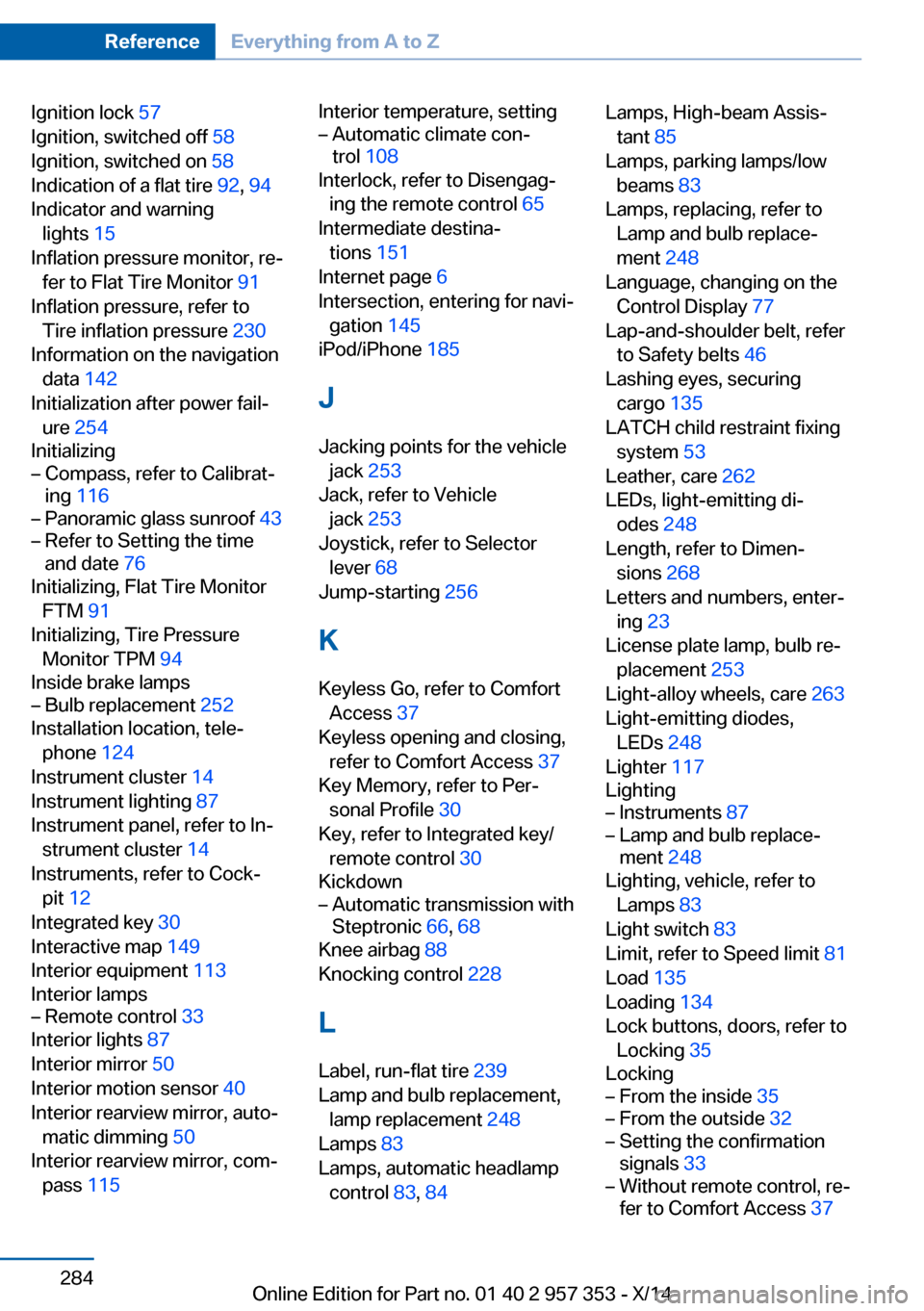
Ignition lock 57
Ignition, switched off 58
Ignition, switched on 58
Indication of a flat tire 92, 94
Indicator and warning lights 15
Inflation pressure monitor, re‐ fer to Flat Tire Monitor 91
Inflation pressure, refer to Tire inflation pressure 230
Information on the navigation data 142
Initialization after power fail‐ ure 254
Initializing– Compass, refer to Calibrat‐
ing 116– Panoramic glass sunroof 43– Refer to Setting the time
and date 76
Initializing, Flat Tire Monitor
FTM 91
Initializing, Tire Pressure Monitor TPM 94
Inside brake lamps
– Bulb replacement 252
Installation location, tele‐
phone 124
Instrument cluster 14
Instrument lighting 87
Instrument panel, refer to In‐ strument cluster 14
Instruments, refer to Cock‐ pit 12
Integrated key 30
Interactive map 149
Interior equipment 113
Interior lamps
– Remote control 33
Interior lights 87
Interior mirror 50
Interior motion sensor 40
Interior rearview mirror, auto‐ matic dimming 50
Interior rearview mirror, com‐ pass 115
Interior temperature, setting– Automatic climate con‐
trol 108
Interlock, refer to Disengag‐
ing the remote control 65
Intermediate destina‐ tions 151
Internet page 6
Intersection, entering for navi‐ gation 145
iPod/iPhone 185
J
Jacking points for the vehicle jack 253
Jack, refer to Vehicle jack 253
Joystick, refer to Selector lever 68
Jump-starting 256
K
Keyless Go, refer to Comfort Access 37
Keyless opening and closing, refer to Comfort Access 37
Key Memory, refer to Per‐ sonal Profile 30
Key, refer to Integrated key/ remote control 30
Kickdown
– Automatic transmission with
Steptronic 66, 68
Knee airbag 88
Knocking control 228
L
Label, run-flat tire 239
Lamp and bulb replacement, lamp replacement 248
Lamps 83
Lamps, automatic headlamp control 83, 84
Lamps, High-beam Assis‐
tant 85
Lamps, parking lamps/low beams 83
Lamps, replacing, refer to Lamp and bulb replace‐
ment 248
Language, changing on the Control Display 77
Lap-and-shoulder belt, refer to Safety belts 46
Lashing eyes, securing cargo 135
LATCH child restraint fixing system 53
Leather, care 262
LEDs, light-emitting di‐ odes 248
Length, refer to Dimen‐ sions 268
Letters and numbers, enter‐ ing 23
License plate lamp, bulb re‐ placement 253
Light-alloy wheels, care 263
Light-emitting diodes, LEDs 248
Lighter 117
Lighting– Instruments 87– Lamp and bulb replace‐
ment 248
Lighting, vehicle, refer to
Lamps 83
Light switch 83
Limit, refer to Speed limit 81
Load 135
Loading 134
Lock buttons, doors, refer to Locking 35
Locking
– From the inside 35– From the outside 32– Setting the confirmation
signals 33– Without remote control, re‐
fer to Comfort Access 37Seite 284ReferenceEverything from A to Z284
Online Edition for Part no. 01 40 2 957 353 - X/14