symbol BMW X1 2014 E84 Workshop Manual
[x] Cancel search | Manufacturer: BMW, Model Year: 2014, Model line: X1, Model: BMW X1 2014 E84Pages: 297, PDF Size: 7 MB
Page 220 of 297
ContactsVehicle equipmentThis chapter describes all series equipment as
well as country-specific and special equipment
offered for this model series. Therefore, it also
describes equipment that may not be found in
your vehicle, for instance due to the selected
special equipment or the country version. This
also applies to safety-related functions and
systems.
When using the features and systems descri‐
bed here, adhere to local regulations.
Note Equipment version without the mobile phone
preparation package.
General information
Contacts can be created and edited. The con‐
tacts from the mobile phone are displayed as
well if this function is supported by the mobile
phone. The addresses can be adopted as des‐
tinations for navigation and the phone num‐
bers can be dialed.
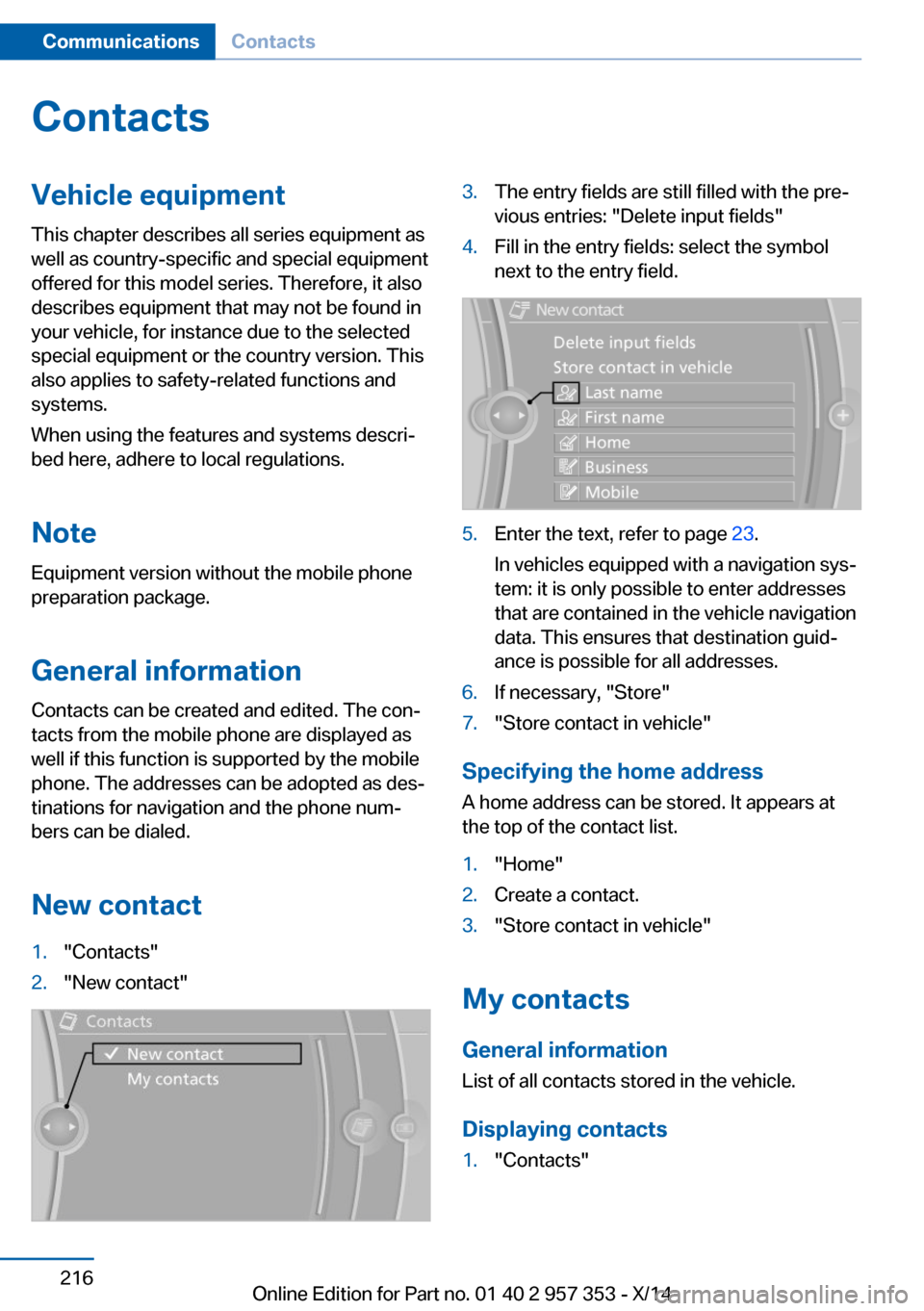
New contact1."Contacts"2."New contact"3.The entry fields are still filled with the pre‐
vious entries: "Delete input fields"4.Fill in the entry fields: select the symbol
next to the entry field.5.Enter the text, refer to page 23.
In vehicles equipped with a navigation sys‐
tem: it is only possible to enter addresses
that are contained in the vehicle navigation
data. This ensures that destination guid‐
ance is possible for all addresses.6.If necessary, "Store"7."Store contact in vehicle"
Specifying the home address
A home address can be stored. It appears at
the top of the contact list.
1."Home"2.Create a contact.3."Store contact in vehicle"
My contacts
General information List of all contacts stored in the vehicle.
Displaying contacts
1."Contacts"Seite 216CommunicationsContacts216
Online Edition for Part no. 01 40 2 957 353 - X/14
Page 221 of 297
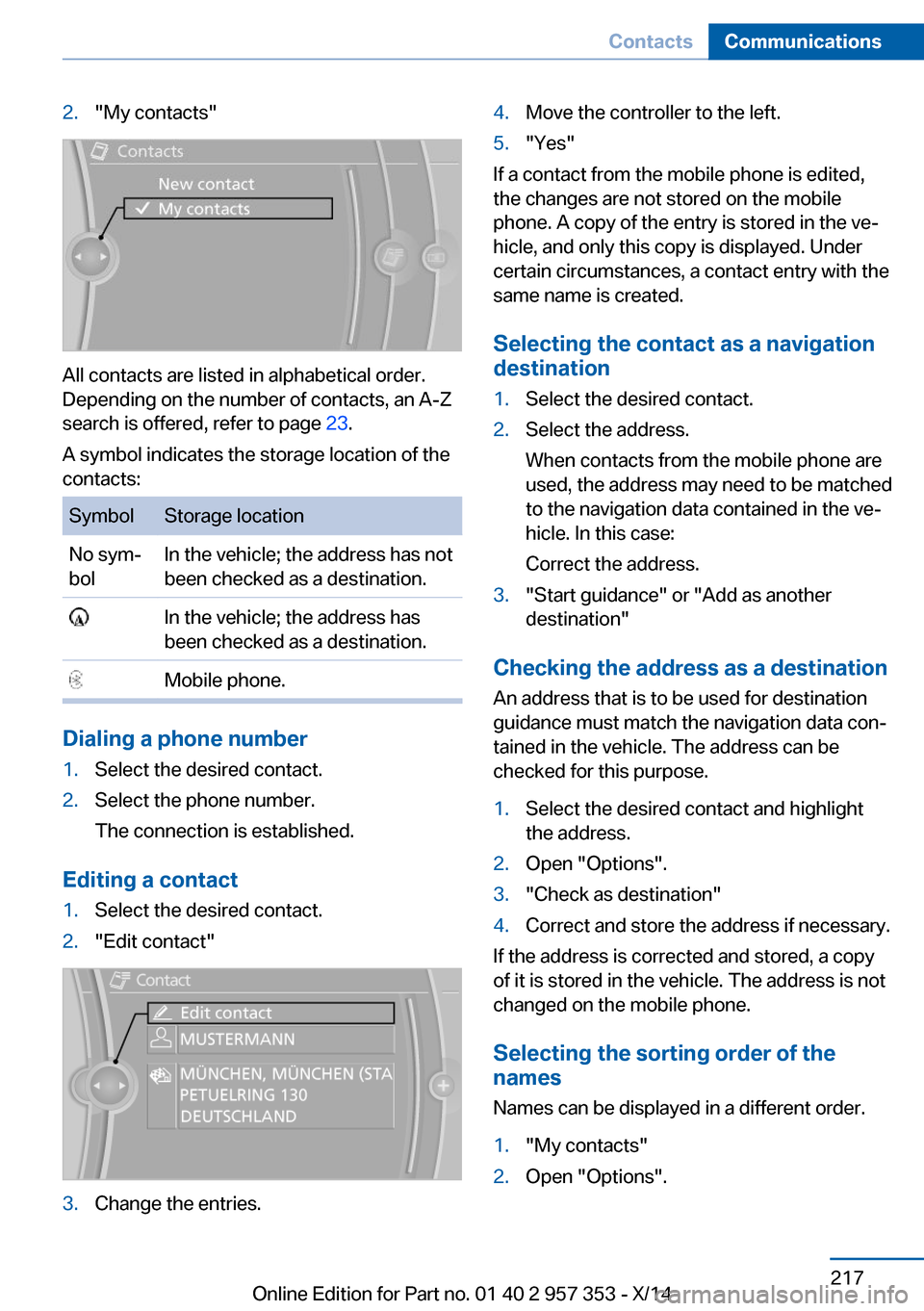
2."My contacts"
All contacts are listed in alphabetical order.
Depending on the number of contacts, an A-Z
search is offered, refer to page 23.
A symbol indicates the storage location of the
contacts:
SymbolStorage locationNo sym‐
bolIn the vehicle; the address has not
been checked as a destination. In the vehicle; the address has
been checked as a destination. Mobile phone.
Dialing a phone number
1.Select the desired contact.2.Select the phone number.
The connection is established.
Editing a contact
1.Select the desired contact.2."Edit contact"3.Change the entries.4.Move the controller to the left.5."Yes"
If a contact from the mobile phone is edited,
the changes are not stored on the mobile
phone. A copy of the entry is stored in the ve‐
hicle, and only this copy is displayed. Under
certain circumstances, a contact entry with the
same name is created.
Selecting the contact as a navigation
destination
1.Select the desired contact.2.Select the address.
When contacts from the mobile phone are
used, the address may need to be matched
to the navigation data contained in the ve‐
hicle. In this case:
Correct the address.3."Start guidance" or "Add as another
destination"
Checking the address as a destination
An address that is to be used for destination
guidance must match the navigation data con‐
tained in the vehicle. The address can be
checked for this purpose.
1.Select the desired contact and highlight
the address.2.Open "Options".3."Check as destination"4.Correct and store the address if necessary.
If the address is corrected and stored, a copy
of it is stored in the vehicle. The address is not
changed on the mobile phone.
Selecting the sorting order of the
names
Names can be displayed in a different order.
1."My contacts"2.Open "Options".Seite 217ContactsCommunications217
Online Edition for Part no. 01 40 2 957 353 - X/14
Page 231 of 297
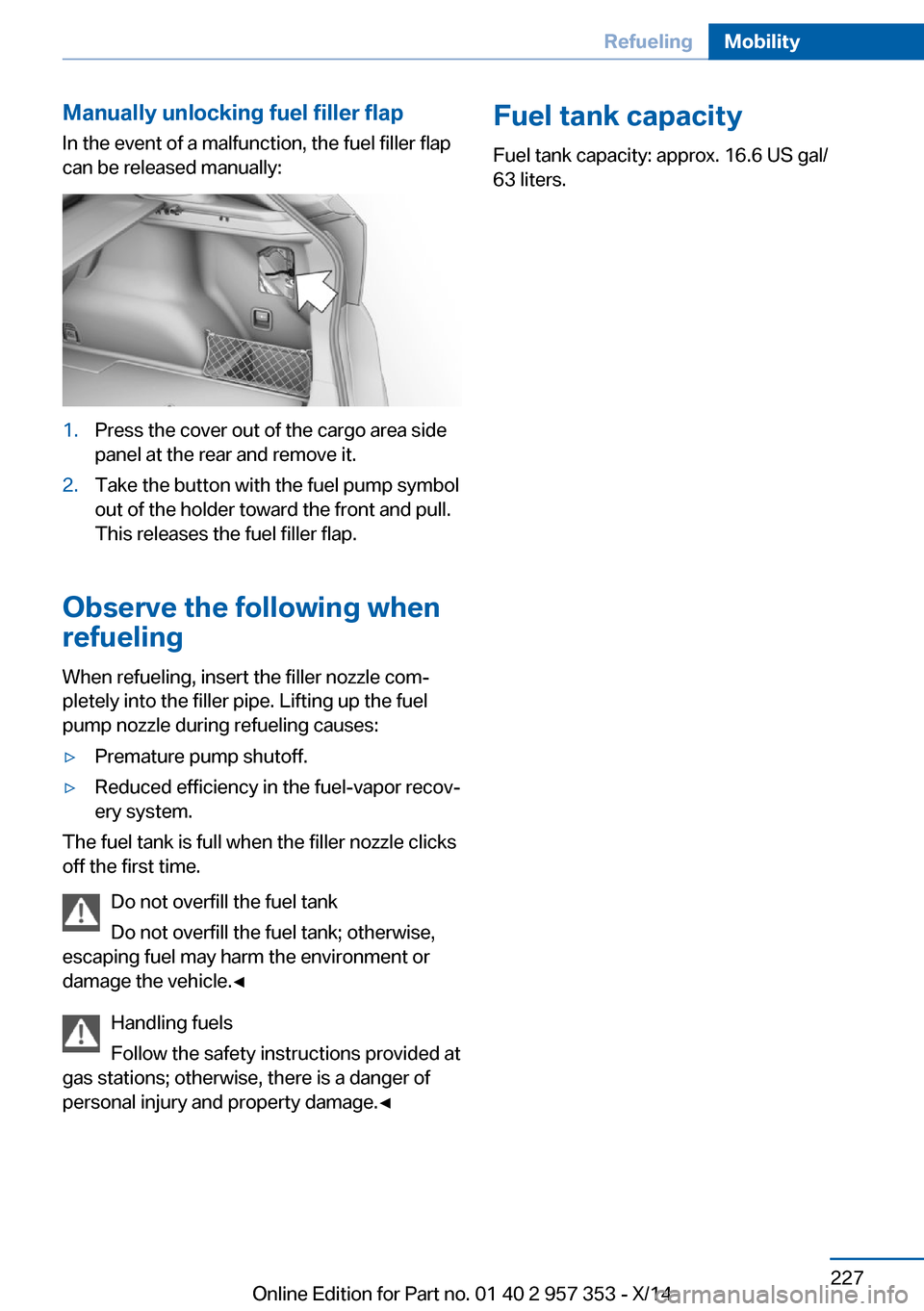
Manually unlocking fuel filler flapIn the event of a malfunction, the fuel filler flap
can be released manually:1.Press the cover out of the cargo area side
panel at the rear and remove it.2.Take the button with the fuel pump symbol
out of the holder toward the front and pull.
This releases the fuel filler flap.
Observe the following when
refueling
When refueling, insert the filler nozzle com‐
pletely into the filler pipe. Lifting up the fuel
pump nozzle during refueling causes:
▷Premature pump shutoff.▷Reduced efficiency in the fuel-vapor recov‐
ery system.
The fuel tank is full when the filler nozzle clicks
off the first time.
Do not overfill the fuel tank
Do not overfill the fuel tank; otherwise,
escaping fuel may harm the environment or
damage the vehicle.◀
Handling fuels
Follow the safety instructions provided at
gas stations; otherwise, there is a danger of
personal injury and property damage.◀
Fuel tank capacity
Fuel tank capacity: approx. 16.6 US gal/
63 liters.Seite 227RefuelingMobility227
Online Edition for Part no. 01 40 2 957 353 - X/14
Page 240 of 297
Uniform Tire Quality GradingQuality grades can be found where applicable
on the tire sidewall between tread shoulder
and maximum section width. For example:
Treadwear 200 Traction AA
Temperature A
DOT Quality Grades
Treadwear
Traction AA A B C
Temperature A B C
Conform to Federal Safety Requirements
All passenger car tires must conform to
Federal Safety Requirements in addition to
these grades.◀
Treadwear The treadwear grade is a comparative rating
based on the wear rate of the tire when tested
under controlled conditions on a specified gov‐
ernment test course. For example, a tire graded 150 would wear one and one-half
(1 1/2) times as well on the government course
as a tire graded 100. The relative performance
of tires depends upon the actual conditions of
their use, however, and may depart signifi‐
cantly from the norm due to variations in driv‐
ing habits, service practices and differences in
road characteristics and climate.
Traction
The traction grades, from highest to lowest,
are AA, A, B, and C.
Those grades represent the tire's ability to
stop on wet pavement as measured under
controlled conditions on specified government
test surfaces of asphalt and concrete. A tire
marked C may have poor traction performance.
The traction grade assigned to this tire is
based on straight-ahead braking traction tests,
and does not include acceleration, cornering,
hydroplaning, or peak traction characteristics.Temperature
The temperature grades are A, the highest, B,
and C, representing the tire's resistance to the
generation of heat and its ability to dissipate
heat when tested under controlled conditions
on a specified indoor laboratory test wheel.
Sustained high temperature can cause the ma‐
terial of the tire to degenerate and reduce tire
life, and excessive temperature can lead to
sudden tire failure. The grade C corresponds
to a level of performance which all passenger
car tires must meet under the Federal Motor
Vehicle Safety Standard No. 109. Grades B
and A represent higher levels of performance
on the laboratory test wheel than the minimum
required by law.
Temperature grade for this tire
The temperature grade for this tire is es‐
tablished for a tire that is properly inflated and
not overloaded. Excessive speed, underinfla‐
tion, or excessive loading, either separately or
in combination, can cause heat buildup and
possible tire failure.◀
RSC – Run-flat tires
The symbol identifying run-flat tires is a circle
with the letters RSC on the sidewall, refer to
page 239.
M+S
Winter and all-season tires.
These have better winter properties than
summer tires.
XL
Designation for specially reinforced tires.
Tire treadSummer tires
Do not drive with a tire tread depth of less than
0.12 in/3 mm.Seite 236MobilityWheels and tires236
Online Edition for Part no. 01 40 2 957 353 - X/14
Page 246 of 297
Requirements▷The engine must be running and warm af‐
ter the vehicle has been driven for at least
6.2 miles/10 km.▷The vehicle is stopped or being driven on a
level roadway.
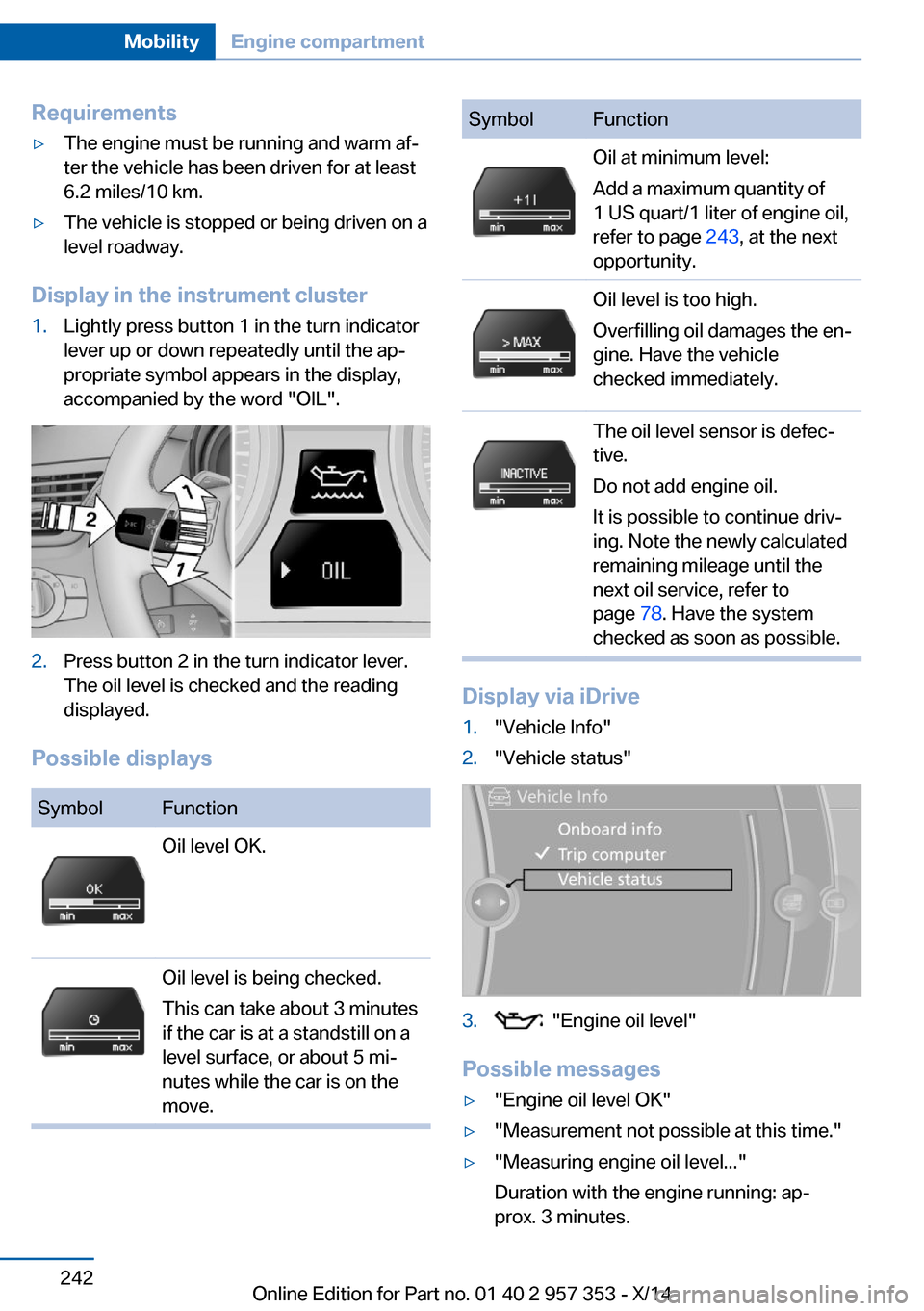
Display in the instrument cluster
1.Lightly press button 1 in the turn indicator
lever up or down repeatedly until the ap‐
propriate symbol appears in the display,
accompanied by the word "OIL".2.Press button 2 in the turn indicator lever.
The oil level is checked and the reading
displayed.
Possible displays
SymbolFunctionOil level OK.Oil level is being checked.
This can take about 3 minutes
if the car is at a standstill on a
level surface, or about 5 mi‐
nutes while the car is on the
move.SymbolFunctionOil at minimum level:
Add a maximum quantity of
1 US quart/1 liter of engine oil,
refer to page 243, at the next
opportunity.Oil level is too high.
Overfilling oil damages the en‐
gine. Have the vehicle
checked immediately.The oil level sensor is defec‐
tive.
Do not add engine oil.
It is possible to continue driv‐
ing. Note the newly calculated
remaining mileage until the
next oil service, refer to
page 78. Have the system
checked as soon as possible.
Display via iDrive
1."Vehicle Info"2."Vehicle status"3. "Engine oil level"
Possible messages
▷"Engine oil level OK"▷"Measurement not possible at this time."▷"Measuring engine oil level..."
Duration with the engine running: ap‐
prox. 3 minutes.Seite 242MobilityEngine compartment242
Online Edition for Part no. 01 40 2 957 353 - X/14
Page 256 of 297
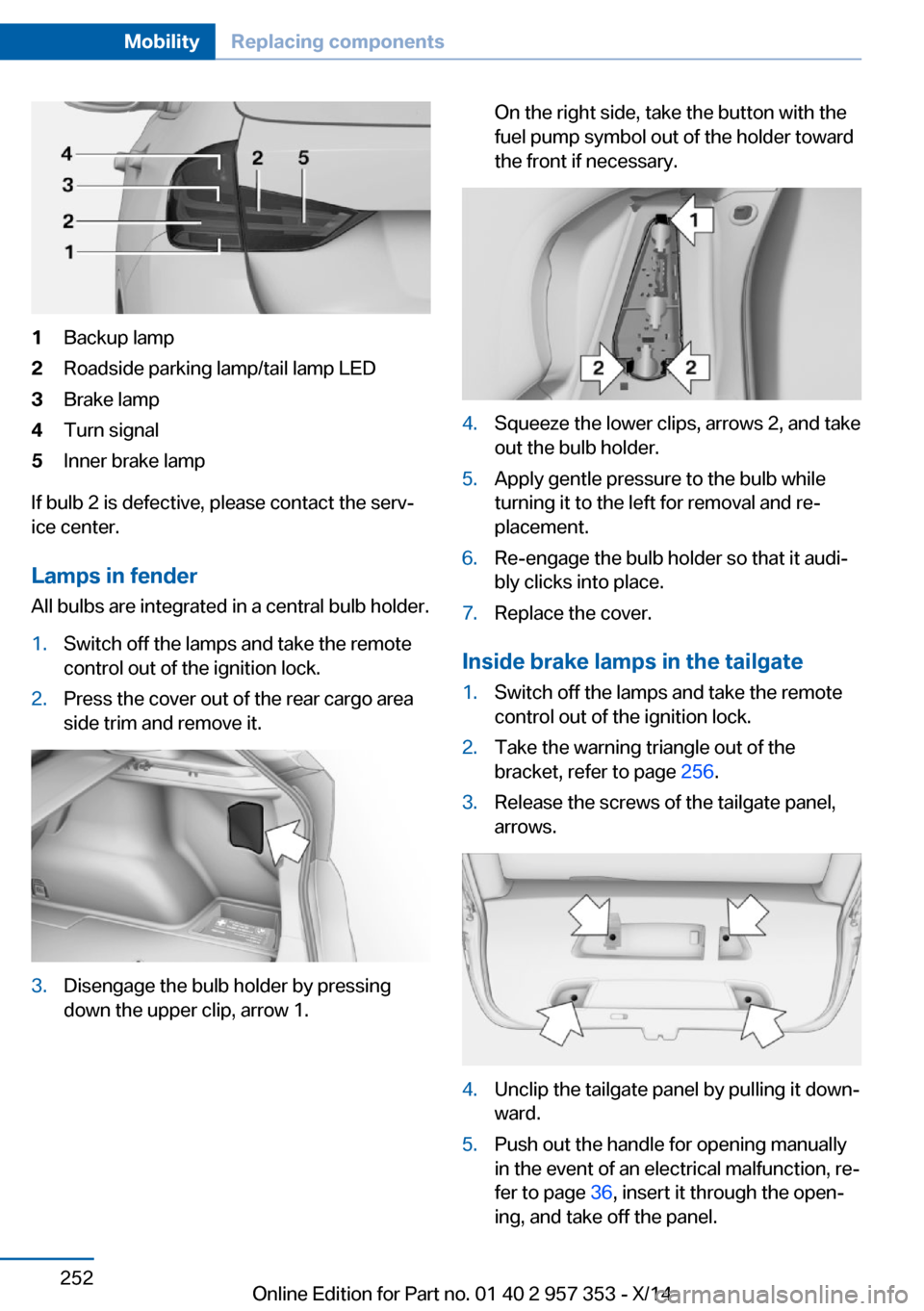
1Backup lamp2Roadside parking lamp/tail lamp LED3Brake lamp4Turn signal5Inner brake lamp
If bulb 2 is defective, please contact the serv‐
ice center.
Lamps in fender
All bulbs are integrated in a central bulb holder.
1.Switch off the lamps and take the remote
control out of the ignition lock.2.Press the cover out of the rear cargo area
side trim and remove it.3.Disengage the bulb holder by pressing
down the upper clip, arrow 1.On the right side, take the button with the
fuel pump symbol out of the holder toward
the front if necessary.4.Squeeze the lower clips, arrows 2, and take
out the bulb holder.5.Apply gentle pressure to the bulb while
turning it to the left for removal and re‐
placement.6.Re-engage the bulb holder so that it audi‐
bly clicks into place.7.Replace the cover.
Inside brake lamps in the tailgate
1.Switch off the lamps and take the remote
control out of the ignition lock.2.Take the warning triangle out of the
bracket, refer to page 256.3.Release the screws of the tailgate panel,
arrows.4.Unclip the tailgate panel by pulling it down‐
ward.5.Push out the handle for opening manually
in the event of an electrical malfunction, re‐
fer to page 36, insert it through the open‐
ing, and take off the panel.Seite 252MobilityReplacing components252
Online Edition for Part no. 01 40 2 957 353 - X/14
Page 293 of 297
Storage compartmentnets 125
Storage compart‐ ments 123, 125
Storage, tires 239
Storing the seat position, re‐ fer to Seat and mirror mem‐
ory 48
Storing the vehicle 264
Street, entering for naviga‐ tion 145
Summer tires, refer to Wheels and tires 230
Summer tires, tread 236
Sun visor 117
Switches, refer to Cockpit 12
Switching off, engine 59
Switching off, vehicle 59
Switch-on times, parked-car ventilation 112
Symbols 6
T Tachometer 72
Tailgate 35
Tailgate– Comfort Access 37– Emergency operation, refer
to Opening manually 36– Opening from the inside 36– Opening from the out‐
side 36– Opening manually 36– Remote control 33
Tail lamp, bulb replace‐
ment 253
Tail lamps 251
Tail lamps
– Bulb replacement 252
Tank gauge, refer to Fuel
gauge 72
Tasks 213
Technical changes, refer to Safety 6
Technical data 268
Telephone 196
Telephone, adjusting the vol‐
ume 200
Telephone, installation loca‐ tion, refer to Center arm‐
rest 124
TeleService 219
Temperature– Automatic climate con‐
trol 109– Changing the unit of meas‐
ure 75
Temperature, coolant, refer to
Coolant temperature 72
Temperature display
– External temperature 71– External temperature warn‐
ing 71– Setting the unit 75
Temperature, engine oil 72
Temperature warning 71
Text messages 210
Theft alarm system, refer to Alarm system 39
Thigh support adjustment 45
Third brake lamp, refer to
Center brake lamp 253
Tilt alarm sensor 40
Tilting the passenger side mirror 49
Time
– Setting the time 75– Setting the time zone 76
Tire age 235
Tire identification marks 235
Tire inflation pressure 230
Tire inflation pressure, check‐ ing 230
Tire pressure monitor, refer to Flat Tire Monitor 91
Tire Pressure Monitor TPM 93
Tire Quality Grading 236
Tires
– Inflation pressure 230
Tires, breaking in 130
Tires, changing 237
Tires, condition 236
Tires, damage 237
Tire size 235
Tires, minimum tread 237
Tires, retreaded tires 238
Tires, run-flat tires 239
Tires, storage 239
Tire tread 236
Toll roads, route 153
Tone 164
Tool kit, refer to Onboard ve‐ hicle tool kit 247
Tools, refer to Onboard vehi‐ cle tool kit 247
Tow bar 259
Tow fitting 259
Towing 257
Towing another vehicle 258
Towing, being towed 258
Towing with automatic trans‐ mission 258
Town/city, navigation 145
Tow rope 259
Tow-starting 257, 260
TPM Tire Pressure Moni‐ tor 93
Traction control 98
Traffic bulletins, naviga‐ tion 157
Transmission– Automatic transmission with
Steptronic 65– Overriding selector lever
lock in case of automatic
transmission with Step‐
tronic 67
Transmission, automatic
transmission with Step‐
tronic 68
Transmission lock
– Refer to Changing selector
lever positions 66– Refer to P Park 66
Transmission positions, auto‐
matic transmission with
Steptronic 68
Transporting children safely 52
Seite 289Everything from A to ZReference289
Online Edition for Part no. 01 40 2 957 353 - X/14