Armrest BMW X1 2014 E84 Owner's Manual
[x] Cancel search | Manufacturer: BMW, Model Year: 2014, Model line: X1, Model: BMW X1 2014 E84Pages: 297, PDF Size: 7 MB
Page 39 of 297
▷Press down the lock button of the front
passenger door and close the door
from the outside.▷Lock the driver's door using the
integrated key in the door lock.
Manual operation
If an electrical malfunction occurs, unlock or
lock the driver's door using the integrated key
in the door lock. The other doors must be un‐
locked or locked from the inside.
Opening and closing: from
the inside
Locking and unlocking
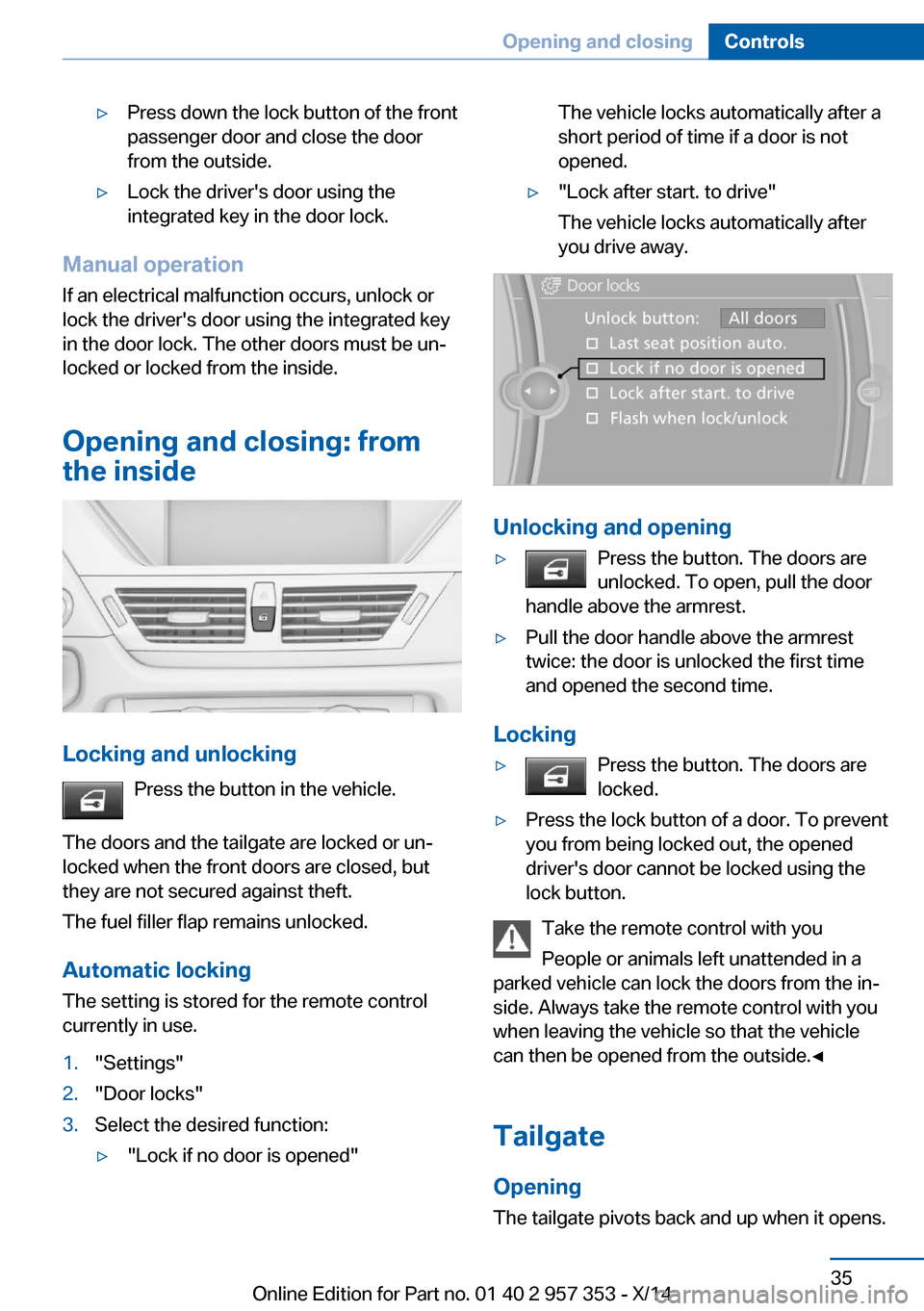
Press the button in the vehicle.
The doors and the tailgate are locked or un‐
locked when the front doors are closed, but
they are not secured against theft.
The fuel filler flap remains unlocked.
Automatic locking The setting is stored for the remote control
currently in use.
1."Settings"2."Door locks"3.Select the desired function:▷"Lock if no door is opened"The vehicle locks automatically after a
short period of time if a door is not
opened.▷"Lock after start. to drive"
The vehicle locks automatically after
you drive away.
Unlocking and opening
▷Press the button. The doors are
unlocked. To open, pull the door
handle above the armrest.▷Pull the door handle above the armrest
twice: the door is unlocked the first time
and opened the second time.
Locking
▷Press the button. The doors are
locked.▷Press the lock button of a door. To prevent
you from being locked out, the opened
driver's door cannot be locked using the
lock button.
Take the remote control with you
People or animals left unattended in a
parked vehicle can lock the doors from the in‐
side. Always take the remote control with you
when leaving the vehicle so that the vehicle
can then be opened from the outside.◀
Tailgate Opening
The tailgate pivots back and up when it opens.
Seite 35Opening and closingControls35
Online Edition for Part no. 01 40 2 957 353 - X/14
Page 122 of 297
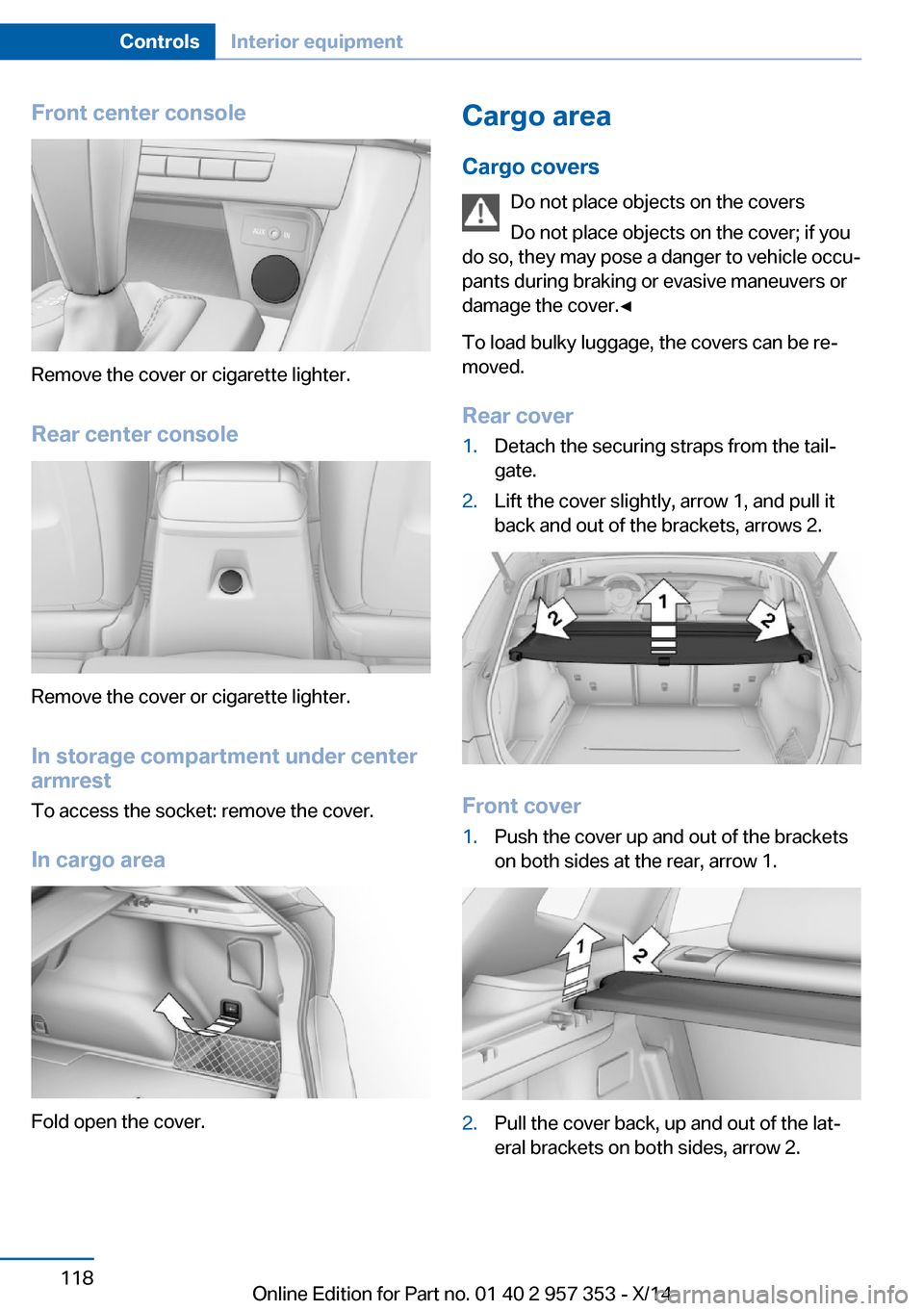
Front center console
Remove the cover or cigarette lighter.
Rear center console
Remove the cover or cigarette lighter.
In storage compartment under center
armrest
To access the socket: remove the cover.
In cargo area
Fold open the cover.
Cargo area
Cargo covers Do not place objects on the covers
Do not place objects on the cover; if you
do so, they may pose a danger to vehicle occu‐
pants during braking or evasive maneuvers or
damage the cover.◀
To load bulky luggage, the covers can be re‐
moved.
Rear cover1.Detach the securing straps from the tail‐
gate.2.Lift the cover slightly, arrow 1, and pull it
back and out of the brackets, arrows 2.
Front cover
1.Push the cover up and out of the brackets
on both sides at the rear, arrow 1.2.Pull the cover back, up and out of the lat‐
eral brackets on both sides, arrow 2.Seite 118ControlsInterior equipment118
Online Edition for Part no. 01 40 2 957 353 - X/14
Page 128 of 297
▷Do not use force when plugging the con‐
nector into the USB interface.▷Do not connect devices such as fans or
lamps to the USB interface.▷Do not connect a USB hard drive.▷Do not use the USB interface to recharge
external devices.
Center armrest front
Storage compartment The center armrest between the front seats
contains a compartment with cupholders or
the cover for the snap-in adapter, depending
on the version.
Details on this mobile phone cradle, refer to
page 205.
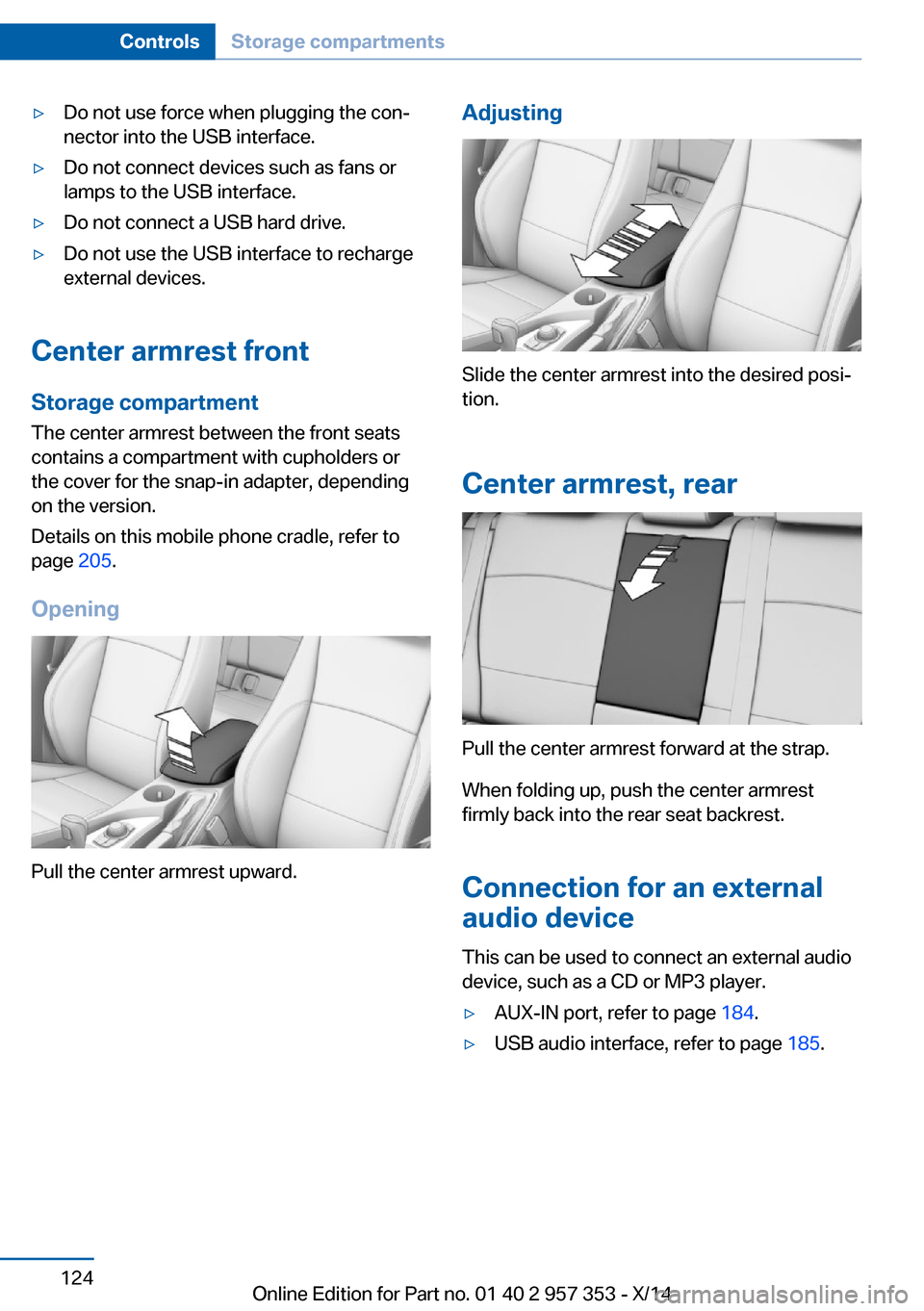
Opening
Pull the center armrest upward.
Adjusting
Slide the center armrest into the desired posi‐
tion.
Center armrest, rear
Pull the center armrest forward at the strap.
When folding up, push the center armrest
firmly back into the rear seat backrest.
Connection for an external
audio device
This can be used to connect an external audio
device, such as a CD or MP3 player.
▷AUX-IN port, refer to page 184.▷USB audio interface, refer to page 185.Seite 124ControlsStorage compartments124
Online Edition for Part no. 01 40 2 957 353 - X/14
Page 129 of 297
Storage compartmentsStorage compartments
Interior▷Glove compartment, refer to page 123.▷Compartments in the center console.▷Compartments in the doors.▷Bottle holders in the doors, cupholders, re‐
fer to page 125.
Cargo area
▷Lashing eyes, refer to page 135.▷Storage compartment under the cargo
floor panel, refer to page 121.▷Left and right storage compartments.▷Multi-function hook, refer to page 122.
Storage compartment package
For your comfort:
Interior
▷Insertable cupholder, refer to page 126.▷Front center armrest, refer to page 124.▷Nets on the backrests of the front seats.▷Retaining straps in the front door compart‐
ments.▷Rear center armrest with integrated cu‐
pholders.
Cargo area
▷Retaining strap on the left side panel for
securing small items.▷Retaining straps on the cargo area floor.▷Insertable partition elements for the stor‐
age compartment under the cargo floor
panel, used to variably subdivide the stor‐
age compartment.
With partition net: arrange the partition ele‐
ments in such a way that there is enoughspace at the rear of the storage compart‐
ment for the partition net.▷Storage net next to the storage compart‐
ment on the right in the cargo area.
Clothes hooks
The clothes hooks are located at the grab han‐
dles in the rear.
Do not obstruct view
When suspending clothing from the
hooks, ensure that it will not obstruct the driv‐
er's vision.◀
No heavy objects
Do not hang heavy objects from the
hooks; otherwise, they may present a danger
to passengers during braking and evasive ma‐
neuvers.◀
Cupholders Notes Shatter-proof containers and no hot
drinks
Use light and shatter-proof containers and do
not transport hot drinks. Otherwise, there is
the increased danger of injury in an accident.◀
Unsuitable containers
Do not forcefully push unsuitable con‐
tainers into the cupholders. This may result in
damage.◀
Front
▷In the front door compartments as a bottle
holder for 1-quart/1 liter bottles, for exam‐
ple.
Insert the bottle into the bottle holder with
the bottom slanted toward the front.▷In the center console.Seite 125Storage compartmentsControls125
Online Edition for Part no. 01 40 2 957 353 - X/14
Page 130 of 297
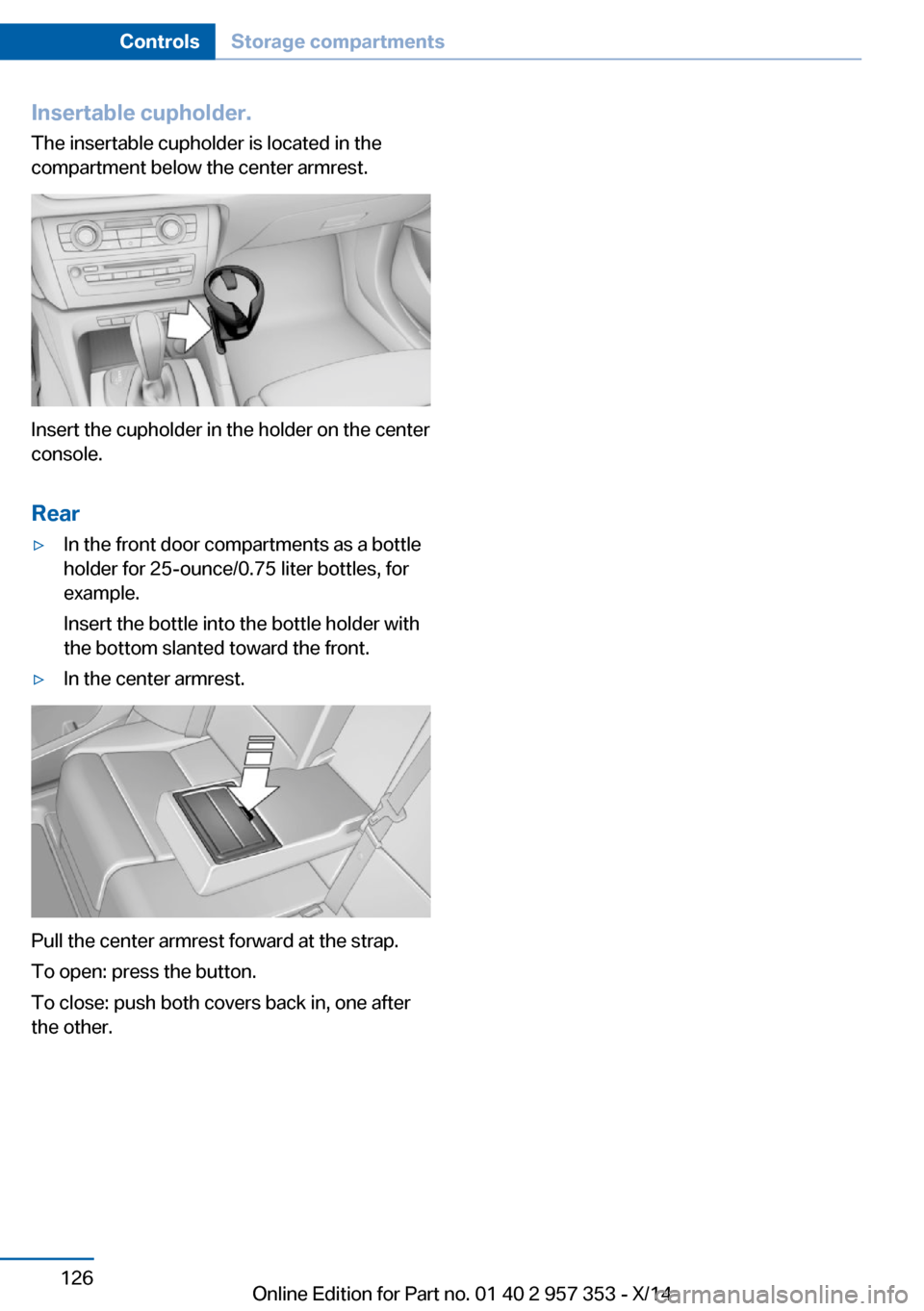
Insertable cupholder.
The insertable cupholder is located in the
compartment below the center armrest.
Insert the cupholder in the holder on the center
console.
Rear
▷In the front door compartments as a bottle
holder for 25-ounce/0.75 liter bottles, for
example.
Insert the bottle into the bottle holder with
the bottom slanted toward the front.▷In the center armrest.
Pull the center armrest forward at the strap.
To open: press the button.
To close: push both covers back in, one after
the other.
Seite 126ControlsStorage compartments126
Online Edition for Part no. 01 40 2 957 353 - X/14
Page 185 of 297
via the USB audio interface in the center
armrest.▷File systems: standard file systems for
USB devices are supported. The FAT 32
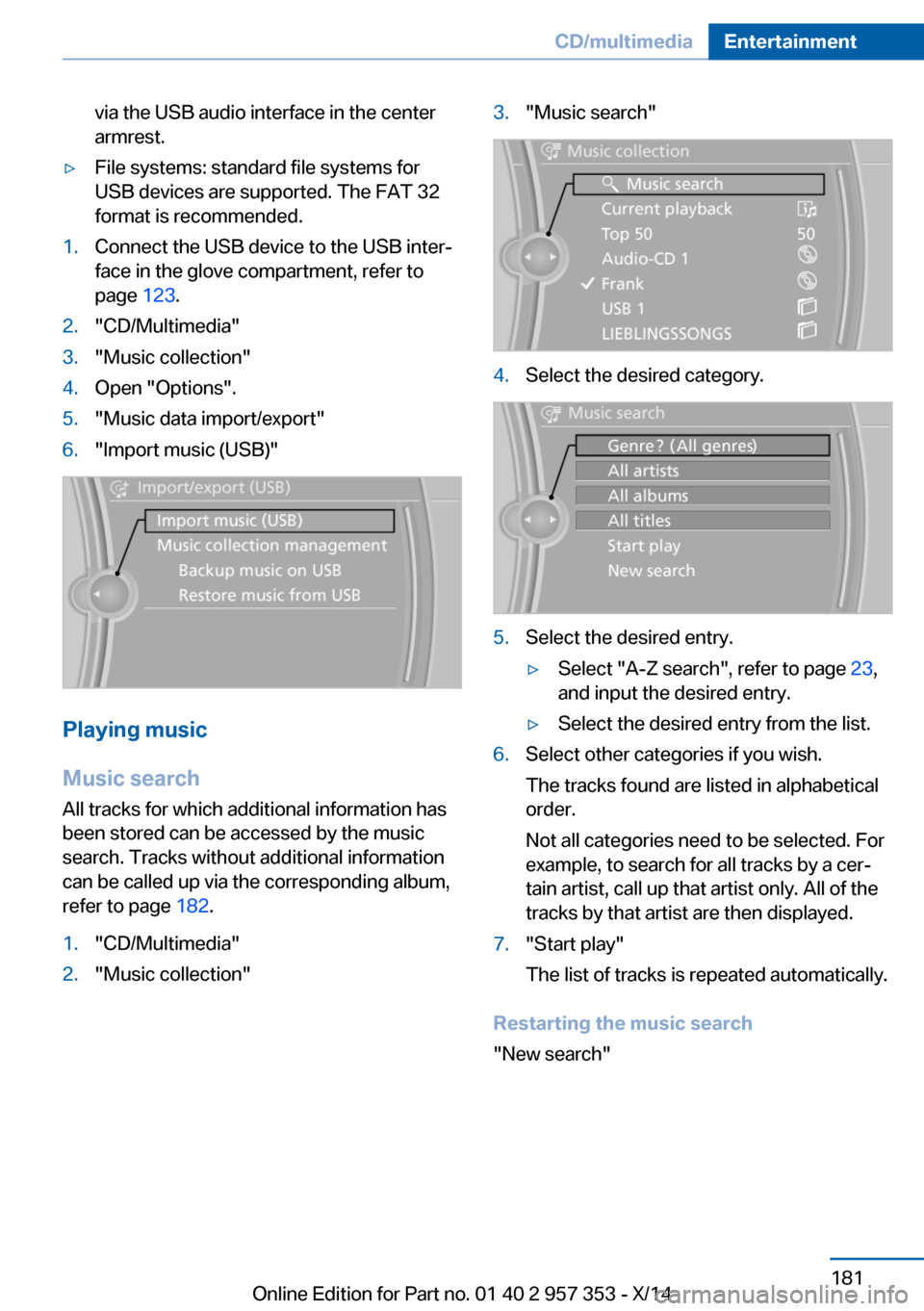
format is recommended.1.Connect the USB device to the USB inter‐
face in the glove compartment, refer to
page 123.2."CD/Multimedia"3."Music collection"4.Open "Options".5."Music data import/export"6."Import music (USB)"
Playing music
Music search
All tracks for which additional information has been stored can be accessed by the music
search. Tracks without additional information
can be called up via the corresponding album,
refer to page 182.
1."CD/Multimedia"2."Music collection"3."Music search"4.Select the desired category.5.Select the desired entry.▷Select "A-Z search", refer to page 23,
and input the desired entry.▷Select the desired entry from the list.6.Select other categories if you wish.
The tracks found are listed in alphabetical
order.
Not all categories need to be selected. For
example, to search for all tracks by a cer‐
tain artist, call up that artist only. All of the
tracks by that artist are then displayed.7."Start play"
The list of tracks is repeated automatically.
Restarting the music search
"New search"
Seite 181CD/multimediaEntertainment181
Online Edition for Part no. 01 40 2 957 353 - X/14
Page 209 of 297
Snap-in adapter
General information More information on compatible snap-in
adapters that support the functions of the mo‐
bile phone is available at the service center.
Notes At high temperatures, the charging function of
the mobile phone may be limited and functions
may not be executed.
When using the mobile phone via the vehicle,
note the operating instructions of the mobile
phone.
Installation position
In the center armrest.
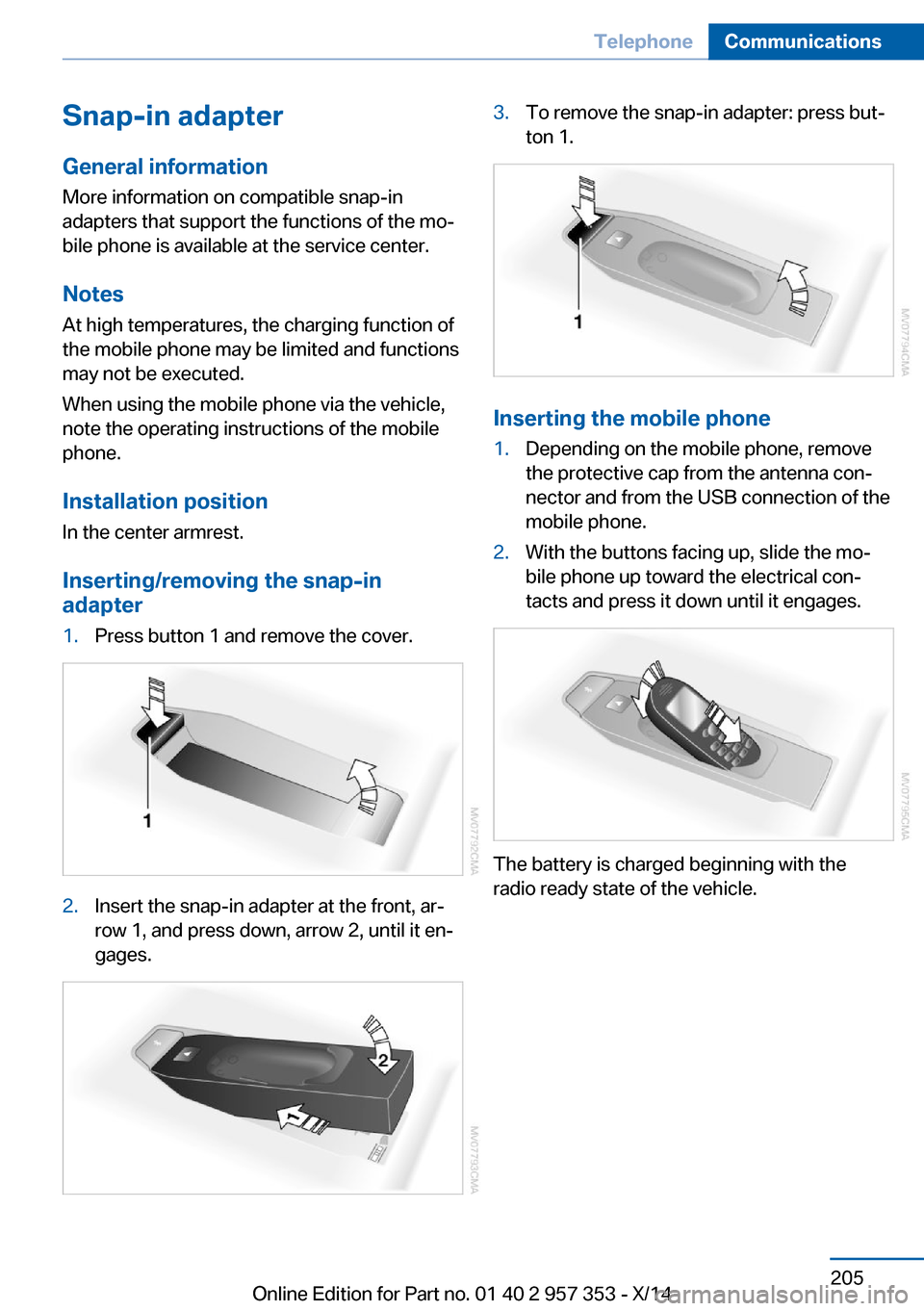
Inserting/removing the snap-in
adapter1.Press button 1 and remove the cover.2.Insert the snap-in adapter at the front, ar‐
row 1, and press down, arrow 2, until it en‐
gages.3.To remove the snap-in adapter: press but‐
ton 1.
Inserting the mobile phone
1.Depending on the mobile phone, remove
the protective cap from the antenna con‐
nector and from the USB connection of the
mobile phone.2.With the buttons facing up, slide the mo‐
bile phone up toward the electrical con‐
tacts and press it down until it engages.
The battery is charged beginning with the
radio ready state of the vehicle.
Seite 205TelephoneCommunications205
Online Edition for Part no. 01 40 2 957 353 - X/14
Page 282 of 297
Everything from A to Z
IndexA ABS, Antilock Brake Sys‐ tem 97
Accident, refer to Emergency Request, initiating 255
Acoustic signal, refer to Check Control 80
Activated charcoal filter with automatic climate con‐
trol 111
Adaptive brake lights, refer to Brake force display 96
Adaptive Light Control 84
Additional telephone 196
Additives, coolant 244
Additives, engine oil 243
After washing vehicle 262
Airbags 88
Airbags, indicator/warning light 91
Air circulation, refer to Recir‐ culated air mode 110
Air conditioning mode– Automatic climate con‐
trol 108– Ventilation 111
Air distribution
– Automatic 109– Manual 109
Air drying, refer to Cooling
function 110
Air flow rate 110
Airing, refer to Ventila‐ tion 111
Air pressure, refer to Tire in‐ flation pressure 230
Air supply
– Automatic climate con‐
trol 108– Ventilation 111Air vents– Refer to Ventilation 111
Alarm system 39
Alarm system
– Avoiding unintentional
alarms 40– Ending an alarm 39– Interior motion sensor 40– Tilt alarm sensor 40
All around the headliner 17
ALL program 110
All-season tires, refer to Win‐ ter tires 238
All-wheel drive, refer to xDrive 99
Alternating-code hand-held transmitter 114
AM/FM station 166
Announcement, navigation, refer to Spoken instruc‐
tions 155
Antifreeze, coolant 244
Antifreeze, washer fluid 65
Antilock Brake System, ABS 97
Anti-slip control, refer to Dy‐ namic Stability Control
DSC 97
Anti-theft protection 32
Appointments 212
Approved axle loads, refer to Weights 268
Approved engine oils 243
Approved gross vehicle weight, refer to
Weights 268
Armrest, refer to Center arm‐ rest 124
Arrival time, refer to Com‐ puter 74
Ashtray 117
Assistance with driving off,
refer to Drive-off assis‐
tant 100
Assistance with starting en‐ gine, refer to Jump-start‐
ing 256
Audio device, external 124
Audio playback 175
Audio playback, Blue‐ tooth 187
Automatic– Air distribution 109– Air flow rate 109
Automatic car wash 261
Automatic climate con‐ trol 108
Automatic climate control
– Automatic air distribu‐
tion 109
Automatic, cruise control 101
Automatic Curb Monitor 49
Automatic Engine Start/Stop Function 59
Automatic headlamp con‐ trol 83, 84
Automatic recirculated air control 110
Automatic transmission with Steptronic 65, 68
Automatic transmission with
Steptronic
– Interlock 65– Kickdown 66, 68– Overriding selector lever
lock 67
AUTO program with auto‐
matic climate control 109
AUX-IN port 124, 184
Average fuel consumption 73
Average fuel consumption
– Setting the units 75
Average speed 73
Seite 278ReferenceEverything from A to Z278
Online Edition for Part no. 01 40 2 957 353 - X/14
Page 284 of 297
Car phone, installation loca‐tion, refer to Center arm‐
rest 124
Car phone, refer to Tele‐ phone 196
Car vacuum cleaner, connect‐ ing, refer to Connecting
electrical devices 117
Car wash 261
Catalytic converter, refer to Hot exhaust system 131
CBS Condition Based Serv‐ ice 245
CD/DVD 174
CD/DVD notes 178
CDs, storing 179
Cell phone 196
Cell phone, installation loca‐ tion, refer to Center arm‐
rest 124
Center armrest, front 124
Center armrest, rear 124
Center brake lamp, bulb re‐ placement 253
Center console, refer to Around the center con‐
sole 16
Central locking– Comfort Access 37– From the inside 35– Setting the unlocking char‐
acteristics 32
Central locking system
– From the outside 31– Principle 31
Central screen, refer to Con‐
trol Display 18
Changes, technical, refer to Safety 6
Changing wheels/tires 237
Check Control 80
Children, transporting 52
Child restraint fixing system LATCH 53
Child restraint fixing sys‐ tems 52
Child restraint fixing systems,
mounting 52
Child safety locks 55
Child seat, mounting 52
Child seats, refer to Trans‐ porting children safely 52
Chrome parts, care 263
Cigarette lighter, connecting electrical devices 117
Cigarette lighter, refer to Lighter 117
Cigarette lighter socket 117
Circulation of air, refer to Re‐ circulated air mode 110
Cleaning, displays 264
Cleaning your BMW, refer to Care 261
Clock 71
Clock– 12h/24h format 76– Setting the time and date 76
Closing
– From the inside 35– From the outside 32
Clothes hooks 125
Cockpit 12
Cold start, refer to Starting the engine 58
Combination instrument, refer to Instrument cluster 14
Combination switch, refer to Turn signal/high beams/
headlamp flasher 62
Combination switch, refer to Washer/wiper system 62
Comfort Access 37
Comfort Access
– Battery replacement 38
Comfort area, refer to Around
the center console 16
Compact wheel, inflation pressure 230
Compartment for remote control, refer to Ignition
lock 57
Compartment in floor 121
Compartments, refer to Stor‐
age compart‐
ments 123, 125
Compass, digital 115
Computer 73
Computer, displaying infor‐ mation 73
Computer, displays on the Control Display 74
Concierge service 219
Condensation under the vehi‐ cle 132
Condition Based Service CBS 245
Confirmation signals for lock‐ ing/unlocking the vehicle 33
Connecting, mobile phone, refer to Pairing the mobile
phone 197
Consumption, refer to Aver‐ age fuel consumption 73
Contacts 208, 216
Control Display 18
Control Display, care 264
Control Display, settings 77
Controller 19
Controls and displays 12
Control systems, driving sta‐ bility 97
Convenient operation– Glass sunroof 32– Window 32
Coolant 244
Coolant, checking the level 244
Coolant temperature 72
Cooling function, switching on and off 110
Cooling, maximum 109
Cooling system, refer to Cool‐ ant 244
Corrosion on brake discs 132
Courtesy lights, refer to Inte‐ rior lights 87
Cradle for telephone or mo‐ bile phone, refer to Snap-in
adapter 205
Seite 280ReferenceEverything from A to Z280
Online Edition for Part no. 01 40 2 957 353 - X/14
Page 292 of 297
Seats– Adjusting 44– Adjusting electrically 45– Heating 46– Memory, refer to Seat and
mirror memory 48– Sitting safely 44– Storing the setting, refer to
Seat and mirror memory 48
Selector lever, automatic
transmission with Step‐
tronic 66, 68
Selector lever lock, overrid‐ ing 67
Selector lever lock, refer to Changing selector lever po‐
sitions, Shiftlock 66
Selector lever lock, releas‐ ing 68
Selector lever positions, auto‐ matic transmission with
Steptronic 66
Sensors, care 264
Service and warranty 7
Service data in the remote control 245
Service interval display, refer to Condition Based Service
CBS 245
Service interval display, refer to Service requirements 78
Service requirements 78
Service requirements, CBS Condition Based Serv‐
ice 245
Services, remote 223
Servotronic 100
Settings
– Changing on the Control
Display 77– Language 77
Settings and information 74
Settings, configuring, refer to Personal Profile 30
Settings, DVD 177
Setting the clock, 12h/24h format 76
Shifting– Automatic transmission with
Steptronic 66
Shifting, automatic transmis‐
sion with Steptronic 69
Shift lever
– Automatic transmission with
Steptronic 66
Shift paddles 69
Shift paddles on the steering wheel 67
Short commands, voice acti‐
vation 270
Side airbags 88
Side windows, refer to Win‐ dows 40
Sitting safely 44
Size, refer to Dimensions 268
Ski bag, refer to Ski and snowboard bag 122
Slide/tilt glass roof, refer to Panoramic glass sunroof 41
Slot for remote control 57
Smokers' package, refer to Ashtray 117
Snap-in adapter, mobile phone 205
Snap-in adapter, refer to Storage compartment of
center armrest 124
Snow chains 239
Socket, OBD Onboard Diag‐ nosis 246
Socket, refer to Connecting electrical devices 117
Software applications, iPhone 222
Software part number 196
Software update 191
SOS, refer to Emergency Re‐ quest, initiating 255
Sound output 166, 174
Spare fuse 254
Special destinations, naviga‐ tion 147
Special equipment, series equipment 6
Speed, average 73
Speed limit 81
Speed limit, setting 82
Speedometer 14
Speed, with winter tires 238
Split screen 22
Split screen map set‐ tings 157
Spoken instructions, naviga‐ tion 155
Sport program, automatic transmission with Step‐
tronic 66, 69
Spray nozzles, refer to Clean‐ ing the windshield and head‐
lamps 64
Spray nozzles, refer to Wind‐ shield washer nozzles 64
Stability control systems 97
Start/Stop button 57
Start/Stop button, starting the engine 58
Start/Stop button, switching off the engine 59
Starting the engine 58
Start problems, refer to Jump-starting 256
State/province, selecting for navigation 144
Stations, stored 172
Station, storing 166
Status information, iDrive 21
Status of Owner's Manual 6
Steam jets 261
Steering wheel 51
Steering wheel– Shift paddles 67
Steering wheel, adjusting 51
Steering wheel lock 57
Steptronic, refer to Automatic transmission with Step‐
tronic 65
Steptronic, refer to Sport pro‐ gram and manual mode M/
S 69
Stopping, engine 59
Seite 288ReferenceEverything from A to Z288
Online Edition for Part no. 01 40 2 957 353 - X/14