Car battery BMW X1 2014 E84 Owner's Manual
[x] Cancel search | Manufacturer: BMW, Model Year: 2014, Model line: X1, Model: BMW X1 2014 E84Pages: 297, PDF Size: 7 MB
Page 11 of 297
sary to adapt your vehicle to potentially differ‐
ing operating conditions and permit
requirements. If your vehicle does not comply
with the homologation requirements in a cer‐
tain country you cannot lodge warranty claims
for your vehicle there. Further information can
be obtained from your Service Center.
Maintenance and repairs
Advanced technology, e.g., the use of modern
materials and high-performance electronics,
requires suitable maintenance and repair methods.
Therefore, have this work performed only by a
BMW center or a workshop that works accord‐
ing to BMW repair procedures with appropri‐
ately trained personnel.
If this work is not carried out properly, there is
the danger of subsequent damage and related
safety hazards.
Parts and accessories
For your own safety, it is recommended that
you use genuine parts and accessories ap‐
proved by BMW. When you purchase accesso‐
ries tested and approved by BMW and Genu‐
ine BMW Parts, you simultaneously acquire
the assurance that they have been thoroughly
tested by BMW to ensure optimum perform‐
ance when installed on your vehicle. BMW
warrants these parts to be free from defects in
material and workmanship. BMW will not ac‐
cept any liability for damage resulting from in‐
stallation of parts and accessories not ap‐
proved by BMW. BMW cannot test every
product made by other manufacturers to verify
if it can be used on a BMW safely and without
risk to either the vehicle, its operation, or its
occupants. Genuine BMW Parts, BMW Acces‐
sories and other products approved by BMW,
together with professional advice on using
these items, are available from all BMW cen‐
ters. Installation and operation of non BMW
approved accessories such as alarms, radios,
amplifiers, radar detectors, wheels, suspensioncomponents, brake dust shields, telephones,
including operation of any mobile phone from
within the vehicle without using an externally
mounted antenna, or transceiver equipment,
for instance, CBs, walkie-talkies, ham radios or
similar accessories, may cause extensive dam‐
age to the vehicle, compromise its safety, in‐
terfere with the vehicle's electrical system or
affect the validity of the BMW Limited War‐
ranty. See your BMW center for additional in‐
formation. Maintenance, replacement, or repair
of the emission control devices and systems
may be performed by any automotive repair
establishment or individual using any certified
automotive part.
California Proposition 65 WarningCalifornia laws require us to state the following
warning:
Engine exhaust and a wide variety of automo‐
bile components and parts, including compo‐
nents found in the interior furnishings in a vehi‐
cle, contain or emit chemicals known to the
State of California to cause cancer and birth
defects and reproductive harm. In addition,
certain fluids contained in vehicles and certain
products of component wear contain or emit
chemicals known to the State of California to
cause cancer and birth defects or other repro‐
ductive harm. Battery posts, terminals and re‐
lated accessories contain lead and lead com‐
pounds. Wash your hands after handling. Used
engine oil contains chemicals that have caused
cancer in laboratory animals. Always protect
your skin by washing thoroughly with soap and
water.
Service and warranty We recommend that you read this publication
thoroughly. Your vehicle is covered by the fol‐
lowing warranties:▷New Vehicle Limited Warranty▷Rust Perforation Limited WarrantySeite 7Notes7
Online Edition for Part no. 01 40 2 957 353 - X/14
Page 34 of 297
Opening and closingVehicle equipment
This chapter describes all series equipment as
well as country-specific and special equipment
offered for this model series. Therefore, it also
describes equipment that may not be found in
your vehicle, for instance due to the selected
special equipment or the country version. This
also applies to safety-related functions and
systems.
When using the features and systems descri‐
bed here, adhere to local regulations.
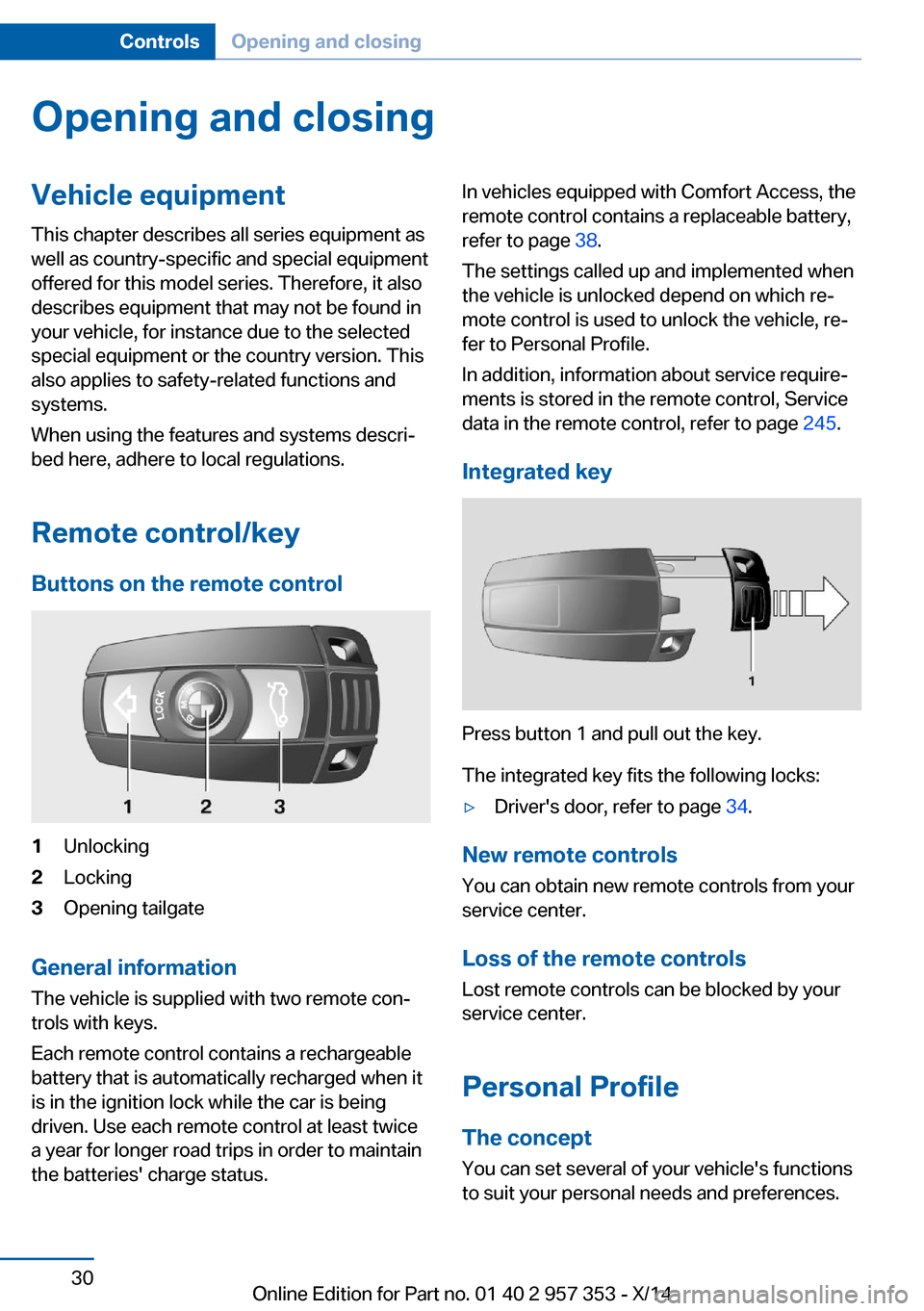
Remote control/key Buttons on the remote control1Unlocking2Locking3Opening tailgate
General information
The vehicle is supplied with two remote con‐
trols with keys.
Each remote control contains a rechargeable
battery that is automatically recharged when it
is in the ignition lock while the car is being
driven. Use each remote control at least twice
a year for longer road trips in order to maintain
the batteries' charge status.
In vehicles equipped with Comfort Access, the
remote control contains a replaceable battery,
refer to page 38.
The settings called up and implemented when
the vehicle is unlocked depend on which re‐
mote control is used to unlock the vehicle, re‐
fer to Personal Profile.
In addition, information about service require‐
ments is stored in the remote control, Service
data in the remote control, refer to page 245.
Integrated key
Press button 1 and pull out the key.
The integrated key fits the following locks:
▷Driver's door, refer to page 34.
New remote controls
You can obtain new remote controls from your
service center.
Loss of the remote controls
Lost remote controls can be blocked by your
service center.
Personal Profile The concept
You can set several of your vehicle's functions
to suit your personal needs and preferences.
Seite 30ControlsOpening and closing30
Online Edition for Part no. 01 40 2 957 353 - X/14
Page 38 of 297
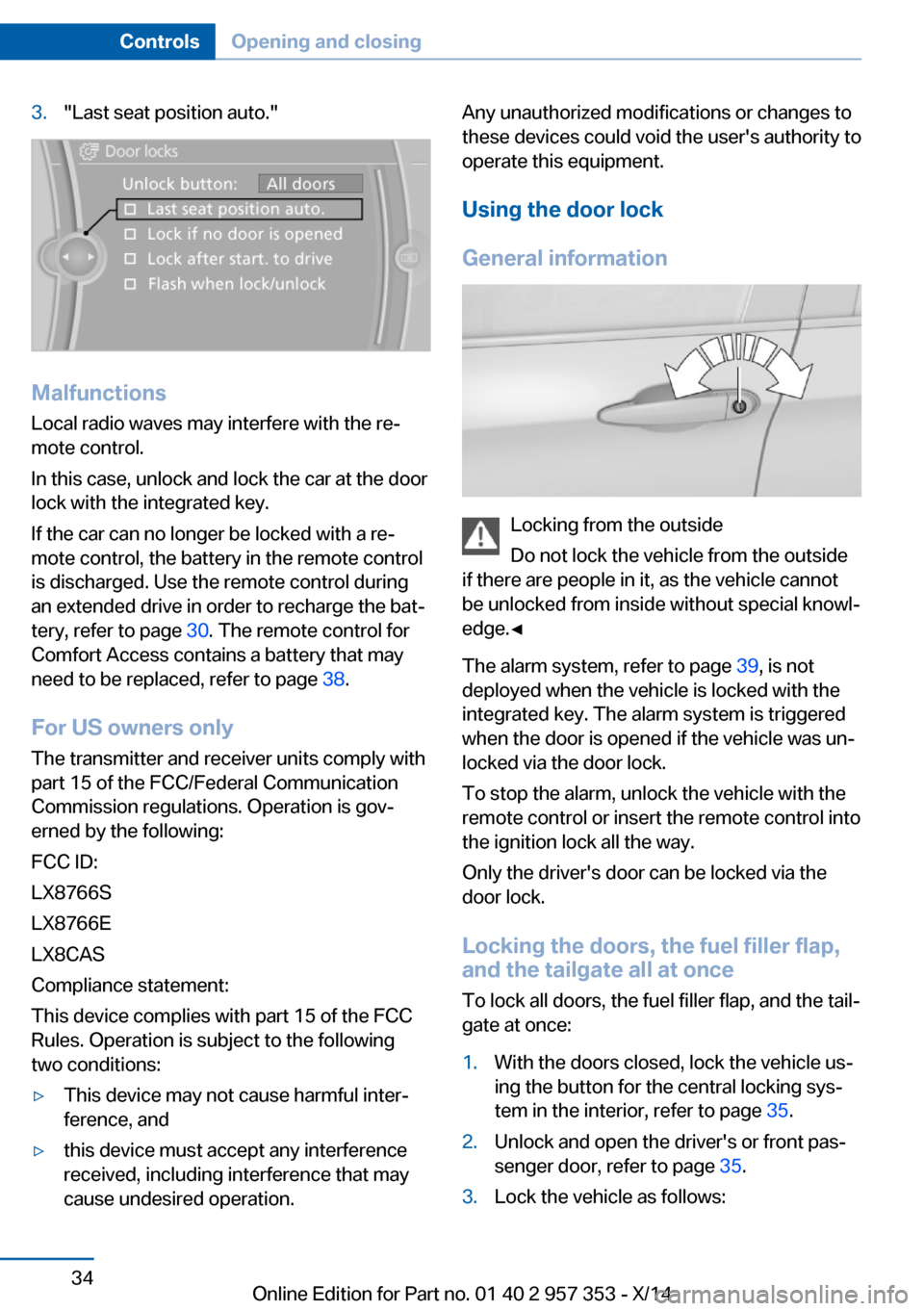
3."Last seat position auto."
MalfunctionsLocal radio waves may interfere with the re‐
mote control.
In this case, unlock and lock the car at the door
lock with the integrated key.
If the car can no longer be locked with a re‐
mote control, the battery in the remote control
is discharged. Use the remote control during
an extended drive in order to recharge the bat‐
tery, refer to page 30. The remote control for
Comfort Access contains a battery that may
need to be replaced, refer to page 38.
For US owners only
The transmitter and receiver units comply with
part 15 of the FCC/Federal Communication
Commission regulations. Operation is gov‐
erned by the following:
FCC ID:
LX8766S
LX8766E
LX8CAS
Compliance statement:
This device complies with part 15 of the FCC
Rules. Operation is subject to the following
two conditions:
▷This device may not cause harmful inter‐
ference, and▷this device must accept any interference
received, including interference that may
cause undesired operation.Any unauthorized modifications or changes to
these devices could void the user's authority to
operate this equipment.
Using the door lock
General information
Locking from the outside
Do not lock the vehicle from the outside
if there are people in it, as the vehicle cannot
be unlocked from inside without special knowl‐
edge.◀
The alarm system, refer to page 39, is not
deployed when the vehicle is locked with the
integrated key. The alarm system is triggered
when the door is opened if the vehicle was un‐
locked via the door lock.
To stop the alarm, unlock the vehicle with the
remote control or insert the remote control into
the ignition lock all the way.
Only the driver's door can be locked via the
door lock.
Locking the doors, the fuel filler flap, and the tailgate all at once
To lock all doors, the fuel filler flap, and the tail‐
gate at once:
1.With the doors closed, lock the vehicle us‐
ing the button for the central locking sys‐
tem in the interior, refer to page 35.2.Unlock and open the driver's or front pas‐
senger door, refer to page 35.3.Lock the vehicle as follows:Seite 34ControlsOpening and closing34
Online Edition for Part no. 01 40 2 957 353 - X/14
Page 41 of 297
Comfort AccessThe concept
The vehicle can be accessed without activat‐
ing the remote control.
All you need to do is to have the remote con‐
trol with you, e.g., in your jacket pocket.
The vehicle automatically detects the remote
control when it is nearby or in the passenger
compartment.
Comfort Access supports the following func‐
tions:▷Unlocking/locking of the vehicle.▷Unlocking of the tailgate separately.▷Starting the engine.▷Convenient closing.
Functional requirement
▷To lock the vehicle, the remote control
must be located outside of the vehicle.▷The next unlocking and locking cycle is not
possible until after approx. 2 seconds.▷The engine can only be started if the re‐
mote control is inside the vehicle.
Comparison with ordinary remote
control
The functions can be controlled by pressing the buttons or via Comfort Access.
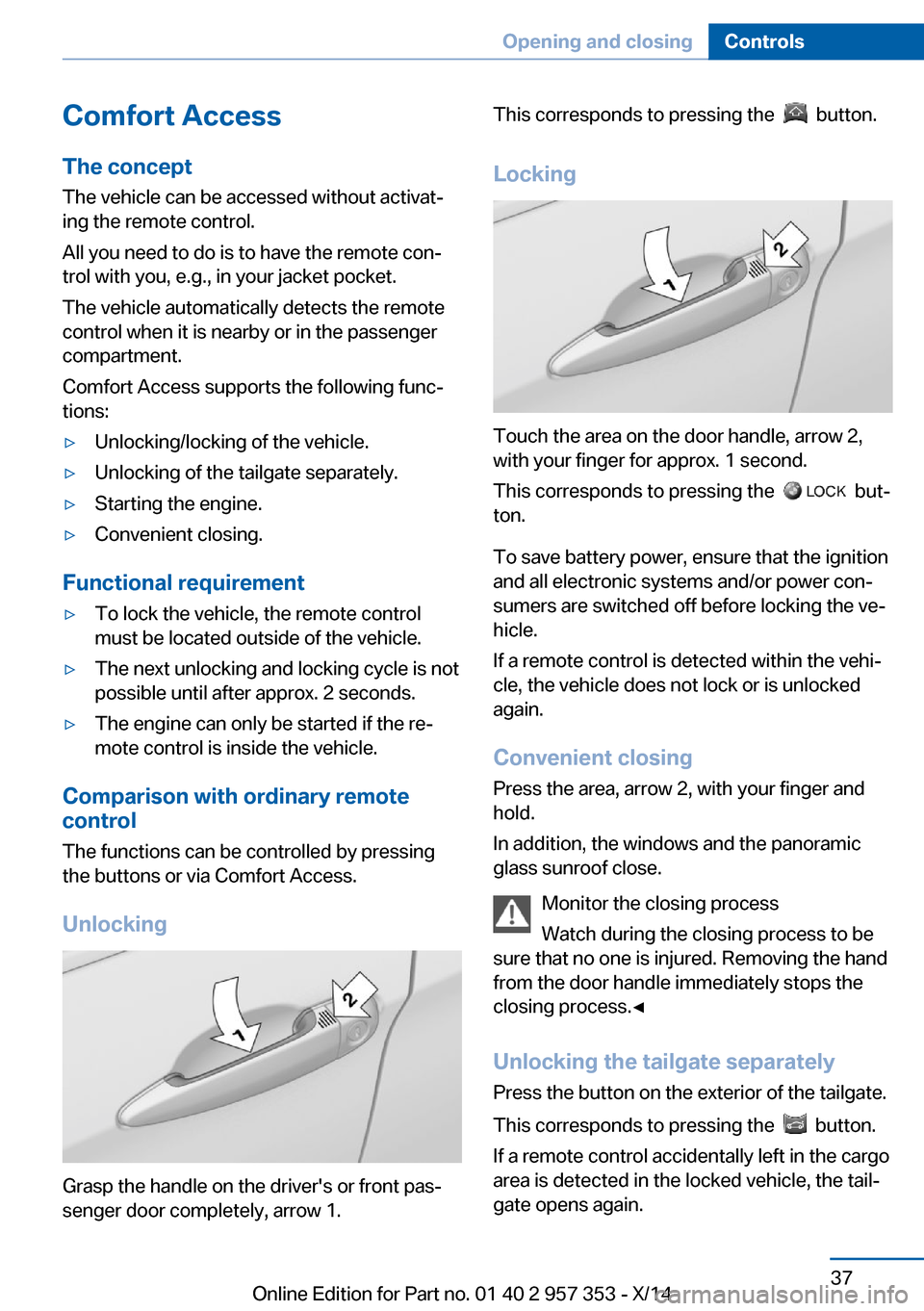
Unlocking
Grasp the handle on the driver's or front pas‐
senger door completely, arrow 1.
This corresponds to pressing the button.
Locking
Touch the area on the door handle, arrow 2,
with your finger for approx. 1 second.
This corresponds to pressing the
but‐
ton.
To save battery power, ensure that the ignition
and all electronic systems and/or power con‐
sumers are switched off before locking the ve‐
hicle.
If a remote control is detected within the vehi‐
cle, the vehicle does not lock or is unlocked
again.
Convenient closing Press the area, arrow 2, with your finger and
hold.
In addition, the windows and the panoramic
glass sunroof close.
Monitor the closing process
Watch during the closing process to be
sure that no one is injured. Removing the hand
from the door handle immediately stops the closing process.◀
Unlocking the tailgate separately
Press the button on the exterior of the tailgate.
This corresponds to pressing the
button.
If a remote control accidentally left in the cargo
area is detected in the locked vehicle, the tail‐
gate opens again.
Seite 37Opening and closingControls37
Online Edition for Part no. 01 40 2 957 353 - X/14
Page 42 of 297
Ignition onPressing the Start/Stop button switches the
ignition on.
When doing so, do not depress the brake
pedal, otherwise the engine will start.
Starting the engine
The engine can be started or the ignition can
be switched on when a remote control is inside
the vehicle. It is not necessary to insert a re‐
mote control into the ignition lock, refer to
page 57.
Switching off the engine in cars with
automatic transmission
The engine can only be switched off with
transmission position P engaged, refer to
page 59.
To switch the engine off with transmission po‐
sition N engaged, insert the remote control in
the ignition lock.
Malfunction
The Comfort Access functions can be distur‐
bed by local radio waves, such as by a mobile
phone in the immediate vicinity of the remote
control or when a mobile phone is being
charged in the vehicle.
If this occurs, open or close the vehicle using
the buttons on the remote control or use the
integrated key in the door lock.
Mechanical activation using the integrated key
only locks/unlocks the driver's door.
To start the engine afterward, insert the re‐
mote control into the ignition switch.
Warning lamps The warning lamp in the instrument
cluster lights up when you attempt to
start the engine: the engine cannot
be started.
The remote control is not in the vehicle or has
a malfunction. Take the remote control withyou inside the vehicle or have it checked. If
necessary, insert another remote control into
the ignition switch.
The warning lamp in the instrumentcluster lights up while the engine is
running: the remote control is no lon‐
ger inside the vehicle.
After switching off the engine, the engine can
only be started again within approx. 10 sec‐
onds if no door has been opened.
The indicator lamp in the instrument
cluster comes on and a message ap‐
pears on the Control Display: replace
the remote control battery.
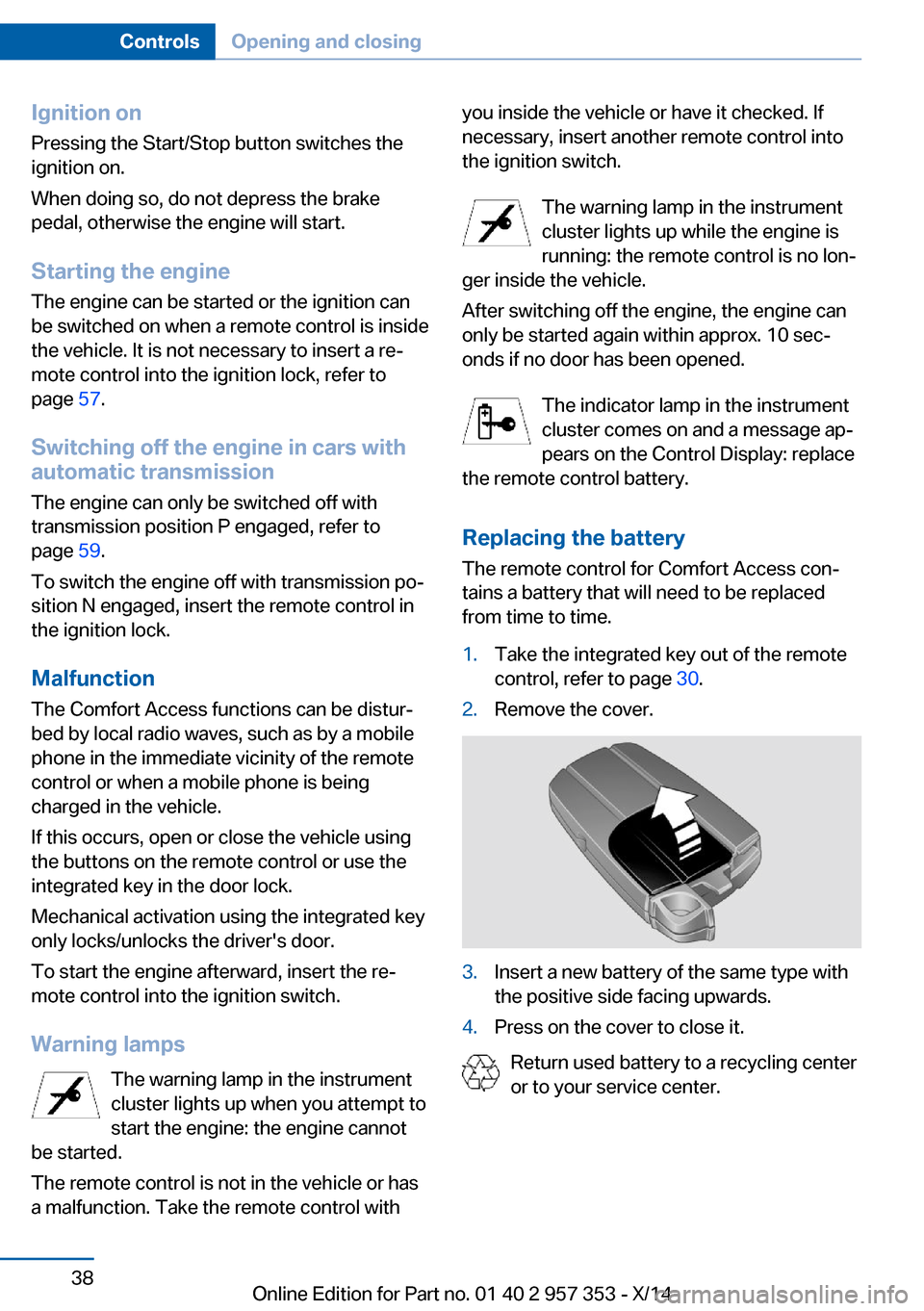
Replacing the battery
The remote control for Comfort Access con‐
tains a battery that will need to be replaced
from time to time.1.Take the integrated key out of the remote
control, refer to page 30.2.Remove the cover.3.Insert a new battery of the same type with
the positive side facing upwards.4.Press on the cover to close it.
Return used battery to a recycling center
or to your service center.
Seite 38ControlsOpening and closing38
Online Edition for Part no. 01 40 2 957 353 - X/14
Page 43 of 297
Alarm systemThe conceptThe vehicle alarm system responds to:▷Opening of a door, the hood or the tailgate.▷Movements in the vehicle: interior motion
sensor, refer to page 40.▷Changes in the vehicle tilt, e.g., during at‐
tempts to steal a wheel or tow the car.▷Interruptions in battery voltage.
The alarm system briefly indicates tampering:
▷By sounding an acoustic alarm.▷By switching on the hazard warning sys‐
tem.▷By flashing the high beams.
Arming and disarming the alarm
system
General information
When you lock or unlock the vehicle, either
with the remote control or via Comfort Access,
the alarm system is armed or disarmed at the
same time.
Door lock and armed alarm systemThe alarm system is triggered when the door is
opened if the vehicle was unlocked via the
door lock.
To stop this alarm, unlock the vehicle with the
remote control or switch on the ignition, if nec‐
essary through emergency detection of the re‐
mote control.
Tailgate and armed alarm system
The tailgate can be opened using the remote
control, even if the alarm system is armed.
Press the button on the remote control.
After the tailgate is closed, it is locked and
monitored again by the alarm system. The haz‐
ard warning system flashes once.
In some market-specific versions, the tailgate
can only be opened using the remote control if
the vehicle was unlocked first.
Switching off the alarm▷Unlock the vehicle using the remote con‐
trol, refer to page 32.▷Insert the remote control all the way into
the ignition lock.
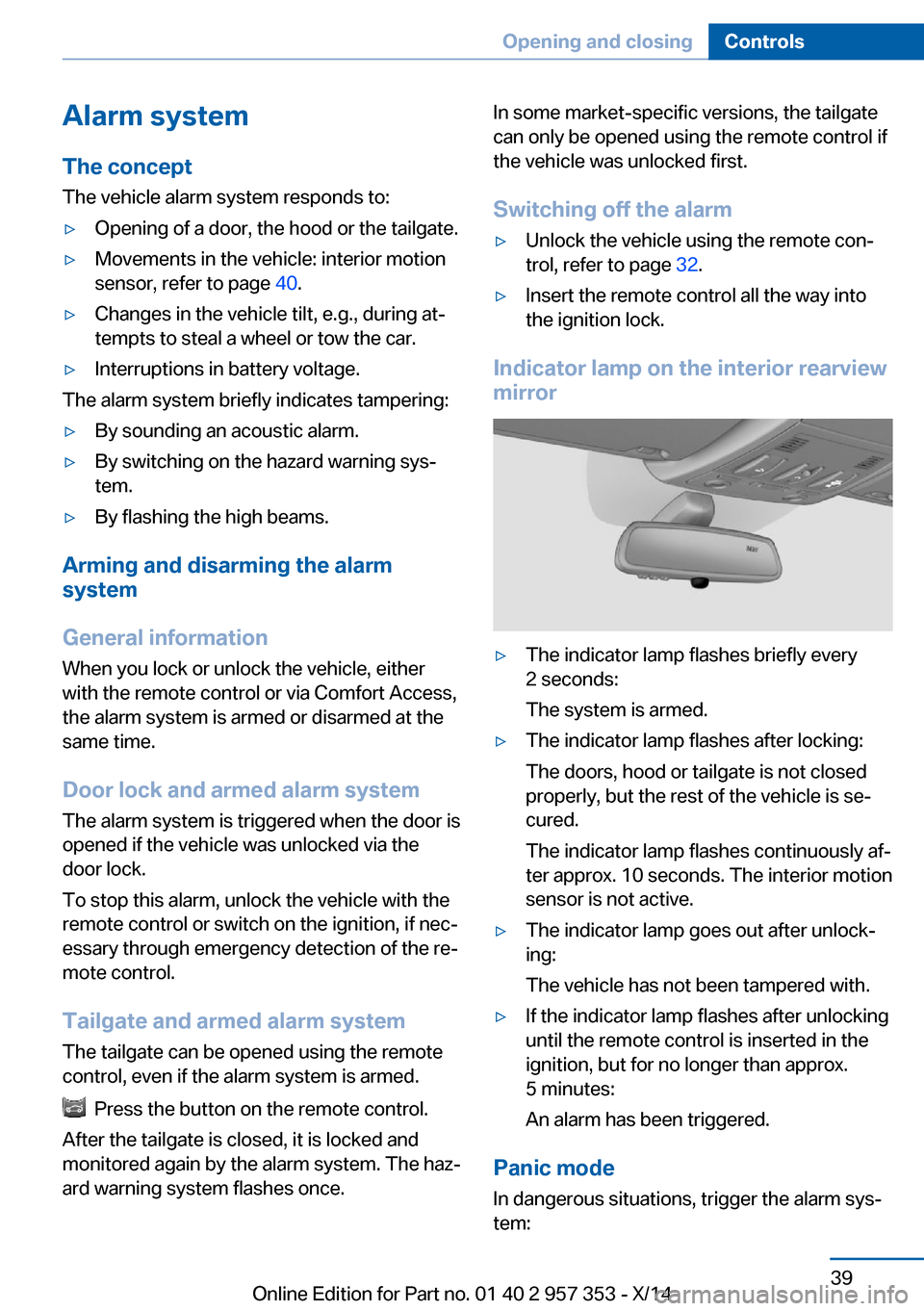
Indicator lamp on the interior rearview
mirror
▷The indicator lamp flashes briefly every
2 seconds:
The system is armed.▷The indicator lamp flashes after locking:
The doors, hood or tailgate is not closed
properly, but the rest of the vehicle is se‐
cured.
The indicator lamp flashes continuously af‐
ter approx. 10 seconds. The interior motion
sensor is not active.▷The indicator lamp goes out after unlock‐
ing:
The vehicle has not been tampered with.▷If the indicator lamp flashes after unlocking
until the remote control is inserted in the
ignition, but for no longer than approx.
5 minutes:
An alarm has been triggered.
Panic mode
In dangerous situations, trigger the alarm sys‐
tem:
Seite 39Opening and closingControls39
Online Edition for Part no. 01 40 2 957 353 - X/14
Page 62 of 297
▷In cars with Comfort Access, refer to
page 37, by touching the surface above the
door lock.
Ignition on
All electrical consumers can operate. The od‐
ometer and trip odometer are displayed in the
instrument cluster.
To save battery power when the engine is off,
switch off the ignition and any unnecessary
electronic systems/power consumers.
Radio ready state and ignition off
All indicator and warning lamps as well as dis‐
plays in the instrument cluster go out.
Automatic transmission, 8-gear
In certain situations, transmission position P is
engaged automatically. To make it possible for
the vehicle to roll, such as in an automatic car
wash, follow the instructions in Car washes, re‐
fer to page 261.
Starting the engine General information Enclosed areas
Do not let the engine run in enclosed
areas; otherwise, breathing of exhaust fumes
may lead to loss of consciousness and death.
The exhaust gases contain carbon monoxide,
an odorless and colorless but highly toxic
gas.◀
Unattended vehicle
Do not leave the car unattended with the
engine running; otherwise, it presents a poten‐
tial source of danger.
Before leaving the car with the engine running,
shift to neutral or engage transmission posi‐
tion P and set the parking brake firmly; other‐
wise, the vehicle may begin to roll.◀
Frequent starting in quick succession
Avoid repeated futile attempts at starting
the car and avoid starting the car frequently in
quick succession. Otherwise, the fuel is not
burned or is inadequately burned, and there is
the danger of overheating and damaging the
catalytic converter.◀
Do not wait for the engine to warm-up while
the vehicle remains stationary. Start driving
right away, but at moderate engine speeds.
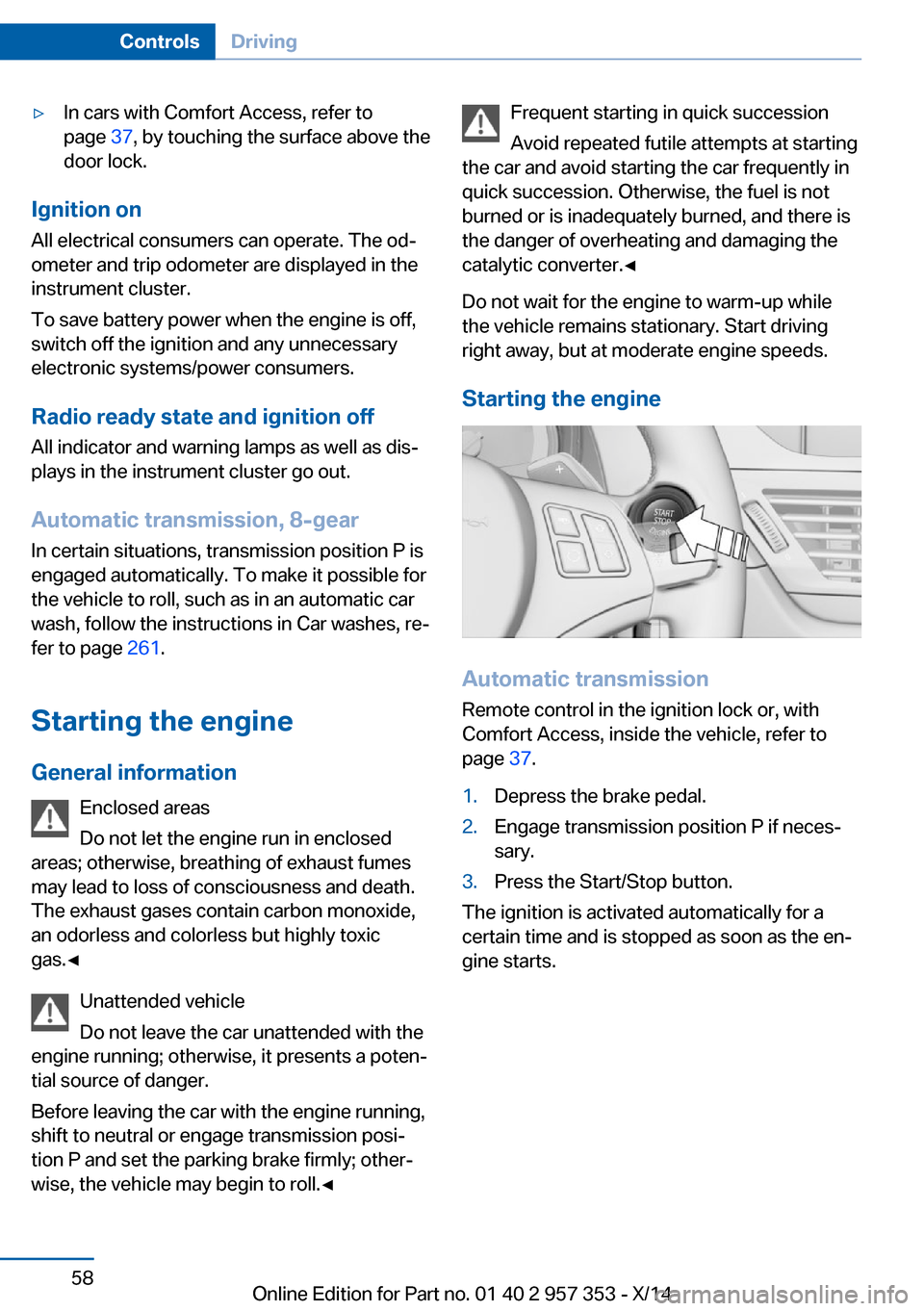
Starting the engine
Automatic transmission Remote control in the ignition lock or, withComfort Access, inside the vehicle, refer to
page 37.
1.Depress the brake pedal.2.Engage transmission position P if neces‐
sary.3.Press the Start/Stop button.
The ignition is activated automatically for a
certain time and is stopped as soon as the en‐
gine starts.
Seite 58ControlsDriving58
Online Edition for Part no. 01 40 2 957 353 - X/14
Page 91 of 297
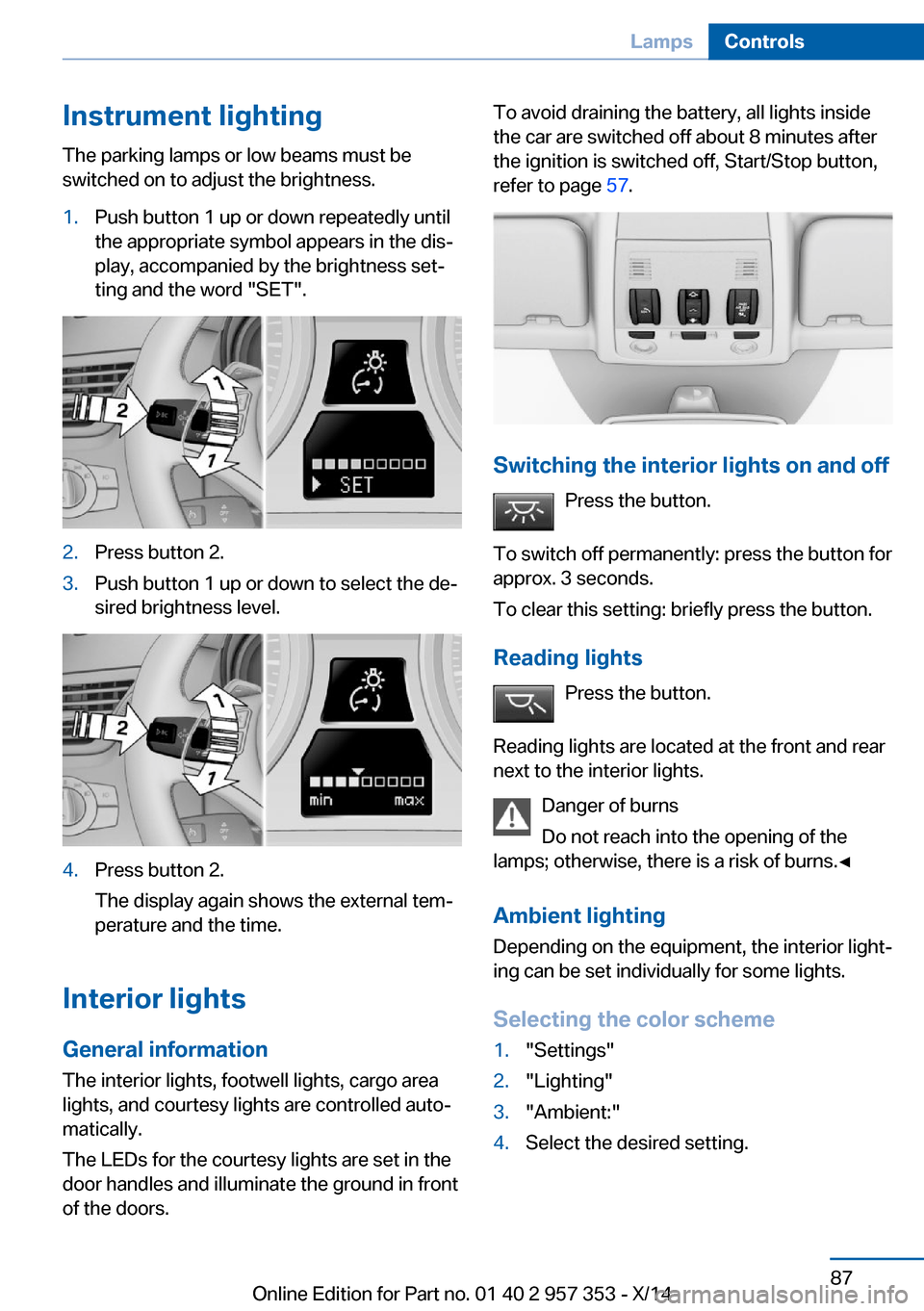
Instrument lightingThe parking lamps or low beams must be
switched on to adjust the brightness.1.Push button 1 up or down repeatedly until
the appropriate symbol appears in the dis‐
play, accompanied by the brightness set‐
ting and the word "SET".2.Press button 2.3.Push button 1 up or down to select the de‐
sired brightness level.4.Press button 2.
The display again shows the external tem‐
perature and the time.
Interior lights
General information
The interior lights, footwell lights, cargo area
lights, and courtesy lights are controlled auto‐
matically.
The LEDs for the courtesy lights are set in the
door handles and illuminate the ground in front
of the doors.
To avoid draining the battery, all lights inside
the car are switched off about 8 minutes after
the ignition is switched off, Start/Stop button,
refer to page 57.
Switching the interior lights on and off
Press the button.
To switch off permanently: press the button for
approx. 3 seconds.
To clear this setting: briefly press the button.
Reading lights Press the button.
Reading lights are located at the front and rear
next to the interior lights.
Danger of burns
Do not reach into the opening of the
lamps; otherwise, there is a risk of burns.◀
Ambient lighting
Depending on the equipment, the interior light‐
ing can be set individually for some lights.
Selecting the color scheme
1."Settings"2."Lighting"3."Ambient:"4.Select the desired setting.Seite 87LampsControls87
Online Edition for Part no. 01 40 2 957 353 - X/14
Page 260 of 297
For this purpose, data that are used to de‐
termine the necessary rescue measures,
such as the current position of the vehicle
if it can be established, are transmitted to
the BMW Response Center.▷If the LED is flashing but the BMW Re‐
sponse Center cannot be heard on the
hands-free system, the hands-free system
may be malfunctioning. However, the
BMW Response Center may still be able to
hear you.
Initiating an Emergency Request
automatically
Under certain conditions, an Emergency Re‐
quest is automatically initiated immediately af‐
ter a severe accident. Automatic Collision Noti‐
fication is not affected by pressing the SOS
button.
Warning triangle
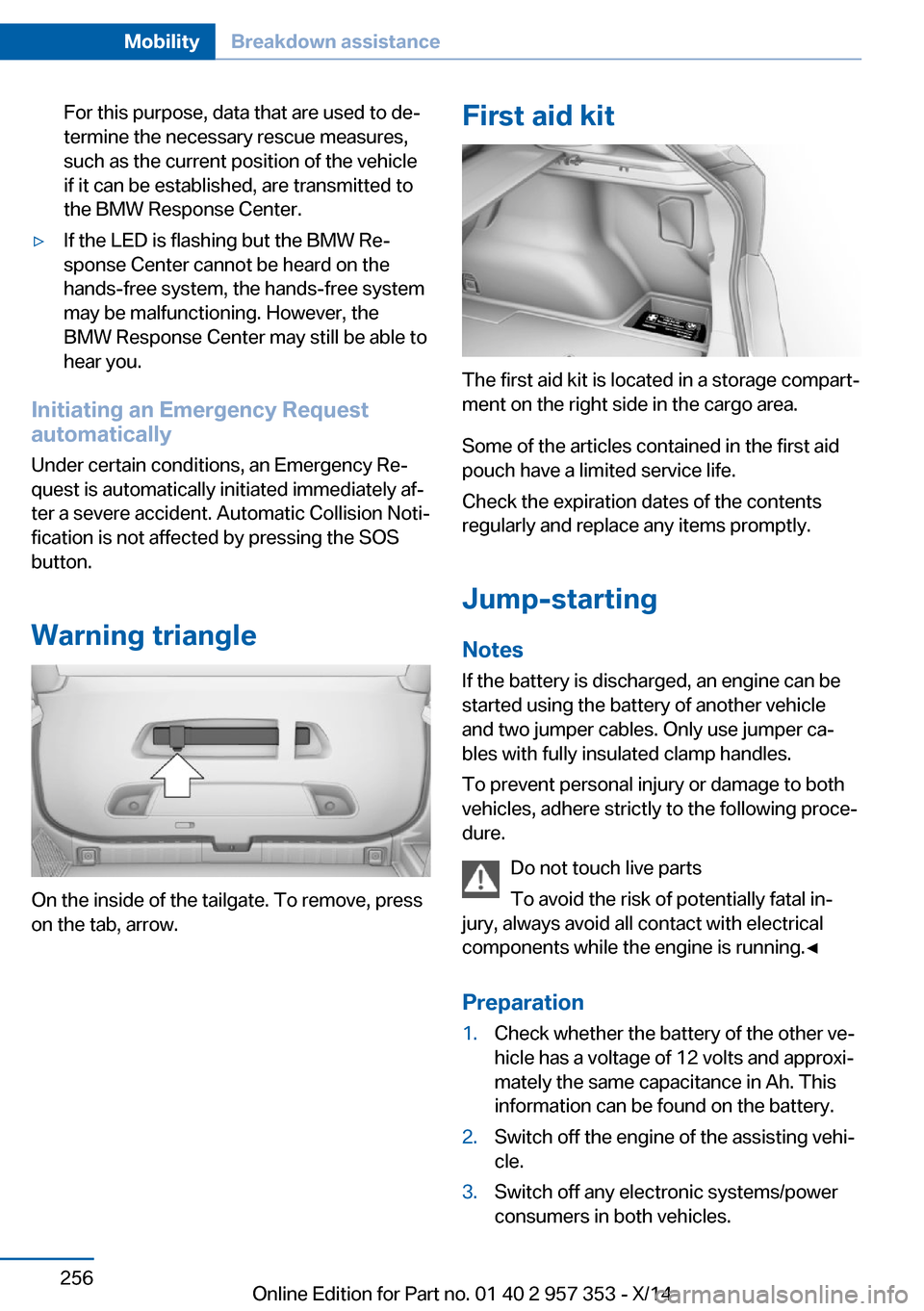
On the inside of the tailgate. To remove, press
on the tab, arrow.
First aid kit
The first aid kit is located in a storage compart‐
ment on the right side in the cargo area.
Some of the articles contained in the first aid
pouch have a limited service life.
Check the expiration dates of the contents
regularly and replace any items promptly.
Jump-starting
Notes If the battery is discharged, an engine can be
started using the battery of another vehicle
and two jumper cables. Only use jumper ca‐
bles with fully insulated clamp handles.
To prevent personal injury or damage to both
vehicles, adhere strictly to the following proce‐
dure.
Do not touch live parts
To avoid the risk of potentially fatal in‐
jury, always avoid all contact with electrical
components while the engine is running.◀
Preparation
1.Check whether the battery of the other ve‐
hicle has a voltage of 12 volts and approxi‐
mately the same capacitance in Ah. This
information can be found on the battery.2.Switch off the engine of the assisting vehi‐
cle.3.Switch off any electronic systems/power
consumers in both vehicles.Seite 256MobilityBreakdown assistance256
Online Edition for Part no. 01 40 2 957 353 - X/14
Page 283 of 297
Average speed, refer to Com‐puter 73
Axle loads, refer to Weights 268
B
Backrest curvature, refer to Lumbar support 45
Backrests, refer to Seats 44
Backrest width adjust‐ ment 46
Back seats– Adjusting the backrest
tilt 119
Backup camera 105
Backup camera, obstacle marking 107
Backup camera, pathway lines 106
Backup camera, turning lines 106
Backup lamps, bulb replace‐ ment 252
Balance 164
Band-aids, refer to First aid kit 256
Bass 164
Battery
– Remote control 30
Battery disposal 254
Battery, refer to Vehicle bat‐ tery 253
Battery replacement, remote control for vehicle 38
Before entering the car wash 261
Belts, refer to Safety belts 46
Belt tensioners, refer to Safety belts 46
Beverage holder, refer to Cu‐ pholder 125
Black and white map dis‐ play 158
Blower, refer to Air flow rate 110
Bluetooth audio 187
Bluetooth connection, acti‐
vating/deactivating 197
BMW Apps 222
BMW EfficientDynamics, re‐ fer to Saving fuel 137
BMW Homepage 6
BMW Internet page 6
BMW maintenance sys‐ tem 245
BMW Online 220
Bottle holder, refer to Cu‐ pholder 125
Brake assistant 97
Brake discs, breaking in 130
Brake fluid, refer to Service requirements 78
Brake force display 96
Brake force distribution, elec‐ tronic 97
Brake lamps– Bulb replacement 252
Brake lamps, brake force dis‐
play 96
Brake lights, adaptive 96
Brake pads, breaking in 130
Brakes
– Parking brake 61
Brakes, BMW maintenance
system 245
Brakes, service require‐ ments 78
Brake system, BMW mainte‐ nance system 245
Braking, notes 131
Breakdown assistance, refer to Roadside Assistance 219
Breakdown, transporting the vehicle 258
Breaking in 130
Brightness on the Control Display 78
Bulb replacement, refer to Lamp and bulb replace‐
ment 248
Button for starting the engine, refer to Start/Stop but‐
ton 57
C
Calendar 212
California Proposition 65 Warning 7
Camera, care 264
Camera, refer to Backup cam‐ era 105
Can holder, refer to Cu‐ pholder 125
Car battery, refer to Vehicle battery 253
Car care products 262
Care 261
Care, displays 264
Care, vehicle 262
Cargo 134
Cargo area 118
Cargo area– Comfort Access 37– Cover 118– Folding up the cargo floor
panel 121– Multi-function hook 122– Partition net 119
Cargo area, capacities 268
Cargo area, enlarging 119
Cargo area lid, refer to Tail‐ gate 35
Cargo area light, refer to Inte‐ rior lights 87
Cargo area net, refer to Parti‐ tion net 119
Cargo area, opening from the inside 36
Cargo area, opening from the outside 36
Cargo floor panel
– Folding up 121
Cargo floor panel, raising 121
Cargo straps, securing cargo 135
Car key, refer to Integrated key/remote control 30
Carpet, care 263
Seite 279Everything from A to ZReference279
Online Edition for Part no. 01 40 2 957 353 - X/14