Tool BMW X1 2014 E84 Owner's Manual
[x] Cancel search | Manufacturer: BMW, Model Year: 2014, Model line: X1, Model: BMW X1 2014 E84Pages: 297, PDF Size: 7 MB
Page 12 of 297
▷Federal Emissions System Defect War‐
ranty▷Federal Emissions Performance Warranty▷California Emission Control System Lim‐
ited Warranty
Detailed information about these warranties is
listed in the Service and Warranty Information
Booklet for US models or in the Warranty and
Service Guide Booklet for Canadian models.
Your vehicle has been specifically adapted and
designed to meet the particular operating con‐
ditions and homologation requirements in your
country and continental region in order to de‐
liver the full driving pleasure while the vehicle
is operated under those conditions. If you wish
to operate your vehicle in another country or
region, you may be required to adapt your ve‐
hicle to meet different prevailing operating
conditions and homologation requirements.
You should also be aware of any applicable
warranty limitations or exclusions for such
country or region. In such case, please contact
Customer Relations for further information.
Maintenance
Maintain the vehicle regularly to sustain the
road safety, operational reliability and the New
Vehicle Limited Warranty.
Specifications for required maintenance meas‐
ures:
▷BMW Maintenance system▷Service and Warranty Information Booklet
for US models▷Warranty and Service Guide Booklet for
Canadian models
If the vehicle is not maintained according to
these specifications, this could result in seri‐
ous damage to the vehicle. Such damage is
not covered by the BMW New Vehicle Limited
Warranty.
Data memory
Numerous electronic components in your vehi‐
cle contain data memories that store technical
information on the vehicle condition, events
and faults, either temporarily or permanently.
This technical information generally docu‐
ments the state of a component, a module, a
system or the environment.▷Operating conditions of system compo‐
nents, such as filling levels.▷Status messages from the vehicle and its
individual components, such as wheel rpm/
speed, motion delay, transverse accelera‐
tion.▷Malfunctions and defects in important sys‐
tem components, such as lights and
brakes.▷Vehicle responses to special driving situa‐
tions, such as airbag deployment, use of
the stability control systems.▷Ambient conditions, such as the tempera‐
ture.
These data are of a technical nature only and
are used to detect and eliminate faults and to
optimize vehicle functions. Travel profiles of
routes driven with the vehicle cannot be cre‐
ated from these data. If services are used, for
instance in the event of repairs, service proc‐
esses, warranty cases, quality assurance, etc.,
this technical information can be read out from
the event and fault data memories by service
personnel, including the manufacturer, using
special diagnosis tools. This service personnel
can provide you with more information if
needed. After troubleshooting, the information
in the fault memory is cleared or overwritten
continuously.
Situations are conceivable during the use of
the vehicle in which these technical data could
become associated with a specific person in
combination with other information, such as an
accident report, damage to the vehicle, wit‐
ness accounts, etc., possibly with the involve‐
ment of an authorized expert.
Seite 8Notes8
Online Edition for Part no. 01 40 2 957 353 - X/14
Page 71 of 297
Activating the M/S manual mode
Move the selector lever from position D toward
the left.
Push the selector lever forward or backward.
Manual mode becomes active and the gear is
changed.
The engaged gear is displayed in the instru‐
ment cluster, e.g., M1.▷To shift down: press the selector lever for‐
ward.▷To shift up: press the selector lever back‐
ward.
The vehicle only shifts up or down at appropri‐
ate engine and road speeds, e.g., it does not
shift down if the engine speed is too high. The
selected gear is briefly displayed in the instru‐
ment panel, followed by the current gear.
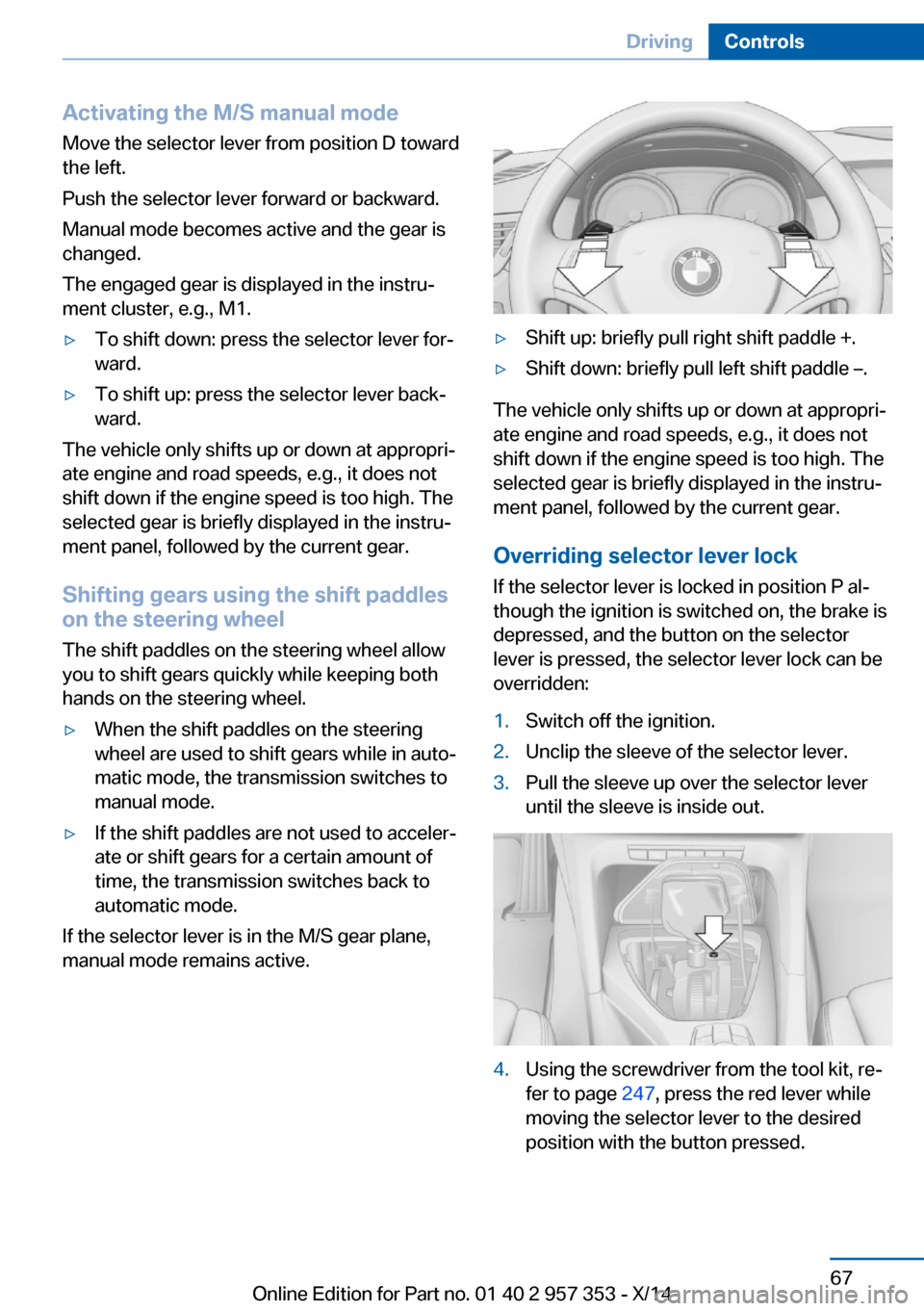
Shifting gears using the shift paddles on the steering wheel
The shift paddles on the steering wheel allow
you to shift gears quickly while keeping both
hands on the steering wheel.
▷When the shift paddles on the steering
wheel are used to shift gears while in auto‐
matic mode, the transmission switches to
manual mode.▷If the shift paddles are not used to acceler‐
ate or shift gears for a certain amount of
time, the transmission switches back to
automatic mode.
If the selector lever is in the M/S gear plane,
manual mode remains active.
▷Shift up: briefly pull right shift paddle +.▷Shift down: briefly pull left shift paddle –.
The vehicle only shifts up or down at appropri‐
ate engine and road speeds, e.g., it does not
shift down if the engine speed is too high. The
selected gear is briefly displayed in the instru‐
ment panel, followed by the current gear.
Overriding selector lever lock If the selector lever is locked in position P al‐
though the ignition is switched on, the brake is
depressed, and the button on the selector
lever is pressed, the selector lever lock can be
overridden:
1.Switch off the ignition.2.Unclip the sleeve of the selector lever.3.Pull the sleeve up over the selector lever
until the sleeve is inside out.4.Using the screwdriver from the tool kit, re‐
fer to page 247, press the red lever while
moving the selector lever to the desired
position with the button pressed.Seite 67DrivingControls67
Online Edition for Part no. 01 40 2 957 353 - X/14
Page 125 of 297
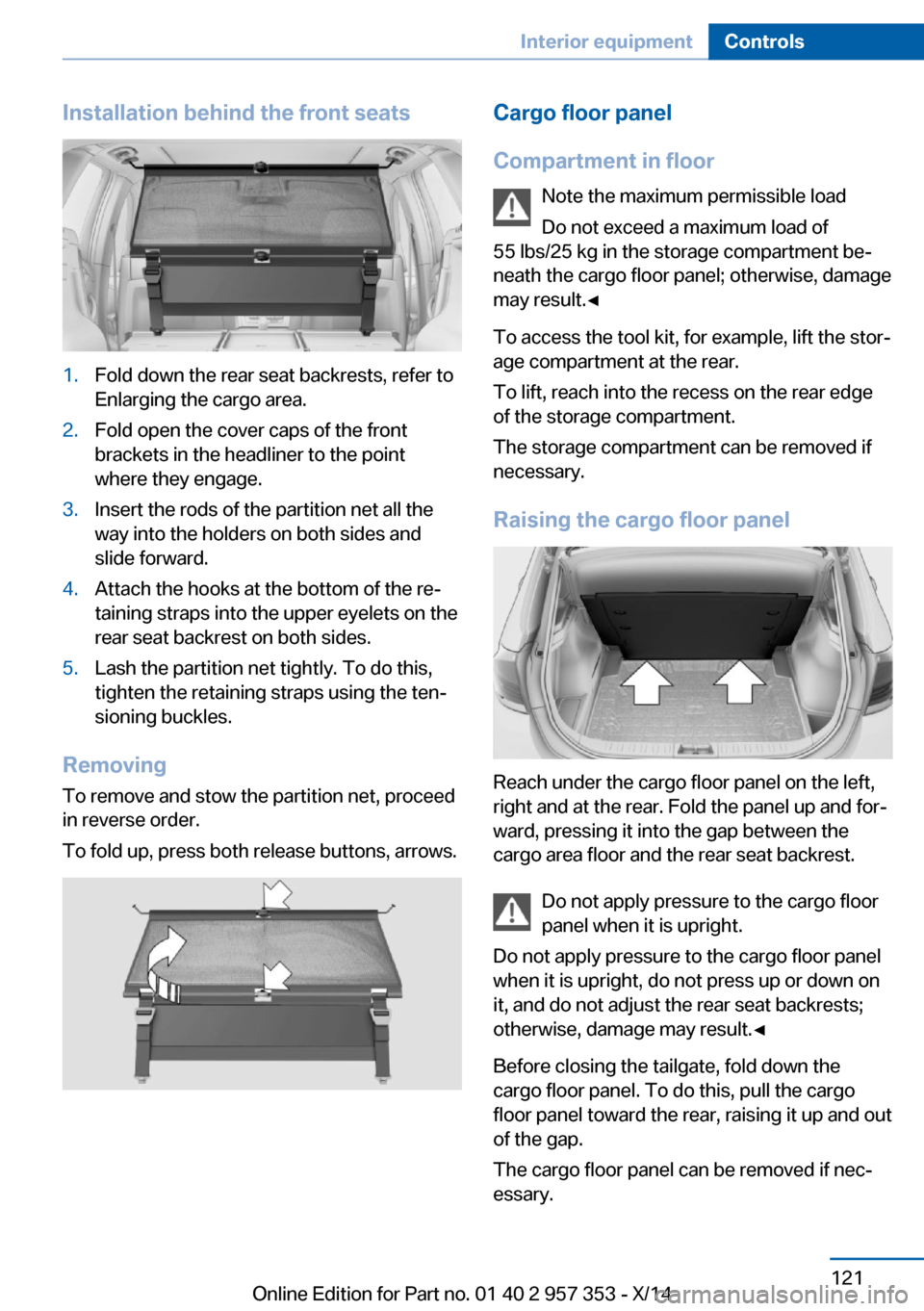
Installation behind the front seats1.Fold down the rear seat backrests, refer to
Enlarging the cargo area.2.Fold open the cover caps of the front
brackets in the headliner to the point
where they engage.3.Insert the rods of the partition net all the
way into the holders on both sides and
slide forward.4.Attach the hooks at the bottom of the re‐
taining straps into the upper eyelets on the
rear seat backrest on both sides.5.Lash the partition net tightly. To do this,
tighten the retaining straps using the ten‐
sioning buckles.
Removing
To remove and stow the partition net, proceed
in reverse order.
To fold up, press both release buttons, arrows.
Cargo floor panel
Compartment in floor Note the maximum permissible load
Do not exceed a maximum load of
55 lbs/25 kg in the storage compartment be‐
neath the cargo floor panel; otherwise, damage
may result.◀
To access the tool kit, for example, lift the stor‐
age compartment at the rear.
To lift, reach into the recess on the rear edge
of the storage compartment.
The storage compartment can be removed if
necessary.
Raising the cargo floor panel
Reach under the cargo floor panel on the left,
right and at the rear. Fold the panel up and for‐
ward, pressing it into the gap between the
cargo area floor and the rear seat backrest.
Do not apply pressure to the cargo floor
panel when it is upright.
Do not apply pressure to the cargo floor panel
when it is upright, do not press up or down on
it, and do not adjust the rear seat backrests;
otherwise, damage may result.◀
Before closing the tailgate, fold down the
cargo floor panel. To do this, pull the cargo
floor panel toward the rear, raising it up and out
of the gap.
The cargo floor panel can be removed if nec‐
essary.
Seite 121Interior equipmentControls121
Online Edition for Part no. 01 40 2 957 353 - X/14
Page 251 of 297
Replacing componentsVehicle equipmentThis chapter describes all series equipment as
well as country-specific and special equipment
offered for this model series. Therefore, it also
describes equipment that may not be found in
your vehicle, for instance due to the selected
special equipment or the country version. This
also applies to safety-related functions and
systems.
When using the features and systems descri‐
bed here, adhere to local regulations.
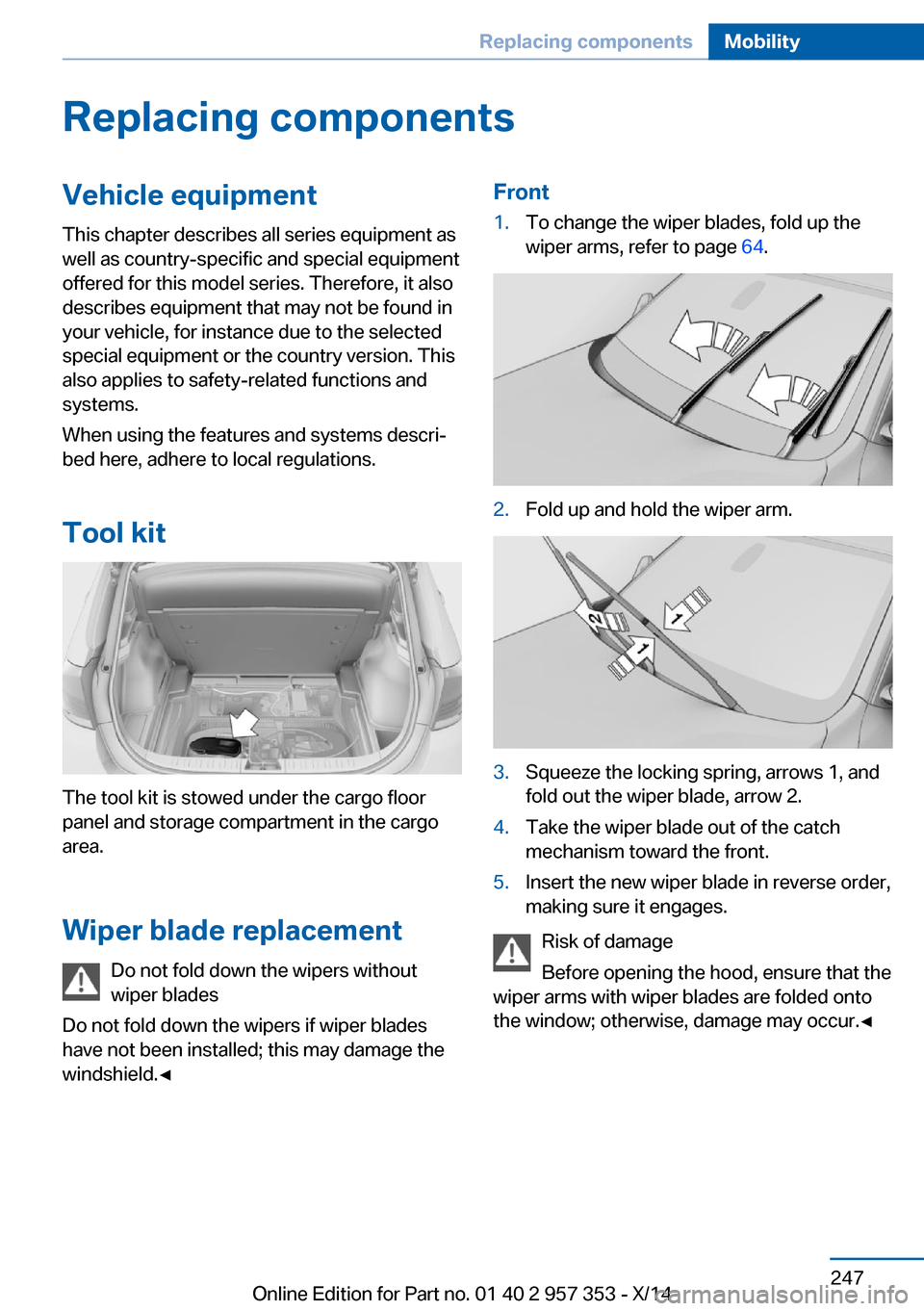
Tool kit
The tool kit is stowed under the cargo floor
panel and storage compartment in the cargo
area.
Wiper blade replacement Do not fold down the wipers without
wiper blades
Do not fold down the wipers if wiper blades
have not been installed; this may damage the
windshield.◀
Front1.To change the wiper blades, fold up the
wiper arms, refer to page 64.2.Fold up and hold the wiper arm.3.Squeeze the locking spring, arrows 1, and
fold out the wiper blade, arrow 2.4.Take the wiper blade out of the catch
mechanism toward the front.5.Insert the new wiper blade in reverse order,
making sure it engages.
Risk of damage
Before opening the hood, ensure that the
wiper arms with wiper blades are folded onto
the window; otherwise, damage may occur.◀
Seite 247Replacing componentsMobility247
Online Edition for Part no. 01 40 2 957 353 - X/14
Page 257 of 297
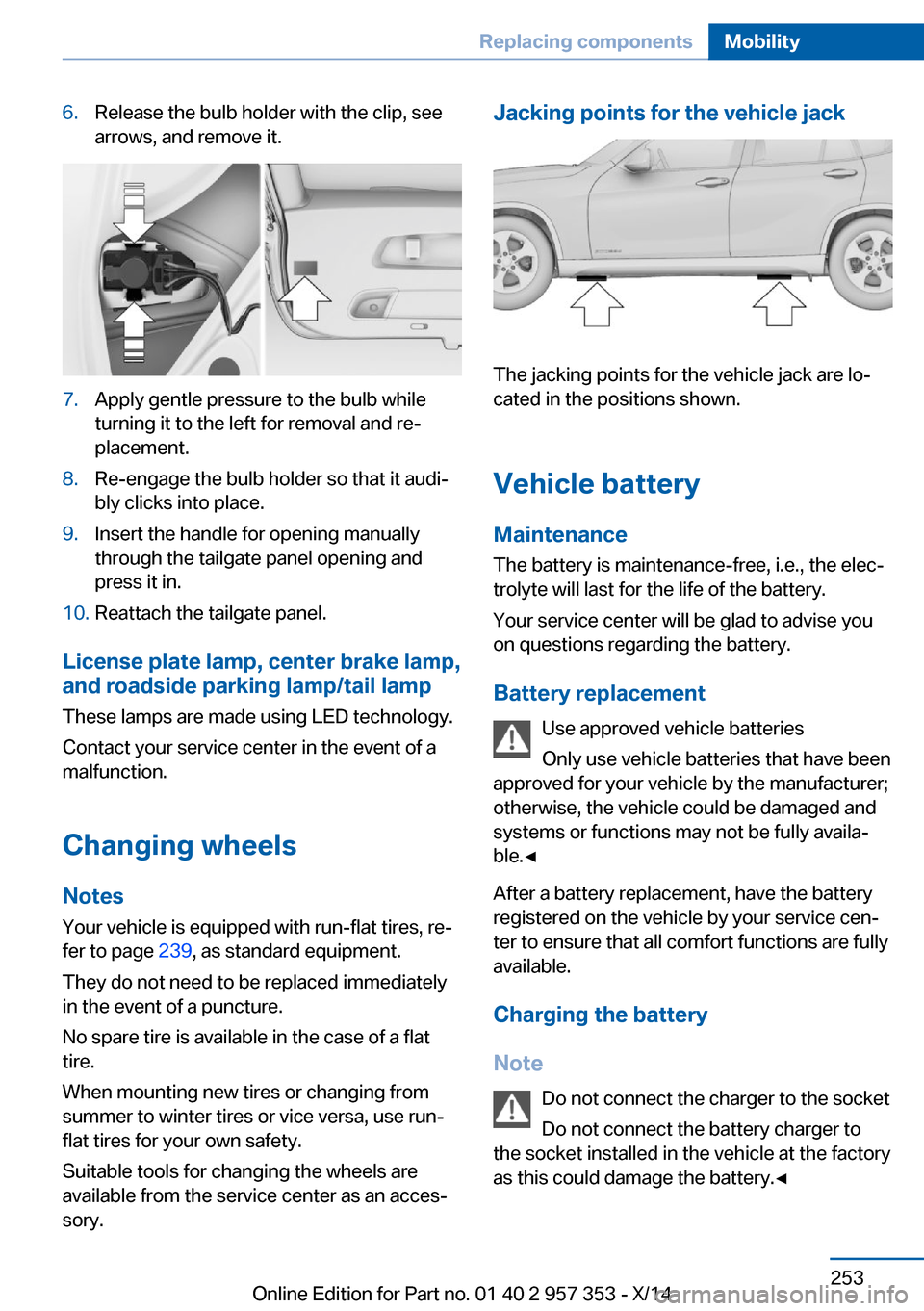
6.Release the bulb holder with the clip, see
arrows, and remove it.7.Apply gentle pressure to the bulb while
turning it to the left for removal and re‐
placement.8.Re-engage the bulb holder so that it audi‐
bly clicks into place.9.Insert the handle for opening manually
through the tailgate panel opening and
press it in.10.Reattach the tailgate panel.
License plate lamp, center brake lamp, and roadside parking lamp/tail lamp
These lamps are made using LED technology.
Contact your service center in the event of a
malfunction.
Changing wheels
Notes
Your vehicle is equipped with run-flat tires, re‐
fer to page 239, as standard equipment.
They do not need to be replaced immediately
in the event of a puncture.
No spare tire is available in the case of a flat
tire.
When mounting new tires or changing from
summer to winter tires or vice versa, use run-
flat tires for your own safety.
Suitable tools for changing the wheels are
available from the service center as an acces‐
sory.
Jacking points for the vehicle jack
The jacking points for the vehicle jack are lo‐
cated in the positions shown.
Vehicle battery
Maintenance
The battery is maintenance-free, i.e., the elec‐ trolyte will last for the life of the battery.
Your service center will be glad to advise you
on questions regarding the battery.
Battery replacement Use approved vehicle batteries
Only use vehicle batteries that have been
approved for your vehicle by the manufacturer;
otherwise, the vehicle could be damaged and
systems or functions may not be fully availa‐
ble.◀
After a battery replacement, have the battery
registered on the vehicle by your service cen‐
ter to ensure that all comfort functions are fully
available.
Charging the battery
Note Do not connect the charger to the socket
Do not connect the battery charger to
the socket installed in the vehicle at the factory
as this could damage the battery.◀
Seite 253Replacing componentsMobility253
Online Edition for Part no. 01 40 2 957 353 - X/14
Page 263 of 297
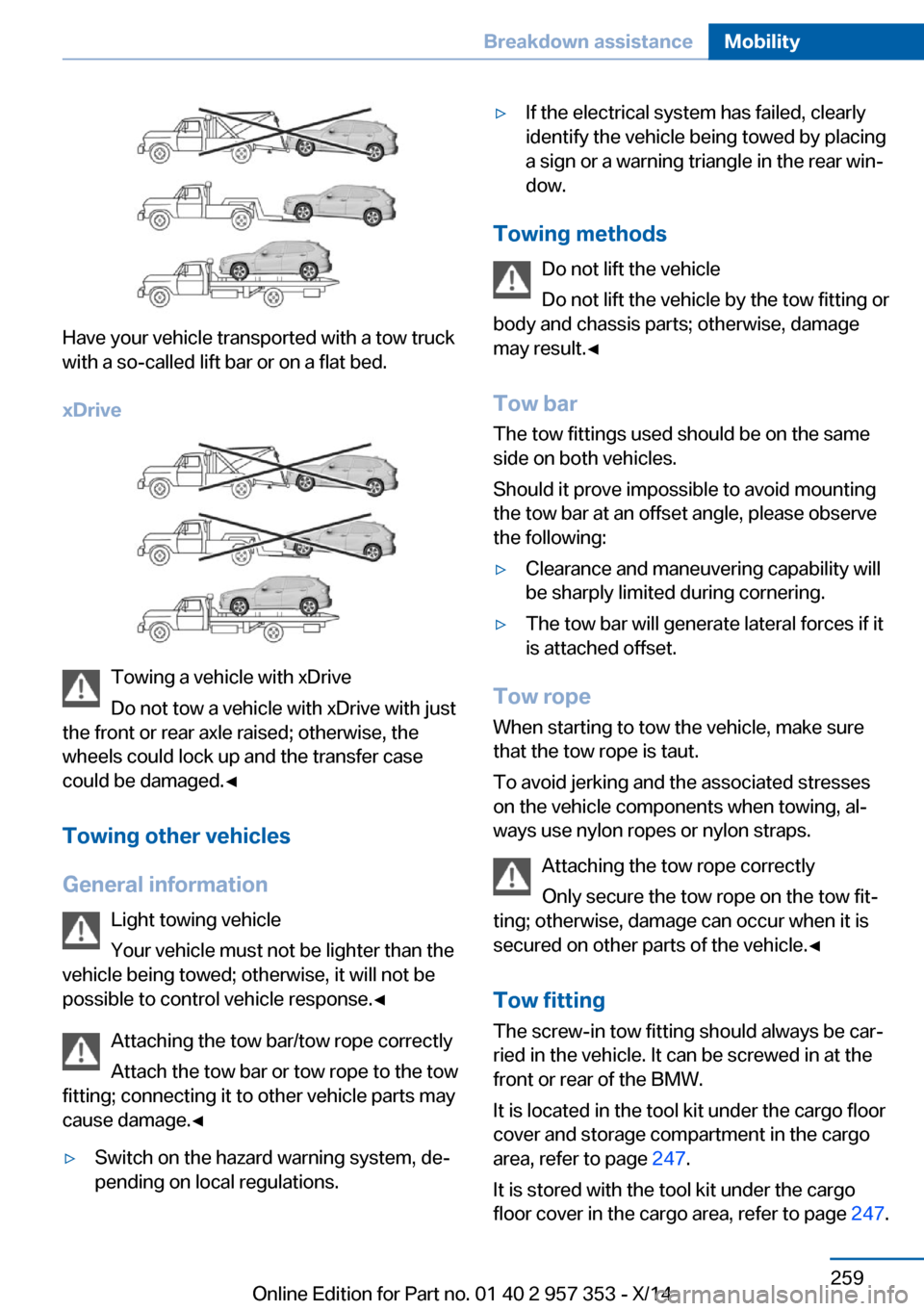
Have your vehicle transported with a tow truck
with a so-called lift bar or on a flat bed.
xDrive
Towing a vehicle with xDrive
Do not tow a vehicle with xDrive with just
the front or rear axle raised; otherwise, the
wheels could lock up and the transfer case
could be damaged.◀
Towing other vehicles
General information Light towing vehicle
Your vehicle must not be lighter than the
vehicle being towed; otherwise, it will not be possible to control vehicle response.◀
Attaching the tow bar/tow rope correctly
Attach the tow bar or tow rope to the tow
fitting; connecting it to other vehicle parts may
cause damage.◀
▷Switch on the hazard warning system, de‐
pending on local regulations.▷If the electrical system has failed, clearly
identify the vehicle being towed by placing
a sign or a warning triangle in the rear win‐
dow.
Towing methods
Do not lift the vehicle
Do not lift the vehicle by the tow fitting or
body and chassis parts; otherwise, damage
may result.◀
Tow bar The tow fittings used should be on the same
side on both vehicles.
Should it prove impossible to avoid mounting
the tow bar at an offset angle, please observe
the following:
▷Clearance and maneuvering capability will
be sharply limited during cornering.▷The tow bar will generate lateral forces if it
is attached offset.
Tow rope
When starting to tow the vehicle, make sure
that the tow rope is taut.
To avoid jerking and the associated stresses
on the vehicle components when towing, al‐
ways use nylon ropes or nylon straps.
Attaching the tow rope correctly
Only secure the tow rope on the tow fit‐
ting; otherwise, damage can occur when it is
secured on other parts of the vehicle.◀
Tow fitting
The screw-in tow fitting should always be car‐
ried in the vehicle. It can be screwed in at the
front or rear of the BMW.
It is located in the tool kit under the cargo floor
cover and storage compartment in the cargo
area, refer to page 247.
It is stored with the tool kit under the cargo floor cover in the cargo area, refer to page 247.
Seite 259Breakdown assistanceMobility259
Online Edition for Part no. 01 40 2 957 353 - X/14
Page 290 of 297
Octane rating, refer to Rec‐ommended fuel grade 228
Odometer 71
Office 207
Oil additives 243
Oil consumption 241
Oil level 241
Oil, refer to Engine oil 241
Oil types, alternative 243
Oil types, approved 243
Old batteries, disposal 254
Onboard Diagnostics OBD 246
Onboard monitor, refer to Control Display 18
Onboard vehicle tool kit 247
Opening and closing– Comfort Access 37– From the inside 35– From the outside 32– Using the door lock 34– Using the remote control 32
Operating concept, iDrive 18
Outside-air mode
– Automatic climate con‐
trol 110
Outside air, refer to Recircu‐
lated air mode 110
Overheating of engine, refer to Coolant temperature 72
P Paint, vehicle 262
Pairing, mobile phone 197
Panic mode 33
Panoramic glass sunroof 41
Panoramic glass sunroof
– Convenient operation 32– Initializing 43– Opening, closing 42– Pinch protection 42– Power failure 43– Remote control 32– Tilting 42
Park Distance Control
PDC 103
Parked-car ventilation 111
Parked vehicle, condensa‐
tion 132
Parking aid, refer to Park Dis‐ tance Control PDC 103
Parking assistant, refer to Park Distance Control
PDC 103
Parking brake 61
Parking brake, refer to Park‐ ing brake 61
Parking lamps 83
Parking lamps/low beams 83
Parking lamps, bulb replace‐ ment 250, 251
Partition net 119
Passenger airbags, deactivat‐ ing 89
Passenger side mirror, tilt‐ ing 49
PDC Park Distance Con‐ trol 103
Performance Control 99
Personal information 207
Personal Profile 30
Pinch protection– Panoramic glass sunroof 42– Windows 41
Plastic, care 263
Pollen
– Refer to Microfilter/acti‐
vated-charcoal filter with
automatic climate con‐
trol 111
Poor road operation 132
Position, storing 146
Postal code, entering in navi‐ gation 145
Power failure 254
Power windows
– Safety switch 41
Power windows, opening and
closing 40
Power windows, refer to Win‐ dows 40
Prescribed engine oils, refer to Approved engine oils 243
Pressure, tires 230
Pressure warning, tires 91
Profile depth, refer to Mini‐ mum tread depth 237
Profile, tires 236
Programmable memory but‐ tons, iDrive 22
Protection function, refer to
Pinch protection– Panoramic glass sunroof 42
Protective function, refer to
Pinch protection
– Windows 41
Push-and-turn switch, refer to
Controller 19
R Radiator fluid, refer to Cool‐ ant 244
Radio-operated key, refer to Remote control with
integrated key 30
Radio ready state 57
Radio ready state, switched off 58
Radio ready state, switched on 57
Radio setting, refer to Radio ready state 57
Rain sensor 63
Random 175
Random playback 175
Range 73
RDS 167
Reading lights 87
Reading out loud 214
Rear lamps, refer to Tail lamps 251
Rear luggage rack 136
Rear seat backrest
– Foldable 119Seite 286ReferenceEverything from A to Z286
Online Edition for Part no. 01 40 2 957 353 - X/14
Page 293 of 297
Storage compartmentnets 125
Storage compart‐ ments 123, 125
Storage, tires 239
Storing the seat position, re‐ fer to Seat and mirror mem‐
ory 48
Storing the vehicle 264
Street, entering for naviga‐ tion 145
Summer tires, refer to Wheels and tires 230
Summer tires, tread 236
Sun visor 117
Switches, refer to Cockpit 12
Switching off, engine 59
Switching off, vehicle 59
Switch-on times, parked-car ventilation 112
Symbols 6
T Tachometer 72
Tailgate 35
Tailgate– Comfort Access 37– Emergency operation, refer
to Opening manually 36– Opening from the inside 36– Opening from the out‐
side 36– Opening manually 36– Remote control 33
Tail lamp, bulb replace‐
ment 253
Tail lamps 251
Tail lamps
– Bulb replacement 252
Tank gauge, refer to Fuel
gauge 72
Tasks 213
Technical changes, refer to Safety 6
Technical data 268
Telephone 196
Telephone, adjusting the vol‐
ume 200
Telephone, installation loca‐ tion, refer to Center arm‐
rest 124
TeleService 219
Temperature– Automatic climate con‐
trol 109– Changing the unit of meas‐
ure 75
Temperature, coolant, refer to
Coolant temperature 72
Temperature display
– External temperature 71– External temperature warn‐
ing 71– Setting the unit 75
Temperature, engine oil 72
Temperature warning 71
Text messages 210
Theft alarm system, refer to Alarm system 39
Thigh support adjustment 45
Third brake lamp, refer to
Center brake lamp 253
Tilt alarm sensor 40
Tilting the passenger side mirror 49
Time
– Setting the time 75– Setting the time zone 76
Tire age 235
Tire identification marks 235
Tire inflation pressure 230
Tire inflation pressure, check‐ ing 230
Tire pressure monitor, refer to Flat Tire Monitor 91
Tire Pressure Monitor TPM 93
Tire Quality Grading 236
Tires
– Inflation pressure 230
Tires, breaking in 130
Tires, changing 237
Tires, condition 236
Tires, damage 237
Tire size 235
Tires, minimum tread 237
Tires, retreaded tires 238
Tires, run-flat tires 239
Tires, storage 239
Tire tread 236
Toll roads, route 153
Tone 164
Tool kit, refer to Onboard ve‐ hicle tool kit 247
Tools, refer to Onboard vehi‐ cle tool kit 247
Tow bar 259
Tow fitting 259
Towing 257
Towing another vehicle 258
Towing, being towed 258
Towing with automatic trans‐ mission 258
Town/city, navigation 145
Tow rope 259
Tow-starting 257, 260
TPM Tire Pressure Moni‐ tor 93
Traction control 98
Traffic bulletins, naviga‐ tion 157
Transmission– Automatic transmission with
Steptronic 65– Overriding selector lever
lock in case of automatic
transmission with Step‐
tronic 67
Transmission, automatic
transmission with Step‐
tronic 68
Transmission lock
– Refer to Changing selector
lever positions 66– Refer to P Park 66
Transmission positions, auto‐
matic transmission with
Steptronic 68
Transporting children safely 52
Seite 289Everything from A to ZReference289
Online Edition for Part no. 01 40 2 957 353 - X/14
Page 295 of 297
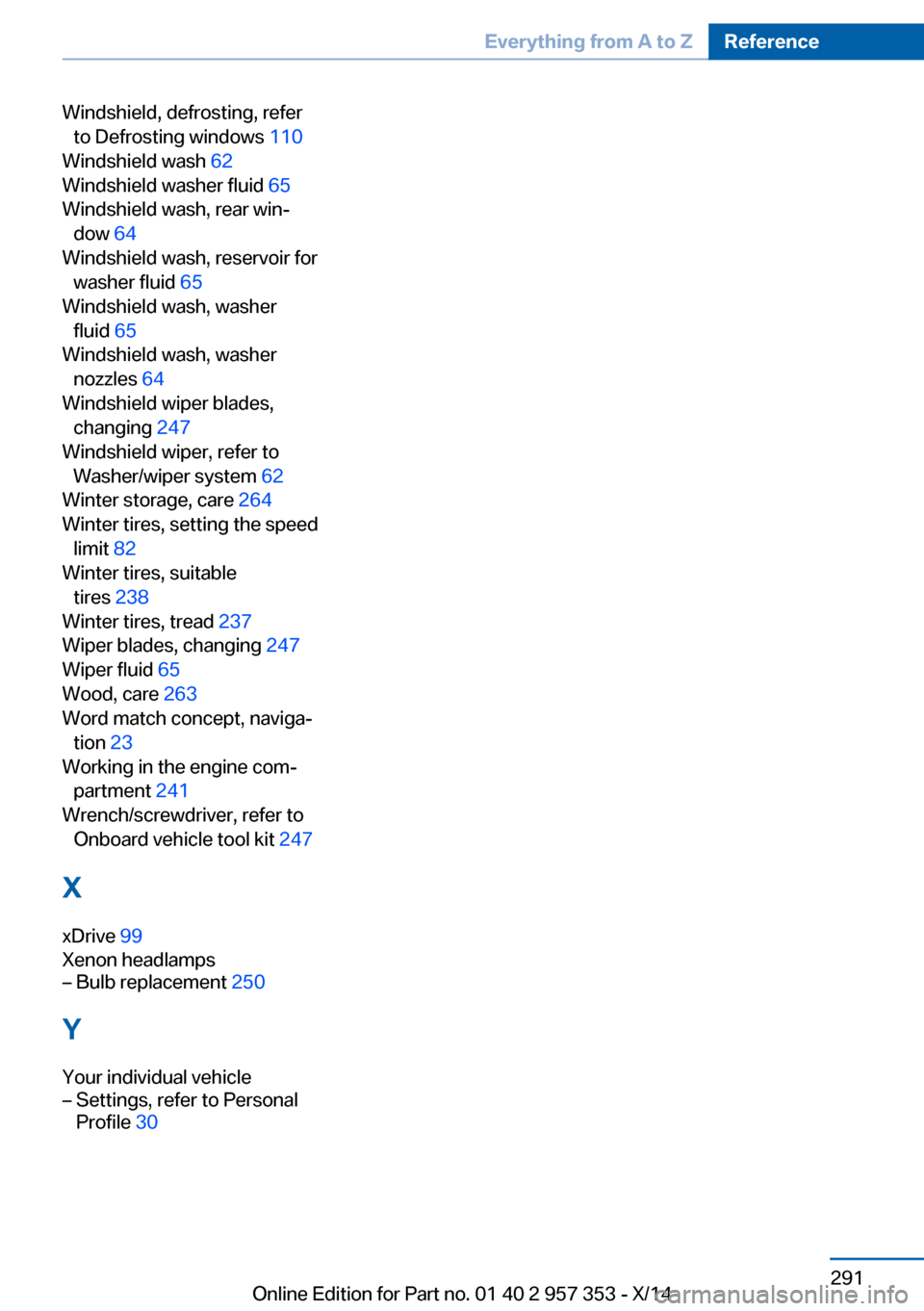
Windshield, defrosting, referto Defrosting windows 110
Windshield wash 62
Windshield washer fluid 65
Windshield wash, rear win‐ dow 64
Windshield wash, reservoir for washer fluid 65
Windshield wash, washer fluid 65
Windshield wash, washer nozzles 64
Windshield wiper blades, changing 247
Windshield wiper, refer to Washer/wiper system 62
Winter storage, care 264
Winter tires, setting the speed limit 82
Winter tires, suitable tires 238
Winter tires, tread 237
Wiper blades, changing 247
Wiper fluid 65
Wood, care 263
Word match concept, naviga‐ tion 23
Working in the engine com‐ partment 241
Wrench/screwdriver, refer to Onboard vehicle tool kit 247
X xDrive 99
Xenon headlamps– Bulb replacement 250
Y
Your individual vehicle
– Settings, refer to Personal
Profile 30Seite 291Everything from A to ZReference291
Online Edition for Part no. 01 40 2 957 353 - X/14