ECU BMW X1 2015 E84 Owner's Guide
[x] Cancel search | Manufacturer: BMW, Model Year: 2015, Model line: X1, Model: BMW X1 2015 E84Pages: 297, PDF Size: 7.01 MB
Page 209 of 297
Snap-in adapter
General information More information on compatible snap-in
adapters that support the functions of the mo‐
bile phone is available at the service center.
Notes At high temperatures, the charging function of
the mobile phone may be limited and functions
may not be executed.
When using the mobile phone via the vehicle,
note the operating instructions of the mobile
phone.
Installation position
In the center armrest.
Inserting/removing the snap-in
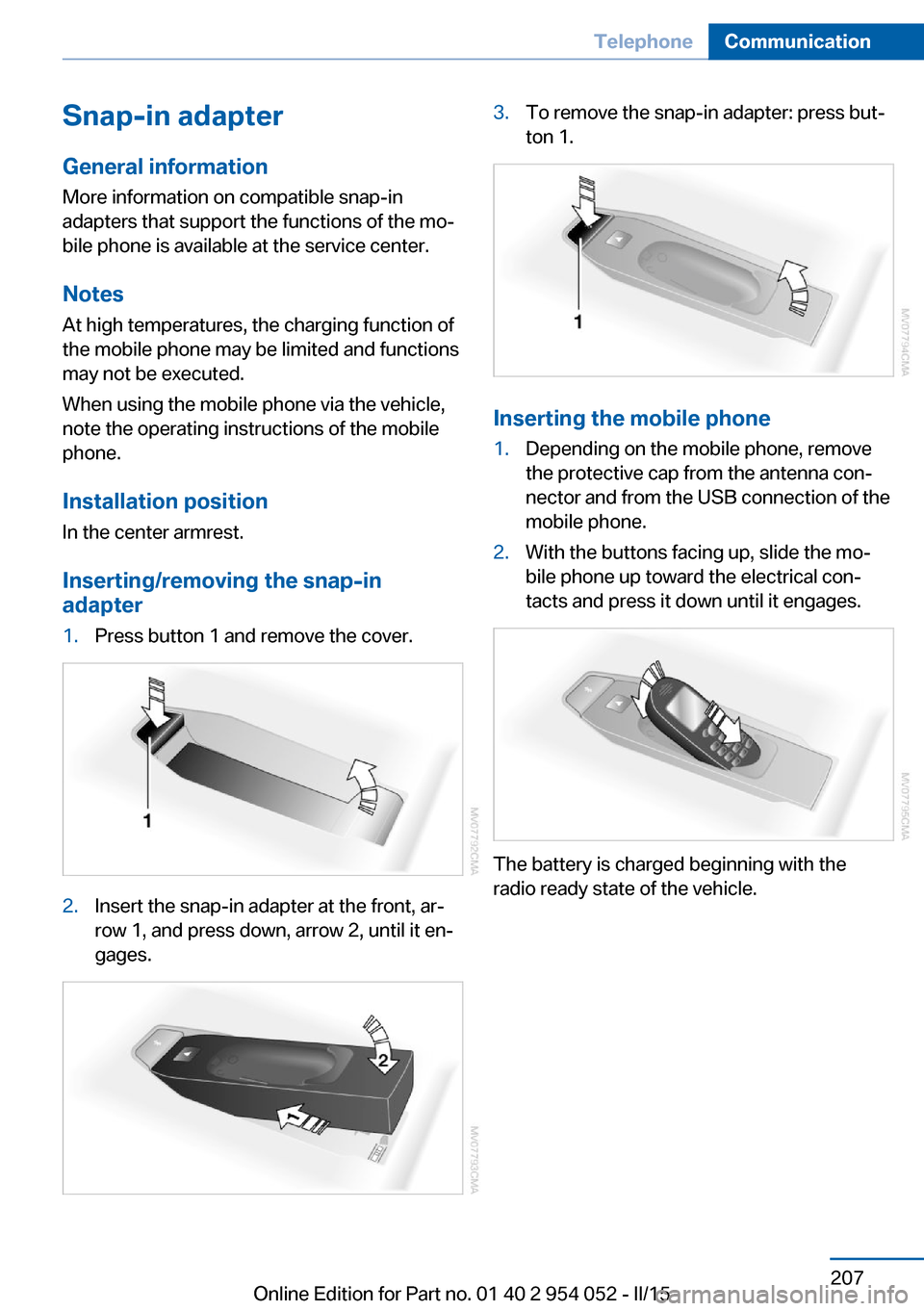
adapter1.Press button 1 and remove the cover.2.Insert the snap-in adapter at the front, ar‐
row 1, and press down, arrow 2, until it en‐
gages.3.To remove the snap-in adapter: press but‐
ton 1.
Inserting the mobile phone
1.Depending on the mobile phone, remove
the protective cap from the antenna con‐
nector and from the USB connection of the
mobile phone.2.With the buttons facing up, slide the mo‐
bile phone up toward the electrical con‐
tacts and press it down until it engages.
The battery is charged beginning with the
radio ready state of the vehicle.
Seite 207TelephoneCommunication207
Online Edition for Part no. 01 40 2 954 052 - II/15
Page 245 of 297
Hood
Opening the hood Working in the engine compartment
Never attempt to perform any service or
repair operations on your vehicle without the necessary professional technical training.
If you are unfamiliar with the statutory guide‐
lines, have any work on the vehicle performed
only by a service center.
If this work is not carried out properly, there is
the danger of subsequent damage and related
safety hazards.◀
Risk of damage
Before opening the hood, ensure that the
wiper arms with wiper blades are folded onto
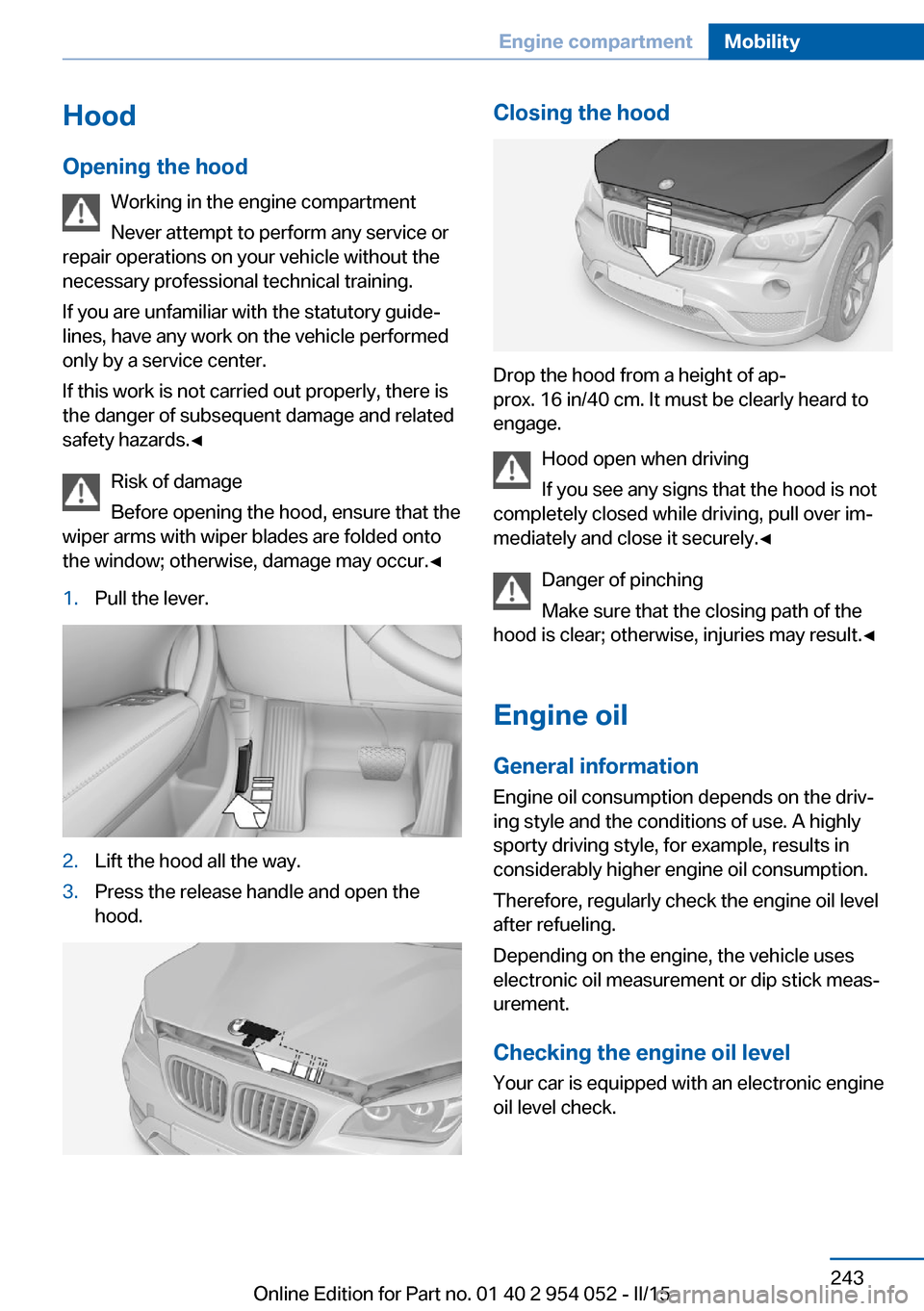
the window; otherwise, damage may occur.◀1.Pull the lever.2.Lift the hood all the way.3.Press the release handle and open the
hood.Closing the hood
Drop the hood from a height of ap‐
prox. 16 in/40 cm. It must be clearly heard to
engage.
Hood open when driving
If you see any signs that the hood is not
completely closed while driving, pull over im‐
mediately and close it securely.◀
Danger of pinching
Make sure that the closing path of the
hood is clear; otherwise, injuries may result.◀
Engine oil
General information Engine oil consumption depends on the driv‐
ing style and the conditions of use. A highly
sporty driving style, for example, results in
considerably higher engine oil consumption.
Therefore, regularly check the engine oil level
after refueling.
Depending on the engine, the vehicle uses
electronic oil measurement or dip stick meas‐
urement.
Checking the engine oil level Your car is equipped with an electronic engine
oil level check.
Seite 243Engine compartmentMobility243
Online Edition for Part no. 01 40 2 954 052 - II/15
Page 258 of 297
General information
Ensure that the battery is sufficiently charged
to achieve the full battery life.
It may be necessary to charge the battery in
the following cases:▷When the vehicle is frequently used to
drive short distances.▷When the vehicle has not been driven for
more than one month.
Starting aid terminals
Only charge using the starting aid terminals,
refer to page 259, in the engine compartment
while the engine is switched off.
Power failure
After a temporary power loss, some equipment
needs to be reinitialized.
Individual settings need to be reprogrammed:
▷Seat and mirror memory: store the posi‐
tions again, refer to page 50.▷Time: update, refer to page 77.▷Date: update, refer to page 78.▷Radio station: save again, refer to
page 168.▷Navigation system: wait for the navigation
system to be operational.▷Panoramic glass sunroof: it may only be
possible to tilt the roof. Have the system
initialized by the service center.▷Digital compass: recalibrate, refer to
page 117.▷xDrive: the system automatically initializes
as you drive. During this time, indicator
lamps light up. If the lamps do not disap‐
pear during the current trip, have the sys‐
tem checked.
Disposing of old batteries
Have old batteries disposed of by your
service center or bring them to a recy‐
cling center.
Maintain the battery in an upright position for
transport and storage. Secure the battery so
that it does not tip over during transport.
Fuses Replacing fuses
Never attempt to repair a blown fuse and
do not replace a defective fuse with a substi‐
tute of another color or amperage rating; this
could lead to a circuit overload, ultimately re‐
sulting in a fire in the vehicle.◀
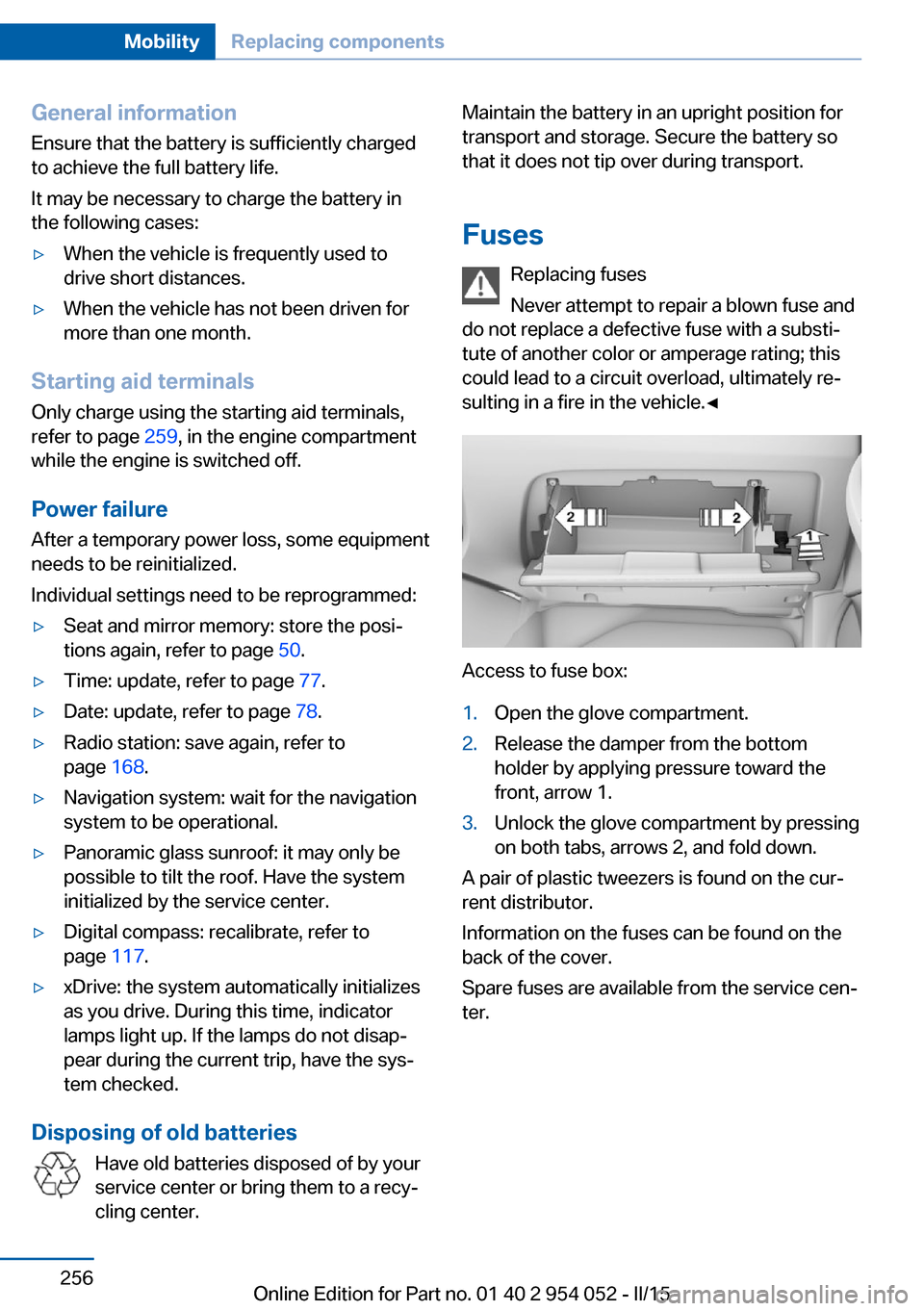
Access to fuse box:
1.Open the glove compartment.2.Release the damper from the bottom
holder by applying pressure toward the
front, arrow 1.3.Unlock the glove compartment by pressing
on both tabs, arrows 2, and fold down.
A pair of plastic tweezers is found on the cur‐
rent distributor.
Information on the fuses can be found on the
back of the cover.
Spare fuses are available from the service cen‐
ter.
Seite 256MobilityReplacing components256
Online Edition for Part no. 01 40 2 954 052 - II/15
Page 263 of 297
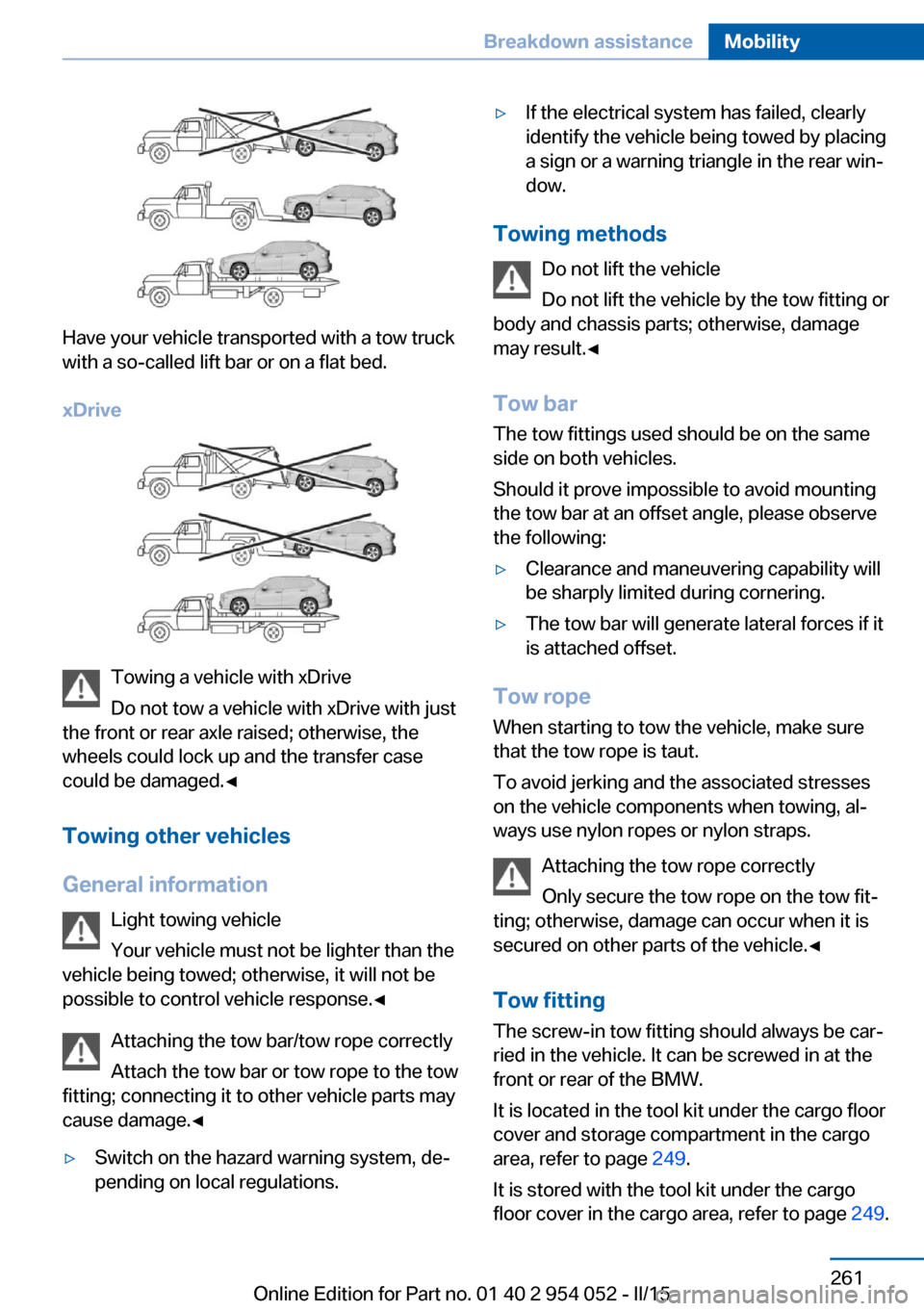
Have your vehicle transported with a tow truck
with a so-called lift bar or on a flat bed.
xDrive
Towing a vehicle with xDrive
Do not tow a vehicle with xDrive with just
the front or rear axle raised; otherwise, the
wheels could lock up and the transfer case
could be damaged.◀
Towing other vehicles
General information Light towing vehicle
Your vehicle must not be lighter than the
vehicle being towed; otherwise, it will not be possible to control vehicle response.◀
Attaching the tow bar/tow rope correctly
Attach the tow bar or tow rope to the tow
fitting; connecting it to other vehicle parts may
cause damage.◀
▷Switch on the hazard warning system, de‐
pending on local regulations.▷If the electrical system has failed, clearly
identify the vehicle being towed by placing
a sign or a warning triangle in the rear win‐
dow.
Towing methods
Do not lift the vehicle
Do not lift the vehicle by the tow fitting or
body and chassis parts; otherwise, damage
may result.◀
Tow bar The tow fittings used should be on the same
side on both vehicles.
Should it prove impossible to avoid mounting
the tow bar at an offset angle, please observe
the following:
▷Clearance and maneuvering capability will
be sharply limited during cornering.▷The tow bar will generate lateral forces if it
is attached offset.
Tow rope
When starting to tow the vehicle, make sure
that the tow rope is taut.
To avoid jerking and the associated stresses
on the vehicle components when towing, al‐
ways use nylon ropes or nylon straps.
Attaching the tow rope correctly
Only secure the tow rope on the tow fit‐
ting; otherwise, damage can occur when it is
secured on other parts of the vehicle.◀
Tow fitting
The screw-in tow fitting should always be car‐
ried in the vehicle. It can be screwed in at the
front or rear of the BMW.
It is located in the tool kit under the cargo floor
cover and storage compartment in the cargo
area, refer to page 249.
It is stored with the tool kit under the cargo floor cover in the cargo area, refer to page 249.
Seite 261Breakdown assistanceMobility261
Online Edition for Part no. 01 40 2 954 052 - II/15
Page 268 of 297
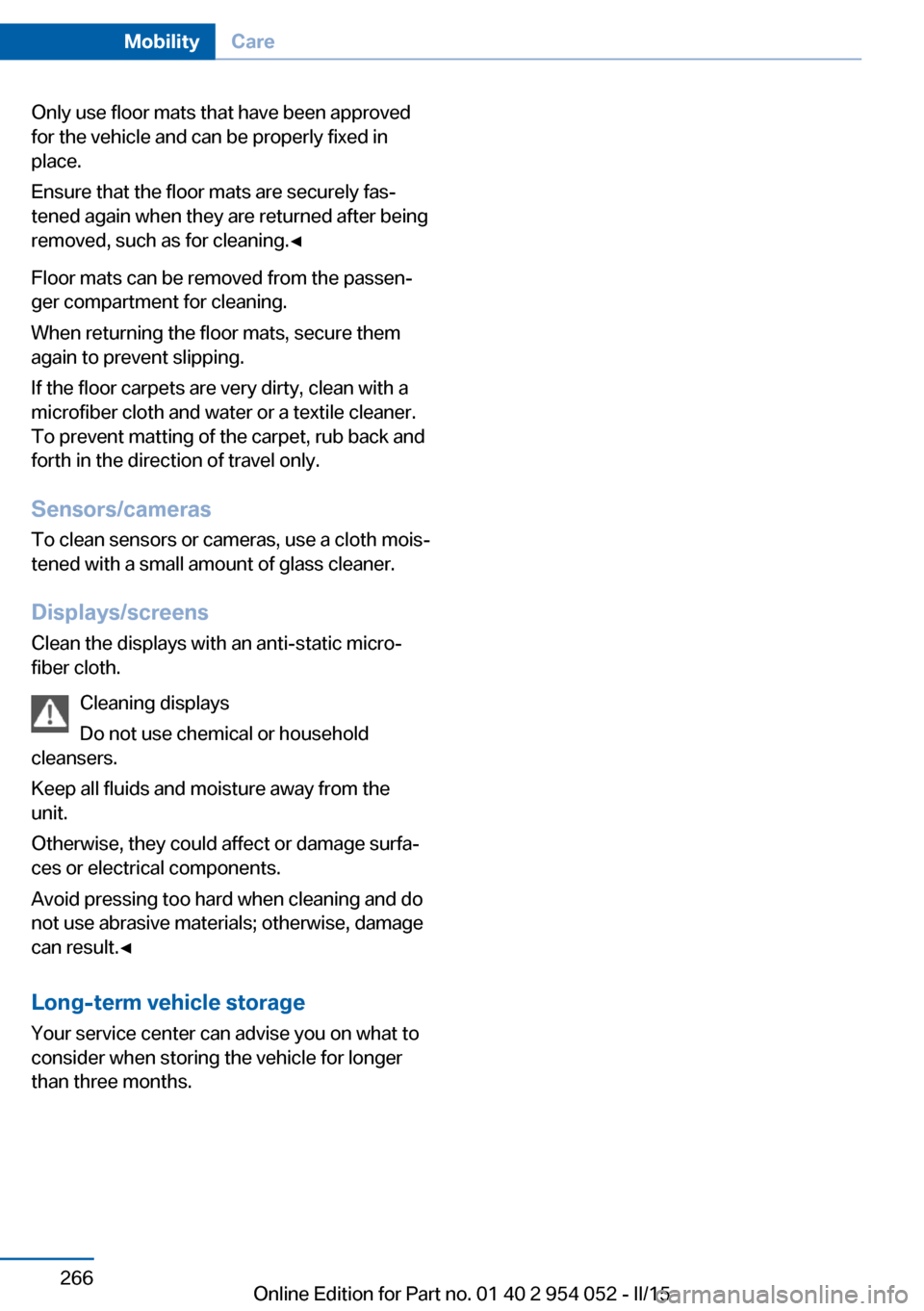
Only use floor mats that have been approved
for the vehicle and can be properly fixed in
place.
Ensure that the floor mats are securely fas‐
tened again when they are returned after being
removed, such as for cleaning.◀
Floor mats can be removed from the passen‐
ger compartment for cleaning.
When returning the floor mats, secure them
again to prevent slipping.
If the floor carpets are very dirty, clean with a
microfiber cloth and water or a textile cleaner.
To prevent matting of the carpet, rub back and
forth in the direction of travel only.
Sensors/cameras
To clean sensors or cameras, use a cloth mois‐
tened with a small amount of glass cleaner.
Displays/screens
Clean the displays with an anti-static micro‐
fiber cloth.
Cleaning displays
Do not use chemical or household
cleansers.
Keep all fluids and moisture away from the
unit.
Otherwise, they could affect or damage surfa‐
ces or electrical components.
Avoid pressing too hard when cleaning and do
not use abrasive materials; otherwise, damage
can result.◀
Long-term vehicle storage Your service center can advise you on what to
consider when storing the vehicle for longer
than three months.Seite 266MobilityCare266
Online Edition for Part no. 01 40 2 954 052 - II/15
Page 284 of 297
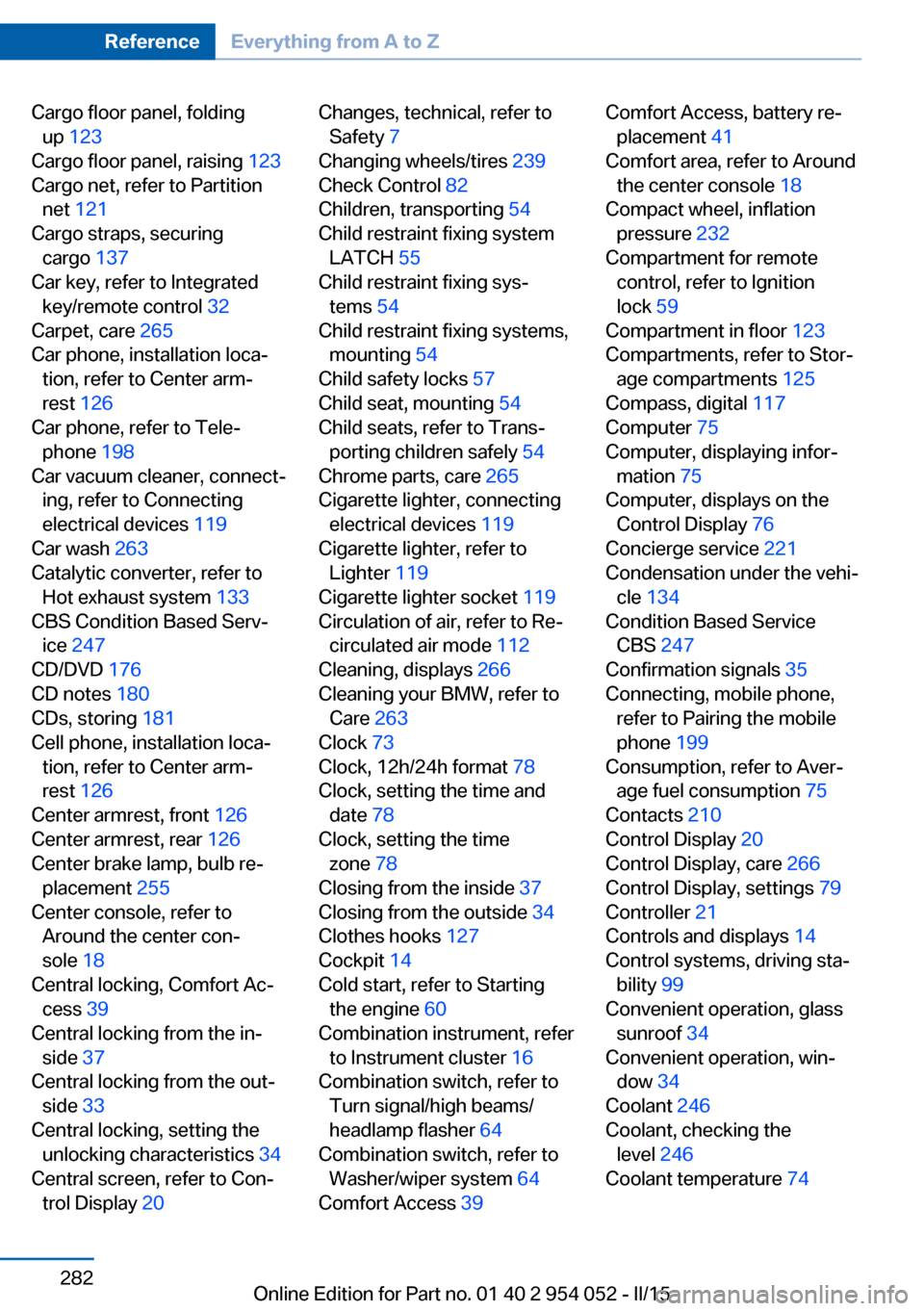
Cargo floor panel, foldingup 123
Cargo floor panel, raising 123
Cargo net, refer to Partition net 121
Cargo straps, securing cargo 137
Car key, refer to Integrated key/remote control 32
Carpet, care 265
Car phone, installation loca‐ tion, refer to Center arm‐
rest 126
Car phone, refer to Tele‐ phone 198
Car vacuum cleaner, connect‐ ing, refer to Connecting
electrical devices 119
Car wash 263
Catalytic converter, refer to Hot exhaust system 133
CBS Condition Based Serv‐ ice 247
CD/DVD 176
CD notes 180
CDs, storing 181
Cell phone, installation loca‐ tion, refer to Center arm‐
rest 126
Center armrest, front 126
Center armrest, rear 126
Center brake lamp, bulb re‐ placement 255
Center console, refer to Around the center con‐
sole 18
Central locking, Comfort Ac‐ cess 39
Central locking from the in‐ side 37
Central locking from the out‐ side 33
Central locking, setting the unlocking characteristics 34
Central screen, refer to Con‐ trol Display 20 Changes, technical, refer to
Safety 7
Changing wheels/tires 239
Check Control 82
Children, transporting 54
Child restraint fixing system LATCH 55
Child restraint fixing sys‐ tems 54
Child restraint fixing systems, mounting 54
Child safety locks 57
Child seat, mounting 54
Child seats, refer to Trans‐ porting children safely 54
Chrome parts, care 265
Cigarette lighter, connecting electrical devices 119
Cigarette lighter, refer to Lighter 119
Cigarette lighter socket 119
Circulation of air, refer to Re‐ circulated air mode 112
Cleaning, displays 266
Cleaning your BMW, refer to Care 263
Clock 73
Clock, 12h/24h format 78
Clock, setting the time and date 78
Clock, setting the time zone 78
Closing from the inside 37
Closing from the outside 34
Clothes hooks 127
Cockpit 14
Cold start, refer to Starting the engine 60
Combination instrument, refer to Instrument cluster 16
Combination switch, refer to Turn signal/high beams/
headlamp flasher 64
Combination switch, refer to Washer/wiper system 64
Comfort Access 39 Comfort Access, battery re‐
placement 41
Comfort area, refer to Around the center console 18
Compact wheel, inflation pressure 232
Compartment for remote control, refer to Ignition
lock 59
Compartment in floor 123
Compartments, refer to Stor‐ age compartments 125
Compass, digital 117
Computer 75
Computer, displaying infor‐ mation 75
Computer, displays on the Control Display 76
Concierge service 221
Condensation under the vehi‐ cle 134
Condition Based Service CBS 247
Confirmation signals 35
Connecting, mobile phone, refer to Pairing the mobile
phone 199
Consumption, refer to Aver‐ age fuel consumption 75
Contacts 210
Control Display 20
Control Display, care 266
Control Display, settings 79
Controller 21
Controls and displays 14
Control systems, driving sta‐ bility 99
Convenient operation, glass sunroof 34
Convenient operation, win‐ dow 34
Coolant 246
Coolant, checking the level 246
Coolant temperature 74 Seite 282ReferenceEverything from A to Z282
Online Edition for Part no. 01 40 2 954 052 - II/15
Page 286 of 297
Emergency operation, doorlock, refer to Manual opera‐
tion 37
Emergency operation, fuel filler flap, unlocking man‐
ually 229
Emergency Request 257
Energy-conscious driving, re‐ fer to Current fuel consump‐
tion 74
Energy, saving, Automatic Start/Stop function 61
Energy, saving, refer to Sav‐ ing fuel 139
Engine, breaking in 132
Engine compartment 242
Engine coolant, refer to Cool‐ ant 246
Engine oil, adding 245
Engine oil, additives, refer to Approved engine oils 245
Engine oil, alternative oil types 245
Engine oil, BMW maintenance system 247
Engine oil change intervals, refer to Service require‐
ments 80
Engine oil, checking the level 243
Engine oil, filling ca‐ pacity 271
Engine oil temperature 74
Engine oil types, alterna‐ tive 245
Engine oil types, ap‐ proved 245
Engine, overheating, refer to Coolant temperature 74
Engine start, assistance 258
Engine, starting 60
Engine, starting, Comfort Ac‐ cess 39
Engine, starting, Start/Stop button 59 Engine, stopping, Start/Stop
button 59
Engine, switching off 61
Environmentally friendly driv‐ ing, refer to Current fuel
consumption 74
Equalizer 166
Equipment, interior 115
ESP Electronic Stability Pro‐ gram, refer to Dynamic Sta‐
bility Control DSC 99
Exchanging wheels/tires 239
Exhaust system 133
Exterior mirrors 51
Exterior mirrors, adjusting 51
Exterior mirrors, automatic dimming 52
Exterior mirrors, automatic heating 52
Exterior mirrors, folding in and out 52
External audio device 126
External devices 186
External temperature dis‐ play 73
External temperature display, changing the unit of meas‐
ure 77
External temperature display, on computer 77
External temperature warn‐ ing 73
Eyes for securing cargo 137
F
Fader 166
Failure messages, refer to Check Control 82
False alarm, avoiding uninten‐ tional alarms 42
False alarm, ending an alarm 41
Fastening safety belts, refer to Safety belts 48 Fault messages, refer to
Check Control 82
Filling capacities 271
Filter, refer to Microfilter/acti‐ vated-charcoal filter with au‐
tomatic climate control 113
Fine wood, care 265
First aid kit 258
Fitting for towing 261
Flashing when locking/ unlocking 35
Flat Tire Monitor FTM 93
Flat Tire Monitor FTM, snow chains 241
Flat tire, run-flat tires 241
Flat tire, Tire Pressure Moni‐ tor TPM 95
Flat tire, warning light 94, 96
Flat tire, wheel change 255
Flooding, refer to Driving through water 133
Floor carpet, care 265
Floor mats, care 265
FM/AM station 168
Fog lamps, indicator lamp 88
Fog lights 88
Foldable rear seat back‐ rest 121
Folding sun visor 119
Foot brake 133
Footwell lights, refer to Inte‐ rior lights 89
For your own safety 7
Four-wheel drive, refer to xDrive 101
Front airbags 90
Front fog lights 88
Front passenger airbags, de‐ activating 91
FTM Flat Tire Monitor 93
Fuel 230
Fuel, additives 230
Fuel, average consump‐ tion 75
Fuel cap 228
Fuel cap, closing 228 Seite 284ReferenceEverything from A to Z284
Online Edition for Part no. 01 40 2 954 052 - II/15
Page 288 of 297
IIce warning, refer to External temperature warning 73
Icy roads, refer to External temperature warning 73
Identification marks, tires 237
Identification number, refer to Engine compartment 242
iDrive 20
iDrive, changing settings 79
iDrive, changing the date and time 78
iDrive, changing the lan‐ guage 79
iDrive, changing the units of measure and display for‐
mat 77
iDrive, setting the bright‐ ness 80
Ignition 60
Ignition key position 1, refer to Radio ready state 59
Ignition key position 2, refer to Ignition on 60
Ignition key, refer to Remote control with integrated
key 32
Ignition lock 59
Ignition, switched off 60
Ignition, switched on 60
Indication of a flat tire 94, 96
Indicator and warning lights 17
Individual settings, refer to Personal Profile 32
Inflation pressure monitor, re‐ fer to Flat Tire Monitor 93
Inflation pressure, refer to Tire inflation pressure 232
Information on the navigation data 144
Initialization after power fail‐ ure 256
Initializing– Refer to Setting the time
and date 78Initializing, compass, refer to
Calibrating 118
Initializing, Flat Tire Monitor FTM 93
Initializing panoramic glass sunroof 45
Initializing, Tire Pressure Monitor TPM 96
Inside brake lamps, bulb re‐ placement 254
Installation location, tele‐ phone 126
Instrument cluster 16
Instrument lighting 89
Instrument panel, refer to In‐ strument cluster 16
Instruments, refer to Cock‐ pit 14
Integrated key 32
Integrated universal remote control 115
Interactive map 151
Interior equipment 115
Interior lights 89
Interior lights, remote con‐ trol 35
Interior mirror 52
Interior motion sensor 42
Interior rearview mirror, auto‐ matic dimming 52
Interior rearview mirror, com‐ pass 117
Interior temperature, setting, automatic climate con‐
trol 110
Interlock, refer to Disengag‐ ing the remote control 67
Intermediate destina‐ tions 153
Internet page 6
Intersection, entering for navi‐ gation 147 J
Jacking points for the vehicle jack 255
Jack, refer to Vehicle jack 255
Joystick, refer to Selector lever 70
Jump-starting 258
K
Keyless Go, refer to Comfort Access 39
Keyless opening and closing, refer to Comfort Access 39
Key Memory, refer to Per‐ sonal Profile 32
Key, refer to Integrated key/ remote control 32
Kickdown, automatic trans‐ mission with Step‐
tronic 68, 70
Knee airbag 90
Knocking control 230
L Label, run-flat tire 241
Lamp and bulb replacement, light replacement 250
Lamps 85
Lamps, automatic headlight control 86
Lamps, High-beam Assis‐ tant 87
Lamps, replacing, refer to Lamp and bulb replace‐
ment 250
Language, changing on the Control Display 79
Lap-and-shoulder belt, refer to Safety belts 48
Lashing eyes, securing cargo 137 Seite 286ReferenceEverything from A to Z286
Online Edition for Part no. 01 40 2 954 052 - II/15
Page 291 of 297
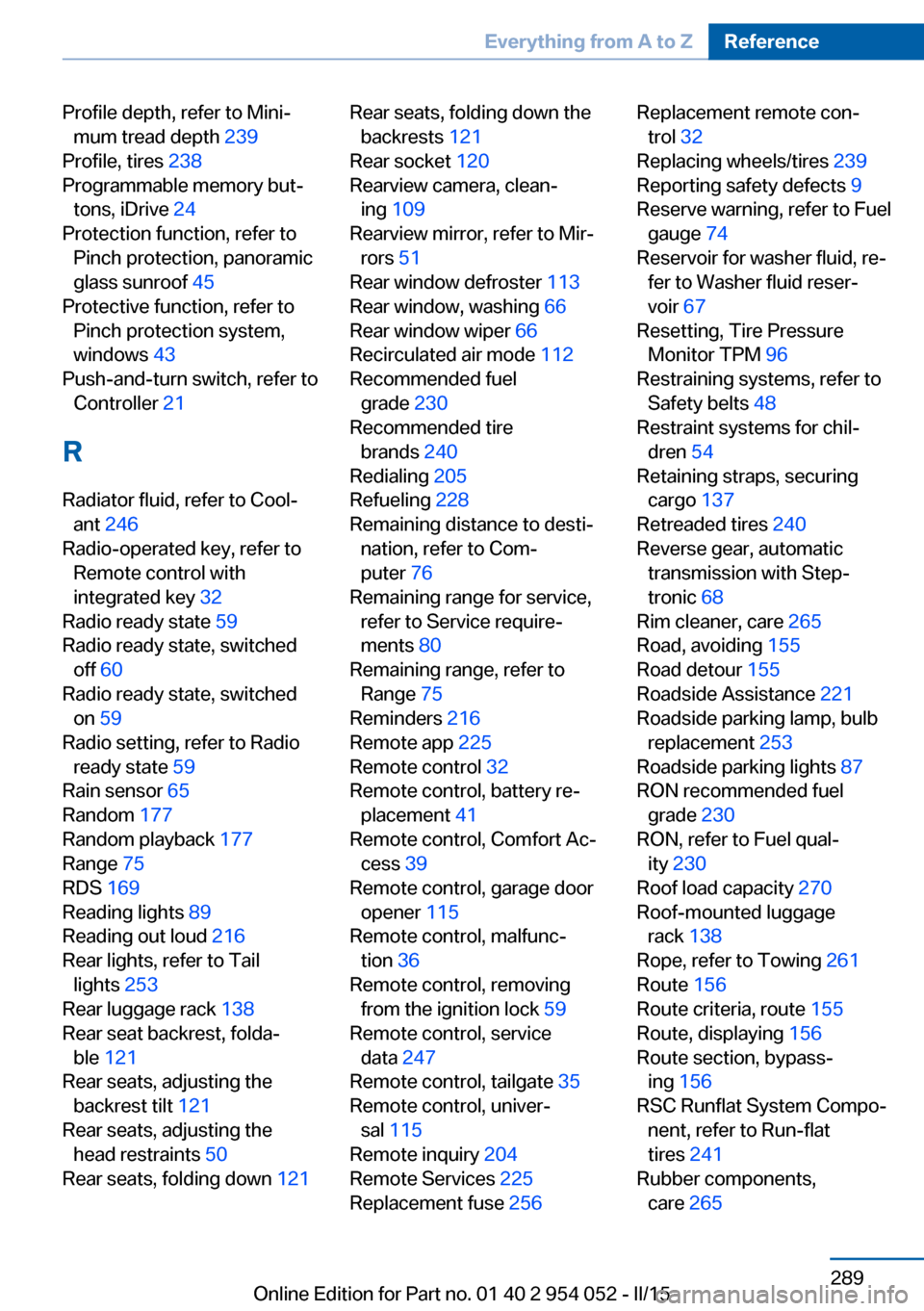
Profile depth, refer to Mini‐mum tread depth 239
Profile, tires 238
Programmable memory but‐ tons, iDrive 24
Protection function, refer to Pinch protection, panoramic
glass sunroof 45
Protective function, refer to Pinch protection system,
windows 43
Push-and-turn switch, refer to Controller 21
R Radiator fluid, refer to Cool‐ ant 246
Radio-operated key, refer to Remote control with
integrated key 32
Radio ready state 59
Radio ready state, switched off 60
Radio ready state, switched on 59
Radio setting, refer to Radio ready state 59
Rain sensor 65
Random 177
Random playback 177
Range 75
RDS 169
Reading lights 89
Reading out loud 216
Rear lights, refer to Tail lights 253
Rear luggage rack 138
Rear seat backrest, folda‐ ble 121
Rear seats, adjusting the backrest tilt 121
Rear seats, adjusting the head restraints 50
Rear seats, folding down 121 Rear seats, folding down the
backrests 121
Rear socket 120
Rearview camera, clean‐ ing 109
Rearview mirror, refer to Mir‐ rors 51
Rear window defroster 113
Rear window, washing 66
Rear window wiper 66
Recirculated air mode 112
Recommended fuel grade 230
Recommended tire brands 240
Redialing 205
Refueling 228
Remaining distance to desti‐ nation, refer to Com‐
puter 76
Remaining range for service, refer to Service require‐
ments 80
Remaining range, refer to Range 75
Reminders 216
Remote app 225
Remote control 32
Remote control, battery re‐ placement 41
Remote control, Comfort Ac‐ cess 39
Remote control, garage door opener 115
Remote control, malfunc‐ tion 36
Remote control, removing from the ignition lock 59
Remote control, service data 247
Remote control, tailgate 35
Remote control, univer‐ sal 115
Remote inquiry 204
Remote Services 225
Replacement fuse 256 Replacement remote con‐
trol 32
Replacing wheels/tires 239
Reporting safety defects 9
Reserve warning, refer to Fuel gauge 74
Reservoir for washer fluid, re‐ fer to Washer fluid reser‐
voir 67
Resetting, Tire Pressure Monitor TPM 96
Restraining systems, refer to Safety belts 48
Restraint systems for chil‐ dren 54
Retaining straps, securing cargo 137
Retreaded tires 240
Reverse gear, automatic transmission with Step‐
tronic 68
Rim cleaner, care 265
Road, avoiding 155
Road detour 155
Roadside Assistance 221
Roadside parking lamp, bulb replacement 253
Roadside parking lights 87
RON recommended fuel grade 230
RON, refer to Fuel qual‐ ity 230
Roof load capacity 270
Roof-mounted luggage rack 138
Rope, refer to Towing 261
Route 156
Route criteria, route 155
Route, displaying 156
Route section, bypass‐ ing 156
RSC Runflat System Compo‐ nent, refer to Run-flat
tires 241
Rubber components, care 265 Seite 289Everything from A to ZReference289
Online Edition for Part no. 01 40 2 954 052 - II/15