lights BMW X1 2015 E84 Service Manual
[x] Cancel search | Manufacturer: BMW, Model Year: 2015, Model line: X1, Model: BMW X1 2015 E84Pages: 297, PDF Size: 7.01 MB
Page 252 of 297
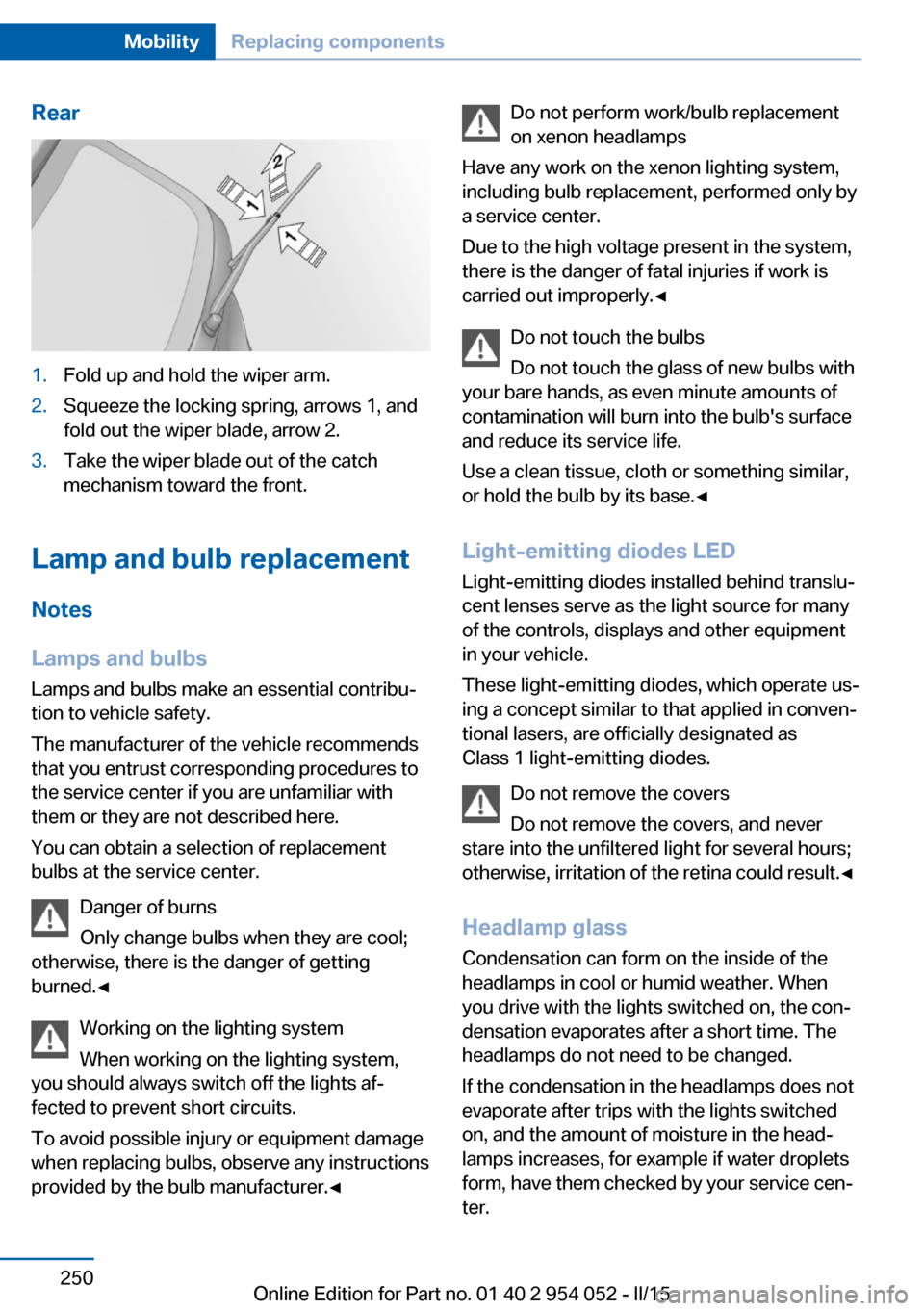
Rear1.Fold up and hold the wiper arm.2.Squeeze the locking spring, arrows 1, and
fold out the wiper blade, arrow 2.3.Take the wiper blade out of the catch
mechanism toward the front.
Lamp and bulb replacement
Notes
Lamps and bulbs
Lamps and bulbs make an essential contribu‐
tion to vehicle safety.
The manufacturer of the vehicle recommends
that you entrust corresponding procedures to
the service center if you are unfamiliar with them or they are not described here.
You can obtain a selection of replacement
bulbs at the service center.
Danger of burns
Only change bulbs when they are cool;
otherwise, there is the danger of getting
burned.◀
Working on the lighting system
When working on the lighting system,
you should always switch off the lights af‐
fected to prevent short circuits.
To avoid possible injury or equipment damage
when replacing bulbs, observe any instructions
provided by the bulb manufacturer.◀
Do not perform work/bulb replacement
on xenon headlamps
Have any work on the xenon lighting system,
including bulb replacement, performed only by
a service center.
Due to the high voltage present in the system,
there is the danger of fatal injuries if work is
carried out improperly.◀
Do not touch the bulbs
Do not touch the glass of new bulbs with
your bare hands, as even minute amounts of
contamination will burn into the bulb's surface
and reduce its service life.
Use a clean tissue, cloth or something similar,
or hold the bulb by its base.◀
Light-emitting diodes LED
Light-emitting diodes installed behind translu‐
cent lenses serve as the light source for many
of the controls, displays and other equipment
in your vehicle.
These light-emitting diodes, which operate us‐
ing a concept similar to that applied in conven‐
tional lasers, are officially designated as
Class 1 light-emitting diodes.
Do not remove the covers
Do not remove the covers, and never
stare into the unfiltered light for several hours; otherwise, irritation of the retina could result.◀
Headlamp glass
Condensation can form on the inside of the
headlamps in cool or humid weather. When
you drive with the lights switched on, the con‐
densation evaporates after a short time. The
headlamps do not need to be changed.
If the condensation in the headlamps does not
evaporate after trips with the lights switched
on, and the amount of moisture in the head‐
lamps increases, for example if water droplets
form, have them checked by your service cen‐
ter.Seite 250MobilityReplacing components250
Online Edition for Part no. 01 40 2 954 052 - II/15
Page 253 of 297
Headlight setting
Changing the bulbs and lights may influence
the headlight settings. Have the headlight set‐
ting checked by a service center and corrected
if necessary after changing bulbs or lights.
Removing the headlight cover
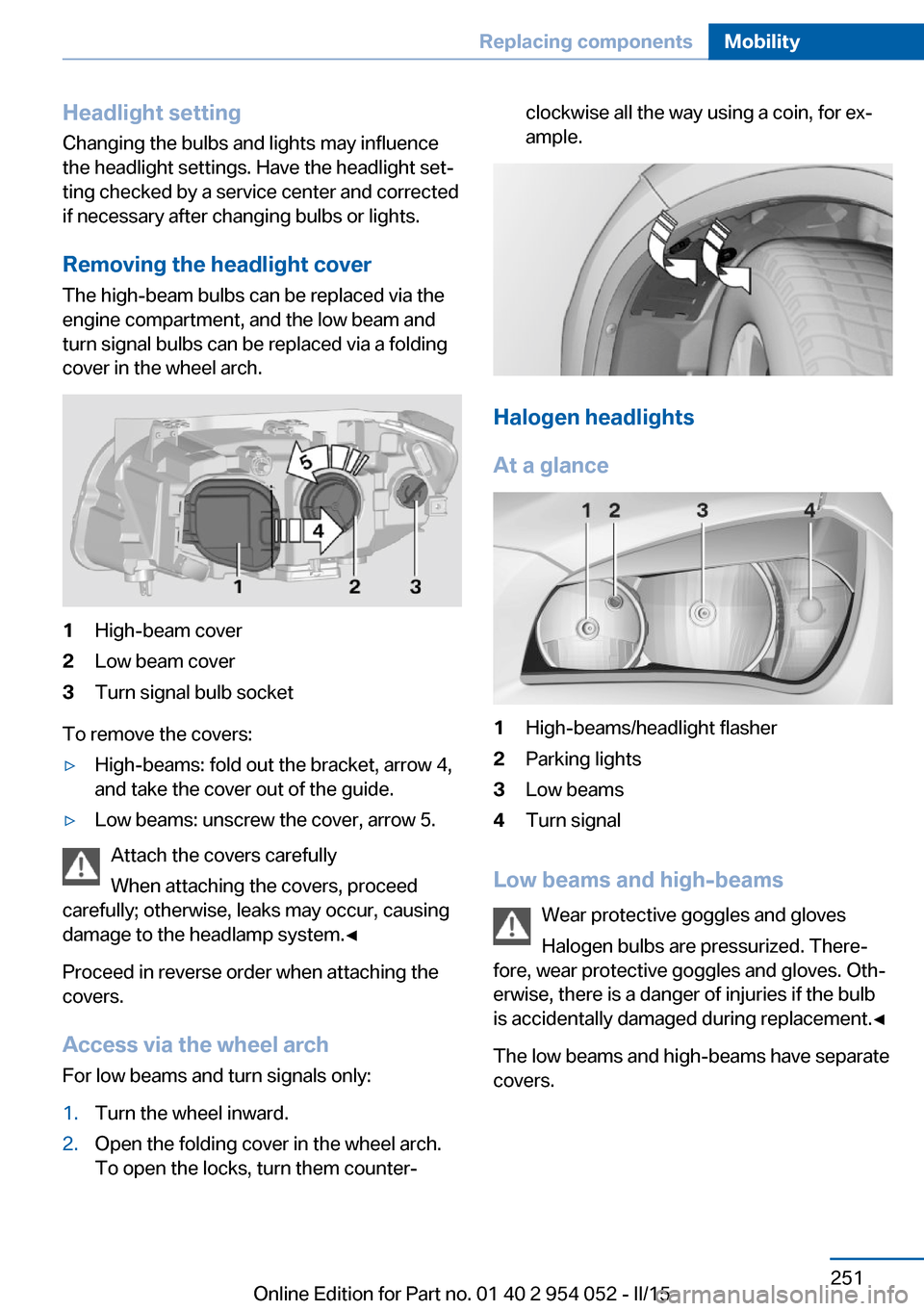
The high-beam bulbs can be replaced via the
engine compartment, and the low beam and
turn signal bulbs can be replaced via a folding
cover in the wheel arch.1High-beam cover2Low beam cover3Turn signal bulb socket
To remove the covers:
▷High-beams: fold out the bracket, arrow 4,
and take the cover out of the guide.▷Low beams: unscrew the cover, arrow 5.
Attach the covers carefully
When attaching the covers, proceed
carefully; otherwise, leaks may occur, causing
damage to the headlamp system.◀
Proceed in reverse order when attaching the
covers.
Access via the wheel arch For low beams and turn signals only:
1.Turn the wheel inward.2.Open the folding cover in the wheel arch.
To open the locks, turn them counter‐clockwise all the way using a coin, for ex‐
ample.
Halogen headlights
At a glance
1High-beams/headlight flasher2Parking lights3Low beams4Turn signal
Low beams and high-beams Wear protective goggles and gloves
Halogen bulbs are pressurized. There‐
fore, wear protective goggles and gloves. Oth‐
erwise, there is a danger of injuries if the bulb
is accidentally damaged during replacement.◀
The low beams and high-beams have separate
covers.
Seite 251Replacing componentsMobility251
Online Edition for Part no. 01 40 2 954 052 - II/15
Page 254 of 297
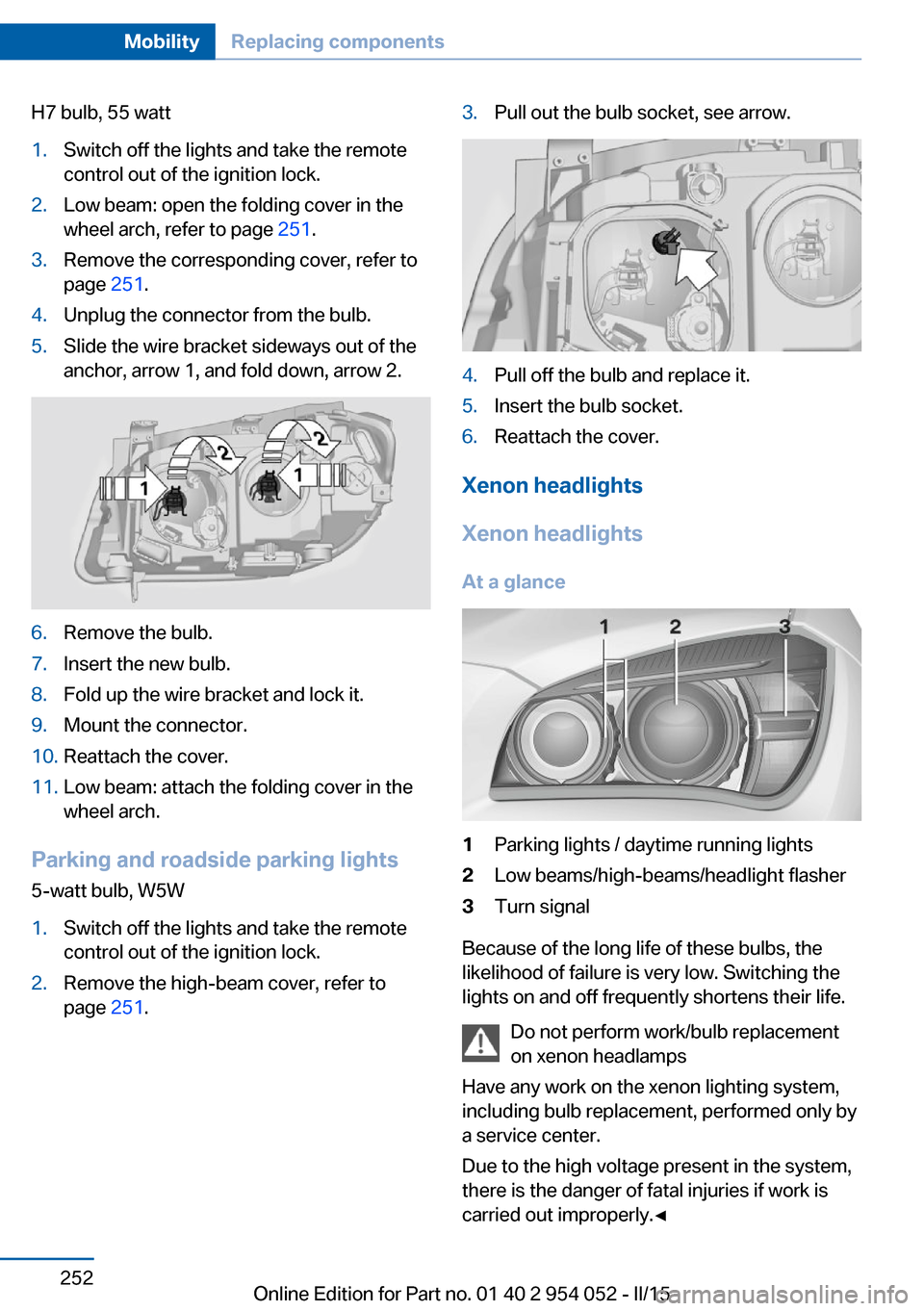
H7 bulb, 55 watt1.Switch off the lights and take the remote
control out of the ignition lock.2.Low beam: open the folding cover in the
wheel arch, refer to page 251.3.Remove the corresponding cover, refer to
page 251.4.Unplug the connector from the bulb.5.Slide the wire bracket sideways out of the
anchor, arrow 1, and fold down, arrow 2.6.Remove the bulb.7.Insert the new bulb.8.Fold up the wire bracket and lock it.9.Mount the connector.10.Reattach the cover.11.Low beam: attach the folding cover in the
wheel arch.
Parking and roadside parking lights
5-watt bulb, W5W
1.Switch off the lights and take the remote
control out of the ignition lock.2.Remove the high-beam cover, refer to
page 251.3.Pull out the bulb socket, see arrow.4.Pull off the bulb and replace it.5.Insert the bulb socket.6.Reattach the cover.
Xenon headlights
Xenon headlights
At a glance
1Parking lights / daytime running lights2Low beams/high-beams/headlight flasher3Turn signal
Because of the long life of these bulbs, the
likelihood of failure is very low. Switching the
lights on and off frequently shortens their life.
Do not perform work/bulb replacement
on xenon headlamps
Have any work on the xenon lighting system,
including bulb replacement, performed only by
a service center.
Due to the high voltage present in the system,
there is the danger of fatal injuries if work is
carried out improperly.◀
Seite 252MobilityReplacing components252
Online Edition for Part no. 01 40 2 954 052 - II/15
Page 255 of 297
Adhere to the general instructions, refer to
page 250.
With Xenon headlights, the following lights are
designed with LED technology:▷Parking and roadside parking lights.▷Daytime running lights.
Contact your service center in the event of a
malfunction.
Parking lights and roadside parking
lights, daytime running lights
H8 bulb, 35 watt
1.Switch off the lights and take the remote
control out of the ignition lock.2.Remove the high-beam cover, refer to
page 251.3.Turn the bulb by approx. 90˚, see arrow,
and pull it out.4.Disconnect the plug, change the bulb and
reconnect the plug.5.Insert the bulb and turn it until it stops.6.Reattach the cover.Turn signals, front
21-watt bulb, PY21W1.Switch off the lights and take the remote
control out of the ignition lock.2.Open the folding cover in the wheel arch,
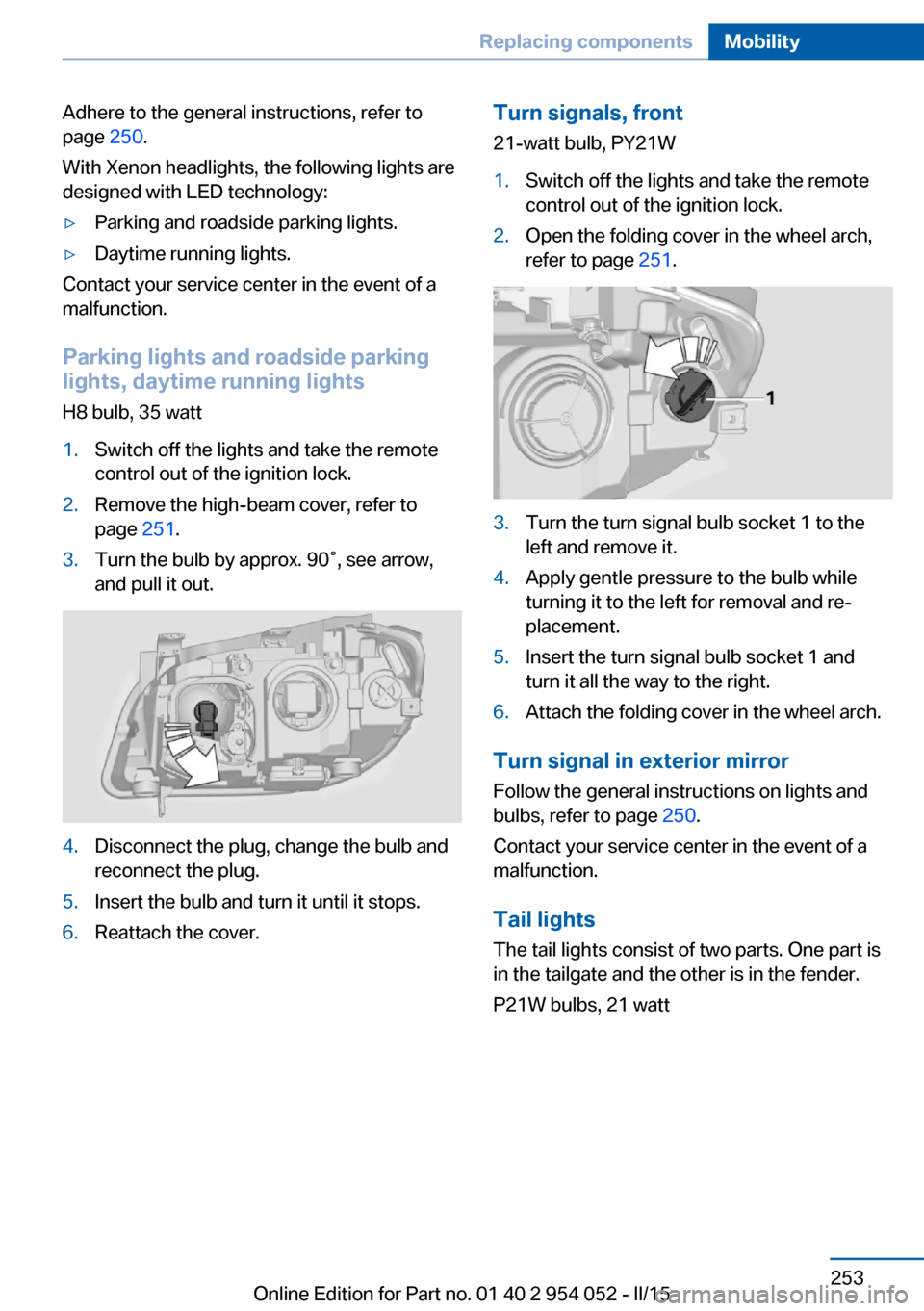
refer to page 251.3.Turn the turn signal bulb socket 1 to the
left and remove it.4.Apply gentle pressure to the bulb while
turning it to the left for removal and re‐
placement.5.Insert the turn signal bulb socket 1 and
turn it all the way to the right.6.Attach the folding cover in the wheel arch.
Turn signal in exterior mirror
Follow the general instructions on lights and
bulbs, refer to page 250.
Contact your service center in the event of a
malfunction.
Tail lights
The tail lights consist of two parts. One part is
in the tailgate and the other is in the fender.
P21W bulbs, 21 watt
Seite 253Replacing componentsMobility253
Online Edition for Part no. 01 40 2 954 052 - II/15
Page 256 of 297
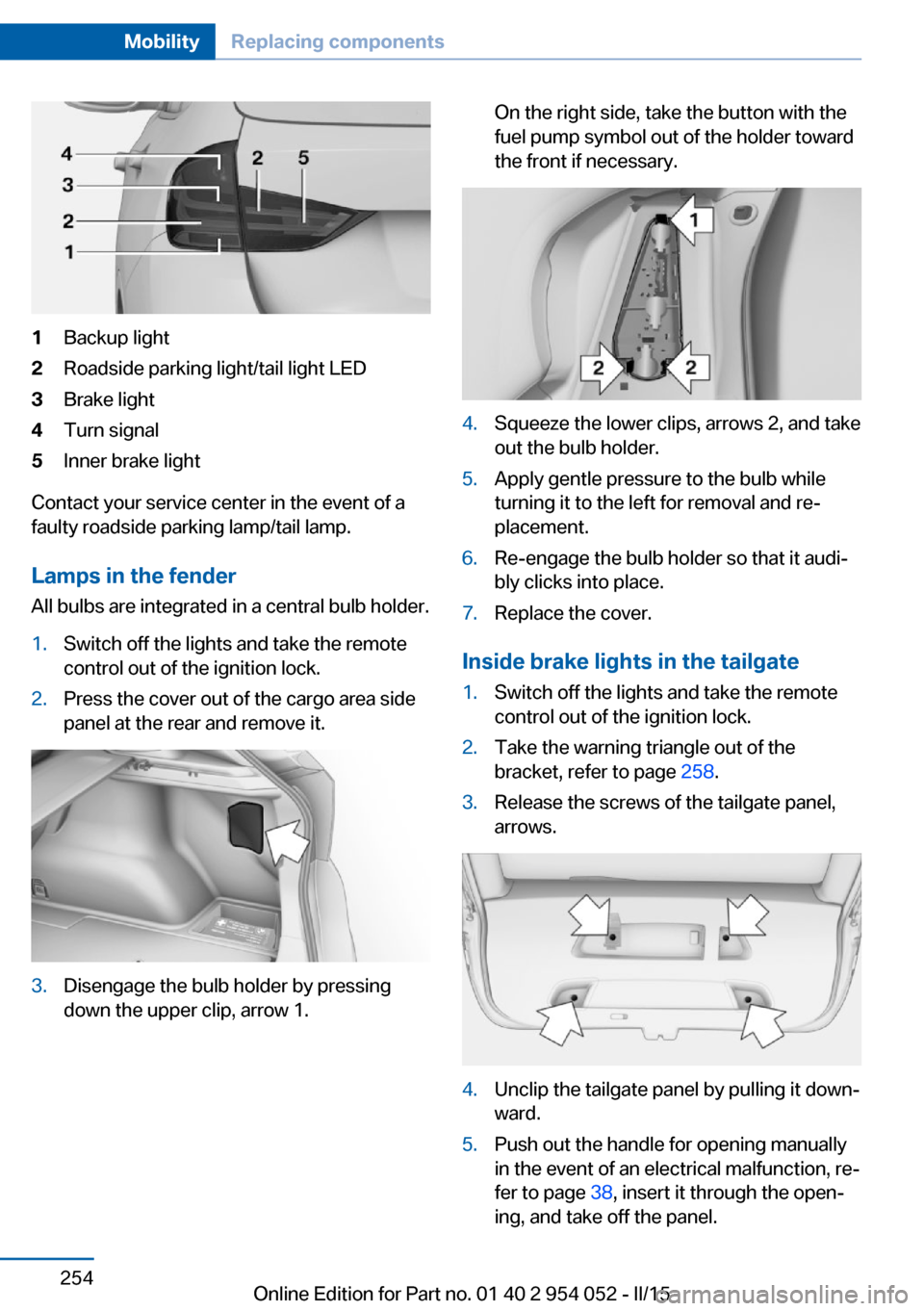
1Backup light2Roadside parking light/tail light LED3Brake light4Turn signal5Inner brake light
Contact your service center in the event of a
faulty roadside parking lamp/tail lamp.
Lamps in the fender All bulbs are integrated in a central bulb holder.
1.Switch off the lights and take the remote
control out of the ignition lock.2.Press the cover out of the cargo area side
panel at the rear and remove it.3.Disengage the bulb holder by pressing
down the upper clip, arrow 1.On the right side, take the button with the
fuel pump symbol out of the holder toward
the front if necessary.4.Squeeze the lower clips, arrows 2, and take
out the bulb holder.5.Apply gentle pressure to the bulb while
turning it to the left for removal and re‐
placement.6.Re-engage the bulb holder so that it audi‐
bly clicks into place.7.Replace the cover.
Inside brake lights in the tailgate
1.Switch off the lights and take the remote
control out of the ignition lock.2.Take the warning triangle out of the
bracket, refer to page 258.3.Release the screws of the tailgate panel,
arrows.4.Unclip the tailgate panel by pulling it down‐
ward.5.Push out the handle for opening manually
in the event of an electrical malfunction, re‐
fer to page 38, insert it through the open‐
ing, and take off the panel.Seite 254MobilityReplacing components254
Online Edition for Part no. 01 40 2 954 052 - II/15
Page 259 of 297
Breakdown assistanceVehicle equipment
This chapter describes all series equipment as
well as country-specific and special equipment
offered for this model series. Therefore, it also
describes equipment that may not be found in
your vehicle, for instance due to the selected
special equipment or the country version. This
also applies to safety-related functions and
systems.
When using the features and systems descri‐
bed here, adhere to local regulations.
Hazard warning flashers
The button for the hazard warning system is
located on the center console.
Do not fold in the exterior mirrors
While driving and when using the turn
signal/hazard warning flashers, do not fold in
the exterior mirrors; otherwise, the additional
turn signal lamps in the exterior mirrors will not
be in the appropriate position and will be diffi‐
cult to detect.◀
Intelligent Emergency
Request
Requirements
▷Radio readiness is switched on.▷The Assist system is operable.▷The SIM card integrated in the vehicle is
activated.▷ConnectedDrive subscription is available.
Only press the SOS button in an emergency.
Emergency Request not guaranteed
For technical reasons, the Emergency
Request cannot be guaranteed under unfavor‐
able conditions.◀
Initiating an Emergency Request
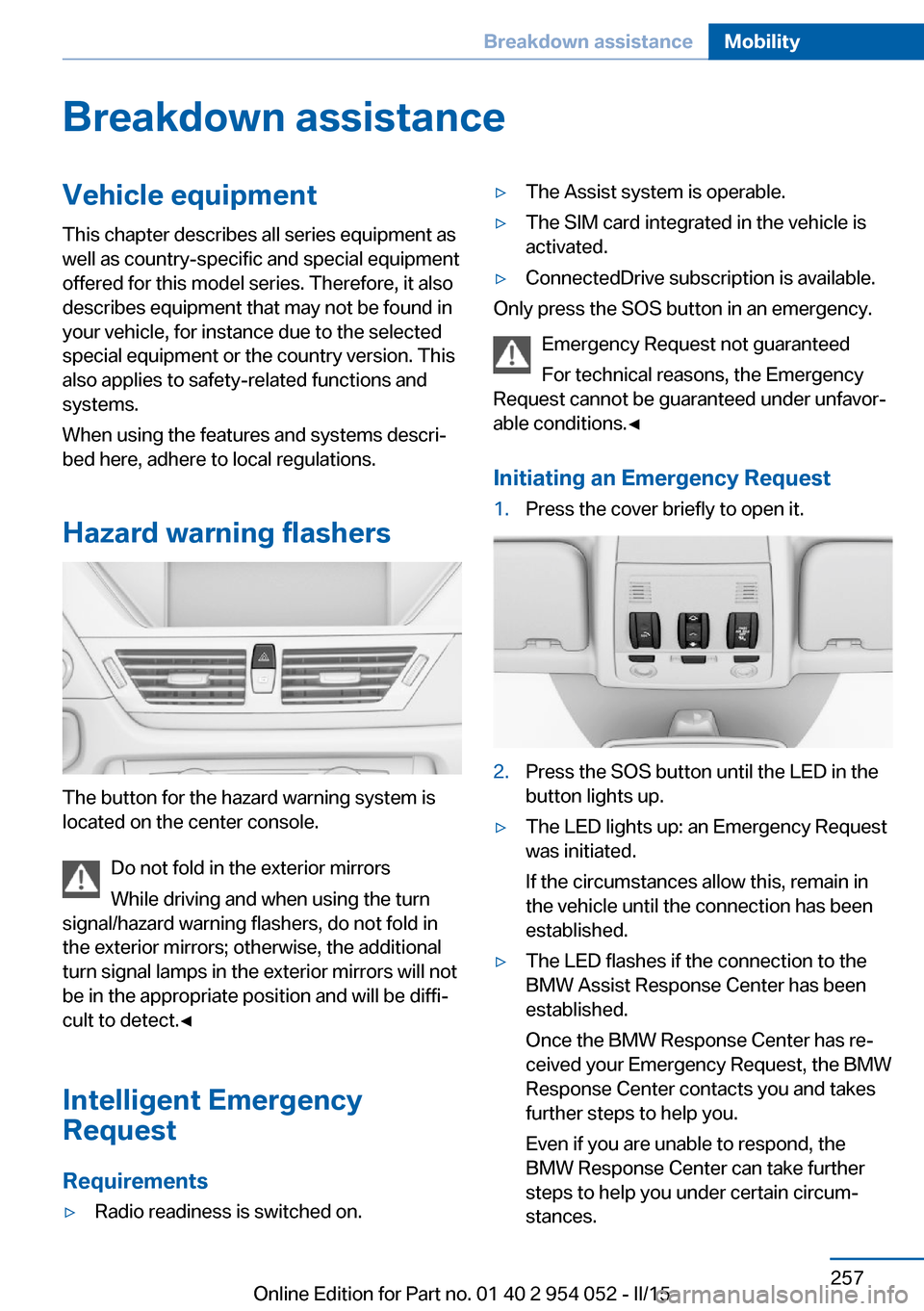
1.Press the cover briefly to open it.2.Press the SOS button until the LED in the
button lights up.▷The LED lights up: an Emergency Request
was initiated.
If the circumstances allow this, remain in
the vehicle until the connection has been
established.▷The LED flashes if the connection to the
BMW Assist Response Center has been
established.
Once the BMW Response Center has re‐
ceived your Emergency Request, the BMW
Response Center contacts you and takes
further steps to help you.
Even if you are unable to respond, the
BMW Response Center can take further
steps to help you under certain circum‐
stances.Seite 257Breakdown assistanceMobility257
Online Edition for Part no. 01 40 2 954 052 - II/15
Page 262 of 297
Automatic transmission, 8-gear:
transporting your vehicle
Note Your vehicle is not permitted to be towed.
Therefore, contact a service center in the
event of a breakdown.
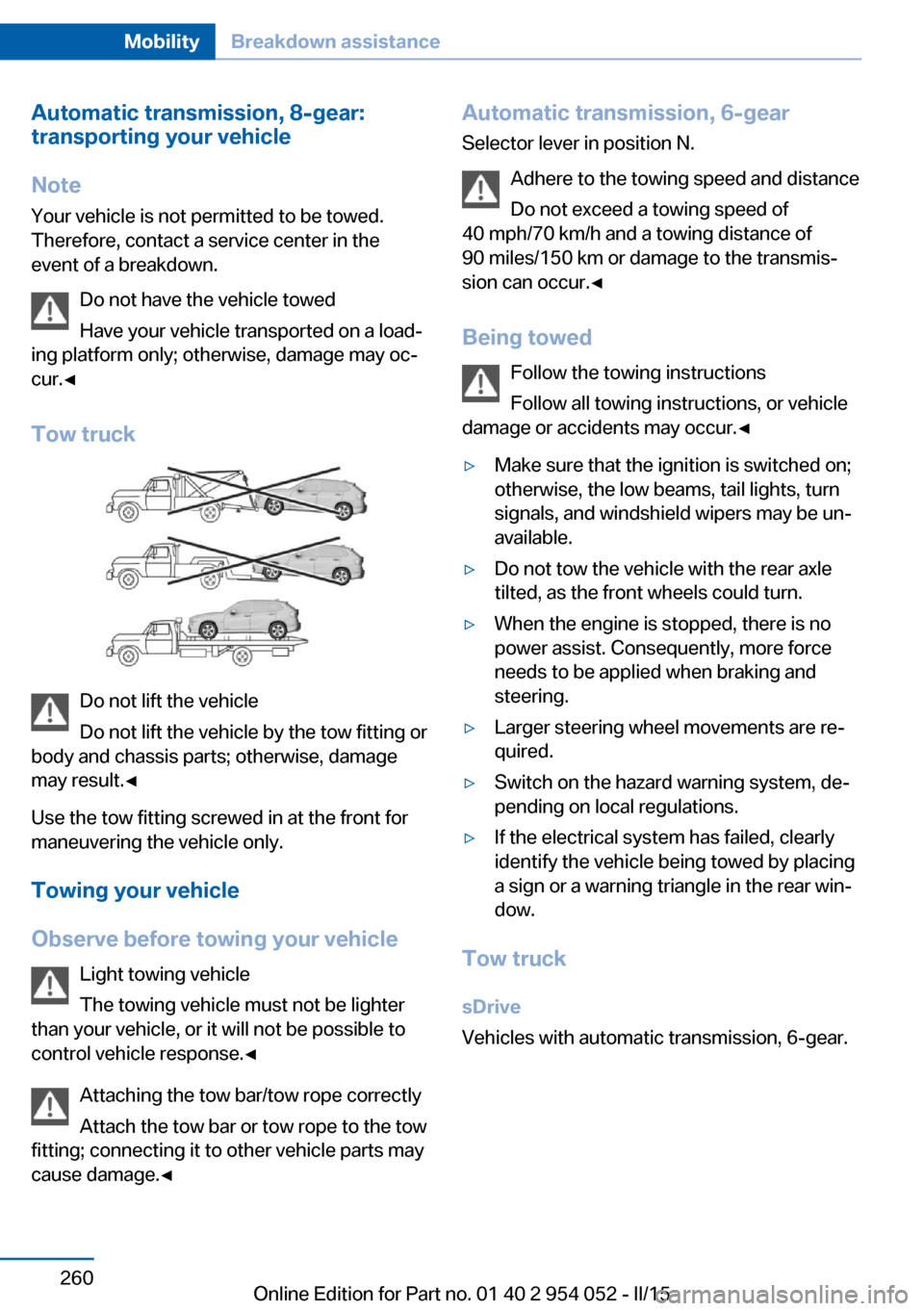
Do not have the vehicle towed
Have your vehicle transported on a load‐
ing platform only; otherwise, damage may oc‐
cur.◀
Tow truck
Do not lift the vehicle
Do not lift the vehicle by the tow fitting or
body and chassis parts; otherwise, damage
may result.◀
Use the tow fitting screwed in at the front for
maneuvering the vehicle only.
Towing your vehicle
Observe before towing your vehicle Light towing vehicle
The towing vehicle must not be lighter
than your vehicle, or it will not be possible to
control vehicle response.◀
Attaching the tow bar/tow rope correctly
Attach the tow bar or tow rope to the tow
fitting; connecting it to other vehicle parts may
cause damage.◀
Automatic transmission, 6-gear
Selector lever in position N.
Adhere to the towing speed and distance
Do not exceed a towing speed of
40 mph/70 km/h and a towing distance of
90 miles/150 km or damage to the transmis‐
sion can occur.◀
Being towed Follow the towing instructions
Follow all towing instructions, or vehicle
damage or accidents may occur.◀▷Make sure that the ignition is switched on;
otherwise, the low beams, tail lights, turn
signals, and windshield wipers may be un‐
available.▷Do not tow the vehicle with the rear axle
tilted, as the front wheels could turn.▷When the engine is stopped, there is no
power assist. Consequently, more force
needs to be applied when braking and
steering.▷Larger steering wheel movements are re‐
quired.▷Switch on the hazard warning system, de‐
pending on local regulations.▷If the electrical system has failed, clearly
identify the vehicle being towed by placing
a sign or a warning triangle in the rear win‐
dow.
Tow truck
sDrive
Vehicles with automatic transmission, 6-gear.
Seite 260MobilityBreakdown assistance260
Online Edition for Part no. 01 40 2 954 052 - II/15
Page 266 of 297
Automatic transmission1.Release the parking brake, refer to
page 63.2.Drive into the car wash.3.Depress the brake pedal if necessary.4.Engage the selector lever or transmission
position N.5.Switch the engine off.6.Leave the remote control in the ignition
lock so that the vehicle can roll.
In 8-gear automatic transmissions, transmis‐
sion position P is engaged automatically:
▷Automatically after approx. 30 minutes.▷When the remote control is removed from
the ignition lock.
Headlights
▷Do not rub dry and do not use abrasive or
caustic cleansers.▷Soak areas that have been soiled e.g. due
to insects, with shampoo and wash off with
water.▷Thaw ice with de-icing spray; do not use an
ice scraper.
After washing the vehicle
After washing the vehicle, apply the brakes
briefly to dry them; otherwise, braking action
can be reduced and corrosion of the brake
discs can occur.
Fully remove any residue from the windows to
prevent obstruction of view from streaking,
wiping noises, and wiper wear.
Vehicle careCar care productsBMW recommends using cleaning and care
products from BMW, since these have been
tested and approved.
Car care and cleaning products
Follow the instructions on the container.
When cleaning the interior, open the doors or
windows.
Only use products intended for cleaning vehi‐
cles.
Cleansers can contain substances that are
dangerous and harmful to your health.◀
Vehicle paint Regular care contributes to driving safety and
value retention. Environmental influences in
areas with high air pollution or natural contami‐
nants, such as tree resin or pollen, can have an
impact on the vehicle paint. Tailor the fre‐
quency and extent of your car care to these in‐
fluences.
Immediately remove aggressive substances,
such as spilled fuel, oil, grease, or bird drop‐
pings, to prevent damage to or discoloration of
the paintwork.
Leather care
Remove dust from the leather often, using a
cloth or vacuum cleaner.
Otherwise, particles of dust and road grime
chafe in pores and folds, and lead to increased
wear and premature degradation of the leather
surface.
To guard against discoloration, such as from
clothing, provide leather care roughly every
two months.
Clean light-colored leather more frequently as
dust and dirt are more noticeable.
Use leather care products; otherwise, dirt and
grease will gradually break down the protective
layer of the leather surface.
Suitable care products are available from the
service center.
Upholstery material care Vacuum regularly with a vacuum cleaner.Seite 264MobilityCare264
Online Edition for Part no. 01 40 2 954 052 - II/15
Page 282 of 297
Everything from A to Z
IndexA ABS, Antilock Brake Sys‐ tem 99
Accident, refer to Emergency Request, initiating 257
Acoustic signal, refer to Check Control 82
Activated charcoal filter with automatic climate con‐
trol 113
Adaptive brake lights, refer to Brake force display 98
Adaptive Light Control 86
Additional telephone 198
Additives, coolant 246
Additives, engine oil 245
After washing vehicle 264
Airbags 90
Airbags, indicator/warning light 93
Air circulation, refer to Recir‐ culated air mode 112
Air conditioning mode, auto‐ matic climate control 110
Air conditioning mode, venti‐ lation 113
Air distribution, auto‐ matic 111
Air distribution, manual 111
Air drying, refer to Cooling function 112
Air flow rate 112
Airing, refer to Ventila‐ tion 113
Air pressure, refer to Tire in‐ flation pressure 232
Air supply, automatic climate control 110
Air supply, ventilation 113 Air vents, refer to Ventila‐
tion 113
Alarm system 41
Alarm system, avoiding unin‐ tentional alarms 42
Alarm system, ending an alarm 41
Alarm system, interior motion sensor 42
Alarm system, tilt alarm sen‐ sor 42
All around the headliner 19
ALL program 112
All-season tires, refer to Win‐ ter tires 240
All-wheel drive, refer to xDrive 101
Alternating-code hand-held transmitter 116
AM/FM station 168
Announcement, navigation, see Spoken instruc‐
tions 157
Antifreeze, coolant 246
Antifreeze, washer fluid 67
Antilock Brake System, ABS 99
Anti-slip control, refer to Dy‐ namic Stability Control
DSC 99
Anti-theft protection 34
Appointments 214
Approved axle loads, refer to Weights 270
Approved engine oils 245
Approved gross vehicle weight, refer to
Weights 270
Armrest, refer to Center arm‐ rest 126 Arrival time, refer to Com‐
puter 76
Ashtray 119
Assistance with driving off, refer to Drive-off assis‐
tant 102
Assistance with starting en‐ gine, refer to Jump-start‐
ing 258
Audio device, external 126
Audio playback 177
Audio playback, Blue‐ tooth 189
Automatic, air distribu‐ tion 111
Automatic, air flow rate 111
Automatic car wash 263
Automatic climate con‐ trol 110
Automatic climate control, automatic air distribu‐
tion 111
Automatic, cruise control 103
Automatic Curb Monitor 51
Automatic headlight con‐ trol 86
Automatic recirculated air control 112
Automatic Start/Stop func‐ tion 61
Automatic transmission with Steptronic 67, 70
Automatic transmission with Steptronic, interlock 67
Automatic transmission with Steptronic, kickdown 68, 70
Automatic transmission with Steptronic, overriding selec‐
tor lever lock 69
AUTO program with auto‐ matic climate control 111 Seite 280ReferenceEverything from A to Z280
Online Edition for Part no. 01 40 2 954 052 - II/15
Page 283 of 297
AUX-IN port 186
Average fuel consumption 75
Average fuel consumption, setting the unit 77
Average speed 75
Average speed, refer to Com‐ puter 75
Axle loads, refer to Weights 270
B
Backrest curvature, refer to Lumbar support 47
Backrests, refer to Seats 46
Backrest width adjust‐ ment 48
Back seats, adjusting the backrest tilt 121
Backup camera 107
Backup camera, obstacle marking 108
Backup camera, pathway lines 108
Backup camera, turning lines 108
Backup lamps, bulb replace‐ ment 254
Balance 166
Band-aids, refer to First aid kit 258
Bass 166
Battery disposal 256
Battery, refer to Vehicle bat‐ tery 255
Battery, remote control 32
Battery replacement, remote control for vehicle 41
Before entering the car wash 263
Being towed 260
Belts, refer to Safety belts 48
Belt tensioners, refer to Safety belts 48
Beverage holder, refer to Cu‐ pholder 127 Black and white map dis‐
play 160
Blower, refer to Air flow rate 112
Bluetooth audio 189
Bluetooth connection, acti‐ vating/deactivating 199
BMW Apps 224
BMW Driver's Guide App 6
BMW EfficientDynamics, re‐ fer to Saving fuel 139
BMW Homepage 6
BMW Internet page 6
BMW maintenance sys‐ tem 247
BMW Online 222
Bottle holder, refer to Cu‐ pholder 127
Brake assistant 99
Brake discs, breaking in 132
Brake fluid, refer to Service requirements 80
Brake force display 98
Brake force distribution, elec‐ tronic 99
Brake lamps, brake force dis‐ play 98
Brake lamps, bulb replace‐ ment 254
Brake lights, adaptive 98
Brake pads, breaking in 132
Brake, refer to Parking brake 63
Brakes, BMW maintenance system 247
Brakes, service require‐ ments 80
Brake system, BMW mainte‐ nance system 247
Braking, notes 133
Braking, parking brake 63
Breakdown assistance, refer to Roadside Assistance 221
Breakdown, transporting the vehicle 260
Breaking in 132 Brightness on the Control
Display 80
Bulb replacement, refer to Lamp and bulb replace‐
ment 250
Button for starting the engine, refer to Start/Stop but‐
ton 59
C
Calendar 214
California Proposition 65 Warning 7
Camera, care 266
Camera, refer to Backup cam‐ era 107
Can holder, refer to Cu‐ pholder 127
Car battery, refer to Vehicle battery 255
Car care products 264
Care 263
Care, displays 266
Care, vehicle 264
Cargo 136
Cargo area 120
Cargo area, capacities 270
Cargo area, Comfort Ac‐ cess 40
Cargo area, cover 120
Cargo area, enlarging 121
Cargo area, folding up the cargo floor panel 123
Cargo area lid, refer to Tail‐ gate 38
Cargo area light, refer to Inte‐ rior lights 89
Cargo area, multi-function hook 124
Cargo area, opening from the inside 38
Cargo area, opening from the outside 38
Cargo area, partition net 121 Seite 281Everything from A to ZReference281
Online Edition for Part no. 01 40 2 954 052 - II/15