ESP BMW X1 2015 E84 Workshop Manual
[x] Cancel search | Manufacturer: BMW, Model Year: 2015, Model line: X1, Model: BMW X1 2015 E84Pages: 297, PDF Size: 7.01 MB
Page 259 of 297
Breakdown assistanceVehicle equipment
This chapter describes all series equipment as
well as country-specific and special equipment
offered for this model series. Therefore, it also
describes equipment that may not be found in
your vehicle, for instance due to the selected
special equipment or the country version. This
also applies to safety-related functions and
systems.
When using the features and systems descri‐
bed here, adhere to local regulations.
Hazard warning flashers
The button for the hazard warning system is
located on the center console.
Do not fold in the exterior mirrors
While driving and when using the turn
signal/hazard warning flashers, do not fold in
the exterior mirrors; otherwise, the additional
turn signal lamps in the exterior mirrors will not
be in the appropriate position and will be diffi‐
cult to detect.◀
Intelligent Emergency
Request
Requirements
▷Radio readiness is switched on.▷The Assist system is operable.▷The SIM card integrated in the vehicle is
activated.▷ConnectedDrive subscription is available.
Only press the SOS button in an emergency.
Emergency Request not guaranteed
For technical reasons, the Emergency
Request cannot be guaranteed under unfavor‐
able conditions.◀
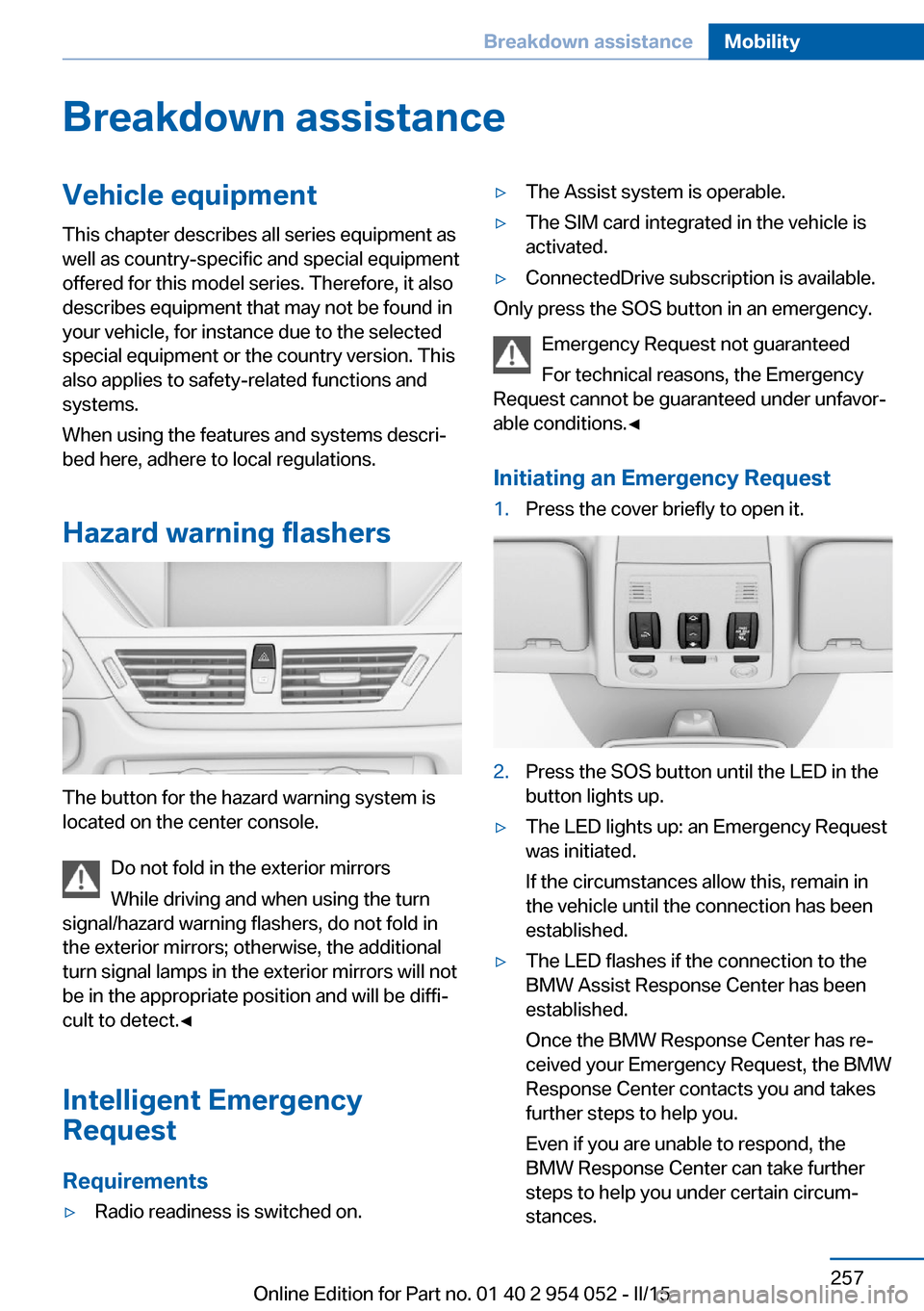
Initiating an Emergency Request
1.Press the cover briefly to open it.2.Press the SOS button until the LED in the
button lights up.▷The LED lights up: an Emergency Request
was initiated.
If the circumstances allow this, remain in
the vehicle until the connection has been
established.▷The LED flashes if the connection to the
BMW Assist Response Center has been
established.
Once the BMW Response Center has re‐
ceived your Emergency Request, the BMW
Response Center contacts you and takes
further steps to help you.
Even if you are unable to respond, the
BMW Response Center can take further
steps to help you under certain circum‐
stances.Seite 257Breakdown assistanceMobility257
Online Edition for Part no. 01 40 2 954 052 - II/15
Page 260 of 297
For this purpose, data that are used to de‐
termine the necessary rescue measures,
such as the current position of the vehicle
if it can be established, are transmitted to
the BMW Response Center.▷If the LED is flashing but the BMW Re‐
sponse Center cannot be heard on the
hands-free system, the hands-free system
may be malfunctioning. However, the
BMW Response Center may still be able to
hear you.
Initiating an Emergency Request
automatically
Under certain conditions, an Emergency Re‐
quest is automatically initiated immediately af‐
ter a severe accident. Automatic Collision Noti‐
fication is not affected by pressing the SOS
button.
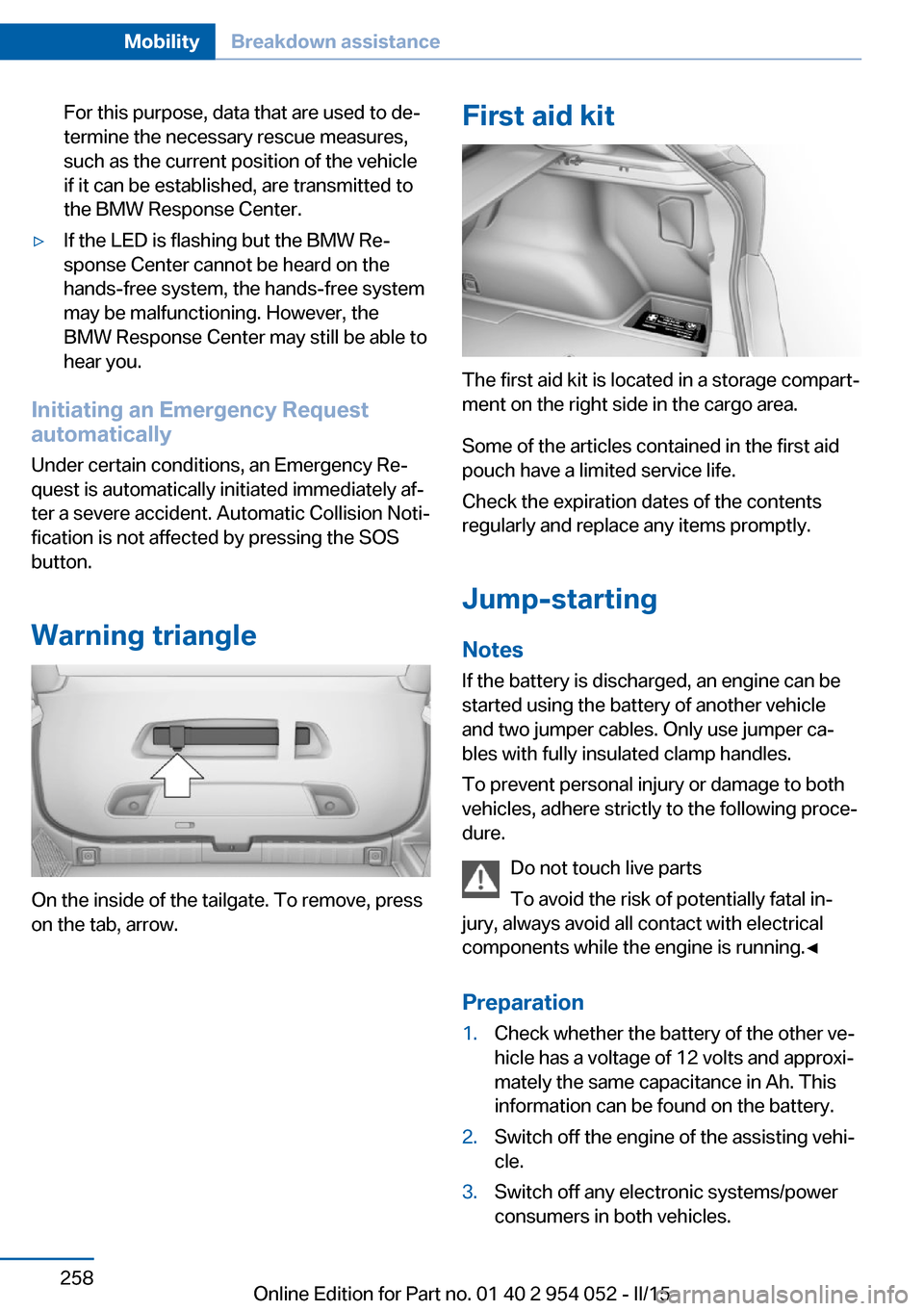
Warning triangle
On the inside of the tailgate. To remove, press
on the tab, arrow.
First aid kit
The first aid kit is located in a storage compart‐
ment on the right side in the cargo area.
Some of the articles contained in the first aid
pouch have a limited service life.
Check the expiration dates of the contents
regularly and replace any items promptly.
Jump-starting
Notes If the battery is discharged, an engine can be
started using the battery of another vehicle
and two jumper cables. Only use jumper ca‐
bles with fully insulated clamp handles.
To prevent personal injury or damage to both
vehicles, adhere strictly to the following proce‐
dure.
Do not touch live parts
To avoid the risk of potentially fatal in‐
jury, always avoid all contact with electrical
components while the engine is running.◀
Preparation
1.Check whether the battery of the other ve‐
hicle has a voltage of 12 volts and approxi‐
mately the same capacitance in Ah. This
information can be found on the battery.2.Switch off the engine of the assisting vehi‐
cle.3.Switch off any electronic systems/power
consumers in both vehicles.Seite 258MobilityBreakdown assistance258
Online Edition for Part no. 01 40 2 954 052 - II/15
Page 261 of 297
Bodywork contact between vehicles
There must not be any contact between
the bodies of the two vehicles, otherwise there
is a danger of shorting.◀
Starting aid terminals Connecting order
Connect the jumper cables in the correct
order; otherwise, there is the danger of injury
from sparking.◀
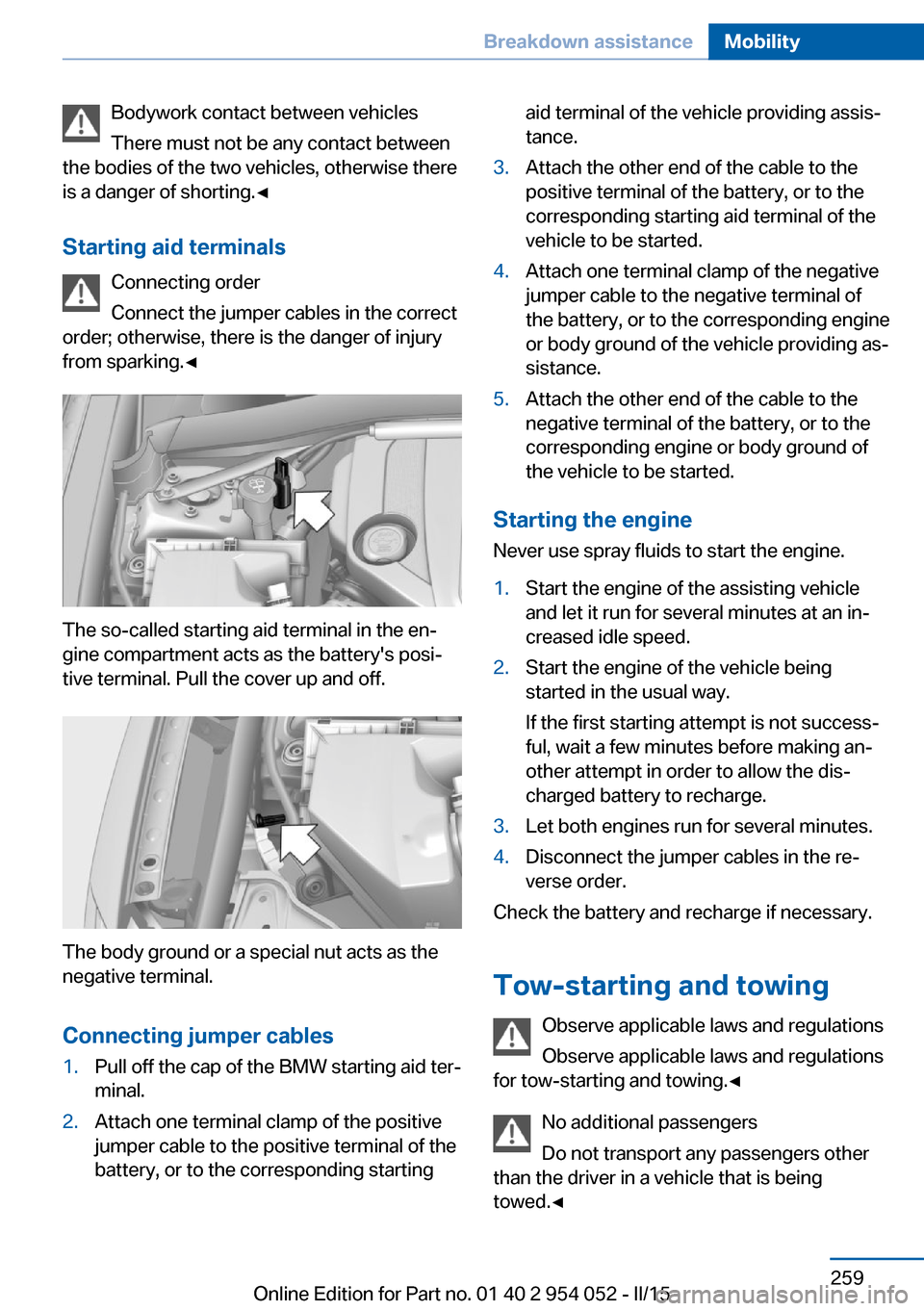
The so-called starting aid terminal in the en‐
gine compartment acts as the battery's posi‐
tive terminal. Pull the cover up and off.
The body ground or a special nut acts as the
negative terminal.
Connecting jumper cables
1.Pull off the cap of the BMW starting aid ter‐
minal.2.Attach one terminal clamp of the positive
jumper cable to the positive terminal of the
battery, or to the corresponding startingaid terminal of the vehicle providing assis‐
tance.3.Attach the other end of the cable to the
positive terminal of the battery, or to the
corresponding starting aid terminal of the
vehicle to be started.4.Attach one terminal clamp of the negative
jumper cable to the negative terminal of
the battery, or to the corresponding engine
or body ground of the vehicle providing as‐
sistance.5.Attach the other end of the cable to the
negative terminal of the battery, or to the
corresponding engine or body ground of
the vehicle to be started.
Starting the engine
Never use spray fluids to start the engine.
1.Start the engine of the assisting vehicle
and let it run for several minutes at an in‐
creased idle speed.2.Start the engine of the vehicle being
started in the usual way.
If the first starting attempt is not success‐
ful, wait a few minutes before making an‐
other attempt in order to allow the dis‐
charged battery to recharge.3.Let both engines run for several minutes.4.Disconnect the jumper cables in the re‐
verse order.
Check the battery and recharge if necessary.
Tow-starting and towing Observe applicable laws and regulations
Observe applicable laws and regulations
for tow-starting and towing.◀
No additional passengers
Do not transport any passengers other
than the driver in a vehicle that is being
towed.◀
Seite 259Breakdown assistanceMobility259
Online Edition for Part no. 01 40 2 954 052 - II/15
Page 262 of 297
Automatic transmission, 8-gear:
transporting your vehicle
Note Your vehicle is not permitted to be towed.
Therefore, contact a service center in the
event of a breakdown.
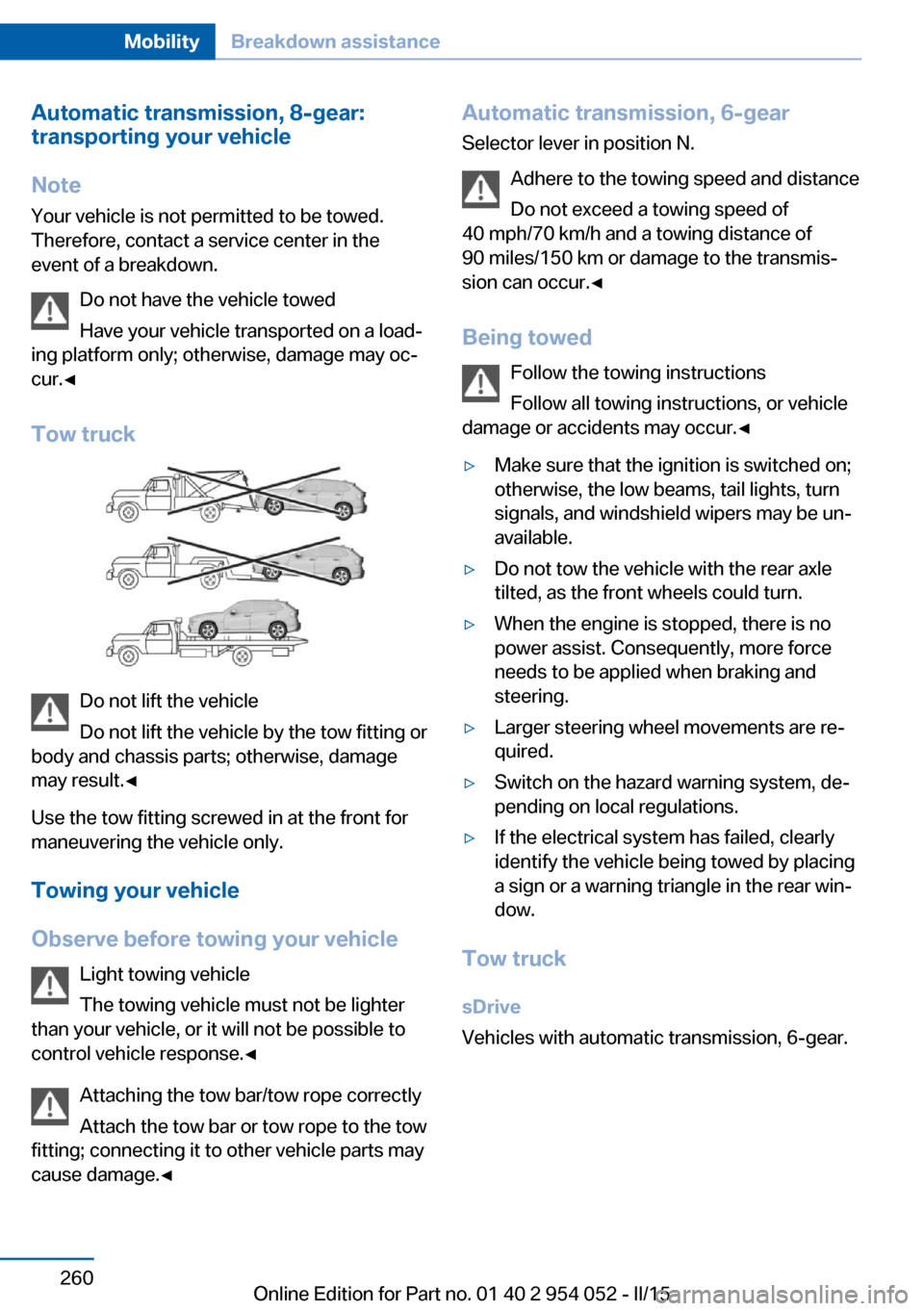
Do not have the vehicle towed
Have your vehicle transported on a load‐
ing platform only; otherwise, damage may oc‐
cur.◀
Tow truck
Do not lift the vehicle
Do not lift the vehicle by the tow fitting or
body and chassis parts; otherwise, damage
may result.◀
Use the tow fitting screwed in at the front for
maneuvering the vehicle only.
Towing your vehicle
Observe before towing your vehicle Light towing vehicle
The towing vehicle must not be lighter
than your vehicle, or it will not be possible to
control vehicle response.◀
Attaching the tow bar/tow rope correctly
Attach the tow bar or tow rope to the tow
fitting; connecting it to other vehicle parts may
cause damage.◀
Automatic transmission, 6-gear
Selector lever in position N.
Adhere to the towing speed and distance
Do not exceed a towing speed of
40 mph/70 km/h and a towing distance of
90 miles/150 km or damage to the transmis‐
sion can occur.◀
Being towed Follow the towing instructions
Follow all towing instructions, or vehicle
damage or accidents may occur.◀▷Make sure that the ignition is switched on;
otherwise, the low beams, tail lights, turn
signals, and windshield wipers may be un‐
available.▷Do not tow the vehicle with the rear axle
tilted, as the front wheels could turn.▷When the engine is stopped, there is no
power assist. Consequently, more force
needs to be applied when braking and
steering.▷Larger steering wheel movements are re‐
quired.▷Switch on the hazard warning system, de‐
pending on local regulations.▷If the electrical system has failed, clearly
identify the vehicle being towed by placing
a sign or a warning triangle in the rear win‐
dow.
Tow truck
sDrive
Vehicles with automatic transmission, 6-gear.
Seite 260MobilityBreakdown assistance260
Online Edition for Part no. 01 40 2 954 052 - II/15
Page 263 of 297
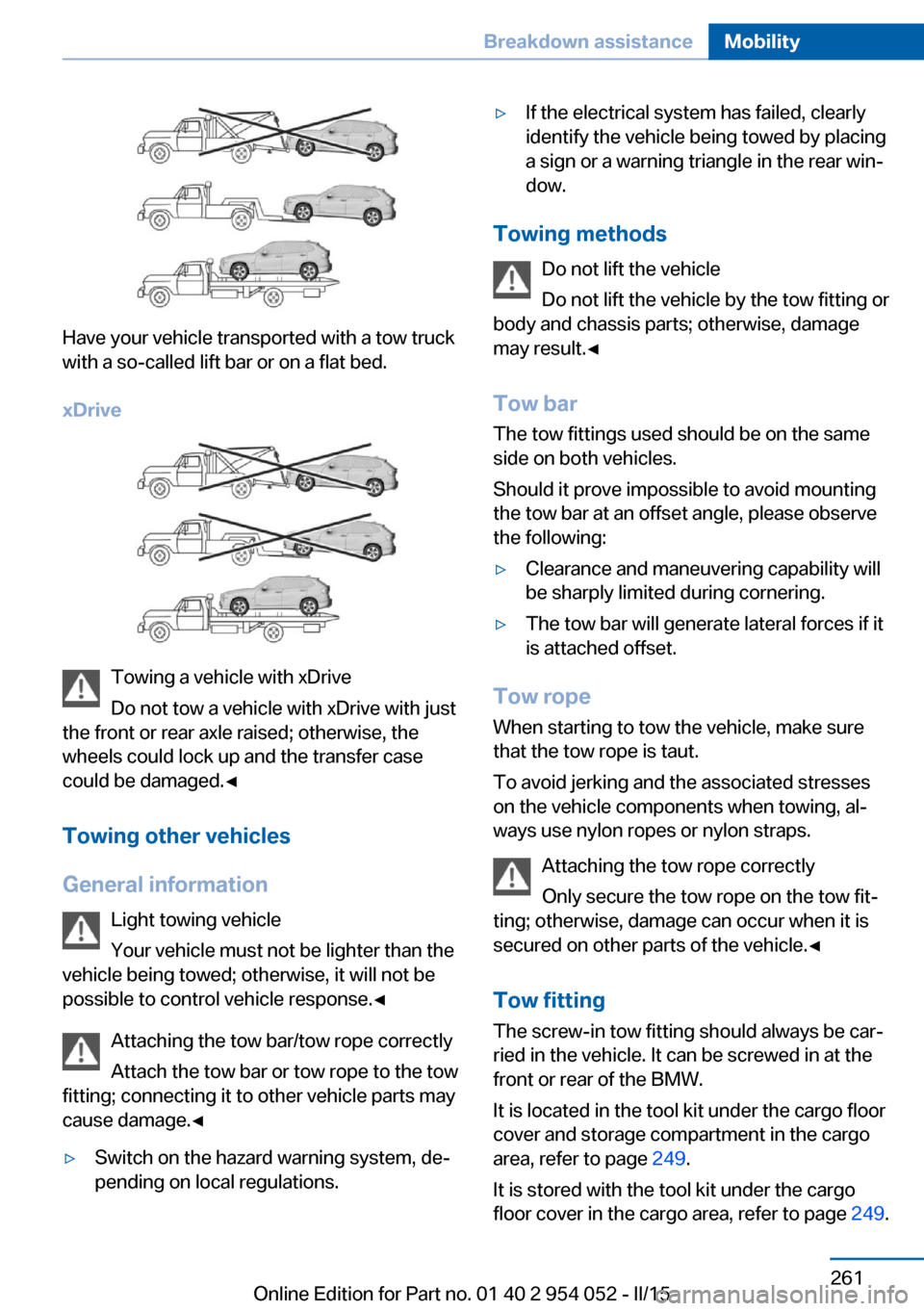
Have your vehicle transported with a tow truck
with a so-called lift bar or on a flat bed.
xDrive
Towing a vehicle with xDrive
Do not tow a vehicle with xDrive with just
the front or rear axle raised; otherwise, the
wheels could lock up and the transfer case
could be damaged.◀
Towing other vehicles
General information Light towing vehicle
Your vehicle must not be lighter than the
vehicle being towed; otherwise, it will not be possible to control vehicle response.◀
Attaching the tow bar/tow rope correctly
Attach the tow bar or tow rope to the tow
fitting; connecting it to other vehicle parts may
cause damage.◀
▷Switch on the hazard warning system, de‐
pending on local regulations.▷If the electrical system has failed, clearly
identify the vehicle being towed by placing
a sign or a warning triangle in the rear win‐
dow.
Towing methods
Do not lift the vehicle
Do not lift the vehicle by the tow fitting or
body and chassis parts; otherwise, damage
may result.◀
Tow bar The tow fittings used should be on the same
side on both vehicles.
Should it prove impossible to avoid mounting
the tow bar at an offset angle, please observe
the following:
▷Clearance and maneuvering capability will
be sharply limited during cornering.▷The tow bar will generate lateral forces if it
is attached offset.
Tow rope
When starting to tow the vehicle, make sure
that the tow rope is taut.
To avoid jerking and the associated stresses
on the vehicle components when towing, al‐
ways use nylon ropes or nylon straps.
Attaching the tow rope correctly
Only secure the tow rope on the tow fit‐
ting; otherwise, damage can occur when it is
secured on other parts of the vehicle.◀
Tow fitting
The screw-in tow fitting should always be car‐
ried in the vehicle. It can be screwed in at the
front or rear of the BMW.
It is located in the tool kit under the cargo floor
cover and storage compartment in the cargo
area, refer to page 249.
It is stored with the tool kit under the cargo floor cover in the cargo area, refer to page 249.
Seite 261Breakdown assistanceMobility261
Online Edition for Part no. 01 40 2 954 052 - II/15
Page 285 of 297
Cooling function, switchingon and off 112
Cooling, maximum 111
Cooling system, refer to Cool‐ ant 246
Corrosion on brake discs 134
Courtesy lights, refer to Inte‐ rior lights 89
Cradle for telephone or mo‐ bile phone, refer to Snap-in
adapter 207
Cruise control 103
Cruise control, malfunc‐ tion 105
Cupholder 127
Curb weight, refer to Weights 270
Current fuel consumption 74
Current location, storing 148
Curve lights, refer to Adaptive Light Control 86
D
Dashboard lighting, refer to Instrument lighting 89
Dashboard, refer to Cock‐ pit 14
Data, technical 270
Date, date format 79
Date, setting 78
Daytime running lights 86
Daytime running lights, bulb replacement 253
Defroster, rear window 113
Destination entry via the ad‐ dress book 148
Destination guidance 155
Destination guidance with in‐ termediate destinations 153
Destination input, naviga‐ tion 146
Digital clock 73
Digital compass 117
Digital radio 169
Dimming mirrors 52 Directional indicators, refer to
Turn signals 64
Display lighting, refer to In‐ strument lighting 89
Displays and controls 14
Displays, care 266
Displays, cleaning 266
Displays, refer to Instrument cluster 16
Disposal, coolant 246
Disposal, vehicle battery 256
Distance warning, refer to Park Distance Control
PDC 105
Divided rear seat backrest, re‐ fer to Cargo area, enlarg‐
ing 121
Divided screen view, split screen 24
Door key, refer to Remote control with integrated
key 32
Door lock 36
Doors, manual operation 37
Doors, unlocking and locking, confirmation signals 35
Doors, unlocking and locking from the inside 37
Doors, unlocking and locking from the outside 34
DOT Quality Grades 238
Downhill control 101
Draft-free ventilation 113
Drive-off assistant 102
Driving away on inclines, refer to Drive-off assistant 102
Driving notes, breaking in 132
Driving notes, general 132
Driving on poor roads 134
Driving stability control sys‐ tems 99
Driving through water 133
Driving tips, refer to Driving notes 132 Dry air, refer to Cooling func‐
tion 112
DSC Dynamic Stability Con‐ trol 99
DTC Dynamic Traction Con‐ trol 100
DTMF suffix dialing 204
DVD/CD 176
DVDs, storing 181
DVD, video 178
Dynamic destination guid‐ ance 162
Dynamic Stability Control DSC 99
Dynamic Traction Control DTC 100
E ECO PRO 140
ECO PRO display 140
ECO PRO driving mode 140
ECO PRO mode 140
EfficientDynamics, refer to Saving fuel 139
Electrical malfunction, door lock 37
Electrical malfunction, driver's door 37
Electrical malfunction, fuel filler flap 229
Electrical malfunction, tail‐ gate 38
Electric seat adjustment 47
Electronic brake-force distri‐ bution 99
Electronic engine oil level check 243
Electronic Stability Program ESP, refer to Dynamic Sta‐
bility Control DSC 99
Emergency operation, auto‐ matic transmission, refer to
Overriding selector lever
lock 69 Seite 283Everything from A to ZReference283
Online Edition for Part no. 01 40 2 954 052 - II/15
Page 286 of 297
Emergency operation, doorlock, refer to Manual opera‐
tion 37
Emergency operation, fuel filler flap, unlocking man‐
ually 229
Emergency Request 257
Energy-conscious driving, re‐ fer to Current fuel consump‐
tion 74
Energy, saving, Automatic Start/Stop function 61
Energy, saving, refer to Sav‐ ing fuel 139
Engine, breaking in 132
Engine compartment 242
Engine coolant, refer to Cool‐ ant 246
Engine oil, adding 245
Engine oil, additives, refer to Approved engine oils 245
Engine oil, alternative oil types 245
Engine oil, BMW maintenance system 247
Engine oil change intervals, refer to Service require‐
ments 80
Engine oil, checking the level 243
Engine oil, filling ca‐ pacity 271
Engine oil temperature 74
Engine oil types, alterna‐ tive 245
Engine oil types, ap‐ proved 245
Engine, overheating, refer to Coolant temperature 74
Engine start, assistance 258
Engine, starting 60
Engine, starting, Comfort Ac‐ cess 39
Engine, starting, Start/Stop button 59 Engine, stopping, Start/Stop
button 59
Engine, switching off 61
Environmentally friendly driv‐ ing, refer to Current fuel
consumption 74
Equalizer 166
Equipment, interior 115
ESP Electronic Stability Pro‐ gram, refer to Dynamic Sta‐
bility Control DSC 99
Exchanging wheels/tires 239
Exhaust system 133
Exterior mirrors 51
Exterior mirrors, adjusting 51
Exterior mirrors, automatic dimming 52
Exterior mirrors, automatic heating 52
Exterior mirrors, folding in and out 52
External audio device 126
External devices 186
External temperature dis‐ play 73
External temperature display, changing the unit of meas‐
ure 77
External temperature display, on computer 77
External temperature warn‐ ing 73
Eyes for securing cargo 137
F
Fader 166
Failure messages, refer to Check Control 82
False alarm, avoiding uninten‐ tional alarms 42
False alarm, ending an alarm 41
Fastening safety belts, refer to Safety belts 48 Fault messages, refer to
Check Control 82
Filling capacities 271
Filter, refer to Microfilter/acti‐ vated-charcoal filter with au‐
tomatic climate control 113
Fine wood, care 265
First aid kit 258
Fitting for towing 261
Flashing when locking/ unlocking 35
Flat Tire Monitor FTM 93
Flat Tire Monitor FTM, snow chains 241
Flat tire, run-flat tires 241
Flat tire, Tire Pressure Moni‐ tor TPM 95
Flat tire, warning light 94, 96
Flat tire, wheel change 255
Flooding, refer to Driving through water 133
Floor carpet, care 265
Floor mats, care 265
FM/AM station 168
Fog lamps, indicator lamp 88
Fog lights 88
Foldable rear seat back‐ rest 121
Folding sun visor 119
Foot brake 133
Footwell lights, refer to Inte‐ rior lights 89
For your own safety 7
Four-wheel drive, refer to xDrive 101
Front airbags 90
Front fog lights 88
Front passenger airbags, de‐ activating 91
FTM Flat Tire Monitor 93
Fuel 230
Fuel, additives 230
Fuel, average consump‐ tion 75
Fuel cap 228
Fuel cap, closing 228 Seite 284ReferenceEverything from A to Z284
Online Edition for Part no. 01 40 2 954 052 - II/15