high beam BMW X1 2015 E84 Owner's Manual
[x] Cancel search | Manufacturer: BMW, Model Year: 2015, Model line: X1, Model: BMW X1 2015 E84Pages: 297, PDF Size: 7.01 MB
Page 16 of 297
CockpitVehicle equipment
This chapter describes all series equipment as
well as country-specific and special equipment
offered for this model series. Therefore, it also
describes equipment that may not be found in
your vehicle, for instance due to the selectedspecial equipment or the country version. This
also applies to safety-related functions and
systems.
When using the features and systems descri‐
bed here, adhere to local regulations.
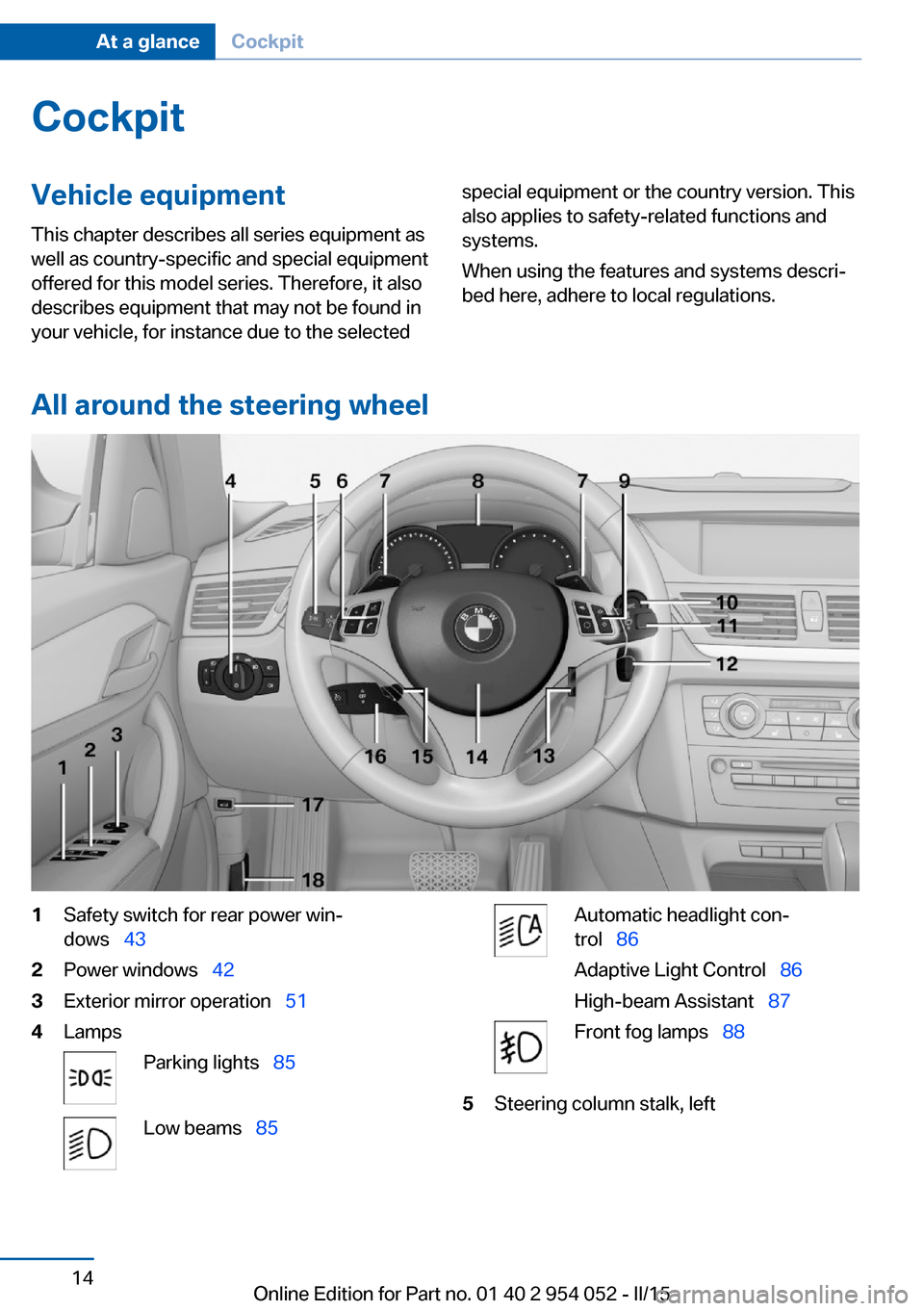
All around the steering wheel
1Safety switch for rear power win‐
dows 432Power windows 423Exterior mirror operation 514LampsParking lights 85Low beams 85Automatic headlight con‐
trol 86
Adaptive Light Control 86
High-beam Assistant 87Front fog lamps 885Steering column stalk, leftSeite 14At a glanceCockpit14
Online Edition for Part no. 01 40 2 954 052 - II/15
Page 17 of 297
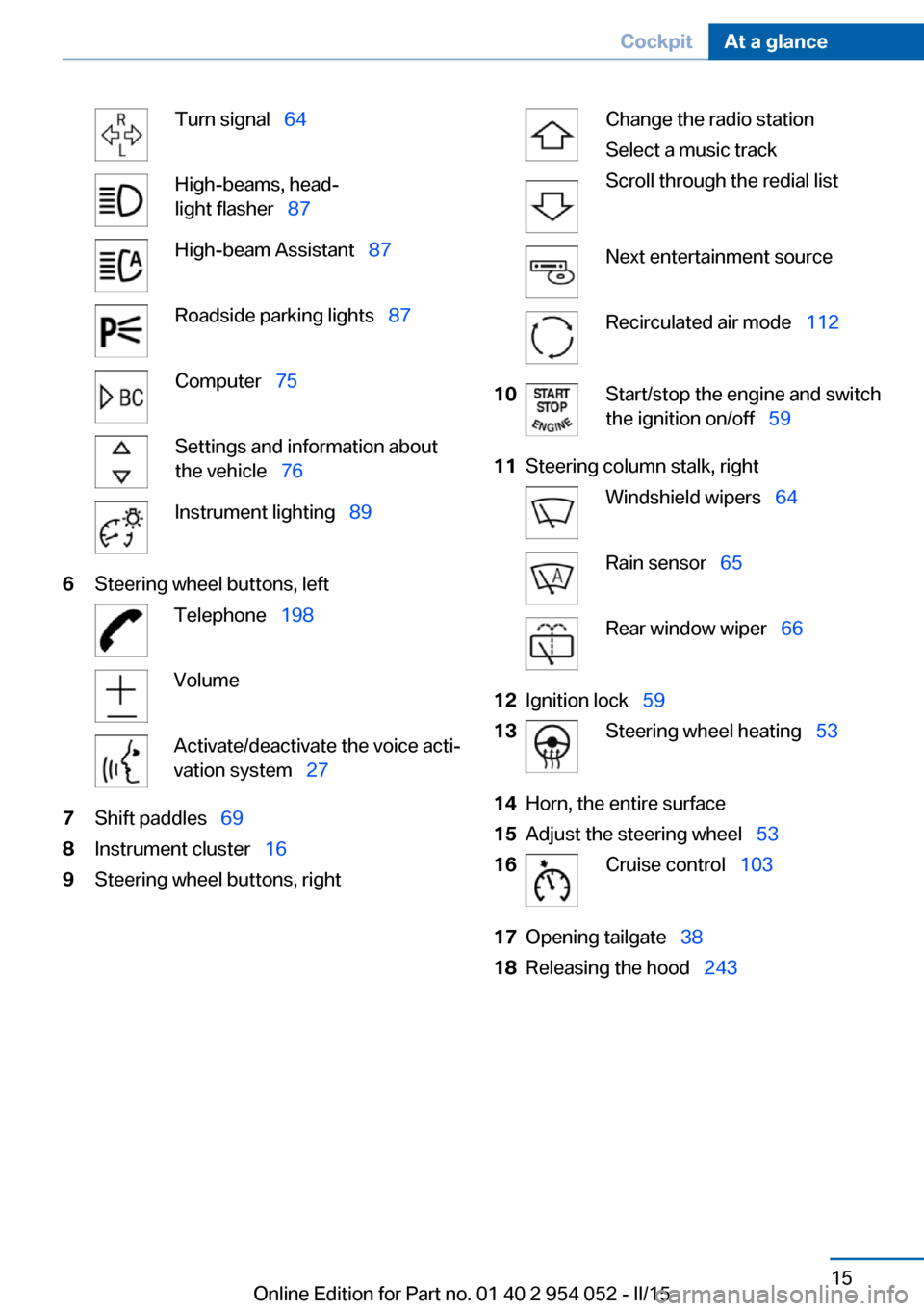
Turn signal 64High-beams, head‐
light flasher 87High-beam Assistant 87Roadside parking lights 87Computer 75Settings and information about
the vehicle 76Instrument lighting 896Steering wheel buttons, leftTelephone 198VolumeActivate/deactivate the voice acti‐
vation system 277Shift paddles 698Instrument cluster 169Steering wheel buttons, rightChange the radio station
Select a music track
Scroll through the redial listNext entertainment sourceRecirculated air mode 11210Start/stop the engine and switch
the ignition on/off 5911Steering column stalk, rightWindshield wipers 64Rain sensor 65Rear window wiper 6612Ignition lock 5913Steering wheel heating 5314Horn, the entire surface15Adjust the steering wheel 5316Cruise control 10317Opening tailgate 3818Releasing the hood 243Seite 15CockpitAt a glance15
Online Edition for Part no. 01 40 2 954 052 - II/15
Page 19 of 297
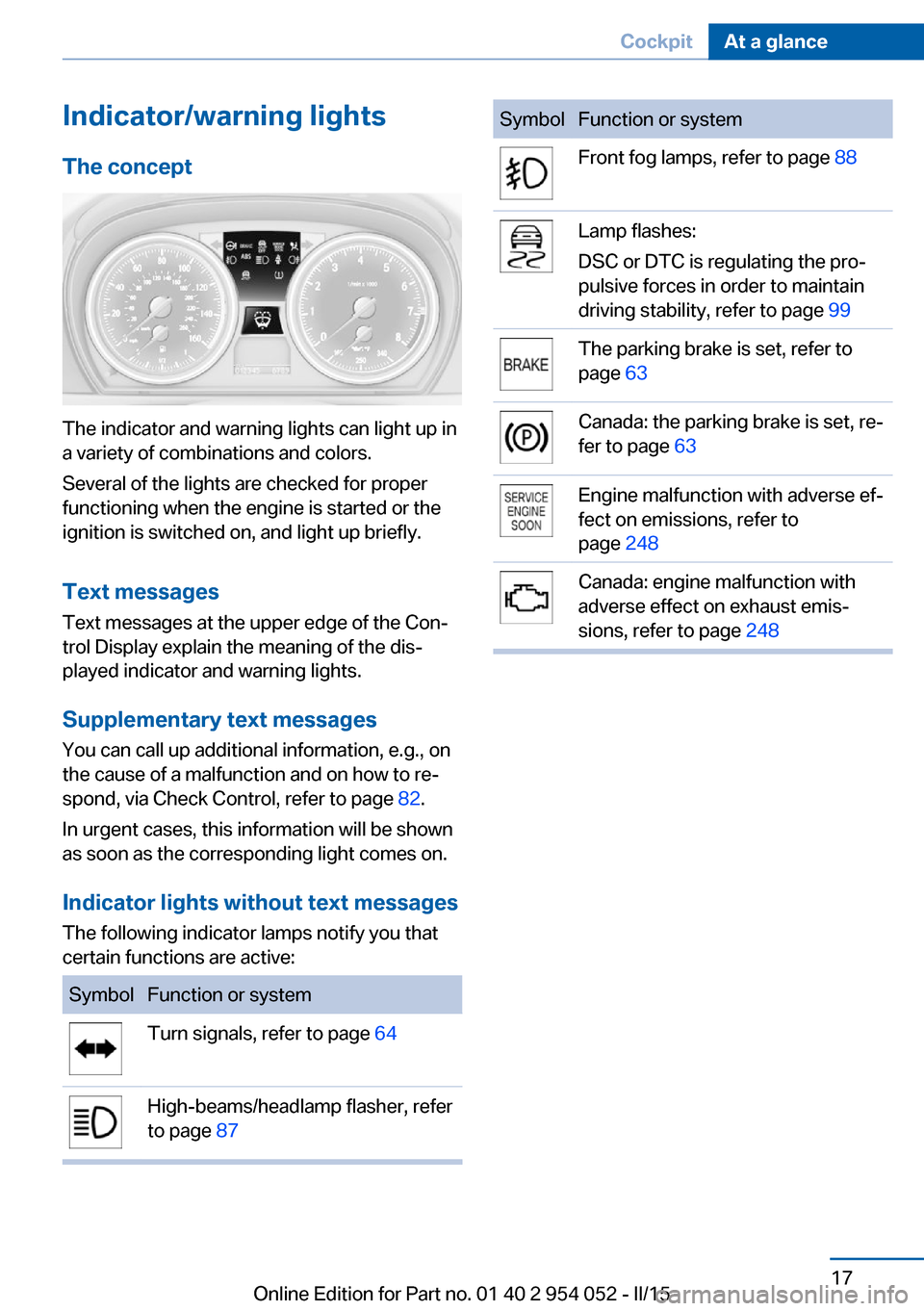
Indicator/warning lightsThe concept
The indicator and warning lights can light up in
a variety of combinations and colors.
Several of the lights are checked for proper
functioning when the engine is started or the
ignition is switched on, and light up briefly.
Text messages Text messages at the upper edge of the Con‐
trol Display explain the meaning of the dis‐
played indicator and warning lights.
Supplementary text messages
You can call up additional information, e.g., on
the cause of a malfunction and on how to re‐
spond, via Check Control, refer to page 82.
In urgent cases, this information will be shown
as soon as the corresponding light comes on.
Indicator lights without text messages The following indicator lamps notify you that
certain functions are active:
SymbolFunction or systemTurn signals, refer to page 64High-beams/headlamp flasher, refer
to page 87SymbolFunction or systemFront fog lamps, refer to page 88Lamp flashes:
DSC or DTC is regulating the pro‐
pulsive forces in order to maintain
driving stability, refer to page 99The parking brake is set, refer to
page 63Canada: the parking brake is set, re‐
fer to page 63Engine malfunction with adverse ef‐
fect on emissions, refer to
page 248Canada: engine malfunction with
adverse effect on exhaust emis‐
sions, refer to page 248Seite 17CockpitAt a glance17
Online Edition for Part no. 01 40 2 954 052 - II/15
Page 35 of 297
▷The settings are automatically saved in the
profile currently activated in the remote
control.▷The remote control used is detected when
the vehicle is unlocked and the stored pro‐
file is called up.▷Your personal settings will be recognized
and called up again even if the vehicle has
been used in the meantime by someone
else with another remote control.
The individual settings are stored for a maxi‐
mum of four remote controls. They are stored
for two remote controls if Comfort Access is in
use.
Personal Profile settingsThe following functions and settings can be
stored in a profile.
More information on the settings can be found
under:
▷Assigning the programmable memory but‐
tons, refer to page 24.▷Response of the central locking system
when the car is being unlocked, refer to
page 34.▷Automatic locking of the vehicle, refer to
page 37.▷Automatic call-up of the driver's seat posi‐
tion after unlocking, refer to page 35.▷Settings for the display on the Control Dis‐
play and in the instrument cluster:▷12h/24h clock format, refer to
page 78.▷Date format, refer to page 79.▷Brightness of the Control Display, refer
to page 80.▷Language on the Control Display, refer
to page 79.▷Units of measure for fuel consumption,
distance covered/remaining distances,
and temperature, refer to page 77.▷Show visual warning for the Park Distance
Control PDC, refer to page 106.▷rearview camera:▷Function selection, refer to page 107.▷Type of display, refer to page 109.▷Light settings:▷Triple turn signal activation, refer to
page 64.▷Welcome lights, refer to page 85.▷Headlight courtesy delay feature, refer
to page 86.▷Daytime running lights, refer to
page 86.▷High-beam Assistant, refer to
page 87.▷Automatic climate control: AUTO program,
cooling function and automatic recircu‐
lated air control activated/deactivated,
temperature, air flow rate and distribution,
refer to page 110.▷Navigation:▷Voice activation, refer to page 157.▷Route criteria, refer to page 155.▷Map view settings, refer to page 159.▷Entertainment:▷Tone control, refer to page 166.▷Radio, stored stations, refer to
page 174.▷CD/multimedia, audio source listened
to last, refer to page 176.▷Telephone: volume, refer to page 202.
Central locking system
The concept The central locking system becomes active
when the driver's door is closed.
The system simultaneously engages and re‐
leases the locks on the following:
Seite 33Opening and closingControls33
Online Edition for Part no. 01 40 2 954 052 - II/15
Page 43 of 297
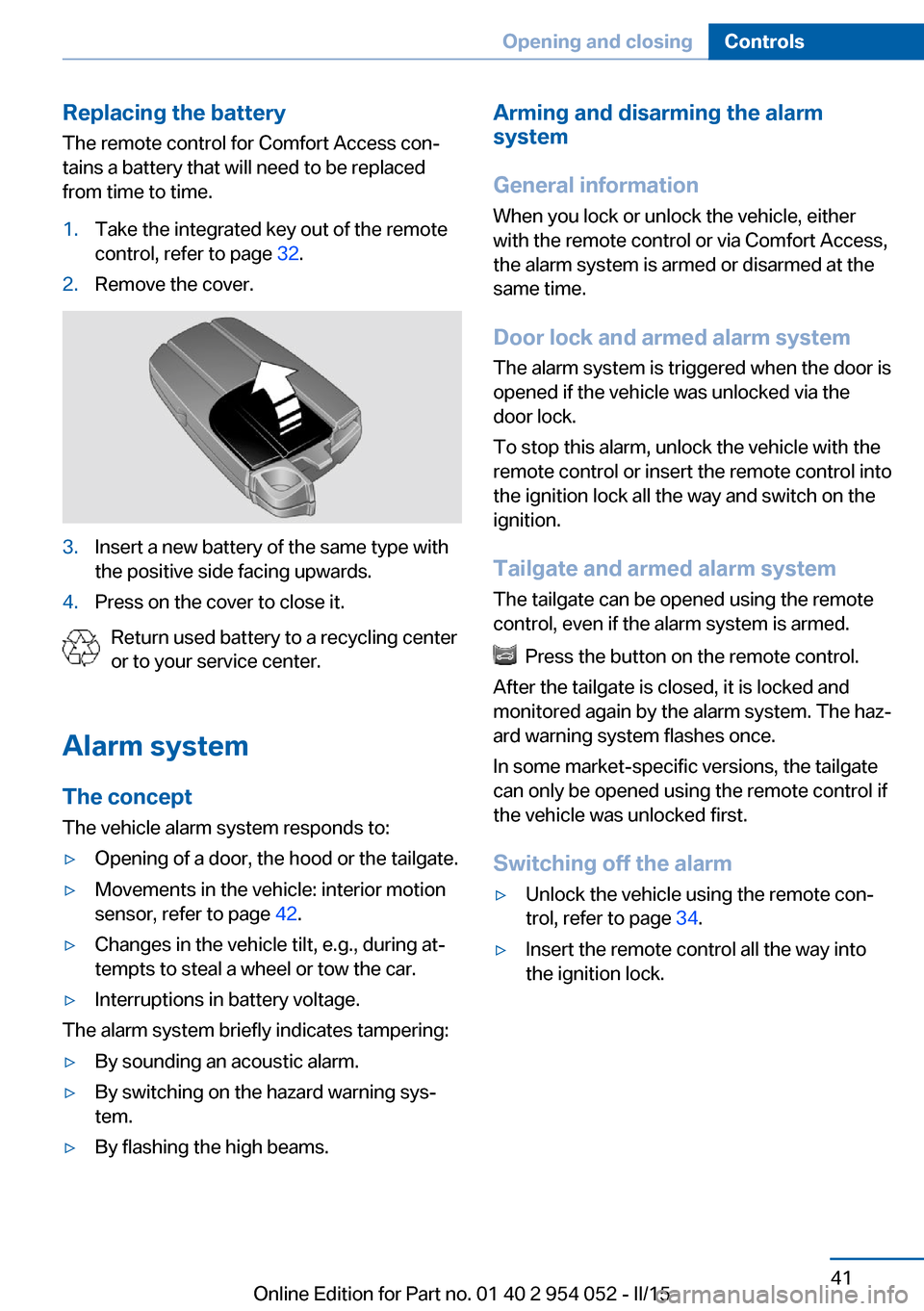
Replacing the battery
The remote control for Comfort Access con‐
tains a battery that will need to be replaced
from time to time.1.Take the integrated key out of the remote
control, refer to page 32.2.Remove the cover.3.Insert a new battery of the same type with
the positive side facing upwards.4.Press on the cover to close it.
Return used battery to a recycling center
or to your service center.
Alarm system The conceptThe vehicle alarm system responds to:
▷Opening of a door, the hood or the tailgate.▷Movements in the vehicle: interior motion
sensor, refer to page 42.▷Changes in the vehicle tilt, e.g., during at‐
tempts to steal a wheel or tow the car.▷Interruptions in battery voltage.
The alarm system briefly indicates tampering:
▷By sounding an acoustic alarm.▷By switching on the hazard warning sys‐
tem.▷By flashing the high beams.Arming and disarming the alarm
system
General information
When you lock or unlock the vehicle, either
with the remote control or via Comfort Access,
the alarm system is armed or disarmed at the
same time.
Door lock and armed alarm systemThe alarm system is triggered when the door is
opened if the vehicle was unlocked via the
door lock.
To stop this alarm, unlock the vehicle with the
remote control or insert the remote control into
the ignition lock all the way and switch on the
ignition.
Tailgate and armed alarm system
The tailgate can be opened using the remote
control, even if the alarm system is armed.
Press the button on the remote control.
After the tailgate is closed, it is locked and
monitored again by the alarm system. The haz‐
ard warning system flashes once.
In some market-specific versions, the tailgate
can only be opened using the remote control if
the vehicle was unlocked first.
Switching off the alarm
▷Unlock the vehicle using the remote con‐
trol, refer to page 34.▷Insert the remote control all the way into
the ignition lock.Seite 41Opening and closingControls41
Online Edition for Part no. 01 40 2 954 052 - II/15
Page 66 of 297
To prevent corrosion and uneven brake action,
lightly apply the parking brake from time to
time when coasting, traffic conditions permit‐
ting.
The brake lights do not light up when the park‐
ing brake is pulled.
Turn signal, high beams,
headlamp flasher
Turn signal Do not fold in the exterior mirrors
While driving and when using the turn
signal/hazard warning flashers, do not fold in
the exterior mirrors; otherwise, the additional
turn signal lamps in the exterior mirrors will not
be in the appropriate position and will be diffi‐ cult to detect.◀
Press the lever beyond the resistance point.
To switch off manually, press the lever to the
resistance point.
Unusually rapid flashing of the indicator lamp
indicates that a turn signal bulb has failed.
When towing a trailer, the indicator lamp may
also signal the failure of a turn signal bulb on
the trailer.
Signaling a turn briefly
Press the lever to the resistance point and hold
it there for as long as you want the turn signal
to flash.
Triple turn signal activation
Press the lever to the resistance point.
The turn signal flashes three times.
This function can be activated or deactivated:1."Settings"2."Lighting"3."Triple turn signal"
The setting is stored for the remote control
currently in use.
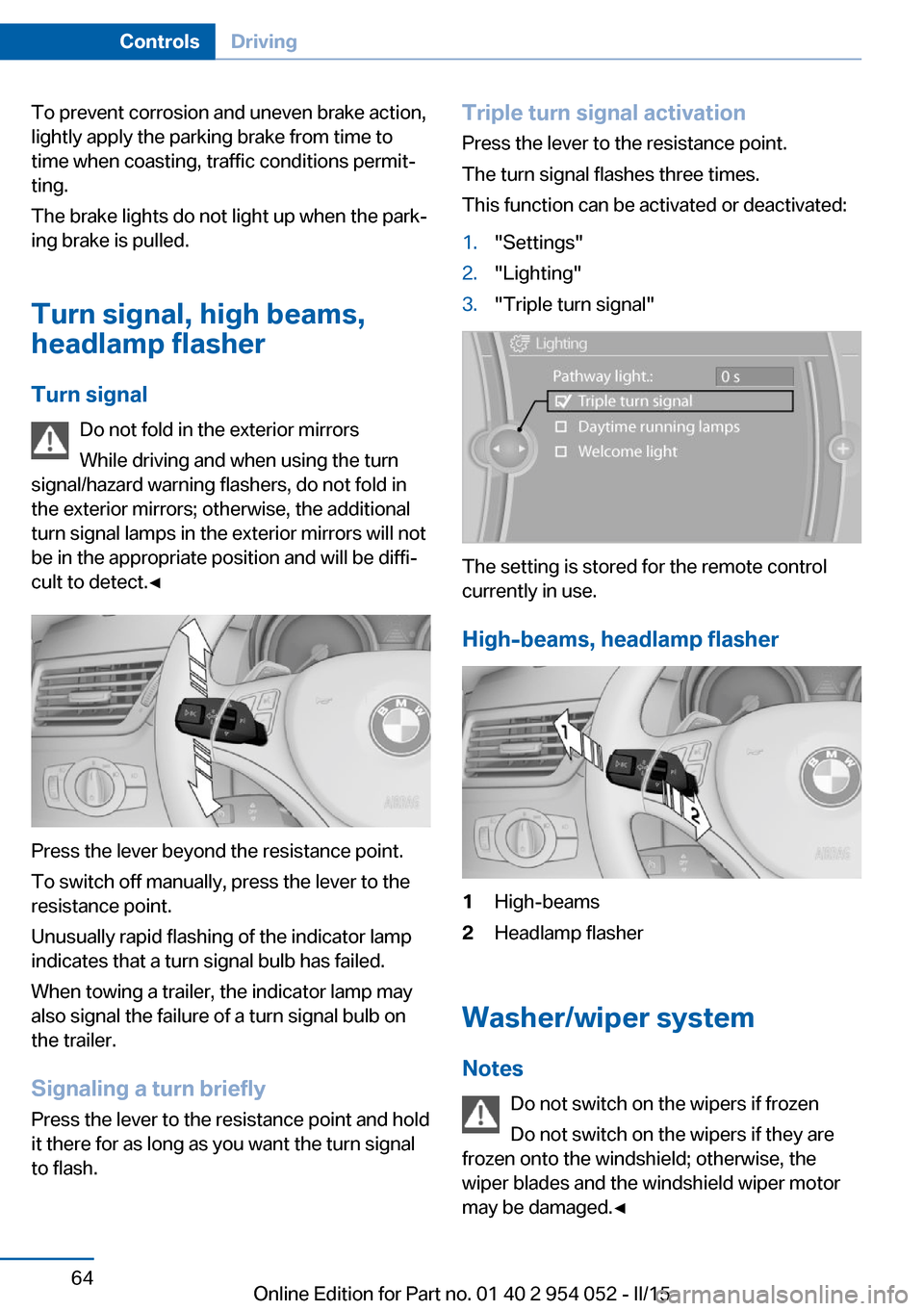
High-beams, headlamp flasher
1High-beams2Headlamp flasher
Washer/wiper system Notes Do not switch on the wipers if frozen
Do not switch on the wipers if they are
frozen onto the windshield; otherwise, the
wiper blades and the windshield wiper motor
may be damaged.◀
Seite 64ControlsDriving64
Online Edition for Part no. 01 40 2 954 052 - II/15
Page 87 of 297
LampsVehicle equipment
This chapter describes all series equipment as
well as country-specific and special equipment
offered for this model series. Therefore, it also
describes equipment that may not be found in
your vehicle, for instance due to the selected
special equipment or the country version. This
also applies to safety-related functions and
systems.
When using the features and systems descri‐
bed here, adhere to local regulations.
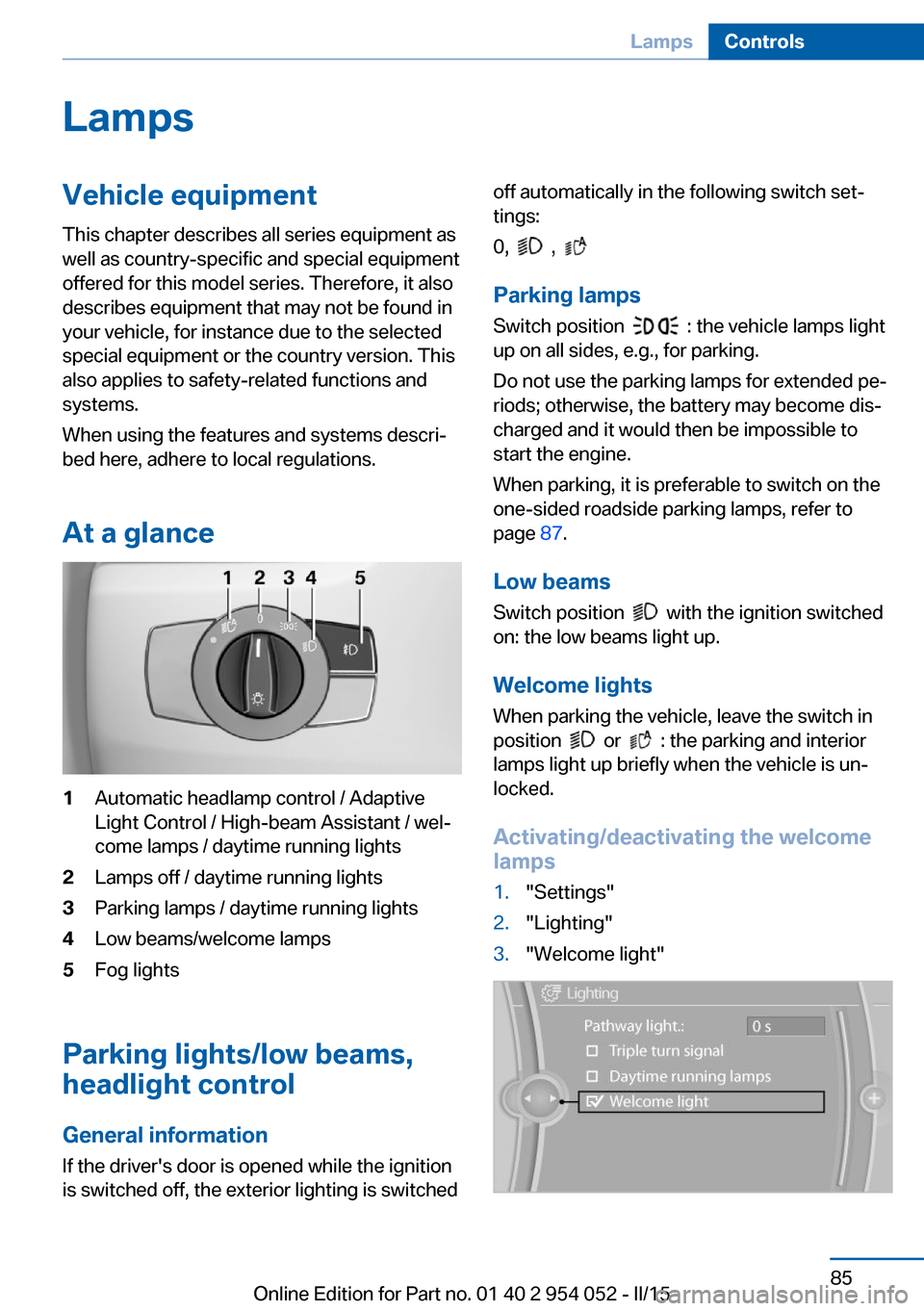
At a glance1Automatic headlamp control / Adaptive
Light Control / High-beam Assistant / wel‐
come lamps / daytime running lights2Lamps off / daytime running lights3Parking lamps / daytime running lights4Low beams/welcome lamps5Fog lights
Parking lights/low beams,
headlight control
General information
If the driver's door is opened while the ignition
is switched off, the exterior lighting is switched
off automatically in the following switch set‐
tings:
0,
,
Parking lamps
Switch position
: the vehicle lamps light
up on all sides, e.g., for parking.
Do not use the parking lamps for extended pe‐
riods; otherwise, the battery may become dis‐
charged and it would then be impossible to
start the engine.
When parking, it is preferable to switch on the
one-sided roadside parking lamps, refer to
page 87.
Low beams Switch position
with the ignition switched
on: the low beams light up.
Welcome lights When parking the vehicle, leave the switch in
position
or : the parking and interior
lamps light up briefly when the vehicle is un‐
locked.
Activating/deactivating the welcome
lamps
1."Settings"2."Lighting"3."Welcome light"Seite 85LampsControls85
Online Edition for Part no. 01 40 2 954 052 - II/15
Page 89 of 297
front fog lamps is switched on as a turning
lamp. This provides improved illumination of
the area inside the curve.
Controls
Activating Switch position
with the ignition switched
on.
The turning lamps are automatically switched
on depending on the steering angle or the use
of turn signals.
To avoid blinding oncoming traffic, the Adap‐
tive Light Control does not swivel to the driv‐
er's side when the vehicle is at a standstill.
When driving in reverse, both turning lamps
are active.
Malfunction The warning lamp lights up.A mes‐
sage appears on the Control Display.
Adaptive Light Control is malfunc‐
tioning or has failed. Have the system checked
as soon as possible.
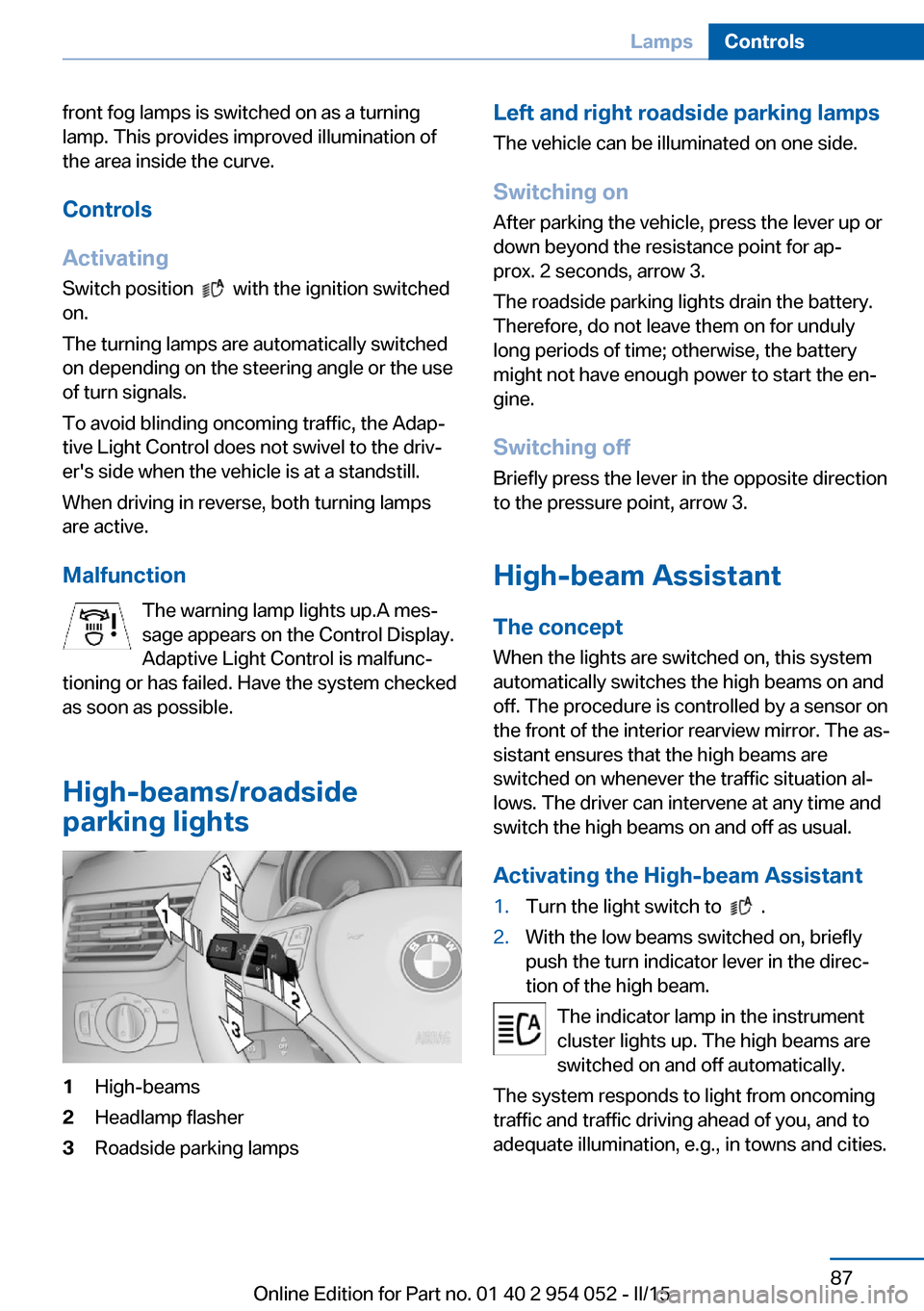
High-beams/roadside
parking lights
1High-beams2Headlamp flasher3Roadside parking lampsLeft and right roadside parking lamps
The vehicle can be illuminated on one side.
Switching on After parking the vehicle, press the lever up or
down beyond the resistance point for ap‐
prox. 2 seconds, arrow 3.
The roadside parking lights drain the battery.
Therefore, do not leave them on for unduly
long periods of time; otherwise, the battery might not have enough power to start the en‐
gine.
Switching off
Briefly press the lever in the opposite direction
to the pressure point, arrow 3.
High-beam Assistant
The concept When the lights are switched on, this system
automatically switches the high beams on and
off. The procedure is controlled by a sensor on
the front of the interior rearview mirror. The as‐
sistant ensures that the high beams are
switched on whenever the traffic situation al‐
lows. The driver can intervene at any time and
switch the high beams on and off as usual.
Activating the High-beam Assistant1.Turn the light switch to .2.With the low beams switched on, briefly
push the turn indicator lever in the direc‐
tion of the high beam.
The indicator lamp in the instrument
cluster lights up. The high beams are
switched on and off automatically.
The system responds to light from oncoming
traffic and traffic driving ahead of you, and to
adequate illumination, e.g., in towns and cities.
Seite 87LampsControls87
Online Edition for Part no. 01 40 2 954 052 - II/15
Page 90 of 297
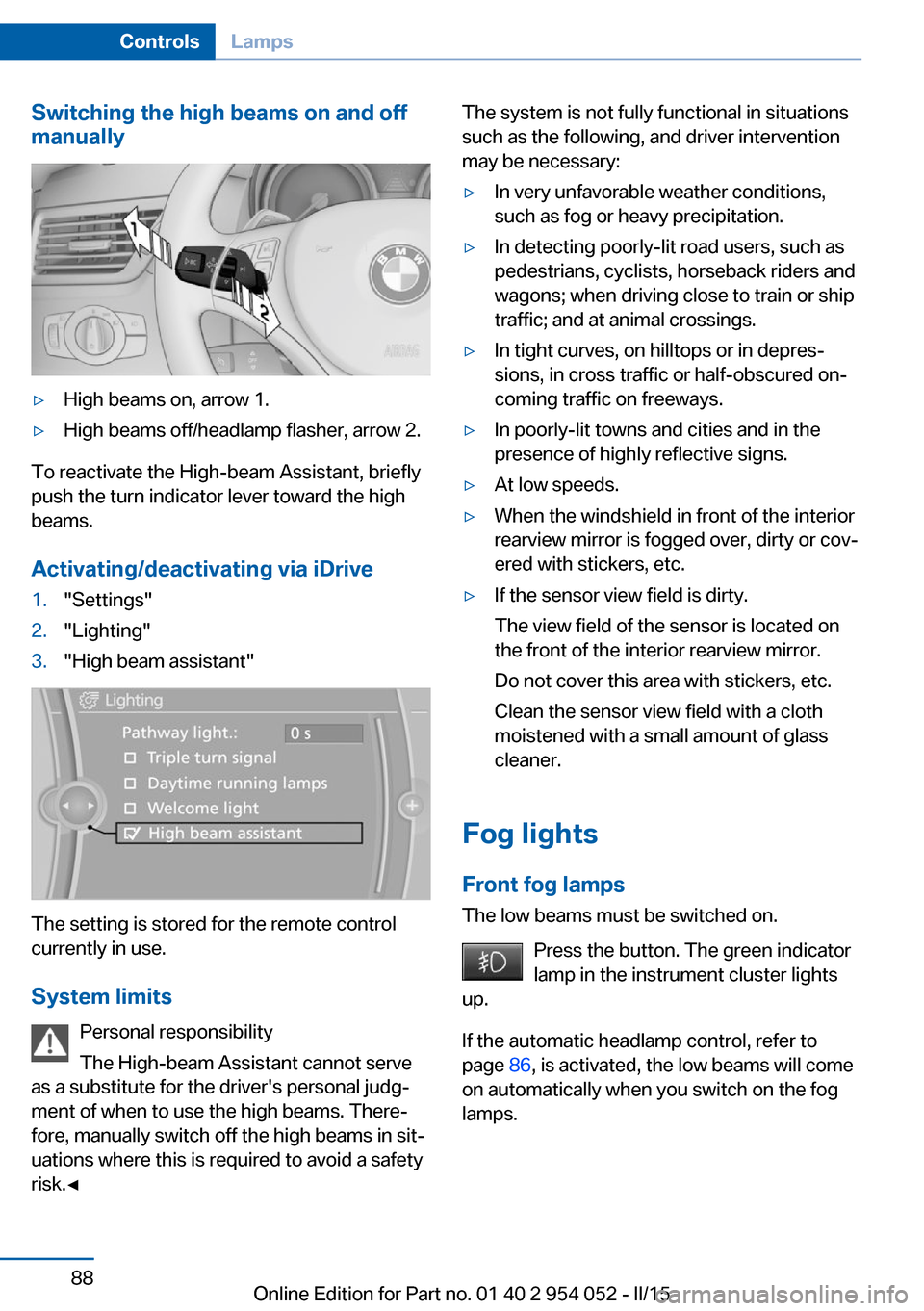
Switching the high beams on and off
manually▷High beams on, arrow 1.▷High beams off/headlamp flasher, arrow 2.
To reactivate the High-beam Assistant, briefly
push the turn indicator lever toward the high
beams.
Activating/deactivating via iDrive
1."Settings"2."Lighting"3."High beam assistant"
The setting is stored for the remote control
currently in use.
System limits Personal responsibility
The High-beam Assistant cannot serve
as a substitute for the driver's personal judg‐
ment of when to use the high beams. There‐
fore, manually switch off the high beams in sit‐
uations where this is required to avoid a safety
risk.◀
The system is not fully functional in situations
such as the following, and driver intervention
may be necessary:▷In very unfavorable weather conditions,
such as fog or heavy precipitation.▷In detecting poorly-lit road users, such as
pedestrians, cyclists, horseback riders and
wagons; when driving close to train or ship
traffic; and at animal crossings.▷In tight curves, on hilltops or in depres‐
sions, in cross traffic or half-obscured on‐
coming traffic on freeways.▷In poorly-lit towns and cities and in the
presence of highly reflective signs.▷At low speeds.▷When the windshield in front of the interior
rearview mirror is fogged over, dirty or cov‐
ered with stickers, etc.▷If the sensor view field is dirty.
The view field of the sensor is located on
the front of the interior rearview mirror.
Do not cover this area with stickers, etc.
Clean the sensor view field with a cloth
moistened with a small amount of glass
cleaner.
Fog lights
Front fog lamps
The low beams must be switched on.
Press the button. The green indicator
lamp in the instrument cluster lights
up.
If the automatic headlamp control, refer to
page 86, is activated, the low beams will come
on automatically when you switch on the fog
lamps.
Seite 88ControlsLamps88
Online Edition for Part no. 01 40 2 954 052 - II/15
Page 253 of 297
Headlight setting
Changing the bulbs and lights may influence
the headlight settings. Have the headlight set‐
ting checked by a service center and corrected
if necessary after changing bulbs or lights.
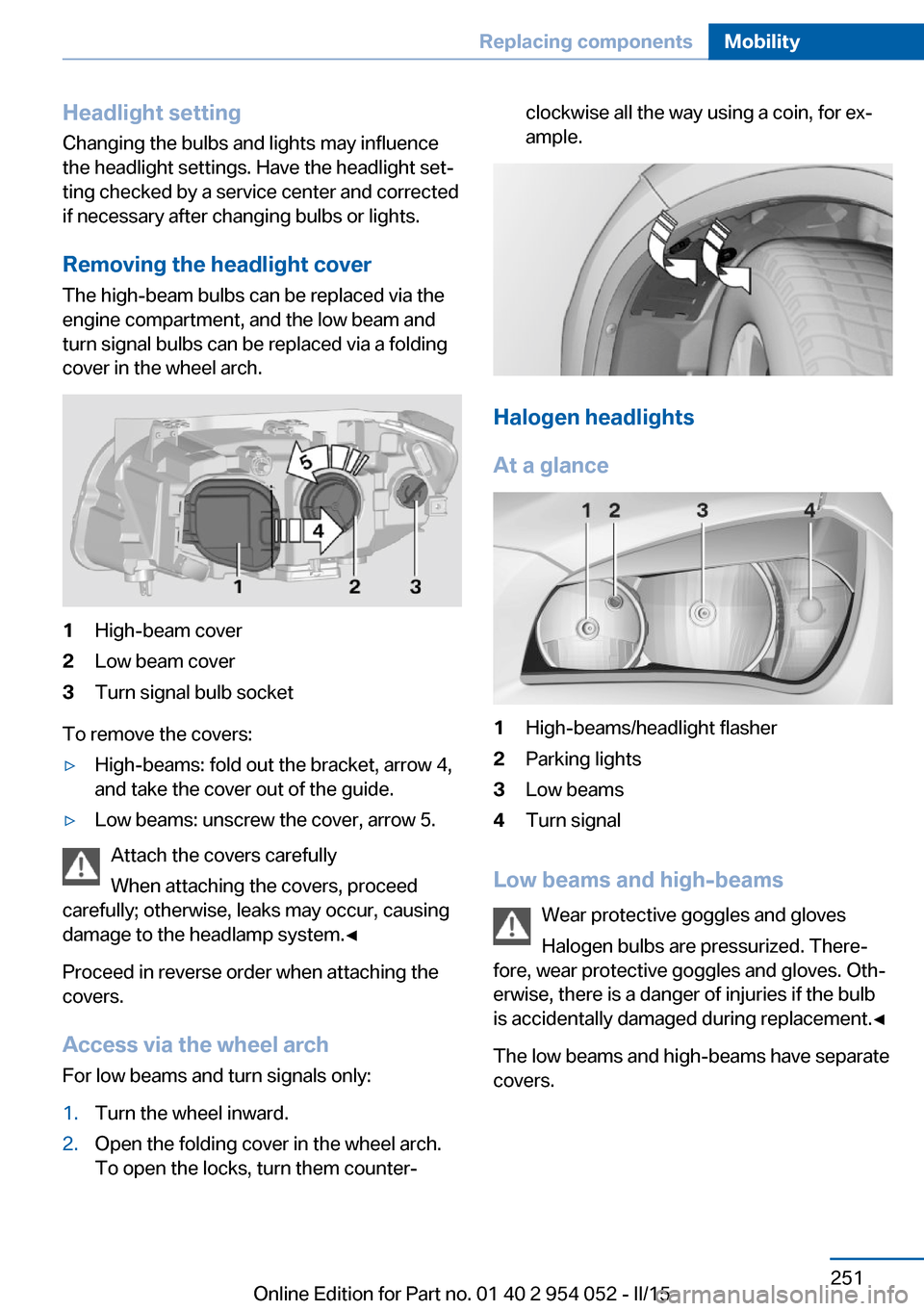
Removing the headlight cover
The high-beam bulbs can be replaced via the
engine compartment, and the low beam and
turn signal bulbs can be replaced via a folding
cover in the wheel arch.1High-beam cover2Low beam cover3Turn signal bulb socket
To remove the covers:
▷High-beams: fold out the bracket, arrow 4,
and take the cover out of the guide.▷Low beams: unscrew the cover, arrow 5.
Attach the covers carefully
When attaching the covers, proceed
carefully; otherwise, leaks may occur, causing
damage to the headlamp system.◀
Proceed in reverse order when attaching the
covers.
Access via the wheel arch For low beams and turn signals only:
1.Turn the wheel inward.2.Open the folding cover in the wheel arch.
To open the locks, turn them counter‐clockwise all the way using a coin, for ex‐
ample.
Halogen headlights
At a glance
1High-beams/headlight flasher2Parking lights3Low beams4Turn signal
Low beams and high-beams Wear protective goggles and gloves
Halogen bulbs are pressurized. There‐
fore, wear protective goggles and gloves. Oth‐
erwise, there is a danger of injuries if the bulb
is accidentally damaged during replacement.◀
The low beams and high-beams have separate
covers.
Seite 251Replacing componentsMobility251
Online Edition for Part no. 01 40 2 954 052 - II/15