lock BMW X1 2015 E84 Owner's Manual
[x] Cancel search | Manufacturer: BMW, Model Year: 2015, Model line: X1, Model: BMW X1 2015 E84Pages: 297, PDF Size: 7.01 MB
Page 17 of 297
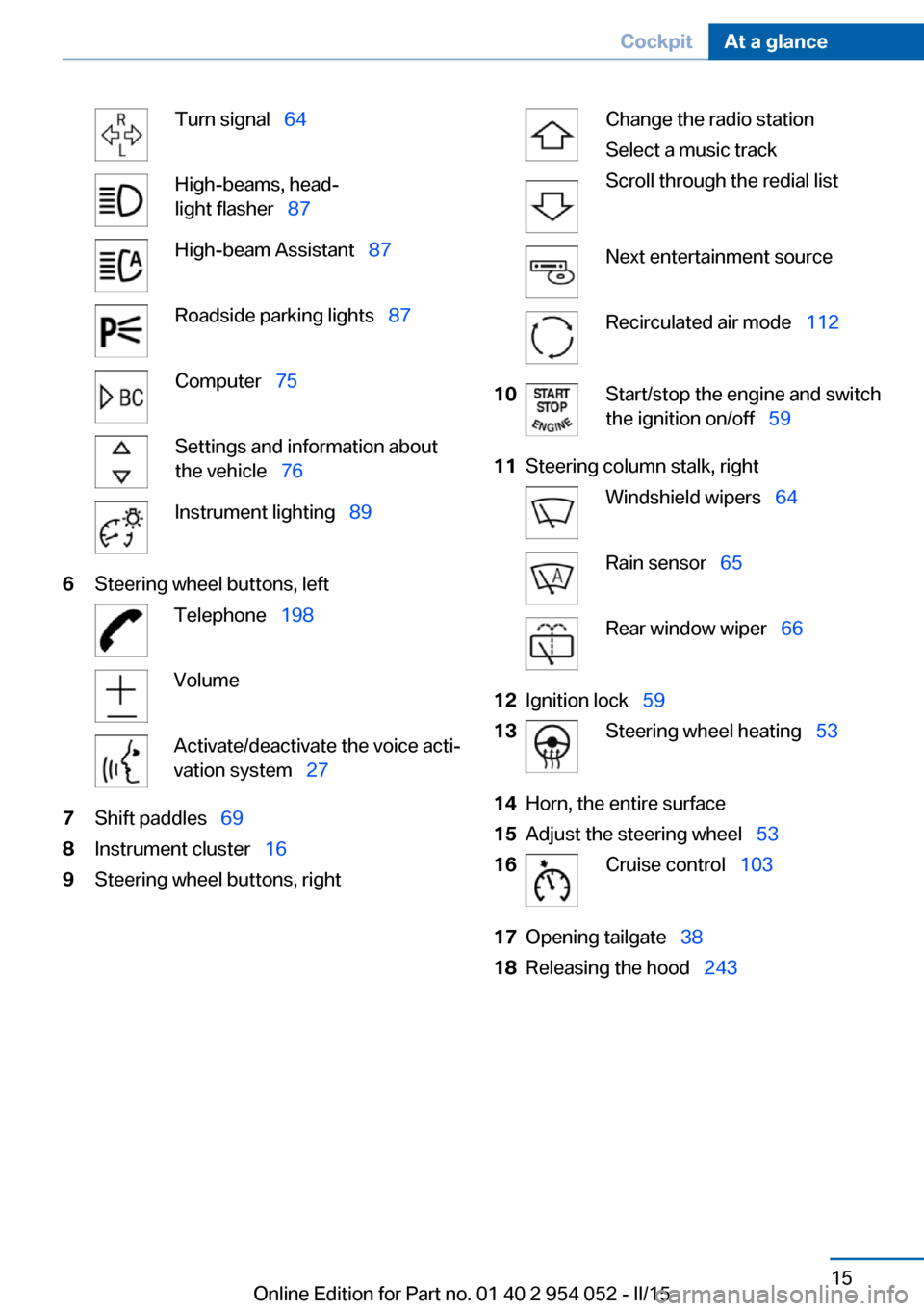
Turn signal 64High-beams, head‐
light flasher 87High-beam Assistant 87Roadside parking lights 87Computer 75Settings and information about
the vehicle 76Instrument lighting 896Steering wheel buttons, leftTelephone 198VolumeActivate/deactivate the voice acti‐
vation system 277Shift paddles 698Instrument cluster 169Steering wheel buttons, rightChange the radio station
Select a music track
Scroll through the redial listNext entertainment sourceRecirculated air mode 11210Start/stop the engine and switch
the ignition on/off 5911Steering column stalk, rightWindshield wipers 64Rain sensor 65Rear window wiper 6612Ignition lock 5913Steering wheel heating 5314Horn, the entire surface15Adjust the steering wheel 5316Cruise control 10317Opening tailgate 3818Releasing the hood 243Seite 15CockpitAt a glance15
Online Edition for Part no. 01 40 2 954 052 - II/15
Page 18 of 297
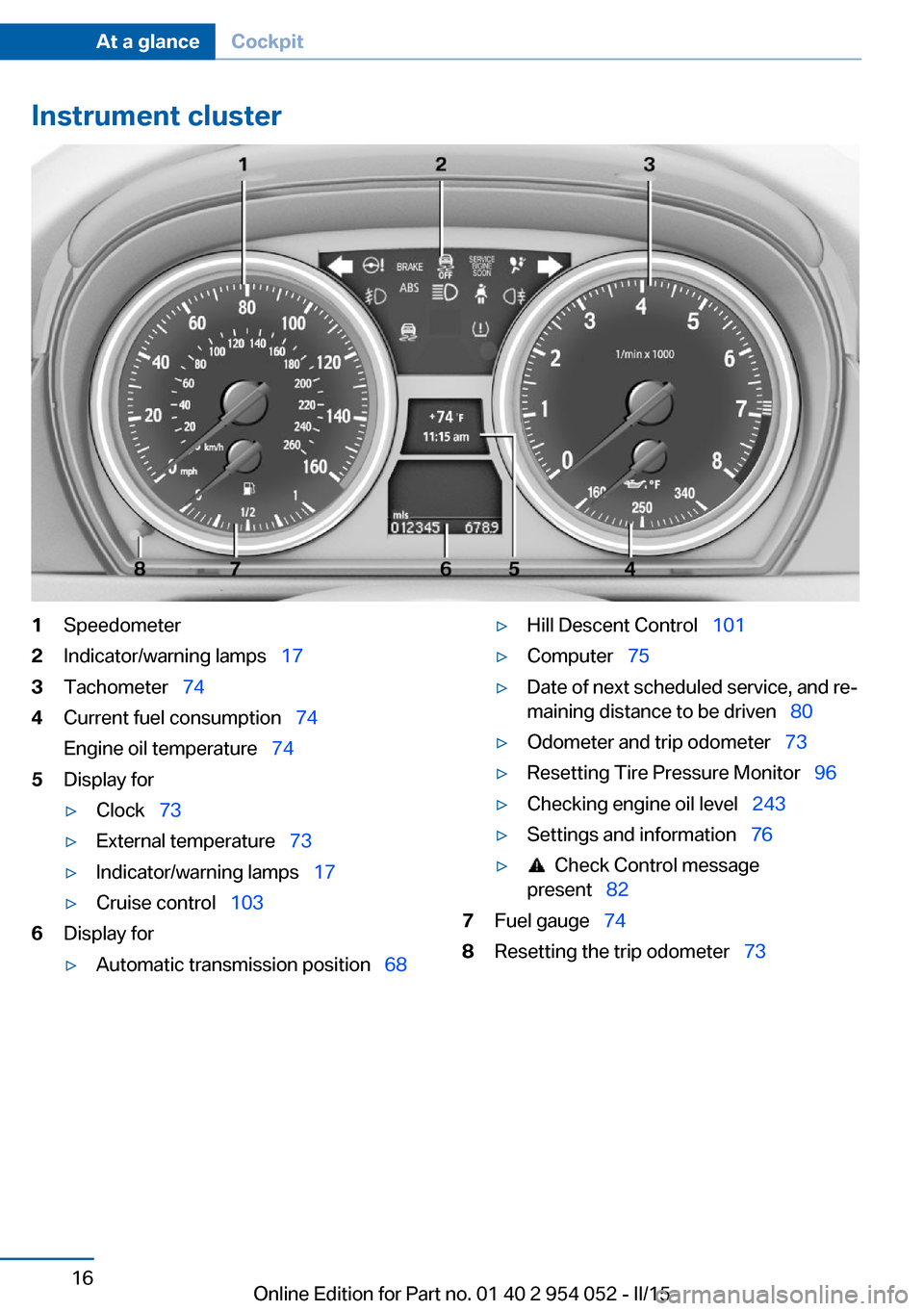
Instrument cluster1Speedometer2Indicator/warning lamps 173Tachometer 744Current fuel consumption 74
Engine oil temperature 745Display for▷Clock 73▷External temperature 73▷Indicator/warning lamps 17▷Cruise control 1036Display for▷Automatic transmission position 68▷Hill Descent Control 101▷Computer 75▷Date of next scheduled service, and re‐
maining distance to be driven 80▷Odometer and trip odometer 73▷Resetting Tire Pressure Monitor 96▷Checking engine oil level 243▷Settings and information 76▷ Check Control message
present 827Fuel gauge 748Resetting the trip odometer 73Seite 16At a glanceCockpit16
Online Edition for Part no. 01 40 2 954 052 - II/15
Page 20 of 297
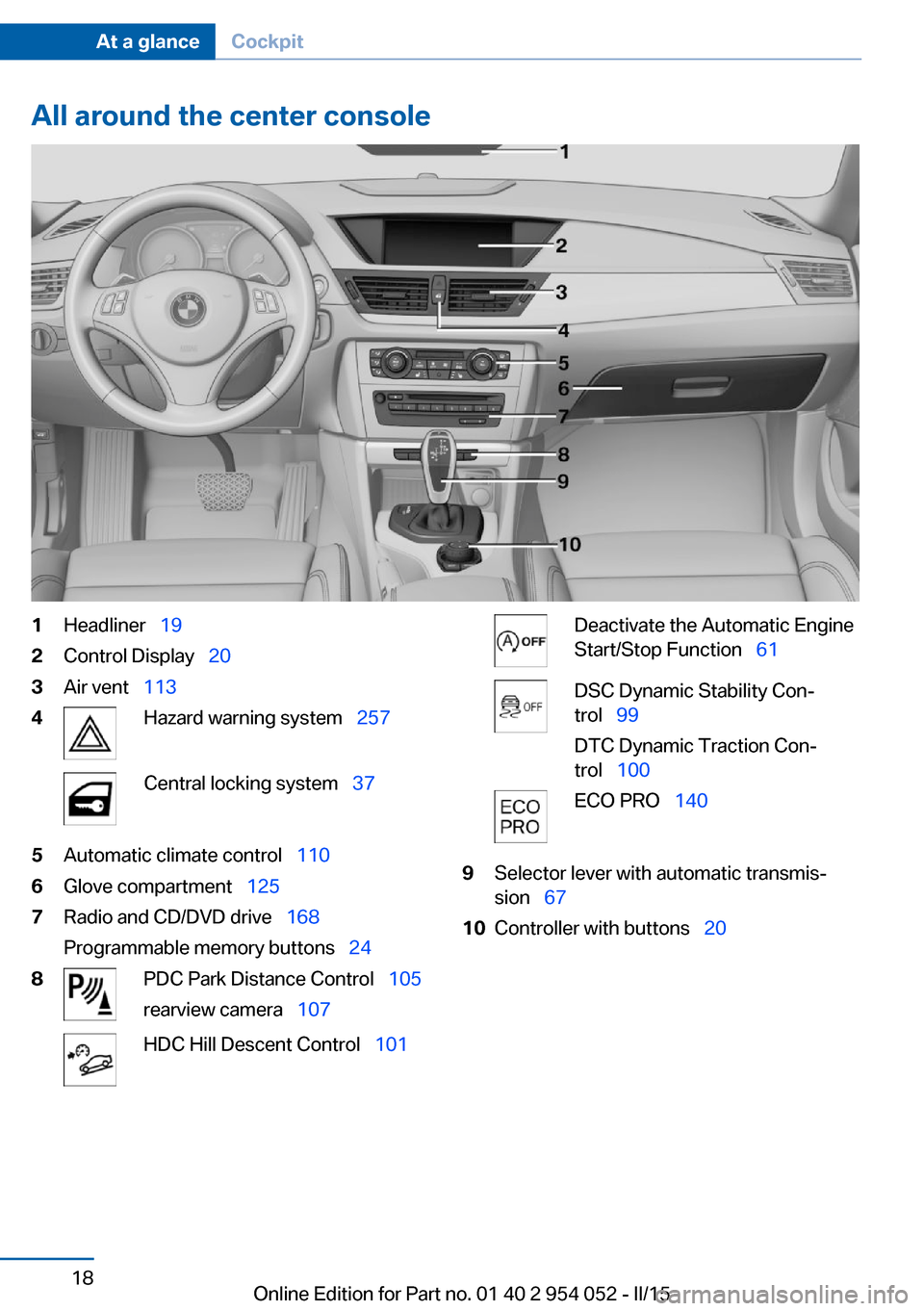
All around the center console1Headliner 192Control Display 203Air vent 1134Hazard warning system 257Central locking system 375Automatic climate control 1106Glove compartment 1257Radio and CD/DVD drive 168
Programmable memory buttons 248PDC Park Distance Control 105
rearview camera 107HDC Hill Descent Control 101Deactivate the Automatic Engine
Start/Stop Function 61DSC Dynamic Stability Con‐
trol 99
DTC Dynamic Traction Con‐
trol 100ECO PRO 1409Selector lever with automatic transmis‐
sion 6710Controller with buttons 20Seite 18At a glanceCockpit18
Online Edition for Part no. 01 40 2 954 052 - II/15
Page 25 of 297
Function is activated.
The function is deactivated.
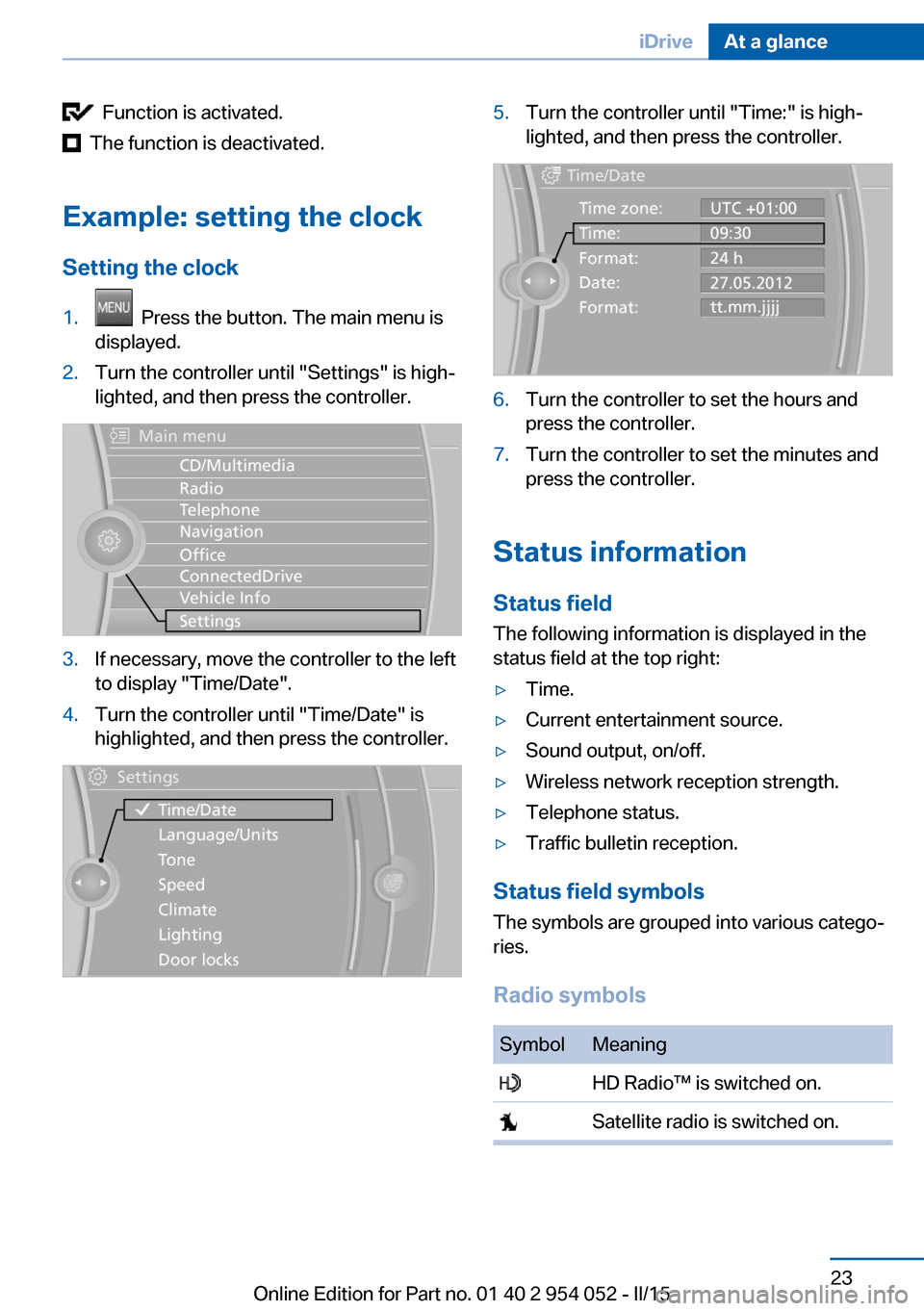
Example: setting the clock Setting the clock
1. Press the button. The main menu is
displayed.2.Turn the controller until "Settings" is high‐
lighted, and then press the controller.3.If necessary, move the controller to the left
to display "Time/Date".4.Turn the controller until "Time/Date" is
highlighted, and then press the controller.5.Turn the controller until "Time:" is high‐
lighted, and then press the controller.6.Turn the controller to set the hours and
press the controller.7.Turn the controller to set the minutes and
press the controller.
Status information
Status field The following information is displayed in the
status field at the top right:
▷Time.▷Current entertainment source.▷Sound output, on/off.▷Wireless network reception strength.▷Telephone status.▷Traffic bulletin reception.
Status field symbols
The symbols are grouped into various catego‐
ries.
Radio symbols
SymbolMeaning HD Radio™ is switched on. Satellite radio is switched on.Seite 23iDriveAt a glance23
Online Edition for Part no. 01 40 2 954 052 - II/15
Page 26 of 297
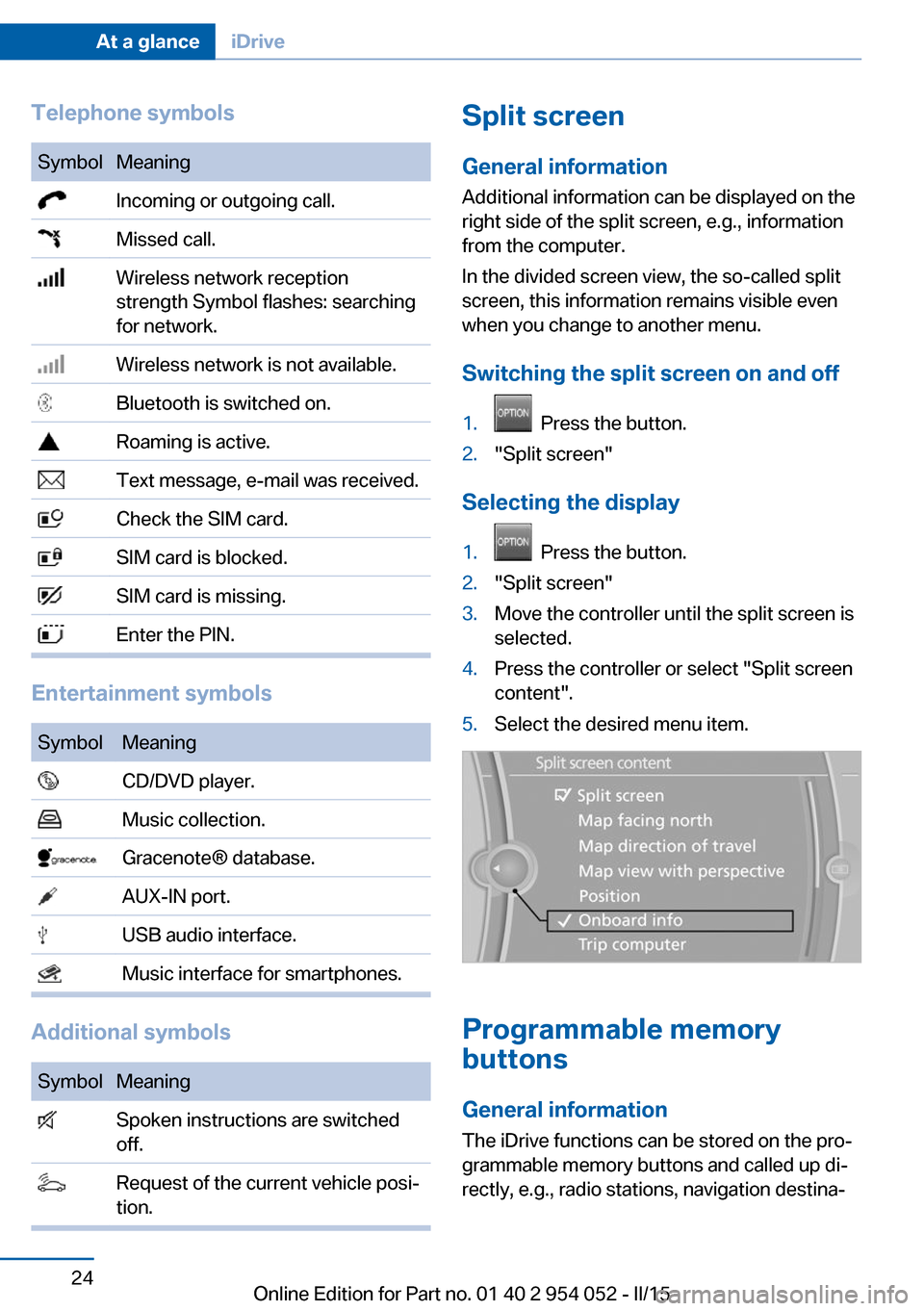
Telephone symbolsSymbolMeaning Incoming or outgoing call. Missed call. Wireless network reception
strength Symbol flashes: searching
for network. Wireless network is not available. Bluetooth is switched on. Roaming is active. Text message, e-mail was received. Check the SIM card. SIM card is blocked. SIM card is missing. Enter the PIN.
Entertainment symbols
SymbolMeaning CD/DVD player. Music collection. Gracenote® database. AUX-IN port. USB audio interface. Music interface for smartphones.
Additional symbols
SymbolMeaning Spoken instructions are switched
off. Request of the current vehicle posi‐
tion.Split screen
General information Additional information can be displayed on the
right side of the split screen, e.g., information
from the computer.
In the divided screen view, the so-called split
screen, this information remains visible even when you change to another menu.
Switching the split screen on and off1. Press the button.2."Split screen"
Selecting the display
1. Press the button.2."Split screen"3.Move the controller until the split screen is
selected.4.Press the controller or select "Split screen
content".5.Select the desired menu item.
Programmable memory
buttons
General information
The iDrive functions can be stored on the pro‐
grammable memory buttons and called up di‐
rectly, e.g., radio stations, navigation destina‐
Seite 24At a glanceiDrive24
Online Edition for Part no. 01 40 2 954 052 - II/15
Page 34 of 297
Opening and closingVehicle equipment
This chapter describes all series equipment as
well as country-specific and special equipment
offered for this model series. Therefore, it also
describes equipment that may not be found in
your vehicle, for instance due to the selected
special equipment or the country version. This
also applies to safety-related functions and
systems.
When using the features and systems descri‐
bed here, adhere to local regulations.
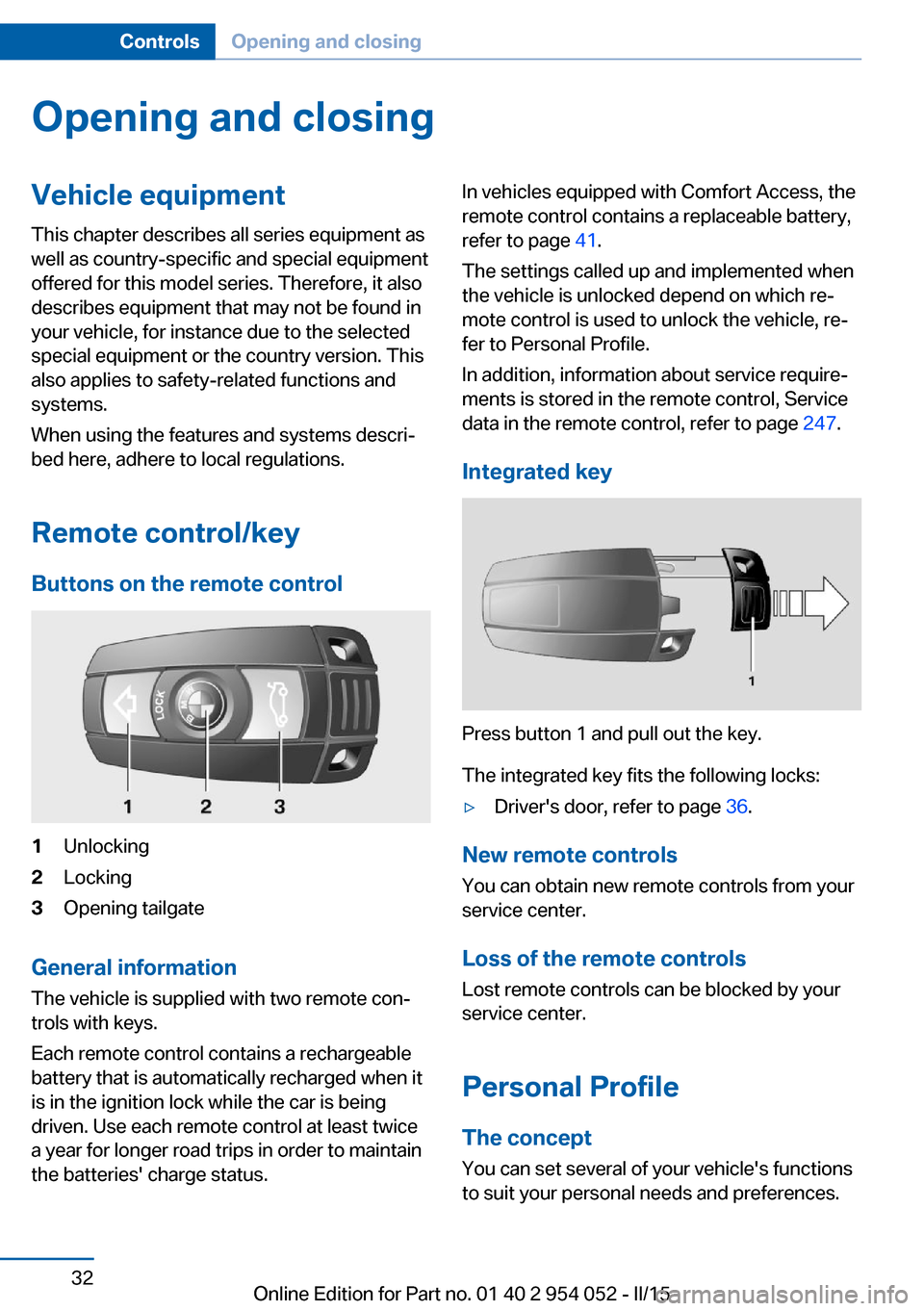
Remote control/key Buttons on the remote control1Unlocking2Locking3Opening tailgate
General information
The vehicle is supplied with two remote con‐
trols with keys.
Each remote control contains a rechargeable
battery that is automatically recharged when it
is in the ignition lock while the car is being
driven. Use each remote control at least twice
a year for longer road trips in order to maintain
the batteries' charge status.
In vehicles equipped with Comfort Access, the
remote control contains a replaceable battery,
refer to page 41.
The settings called up and implemented when
the vehicle is unlocked depend on which re‐
mote control is used to unlock the vehicle, re‐
fer to Personal Profile.
In addition, information about service require‐
ments is stored in the remote control, Service
data in the remote control, refer to page 247.
Integrated key
Press button 1 and pull out the key.
The integrated key fits the following locks:
▷Driver's door, refer to page 36.
New remote controls
You can obtain new remote controls from your
service center.
Loss of the remote controls
Lost remote controls can be blocked by your
service center.
Personal Profile The concept
You can set several of your vehicle's functions
to suit your personal needs and preferences.
Seite 32ControlsOpening and closing32
Online Edition for Part no. 01 40 2 954 052 - II/15
Page 35 of 297
▷The settings are automatically saved in the
profile currently activated in the remote
control.▷The remote control used is detected when
the vehicle is unlocked and the stored pro‐
file is called up.▷Your personal settings will be recognized
and called up again even if the vehicle has
been used in the meantime by someone
else with another remote control.
The individual settings are stored for a maxi‐
mum of four remote controls. They are stored
for two remote controls if Comfort Access is in
use.
Personal Profile settingsThe following functions and settings can be
stored in a profile.
More information on the settings can be found
under:
▷Assigning the programmable memory but‐
tons, refer to page 24.▷Response of the central locking system
when the car is being unlocked, refer to
page 34.▷Automatic locking of the vehicle, refer to
page 37.▷Automatic call-up of the driver's seat posi‐
tion after unlocking, refer to page 35.▷Settings for the display on the Control Dis‐
play and in the instrument cluster:▷12h/24h clock format, refer to
page 78.▷Date format, refer to page 79.▷Brightness of the Control Display, refer
to page 80.▷Language on the Control Display, refer
to page 79.▷Units of measure for fuel consumption,
distance covered/remaining distances,
and temperature, refer to page 77.▷Show visual warning for the Park Distance
Control PDC, refer to page 106.▷rearview camera:▷Function selection, refer to page 107.▷Type of display, refer to page 109.▷Light settings:▷Triple turn signal activation, refer to
page 64.▷Welcome lights, refer to page 85.▷Headlight courtesy delay feature, refer
to page 86.▷Daytime running lights, refer to
page 86.▷High-beam Assistant, refer to
page 87.▷Automatic climate control: AUTO program,
cooling function and automatic recircu‐
lated air control activated/deactivated,
temperature, air flow rate and distribution,
refer to page 110.▷Navigation:▷Voice activation, refer to page 157.▷Route criteria, refer to page 155.▷Map view settings, refer to page 159.▷Entertainment:▷Tone control, refer to page 166.▷Radio, stored stations, refer to
page 174.▷CD/multimedia, audio source listened
to last, refer to page 176.▷Telephone: volume, refer to page 202.
Central locking system
The concept The central locking system becomes active
when the driver's door is closed.
The system simultaneously engages and re‐
leases the locks on the following:
Seite 33Opening and closingControls33
Online Edition for Part no. 01 40 2 954 052 - II/15
Page 36 of 297
▷Doors.▷Tailgate.▷Fuel filler flap.
Operating from the outside
▷Via the remote control.▷In cars with Comfort Access, via the door
handles on the driver's and front passen‐
ger sides.
The following takes place simultaneously
when locking/unlocking the vehicle via the re‐
mote control:
▷The welcome lamps, interior lamps and
courtesy lamps are switched on and off.▷The alarm system is armed or disarmed,
refer to page 41.
Operating from the inside
Via the button for the central locking system,
refer to page 37.
If the vehicle is locked from the inside, the fuel
filler flap remains unlocked.
If an accident of a certain severity occurs, the central locking system unlocks automatically.
The hazard warning system and interior lamps come on.
Opening and closing: from
the outside
Using the remote control
General information Take the remote control with you
People or animals left unattended in a
parked vehicle can lock the doors from the in‐
side. Always take the remote control with you
when leaving the vehicle so that the vehicle
can then be opened from the outside.◀
Unlocking
Press the button. The vehicle is unlocked.
The welcome lamps, interior lamps, and cour‐
tesy lamps are switched on.
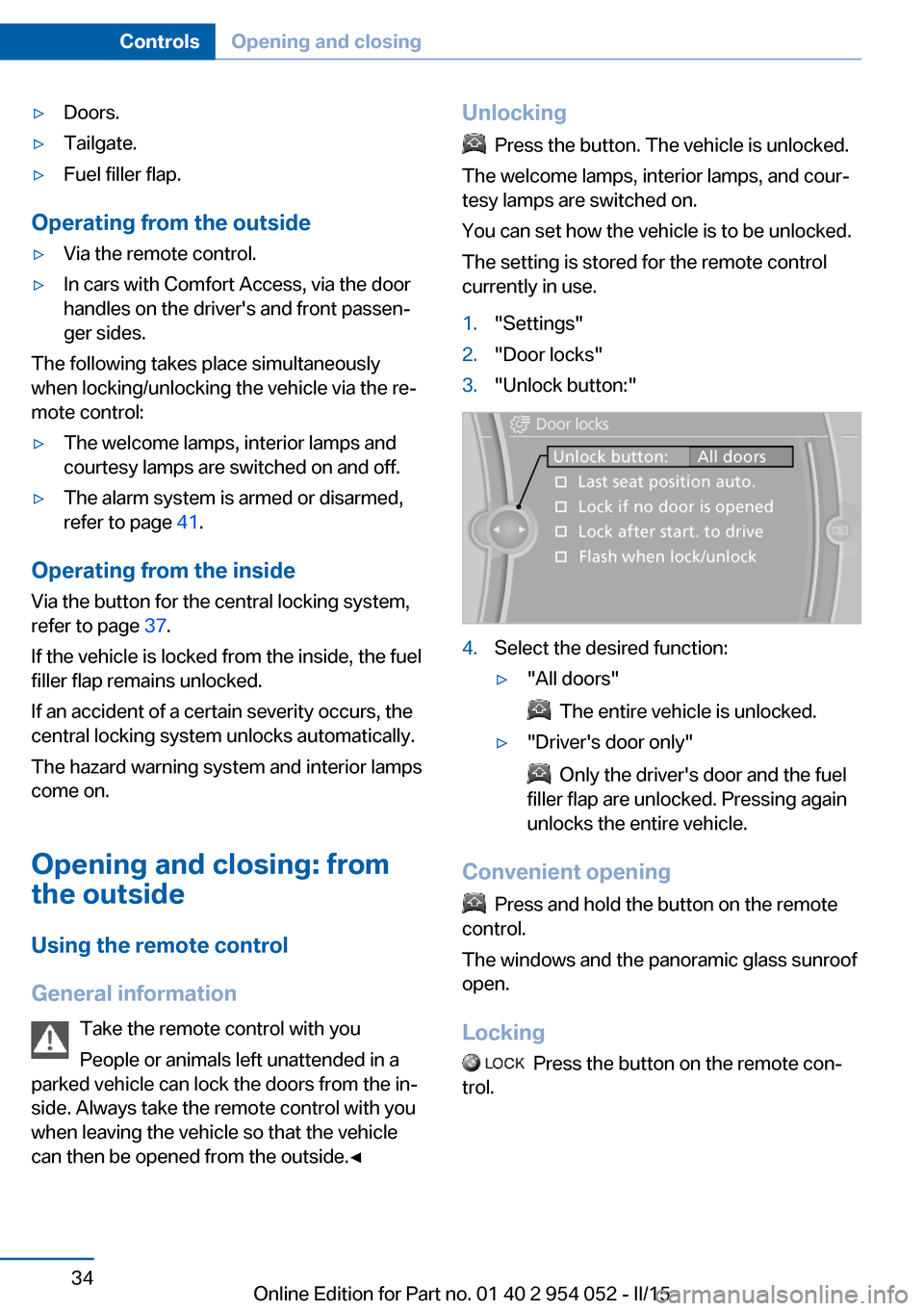
You can set how the vehicle is to be unlocked.
The setting is stored for the remote control
currently in use.
1."Settings"2."Door locks"3."Unlock button:"4.Select the desired function:▷"All doors"
The entire vehicle is unlocked.
▷"Driver's door only"
Only the driver's door and the fuel
filler flap are unlocked. Pressing again
unlocks the entire vehicle.
Convenient opening
Press and hold the button on the remote
control.
The windows and the panoramic glass sunroof
open.
Locking
Press the button on the remote con‐
trol.
Seite 34ControlsOpening and closing34
Online Edition for Part no. 01 40 2 954 052 - II/15
Page 37 of 297
Locking from the outside
Do not lock the vehicle from the outside
if there are people in it, as the vehicle cannot
be unlocked from inside without special knowl‐
edge.◀
Switching on the interior lamps and
courtesy lamps
Press the button on the remote con‐
trol with the vehicle locked.
Panic mode
You can trigger the alarm system if you find
yourself in a dangerous situation.
Press the button on the remote control for
at least 3 seconds.
To switch off the alarm: press any button.
Unlocking tailgate
Press the button on the remote control for
approx. 1 second and release.
The tailgate will open slightly, regardless of
whether it was previously locked or unlocked.
The tailgate pivots back and up when it opens.
Ensure that adequate clearance is available
before opening.
To avoid locking yourself out of the vehicle, do
not place the remote control into the cargo
area. The tailgate is locked again as soon as it
is pushed closed.
Before and after each trip, check that the tail‐
gate has not been inadvertently unlocked.
Confirmation signals from the vehicle
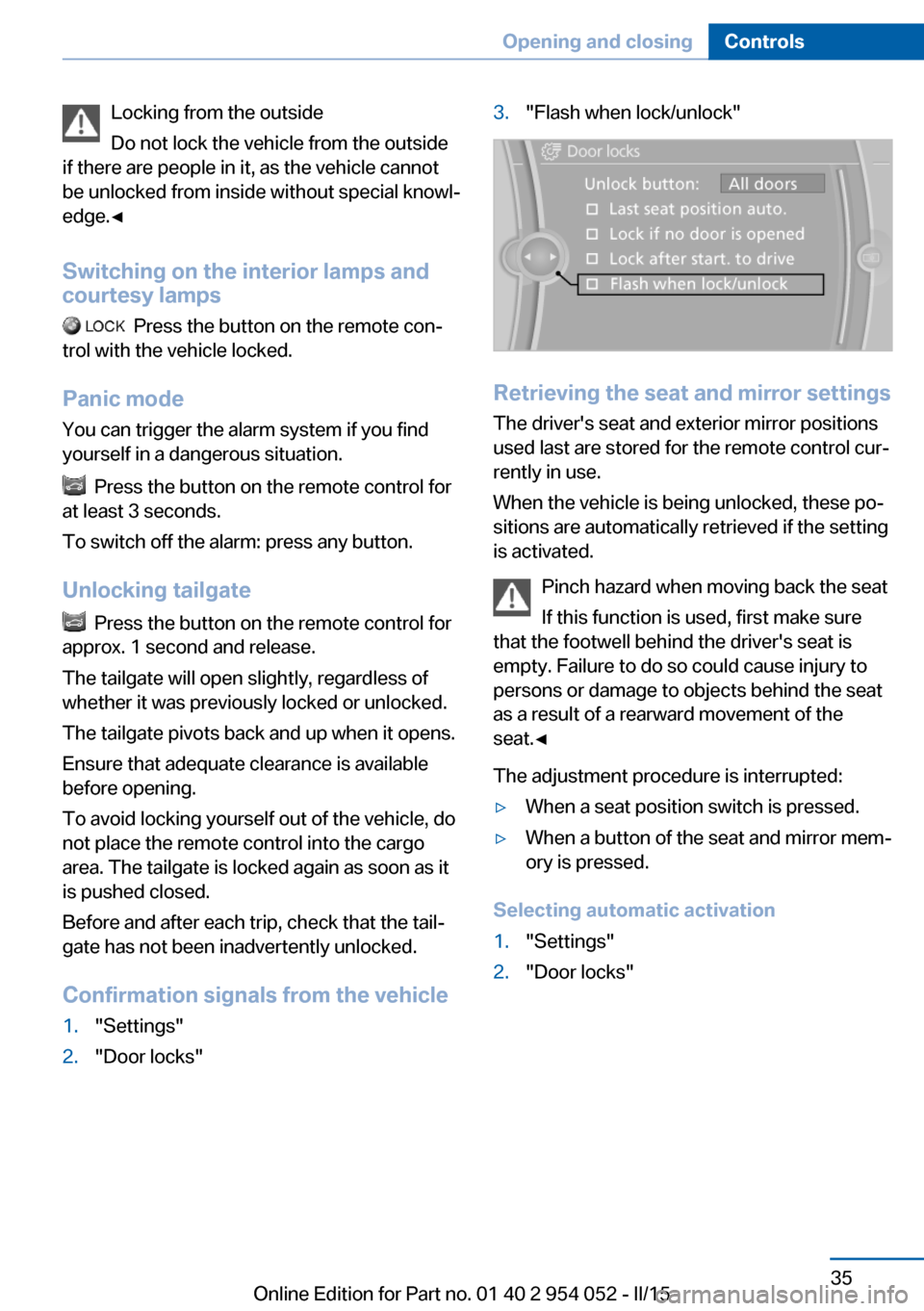
1."Settings"2."Door locks"3."Flash when lock/unlock"
Retrieving the seat and mirror settings The driver's seat and exterior mirror positions
used last are stored for the remote control cur‐
rently in use.
When the vehicle is being unlocked, these po‐
sitions are automatically retrieved if the setting
is activated.
Pinch hazard when moving back the seat
If this function is used, first make sure
that the footwell behind the driver's seat is
empty. Failure to do so could cause injury to
persons or damage to objects behind the seat
as a result of a rearward movement of the
seat.◀
The adjustment procedure is interrupted:
▷When a seat position switch is pressed.▷When a button of the seat and mirror mem‐
ory is pressed.
Selecting automatic activation
1."Settings"2."Door locks"Seite 35Opening and closingControls35
Online Edition for Part no. 01 40 2 954 052 - II/15
Page 38 of 297
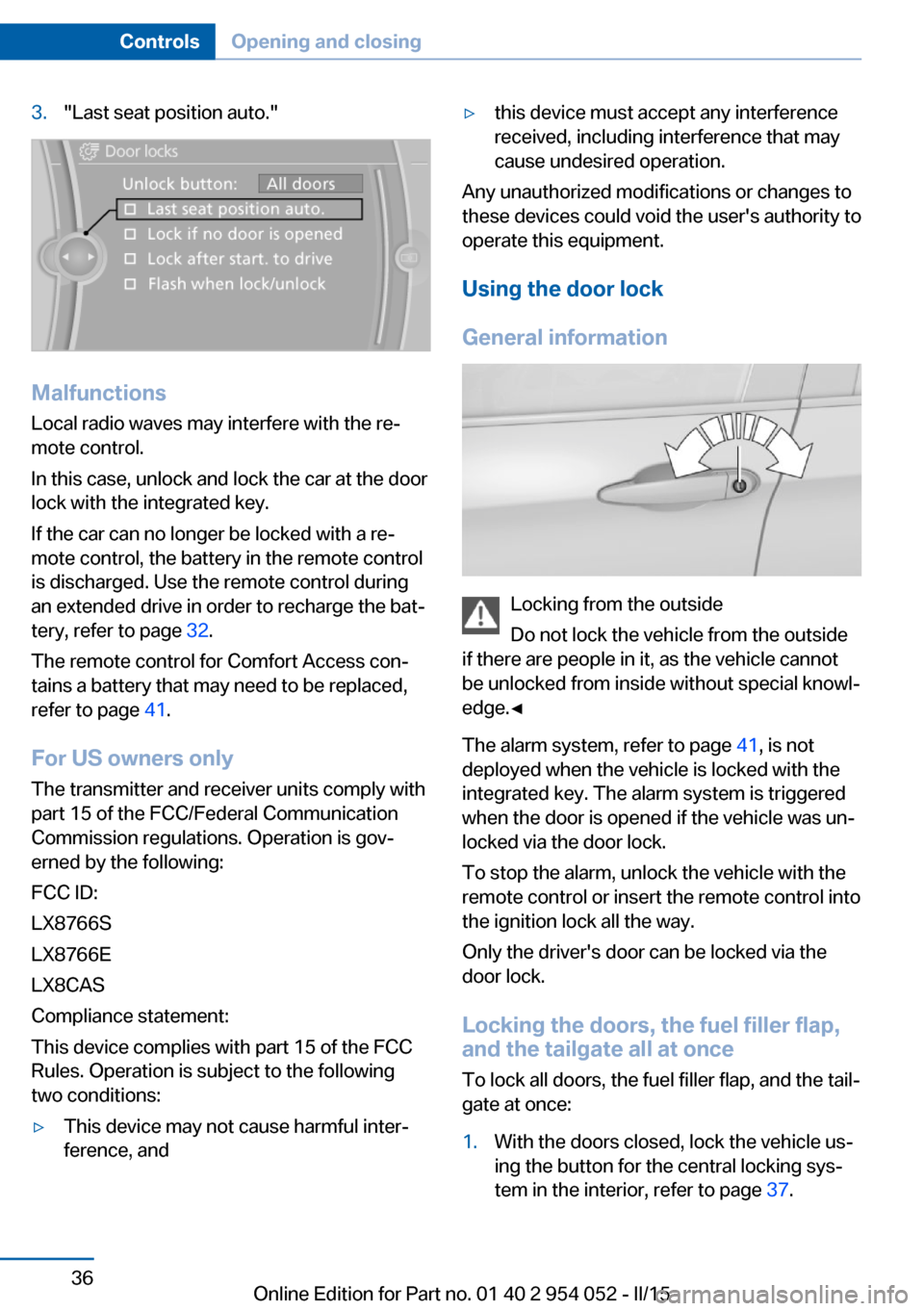
3."Last seat position auto."
MalfunctionsLocal radio waves may interfere with the re‐
mote control.
In this case, unlock and lock the car at the door
lock with the integrated key.
If the car can no longer be locked with a re‐
mote control, the battery in the remote control
is discharged. Use the remote control during
an extended drive in order to recharge the bat‐
tery, refer to page 32.
The remote control for Comfort Access con‐
tains a battery that may need to be replaced,
refer to page 41.
For US owners only
The transmitter and receiver units comply with
part 15 of the FCC/Federal Communication
Commission regulations. Operation is gov‐
erned by the following:
FCC ID:
LX8766S
LX8766E
LX8CAS
Compliance statement:
This device complies with part 15 of the FCC
Rules. Operation is subject to the following
two conditions:
▷This device may not cause harmful inter‐
ference, and▷this device must accept any interference
received, including interference that may
cause undesired operation.
Any unauthorized modifications or changes to
these devices could void the user's authority to
operate this equipment.
Using the door lock
General information
Locking from the outside
Do not lock the vehicle from the outside
if there are people in it, as the vehicle cannot
be unlocked from inside without special knowl‐
edge.◀
The alarm system, refer to page 41, is not
deployed when the vehicle is locked with the
integrated key. The alarm system is triggered
when the door is opened if the vehicle was un‐
locked via the door lock.
To stop the alarm, unlock the vehicle with the
remote control or insert the remote control into
the ignition lock all the way.
Only the driver's door can be locked via the
door lock.
Locking the doors, the fuel filler flap, and the tailgate all at once
To lock all doors, the fuel filler flap, and the tail‐
gate at once:
1.With the doors closed, lock the vehicle us‐
ing the button for the central locking sys‐
tem in the interior, refer to page 37.Seite 36ControlsOpening and closing36
Online Edition for Part no. 01 40 2 954 052 - II/15