remote control BMW X1 2016 F48 Owner's Guide
[x] Cancel search | Manufacturer: BMW, Model Year: 2016, Model line: X1, Model: BMW X1 2016 F48Pages: 242, PDF Size: 7.12 MB
Page 69 of 242
▷Opening or closing the driver's door.▷Unfastening of the driver's safety belt.▷When automatically switching from low
beams to parking lights.
If the engine is switched off and the ignition is
switched on, the system automatically
switches to the radio-ready state if the lights
are turned off or, if correspondingly equipped,
the daytime running lights are activated.
Starting the engine
Information DANGER
If the exhaust pipe is blocked or ventila‐
tion is insufficient, harmful exhaust gases can
enter into the vehicle. The exhaust gases con‐
tain carbon monoxide, an odorless and color‐
less but highly toxic gas. In enclosed areas, ex‐
haust gases can also accumulate outside of
the vehicle. There is danger to life. Keep the
exhaust pipe free and ensure sufficient ventila‐
tion.◀
WARNING
An unsecured vehicle can put itself into
motion and roll away. There is risk of an acci‐
dent. Before exiting, secure the vehicle against
rolling.
In order to ensure that the vehicle is secured
against rolling away, observe the following:
▷Set the parking brake.▷On uphill grades or on a slope, turn the
front wheels in the direction of the curb.▷On uphill grades or on a slope, also secure
the vehicle, e.g. with a wheel chock.◀
CAUTION
In the case of repeated starting attempts
or repeated starting in quick succession, the
fuel is not burned or is inadequately burned.
The catalytic converter can overheat. There is
risk of property damage. Avoid repeated start‐
ing in quick succession.◀
Steptronic transmission
Starting the engine1.Depress the brake pedal.2.Press the Start/Stop button.
The ignition is activated automatically for a
certain time and is stopped as soon as the en‐
gine starts.
Engine stop
Information WARNING
Unattended children or animals can
move the vehicle and endanger themselves
and traffic, e.g. with the following actions:
▷Pressing the Start/Stop button.▷Releasing the parking brake.▷Opening and closing of doors or windows.▷Shifting the selector lever into neutral.▷Using vehicle equipment.
There is risk of accidents or injuries. Do not
leave children or animals unattended in the ve‐
hicle. Carry remote control along when exiting
and lock the vehicle.◀
WARNING
An unsecured vehicle can put itself into
motion and roll away. There is risk of an acci‐
dent. Before exiting, secure the vehicle against
rolling.
In order to ensure that the vehicle is secured
against rolling away, observe the following:
▷Set the parking brake.▷On uphill grades or on a slope, turn the
front wheels in the direction of the curb.▷On uphill grades or on a slope, also secure
the vehicle, e.g. with a wheel chock.◀Seite 69DrivingControls69
Online Edition for Part no. 01 40 2 964 303 - VI/15
Page 72 of 242
Malfunction
The Auto Start/Stop function no longer
switches off the engine automatically. A Check Control message is displayed. It is possible to
continue driving. Have the system checked.
Parking brake The conceptThe parking brake is used to prevent the vehi‐
cle from rolling when it is parked.
Overview
Parking brake
Setting WARNING
An unsecured vehicle can put itself into
motion and roll away. There is risk of an acci‐
dent. Before exiting, secure the vehicle against
rolling.
In order to ensure that the vehicle is secured
against rolling away, observe the following:
▷Set the parking brake.▷On uphill grades or on a slope, turn the
front wheels in the direction of the curb.▷On uphill grades or on a slope, also secure
the vehicle, e.g. with a wheel chock.◀WARNING
Unattended children or animals can
move the vehicle and endanger themselves
and traffic, e.g. with the following actions:▷Pressing the Start/Stop button.▷Releasing the parking brake.▷Opening and closing of doors or windows.▷Shifting the selector lever into neutral.▷Using vehicle equipment.
There is risk of accidents or injuries. Do not
leave children or animals unattended in the ve‐
hicle. Carry remote control along when exiting
and lock the vehicle.◀
Pull the switch.
The LED lights up.
The indicator lamp lights up red. The
parking brake is set.
Depending on the stopping situation, the park‐
ing brake is engaged automatically.
Steptronic transmission: In some parking sit‐
uations, the parking brake is automatically en‐
gaged, when selector lever position P is en‐
gaged. In these cases, the parking brake is
released automatically when you leave the se‐
lector lever position P.
While driving
Use as emergency brake while driving:
Pull the switch and hold it. The vehicle brakes
hard while the switch is being pulled.
The indicator lamp lights up red, a sig‐
nal sounds and the brake lights light
up.
A Check Control message is displayed.
If the vehicle is slowed down to a speed of ap‐
prox. 2 mph/3 km/h the parking brake is set.
Releasing
With the ignition switched on:
Seite 72ControlsDriving72
Online Edition for Part no. 01 40 2 964 303 - VI/15
Page 87 of 242
CAUTION
With a range of less than 30 miles/50 km
it is possible that the engine will no longer have
sufficient fuel. Engine functions are no longer
ensured. There is risk of property damage. Re‐
fuel promptly.◀
Current fuel consumption Instrument cluster Displays the current fuel con‐
sumption. Check whether you
are currently driving in an effi‐
cient and environmentally-
friendly manner.
Instrument cluster with enhanced features
Displays the current fuel con‐
sumption. Check whether you
are currently driving in an effi‐
cient and environmentally-
friendly manner.
Displaying the current fuel
consumption
Depending on your vehicle's optional features,
the current fuel consumption can also be dis‐
played as bar in the instrument cluster.1."Settings"2."Instrument cluster"3."Additional indicators"Energy recovery
Display The energy of motion of the ve‐
hicle is converted to electrical
energy while coasting. The vehi‐
cle battery is partially charged
and fuel consumption can be re‐
duced.
Service requirements
The concept
After the ignition is turned on the instrument
cluster briefly displays available driving dis‐
tance or time to the next scheduled mainte‐
nance.
A service advisor can read out the current
service requirements from your remote con‐
trol.
Display
Detailed information on service
requirements
More information on the scope of service re‐
quired can be displayed on the Control Dis‐
play.1."Vehicle info"2."Vehicle status"3. "Service required"
Required maintenance procedures and le‐
gally mandated inspections are displayed.4.Select an entry to call up detailed informa‐
tion.Seite 87DisplaysControls87
Online Edition for Part no. 01 40 2 964 303 - VI/15
Page 151 of 242
Interior equipmentVehicle features and optionsThis chapter describes all standard, country-
specific and optional features offered with the
series. It also describes features that are not
necessarily available in your car, e. g., due to
the selected options or country versions. This
also applies to safety-related functions and
systems. The respectively applicable country
provisions must be observed when using the
respective features and systems.
Universal Integrated Remote Control
The concept The universal garage door opener can operate
up to 3 functions of remote-controlled sys‐
tems such as garage door drives or lighting
systems. The universal garage door opener re‐
places up to 3 different hand-held transmitters.
To operate the remote control, the buttons on
the interior rearview mirror must be program‐
med with the desired functions. The hand-held
transmitter for the particular system is required
in order to program the remote control.
Before selling the vehicle, delete the stored
functions for the sake of security.
Information WARNING
Body parts can be jammed when operat‐
ing remote-controlled systems, e.g. the garage
door, using the universal garage door opener.
There is risk of injuries or risk of property dam‐
age. Make sure that the area of movement of
the respective system is clear during program‐
ming and operation. Also follow the safety in‐
structions of the hand-held transmitter.◀Compatibility
If this symbol is printed on the packag‐
ing or in the instructions of the system
to be controlled, the system is gener‐
ally compatible with the universal garage door opener.
If you have any questions, please contact:▷A dealer’s service center or another quali‐
fied service center or repair shop.▷www.homelink.com on the Internet.
HomeLink is a registered trademark of Gentex
Corporation.
Controls on the interior rearview
mirror
▷LED, arrow 1.▷Buttons, arrow 2.▷The hand-held transmitter, arrow 3, is re‐
quired for programming.
Programming
General information
1.Switch on the ignition.2.Initial setup:
Press and hold the left and right button on
the interior rearview mirror simultaneously
for approximately 20 seconds until the LED
on the interior rearview mirror flashes. ThisSeite 151Interior equipmentControls151
Online Edition for Part no. 01 40 2 964 303 - VI/15
Page 153 of 242
4.Likewise, press and hold the button of the
desired function on the hand-held trans‐
mitter.5.Release both buttons as soon as the inte‐
rior rearview mirror LED flashes more rap‐
idly. The LED flashing faster indicates that
the button on the interior rearview mirror
has been programmed. The system can
then be controlled by the button on the in‐
terior rearview mirror.
If the LED does not flash faster after at
least 60 seconds, change the distance and
repeat the step. Several more attempts at
different distances may be necessary. Wait
at least 15 seconds between attempts.
Canada: if programming with the hand-
held transmitter was interrupted, hold
down the interior rearview mirror button
and repeatedly press and release the
hand-held transmitter button for 2 sec‐
onds.
Controls
WARNING
Body parts can be jammed when operat‐
ing remote-controlled systems, e.g. the garage
door, using the universal garage door opener. There is risk of injuries or risk of property dam‐
age. Make sure that the area of movement of
the respective system is clear during program‐
ming and operation. Also follow the safety in‐
structions of the hand-held transmitter.◀
The system, such as the garage door, can be
operated using the button on the interior rear‐
view mirror while the engine is running or when
the ignition is started. To do this, hold down
the button within receiving range of the system
until the function is activated. The interior rear‐
view mirror LED stays lit while the wireless sig‐
nal is being transmitted.
Deleting stored functions Press and hold the left and right button on the
interior rearview mirror simultaneously for ap‐
proximately 20 seconds until the LED flashes
rapidly. All stored functions are deleted. The
functions cannot be deleted individually.
Digital compass
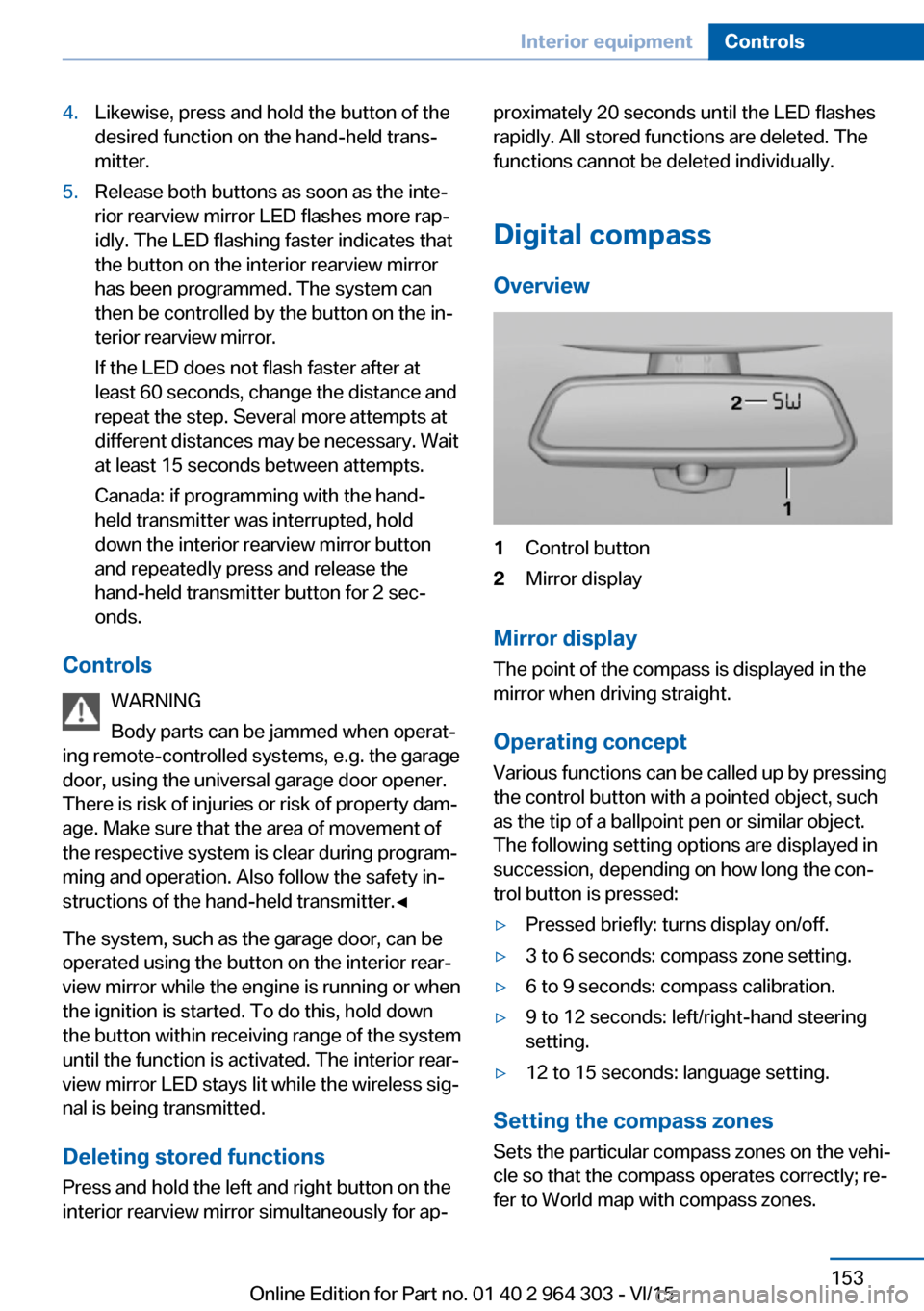
Overview1Control button2Mirror display
Mirror display
The point of the compass is displayed in the
mirror when driving straight.
Operating concept
Various functions can be called up by pressing
the control button with a pointed object, such
as the tip of a ballpoint pen or similar object.
The following setting options are displayed in
succession, depending on how long the con‐
trol button is pressed:
▷Pressed briefly: turns display on/off.▷3 to 6 seconds: compass zone setting.▷6 to 9 seconds: compass calibration.▷9 to 12 seconds: left/right-hand steering
setting.▷12 to 15 seconds: language setting.
Setting the compass zones
Sets the particular compass zones on the vehi‐
cle so that the compass operates correctly; re‐
fer to World map with compass zones.
Seite 153Interior equipmentControls153
Online Edition for Part no. 01 40 2 964 303 - VI/15
Page 155 of 242
Settings are stored automatically after approxi‐
mately 10 seconds.
Sun visor
Glare shield Fold the sun visor down or up.
Vanity mirror A vanity mirror is located in the sun visor be‐
hind a cover. When the cover is opened, the in‐
terior lighting switches on.
Ashtray/cigarette lighter
Ashtray
Opening
The ashtray can be inserted in the cupholder.
Emptying Take out the insert.
Lighter WARNING
Contact with hot heating elements or the
hot socket of the cigarette lighter can cause
burns. Flammable materials can ignite if the
cigarette lighter falls down or is held against
the respective objects. There is risk of fire and
injuries. Hold the cigarette lighter on its handle.
Make sure that children do not use the ciga‐
rette lighter and do not burn themselves, e.g.
by carrying the remote control along when ex‐
iting the vehicle.◀
CAUTION
If metal objects fall into the socket, they
can cause a short circuit. There is risk of prop‐
erty damage. Replace the cigarette lighter or
socket cover again after using the socket.◀
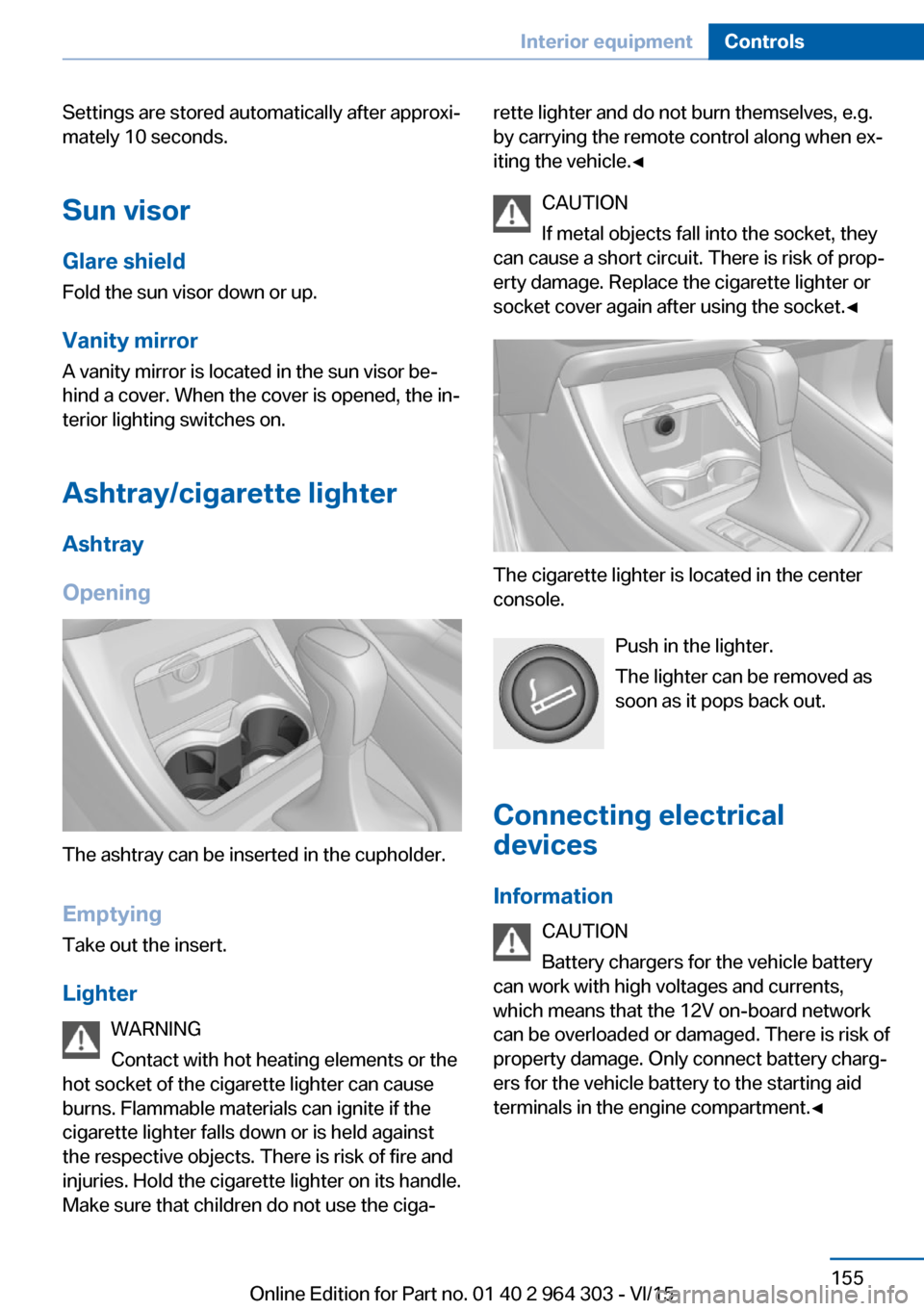
The cigarette lighter is located in the center
console.
Push in the lighter.
The lighter can be removed as
soon as it pops back out.
Connecting electrical devices
Information CAUTION
Battery chargers for the vehicle battery
can work with high voltages and currents,
which means that the 12V on-board network
can be overloaded or damaged. There is risk of
property damage. Only connect battery charg‐
ers for the vehicle battery to the starting aid
terminals in the engine compartment.◀
Seite 155Interior equipmentControls155
Online Edition for Part no. 01 40 2 964 303 - VI/15
Page 204 of 242
MaintenanceVehicle features and options
This chapter describes all standard, country-
specific and optional features offered with the
series. It also describes features that are not
necessarily available in your car, e. g., due to
the selected options or country versions. This
also applies to safety-related functions and
systems. The respectively applicable country
provisions must be observed when using the
respective features and systems.
BMW maintenance system The maintenance system indicates required
maintenance measures, and thereby provides
support in maintaining road safety and the op‐
erational reliability of the vehicle.
In some cases scopes and intervals may vary
according to the country-specific version. Re‐
placement work, spare parts, fuels and lubri‐
cants and wear materials are calculated sepa‐
rately. Further information is available from a
dealer’s service center or another qualified
service center or repair shop.
Condition Based ServiceCBS
Sensors and special algorithms take into ac‐
count the driving conditions of your vehicle.
Based on this, Condition Based Service recog‐
nizes the maintenance requirements.
The system makes it possible to adapt the
amount of maintenance corresponding to your
user profile.
Detailed information on service requirements,
refer to page 87, can be displayed on the Con‐
trol Display.Service data in the remote control
Information on the required maintenance is
continuously stored in the remote control. The dealer’s service center can read this data out
and suggest an optimized maintenance scope
for your vehicle.
Therefore, hand the service advisor the remote
control with which the vehicle was driven most
recently.
Storage periods Storage periods during which the vehicle bat‐
tery was disconnected are not taken into ac‐
count.
If this occurs, have a dealer's service center or
another qualified service center or repair shop
update the time-dependent maintenance pro‐
cedures, such as checking brake fluid and, if
necessary, changing the engine oil and the mi‐
crofilter/activated-charcoal filter.
Service and WarrantyInformation Booklet for US
models and Warranty and
Service Guide Booklet for
Canadian models
Please consult your Service and Warranty In‐
formation Booklet for US models and Warranty
and Service Guide Booklet for Canadian mod‐
els for additional information on service re‐
quirements.
The manufacturer of your vehicle recommends
that maintenance and repair be performed by a
dealer’s service center or another qualified
service center or repair shop. Records of regu‐
lar maintenance and repair work should be re‐
tained.Seite 204MobilityMaintenance204
Online Edition for Part no. 01 40 2 964 303 - VI/15
Page 232 of 242
Everything from A to Z
IndexA ABS, Antilock Brake Sys‐ tem 120
ACC, Active Cruise Con‐ trol 126
Acceleration Assistant, refer to Launch Control 80
Accessories and parts 7
Activated-charcoal filter 148
Active cruise control, ACC 126
Adaptive brake lights, see Brake force display 118
Additives, oil 201
Adjustments, seats/head re‐ straints 52
After washing vehicle 223
Airbags 102
Airbags, indicator/warning light 103
Air circulation, refer to Recir‐ culated-air mode 147
Air circulation, see Recircu‐ lated-air mode 145
Air conditioner 144
Air, dehumidifying, see Cool‐ ing function 145, 147
Air distribution, manual 145, 148
Air flow, air conditioner 145
Air flow, automatic climate control 148
Air pressure, tires 186
Air vents, refer to Ventila‐ tion 149
Alarm system 46
Alarm, unintentional 47
All around the center con‐ sole 16
All around the roofliner 17 All around the steering
wheel 14
All-season tires, see Winter tires 191
All-wheel-drive 122
Alternating-code hand-held transmitter 152
Alternative oil types 201
Ambient light 101
Antifreeze, washer fluid 76
Antilock Brake System, ABS 120
Anti-slip control, see DSC 120
Approved axle load 229
Arrival time 91
Ashtray 155
Assistance when driving off 125
Assist system, see Intelligent Safety 111
Attentiveness assistant 118
AUTO intensity 147
Automatic car wash 222
Automatic climate con‐ trol 146
Automatic cruise control with Stop & Go 126
Automatic Curb Monitor 61
Automatic deactivation, Front-seat passenger air‐
bags 104
Automatic headlight con‐ trol 98
Automatic locking 46
Automatic recirculated-air control 147
Automatic tailgate 41
Automatic transmission, see Steptronic transmission 77 AUTO program, automatic cli‐
mate control 147
AUTO program, intensity 147
Auto Start/Stop function 70
Average fuel consumption 91
Average speed 91
Axle loads, weights 229
B Backrest curvature, refer to Lumbar support 54
Backrest, seats 52
Backrest, width 54
Bad road trips 168
Band-aids, see First-aid kit 218
Bar for tow-starting/ towing 220
Battery replacement, vehicle battery 215
Battery replacement, vehicle remote control 35
Battery, vehicle 215
Belts, safety belts 56
Beverage holder, cu‐ pholder 162
BMW Assist 6
BMW Driver’s Guide App 6
BMW Homepage 6
BMW Internet page 6
BMW maintenance sys‐ tem 204
Bonus range, ECO PRO 177
Bottle holder, see Cu‐ pholder 162
Brake assistant 120
Brake discs, break-in 168
Brake force display 118
Brake lights, adaptive 118 Seite 232ReferenceEverything from A to Z232
Online Edition for Part no. 01 40 2 964 303 - VI/15
Page 233 of 242
Brake lights, brake force dis‐play 118
Brake pads, break-in 168
Braking, hints 170
Breakdown assistance 217
Break-in 168
Brightness of Control Dis‐ play 94
Bulb replacement 206
Bulb replacement, front 207
Bulb replacement, rear 211
Bulbs and lights 206
Button, Start/Stop 68
Bypassing, see Jump-start‐ ing 218
C
California Proposition 65 Warning 8
Camera-based cruise control, ACC 126
Camera lenses, care 225
Camera, rearview cam‐ era 138
Can holder, see Cu‐ pholder 162
Car battery 215
Car care products 223
Care, displays 225
Care, vehicle 223
Cargo 172
Cargo area 157
Cargo area, enlarging 158
Cargo area, storage compart‐ ments 163
Cargo floor panel 157
Cargo position, rear seat backrest 159
Cargo, securing 173
Cargo straps, securing cargo 173
Car key, see Remote con‐ trol 34
Carpet, care 224
Car wash 222 Catalytic converter, see Hot
exhaust system 169
CBS Condition Based Serv‐ ice 204
Center armrest 161
Center console 16
Central locking system 40
Central screen, see Control Display 18
Changes, technical, see Own Safety 7
Changing parts 206
Changing wheels 213
Changing wheels/tires 190
Chassis number, see vehicle identification number 10
Check Control 82
Checking the oil level elec‐ tronically 199
Children, seating position 64
Children, transporting safely 64
Child restraint fixing sys‐ tem 64
Child restraint fixing system LATCH 66
Child restraint fixing systems, mounting 65
Child safety locks 67
Child seat, mounting 65
Child seats 64
Chrome parts, care 224
Cigarette lighter 155
Cleaning displays 225
Climate control 144, 146
Clock 86
Closing/opening via door lock 39
Closing/opening with remote control 37
Closing the tailgate with no- touch activation 44
Cockpit 14
Combination switch, see Turn signals 73 Combination switch, see
Wiper system 74
Comfort Access 43
COMFORT program, Dy‐ namic Driving Control 124
Compact wheel, see Emer‐ gency wheel 213
Compartments in the doors 161
Compass 153
Compressor 192
Condensation on win‐ dows 148
Condensation under the vehi‐ cle 171
Condition Based Service CBS 204
Confirmation signal 46
ConnectedDrive 6
ConnectedDrive Services 6
Connecting electrical devi‐ ces 155
Continued driving with a flat tire 107 , 110
Control Display 18
Control Display, settings 93
Controller 19
Control systems, driving sta‐ bility 120
Convenient opening with the remote control 38
Coolant 202
Cooling function 145, 147
Cooling, maximum 147
Cooling system 202
Cornering lamp 99
Corrosion on brake discs 170
Cosmetic mirror 155
Courtesy lamps during un‐ locking 37
Courtesy lamps with the vehi‐ cle locked 38
Cruise control 132
Cruise control, active 126 Seite 233Everything from A to ZReference233
Online Edition for Part no. 01 40 2 964 303 - VI/15
Page 234 of 242
Cruise control, refer to cam‐era-based cruise con‐
trol 126
Cruising range 86
Cupholder 162
Current fuel consumption 87
D
Damage, tires 190
Damping control, dy‐ namic 123
Data, technical 228
Date 86
Daytime running lights 99
Defrosting, refer to defrosting the windows 145
Defrosting, see Windows, de‐ frosting 148
Defrosting the windows 145
Dehumidifying, air 145, 147
Deleting personal data 24
Deletion of personal data 24
Destination distance 91
Digital clock 86
Digital compass 153
Dimensions 228
Dimmable exterior mirrors 62
Dimmable interior rearview mirror 62
Direction indicator, see Turn signals 73
Display, electronic, instru‐ ment cluster 81
Display, engine tempera‐ ture 91
Display lighting, see Instru‐ ment lighting 100
Displays, cleaning 225
Disposal, coolant 203
Disposal, vehicle battery 216
Distance control, see PDC 135
Distance to destination 91
Divided screen view, split screen 23 Door lock 39
Door lock, see Remote con‐ trol 34
Downhill control 122
Drive-off assistant 125
Drive-off assistant, see DSC 120
Driving Dynamics Con‐ trol 124
Driving Excitement, SPORT 92
Driving instructions, break- in 168
Driving mode 124
Driving notes, general 169
Driving on bad roads 168
Driving stability control sys‐ tems 120
Driving tips 169
DSC Dynamic Stability Con‐ trol 120
DTC Dynamic Traction Con‐ trol 121
Dynamic Damping Con‐ trol 123
Dynamic Stability Control DSC 120
Dynamic Traction Control DTC 121
E
ECO PRO 176
ECO PRO, bonus range 177
ECO PRO display 176
ECO PRO driving mode 176
ECO PRO mode 176
ECO PRO program, driving dynamics 124
Electronic displays, instru‐ ment cluster 81
Electronic oil measure‐ ment 199
Electronic Stability Program ESP, see DSC 120 Emergency detection, remote
control 35
Emergency release, fuel filler flap 182
Emergency Request 217
Emergency start function, en‐ gine start 35
Emergency wheel 213
Energy Control 87
Energy recovery 87
Engine, automatic Start/Stop function 70
Engine, automatic switch- off 70
Engine compartment 197
Engine compartment, work‐ ing in 197
Engine coolant 202
Engine oil 199
Engine oil, adding 200
Engine oil additives 201
Engine oil change 201
Engine oil filler neck 200
Engine oil types, alterna‐ tive 201
Engine oil types, suitable 201
Engine start during malfunc‐ tion 35
Engine start, jump-start‐ ing 218
Engine start, refer to Starting the engine 69
Engine stop 69
Engine temperature, dis‐ play 91
Entering a car wash 222
Equipment, interior 151
Error displays, see Check Control 82
ESP Electronic Stability Pro‐ gram, see DSC 120
Exchanging wheels/tires 190
Exhaust system 169
Exterior mirror, automatic dimming feature 62
Exterior mirrors 60 Seite 234ReferenceEverything from A to Z234
Online Edition for Part no. 01 40 2 964 303 - VI/15