202 BMW X1 2016 F48 Owner's Manual
[x] Cancel search | Manufacturer: BMW, Model Year: 2016, Model line: X1, Model: BMW X1 2016 F48Pages: 242, PDF Size: 7.12 MB
Page 5 of 242
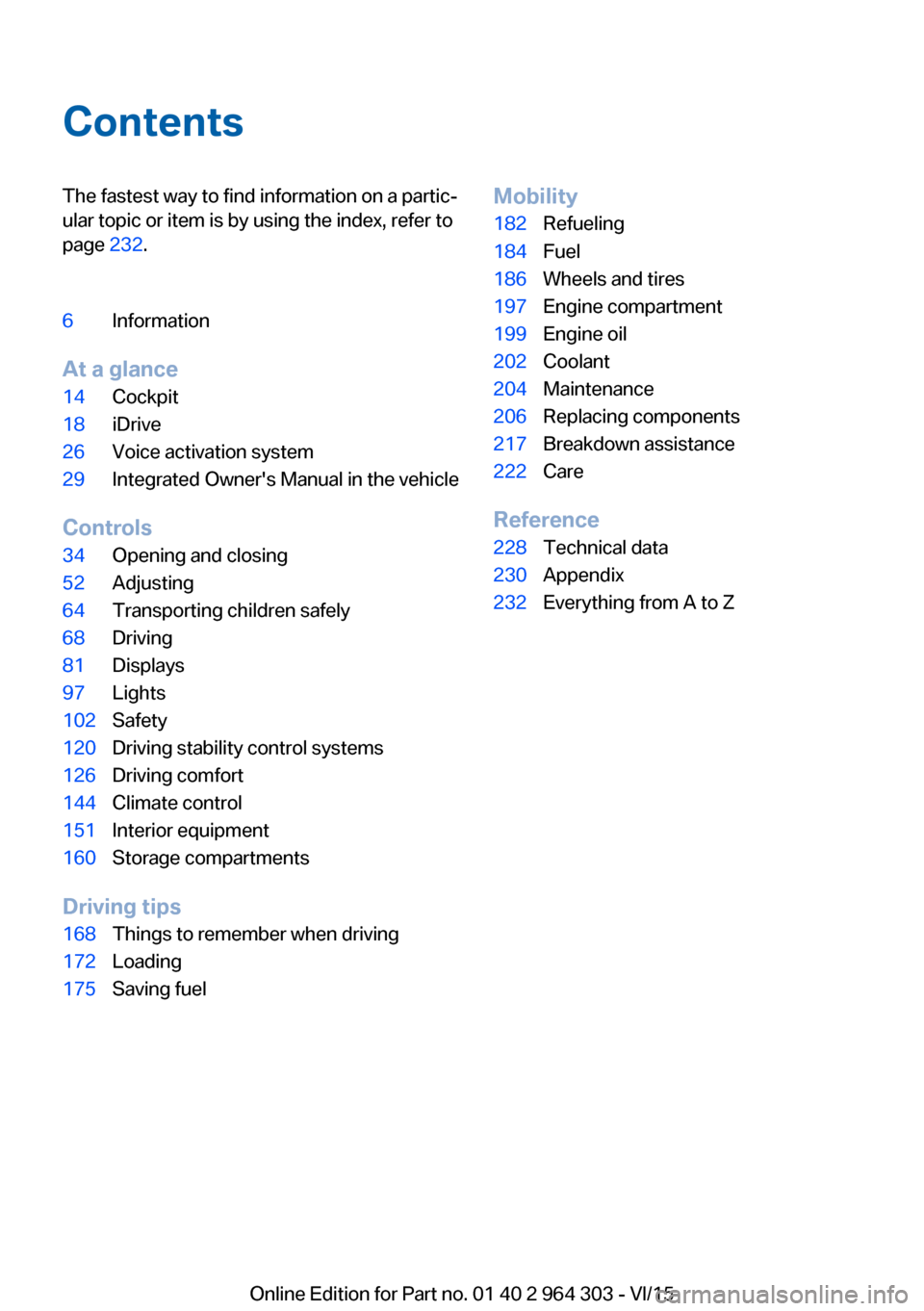
ContentsThe fastest way to find information on a partic‐
ular topic or item is by using the index, refer to
page 232.6Information
At a glance
14Cockpit18iDrive26Voice activation system29Integrated Owner's Manual in the vehicle
Controls
34Opening and closing52Adjusting64Transporting children safely68Driving81Displays97Lights102Safety120Driving stability control systems126Driving comfort144Climate control151Interior equipment160Storage compartments
Driving tips
168Things to remember when driving172Loading175Saving fuelMobility182Refueling184Fuel186Wheels and tires197Engine compartment199Engine oil202Coolant204Maintenance206Replacing components217Breakdown assistance222Care
Reference
228Technical data230Appendix232Everything from A to Z
Online Edition for Part no. 01 40 2 964 303 - VI/15
Page 91 of 242
▷Range.▷ECO PRO bonus range.▷Average fuel consumption.▷Current fuel consumption.▷Average speed.▷Date.▷Engine temperature display.▷Speed limit detection.▷Time of arrival.
When destination guidance is activated in
the navigation system.▷Distance to destination.
When destination guidance is activated in
the navigation system.
Adjusting the info display
Depending on the vehicle equipment version,
you can select what information from the on-
board computer is to be displayed on the info
display of the instrument cluster.
On the Control Display:
1."Settings"2."Instrument cluster"3.Select the desired displays.
Information in detail
Range
Displays the estimated cruising range available
with the remaining fuel.
It is calculated based on your driving style over
the last 20 miles/30 km.
Average fuel consumption
The average fuel consumption is calculated for
the period while the engine is running.
The average fuel consumption is calculated for
the distance traveled since the last reset by the
on-board comupter.
Average speed
Periods in which the vehicle is parked with the
engine manually stopped are not included in
the calculation of the average speed.
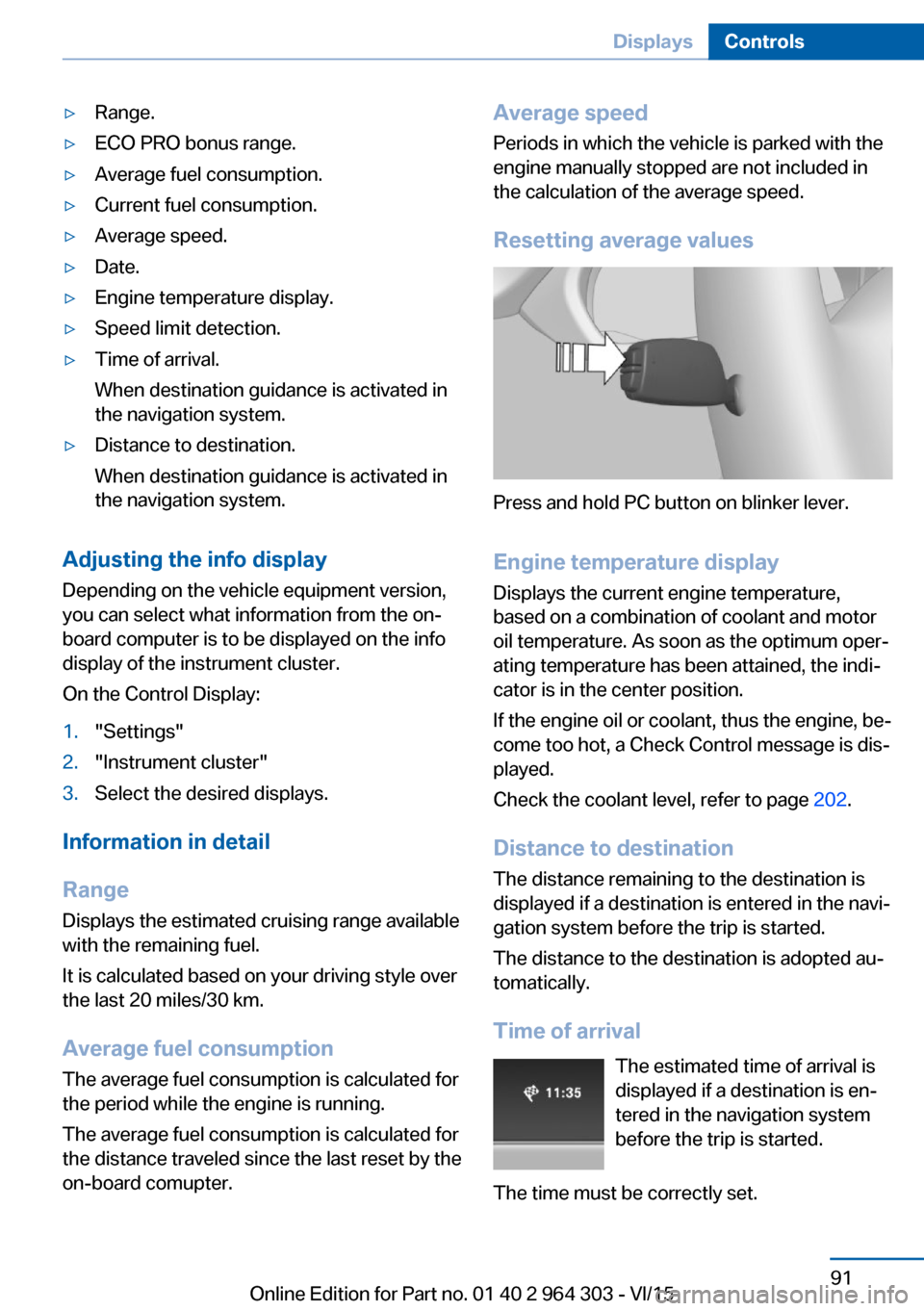
Resetting average values
Press and hold PC button on blinker lever.
Engine temperature display
Displays the current engine temperature,
based on a combination of coolant and motor
oil temperature. As soon as the optimum oper‐
ating temperature has been attained, the indi‐
cator is in the center position.
If the engine oil or coolant, thus the engine, be‐
come too hot, a Check Control message is dis‐
played.
Check the coolant level, refer to page 202.
Distance to destination
The distance remaining to the destination is
displayed if a destination is entered in the navi‐
gation system before the trip is started.
The distance to the destination is adopted au‐
tomatically.
Time of arrival The estimated time of arrival is
displayed if a destination is en‐
tered in the navigation system
before the trip is started.
The time must be correctly set.
Seite 91DisplaysControls91
Online Edition for Part no. 01 40 2 964 303 - VI/15
Page 202 of 242
CoolantVehicle features and optionsThis chapter describes all standard, country-
specific and optional features offered with the
series. It also describes features that are not
necessarily available in your car, e. g., due to
the selected options or country versions. This
also applies to safety-related functions and
systems. The respectively applicable country
provisions must be observed when using the
respective features and systems.
Information WARNING
With the engine hot and the cooling sys‐
tem open, coolant can escape and lead to
burns. There is risk of injuries. Only open the
cooling system with the engine cooled down.◀
WARNING
Additives are harmful and incorrect addi‐
tives can damage the engine. There is risk of
injuries and risk of property damage. Avoid the
contact of articles of clothing, skin or eyes with
additives. Do not swallow any additives. Use
suitable additives only.◀
Coolant consists of water and additives.
Not all commercially available additives are
suitable for the vehicle. Information about suit‐
able additives is available from a dealer’s serv‐
ice center or another qualified service center or
repair shop.
Coolant level
Overview
Depending on the engine installation, the cool‐
ant reservoir is located on the right side or the
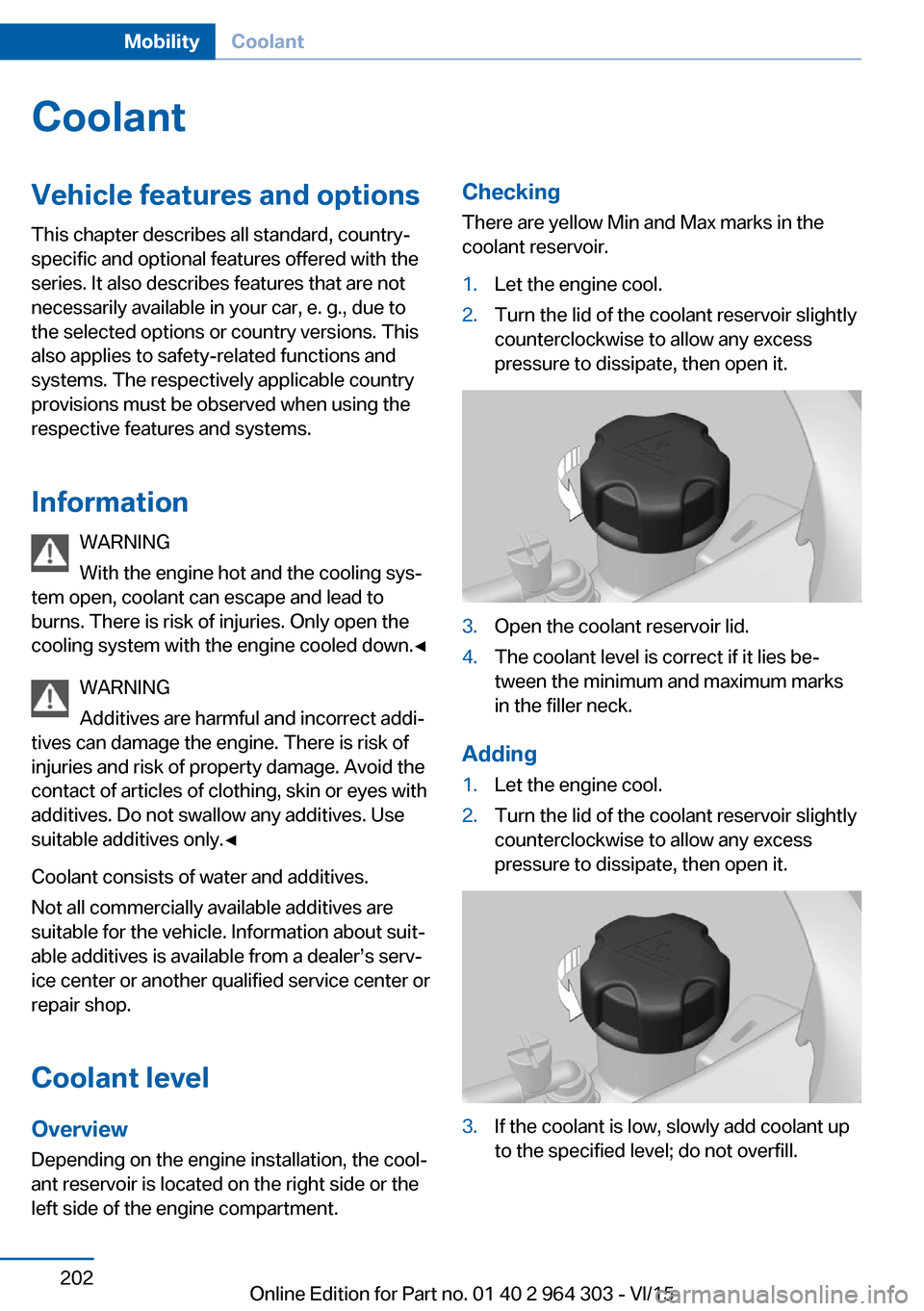
left side of the engine compartment.Checking
There are yellow Min and Max marks in the
coolant reservoir.1.Let the engine cool.2.Turn the lid of the coolant reservoir slightly
counterclockwise to allow any excess
pressure to dissipate, then open it.3.Open the coolant reservoir lid.4.The coolant level is correct if it lies be‐
tween the minimum and maximum marks
in the filler neck.
Adding
1.Let the engine cool.2.Turn the lid of the coolant reservoir slightly
counterclockwise to allow any excess
pressure to dissipate, then open it.3.If the coolant is low, slowly add coolant up
to the specified level; do not overfill.Seite 202MobilityCoolant202
Online Edition for Part no. 01 40 2 964 303 - VI/15
Page 229 of 242
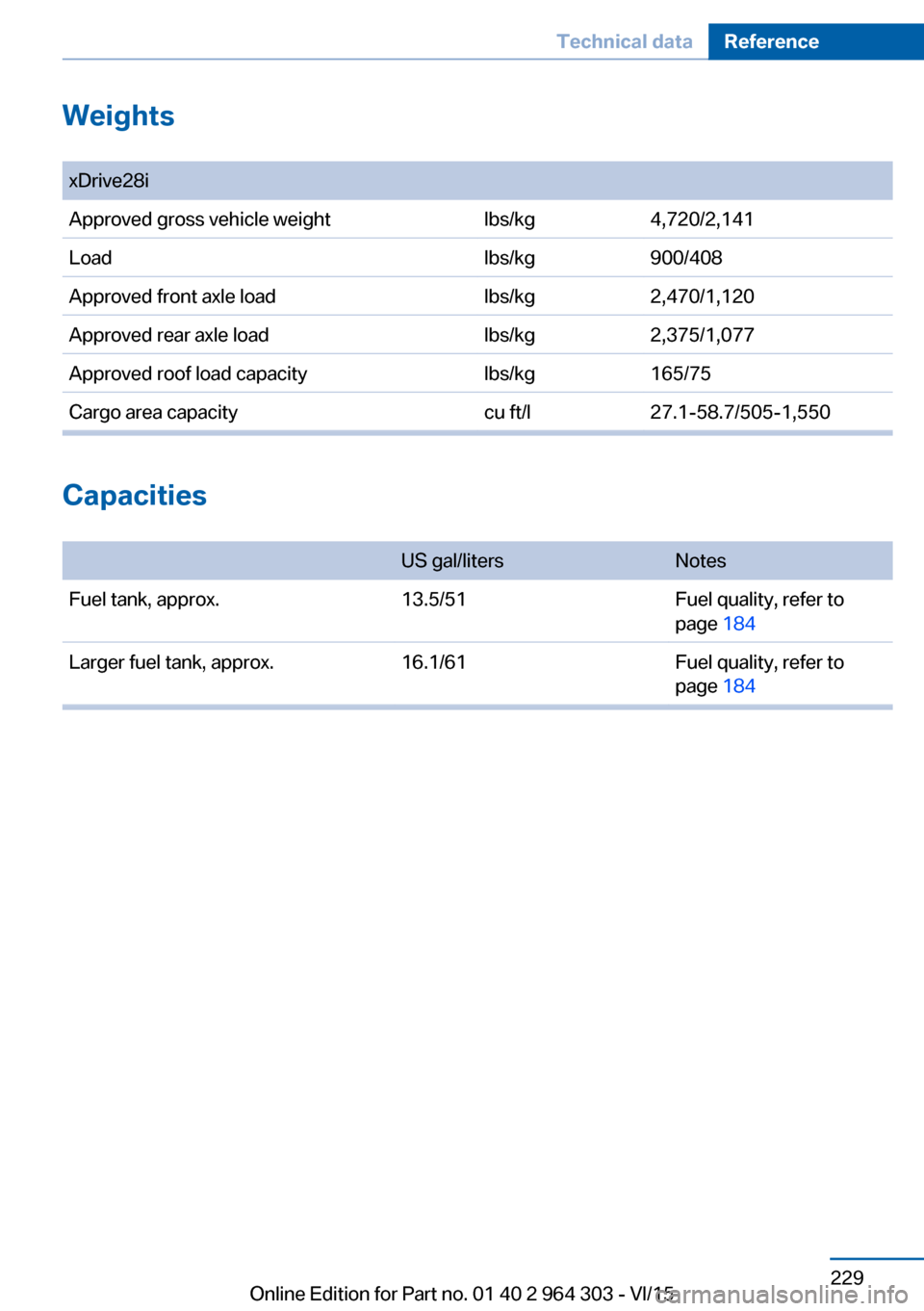
Weights
Capacities
US gal/litersNotesFuel tank, approx.13.5/51Fuel quality, refer to
page 184
Larger fuel tank, approx.16.1/61Fuel quality, refer to
page 184
Seite 229Technical dataReference229
Online Edition for Part no. 01 40 2 964 303 - VI/15
xDrive28iApproved gross vehicle weightlbs/kgLoadlbs/kgApproved front axle loadlbs/kgApproved rear axle loadlbs/kgApproved roof load capacitylbs/kgCargo area capacitycu ft/l4,720/2,141900/4082,470/1,1202,375/1,077165/7527.1-58.7/505-1,550
Page 233 of 242
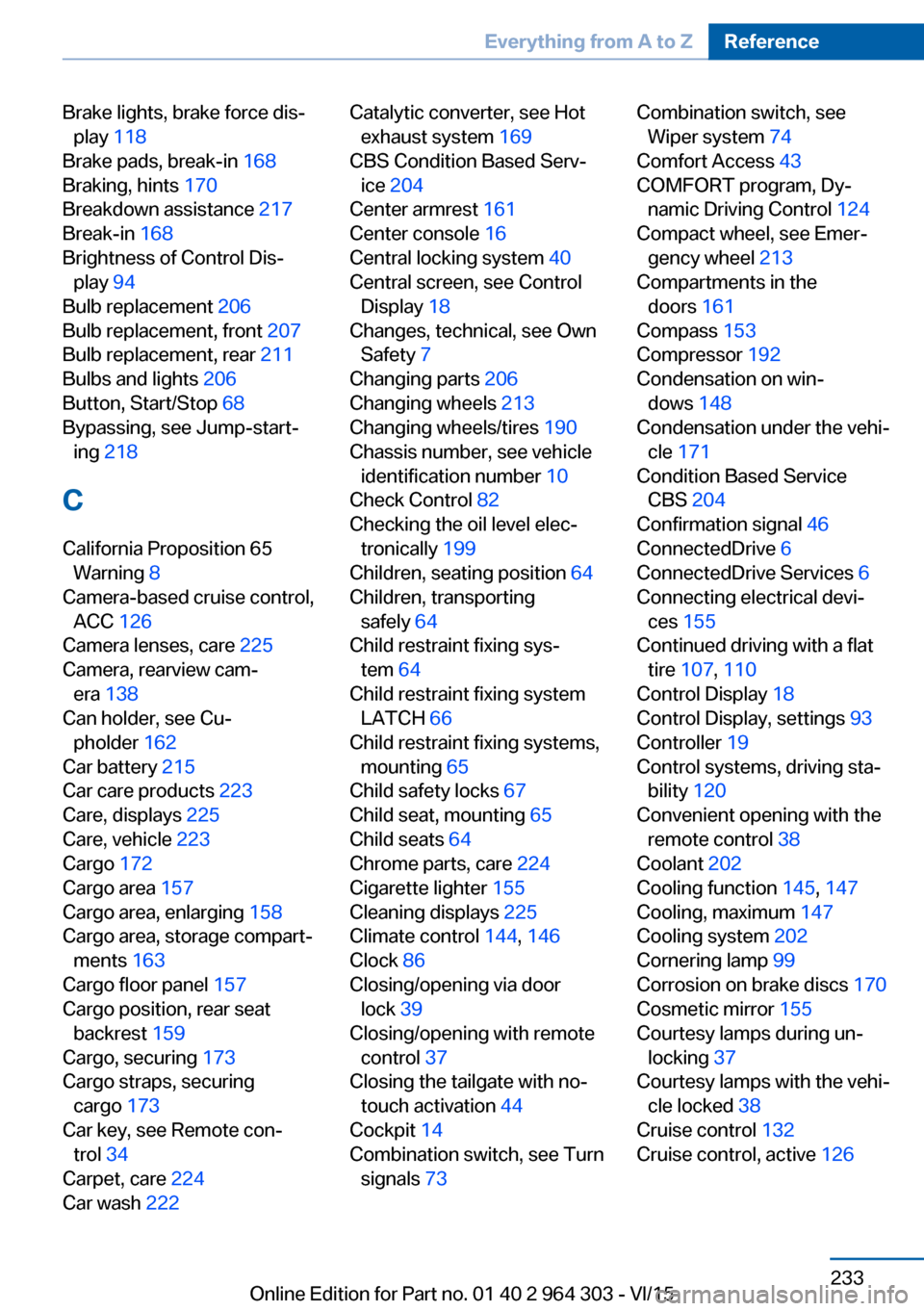
Brake lights, brake force dis‐play 118
Brake pads, break-in 168
Braking, hints 170
Breakdown assistance 217
Break-in 168
Brightness of Control Dis‐ play 94
Bulb replacement 206
Bulb replacement, front 207
Bulb replacement, rear 211
Bulbs and lights 206
Button, Start/Stop 68
Bypassing, see Jump-start‐ ing 218
C
California Proposition 65 Warning 8
Camera-based cruise control, ACC 126
Camera lenses, care 225
Camera, rearview cam‐ era 138
Can holder, see Cu‐ pholder 162
Car battery 215
Car care products 223
Care, displays 225
Care, vehicle 223
Cargo 172
Cargo area 157
Cargo area, enlarging 158
Cargo area, storage compart‐ ments 163
Cargo floor panel 157
Cargo position, rear seat backrest 159
Cargo, securing 173
Cargo straps, securing cargo 173
Car key, see Remote con‐ trol 34
Carpet, care 224
Car wash 222 Catalytic converter, see Hot
exhaust system 169
CBS Condition Based Serv‐ ice 204
Center armrest 161
Center console 16
Central locking system 40
Central screen, see Control Display 18
Changes, technical, see Own Safety 7
Changing parts 206
Changing wheels 213
Changing wheels/tires 190
Chassis number, see vehicle identification number 10
Check Control 82
Checking the oil level elec‐ tronically 199
Children, seating position 64
Children, transporting safely 64
Child restraint fixing sys‐ tem 64
Child restraint fixing system LATCH 66
Child restraint fixing systems, mounting 65
Child safety locks 67
Child seat, mounting 65
Child seats 64
Chrome parts, care 224
Cigarette lighter 155
Cleaning displays 225
Climate control 144, 146
Clock 86
Closing/opening via door lock 39
Closing/opening with remote control 37
Closing the tailgate with no- touch activation 44
Cockpit 14
Combination switch, see Turn signals 73 Combination switch, see
Wiper system 74
Comfort Access 43
COMFORT program, Dy‐ namic Driving Control 124
Compact wheel, see Emer‐ gency wheel 213
Compartments in the doors 161
Compass 153
Compressor 192
Condensation on win‐ dows 148
Condensation under the vehi‐ cle 171
Condition Based Service CBS 204
Confirmation signal 46
ConnectedDrive 6
ConnectedDrive Services 6
Connecting electrical devi‐ ces 155
Continued driving with a flat tire 107 , 110
Control Display 18
Control Display, settings 93
Controller 19
Control systems, driving sta‐ bility 120
Convenient opening with the remote control 38
Coolant 202
Cooling function 145, 147
Cooling, maximum 147
Cooling system 202
Cornering lamp 99
Corrosion on brake discs 170
Cosmetic mirror 155
Courtesy lamps during un‐ locking 37
Courtesy lamps with the vehi‐ cle locked 38
Cruise control 132
Cruise control, active 126 Seite 233Everything from A to ZReference233
Online Edition for Part no. 01 40 2 964 303 - VI/15
Page 234 of 242
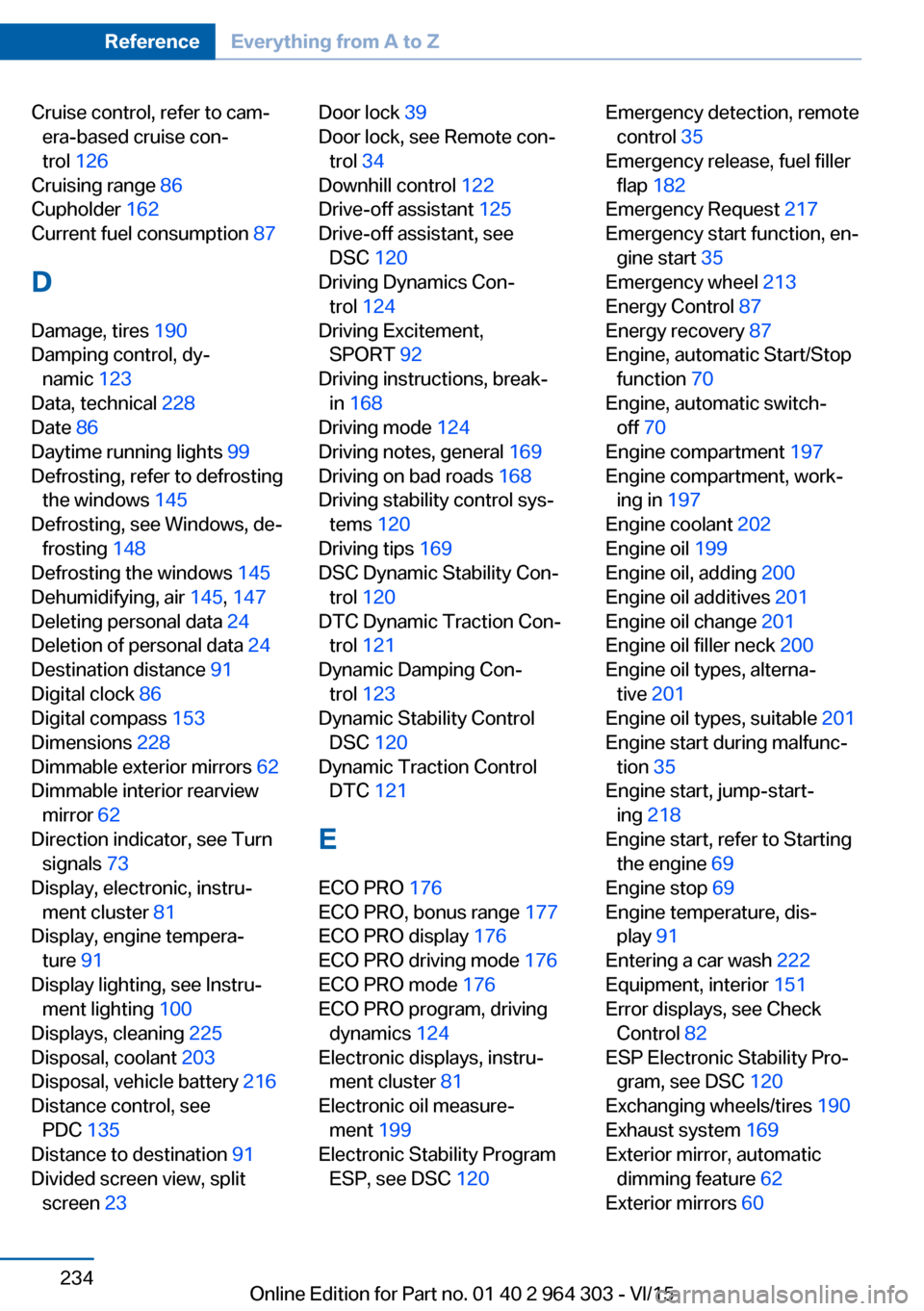
Cruise control, refer to cam‐era-based cruise con‐
trol 126
Cruising range 86
Cupholder 162
Current fuel consumption 87
D
Damage, tires 190
Damping control, dy‐ namic 123
Data, technical 228
Date 86
Daytime running lights 99
Defrosting, refer to defrosting the windows 145
Defrosting, see Windows, de‐ frosting 148
Defrosting the windows 145
Dehumidifying, air 145, 147
Deleting personal data 24
Deletion of personal data 24
Destination distance 91
Digital clock 86
Digital compass 153
Dimensions 228
Dimmable exterior mirrors 62
Dimmable interior rearview mirror 62
Direction indicator, see Turn signals 73
Display, electronic, instru‐ ment cluster 81
Display, engine tempera‐ ture 91
Display lighting, see Instru‐ ment lighting 100
Displays, cleaning 225
Disposal, coolant 203
Disposal, vehicle battery 216
Distance control, see PDC 135
Distance to destination 91
Divided screen view, split screen 23 Door lock 39
Door lock, see Remote con‐ trol 34
Downhill control 122
Drive-off assistant 125
Drive-off assistant, see DSC 120
Driving Dynamics Con‐ trol 124
Driving Excitement, SPORT 92
Driving instructions, break- in 168
Driving mode 124
Driving notes, general 169
Driving on bad roads 168
Driving stability control sys‐ tems 120
Driving tips 169
DSC Dynamic Stability Con‐ trol 120
DTC Dynamic Traction Con‐ trol 121
Dynamic Damping Con‐ trol 123
Dynamic Stability Control DSC 120
Dynamic Traction Control DTC 121
E
ECO PRO 176
ECO PRO, bonus range 177
ECO PRO display 176
ECO PRO driving mode 176
ECO PRO mode 176
ECO PRO program, driving dynamics 124
Electronic displays, instru‐ ment cluster 81
Electronic oil measure‐ ment 199
Electronic Stability Program ESP, see DSC 120 Emergency detection, remote
control 35
Emergency release, fuel filler flap 182
Emergency Request 217
Emergency start function, en‐ gine start 35
Emergency wheel 213
Energy Control 87
Energy recovery 87
Engine, automatic Start/Stop function 70
Engine, automatic switch- off 70
Engine compartment 197
Engine compartment, work‐ ing in 197
Engine coolant 202
Engine oil 199
Engine oil, adding 200
Engine oil additives 201
Engine oil change 201
Engine oil filler neck 200
Engine oil types, alterna‐ tive 201
Engine oil types, suitable 201
Engine start during malfunc‐ tion 35
Engine start, jump-start‐ ing 218
Engine start, refer to Starting the engine 69
Engine stop 69
Engine temperature, dis‐ play 91
Entering a car wash 222
Equipment, interior 151
Error displays, see Check Control 82
ESP Electronic Stability Pro‐ gram, see DSC 120
Exchanging wheels/tires 190
Exhaust system 169
Exterior mirror, automatic dimming feature 62
Exterior mirrors 60 Seite 234ReferenceEverything from A to Z234
Online Edition for Part no. 01 40 2 964 303 - VI/15
Page 238 of 242
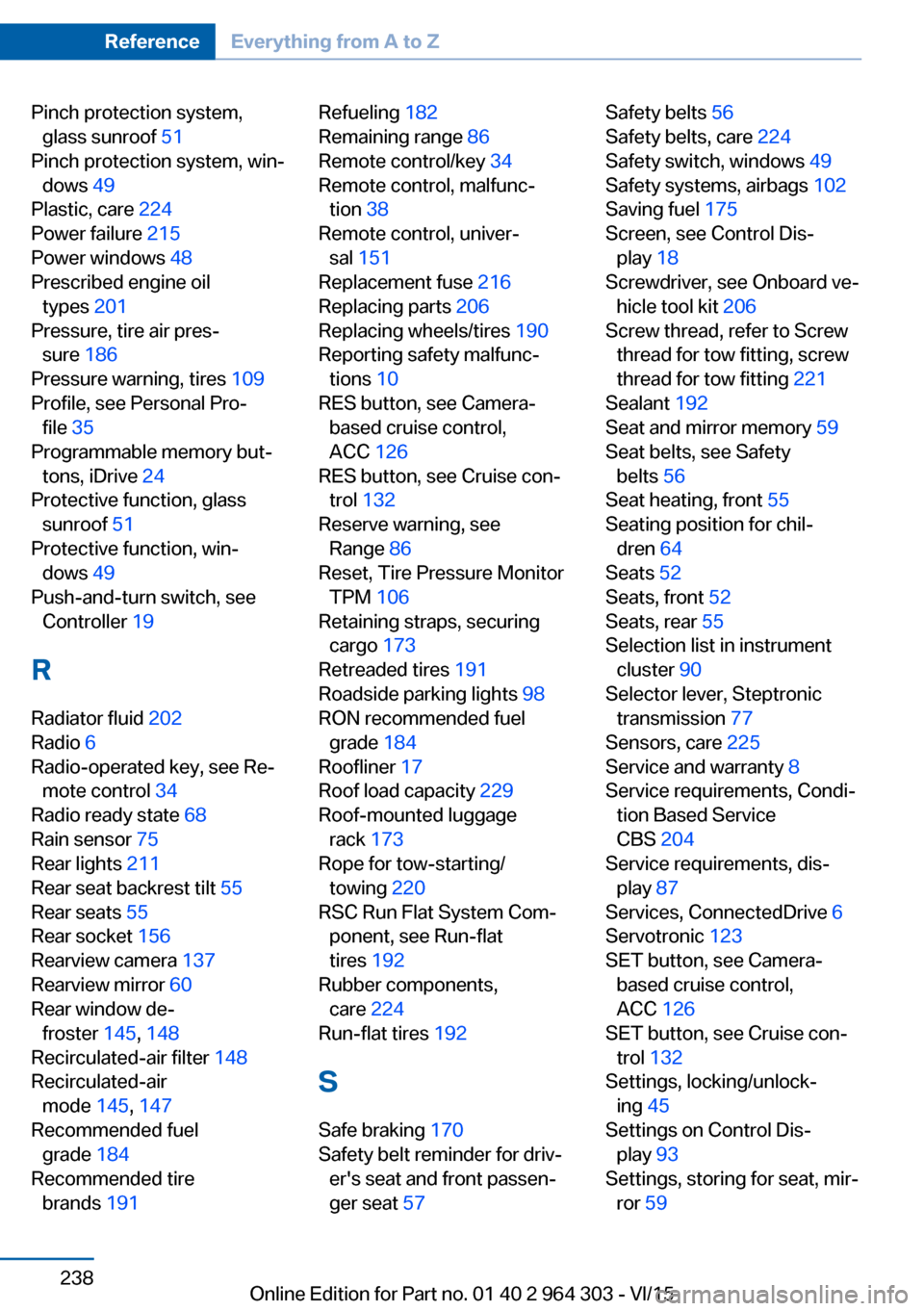
Pinch protection system,glass sunroof 51
Pinch protection system, win‐ dows 49
Plastic, care 224
Power failure 215
Power windows 48
Prescribed engine oil types 201
Pressure, tire air pres‐ sure 186
Pressure warning, tires 109
Profile, see Personal Pro‐ file 35
Programmable memory but‐ tons, iDrive 24
Protective function, glass sunroof 51
Protective function, win‐ dows 49
Push-and-turn switch, see Controller 19
R Radiator fluid 202
Radio 6
Radio-operated key, see Re‐ mote control 34
Radio ready state 68
Rain sensor 75
Rear lights 211
Rear seat backrest tilt 55
Rear seats 55
Rear socket 156
Rearview camera 137
Rearview mirror 60
Rear window de‐ froster 145, 148
Recirculated-air filter 148
Recirculated-air mode 145, 147
Recommended fuel grade 184
Recommended tire brands 191 Refueling 182
Remaining range 86
Remote control/key 34
Remote control, malfunc‐ tion 38
Remote control, univer‐ sal 151
Replacement fuse 216
Replacing parts 206
Replacing wheels/tires 190
Reporting safety malfunc‐ tions 10
RES button, see Camera- based cruise control,
ACC 126
RES button, see Cruise con‐ trol 132
Reserve warning, see Range 86
Reset, Tire Pressure Monitor TPM 106
Retaining straps, securing cargo 173
Retreaded tires 191
Roadside parking lights 98
RON recommended fuel grade 184
Roofliner 17
Roof load capacity 229
Roof-mounted luggage rack 173
Rope for tow-starting/ towing 220
RSC Run Flat System Com‐ ponent, see Run-flat
tires 192
Rubber components, care 224
Run-flat tires 192
S Safe braking 170
Safety belt reminder for driv‐ er's seat and front passen‐
ger seat 57 Safety belts 56
Safety belts, care 224
Safety switch, windows 49
Safety systems, airbags 102
Saving fuel 175
Screen, see Control Dis‐ play 18
Screwdriver, see Onboard ve‐ hicle tool kit 206
Screw thread, refer to Screw thread for tow fitting, screw
thread for tow fitting 221
Sealant 192
Seat and mirror memory 59
Seat belts, see Safety belts 56
Seat heating, front 55
Seating position for chil‐ dren 64
Seats 52
Seats, front 52
Seats, rear 55
Selection list in instrument cluster 90
Selector lever, Steptronic transmission 77
Sensors, care 225
Service and warranty 8
Service requirements, Condi‐ tion Based Service
CBS 204
Service requirements, dis‐ play 87
Services, ConnectedDrive 6
Servotronic 123
SET button, see Camera- based cruise control,
ACC 126
SET button, see Cruise con‐ trol 132
Settings, locking/unlock‐ ing 45
Settings on Control Dis‐ play 93
Settings, storing for seat, mir‐ ror 59 Seite 238ReferenceEverything from A to Z238
Online Edition for Part no. 01 40 2 964 303 - VI/15