warning BMW X1 XDRIVE 28I 2013 Owners Manual
[x] Cancel search | Manufacturer: BMW, Model Year: 2013, Model line: X1 XDRIVE 28I, Model: BMW X1 XDRIVE 28I 2013Pages: 291, PDF Size: 6.58 MB
Page 7 of 291
ing to BMW repair procedures with appropri‐
ately trained personnel.
If this work is not carried out properly, there is
the danger of subsequent damage and related
safety hazards.
Parts and accessories
For your own safety, use genuine parts and ac‐
cessories approved by BMW. When you pur‐
chase accessories tested and approved by
BMW and Genuine BMW Parts, you simultane‐
ously acquire the assurance that they have been
thoroughly tested by BMW to ensure optimum
performance when installed on your vehicle.
BMW warrants these parts to be free from de‐
fects in material and workmanship. BMW will not
accept any liability for damage resulting from in‐
stallation of parts and accessories not approved
by BMW. BMW cannot test every product made
by other manufacturers to verify if it can be used
on a BMW safely and without risk to either the
vehicle, its operation, or its occupants. Genuine
BMW Parts, BMW Accessories and other prod‐
ucts approved by BMW, together with profes‐
sional advice on using these items, are available
from all BMW centers. Installation and operation
of non-BMW approved accessories such as
alarms, radios, amplifiers, radar detectors,
wheels, suspension components, brake dust
shields, telephones, including operation of any
mobile phone from within the vehicle without
using an externally mounted antenna, or trans‐
ceiver equipment, for instance, CBs, walkie-
talkies, ham radios or similar accessories, may
cause extensive damage to the vehicle, com‐
promise its safety, interfere with the vehicle's
electrical system or affect the validity of the
BMW Limited Warranty. See your BMW center
for additional information. Maintenance, re‐
placement, or repair of the emission control de‐
vices and systems may be performed by any au‐
tomotive repair establishment or individual
using any certified automotive part.California Proposition 65 Warning
California laws require us to state the following
warning:
Engine exhaust and a wide variety of automobile
components and parts, including components
found in the interior furnishings in a vehicle, con‐
tain or emit chemicals known to the State of Cal‐
ifornia to cause cancer and birth defects and re‐
productive harm. In addition, certain fluids
contained in vehicles and certain products of
component wear contain or emit chemicals
known to the State of California to cause cancer
and birth defects or other reproductive harm.
Battery posts, terminals and related accessories
contain lead and lead compounds. Wash your
hands after handling. Used engine oil contains
chemicals that have caused cancer in laboratory
animals. Always protect your skin by washing
thoroughly with soap and water.
Service and warranty
We recommend that you read this publication
thoroughly. Your vehicle is covered by the fol‐
lowing warranties:▷New Vehicle Limited Warranty▷Rust Perforation Limited Warranty▷Federal Emissions System Defect Warranty▷Federal Emissions Performance Warranty▷California Emission Control System Limited
Warranty
Detailed information about these warranties is
listed in the Service and Warranty Information
Booklet for US models or in the Warranty and
Service Guide Booklet for Canadian models.
Your vehicle has been specifically adapted and
designed to meet the particular operating con‐
ditions and homologation requirements in your
country and continental region in order to deliver
the full driving pleasure while the vehicle is op‐
erated under those conditions. If you wish to op‐
erate your vehicle in another country or region,
you may be required to adapt your vehicle to
meet different prevailing operating conditions
and homologation requirements. You should
Seite 7Notes7
Online Edition for Part no. 01 40 2 914 595 - VI/12
Page 14 of 291
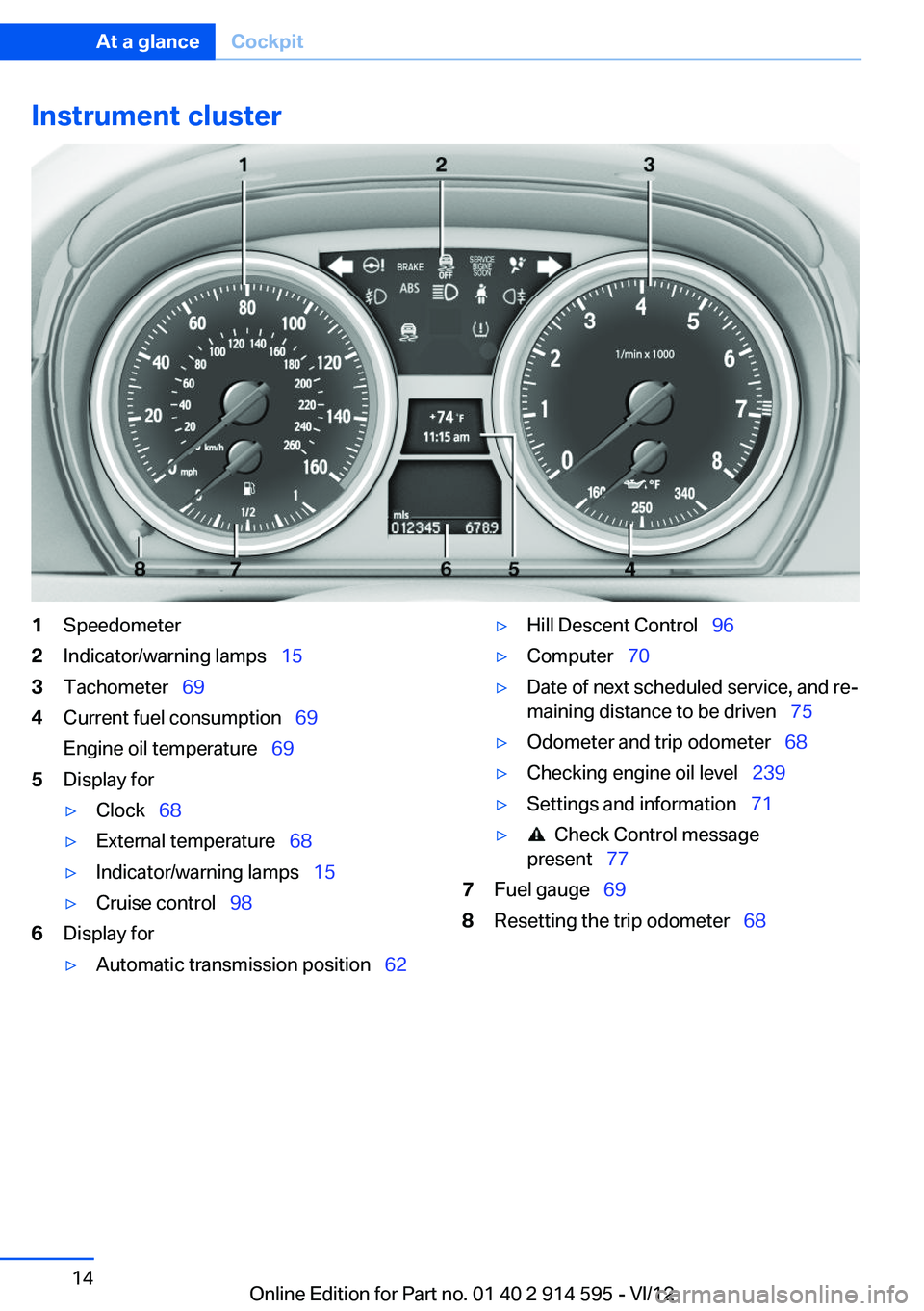
Instrument cluster1Speedometer2Indicator/warning lamps 153Tachometer 694Current fuel consumption 69
Engine oil temperature 695Display for▷Clock 68▷External temperature 68▷Indicator/warning lamps 15▷Cruise control 986Display for▷Automatic transmission position 62▷Hill Descent Control 96▷Computer 70▷Date of next scheduled service, and re‐
maining distance to be driven 75▷Odometer and trip odometer 68▷Checking engine oil level 239▷Settings and information 71▷ Check Control message
present 777Fuel gauge 698Resetting the trip odometer 68Seite 14At a glanceCockpit14
Online Edition for Part no. 01 40 2 914 595 - VI/12
Page 15 of 291
Indicator/warning lamps
The concept
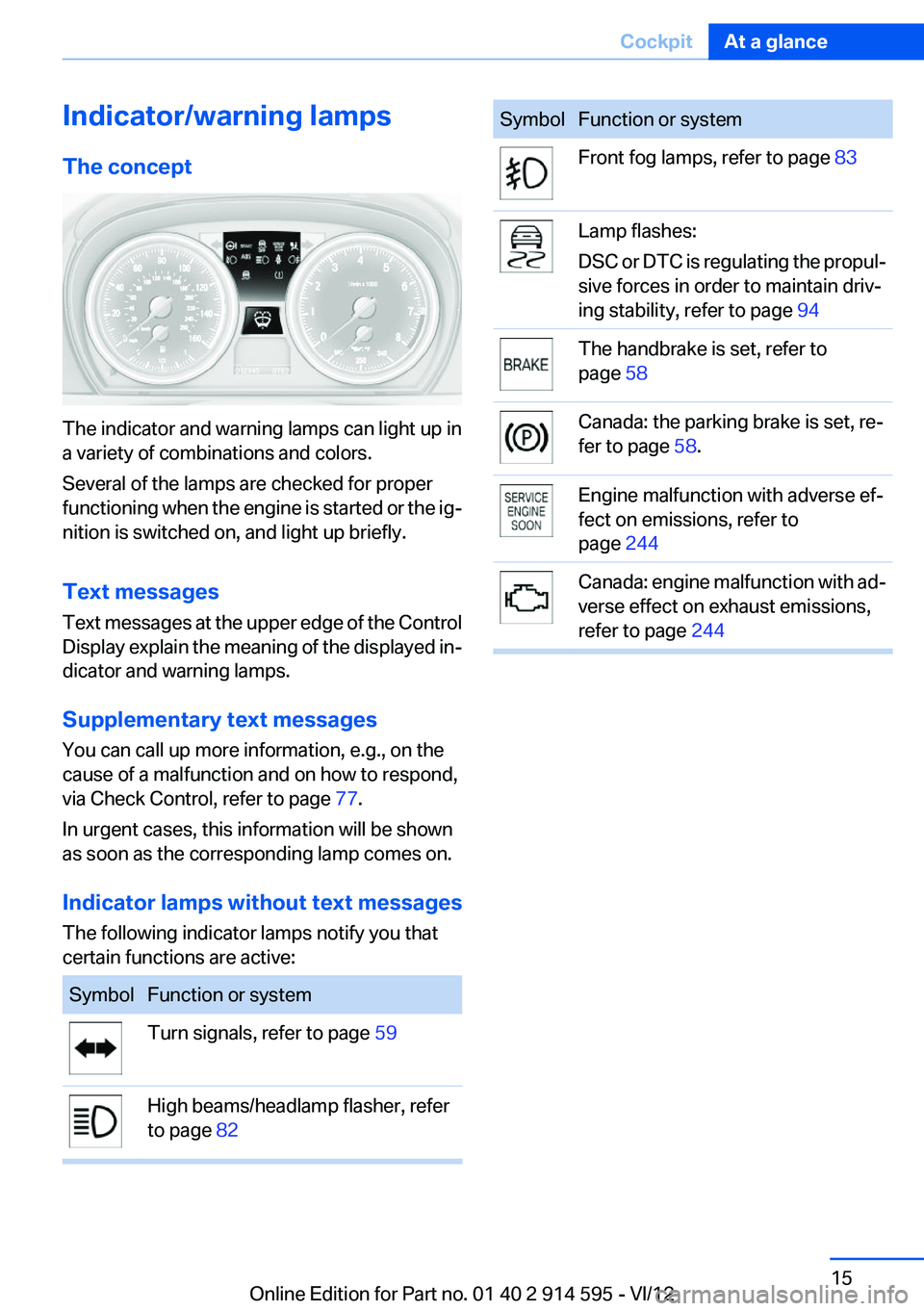
The indicator and warning lamps can light up in
a variety of combinations and colors.
Several of the lamps are checked for proper
functioning when the engine is started or the ig‐
nition is switched on, and light up briefly.
Text messages
Text messages at the upper edge of the Control
Display explain the meaning of the displayed in‐
dicator and warning lamps.
Supplementary text messages
You can call up more information, e.g., on the
cause of a malfunction and on how to respond,
via Check Control, refer to page 77.
In urgent cases, this information will be shown
as soon as the corresponding lamp comes on.
Indicator lamps without text messages
The following indicator lamps notify you that
certain functions are active:
SymbolFunction or systemTurn signals, refer to page 59High beams/headlamp flasher, refer
to page 82SymbolFunction or systemFront fog lamps, refer to page 83Lamp flashes:
DSC or DTC is regulating the propul‐
sive forces in order to maintain driv‐
ing stability, refer to page 94The handbrake is set, refer to
page 58Canada: the parking brake is set, re‐
fer to page 58.Engine malfunction with adverse ef‐
fect on emissions, refer to
page 244Canada: engine malfunction with ad‐
verse effect on exhaust emissions,
refer to page 244Seite 15CockpitAt a glance15
Online Edition for Part no. 01 40 2 914 595 - VI/12
Page 16 of 291
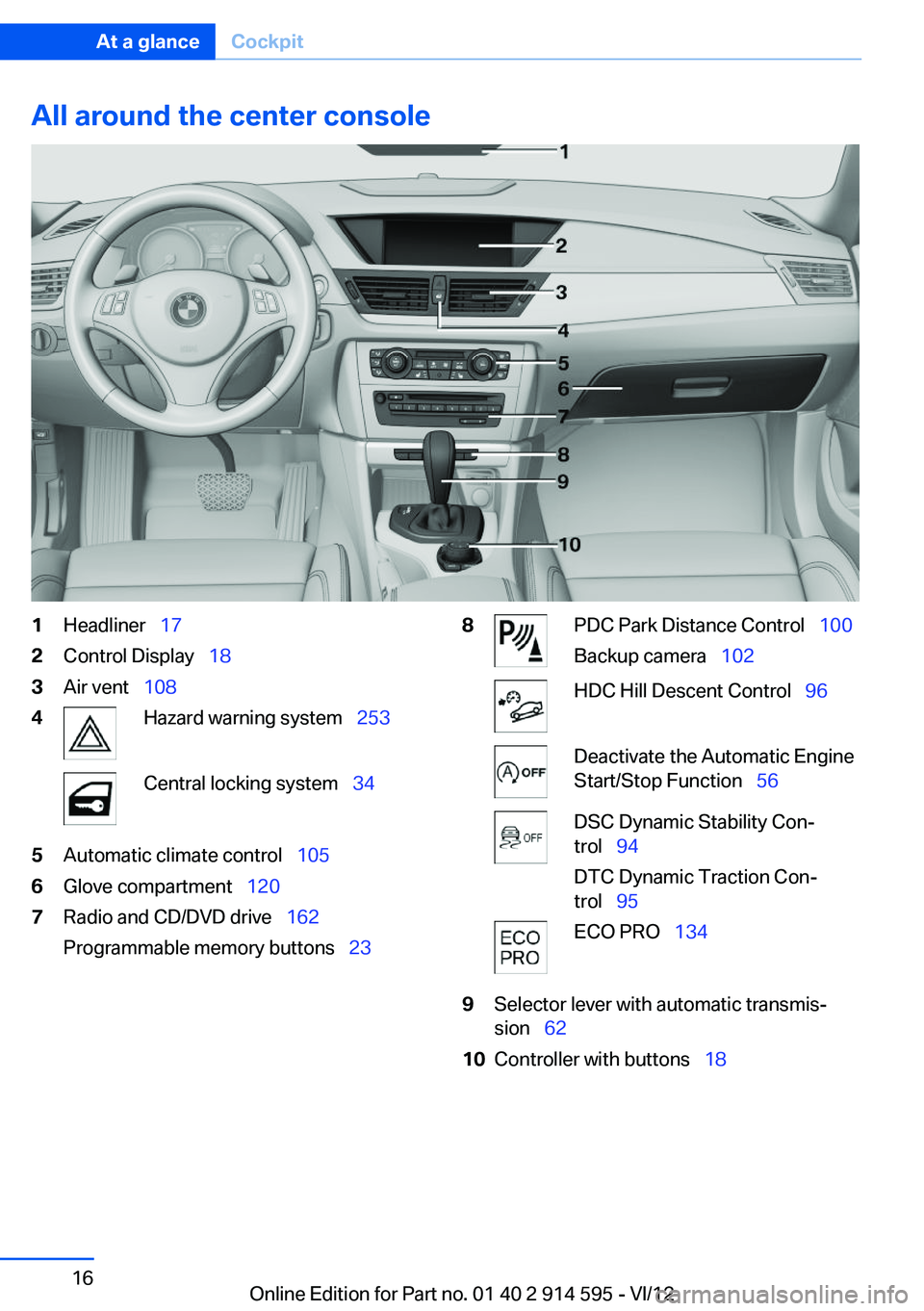
All around the center console1Headliner 172Control Display 183Air vent 1084Hazard warning system 253Central locking system 345Automatic climate control 1056Glove compartment 1207Radio and CD/DVD drive 162
Programmable memory buttons 238PDC Park Distance Control 100
Backup camera 102HDC Hill Descent Control 96Deactivate the Automatic Engine
Start/Stop Function 56DSC Dynamic Stability Con‐
trol 94
DTC Dynamic Traction Con‐
trol 95ECO PRO 1349Selector lever with automatic transmis‐
sion 6210Controller with buttons 18Seite 16At a glanceCockpit16
Online Edition for Part no. 01 40 2 914 595 - VI/12
Page 31 of 291
▷The remote control used is detected when
the vehicle is unlocked and the stored profile
is called up.▷Your personal settings will be recognized
and called up again even if the vehicle has
been used in the meantime by someone else
with another remote control.
The individual settings are stored for a maximum
of four remote controls. They are stored for two
remote controls if Comfort Access is in use.
Personal Profile settings
The following functions and settings can be
stored in a profile.
More information on the settings can be found
under:
▷Assigning the programmable memory but‐
tons, refer to page 23.▷Response of the central locking system
when the car is being unlocked, refer to
page 32.▷Automatic locking of the vehicle, refer to
page 35.▷Automatic call-up of the driver's seat posi‐
tion after unlocking, refer to page 33.▷Settings for the display on the Control Dis‐
play and in the instrument cluster:▷12h/24h clock format, refer to
page 73.▷Date format, refer to page 74.▷Brightness of the Control Display, refer
to page 75.▷Language on the Control Display, refer
to page 74.▷Units of measure for fuel consumption,
distance covered/remaining distances,
and temperature, refer to page 72.▷Show visual warning for the Park Distance
Control PDC, refer to page 101.▷Backup camera:▷Function selection, refer to page 102.▷Type of display, refer to page 104.▷Light settings:▷Triple turn signal activation, refer to
page 59.▷Welcome lamps, refer to page 80.▷Headlamp courtesy delay feature, refer
to page 81.▷Daytime running lights, refer to
page 81.▷High-beam Assistant, refer to
page 82.▷Automatic climate control: AUTO program,
cooling function and automatic recirculated
air control activated/deactivated, tempera‐
ture, air flow rate and distribution, refer to
page 105.▷Navigation:▷Voice activation, refer to page 151.▷Route criteria, refer to page 149.▷Map view settings, refer to page 152.▷Entertainment:▷Tone control, refer to page 160.▷Radio, stored stations, refer to
page 168.▷CD/multimedia, audio source listened to
last, refer to page 170.▷Telephone: volume, refer to page 196.
Central locking system
The concept
The central locking system becomes active
when the driver's door is closed.
The system simultaneously engages and re‐
leases the locks on the following:
▷Doors.▷Tailgate.▷Fuel filler flap.Seite 31Opening and closingControls31
Online Edition for Part no. 01 40 2 914 595 - VI/12
Page 32 of 291
Operating from the outside▷Via the remote control.▷Via the door lock.▷In cars with Comfort Access, via the door
handles on the driver's and front passenger
sides.
The following takes place simultaneously when
locking/unlocking the vehicle via the remote
control:
▷The welcome lamps, interior lamps and
courtesy lamps are switched on and off.▷The alarm system is armed or disarmed, re‐
fer to page 39.
Operating from the inside
Via the button for the central locking system, re‐
fer to page 35.
If the vehicle is locked from the inside, the fuel
filler flap remains unlocked.
If an accident of a certain severity occurs, the
central locking system unlocks automatically.
The hazard warning system and interior lamps
come on.
Opening and closing: from the
outside
Using the remote control
General information Take the remote control with you
People or animals left unattended in a
parked vehicle can lock the doors from the in‐
side. Always take the remote control with you
when leaving the vehicle so that the vehicle can
then be opened from the outside.◀
Unlocking
Press the button. The vehicle is unlocked.
The welcome lamps, interior lamps, and cour‐
tesy lamps are switched on.
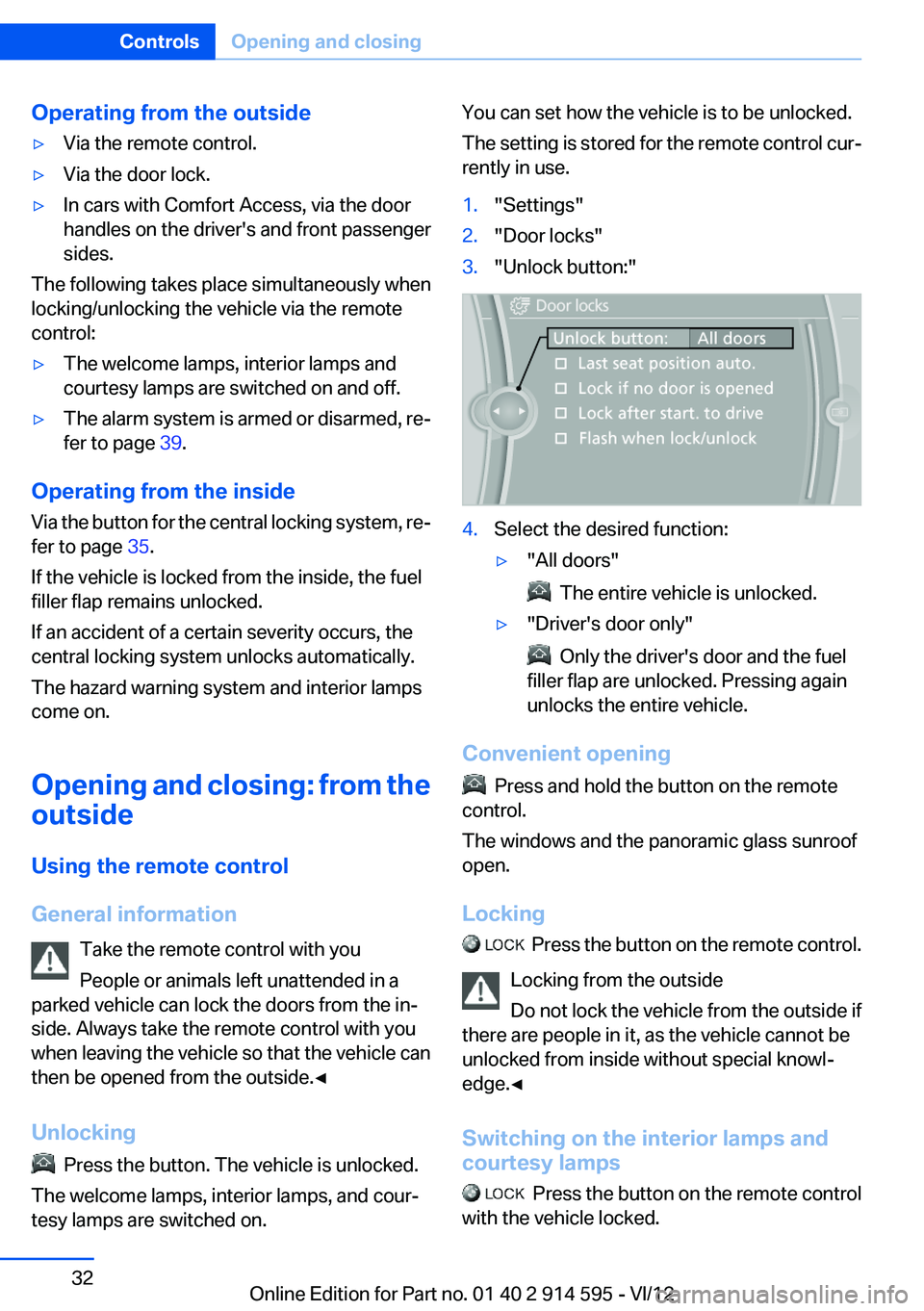
You can set how the vehicle is to be unlocked.
The setting is stored for the remote control cur‐
rently in use.1."Settings"2."Door locks"3."Unlock button:"4.Select the desired function:▷"All doors"
The entire vehicle is unlocked.
▷"Driver's door only"
Only the driver's door and the fuel
filler flap are unlocked. Pressing again
unlocks the entire vehicle.
Convenient opening
Press and hold the button on the remote
control.
The windows and the panoramic glass sunroof
open.
Locking
Press the button on the remote control.
Locking from the outside
Do not lock the vehicle from the outside if
there are people in it, as the vehicle cannot be
unlocked from inside without special knowl‐
edge.◀
Switching on the interior lamps and
courtesy lamps
Press the button on the remote control
with the vehicle locked.
Seite 32ControlsOpening and closing32
Online Edition for Part no. 01 40 2 914 595 - VI/12
Page 38 of 291
To switch the engine off with transmission po‐
sition N engaged, insert the remote control in
the ignition lock.
Malfunction
The Comfort Access functions can be disturbed
by local radio waves, such as by a mobile phone
in the immediate vicinity of the remote control or
when a mobile phone is being charged in the
vehicle.
If this occurs, open or close the vehicle using the
buttons on the remote control or use the
integrated key in the door lock.
To start the engine afterward, insert the remote
control into the ignition switch.
Warning lamps The warning lamp in the instrument
cluster lights up when you attempt to
start the engine: the engine cannot be
started.
The remote control is not in the vehicle or has a
malfunction. Take the remote control with you
inside the vehicle or have it checked. If neces‐
sary, insert another remote control into the ig‐
nition switch.
The warning lamp in the instrument
cluster lights up while the engine is
running: the remote control is no lon‐
ger inside the vehicle.
After switching off the engine, the engine can
only be started again within approx. 10 seconds
if no door has been opened.
The indicator lamp in the instrument
cluster comes on and a message ap‐
pears on the Control Display: replace
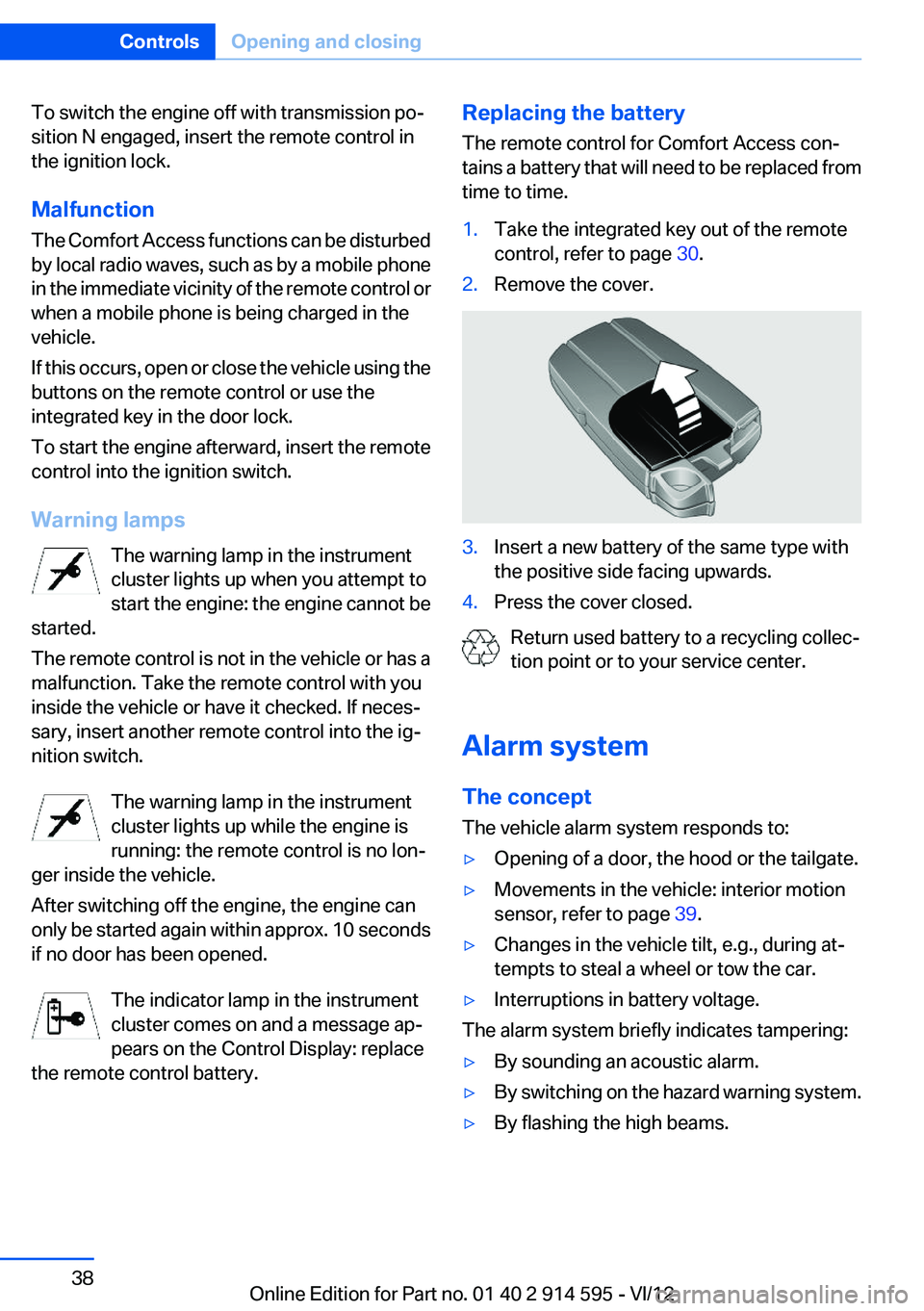
the remote control battery.Replacing the battery
The remote control for Comfort Access con‐
tains a battery that will need to be replaced from
time to time.1.Take the integrated key out of the remote
control, refer to page 30.2.Remove the cover.3.Insert a new battery of the same type with
the positive side facing upwards.4.Press the cover closed.
Return used battery to a recycling collec‐
tion point or to your service center.
Alarm system
The concept
The vehicle alarm system responds to:
▷Opening of a door, the hood or the tailgate.▷Movements in the vehicle: interior motion
sensor, refer to page 39.▷Changes in the vehicle tilt, e.g., during at‐
tempts to steal a wheel or tow the car.▷Interruptions in battery voltage.
The alarm system briefly indicates tampering:
▷By sounding an acoustic alarm.▷By switching on the hazard warning system.▷By flashing the high beams.Seite 38ControlsOpening and closing38
Online Edition for Part no. 01 40 2 914 595 - VI/12
Page 39 of 291
Arming and disarming the alarm
system
General information
When you lock or unlock the vehicle, either with
the remote control or at the door lock, the alarm
system is armed or disarmed at the same time.
Door lock and armed alarm system
Unlocking via the door lock will trigger the alarm
on some market-specific versions.
To stop this alarm, unlock the vehicle with the
remote control or switch on the ignition.
Tailgate and armed alarm system
The tailgate can be opened using the remote
control, even if the alarm system is armed.
Press the button on the remote control.
After the tailgate is closed, it is locked and moni‐
tored again by the alarm system. The hazard
warning system flashes once.
In some market-specific versions, the tailgate
can only be opened using the remote control if
the vehicle was unlocked first.
Switching off the alarm
▷Unlock the vehicle using the remote control,
refer to page 32.▷Insert the remote control all the way into the
ignition lock.
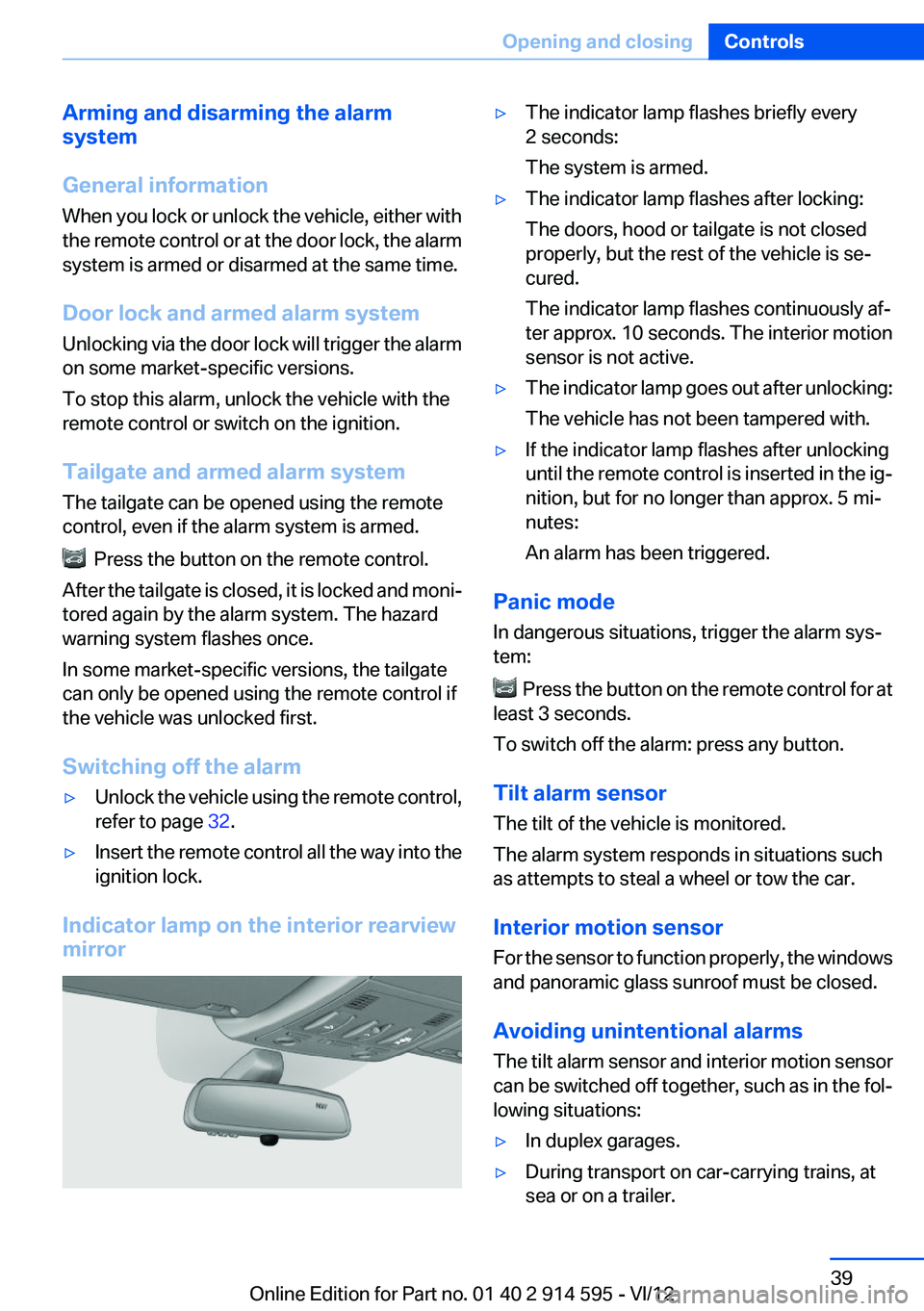
Indicator lamp on the interior rearview
mirror
▷The indicator lamp flashes briefly every
2 seconds:
The system is armed.▷The indicator lamp flashes after locking:
The doors, hood or tailgate is not closed
properly, but the rest of the vehicle is se‐
cured.
The indicator lamp flashes continuously af‐
ter approx. 10 seconds. The interior motion
sensor is not active.▷The indicator lamp goes out after unlocking:
The vehicle has not been tampered with.▷If the indicator lamp flashes after unlocking
until the remote control is inserted in the ig‐
nition, but for no longer than approx. 5 mi‐
nutes:
An alarm has been triggered.
Panic mode
In dangerous situations, trigger the alarm sys‐
tem:
Press the button on the remote control for at
least 3 seconds.
To switch off the alarm: press any button.
Tilt alarm sensor
The tilt of the vehicle is monitored.
The alarm system responds in situations such
as attempts to steal a wheel or tow the car.
Interior motion sensor
For the sensor to function properly, the windows
and panoramic glass sunroof must be closed.
Avoiding unintentional alarms
The tilt alarm sensor and interior motion sensor
can be switched off together, such as in the fol‐
lowing situations:
▷In duplex garages.▷During transport on car-carrying trains, at
sea or on a trailer.Seite 39Opening and closingControls39
Online Edition for Part no. 01 40 2 914 595 - VI/12
Page 55 of 291
To save battery power when the engine is off,
switch off the ignition and any unnecessary
electronic systems/power consumers.
Radio ready state and ignition off
All indicator and warning lamps as well as dis‐
plays in the instrument cluster go out.
Automatic transmission, 8-gear
In certain situations, transmission position P is
engaged automatically. To make it possible for
the vehicle to roll, such as in an automatic car
wash, follow the instructions in Car washes, re‐
fer to page 259.
Starting the engine
General information Enclosed areas
Do not let the engine run in enclosed
areas; otherwise, breathing of exhaust fumes
may lead to loss of consciousness and death.
The exhaust gases contain carbon monoxide, an
odorless and colorless but highly toxic gas.◀
Unattended vehicle
Do not leave the car unattended with the
engine running; otherwise, it presents a poten‐
tial source of danger.
Before leaving the car with the engine running,
shift to neutral or engage transmission posi‐
tion P and set the handbrake firmly; otherwise,
the vehicle may begin to roll.◀
Frequent starting in quick succession
Avoid repeated futile attempts at starting
the car and avoid starting the car frequently in
quick succession. Otherwise, the fuel is not
burned or is inadequately burned, and there is
the danger of overheating and damaging the
catalytic converter.◀Do not wait for the engine to warm up while the
vehicle remains stationary. Start driving right
away, but at moderate engine speeds.
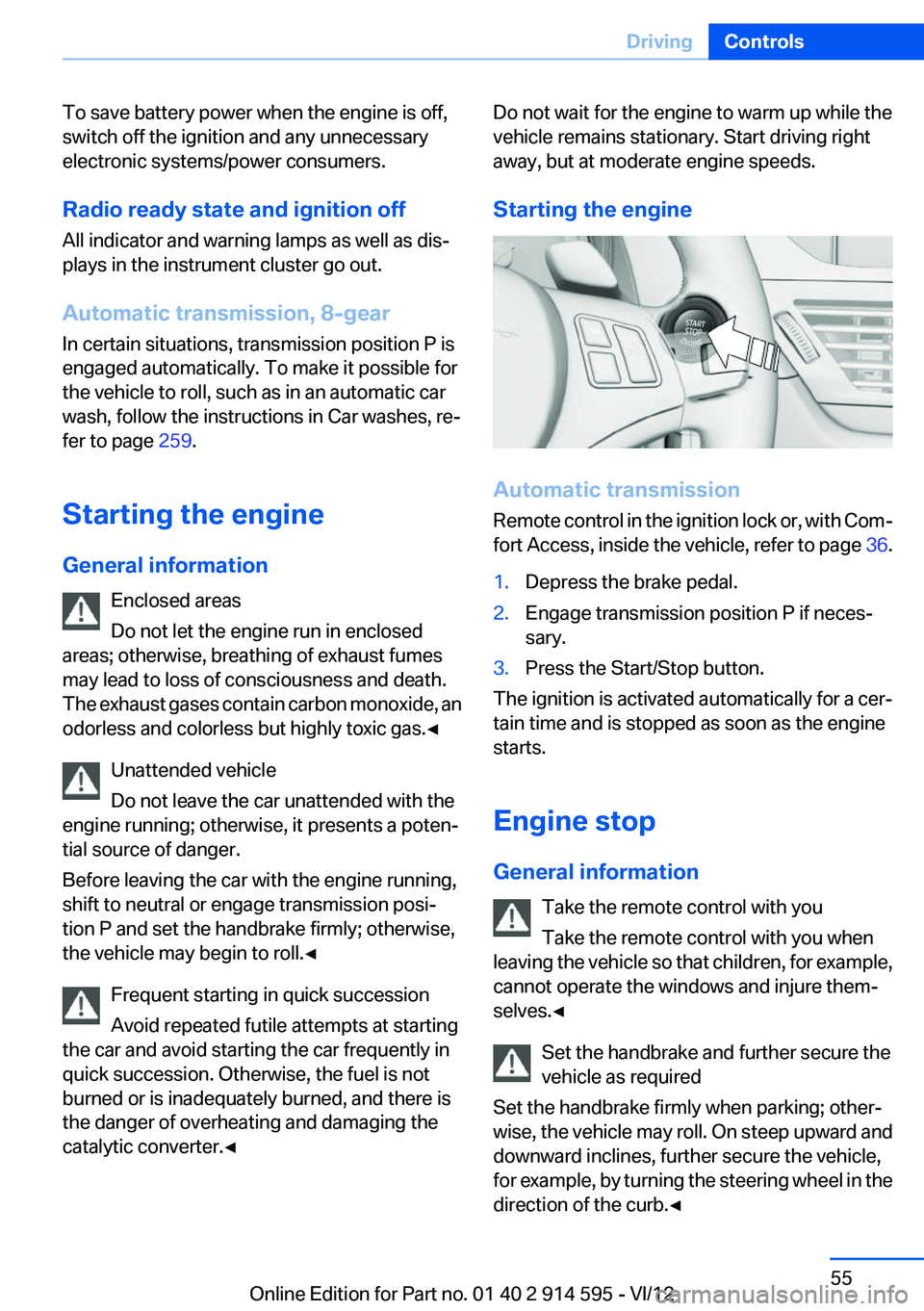
Starting the engine
Automatic transmission
Remote control in the ignition lock or, with Com‐
fort Access, inside the vehicle, refer to page 36.
1.Depress the brake pedal.2.Engage transmission position P if neces‐
sary.3.Press the Start/Stop button.
The ignition is activated automatically for a cer‐
tain time and is stopped as soon as the engine
starts.
Engine stop
General information Take the remote control with you
Take the remote control with you when
leaving the vehicle so that children, for example,
cannot operate the windows and injure them‐
selves.◀
Set the handbrake and further secure the
vehicle as required
Set the handbrake firmly when parking; other‐
wise, the vehicle may roll. On steep upward and
downward inclines, further secure the vehicle,
for example, by turning the steering wheel in the
direction of the curb.◀
Seite 55DrivingControls55
Online Edition for Part no. 01 40 2 914 595 - VI/12
Page 59 of 291
Turn signal, high beams,
headlamp flasher
Turn signal Do not fold in the exterior mirrors
While driving and when using the turn sig‐
nal/hazard warning flashers, do not fold in the
exterior mirrors; otherwise, the additional turn
signal lamps in the exterior mirrors will not be in
the appropriate position and will be difficult to
detect.◀
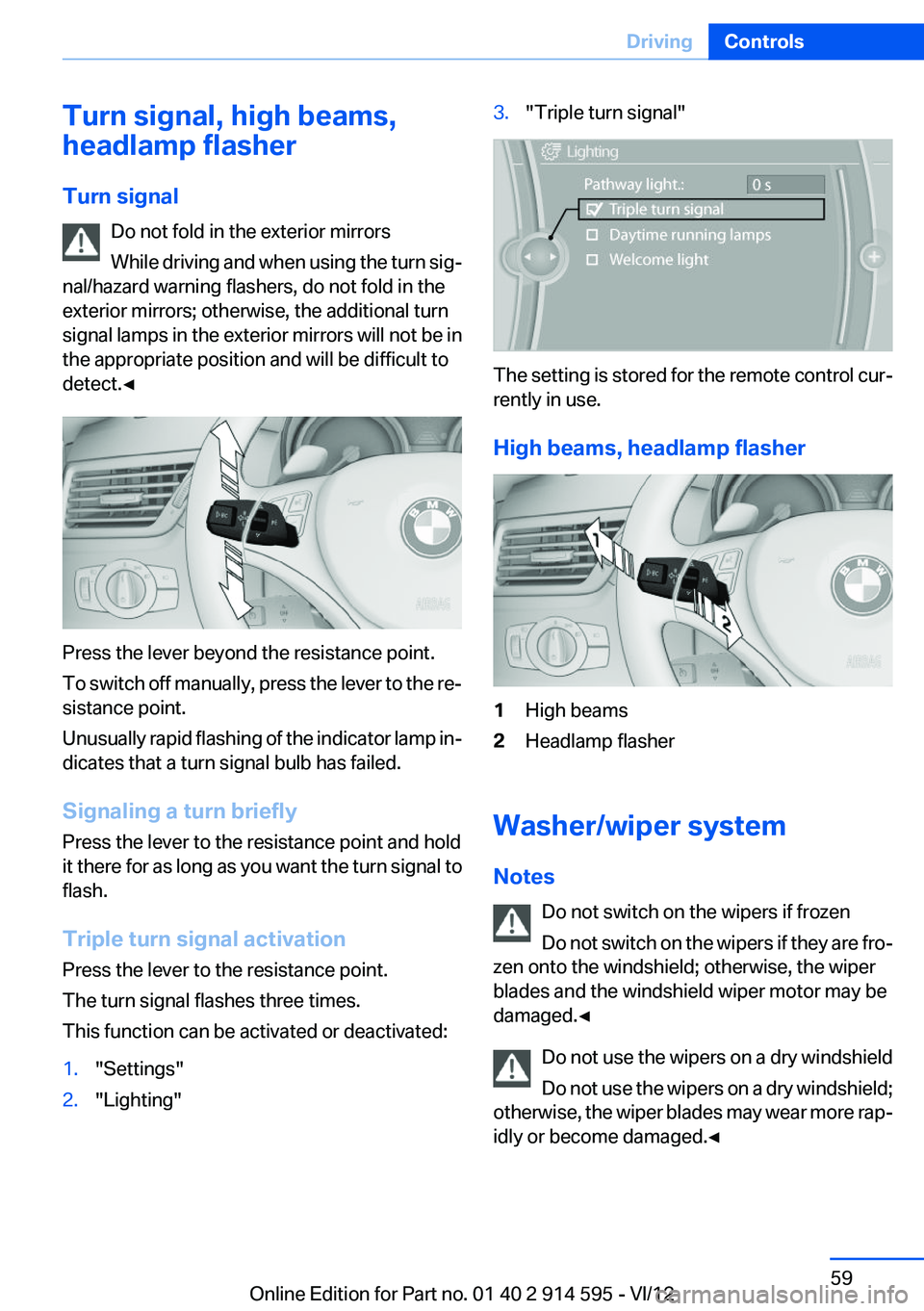
Press the lever beyond the resistance point.
To switch off manually, press the lever to the re‐
sistance point.
Unusually rapid flashing of the indicator lamp in‐
dicates that a turn signal bulb has failed.
Signaling a turn briefly
Press the lever to the resistance point and hold
it there for as long as you want the turn signal to
flash.
Triple turn signal activation
Press the lever to the resistance point.
The turn signal flashes three times.
This function can be activated or deactivated:
1."Settings"2."Lighting"3."Triple turn signal"
The setting is stored for the remote control cur‐
rently in use.
High beams, headlamp flasher
1High beams2Headlamp flasher
Washer/wiper system
Notes Do not switch on the wipers if frozen
Do not switch on the wipers if they are fro‐
zen onto the windshield; otherwise, the wiper
blades and the windshield wiper motor may be
damaged.◀
Do not use the wipers on a dry windshield
Do not use the wipers on a dry windshield;
otherwise, the wiper blades may wear more rap‐
idly or become damaged.◀
Seite 59DrivingControls59
Online Edition for Part no. 01 40 2 914 595 - VI/12