ECU BMW X1 XDRIVE 28I 2014 Owner's Manual
[x] Cancel search | Manufacturer: BMW, Model Year: 2014, Model line: X1 XDRIVE 28I, Model: BMW X1 XDRIVE 28I 2014Pages: 295, PDF Size: 7.06 MB
Page 207 of 295
Snap-in adapter
General information More information on compatible snap-in
adapters that support the functions of the mo‐
bile phone is available at the service center.
Notes At high temperatures, the charging function of
the mobile phone may be limited and functions
may not be executed.
When using the mobile phone via the vehicle,
note the operating instructions of the mobile
phone.
Installation position
In the center armrest.
Inserting/removing the snap-in
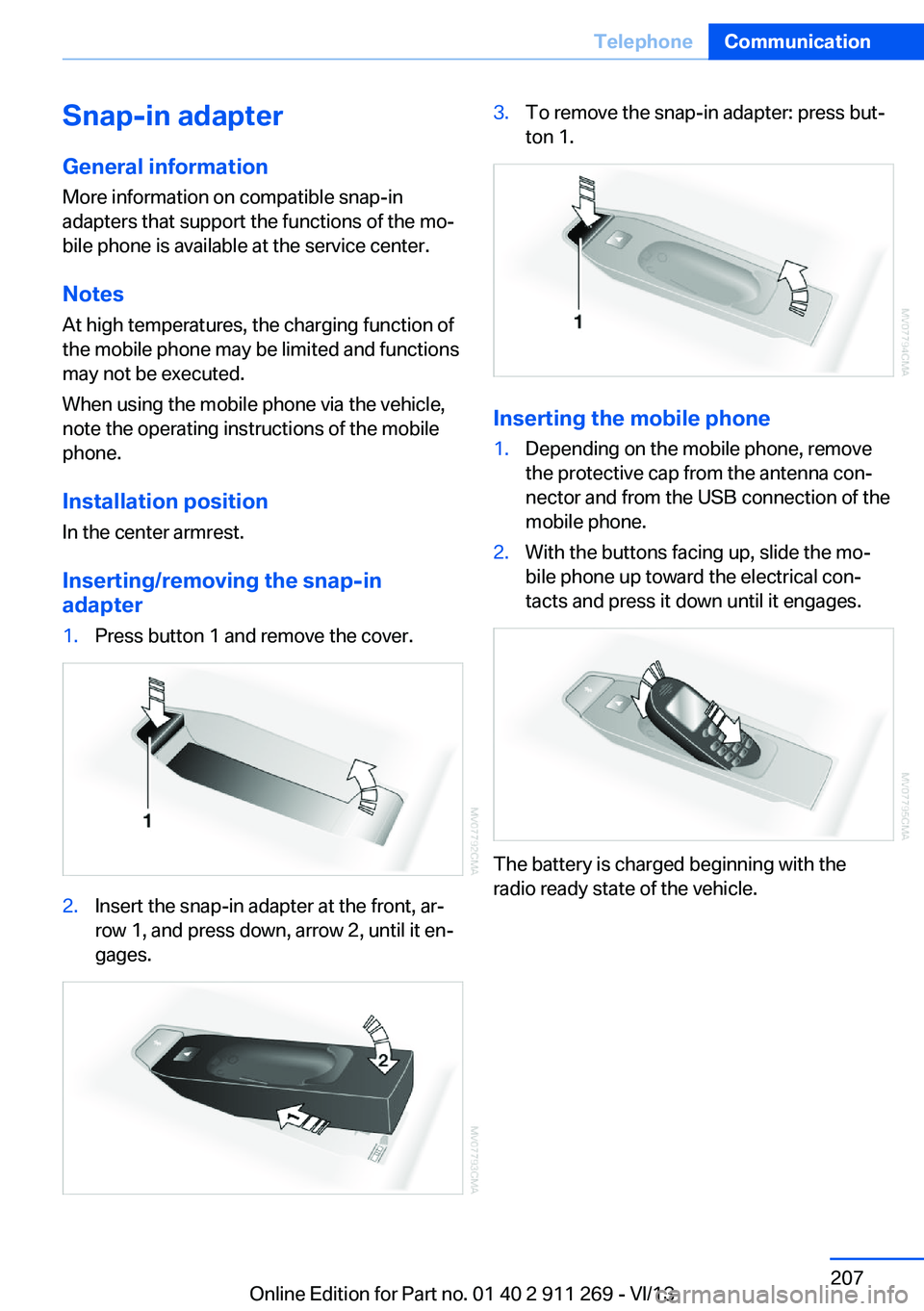
adapter1.Press button 1 and remove the cover.2.Insert the snap-in adapter at the front, ar‐
row 1, and press down, arrow 2, until it en‐
gages.3.To remove the snap-in adapter: press but‐
ton 1.
Inserting the mobile phone
1.Depending on the mobile phone, remove
the protective cap from the antenna con‐
nector and from the USB connection of the
mobile phone.2.With the buttons facing up, slide the mo‐
bile phone up toward the electrical con‐
tacts and press it down until it engages.
The battery is charged beginning with the
radio ready state of the vehicle.
Seite 207TelephoneCommunication207
Online Edition for Part no. 01 40 2 911 269 - VI/13
Page 243 of 295
Risk of damage
Before opening the hood, ensure that the
wiper arms with wiper blades are folded onto
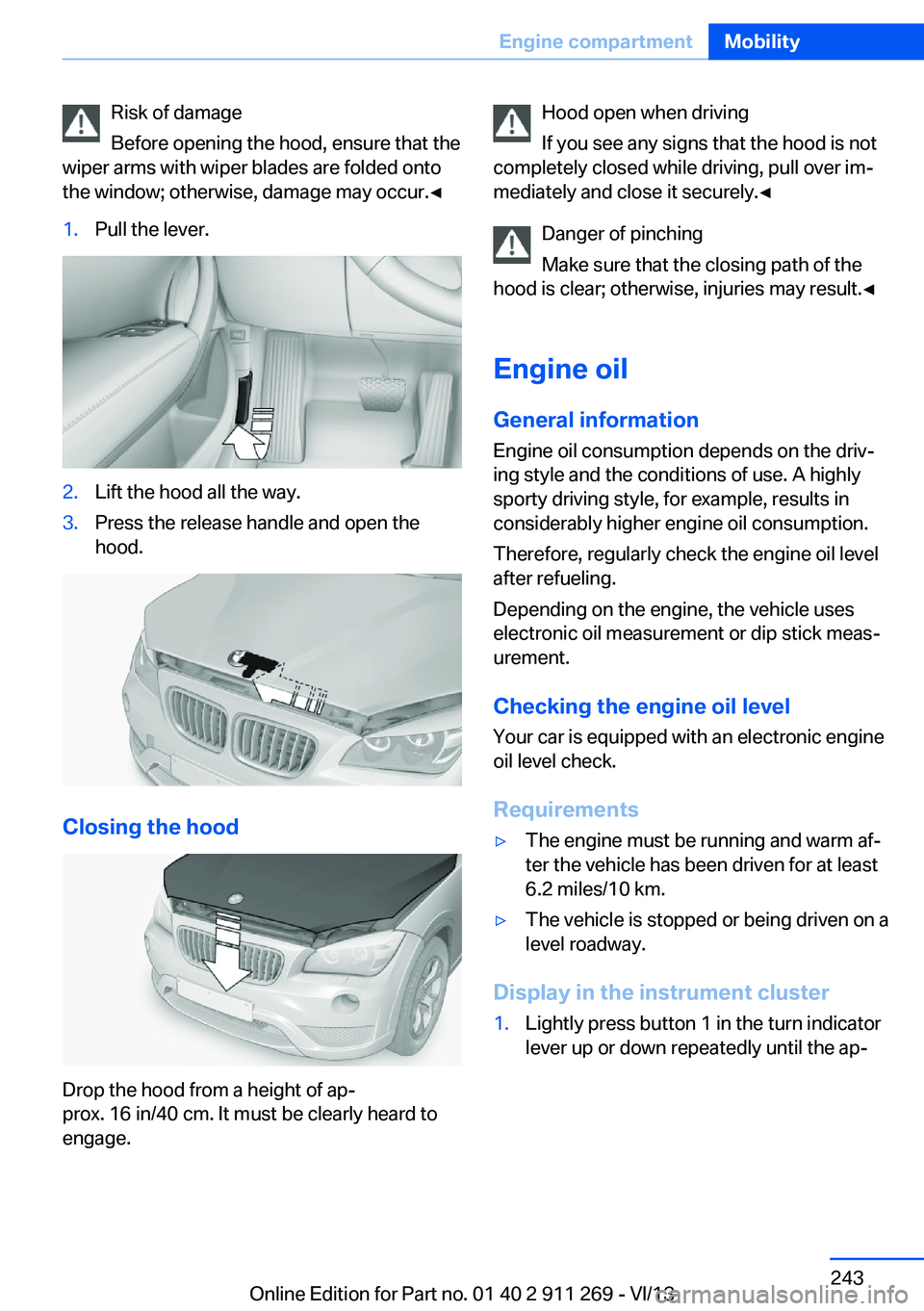
the window; otherwise, damage may occur.◀1.Pull the lever.2.Lift the hood all the way.3.Press the release handle and open the
hood.
Closing the hood
Drop the hood from a height of ap‐
prox. 16 in/40 cm. It must be clearly heard to
engage.
Hood open when driving
If you see any signs that the hood is not
completely closed while driving, pull over im‐
mediately and close it securely.◀
Danger of pinching
Make sure that the closing path of the
hood is clear; otherwise, injuries may result.◀
Engine oil
General information Engine oil consumption depends on the driv‐
ing style and the conditions of use. A highly
sporty driving style, for example, results in
considerably higher engine oil consumption.
Therefore, regularly check the engine oil level
after refueling.
Depending on the engine, the vehicle uses
electronic oil measurement or dip stick meas‐
urement.
Checking the engine oil level Your car is equipped with an electronic engine
oil level check.
Requirements▷The engine must be running and warm af‐
ter the vehicle has been driven for at least
6.2 miles/10 km.▷The vehicle is stopped or being driven on a
level roadway.
Display in the instrument cluster
1.Lightly press button 1 in the turn indicator
lever up or down repeatedly until the ap‐Seite 243Engine compartmentMobility243
Online Edition for Part no. 01 40 2 911 269 - VI/13
Page 256 of 295
Maintain the battery in an upright position for
transport and storage. Secure the battery so
that it does not tip over during transport.
Fuses Replacing fuses
Never attempt to repair a blown fuse and
do not replace a defective fuse with a substi‐
tute of another color or amperage rating; this
could lead to a circuit overload, ultimately re‐
sulting in a fire in the vehicle.◀
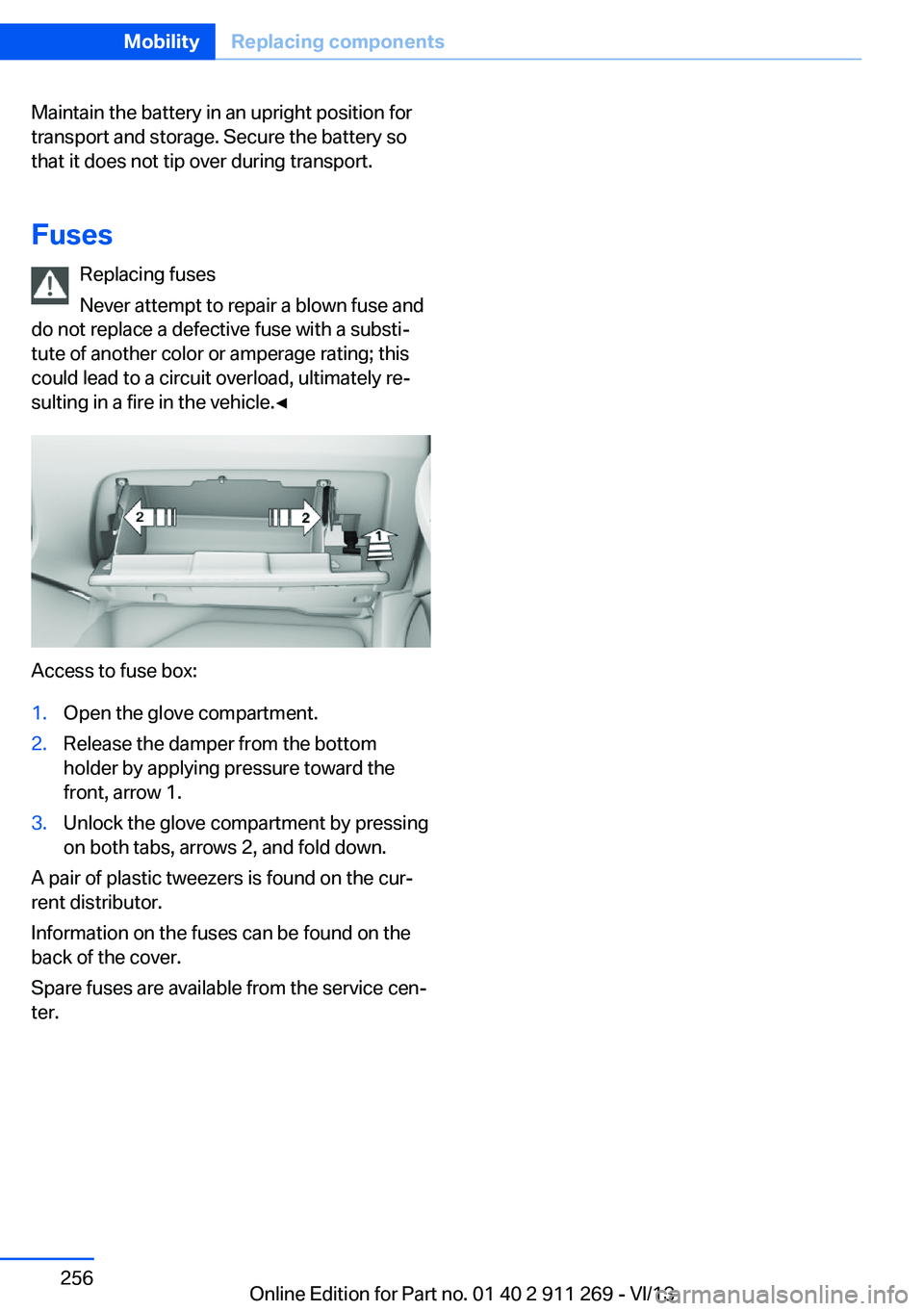
Access to fuse box:
1.Open the glove compartment.2.Release the damper from the bottom
holder by applying pressure toward the
front, arrow 1.3.Unlock the glove compartment by pressing
on both tabs, arrows 2, and fold down.
A pair of plastic tweezers is found on the cur‐
rent distributor.
Information on the fuses can be found on the
back of the cover.
Spare fuses are available from the service cen‐
ter.
Seite 256MobilityReplacing components256
Online Edition for Part no. 01 40 2 911 269 - VI/13
Page 262 of 295
Attaching the tow rope correctly
Only secure the tow rope on the tow fit‐
ting; otherwise, damage can occur when it is
secured on other parts of the vehicle.◀
Tow fitting
The screw-in tow fitting should always be car‐
ried in the vehicle. It can be screwed in at the
front or rear of the BMW.
It is located in the tool kit under the cargo floor
cover and storage compartment in the cargo
area, refer to page 249.
It is stored with the tool kit under the cargo
floor cover in the cargo area, refer to page 249.
Tow fitting, information on use▷Use only the tow fitting provided with
the vehicle and screw it all the way in.▷Use the tow fitting for towing on paved
roads only.▷Avoid lateral loading of the tow fitting, e.g.,
do not lift the vehicle by the tow fitting.
Otherwise, damage to the tow fitting and the
vehicle can occur.◀
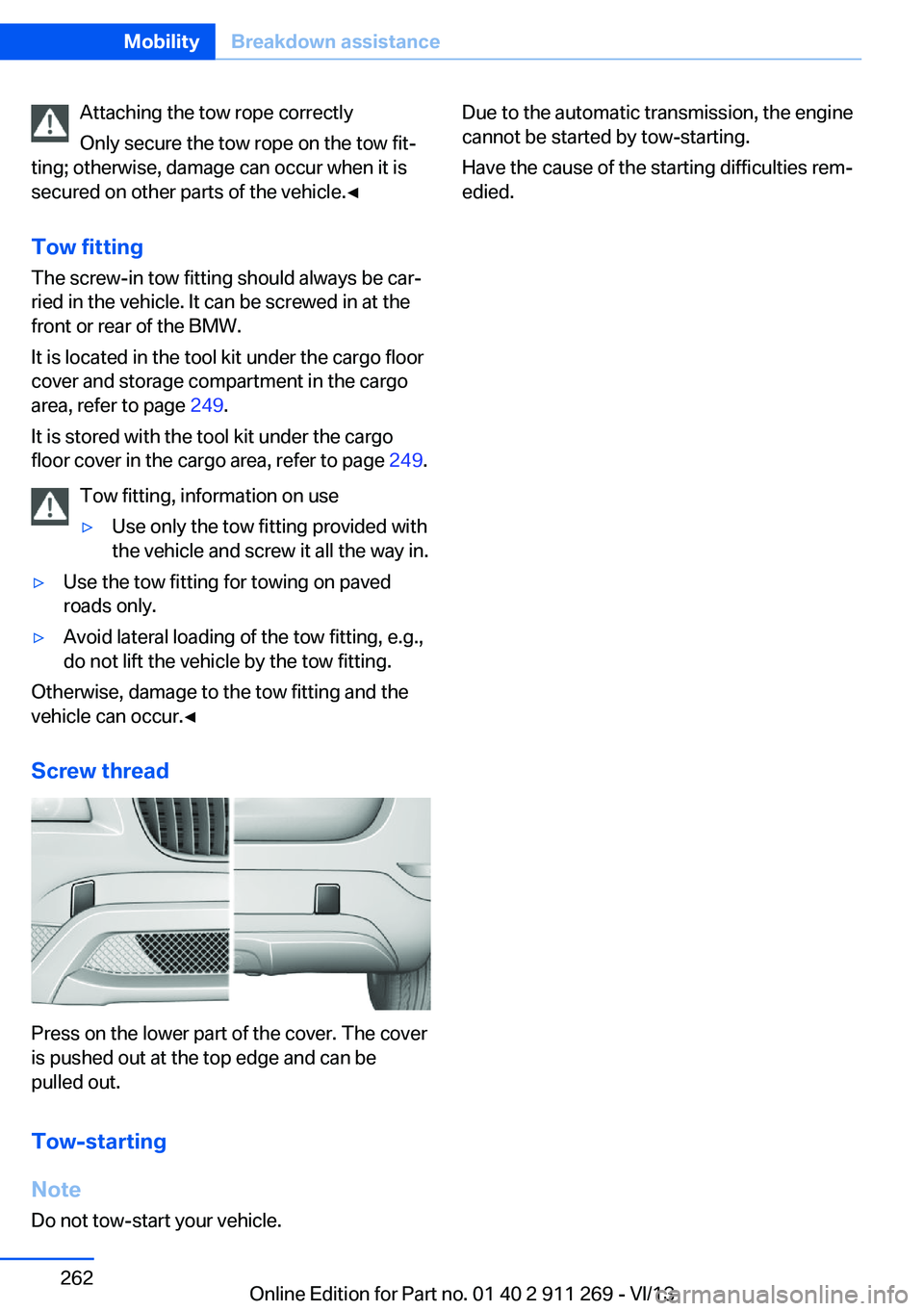
Screw thread
Press on the lower part of the cover. The cover
is pushed out at the top edge and can be
pulled out.
Tow-starting
Note Do not tow-start your vehicle.
Due to the automatic transmission, the engine
cannot be started by tow-starting.
Have the cause of the starting difficulties rem‐
edied.Seite 262MobilityBreakdown assistance262
Online Edition for Part no. 01 40 2 911 269 - VI/13
Page 266 of 295
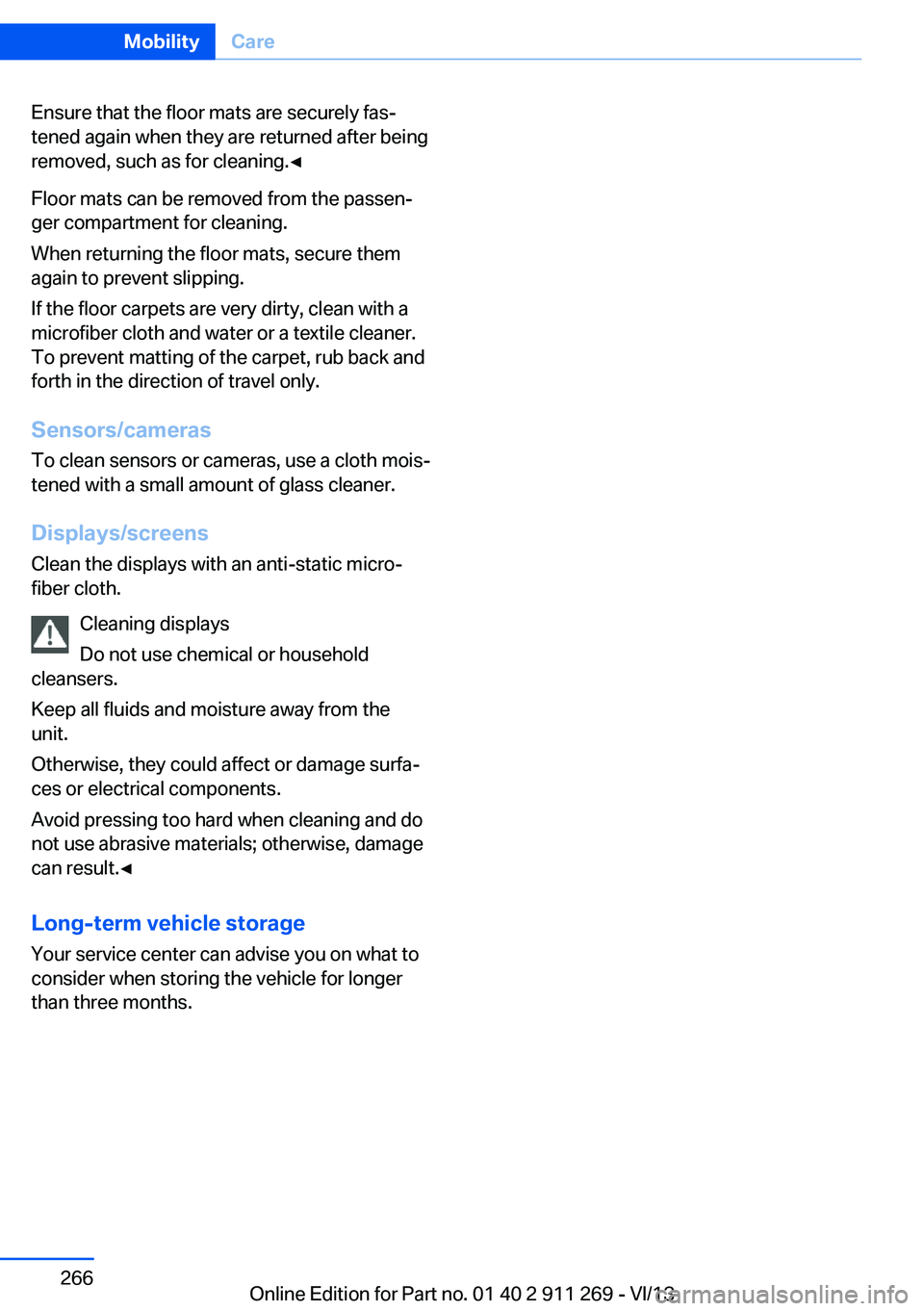
Ensure that the floor mats are securely fas‐
tened again when they are returned after being
removed, such as for cleaning.◀
Floor mats can be removed from the passen‐
ger compartment for cleaning.
When returning the floor mats, secure them
again to prevent slipping.
If the floor carpets are very dirty, clean with a
microfiber cloth and water or a textile cleaner.
To prevent matting of the carpet, rub back and
forth in the direction of travel only.
Sensors/cameras
To clean sensors or cameras, use a cloth mois‐
tened with a small amount of glass cleaner.
Displays/screens
Clean the displays with an anti-static micro‐
fiber cloth.
Cleaning displays
Do not use chemical or household
cleansers.
Keep all fluids and moisture away from the
unit.
Otherwise, they could affect or damage surfa‐
ces or electrical components.
Avoid pressing too hard when cleaning and do
not use abrasive materials; otherwise, damage
can result.◀
Long-term vehicle storage Your service center can advise you on what to
consider when storing the vehicle for longer
than three months.Seite 266MobilityCare266
Online Edition for Part no. 01 40 2 911 269 - VI/13
Page 281 of 295
Average speed, refer to Com‐puter 73
Axle loads, refer to Weights 270
B
Backrest curvature, refer to Lumbar support 45
Backrests, refer to Seats 44
Backrest width adjust‐ ment 46
Back seats– Adjusting the backrest
tilt 118
Backup camera 105
Backup camera, obstacle marking 107
Backup camera, pathway lines 106
Backup camera, turning lines 106
Backup lamps, bulb replace‐ ment 253
Balance 164
Band-aids, refer to First aid kit 258
Bass 164
Battery
– Remote control 30
Battery disposal 255
Battery, refer to Vehicle bat‐ tery 255
Battery replacement, remote control for vehicle 38
Before entering the car wash 263
Belts, refer to Safety belts 46
Belt tensioners, refer to Safety belts 46
Beverage holder, refer to Cu‐ pholder 125
Black and white map dis‐ play 158
Blower, refer to Air flow rate 110
Bluetooth audio 187
Bluetooth connection, acti‐
vating/deactivating 197
BMW Apps 224
BMW EfficientDynamics, re‐ fer to Saving fuel 137
BMW Homepage 6
BMW Internet page 6
BMW maintenance sys‐ tem 247
BMW Online 222
Bottle holder, refer to Cu‐ pholder 125
Brake assistant 97
Brake discs, breaking in 130
Brake fluid, refer to Service requirements 78
Brake force display 96
Brake force distribution, elec‐ tronic 97
Brake lamps– Bulb replacement 253
Brake lamps, brake force dis‐
play 96
Brake lights, adaptive 96
Brake pads, breaking in 130
Brakes
– Handbrake 61
Brakes, BMW maintenance
system 247
Brakes, service require‐ ments 78
Brake system, BMW mainte‐ nance system 247
Braking, notes 131
Breakdown assistance 258
Breakdown, transporting the vehicle 260
Breaking in 130
Brightness on the Control Display 78
Bulb replacement, refer to Lamp and bulb replace‐
ment 250
Button for starting the engine, refer to Start/Stop but‐
ton 57
C
Calendar 214
California Proposition 65 Warning 7
Camera, care 266
Camera, refer to Backup cam‐ era 105
Can holder, refer to Cu‐ pholder 125
Car battery, refer to Vehicle battery 255
Car care products 264
Care 263
Care, displays 266
Care, vehicle 264
Cargo 134
Cargo area 118
Cargo area– Comfort Access 37– Cover 118– Folding up the cargo floor
panel 121– Multi-function hook 121– Partition net 119
Cargo area, capacities 270
Cargo area, enlarging 118
Cargo area lamp, refer to Inte‐ rior lamps 87
Cargo area lid, refer to Tail‐ gate 35
Cargo area net, refer to Parti‐ tion net 119
Cargo area, opening from the inside 36
Cargo area, opening from the outside 36
Cargo floor panel
– Folding up 121
Cargo floor panel, raising 121
Cargo straps, securing cargo 135
Car key, refer to Integrated key/remote control 30
Carpet, care 265
Seite 281Everything from A to ZReference281
Online Edition for Part no. 01 40 2 911 269 - VI/13
Page 284 of 295
Engine coolant, refer to Cool‐ant 246
Engine oil, adding 245
Engine oil, additives, refer to Approved engine oils 245
Engine oil, alternative oil types 245
Engine oil, BMW maintenance system 247
Engine oil change intervals, refer to Service require‐
ments 78
Engine oil, checking the level 243
Engine oil, filling ca‐ pacity 271
Engine oil temperature 72
Engine oil types, alterna‐ tive 245
Engine oil types, ap‐ proved 245
Engine, overheating, refer to Coolant temperature 72
Engine start, assistance 258
Engine, starting 58
Engine, starting– Comfort Access 37
Engine, starting, Start/Stop
button 57
Engine, stopping, Start/Stop button 57
Engine, switching off 59
Environmentally friendly driv‐ ing, refer to Current fuel
consumption 72
Equalizer 164
Equipment, interior 113
ESP Electronic Stability Pro‐ gram, refer to Dynamic Sta‐
bility Control DSC 97
Exchanging wheels/tires 239
Exhaust system 130
Exterior mirrors 49
Exterior mirrors, adjusting 49
Exterior mirrors, automatic dimming 50
Exterior mirrors, automatic
heating 50
Exterior mirrors, folding in and out 50
External audio device 124
External devices 184
External temperature dis‐ play 71
External temperature display– Changing the unit of meas‐
ure 75– On computer 75
External temperature warn‐
ing 71
Externel temperature dis‐ play 71
Eyes for securing cargo 135
F
Fader 164
Failure messages, refer to Check Control 80
False alarm
– Avoiding unintentional
alarms 40– Ending an alarm 39
Fastening safety belts, refer
to Safety belts 46
Fault messages, refer to Check Control 80
Filling capacities 271
Filter
– Refer to Microfilter/acti‐
vated-charcoal filter with
automatic climate con‐
trol 111
Fine wood, care 265
First aid kit 258
Fitting for towing 262
Flashing when locking/ unlocking 33
Flat Tire Monitor FTM 91
Flat Tire Monitor FTM, snow chains 241
Flat tire, run-flat tires 240
Flat tire, Tire Pressure Moni‐
tor TPM 93
Flat tire, warning lamp 92, 94
Flat tire, wheel change 254
Flooding, refer to Driving through water 131
Floor carpet, care 265
Floor mats, care 265
FM/AM station 166
Fog lamps 86
Fog lamps, indicator lamp 86
Foldable rear seat back‐ rest 118
Foot brake 131
Footwell lamps, refer to Inte‐ rior lamps 87
For your own safety 6
Four-wheel drive, refer to xDrive 99
Front airbags 88
Front fog lamps 86
FTM Flat Tire Monitor 91
Fuel 230
Fuel– Refer to Average fuel con‐
sumption 73
Fuel, additives 230
Fuel, average consump‐ tion 73
Fuel cap 228
Fuel cap, closing 228
Fuel consumption display
– Average fuel consump‐
tion 73
Fuel consumption display,
current fuel consump‐
tion 72
Fuel-efficient driving, refer to Current fuel consump‐
tion 72
Fuel filler flap, closing 228
Fuel filler flap, opening 228
Fuel filler flap, unlocking in case of an electrical mal‐
function 229
Fuel gauge 72
Fuel, saving 137
Seite 284ReferenceEverything from A to Z284
Online Edition for Part no. 01 40 2 911 269 - VI/13
Page 286 of 295
Ignition lock 57
Ignition, switched off 58
Ignition, switched on 58
Indication of a flat tire 92, 94
Indicator and warning lamps 15
Inflation pressure monitor, re‐ fer to Flat Tire Monitor 91
Inflation pressure, refer to Tire inflation pressure 232
Information on the navigation data 142
Initialization after power fail‐ ure 255
Initializing– Compass, refer to Calibrat‐
ing 116– Panoramic glass sunroof 43– Refer to Setting the time
and date 76
Initializing, Flat Tire Monitor
FTM 91
Initializing, Tire Pressure Monitor TPM 94
Inside brake lamps
– Bulb replacement 254
Installation location, tele‐
phone 124
Instrument cluster 14
Instrument lighting 87
Instrument panel, refer to In‐ strument cluster 14
Instruments, refer to Cock‐ pit 12
Integrated key 30
Interactive map 149
Interior equipment 113
Interior lamps 87
Interior lamps
– Remote control 33
Interior mirror 50
Interior rearview mirror, auto‐ matic dimming 50
Interior rearview mirror, com‐ pass 115
Interior temperature, setting– Automatic climate con‐
trol 108
Interlock, refer to Disengag‐
ing the remote control 65
Intermediate destina‐ tions 151
Internet page 6
Intersection, entering for navi‐ gation 145
iPod/iPhone 185
J
Jacking points for the vehicle jack 255
Jack, refer to Vehicle jack 255
Joystick, refer to Selector lever 68
Jump-starting 258
K
Keyless Go, refer to Comfort Access 37
Keyless opening and closing, refer to Comfort Access 37
Key Memory, refer to Per‐ sonal Profile 30
Key, refer to Integrated key/ remote control 30
Kickdown
– Automatic transmission with
Steptronic 66, 68
Knee airbag 88
Knocking control 230
L
Label, run-flat tire 240
Lamp and bulb replacement, lamp replacement 250
Lamps 83
Lamps, automatic headlamp control 83, 84
Lamps, High-beam Assis‐
tant 85
Lamps, parking lamps/low beams 83
Lamps, replacing, refer to Lamp and bulb replace‐
ment 250
Language, changing on the Control Display 77
Lap-and-shoulder belt, refer to Safety belts 46
Lashing eyes, securing cargo 135
LATCH child restraint fixing system 53
Leather, care 264
LEDs, light-emitting di‐ odes 250
Length, refer to Dimen‐ sions 270
Letters and numbers, enter‐ ing 23
License plate lamp, bulb re‐ placement 254
Light-alloy wheels, care 265
Light-emitting diodes, LEDs 250
Lighter 117
Lighting– Instruments 87– Lamp and bulb replace‐
ment 250
Lighting, vehicle, refer to
Lamps 83
Light switch 83
Limit, refer to Speed limit 81
Load 135
Loading 134
Lock buttons, doors, refer to Locking 35
Locking
– From the inside 35– From the outside 32– Setting the confirmation
signals 33– Without remote control, re‐
fer to Comfort Access 37Seite 286ReferenceEverything from A to Z286
Online Edition for Part no. 01 40 2 911 269 - VI/13
Page 289 of 295
Rearview mirror, refer to Mir‐rors 49
Rear window defroster 111
Rear window, washing 64
Rear window wiper 64
Recirculated air mode 110
Recommended tire brands 240
Redialing 203
Refueling 228
Remaining distance to desti‐ nation, refer to Com‐
puter 74
Remaining range for service, refer to Service require‐
ments 78
Remaining range, refer to Range 73
Reminders 216
Remote app 225
Remote control– Battery replacement 38– Comfort Access 37– Garage door opener 113– Malfunction 33, 38– Tailgate 33– Universal 113
Remote control, removing
from the ignition lock 57
Remote control, service data 247
Remote inquiry 202
Remote Services 225
Replacement fuse 256
Replacement remote con‐ trol 30
Replacing wheels/tires 239
Reporting safety defects 9
Reserve warning, refer to Fuel gauge 72
Reservoir for washer fluid, re‐ fer to Washer fluid reser‐
voir 65
Resetting, Tire Pressure Monitor TPM 94
Restraining systems
– Refer to Safety belts 46Restraint systems for chil‐
dren 52
Retaining straps, securing cargo 135
Retreaded tires 240
Reverse gear– Automatic transmission with
Steptronic 66
Rim cleaner, care 265
Road, avoiding 153
Road detour 153
Roadside Assistance 221
Roadside parking lamp
– Bulb replacement 252
Roadside parking lamps 85
RON gasoline quality 230
RON, refer to Fuel qual‐ ity 230
Roof load capacity 270
Roof-mounted luggage rack 136
Rope, refer to Towing 261
Route 154
Route criteria, route 153
Route, displaying 154
Route section, bypass‐ ing 154
RSC Runflat System Compo‐ nent, refer to Run-flat
tires 240
Rubber components, care 265
Run-flat tires 240
Run-flat tires, tire inflation pressure 232
Running lights, refer to Park‐ ing lamps/low beams 83
S Safe braking 131
Safety 6
Safety belts 46
Safety belts
– Damage 47
Safety belts, care 265
Safety belts, indicator/warn‐
ing lamp 47
Safety belts, reminder 47
Safety switch for rear win‐ dows 41
Safety systems– Safety belts 46
Safety systems, airbags 88
Safety tires, refer to Run-flat tires 240
Satellite radio 168
Saving fuel 137
Scale, changing during navi‐ gation 156
Screen, refer to Control Dis‐ play 18
Search, refer to BMW On‐ line 222
Seat adjustment
– Manual 44
Seat adjustment, electric 45
Seat and mirror memory 48
Seat belts
– Refer to Safety belts 46
Seat heating 46
Seats
– Adjusting 44– Adjusting electrically 45– Heating 46– Memory, refer to Seat and
mirror memory 48– Sitting safely 44– Storing the setting, refer to
Seat and mirror memory 48
Selector lever, automatic
transmission with Step‐
tronic 66, 68
Selector lever lock, overrid‐ ing 67
Selector lever lock, refer to Changing selector lever po‐
sitions, Shiftlock 66
Selector lever lock, releas‐ ing 68
Selector lever positions, auto‐ matic transmission with
Steptronic 66
Seite 289Everything from A to ZReference289
Online Edition for Part no. 01 40 2 911 269 - VI/13