battery BMW X1 XDRIVE 35I 2014 Owner's Manual
[x] Cancel search | Manufacturer: BMW, Model Year: 2014, Model line: X1 XDRIVE 35I, Model: BMW X1 XDRIVE 35I 2014Pages: 295, PDF Size: 7.06 MB
Page 259 of 295

Do not touch live parts
To avoid the risk of potentially fatal in‐
jury, always avoid all contact with electrical
components while the engine is running.◀
Preparation1.Check whether the battery of the other ve‐
hicle has a voltage of 12 volts and approxi‐
mately the same capacitance in Ah. This
information can be found on the battery.2.Switch off the engine of the assisting vehi‐
cle.3.Switch off any electronic systems/power
consumers in both vehicles.
Bodywork contact between vehicles
There must not be any contact between
the bodies of the two vehicles, otherwise there
is a danger of shorting.◀
Starting aid terminals Connecting order
Connect the jumper cables in the correct
order; otherwise, there is the danger of injury
from sparking.◀
The so-called starting aid terminal in the en‐
gine compartment acts as the battery's posi‐
tive terminal. Pull the cover up and off.
The body ground or a special nut acts as the
negative terminal.
Connecting jumper cables
1.Pull off the cap of the BMW starting aid ter‐
minal.2.Attach one terminal clamp of the positive
jumper cable to the positive terminal of the
battery, or to the corresponding starting
aid terminal of the vehicle providing assis‐
tance.3.Attach the other end of the cable to the
positive terminal of the battery, or to the
corresponding starting aid terminal of the
vehicle to be started.4.Attach one terminal clamp of the negative
jumper cable to the negative terminal of
the battery, or to the corresponding engine
or body ground of the vehicle providing as‐
sistance.5.Attach the other end of the cable to the
negative terminal of the battery, or to the
corresponding engine or body ground of
the vehicle to be started.
Starting the engine
Never use spray fluids to start the engine.
1.Start the engine of the assisting vehicle
and let it run for several minutes at an in‐
creased idle speed.2.Start the engine of the vehicle being
started in the usual way.
If the first starting attempt is not success‐
ful, wait a few minutes before making an‐Seite 259Breakdown assistanceMobility259
Online Edition for Part no. 01 40 2 911 269 - VI/13
Page 260 of 295
other attempt in order to allow the dis‐
charged battery to recharge.3.Let both engines run for several minutes.4.Disconnect the jumper cables in the re‐
verse order.
Check the battery and recharge if necessary.
Tow-starting and towing Observe applicable laws and regulations
Observe applicable laws and regulations
for tow-starting and towing.◀
No additional passengers
Do not transport any passengers other
than the driver in a vehicle that is being
towed.◀
Automatic transmission, 8-gear:
transporting your vehicle
Note Your vehicle is not permitted to be towed.
Therefore, contact a service center in the
event of a breakdown.
Do not have the vehicle towed
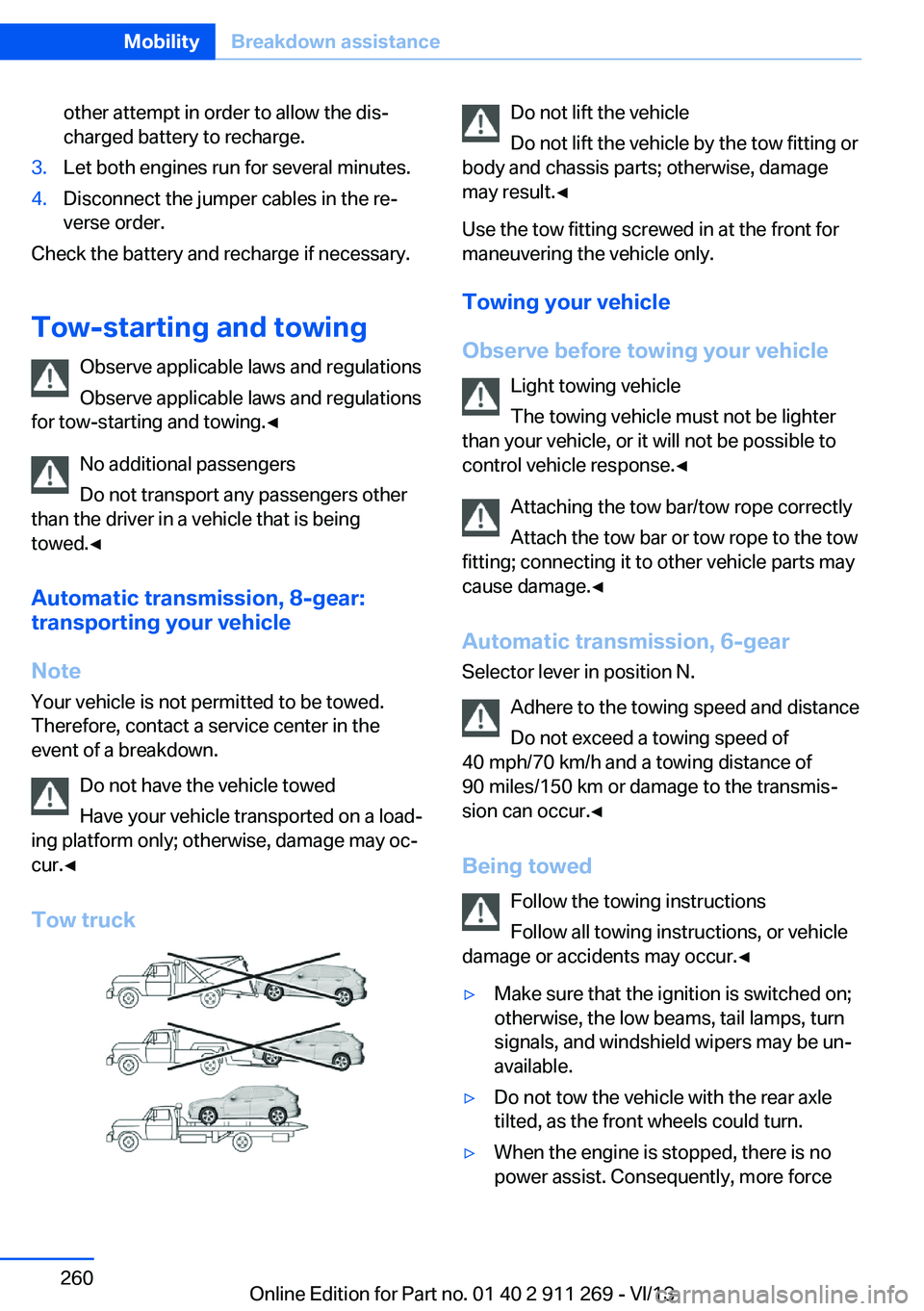
Have your vehicle transported on a load‐
ing platform only; otherwise, damage may oc‐
cur.◀
Tow truck
Do not lift the vehicle
Do not lift the vehicle by the tow fitting or
body and chassis parts; otherwise, damage
may result.◀
Use the tow fitting screwed in at the front for
maneuvering the vehicle only.
Towing your vehicle
Observe before towing your vehicle Light towing vehicle
The towing vehicle must not be lighter
than your vehicle, or it will not be possible to
control vehicle response.◀
Attaching the tow bar/tow rope correctly
Attach the tow bar or tow rope to the tow
fitting; connecting it to other vehicle parts may
cause damage.◀
Automatic transmission, 6-gear Selector lever in position N.
Adhere to the towing speed and distance
Do not exceed a towing speed of
40 mph/70 km/h and a towing distance of
90 miles/150 km or damage to the transmis‐
sion can occur.◀
Being towed Follow the towing instructions
Follow all towing instructions, or vehicle
damage or accidents may occur.◀▷Make sure that the ignition is switched on;
otherwise, the low beams, tail lamps, turn
signals, and windshield wipers may be un‐
available.▷Do not tow the vehicle with the rear axle
tilted, as the front wheels could turn.▷When the engine is stopped, there is no
power assist. Consequently, more forceSeite 260MobilityBreakdown assistance260
Online Edition for Part no. 01 40 2 911 269 - VI/13
Page 281 of 295
Average speed, refer to Com‐puter 73
Axle loads, refer to Weights 270
B
Backrest curvature, refer to Lumbar support 45
Backrests, refer to Seats 44
Backrest width adjust‐ ment 46
Back seats– Adjusting the backrest
tilt 118
Backup camera 105
Backup camera, obstacle marking 107
Backup camera, pathway lines 106
Backup camera, turning lines 106
Backup lamps, bulb replace‐ ment 253
Balance 164
Band-aids, refer to First aid kit 258
Bass 164
Battery
– Remote control 30
Battery disposal 255
Battery, refer to Vehicle bat‐ tery 255
Battery replacement, remote control for vehicle 38
Before entering the car wash 263
Belts, refer to Safety belts 46
Belt tensioners, refer to Safety belts 46
Beverage holder, refer to Cu‐ pholder 125
Black and white map dis‐ play 158
Blower, refer to Air flow rate 110
Bluetooth audio 187
Bluetooth connection, acti‐
vating/deactivating 197
BMW Apps 224
BMW EfficientDynamics, re‐ fer to Saving fuel 137
BMW Homepage 6
BMW Internet page 6
BMW maintenance sys‐ tem 247
BMW Online 222
Bottle holder, refer to Cu‐ pholder 125
Brake assistant 97
Brake discs, breaking in 130
Brake fluid, refer to Service requirements 78
Brake force display 96
Brake force distribution, elec‐ tronic 97
Brake lamps– Bulb replacement 253
Brake lamps, brake force dis‐
play 96
Brake lights, adaptive 96
Brake pads, breaking in 130
Brakes
– Handbrake 61
Brakes, BMW maintenance
system 247
Brakes, service require‐ ments 78
Brake system, BMW mainte‐ nance system 247
Braking, notes 131
Breakdown assistance 258
Breakdown, transporting the vehicle 260
Breaking in 130
Brightness on the Control Display 78
Bulb replacement, refer to Lamp and bulb replace‐
ment 250
Button for starting the engine, refer to Start/Stop but‐
ton 57
C
Calendar 214
California Proposition 65 Warning 7
Camera, care 266
Camera, refer to Backup cam‐ era 105
Can holder, refer to Cu‐ pholder 125
Car battery, refer to Vehicle battery 255
Car care products 264
Care 263
Care, displays 266
Care, vehicle 264
Cargo 134
Cargo area 118
Cargo area– Comfort Access 37– Cover 118– Folding up the cargo floor
panel 121– Multi-function hook 121– Partition net 119
Cargo area, capacities 270
Cargo area, enlarging 118
Cargo area lamp, refer to Inte‐ rior lamps 87
Cargo area lid, refer to Tail‐ gate 35
Cargo area net, refer to Parti‐ tion net 119
Cargo area, opening from the inside 36
Cargo area, opening from the outside 36
Cargo floor panel
– Folding up 121
Cargo floor panel, raising 121
Cargo straps, securing cargo 135
Car key, refer to Integrated key/remote control 30
Carpet, care 265
Seite 281Everything from A to ZReference281
Online Edition for Part no. 01 40 2 911 269 - VI/13
Page 282 of 295
Car phone, installation loca‐tion, refer to Center arm‐
rest 124
Car phone, refer to Tele‐ phone 196
Car vacuum cleaner, connect‐ ing, refer to Connecting
electrical devices 117
Car wash 263
Catalytic converter, refer to Hot exhaust system 130
CBS Condition Based Serv‐ ice 247
CD/DVD 174
CD/DVD notes 178
CDs, storing 179
Cell phone 196
Cell phone, installation loca‐ tion, refer to Center arm‐
rest 124
Center armrest, front 124
Center armrest, rear 124
Center brake lamp, bulb re‐ placement 254
Center console, refer to Around the center con‐
sole 16
Central locking– Comfort Access 37– From the inside 35– Setting the unlocking char‐
acteristics 32
Central locking system
– From the outside 31– Principle 31
Central screen, refer to Con‐
trol Display 18
Changes, technical, refer to Safety 6
Changing wheels/tires 239
Check Control 80
Children, transporting 52
Child restraint fixing system LATCH 53
Child restraint fixing sys‐ tems 52
Child restraint fixing systems,
mounting 52
Child safety locks 55
Child seat, mounting 52
Child seats, refer to Trans‐ porting children safely 52
Chrome parts, care 265
Cigarette lighter, connecting electrical devices 117
Cigarette lighter, refer to Lighter 117
Cigarette lighter socket 117
Circulation of air, refer to Re‐ circulated air mode 110
Cleaning, displays 266
Cleaning your BMW, refer to Care 263
Clock 71
Clock– 12h/24h format 76– Setting the time and date 76
Closing
– From the inside 35– From the outside 32
Clothes hooks 125
Cockpit 12
Cold start, refer to Starting the engine 58
Combination instrument, refer to Instrument cluster 14
Combination switch, refer to Turn signal/high beams/
headlamp flasher 62
Combination switch, refer to Washer/wiper system 62
Comfort Access
– Battery replacement 38
Comfort area, refer to Around
the center console 16
Compact wheel, inflation pressure 232
Compartment for remote control, refer to Ignition
lock 57
Compartment in floor 121
Compartments, refer to Stor‐
age compart‐
ments 123, 124
Compass, digital 115
Computer 73
Computer, displaying infor‐ mation 73
Computer, displays on the Control Display 74
Concierge service 221
Condensation under the vehi‐ cle 132
Condition Based Service CBS 247
Confirmation signals for lock‐ ing/unlocking the vehicle 33
Connecting, mobile phone, refer to Pairing the mobile
phone 197
Consumption, refer to Aver‐ age fuel consumption 73
Contacts 210, 218
Control Display 18
Control Display, care 266
Control Display, settings 77
Controller 19
Controls and displays 12
Control systems, driving sta‐ bility 97
Convenient operation– Glass sunroof 32– Window 32
Coolant 246
Coolant, checking the level 246
Coolant temperature 72
Cooling function, switching on and off 110
Cooling, maximum 109
Cooling system, refer to Cool‐ ant 246
Corrosion on brake discs 132
Courtesy lamps, refer to Inte‐ rior lamps 87
Cradle for telephone or mo‐ bile phone, refer to Snap-in
adapter 207
Seite 282ReferenceEverything from A to Z282
Online Edition for Part no. 01 40 2 911 269 - VI/13
Page 283 of 295
Cruise control 101
Cruise control– Malfunction 103
Cupholder 125
Curb weight, refer to Weights 270
Current fuel consumption 72
Current location, storing 146
Curve lights, refer to Adaptive Light Control 84
D
Dashboard lighting, refer to Instrument lighting 87
Dashboard, refer to Cock‐ pit 12
Data, technical 270
Date
– Date format 77– Setting 76
Daytime running lights 84
Daytime running lights, bulb replacement 252
Defroster
– Rear window 111
Destination entry via the ad‐
dress book 146
Destination guidance 153
Destination guidance with in‐ termediate destinations 151
Destination input, naviga‐ tion 144
Digital clock 71
Digital compass 115
Digital radio 167
Dimming mirrors 50
Directional indicators, refer to Turn signals 62
Display lighting, refer to In‐ strument lighting 87
Displays and controls 12
Displays, care 266
Displays, cleaning 266
Displays, refer to Instrument cluster 14
Disposal, coolant 246
Disposal, vehicle battery 255
Distance warning, refer to Park Distance Control
PDC 103
Divided rear seat backrest, re‐ fer to Enlarging the cargo
area 118
Divided screen view, split screen 22
Door key, refer to Remote control with integrated
key 30
Door lock 34
Doors, manual operation 34
Doors, unlocking and locking– Confirmation signals 33– From the inside 35– From the outside 32
DOT Quality Grades 237
Downhill control 99
Draft-free ventilation 111
Drive-off assistant 100
Driving away on inclines, refer to Drive-off assistant 100
Driving notes, breaking in 130
Driving notes, general 130
Driving on poor roads 132
Driving stability control sys‐ tems 97
Driving through water 131
Driving tips, refer to Driving notes 130
Dry air, refer to Cooling func‐ tion 110
DSC Dynamic Stability Con‐ trol 97
DTC Dynamic Traction Con‐ trol 98
DTMF suffix dialing 202
DVD/CD 174
DVDs, storing 179
DVD, video 176
Dynamic destination guid‐ ance 160
Dynamic Stability Control DSC 97
Dynamic Traction Control
DTC 98
E
ECO PRO 138
ECO PRO display 138
ECO PRO driving mode 138
ECO PRO mode 138
EfficientDynamics, refer to Saving fuel 137
Electrical malfunction– Door lock 34– Driver's door 34– Fuel filler flap 229– Tailgate 36
Electric seat adjustment 45
Electronic brake-force distri‐ bution 97
Electronic engine oil level check 243
Electronic Stability Program ESP, refer to Dynamic Sta‐
bility Control DSC 97
Emergency activation
– Automatic transmission, re‐
fer to Overriding selector
lever lock 67
Emergency operation
– Door lock, refer to Manual
operation 34
Emergency operation, fuel
filler flap, unlocking man‐
ually 229
Emergency Request 257
Emergency service, refer to Roadside Assistance 258
Energy-conscious driving, re‐ fer to Current fuel consump‐
tion 72
Energy, saving
– Automatic Engine Start/
Stop Function 59
Energy, saving, refer to Sav‐
ing fuel 137
Engine, breaking in 130
Engine compartment 242
Seite 283Everything from A to ZReference283
Online Edition for Part no. 01 40 2 911 269 - VI/13
Page 289 of 295
Rearview mirror, refer to Mir‐rors 49
Rear window defroster 111
Rear window, washing 64
Rear window wiper 64
Recirculated air mode 110
Recommended tire brands 240
Redialing 203
Refueling 228
Remaining distance to desti‐ nation, refer to Com‐
puter 74
Remaining range for service, refer to Service require‐
ments 78
Remaining range, refer to Range 73
Reminders 216
Remote app 225
Remote control– Battery replacement 38– Comfort Access 37– Garage door opener 113– Malfunction 33, 38– Tailgate 33– Universal 113
Remote control, removing
from the ignition lock 57
Remote control, service data 247
Remote inquiry 202
Remote Services 225
Replacement fuse 256
Replacement remote con‐ trol 30
Replacing wheels/tires 239
Reporting safety defects 9
Reserve warning, refer to Fuel gauge 72
Reservoir for washer fluid, re‐ fer to Washer fluid reser‐
voir 65
Resetting, Tire Pressure Monitor TPM 94
Restraining systems
– Refer to Safety belts 46Restraint systems for chil‐
dren 52
Retaining straps, securing cargo 135
Retreaded tires 240
Reverse gear– Automatic transmission with
Steptronic 66
Rim cleaner, care 265
Road, avoiding 153
Road detour 153
Roadside Assistance 221
Roadside parking lamp
– Bulb replacement 252
Roadside parking lamps 85
RON gasoline quality 230
RON, refer to Fuel qual‐ ity 230
Roof load capacity 270
Roof-mounted luggage rack 136
Rope, refer to Towing 261
Route 154
Route criteria, route 153
Route, displaying 154
Route section, bypass‐ ing 154
RSC Runflat System Compo‐ nent, refer to Run-flat
tires 240
Rubber components, care 265
Run-flat tires 240
Run-flat tires, tire inflation pressure 232
Running lights, refer to Park‐ ing lamps/low beams 83
S Safe braking 131
Safety 6
Safety belts 46
Safety belts
– Damage 47
Safety belts, care 265
Safety belts, indicator/warn‐
ing lamp 47
Safety belts, reminder 47
Safety switch for rear win‐ dows 41
Safety systems– Safety belts 46
Safety systems, airbags 88
Safety tires, refer to Run-flat tires 240
Satellite radio 168
Saving fuel 137
Scale, changing during navi‐ gation 156
Screen, refer to Control Dis‐ play 18
Search, refer to BMW On‐ line 222
Seat adjustment
– Manual 44
Seat adjustment, electric 45
Seat and mirror memory 48
Seat belts
– Refer to Safety belts 46
Seat heating 46
Seats
– Adjusting 44– Adjusting electrically 45– Heating 46– Memory, refer to Seat and
mirror memory 48– Sitting safely 44– Storing the setting, refer to
Seat and mirror memory 48
Selector lever, automatic
transmission with Step‐
tronic 66, 68
Selector lever lock, overrid‐ ing 67
Selector lever lock, refer to Changing selector lever po‐
sitions, Shiftlock 66
Selector lever lock, releas‐ ing 68
Selector lever positions, auto‐ matic transmission with
Steptronic 66
Seite 289Everything from A to ZReference289
Online Edition for Part no. 01 40 2 911 269 - VI/13
Page 292 of 295
U
Uniform Tire Quality Grading/ UTQG 237
Unintentional alarms, avoid‐ ing 40
Units– Average fuel consump‐
tion 75– Temperature 75
Units of measure, changing
on Control Display 75
Universal Garage Door Opener 113
Universal remote control 113
Unlocking
– From the outside 32– Setting the unlocking char‐
acteristics 32– Tailgate 37– Without remote control, re‐
fer to Comfort Access 37
Unlocking, from the inside 35
Unlocking, hood 242
Updates made after the edito‐ rial deadline 6
Update, software 191
Upholstery care 264
USB audio interface 185
USB interface 123
V
Vacuum cleaner, connecting, refer to Connecting electri‐
cal devices 117
Vehicle
– Identification number 196
Vehicle battery, chang‐
ing 255
Vehicle, breaking in 130
Vehicle care 264
Vehicle care, refer to Care 263
Vehicle equipment 6
Vehicle identification number, refer to Identification num‐
ber in the engine compart‐
ment 242
Vehicle jack 255
Vehicle paint 264
Vehicle storage 266
Vehicle, switching off 59
Vehicle wash 263
Ventilation– Draft-free 111
Ventilation, refer to Parked-
car ventilation 111
Version of the navigation data 142
Video playback 176
Voice activation
– Navigation 150
Voice activation, mobile
phone 205
Voice activation, short com‐ mands 272
Voice activation system 25
Volume, setting 164
W Warning and indicator lamps 15
Warning messages, refer to Check Control 80
Warning signal volumes 165
Warning triangle 258
Washer/wiper system 62
Washer/wiper system, rain sensor 63
Washer/wiper system, washer fluid 65
Washer/wiper system, wind‐ shield washer nozzles 64
Washer fluid 65
Washer fluid reservoir 65
Washing, vehicle 263
Waste tray, refer to Ash‐ tray 117
Water on roads, refer to Driv‐ ing through water 131
Weights 270
Welcome lamps 83
Wheelbase, refer to Dimen‐
sions 270
Wheel change 254
Wheels and tires 232
Wheels, changing 239
Wheels, Flat Tire Monitor FTM 91
Wheels, Tire Pressure Moni‐ tor TPM 93
Width, refer to Dimen‐ sions 270
Window, Convenient opera‐ tion 32
Windows– Safety switch 41
Windows, defrosting and de‐
fogging
– Automatic climate con‐
trol 110
Windows, pinch protec‐
tion 41
Windshield, cleaning 64
Windshield, defrosting, refer to Defrosting windows 110
Windshield wash 62
Windshield washer fluid 65
Windshield wash, rear win‐ dow 64
Windshield wash, reservoir for washer fluid 65
Windshield wash, washer fluid 65
Windshield wash, washer nozzles 64
Windshield wiper blades, changing 249
Windshield wiper, refer to Washer/wiper system 62
Winter storage, care 266
Winter tires, setting the speed limit 82
Winter tires, suitable tires 240
Winter tires, tread 238
Wiper blades, changing 249
Wiper fluid 65
Wood, care 265
Seite 292ReferenceEverything from A to Z292
Online Edition for Part no. 01 40 2 911 269 - VI/13