battery BMW X3 2.5I 2005 E83 User Guide
[x] Cancel search | Manufacturer: BMW, Model Year: 2005, Model line: X3 2.5I, Model: BMW X3 2.5I 2005 E83Pages: 126, PDF Size: 4.65 MB
Page 102 of 126
Reference
At a glance
Controls
Driving tips
Mobility
101
light-alloy wheels, different lug bolts may
also be required.
4.Screw in the remaining lug bolts. Tighten all
the bolts securely in a diagonal pattern.
5.Lower the jack and remove it from beneath
the vehicle.
After mounting
1.Tighten the lug bolts in a diagonal pattern.
To ensure safety, always have the lug
bolts checked with a calibrated
torque wrench as soon as possible to
ensure that they are tightened to the speci-
fied torque. The tightening torque is
101lbft/140Nm.<
2.Stow the defective wheel in the cargo area.
3.Check and correct the tire inflation pressure
at the earliest opportunity.
Protect valve stems and valve stem
seal caps against dirt and contamina-
tion. Dirt in valve stems is a frequent source
of gradual air loss.<
4.Reinitialize the Flat Tire Monitor, refer to
page49.
Do not initialize the system when driv-
ing with the compact wheel.<
5.Replace the damaged tire with a new one as
soon as possible and have the new wheel
balanced.
Driving with compact wheel
Drive reservedly and do not exceed a
speed of 50 mph/80 km/h. Do not deacti-
vate DSC, as otherwise unstable driving condi-
tions may result.<
The driving characteristics change, for example
reduced track stability on braking, extended
braking distance, and altered self-steering
characteristics in the limit range. In conjunction
with winter tires, these characteristics are more
pronounced.
Only one compact wheel may be
mounted. You should re-equip with
wheels and tires of the original size as quickly as
possible.<
Vehicle battery
Maintenance
The battery is 100 % maintenance-free, i.e., the
electrolyte will last for the life of the battery
when the vehicle is operated in a temperate cli-
mate. Your BMW Sports Activity Vehicle Center
will be happy to consult you on all questions
concerning the battery.
Warning lamp
The warning lamp lights up. The bat-
tery is no longer being charged. The
alternator V-belt is defective or there is
a malfunction in the charge current circuit of the
alternator. Have the system checked immedi-
ately.
Do not continue driving if the V-belt is
defective. The engine could be damaged
due to overheating.
Moreover, an increased amount of force is
required for steering if there is a sharp drop in
the onboard supply voltage.<
Charging battery
Charge the battery in the vehicle only when the
engine is not running. Use the connections pro-
vided in the engine compartment. For connec-
tions, refer to Jump starting on page104.
Disposal
Have old batteries disposed of following
replacement at your BMW Sports Activity
Vehicle Center or bring them to a collection
point. Maintain the battery in an upright position
for transport and storage. Always secure the
battery to prevent it from tipping over during
transport.<
Page 103 of 126
Replacing components
102
Power failure
Following a temporary power failure, e.g. in the
case of a dead battery, some equipment is sub-
ject to restricted use and must be reinitialized.
Individual settings are also lost and must be
updated again:
>Panorama glass sunroof
The sunroof can only be raised and must be
initialized, refer to page21.
>Power windows
The anti-trapping mechanism must be rein-
itialized, refer to page20.
>Seat and mirror memory
The positions must be stored again, refer to
page26.
>Time
Must be set again, refer to page43.
Fuses
Never attempt to repair a blown fuse, and
do not replace a defective fuse with a sub-
stitute of another color or amperage rating, as
this could lead to a circuit overload, ultimately
resulting in a fire in the vehicle.<
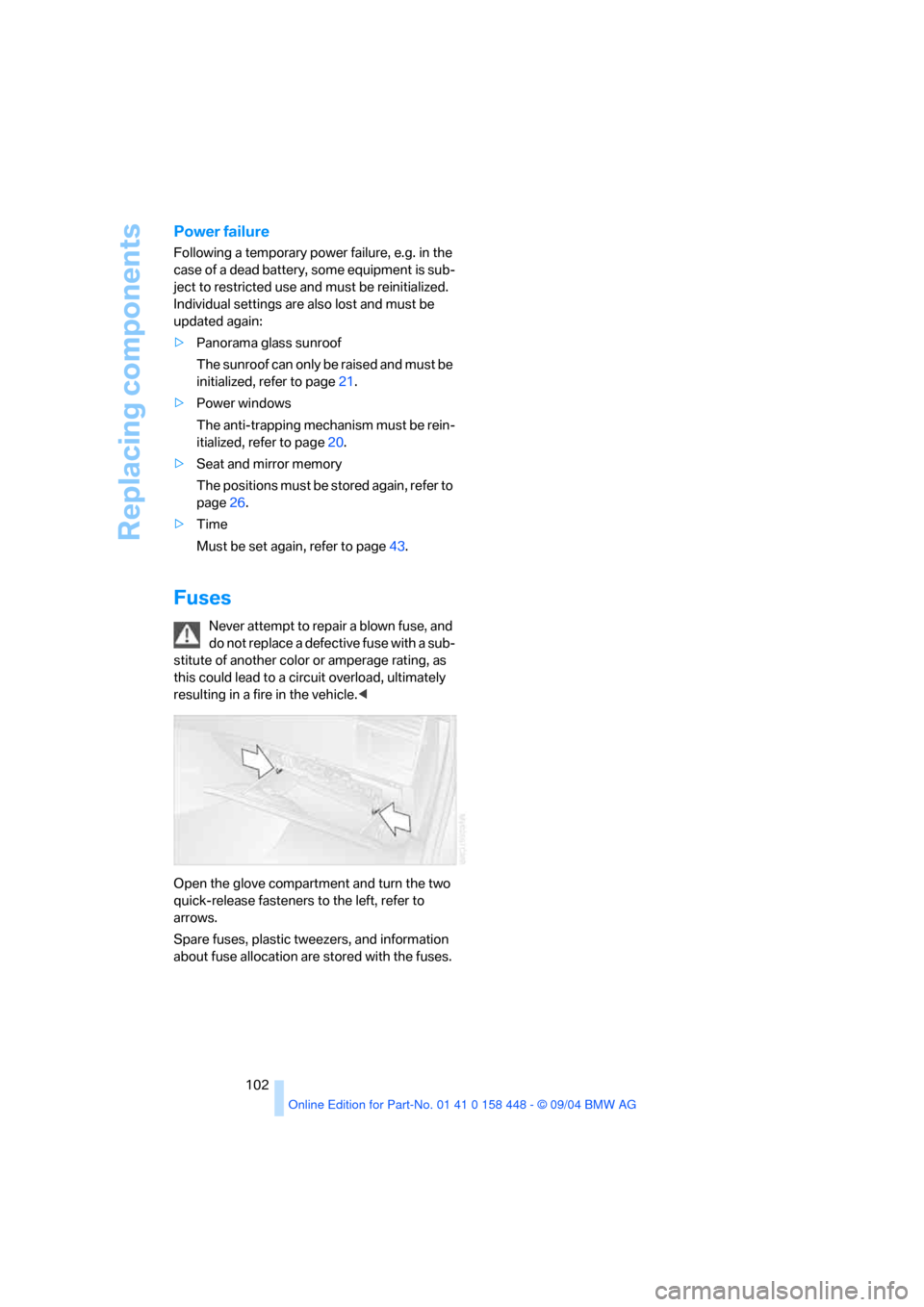
Open the glove compartment and turn the two
quick-release fasteners to the left, refer to
arrows.
Spare fuses, plastic tweezers, and information
about fuse allocation are stored with the fuses.
Page 105 of 126
Giving and receiving assistance
104
First-aid kit*
Beneath the front passenger's seat.
To open: pull the handle and fold the cover
downward.
To close: fold the cover up.
Some of the articles in the first-aid kit may
be used within a limited time only. There-
fore, check the expiration dates of the contents
regularly and replace the contents in a timely
fashion as needed. You can find replacements
in any pharmacy. Always observe all legal regu-
lations requiring a first-aid kit to be carried in the
vehicle.<
Jump starting
When your battery is discharged, you can use
two jumper cables to start your vehicle with
power from the battery in a second vehicle. You
can also use the same method to help start
another vehicle. Use only jumper cables with
fully-insulated clamp handles.
To avoid the risk of potentially fatal injury,
always avoid all contact with electrical
components while the engine is running. Care-
fully observe the following instructions to avoid
personal injury and/or damage to one or both
vehicles.<
Preparing
1.Check whether the battery of the other
vehicle has a voltage of 12 Volts and
approximately the same capacitance in Ah.
This information can be found on the bat-
tery.2.Switch off the engine of the vehicle provid-
ing assistance.
3.Switch off any electrical systems and com-
ponents in both vehicles.
Ensure that no contact exists between
the bodywork on the two vehicles, other-
wise there is a danger of short circuits.<
Connecting jumper cables
To avoid personal injury from sparks,
always follow this sequence when con-
necting jumper cables.<
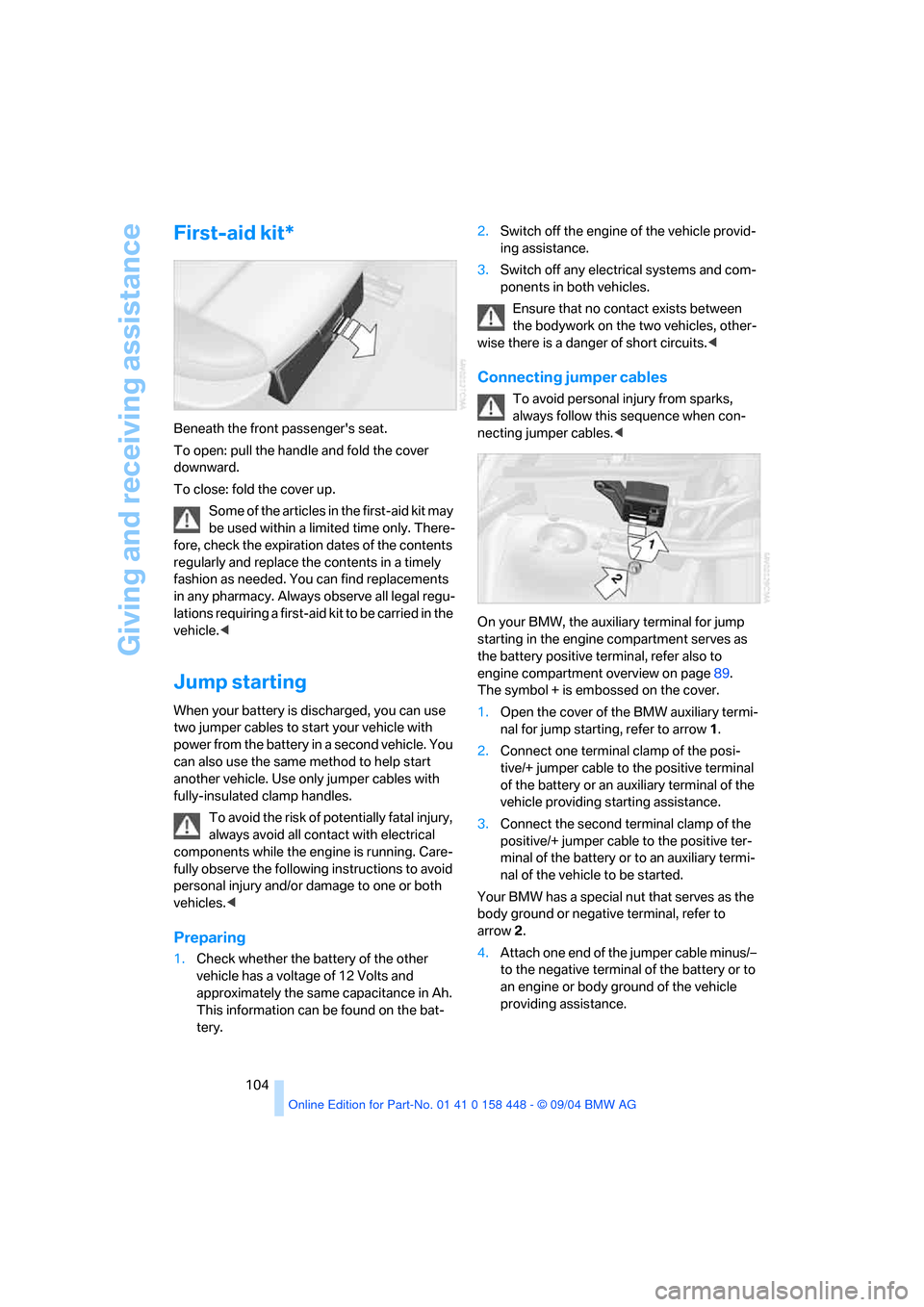
On your BMW, the auxiliary terminal for jump
starting in the engine compartment serves as
the battery positive terminal, refer also to
engine compartment overview on page89.
The symbol + is embossed on the cover.
1.Open the cover of the BMW auxiliary termi-
nal for jump starting, refer to arrow1.
2.Connect one terminal clamp of the posi-
tive/+ jumper cable to the positive terminal
of the battery or an auxiliary terminal of the
vehicle providing starting assistance.
3.Connect the second terminal clamp of the
positive/+ jumper cable to the positive ter-
minal of the battery or to an auxiliary termi-
nal of the vehicle to be started.
Your BMW has a special nut that serves as the
body ground or negative terminal, refer to
arrow2.
4.Attach one end of the jumper cable minus/–
to the negative terminal of the battery or to
an engine or body ground of the vehicle
providing assistance.
Page 106 of 126
Reference
At a glance
Controls
Driving tips
Mobility
105
5.Connect the second terminal clamp of the
negative/– jumper cable to the negative ter-
minal of the battery or to the engine or body
ground of the vehicle to be started.
Starting engine
1.Start the assisting vehicle's engine and let it
run at an increased idling speed for a few
minutes.
2.Start the engine on the other vehicle in the
usual way.
If the first start attempt is not successful,
wait a few minutes before another attempt
in order to allow the discharged battery to
recharge.
3.Let the engines run for a few minutes.
4.Disconnect the jumper cables by reversing
the connection sequence.
If necessary, have the battery checked and
recharged at a BMW Sports Activity Vehicle
Center.
Never use spray fluids to start the
engine.<
Tow-starting and towing
Use tow fitting
The threaded tow fitting is stored in the
onboard tool kit, refer to page95, and must
always remain in the vehicle. It can be screwed
in at the front or rear of the BMW.
To avoid damage to the tow fitting and the
vehicle, observe the following: only use
the tow fitting that comes with the vehicle and
screw it in as far as it will go. Only use the tow
fitting to tow on roads. Avoid lateral loading of
the tow fitting, e.g. do not lift the vehicle by the
tow fitting.<
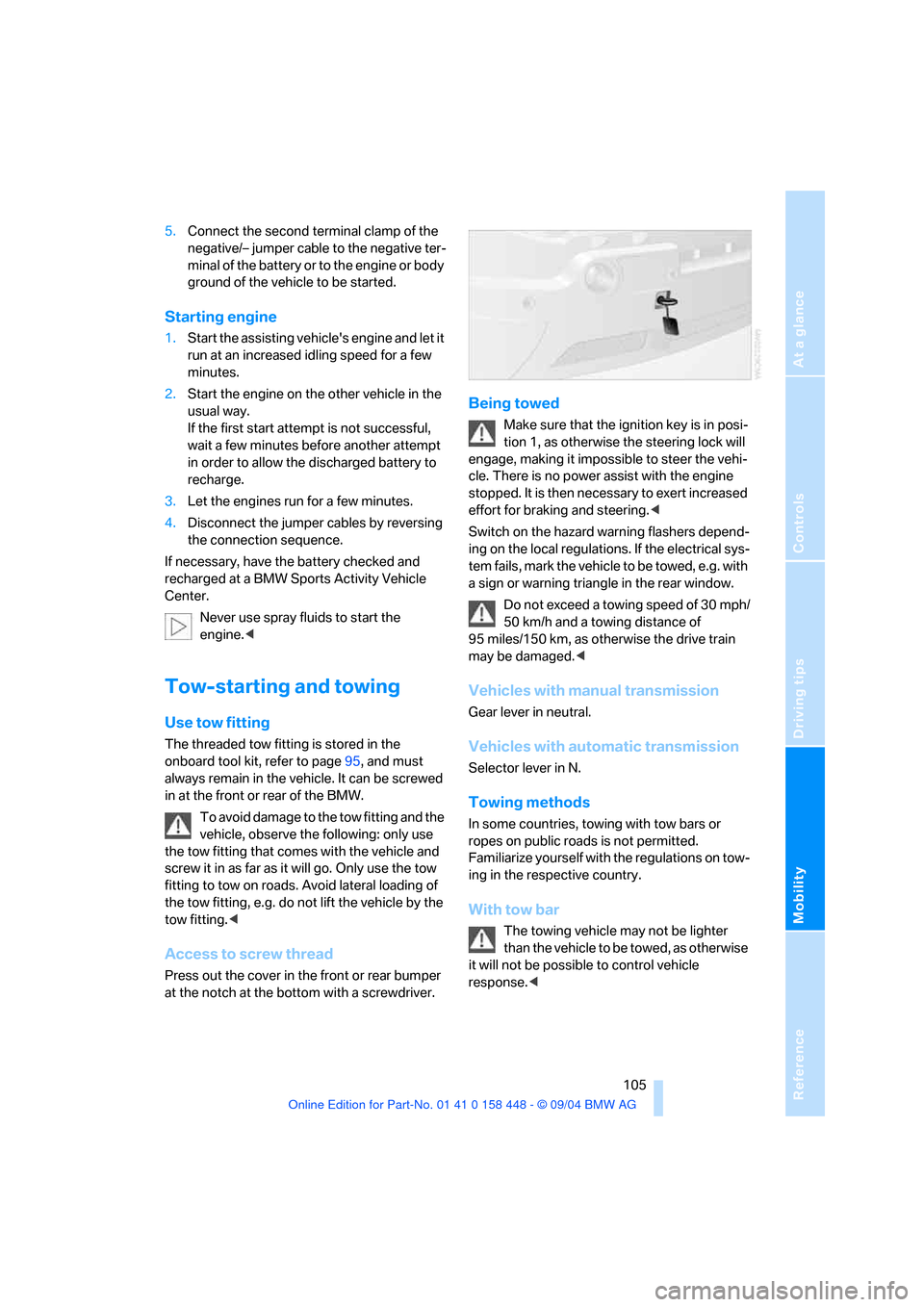
Access to screw thread
Press out the cover in the front or rear bumper
at the notch at the bottom with a screwdriver.
Being towed
Make sure that the ignition key is in posi-
tion 1, as otherwise the steering lock will
engage, making it impossible to steer the vehi-
cle. There is no power assist with the engine
stopped. It is then necessary to exert increased
effort for braking and steering.<
Switch on the hazard warning flashers depend-
ing on the local regulations. If the electrical sys-
tem fails, mark the vehicle to be towed, e.g. with
a sign or warning triangle in the rear window.
Do not exceed a towing speed of 30 mph/
50 km/h and a towing distance of
95 miles/150 km, as otherwise the drive train
may be damaged.<
Vehicles with manual transmission
Gear lever in neutral.
Vehicles with automatic transmission
Selector lever in N.
Towing methods
In some countries, towing with tow bars or
ropes on public roads is not permitted.
Familiarize yourself with the regulations on tow-
ing in the respective country.
With tow bar
The towing vehicle may not be lighter
than the vehicle to be towed, as otherwise
it will not be possible to control vehicle
response.<
Page 114 of 126
Reference
At a glance
Controls
Driving tips
Mobility
113
Everything from A to Z
Index
A
ABS Antilock Brake
System47
– indicator lamp12
Accessories, refer to For your
own safety6
Accident, refer to Receiving
assistance103
Activated-charcoal filter61
Adaptive Head Light53
Adding engine oil91
Adjusting seats24
– electric26
– mechanical25
– mechanical, sports seat25
Air, drying, refer to Air
conditioner57,60
Airbags51
– deactivating front passenger
side31,52
– indicator lamp for front
passenger airbags52
– sitting safely24
– warning lamp52
Air circulation, refer to Recir-
culated-air mode57,60
Air conditioner56,57
Air distribution
– air conditioner57
– automatic climate control60
Airing, refer to
Ventilation57,61
Air outlets, refer to
Ventilation57,61
Air pressure, refer to Tire
inflation pressure82
Air supply
– air conditioner57
– automatic climate control60
Air vents, refer to
Ventilation57,61AKI, refer to Fuel
specifications81
Alarm system22
– avoiding unintentional
alarms23
All-season tires, refer to
Special characteristics of
winter tires86
Anchorage points33
Antifreeze
– coolant91
– washer fluid90
Antilock Brake System
ABS47
– indicator lamp12
Anti-theft alarm system16
– refer to Alarm system22
Anti-trapping mechanism
– panorama glass sunroof21
– power windows20
Approved axle load, refer to
Weights112
Approved engine oils91
Approved gross vehicle
weight, refer to Weights112
Armrest
– front64
– rear64
Artificial leather, refer to the
Caring for your vehicle
brochure
Ashtray65
AUC Automatic recirculated-
air control60
Automatic
– air distribution60
– air supply60
– climate control59,60
– headlamp control53
– recirculated-air control
AUC60Automatic car wash, refer to
the Caring for your vehicle
brochure
Automatic cruise control40
Automatic curb monitor29
Automatic transmission with
Steptronic36
– indicator lamp38
– interlock34
– selector lever interlock37
– shiftlock37
– towing105
– tow-starting106
AUTO program, refer to
Automatic air distribution
and supply60
Average fuel consumption44
– setting units44
Average speed45
– setting units44
Avoiding unintentional
alarms23
Axle loads, refer to
Weights112
B
Backrest, refer to Seats25
Backup lamps36
– refer to Tail lamps98
– replacing bulbs98
Bandages, refer to First-aid
kit104
Bar, towing105
Battery101
– indicator lamp12
– jump starting104
– power failure102
– remote control16
– warning lamp101
Belts, refer to Safety belts27
Beverage holder, refer to Cup
holders63
Page 115 of 126
Everything from A to Z
114 Black ice, refer to Ice
warning44
Blower
– air conditioner57
– automatic climate control60
BMW maintenance system93
Bottle holder, refer to Cup
holders63
Brake fluid92
– level92
– warning lamp92
Brake Force Display50
Brake lamps
– Brake Force Display50
– indicator lamp, defective
lamp12,53
– replacing bulbs98
Brake pads
– breaking-in72
Brake pedal, refer to Safe
braking73
Brake rotors
– brake system72
– breaking-in72
Brakes73,92
– ABS73
– brake fluid92
– breaking in72
– handbrake35
– indicator/warning lamp11
Brake system92
– brake fluid92
– brake pads92
– breaking-in72
– disc brakes74
– warning lamp92
Brake wear warning
– brake pads92
– warning lamp92
Breakdown service, refer to
Receiving assistance103
Breaking-in72
Bulb replacement, refer to
Lamps and bulbs95
Buttons on steering wheel12
C
California law
– Event Data Recorders94
– Proposition 65 Warning6
Calling, refer to telephone
Owner's Manual
Can holder, refer to Cup
holders63
Capacities112
Capacity, cargo area112
Car care, refer to the Caring
for your vehicle brochure
Car-care products, refer to the
Caring for your vehicle
brochure
Care, refer to the Caring for
your vehicle brochure
Cargo, securing75
Cargo area67
– capacity112
– cover67
– emergency operation, refer
to Manual unlocking19
– floor cover69
– folding rear seat backrest67
– lashing eyes69
– lid, refer to Tailgate19
– opening, remote control17
– power socket69
Cargo loading74
– determining load limit74
– securing cargo75
– stowing cargo75
– vehicle74
Caring for artificial leather,
refer to the Caring for your
vehicle brochure
Caring for leather, refer to the
Caring for your vehicle
brochure
Caring for plastic, refer to the
Caring for your vehicle
brochure
Caring for the carpet, refer to
the Caring for your vehicle
brochureCaring for the vehicle finish,
refer to the Caring for your
vehicle brochure
Car keys, refer to Key set16
Car phone, refer to separate
Owner's Manual
Car phone preparation66
Car radio, refer to Owner's
Manual for Radio/Onboard
Computer
Car wash73
– refer to the Caring for your
vehicle brochure
Cassette operation, refer to
Owner's Manual for Radio/
Onboard Computer
Catalytic converter, refer to
Hot exhaust system73
CD operation, refer to Owner's
Manual for Radio/Onboard
Computer
Central locking system16
– interior18
Changes, technical, refer to
For your own safety6
Changing a wheel99
Changing gears
– automatic transmission with
Steptronic37
Changing wheels86
Charge-current indicator
lamp12,101
Charging battery101
Check Gas Cap, warning
lamp12,80
Checking oil level90
Child's seats, refer to Child-
restraint systems31
Child-restraint fixing system
LATCH33
Child-restraint systems31
Child-safety locks33
Chock99
Chrome parts, care, refer to
the Caring for your vehicle
brochure
Cigarette lighter65
Page 116 of 126
Reference
At a glance
Controls
Driving tips
Mobility
115
Circulation of air, refer to
Recirculated-air
mode57,60
Cleaning, vehicle, refer to the
Caring for your vehicle
brochure
Cleaning rear window39
Cleaning windows,
reservoir90
Cleaning windshield39
Clock43,44
– 12/24 hour mode44
– setting, also refer to Owner's
Manual for Radio/Onboard
Computer
– setting time43
Closing
– from inside18
– from outside16
Clothes hooks65
Clutch72
– breaking-in72
Cockpit10
Cold start, refer to Starting the
engine34
Combination of wheel/tire86
Compact wheel, wheel
changes99
Compartments, refer to
Storage compartments64
Computer44
– also refer to Owner's Manual
for Onboard Computer
– functions44
Condensation, refer to
– Air conditioner57,60
– Parking vehicle73
Connecting a car vacuum
cleaner, refer to Power
socket65
Consumption, refer to
Average fuel
consumption44
Consumption indicator, refer
to Fuel gage42
Controls, refer to Cockpit10Convenience operation
– from outside18
– panorama glass sunroof18
– windows18
Coolant91
– level91
– temperature gage42
– warning lamp91
Cooling, refer to
Temperature57,60
Cooling system filling
capacity, refer to Filling
capacities112
Copyright2
Cruise control40
– buttons on steering
wheel12
– indicator lamp40
Cruising range45
Cup holders63
Curb weight, refer to
Weights112
Cylinders, refer to Engine
data110
D
Dashboard lighting, refer to
Instrument lighting54
Dashboard system, refer to
Cockpit10
Data, technical110
– dimensions111
– engine110
– filling capacities112
– weights112
Daytime driving lamps53
DBC Dynamic Brake
Control47
– warning lamp49
Deactivating front passenger
airbags31,52
Decommissioning the vehicle,
refer to the Caring for your
vehicle brochure
Defective lamp53
Defects7Defrosting windows58,60
– air conditioner58
– automatic climate control60
Defrosting windows and
removing condensation
– air conditioner58
– automatic climate control60
Defrosting windshield, refer to
Defrosting windows58,60
Defrost position, refer to
Defrosting windows58,60
Digital clock43
Dimensions111
Dipstick, engine oil90
Directional indicators, refer to
Turn signals38
Disc brakes73
Displacement, refer to Engine
data110
Display illumination, refer to
Instrument lighting54
Display lighting, refer to
Instrument lighting54
Displays, refer to Instrument
cluster11
Disposal
– engine oil91
– vehicle battery101
Distance warning, refer to
PDC Park Distance
Control46
Door keys16
Door lock18
Doors, manual operation18
DOT Quality Grades84
Draft-free ventilation58,61
Driving lamps, refer to Parking
lamps/low beams53
Driving notes72
Driving on poor roads76
Driving stability control
systems47
Driving through water76
Drying the air, refer to Air
conditioner57,60
DSC Dynamic Stability
Control47
– indicator lamp47
Page 120 of 126
Reference
At a glance
Controls
Driving tips
Mobility
119
Nozzles, refer to
Ventilation57,61
Nylon rope, refer to Tow-
starting and towing105
O
OBD connector93
Octane rating, refer to Fuel
quality81
Odometer42
Oil
– approved engine oils91
– capacity112
– dipstick90
Oil change interval
– refer to Service and
Warranty Information
Booklet for US models,
Warranty and Service Guide
Booklet for Canadian
models
– refer to Service Interval
Display43
Oil consumption90
Oil grades91
Oil level90
– warning lamp90
Oil pressure90
– warning lamp90
Oil sensor90
– warning lamp90
OIL SERVICE43
Old batteries, refer to
Disposal101
Onboard computer, refer to
separate Owner's Manual
Onboard Diagnostics OBD
interface socket93
Onboard tool kit95
Opening and closing
– from inside18
– from outside16
– using the door lock18
– using the remote control16
Output, refer to Engine
data110Outside air
– air conditioner57
– automatic climate control60
Outside temperature display
– changing unit of measure44
– in computer44P
Panorama glass sunroof21
– automatic opening and
closing21
– closing with electrical
malfunction22
– comfort operation18
– comfort position21
– initializing21
– power failure21
– remote control17
Parcel shelf, refer to Cargo
area cover67
Park Distance Control PDC46
Parking aid, refer to PDC Park
Distance Control46
Parking brake, refer to
Handbrake35
Parking lamps53
– replacing bulbs97
Parking lamps/low beams53
Parking vehicle35
Partition net68
Parts and accessories, refer to
For your own safety6
Passenger-side mirror tilt
function29
Pathway lighting53
PDC Park Distance Control46
Plastic, refer to the Caring for
your vehicle brochure
Pollen, refer to
– Microfilter58
– Microfilter/activated
charcoal filter61
Portable phone, refer also to
separate Owner's Manual
Power failure
– battery102
– panorama glass sunroof21
– windows20Power seat adjustment26
Power socket65,69
Power windows20
– initializing20
– safety switch20
Pressure, tires82
Pressure monitoring, tires49
– Flat Tire Monitor49
Programming settings, refer
to Vehicle Memory, Key
Memory30
Protective function, panorama
glass sunroof21
Puncture, Flat Tire Monitor49
R
Radiator, refer to Coolant91
Radio, refer to Owner's
Manual for Radio/Onboard
Computer
Radio-control key, refer to
Master key with remote
control16
Radio navigation, refer to
separate Owner's Manual
Rain sensor39
Range, setting units44
Reading lamps
– front55
– rear55
Rear backrests, folding67
Rear seat back, folding67
Rearview mirrors, exterior28
Rear window defroster
– air conditioner57
– automatic climate control61
Rear window safety switch20
Rear window wiper39
– wiper blade replacement95
Recirculated-air mode
– air conditioner57
– automatic climate control60
Reflector, refer to Tail
lamps98
Refueling80
– fuel filler door80
Remaining distance, refer to
Cruising range45
Page 123 of 126
Everything from A to Z
122 Turn signals38
– indicator lamp12
– replacing bulbs97
Turn signals, side, replacing
bulbs97
U
Undercarriage protection,
refer to the Caring for your
vehicle brochure
Units44
– outside temperature44
Universal garage-door
opener, refer to Integrated
universal remote control62
Universal portable phone
preparation, refer to
separate Owner's Manual
Universal remote control62
Unlocking
– from inside18
– from outside16
– hood88
Upholstery care, refer to the
Caring for your vehicle
brochure
V
Valve
– insert101
– screw cap101
Vehicle
– battery101
– breaking-in72
– care, refer to the Caring for
your vehicle brochure
– cargo loading74
– decommissioning, refer to
the Caring for your vehicle
brochure
– dimensions111
– parking35
– washing, refer to the Caring
for your vehicle brochure
– weights112
Vehicle battery101Vehicle jack99
– jacking points100
Vehicle jacking points100
Vehicle Memory30
Ventilation57,61
– draft-free58,61
Viscosity91
Voice control, refer to
separate Owner's Manual
W
Warning and indicator
lamps11
Warning triangle103
Warranty, refer to Service and
Warranty Information
Booklet for US models,
Warranty and Service Guide
Booklet for Canadian
models93
Warranty and service7
Washer fluid90
Washer fluid reservoir
– capacity, refer to Filling
capacities112
– refer to Windshield/
headlamp washer
system90
Weights112
Wheel/tire combination86
Wheelbase, refer to
Dimensions111
Wheel bolt, wrench99
Wheel changes, compact
wheel99
Wheels and tires86
Width, refer to
Dimensions111
Windows20
– convenience operation18
– safety switch20
Windshield washer
reservoir90
– capacity, refer to Filling
capacities112
Windshield washer system
– washer/wiper system38
– washer fluid90Windshield wiper blade
replacement95
Windshield wipers, refer to
Washer/wiper system38
Winter tires86
– changing99
– condition85
– storage86
Wiper blade replacement95
Wiper system38,90
Wood decor, refer to Fine
wood parts
Working in the engine
compartment88
Wrenches, refer to Onboard
tool kit95
X
xDrive48
Xenon lamps97
– replacing bulbs97