lock BMW X3 2.5I 2005 E83 User Guide
[x] Cancel search | Manufacturer: BMW, Model Year: 2005, Model line: X3 2.5I, Model: BMW X3 2.5I 2005 E83Pages: 126, PDF Size: 4.65 MB
Page 28 of 126
Reference
At a glance
Controls
Driving tips
Mobility
27
3.Press the MEMORY button:
The indicator lamp in the button lights up.
4.Press the desired memory button 1, 2 or3:
The indicator lamp goes out.
Requesting a stored setting
Do not request a position from the mem-
ory while the vehicle is moving, as other-
wise there is a risk of accident from unexpected
seat movement.<
Convenience mode
1.Open the driver's door after unlocking or
turn the ignition key to position 1.
2.Briefly press the desired memory button 1,
2 or3.
The system immediately cancels the
adjustment procedure when you press one
of the seat adjustment buttons or use one of
the memory buttons.
Safety feature
1.Close the driver's door and turn the ignition
key to position 0 or 2.
2.Press the desired memory button 1, 2 or3
and maintain pressure until the adjustment
process has been completed.
If you press the
MEMORY button acci-
dentally:
Press the button a second time – the indicator
lamp goes out.<
You can have your vehicle programmed
to automatically recall your own individual
adjustment settings for the seat and exterior
mirror position whenever you use your personal
remote control to unlock the vehicle.<
If you make use of this adjustment, be
sure that the footwell behind the driver's
seat is unobstructed before unlocking the vehi-
cle. If you fail to do so, any persons, animals or
objects behind the seat could be injured or
damaged by a rearward movement of the
seat.<
Heated seats*
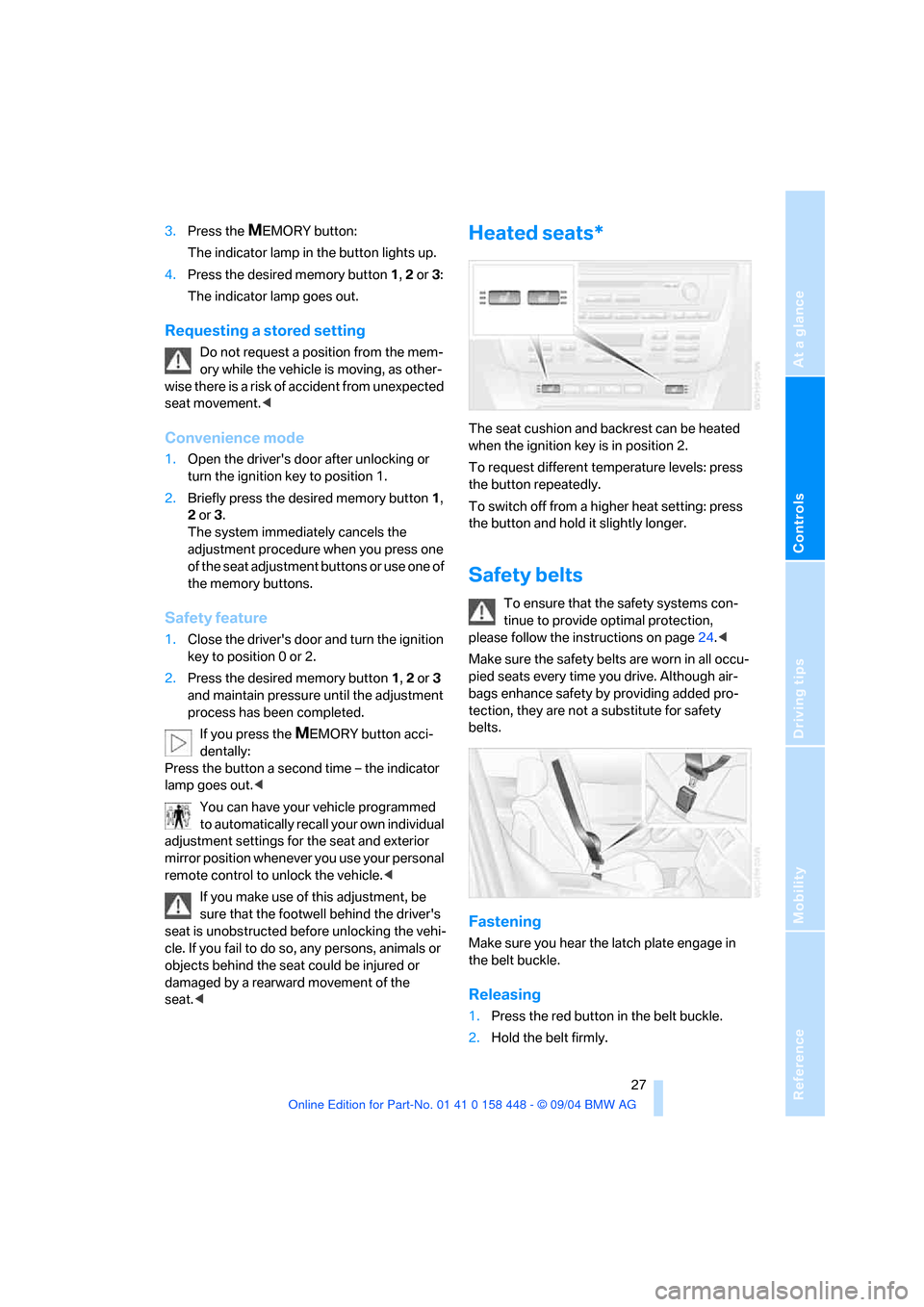
The seat cushion and backrest can be heated
when the ignition key is in position 2.
To request different temperature levels: press
the button repeatedly.
To switch off from a higher heat setting: press
the button and hold it slightly longer.
Safety belts
To ensure that the safety systems con-
tinue to provide optimal protection,
please follow the instructions on page24.<
Make sure the safety belts are worn in all occu-
pied seats every time you drive. Although air-
bags enhance safety by providing added pro-
tection, they are not a substitute for safety
belts.
Fastening
Make sure you hear the latch plate engage in
the belt buckle.
Releasing
1.Press the red button in the belt buckle.
2.Hold the belt firmly.
Page 31 of 126
Adjustments
30
Vehicle Memory, Key Memory
How the system functions
You have probably frequently wished that you
could configure individual functions of your
vehicle to reflect your own personal require-
ments. In developing your vehicle, BMW has
incorporated a number of options for personal
adjustment. You can have these programmed
at your BMW Sports Activity Vehicle Center.
There are vehicle-related and person-related
adjustments: Vehicle Memory and Key Mem-
ory. You can configure up to four different basic
adjustments for four different persons. The only
requirement is that each person uses his or her
own master key with remote control.
When your vehicle is unlocked with the remote
control, the vehicle recognizes the individual
user by means of a data exchange with the key,
and makes adjustments accordingly.
In order for you to distinguish between the mas-
ter keys with remote control, color-coded
decals are supplied together with the keys.
What the system can do
Your BMW Sports Activity Vehicle Center can
provide you with details on the capabilities of
the Vehicle Memory and Key Memory systems.
You will see this symbol throughout the
Owner's Manual. It is to remind you at
appropriate places of the settings that are avail-
able to you.<
Following configuration of memory func-
tions, vehicle operation may differ from
the description in the Owner's Manual. Should
you want to sell your BMW some day, please
remember to have the memory functions reset
to the factory default settings.<
Examples of Vehicle Memory functions
>Different acknowledgment signals to con-
firm locking/unlocking of the vehicle, refer
to page16.
>Activating/deactivating function for path-
way lighting, refer to page53.
>Activating/deactivating daytime driving
lamps, refer to page53.
>Setting measurement units for displays in
the instrument cluster for time, outside
temperature, distance driven and fuel con-
sumption, refer to page44.
>Active PDC Park Distance Control is indi-
cated by an acoustic sound signal when
reverse gear or selector lever position R is
engaged, refer to page46.
>The rear window defroster switches on
automatically, refer to page57.
>Different acknowledgment signals to con-
firm arming/disarming the alarm system,
refer to page22.
>After an ice warning has been issued, the
computer display returns to the previous
adjustment, refer to page44.
>Acoustic warning if the ignition key remains
in the ignition lock after the driver's door has
been opened, refer to page19.
Examples of Key Memory functions
>When unlocking, first unlock the driver's
door, then the entire vehicle, refer to
page17.
>Locking the vehicle after moving off, refer to
page18.
>Automatic adjustment of the driver's seat
and exterior mirror position for each person
when unlocking the vehicle, refer to
page27.
>Angle of downward tilt of mirror on passen-
ger side, refer to page29.
Page 33 of 126
Transporting children safely
32 of injury to children. Always read and follow the
instructions that come with the system.
Child seat security
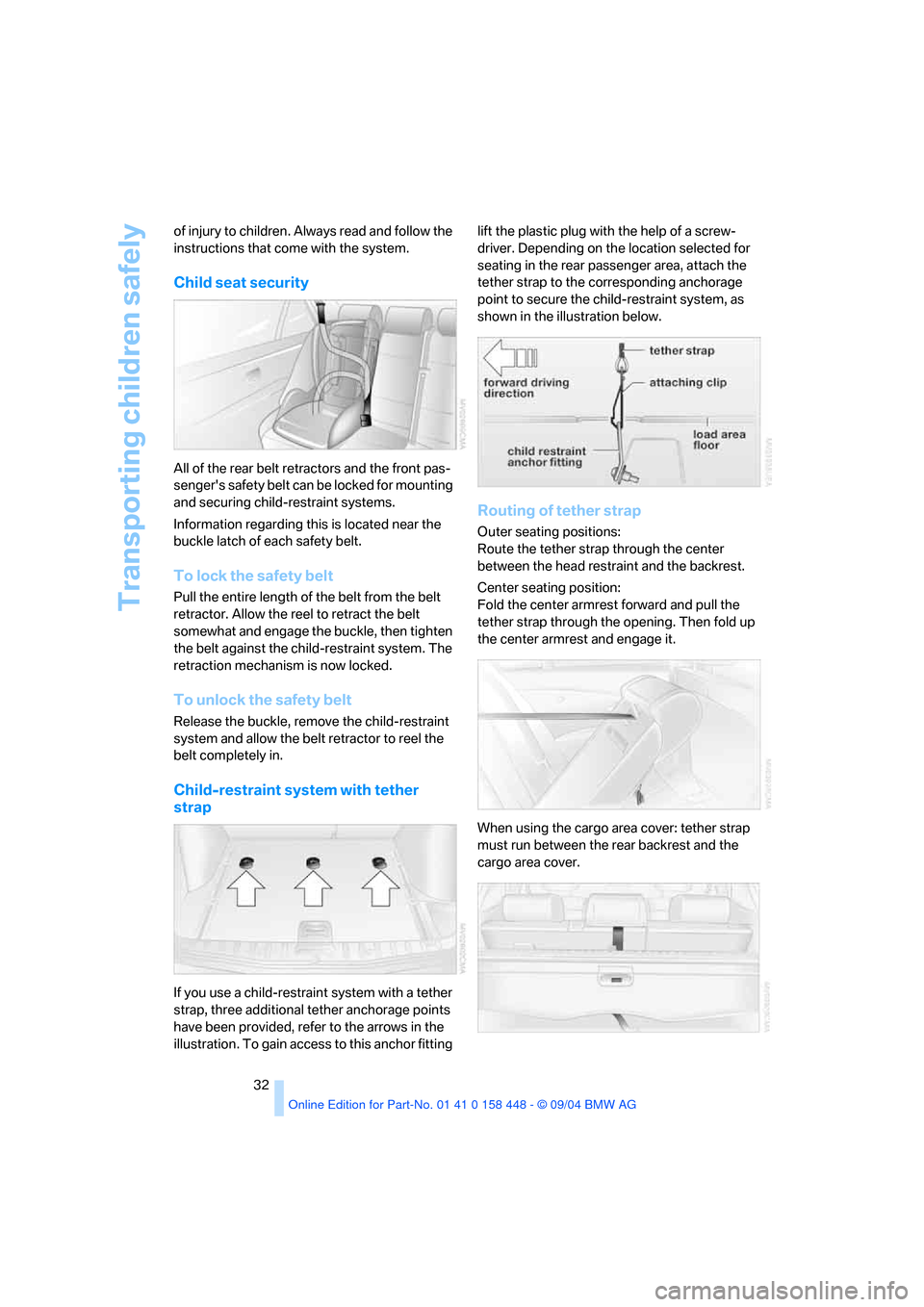
All of the rear belt retractors and the front pas-
senger's safety belt can be locked for mounting
and securing child-restraint systems.
Information regarding this is located near the
buckle latch of each safety belt.
To lock the safety belt
Pull the entire length of the belt from the belt
retractor. Allow the reel to retract the belt
somewhat and engage the buckle, then tighten
the belt against the child-restraint system. The
retraction mechanism is now locked.
To unlock the safety belt
Release the buckle, remove the child-restraint
system and allow the belt retractor to reel the
belt completely in.
Child-restraint system with tether
strap
If you use a child-restraint system with a tether
strap, three additional tether anchorage points
have been provided, refer to the arrows in the
illustration. To gain access to this anchor fitting lift the plastic plug with the help of a screw-
driver. Depending on the location selected for
seating in the rear passenger area, attach the
tether strap to the corresponding anchorage
point to secure the child-restraint system, as
shown in the illustration below.
Routing of tether strap
Outer seating positions:
Route the tether strap through the center
between the head restraint and the backrest.
Center seating position:
Fold the center armrest forward and pull the
tether strap through the opening. Then fold up
the center armrest and engage it.
When using the cargo area cover: tether strap
must run between the rear backrest and the
cargo area cover.
Page 34 of 126
Reference
At a glance
Controls
Driving tips
Mobility
33
Adjust the tether strap according to the
child-restraint manufacturer's instruc-
tions.<
LATCH child-restraint fixing system*
LATCH: Lower Anchor and Tethers for CHil-
dren.
The rear outer seating positions are provided
with anchors for a LATCH child-restraint fixing
system.
To fit the LATCH child-restraint fixing
system, follow the operating and safety
instructions of the system manufacturer.<
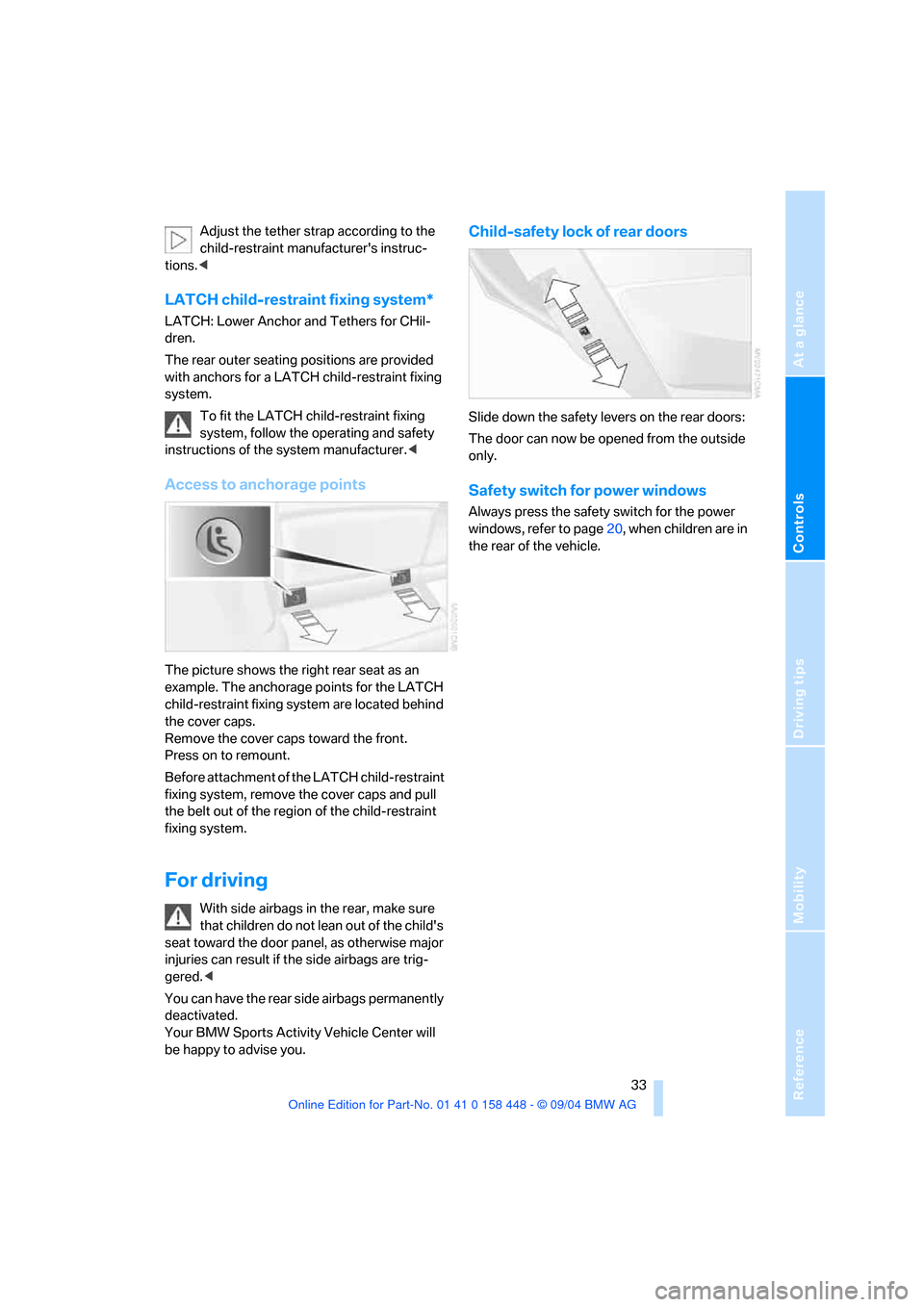
Access to anchorage points
The picture shows the right rear seat as an
example. The anchorage points for the LATCH
child-restraint fixing system are located behind
the cover caps.
Remove the cover caps toward the front.
Press on to remount.
Before attachment of the LATCH child-restraint
fixing system, remove the cover caps and pull
the belt out of the region of the child-restraint
fixing system.
For driving
With side airbags in the rear, make sure
that children do not lean out of the child's
seat toward the door panel, as otherwise major
injuries can result if the side airbags are trig-
gered.<
You can have the rear side airbags permanently
deactivated.
Your BMW Sports Activity Vehicle Center will
be happy to advise you.
Child-safety lock of rear doors
Slide down the safety levers on the rear doors:
The door can now be opened from the outside
only.
Safety switch for power windows
Always press the safety switch for the power
windows, refer to page20, when children are in
the rear of the vehicle.
Page 35 of 126
Driving
34
Driving
Ignition lock
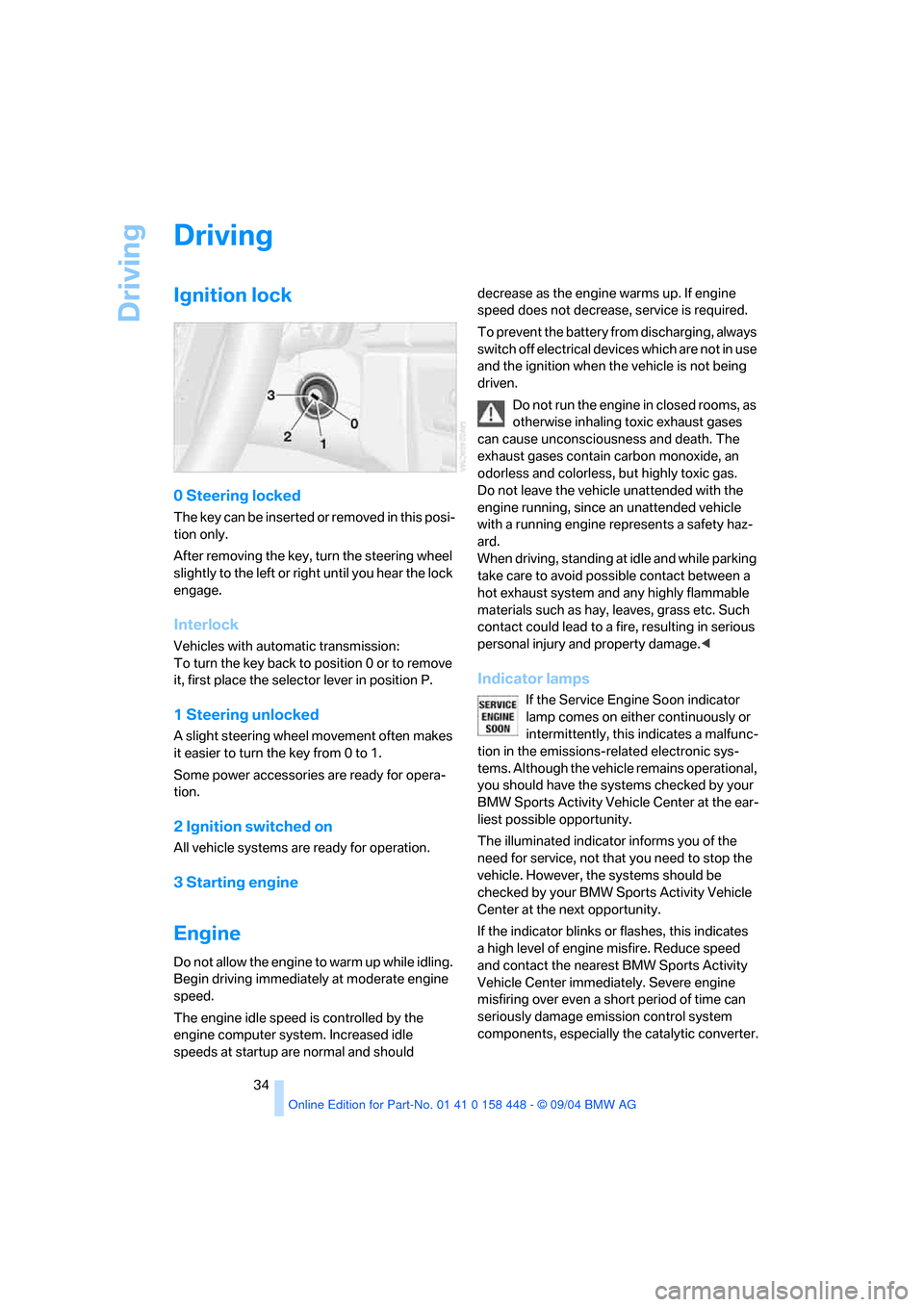
0 Steering locked
T h e k e y c a n b e in s e r t e d o r r e m o v e d in t h i s p o s i-
tion only.
After removing the key, turn the steering wheel
slightly to the left or right until you hear the lock
engage.
Interlock
Vehicles with automatic transmission:
To turn the key back to position 0 or to remove
it, first place the selector lever in position P.
1 Steering unlocked
A slight steering wheel movement often makes
it easier to turn the key from 0 to 1.
Some power accessories are ready for opera-
tion.
2 Ignition switched on
All vehicle systems are ready for operation.
3 Starting engine
Engine
Do not allow the engine to warm up while idling.
Begin driving immediately at moderate engine
speed.
The engine idle speed is controlled by the
engine computer system. Increased idle
speeds at startup are normal and should decrease as the engine warms up. If engine
speed does not decrease, service is required.
To prevent the battery from discharging, always
switch off electrical devices which are not in use
and the ignition when the vehicle is not being
driven.
Do not run the engine in closed rooms, as
otherwise inhaling toxic exhaust gases
can cause unconsciousness and death. The
exhaust gases contain carbon monoxide, an
odorless and colorless, but highly toxic gas.
Do not leave the vehicle unattended with the
engine running, since an unattended vehicle
with a running engine represents a safety haz-
ard.
When driving, standing at idle and while parking
take care to avoid possible contact between a
hot exhaust system and any highly flammable
materials such as hay, leaves, grass etc. Such
contact could lead to a fire, resulting in serious
personal injury and property damage.<
Indicator lamps
If the Service Engine Soon indicator
lamp comes on either continuously or
intermittently, this indicates a malfunc-
tion in the emissions-related electronic sys-
tems. Although the vehicle remains operational,
you should have the systems checked by your
BMW Sports Activity Vehicle Center at the ear-
liest possible opportunity.
The illuminated indicator informs you of the
need for service, not that you need to stop the
vehicle. However, the systems should be
checked by your BMW Sports Activity Vehicle
Center at the next opportunity.
If the indicator blinks or flashes, this indicates
a high level of engine misfire. Reduce speed
and contact the nearest BMW Sports Activity
Vehicle Center immediately. Severe engine
misfiring over even a short period of time can
seriously damage emission control system
components, especially the catalytic converter.
Page 36 of 126
Reference
At a glance
Controls
Driving tips
Mobility
35
Display of the previously described
malfunction on Canadian models.
The warning lamp lights up. Malfunc-
tion in the engine electronics. You can
continue to drive with reduced engine
output or speed. Have the system checked
immediately.
Starting engine
When starting the engine, do not press the
accelerator pedal.
Vehicles with manual transmission:
Step on the clutch when starting the vehicle.
A locking mechanism prevents the engine from
starting if the clutch is not depressed.
Do not end the starting procedure too early, but
do not prolong it for more than 20 seconds.
Release the ignition key immediately as soon as
the engine starts.
If the engine fails to start on the first attempt, for
instance, if it is very hot or cold:
Press the accelerator pedal halfway down while
engaging the starter.
During a cold start at very low temperatures,
below approx. +57/–156, at high altitudes
over 3,300 ft/1,000 m:
>Engage the starter for approx. 10 seconds
the first time.
>Press the accelerator pedal halfway down
while engaging the starter.
Avoid frequent starting in quick succes-
sion or repeated start attempts in which
the engine does not start. Otherwise, the fuel is
not burned or inadequately burned and there is
a danger of overheating and damaging the cat-
alytic converter.<
Manual transmission
1.Apply the handbrake.
2.Shift into neutral.
3.Press the clutch pedal.
If the clutch pedal is not pressed, the engine
cannot be started.
4.Start the engine.Before leaving the vehicle with the engine
running, place the gearshift lever in neu-
tral position and engage the handbrake.
Never leave an unattended vehicle with the
engine running, as such a vehicle represents a
potential safety hazard.<
Automatic transmission
1.Press the brake pedal.
2.Engage selector-lever position P or N.
3.Start the engine.
To prevent the vehicle from rolling,
always select position P and engage the
handbrake before leaving the vehicle with the
engine running. Never leave an unattended
vehicle with the engine running, as such a vehi-
cle represents a potential safety hazard.<
Switching off engine
Do not remove the ignition key when the
vehicle is moving, as otherwise the steer-
ing could lock.
When leaving the vehicle, always remove the
ignition key and lock the steering.
When parking on downward inclines, engage
the handbrake.<
Manual transmission
Turn the ignition key to position 1 or 0.
Automatic transmission
Engage selector-lever position P, turn ignition
key to position 1 or 0.
Handbrake
The handbrake is primarily intended to prevent
the vehicle from rolling while parked; it brakes
the rear wheels.
Indicator lamp
The indicator lamp lights up red. An
acoustic signal also sounds when you
begin to drive. The handbrake is
engaged.
Page 38 of 126
Reference
At a glance
Controls
Driving tips
Mobility
37
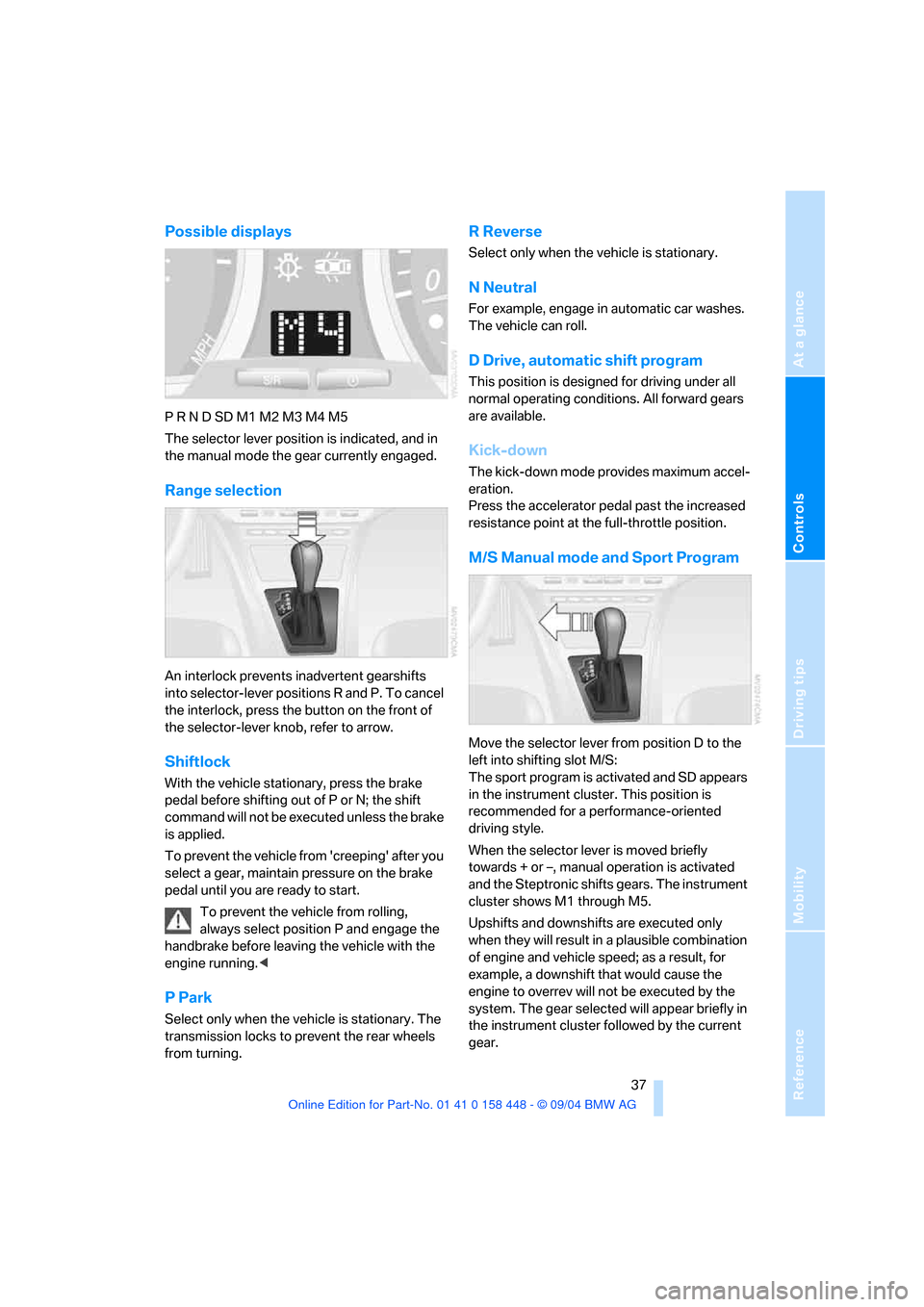
Possible displays
P R N D SD M1 M2 M3 M4 M5
The selector lever position is indicated, and in
the manual mode the gear currently engaged.
Range selection
An interlock prevents inadvertent gearshifts
into selector-lever positions R and P. To cancel
the interlock, press the button on the front of
the selector-lever knob, refer to arrow.
Shiftlock
With the vehicle stationary, press the brake
pedal before shifting out of P or N; the shift
command will not be executed unless the brake
is applied.
To prevent the vehicle from 'creeping' after you
select a gear, maintain pressure on the brake
pedal until you are ready to start.
To prevent the vehicle from rolling,
always select position P and engage the
handbrake before leaving the vehicle with the
engine running.<
P Park
Select only when the vehicle is stationary. The
transmission locks to prevent the rear wheels
from turning.
R Reverse
Select only when the vehicle is stationary.
N Neutral
For example, engage in automatic car washes.
The vehicle can roll.
D Drive, automatic shift program
This position is designed for driving under all
normal operating conditions. All forward gears
are available.
Kick-down
The kick-down mode provides maximum accel-
eration.
Press the accelerator pedal past the increased
resistance point at the full-throttle position.
M/S Manual mode and Sport Program
Move the selector lever from position D to the
left into shifting slot M/S:
The sport program is activated and SD appears
in the instrument cluster. This position is
recommended for a performance-oriented
driving style.
When the selector lever is moved briefly
towards + or –, manual operation is activated
and the Steptronic shifts gears. The instrument
cluster shows M1 through M5.
Upshifts and downshifts are executed only
when they will result in a plausible combination
of engine and vehicle speed; as a result, for
example, a downshift that would cause the
engine to overrev will not be executed by the
system. The gear selected will appear briefly in
the instrument cluster followed by the current
gear.
Page 44 of 126
Reference
At a glance
Controls
Driving tips
Mobility
43
Between blue and red fields
Normal operating range. It is permissible for the
dial to drift up to the red field.
Red
Comes on while driving:
The engine is overheated. Switch off the engine
immediately and allow it to cool down.
Checking coolant level, refer to page91.
When you switch on the ignition, the warning
lamp1 comes on briefly to confirm that the sys-
tem is operational.
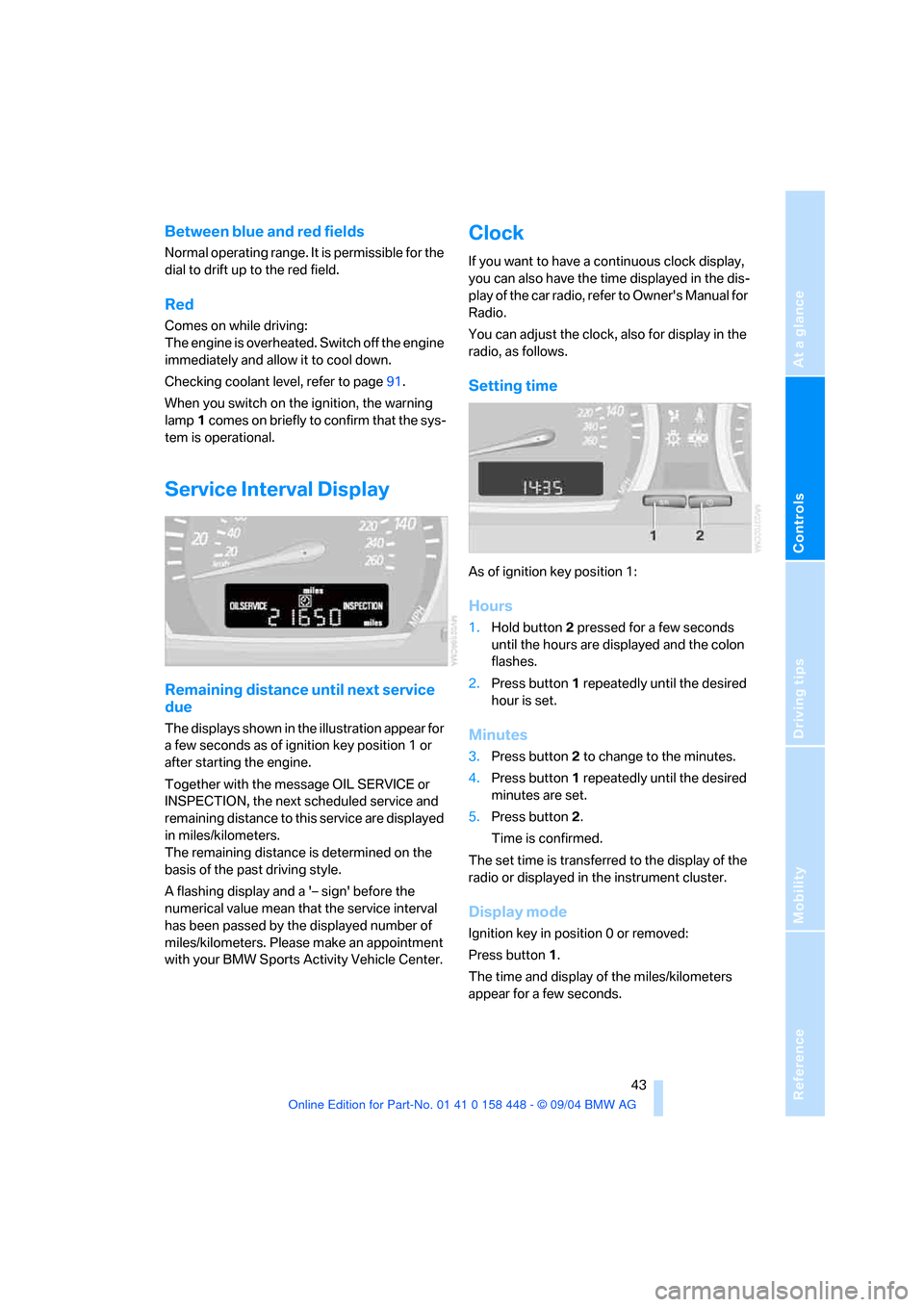
Service Interval Display
Remaining distance until next service
due
The displays shown in the illustration appear for
a few seconds as of ignition key position 1 or
after starting the engine.
Together with the message OIL SERVICE or
INSPECTION, the next scheduled service and
remaining distance to this service are displayed
in miles/kilometers.
The remaining distance is determined on the
basis of the past driving style.
A flashing display and a '– sign' before the
numerical value mean that the service interval
has been passed by the displayed number of
miles/kilometers. Please make an appointment
with your BMW Sports Activity Vehicle Center.
Clock
If you want to have a continuous clock display,
you can also have the time displayed in the dis-
play of the car radio, refer to Owner's Manual for
Radio.
You can adjust the clock, also for display in the
radio, as follows.
Setting time
As of ignition key position 1:
Hours
1.Hold button2 pressed for a few seconds
until the hours are displayed and the colon
flashes.
2.Press button1 repeatedly until the desired
hour is set.
Minutes
3.Press button2 to change to the minutes.
4.Press button1 repeatedly until the desired
minutes are set.
5.Press button2.
Time is confirmed.
The set time is transferred to the display of the
radio or displayed in the instrument cluster.
Display mode
Ignition key in position 0 or removed:
Press button1.
The time and display of the miles/kilometers
appear for a few seconds.
Page 45 of 126
Everything under control
44
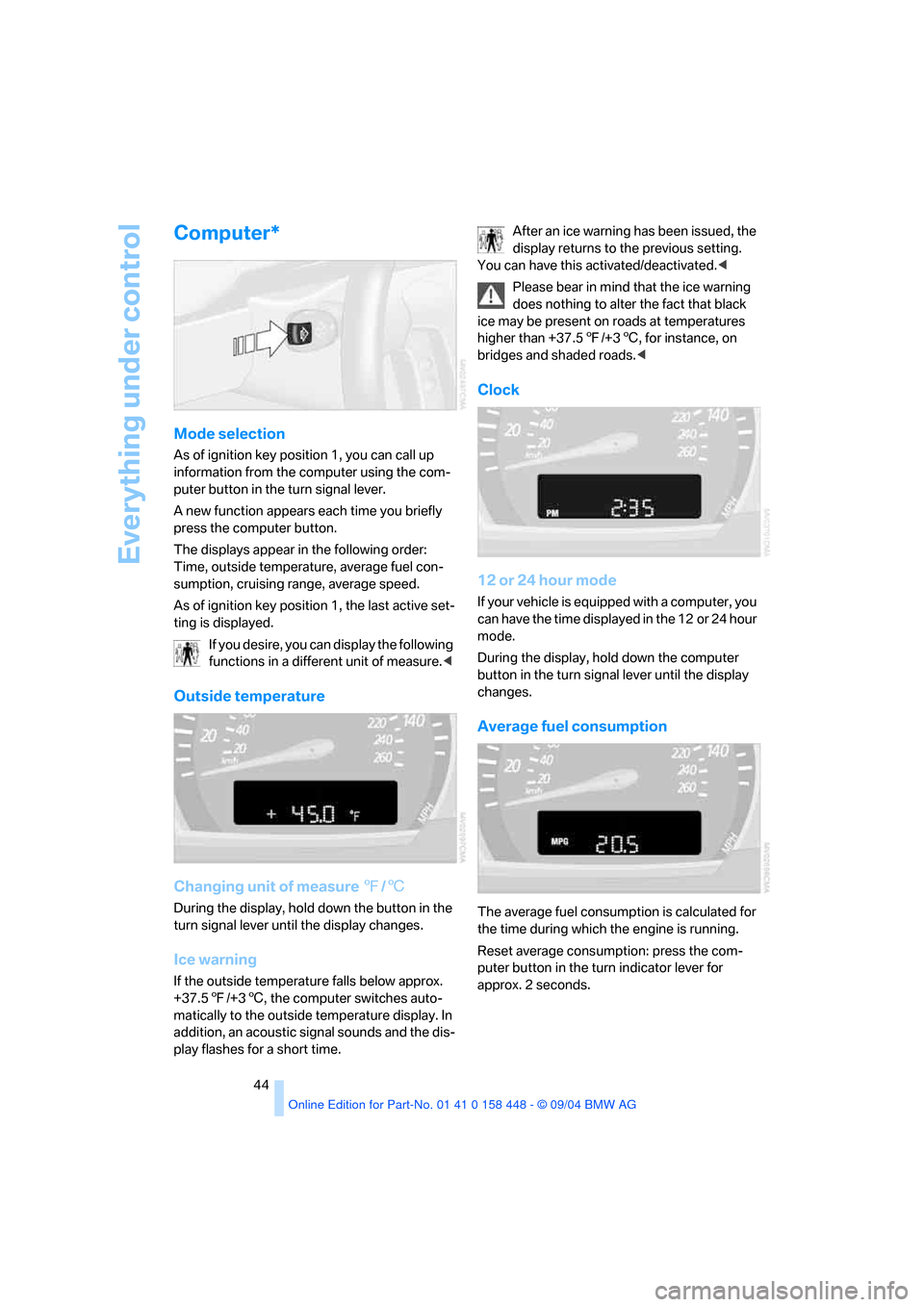
Computer*
Mode selection
As of ignition key position 1, you can call up
information from the computer using the com-
puter button in the turn signal lever.
A new function appears each time you briefly
press the computer button.
The displays appear in the following order:
Time, outside temperature, average fuel con-
sumption, cruising range, average speed.
As of ignition key position 1, the last active set-
ting is displayed.
If you desire, you can display the following
functions in a different unit of measure.<
Outside temperature
Changing unit of measure 7/6
During the display, hold down the button in the
turn signal lever until the display changes.
Ice warning
If the outside temperature falls below approx.
+37.57/+36, the computer switches auto-
matically to the outside temperature display. In
addition, an acoustic signal sounds and the dis-
play flashes for a short time.After an ice warning has been issued, the
display returns to the previous setting.
You can have this activated/deactivated.<
Please bear in mind that the ice warning
does nothing to alter the fact that black
ice may be present on roads at temperatures
higher than +37.57/+36, for instance, on
bridges and shaded roads.<
Clock
12 or 24 hour mode
If your vehicle is equipped with a computer, you
can have the time displayed in the 12 or 24 hour
mode.
During the display, hold down the computer
button in the turn signal lever until the display
changes.
Average fuel consumption
The average fuel consumption is calculated for
the time during which the engine is running.
Reset average consumption: press the com-
puter button in the turn indicator lever for
approx. 2 seconds.
Page 48 of 126
Reference
At a glance
Controls
Driving tips
Mobility
47
Malfunction
The indicator lamp in the button flashes and a
short continuous tone sounds. PDC is malfunc-
tioning. Switch off PDC. Have the system
checked.
To prevent this problem, keep the sensors
clean and free of ice or snow in order to ensure
that they will continue to operate effectively.
System limits
Even with PDC, final responsibility for
estimating the distance between the
vehicle and any obstructions always remains
with the driver. Even when sensors are involved,
there is a blind spot in which objects cannot be
detected. The system is also subject to the
physical limits that apply to all forms of ultra-
sonic measurement, such as those encoun-
tered with tow bars and trailer couplings, or thin
and wedge-shaped objects etc. Low objects
already displayed, e.g. a curb, can also disap-
pear from the detection area of the sensors
again before a continuous tone sounds.
Loud sources of sound, inside and outside the
vehicle, could drown out the PDC signal tone.<
Keep the sensors clean and free of ice or
snow in order to ensure that they will con-
tinue to operate effectively.
Do not apply high pressure spray to the sensors
for a prolonged period of time. Keep the spray at
least 4 in/10 cm away from the sensors.<
Driving stability control
systems
Your BMW is equipped with an extended array
of systems designed to enhance and maintain
vehicle stability under extreme conditions.
ABS Antilock Brake System
ABS prevents the wheels from locking during
braking. Safe steering response is maintained
even during full braking. This results in an
increase in the active safety.
ABS is operational every time you start the
engine. Safe braking, refer to page73.
EBV Electronic brake-force
distribution
EBV controls the brake system's application
pressure in the rear wheels to ensure stable
deceleration.
DBC Dynamic Brake Control
When the brake pedal is depressed quickly, this
system automatically generates a maximal
braking force distribution and thus helps keep
the braking distance to a minimum during full
braking. This system exploits all of the benefits
provided by ABS.
Do not reduce the pressure on the brake pedal
for the duration of the brake application. DBC is
deactivated when you release the brake pedal.
DSC Dynamic Stability Control
DSC prevents slip at the drive wheels when
starting off and accelerating. DSC also detects
unstable driving conditions, such as a fishtailing
of the vehicle's rear end or the sliding of the
vehicle on its front wheels. In these circum-
stances, DSC helps keep the vehicle on a safe
path, within physical limits, by reducing engine
output and by applying the brakes in individual
wheels.
The DSC is operational every time you start the
engine.
The laws of physics cannot be repealed,
even with DSC. An appropriate driving
style always remains the responsibility of the
driver. Therefore, do not reduce the additional
safety margin again by taking risks.<
Indicator lamp
The indicator lamp goes out shortly
after the engine starts.
When the indicator lamp flashes:
DSC is controlling the drive and braking forces.
When the indicator lamp stays lit:
DSC has been switched off with the button.