light BMW X3 2.5I 2006 E83 User Guide
[x] Cancel search | Manufacturer: BMW, Model Year: 2006, Model line: X3 2.5I, Model: BMW X3 2.5I 2006 E83Pages: 133, PDF Size: 8.37 MB
Page 29 of 133
Reference
At a glance
Controls
Driving tips
Mobility
27
Seats
Note before adjusting
Never try to adjust your seat while operat-
ing the vehicle. The seat could respond
with unexpected movement, and the ensuing
loss of vehicle control could lead to an accident.
On the passenger seat as well, do not incline
the backrest too far to the rear while the vehicle
is being driven; otherwise, there is a danger in
the event of an accident of sliding under the
safety belt, eliminating the protection normally
provided by the belt.<
Also follow the instructions regarding the
height of head restraints on page28 and
regarding safety belt damage on page30.
Adjusting manually
To ensure that the safety systems con-
tinue to provide optimized protection, fol-
low the adjustment instructions above.<
Longitudinal direction
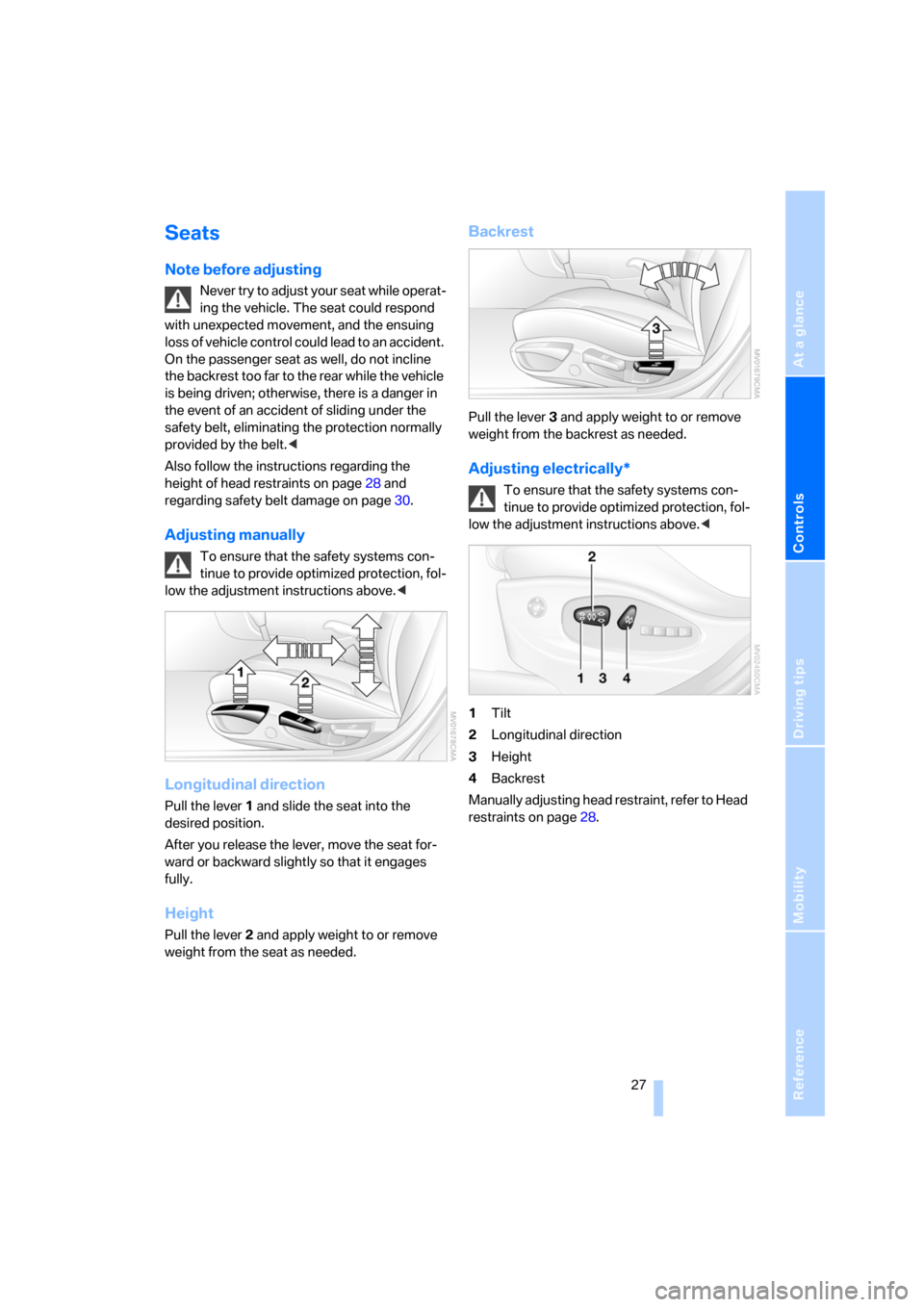
Pull the lever 1 and slide the seat into the
desired position.
After you release the lever, move the seat for-
ward or backward slightly so that it engages
fully.
Height
Pull the lever 2 and apply weight to or remove
weight from the seat as needed.
Backrest
Pull the lever 3 and apply weight to or remove
weight from the backrest as needed.
Adjusting electrically*
To ensure that the safety systems con-
tinue to provide optimized protection, fol-
low the adjustment instructions above.<
1Tilt
2Longitudinal direction
3Height
4Backrest
Manually adjusting head restraint, refer to Head
restraints on page28.
Page 31 of 133
Reference
At a glance
Controls
Driving tips
Mobility
29
Heated seats*
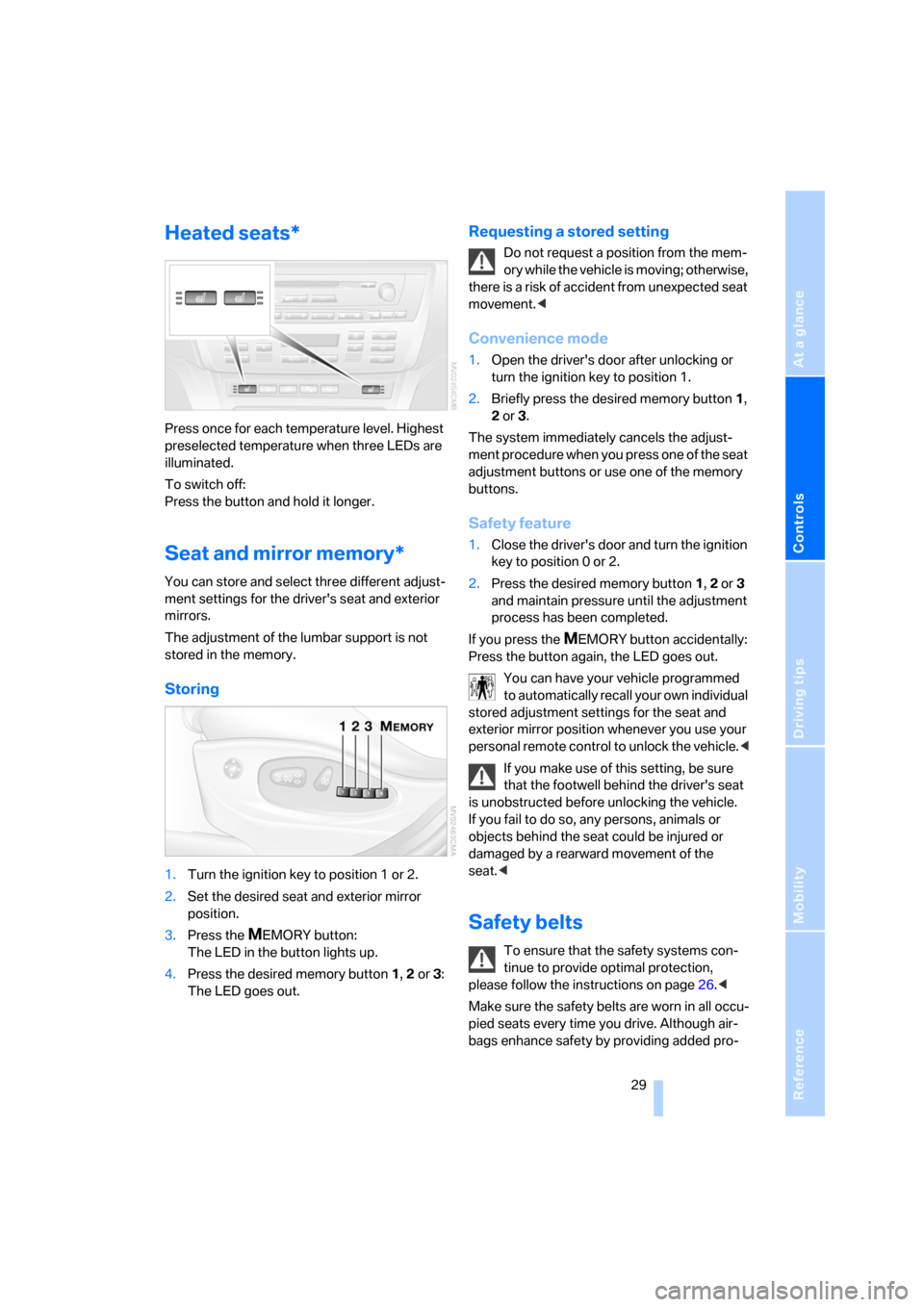
Press once for each temperature level. Highest
preselected temperature when three LEDs are
illuminated.
To switch off:
Press the button and hold it longer.
Seat and mirror memory*
You can store and select three different adjust-
ment settings for the driver's seat and exterior
mirrors.
The adjustment of the lumbar support is not
stored in the memory.
Storing
1.Turn the ignition key to position 1 or 2.
2.Set the desired seat and exterior mirror
position.
3.Press the
MEMORY button:
The LED in the button lights up.
4.Press the desired memory button 1, 2 or3:
The LED goes out.
Requesting a stored setting
Do not request a position from the mem-
ory while the vehicle is moving; otherwise,
there is a risk of accident from unexpected seat
movement.<
Convenience mode
1.Open the driver's door after unlocking or
turn the ignition key to position 1.
2.Briefly press the desired memory button 1,
2 or3.
The system immediately cancels the adjust-
ment procedure when you press one of the seat
adjustment buttons or use one of the memory
buttons.
Safety feature
1.Close the driver's door and turn the ignition
key to position 0 or 2.
2.Press the desired memory button 1, 2 or3
and maintain pressure until the adjustment
process has been completed.
If you press the
MEMORY button accidentally:
Press the button again, the LED goes out.
You can have your vehicle programmed
to automatically recall your own individual
stored adjustment settings for the seat and
exterior mirror position whenever you use your
personal remote control to unlock the vehicle.<
If you make use of this setting, be sure
that the footwell behind the driver's seat
is unobstructed before unlocking the vehicle.
If you fail to do so, any persons, animals or
objects behind the seat could be injured or
damaged by a rearward movement of the
seat.<
Safety belts
To ensure that the safety systems con-
tinue to provide optimal protection,
please follow the instructions on page26.<
Make sure the safety belts are worn in all occu-
pied seats every time you drive. Although air-
bags enhance safety by providing added pro-
Page 32 of 133
Adjustments
30 tection, they are not a substitute for safety
belts.
In the rear, the middle belt buckle embossed
with the word CENTER is intended exclusively
for use by passengers riding in the center posi-
tion.
Fastening
Make sure you hear the latch plate engage in
the belt buckle.
The upper shoulder strap's anchorage point will
be in the correct position for seat occupants of
every build if the seat is correctly adjusted, refer
to page26.
Releasing
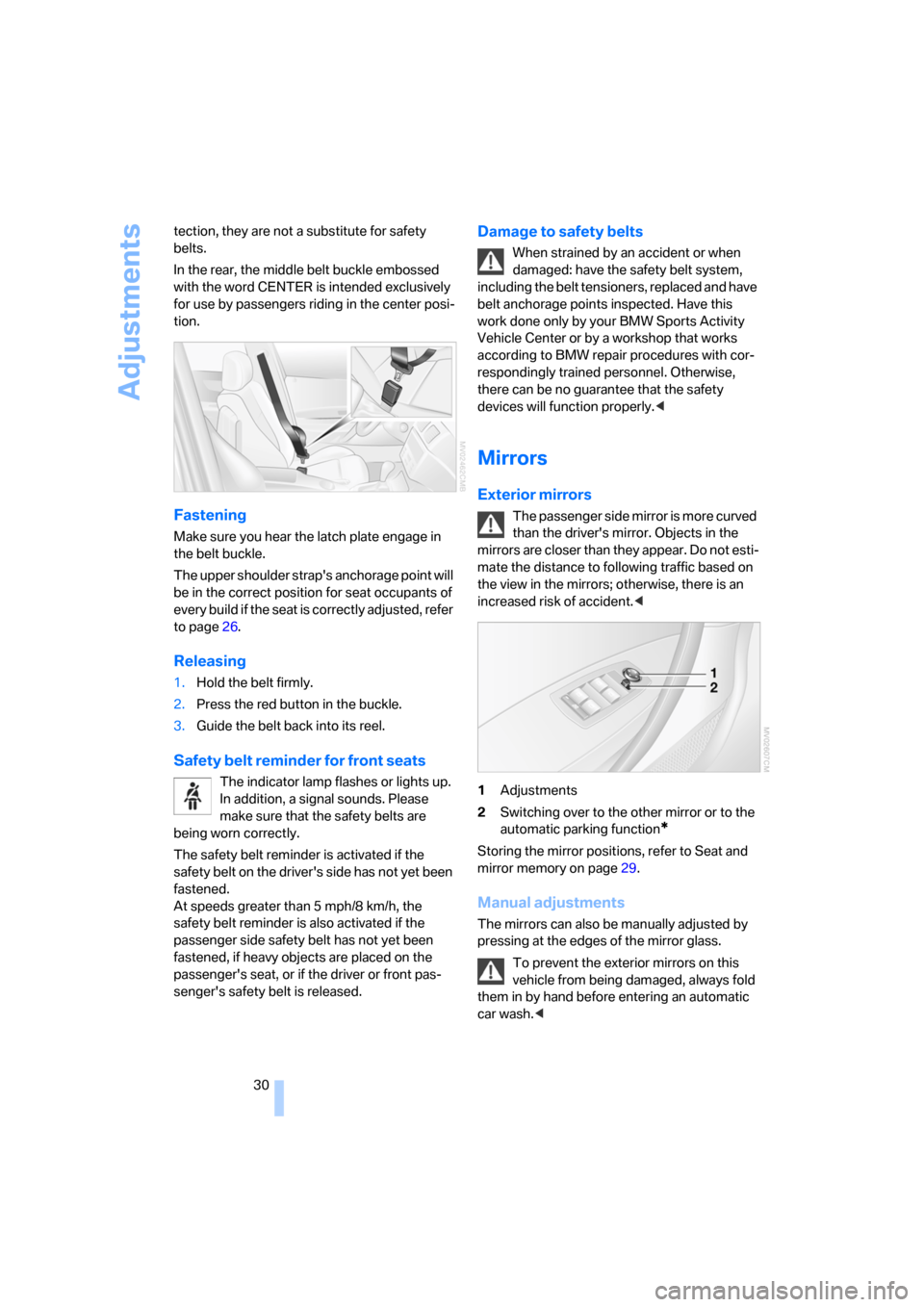
1.Hold the belt firmly.
2.Press the red button in the buckle.
3.Guide the belt back into its reel.
Safety belt reminder for front seats
The indicator lamp flashes or lights up.
In addition, a signal sounds. Please
make sure that the safety belts are
being worn correctly.
The safety belt reminder is activated if the
safety belt on the driver's side has not yet been
fastened.
At speeds greater than 5 mph/8 km/h, the
safety belt reminder is also activated if the
passenger side safety belt has not yet been
fastened, if heavy objects are placed on the
passenger's seat, or if the driver or front pas-
senger's safety belt is released.
Damage to safety belts
When strained by an accident or when
damaged: have the safety belt system,
including the belt tensioners, replaced and have
belt anchorage points inspected. Have this
work done only by your BMW Sports Activity
Vehicle Center or by a workshop that works
according to BMW repair procedures with cor-
respondingly trained personnel. Otherwise,
there can be no guarantee that the safety
devices will function properly.<
Mirrors
Exterior mirrors
The passenger side mirror is more curved
than the driver's mirror. Objects in the
mirrors are closer than they appear. Do not esti-
mate the distance to following traffic based on
the view in the mirrors; otherwise, there is an
increased risk of accident.<
1Adjustments
2Switching over to the other mirror or to the
automatic parking function
*
Storing the mirror positions, refer to Seat and
mirror memory on page29.
Manual adjustments
The mirrors can also be manually adjusted by
pressing at the edges of the mirror glass.
To prevent the exterior mirrors on this
vehicle from being damaged, always fold
them in by hand before entering an automatic
car wash.<
Page 33 of 133
Reference
At a glance
Controls
Driving tips
Mobility
31
Automatic heating*
When the outside temperature falls below a
specified temperature, both outside mirrors are
automatically heated whenever the engine is
running or the ignition is switched on.
Tilting down passenger's mirror,
automatic parking function*
Activating
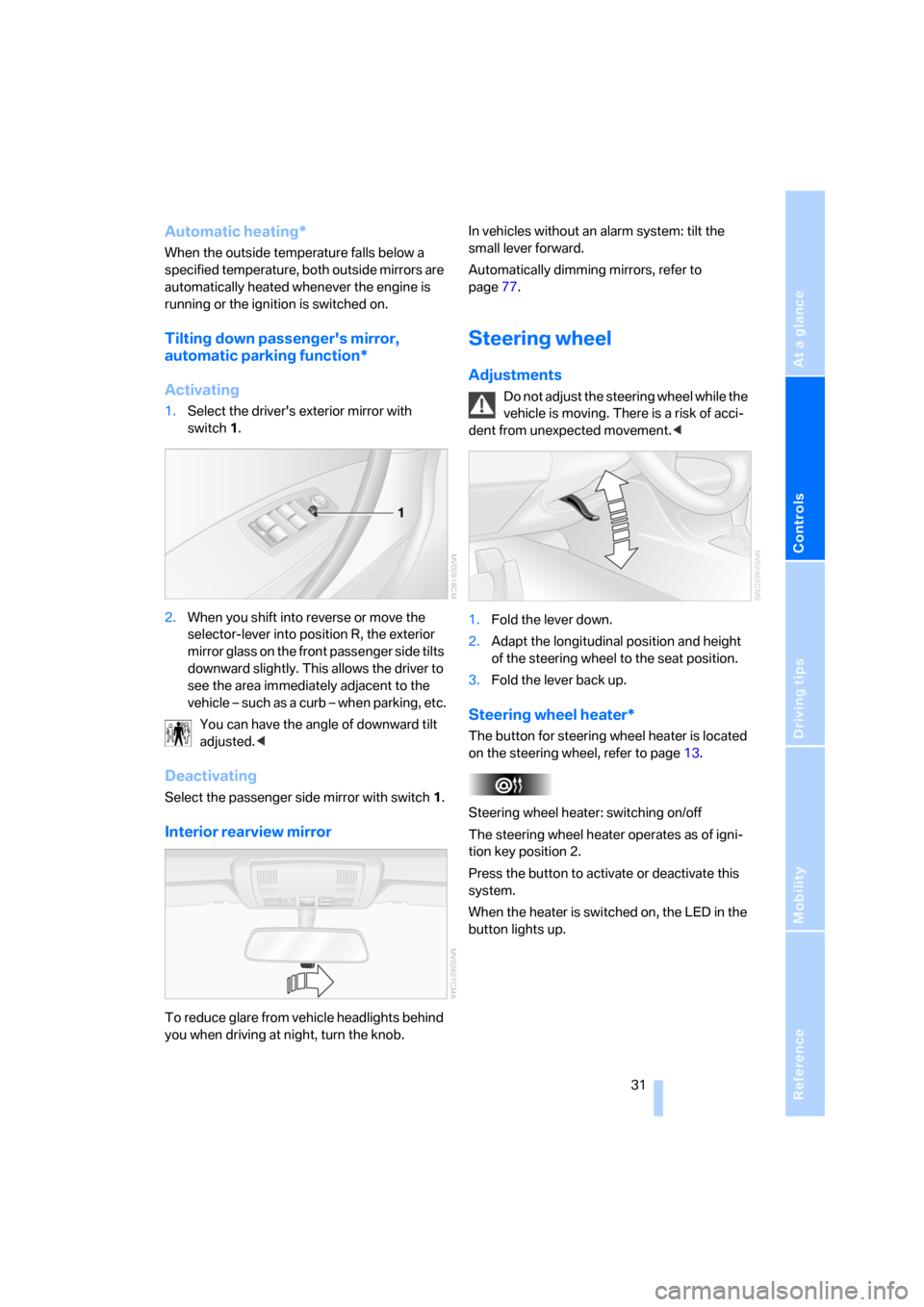
1.Select the driver's exterior mirror with
switch 1.
2.When you shift into reverse or move the
selector-lever into position R, the exterior
mirror glass on the front passenger side tilts
downward slightly. This allows the driver to
see the area immediately adjacent to the
vehicle – such as a curb – when parking, etc.
You can have the angle of downward tilt
adjusted.<
Deactivating
Select the passenger side mirror with switch1.
Interior rearview mirror
To reduce glare from vehicle headlights behind
you when driving at night, turn the knob.In vehicles without an alarm system: tilt the
small lever forward.
Automatically dimming mirrors, refer to
page77.
Steering wheel
Adjustments
Do not adjust the steering wheel while the
vehicle is moving. There is a risk of acci-
dent from unexpected movement.<
1.Fold the lever down.
2.Adapt the longitudinal position and height
of the steering wheel to the seat position.
3.Fold the lever back up.
Steering wheel heater*
The button for steering wheel heater is located
on the steering wheel, refer to page13.
Steering wheel heater: switching on/off
The steering wheel heater operates as of igni-
tion key position 2.
Press the button to activate or deactivate this
system.
When the heater is switched on, the LED in the
button lights up.
Page 34 of 133
Adjustments
32
Vehicle Memory, Key Memory
How the system functions
You have probably frequently wished that you
could configure individual functions of your
vehicle to reflect your own personal require-
ments. In developing your vehicle, BMW has
incorporated a number of options for personal
adjustment. You can have these programmed
at your BMW Sports Activity Vehicle Center.
There are vehicle-related and person-related
adjustments: Vehicle Memory and Key Mem-
ory. You can configure up to four different basic
adjustments for four different persons. The only
requirement is that each person use his or her
own master key with remote control.
When your vehicle is unlocked with the remote
control, the vehicle recognizes the individual
user by means of a data exchange with the key,
and makes adjustments accordingly.
In order for you to distinguish between the mas-
ter keys with remote control, color-coded
decals are supplied together with the keys.
What the system can do
Ask your BMW Sports Activity Vehicle Center
about the possibilities of Vehicle Memory and
Key Memory.
You will see this symbol throughout the
Owner's Manual. It is to remind you at
appropriate places of the settings that are avail-
able to you.<
Following configuration of memory func-
tions, vehicle operation may differ from
the description in the Owner's Manual. Should
you wish to sell your BMW some day, please
remember to have the memory functions reset
to the factory default settings.<
Examples of Vehicle Memory
>Different acknowledgment signals to con-
firm locking/unlocking of the vehicle, refer
to page19.
>Activating/deactivating function for path-
way lighting, refer to page56.
>Activating/deactivating daytime running
lamps, refer to page56.
>Active PDC Park Distance Control is acous-
tically indicated by a signal tone when you
shift into reverse or move the selector lever
into position R, refer to page47.
>Different acknowledgment signals to con-
firm arming/disarming the alarm system,
refer to page24.
>After an outside temperature warning has
been issued, the computer display returns
to the previous setting, refer to page45.
>Acoustic warning if the ignition key remains
in the ignition lock after the driver's door has
been opened, refer to page18.
Examples of Key Memory functions
>Locking the vehicle after starting to drive,
refer to page20.
>Automatic adjustment of the driver's seat
and exterior mirror position for each person
when unlocking the vehicle, refer to
page29.
>Angle of downward tilt of passenger side
mirror, refer to page31.
>Setting units of measure for displays in the
instrument cluster for time, outside temper-
ature, distance driven and fuel consump-
tion, refer to page45.
Page 36 of 133
Transporting children safely
34
Unlocking safety belt
1.Open safety belt buckle.
2.Remove child restraint system.
3.Allow safety belt strap to retract all the way.
Child restraint system with tether strap
Only use the tether strap attachment
points to fasten child restraint systems;
otherwise, the attachment points can be dam-
aged.<
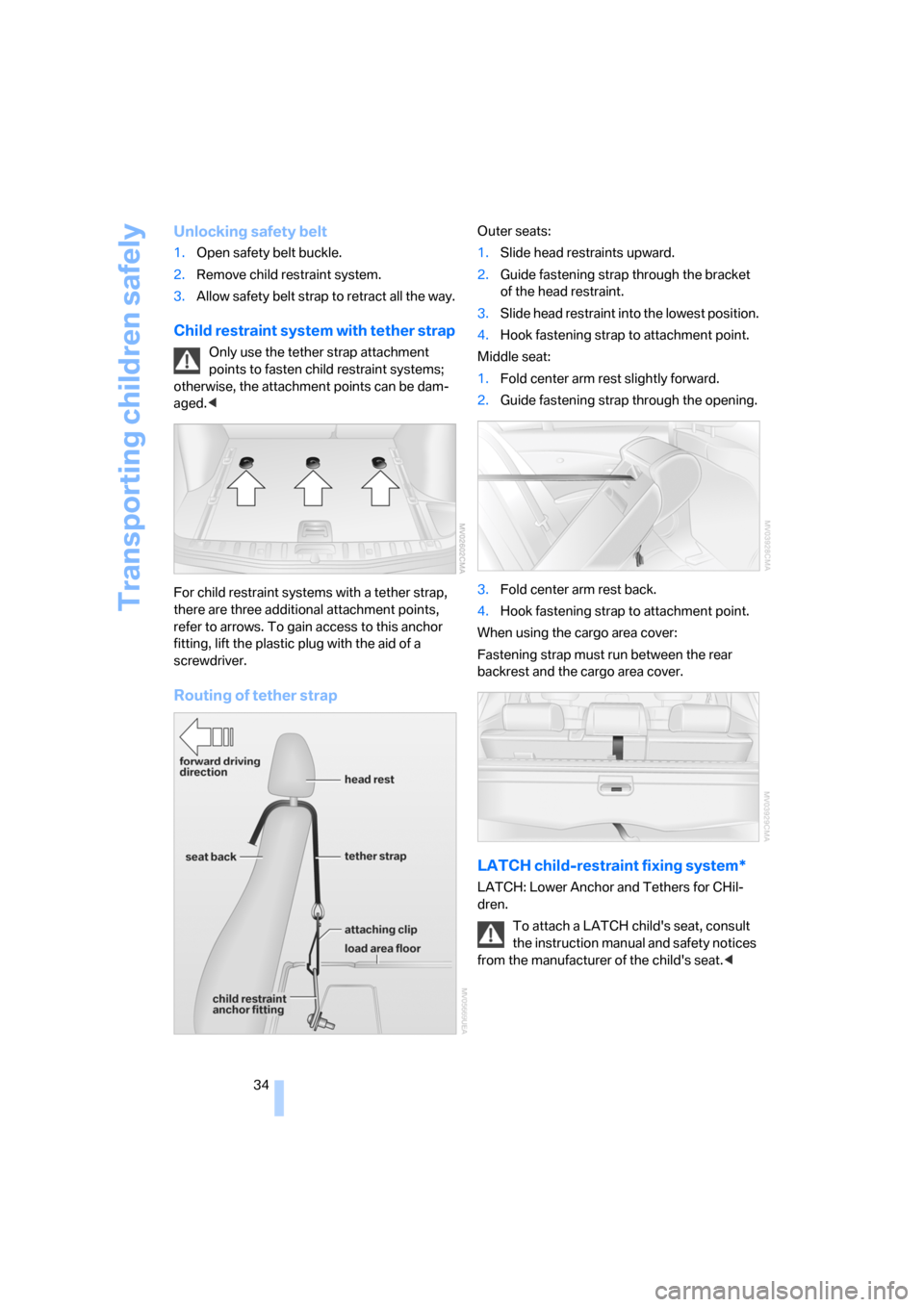
For child restraint systems with a tether strap,
there are three additional attachment points,
refer to arrows. To gain access to this anchor
fitting, lift the plastic plug with the aid of a
screwdriver.
Routing of tether strap
Outer seats:
1.Slide head restraints upward.
2.Guide fastening strap through the bracket
of the head restraint.
3.Slide head restraint into the lowest position.
4.Hook fastening strap to attachment point.
Middle seat:
1.Fold center arm rest slightly forward.
2.Guide fastening strap through the opening.
3.Fold center arm rest back.
4.Hook fastening strap to attachment point.
When using the cargo area cover:
Fastening strap must run between the rear
backrest and the cargo area cover.
LATCH child-restraint fixing system*
LATCH: Lower Anchor and Tethers for CHil-
dren.
To attach a LATCH child's seat, consult
the instruction manual and safety notices
from the manufacturer of the child's seat.<
Page 38 of 133
Driving
36
Driving
Ignition lock
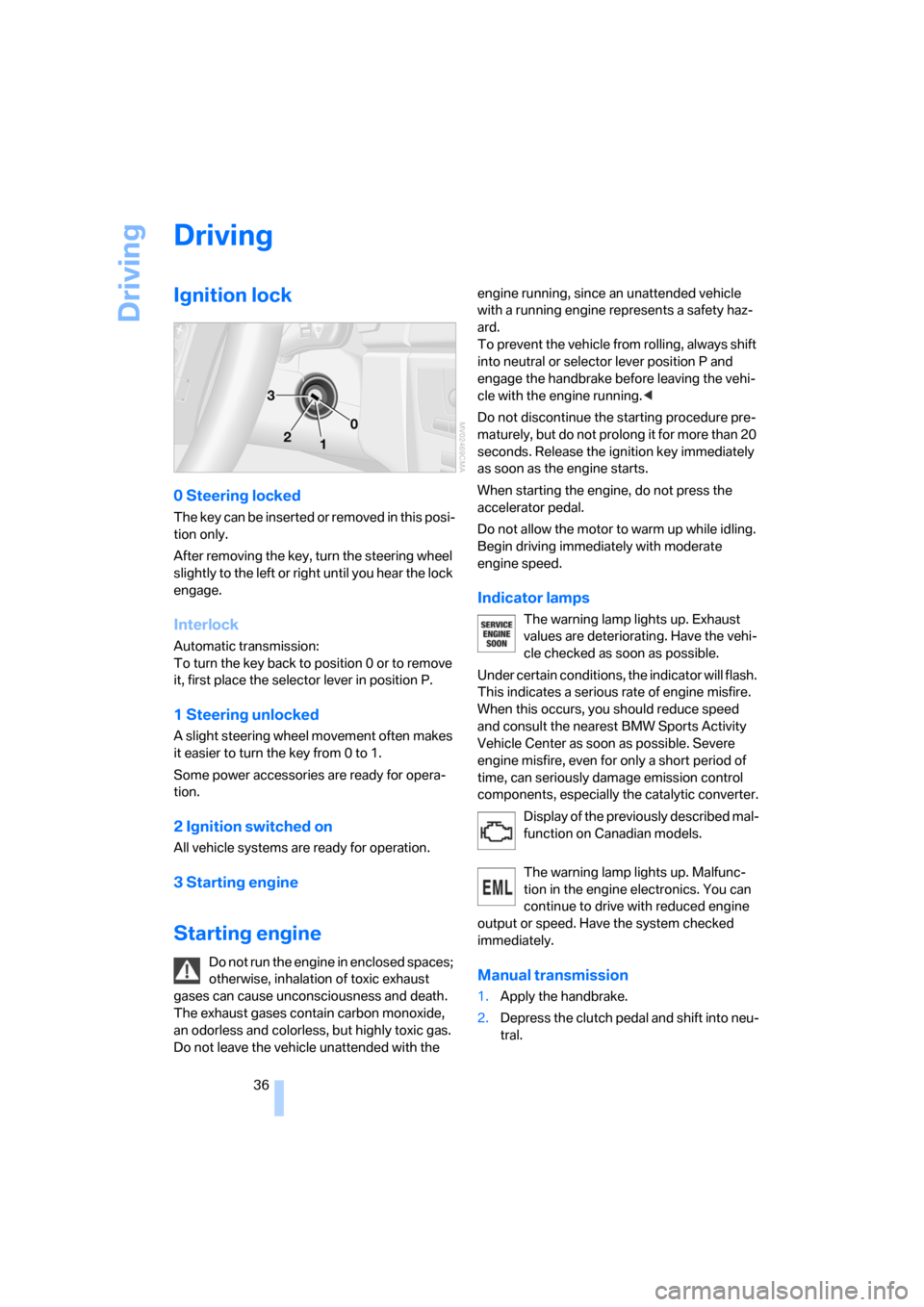
0 Steering locked
T h e k e y c a n b e in s e r t e d o r r e m o v e d in t h i s p o s i-
tion only.
After removing the key, turn the steering wheel
slightly to the left or right until you hear the lock
engage.
Interlock
Automatic transmission:
To turn the key back to position 0 or to remove
it, first place the selector lever in position P.
1 Steering unlocked
A slight steering wheel movement often makes
it easier to turn the key from 0 to 1.
Some power accessories are ready for opera-
tion.
2 Ignition switched on
All vehicle systems are ready for operation.
3 Starting engine
Starting engine
Do not run the engine in enclosed spaces;
otherwise, inhalation of toxic exhaust
gases can cause unconsciousness and death.
The exhaust gases contain carbon monoxide,
an odorless and colorless, but highly toxic gas.
Do not leave the vehicle unattended with the engine running, since an unattended vehicle
with a running engine represents a safety haz-
ard.
To prevent the vehicle from rolling, always shift
into neutral or selector lever position P and
engage the handbrake before leaving the vehi-
cle with the engine running.<
Do not discontinue the starting procedure pre-
maturely, but do not prolong it for more than 20
seconds. Release the ignition key immediately
as soon as the engine starts.
When starting the engine, do not press the
accelerator pedal.
Do not allow the motor to warm up while idling.
Begin driving immediately with moderate
engine speed.
Indicator lamps
The warning lamp lights up. Exhaust
values are deteriorating. Have the vehi-
cle checked as soon as possible.
Under certain conditions, the indicator will flash.
This indicates a serious rate of engine misfire.
When this occurs, you should reduce speed
and consult the nearest BMW Sports Activity
Vehicle Center as soon as possible. Severe
engine misfire, even for only a short period of
time, can seriously damage emission control
components, especially the catalytic converter.
Display of the previously described mal-
function on Canadian models.
The warning lamp lights up. Malfunc-
tion in the engine electronics. You can
continue to drive with reduced engine
output or speed. Have the system checked
immediately.
Manual transmission
1.Apply the handbrake.
2.Depress the clutch pedal and shift into neu-
tral.
Page 39 of 133
Reference
At a glance
Controls
Driving tips
Mobility
37
If the clutch pedal is not depressed,
the motor will not start.<
3.Start the engine.
Automatic transmission
1.Step on the brake.
2.Move selector lever into position P.
3.Start the engine.
Special starting conditions
In the following situations, press the accelerator
pedal halfway down while starting:
>If the engine fails to start on the first
attempt, for instance, if it is very hot or cold.
>When starting the engine at very low tem-
peratures, below approx. +57/–156, at
high altitudes over approx. 3,300 ft/
1,000 m.
Avoid frequent starting in quick succes-
sion or repeated start attempts in which
the engine does not start. Otherwise, the fuel is
not burned or inadequately burned and there is
a danger of overheating and damaging the cat-
alytic converter.<
Switching off engine
Do not remove the ignition key when the
vehicle is rolling; otherwise, the steering
wheel lock would engage during steering.
When leaving the vehicle, remove the ignition
key and lock the steering. When parking on
downward inclines, engage the handbrake; oth-
erwise, the vehicle could start to roll.<
Manual transmission
1.Apply the handbrake.
2.Turn the ignition key to position 1 or 0.
3.Shift into first gear or reverse.
Automatic transmission
1.With the vehicle at a stop, move the selector
lever into position P.
2.Turn the ignition key to position 1 or 0.3.Apply the handbrake.
Handbrake
The handbrake is primarily intended to prevent
the vehicle from rolling while parked; it brakes
the rear wheels.
Indicator lamp
The indicator lamp lights up; an acous-
tic signal also sounds when you begin
to drive. The handbrake is still engaged.
Indicator lamp for Canadian models.
Engaging
The lever engages automatically.
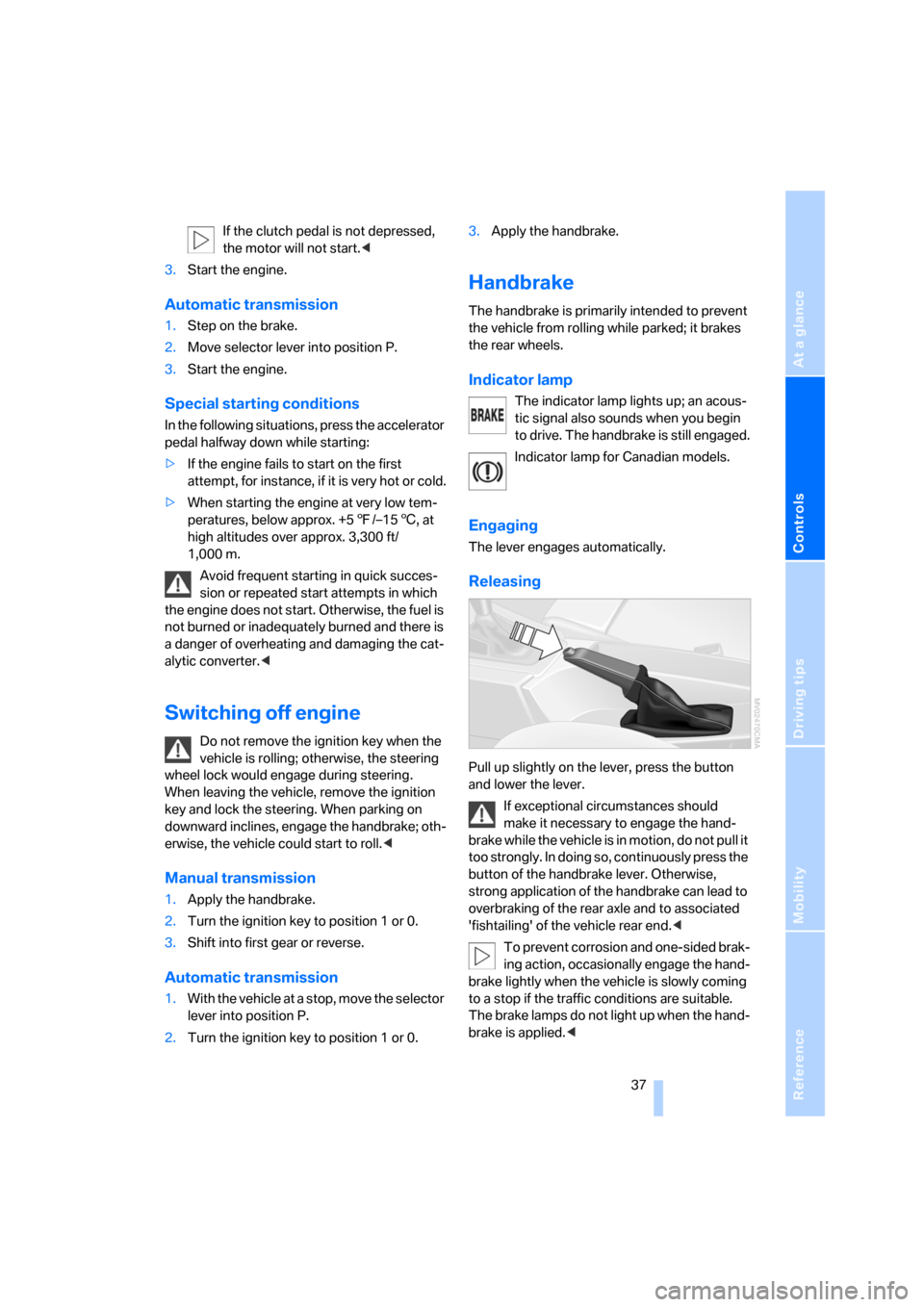
Releasing
Pull up slightly on the lever, press the button
and lower the lever.
If exceptional circumstances should
make it necessary to engage the hand-
brake while the vehicle is in motion, do not pull it
too strongly. In doing so, continuously press the
button of the handbrake lever. Otherwise,
strong application of the handbrake can lead to
overbraking of the rear axle and to associated
'fishtailing' of the vehicle rear end.<
To prevent corrosion and one-sided brak-
ing action, occasionally engage the hand-
brake lightly when the vehicle is slowly coming
to a stop if the traffic conditions are suitable.
The brake lamps do not light up when the hand-
brake is applied.<
Page 41 of 133
Reference
At a glance
Controls
Driving tips
Mobility
39
R Reverse
Select only when the vehicle is stationary.
N Neutral
You can shift into neutral, for example, in auto-
matic car washes. The vehicle can roll.
D Drive, automatic position
Under normal operating conditions, fuel con-
sumption is the lowest when the vehicle is
driven in position D.
Kick-down
The kick-down mode provides maximum accel-
eration.
Press the accelerator pedal past the increased
resistance point at the full-throttle position.
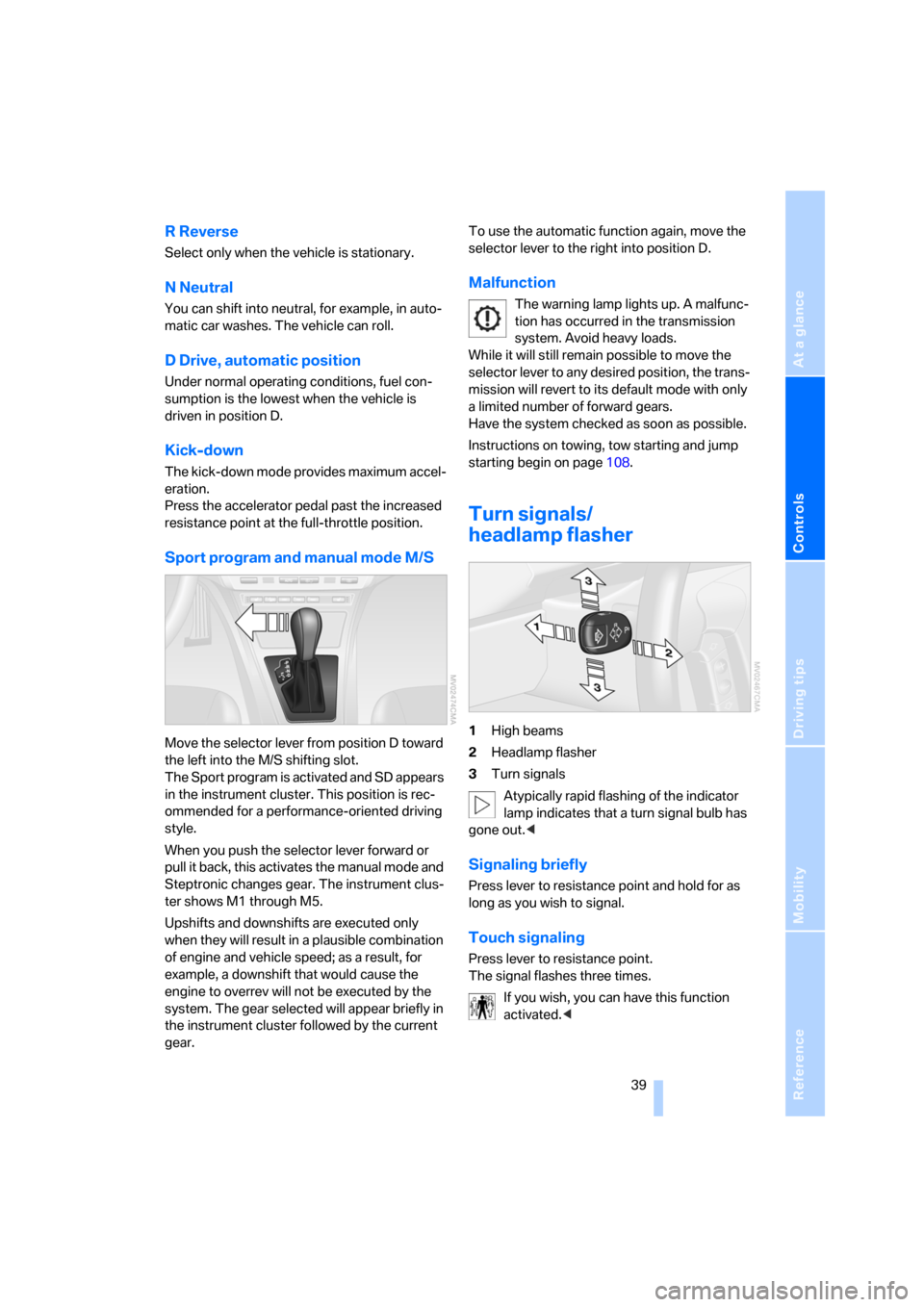
Sport program and manual mode M/S
Move the selector lever from position D toward
the left into the M/S shifting slot.
The Sport program is activated and SD appears
in the instrument cluster. This position is rec-
ommended for a performance-oriented driving
style.
When you push the selector lever forward or
pull it back, this activates the manual mode and
Steptronic changes gear. The instrument clus-
ter shows M1 through M5.
Upshifts and downshifts are executed only
when they will result in a plausible combination
of engine and vehicle speed; as a result, for
example, a downshift that would cause the
engine to overrev will not be executed by the
system. The gear selected will appear briefly in
the instrument cluster followed by the current
gear.To use the automatic function again, move the
selector lever to the right into position D.
Malfunction
The warning lamp lights up. A malfunc-
tion has occurred in the transmission
system. Avoid heavy loads.
While it will still remain possible to move the
selector lever to any desired position, the trans-
mission will revert to its default mode with only
a limited number of forward gears.
Have the system checked as soon as possible.
Instructions on towing, tow starting and jump
starting begin on page108.
Turn signals/
headlamp flasher
1High beams
2Headlamp flasher
3Turn signals
Atypically rapid flashing of the indicator
lamp indicates that a turn signal bulb has
gone out.<
Signaling briefly
Press lever to resistance point and hold for as
long as you wish to signal.
Touch signaling
Press lever to resistance point.
The signal flashes three times.
If you wish, you can have this function
activated.<
Page 43 of 133
Reference
At a glance
Controls
Driving tips
Mobility
41
Cleaning windshield, rear window and
headlamps*
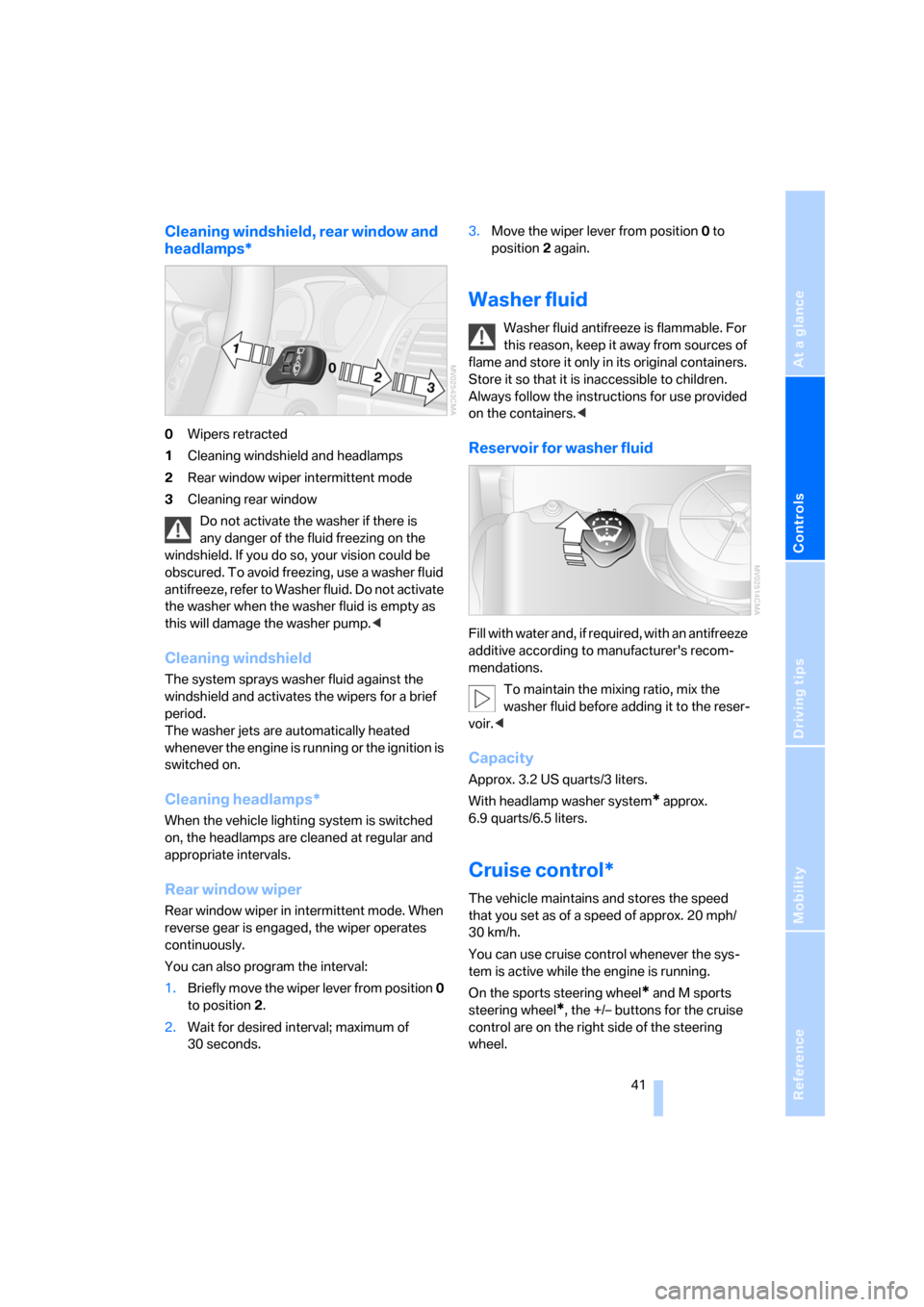
0Wipers retracted
1Cleaning windshield and headlamps
2Rear window wiper intermittent mode
3Cleaning rear window
Do not activate the washer if there is
any danger of the fluid freezing on the
windshield. If you do so, your vision could be
obscured. To avoid freezing, use a washer fluid
antifreeze, refer to Washer fluid. Do not activate
the washer when the washer fluid is empty as
this will damage the washer pump.<
Cleaning windshield
The system sprays washer fluid against the
windshield and activates the wipers for a brief
period.
The washer jets are automatically heated
whenever the engine is running or the ignition is
switched on.
Cleaning headlamps*
When the vehicle lighting system is switched
on, the headlamps are cleaned at regular and
appropriate intervals.
Rear window wiper
Rear window wiper in intermittent mode. When
reverse gear is engaged, the wiper operates
continuously.
You can also program the interval:
1.Briefly move the wiper lever from position 0
to position 2.
2.Wait for desired interval; maximum of
30 seconds.3.Move the wiper lever from position 0 to
position 2 again.
Washer fluid
Washer fluid antifreeze is flammable. For
this reason, keep it away from sources of
flame and store it only in its original containers.
Store it so that it is inaccessible to children.
Always follow the instructions for use provided
on the containers.<
Reservoir for washer fluid
Fill with water and, if required, with an antifreeze
additive according to manufacturer's recom-
mendations.
To maintain the mixing ratio, mix the
washer fluid before adding it to the reser-
voir.<
Capacity
Approx. 3.2 US quarts/3 liters.
With headlamp washer system
* approx.
6.9 quarts/6.5 liters.
Cruise control*
The vehicle maintains and stores the speed
that you set as of a speed of approx. 20 mph/
30 km/h.
You can use cruise control whenever the sys-
tem is active while the engine is running.
On the sports steering wheel
* and M sports
steering wheel
*, the +/– buttons for the cruise
control are on the right side of the steering
wheel.