change wheel BMW X3 2012 User Guide
[x] Cancel search | Manufacturer: BMW, Model Year: 2012, Model line: X3, Model: BMW X3 2012Pages: 278, PDF Size: 10.15 MB
Page 99 of 278
Driving comfortVehicle equipment
All standard, country-specific and optional
equipment that is offered in the model series is
described in this chapter. Therefore, equipment
is also described that is not available in a vehicle,
e. g., because of the selected optional equip‐
ment or country variant. This also applies for
safety-related functions and systems.
Cruise control
The concept
The system is functional at speeds beginning at
approx. 20 mph/30 km/h.
It maintains the speed that was set using the
control elements on the steering wheel.
The system brakes on downhill gradients if en‐
gine braking action is insufficient.
Unfavorable conditions
Do not use the system if unfavorable con‐
ditions make it impossible to drive at a constant
speed, for instance:▷On curvy roads.▷In heavy traffic.▷On slippery roads, in fog, snow or rain, or on
a loose road surface.
Otherwise, you could lose control of the vehicle
and cause an accident.◀
Controls
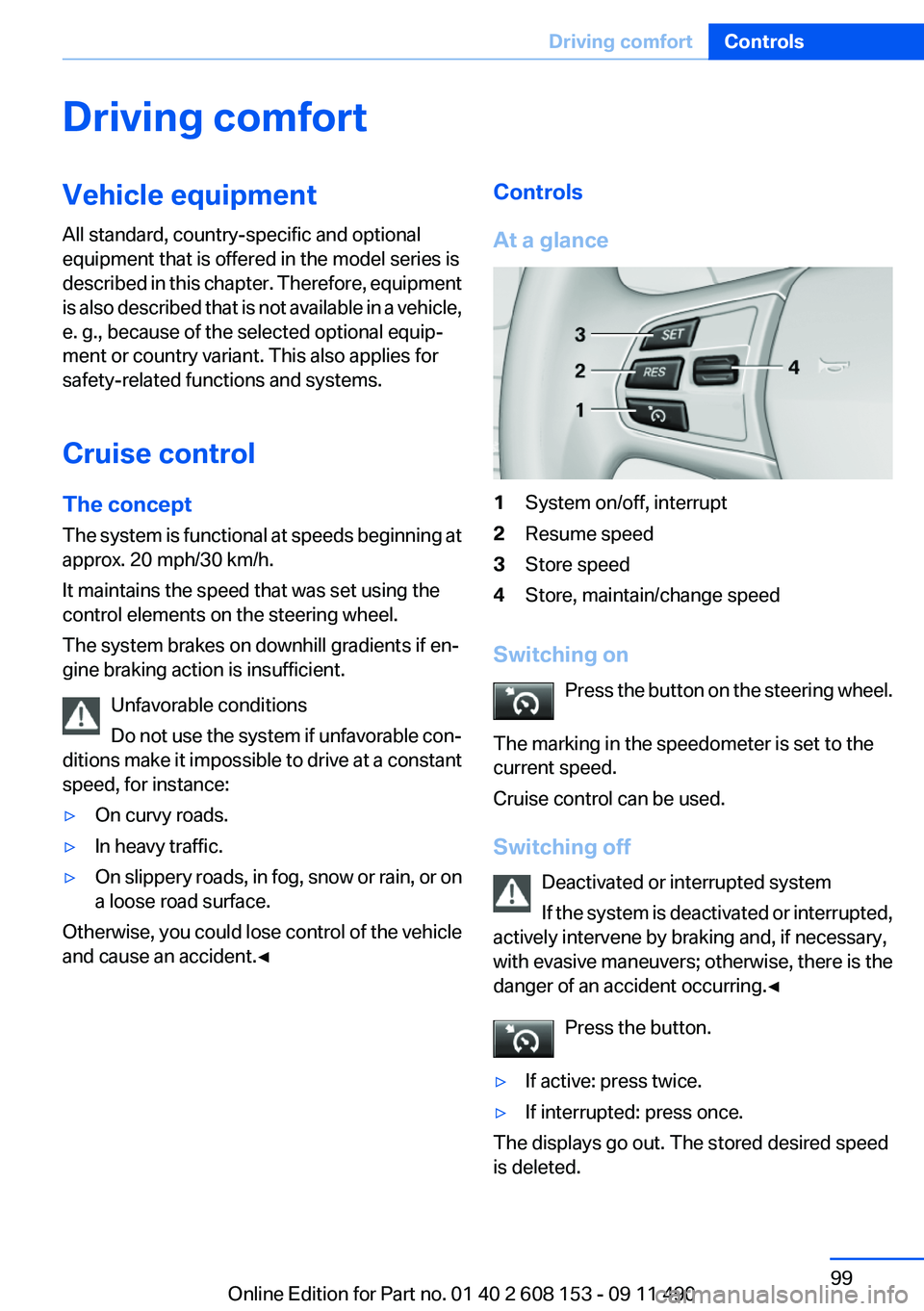
At a glance1System on/off, interrupt2Resume speed3Store speed4Store, maintain/change speed
Switching on Press the button on the steering wheel.
The marking in the speedometer is set to the
current speed.
Cruise control can be used.
Switching off Deactivated or interrupted system
If the system is deactivated or interrupted,
actively intervene by braking and, if necessary,
with evasive maneuvers; otherwise, there is the
danger of an accident occurring.◀
Press the button.
▷If active: press twice.▷If interrupted: press once.
The displays go out. The stored desired speed
is deleted.
Seite 99Driving comfortControls99
Online Edition for Part no. 01 40 2 608 153 - 09 11 490
Page 195 of 278
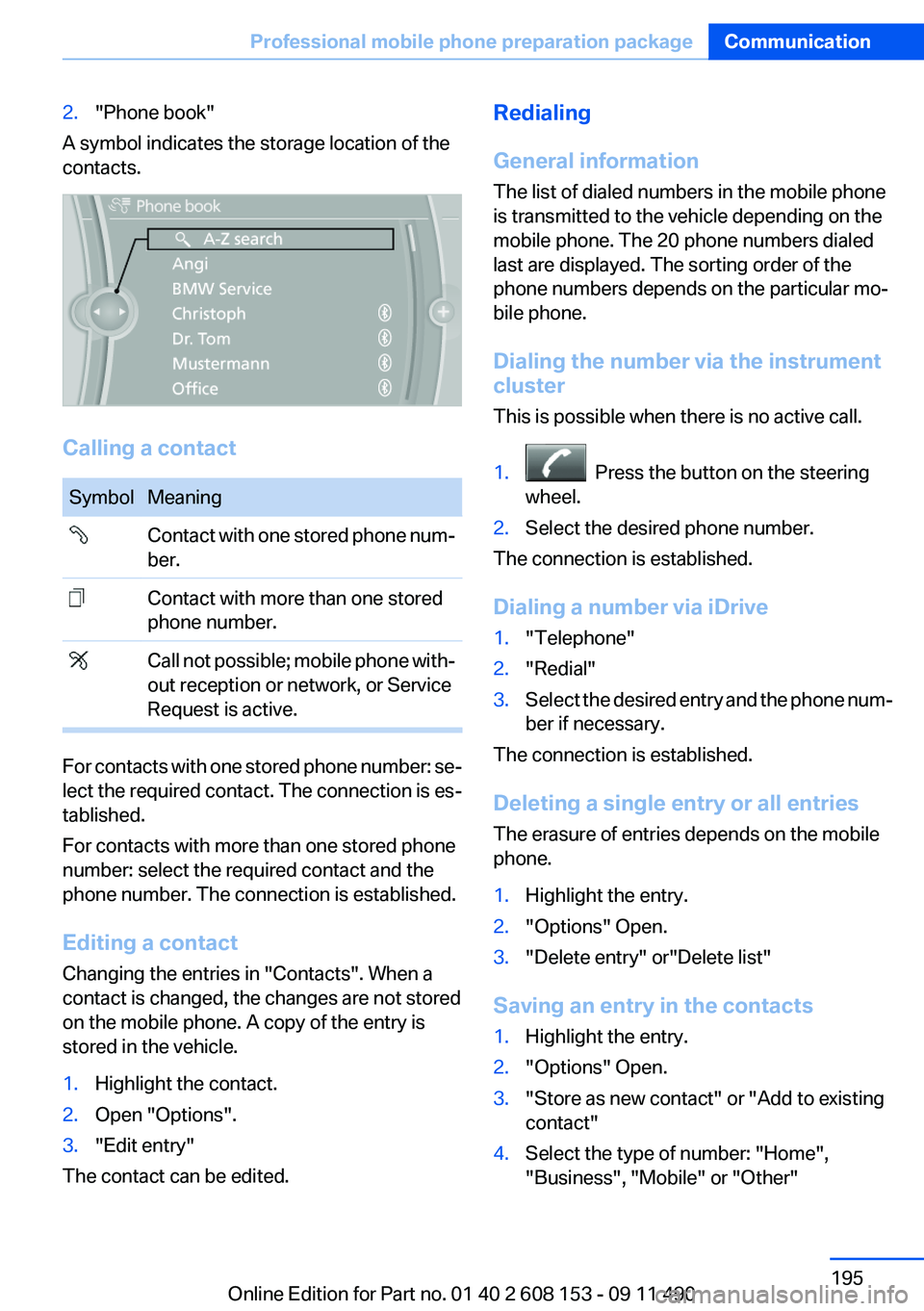
2."Phone book"
A symbol indicates the storage location of the
contacts.
Calling a contact
SymbolMeaning Contact with one stored phone num‐
ber. Contact with more than one stored
phone number. Call not possible; mobile phone with‐
out reception or network, or Service
Request is active.
For contacts with one stored phone number: se‐
lect the required contact. The connection is es‐
tablished.
For contacts with more than one stored phone
number: select the required contact and the
phone number. The connection is established.
Editing a contact
Changing the entries in "Contacts". When a
contact is changed, the changes are not stored
on the mobile phone. A copy of the entry is
stored in the vehicle.
1.Highlight the contact.2.Open "Options".3."Edit entry"
The contact can be edited.
Redialing
General information
The list of dialed numbers in the mobile phone
is transmitted to the vehicle depending on the
mobile phone. The 20 phone numbers dialed
last are displayed. The sorting order of the
phone numbers depends on the particular mo‐
bile phone.
Dialing the number via the instrument
cluster
This is possible when there is no active call.1. Press the button on the steering
wheel.2.Select the desired phone number.
The connection is established.
Dialing a number via iDrive
1."Telephone"2."Redial"3.Select the desired entry and the phone num‐
ber if necessary.
The connection is established.
Deleting a single entry or all entries
The erasure of entries depends on the mobile
phone.
1.Highlight the entry.2."Options" Open.3."Delete entry" or"Delete list"
Saving an entry in the contacts
1.Highlight the entry.2."Options" Open.3."Store as new contact" or "Add to existing
contact"4.Select the type of number: "Home",
"Business", "Mobile" or "Other"Seite 195Professional mobile phone preparation packageCommunication195
Online Edition for Part no. 01 40 2 608 153 - 09 11 490
Page 241 of 278
6.Turn the bulb and remove it. The turn signal
is the upper bulb and the tail lamp/brake
lamp is the lower bulb on the bulb holder.7.Proceed in the reverse order to insert the
new bulb and attach the bulb holder. Make
sure that the bulb holder is engaged in all
fasteners.8.Connect and install tail lamp.9.Insert cover with the three mountings in the
tail lamp. While applying pressure on the top
and bottom bracket, slide the cover down to
the stop.
Backup lamp and inner brake lamp
Follow the General instructions on lamps and
bulbs, refer to page 237.
Backup lamp: 16-watt bulb, W16W
Inner brake lamp: 21-watt bulb, H21W
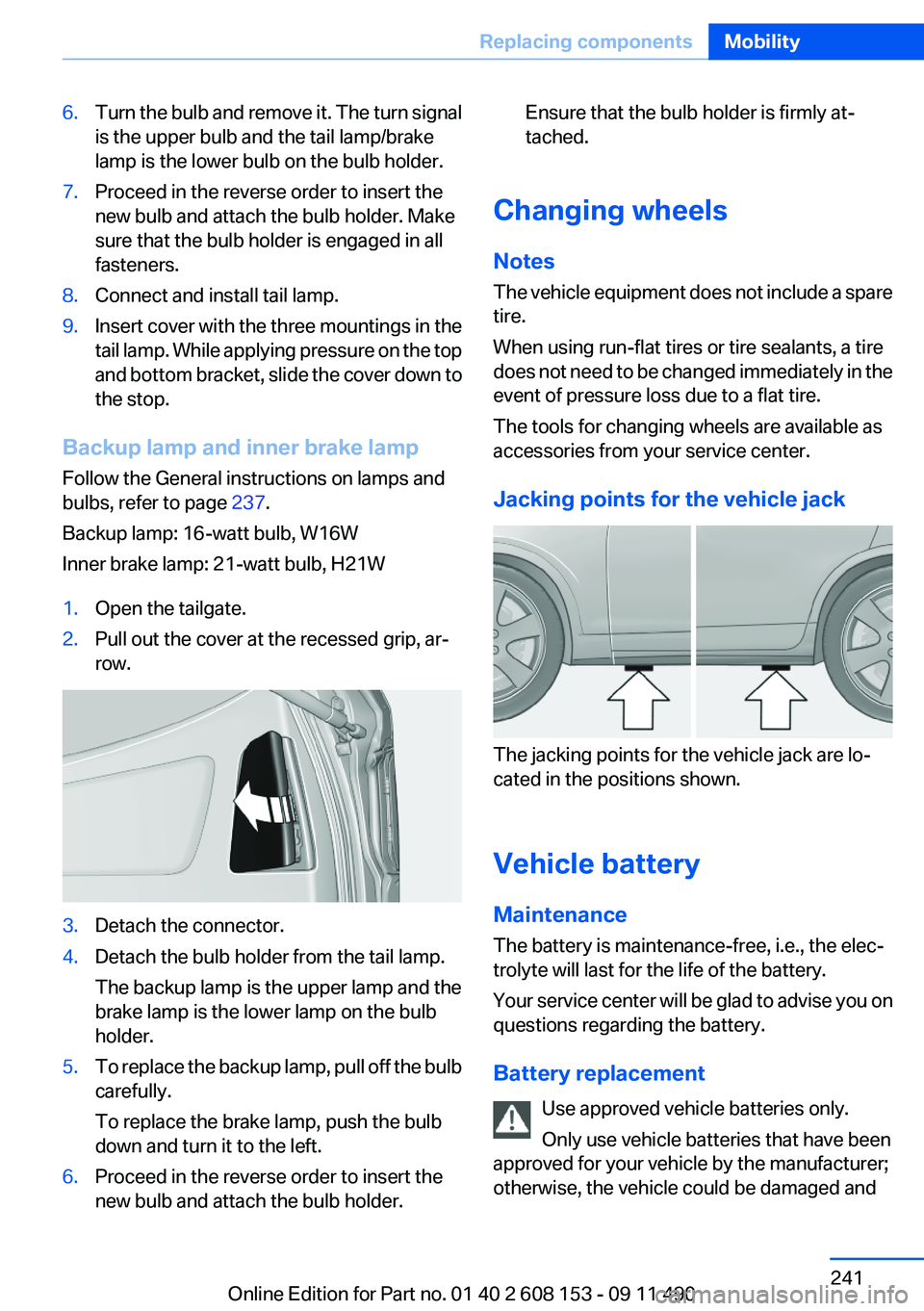
1.Open the tailgate.2.Pull out the cover at the recessed grip, ar‐
row.3.Detach the connector.4.Detach the bulb holder from the tail lamp.
The backup lamp is the upper lamp and the
brake lamp is the lower lamp on the bulb
holder.5.To replace the backup lamp, pull off the bulb
carefully.
To replace the brake lamp, push the bulb
down and turn it to the left.6.Proceed in the reverse order to insert the
new bulb and attach the bulb holder.Ensure that the bulb holder is firmly at‐
tached.
Changing wheels
Notes
The vehicle equipment does not include a spare
tire.
When using run-flat tires or tire sealants, a tire
does not need to be changed immediately in the
event of pressure loss due to a flat tire.
The tools for changing wheels are available as
accessories from your service center.
Jacking points for the vehicle jack
The jacking points for the vehicle jack are lo‐
cated in the positions shown.
Vehicle battery
Maintenance
The battery is maintenance-free, i.e., the elec‐
trolyte will last for the life of the battery.
Your service center will be glad to advise you on
questions regarding the battery.
Battery replacement Use approved vehicle batteries only.
Only use vehicle batteries that have been
approved for your vehicle by the manufacturer;
otherwise, the vehicle could be damaged and
Seite 241Replacing componentsMobility241
Online Edition for Part no. 01 40 2 608 153 - 09 11 490
Page 269 of 278
BMW Maintenance Sys‐tem 234
BMW Search 211
Bottle holder, refer to Cu‐ pholder 123
Brake assistant 94
Brake discs, breaking in 128
Brake force display 93
Brake lamps, brake force dis‐ play 93
Brake lights, adaptive 93
Brake pads, breaking in 128
Braking, notes 129
Breakdown assis‐ tance 243, 244
Breaking in 128
Brightness of Control Dis‐ play 79
Bulb replacement 237
Bulb replacement, front 237
Bulb replacement, rear 240
Bulbs and lamps 237
Button, Start/Stop 58
Bypassing, refer to starting aid 244
C
Calendar 204
California Proposition 65 Warning 7
Camera, backup camera 105
Camera, care 251
Camera, Top View 107
Can holder, refer to Cu‐ pholder 123
Car battery 241
Car care products 249
Care, displays 251
Care, vehicle 249
Cargo 131
Cargo area 118
Cargo area lid 37
Cargo area, storage compart‐ ments 124
Cargo cover 118 Cargo straps, securing
cargo 132
Car key, refer to Remote con‐ trol 30
Carpet, care 250
Car wash 248
Catalytic converter, refer to Hot exhaust system 128
CBS Condition Based Serv‐ ice 234
CD/DVD 166
CDs, storing 173
Cell phone 188
Center armrest 123
Center console 14
Central locking system 33
Central screen, refer to Control Display 16
Changes, technical, refer to Safety 6
Changing parts 236
Changing wheels 241
Changing wheels/tires 226
Check Control 70
Children, seating position 55
Children, transporting safely 55
Child restraint fixing sys‐ tem 55
Child restraint fixing system LATCH 56
Child restraint fixing systems, mounting 55
Child safety locks 57
Child seat, mounting 55
Child seats 55
Chrome parts, care 250
Cleaning, displays 251
Climate control 109, 111
Clock 73
Closing/opening from in‐ side 37
Closing/opening via door lock 36
Closing/opening with remote control 34 Clothes hooks 124
Combination switch, refer to Turn signals 62
Combination switch, refer to Wiper system 62
Comfort Access 40
Compartments in the doors 123
Computer 75
Concierge service 210
Condensation on win‐ dows 110, 113
Condensation under the vehi‐ cle 130
Condition Based Service CBS 234
Confirmation signal 35
Contacts 199
Control Display 16
Control Display, settings 78
Controller 16
Control systems, driving sta‐ bility 94
Convenient opening 34
Coolant 232
Cooling function 110, 113
Cooling, maximum 112
Cooling system 232
Corrosion on brake discs 130
Cruise control 99
Cruising range 73
Cupholder 123
Current fuel consumption 73
Current location, storing 140
Customer Relations 212
D
Damage, tires 225
Damping control, dynamic 96
Data, technical 254
Date 73
Daytime running lights 81
Defrosting, refer to Windows, defrosting 110, 113
Destination distance 76 Seite 269Everything from A to ZReference269
Online Edition for Part no. 01 40 2 608 153 - 09 11 490
Page 270 of 278
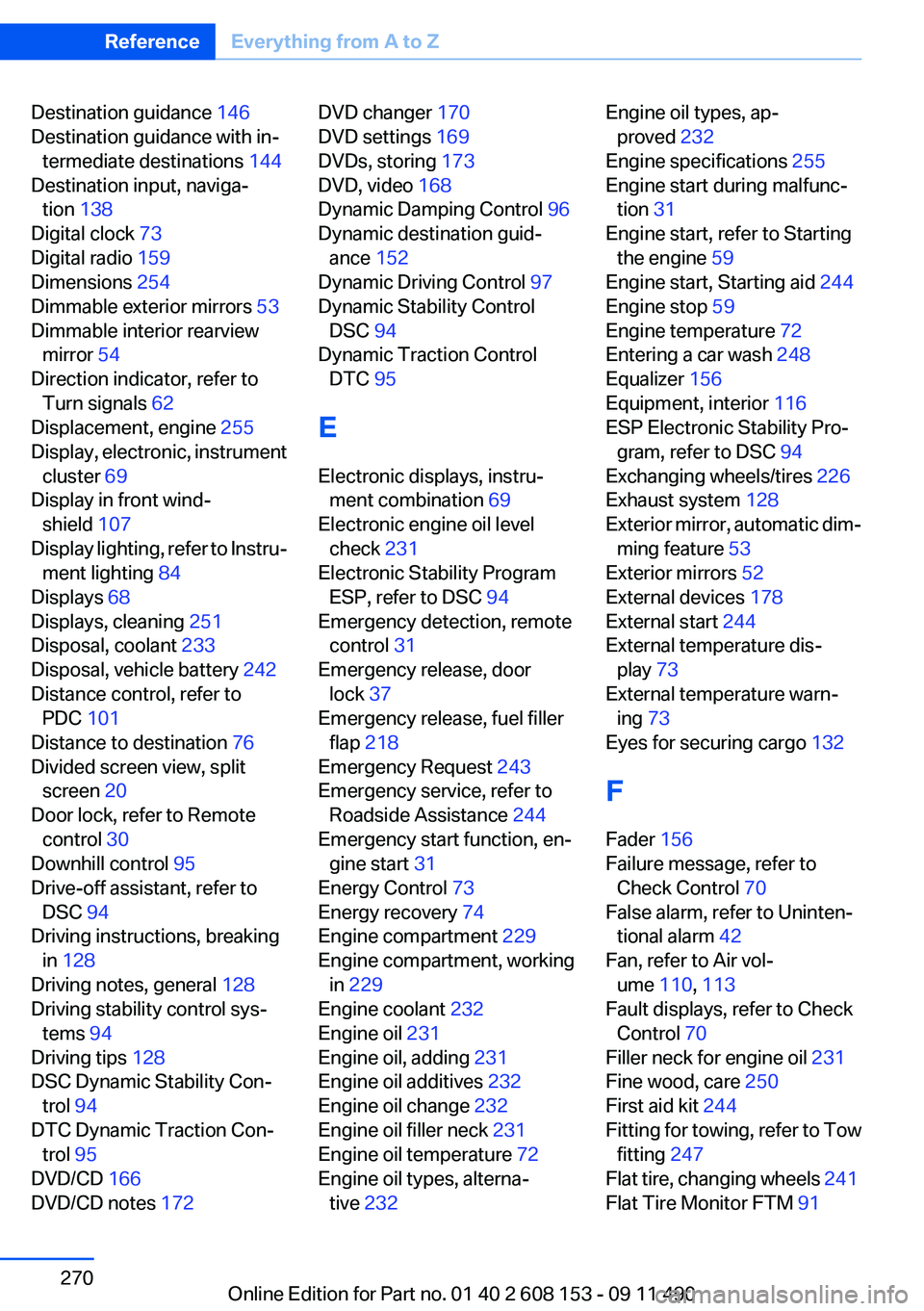
Destination guidance 146
Destination guidance with in‐ termediate destinations 144
Destination input, naviga‐ tion 138
Digital clock 73
Digital radio 159
Dimensions 254
Dimmable exterior mirrors 53
Dimmable interior rearview mirror 54
Direction indicator, refer to Turn signals 62
Displacement, engine 255
Display, electronic, instrument cluster 69
Display in front wind‐ shield 107
Display lighting, refer to Instru‐ ment lighting 84
Displays 68
Displays, cleaning 251
Disposal, coolant 233
Disposal, vehicle battery 242
Distance control, refer to PDC 101
Distance to destination 76
Divided screen view, split screen 20
Door lock, refer to Remote control 30
Downhill control 95
Drive-off assistant, refer to DSC 94
Driving instructions, breaking in 128
Driving notes, general 128
Driving stability control sys‐ tems 94
Driving tips 128
DSC Dynamic Stability Con‐ trol 94
DTC Dynamic Traction Con‐ trol 95
DVD/CD 166
DVD/CD notes 172 DVD changer 170
DVD settings 169
DVDs, storing 173
DVD, video 168
Dynamic Damping Control 96
Dynamic destination guid‐ ance 152
Dynamic Driving Control 97
Dynamic Stability Control DSC 94
Dynamic Traction Control DTC 95
E
Electronic displays, instru‐ ment combination 69
Electronic engine oil level check 231
Electronic Stability Program ESP, refer to DSC 94
Emergency detection, remote control 31
Emergency release, door lock 37
Emergency release, fuel filler flap 218
Emergency Request 243
Emergency service, refer to Roadside Assistance 244
Emergency start function, en‐ gine start 31
Energy Control 73
Energy recovery 74
Engine compartment 229
Engine compartment, working in 229
Engine coolant 232
Engine oil 231
Engine oil, adding 231
Engine oil additives 232
Engine oil change 232
Engine oil filler neck 231
Engine oil temperature 72
Engine oil types, alterna‐ tive 232 Engine oil types, ap‐
proved 232
Engine specifications 255
Engine start during malfunc‐ tion 31
Engine start, refer to Starting the engine 59
Engine start, Starting aid 244
Engine stop 59
Engine temperature 72
Entering a car wash 248
Equalizer 156
Equipment, interior 116
ESP Electronic Stability Pro‐ gram, refer to DSC 94
Exchanging wheels/tires 226
Exhaust system 128
Exterior mirror, automatic dim‐ ming feature 53
Exterior mirrors 52
External devices 178
External start 244
External temperature dis‐ play 73
External temperature warn‐ ing 73
Eyes for securing cargo 132
F
Fader 156
Failure message, refer to Check Control 70
False alarm, refer to Uninten‐ tional alarm 42
Fan, refer to Air vol‐ ume 110, 113
Fault displays, refer to Check Control 70
Filler neck for engine oil 231
Fine wood, care 250
First aid kit 244
Fitting for towing, refer to Tow fitting 247
Flat tire, changing wheels 241
Flat Tire Monitor FTM 91 Seite 270ReferenceEverything from A to Z270
Online Edition for Part no. 01 40 2 608 153 - 09 11 490
Page 273 of 278
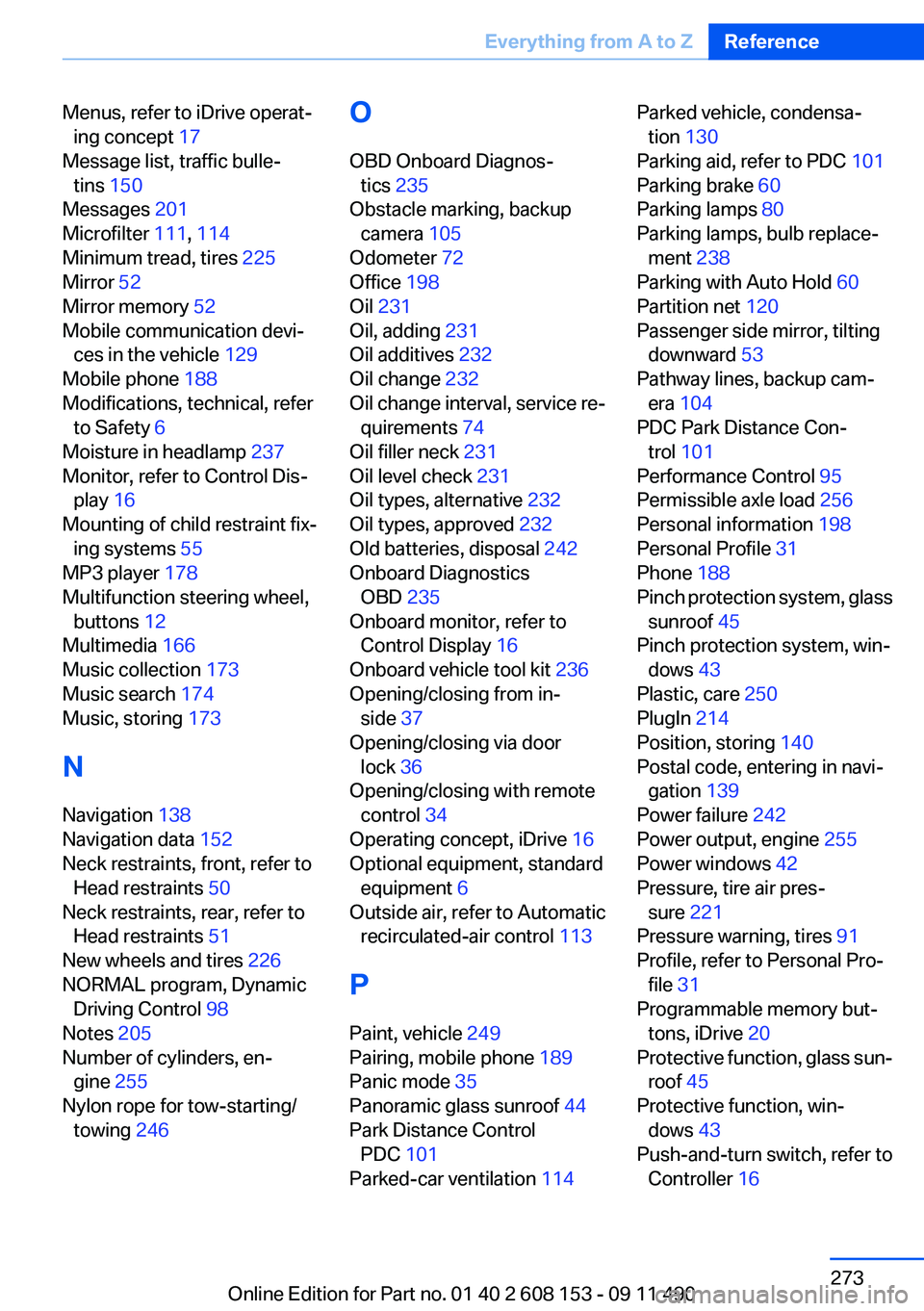
Menus, refer to iDrive operat‐ing concept 17
Message list, traffic bulle‐ tins 150
Messages 201
Microfilter 111, 114
Minimum tread, tires 225
Mirror 52
Mirror memory 52
Mobile communication devi‐ ces in the vehicle 129
Mobile phone 188
Modifications, technical, refer to Safety 6
Moisture in headlamp 237
Monitor, refer to Control Dis‐ play 16
Mounting of child restraint fix‐ ing systems 55
MP3 player 178
Multifunction steering wheel, buttons 12
Multimedia 166
Music collection 173
Music search 174
Music, storing 173
N
Navigation 138
Navigation data 152
Neck restraints, front, refer to Head restraints 50
Neck restraints, rear, refer to Head restraints 51
New wheels and tires 226
NORMAL program, Dynamic Driving Control 98
Notes 205
Number of cylinders, en‐ gine 255
Nylon rope for tow-starting/ towing 246 O
OBD Onboard Diagnos‐ tics 235
Obstacle marking, backup camera 105
Odometer 72
Office 198
Oil 231
Oil, adding 231
Oil additives 232
Oil change 232
Oil change interval, service re‐ quirements 74
Oil filler neck 231
Oil level check 231
Oil types, alternative 232
Oil types, approved 232
Old batteries, disposal 242
Onboard Diagnostics OBD 235
Onboard monitor, refer to Control Display 16
Onboard vehicle tool kit 236
Opening/closing from in‐ side 37
Opening/closing via door lock 36
Opening/closing with remote control 34
Operating concept, iDrive 16
Optional equipment, standard equipment 6
Outside air, refer to Automatic recirculated-air control 113
P
Paint, vehicle 249
Pairing, mobile phone 189
Panic mode 35
Panoramic glass sunroof 44
Park Distance Control PDC 101
Parked-car ventilation 114 Parked vehicle, condensa‐
tion 130
Parking aid, refer to PDC 101
Parking brake 60
Parking lamps 80
Parking lamps, bulb replace‐ ment 238
Parking with Auto Hold 60
Partition net 120
Passenger side mirror, tilting downward 53
Pathway lines, backup cam‐ era 104
PDC Park Distance Con‐ trol 101
Performance Control 95
Permissible axle load 256
Personal information 198
Personal Profile 31
Phone 188
Pinch protection system, glass sunroof 45
Pinch protection system, win‐ dows 43
Plastic, care 250
PlugIn 214
Position, storing 140
Postal code, entering in navi‐ gation 139
Power failure 242
Power output, engine 255
Power windows 42
Pressure, tire air pres‐ sure 221
Pressure warning, tires 91
Profile, refer to Personal Pro‐ file 31
Programmable memory but‐ tons, iDrive 20
Protective function, glass sun‐ roof 45
Protective function, win‐ dows 43
Push-and-turn switch, refer to Controller 16 Seite 273Everything from A to ZReference273
Online Edition for Part no. 01 40 2 608 153 - 09 11 490
Page 275 of 278
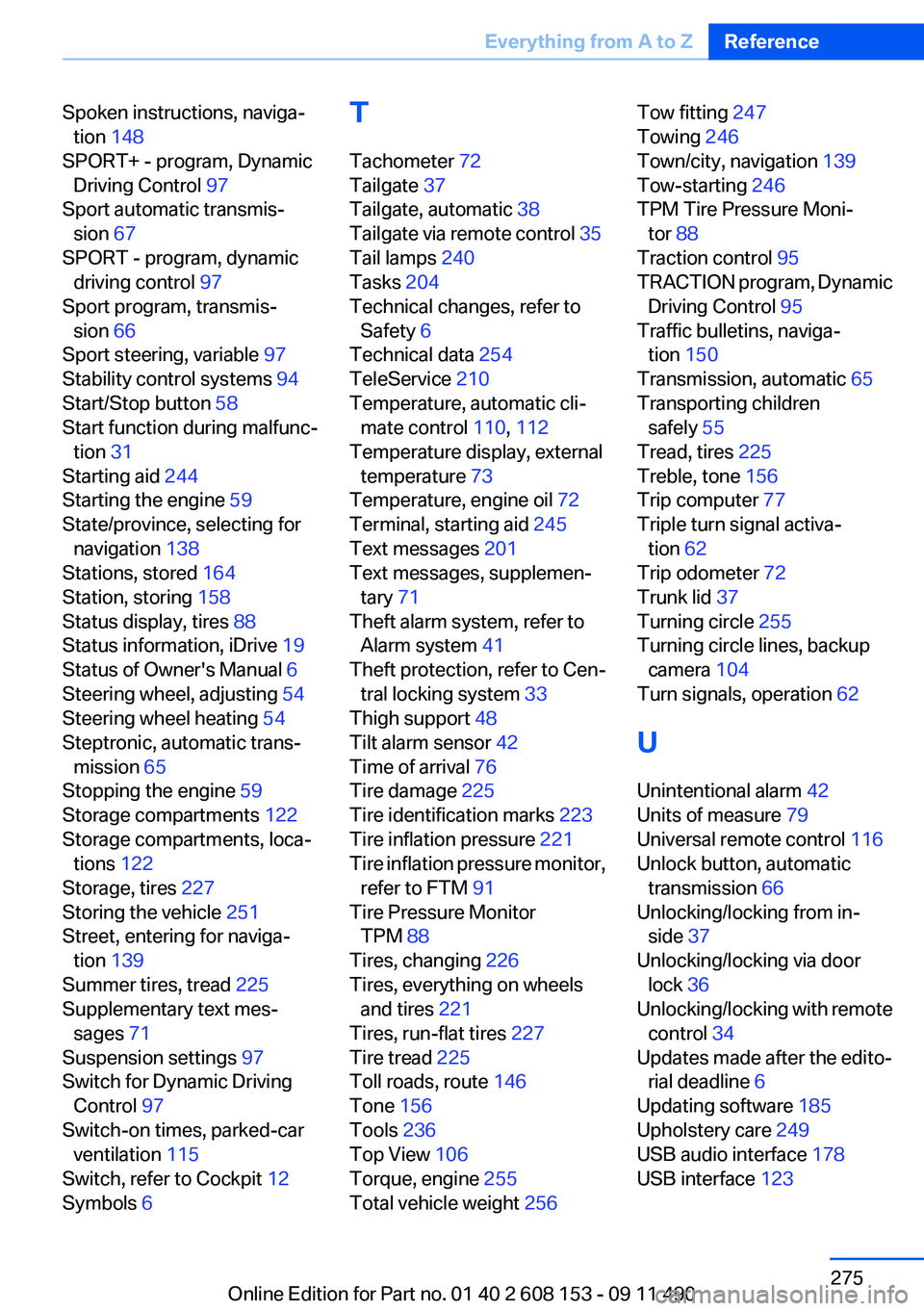
Spoken instructions, naviga‐tion 148
SPORT+ - program, Dynamic Driving Control 97
Sport automatic transmis‐ sion 67
SPORT - program, dynamic driving control 97
Sport program, transmis‐ sion 66
Sport steering, variable 97
Stability control systems 94
Start/Stop button 58
Start function during malfunc‐ tion 31
Starting aid 244
Starting the engine 59
State/province, selecting for navigation 138
Stations, stored 164
Station, storing 158
Status display, tires 88
Status information, iDrive 19
Status of Owner's Manual 6
Steering wheel, adjusting 54
Steering wheel heating 54
Steptronic, automatic trans‐ mission 65
Stopping the engine 59
Storage compartments 122
Storage compartments, loca‐ tions 122
Storage, tires 227
Storing the vehicle 251
Street, entering for naviga‐ tion 139
Summer tires, tread 225
Supplementary text mes‐ sages 71
Suspension settings 97
Switch for Dynamic Driving Control 97
Switch-on times, parked-car ventilation 115
Switch, refer to Cockpit 12
Symbols 6 T
Tachometer 72
Tailgate 37
Tailgate, automatic 38
Tailgate via remote control 35
Tail lamps 240
Tasks 204
Technical changes, refer to Safety 6
Technical data 254
TeleService 210
Temperature, automatic cli‐ mate control 110, 112
Temperature display, external temperature 73
Temperature, engine oil 72
Terminal, starting aid 245
Text messages 201
Text messages, supplemen‐ tary 71
Theft alarm system, refer to Alarm system 41
Theft protection, refer to Cen‐ tral locking system 33
Thigh support 48
Tilt alarm sensor 42
Time of arrival 76
Tire damage 225
Tire identification marks 223
Tire inflation pressure 221
Tire inflation pressure monitor, refer to FTM 91
Tire Pressure Monitor TPM 88
Tires, changing 226
Tires, everything on wheels and tires 221
Tires, run-flat tires 227
Tire tread 225
Toll roads, route 146
Tone 156
Tools 236
Top View 106
Torque, engine 255
Total vehicle weight 256 Tow fitting 247
Towing 246
Town/city, navigation 139
Tow-starting 246
TPM Tire Pressure Moni‐ tor 88
Traction control 95
TRACTION program, Dynamic Driving Control 95
Traffic bulletins, naviga‐ tion 150
Transmission, automatic 65
Transporting children safely 55
Tread, tires 225
Treble, tone 156
Trip computer 77
Triple turn signal activa‐ tion 62
Trip odometer 72
Trunk lid 37
Turning circle 255
Turning circle lines, backup camera 104
Turn signals, operation 62
U
Unintentional alarm 42
Units of measure 79
Universal remote control 116
Unlock button, automatic transmission 66
Unlocking/locking from in‐ side 37
Unlocking/locking via door lock 36
Unlocking/locking with remote control 34
Updates made after the edito‐ rial deadline 6
Updating software 185
Upholstery care 249
USB audio interface 178
USB interface 123 Seite 275Everything from A to ZReference275
Online Edition for Part no. 01 40 2 608 153 - 09 11 490