roof BMW X3 2012 User Guide
[x] Cancel search | Manufacturer: BMW, Model Year: 2012, Model line: X3, Model: BMW X3 2012Pages: 278, PDF Size: 10.15 MB
Page 128 of 278
Things to remember when drivingVehicle equipment
All standard, country-specific and optional
equipment that is offered in the model series is
described in this chapter. Therefore, equipment
is also described that is not available in a vehicle,
e. g., because of the selected optional equip‐
ment or country variant. This also applies for
safety-related functions and systems.
Breaking-in period
General information
Moving parts need to be broken in to adjust to
each other.
The following instructions will help achieve a
long vehicle life and good economy.
Engine and differential
Always obey the official speed limit.
Up to 1,200 miles/2,000 km
Do not exceed the maximum engine and road
speed:▷For gasoline engine, 4,500 rpm and
100 mph/160 km/h.
Avoid full-throttle operation and use of the
transmission's kickdown mode for the initial
miles.
From 1,200 miles/2,000 km
The engine and vehicle speed can gradually be
increased.
Tires
Due to technical factors associated with their
manufacture, tires do not achieve their full trac‐
tion potential until after an initial breaking-in pe‐
riod.
Drive conservatively for the first 200 miles/
300 km.
Brake system
Brakes require an initial break-in period of ap‐
prox. 300 miles/500 km to achieve optimized
contact and wear patterns between brake pads
and discs. Drive moderately during this break-in
period.
Following part replacement
The same breaking in procedures should be ob‐
served if any of the components mentioned
above have to be renewed in the course of the
vehicle's operating life.
General driving notes
Closing the tailgate Drive with the tailgate closed
Only drive with the tailgate closed; other‐
wise, in the event of an accident or braking or
evasive maneuvers, passengers or other road
users may be injured or the vehicle may be dam‐
aged. In addition, exhaust fumes may enter the
passenger compartment.◀
If driving with the tailgate open cannot be
avoided:▷Close all windows and the glass sunroof.▷Greatly increase the blower speed.▷Drive moderately.
Hot exhaust system
Hot exhaust system
High temperatures are generated in the
exhaust system.
Seite 128Driving tipsThings to remember when driving128
Online Edition for Part no. 01 40 2 608 153 - 09 11 490
Page 130 of 278
In this way braking efficiency will be available
when you need it.
Hills
Drive long or steep downhill gradients in the gear
in which the least braking is required. Otherwise,
the brake system may overheat, resulting in a
reduction in the brake system efficiency.
Manual transmission:
You can increase the engine's braking effect by
shifting down, going all the way to first gear, if
necessary.
Automatic transmission:
You can increase the engine's braking effect by
shifting down in the manual mode of the auto‐
matic transmission, refer to page 65.
Avoid load on the brakes
Avoid placing excessive load on the brake
system. Light but consistent brake pressure can
lead to high temperatures, brake wear and pos‐
sibly even brake failure.◀
Do not drive in neutral
Do not drive in neutral or with the engine
stopped, as doing so disables engine braking. In
addition, steering and brake assist is unavailable
with the engine stopped.◀
Brake disc corrosion
Corrosion on the brake discs and contamination
on the brake pads are furthered by:▷Low mileage.▷Extended periods when the vehicle is not
used at all.▷Infrequent use of the brakes.
Corrosion occurs when the minimum pressure
that must be exerted by the pads during brake
applications to clean the discs is not reached.
Should corrosion form on the brake discs, the
brakes will tend to respond with a pulsating ef‐
fect that generally cannot be corrected.
Condensation under the parked vehicle
When using the automatic climate control, con‐
densation water develops that exits underneath
the vehicle.
Therefore, traces of condensed water under the
vehicle are normal.
Roof-mounted luggage rack
Note
Installation only possible with roof rack.
Roof racks are available as special accessories.
Attachment to the rack
Follow the installation instructions of the roof
rack.
Mounting
Be sure that adequate clearance is maintained
for tilting and opening the glass sunroof.
Loading
Because roof racks raise the vehicle's center of
gravity when loaded, they have a major effect on
vehicle handling and steering response.
Therefore, note the following when loading and
driving:▷Do not exceed the approved roof/axle loads
and the approved gross vehicle weight.▷Distribute the roof load uniformly.▷The roof load should not be too large in area.▷Always place the heaviest pieces on the bot‐
tom.▷Secure the roof luggage firmly, e.g., tie with
ratchet straps.▷Do not let objects project into the opening
path of the tailgate.▷Drive smoothly. Avoid sudden acceleration
and braking maneuvers. Take corners gen‐
tly.Seite 130Driving tipsThings to remember when driving130
Online Edition for Part no. 01 40 2 608 153 - 09 11 490
Page 134 of 278
Saving fuelVehicle equipment
All standard, country-specific and optional
equipment that is offered in the model series is
described in this chapter. Therefore, equipment
is also described that is not available in a vehicle,
e. g., because of the selected optional equip‐
ment or country variant. This also applies for
safety-related functions and systems.
General information
Your vehicle contains advanced technology for
the reduction of fuel consumption and emis‐
sions.
Fuel consumption depends on a number of dif‐
ferent factors.
The implementation of certain measures, driv‐
ing style and regular maintenance can have an
influence on fuel consumption and on the envi‐
ronmental impact.
Remove unnecessary cargo
Additional weight increases fuel consumption.
Remove attached parts
following use
Remove auxiliary mirrors, roof or rear luggage
racks which are no longer required following
use.
Attached parts on the vehicle impair the aero‐
dynamics and increase the fuel consumption.Close the windows and glass
sunroof
Driving with the glass sunroof and windows
open results in increased air resistance and
raises fuel consumption.
Check the tire inflation
pressure regularly
Check and, if necessary, correct the tire inflation
pressure at least twice a month and before start‐
ing on a long trip.
Low tire inflation pressure increases rolling re‐
sistance and thus raises fuel consumption and
tire wear.
Drive away without delay
Do not wait for the engine to warm up while the
vehicle remains stationary. Start driving right
away, but at moderate engine speeds.
This is the fastest way for the cold engine to
reach its operating temperature.
Look well ahead when driving
Avoid unnecessary acceleration and braking.
By maintaining a suitable distance to the vehicle
driving ahead of you.
Driving smoothly and looking ahead reduces
fuel consumption.
Use coasting conditions
When approaching a red light, take your foot off
the accelerator and let the vehicle coast to a halt.
On a downhill gradient, take your foot off the ac‐
celerator and let the vehicle roll.Seite 134Driving tipsSaving fuel134
Online Edition for Part no. 01 40 2 608 153 - 09 11 490
Page 234 of 278
MaintenanceVehicle equipment
All standard, country-specific and optional
equipment that is offered in the model series is
described in this chapter. Therefore, equipment
is also described that is not available in a vehicle,
e. g., because of the selected optional equip‐
ment or country variant. This also applies for
safety-related functions and systems.
BMW Maintenance System
The maintenance system directs you to re‐
quired maintenance measures and thereby sup‐
ports you in maintaining road safety and the op‐
erational reliability of the vehicle.
Condition Based Service CBS
Sensors and special algorithms take into ac‐
count the driving conditions of your vehicle.
Based on this, Condition Based Service deter‐
mines the maintenance requirements.
The system makes it possible to adapt the
amount of maintenance you need to your user
profile.
Detailed information on service requirements,
refer to page 74, can be displayed on the Control
Display.
Service data in the remote control
Information on the required maintenance is con‐
tinuously stored in the remote control. Your
service center will read out this data and suggest
the right array of service procedures for your ve‐
hicle.
Therefore, hand your service specialist the re‐
mote control that you used most recently.Storage periods
Storage periods during which the vehicle bat‐
tery was disconnected are not taken into ac‐
count.
If this occurs, have a service center update the
time-dependent maintenance procedures,
such as checking brake fluid and, if necessary,
changing the engine oil and the microfilter/acti‐
vated-charcoal filter.
Service and Warranty
Information Booklet for US
models and Warranty and
Service Guide Booklet for
Canadian models
Please consult your Service and Warranty Infor‐
mation Booklet for US models and Warranty and
Service Guide Booklet for Canadian models for
additional information on service requirements.
Maintenance and repair should be performed by
your service center. Make sure to have regular
maintenance procedures recorded in the vehi‐
cle's Service and Warranty Information Booklet
for US models, and in the Warranty and Service
Guide Booklet for Canadian models. These en‐
tries are proof of regular maintenance.Seite 234MobilityMaintenance234
Online Edition for Part no. 01 40 2 608 153 - 09 11 490
Page 256 of 278
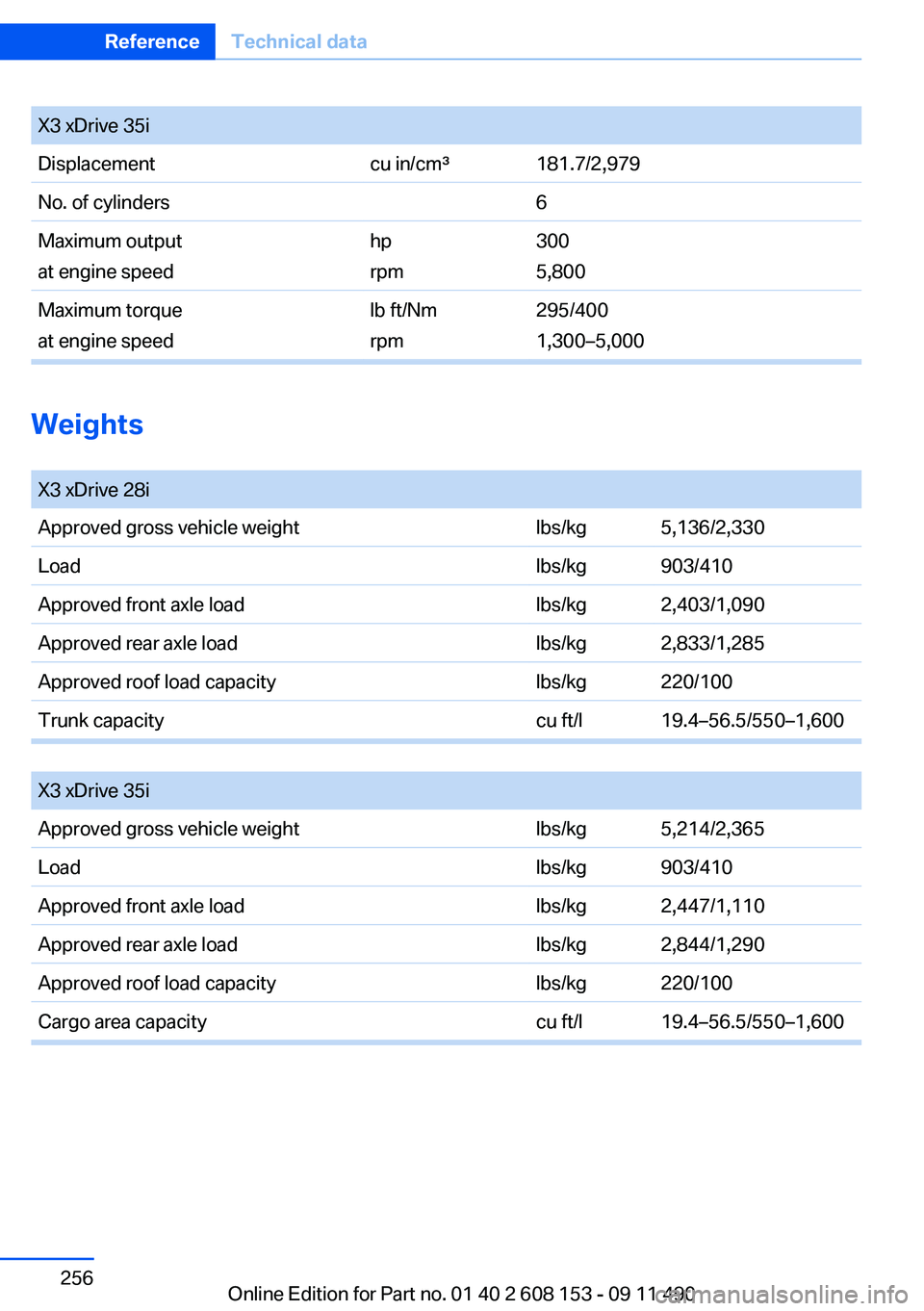
X3 xDrive 35iDisplacementcu in/cm³181.7/2,979No. of cylinders6Maximum output
at engine speedhp
rpm300
5,800Maximum torque
at engine speedlb ft/Nm
rpm295/400
1,300–5,000
Weights
X3 xDrive 28iApproved gross vehicle weightlbs/kg5,136/2,330Loadlbs/kg903/410Approved front axle loadlbs/kg2,403/1,090Approved rear axle loadlbs/kg2,833/1,285Approved roof load capacitylbs/kg220/100Trunk capacitycu ft/l19.4–56.5/550–1,600
X3 xDrive 35iApproved gross vehicle weightlbs/kg5,214/2,365Loadlbs/kg903/410Approved front axle loadlbs/kg2,447/1,110Approved rear axle loadlbs/kg2,844/1,290Approved roof load capacitylbs/kg220/100Cargo area capacitycu ft/l19.4–56.5/550–1,600Seite 256ReferenceTechnical data256
Online Edition for Part no. 01 40 2 608 153 - 09 11 490
Page 271 of 278
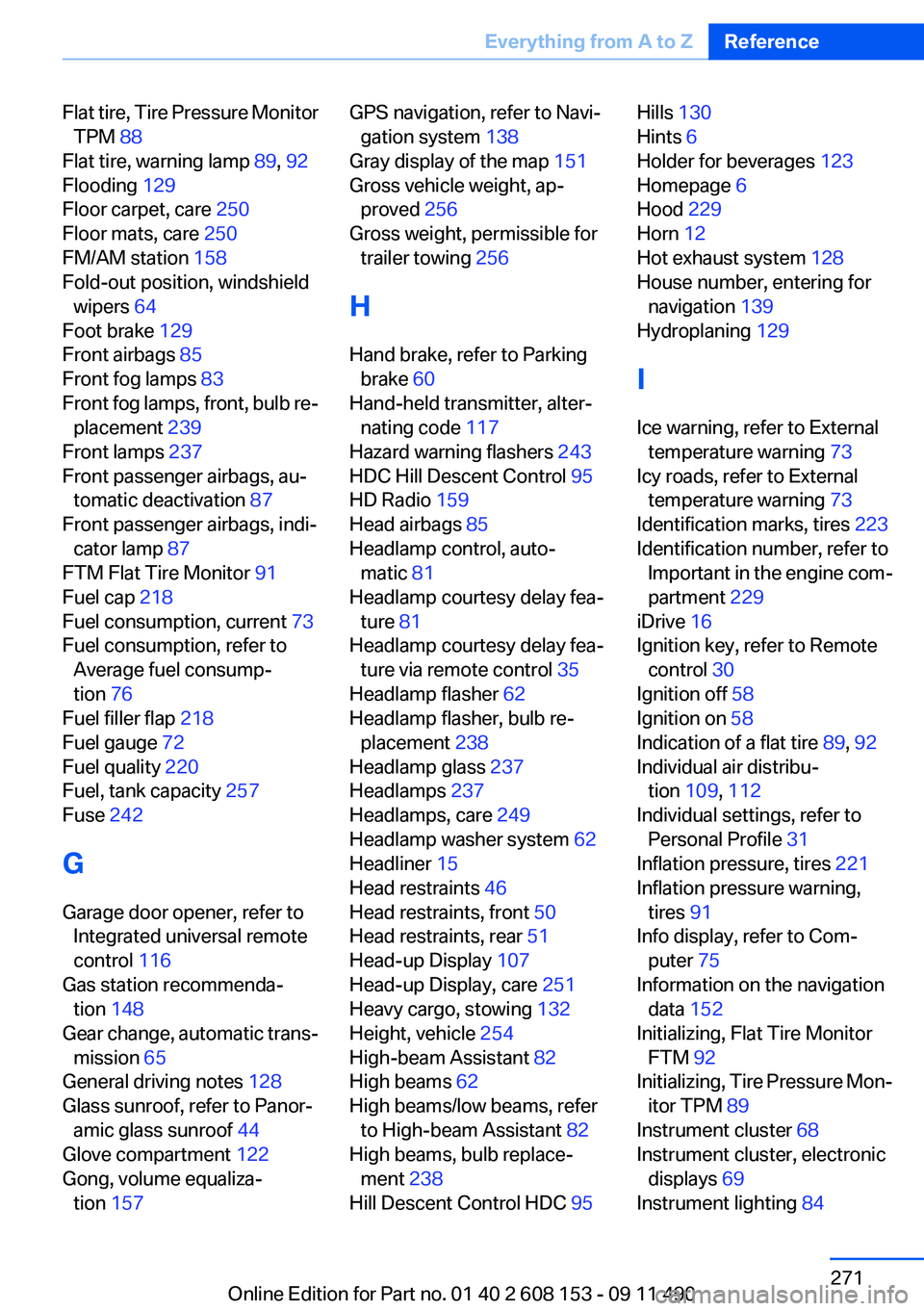
Flat tire, Tire Pressure MonitorTPM 88
Flat tire, warning lamp 89, 92
Flooding 129
Floor carpet, care 250
Floor mats, care 250
FM/AM station 158
Fold-out position, windshield wipers 64
Foot brake 129
Front airbags 85
Front fog lamps 83
Front fog lamps, front, bulb re‐ placement 239
Front lamps 237
Front passenger airbags, au‐ tomatic deactivation 87
Front passenger airbags, indi‐ cator lamp 87
FTM Flat Tire Monitor 91
Fuel cap 218
Fuel consumption, current 73
Fuel consumption, refer to Average fuel consump‐
tion 76
Fuel filler flap 218
Fuel gauge 72
Fuel quality 220
Fuel, tank capacity 257
Fuse 242
G
Garage door opener, refer to Integrated universal remote
control 116
Gas station recommenda‐ tion 148
Gear change, automatic trans‐ mission 65
General driving notes 128
Glass sunroof, refer to Panor‐ amic glass sunroof 44
Glove compartment 122
Gong, volume equaliza‐ tion 157 GPS navigation, refer to Navi‐
gation system 138
Gray display of the map 151
Gross vehicle weight, ap‐ proved 256
Gross weight, permissible for trailer towing 256
H
Hand brake, refer to Parking brake 60
Hand-held transmitter, alter‐ nating code 117
Hazard warning flashers 243
HDC Hill Descent Control 95
HD Radio 159
Head airbags 85
Headlamp control, auto‐ matic 81
Headlamp courtesy delay fea‐ ture 81
Headlamp courtesy delay fea‐ ture via remote control 35
Headlamp flasher 62
Headlamp flasher, bulb re‐ placement 238
Headlamp glass 237
Headlamps 237
Headlamps, care 249
Headlamp washer system 62
Headliner 15
Head restraints 46
Head restraints, front 50
Head restraints, rear 51
Head-up Display 107
Head-up Display, care 251
Heavy cargo, stowing 132
Height, vehicle 254
High-beam Assistant 82
High beams 62
High beams/low beams, refer to High-beam Assistant 82
High beams, bulb replace‐ ment 238
Hill Descent Control HDC 95 Hills 130
Hints 6
Holder for beverages 123
Homepage 6
Hood 229
Horn 12
Hot exhaust system 128
House number, entering for navigation 139
Hydroplaning 129
I
Ice warning, refer to External temperature warning 73
Icy roads, refer to External temperature warning 73
Identification marks, tires 223
Identification number, refer to Important in the engine com‐
partment 229
iDrive 16
Ignition key, refer to Remote control 30
Ignition off 58
Ignition on 58
Indication of a flat tire 89, 92
Individual air distribu‐ tion 109, 112
Individual settings, refer to Personal Profile 31
Inflation pressure, tires 221
Inflation pressure warning, tires 91
Info display, refer to Com‐ puter 75
Information on the navigation data 152
Initializing, Flat Tire Monitor FTM 92
Initializing, Tire Pressure Mon‐ itor TPM 89
Instrument cluster 68
Instrument cluster, electronic displays 69
Instrument lighting 84 Seite 271Everything from A to ZReference271
Online Edition for Part no. 01 40 2 608 153 - 09 11 490
Page 272 of 278
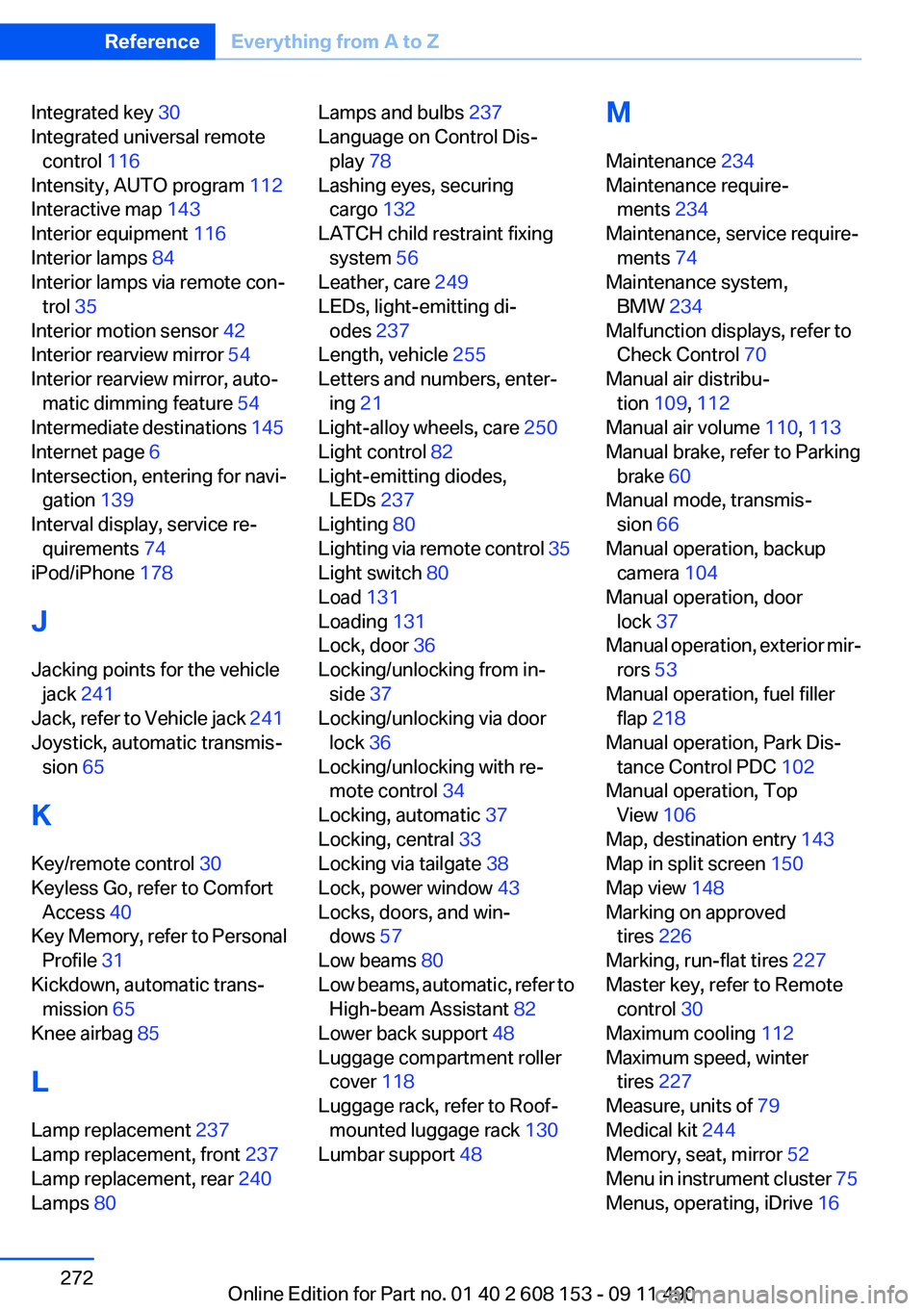
Integrated key 30
Integrated universal remote control 116
Intensity, AUTO program 112
Interactive map 143
Interior equipment 116
Interior lamps 84
Interior lamps via remote con‐ trol 35
Interior motion sensor 42
Interior rearview mirror 54
Interior rearview mirror, auto‐ matic dimming feature 54
Intermediate destinations 145
Internet page 6
Intersection, entering for navi‐ gation 139
Interval display, service re‐ quirements 74
iPod/iPhone 178
J
Jacking points for the vehicle jack 241
Jack, refer to Vehicle jack 241
Joystick, automatic transmis‐ sion 65
K
Key/remote control 30
Keyless Go, refer to Comfort Access 40
Key Memory, refer to Personal Profile 31
Kickdown, automatic trans‐ mission 65
Knee airbag 85
L
Lamp replacement 237
Lamp replacement, front 237
Lamp replacement, rear 240
Lamps 80 Lamps and bulbs 237
Language on Control Dis‐ play 78
Lashing eyes, securing cargo 132
LATCH child restraint fixing system 56
Leather, care 249
LEDs, light-emitting di‐ odes 237
Length, vehicle 255
Letters and numbers, enter‐ ing 21
Light-alloy wheels, care 250
Light control 82
Light-emitting diodes, LEDs 237
Lighting 80
Lighting via remote control 35
Light switch 80
Load 131
Loading 131
Lock, door 36
Locking/unlocking from in‐ side 37
Locking/unlocking via door lock 36
Locking/unlocking with re‐ mote control 34
Locking, automatic 37
Locking, central 33
Locking via tailgate 38
Lock, power window 43
Locks, doors, and win‐ dows 57
Low beams 80
Low beams, automatic, refer to High-beam Assistant 82
Lower back support 48
Luggage compartment roller cover 118
Luggage rack, refer to Roof- mounted luggage rack 130
Lumbar support 48 M
Maintenance 234
Maintenance require‐ ments 234
Maintenance, service require‐ ments 74
Maintenance system, BMW 234
Malfunction displays, refer to Check Control 70
Manual air distribu‐ tion 109, 112
Manual air volume 110, 113
Manual brake, refer to Parking brake 60
Manual mode, transmis‐ sion 66
Manual operation, backup camera 104
Manual operation, door lock 37
Manual operation, exterior mir‐ rors 53
Manual operation, fuel filler flap 218
Manual operation, Park Dis‐ tance Control PDC 102
Manual operation, Top View 106
Map, destination entry 143
Map in split screen 150
Map view 148
Marking on approved tires 226
Marking, run-flat tires 227
Master key, refer to Remote control 30
Maximum cooling 112
Maximum speed, winter tires 227
Measure, units of 79
Medical kit 244
Memory, seat, mirror 52
Menu in instrument cluster 75
Menus, operating, iDrive 16 Seite 272ReferenceEverything from A to Z272
Online Edition for Part no. 01 40 2 608 153 - 09 11 490
Page 273 of 278
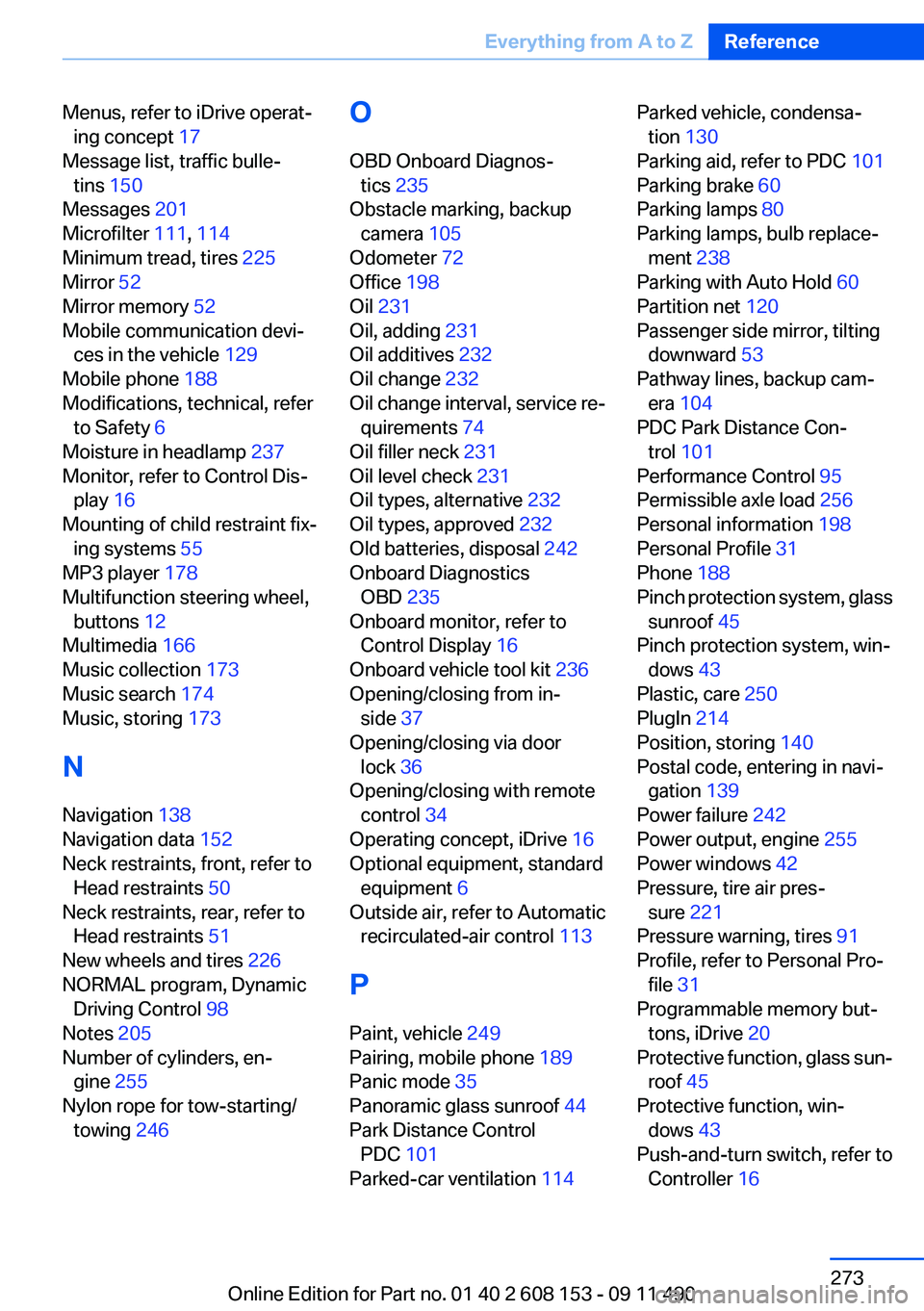
Menus, refer to iDrive operat‐ing concept 17
Message list, traffic bulle‐ tins 150
Messages 201
Microfilter 111, 114
Minimum tread, tires 225
Mirror 52
Mirror memory 52
Mobile communication devi‐ ces in the vehicle 129
Mobile phone 188
Modifications, technical, refer to Safety 6
Moisture in headlamp 237
Monitor, refer to Control Dis‐ play 16
Mounting of child restraint fix‐ ing systems 55
MP3 player 178
Multifunction steering wheel, buttons 12
Multimedia 166
Music collection 173
Music search 174
Music, storing 173
N
Navigation 138
Navigation data 152
Neck restraints, front, refer to Head restraints 50
Neck restraints, rear, refer to Head restraints 51
New wheels and tires 226
NORMAL program, Dynamic Driving Control 98
Notes 205
Number of cylinders, en‐ gine 255
Nylon rope for tow-starting/ towing 246 O
OBD Onboard Diagnos‐ tics 235
Obstacle marking, backup camera 105
Odometer 72
Office 198
Oil 231
Oil, adding 231
Oil additives 232
Oil change 232
Oil change interval, service re‐ quirements 74
Oil filler neck 231
Oil level check 231
Oil types, alternative 232
Oil types, approved 232
Old batteries, disposal 242
Onboard Diagnostics OBD 235
Onboard monitor, refer to Control Display 16
Onboard vehicle tool kit 236
Opening/closing from in‐ side 37
Opening/closing via door lock 36
Opening/closing with remote control 34
Operating concept, iDrive 16
Optional equipment, standard equipment 6
Outside air, refer to Automatic recirculated-air control 113
P
Paint, vehicle 249
Pairing, mobile phone 189
Panic mode 35
Panoramic glass sunroof 44
Park Distance Control PDC 101
Parked-car ventilation 114 Parked vehicle, condensa‐
tion 130
Parking aid, refer to PDC 101
Parking brake 60
Parking lamps 80
Parking lamps, bulb replace‐ ment 238
Parking with Auto Hold 60
Partition net 120
Passenger side mirror, tilting downward 53
Pathway lines, backup cam‐ era 104
PDC Park Distance Con‐ trol 101
Performance Control 95
Permissible axle load 256
Personal information 198
Personal Profile 31
Phone 188
Pinch protection system, glass sunroof 45
Pinch protection system, win‐ dows 43
Plastic, care 250
PlugIn 214
Position, storing 140
Postal code, entering in navi‐ gation 139
Power failure 242
Power output, engine 255
Power windows 42
Pressure, tire air pres‐ sure 221
Pressure warning, tires 91
Profile, refer to Personal Pro‐ file 31
Programmable memory but‐ tons, iDrive 20
Protective function, glass sun‐ roof 45
Protective function, win‐ dows 43
Push-and-turn switch, refer to Controller 16 Seite 273Everything from A to ZReference273
Online Edition for Part no. 01 40 2 608 153 - 09 11 490
Page 274 of 278
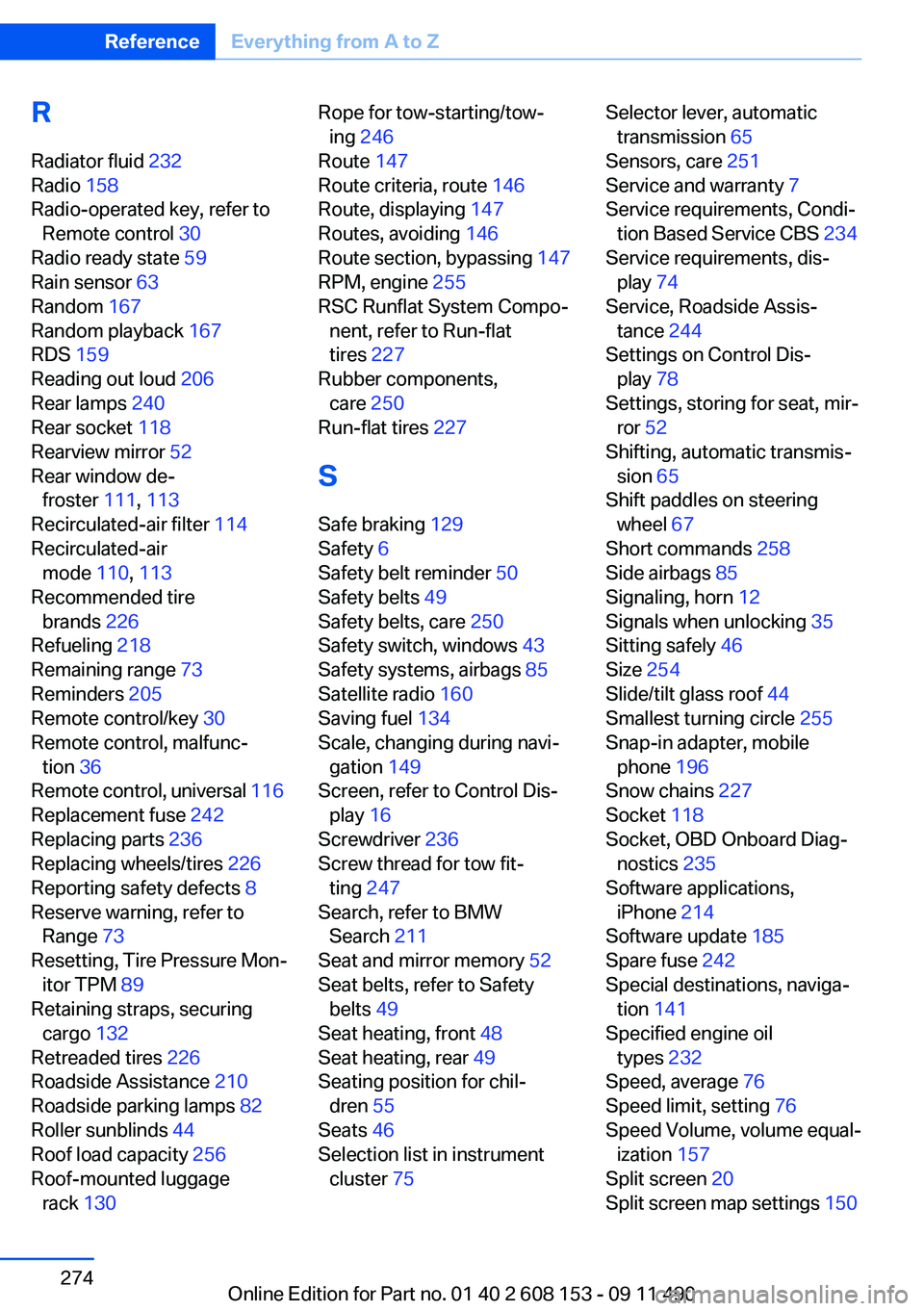
R
Radiator fluid 232
Radio 158
Radio-operated key, refer to Remote control 30
Radio ready state 59
Rain sensor 63
Random 167
Random playback 167
RDS 159
Reading out loud 206
Rear lamps 240
Rear socket 118
Rearview mirror 52
Rear window de‐ froster 111, 113
Recirculated-air filter 114
Recirculated-air mode 110, 113
Recommended tire brands 226
Refueling 218
Remaining range 73
Reminders 205
Remote control/key 30
Remote control, malfunc‐ tion 36
Remote control, universal 116
Replacement fuse 242
Replacing parts 236
Replacing wheels/tires 226
Reporting safety defects 8
Reserve warning, refer to Range 73
Resetting, Tire Pressure Mon‐ itor TPM 89
Retaining straps, securing cargo 132
Retreaded tires 226
Roadside Assistance 210
Roadside parking lamps 82
Roller sunblinds 44
Roof load capacity 256
Roof-mounted luggage rack 130 Rope for tow-starting/tow‐
ing 246
Route 147
Route criteria, route 146
Route, displaying 147
Routes, avoiding 146
Route section, bypassing 147
RPM, engine 255
RSC Runflat System Compo‐ nent, refer to Run-flat
tires 227
Rubber components, care 250
Run-flat tires 227
S
Safe braking 129
Safety 6
Safety belt reminder 50
Safety belts 49
Safety belts, care 250
Safety switch, windows 43
Safety systems, airbags 85
Satellite radio 160
Saving fuel 134
Scale, changing during navi‐ gation 149
Screen, refer to Control Dis‐ play 16
Screwdriver 236
Screw thread for tow fit‐ ting 247
Search, refer to BMW Search 211
Seat and mirror memory 52
Seat belts, refer to Safety belts 49
Seat heating, front 48
Seat heating, rear 49
Seating position for chil‐ dren 55
Seats 46
Selection list in instrument cluster 75 Selector lever, automatic
transmission 65
Sensors, care 251
Service and warranty 7
Service requirements, Condi‐ tion Based Service CBS 234
Service requirements, dis‐ play 74
Service, Roadside Assis‐ tance 244
Settings on Control Dis‐ play 78
Settings, storing for seat, mir‐ ror 52
Shifting, automatic transmis‐ sion 65
Shift paddles on steering wheel 67
Short commands 258
Side airbags 85
Signaling, horn 12
Signals when unlocking 35
Sitting safely 46
Size 254
Slide/tilt glass roof 44
Smallest turning circle 255
Snap-in adapter, mobile phone 196
Snow chains 227
Socket 118
Socket, OBD Onboard Diag‐ nostics 235
Software applications, iPhone 214
Software update 185
Spare fuse 242
Special destinations, naviga‐ tion 141
Specified engine oil types 232
Speed, average 76
Speed limit, setting 76
Speed Volume, volume equal‐ ization 157
Split screen 20
Split screen map settings 150 Seite 274ReferenceEverything from A to Z274
Online Edition for Part no. 01 40 2 608 153 - 09 11 490