tire pressure BMW X3 2012 User Guide
[x] Cancel search | Manufacturer: BMW, Model Year: 2012, Model line: X3, Model: BMW X3 2012Pages: 278, PDF Size: 10.15 MB
Page 221 of 278
Wheels and tiresVehicle equipment
All standard, country-specific and optional
equipment that is offered in the model series is
described in this chapter. Therefore, equipment
is also described that is not available in a vehicle,
e. g., because of the selected optional equip‐
ment or country variant. This also applies for
safety-related functions and systems.
Tire inflation pressure
Safety information
The tire characteristics and tire inflation pres‐
sure influence the following:▷The service life of the tires.▷Road safety.▷Driving comfort.
Checking the pressure
Only check the tire inflation pressure when the
tires are cold. This means after driving no more
than 1.25 miles/2 km or when the vehicle has
been parked for at least 2 hours. When the tires
are warm, the tire inflation pressure is higher.
Check the tire inflation pressure regularly
Regularly check the tire inflation pressure
and correct it as needed: at least twice a month
and before a long trip. If you fail to observe this
precaution, you may be driving on tires with in‐
correct tire pressures, a condition that may not
only compromise your vehicle's driving stability,
but also lead to tire damage and the risk of an
accident.◀
After correcting the tire inflation pressure:
▷Reinitialize the Flat Tire Monitor.▷Reinitialize the Tire Pressure Monitor.Pressure specifications
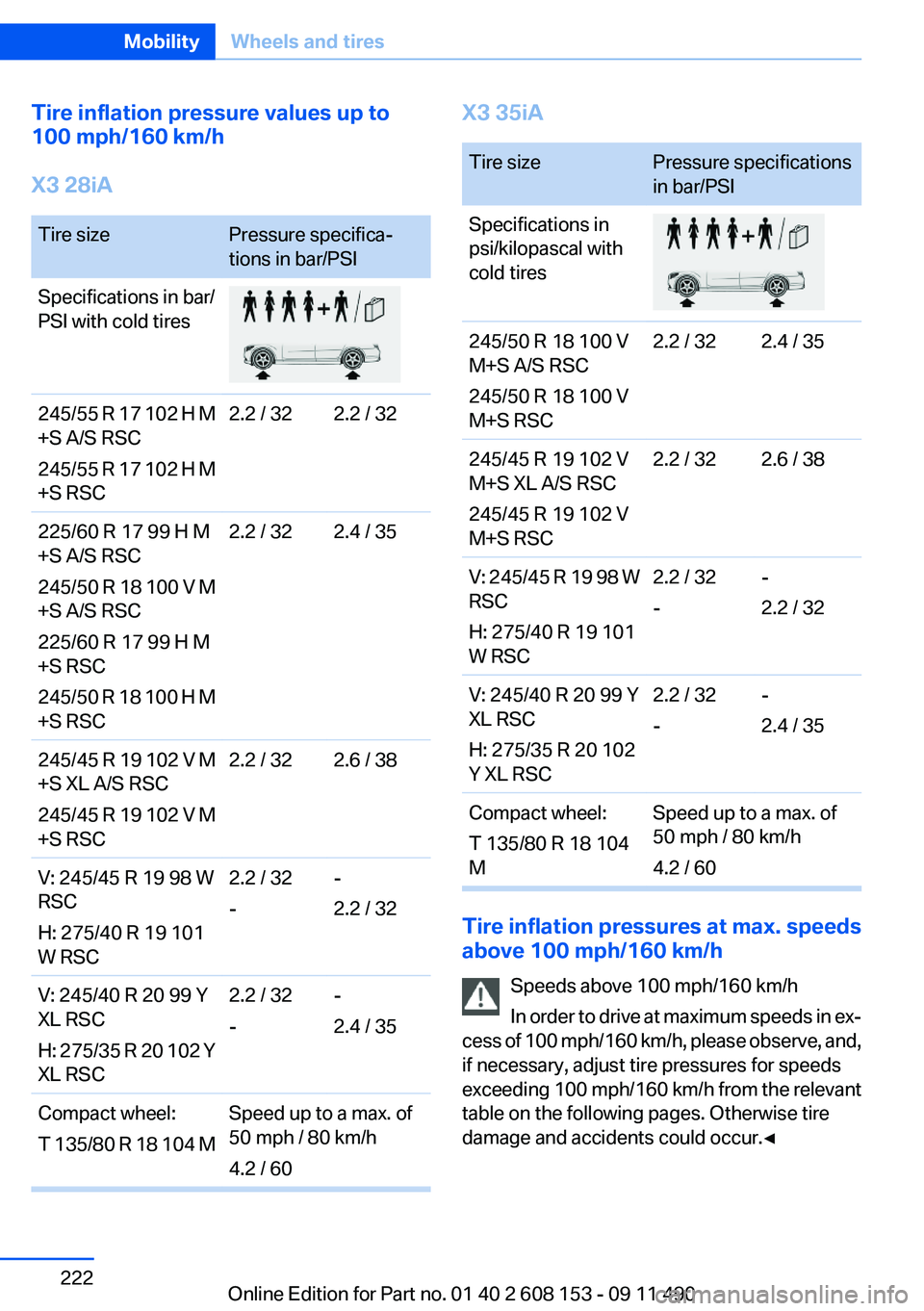
The tire inflation pressure table, refer to
page 222, contains all pressure specifications
for the specified tire sizes at the ambient tem‐
perature. Pressure specifications apply to ap‐
proved tire sizes and recommended tire brands.
This information can be obtained from your
service center.
To identify the correct tire inflation pressure,
please note the following:▷Tire sizes of your vehicle.▷Maximum allowable driving speed.
Tire inflation pressures up to 100 mph/
160 km/h
For speeds of up to 100 mph/160 km/h and for
optimum driving comfort, note the pressure val‐
ues in the tire inflation pressure table, refer to
page 222, and adjust as necessary.
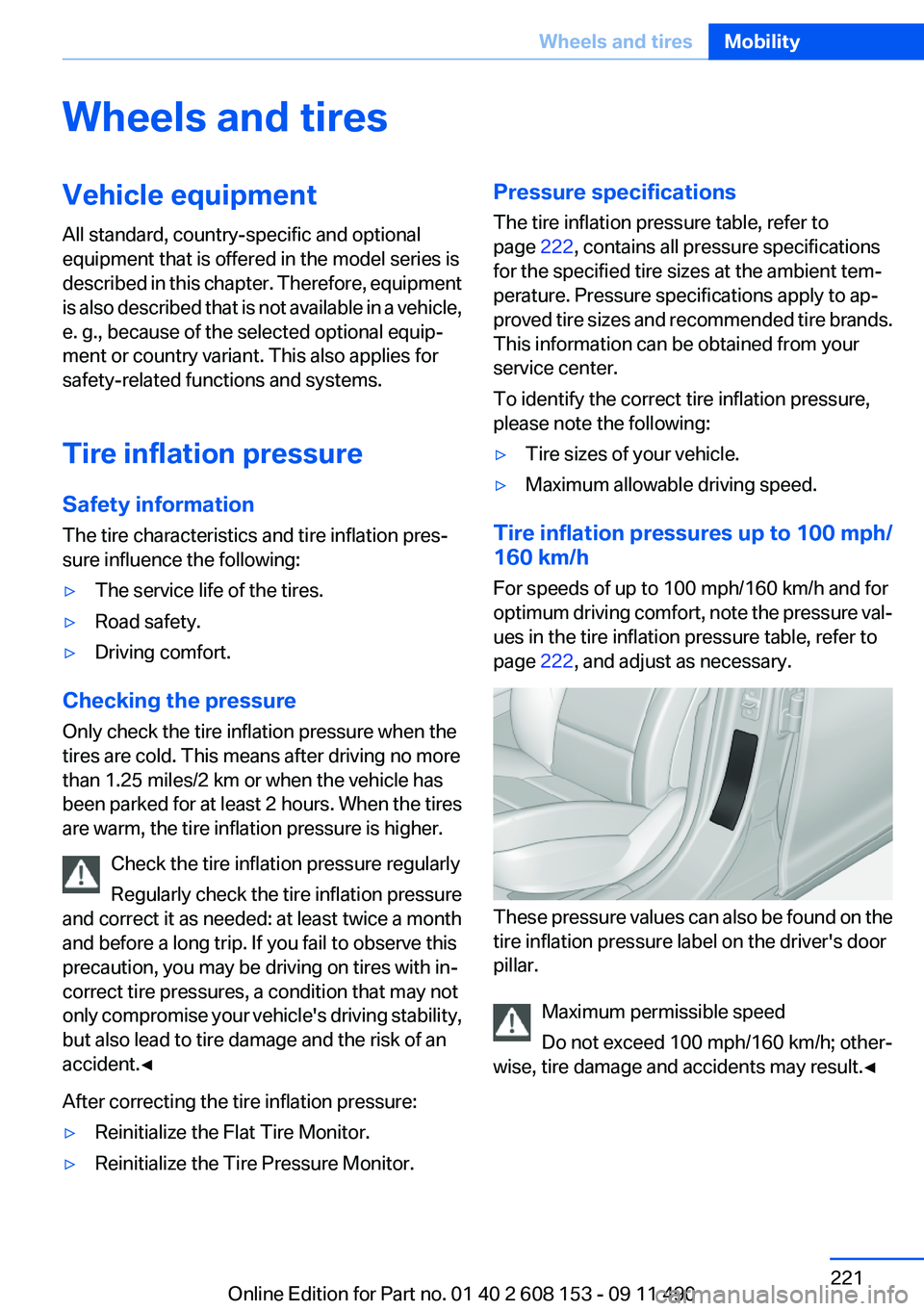
These pressure values can also be found on the
tire inflation pressure label on the driver's door
pillar.
Maximum permissible speed
Do not exceed 100 mph/160 km/h; other‐
wise, tire damage and accidents may result.◀
Seite 221Wheels and tiresMobility221
Online Edition for Part no. 01 40 2 608 153 - 09 11 490
Page 222 of 278
Tire inflation pressure values up to
100 mph/160 km/h
X3 28iATire sizePressure specifica‐
tions in bar/PSISpecifications in bar/
PSI with cold tires245/55 R 17 102 H M
+S A/S RSC
245/55 R 17 102 H M
+S RSC2.2 / 322.2 / 32225/60 R 17 99 H M
+S A/S RSC
245/50 R 18 100 V M
+S A/S RSC
225/60 R 17 99 H M
+S RSC
245/50 R 18 100 H M
+S RSC2.2 / 322.4 / 35245/45 R 19 102 V M
+S XL A/S RSC
245/45 R 19 102 V M
+S RSC2.2 / 322.6 / 38V: 245/45 R 19 98 W
RSC
H: 275/40 R 19 101
W RSC2.2 / 32
--
2.2 / 32V: 245/40 R 20 99 Y
XL RSC
H: 275/35 R 20 102 Y
XL RSC2.2 / 32
--
2.4 / 35Compact wheel:
T 135/80 R 18 104 MSpeed up to a max. of
50 mph / 80 km/h
4.2 / 60X3 35iATire sizePressure specifications
in bar/PSISpecifications in
psi/kilopascal with
cold tires245/50 R 18 100 V
M+S A/S RSC
245/50 R 18 100 V
M+S RSC2.2 / 322.4 / 35245/45 R 19 102 V
M+S XL A/S RSC
245/45 R 19 102 V
M+S RSC2.2 / 322.6 / 38V: 245/45 R 19 98 W
RSC
H: 275/40 R 19 101
W RSC2.2 / 32
--
2.2 / 32V: 245/40 R 20 99 Y
XL RSC
H: 275/35 R 20 102
Y XL RSC2.2 / 32
--
2.4 / 35Compact wheel:
T 135/80 R 18 104
MSpeed up to a max. of
50 mph / 80 km/h
4.2 / 60
Tire inflation pressures at max. speeds
above 100 mph/160 km/h
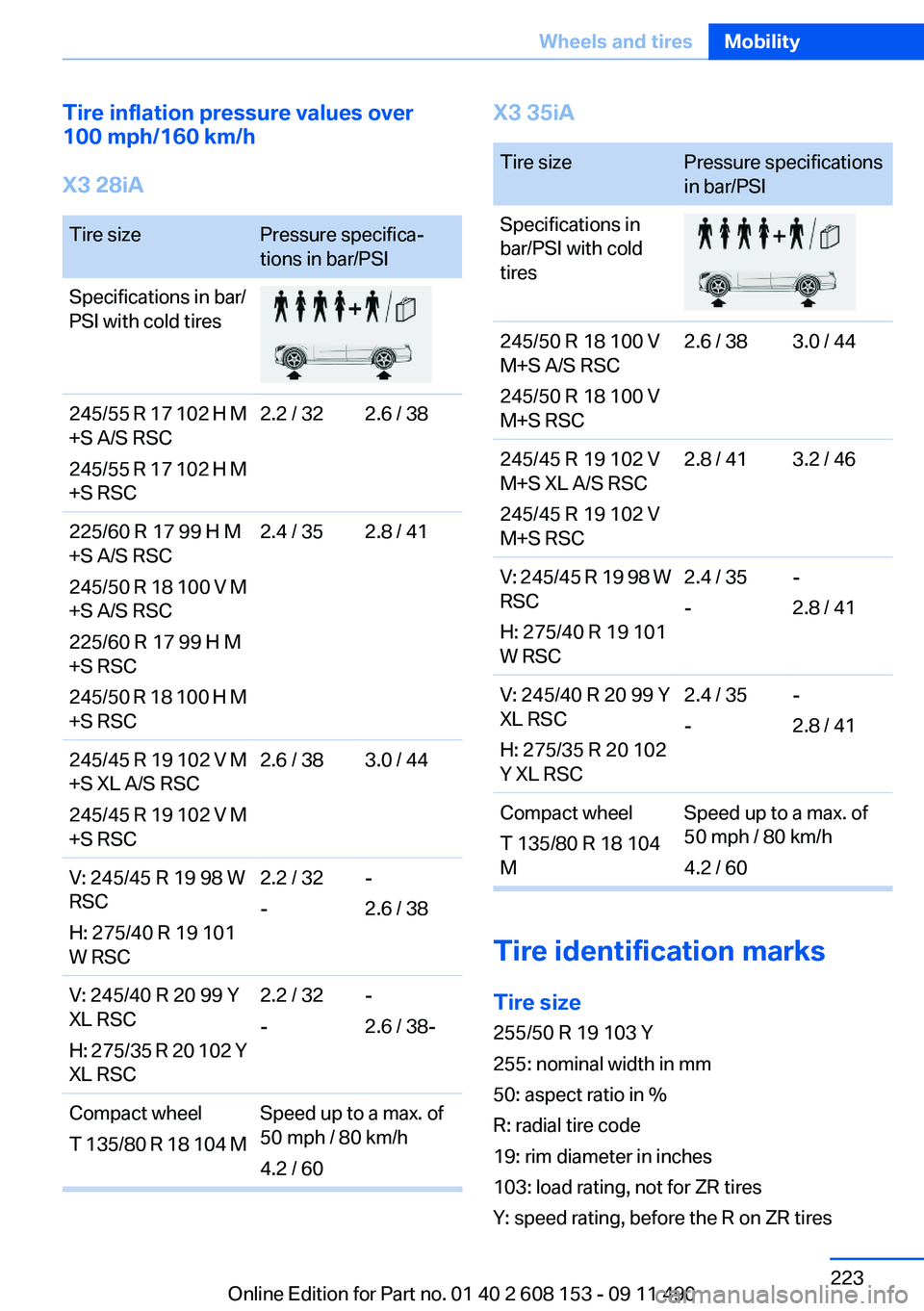
Speeds above 100 mph/160 km/h
In order to drive at maximum speeds in ex‐
cess of 100 mph/160 km/h, please observe, and,
if necessary, adjust tire pressures for speeds
exceeding 100 mph/160 km/h from the relevant
table on the following pages. Otherwise tire
damage and accidents could occur.◀
Seite 222MobilityWheels and tires222
Online Edition for Part no. 01 40 2 608 153 - 09 11 490
Page 223 of 278
Tire inflation pressure values over
100 mph/160 km/h
X3 28iATire sizePressure specifica‐
tions in bar/PSISpecifications in bar/
PSI with cold tires245/55 R 17 102 H M
+S A/S RSC
245/55 R 17 102 H M
+S RSC2.2 / 322.6 / 38225/60 R 17 99 H M
+S A/S RSC
245/50 R 18 100 V M
+S A/S RSC
225/60 R 17 99 H M
+S RSC
245/50 R 18 100 H M
+S RSC2.4 / 352.8 / 41245/45 R 19 102 V M
+S XL A/S RSC
245/45 R 19 102 V M
+S RSC2.6 / 383.0 / 44V: 245/45 R 19 98 W
RSC
H: 275/40 R 19 101
W RSC2.2 / 32
--
2.6 / 38V: 245/40 R 20 99 Y
XL RSC
H: 275/35 R 20 102 Y
XL RSC2.2 / 32
--
2.6 / 38-Compact wheel
T 135/80 R 18 104 MSpeed up to a max. of
50 mph / 80 km/h
4.2 / 60X3 35iATire sizePressure specifications
in bar/PSISpecifications in
bar/PSI with cold
tires245/50 R 18 100 V
M+S A/S RSC
245/50 R 18 100 V
M+S RSC2.6 / 383.0 / 44245/45 R 19 102 V
M+S XL A/S RSC
245/45 R 19 102 V
M+S RSC2.8 / 413.2 / 46V: 245/45 R 19 98 W
RSC
H: 275/40 R 19 101
W RSC2.4 / 35
--
2.8 / 41V: 245/40 R 20 99 Y
XL RSC
H: 275/35 R 20 102
Y XL RSC2.4 / 35
--
2.8 / 41Compact wheel
T 135/80 R 18 104
MSpeed up to a max. of
50 mph / 80 km/h
4.2 / 60
Tire identification marks
Tire size
255/50 R 19 103 Y
255: nominal width in mm
50: aspect ratio in %
R: radial tire code
19: rim diameter in inches
103: load rating, not for ZR tires
Y: speed rating, before the R on ZR tires
Seite 223Wheels and tiresMobility223
Online Edition for Part no. 01 40 2 608 153 - 09 11 490
Page 227 of 278
Maximum speed of winter tires
If the maximum speed of the vehicle is higher
than the permissible speed for the winter tires,
then display a corresponding sign in the field of
vision. You can obtain this sign from the tire spe‐
cialist or from your service center.
Maximum speed for winter tires
Do not exceed the maximum speed for the
winter tires; otherwise, tire damage and acci‐
dents can occur.◀
Run-flat tires
For your own safety, only use run-flat tires. No
spare tire is available in the case of a flat tire. Your
service center will be glad to advise you.
Rotating wheels between axles
The manufacturer of your vehicle advises
against swapping wheels between the front and
rear axles.
This can impair the handling characteristics.
Storage
Store wheels and tires in a cool, dry place with
as little exposure to light as possible.
Always protect tires against all contact with oil,
grease and fuels.
Do not exceed the maximum tire inflation pres‐
sure indicated on the side wall of the tire.Run-flat tires
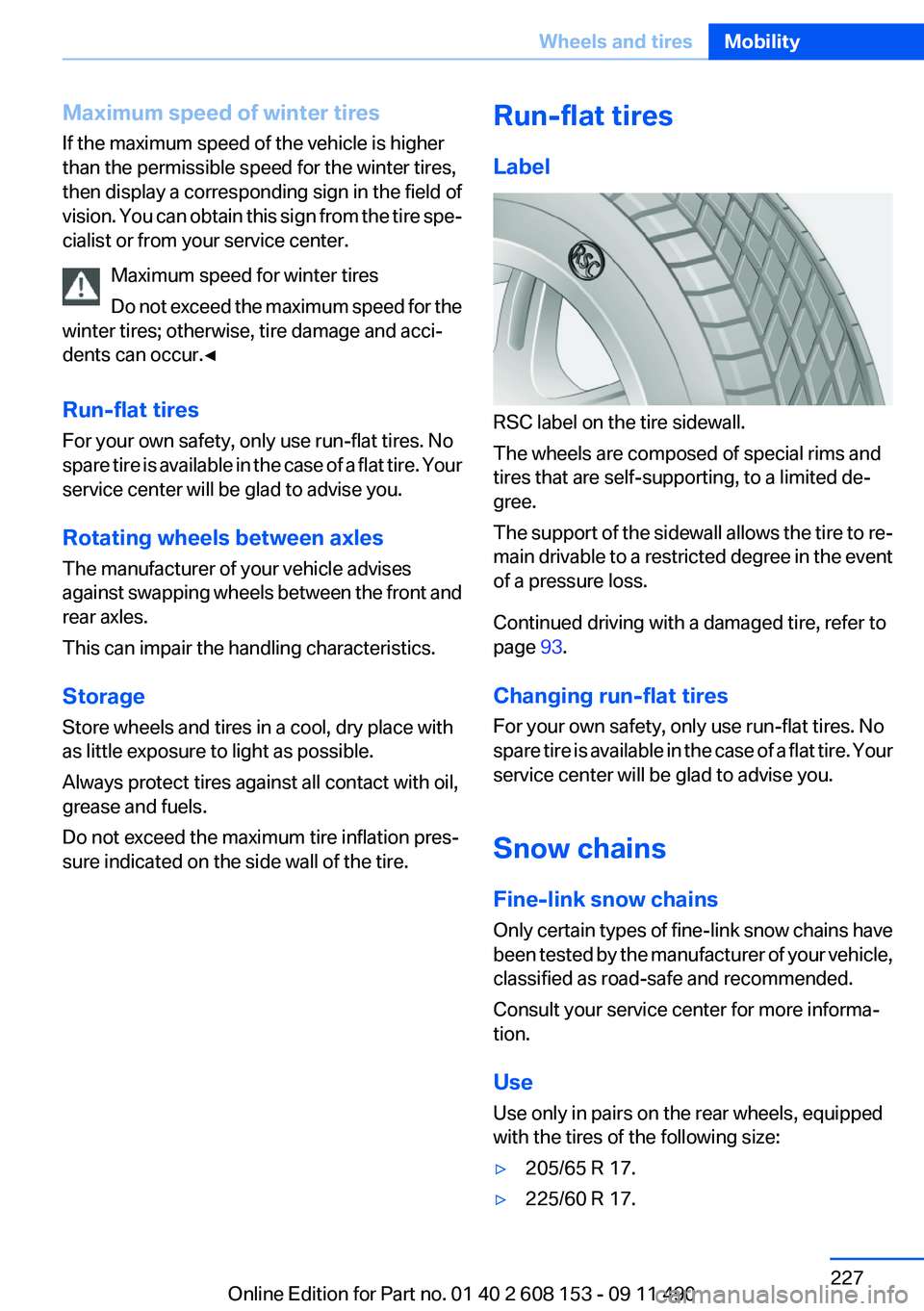
Label
RSC label on the tire sidewall.
The wheels are composed of special rims and
tires that are self-supporting, to a limited de‐
gree.
The support of the sidewall allows the tire to re‐
main drivable to a restricted degree in the event
of a pressure loss.
Continued driving with a damaged tire, refer to
page 93.
Changing run-flat tires
For your own safety, only use run-flat tires. No
spare tire is available in the case of a flat tire. Your
service center will be glad to advise you.
Snow chains
Fine-link snow chains
Only certain types of fine-link snow chains have
been tested by the manufacturer of your vehicle,
classified as road-safe and recommended.
Consult your service center for more informa‐
tion.
Use
Use only in pairs on the rear wheels, equipped
with the tires of the following size:
▷205/65 R 17.▷225/60 R 17.Seite 227Wheels and tiresMobility227
Online Edition for Part no. 01 40 2 608 153 - 09 11 490
Page 228 of 278
▷245/50 R 18.
No snow chains with tires of size 245/45 R
19
Do not mount snow chains on tires of size
245/45 R 19; otherwise, the vehicle can become
damaged.◀
Follow the chain manufacturer's instructions.
Make sure that the snow chains are always suf‐
ficiently tight. Retighten as needed according to
the chain manufacturer's instructions.
Do not initialize the Flat Tire Monitor after
mounting snow chains, as doing so may result
in incorrect readings.
Do not initialize the Tire Pressure Monitor after
mounting snow chains, as doing so may result
in incorrect readings.
When driving with snow chains, briefly activate
Dynamic Traction Control if necessary.
Maximum speed with snow chains
Do not exceed a speed of 30 mph/50 km/h when
using snow chains.
Seite 228MobilityWheels and tires228
Online Edition for Part no. 01 40 2 608 153 - 09 11 490
Page 241 of 278
6.Turn the bulb and remove it. The turn signal
is the upper bulb and the tail lamp/brake
lamp is the lower bulb on the bulb holder.7.Proceed in the reverse order to insert the
new bulb and attach the bulb holder. Make
sure that the bulb holder is engaged in all
fasteners.8.Connect and install tail lamp.9.Insert cover with the three mountings in the
tail lamp. While applying pressure on the top
and bottom bracket, slide the cover down to
the stop.
Backup lamp and inner brake lamp
Follow the General instructions on lamps and
bulbs, refer to page 237.
Backup lamp: 16-watt bulb, W16W
Inner brake lamp: 21-watt bulb, H21W
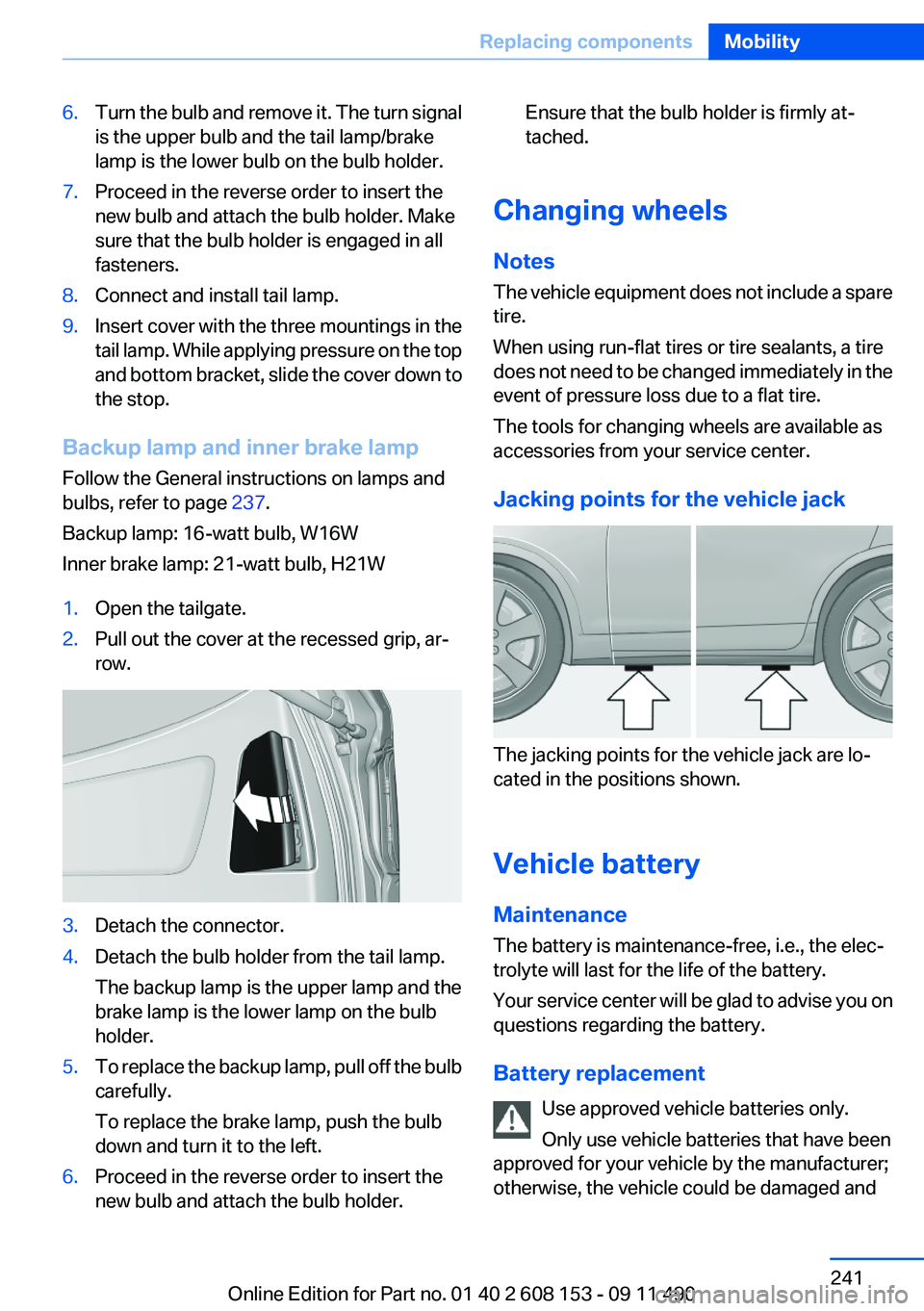
1.Open the tailgate.2.Pull out the cover at the recessed grip, ar‐
row.3.Detach the connector.4.Detach the bulb holder from the tail lamp.
The backup lamp is the upper lamp and the
brake lamp is the lower lamp on the bulb
holder.5.To replace the backup lamp, pull off the bulb
carefully.
To replace the brake lamp, push the bulb
down and turn it to the left.6.Proceed in the reverse order to insert the
new bulb and attach the bulb holder.Ensure that the bulb holder is firmly at‐
tached.
Changing wheels
Notes
The vehicle equipment does not include a spare
tire.
When using run-flat tires or tire sealants, a tire
does not need to be changed immediately in the
event of pressure loss due to a flat tire.
The tools for changing wheels are available as
accessories from your service center.
Jacking points for the vehicle jack
The jacking points for the vehicle jack are lo‐
cated in the positions shown.
Vehicle battery
Maintenance
The battery is maintenance-free, i.e., the elec‐
trolyte will last for the life of the battery.
Your service center will be glad to advise you on
questions regarding the battery.
Battery replacement Use approved vehicle batteries only.
Only use vehicle batteries that have been
approved for your vehicle by the manufacturer;
otherwise, the vehicle could be damaged and
Seite 241Replacing componentsMobility241
Online Edition for Part no. 01 40 2 608 153 - 09 11 490
Page 248 of 278
CareVehicle equipment
All standard, country-specific and optional
equipment that is offered in the model series is
described in this chapter. Therefore, equipment
is also described that is not available in a vehicle,
e. g., because of the selected optional equip‐
ment or country variant. This also applies for
safety-related functions and systems.
Car washes
Notes Steam jets or high-pressure washers
When using steam jets or high-pressure
washers, hold them a sufficient distance away
and use a maximum temperature of 140 ℉/
60 ℃.
Holding them too close or using excessively
high pressures or temperatures can cause dam‐
age or preliminary damage that may then lead to
long-term damage.
Follow the operating instructions for the high-
pressure washer.◀
Cleaning sensors/cameras with high-
pressure washers
When using high-pressure washers, do not
spray the exterior sensors and cameras, e.g.,
Park Distance Control, for extended periods of
time and only from a distance of at least 12 in/
30 cm.◀
Wash your vehicle frequently, particularly in win‐
ter.
Intense soiling and road salt can damage the ve‐
hicle.Washing in automatic car washes
Give preference to cloth car washes or those
that use soft brushes in order to avoid paint
damage.
Notes
Note the following:▷Make sure that the wheels and tires are not
damaged by the transport mechanisms.▷Fold in the exterior mirrors; otherwise, they
may be damaged, depending on the width of
the vehicle.▷Deactivate the rain sensor, refer to page 63,
to avoid unintentional wiper activation.▷In some cases, an unintentional alarm can be
triggered by the interior motion sensor of the
alarm system. Follow the instructions on
avoiding an unintentional alarm, refer to
page 42.
Guide rails in car washes
Avoid car washes with guide rails higher
than 4 in/10 cm; otherwise, the vehicle body
could be damaged.◀
Before driving into a car wash
In order to ensure that the vehicle can roll in a car
wash, take the following steps:
Automatic transmission:
1.Releaseparking brake, refer to page 60, and
deactivate Automatic Hold, refer to
page 61.2.Drive into the car wash.3.Depress the brake pedal as needed.4.Engage transmission position N.5.Switch the engine off. In this way, the igni‐
tion remains switched on, and a Check-Con‐
trol message is displayed.Seite 248MobilityCare248
Online Edition for Part no. 01 40 2 608 153 - 09 11 490
Page 268 of 278
Everything from A to Z
IndexA
ABS, Antilock Brake Sys‐ tem 94
Activated-charcoal filter 114
Adaptive brake lights, refer to Brake force display 93
Adaptive light control 82
Additional telephone 188
Additives, oil 232
Adjustments, seats/head re‐ straints 46
After washing vehicle 249
Airbags 85
Airbags, indicator/warning light 86
Air circulation, refer to Recir‐ culated-air mode 110, 113
Air distribution, manual 109, 112
Air drying, refer to Cooling function 110, 113
Air pressure, tires 221
Air vents, refer to Ventila‐ tion 114
Air volume, automatic climate control 110, 113
Alarm system 41
Alarm, unintentional 42
All around the center con‐ sole 14
All around the headliner 15
All around the steering wheel 12
ALL program, automatic cli‐ mate control 113
All-season tires, refer to Win‐ ter tires 226
All-wheel-drive 95
Alternating-code hand-held transmitter 117 Alternative oil types 232
AM/FM station 158
Announcement, navigation, refer to Spoken instruc‐
tions 148
Antifreeze, washer fluid 64
Antilock Brake System, ABS 94
Anti-slip control, refer to DSC 94
Applications 214
Appointments 204
Approved engine oils 232
Apps 214
Apps, video playback 181
Armrest, refer to Center arm‐ rest 123
Arrival time 76
Assist 209
Assistance, Roadside Assis‐ tance 244
Audio playback 167
Audio playback, Blue‐ tooth 181
AUTO H button, refer to Auto‐ matic Hold 60
AUTO intensity 112
Automatic car wash 248
Automatic climate con‐ trol 109
Automatic climate control with enhanced features 111
Automatic Curb Monitor 53
Automatic deactivation, front passenger airbags 87
Automatic headlamp con‐ trol 81
Automatic Hold 60
Automatic locking 37
Automatic recirculated-air control 113 Automatic tailgate 38
Automatic transmission with Steptronic 65
AUTO program, automatic cli‐ mate control 112
AUTO program, climate con‐ trol 110
AUTO program, intensity 112
AUX-IN port 178
Average fuel consumption 76
Average speed 76
Axle loads, weights 256
B
Backrest curvature, refer to Lumbar support 48
Backrest, width 48
Backup camera 103
Balance 156
Band-Aids, refer to First aid kit 244
Bar for tow-starting/tow‐ ing 246
Bass 156
Battery replacement, vehicle battery 241
Battery replacement, vehicle remote control 30
Battery, vehicle 241
Belts, safety belts 49
Beverage holder, cu‐ pholder 123
Blinds, sun protection 44
Bluetooth audio 181
Bluetooth connection, activat‐ ing/deactivating 189
BMW Assist 209
BMW homepage 6
BMW Internet page 6 Seite 268ReferenceEverything from A to Z268
Online Edition for Part no. 01 40 2 608 153 - 09 11 490
Page 271 of 278
Flat tire, Tire Pressure MonitorTPM 88
Flat tire, warning lamp 89, 92
Flooding 129
Floor carpet, care 250
Floor mats, care 250
FM/AM station 158
Fold-out position, windshield wipers 64
Foot brake 129
Front airbags 85
Front fog lamps 83
Front fog lamps, front, bulb re‐ placement 239
Front lamps 237
Front passenger airbags, au‐ tomatic deactivation 87
Front passenger airbags, indi‐ cator lamp 87
FTM Flat Tire Monitor 91
Fuel cap 218
Fuel consumption, current 73
Fuel consumption, refer to Average fuel consump‐
tion 76
Fuel filler flap 218
Fuel gauge 72
Fuel quality 220
Fuel, tank capacity 257
Fuse 242
G
Garage door opener, refer to Integrated universal remote
control 116
Gas station recommenda‐ tion 148
Gear change, automatic trans‐ mission 65
General driving notes 128
Glass sunroof, refer to Panor‐ amic glass sunroof 44
Glove compartment 122
Gong, volume equaliza‐ tion 157 GPS navigation, refer to Navi‐
gation system 138
Gray display of the map 151
Gross vehicle weight, ap‐ proved 256
Gross weight, permissible for trailer towing 256
H
Hand brake, refer to Parking brake 60
Hand-held transmitter, alter‐ nating code 117
Hazard warning flashers 243
HDC Hill Descent Control 95
HD Radio 159
Head airbags 85
Headlamp control, auto‐ matic 81
Headlamp courtesy delay fea‐ ture 81
Headlamp courtesy delay fea‐ ture via remote control 35
Headlamp flasher 62
Headlamp flasher, bulb re‐ placement 238
Headlamp glass 237
Headlamps 237
Headlamps, care 249
Headlamp washer system 62
Headliner 15
Head restraints 46
Head restraints, front 50
Head restraints, rear 51
Head-up Display 107
Head-up Display, care 251
Heavy cargo, stowing 132
Height, vehicle 254
High-beam Assistant 82
High beams 62
High beams/low beams, refer to High-beam Assistant 82
High beams, bulb replace‐ ment 238
Hill Descent Control HDC 95 Hills 130
Hints 6
Holder for beverages 123
Homepage 6
Hood 229
Horn 12
Hot exhaust system 128
House number, entering for navigation 139
Hydroplaning 129
I
Ice warning, refer to External temperature warning 73
Icy roads, refer to External temperature warning 73
Identification marks, tires 223
Identification number, refer to Important in the engine com‐
partment 229
iDrive 16
Ignition key, refer to Remote control 30
Ignition off 58
Ignition on 58
Indication of a flat tire 89, 92
Individual air distribu‐ tion 109, 112
Individual settings, refer to Personal Profile 31
Inflation pressure, tires 221
Inflation pressure warning, tires 91
Info display, refer to Com‐ puter 75
Information on the navigation data 152
Initializing, Flat Tire Monitor FTM 92
Initializing, Tire Pressure Mon‐ itor TPM 89
Instrument cluster 68
Instrument cluster, electronic displays 69
Instrument lighting 84 Seite 271Everything from A to ZReference271
Online Edition for Part no. 01 40 2 608 153 - 09 11 490
Page 273 of 278
Menus, refer to iDrive operat‐ing concept 17
Message list, traffic bulle‐ tins 150
Messages 201
Microfilter 111, 114
Minimum tread, tires 225
Mirror 52
Mirror memory 52
Mobile communication devi‐ ces in the vehicle 129
Mobile phone 188
Modifications, technical, refer to Safety 6
Moisture in headlamp 237
Monitor, refer to Control Dis‐ play 16
Mounting of child restraint fix‐ ing systems 55
MP3 player 178
Multifunction steering wheel, buttons 12
Multimedia 166
Music collection 173
Music search 174
Music, storing 173
N
Navigation 138
Navigation data 152
Neck restraints, front, refer to Head restraints 50
Neck restraints, rear, refer to Head restraints 51
New wheels and tires 226
NORMAL program, Dynamic Driving Control 98
Notes 205
Number of cylinders, en‐ gine 255
Nylon rope for tow-starting/ towing 246 O
OBD Onboard Diagnos‐ tics 235
Obstacle marking, backup camera 105
Odometer 72
Office 198
Oil 231
Oil, adding 231
Oil additives 232
Oil change 232
Oil change interval, service re‐ quirements 74
Oil filler neck 231
Oil level check 231
Oil types, alternative 232
Oil types, approved 232
Old batteries, disposal 242
Onboard Diagnostics OBD 235
Onboard monitor, refer to Control Display 16
Onboard vehicle tool kit 236
Opening/closing from in‐ side 37
Opening/closing via door lock 36
Opening/closing with remote control 34
Operating concept, iDrive 16
Optional equipment, standard equipment 6
Outside air, refer to Automatic recirculated-air control 113
P
Paint, vehicle 249
Pairing, mobile phone 189
Panic mode 35
Panoramic glass sunroof 44
Park Distance Control PDC 101
Parked-car ventilation 114 Parked vehicle, condensa‐
tion 130
Parking aid, refer to PDC 101
Parking brake 60
Parking lamps 80
Parking lamps, bulb replace‐ ment 238
Parking with Auto Hold 60
Partition net 120
Passenger side mirror, tilting downward 53
Pathway lines, backup cam‐ era 104
PDC Park Distance Con‐ trol 101
Performance Control 95
Permissible axle load 256
Personal information 198
Personal Profile 31
Phone 188
Pinch protection system, glass sunroof 45
Pinch protection system, win‐ dows 43
Plastic, care 250
PlugIn 214
Position, storing 140
Postal code, entering in navi‐ gation 139
Power failure 242
Power output, engine 255
Power windows 42
Pressure, tire air pres‐ sure 221
Pressure warning, tires 91
Profile, refer to Personal Pro‐ file 31
Programmable memory but‐ tons, iDrive 20
Protective function, glass sun‐ roof 45
Protective function, win‐ dows 43
Push-and-turn switch, refer to Controller 16 Seite 273Everything from A to ZReference273
Online Edition for Part no. 01 40 2 608 153 - 09 11 490