ignition BMW X3 2012 Owner's Guide
[x] Cancel search | Manufacturer: BMW, Model Year: 2012, Model line: X3, Model: BMW X3 2012Pages: 278, PDF Size: 10.15 MB
Page 210 of 278
Press the SOS button to contact the BMW
Assist Response Center.
TeleService
General information
TeleService supports communication with your
service center.
▷Data on the vehicle's service requirements
can be sent directly to the service center. In
this way, the service center can plan its work
in advance. This shortens the duration of the
service appointment.▷In the event of a breakdown, data on the ve‐
hicle's condition can be sent directly to
Roadside Assistance.▷The service varies by country.▷Connection costs may ensue.▷Services may be restricted abroad.
Requirements
▷BMW Assist is activated.▷Wireless reception is available.▷The ignition is switched on.
Using TeleService
The TeleServices are typically activated in the
vehicle.
Even TeleService Customer Service is not ac‐
tive, a voice contact to Roadside Assistance is
still possible.
To continue using or to deactivate the services,
please contact your service partner or the BMW
customer hotline.
Concierge service
General information
The BMW Assist Concierge service offers infor‐
mation on events, gas stations or hotels, and
provides phone numbers and addresses. Hotels
can be booked directly by the BMW Assist Con‐
cierge service. The Concierge service is part of
the optional BMW Convenience Plan.
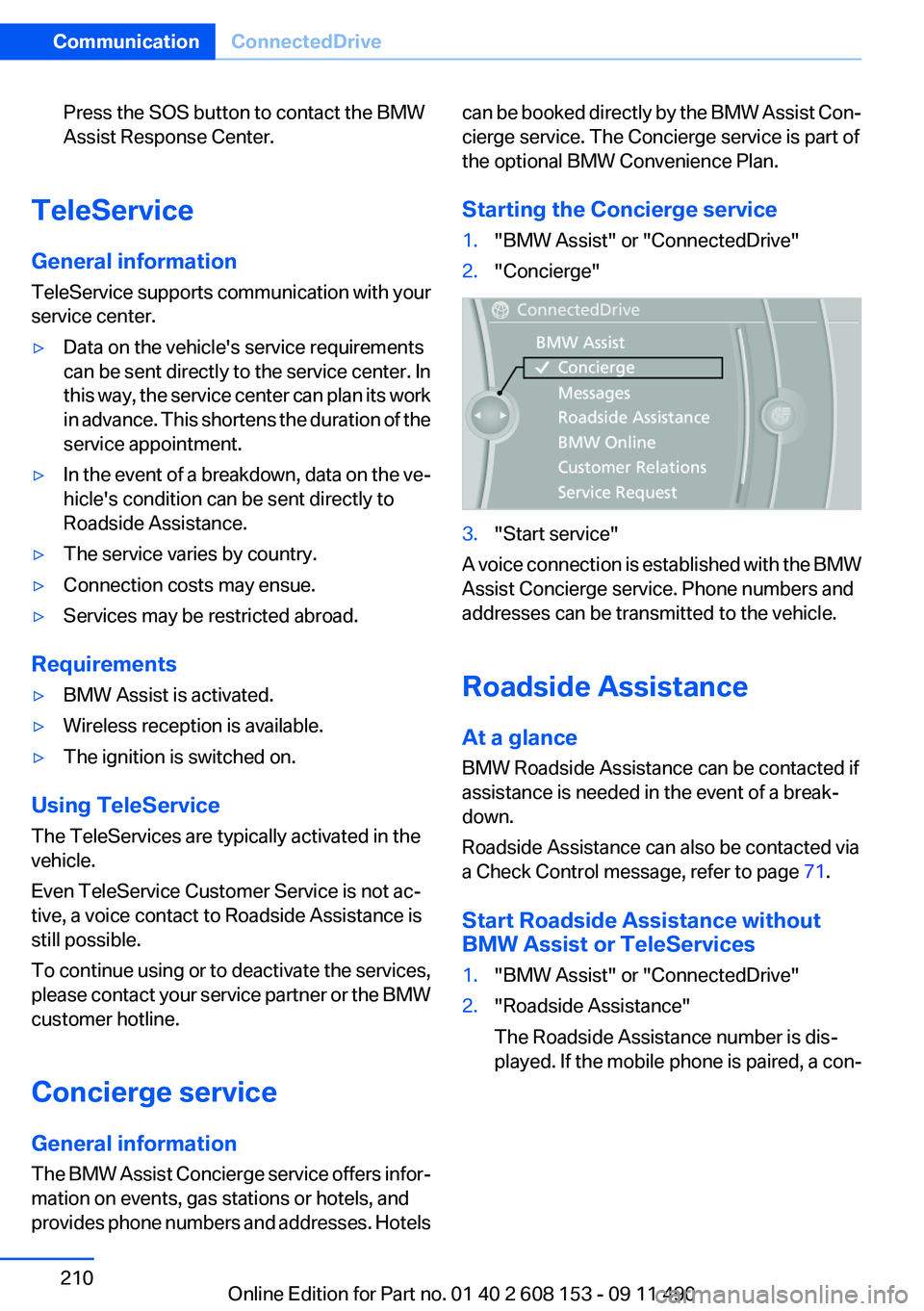
Starting the Concierge service1."BMW Assist" or "ConnectedDrive"2."Concierge"3."Start service"
A voice connection is established with the BMW
Assist Concierge service. Phone numbers and
addresses can be transmitted to the vehicle.
Roadside Assistance
At a glance
BMW Roadside Assistance can be contacted if
assistance is needed in the event of a break‐
down.
Roadside Assistance can also be contacted via
a Check Control message, refer to page 71.
Start Roadside Assistance without
BMW Assist or TeleServices
1."BMW Assist" or "ConnectedDrive"2."Roadside Assistance"
The Roadside Assistance number is dis‐
played. If the mobile phone is paired, a con‐Seite 210CommunicationConnectedDrive210
Online Edition for Part no. 01 40 2 608 153 - 09 11 490
Page 249 of 278
Transmission position P with the igni‐
tion off
When the ignition is switched off, position P
is engaged automatically. When in an auto‐
matic car wash, for example, ensure that the
ignition is not switched off accidentally.◀
The vehicle cannot be locked from the outside
when in transmission position N.
A signal is sounded when an attempt is made to
lock the vehicle.
Transmission position
Transmission position P is engaged automati‐
cally:
▷When the ignition is switched off.▷After approx. 15 minutes.
Headlamps
▷Do not rub dry and do not use abrasive or
caustic cleansers.▷Soak areas that have been soiled e.g. due to
insects, with shampoo and wash off with
water.▷Thaw ice with deicing spray; do not use an
ice scraper.
After washing the vehicle
After washing the vehicle, apply the brakes
briefly to dry them; otherwise, braking action can
be reduced and corrosion of the brake discs can
occur.
Vehicle care
Car care products
BMW recommends using cleaning and care
products from BMW, since these have been
tested and approved.
Car care and cleaning products
Follow the instructions on the container.
When cleaning the interior, open the doors or
windows.
Only use products intended for cleaning vehi‐
cles.
Cleansers can contain substances that are dan‐
gerous and harmful to your health.◀
Vehicle paint
Regular care contributes to driving safety and
value retention.
Environmental influences can act on the vehicle
paint. Tailor the frequency and extent of your car
care to these influences.
Leather care
Remove dust from the leather often, using a
cloth or vacuum cleaner.
Otherwise, particles of dust and road grime
chafe in pores and folds, and lead to increased
wear and premature degradation of the leather
surface.
To guard against discoloration, such as from
clothing, provide leather care roughly every two
months.
Clean light-colored leather more frequently be‐
cause soiling on such surfaces is substantially
more visible.
Use leather care products; otherwise, dirt and
grease will gradually break down the protective
layer of the leather surface.
Suitable care products are available from the
service center.
Upholstery material care
Vacuum regularly with a vacuum cleaner.
If they are very dirty, e.g., beverage stains, use a
soft sponge or microfiber cloth with a suitable
interior cleaner.
Clean the upholstery down to the seams using
large sweeping motions. Avoid rubbing the ma‐
terial vigorously.Seite 249CareMobility249
Online Edition for Part no. 01 40 2 608 153 - 09 11 490
Page 271 of 278
Flat tire, Tire Pressure MonitorTPM 88
Flat tire, warning lamp 89, 92
Flooding 129
Floor carpet, care 250
Floor mats, care 250
FM/AM station 158
Fold-out position, windshield wipers 64
Foot brake 129
Front airbags 85
Front fog lamps 83
Front fog lamps, front, bulb re‐ placement 239
Front lamps 237
Front passenger airbags, au‐ tomatic deactivation 87
Front passenger airbags, indi‐ cator lamp 87
FTM Flat Tire Monitor 91
Fuel cap 218
Fuel consumption, current 73
Fuel consumption, refer to Average fuel consump‐
tion 76
Fuel filler flap 218
Fuel gauge 72
Fuel quality 220
Fuel, tank capacity 257
Fuse 242
G
Garage door opener, refer to Integrated universal remote
control 116
Gas station recommenda‐ tion 148
Gear change, automatic trans‐ mission 65
General driving notes 128
Glass sunroof, refer to Panor‐ amic glass sunroof 44
Glove compartment 122
Gong, volume equaliza‐ tion 157 GPS navigation, refer to Navi‐
gation system 138
Gray display of the map 151
Gross vehicle weight, ap‐ proved 256
Gross weight, permissible for trailer towing 256
H
Hand brake, refer to Parking brake 60
Hand-held transmitter, alter‐ nating code 117
Hazard warning flashers 243
HDC Hill Descent Control 95
HD Radio 159
Head airbags 85
Headlamp control, auto‐ matic 81
Headlamp courtesy delay fea‐ ture 81
Headlamp courtesy delay fea‐ ture via remote control 35
Headlamp flasher 62
Headlamp flasher, bulb re‐ placement 238
Headlamp glass 237
Headlamps 237
Headlamps, care 249
Headlamp washer system 62
Headliner 15
Head restraints 46
Head restraints, front 50
Head restraints, rear 51
Head-up Display 107
Head-up Display, care 251
Heavy cargo, stowing 132
Height, vehicle 254
High-beam Assistant 82
High beams 62
High beams/low beams, refer to High-beam Assistant 82
High beams, bulb replace‐ ment 238
Hill Descent Control HDC 95 Hills 130
Hints 6
Holder for beverages 123
Homepage 6
Hood 229
Horn 12
Hot exhaust system 128
House number, entering for navigation 139
Hydroplaning 129
I
Ice warning, refer to External temperature warning 73
Icy roads, refer to External temperature warning 73
Identification marks, tires 223
Identification number, refer to Important in the engine com‐
partment 229
iDrive 16
Ignition key, refer to Remote control 30
Ignition off 58
Ignition on 58
Indication of a flat tire 89, 92
Individual air distribu‐ tion 109, 112
Individual settings, refer to Personal Profile 31
Inflation pressure, tires 221
Inflation pressure warning, tires 91
Info display, refer to Com‐ puter 75
Information on the navigation data 152
Initializing, Flat Tire Monitor FTM 92
Initializing, Tire Pressure Mon‐ itor TPM 89
Instrument cluster 68
Instrument cluster, electronic displays 69
Instrument lighting 84 Seite 271Everything from A to ZReference271
Online Edition for Part no. 01 40 2 608 153 - 09 11 490