Head BMW X3 2013 F25 Owner's Manual
[x] Cancel search | Manufacturer: BMW, Model Year: 2013, Model line: X3, Model: BMW X3 2013 F25Pages: 212, PDF Size: 4.8 MB
Page 6 of 212
Addendum
6.At page 52 and page 53, under the
heading: “Active head restraint,” the
paragraph beginning, “Only attach
accessories . . .” should be
disregarded and the following text
should be read in lieu thereof:
“BMW recommends that you attach
accessories approved by BMW to
the seat or head restraint.”
7.At page 123, under the heading:
“Special windshield,” the paragraph
beginning, “Therefore, have the
special windshield . . .” should be
disregarded and the following text
should be read in lieu thereof:
“BMW recommends that you have
the special windshield replaced by
the service center.”
8.At page 145 under the heading:
“Objects in the area around the
pedals” and at page 190 under the
heading: “Carpets and floor mats,”
the paragraph that begins: “Only
use floor mats . . .” should be
disregarded and the following
language should be read in lieu
thereof: “The manufacturer of your
vehicle recommends that you use
floor mats that have been identified
by it as appropriate for use in your
vehicle and that can be properly
fixed in place.”
9.At page 151, under the heading:
“Have maintenance carried out,” the
sentence beginning, “Have the
maintenance carried out . . .” should
be disregarded and the following
text should be read in lieu thereof:
“BMW recommends that you have
the maintenance carried out by your
service center.”
10.At page 164, under the heading:
“Mounting,” the paragraph
beginning, “Have mounting and
balancing . . .” should be
disregarded and the following text
should be read in lieu thereof:
“BMW recommends that you have
mounting and balancing performed
by your service center or a tire
mounting specialist.”
11.At page 164, under the heading:
“Approved wheels and tires,” the
term “Approved” should be
disregarded and in lieu thereof, the
term “Recommended” should be
read in its place. In addition, the
text of that section should be
disregarded and the following text
should be read in lieu thereof:
The manufacturer of your vehicle
strongly suggests that you use
wheels and tires that have been
recommended by the vehicle
manufacturer for your vehicle type;
otherwise, for example, despite
having the same official size ratings,
variations can lead to body contact
and with it, the risk of severe
accidents.
The manufacturer of your vehicle
does not evaluate non-
recommended wheels and tires to
determine if they are suitable for
use on your vehicle.
12.At page 165 and page 166, under
the heading: “Snow Chains,” the
text should be disregarded and the
following text should be read in lieu
thereof:
Page 7 of 212
Addendum
Only certain types of fine-link snow
chains have been tested by the
manufacturer of your vehicle and
are determined by the manufacturer
of your vehicle to be road safe and
are recommended by the
manufacturer of your vehicle.
Information about recommended
snow chains is available from a
service center.
13.At page 167, under the heading
“Hood,” the sentence beginning, “If
you are unfamiliar” should be
disregarded.
14.At page 170, under the heading:
“Approved oil types,” the references
to “Approved” should be read as
“Suitable.” Immediately preceding
the “Gasoline engine” chart, the
following sentence should be
inserted: “Add engine oils that meet
the following oil rating
standards: . . .” The reference to
“BMW High Performance SAE 5W-
30” should be disregarded.
15.At page 170, under the heading:
“Alternative oil types,” the text
preceding the chart should be
disregarded, and in lieu thereof
should be read as follows: “If an
engine oil suitable for continuous
use is not available, up to 1 US
quart/liter of an engine oil with the
following oil rating can be
added: . . .” The reference to
“specification” should be read as
“rating.”
16.At page 170, under the heading:
“Engine oil change,” the text should
be disregarded and in lieu thereof
should be read as follows:
BMW recommends that you have
the oil changed at your BMW
dealer’s service center or at another
service center that has trained
personnel that can perform the work
in accordance with BMW
specifications
17.At page 172, under the heading:
“Service and Warranty Information
Booklet for US models and
Warranty and Service Guide
Booklet for Canadian models,” the
second paragraph should be
disregarded and the following text
read in lieu thereof:
The manufacturer of your vehicle
recommends that you have
maintenance and repair performed
by your BMW dealer’s service
center or another service center or
repair shop that employs trained
personnel that can perform
maintenance and repair work on
your vehicle in accordance with
BMW specifications. The
manufacturer of your vehicle
recommends that you maintain
records of all maintenance and
repair work performed on your
vehicle.
18.At page 175 and page 177, where it
reads: “Do not perform work/bulb
replacement on xenon headlamps,”
that text should be disregarded and
in lieu thereof the following text
should be read: “Xenon headlamp
work or replacement can cause
serious and fatal injuries.” In the
Page 16 of 212
CockpitVehicle equipment
All standard, country-specific and optional
equipment that is offered in the model series is
described in this chapter. Therefore, equip‐ment is also described that is not available in a
vehicle, e. g., because of the selected optional
equipment or country variant. This also applies
for safety-related functions and systems.
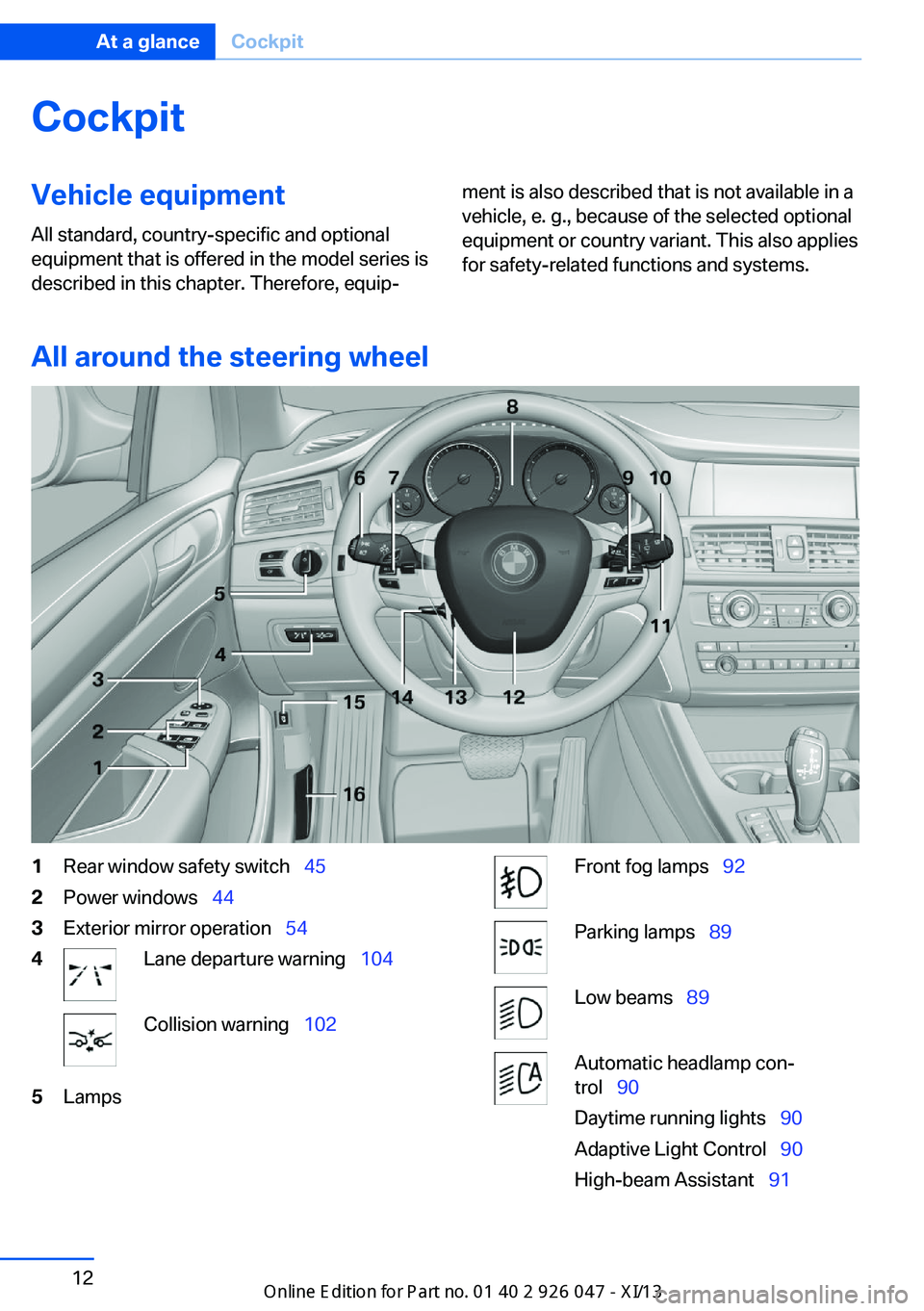
All around the steering wheel
1Rear window safety switch 452Power windows 443Exterior mirror operation 544Lane departure warning 104Collision warning 1025LampsFront fog lamps 92Parking lamps 89Low beams 89Automatic headlamp con‐
trol 90
Daytime running lights 90
Adaptive Light Control 90
High-beam Assistant 91Seite 12At a glanceCockpit12
Online Edition for Part no. 01 40 2 911 041 - VI/13
Page 17 of 212
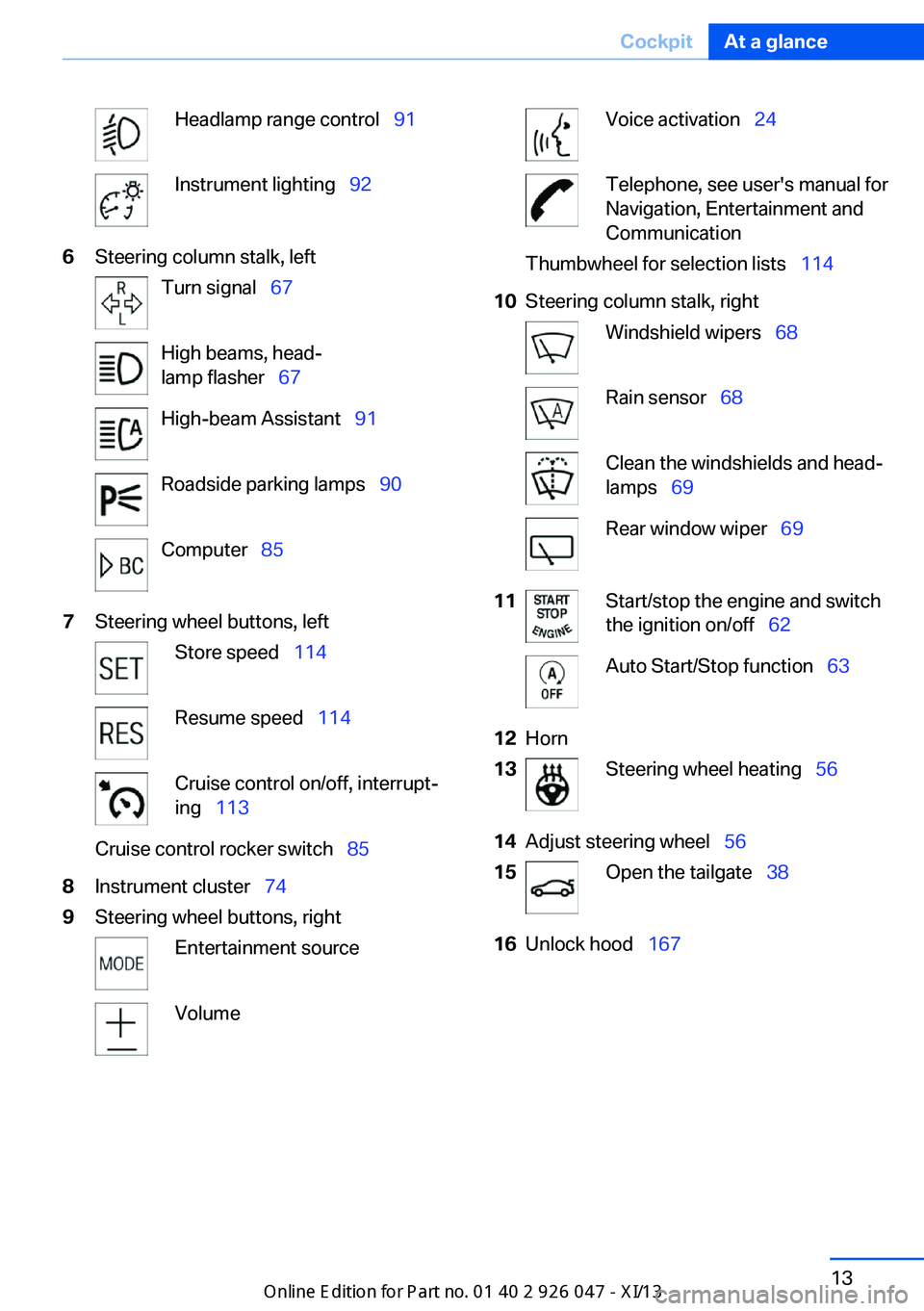
Headlamp range control 91Instrument lighting 926Steering column stalk, leftTurn signal 67High beams, head‐
lamp flasher 67High-beam Assistant 91Roadside parking lamps 90Computer 857Steering wheel buttons, leftStore speed 114Resume speed 114Cruise control on/off, interrupt‐
ing 113Cruise control rocker switch 858Instrument cluster 749Steering wheel buttons, rightEntertainment sourceVolumeVoice activation 24Telephone, see user's manual for
Navigation, Entertainment and
CommunicationThumbwheel for selection lists 11410Steering column stalk, rightWindshield wipers 68Rain sensor 68Clean the windshields and head‐
lamps 69Rear window wiper 6911Start/stop the engine and switch
the ignition on/off 62Auto Start/Stop function 6312Horn13Steering wheel heating 5614Adjust steering wheel 5615Open the tailgate 3816Unlock hood 167Seite 13CockpitAt a glance13
Online Edition for Part no. 01 40 2 911 041 - VI/13
Page 18 of 212
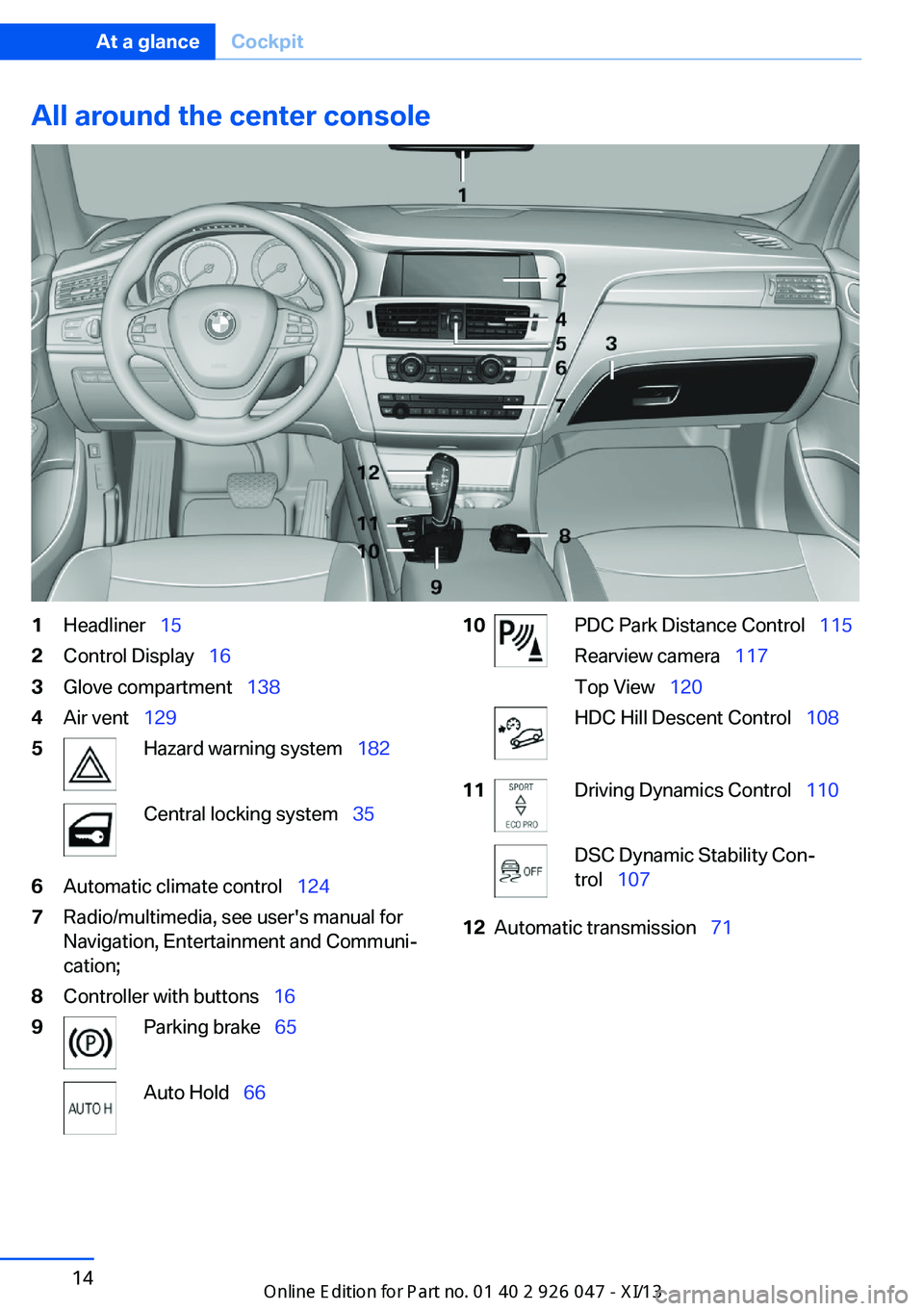
All around the center console1Headliner 152Control Display 163Glove compartment 1384Air vent 1295Hazard warning system 182Central locking system 356Automatic climate control 1247Radio/multimedia, see user's manual for
Navigation, Entertainment and Communi‐
cation;8Controller with buttons 169Parking brake 65Auto Hold 6610PDC Park Distance Control 115
Rearview camera 117
Top View 120HDC Hill Descent Control 10811Driving Dynamics Control 110DSC Dynamic Stability Con‐
trol 10712Automatic transmission 71Seite 14At a glanceCockpit14
Online Edition for Part no. 01 40 2 911 041 - VI/13
Page 19 of 212
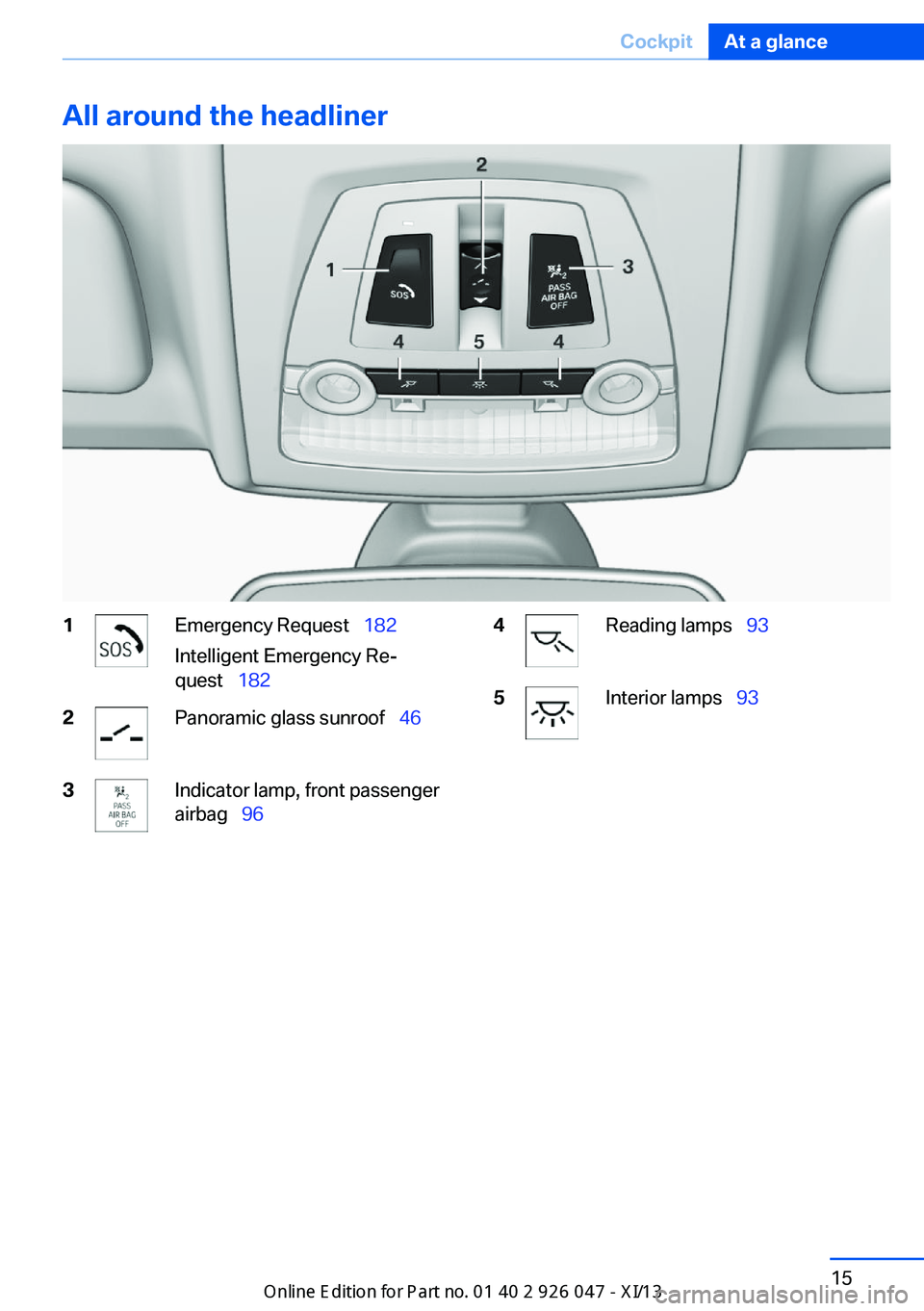
All around the headliner1Emergency Request 182
Intelligent Emergency Re‐
quest 1822Panoramic glass sunroof 463Indicator lamp, front passenger
airbag 964Reading lamps 935Interior lamps 93Seite 15CockpitAt a glance15
Online Edition for Part no. 01 40 2 911 041 - VI/13
Page 36 of 212
Opening and closingVehicle equipment
All standard, country-specific and optional
equipment that is offered in the model series is
described in this chapter. Therefore, equip‐
ment is also described that is not available in a
vehicle, e. g., because of the selected optional
equipment or country variant. This also applies
for safety-related functions and systems.
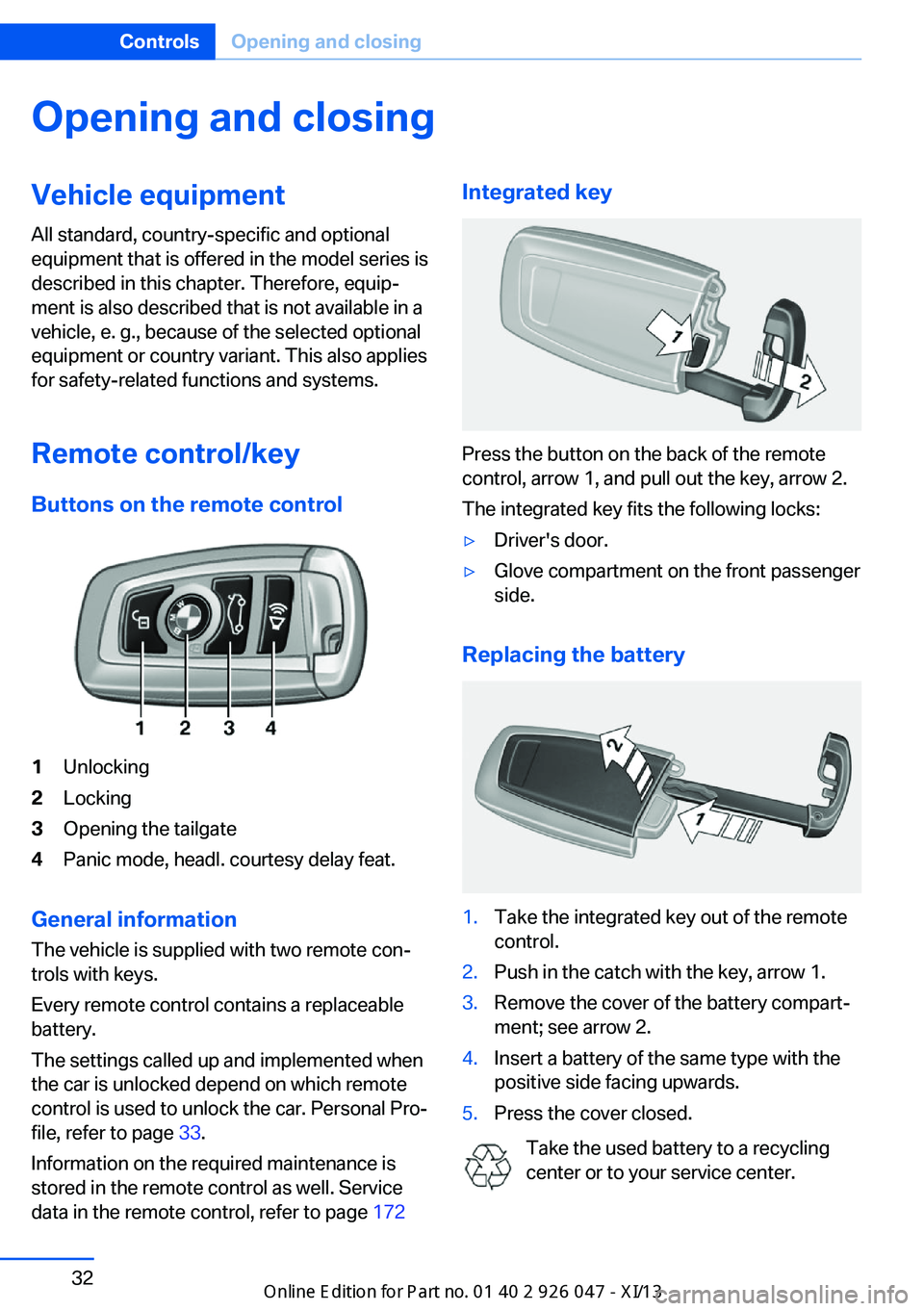
Remote control/key Buttons on the remote control1Unlocking2Locking3Opening the tailgate4Panic mode, headl. courtesy delay feat.
General information
The vehicle is supplied with two remote con‐
trols with keys.
Every remote control contains a replaceable
battery.
The settings called up and implemented when
the car is unlocked depend on which remote
control is used to unlock the car. Personal Pro‐
file, refer to page 33.
Information on the required maintenance is
stored in the remote control as well. Service
data in the remote control, refer to page 172
Integrated key
Press the button on the back of the remote
control, arrow 1, and pull out the key, arrow 2.
The integrated key fits the following locks:
▷Driver's door.▷Glove compartment on the front passenger
side.
Replacing the battery
1.Take the integrated key out of the remote
control.2.Push in the catch with the key, arrow 1.3.Remove the cover of the battery compart‐
ment; see arrow 2.4.Insert a battery of the same type with the
positive side facing upwards.5.Press the cover closed.
Take the used battery to a recycling
center or to your service center.
Seite 32ControlsOpening and closing32
Online Edition for Part no. 01 40 2 911 041 - VI/13
Page 38 of 212
The current profile is selected.3.Open "Options".4."Rename current profile"
Resetting profilesThe settings of the active profile are reset to
their default values.
1."Settings"2."Profiles"
The current profile is selected.3.Open "Options".4."Reset current profile"
Importing profiles
Existing settings and contacts are overwritten
with the imported profile.
1."Settings"2."Profiles"3."Import profile"4.BMW Online: "BMW Online"
USB interface: "USB device"
Exporting profiles Most settings of the active profile and the
saved contacts can be exported.
This can be helpful for securing and retrieving
personal settings, before delivering the vehicle
to a workshop for example.
1."Settings"2."Profiles"3."Export profile"4.BMW Online: "BMW Online"
USB interface: "USB device"
Using the guest profile
The guest profile can be used to make individ‐
ual settings without affecting the three Per‐
sonal Profiles.
This can be useful for drivers who are using
the vehicle temporarily and do not have their
own profile.1."Settings"2."Profiles"
The current profile is selected.3.Open "Guest".4.Create the settings.
Note: the guest profile cannot be renamed.
Display profile list during start
The profile list can be displayed during each
start for selecting the desired profile.
1."Settings"2."Profiles"3.Open "Options".4."Display user list at startup"
Personal Profile settings
The following functions and settings can be
stored in a profile.
▷Collision warning: warning time.▷Exterior mirror position.▷CD/Multimedia: audio source listened to
last.▷Unlocking/locking of the vehicle: settings.▷Driving Dynamics Control: sport program▷Driver's seat position: automatically re‐
trieved after unlocking.▷Programmable memory buttons: assign‐
ment.▷Head-up Display: selection, brightness,
position and rotation of the display.▷Headlamp courtesy delay feature: time set‐
ting.▷Tone: tone settings.▷Automatic climate control/Automatic cli‐
mate control with enhanced features: set‐
tings.Seite 34ControlsOpening and closing34
Online Edition for Part no. 01 40 2 911 041 - VI/13
Page 40 of 212
Welcome lamps, interior lamp and courtesy
lamps are switched on.
You can set how the vehicle is to be unlocked.
Create the settings, refer to page 42.
Convenient opening The remote control can be used to simultane‐
ously open the windows and the glass sunroof.
Press and hold the button on the re‐
mote control.
The windows and the glass sunroof open.
Releasing the button stops the motion.
Locking Press the button on the remote control.
Locking from the outside
Do not lock the vehicle from the outside
if there are people in it, as the vehicle cannot
be unlocked from inside without special knowl‐
edge.◀
Switching on interior lamps and
courtesy lamps
Press the button on the remote control
with the vehicle locked.
Panic mode You can trigger the alarm system if you find
yourself in a dangerous situation.
Press the button on the remote con‐
trol for at least 3 seconds.
To switch off the alarm: press any button.
Switching on the headlamp courtesy
delay feature
Briefly press the button on the remote
control.
The duration can be set.Opening the tailgate Press the button on the remote con‐
trol for approx. 1 second.
The tailgate opens, regardless of whether it
was previously locked or unlocked.
The tailgate pivots back and up when it opens.
Ensure that adequate clearance is available
before opening.
In some vehicle equipment variants, the tail‐
gate can only be opened using the remote
control if the vehicle has been unlocked.
Do not place the remote control in the
cargo area
Take the remote control with you and do not
leave it in the cargo area; otherwise, the re‐
mote control is locked inside the vehicle when
the tailgate is closed.◀
The tailgate is locked again as soon as it is
pushed closed.
Provide edge protection
Sharp or angular objects can hit the rear
window while driving and damage the heating
wires of the rear window. Provide edge protec‐
tion.◀
Malfunction
If the vehicle can no longer be locked or un‐
locked with the remote control, the battery
may be discharged or there may be interfer‐
ence from external sources such as mobile
phones, metal objects, overhead power lines,
transmission towers, etc.
If this occurs, lock or unlock the driver's door at
the door lock using the integrated key.
For US owners only
The transmitter and receiver units comply with
part 15 of the FCC/Federal Communication
Commission regulations. Operation is gov‐
erned by the following:
FCC ID:Seite 36ControlsOpening and closing36
Online Edition for Part no. 01 40 2 911 041 - VI/13
Page 46 of 212
Monitor the closing process
Monitor the closing process to ensure
that no one becomes trapped.◀
Unlocking the tailgate separately
Press the button on the exterior of the tailgate.
This corresponds to pressing the
but‐
ton on the remote control.
Do not place the remote control in the
cargo area
Take the remote control with you and do not
leave it in the cargo area; otherwise, the re‐
mote control is locked inside the vehicle when
the tailgate is closed.◀
Malfunction
Comfort Access may not function properly if it
experiences interference from external sour‐
ces such as mobile phones, metal objects,
overhead power lines, transmission towers,
etc.
In this case, open or close the vehicle using the
buttons on the remote control or use the
integrated key in the door lock.
Adjusting
Unlocking The setting is stored for the remote control
currently in use.
1."Settings"2."Doors/key"3. Select symbol or "Unlock button:".4.Select the desired function:▷"Driver's door only"
Only the driver's door and the fuel filler
flap are unlocked. Pressing again un‐
locks the entire vehicle.▷"All doors"
The entire vehicle is unlocked.Depending on how the vehicle is equipped
or the country-specific variant, you can set
whether the doors are also unlocked with
the
button on the remote control.
Confirmation signals from the vehicle
1."Settings"2."Doors/key"3.Deactivate or activate the desired confir‐
mation signals.▷"Acoustic sig. lock/unlock"▷"Flash when lock/unlock"
Automatic locking
The setting is stored for the remote control
currently in use.
1."Settings"2."Doors/key"3.Select the desired function:▷"Lock if no door opened"
The vehicle locks automatically after a
short period of time if a door is not
opened.▷"Lock after start driving"
The vehicle locks automatically after
you drive away.
Retrieving the seat and mirror settings
The driver's seat and exterior mirror positions
used last are stored for the remote control cur‐
rently in use.
When the vehicle is unlocked, these positions
are automatically retrieved if this function was
activated.
Pinch hazard when moving back the seat
If this function is used, first make sure
that the footwell behind the driver's seat is
empty. Otherwise, people can be injured or ob‐
jects damaged when the seat is moved back.◀
The adjustment procedure is interrupted:
Seite 42ControlsOpening and closing42
Online Edition for Part no. 01 40 2 911 041 - VI/13