Remote BMW X3 2014 F25 Owner's Guide
[x] Cancel search | Manufacturer: BMW, Model Year: 2014, Model line: X3, Model: BMW X3 2014 F25Pages: 251, PDF Size: 5.79 MB
Page 75 of 251
Parking
The parking brake is automatically set if the
engine is switched off while the vehicle is be‐
ing held by Automatic Hold.
The indicator lamp changes from green
to red.
The parking brake is not set if the en‐
gine is switched off while the vehicle is coast‐
ing to a halt. Automatic Hold is deactivated.
Automatic Hold remains activated during the
engine stop brought about by the Auto Start/
Stop function.
Take the remote control with you
Take the remote control with you when
leaving the vehicle so that children, e.g., can‐
not release the parking brake.◀
Malfunction In the event of a failure or malfunction of the
parking brake, secure the vehicle against roll‐
ing using a wheel chock, e.g., when leaving it.
After a power failure
Putting the parking brake into
operation1.Switch on the ignition.2. Press the reel while stepping on the
brake pedal or selector lever position P is
set.
It may take several seconds for the brake to be
put into operation. Any sounds associated with
this are normal.
The indicator lamp in the instrument
cluster goes out as soon as the parking
brake is ready for operation.
Turn signal, high beams,
headlight flasher
Turn signal Do not adjust the exterior mirrors
Do not adjust the exterior mirror while
driving and when blinker/hazards are on, or
else the additional blinker lights in the exterior
mirror are out of position and can't be seen.◀
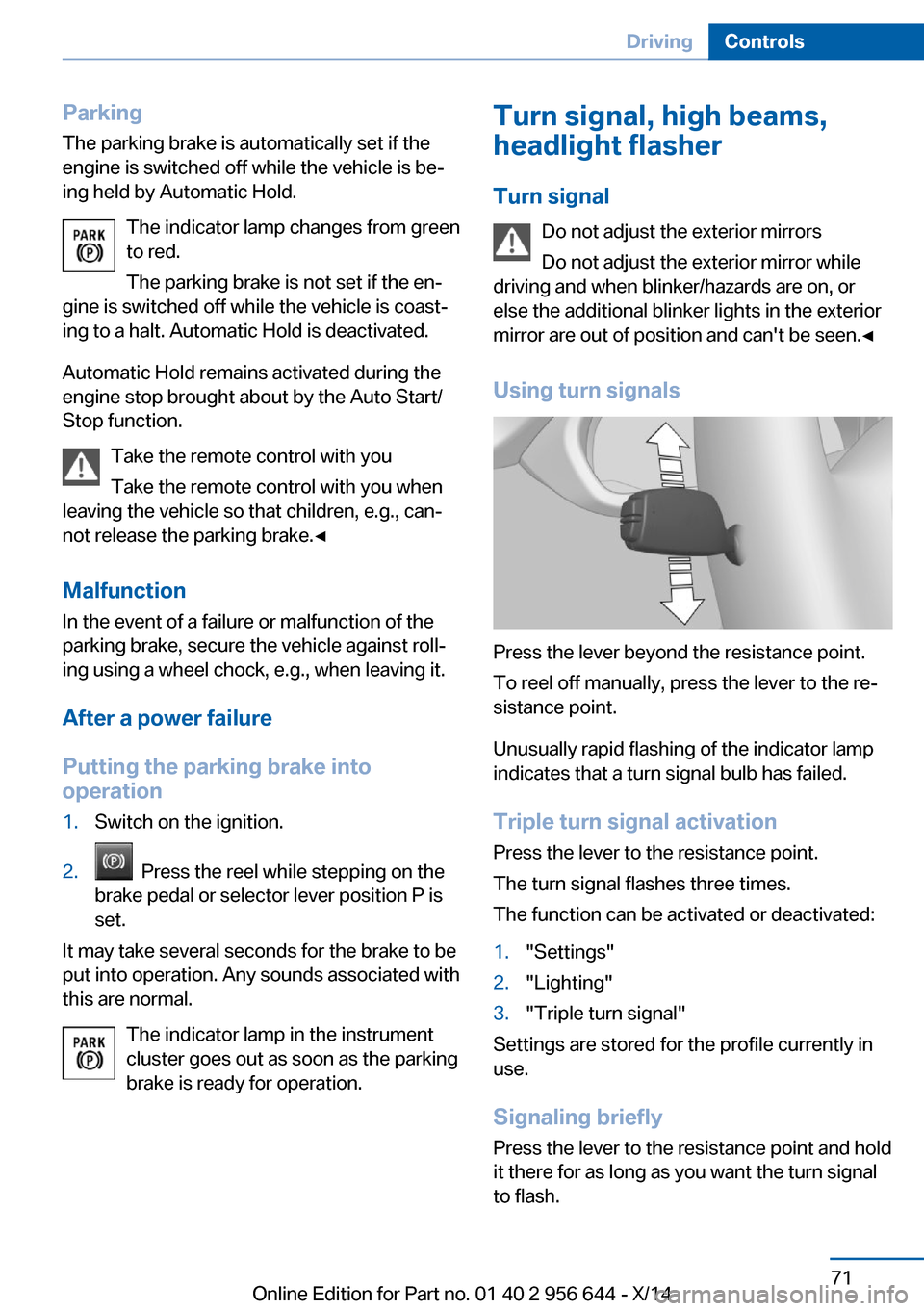
Using turn signals
Press the lever beyond the resistance point.
To reel off manually, press the lever to the re‐
sistance point.
Unusually rapid flashing of the indicator lamp
indicates that a turn signal bulb has failed.
Triple turn signal activation Press the lever to the resistance point.
The turn signal flashes three times.
The function can be activated or deactivated:
1."Settings"2."Lighting"3."Triple turn signal"
Settings are stored for the profile currently in
use.
Signaling briefly
Press the lever to the resistance point and hold
it there for as long as you want the turn signal
to flash.
Seite 71DrivingControls71
Online Edition for Part no. 01 40 2 956 644 - X/14
Page 89 of 251
The Check Control message appears continu‐
ously below a range of approx. 30 miles/50 km.
Refuel promptly
Refuel no later than at a range of
30 miles/50 km or engine operation might fail
and damage might occur.◀
Displaying the cruising range Depending on your vehicle's optional features,
the range can also be displayed as bar in the
instrument cluster.
On the Control Display:1."Settings"2."Instrument cluster"3."Additional indicators"
Range when destination guidance is
activated in the navigation system
With the appropriate equipment,
when destination guidance is
activated in the navigation sys‐
tem, the range up to the desti‐
nation is displayed.
Current fuel consumption
Display Depending on your vehicle's op‐
tional features, the current fuel
consumption can be displayed
as scale with mechanical pointer
or as digital bar display in the
lower area of the tachometer.
The current consumption displays the current
fuel consumption. Check whether you are cur‐
rently driving in an efficient and environmen‐
tally-friendly manner.
Displaying the current fuel
consumption
Depending on your vehicle's optional features,
the current fuel consumption can also be dis‐
played as bar in the instrument cluster.1."Settings"2."Instrument cluster"3."Additional indicators"
Energy recovery
Display The kinetic energy of the vehicle
is converted to electrical energy while coasting. The vehicle bat‐
tery is partially charged and fuel
consumption can be reduced.
Service requirements The concept
After the ignition is turned on the instrument
cluster briefly displays available driving dis‐
tance or time to the next scheduled mainte‐
nance.
Your service specialist can read the current
service requirements from your remote con‐
trol.
Display
Data regarding the service status or legally
mandated vehicle inspections are automati‐
cally transmitted to your service center before
a service due date.
Detailed information on service
requirements
More information on the scope of service re‐
quired can be displayed on the Control Dis‐
play.
Seite 85DisplaysControls85
Online Edition for Part no. 01 40 2 956 644 - X/14
Page 162 of 251
Interior equipmentVehicle features and optionsThis chapter describes all standard, country-
specific and optional features offered with the
series. It also describes features that are not
necessarily available in your car, e. g., due to
the selected options or country versions. This
also applies to safety-related functions and
systems.
Universal Integrated RemoteControl
The concept
The universal garage door opener can operate
up to 3 functions of remote-controlled sys‐
tems such as garage door drives or lighting
systems. The universal garage door opener re‐
places up to 3 different hand-held transmitters.
To operate the remote control, the buttons on
the interior rearview mirror must be program‐
med with the desired functions. The hand-held
transmitter for the particular system is required
in order to program the remote control.
During programming
During programming and before activat‐
ing a device using the universal garage door
opener, ensure that there are no people, ani‐
mals or objects in the area of the remote-con‐
trolled device; otherwise, there is a risk of in‐
jury or damage.
Also follow the safety instructions of the hand-
held transmitter.◀
Before selling the vehicle, delete the stored
functions for the sake of security.
Compatibility If this symbol is printed on the packag‐
ing or in the instructions of the system
to be controlled, the system is gener‐ally compatible with the universal garage door
opener.
If you have any questions, please contact:▷Your service center.▷www.homelink.com on the Internet.
HomeLink is a registered trademark of Gentex
Corporation.
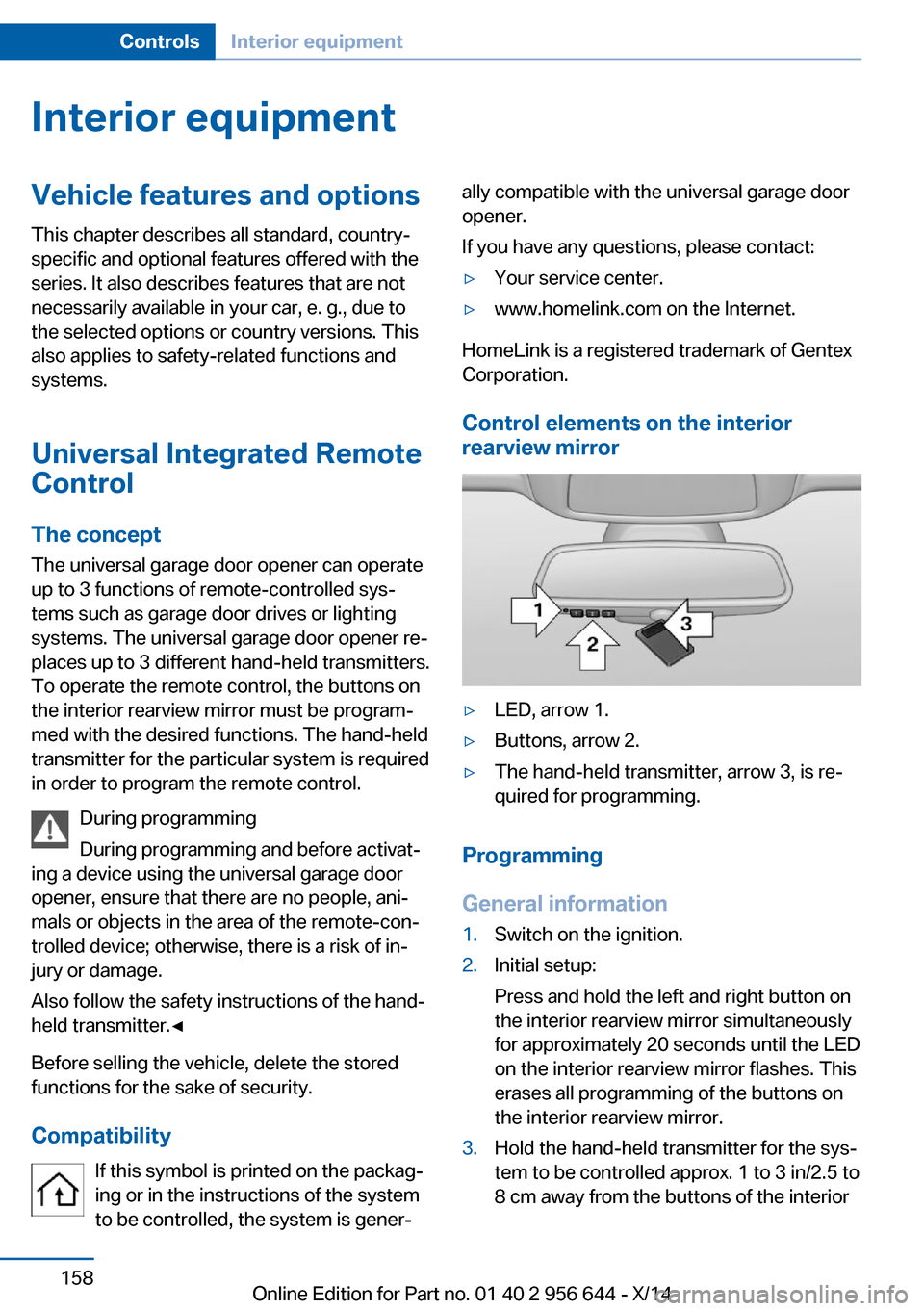
Control elements on the interior
rearview mirror
▷LED, arrow 1.▷Buttons, arrow 2.▷The hand-held transmitter, arrow 3, is re‐
quired for programming.
Programming
General information
1.Switch on the ignition.2.Initial setup:
Press and hold the left and right button on
the interior rearview mirror simultaneously
for approximately 20 seconds until the LED
on the interior rearview mirror flashes. This
erases all programming of the buttons on
the interior rearview mirror.3.Hold the hand-held transmitter for the sys‐
tem to be controlled approx. 1 to 3 in/2.5 to
8 cm away from the buttons of the interiorSeite 158ControlsInterior equipment158
Online Edition for Part no. 01 40 2 956 644 - X/14
Page 164 of 251
then be controlled by the button on the in‐
terior rearview mirror.
If the LED does not flash faster after at
least 60 seconds, change the distance and
repeat the step. Several more attempts at
different distances may be necessary. Wait
at least 15 seconds between attempts.
Canada: if programming with the hand-
held transmitter was interrupted, hold
down the interior rearview mirror button
and repeatedly press and release the
hand-held transmitter button for 2 sec‐
onds.
Controls
Before operation
Before operating a system using the uni‐
versal garage door opener, ensure that there are no people, animals, or objects within the
range of movement of the remote-controlled
system; otherwise, there is a risk of injury or
damage.
Also follow the safety instructions of the hand-
held transmitter.◀
The system, such as the garage door, can be
operated using the button on the interior rear‐
view mirror while the engine is running or when
the ignition is started. To do this, hold down
the button within receiving range of the system
until the function is activated. The interior rear‐ view mirror LED stays lit while the wireless sig‐
nal is being transmitted.
Deleting stored functions Press and hold the left and right button on the
interior rearview mirror simultaneously for ap‐
proximately 20 seconds until the LED flashes
rapidly. All stored functions are deleted. The
functions cannot be deleted individually.
Sun visor
Glare shieldFold the sun visor down or up.
Glare shield from the side
Folding out1.Fold the sun visor down.2.Unhook it from the holder and swing it to
the side.3.Move it back to the desired position.
Folding up
Proceed in the reverse order to close the sun
visor.
Vanity mirror A vanity mirror is located in the sun visor be‐
hind a cover. When the cover is opened, the
mirror lighting switches on.
Ashtray/cigarette lighter
Ashtray
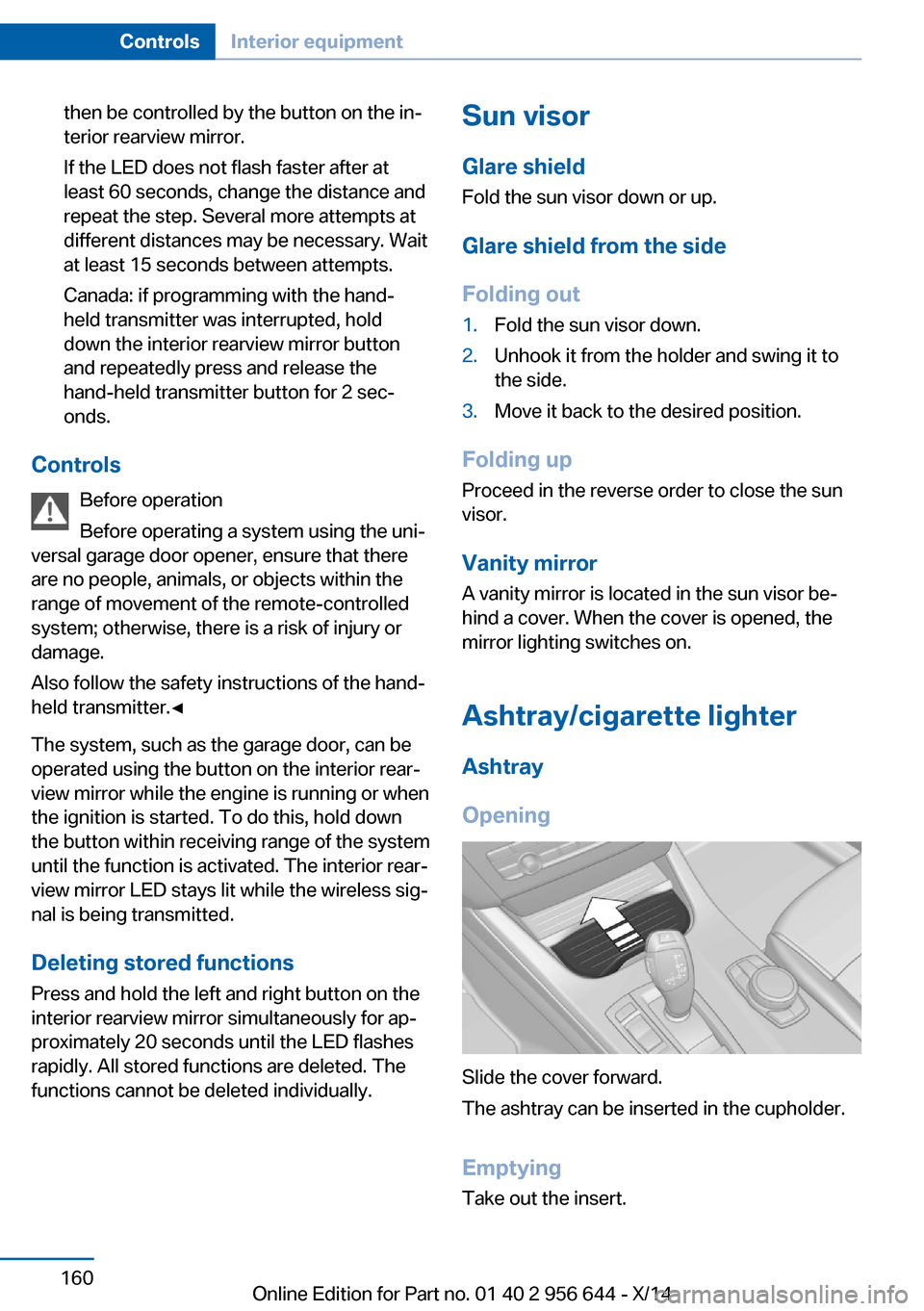
Opening
Slide the cover forward.
The ashtray can be inserted in the cupholder.
Emptying Take out the insert.
Seite 160ControlsInterior equipment160
Online Edition for Part no. 01 40 2 956 644 - X/14
Page 165 of 251
LighterDanger of burns
Only hold the hot lighter by its knob; oth‐
erwise, there is a danger of getting burned.
Switch off the ignition and take the remote
control with you when leaving the vehicle so
that children cannot use the lighter and burn
themselves.◀
Replace the cover after use
Reinsert the lighter or socket cover after
use, otherwise objects may get into the lighter
socket or fixture and cause a short circuit.◀
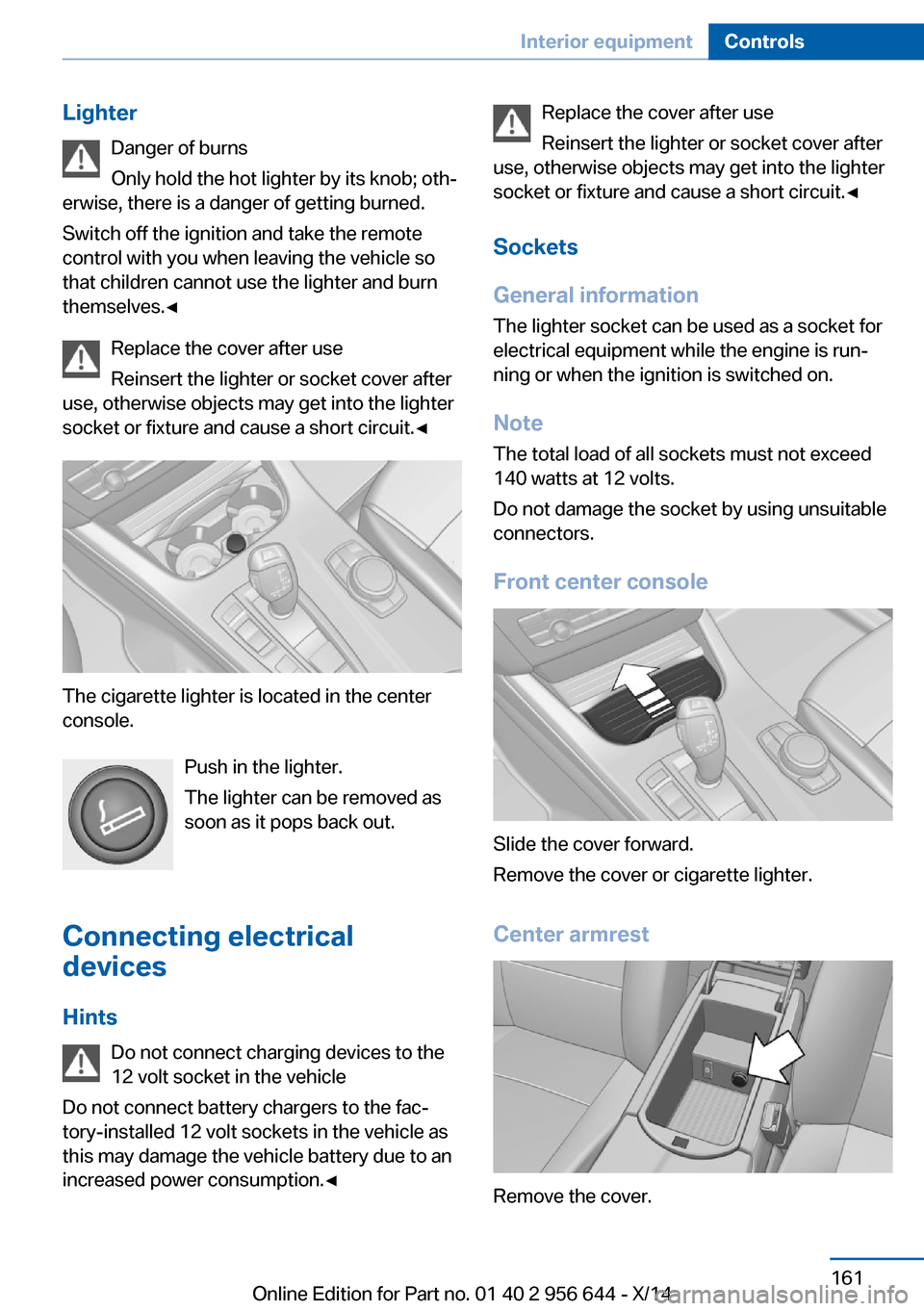
The cigarette lighter is located in the center
console.
Push in the lighter.
The lighter can be removed as
soon as it pops back out.
Connecting electrical devices
Hints Do not connect charging devices to the
12 volt socket in the vehicle
Do not connect battery chargers to the fac‐
tory-installed 12 volt sockets in the vehicle as
this may damage the vehicle battery due to an
increased power consumption.◀
Replace the cover after use
Reinsert the lighter or socket cover after
use, otherwise objects may get into the lighter
socket or fixture and cause a short circuit.◀
Sockets
General information
The lighter socket can be used as a socket for
electrical equipment while the engine is run‐
ning or when the ignition is switched on.
Note The total load of all sockets must not exceed
140 watts at 12 volts.
Do not damage the socket by using unsuitable
connectors.
Front center console
Slide the cover forward.
Remove the cover or cigarette lighter.
Center armrest
Remove the cover.
Seite 161Interior equipmentControls161
Online Edition for Part no. 01 40 2 956 644 - X/14
Page 214 of 251
MaintenanceVehicle features and options
This chapter describes all standard, country-
specific and optional features offered with the
series. It also describes features that are not
necessarily available in your car, e. g., due to
the selected options or country versions. This
also applies to safety-related functions and
systems.
BMW maintenance system
The maintenance system indicates required
maintenance measures, and thereby provides
support in maintaining road safety and the op‐
erational reliability of the vehicle.
Condition Based Service
CBS
Sensors and special algorithms take into ac‐
count the driving conditions of your vehicle.
Based on this, Condition Based Service recog‐
nizes the maintenance requirements.
The system makes it possible to adapt the
amount of maintenance corresponding to your
user profile.
Detailed information on service requirements,
refer to page 85, can be displayed on the Con‐
trol Display.
For service data
Information on the required maintenance is
continuously stored in the remote control. Your service center will read out this data and
suggest the right array of service procedures for your vehicle.
Therefore, hand your service specialist the re‐
mote control with which the vehicle was driven
most recently.Storage periods
Storage periods during which the vehicle bat‐
tery was disconnected are not taken into ac‐
count.
If this occurs, have a service center update the
time-dependent maintenance procedures,
such as checking brake fluid and, if needed,
changing the engine oil and the microfilter/
activated-charcoal filter.
Service and Warranty
Information Booklet for US
models and Warranty and
Service Guide Booklet for
Canadian models
Please consult your Service and Warranty In‐
formation Booklet for US models and Warranty
and Service Guide Booklet for Canadian mod‐ els for additional information on service re‐
quirements.
Maintenance and repair should be performed
by your service center. Make sure to have reg‐
ular maintenance procedures recorded in the
vehicle's Service and Warranty Information
Booklet for US models, and in the Warranty
and Service Guide Booklet for Canadian mod‐
els. These entries are proof of regular mainte‐
nance.
Socket for OBD Onboard
Diagnosis
Note Socket for Onboard Diagnosis
The socket for onboard diagnostics may
only be used by the service center or a work‐
shop that operates in accordance with the
specifications of the vehicle manufacturer withSeite 210MobilityMaintenance210
Online Edition for Part no. 01 40 2 956 644 - X/14
Page 240 of 251
Everything from A to Z
IndexA ABS, Antilock Brake Sys‐ tem 121
ACC, Active Cruise Control with Stop & Go 128
Acceleration Assistant, refer to Launch Control 78
Activated-charcoal filter 156
Active Blind Spot Detec‐ tion 118
Active Cruise Control with Stop & Go, ACC 128
Adaptive brake lights, refer to Brake force display 120
Adaptive Light Control 95
Additives, oil 206
Adjustments, seats/head re‐ straints 51
After washing vehicle 227
Airbags 99
Airbags, indicator/warning light 100
Air circulation, refer to Recir‐ culated-air mode 151, 155
Air, dehumidifying, refer to Cooling function 152, 155
Air distribution, manual 151, 154
Air flow, automatic climate control 151, 154
Air pressure, tires 195
Air vents, refer to Ventila‐ tion 156
Alarm system 46
Alarm, unintentional 47
All around the center con‐ sole 16
All around the roofliner 17
All around the steering wheel 14 All-season tires, refer to Win‐
ter tires 201
All-wheel-drive 123
Alternating-code hand-held transmitter 159
Alternative oil types 207
Ambient light 97
Antifreeze, washer fluid 74
Antilock Brake System, ABS 121
Anti-slip control, refer to DSC 121
Approved axle load 233
Approved engine oils 207
Armrest, refer to Center arm‐ rest 167
Arrival time 90
Ash tray 160
Assistance, Roadside Assis‐ tance 222
Assistance when driving off 126
Assist system, refer to Intelli‐ gent Safety 107
AUTO H button 70
AUTO H button, refer to Au‐ tomatic Hold 70
AUTO intensity 154
Automatic car wash 226
Automatic climate con‐ trol 150
Automatic climate control with enhanced features 153
Automatic Cruise Control with Stop & Go 128
Automatic Curb Monitor 58
Automatic deactivation, front- seat passenger airbags 101
Automatic headlight con‐ trol 95
Automatic Hold 70 Automatic locking 45
Automatic recirculated-air control 155
Automatic tailgate 40
Automatic transmission, see Steptronic transmission 75
AUTO program, automatic cli‐ mate control 154
AUTO program, climate con‐ trol 151
AUTO program, intensity 154
Auto Start/Stop function 67
Average fuel consumption 89
Average speed 89
Axle loads, weights 233
B Backrest curvature, refer to Lumbar support 53
Backrest, width 53
Bad road trips 172
Band-aids, refer to First aid kit 222
Bar for tow-starting/ towing 224
Battery replacement, vehicle battery 219
Battery replacement, vehicle remote control 34
Battery, vehicle 218
Belts, safety belts 54
Beverage holder, cu‐ pholder 167
Blinds, sun protection 48
BMW Advanced Diesel 191
BMW Assist, see user's manual for Navigation, En‐
tertainment and Communi‐
cation Seite 236ReferenceEverything from A to Z236
Online Edition for Part no. 01 40 2 956 644 - X/14
Page 241 of 251
BMW maintenance sys‐tem 210
Bonus range, ECO PRO 181
Bottle holder, refer to Cu‐ pholder 167
Brake assistant 121
Brake discs, break-in 172
Brake force display 120
Brake lights, adaptive 120
Brake lights, brake force dis‐ play 120
Brake pads, break-in 172
Braking, hints 174
Breakdown assis‐ tance 221, 222
Break-in 172
Brightness of Control Dis‐ play 92
Bulb replacement 213
Bulb replacement, front 214
Bulb replacement, rear 217
Bulbs and lights 213
Button, RES 131
Button, Start/Stop 65
Bypassing, refer to Jump- starting 222
C
California Proposition 65 Warning 7
Camera, care 229
Camera, rearview cam‐ era 140
Camera, Side View 144
Camera, Top View 143
Can holder, refer to Cu‐ pholder 167
Car battery 218
Car care products 227
Care, displays 229
Care, vehicle 227
Cargo 176
Cargo area 162
Cargo area, enlarging 163
Cargo area partition net 164 Cargo area, storage compart‐
ments 168
Cargo cover 162
Cargo, securing 177
Cargo straps, securing cargo 177
Car key, refer to Remote con‐ trol 34
Carpet, care 229
Car wash 226
Catalytic converter, refer to Hot exhaust system 173
CBS Condition Based Serv‐ ice 210
CD/Multimedia, see user's manual for Navigation, En‐
tertainment and Communi‐
cation
Center armrest 167
Center console 16
Central locking system 39
Central screen, refer to Con‐ trol Display 18
Changes, technical, refer to Safety 7
Changing parts 212
Changing wheels 218
Changing wheels/tires 200
Chassis number, see vehicle identification number 9
Check Control 80
Checking the oil level elec‐ tronically 205
Children, seating position 61
Children, transporting safely 61
Child restraint fixing sys‐ tem 61
Child restraint fixing system LATCH 62
Child restraint fixing systems, mounting 61
Child safety locks 64
Child seat, mounting 61
Child seats 61
Chrome parts, care 228 Cigarette lighter 160
Cleaning displays 229
Climate control 150, 153
Clock 84
Closing/opening via door lock 39
Closing/opening with remote control 37
Closing the tailgate with no- touch activation 43
Clothes hooks 168
Coasting 183
Coasting with engine decou‐ pled, coasting 183
Coasting with idling en‐ gine 183
Cockpit 14
Cold starting, refer to Starting the engine 66
Combination reel, refer to Turn signals 71
Combination reel, refer to Wiper system 72
Comfort Access 42
COMFORT program, Dy‐ namic Driving Control 126
Compartments in the doors 167
Compass 90
Computer 89
Condensation on win‐ dows 151, 154
Condensation under the vehi‐ cle 175
Condition Based Service CBS 210
Confirmation signal 45
ConnectedDrive, see user's manual for Navigation, En‐
tertainment and Communi‐
cation
ConnectedDrive Services
Connecting electrical devi‐ ces 161
Continued driving with a flat tire 104 , 107 Seite 237Everything from A to ZReference237
Online Edition for Part no. 01 40 2 956 644 - X/14
Page 242 of 251
Control Display 18
Control Display, settings 91
Controller 18, 19
Control systems, driving sta‐ bility 121
Convenient opening with the remote control 37
Coolant 208
Coolant level 208
Coolant temperature 84
Cooling function 152, 155
Cooling, maximum 154
Cooling system 208
Corrosion on brake discs 175
Cosmetic mirror 160
Cruise control 135
Cruise control, active with Stop & Go 128
Cruise Control, refer to Active Cruise Control 128
Cruising range 84
Cupholder 167
Current fuel consumption 85
D
Damage, tires 200
Damping control, dy‐ namic 124
Data, technical 232
Date 84
Daytime running lights 95
Daytime running lights, bulb replacement 214
Defrosting, refer to Windows, defrosting 151, 154
Dehumidifying, air 152, 155
Deleting personal data 24
Deletion of personal data 24
Destination distance 89
Diesel exhaust fluid, at low temperatures 192
Diesel exhaust fluid, having refilled 192
Diesel exhaust fluid, on mini‐ mum 192 Diesel exhaust fluid, replen‐
ishing yourself 192
Diesel particulate filter 173
Digital clock 84
Dimensions 232
Dimmable exterior mirrors 59
Dimmable interior rearview mirror 59
Direction indicator, refer to Turn signals 71
Display, electronic, instru‐ ment cluster 79
Display in windshield 92
Display lighting, refer to In‐ strument lighting 97
Displays, cleaning 229
Disposal, coolant 209
Disposal, vehicle battery 219
Distance control, refer to PDC 137
Distance to destination 89
Divided screen view, split screen 23
Door lock 39
Door lock, refer to Remote control 34
Downhill control 123
Drive-off assistant 126
Drive-off assistant, refer to DSC 121
Driving Dynamics Con‐ trol 124
Driving instructions, break- in 172
Driving mode 124
Driving notes, general 173
Driving on bad roads 172
Driving stability control sys‐ tems 121
Driving tips 173
DSC Dynamic Stability Con‐ trol 121
DTC Dynamic Traction Con‐ trol 122
Dynamic Damping Con‐ trol 124 Dynamic Stability Control
DSC 121
Dynamic Traction Control DTC 122
E ECO PRO 180
ECO PRO, bonus range 181
ECO PRO display 180
ECO PRO driving mode 180
ECO PRO mode 180
ECO PRO Tip - driving in‐ struction 182
EfficientDynamics 182
Electronic displays, instru‐ ment cluster 79
Electronic oil measure‐ ment 205
Electronic Stability Program ESP, refer to DSC 121
Emergency detection, remote control 35
Emergency release, fuel filler flap 188
Emergency Request 221
Emergency service, refer to Roadside Assistance 222
Emergency start function, en‐ gine start 35
Emergency unlocking, trans‐ mission lock 77
Energy Control 85
Energy recovery 85
Engine, automatic reel-off 67
Engine, automatic Start/Stop function 67
Engine compartment 203
Engine compartment, work‐ ing in 203
Engine coolant 208
Engine idling when driving, coasting 183
Engine oil 205
Engine oil, adding 206
Engine oil additives 206 Seite 238ReferenceEverything from A to Z238
Online Edition for Part no. 01 40 2 956 644 - X/14
Page 243 of 251
Engine oil change 207
Engine oil filler neck 206
Engine oil temperature 84
Engine oil types, alterna‐ tive 207
Engine oil types, ap‐ proved 207
Engine start during malfunc‐ tion 35
Engine start, jump-start‐ ing 222
Engine start, refer to Starting the engine 66
Engine stop 66
Engine temperature 84
Entering a car wash 226
Equipment, interior 158
Error displays, see Check Control 80
ESP Electronic Stability Pro‐ gram, refer to DSC 121
Exchanging wheels/tires 200
Exhaust system 173
Exterior mirror, automatic dimming feature 59
Exterior mirrors 58
External start 222
External temperature dis‐ play 84
External temperature warn‐ ing 84
Eyes for securing cargo 177
F
Failure message, see Check Control 80
False alarm, refer to Uninten‐ tional alarm 47
Fan, refer to Air flow 151, 154
Filler neck for engine oil 206
Fine wood, care 228
First aid kit 222
Fitting for towing, see tow fit‐ ting 225 Flat tire, changing
wheels 218
Flat Tire Monitor FTM 105
Flat tire, Tire Pressure Moni‐ tor TPM 102
Flat tire, warning lamp 103, 106
Flooding 174
Floor carpet, care 229
Floor mats, care 229
Fold-out position, wiper 74
Foot brake 174
Front airbags 99
Front-end collision warning with braking function 111
Front-end collision warning with City Braking func‐
tion 108
Front fog lights 97
Front fog lights, bulb replace‐ ment 216
Front fog lights, front, bulb re‐ placement 215
Front lights 214
front-seat passenger airbags, automatic deactivation 101
Front-seat passenger airbags, indicator lamp 101
FTM Flat Tire Monitor 105
Fuel 190
Fuel consumption, current 85
Fuel consumption, refer to Average fuel consump‐
tion 89
Fuel filler flap 188
Fuel gauge 83
Fuel lid 188
Fuel quality 190
Fuel recommendation 190
Fuel, tank capacity 234
Fuse 219 G
Garage door opener, refer to Universal Integrated Remote
Control 158
Gasoline 190
Gear change, Steptronic transmission 75
Gear shift indicator 86
General driving notes 173
Glare shield 160
Glass sunroof, refer to Panor‐ amic glass sunroof 48
Glove compartment 166
Gross vehicle weight, ap‐ proved 233
H
Halogen headlights, bulb re‐ placement 214
Handbrake, refer to Parking brake 69
Hand-held transmitter, alter‐ nating code 159
Hazard warning flashers 221
HDC Hill Descent Con‐ trol 123
Head airbags 99
Headlight control, auto‐ matic 95
Headlight courtesy delay fea‐ ture 95
Headlight courtesy delay fea‐ ture via remote control 38
Headlight flasher 72
Headlight flasher, bulb re‐ placement 214
Headlight glass 213
Headlights 214
Headlights, care 227
Headlight washer system 72
Head restraints 51
Head restraints, front 55
Head restraints, rear 56
Head-up Display 92 Seite 239Everything from A to ZReference239
Online Edition for Part no. 01 40 2 956 644 - X/14