headlight BMW X3 2015 F25 User Guide
[x] Cancel search | Manufacturer: BMW, Model Year: 2015, Model line: X3, Model: BMW X3 2015 F25Pages: 257, PDF Size: 5.26 MB
Page 101 of 257
ActivatingPosition of switch
with the ignition
switched on.
To avoid blinding oncoming traffic, the Adap‐
tive Light Control does not swivel to the driv‐
er's side when the vehicle is at a standstill.
The turning lights are automatically switched
on depending on the steering angle or the use
of turn signals.
When driving in reverse, the turning lights may
be automatically switched on regardless of the
steering angle.
Self-leveling headlights The self-leveling headlights compensate for
acceleration and braking operations in order
not to blind the oncoming traffic and to achieve
optimum illumination of the roadway.
Malfunction A Check Control message is displayed.
Adaptive Light Control is malfunctioning or has
failed. Have the system checked as soon as
possible.
High-beam Assistant
The concept When the low beams are activated, this system
automatically switches the high beams on and
off or suppresses the light in the areas that
blind oncoming traffic. The procedure is con‐
trolled by a camera on the front of the interior
rearview mirror. The assistant ensures that the
high beams are activated whenever the traffic
situation allows. The driver can intervene at
any time and switch the high beams non and
off as usual.
Note
Personal responsibility
The High-beam Assistant cannot serve
as a substitute for the driver's personal judg‐
ment of when to use the high beams. There‐
fore, manually reel off the high beams in situa‐
tions where required to avoid a safety risk.◀
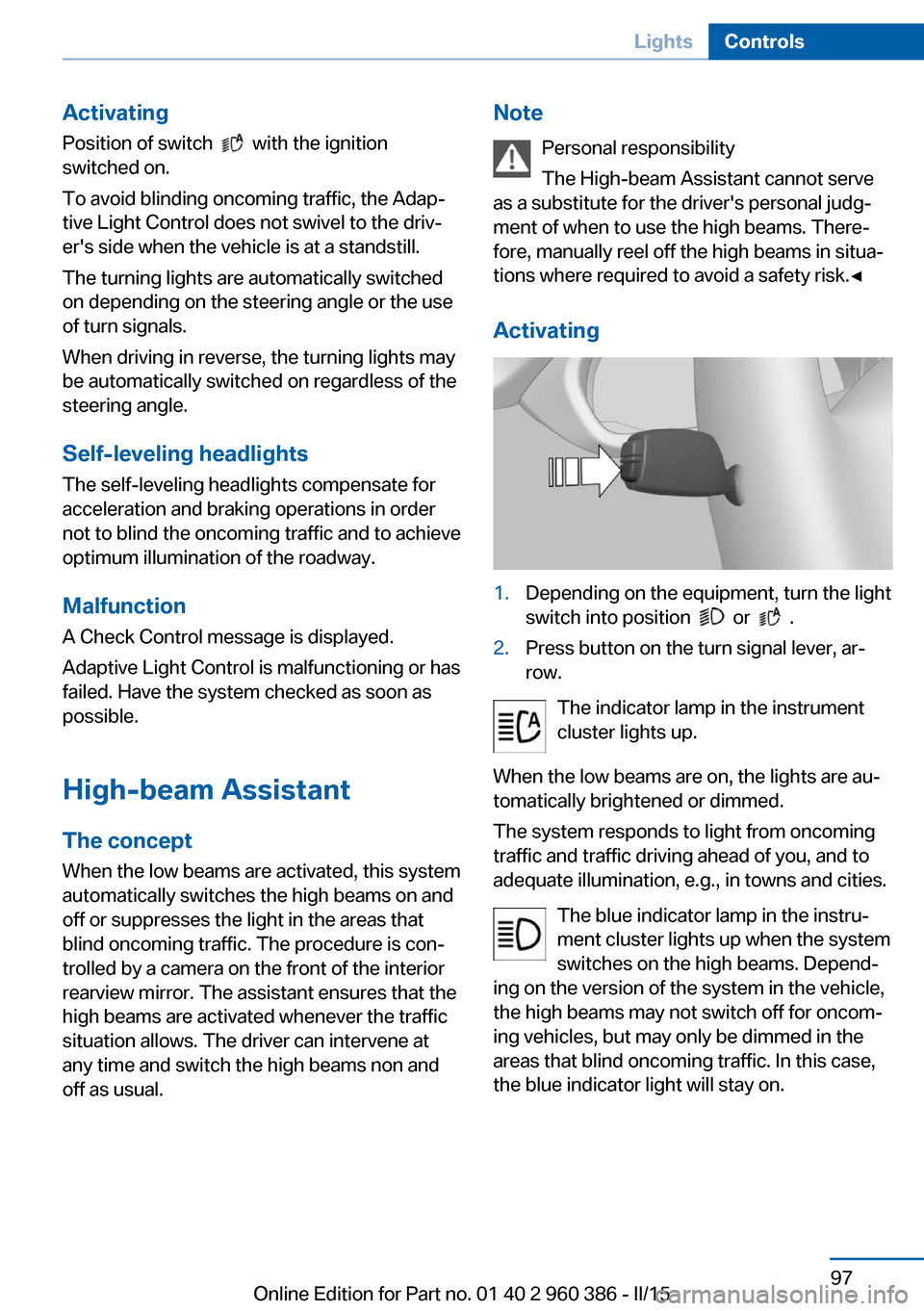
Activating1.Depending on the equipment, turn the light
switch into position
or .
2.Press button on the turn signal lever, ar‐
row.
The indicator lamp in the instrument
cluster lights up.
When the low beams are on, the lights are au‐
tomatically brightened or dimmed.
The system responds to light from oncoming
traffic and traffic driving ahead of you, and to
adequate illumination, e.g., in towns and cities.
The blue indicator lamp in the instru‐
ment cluster lights up when the system
switches on the high beams. Depend‐
ing on the version of the system in the vehicle, the high beams may not switch off for oncom‐
ing vehicles, but may only be dimmed in the
areas that blind oncoming traffic. In this case,
the blue indicator light will stay on.
Seite 97LightsControls97
Online Edition for Part no. 01 40 2 960 386 - II/15
Page 102 of 257
Switching the high beams on and off
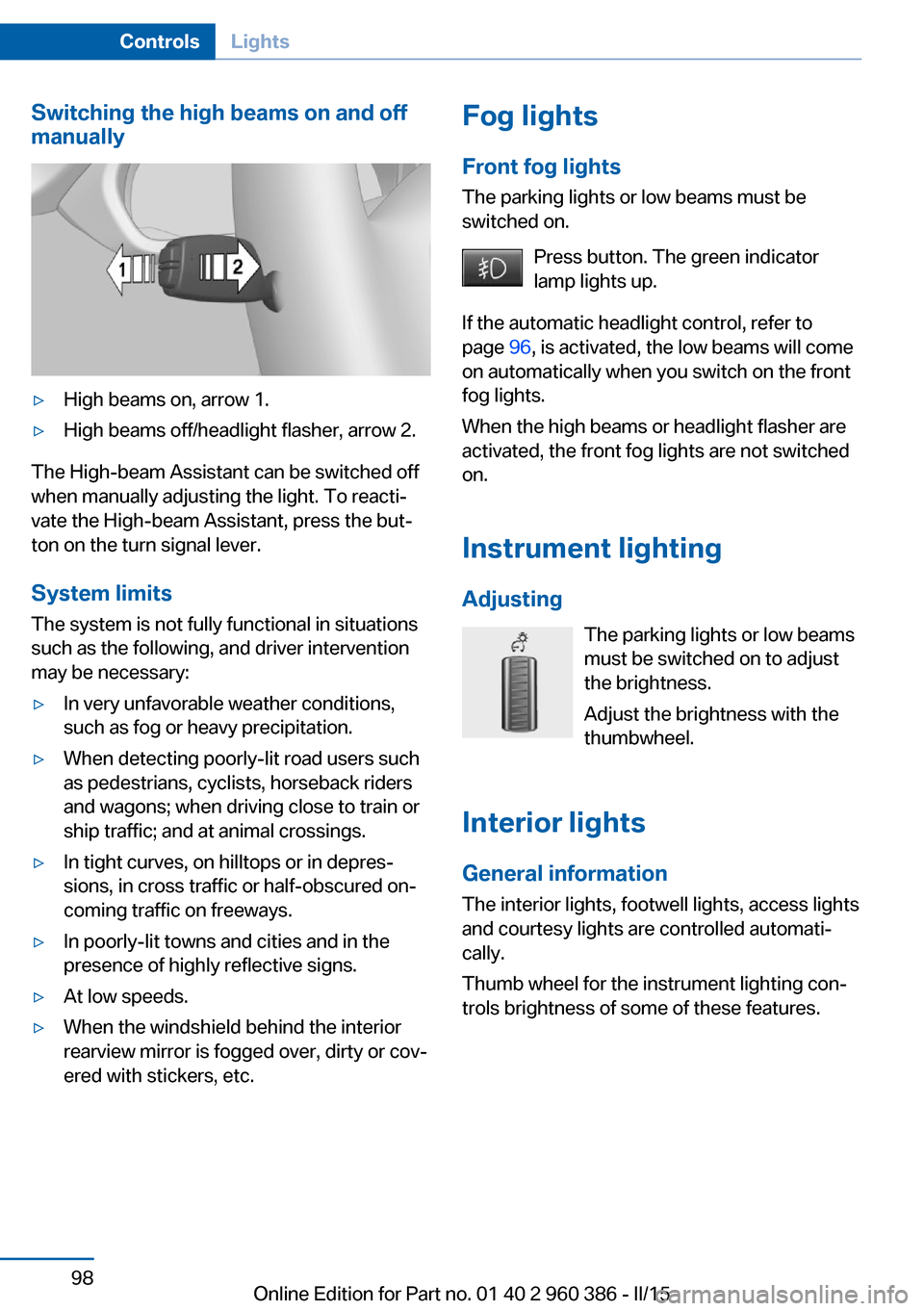
manually▷High beams on, arrow 1.▷High beams off/headlight flasher, arrow 2.
The High-beam Assistant can be switched off
when manually adjusting the light. To reacti‐
vate the High-beam Assistant, press the but‐
ton on the turn signal lever.
System limits
The system is not fully functional in situations such as the following, and driver intervention
may be necessary:
▷In very unfavorable weather conditions,
such as fog or heavy precipitation.▷When detecting poorly-lit road users such
as pedestrians, cyclists, horseback riders
and wagons; when driving close to train or
ship traffic; and at animal crossings.▷In tight curves, on hilltops or in depres‐
sions, in cross traffic or half-obscured on‐
coming traffic on freeways.▷In poorly-lit towns and cities and in the
presence of highly reflective signs.▷At low speeds.▷When the windshield behind the interior
rearview mirror is fogged over, dirty or cov‐
ered with stickers, etc.Fog lights
Front fog lights
The parking lights or low beams must be
switched on.
Press button. The green indicator
lamp lights up.
If the automatic headlight control, refer to
page 96, is activated, the low beams will come
on automatically when you switch on the front
fog lights.
When the high beams or headlight flasher are
activated, the front fog lights are not switched
on.
Instrument lighting Adjusting The parking lights or low beams
must be switched on to adjust
the brightness.
Adjust the brightness with the
thumbwheel.
Interior lights
General information The interior lights, footwell lights, access lights
and courtesy lights are controlled automati‐
cally.
Thumb wheel for the instrument lighting con‐
trols brightness of some of these features.Seite 98ControlsLights98
Online Edition for Part no. 01 40 2 960 386 - II/15
Page 222 of 257
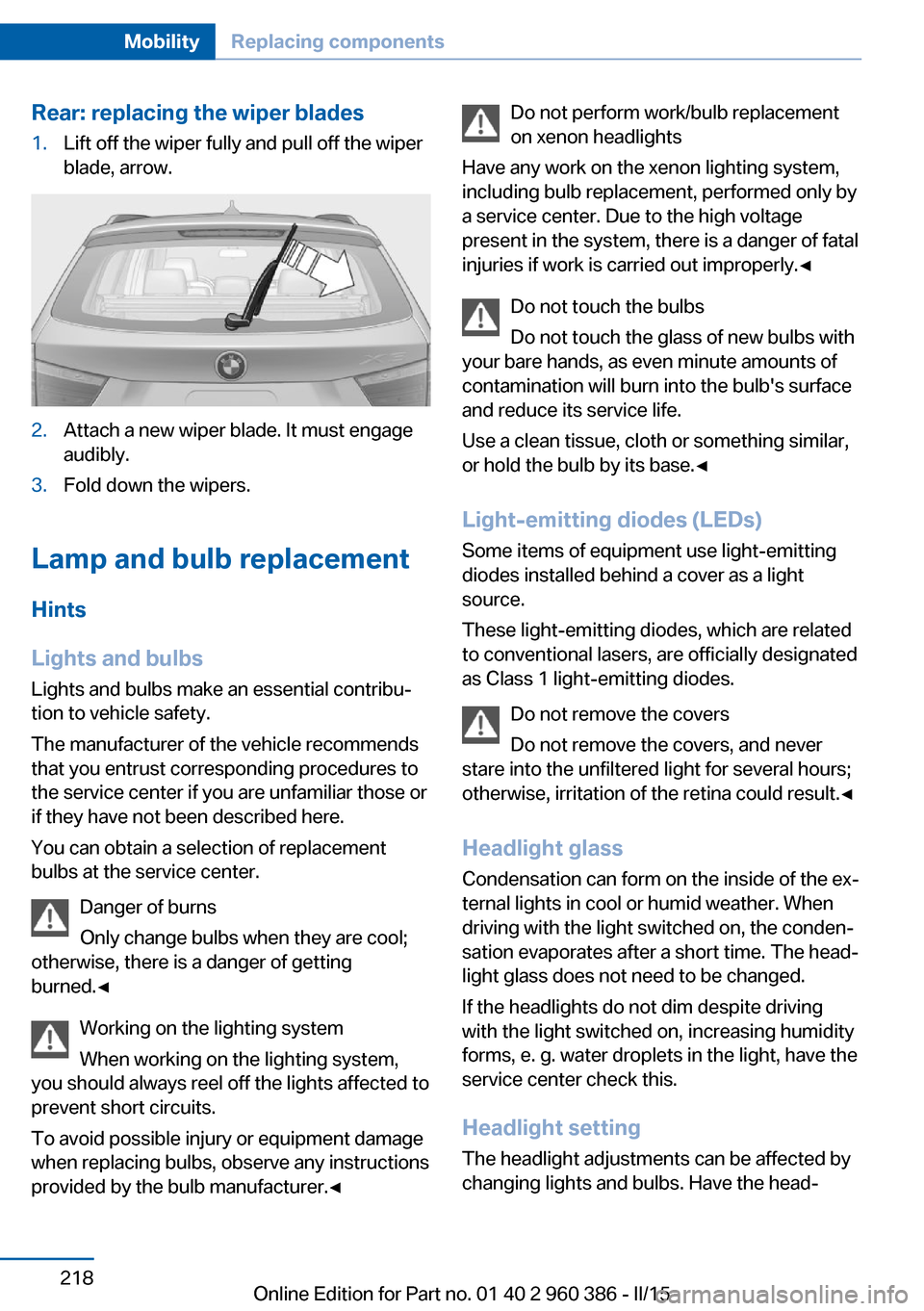
Rear: replacing the wiper blades1.Lift off the wiper fully and pull off the wiper
blade, arrow.2.Attach a new wiper blade. It must engage
audibly.3.Fold down the wipers.
Lamp and bulb replacement
Hints
Lights and bulbs
Lights and bulbs make an essential contribu‐
tion to vehicle safety.
The manufacturer of the vehicle recommends
that you entrust corresponding procedures to
the service center if you are unfamiliar those or
if they have not been described here.
You can obtain a selection of replacement
bulbs at the service center.
Danger of burns
Only change bulbs when they are cool;
otherwise, there is a danger of getting
burned.◀
Working on the lighting system
When working on the lighting system,
you should always reel off the lights affected to
prevent short circuits.
To avoid possible injury or equipment damage
when replacing bulbs, observe any instructions
provided by the bulb manufacturer.◀
Do not perform work/bulb replacement
on xenon headlights
Have any work on the xenon lighting system,
including bulb replacement, performed only by
a service center. Due to the high voltage
present in the system, there is a danger of fatal
injuries if work is carried out improperly.◀
Do not touch the bulbs
Do not touch the glass of new bulbs with
your bare hands, as even minute amounts of
contamination will burn into the bulb's surface
and reduce its service life.
Use a clean tissue, cloth or something similar,
or hold the bulb by its base.◀
Light-emitting diodes (LEDs)
Some items of equipment use light-emitting
diodes installed behind a cover as a light
source.
These light-emitting diodes, which are related
to conventional lasers, are officially designated as Class 1 light-emitting diodes.
Do not remove the covers
Do not remove the covers, and never
stare into the unfiltered light for several hours;
otherwise, irritation of the retina could result.◀
Headlight glass
Condensation can form on the inside of the ex‐
ternal lights in cool or humid weather. When
driving with the light switched on, the conden‐
sation evaporates after a short time. The head‐
light glass does not need to be changed.
If the headlights do not dim despite driving
with the light switched on, increasing humidity
forms, e. g. water droplets in the light, have the
service center check this.
Headlight setting
The headlight adjustments can be affected by
changing lights and bulbs. Have the head‐Seite 218MobilityReplacing components218
Online Edition for Part no. 01 40 2 960 386 - II/15
Page 223 of 257
lights' settings checked and corrected by serv‐
ice after a replacement.
Front lights, bulb replacement
Halogen headlights
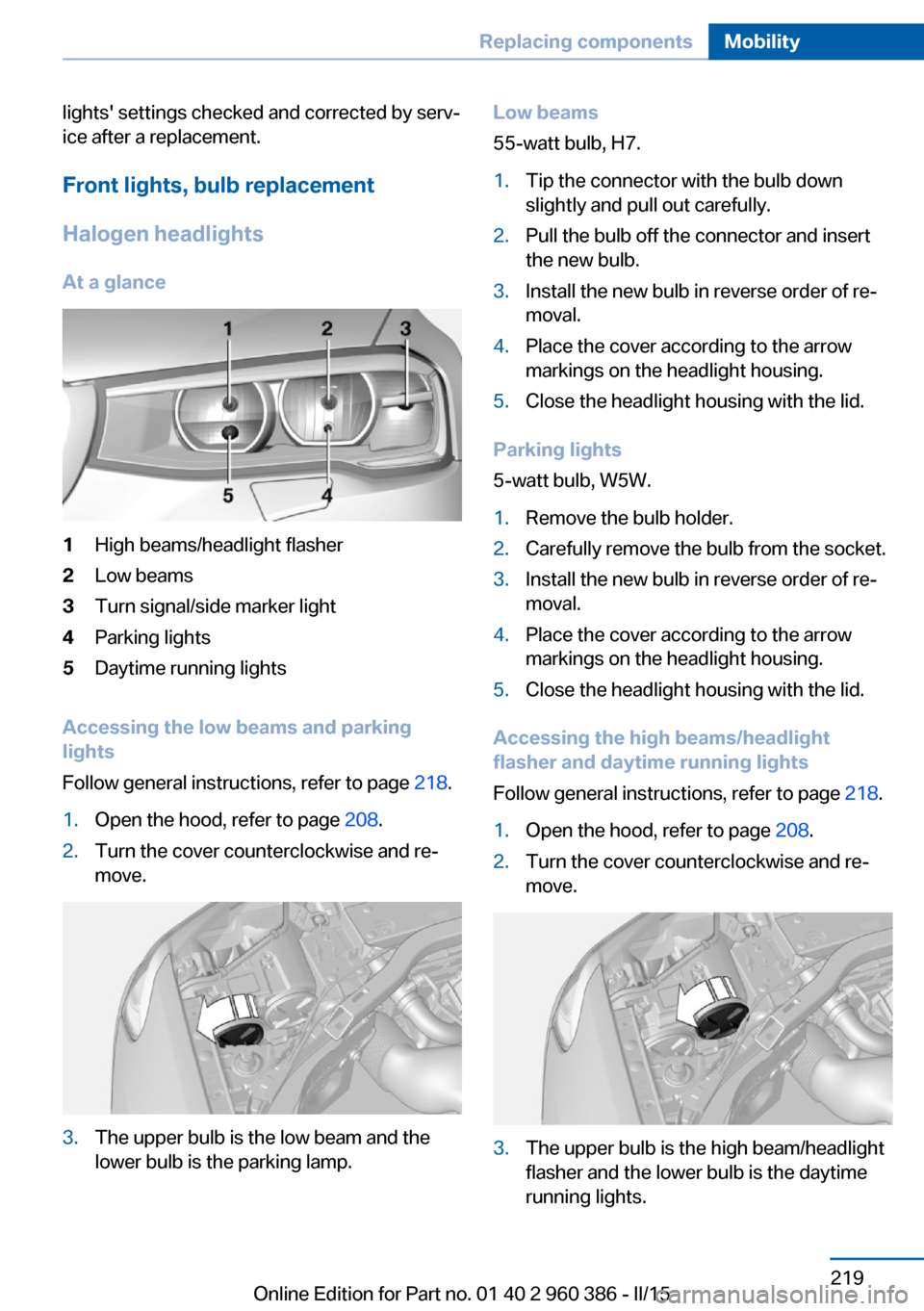
At a glance1High beams/headlight flasher2Low beams3Turn signal/side marker light4Parking lights5Daytime running lights
Accessing the low beams and parking
lights
Follow general instructions, refer to page 218.
1.Open the hood, refer to page 208.2.Turn the cover counterclockwise and re‐
move.3.The upper bulb is the low beam and the
lower bulb is the parking lamp.Low beams
55-watt bulb, H7.1.Tip the connector with the bulb down
slightly and pull out carefully.2.Pull the bulb off the connector and insert
the new bulb.3.Install the new bulb in reverse order of re‐
moval.4.Place the cover according to the arrow
markings on the headlight housing.5.Close the headlight housing with the lid.
Parking lights
5-watt bulb, W5W.
1.Remove the bulb holder.2.Carefully remove the bulb from the socket.3.Install the new bulb in reverse order of re‐
moval.4.Place the cover according to the arrow
markings on the headlight housing.5.Close the headlight housing with the lid.
Accessing the high beams/headlight
flasher and daytime running lights
Follow general instructions, refer to page 218.
1.Open the hood, refer to page 208.2.Turn the cover counterclockwise and re‐
move.3.The upper bulb is the high beam/headlight
flasher and the lower bulb is the daytime
running lights.Seite 219Replacing componentsMobility219
Online Edition for Part no. 01 40 2 960 386 - II/15
Page 224 of 257
High beams/headlight flasher
55-watt bulb, H7.1.Tip the connector with the bulb up slightly
and pull out carefully.2.Pull the bulb off the connector and insert
the new bulb.3.Install the new bulb in reverse order of re‐
moval.4.Place the cover according to the arrow
markings on the headlight housing.5.Close the headlight housing with the lid.
Daytime running lights
21-watt bulb, W21W.
1.Turn the bulb holder counterclockwise and
remove.2.Carefully remove the bulb from the socket.3.Install the new bulb in reverse order of re‐
moval.4.Place the cover according to the arrow
markings on the headlight housing.5.Close the headlight housing with the lid.
Xenon headlights
Hints
Because of the long life of these bulbs, the
likelihood of failure is very low. Switching the
lights on and off frequently shortens their life.
If a bulb fails, reel on the front fog lights and
continue the trip with great care. Comply with
local regulations.
Do not perform work/bulb replacement
on xenon headlights
Have any work on the xenon lighting system,
including bulb replacement, performed only by
a service center. Due to the high voltage
present in the system, there is a danger of fatal
injuries if work is carried out improperly.◀
For checking and adjusting headlamp aim,
please contact your BMW center.
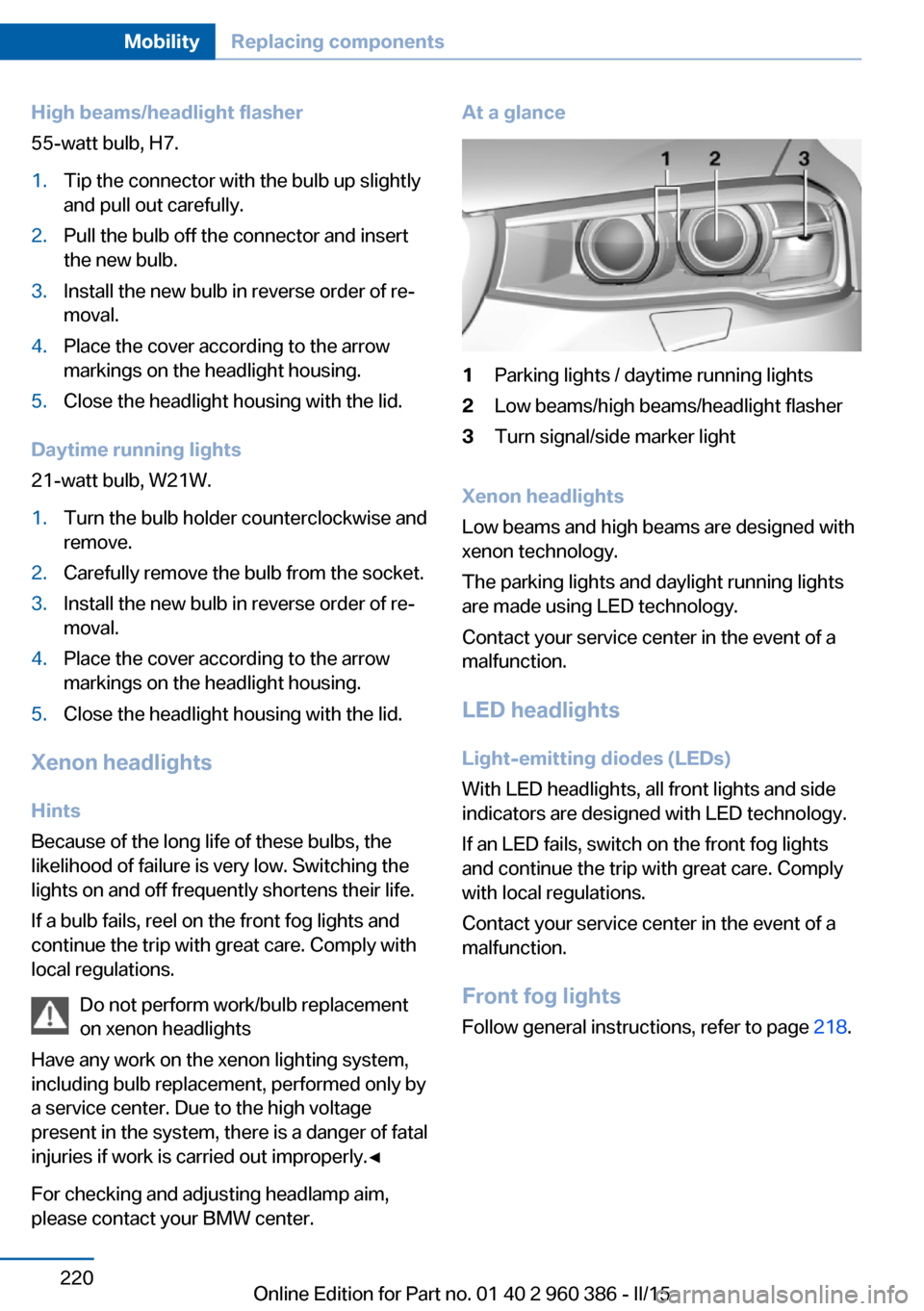
At a glance1Parking lights / daytime running lights2Low beams/high beams/headlight flasher3Turn signal/side marker light
Xenon headlights
Low beams and high beams are designed with
xenon technology.
The parking lights and daylight running lights
are made using LED technology.
Contact your service center in the event of a
malfunction.
LED headlightsLight-emitting diodes (LEDs)
With LED headlights, all front lights and side
indicators are designed with LED technology.
If an LED fails, switch on the front fog lights and continue the trip with great care. Complywith local regulations.
Contact your service center in the event of a
malfunction.
Front fog lights
Follow general instructions, refer to page 218.
Seite 220MobilityReplacing components220
Online Edition for Part no. 01 40 2 960 386 - II/15
Page 236 of 257
3.Deactivating Automatic Hold, refer to
page 71.4.Release the parking brake.5.Switch the engine off.
In this way, the ignition remains switched
on, and a Check-Control message is dis‐
played.
Do not turn off the ignition in the car
wash
Do not turn off the ignition in the car wash;
otherwise, selector lever position P is en‐
gaged and damages can result.◀
The vehicle cannot be locked from the outside
when in selector lever position N. A signal
sounds when an attempt is made to lock the
vehicle.
To start the engine with Steptronic transmis‐
sion:
1.Depress the brake pedal.2.Press the Start/Stop button.
Pressing the Start/Stop button without step‐
ping on the brake turns the ignition off.
Selector lever positionSelector lever position P is engaged automati‐
cally:
▷When the ignition is switched off.▷After approx. 15 minutes.
Headlights
▷Do not rub dry and do not use abrasive or
acidic cleansers.▷Soak areas that have been dirtied e. g.,
from insects, with shampoo and wash off
with water.▷Thaw ice with de-icing spray; do not use an
ice scraper.
After washing the vehicle
After washing the vehicle, apply the brakes
briefly to dry them; otherwise, braking action
can be reduced and corrosion of the brake
discs can occur.
Completely remove all residues on the win‐
dows, to minimize loss of visibility due to
smearing and to reduce wiper noises and
wiper blade wear.
Vehicle care
Car care products BMW recommends using care and cleaning
products from BMW, since these have been
tested and approved.
Car care and cleaning products
Follow the instructions on the container.
When cleaning the interior, open the doors or
windows.
Only use products intended for cleaning vehi‐
cles.
Cleansers can contain substances that are
dangerous and harmful to your health.◀
Vehicle paint
Regular care contributes to driving safety and
value retention. Environmental influences in
areas with elevated air pollution or natural con‐
taminants, such as tree resin or pollen can af‐
fect the vehicle's paintwork. Tailor the fre‐
quency and extent of your car care to these
influences.
Aggressive substances such as spilled fuel, oil,
grease or bird droppings, must be removed im‐
mediately to prevent the finish from being al‐
tered or discolored.
Leather care
Remove dust from the leather often, using a
cloth or vacuum cleaner.
Otherwise, particles of dust and road grime
chafe in pores and folds, and lead to increased
wear and premature degradation of the leather
surface.Seite 232MobilityCare232
Online Edition for Part no. 01 40 2 960 386 - II/15
Page 246 of 257
Everything from A to Z
IndexA ABS, Antilock Brake Sys‐ tem 123
ACC, Active Cruise Control with Stop & Go 130
Acceleration Assistant, refer to Launch Control 79
Accessories and parts 7
Activated-charcoal filter 157
Active Blind Spot Detec‐ tion 120
Active Cruise Control with Stop & Go, ACC 130
Adaptive brake lights, refer to Brake force display 122
Adaptive Light Control 96
Additives, oil 211
Adjustments, seats/head re‐ straints 52
After washing vehicle 232
Airbags 100
Airbags, indicator/warning light 101
Air circulation, refer to Recir‐ culated-air mode 153, 157
Air, dehumidifying, refer to Cooling function 154, 157
Air distribution, manual 153, 156
Air flow, automatic climate control 153, 156
Air pressure, tires 197
Air vents, refer to Ventila‐ tion 158
Alarm system 46
Alarm, unintentional 47
All around the center con‐ sole 16
All around the roofliner 17 All around the steering
wheel 14
All-season tires, refer to Win‐ ter tires 203
All-wheel-drive 125
Alternating-code hand-held transmitter 161
Alternative oil types 212
Ambient light 99
Antifreeze, washer fluid 75
Antilock Brake System, ABS 123
Anti-slip control, refer to DSC 123
Approved axle load 239
Approved engine oils, see Suitable engine oil
types 212
Armrest, refer to Center arm‐ rest 169
Arrival time 91
Ash tray 162
Assistance when driving off 128
Assist system, refer to Intelli‐ gent Safety 108
AUTO H button 71
AUTO H button, refer to Au‐ tomatic Hold 71
AUTO intensity 156
Automatic car wash 231
Automatic climate con‐ trol 152
Automatic climate control with enhanced features 155
Automatic Cruise Control with Stop & Go 130
Automatic Curb Monitor 59
Automatic deactivation, front- seat passenger airbags 102 Automatic headlight con‐
trol 96
Automatic Hold 71
Automatic locking 46
Automatic recirculated-air control 157
Automatic tailgate 41
Automatic transmission, see Steptronic transmission 76
AUTO program, automatic cli‐ mate control 156
AUTO program, climate con‐ trol 153
AUTO program, intensity 156
Auto Start/Stop function 68
Average fuel consumption 90
Average speed 90
Axle loads, weights 239
B Backrest curvature, refer to Lumbar support 54
Backrest, width 54
Bad road trips 174
Band-aids, refer to First aid kit 227
Bar for tow-starting/ towing 229
Battery replacement, vehicle battery 224
Battery replacement, vehicle remote control 35
Battery, vehicle 223
Belts, safety belts 55
Beverage holder, cu‐ pholder 169
Blinds, sun protection 49
BMW Advanced Diesel 193
BMW Assist, see user's manual for Navigation, En‐Seite 242ReferenceEverything from A to Z242
Online Edition for Part no. 01 40 2 960 386 - II/15
Page 249 of 257
Engine coolant 213
Engine idling when driving, coasting 185
Engine oil 210
Engine oil, adding 211
Engine oil additives 211
Engine oil change 212
Engine oil filler neck 211
Engine oil temperature 85
Engine oil types, alterna‐ tive 212
Engine oil types, ap‐ proved 212
Engine start during malfunc‐ tion 35
Engine start, jump-start‐ ing 227
Engine start, refer to Starting the engine 67
Engine stop 67
Engine temperature 85
Entering a car wash 231
Equipment, interior 160
Error displays, see Check Control 81
ESP Electronic Stability Pro‐ gram, refer to DSC 123
Exchanging wheels/tires 202
Exhaust system 175
Exterior mirror, automatic dimming feature 60
Exterior mirrors 59
External start 227
External temperature dis‐ play 85
External temperature warn‐ ing 85
Eyes for securing cargo 179
F
Failure message, see Check Control 81
False alarm, refer to Uninten‐ tional alarm 47 Fan, refer to Air
flow 153, 156
Filler neck for engine oil 211
Fine wood, care 233
First aid kit 227
Fitting for towing, see Tow fit‐ ting 229
Flat tire, changing wheels 223
Flat Tire Monitor FTM 106
Flat tire, Tire Pressure Moni‐ tor TPM 103
Flat tire, warning lamp 104, 107
Flooding 176
Floor carpet, care 234
Floor mats, care 234
Folding back rear seat back‐ rests 165
Fold-out position, wiper 75
Foot brake 176
Front airbags 100
Front-end collision warning with braking function 112
Front-end collision warning with City Braking func‐
tion 110
Front fog lights 98
Front fog lights, bulb replace‐ ment 221
Front fog lights, front, bulb re‐ placement 220
Front lights 219
front-seat passenger airbags, automatic deactivation 102
Front-seat passenger airbags, indicator lamp 102
FTM Flat Tire Monitor 106
Fuel 192
Fuel consumption, current 86
Fuel consumption, refer to Average fuel consump‐
tion 90
Fuel filler flap 190
Fuel gauge 84
Fuel lid 190 Fuel quality 192
Fuel recommendation 192
Fuel, tank capacity 240
Fuse 224
G
Garage door opener, refer to Universal Integrated Remote
Control 160
Gasoline 192
Gear change, Steptronic transmission 76
Gear shift indicator 87
General driving notes 175
Glare shield 162
Glass sunroof, refer to Panor‐ amic glass sunroof 49
Glove compartment 168
Gross vehicle weight, ap‐ proved 239
H
Halogen headlights, bulb re‐ placement 219
Handbrake, refer to Parking brake 70
Hand-held transmitter, alter‐ nating code 161
Hazard warning flashers 226
HDC Hill Descent Con‐ trol 125
Head airbags 100
Headlight control, auto‐ matic 96
Headlight courtesy delay fea‐ ture 96
Headlight courtesy delay fea‐ ture via remote control 38
Headlight flasher 73
Headlight flasher, bulb re‐ placement 219
Headlight glass 218
Headlights 219
Headlights, care 232 Seite 245Everything from A to ZReference245
Online Edition for Part no. 01 40 2 960 386 - II/15
Page 250 of 257
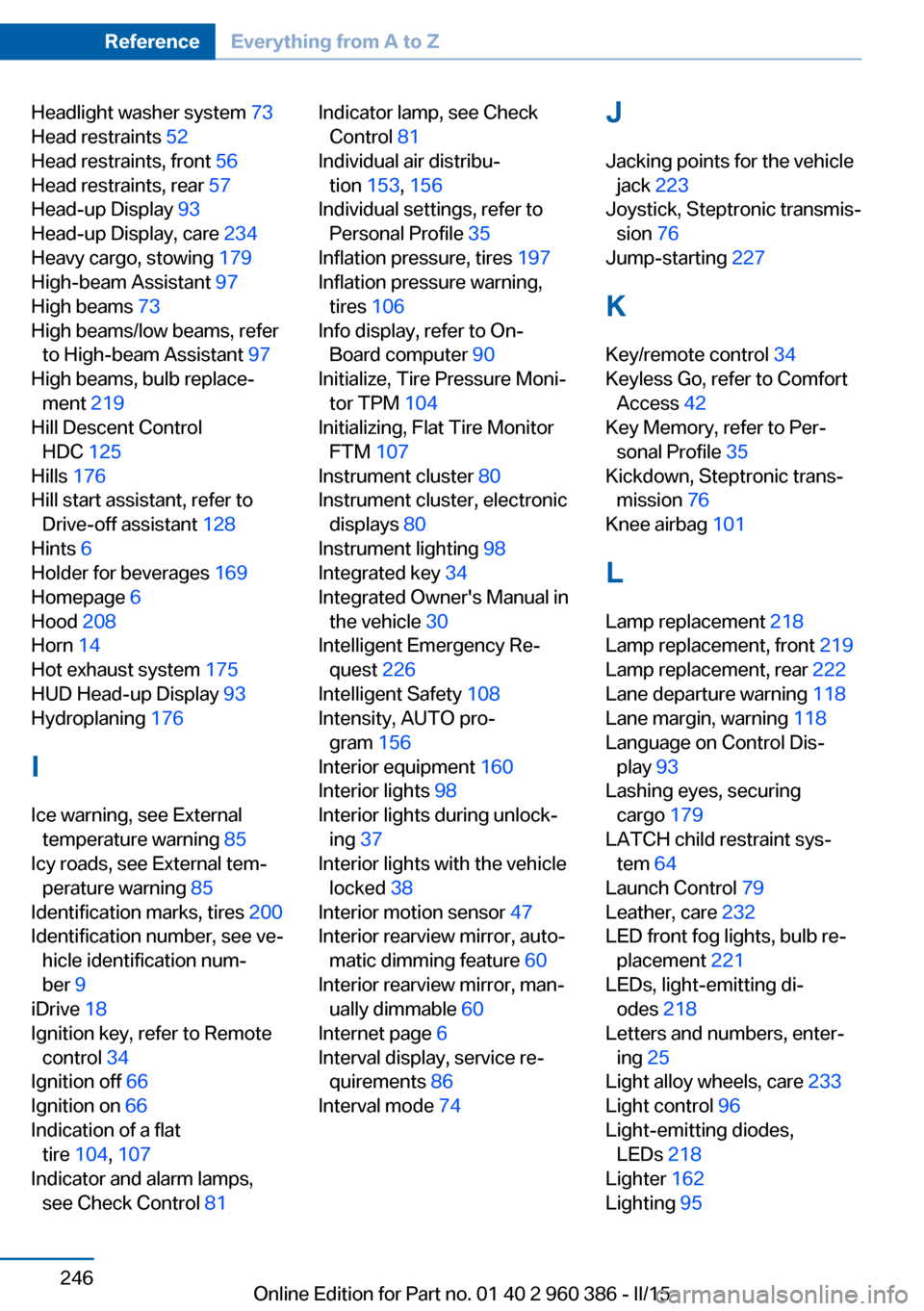
Headlight washer system 73
Head restraints 52
Head restraints, front 56
Head restraints, rear 57
Head-up Display 93
Head-up Display, care 234
Heavy cargo, stowing 179
High-beam Assistant 97
High beams 73
High beams/low beams, refer to High-beam Assistant 97
High beams, bulb replace‐ ment 219
Hill Descent Control HDC 125
Hills 176
Hill start assistant, refer to Drive-off assistant 128
Hints 6
Holder for beverages 169
Homepage 6
Hood 208
Horn 14
Hot exhaust system 175
HUD Head-up Display 93
Hydroplaning 176
I Ice warning, see External temperature warning 85
Icy roads, see External tem‐ perature warning 85
Identification marks, tires 200
Identification number, see ve‐ hicle identification num‐
ber 9
iDrive 18
Ignition key, refer to Remote control 34
Ignition off 66
Ignition on 66
Indication of a flat tire 104 , 107
Indicator and alarm lamps, see Check Control 81 Indicator lamp, see Check
Control 81
Individual air distribu‐ tion 153, 156
Individual settings, refer to Personal Profile 35
Inflation pressure, tires 197
Inflation pressure warning, tires 106
Info display, refer to On- Board computer 90
Initialize, Tire Pressure Moni‐ tor TPM 104
Initializing, Flat Tire Monitor FTM 107
Instrument cluster 80
Instrument cluster, electronic displays 80
Instrument lighting 98
Integrated key 34
Integrated Owner's Manual in the vehicle 30
Intelligent Emergency Re‐ quest 226
Intelligent Safety 108
Intensity, AUTO pro‐ gram 156
Interior equipment 160
Interior lights 98
Interior lights during unlock‐ ing 37
Interior lights with the vehicle locked 38
Interior motion sensor 47
Interior rearview mirror, auto‐ matic dimming feature 60
Interior rearview mirror, man‐ ually dimmable 60
Internet page 6
Interval display, service re‐ quirements 86
Interval mode 74 J
Jacking points for the vehicle jack 223
Joystick, Steptronic transmis‐ sion 76
Jump-starting 227
K
Key/remote control 34
Keyless Go, refer to Comfort Access 42
Key Memory, refer to Per‐ sonal Profile 35
Kickdown, Steptronic trans‐ mission 76
Knee airbag 101
L Lamp replacement 218
Lamp replacement, front 219
Lamp replacement, rear 222
Lane departure warning 118
Lane margin, warning 118
Language on Control Dis‐ play 93
Lashing eyes, securing cargo 179
LATCH child restraint sys‐ tem 64
Launch Control 79
Leather, care 232
LED front fog lights, bulb re‐ placement 221
LEDs, light-emitting di‐ odes 218
Letters and numbers, enter‐ ing 25
Light alloy wheels, care 233
Light control 96
Light-emitting diodes, LEDs 218
Lighter 162
Lighting 95 Seite 246ReferenceEverything from A to Z246
Online Edition for Part no. 01 40 2 960 386 - II/15
Page 251 of 257
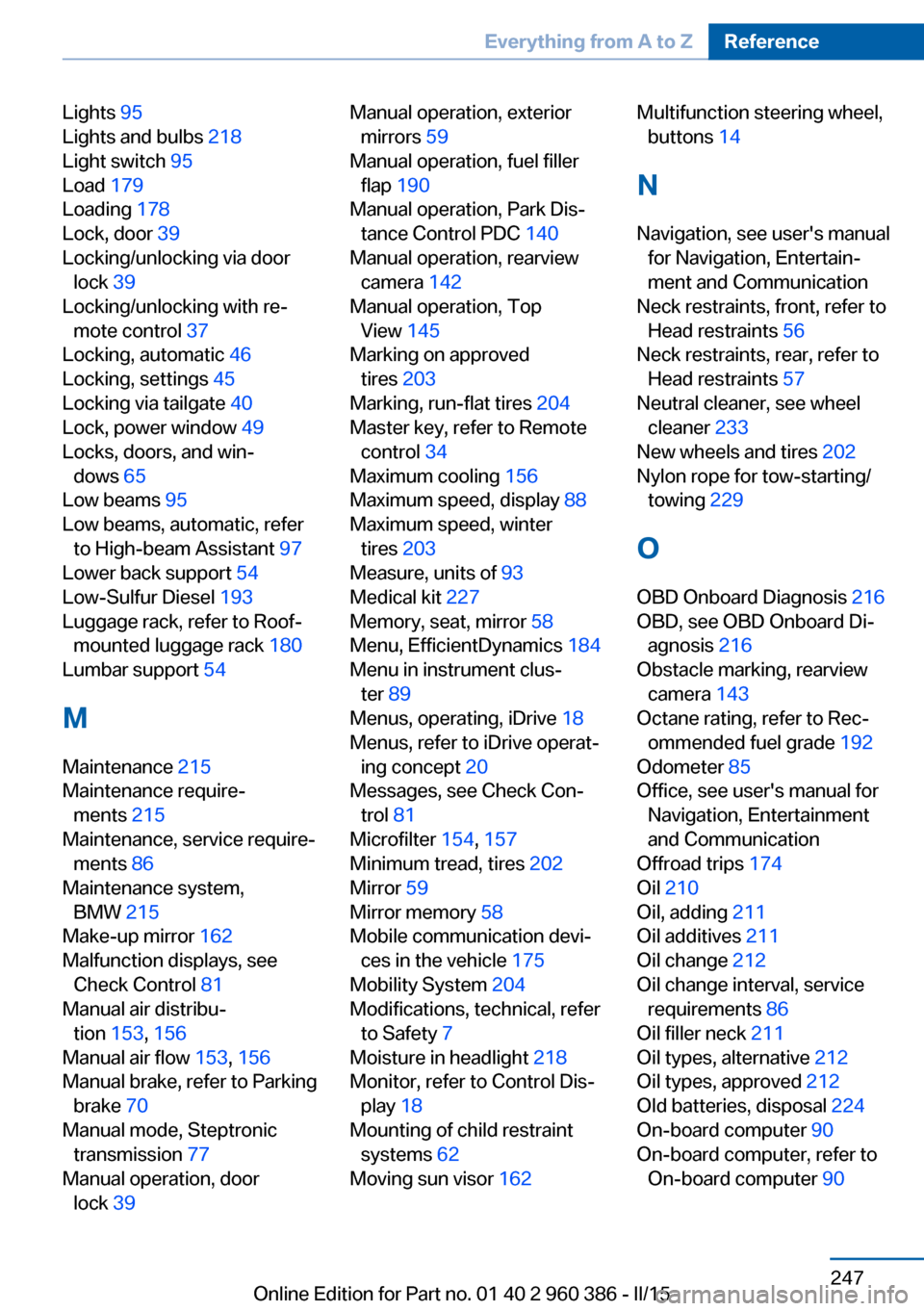
Lights 95
Lights and bulbs 218
Light switch 95
Load 179
Loading 178
Lock, door 39
Locking/unlocking via door lock 39
Locking/unlocking with re‐ mote control 37
Locking, automatic 46
Locking, settings 45
Locking via tailgate 40
Lock, power window 49
Locks, doors, and win‐ dows 65
Low beams 95
Low beams, automatic, refer to High-beam Assistant 97
Lower back support 54
Low-Sulfur Diesel 193
Luggage rack, refer to Roof- mounted luggage rack 180
Lumbar support 54
M
Maintenance 215
Maintenance require‐ ments 215
Maintenance, service require‐ ments 86
Maintenance system, BMW 215
Make-up mirror 162
Malfunction displays, see Check Control 81
Manual air distribu‐ tion 153, 156
Manual air flow 153, 156
Manual brake, refer to Parking brake 70
Manual mode, Steptronic transmission 77
Manual operation, door lock 39 Manual operation, exterior
mirrors 59
Manual operation, fuel filler flap 190
Manual operation, Park Dis‐ tance Control PDC 140
Manual operation, rearview camera 142
Manual operation, Top View 145
Marking on approved tires 203
Marking, run-flat tires 204
Master key, refer to Remote control 34
Maximum cooling 156
Maximum speed, display 88
Maximum speed, winter tires 203
Measure, units of 93
Medical kit 227
Memory, seat, mirror 58
Menu, EfficientDynamics 184
Menu in instrument clus‐ ter 89
Menus, operating, iDrive 18
Menus, refer to iDrive operat‐ ing concept 20
Messages, see Check Con‐ trol 81
Microfilter 154, 157
Minimum tread, tires 202
Mirror 59
Mirror memory 58
Mobile communication devi‐ ces in the vehicle 175
Mobility System 204
Modifications, technical, refer to Safety 7
Moisture in headlight 218
Monitor, refer to Control Dis‐ play 18
Mounting of child restraint systems 62
Moving sun visor 162 Multifunction steering wheel,
buttons 14
N
Navigation, see user's manual for Navigation, Entertain‐
ment and Communication
Neck restraints, front, refer to Head restraints 56
Neck restraints, rear, refer to Head restraints 57
Neutral cleaner, see wheel cleaner 233
New wheels and tires 202
Nylon rope for tow-starting/ towing 229
O OBD Onboard Diagnosis 216
OBD, see OBD Onboard Di‐ agnosis 216
Obstacle marking, rearview camera 143
Octane rating, refer to Rec‐ ommended fuel grade 192
Odometer 85
Office, see user's manual for Navigation, Entertainment
and Communication
Offroad trips 174
Oil 210
Oil, adding 211
Oil additives 211
Oil change 212
Oil change interval, service requirements 86
Oil filler neck 211
Oil types, alternative 212
Oil types, approved 212
Old batteries, disposal 224
On-board computer 90
On-board computer, refer to On-board computer 90 Seite 247Everything from A to ZReference247
Online Edition for Part no. 01 40 2 960 386 - II/15