lock BMW X3 3.0I 2006 E83 Owner's Guide
[x] Cancel search | Manufacturer: BMW, Model Year: 2006, Model line: X3 3.0I, Model: BMW X3 3.0I 2006 E83Pages: 133, PDF Size: 8.37 MB
Page 102 of 133
Replacing components
100 Please have your BMW Sports Activity
Vehicle Center work on lamps whose
replacement is not described here.<
Light-emitting diodes LEDs
Light-emitting diodes installed behind translu-
cent lenses serve as the light source for many of
the controls and displays in your vehicle. These
light-emitting diodes are related to ordinary
lasers.
Do not remove the covers, and never
stare into the unfiltered light for several
hours, as irritation of the retina could result.<
Xenon lamps*
The service life of these bulbs is very long and
the probability of failure is very low, provided
that they are not switched on and off an unusual
number of times. If one of these bulbs should
nevertheless fail, it is possible to continue driv-
ing with great caution using the fog lamps, pro-
vided traffic laws in your area do not prohibit
this.
To avoid risk of potentially fatal injuries
due to the extremely high voltages at
which these units operate, service work should
always be entrusted to qualified personnel.<
Parking and roadside parking lamps
In case of a malfunction, please contact your
BMW Sports Activity Vehicle Center.
Halogen low beams
H7 bulb, 55 watts
Always wear gloves and eye protection –
the atmosphere within the bulb is pres-
surized. Failure to observe this precaution can
lead to personal injury should the bulb be dam-
aged.<
For checking and adjusting headlamp
aim, please contact your BMW Sports
Activity Vehicle Center.<
Driver's side
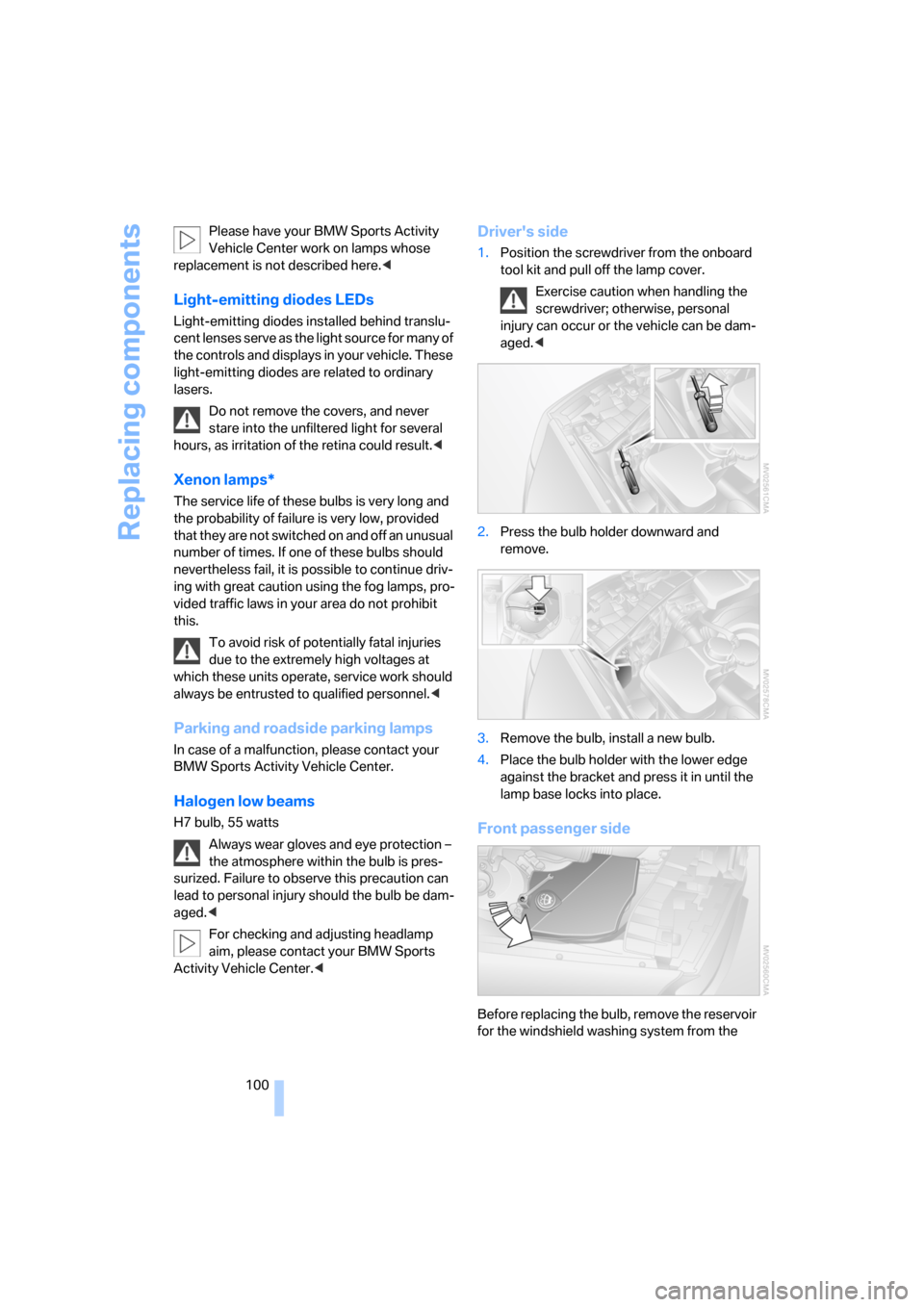
1.Position the screwdriver from the onboard
tool kit and pull off the lamp cover.
Exercise caution when handling the
screwdriver; otherwise, personal
injury can occur or the vehicle can be dam-
aged.<
2.Press the bulb holder downward and
remove.
3.Remove the bulb, install a new bulb.
4.Place the bulb holder with the lower edge
against the bracket and press it in until the
lamp base locks into place.
Front passenger side
Before replacing the bulb, remove the reservoir
for the windshield washing system from the
Page 103 of 133
Reference
At a glance
Controls
Driving tips
Mobility
101
bracket. To do so, loosen the bolt, refer to
arrow, and place the reservoir to one side.
Bear in mind that the windshield washing
system reservoir is heavy. If you do not,
injuries or damage to the vehicle can occur.<
For bulb replacement procedure, refer to
Driver's side.
Halogen high beams
H7 bulb, 55 watts
Always wear gloves and eye protection –
the atmosphere within the bulb is pres-
surized. Failure to observe this precaution can
lead to personal injury should the bulb be dam-
aged.<
For checking and adjusting headlamp
aim, please contact your BMW Sports
Activity Vehicle Center.<
Driver's side
1.Open the clip and remove the lamp cover.
2.Press the bulb holder downward and
remove, refer to Low beams.
3.Pull off the lamp base; plug in a new lamp
base.
4.Place the lamp base with the lower edge
against the bracket and press it in until the
lamp base locks into place.
Make sure that the cover does not fall into
the engine compartment; otherwise, the
vehicle can be damaged or other road users can
be endangered.<
Front passenger side
Before replacing the bulb, remove the reservoir
of the windshield washer system from the
bracket, refer to Halogen low beams on
page100.
For bulb replacement procedure, refer to
Driver's side.
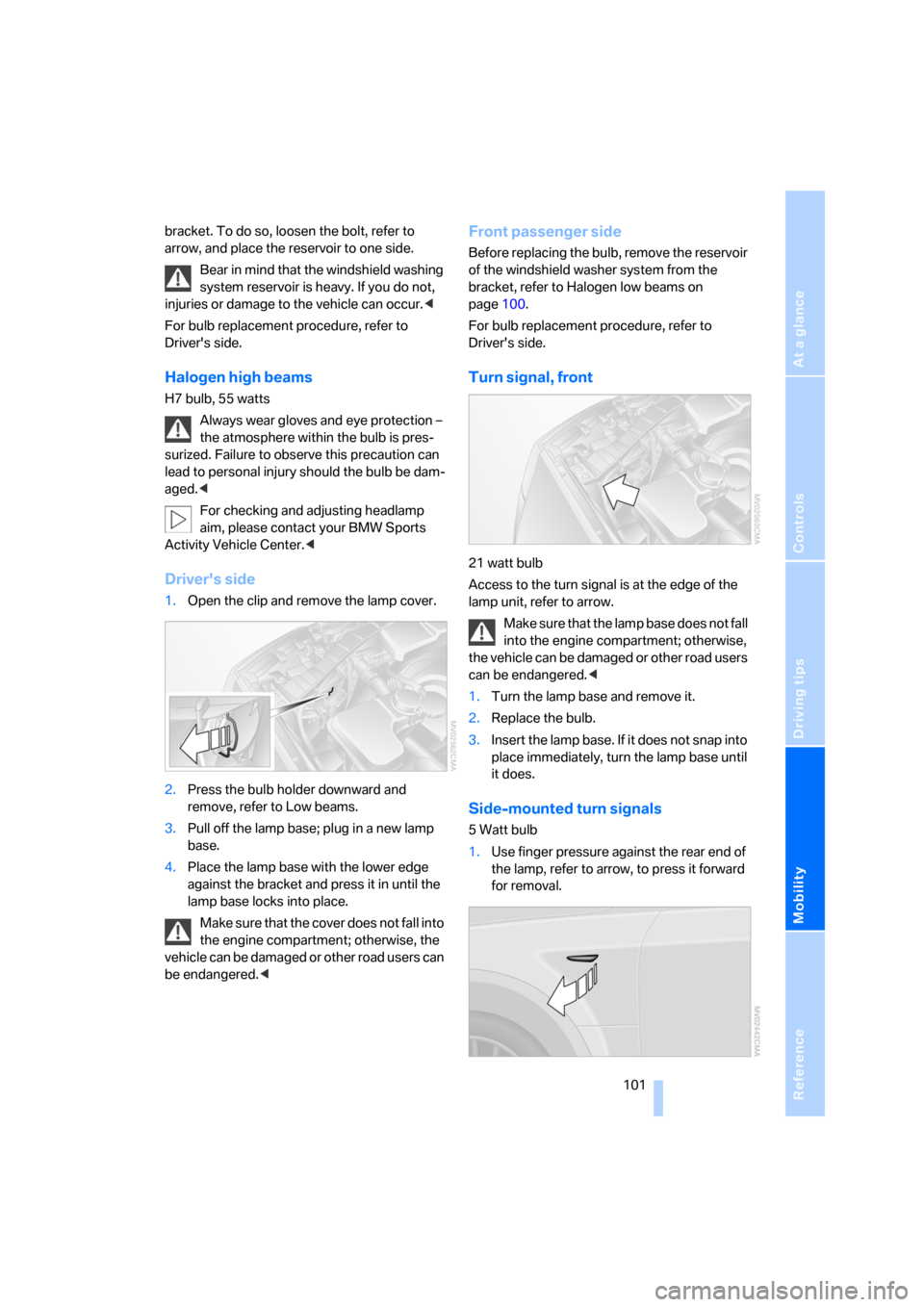
Turn signal, front
21 watt bulb
Access to the turn signal is at the edge of the
lamp unit, refer to arrow.
Make sure that the lamp base does not fall
into the engine compartment; otherwise,
the vehicle can be damaged or other road users
can be endangered.<
1.Turn the lamp base and remove it.
2.Replace the bulb.
3.Insert the lamp base. If it does not snap into
place immediately, turn the lamp base until
it does.
Side-mounted turn signals
5 Watt bulb
1.Use finger pressure against the rear end of
the lamp, refer to arrow, to press it forward
for removal.
Page 105 of 133
Reference
At a glance
Controls
Driving tips
Mobility
103
Liftgate lamp
5 Watt bulb
1.Take out the bulb holder.
2.Replace the bulb.
Wheel changes
Safety precautions to observe in the
event of a flat tire and during all tire
changes:
Park the vehicle as far as possible from passing
traffic. Park on a firm, flat, surface. Switch on the
hazard warning flashers.
Lock the steering wheel with the wheels point-
ing straight ahead. Engage the handbrake and
shift into first gear or reverse, or move the
selector lever to position P.
All passengers should be outside the vehicle
and well away from your immediate working
area, behind a guardrail, for instance.
If a warning triangle or portable hazard warning
lamp is required, set it up on the roadside at an
appropriate distance from the rear of the vehi-
cle. Comply with all safety guidelines and regu-
lations.
Change the wheel only on a level, firm surface
which is not slippery. The vehicle or the jack
could slip to the side if you attempt to raise the
vehicle on a soft or slippery surface such as
snow, ice, tile, etc.
Position the jack on a firm support surface.
Do not use a wooden block or similar object as a
support base for the jack, as this would prevent
it from extending to its full support height and
reduce its load-carrying capacity.To avoid serious or fatal injury: never lie under
the vehicle, and never start the engine while it is
supported by the jack.<
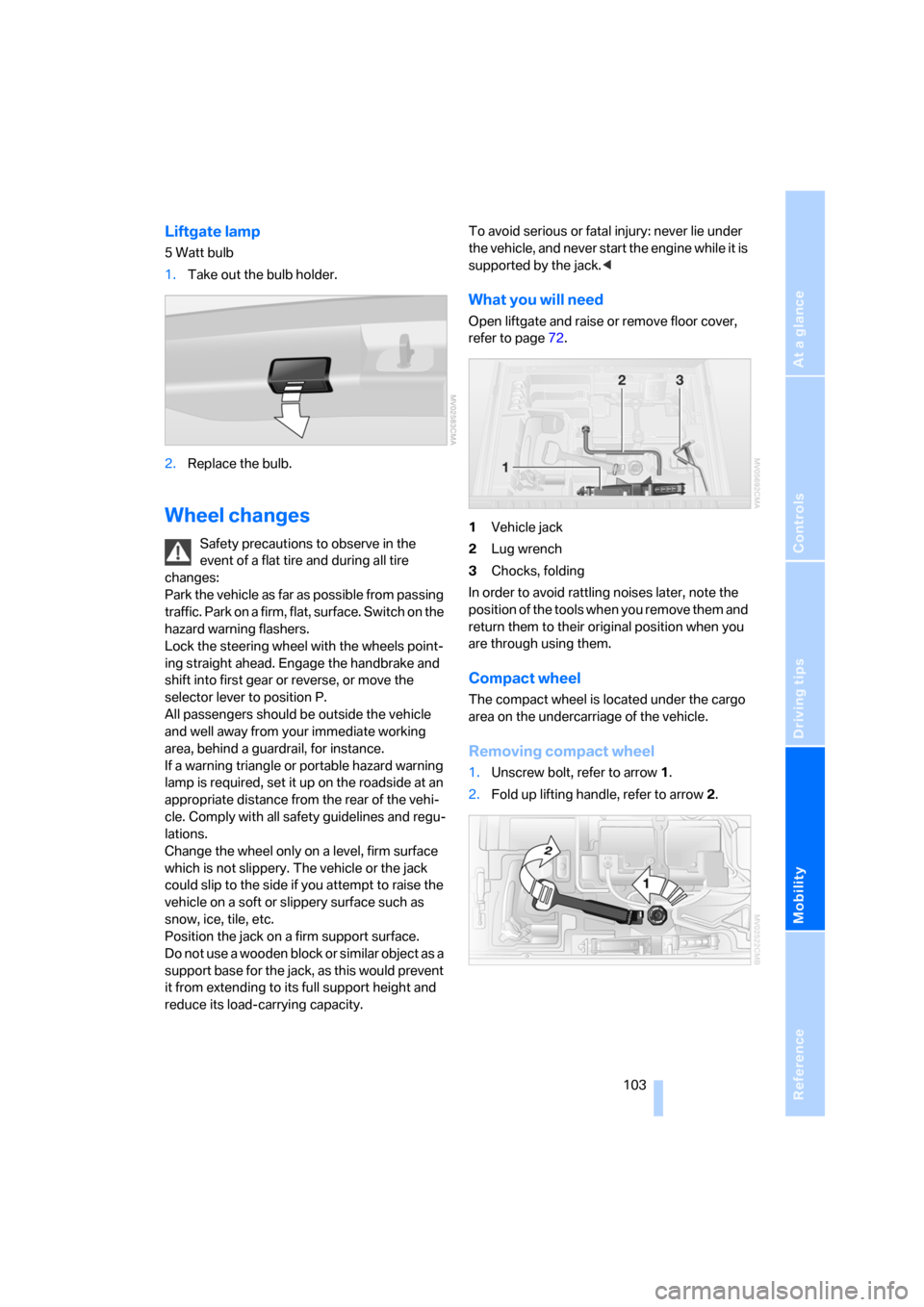
What you will need
Open liftgate and raise or remove floor cover,
refer to page72.
1Vehicle jack
2Lug wrench
3Chocks, folding
In order to avoid rattling noises later, note the
position of the tools when you remove them and
return them to their original position when you
are through using them.
Compact wheel
The compact wheel is located under the cargo
area on the undercarriage of the vehicle.
Removing compact wheel
1.Unscrew bolt, refer to arrow1.
2.Fold up lifting handle, refer to arrow2.
Page 109 of 133
Reference
At a glance
Controls
Driving tips
Mobility
107
Giving and receiving assistance
Receiving assistance
The Roadside Assistance of the BMW Group
offers you assistance in the event of a break-
down around the clock, as well as on weekends
and public holidays.
The phone numbers of the Roadside Assis-
tance control center in your home country can
be found in the BMW Dealer directory.
In the case of vehicles with the corresponding
equipment, you can use buttons in the head-
liner to contact Roadside Assistance or initiate
an emergency call.
When the emergency call is initiated, a tele-
phone connection is established to the BMW
Assist response center.
In vehicles with BMW Assist enabled, if the cur-
r en t p o s it io n o f y o u r v eh i c le c a n b e d et e r m in e d ,
it will be transmitted to the BMW Assist
response center.
The conditions for initiating an emergency call
or contacting Roadside Assistance:
>Ignition key in position 1 or higher
>The car phone is logged on to a mobile tele-
phone network
>The emergency call system is operable
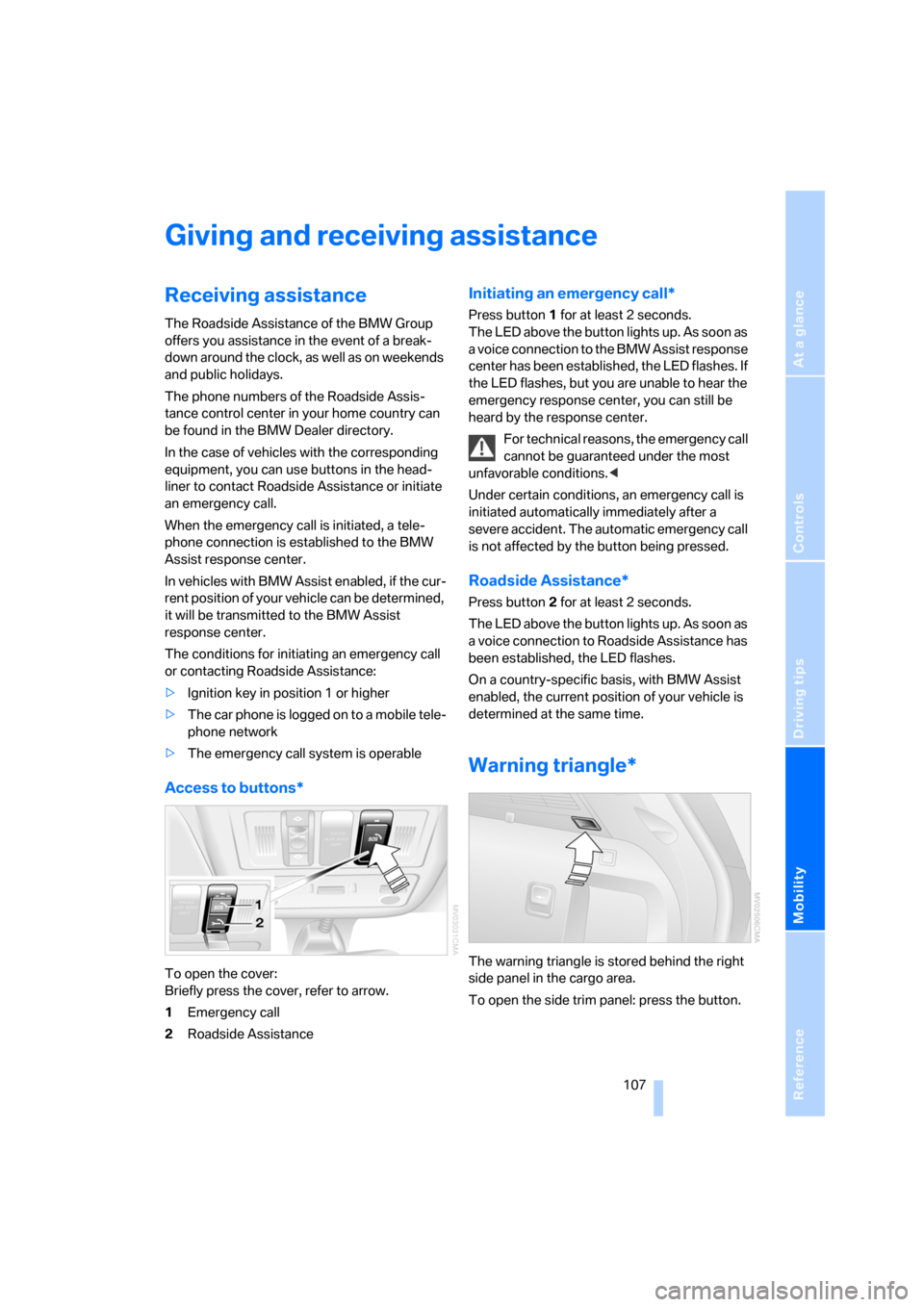
Access to buttons*
To open the cover:
Briefly press the cover, refer to arrow.
1Emergency call
2Roadside Assistance
Initiating an emergency call*
Press button 1 for at least 2 seconds.
The LED above the button lights up. As soon as
a voice connection to the BMW Assist response
center has been established, the LED flashes. If
the LED flashes, but you are unable to hear the
emergency response center, you can still be
heard by the response center.
For technical reasons, the emergency call
cannot be guaranteed under the most
unfavorable conditions.<
Under certain conditions, an emergency call is
initiated automatically immediately after a
severe accident. The automatic emergency call
is not affected by the button being pressed.
Roadside Assistance*
Press button 2 for at least 2 seconds.
The LED above the button lights up. As soon as
a voice connection to Roadside Assistance has
been established, the LED flashes.
On a country-specific basis, with BMW Assist
enabled, the current position of your vehicle is
determined at the same time.
Warning triangle*
The warning triangle is stored behind the right
side panel in the cargo area.
To open the side trim panel: press the button.
Page 111 of 133
Reference
At a glance
Controls
Driving tips
Mobility
109
Starting engine
1.Start the engine of the assisting vehicle and
let it run at a slightly elevated idling speed
for a few minutes.
2.Start the engine on the other vehicle in the
usual way.
If the first start attempt is not successful,
wait a few minutes before another attempt
in order to allow the discharged battery to
recharge.
3.Let the engines run for a few minutes.
4.Disconnect the jumper cables by reversing
the connection sequence.
If need be, have the battery checked and
recharged.
Never use spray fluids to start the
engine.<
Tow starting and towing
Obey all applicable laws and guidelines
for tow starting and towing.<
Do not allow any passengers other than
the driver to ride in a vehicle that is being
towed.<
Using tow fitting
The threaded tow fitting is stored in the
onboard tool kit, refer to page99, and must
always remain in the vehicle. It can be screwed
in at the front or rear of the BMW.
Only use the tow fitting that comes with
the vehicle and screw it in as far as it will
go. Use the tow fitting only for towing on roads.
Avoid lateral loading of the tow fitting, e.g. do
not lift the vehicle by the tow fitting. Otherwise,
the tow fitting and the vehicle can be dam-
aged.<
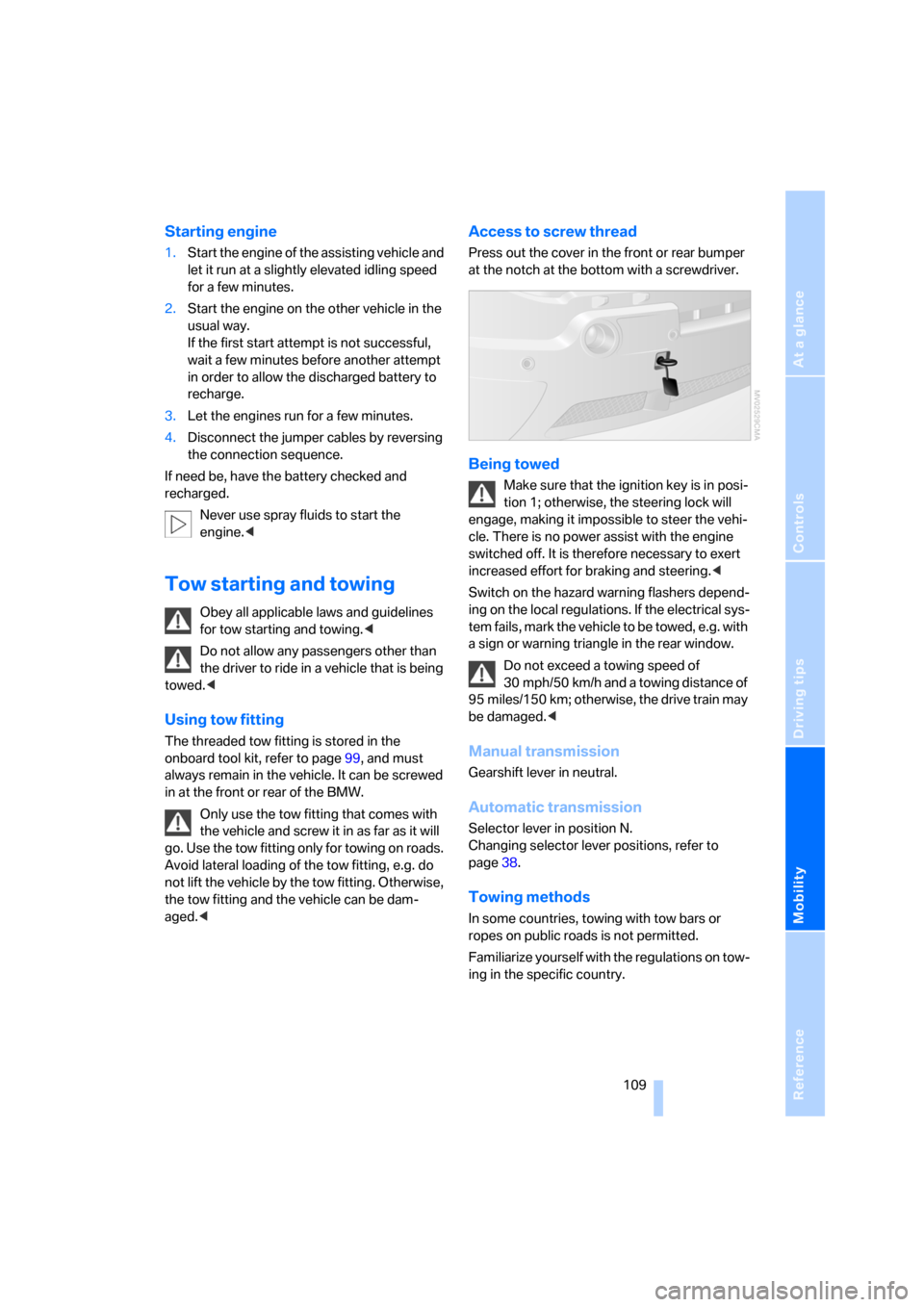
Access to screw thread
Press out the cover in the front or rear bumper
at the notch at the bottom with a screwdriver.
Being towed
Make sure that the ignition key is in posi-
tion 1; otherwise, the steering lock will
engage, making it impossible to steer the vehi-
cle. There is no power assist with the engine
switched off. It is therefore necessary to exert
increased effort for braking and steering.<
Switch on the hazard warning flashers depend-
ing on the local regulations. If the electrical sys-
tem fails, mark the vehicle to be towed, e.g. with
a sign or warning triangle in the rear window.
Do not exceed a towing speed of
30 mph/50 km/h and a towing distance of
95 miles/150 km; otherwise, the drive train may
be damaged.<
Manual transmission
Gearshift lever in neutral.
Automatic transmission
Selector lever in position N.
Changing selector lever positions, refer to
page38.
Towing methods
In some countries, towing with tow bars or
ropes on public roads is not permitted.
Familiarize yourself with the regulations on tow-
ing in the specific country.
Page 112 of 133
Giving and receiving assistance
110
With tow bar
The towing vehicle must not be lighter
than the vehicle to be towed; otherwise,
it will not be possible to safely control vehicle
response.<
The tow fittings used should be on the same
side on both vehicles. Should it prove impossi-
ble to avoid mounting the tow bar at an offset
angle, please observe the following:
>Clearance and maneuvering capability will
be strictly limited in corners.
>When mounted at an angle, the tow bar will
exert lateral forces, tending to push the
vehicle sideways.
Secure the tow bar to the tow fittings
only. Otherwise, other vehicle parts could
be damaged.<
With tow-rope
When starting off in the towing vehicle, make
sure that the tow-rope is taut.
To avoid jerking and the associated
stresses on vehicle components when
towing, always use nylon ropes or nylon straps.
Secure the tow rope to the tow fittings only.
Otherwise, other vehicle parts could be dam-
aged.<
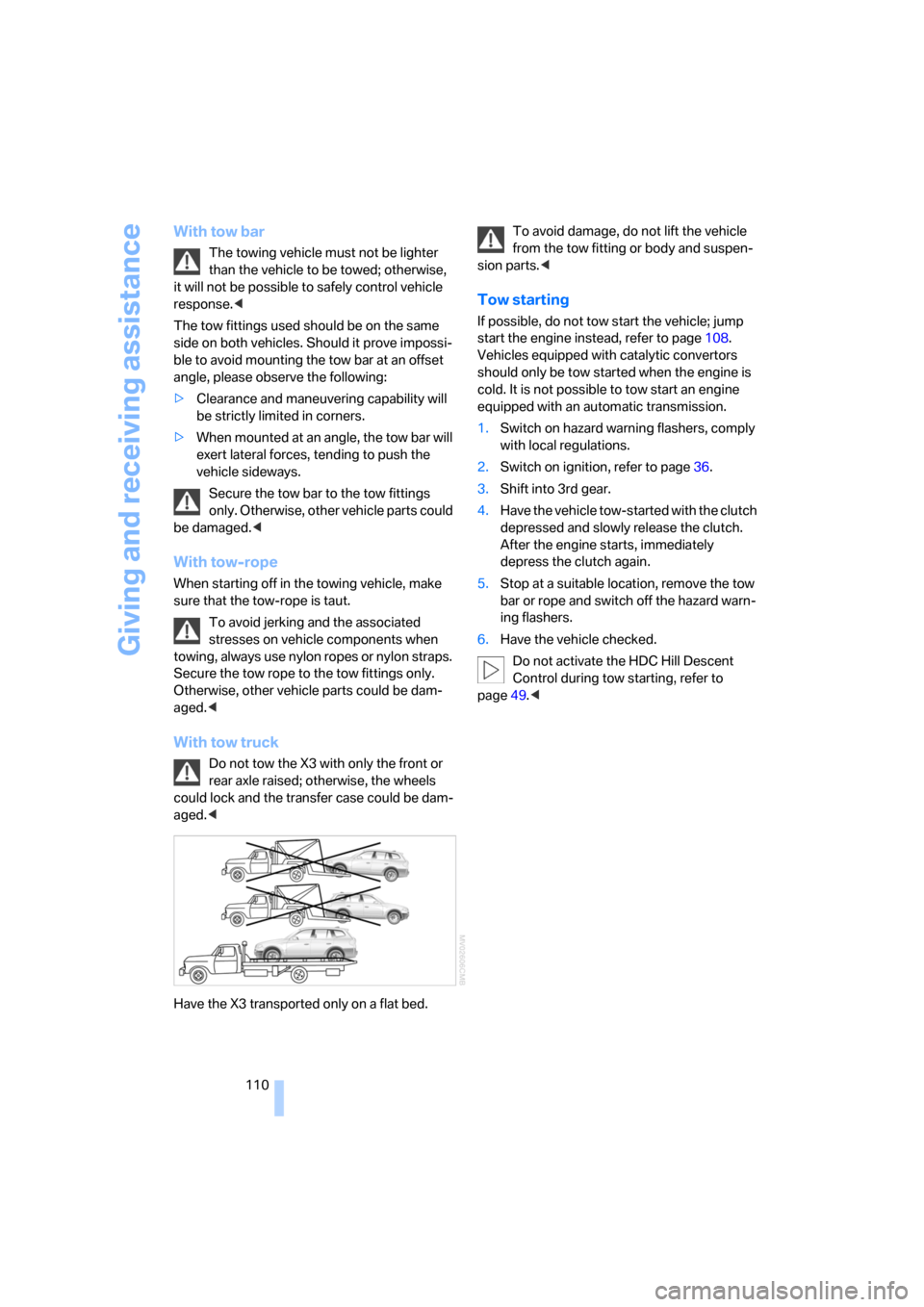
With tow truck
Do not tow the X3 with only the front or
rear axle raised; otherwise, the wheels
could lock and the transfer case could be dam-
aged.<
Have the X3 transported only on a flat bed.To avoid damage, do not lift the vehicle
from the tow fitting or body and suspen-
sion parts.<
Tow starting
If possible, do not tow start the vehicle; jump
start the engine instead, refer to page108.
Vehicles equipped with catalytic convertors
should only be tow started when the engine is
cold. It is not possible to tow start an engine
equipped with an automatic transmission.
1.Switch on hazard warning flashers, comply
with local regulations.
2.Switch on ignition, refer to page36.
3.Shift into 3rd gear.
4.Have the vehicle tow-started with the clutch
depressed and slowly release the clutch.
After the engine starts, immediately
depress the clutch again.
5.Stop at a suitable location, remove the tow
bar or rope and switch off the hazard warn-
ing flashers.
6.Have the vehicle checked.
Do not activate the HDC Hill Descent
Control during tow starting, refer to
page49.<
Page 120 of 133
Everything from A to Z
118
Everything from A to Z
Index
A
ABS Antilock Brake
System48
– indicator lamp12
Accessories, refer to For your
own safety6
Accident, refer to Receiving
assistance107
Acknowledgment signal for
locking/unlocking
vehicle19,20
Activated-charcoal filter64
Adaptive Head Light57
Adding engine oil94
Adjusting seats27
– electrically27
– mechanically27
– mechanically Sports seat28
Airbags53
– deactivating front passenger
side33,54
– indicator lamp for front
passenger airbags54
– sitting safely26
– warning lamp54
Air circulation, refer to Recir-
culated-air mode60,63
Air conditioner59
Air distribution
– air conditioner60
– automatic climate control63
Airing, refer to
Ventilation61,64
Air outlets, refer to
Ventilation61,64
Air pressure, refer to Tire
inflation pressure86
Air vents, refer to
Ventilation61,64
Air volume60
– adjusting manually63AKI, refer to Fuel
specifications85
Alarm system24
– avoiding unintentional
alarms25
All-season tires, refer to
Special characteristics of
winter tires90
All wheel drive, refer to
xDrive49
Anchorage points73
Antifreeze
– coolant95
– washer fluid41
Antifreeze protection,
coolant95
Antilock Brake System
ABS48
– indicator lamp12
Anti-theft alarm system, refer
to Alarm system18,24
Approved axle load, refer to
Weights116
Approved engine oils95
Approved gross vehicle
weight, refer to Weights116
Armrest
– front67
– rear68
Artificial leather, refer to
Caring for your vehicle
brochure
Ashtray68
AUC Automatic recirculated-
air control63
Automatic
– air distribution63
– air volume63
– recirculated-air control
AUC63
Automatic car wash, refer to
Caring for your vehicle
brochureAutomatic climate control62
Automatic cruise control41
Automatic curb monitor31
Automatic deactivation of
front passenger airbags54
Automatic headlamp
control56
Automatic transmission with
Steptronic38
– indicator lamp39
– interlock36
– selector lever interlock38
– shiftlock38
– towing109
– tow starting110
AUTO program63
Average fuel consumption46
– setting units45
Average speed46
– setting units45
Avoiding unintentional
alarms25
Axle loads, refer to
Weights116
B
Backrest, refer to Seats27
Backrest contour, refer to
Lumbar support28
Backup lamps
– bulb replacement102
– refer to Tail lamps102
Bandages, refer to First-aid
kit108
Bar, towing110
Battery105
– disposal106
– indicator lamp12
– jump starting108
– power failure106
– remote control18
– warning lamp105
Page 121 of 133
Reference
At a glance
Controls
Driving tips
Mobility
119
Belts, refer to Safety belts29
Beverage holder, refer to Cup
holders66
Blower, refer to
– Air volume60
– Air volume, adjusting
manually63
BMW maintenance system97
Bottle holder, refer to Cup
holders66
Brake fluid96
– level96
– warning lamp96
Brake force display53
Brake lamps
– brake force display53
– indicator lamp, defective
bulb12,56
– replacing bulbs102
Brake light, refer to Brake
lamps102
Brake pads96
– breaking-in76
– warning lamp96
Brake pedal, refer to Safe
braking78
Brake rotors
– brake system76
– breaking-in76
Brakes78,96
– ABS48,78
– brake fluid96
– brake pads96
– breaking-in76
– handbrake37
– indicator/warning lamp12
Brake system96
– brake fluid96
– brake pads96
– breaking-in76
– disk brakes78
– warning lamp96
Brake wear warning
– refer to Brake pads96
– warning lamp96
Breakdown service, refer to
Receiving assistance107
Breaking-in76Bulb replacement, refer to
Lamps and bulbs99
Buttons on steering wheel13
C
California law
– Event Data Recorders98
– Proposition 65 Warning6
Calling, refer to telephone
Owner's Manual
Can holder, refer to Cup
holders66
Capacities116
Capacity, cargo area116
Car care, refer to Caring for
your vehicle brochure
Car-care products, refer to
Caring for your vehicle
brochure
Care, refer to Caring for your
vehicle brochure
Cargo, securing79
Cargo area21,70
– capacity116
– cover71
– emergency operation, refer
to Opening manually21
– enlarging70
– floor cover72
– folding rear seat backrest70
– lashing eyes73
– lid, refer to Liftgate21
– opening from outside21
– opening with remote
control19
– power socket69
Cargo loading78
– load79
– securing cargo79
– stowing cargo79
– vehicle78
Caring for artificial leather,
refer to Caring for your
vehicle brochure
Caring for carpet, refer to
Caring for your vehicle
brochureCaring for leather, refer to
Caring for your vehicle
brochure
Caring for plastic, refer to
Caring for your vehicle
brochure
Caring for vehicle finish, refer
to Caring for your vehicle
brochure
Car keys, refer to Key set18
Car phone, refer to separate
Owner's Manual
Car phone preparation69
Car radio, refer to Owner's
Manual for Radio/Onboard
Computer
Car wash77
– refer to Caring for your
vehicle brochure
Cassette operation, refer to
Owner's Manual for Radio/
Onboard Computer
CD operation, refer to Owner's
Manual for Radio/Onboard
Computer
Cellphone, refer to separate
Owner's Manual
Central locking system18
– interior20
Changes, technical, refer to
For your own safety6
Changing a wheel103
Changing gears
– automatic transmission with
Steptronic39
– manual transmission38
Changing wheels89
Charge-current indicator
lamp12,105
Charging battery106
Check Gas Cap, warning
lamp12,84
Checking oil level94
Child's seat, refer to Child
restraint systems33
Child-restraint fixing system
LATCH34
Page 122 of 133

Everything from A to Z
120 Child restraint systems33
– installing33
– with tether strap34
Child-safety locks35
Child seat security33
Chock103
Chrome parts, care, refer to
Caring for your vehicle
brochure
Cigarette lighter68
Circulation of air, refer to
Recirculated-air
mode60,63
Cleaning, vehicle, refer to
Caring for your vehicle
brochure
Cleaning rear window41
Cleaning windows,
reservoir41
Clock44,45
– 12 or 24 hour mode45
– setting, also refer to Owner's
Manual for Radio/Onboard
Computer
– setting time44
Closing
– from inside20
– from outside19
Clothes hooks68
Clutch76
– breaking-in76
Cockpit10
Cold start, refer to Starting
engine36
Combination of wheel/tire90
Compact wheel, wheel
changes103
Compartments, refer to
Storage compartments67
Compartments in cargo area,
refer to Behind side trim
panel72
Computer45
– also refer to Owner's Manual
for Onboard Computer
– functions45
Condensation, refer to When
the vehicle is parked77Connecting car vacuum
cleaner, refer to Connecting
electrical devices69
Connecting electrical
devices69
Consumption, refer to
Average fuel
consumption46
Consumption indicator, refer
to Fuel gauge43
Controls, refer to Cockpit10
Convenience operation
– from outside20
– panorama glass sunroof20
– windows20
Coolant95
– level
95
– temperature gauge44
– warning lamp95
Cooling, refer to
Temperature60,63
Cruise control41
– buttons on steering
wheel13
– indicator lamp42
Cruising range46
Cup holders66
Curb weight, refer to
Weights116
Cylinders, refer to Engine
data114
D
Dashboard lighting, refer to
Instrument lighting58
Dashboard system, refer to
Cockpit10
Data, technical114
– dimensions115
– engine114
– filling capacities116
– weights116
Daytime running lamps56
DBC Dynamic Brake
Control48
– warning lamp50
Deactivating front passenger
airbags33,54Defective lamp56
Defects7
Defrosting windows60,63
– air conditioner60
– automatic climate control63
Defrosting windows and
removing condensation
– air conditioner60
– automatic climate control63
Defrost position, refer to
Defrosting windows60,63
Digital clock44
Dimensions115
Dimming mirror77
Dipstick, engine oil94
Directional indicators, refer to
Turn signals39
Disk brakes78
Displacement, refer to Engine
data114
Display illumination, refer to
Instrument lighting58
Display lighting, refer to
Instrument lighting58
Displays, refer to Instrument
cluster11
Disposal, vehicle battery106
Disposal of the vehicle, refer
to Caring for your vehicle
brochure
Distance warning, refer to
PDC Park Distance
Control47
Door keys18
Door lock20
Doors
– locking and unlocking from
inside20
– locking and unlocking from
outside19
– manual operation20
– unlocking and locking,
acknowledgment
signals19,
20
DOT Quality Grades88
Draft-free ventilation61,64
Driving lamps, refer to Parking
lamps/low beams56
Page 123 of 133
Reference
At a glance
Controls
Driving tips
Mobility
121
Driving notes76
Driving on poor roads80
Driving stability control
systems48
Driving through water80
Driving tips, refer to Driving
instructions76
Drying air, refer to Switching
cooling function on/
off60,63
DSC Dynamic Stability
Control48
– indicator lamp48
DVD changer, refer to Owner's
Manual for Radio/Onboard
Computer
Dynamic Brake Control, refer
to DBC Dynamic Brake
Control48
Dynamic Brake Control DBC
– warning lamp50
Dynamic Stability Control
DSC48
– indicator lamp48
E
Electrical malfunctions
– automatic transmission
malfunction39
– door lock20
– driver's door20
– fuel filler door84
– liftgate21
– panorama glass sunroof24
Electronic brake-force
distribution48
Electronic Stability Program,
refer to DSC Dynamic
Stability Control48
Emergency call107
Emergency operation, refer to
Manual operation
– doors20
– driver's door20
– fuel filler door84
– liftgate21
– panorama glass sunroof24Emergency Service, refer to
Receiving assistance107
Engine
– breaking-in76
– data114
– indicator lamps36
– overheated, refer to Coolant
thermometer44
– speed43
– starting36
– switching off37
Engine compartment93
Engine coolant95
Engine coolant
temperature44
Engine oil94
– additives, refer to Approved
engine oils95
– approved engine oils95
– indicator/warning lamp94
– required oil grades95
Engine oil grades95
Engine oil level94
– indicator/warning lamp94
Engine oil pressure94
– indicator/warning lamp94
Engine oil sensor94
– indicator/warning lamp94
Engine output, refer to Engine
data114
Equipment range, refer to
Service and Warranty Infor-
mation Booklet for US
models, Warranty and
Service Guide Booklet for
Canadian models
ESP Electronic Stability
Program, refer to DSC
Dynamic Stability
Control48
Exhaust system77
Exterior mirrors30
– automatically dimming77
Eye, tow starting and
towing109
F
Failure of electrical
accessories106
False alarms, refer to Avoiding
unintentional alarms25
Fastening safety belts, refer to
Safety belts29
Filter, refer to
– Microfilter61
– Microfilter/activated
charcoal filter64
First aid, refer to First-aid
kit108
First-aid kit108
Flat tire103
– compact wheel103
– Flat Tire Monitor50
– refer to Tire inflation
pressure86
– refer to Wheel changes103
– Tire Pressure Monitor52
Flat Tire Monitor50
– indicator lamp51
– initializing system51
– snow chains91
– system limits51
– warning errors51
Flooding, refer to Driving
through water77
Floor cover72
Fog lamps, indicator lamp57
Folding rear seat back70
Four wheel drive, refer to
xDrive49
Front airbags53
Front fog lamps57
– replacing bulbs102
Front passenger airbags,
automatic deactivation54
Fuel85
– average consumption46
– capacity116
– gauge43
– quality85
Fuel cap84
Fuel display, refer to Fuel
gauge43