Temperature BMW X3 3.0I 2006 E83 Owner's Manual
[x] Cancel search | Manufacturer: BMW, Model Year: 2006, Model line: X3 3.0I, Model: BMW X3 3.0I 2006 E83Pages: 133, PDF Size: 8.37 MB
Page 13 of 133
At a glance
Controls
Driving tips
Mobility Reference
11
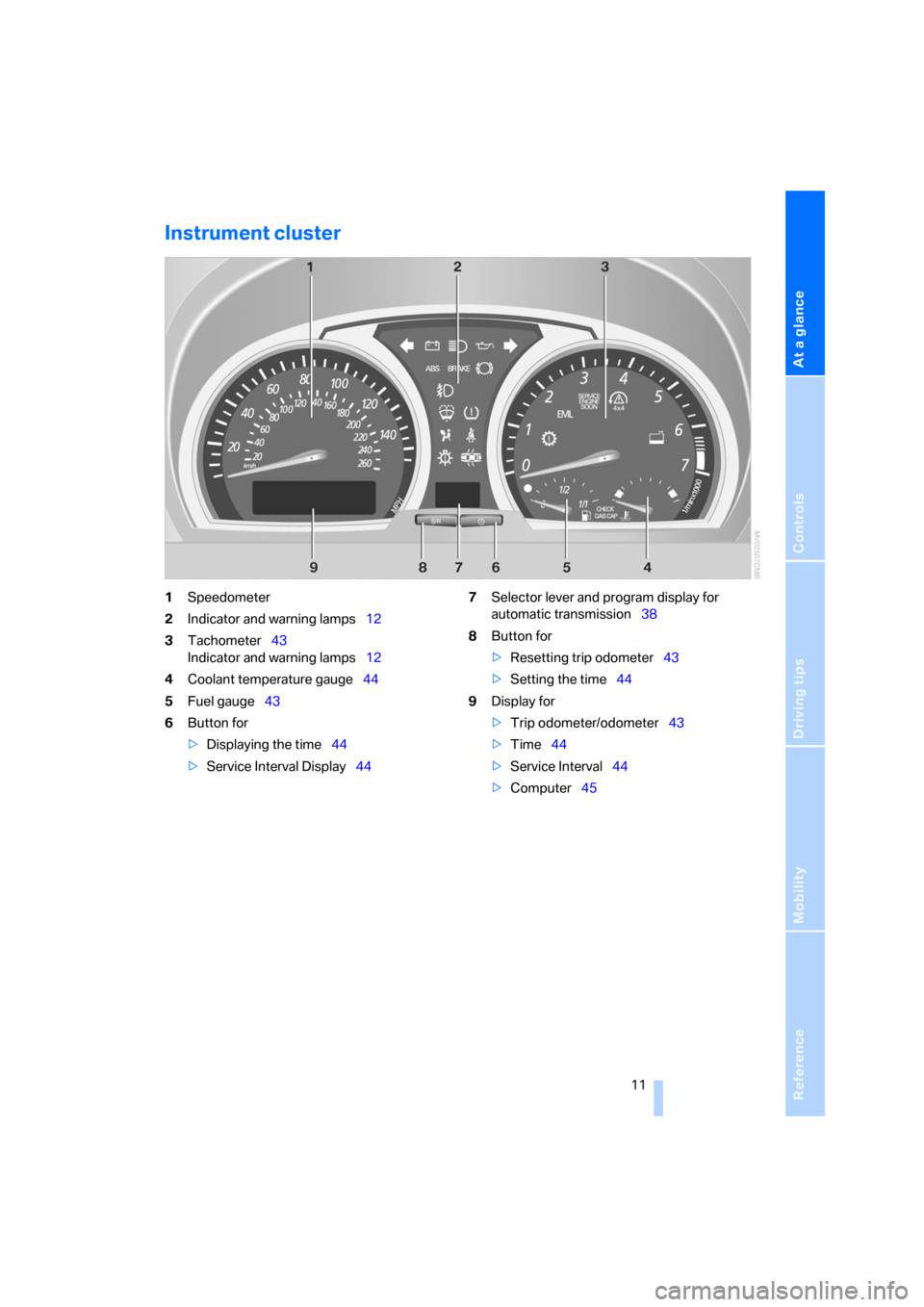
Instrument cluster
1Speedometer
2Indicator and warning lamps12
3Tachometer43
Indicator and warning lamps12
4Coolant temperature gauge44
5Fuel gauge43
6Button for
>Displaying the time44
>Service Interval Display447Selector lever and program display for
automatic transmission38
8Button for
>Resetting trip odometer43
>Setting the time44
9Display for
>Trip odometer/odometer43
>Time44
>Service Interval44
>Computer45
Page 31 of 133
Reference
At a glance
Controls
Driving tips
Mobility
29
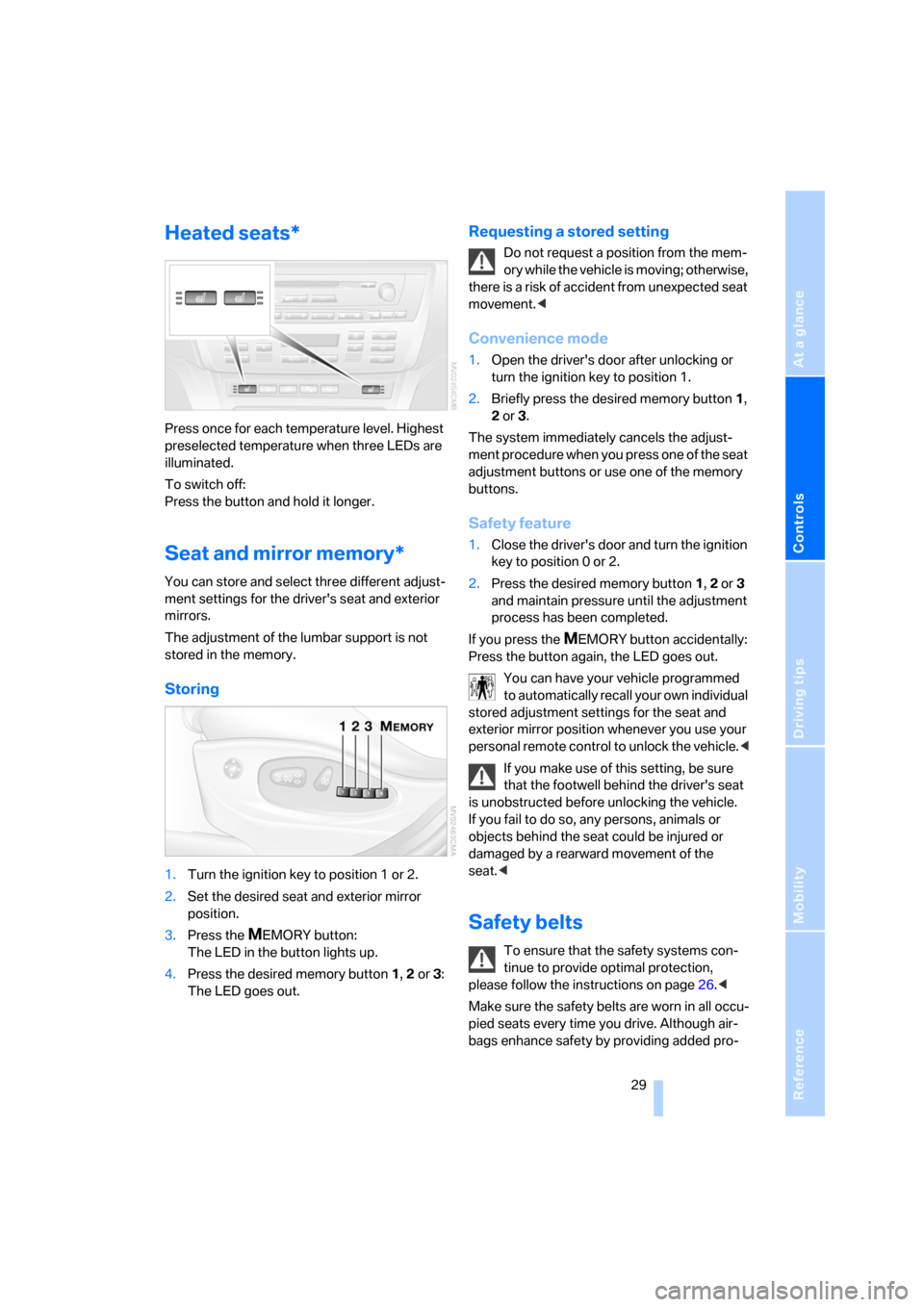
Heated seats*
Press once for each temperature level. Highest
preselected temperature when three LEDs are
illuminated.
To switch off:
Press the button and hold it longer.
Seat and mirror memory*
You can store and select three different adjust-
ment settings for the driver's seat and exterior
mirrors.
The adjustment of the lumbar support is not
stored in the memory.
Storing
1.Turn the ignition key to position 1 or 2.
2.Set the desired seat and exterior mirror
position.
3.Press the
MEMORY button:
The LED in the button lights up.
4.Press the desired memory button 1, 2 or3:
The LED goes out.
Requesting a stored setting
Do not request a position from the mem-
ory while the vehicle is moving; otherwise,
there is a risk of accident from unexpected seat
movement.<
Convenience mode
1.Open the driver's door after unlocking or
turn the ignition key to position 1.
2.Briefly press the desired memory button 1,
2 or3.
The system immediately cancels the adjust-
ment procedure when you press one of the seat
adjustment buttons or use one of the memory
buttons.
Safety feature
1.Close the driver's door and turn the ignition
key to position 0 or 2.
2.Press the desired memory button 1, 2 or3
and maintain pressure until the adjustment
process has been completed.
If you press the
MEMORY button accidentally:
Press the button again, the LED goes out.
You can have your vehicle programmed
to automatically recall your own individual
stored adjustment settings for the seat and
exterior mirror position whenever you use your
personal remote control to unlock the vehicle.<
If you make use of this setting, be sure
that the footwell behind the driver's seat
is unobstructed before unlocking the vehicle.
If you fail to do so, any persons, animals or
objects behind the seat could be injured or
damaged by a rearward movement of the
seat.<
Safety belts
To ensure that the safety systems con-
tinue to provide optimal protection,
please follow the instructions on page26.<
Make sure the safety belts are worn in all occu-
pied seats every time you drive. Although air-
bags enhance safety by providing added pro-
Page 33 of 133
Reference
At a glance
Controls
Driving tips
Mobility
31
Automatic heating*
When the outside temperature falls below a
specified temperature, both outside mirrors are
automatically heated whenever the engine is
running or the ignition is switched on.
Tilting down passenger's mirror,
automatic parking function*
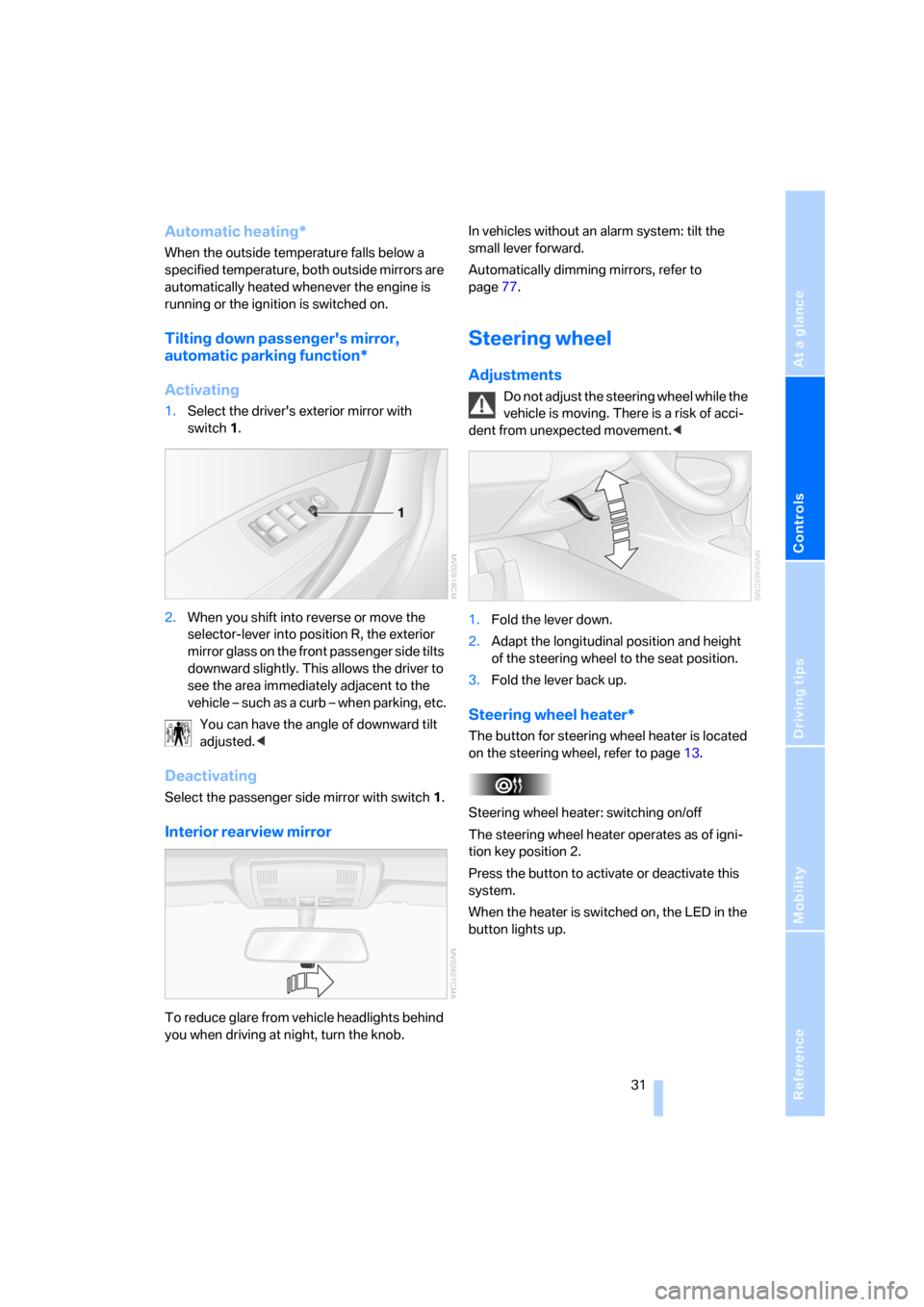
Activating
1.Select the driver's exterior mirror with
switch 1.
2.When you shift into reverse or move the
selector-lever into position R, the exterior
mirror glass on the front passenger side tilts
downward slightly. This allows the driver to
see the area immediately adjacent to the
vehicle – such as a curb – when parking, etc.
You can have the angle of downward tilt
adjusted.<
Deactivating
Select the passenger side mirror with switch1.
Interior rearview mirror
To reduce glare from vehicle headlights behind
you when driving at night, turn the knob.In vehicles without an alarm system: tilt the
small lever forward.
Automatically dimming mirrors, refer to
page77.
Steering wheel
Adjustments
Do not adjust the steering wheel while the
vehicle is moving. There is a risk of acci-
dent from unexpected movement.<
1.Fold the lever down.
2.Adapt the longitudinal position and height
of the steering wheel to the seat position.
3.Fold the lever back up.
Steering wheel heater*
The button for steering wheel heater is located
on the steering wheel, refer to page13.
Steering wheel heater: switching on/off
The steering wheel heater operates as of igni-
tion key position 2.
Press the button to activate or deactivate this
system.
When the heater is switched on, the LED in the
button lights up.
Page 34 of 133
Adjustments
32
Vehicle Memory, Key Memory
How the system functions
You have probably frequently wished that you
could configure individual functions of your
vehicle to reflect your own personal require-
ments. In developing your vehicle, BMW has
incorporated a number of options for personal
adjustment. You can have these programmed
at your BMW Sports Activity Vehicle Center.
There are vehicle-related and person-related
adjustments: Vehicle Memory and Key Mem-
ory. You can configure up to four different basic
adjustments for four different persons. The only
requirement is that each person use his or her
own master key with remote control.
When your vehicle is unlocked with the remote
control, the vehicle recognizes the individual
user by means of a data exchange with the key,
and makes adjustments accordingly.
In order for you to distinguish between the mas-
ter keys with remote control, color-coded
decals are supplied together with the keys.
What the system can do
Ask your BMW Sports Activity Vehicle Center
about the possibilities of Vehicle Memory and
Key Memory.
You will see this symbol throughout the
Owner's Manual. It is to remind you at
appropriate places of the settings that are avail-
able to you.<
Following configuration of memory func-
tions, vehicle operation may differ from
the description in the Owner's Manual. Should
you wish to sell your BMW some day, please
remember to have the memory functions reset
to the factory default settings.<
Examples of Vehicle Memory
>Different acknowledgment signals to con-
firm locking/unlocking of the vehicle, refer
to page19.
>Activating/deactivating function for path-
way lighting, refer to page56.
>Activating/deactivating daytime running
lamps, refer to page56.
>Active PDC Park Distance Control is acous-
tically indicated by a signal tone when you
shift into reverse or move the selector lever
into position R, refer to page47.
>Different acknowledgment signals to con-
firm arming/disarming the alarm system,
refer to page24.
>After an outside temperature warning has
been issued, the computer display returns
to the previous setting, refer to page45.
>Acoustic warning if the ignition key remains
in the ignition lock after the driver's door has
been opened, refer to page18.
Examples of Key Memory functions
>Locking the vehicle after starting to drive,
refer to page20.
>Automatic adjustment of the driver's seat
and exterior mirror position for each person
when unlocking the vehicle, refer to
page29.
>Angle of downward tilt of passenger side
mirror, refer to page31.
>Setting units of measure for displays in the
instrument cluster for time, outside temper-
ature, distance driven and fuel consump-
tion, refer to page45.
Page 46 of 133
Everything under control
44
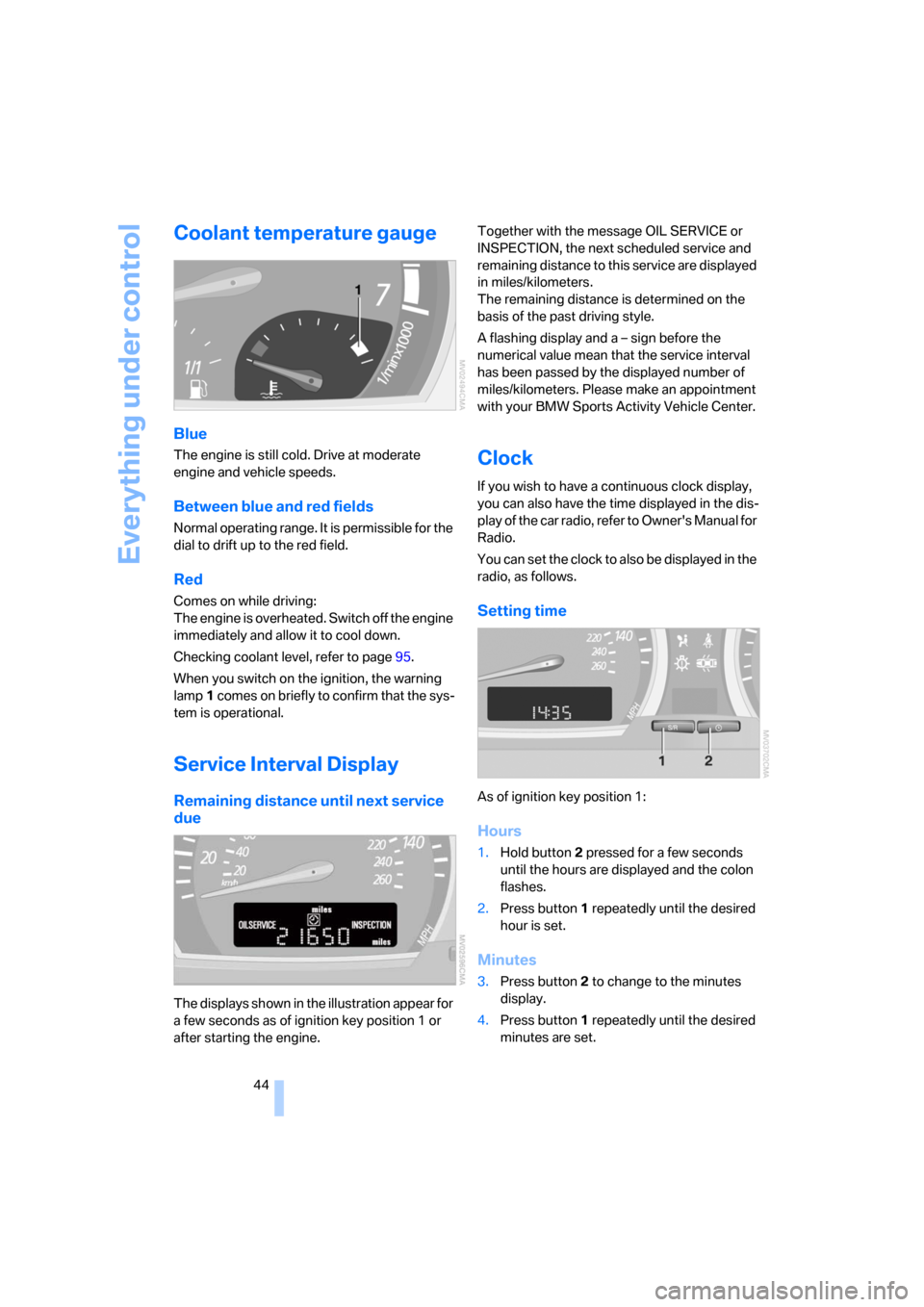
Coolant temperature gauge
Blue
The engine is still cold. Drive at moderate
engine and vehicle speeds.
Between blue and red fields
Normal operating range. It is permissible for the
dial to drift up to the red field.
Red
Comes on while driving:
The engine is overheated. Switch off the engine
immediately and allow it to cool down.
Checking coolant level, refer to page95.
When you switch on the ignition, the warning
lamp1 comes on briefly to confirm that the sys-
tem is operational.
Service Interval Display
Remaining distance until next service
due
The displays shown in the illustration appear for
a few seconds as of ignition key position 1 or
after starting the engine.Together with the message OIL SERVICE or
INSPECTION, the next scheduled service and
remaining distance to this service are displayed
in miles/kilometers.
The remaining distance is determined on the
basis of the past driving style.
A flashing display and a – sign before the
numerical value mean that the service interval
has been passed by the displayed number of
miles/kilometers. Please make an appointment
with your BMW Sports Activity Vehicle Center.
Clock
If you wish to have a continuous clock display,
you can also have the time displayed in the dis-
play of the car radio, refer to Owner's Manual for
Radio.
You can set the clock to also be displayed in the
radio, as follows.
Setting time
As of ignition key position 1:
Hours
1.Hold button2 pressed for a few seconds
until the hours are displayed and the colon
flashes.
2.Press button1 repeatedly until the desired
hour is set.
Minutes
3.Press button2 to change to the minutes
display.
4.Press button1 repeatedly until the desired
minutes are set.
Page 47 of 133
Reference
At a glance
Controls
Driving tips
Mobility
45
5.Press button2 to confirm the time.
The set time is transferred to the display of the
radio or displayed in the instrument cluster.
Display mode
Ignition key in position 0 or removed:
Press button1.
The time and display of the miles/kilometers
appear for a few seconds.
Computer*
Mode selection
As of ignition key position 1, you can call up
information from the computer using the com-
puter button in the turn signal lever.
A new function appears each time you briefly
press the computer button.
The following information is displayed in the
sequence indicated:
>Time
>Outside temperature
>Average fuel consumption
>Cruising range
>Average speed
As of ignition key position 1, the last active set-
ting is displayed.
If you wish, you can display the following
functions in a different unit of measure.<
Outside temperature
Changing unit of measure 7/6
During the display, hold down the button in the
turn signal lever until the display changes.
Outside temperature warning
If the outside temperature falls below approx.
+37.57/+36, the computer switches auto-
matically to the outside temperature display.
In addition, an acoustic signal sounds and the
display flashes for a short time. There is an
increased risk of icy conditions.
After an outside temperature warning has
been issued, the display returns to the
previous setting. You can have this activated/
deactivated.<
Ice can also occur at temperatures
greater than +37,57/+36. For this rea-
son, drive carefully on bridges and shaded
roadways, for example. Otherwise, there is an
increased risk of accidents.<
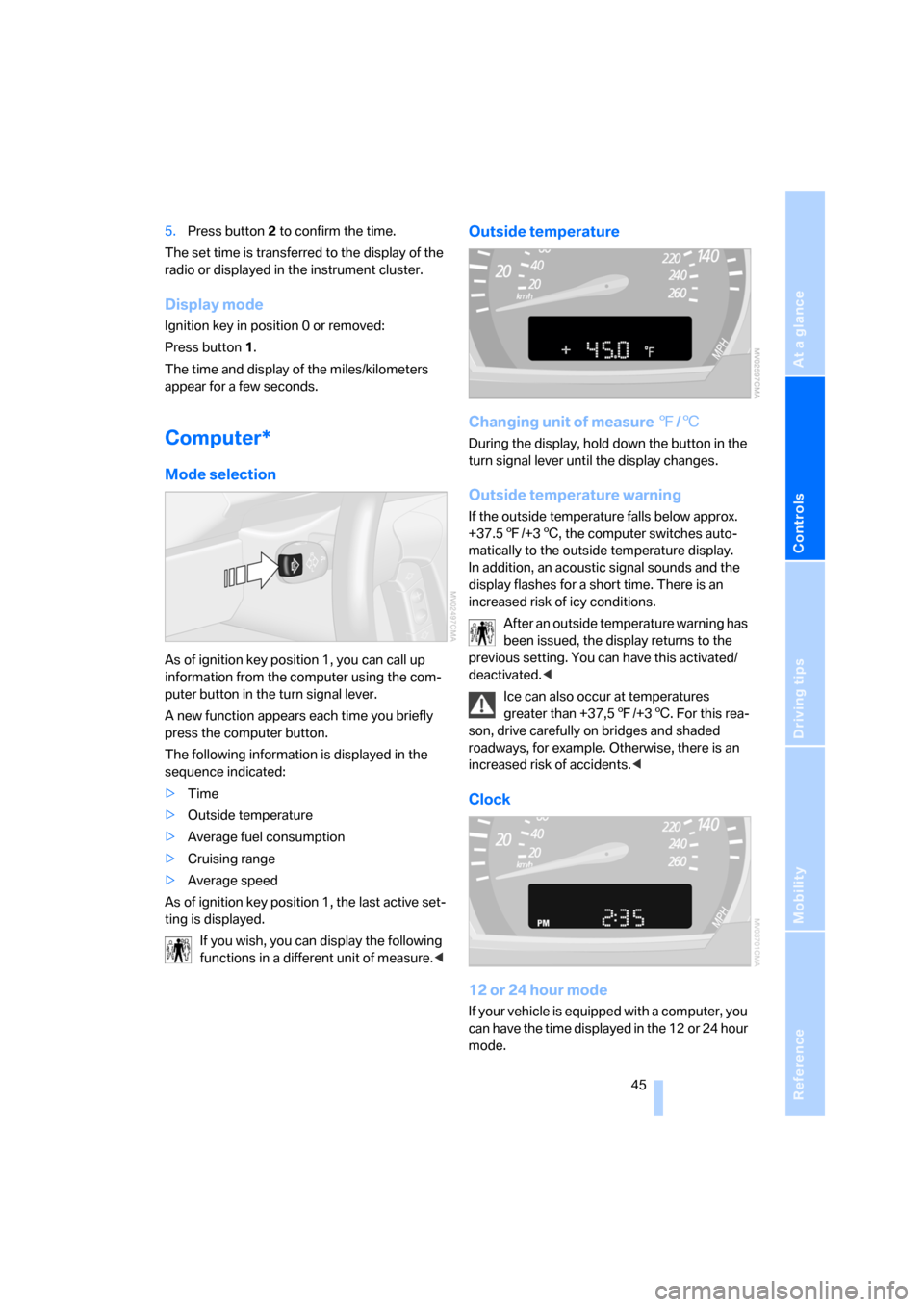
Clock
12 or 24 hour mode
If your vehicle is equipped with a computer, you
can have the time displayed in the 12 or 24 hour
mode.
Page 51 of 133
Reference
At a glance
Controls
Driving tips
Mobility
49
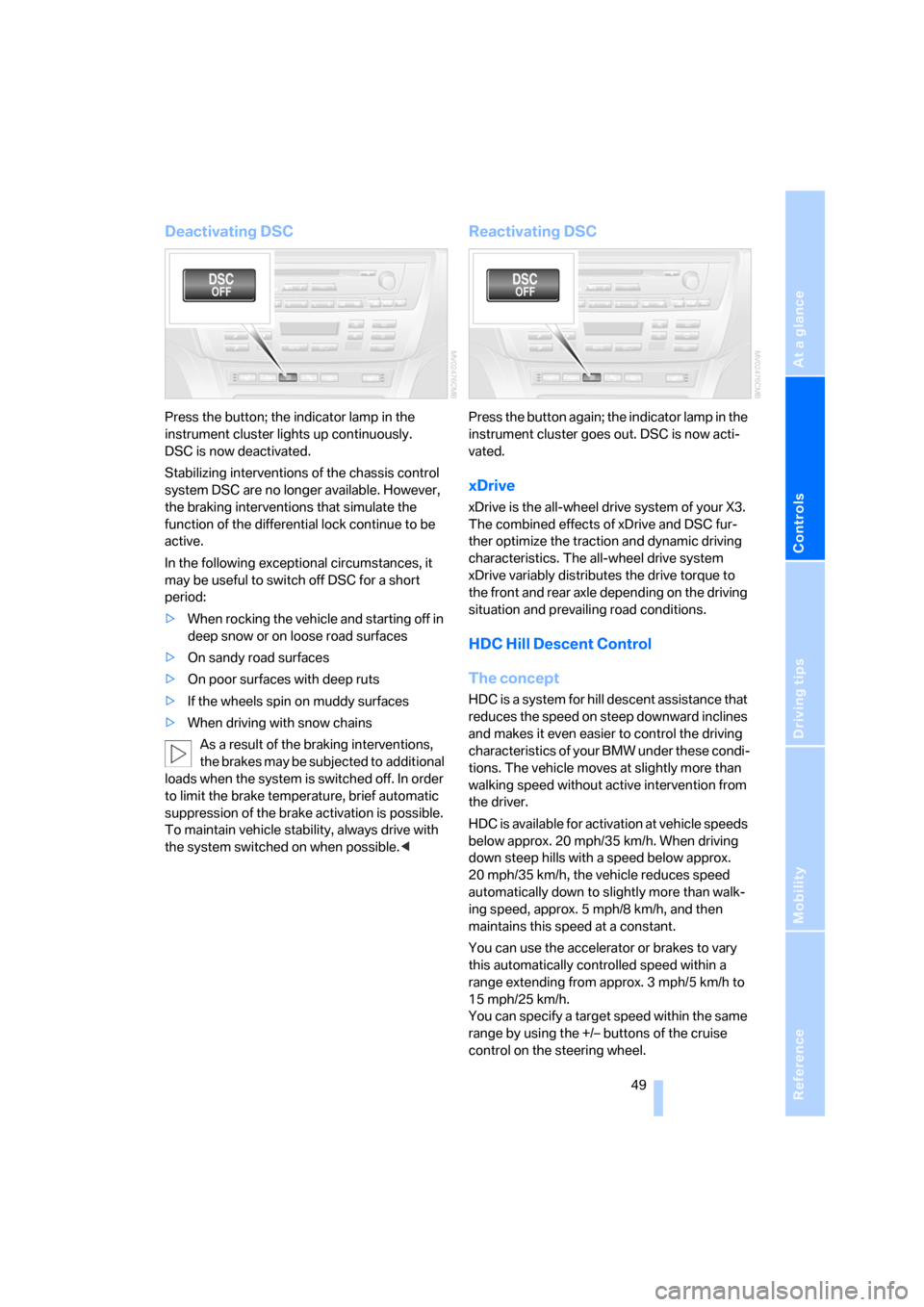
Deactivating DSC
Press the button; the indicator lamp in the
instrument cluster lights up continuously.
DSC is now deactivated.
Stabilizing interventions of the chassis control
system DSC are no longer available. However,
the braking interventions that simulate the
function of the differential lock continue to be
active.
In the following exceptional circumstances, it
may be useful to switch off DSC for a short
period:
>When rocking the vehicle and starting off in
deep snow or on loose road surfaces
>On sandy road surfaces
>On poor surfaces with deep ruts
>If the wheels spin on muddy surfaces
>When driving with snow chains
As a result of the braking interventions,
the brakes may be subjected to additional
loads when the system is switched off. In order
to limit the brake temperature, brief automatic
suppression of the brake activation is possible.
To maintain vehicle stability, always drive with
the system switched on when possible.<
Reactivating DSC
Press the button again; the indicator lamp in the
instrument cluster goes out. DSC is now acti-
vated.
xDrive
xDrive is the all-wheel drive system of your X3.
The combined effects of xDrive and DSC fur-
ther optimize the traction and dynamic driving
characteristics. The all-wheel drive system
xDrive variably distributes the drive torque to
the front and rear axle depending on the driving
situation and prevailing road conditions.
HDC Hill Descent Control
The concept
HDC is a system for hill descent assistance that
reduces the speed on steep downward inclines
and makes it even easier to control the driving
characteristics of your BMW under these condi-
tions. The vehicle moves at slightly more than
walking speed without active intervention from
the driver.
HDC is available for activation at vehicle speeds
below approx. 20 mph/35 km/h. When driving
down steep hills with a speed below approx.
20 mph/35 km/h, the vehicle reduces speed
automatically down to slightly more than walk-
ing speed, approx. 5 mph/8 km/h, and then
maintains this speed at a constant.
You can use the accelerator or brakes to vary
this automatically controlled speed within a
range extending from approx. 3 mph/5 km/h to
15 mph/25 km/h.
You can specify a target speed within the same
range by using the +/– buttons of the cruise
control on the steering wheel.
Page 52 of 133
Technology for comfort, convenience and safety
50
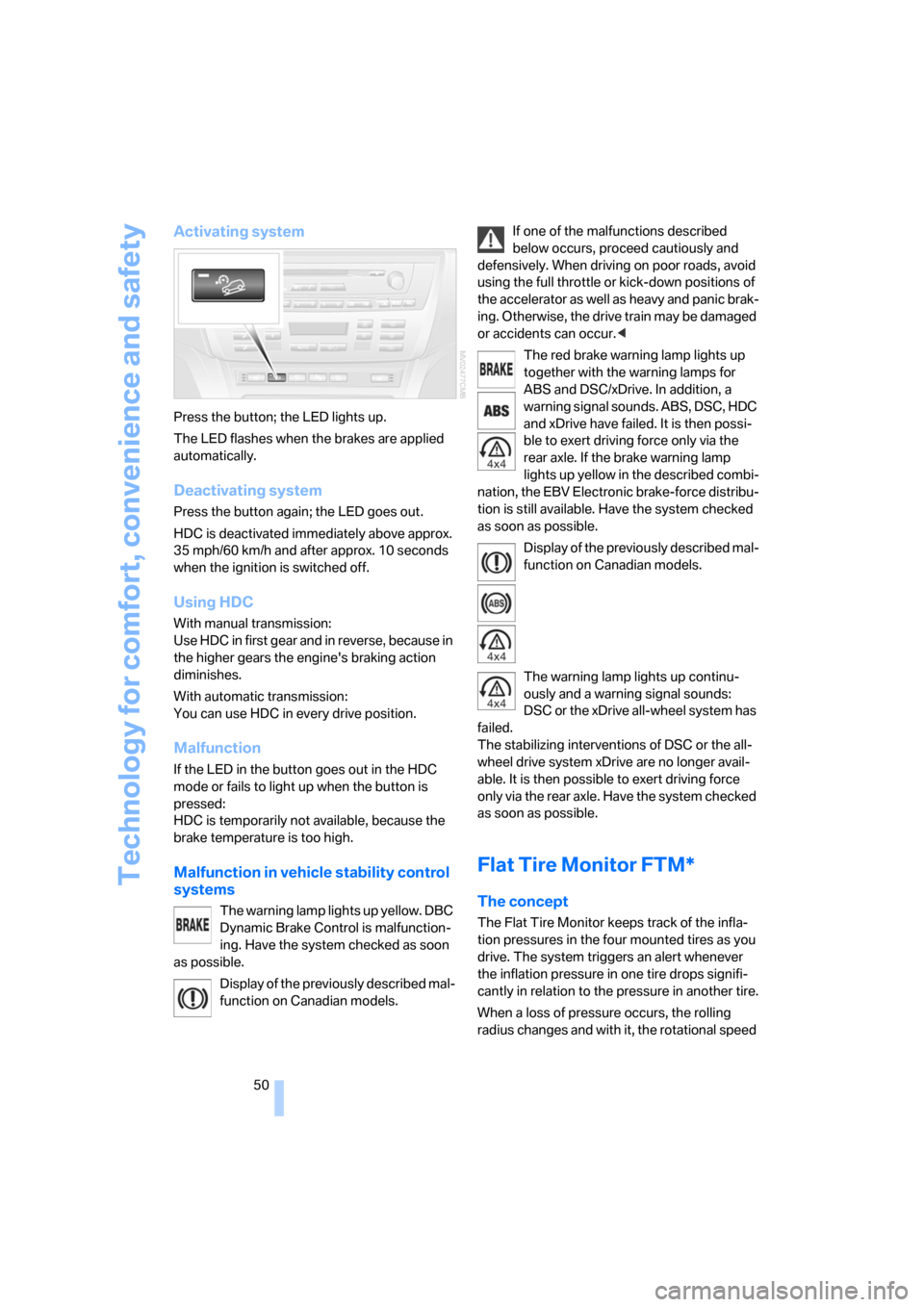
Activating system
Press the button; the LED lights up.
The LED flashes when the brakes are applied
automatically.
Deactivating system
Press the button again; the LED goes out.
HDC is deactivated immediately above approx.
35 mph/60 km/h and after approx. 10 seconds
when the ignition is switched off.
Using HDC
With manual transmission:
Use HDC in first gear and in reverse, because in
the higher gears the engine's braking action
diminishes.
With automatic transmission:
You can use HDC in every drive position.
Malfunction
If the LED in the button goes out in the HDC
mode or fails to light up when the button is
pressed:
HDC is temporarily not available, because the
brake temperature is too high.
Malfunction in vehicle stability control
systems
The warning lamp lights up yellow. DBC
Dynamic Brake Control is malfunction-
ing. Have the system checked as soon
as possible.
Display of the previously described mal-
function on Canadian models.If one of the malfunctions described
below occurs, proceed cautiously and
defensively. When driving on poor roads, avoid
using the full throttle or kick-down positions of
the accelerator as well as heavy and panic brak-
ing. Otherwise, the drive train may be damaged
or accidents can occur.<
The red brake warning lamp lights up
together with the warning lamps for
ABS and DSC/xDrive. In addition, a
warning signal sounds. ABS, DSC, HDC
and xDrive have failed. It is then possi-
ble to exert driving force only via the
rear axle. If the brake warning lamp
lights up yellow in the described combi-
nation, the EBV Electronic brake-force distribu-
tion is still available. Have the system checked
as soon as possible.
Display of the previously described mal-
function on Canadian models.
The warning lamp lights up continu-
ously and a warning signal sounds:
DSC or the xDrive all-wheel system has
failed.
The stabilizing interventions of DSC or the all-
wheel drive system xDrive are no longer avail-
able. It is then possible to exert driving force
only via the rear axle. Have the system checked
as soon as possible.
Flat Tire Monitor FTM*
The concept
The Flat Tire Monitor keeps track of the infla-
tion pressures in the four mounted tires as you
drive. The system triggers an alert whenever
the inflation pressure in one tire drops signifi-
cantly in relation to the pressure in another tire.
When a loss of pressure occurs, the rolling
radius changes and with it, the rotational speed
Page 61 of 133
Reference
At a glance
Controls
Driving tips
Mobility
59
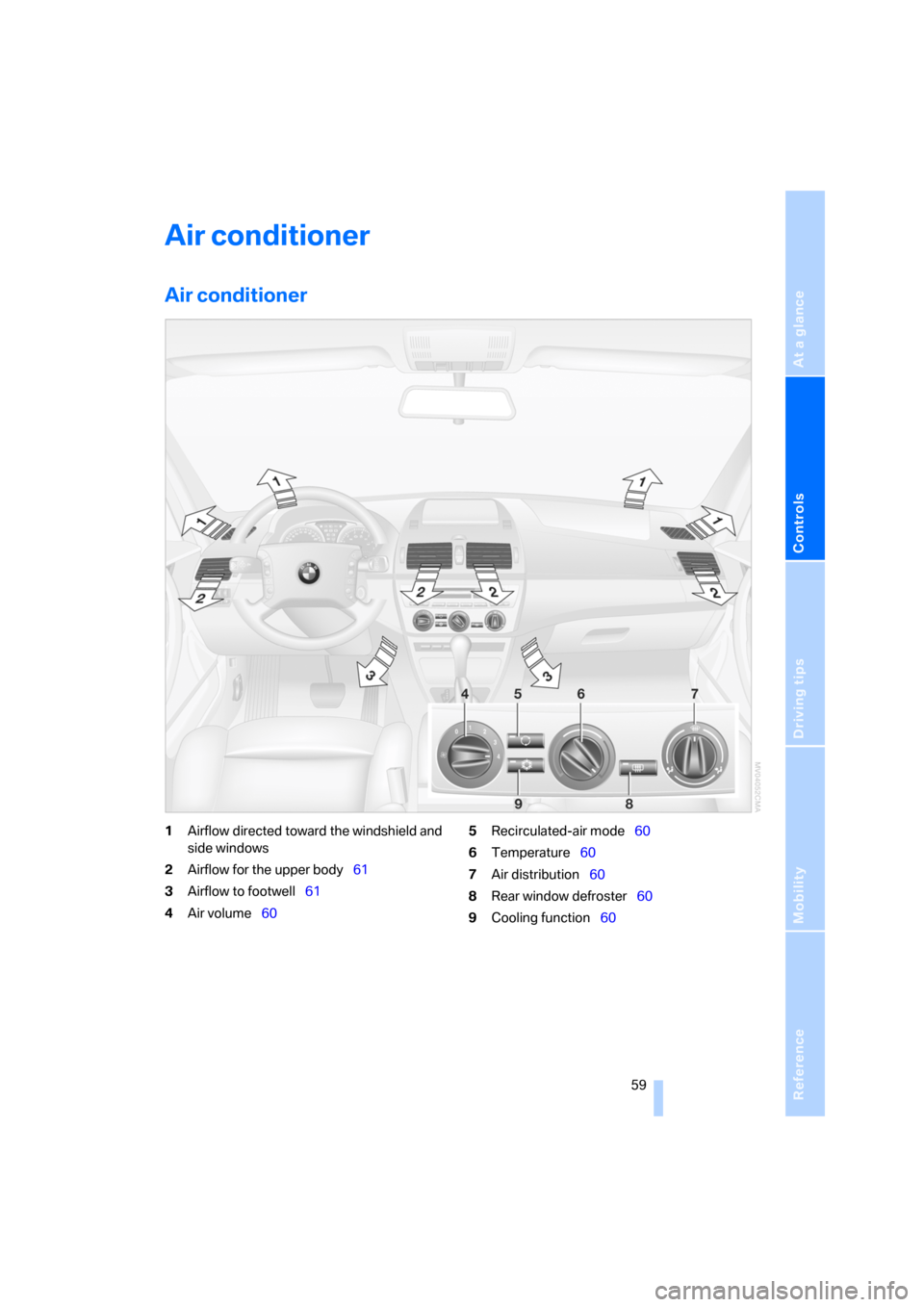
Air conditioner
Air conditioner
1Airflow directed toward the windshield and
side windows
2Airflow for the upper body61
3Airflow to footwell61
4Air volume605Recirculated-air mode60
6Temperature60
7Air distribution60
8Rear window defroster60
9Cooling function60
Page 62 of 133
Air conditioner
60
Air volume
You can vary the air volume in
steps 1 through 4. The heating or
cooling output is more effective
with a higher air volume.
Switching system on/off
Turn air volume rotary switch to 0. The blower
and air conditioning system are completely
switched off, the air flow is shut off.
To switch on the air conditioning system, set an
arbitrary air volume.
Temperature
To increase the temperature, turn
to the right, toward red.
For a lower temperature, turn the
rotary switch counterclockwise
toward blue.
Air distribution
You can direct air to flow onto the
windows , toward the upper
body and into the footwell .
Intermediate settings are possible.
Rear window defroster
The rear window heating switches
off automatically after a certain
amount of time.
Switching cooling function on/off
When the air conditioning is on, the
air is cooled, dehumidified, and
then reheated depending on the
temperature setting.
Depending on the weather, the windshield may
fog over briefly when the engine is started.
Recirculated-air mode
You can respond to unpleasant
odors outside the vehicle by tem-
porarily suspending the supply of
outside air. The system then recirculates the air
currently within the vehicle.
If condensation starts to form on the
inside window surfaces during operation
in the recirculated-air mode, you should switch
it off and increase the air supply as needed.
The recirculated-air mode should not be used
over a sustained period of time; otherwise, the
air quality inside the vehicle will steadily deteri-
orate.<
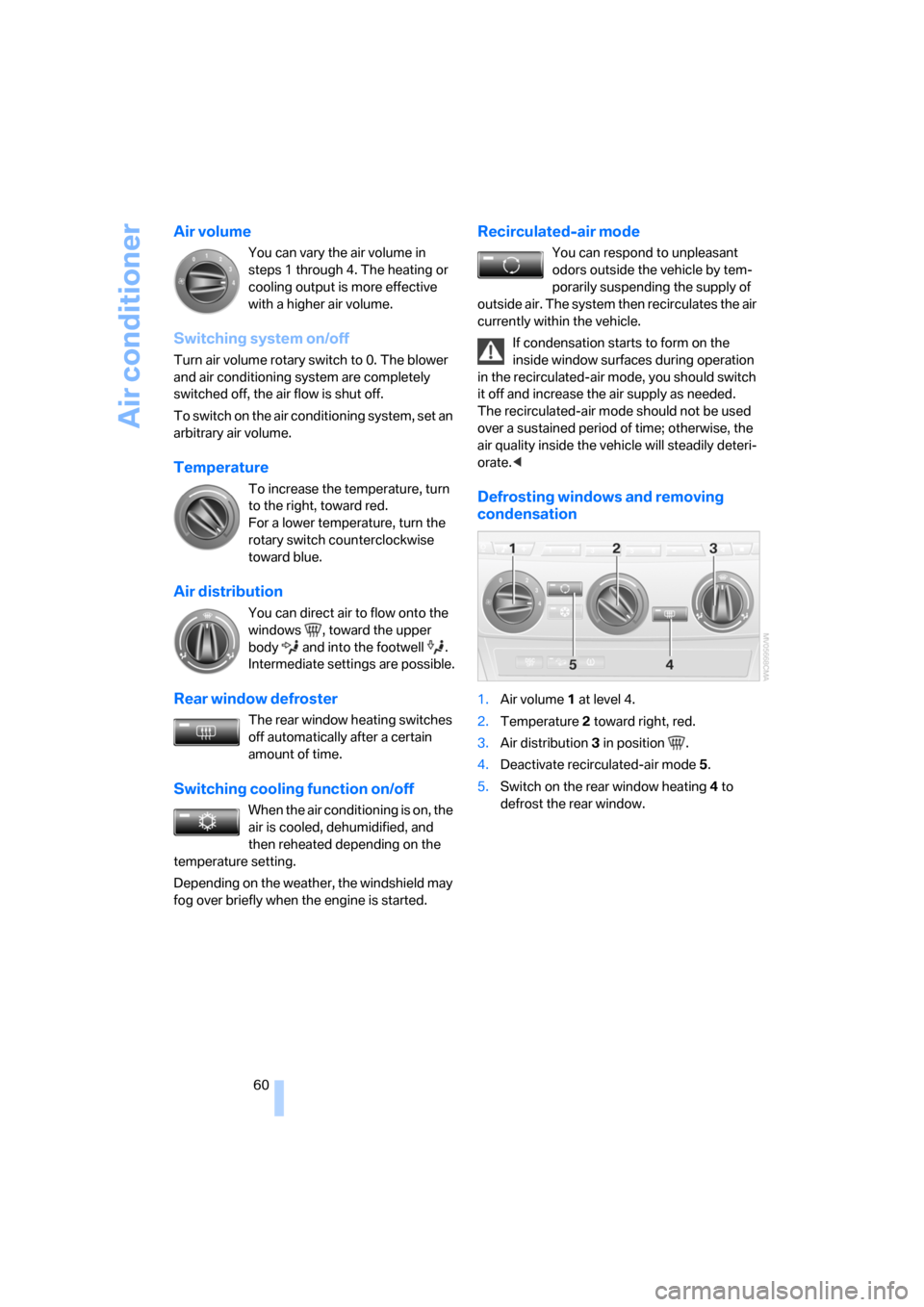
Defrosting windows and removing
condensation
1.Air volume 1 at level 4.
2.Temperature 2 toward right, red.
3.Air distribution 3 in position .
4.Deactivate recirculated-air mode 5.
5.Switch on the rear window heating 4 to
defrost the rear window.