coolant level BMW X3 3.0SI 2008 Owners Manual
[x] Cancel search | Manufacturer: BMW, Model Year: 2008, Model line: X3 3.0SI, Model: BMW X3 3.0SI 2008Pages: 140, PDF Size: 3.36 MB
Page 13 of 140
At a glance
Controls
Driving tips
Mobility Reference
11
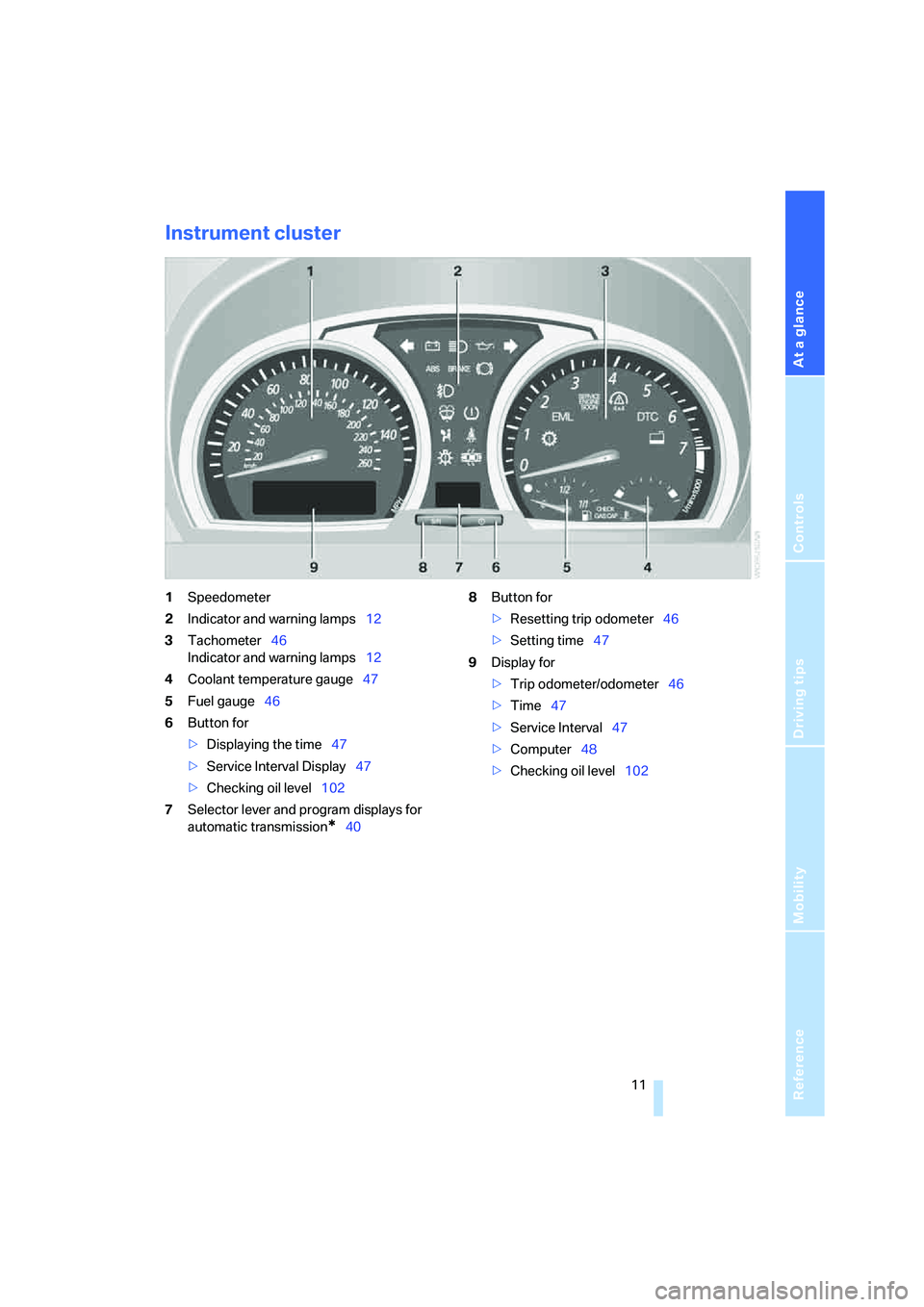
Instrument cluster
1Speedometer
2Indicator and warning lamps12
3Tachometer46
Indicator and warning lamps12
4Coolant temperature gauge47
5Fuel gauge46
6Button for
>Displaying the time47
>Service Interval Display47
>Checking oil level102
7Selector lever and program displays for
automatic transmission
*408Button for
>Resetting trip odometer46
>Setting time47
9Display for
>Trip odometer/odometer46
>Time47
>Service Interval47
>Computer48
>Checking oil level102
Page 49 of 140
Reference
At a glance
Controls
Driving tips
Mobility
47
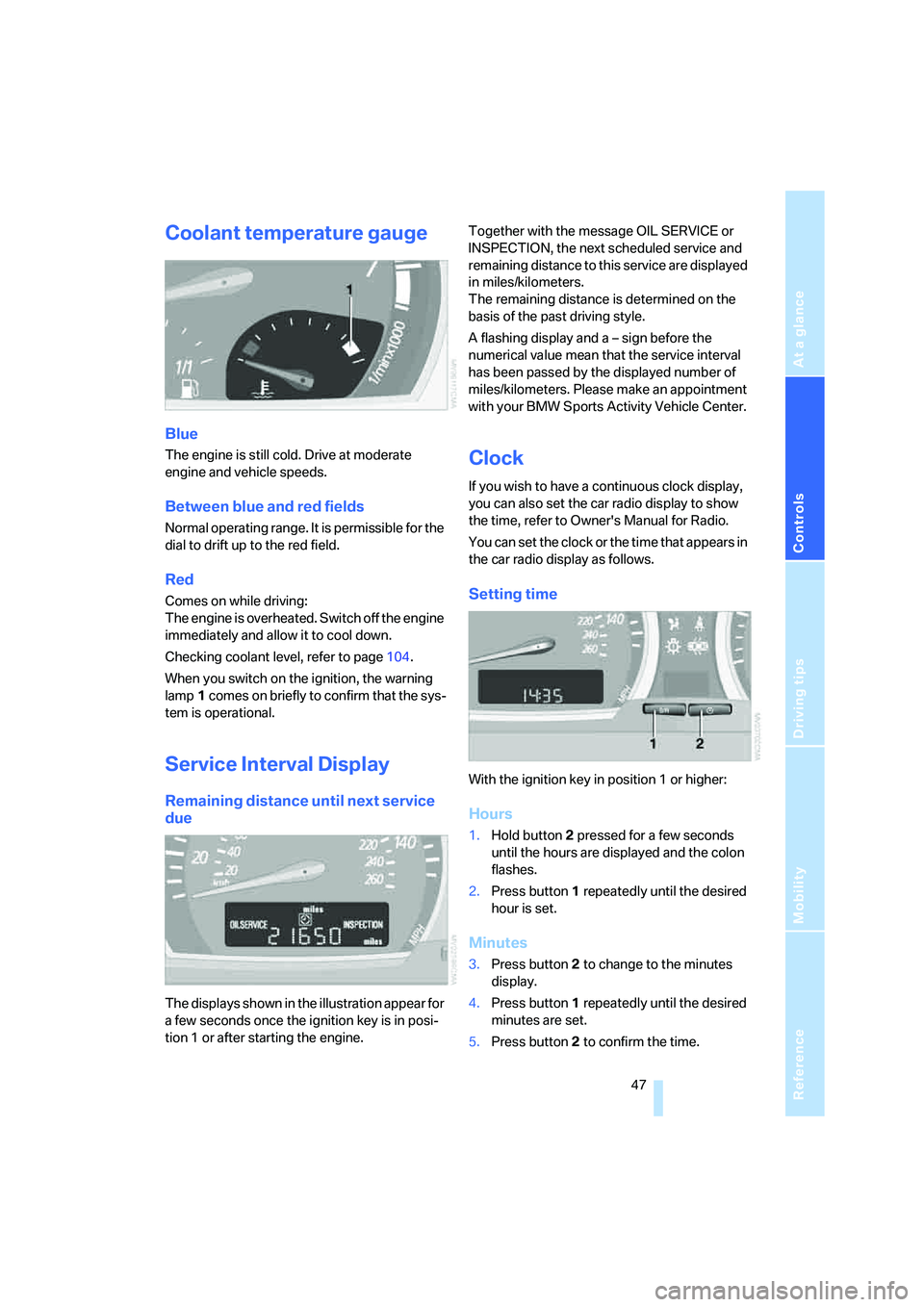
Coolant temperature gauge
Blue
The engine is still cold. Drive at moderate
engine and vehicle speeds.
Between blue and red fields
Normal operating range. It is permissible for the
dial to drift up to the red field.
Red
Comes on while driving:
The engine is overheated. Switch off the engine
immediately and allow it to cool down.
Checking coolant level, refer to page104.
When you switch on the ignition, the warning
lamp1 comes on briefly to confirm that the sys-
tem is operational.
Service Interval Display
Remaining distance until next service
due
The displays shown in the illustration appear for
a few seconds once the ignition key is in posi-
tion 1 or after starting the engine.Together with the message OIL SERVICE or
INSPECTION, the next scheduled service and
remaining distance to this service are displayed
in miles/kilometers.
The remaining distance is determined on the
basis of the past driving style.
A flashing display and a – sign before the
numerical value mean that the service interval
has been passed by the displayed number of
miles/kilometers. Please make an appointment
with your BMW Sports Activity Vehicle Center.
Clock
If you wish to have a continuous clock display,
you can also set the car radio display to show
the time, refer to Owner's Manual for Radio.
You can set the clock or the time that appears in
the car radio display as follows.
Setting time
With the ignition key in position 1 or higher:
Hours
1.Hold button2 pressed for a few seconds
until the hours are displayed and the colon
flashes.
2.Press button1 repeatedly until the desired
hour is set.
Minutes
3.Press button2 to change to the minutes
display.
4.Press button1 repeatedly until the desired
minutes are set.
5.Press button2 to confirm the time.
Page 89 of 140
Reference
At a glance
Controls
Driving tips
Mobility
87
Roof-mounted luggage rack*
A special rack system is available as an optional
accessory for your BMW. Please familiarize
yourself with the information contained in the
installation instructions.
Loading luggage rack
Because roof racks raise the vehicle's center of
gravity when loaded, they have a major effect on
its handling and steering response. You should
therefore always remember not to exceed the
approved roof load capacity, the approved
gross vehicle weight, or the axle loads when
loading the rack.
These specifications can be found under
Weights on page124.
The roof load must be evenly distributed and
must not extend outward beyond the limits of
the loading surface. Always stow the heaviest
pieces on the bottom. Be sure that adequate
clearance is maintained for raising the glass
sunroof and that objects do not project into the
opening path of the liftgate.
Secure roof-mounted cargo correctly and
securely to prevent it from shifting or falling off
while you drive.
Drive smoothly. Avoid sudden acceleration and
braking maneuvers. Take corners gently.
Driving on poor roads
Your X3 is at home on all paved and unpaved
roads. It combines all-wheel drive with the
advantages of a normal passenger car.
Do not drive off-road, as otherwise the
vehicle may be damaged.<
When you are driving on poor roads, there are a
few points which you should strictly observe –
for your own safety and that of your passengers,
as well as to protect the vehicle:
>Familiarize yourself with the vehicle before
you begin driving. Do not take risks with the
vehicle under any circumstances.
>Always adapt your driving speed to the
road conditions. The more steep and uneven the roadway is, the lower the speed
should be.
>You can operate your vehicle on uphill and
downhill gradients with a maximum slope
of 50 %. If you wish to drive on uphill and
downhill grades of this nature, make sure
beforehand that the engine oil and coolant
levels are near the MAX mark, refer to
pages102 and104.
>When descending very steep hills, use
HDC Hill Descent Control, refer to page52.
It is possible to start off on inclines of up
to 32 %.
The permitted side tilt is 32 %.
>While driving, watch carefully for obstacles
such as rocks or holes. Try to avoid these
obstacles whenever possible.
>Avoid having the body make contact with
the ground, e.g. on the crests of hills and
bumpy roads. The ground clearance of the
vehicle is a maximum of approx. 8.0 in/
20 cm. Please be aware that the ground
clearance can vary depending on the load
and operating conditions of the vehicle.
>Do not drive in water that is deeper than
20 in/50 cm. If you must drive through water
up to that depth, drive at a walking speed
and do not stop.
After leaving the water, press on the foot-
brake gently several times while driving at a
low speed. The brake applications will help
to dry the brakes, thus preventing a reduc-
tion in braking performance caused by the
moisture.
To clean the handbrake, apply the lever
slightly at approx. 25 mph/40 km/h and con-
tinue to drive for approx. 200 yards/
200 meters, provided that traffic conditions
allow you to do so.
>Depending on the road condition, it can be
useful to temporarily activate DTC, refer to
DTC Dynamic Traction Control on page52.
>If the drive wheels spin on one side, depress
the accelerator pedal far enough to permit
the driving stability control systems to dis-
tribute the drive torque to the individual
wheels.
Page 106 of 140
Under the hood
104
Coolant
Warning lamp
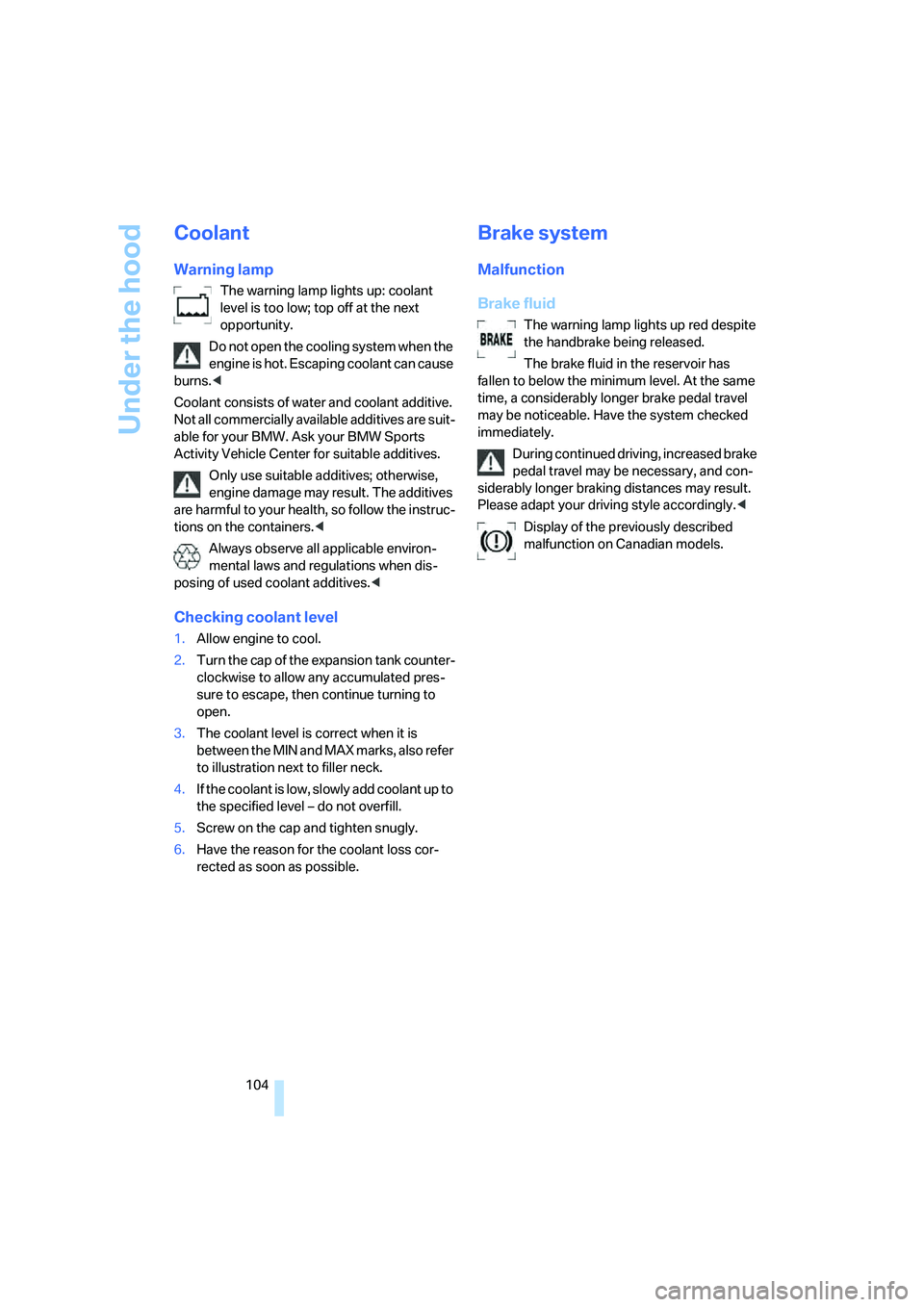
The warning lamp lights up: coolant
level is too low; top off at the next
opportunity.
Do not open the cooling system when the
engine is hot. Escaping coolant can cause
burns.<
Coolant consists of water and coolant additive.
Not all commercially available additives are suit-
able for your BMW. Ask your BMW Sports
Activity Vehicle Center for suitable additives.
Only use suitable additives; otherwise,
engine damage may result. The additives
are harmful to your health, so follow the instruc-
tions on the containers.<
Always observe all applicable environ-
mental laws and regulations when dis-
posing of used coolant additives.<
Checking coolant level
1.Allow engine to cool.
2.Turn the cap of the expansion tank counter-
clockwise to allow any accumulated pres-
sure to escape, then continue turning to
open.
3.The coolant level is correct when it is
between the MIN and MAX marks, also refer
to illustration next to filler neck.
4.If the coolant is low, slowly add coolant up to
the specified level – do not overfill.
5.Screw on the cap and tighten snugly.
6.Have the reason for the coolant loss cor-
rected as soon as possible.
Brake system
Malfunction
Brake fluid
The warning lamp lights up red despite
the handbrake being released.
The brake fluid in the reservoir has
fallen to below the minimum level. At the same
time, a considerably longer brake pedal travel
may be noticeable. Have the system checked
immediately.
During continued driving, increased brake
pedal travel may be necessary, and con-
siderably longer braking distances may result.
Please adapt your driving style accordingly.<
Display of the previously described
malfunction on Canadian models.
Page 130 of 140
Everything from A to Z
128 Charge-current indicator
lamp12,114
Check Gas Cap, warning
lamp12,92
Child's seats, refer to Child
restraint systems35
Child restraint fixing system
LATCH36
Child restraint systems35
– installing35
– with tether strap36
Child-safety locks37
Child seat security35
Chock112
Chrome parts, care, refer to
Caring for your vehicle
brochure
Cigarette lighter74
Circulation of air, refer to
Recirculated-air
mode64,68
Cleaning, vehicle, refer to
Caring for your vehicle
brochure
Cleaning rear window43
Clock47,48
– 12 or 24 hour mode48
– setting, also refer to Owner's
Manual for Radio/Onboard
Computer
– setting time47
Closing
– from inside21
– with the remote control19
Clothes hooks74
Clutch82
– breaking-in82
Cockpit10
Cold start, refer to Starting
engine38
Combination of wheel/tire98
Compact wheel, wheel
changes112
Compartments, refer to
Storage compartments73
Compartments in cargo area,
refer to Behind side trim
panel78Compass, digital70
Computer48
– also refer to Owner's Manual
for Onboard Computer
– functions48
Condensation, refer to When
the vehicle is parked84
Confirmation signal for
locking/unlocking
vehicle19,21
Connecting car vacuum
cleaner, refer to Connecting
electrical devices74
Connecting electrical
devices74
Consumption, refer to
Average fuel
consumption49
Consumption indicator, refer
to Fuel gauge46
Controls, refer to Cockpit10
Convenience operation
– from outside21
– panorama glass sunroof21
– windows21
Coolant104
– level104
– temperature gauge47
– warning lamp104
Cooling, refer to
Temperature64,67
Copyright2
Correct wheels and tires98
Courtesy lamps61
Cruise control44
– buttons on steering
wheel13
– indicator lamp44
Cruising range49
Cup holders72
Curb weight, refer to
Weights124
Cylinders, refer to Engine
data122
D
Dashboard lighting, refer to
Instrument lighting61
Dashboard system, refer to
Cockpit10
Data, technical122
– dimensions123
– engine122
– filling capacities124
– weights124
Daytime running lamps59
Deactivating front passenger
airbags35,57
Defective lamp59
Defects7
Defrosting windows64,67
– air conditioner64
– automatic climate control67
Defrosting windows and
removing condensation
– air conditioner64
– automatic climate control67
Defrost position, refer to
Defrosting windows64,67
Digital clock47
Digital compass70
Dimensions123
Dimming mirror34
Directional indicators, refer to
Turn signals41
Disk brakes85
Displacement, refer to Engine
data122
Display illumination, refer to
Instrument lighting61
Display lighting, refer to
instrument lighting61
Displays, refer to Instrument
cluster11
Disposal, vehicle battery114
Disposal of the vehicle, refer
to Caring for your vehicle
brochure
Distance warning, refer to
PDC Park Distance
Control50
Door exit lighting61
Door handle lighting59
Page 131 of 140
Reference
At a glance
Controls
Driving tips
Mobility
129
Door keys18
Door lock21
Doors
– locking and unlocking from
inside21
– manual operation21
– unlocking and locking,
confirmation signals19,21
DOT Quality Grades96
Draft-free ventilation65,68
Driving lamps, refer to Parking
lamps/low beams59
Driving notes84
Driving on poor roads87
Driving stability control
systems51
Driving through water87
Driving tips, refer to Driving
instructions84
Drying air, refer to Switching
cooling function on/
off64,67
DSC Dynamic Stability
Control51
– indicator lamp52
DTC Dynamic Traction
Control52
– indicator lamps52
DVD changer, refer to Owner's
Manual for Radio/Onboard
Computer
Dynamic Stability Control
DSC51
– indicator lamp52
Dynamic Traction Control
DTC52
– indicator lamps52
E
Electrical malfunctions
– automatic transmission
malfunction41
– door lock21
– driver's door21
– fuel filler door92
– liftgate22
– panorama glass sunroof25Electronic brake-force
distribution51
Electronic Stability Program,
refer to DSC Dynamic
Stability Control51
Emergency call116
Emergency operation, refer to
Manual operation
– doors21
– driver's door21
– fuel filler door92
– liftgate22
– panorama glass sunroof25
Emergency Service, refer to
Receiving assistance116
Engine
– breaking-in82
– data122
– indicator lamps38
– overheated, refer to Coolant
thermometer47
– speed46
– starting38
– switching off39
Engine compartment101
Engine coolant104
Engine coolant
temperature47
Engine oil102
– additives, refer to Approved
engine oils103
– approved engine oils103
– electronic oil level
control102
– indicator/warning lamp102
– possible displays102
– required oil grades103
– specifications, also refer to
Approved engine oils103
Engine oil grades103
Engine oil level, indicator/
warning lamp102
Engine oil pressure102
– indicator/warning lamp102
Engine output, refer to Engine
data122
Equipment package, refer to
Service and Warranty
Information Booklet for US models, Warranty and
Service Guide Booklet for
Canadian models
ESP Electronic Stability
Program, refer to DSC
Dynamic Stability
Control51
Exhaust system84
Exterior mirrors33
– automatically dimming34
External audio device74
Eye, tow starting and
towing118
F
Failure of electrical
accessories115
False alarms, refer to Avoiding
unintentional alarms26
Fastening safety belts, refer to
Safety belts32
Filter, refer to
– Microfilter65
– Microfilter/activated
charcoal filter68
First-aid kit117
Flat tire111
– compact wheel112
– Flat Tire Monitor54
– refer to Tire inflation
pressure94
– refer to Wheel changes111
– Tire Pressure Monitor55
Flat Tire Monitor54
– indicator lamp54
– initializing system54
– snow chains99
– system limits54
– warning errors54
Flooding, refer to Driving
through water84
Floor cover78
Fog lamps, indicator lamp61
Folding rear seat back76
Footwell lamps61
Four wheel drive, refer to
xDrive52
Front airbags57
Page 134 of 140
Everything from A to Z
132 Manual operation
– door lock21
– driver's door21
– fuel filler door92
– liftgate22
– panorama glass sunroof25
Manual transmission40
Master key18
– with remote control18
Maximum speed, with winter
tires98
Mechanical seats28
Memory, refer to
– Seat and mirror memory31
– Vehicle Memory, Key
Memory18
Microfilter
– air conditioner65
– automatic climate control68
Microphone, refer to Car
phone preparation75
Microphone for telephone75
Mirrors33
– automatic curb monitor33
– mirror heating33
– mirror memory, refer to Seat
and mirror memory31
Mobile phone, refer to
separate operating
instructions
Monitoring tire pressure
– refer to Flat Tire Monitor54
– refer to Tire Pressure
Monitor55
Multi-function steering wheel,
refer to Buttons on steering
wheel13
Multifunction switch
– turn signals/headlamp
flasher41
– washer/wiper system42
N
Navigation system, refer to
separate Owner's Manual
Neck support, refer to Head
restraints29
Nets73
New keys18
Non-smoker's equipment
package74
Nozzles, refer to
Ventilation65,68
Nylon rope, refer to Tow
starting and towing118
O
OBD socket105
Octane rating, refer to Fuel
quality93
Odometer46
Oil
– additives, refer to Approved
engine oils103
– approved engine oils103
– level102
– refilling, refer to Adding
engine oil103
Oil change interval, refer to
Service Interval Display47
Oil grades103
Oil level102
– warning lamp102
Oil pressure102
– warning lamp102
OILSERVICE47
Old batteries, refer to
Disposal114
Onboard computer, refer to
separate Owner's Manual
Onboard Diagnostics OBD
interface socket105
Onboard tool kit107
Opening and closing
– from inside21
– using the door lock21
– with the remote control19Output, refer to Engine
data122
Outside air
– air conditioner64
– automatic climate control68
Outside temperature display
– changing unit of measure48
– on computer48
Overheating of engine, refer to
Coolant thermometer47
P
Package tray, refer to Cargo
area cover77
Panic mode20
Panorama glass sunroof23
– closing after electrical
malfunction25
– convenience operation21
– initializing24
– power failure24
– remote control20
Park Distance Control PDC50
Parking aid, refer to PDC Park
Distance Control50
Parking assistant, refer to
PDC Park Distance
Control50
Parking brake, refer to
Handbrake39
Parking lamps59
Parking lamps/low beams59
Partition net78
Parts and accessories, refer to
For your own safety5
Passenger-side mirror tilt
function33
Pathway lighting59
PDC Park Distance Control50
Pinch protection system23
– power windows23
Plastic, refer to Caring for your
vehicle brochure
Pollen, refer to
– Microfilter65
– Microfilter/activated
charcoal filter68