warning light BMW X3 XDRIVE 28I 2011 User Guide
[x] Cancel search | Manufacturer: BMW, Model Year: 2011, Model line: X3 XDRIVE 28I, Model: BMW X3 XDRIVE 28I 2011Pages: 262, PDF Size: 11.2 MB
Page 93 of 262
Brief status display
Brief display in the speedometer:
Selected desired speed
If --- appears briefly, conditions may not be ad‐
equate to operate the system.
PDC Park Distance Control*
The concept
In addition to the PDC Park Distance Control, the
backup camera*, refer to page 95, can be
switched on.
PDC supports you when parking. Objects that
you are approaching slowly in front of or behind
your vehicle are indicated with:▷Signal tones.▷Visual display.
Measurement
Measurements are made by ultrasound sensors
in the bumpers.
The range is approx. 6 ft/2 m.
An acoustic warning is first given:
▷By the front sensors and two rear corner
sensors at approx. 24 in/60 cm.▷By the rear middle sensors at approx. 5 ft/
1.50 m.
System limits
Check the traffic situation as well
PDC cannot serve as a substitute for the
driver's personal judgment of the traffic situa‐
tion. Check the traffic situation around the vehi‐
cle with your own eyes. Otherwise, an accident
could result from road users or objects located
outside of the PDC detection range.
Loud noises from outside and inside the vehicle
may prevent you from hearing the PDC's signal
tone.◀
Avoid driving quickly with PDC
Avoid approaching an object quickly.
Avoid driving away quickly while PDC is not yet
active.
For technical reasons, the system may other‐
wise be too late in issuing a warning.◀
Limits of ultrasonic measurement
The detection of objects can reach the physical
limits of ultrasonic measurement, for instance:▷With tow bars and trailer hitches.▷With thin or wedge-shaped objects.▷With low objects.▷With objects with corners and sharp edges.
Low objects already displayed, e.g., curbs, can
move into the blind area of the sensors before or
after a continuous tone sounds.
High, protruding objects such as ledges may not
be detected.
False warnings
PDC may issue a warning under the following
conditions even though there is no obstacle
within the detection range:
▷In heavy rain.▷When sensors are very dirty or covered in
ice.▷When sensors are covered in snow.▷On rough road surfaces.▷In large buildings with right angles and
smooth walls, e.g., in underground garages.▷In heavy exhaust.▷Due to other ultrasound sources, e.g.,
sweeping machines, high pressure steam
cleaners or neon lights.
Switching on automatically
Select transmission position R with the engine
running.
Switching off automatically
The system switches off and the LED goes out:
Seite 9393
Online Edition for Part no. 01 40 2 606 190 - 12 10 500
ReferenceMobilityCommunicationEntertainmentNavigationDriving tipsControlsAt a glance
Page 94 of 262
▷After approx. 160 ft/50 m when driving for‐
ward.▷Above approx. 22 mph/36 km/h when driv‐
ing forward.
Switch on the system again if necessary.
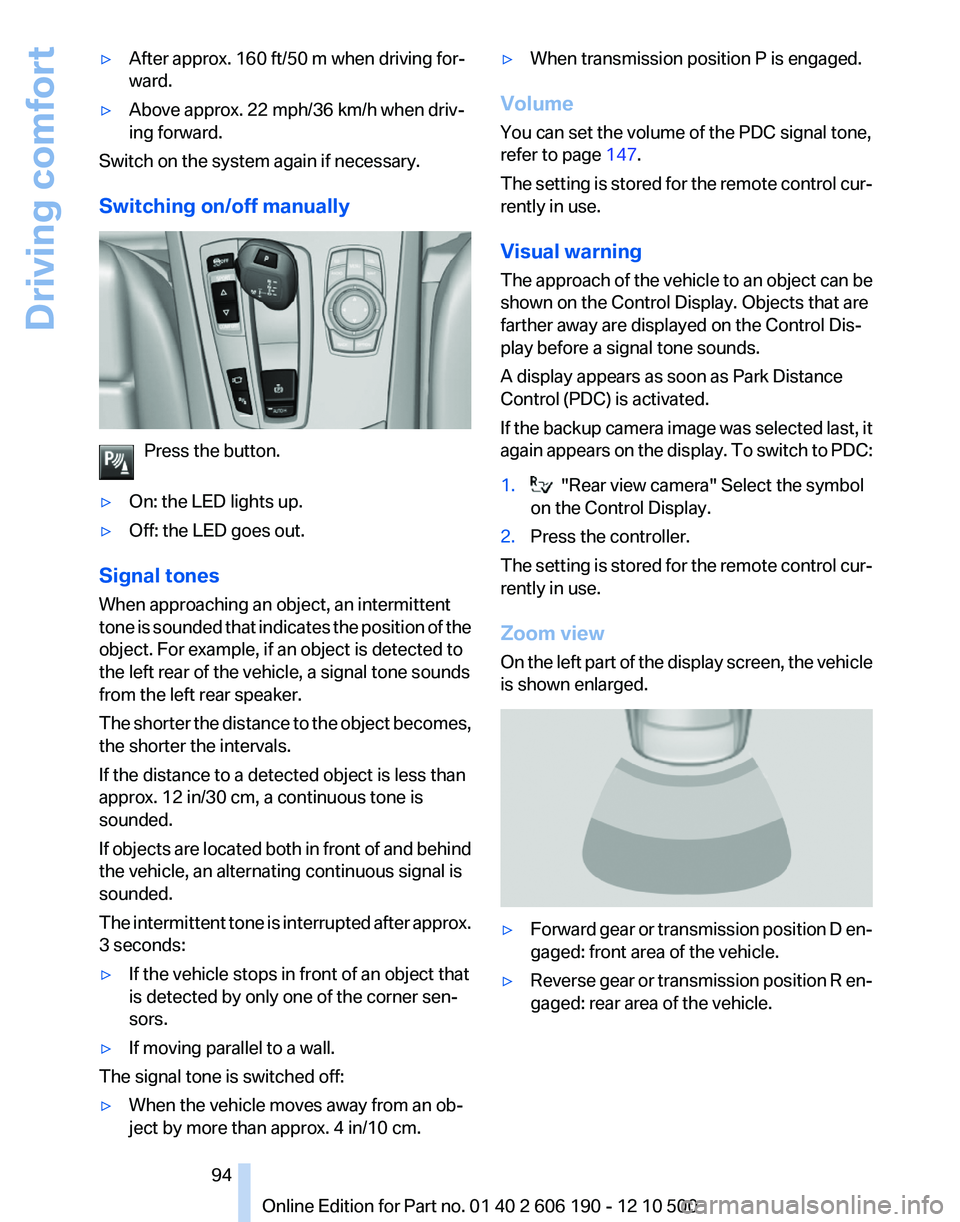
Switching on/off manually
Press the button.
▷On: the LED lights up.▷Off: the LED goes out.
Signal tones
When approaching an object, an intermittent
tone is sounded that indicates the position of the
object. For example, if an object is detected to
the left rear of the vehicle, a signal tone sounds
from the left rear speaker.
The shorter the distance to the object becomes,
the shorter the intervals.
If the distance to a detected object is less than
approx. 12 in/30 cm, a continuous tone is
sounded.
If objects are located both in front of and behind
the vehicle, an alternating continuous signal is
sounded.
The intermittent tone is interrupted after approx.
3 seconds:
▷If the vehicle stops in front of an object that
is detected by only one of the corner sen‐
sors.▷If moving parallel to a wall.
The signal tone is switched off:
▷When the vehicle moves away from an ob‐
ject by more than approx. 4 in/10 cm.▷When transmission position P is engaged.
Volume
You can set the volume of the PDC signal tone,
refer to page 147.
The setting is stored for the remote control cur‐
rently in use.
Visual warning
The approach of the vehicle to an object can be
shown on the Control Display. Objects that are
farther away are displayed on the Control Dis‐
play before a signal tone sounds.
A display appears as soon as Park Distance
Control (PDC) is activated.
If the backup camera image was selected last, it
again appears on the display. To switch to PDC:
1. "Rear view camera" Select the symbol
on the Control Display.2.Press the controller.
The setting is stored for the remote control cur‐
rently in use.
Zoom view
On the left part of the display screen, the vehicle
is shown enlarged.
▷Forward gear or transmission position D en‐
gaged: front area of the vehicle.▷Reverse gear or transmission position R en‐
gaged: rear area of the vehicle.Seite 9494
Online Edition for Part no. 01 40 2 606 190 - 12 10 500Driving comfort
Page 98 of 262
Check the traffic situation as well
Check the traffic situation around the ve‐
hicle with your own eyes. Otherwise, an accident
could result from road users or objects located
outside the picture area of the cameras.◀
Switching on automatically
Select transmission position R with the engine
running.
The Top View and PDC images are displayed if
the system is switched on via iDrive.
Switching off automatically
The system switches off and the LED goes out:▷After approx. 160 ft/50 m when driving for‐
ward.▷Above approx. 22 mph/36 km/h when driv‐
ing forward.
Switch on the system again if necessary.
Switching on/off manually
Press the button.
▷On: the LED lights up.▷Off: the LED goes out.
If Top View is displayed, switch on the backup
camera via the iDrive, refer to page 98.
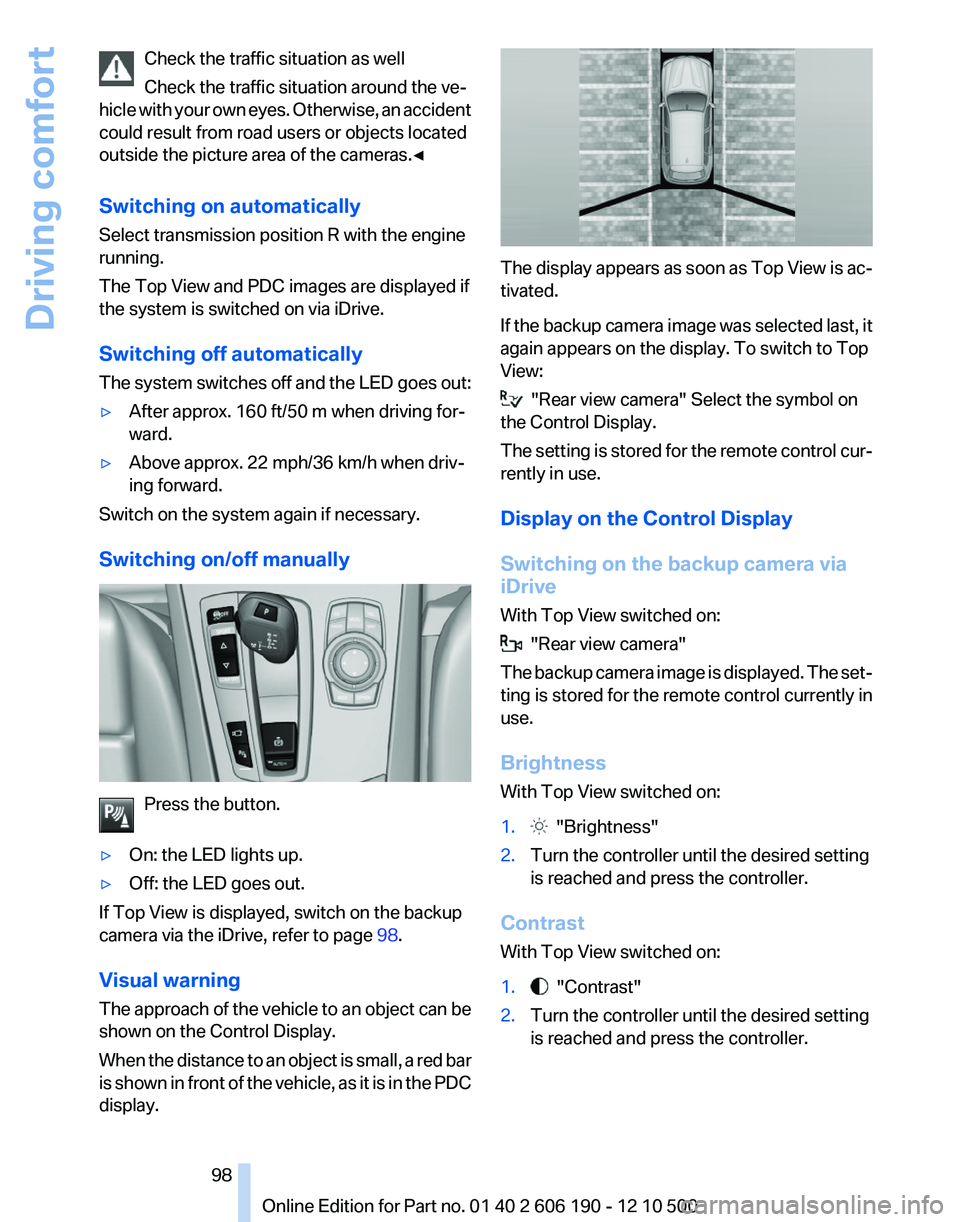
Visual warning
The approach of the vehicle to an object can be
shown on the Control Display.
When the distance to an object is small, a red bar
is shown in front of the vehicle, as it is in the PDC
display.
The display appears as soon as Top View is ac‐
tivated.
If the backup camera image was selected last, it
again appears on the display. To switch to Top
View:
"Rear view camera" Select the symbol on
the Control Display.
The setting is stored for the remote control cur‐
rently in use.
Display on the Control Display
Switching on the backup camera via
iDrive
With Top View switched on:
"Rear view camera"
The backup camera image is displayed. The set‐
ting is stored for the remote control currently in
use.
Brightness
With Top View switched on:
1. "Brightness"2.Turn the controller until the desired setting
is reached and press the controller.
Contrast
With Top View switched on:
1. "Contrast"2.Turn the controller until the desired setting
is reached and press the controller.Seite 9898
Online Edition for Part no. 01 40 2 606 190 - 12 10 500Driving comfort
Page 217 of 262
Engine oilGeneral information
The engine oil consumption is dependent on the
driving style and driving conditions.
Therefore, check the engine oil level after every
refueling using the electronic engine oil level
check.
Checking the oil level
The concept
The oil level is monitored electronically and dis‐
played on the Control Display.
Requirements▷The engine must be running and warm after
the vehicle has been driven for at least
6 miles/10 km.▷The vehicle is stopped or being driven on a
level roadway.
Displaying the oil level
1."Vehicle Info"2."Vehicle status"3. "Engine oil level"
Possible messages
▷"Engine oil level OK"▷"Measurement not possible at this time."▷"Measuring engine oil level..."
Duration with the engine running: ap‐
prox. 3 minutes.
Duration while driving: approx. 5 minutes.▷"Engine oil level below minimum. Add 1
quart!"
Add oil within the next 125 miles/200 km.▷"Engine oil level too high! Have this
checked."
Have the vehicle checked immediately.Too much engine oil
Have the vehicle checked immedi‐
ately; otherwise, surplus oil can lead to en‐
gine damage.◀▷"Measurement inactive. Have this
checked."
Note the newly calculated remaining mile‐
age until the next oil service. Have the sys‐
tem checked as soon as possible.
Adding engine oil
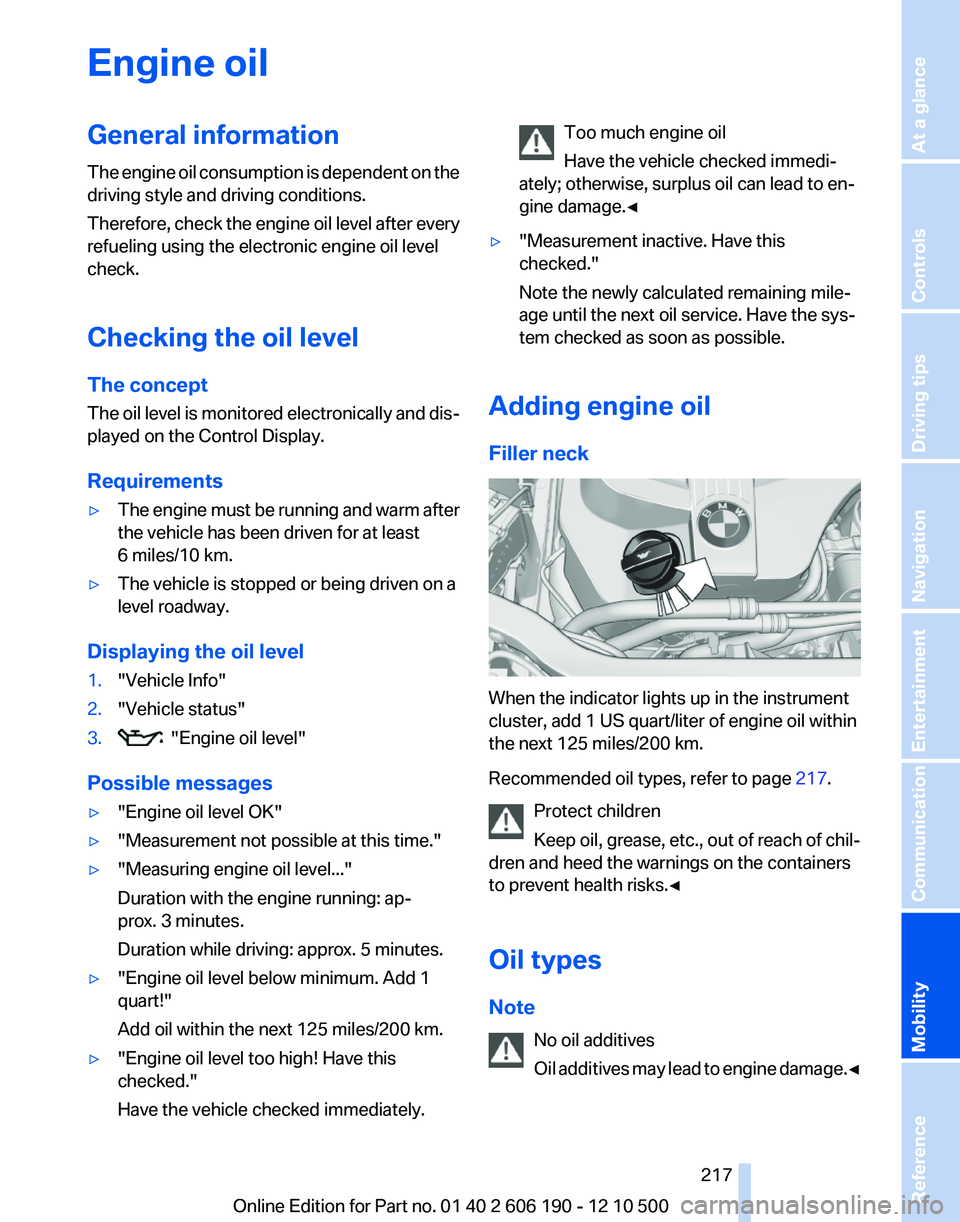
Filler neck
When the indicator lights up in the instrument
cluster, add 1 US quart/liter of engine oil within
the next 125 miles/200 km.
Recommended oil types, refer to page 217.
Protect children
Keep oil, grease, etc., out of reach of chil‐
dren and heed the warnings on the containers
to prevent health risks.◀
Oil types
Note No oil additives
Oil additives may lead to engine damage. ◀
Seite 217217
Online Edition for Part no. 01 40 2 606 190 - 12 10 500
ReferenceMobilityCommunicationEntertainmentNavigationDriving tipsControlsAt a glance
Page 219 of 262
MaintenanceBMW Maintenance System
The system obtains information about the road
safety and operational reliability of the vehicle
and takes into account aspects such as a timely
vehicle check. The aim is to optimize mainte‐
nance procedures with a view to reducing the
cost of running the vehicle.
Condition Based Service CBS
Sensors and special algorithms take into ac‐
count the driving conditions of your vehicle.
Based on this, Condition Based Service deter‐
mines the maintenance requirements.
The system makes it possible to adapt the
amount of maintenance you need to your user
profile.
Detailed information on service requirements,
refer to page 73, can be displayed on the Control
Display.
Service data in the remote control
Information on the required maintenance is con‐
tinuously stored in the remote control. Your
service center will read out this data and suggest
the right array of service procedures for your ve‐
hicle.
Therefore, hand your service specialist the re‐
mote control that you used most recently.
Storage periods
Storage periods during which the vehicle bat‐
tery was disconnected are not taken into ac‐
count.
If this occurs, have a service center update the
time-dependent maintenance procedures,
such as checking brake fluid and, if necessary,
changing the engine oil and the microfilter/acti‐
vated-charcoal filter.Service and Warranty
Information Booklet for US
models and Warranty and
Service Guide Booklet for
Canadian models
Please consult your Service and Warranty Infor‐
mation Booklet for US models and Warranty and
Service Guide Booklet for Canadian models for
additional information on service requirements.
Maintenance and repair should be performed by
your service center. Make sure to have regular
maintenance procedures recorded in the vehi‐
cle's Service and Warranty Information Booklet
for US models, and in the Warranty and Service
Guide Booklet for Canadian models. These en‐
tries are proof of regular maintenance.
Socket for OBD Onboard
Diagnosis
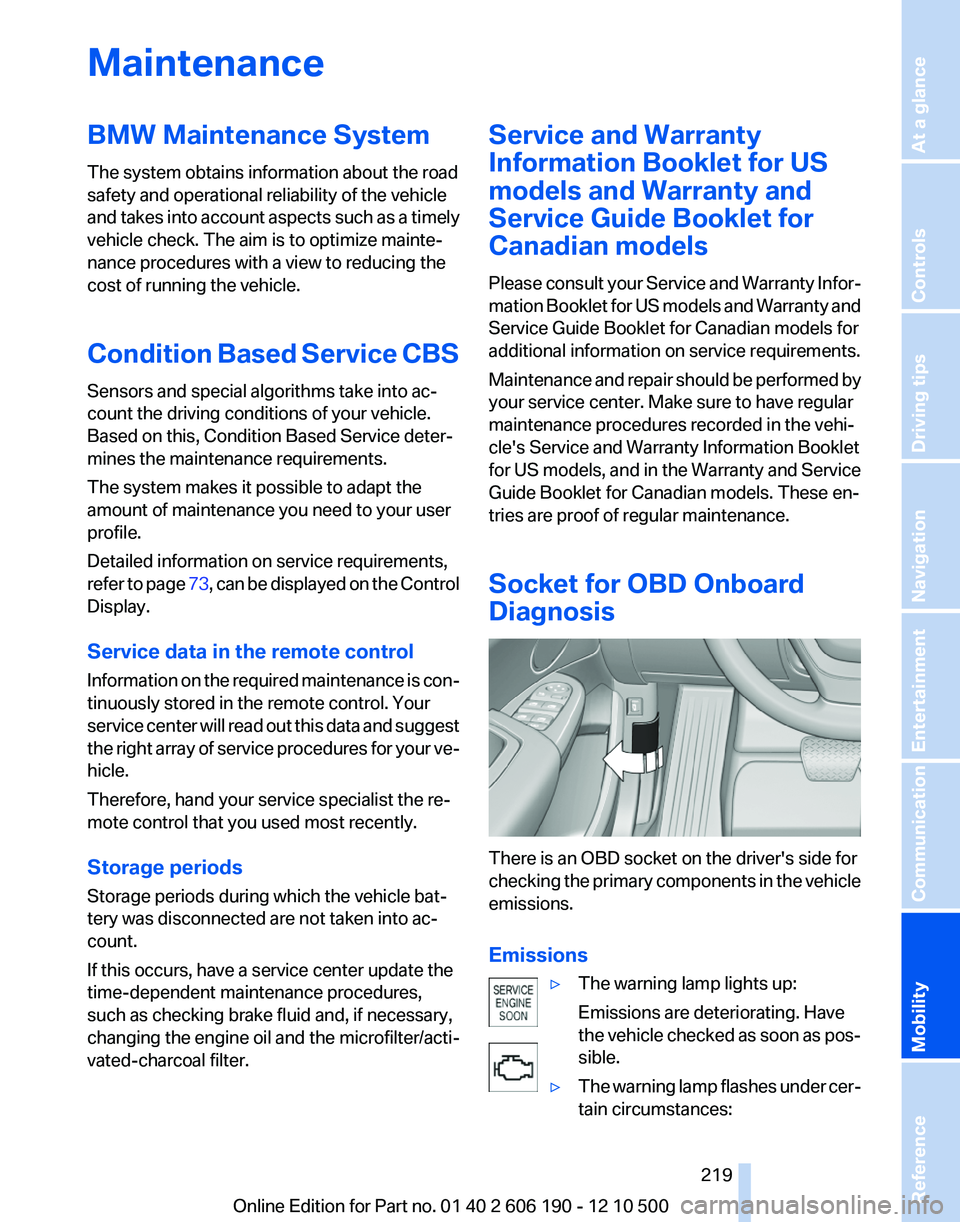
There is an OBD socket on the driver's side for
checking the primary components in the vehicle
emissions.
Emissions
▷The warning lamp lights up:
Emissions are deteriorating. Have
the vehicle checked as soon as pos‐
sible.▷The warning lamp flashes under cer‐
tain circumstances:Seite 219219
Online Edition for Part no. 01 40 2 606 190 - 12 10 500
ReferenceMobilityCommunicationEntertainmentNavigationDriving tipsControlsAt a glance
Page 228 of 262
Breakdown assistanceHazard warning flashers
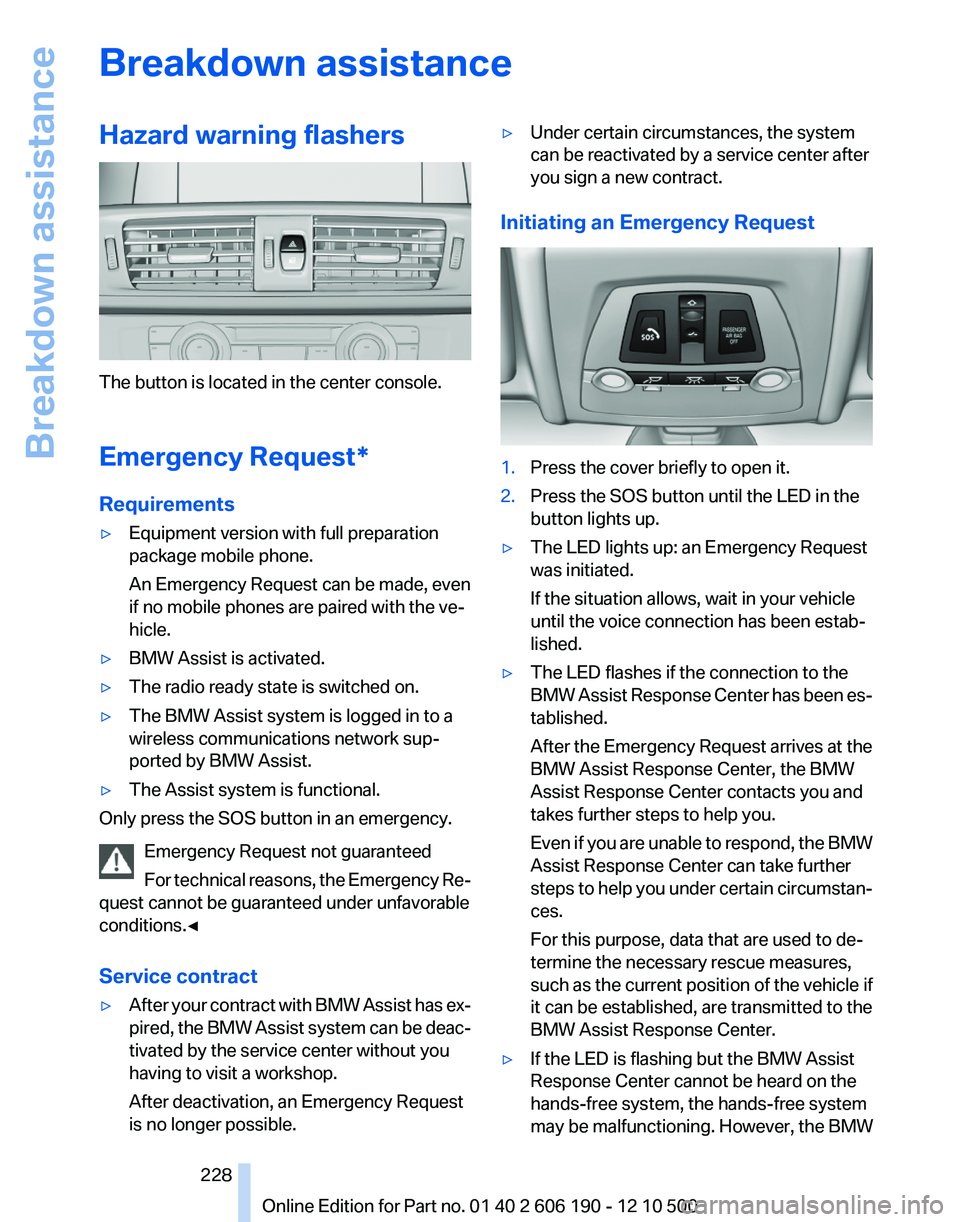
The button is located in the center console.
Emergency Request*
Requirements
▷Equipment version with full preparation
package mobile phone.
An Emergency Request can be made, even
if no mobile phones are paired with the ve‐
hicle.▷BMW Assist is activated.▷The radio ready state is switched on.▷The BMW Assist system is logged in to a
wireless communications network sup‐
ported by BMW Assist.▷The Assist system is functional.
Only press the SOS button in an emergency.
Emergency Request not guaranteed
For technical reasons, the Emergency Re‐
quest cannot be guaranteed under unfavorable
conditions.◀
Service contract
▷After your contract with BMW Assist has ex‐
pired, the BMW Assist system can be deac‐
tivated by the service center without you
having to visit a workshop.
After deactivation, an Emergency Request
is no longer possible.▷Under certain circumstances, the system
can be reactivated by a service center after
you sign a new contract.
Initiating an Emergency Request
1.Press the cover briefly to open it.2.Press the SOS button until the LED in the
button lights up.▷The LED lights up: an Emergency Request
was initiated.
If the situation allows, wait in your vehicle
until the voice connection has been estab‐
lished.▷The LED flashes if the connection to the
BMW Assist Response Center has been es‐
tablished.
After the Emergency Request arrives at the
BMW Assist Response Center, the BMW
Assist Response Center contacts you and
takes further steps to help you.
Even if you are unable to respond, the BMW
Assist Response Center can take further
steps to help you under certain circumstan‐
ces.
For this purpose, data that are used to de‐
termine the necessary rescue measures,
such as the current position of the vehicle if
it can be established, are transmitted to the
BMW Assist Response Center.▷If the LED is flashing but the BMW Assist
Response Center cannot be heard on the
hands-free system, the hands-free system
may be malfunctioning. However, the BMWSeite 228228
Online Edition for Part no. 01 40 2 606 190 - 12 10 500Breakdown assistance
Page 231 of 262
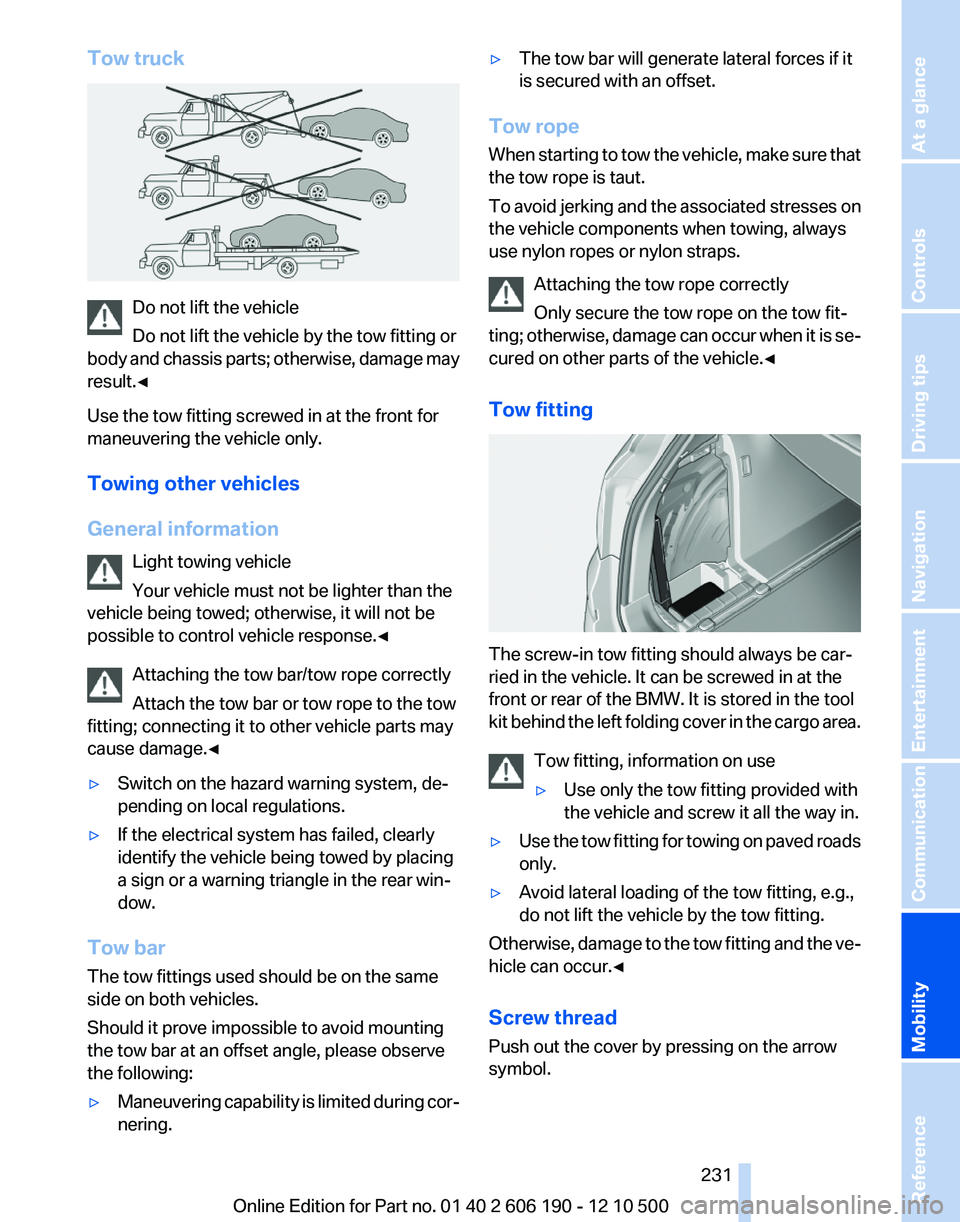
Tow truck
Do not lift the vehicle
Do not lift the vehicle by the tow fitting or
body and chassis parts; otherwise, damage may
result.◀
Use the tow fitting screwed in at the front for
maneuvering the vehicle only.
Towing other vehicles
General information Light towing vehicle
Your vehicle must not be lighter than the
vehicle being towed; otherwise, it will not be
possible to control vehicle response.◀
Attaching the tow bar/tow rope correctly
Attach the tow bar or tow rope to the tow
fitting; connecting it to other vehicle parts may
cause damage.◀
▷Switch on the hazard warning system, de‐
pending on local regulations.▷If the electrical system has failed, clearly
identify the vehicle being towed by placing
a sign or a warning triangle in the rear win‐
dow.
Tow bar
The tow fittings used should be on the same
side on both vehicles.
Should it prove impossible to avoid mounting
the tow bar at an offset angle, please observe
the following:
▷Maneuvering capability is limited during cor‐
nering.▷The tow bar will generate lateral forces if it
is secured with an offset.
Tow rope
When starting to tow the vehicle, make sure that
the tow rope is taut.
To avoid jerking and the associated stresses on
the vehicle components when towing, always
use nylon ropes or nylon straps.
Attaching the tow rope correctly
Only secure the tow rope on the tow fit‐
ting; otherwise, damage can occur when it is se‐
cured on other parts of the vehicle.◀
Tow fitting
The screw-in tow fitting should always be car‐
ried in the vehicle. It can be screwed in at the
front or rear of the BMW. It is stored in the tool
kit behind the left folding cover in the cargo area.
Tow fitting, information on use
▷Use only the tow fitting provided with
the vehicle and screw it all the way in.▷Use the tow fitting for towing on paved roads
only.▷Avoid lateral loading of the tow fitting, e.g.,
do not lift the vehicle by the tow fitting.
Otherwise, damage to the tow fitting and the ve‐
hicle can occur.◀
Screw thread
Push out the cover by pressing on the arrow
symbol.
Seite 231231
Online Edition for Part no. 01 40 2 606 190 - 12 10 500
ReferenceMobilityCommunicationEntertainmentNavigationDriving tipsControlsAt a glance
Page 253 of 262
Brake force display 85
Brake lamps, brake force dis‐ play 85
Brake lights, adaptive 85
Brake pads, breaking in 120
Braking, notes 121
Breakdown assis‐ tance 228, 229
Breaking in 120
Brightness of Control Dis‐ play 73
Bulb replacement 221
Bulb replacement, front 222
Bulb replacement, rear 225
Bulbs and lamps 221
Button, Start/Stop 58
C
Calendar 189
California Proposition 65 Warning 7
Camera, backup camera 97
Camera, care 235
Camera, Top View 99
Can holder, refer to Cu‐ pholder 115
Car battery 227
Car care products 234
Care, displays 235
Care, vehicle 234
Cargo 122
Cargo area 110
Cargo area, enlarg‐ ing 110 , 111
Cargo area lid 39
Cargo area, storage compart‐ ments 116
Cargo straps, securing cargo 123
Car key, refer to Remote con‐ trol 32
Carpet, care 235
Car wash 233
Catalytic converter, refer to Hot exhaust system 120
CBS Condition Based Serv‐ ice 219 CD/DVD 155
CDs, storing 162
Cell phone 176
Center armrest 114
Center console 17
Central locking system 35
Central screen, refer to Control Display 19
Changes, technical, refer to Safety 6
Changing parts 221
Changing wheels/tires 212
Check Control 74
Children, seating position 55
Children, transporting safely 55
Child restraint fixing sys‐ tem 55
Child restraint fixing system LATCH 56
Child restraint fixing systems, mounting 55
Child-safety locks 57
Child seat, mounting 55
Child seats 55
Chrome parts, care 234
Cigarette lighter 108
Cleaning, displays 235
Climate control 101, 103
Clock 69
Closing/opening from in‐ side 38
Closing/opening via door lock 38
Closing/opening with remote control 36
Clothes hooks 115
Combination instrument 13
Combination instrument, elec‐ tronic displays 15
Combination switch, refer to Turn signals 61
Combination switch, refer to Wiper system 62
Comfort Access 41
Computer 70
Concierge service 196 Condensation on win‐
dows 102, 105
Condensation under the vehi‐ cle 122
Condition Based Service CBS 219
Confirmation signal 37
Contacts 185
Control Display 19
Control Display, settings 72
Controller 19
Control systems, driving sta‐ bility 86
Convenient opening 36
Coolant 218
Cooling function 102, 105
Cooling, maximum 104
Cooling system 218
Corrosion on brake discs 122
Cruise control 91
Cruising range 67
Cupholder 115
Current fuel consumption 68
Current location, storing 130
Customer Relations 200
D
Damage, tires 211
Damping control, dynamic 88
Data, technical 238
Date 69
Daytime running lights 77
Defrosting, refer to Windows, defrosting 102, 105
Destination distance 70
Destination guidance 135
Destination guidance with in‐ termediate destinations 134
Destination input, naviga‐ tion 128
Digital clock 69
Digital radio 149
Dimensions 238
Dimmable mirrors 54
Direction indicator, refer to Turn signals 61
Displacement, engine 240 Seite 253253
Online Edition for Part no. 01 40 2 606 190 - 12 10 500
ReferenceMobilityCommunicationEntertainmentNavigationDriving tipsControlsAt a glance
Page 254 of 262
Display in front windshield 99
Display, instrument cluster 67
Display lighting, refer to Instru‐ ment lighting 79
Displays 13
Displays, cleaning 235
Disposal, coolant 218
Disposal, vehicle battery 227
Distance control, refer to PDC 93
Distance to destination 70
Divided screen view, split screen 23
Door lock, refer to Remote control 32
Downhill control 87
Drive-off assistant, refer to DSC 86
Driving instructions, breaking in 120
Driving notes, general 120
Driving stability control sys‐ tems 86
Driving tips 120
DSC Dynamic Stability Con‐ trol 86
DTC Dynamic Traction Con‐ trol 86
DTMF suffix dialing 181
DVD/CD 155
DVD/CD notes 161
DVD changer 159
DVD settings 158
DVDs, storing 162
DVD, video 157
Dynamic Damping Control 88
Dynamic destination guid‐ ance 141
Dynamic Driving Control 89
Dynamic Stability Control DSC 86
Dynamic Traction Control DTC 86
E
EfficientDynamics, refer to Saving fuel 124 Electronic displays, instru‐
ment cluster 15
Electronic engine oil level check 217
Electronic Stability Program ESP, refer to DSC 86
Emergency detection, remote control 33
Emergency release, door lock 38
Emergency release, fuel filler flap 204
Emergency Request 228
Emergency service, refer to Roadside Assistance 229
Emergency start function, en‐ gine start 33
Energy Control 68
Energy recovery 68
Engine compartment 215
Engine compartment, working in 215
Engine coolant 218
Engine oil 217
Engine oil, adding 217
Engine oil additives 217
Engine oil filler neck 217
Engine oil temperature 68
Engine oil types, alterna‐ tive 218
Engine oil types, ap‐ proved 217
Engine specifications 240
Engine start, assistance 229
Engine start during malfunc‐ tion 33
Engine start, refer to Starting the engine 58
Engine stop 59
Engine temperature 68
Equalizer 146
Equipment, interior 107
ESP Electronic Stability Pro‐ gram, refer to DSC 86
Exchanging wheels/tires 212
Exhaust system 120
Exterior mirrors 53
External devices 166 External temperature dis‐
play 69
External temperature warn‐ ing 69
Eyes for securing cargo 123
F
Fader 146
Failure message, refer to Check Control 74
False alarm, refer to Uninten‐ tional alarm 43
Fan, refer to Air vol‐ ume 101, 104
Fault displays, refer to Check Control 74
Filler neck for engine oil 217
Fine wood, care 235
First aid kit 229
Fitting for towing, refer to Tow fitting 231
Flat tire, Tire Pressure Monitor TPM 82
Flat tire, warning lamp 83
Flat tire, wheel change 226
Flooding 121
Floor carpet, care 235
Floor mats, care 235
FM/AM station 148
Fold-out position, windshield wipers 64
Foot brake 121
Front airbags 80
Front fog lamps 79
Front fog lamps, front, bulb re‐ placement 223
Front lamps 222
Front passenger airbags, au‐ tomatic deactivation 81
Front passenger airbags, indi‐ cator lamp 82
Front seats, adjusting 47
Fuel cap 204
Fuel consumption, current 68
Fuel consumption, refer to Average fuel consump‐
tion 70 Seite 254254
Online Edition for Part no. 01 40 2 606 190 - 12 10 500Everything from A to Z
Page 255 of 262
Fuel filler flap 204
Fuel gauge 67
Fuel quality 206
Fuel, tank capacity 242
Fuse 227
G
Garage door opener, refer to Integrated universal remote
control 107
Gas station recommenda‐ tion 137
Gear change, automatic trans‐ mission 65
General driving notes 120
Glass sunroof, refer to Panor‐ amic glass sunroof 45
Glove compartment 114
GPS navigation, refer to Navi‐ gation system 128
Gross vehicle weight, ap‐ proved 241
Gross weight, permissible for trailer towing 241
H
Hand brake, refer to Parking brake 59
Hand-held transmitter, alter‐ nating code 108
Hazard warning flashers 228
HDC Hill Descent Control 87
HD Radio 149
Head airbags 80
Headlamp control, auto‐ matic 77
Headlamp courtesy delay fea‐ ture 76
Headlamp courtesy delay fea‐ ture via remote control 36
Headlamp flasher 62
Headlamp flasher, bulb re‐ placement 223
Headlamp glass 222
Headlamps 222
Headlamps, care 234 Headlamp washer system 62
Headliner 18
Head restraints 47
Head restraints, front 51
Head restraints, rear 51
Head-up Display 99
Head-up Display, care 235
Heavy cargo, stowing 123
Height, seats 47
Height, vehicle 238
High-beam Assistant 78
High beams 62
High beams/low beams, refer to High-beam Assistant 78
High beams, bulb replace‐ ment 223
Hill Descent Control HDC 87
Hills 121
Holder for beverages 115
Homepage 6
Hood 215
Horn 12
Hot exhaust system 120
House number, entering for navigation 129
Hydroplaning 121
I
Ice warning, refer to External temperature warning 69
Icy roads, refer to External temperature warning 69
Identification marks, tires 210
Identification number, refer to Engine compartment 215
iDrive 19
Ignition key, refer to Remote control 32
Ignition off 58
Ignition on 58
Indication of a flat tire 83
Indicator and warning mes‐ sages 14
Indicator lamps 14
Individual air distribu‐ tion 101, 103 Individual settings, refer to
Personal Profile 33
Inflation pressure, tires 207
Info display, refer to Com‐ puter 70
Information on the navigation data 142
Initializing, Tire Pressure Mon‐ itor TPM 83
Instrument cluster 13, 67
Instrument cluster, electronic displays 15
Instrument lighting 79
Integrated key 32
Integrated universal remote control 107
Intensity, AUTO program 104
Interactive map 132
Interior equipment 107
Interior lamps 79
Interior lamps via remote con‐ trol 36
Interior motion sensor 43
Interior rearview and exterior mirrors, automatic dimming
feature 54
Interior rearview mirror 54
Intermediate destinations 134
Internet 198
Internet page 6
Intersection, entering for navi‐ gation 129
Interval display, service re‐ quirements 73
iPod/iPhone 167
J
Jacking points for the vehicle jack 226
Jack, refer to Vehicle jack 226
Joystick, automatic transmis‐ sion 65
Jump starting 229
K
Key/remote control 32 Seite 255255
Online Edition for Part no. 01 40 2 606 190 - 12 10 500
ReferenceMobilityCommunicationEntertainmentNavigationDriving tipsControlsAt a glance