clock BMW X3 XDRIVE 28I 2013 Owners Manual
[x] Cancel search | Manufacturer: BMW, Model Year: 2013, Model line: X3 XDRIVE 28I, Model: BMW X3 XDRIVE 28I 2013Pages: 211, PDF Size: 8.62 MB
Page 19 of 211
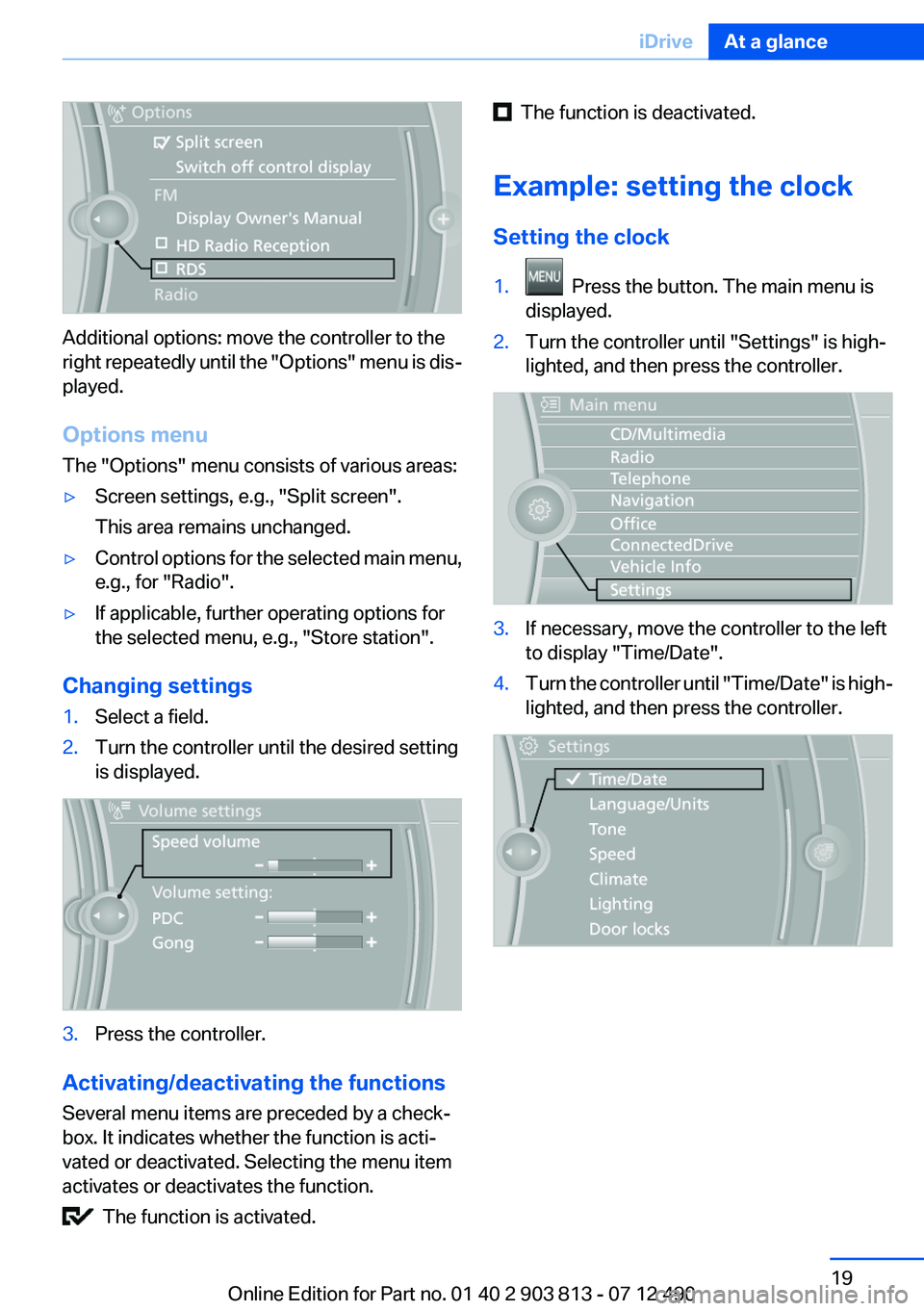
Additional options: move the controller to the
right repeatedly until the "Options" menu is dis‐
played.
Options menu
The "Options" menu consists of various areas:
▷Screen settings, e.g., "Split screen".
This area remains unchanged.▷Control options for the selected main menu,
e.g., for "Radio".▷If applicable, further operating options for
the selected menu, e.g., "Store station".
Changing settings
1.Select a field.2.Turn the controller until the desired setting
is displayed.3.Press the controller.
Activating/deactivating the functions
Several menu items are preceded by a check‐
box. It indicates whether the function is acti‐
vated or deactivated. Selecting the menu item
activates or deactivates the function.
The function is activated.
The function is deactivated.
Example: setting the clock
Setting the clock1. Press the button. The main menu is
displayed.2.Turn the controller until "Settings" is high‐
lighted, and then press the controller.3.If necessary, move the controller to the left
to display "Time/Date".4.Turn the controller until "Time/Date" is high‐
lighted, and then press the controller.Seite 19iDriveAt a glance19
Online Edition for Part no. 01 40 2 903 813 - 07 12 490
Page 74 of 211
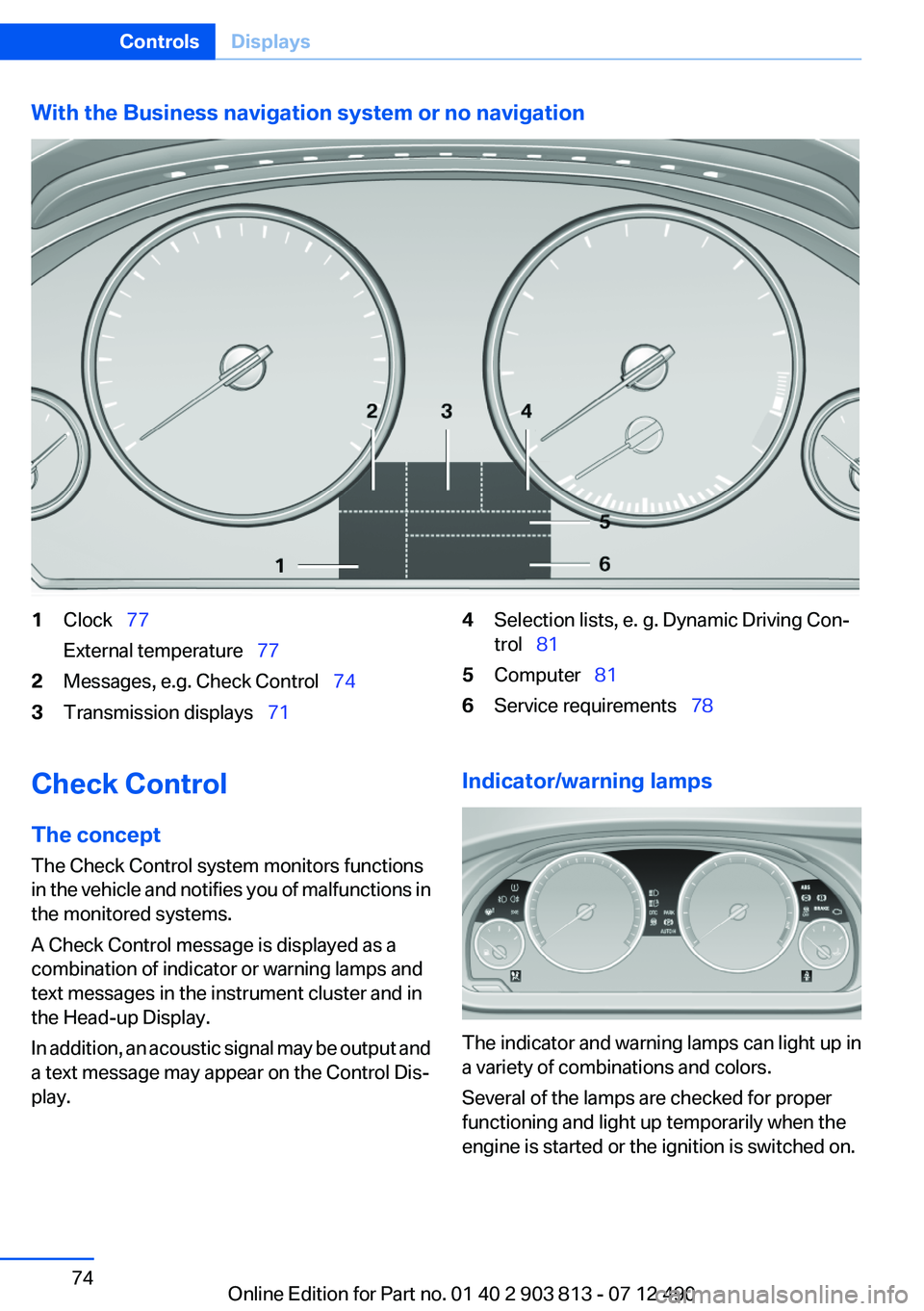
With the Business navigation system or no navigation1Clock 77
External temperature 772Messages, e.g. Check Control 743Transmission displays 714Selection lists, e. g. Dynamic Driving Con‐
trol 815Computer 816Service requirements 78Check Control
The concept
The Check Control system monitors functions
in the vehicle and notifies you of malfunctions in
the monitored systems.
A Check Control message is displayed as a
combination of indicator or warning lamps and
text messages in the instrument cluster and in
the Head-up Display.
In addition, an acoustic signal may be output and
a text message may appear on the Control Dis‐
play.Indicator/warning lamps
The indicator and warning lamps can light up in
a variety of combinations and colors.
Several of the lamps are checked for proper
functioning and light up temporarily when the
engine is started or the ignition is switched on.
Seite 74ControlsDisplays74
Online Edition for Part no. 01 40 2 903 813 - 07 12 490
Page 92 of 211
Knee airbag
The knee airbag supports the legs in a frontal
impact.
Protective action
Airbags are not triggered in every impact situa‐
tion, e.g., in less severe accidents or rear-end
collisions.
Information on how to ensure the optimal
protective effect of the airbags▷Keep at a distance from the airbags.▷Always grasp the steering wheel on the
steering wheel rim, holding your hands at
the 3 o'clock and 9 o'clock positions, to keep
the danger of injury to your hands or arms as
low as possible if the airbag is triggered.▷There should be no people, animals, or ob‐
jects between an airbag and a person.▷Do not use the cover of the front airbag on
the front passenger side as a storage area.▷Keep the dashboard and window on the
front passenger side clear, i.e., do not cover
with adhesive labels or coverings, and do not
attach holders such as for navigation instru‐
ments and mobile phones.▷Make sure that the front passenger is sitting
correctly, i.e., keeps his or her feet and legs
in the footwell; otherwise, leg injuries can
occur if the front airbag is triggered.▷Do not place slip covers, seat cushions or
other objects on the front passenger seat
that are not approved specifically for seats
with integrated side airbags.▷Do not hang pieces of clothing, such as jack‐
ets, over the backrests.▷Make sure that occupants keep their heads
away from the side airbag and do not rest
against the head airbag; otherwise, injuries
can occur if the airbags are triggered.▷Do not remove the airbag restraint system.▷Do not remove the steering wheel.▷Do not apply adhesive materials to the air‐
bag cover panels, cover them or modify
them in any way.▷Never modify either the individual compo‐
nents or the wiring in the airbag system. This
also applies to steering wheel covers, the
dashboard, the seats, the roof pillars and the
sides of the headliner.◀
Even when all instructions are followed closely,
injury from contact with the airbags cannot be
ruled out in certain situations.
The ignition and inflation noise may lead to
short-term and, in most cases, temporary hear‐
ing impairment in sensitive individuals.
In the case of a malfunction, deactivation
and after triggering of the airbags
Do not touch the individual components imme‐
diately after the system has been triggered; oth‐
erwise, there is the danger of burns.
Only have the airbags checked, repaired or dis‐
mantled and the airbag generator scrapped by
your service center or a workshop that has the
necessary authorization for handling explosives.
Non-professional attempts to service the sys‐
tem could lead to failure in an emergency or un‐
desired triggering of the airbag, either of which
could result in injury.◀
Warnings and information on the airbags are
also found on the sun visors.
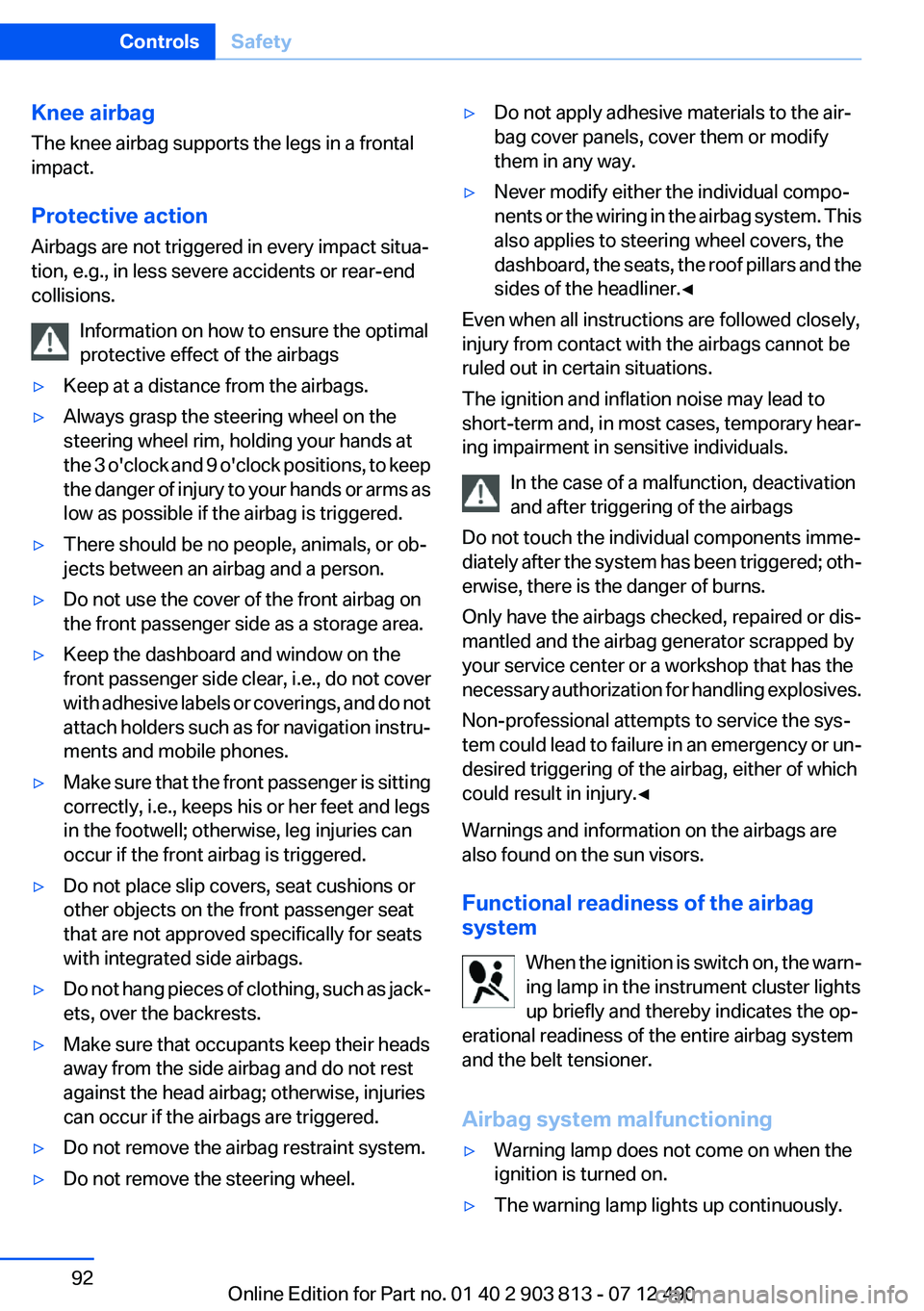
Functional readiness of the airbag
system
When the ignition is switch on, the warn‐
ing lamp in the instrument cluster lights
up briefly and thereby indicates the op‐
erational readiness of the entire airbag system
and the belt tensioner.
Airbag system malfunctioning
▷Warning lamp does not come on when the
ignition is turned on.▷The warning lamp lights up continuously.Seite 92ControlsSafety92
Online Edition for Part no. 01 40 2 903 813 - 07 12 490
Page 152 of 211
RefuelingVehicle equipment
All standard, country-specific and optional
equipment that is offered in the model series is
described in this chapter. Therefore, equipment
is also described that is not available in a vehicle,
e. g., because of the selected optional equip‐
ment or country variant. This also applies for
safety-related functions and systems.
General information Refuel promptly
Refuel no later than at a range of
30 miles/50 km, or operation of the engine is not
ensured and damage may occur.◀
Fuel cap
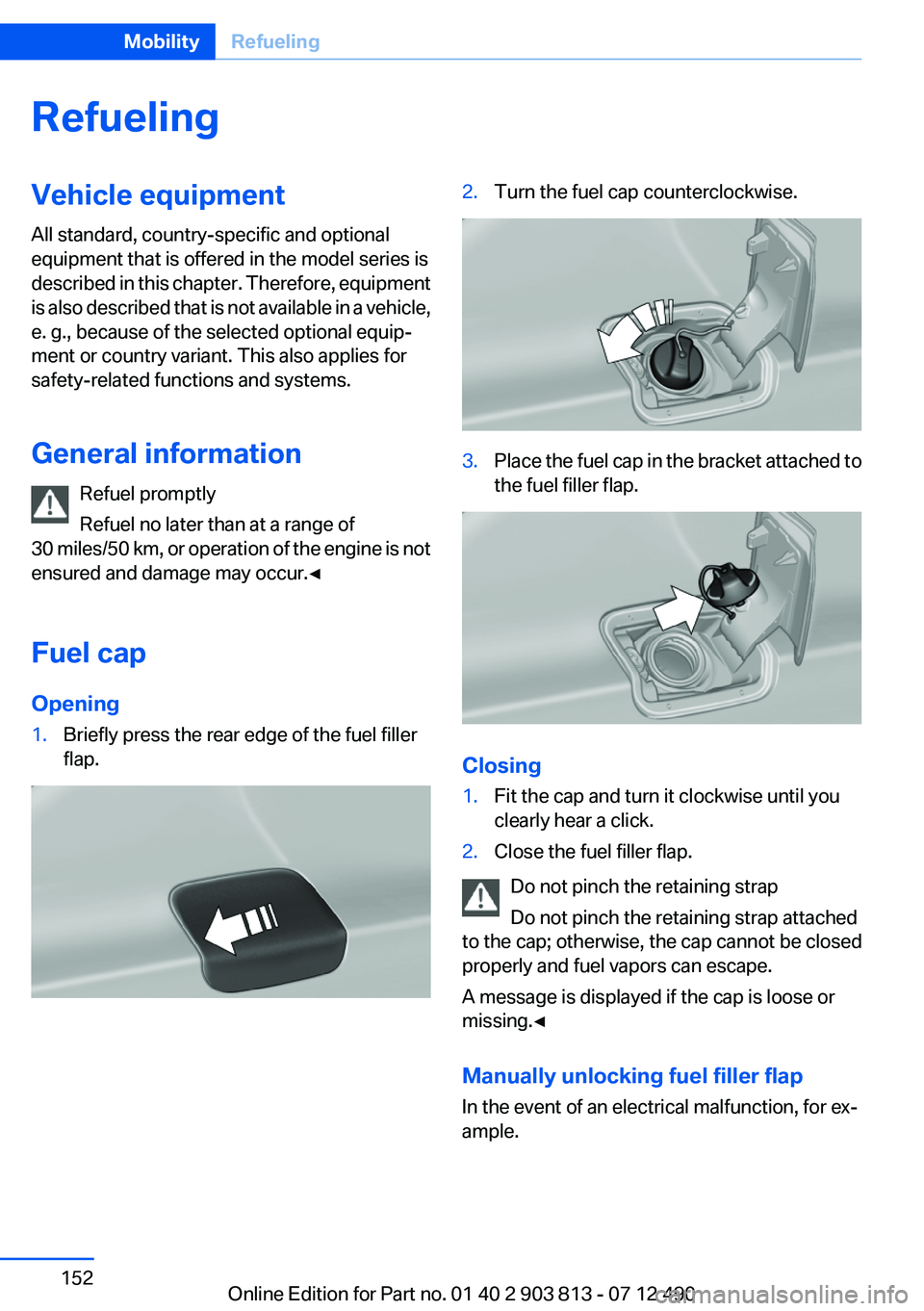
Opening1.Briefly press the rear edge of the fuel filler
flap.2.Turn the fuel cap counterclockwise.3.Place the fuel cap in the bracket attached to
the fuel filler flap.
Closing
1.Fit the cap and turn it clockwise until you
clearly hear a click.2.Close the fuel filler flap.
Do not pinch the retaining strap
Do not pinch the retaining strap attached
to the cap; otherwise, the cap cannot be closed
properly and fuel vapors can escape.
A message is displayed if the cap is loose or
missing.◀
Manually unlocking fuel filler flap
In the event of an electrical malfunction, for ex‐
ample.
Seite 152MobilityRefueling152
Online Edition for Part no. 01 40 2 903 813 - 07 12 490
Page 167 of 211
CoolantVehicle equipment
All standard, country-specific and optional
equipment that is offered in the model series is
described in this chapter. Therefore, equipment
is also described that is not available in a vehicle,
e. g., because of the selected optional equip‐
ment or country variant. This also applies for
safety-related functions and systems.
General information Danger of burns from hot engine
Do not open the cooling system while the
engine is hot; otherwise, escaping coolant may
cause burns.◀
Suitable additives
Only use suitable additives; otherwise, en‐
gine damage may occur. The additives are
harmful to your health.◀
Coolant consists of water and additives.
Not all commercially available additives are suit‐
able for your vehicle. Ask your service center for
suitable additives.Coolant level
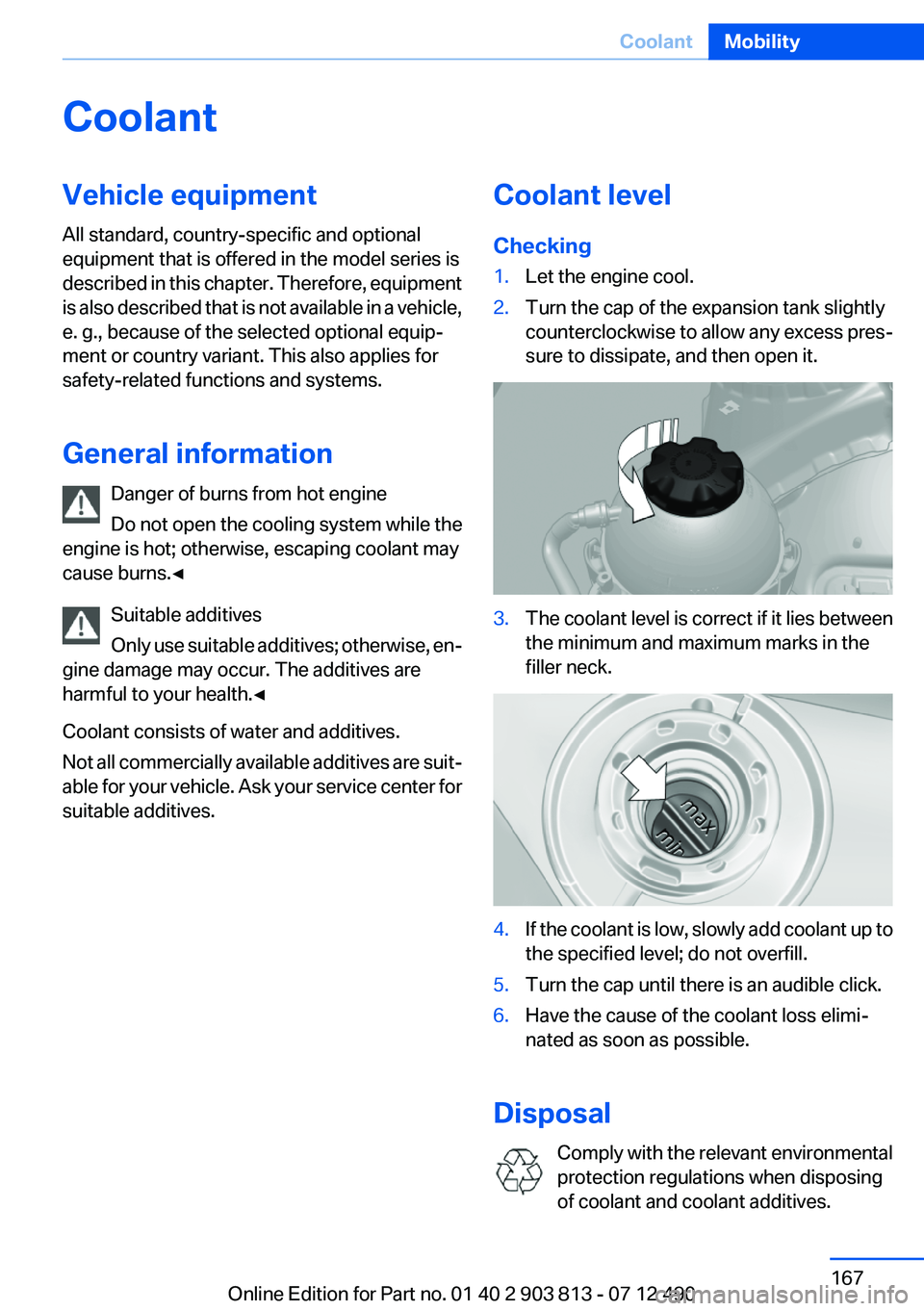
Checking1.Let the engine cool.2.Turn the cap of the expansion tank slightly
counterclockwise to allow any excess pres‐
sure to dissipate, and then open it.3.The coolant level is correct if it lies between
the minimum and maximum marks in the
filler neck.4.If the coolant is low, slowly add coolant up to
the specified level; do not overfill.5.Turn the cap until there is an audible click.6.Have the cause of the coolant loss elimi‐
nated as soon as possible.
Disposal
Comply with the relevant environmental
protection regulations when disposing
of coolant and coolant additives.
Seite 167CoolantMobility167
Online Edition for Part no. 01 40 2 903 813 - 07 12 490
Page 173 of 211
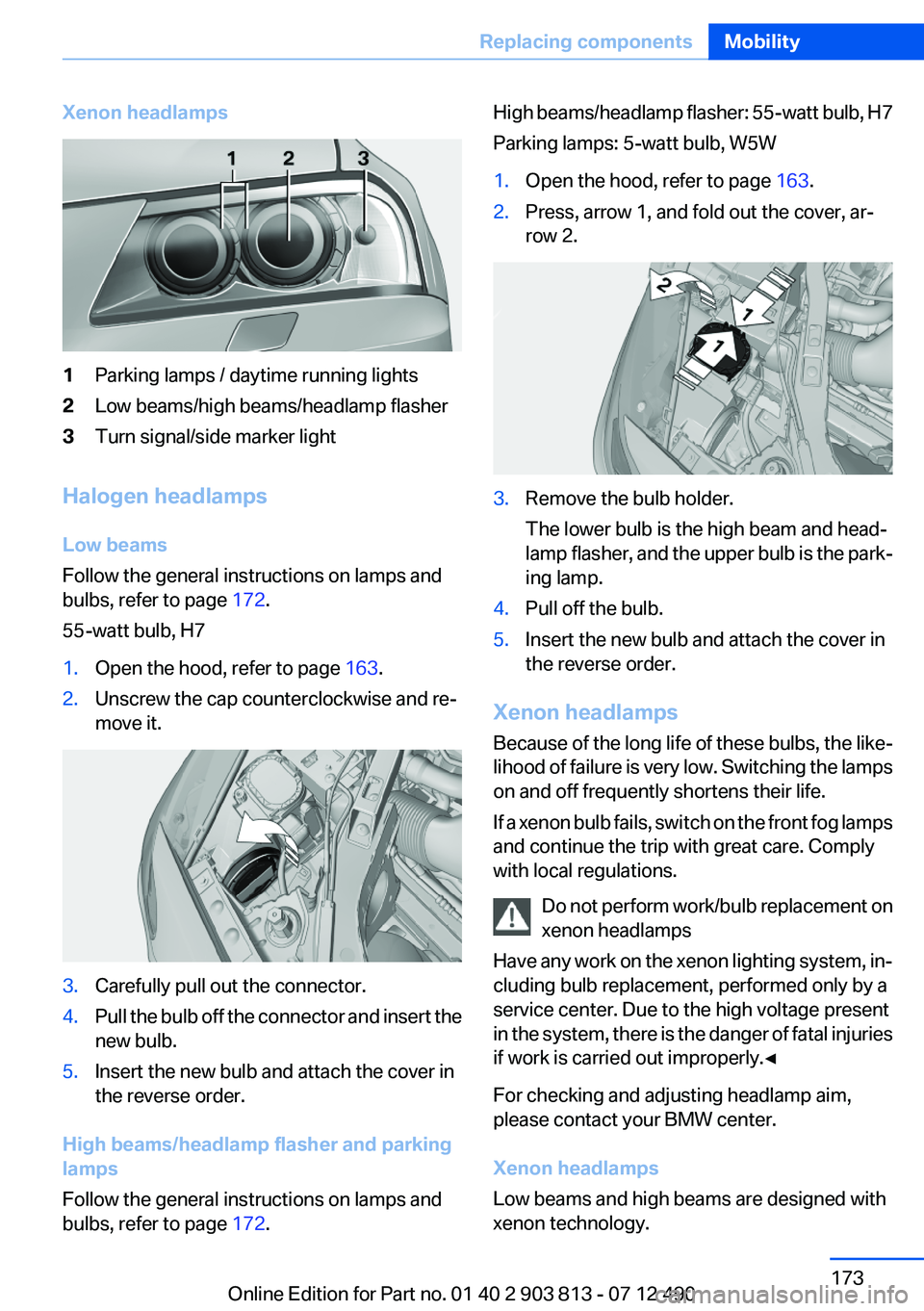
Xenon headlamps1Parking lamps / daytime running lights2Low beams/high beams/headlamp flasher3Turn signal/side marker light
Halogen headlamps
Low beams
Follow the general instructions on lamps and
bulbs, refer to page 172.
55-watt bulb, H7
1.Open the hood, refer to page 163.2.Unscrew the cap counterclockwise and re‐
move it.3.Carefully pull out the connector.4.Pull the bulb off the connector and insert the
new bulb.5.Insert the new bulb and attach the cover in
the reverse order.
High beams/headlamp flasher and parking
lamps
Follow the general instructions on lamps and
bulbs, refer to page 172.
High beams/headlamp flasher: 55-watt bulb, H7
Parking lamps: 5-watt bulb, W5W1.Open the hood, refer to page 163.2.Press, arrow 1, and fold out the cover, ar‐
row 2.3.Remove the bulb holder.
The lower bulb is the high beam and head‐
lamp flasher, and the upper bulb is the park‐
ing lamp.4.Pull off the bulb.5.Insert the new bulb and attach the cover in
the reverse order.
Xenon headlamps
Because of the long life of these bulbs, the like‐
lihood of failure is very low. Switching the lamps
on and off frequently shortens their life.
If a xenon bulb fails, switch on the front fog lamps
and continue the trip with great care. Comply
with local regulations.
Do not perform work/bulb replacement on
xenon headlamps
Have any work on the xenon lighting system, in‐
cluding bulb replacement, performed only by a
service center. Due to the high voltage present
in the system, there is the danger of fatal injuries
if work is carried out improperly.◀
For checking and adjusting headlamp aim,
please contact your BMW center.
Xenon headlamps
Low beams and high beams are designed with
xenon technology.
Seite 173Replacing componentsMobility173
Online Edition for Part no. 01 40 2 903 813 - 07 12 490
Page 174 of 211
The parking lamps and daylight running lights
are made using LED technology.
Contact your service center in the event of a
malfunction.
Front fog lamps
Follow the general instructions on lamps and
bulbs, refer to page 172.
Front fog lamps in vehicles equipped with Adap‐
tive Light Control: 55-watt bulb, H11
Front fog lamps without Adaptive Light Control:
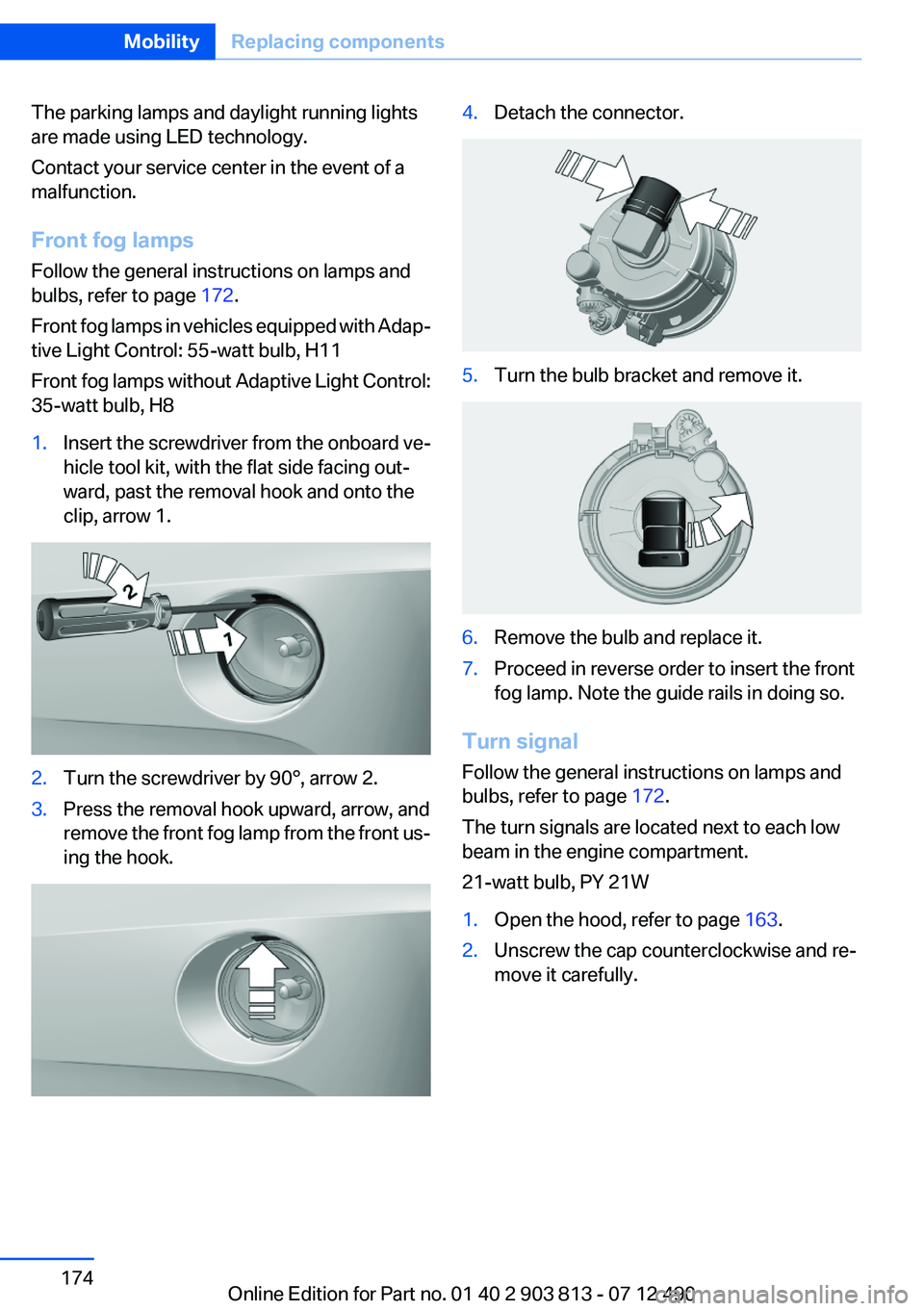
35-watt bulb, H81.Insert the screwdriver from the onboard ve‐
hicle tool kit, with the flat side facing out‐
ward, past the removal hook and onto the
clip, arrow 1.2.Turn the screwdriver by 90°, arrow 2.3.Press the removal hook upward, arrow, and
remove the front fog lamp from the front us‐
ing the hook.4.Detach the connector.5.Turn the bulb bracket and remove it.6.Remove the bulb and replace it.7.Proceed in reverse order to insert the front
fog lamp. Note the guide rails in doing so.
Turn signal
Follow the general instructions on lamps and
bulbs, refer to page 172.
The turn signals are located next to each low
beam in the engine compartment.
21-watt bulb, PY 21W
1.Open the hood, refer to page 163.2.Unscrew the cap counterclockwise and re‐
move it carefully.Seite 174MobilityReplacing components174
Online Edition for Part no. 01 40 2 903 813 - 07 12 490
Page 175 of 211
The bulb is attached to the cap.3.Turn the bulb clockwise to remove it.4.Insert the new bulb and attach the cover in
the reverse order.
Lateral turn signals
Follow the general instructions on lamps and
bulbs, refer to page 172.
These lamps are made using LED technology.
Please contact your service center in the event
of a malfunction.
Tail lamps, bulb replacement
At a glance
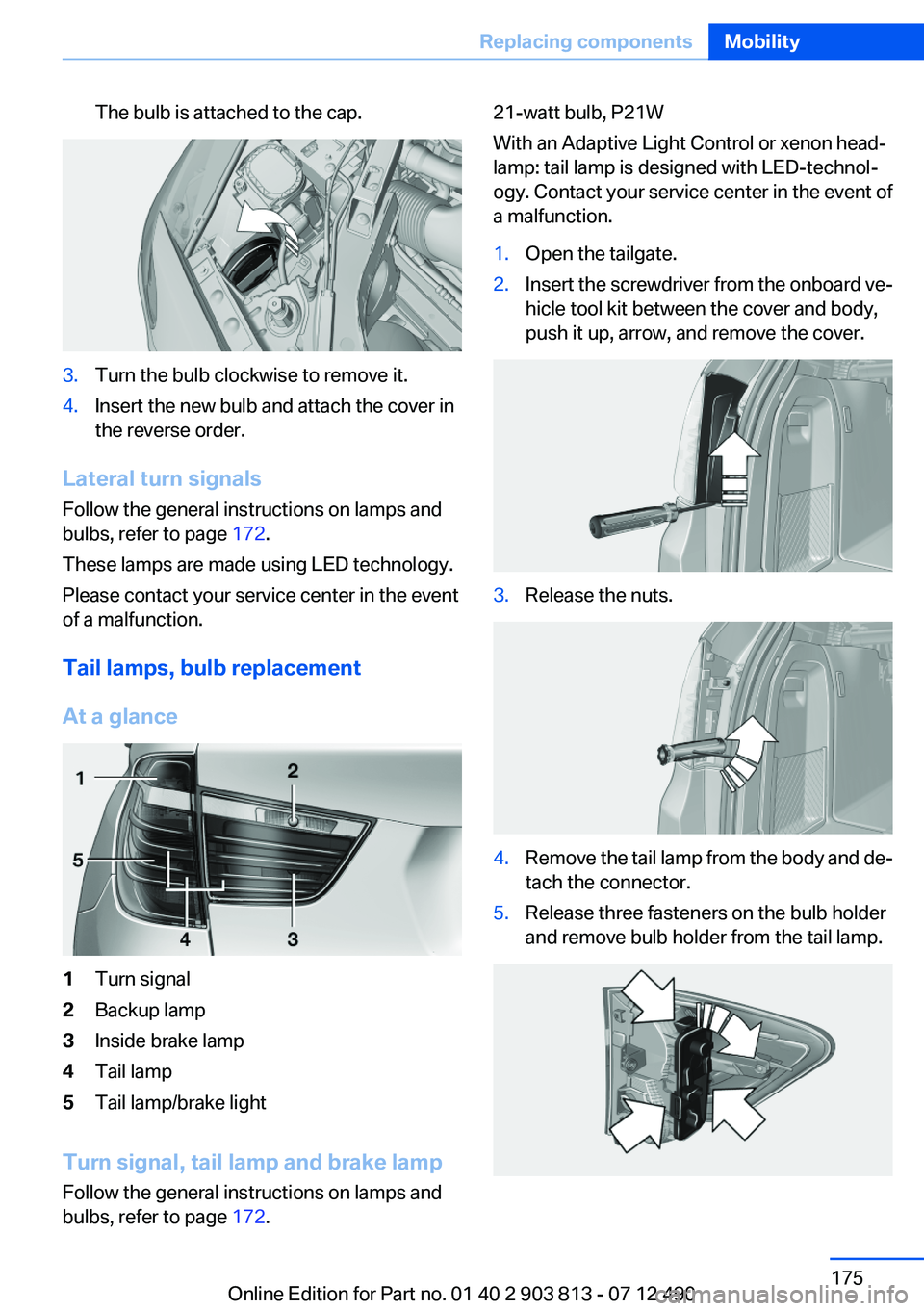
1Turn signal2Backup lamp3Inside brake lamp4Tail lamp5Tail lamp/brake light
Turn signal, tail lamp and brake lamp
Follow the general instructions on lamps and
bulbs, refer to page 172.
21-watt bulb, P21W
With an Adaptive Light Control or xenon head‐
lamp: tail lamp is designed with LED-technol‐
ogy. Contact your service center in the event of
a malfunction.1.Open the tailgate.2.Insert the screwdriver from the onboard ve‐
hicle tool kit between the cover and body,
push it up, arrow, and remove the cover.3.Release the nuts.4.Remove the tail lamp from the body and de‐
tach the connector.5.Release three fasteners on the bulb holder
and remove bulb holder from the tail lamp.Seite 175Replacing componentsMobility175
Online Edition for Part no. 01 40 2 903 813 - 07 12 490
Page 179 of 211
Assist Response Center contacts you and
takes further steps to help you.
Even if you are unable to respond, the BMW
Assist Response Center can take further
steps to help you under certain circumstan‐
ces.
For this purpose, data that are used to de‐
termine the necessary rescue measures,
such as the current position of the vehicle if
it can be established, are transmitted to the
BMW Assist Response Center.▷If the LED is flashing but the BMW Assist
Response Center cannot be heard on the
hands-free system, the hands-free system
may be malfunctioning. However, the BMW
Assist Response Center may still be able to
hear you.
Initiating an Emergency Request
automatically
Under certain conditions, an Emergency Re‐
quest is automatically initiated immediately after
a severe accident. Automatic Collision Notifica‐
tion is not affected by pressing the SOS button.
Warning triangle
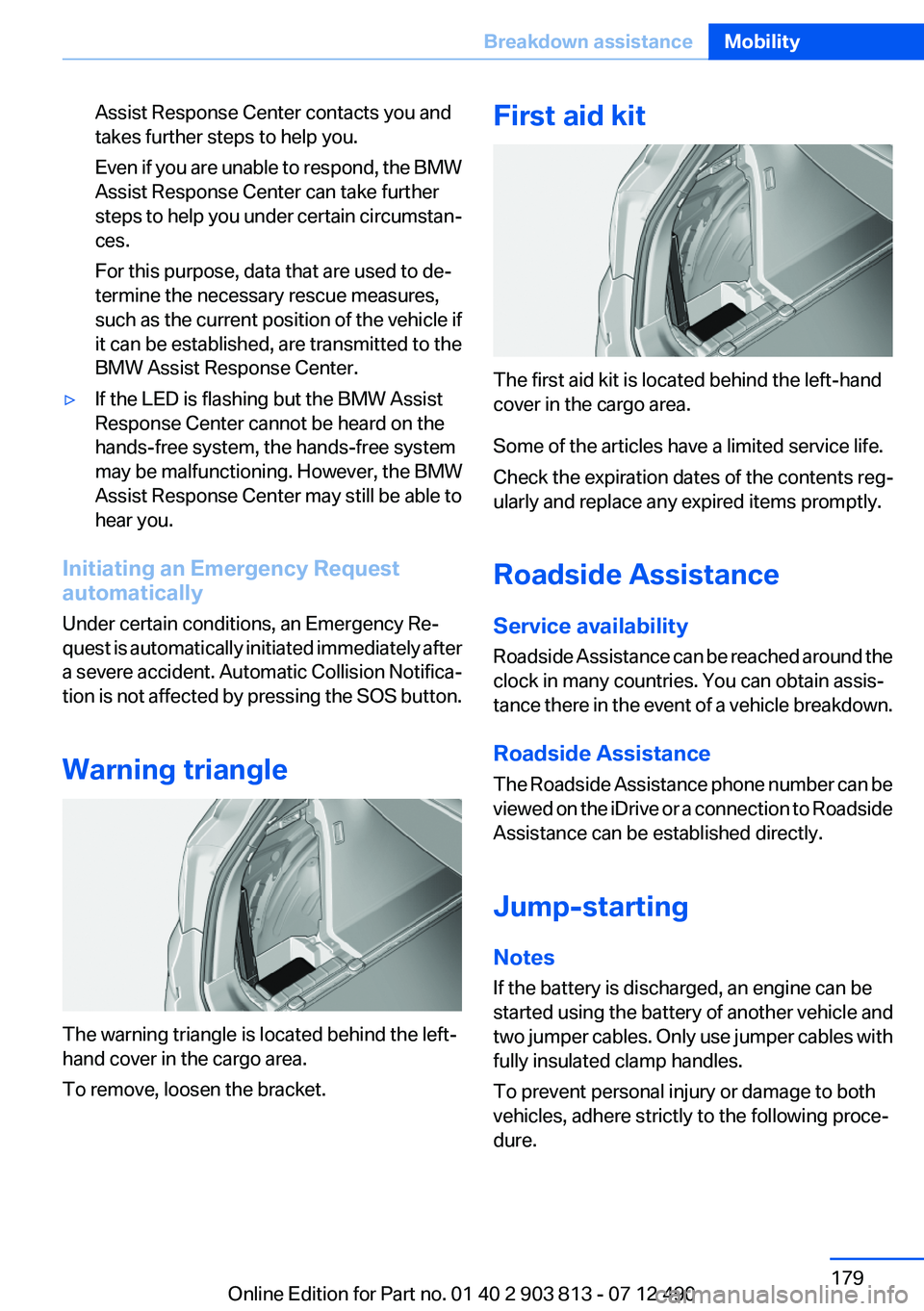
The warning triangle is located behind the left-
hand cover in the cargo area.
To remove, loosen the bracket.
First aid kit
The first aid kit is located behind the left-hand
cover in the cargo area.
Some of the articles have a limited service life.
Check the expiration dates of the contents reg‐
ularly and replace any expired items promptly.
Roadside Assistance
Service availability
Roadside Assistance can be reached around the
clock in many countries. You can obtain assis‐
tance there in the event of a vehicle breakdown.
Roadside Assistance
The Roadside Assistance phone number can be
viewed on the iDrive or a connection to Roadside
Assistance can be established directly.
Jump-starting
Notes
If the battery is discharged, an engine can be
started using the battery of another vehicle and
two jumper cables. Only use jumper cables with
fully insulated clamp handles.
To prevent personal injury or damage to both
vehicles, adhere strictly to the following proce‐
dure.
Seite 179Breakdown assistanceMobility179
Online Edition for Part no. 01 40 2 903 813 - 07 12 490
Page 203 of 211
Braking, notes 141
Breakdown assis‐ tance 178, 179
Breaking in 140
Brightness of Control Dis‐ play 85
Bulb replacement 172
Bulb replacement, front 172
Bulb replacement, rear 175
Bulbs and lamps 172
Button, Start/Stop 59
Bypassing, refer to Jump- starting 179
C
California Proposition 65 Warning 7
Camera, backup camera 114
Camera, care 186
Camera, Top View 117
Can holder, refer to Cu‐ pholder 135
Car battery 176
Car care products 184
Care, displays 186
Care, vehicle 184
Cargo 143
Cargo area 131
Cargo area, enlarging 131
Cargo area lid 37
Cargo area, storage compart‐ ments 136
Cargo cover 131
Cargo straps, securing cargo 144
Car key, refer to Remote con‐ trol 30
Carpet, care 185
Car wash 183
Catalytic converter, refer to Hot exhaust system 140
CBS Condition Based Serv‐ ice 168
CD/Multimedia, see user's manual for Navigation, Enter‐tainment and Communica‐
tion
Center armrest 135
Center console 14
Central locking system 33
Central screen, refer to Control Display 16
Changes, technical, refer to Safety 7
Changing parts 171
Changing wheels 176
Changing wheels/tires 160
Check Control 74
Children, seating position 55
Children, transporting safely 55
Child restraint fixing sys‐ tem 55
Child restraint fixing system LATCH 56
Child restraint fixing systems, mounting 55
Child safety locks 58
Child seat, mounting 55
Child seats 55
Chrome parts, care 185
Cleaning, displays 186
Climate control 120, 122
Clock 77
Closing/opening from in‐ side 37
Closing/opening via door lock 36
Closing/opening with remote control 34
Clothes hooks 136
Collision warning 108
Combination switch, refer to Turn signals 65
Combination switch, refer to Wiper system 66
Comfort Access 39
COMFORT program, Dynamic Driving Control 106
Compartments in the doors 135 Computer 81
Condensation on win‐ dows 121, 124
Condensation under the vehi‐ cle 142
Condition Based Service CBS 168
Confirmation signal 35
ConnectedDrive, see user's manual for Navigation, Enter‐
tainment and Communica‐
tion
Control Display 16
Control Display, settings 83
Controller 16, 17
Control systems, driving sta‐ bility 102
Convenient opening 34
Coolant 167
Coolant temperature 76
Cooling function 121, 124
Cooling, maximum 123
Cooling system 167
Corrosion on brake discs 142
Cruise control 109
Cruising range 77
Cupholder 135
Current fuel consumption 78
D
Damage, tires 160
Damping control, dy‐ namic 104
Data, technical 190
Date 77
Daytime running lights 87
Defrosting, refer to Windows, defrosting 121, 124
Dehumidifying, air 121, 124
Destination distance 82
Digital clock 77
Dimensions 190
Dimmable exterior mirrors 53
Dimmable interior rearview mirror 54 Seite 203Everything from A to ZReference203
Online Edition for Part no. 01 40 2 903 813 - 07 12 490