change wheel BMW X3 XDRIVE 35I 2011 User Guide
[x] Cancel search | Manufacturer: BMW, Model Year: 2011, Model line: X3 XDRIVE 35I, Model: BMW X3 XDRIVE 35I 2011Pages: 262, PDF Size: 11.2 MB
Page 91 of 262
Driving comfortCruise control
The concept
The system is functional at speeds beginning at
approx. 20 mph/30 km/h.
It maintains the speed that was set using the
control elements on the steering wheel.
The system brakes on downhill gradients if en‐
gine braking action is insufficient.
Unfavorable conditions
Do not use the system if unfavorable con‐
ditions make it impossible to drive at a constant
speed, for instance:▷On curvy roads.▷In heavy traffic.▷On slippery roads, in fog, snow or rain, or on
a loose road surface.
Otherwise, you could lose control of the vehicle
and cause an accident.◀
Controls
Buttons at a glance
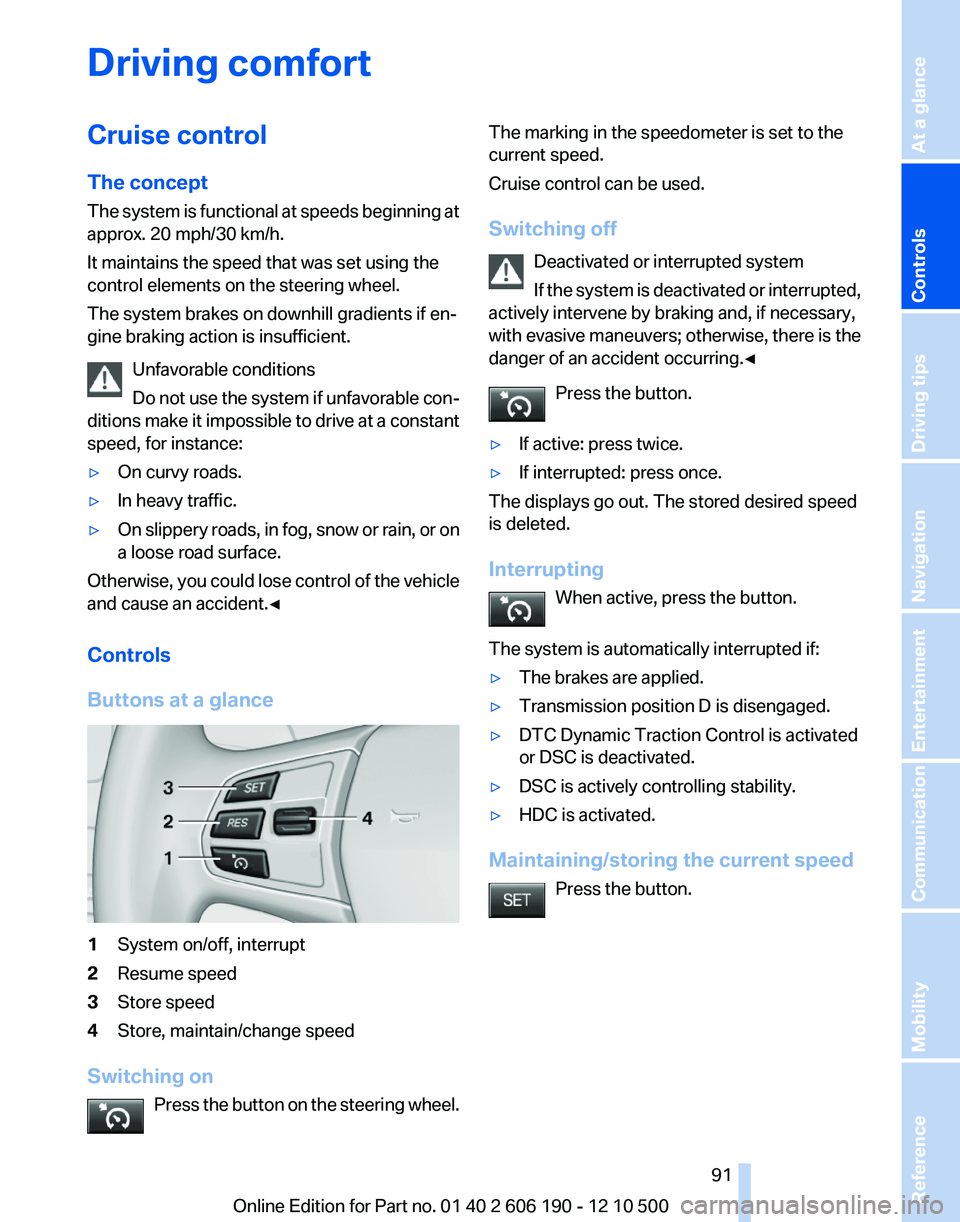
1System on/off, interrupt2Resume speed3Store speed4Store, maintain/change speed
Switching on Press the button on the steering wheel.
The marking in the speedometer is set to the
current speed.
Cruise control can be used.
Switching off Deactivated or interrupted system
If the system is deactivated or interrupted,
actively intervene by braking and, if necessary,
with evasive maneuvers; otherwise, there is the
danger of an accident occurring.◀
Press the button.▷If active: press twice.▷If interrupted: press once.
The displays go out. The stored desired speed
is deleted.
Interrupting When active, press the button.
The system is automatically interrupted if:
▷The brakes are applied.▷Transmission position D is disengaged.▷DTC Dynamic Traction Control is activated
or DSC is deactivated.▷DSC is actively controlling stability.▷HDC is activated.
Maintaining/storing the current speed
Press the button.
Seite 9191
Online Edition for Part no. 01 40 2 606 190 - 12 10 500
ReferenceMobilityCommunicationEntertainmentNavigationDriving tipsControlsAt a glance
Page 133 of 262
▷To change the scale: turn the controller.▷To shift the map: move the controller in
the required direction.▷To shift the map diagonally: move the
controller in the required direction and
turn it.
Specifying the street
If the system does not recognize a street, one of
the following is displayed:
▷The name of a street in the vicinity.▷The county.▷The coordinates of the destination.
Additional functions
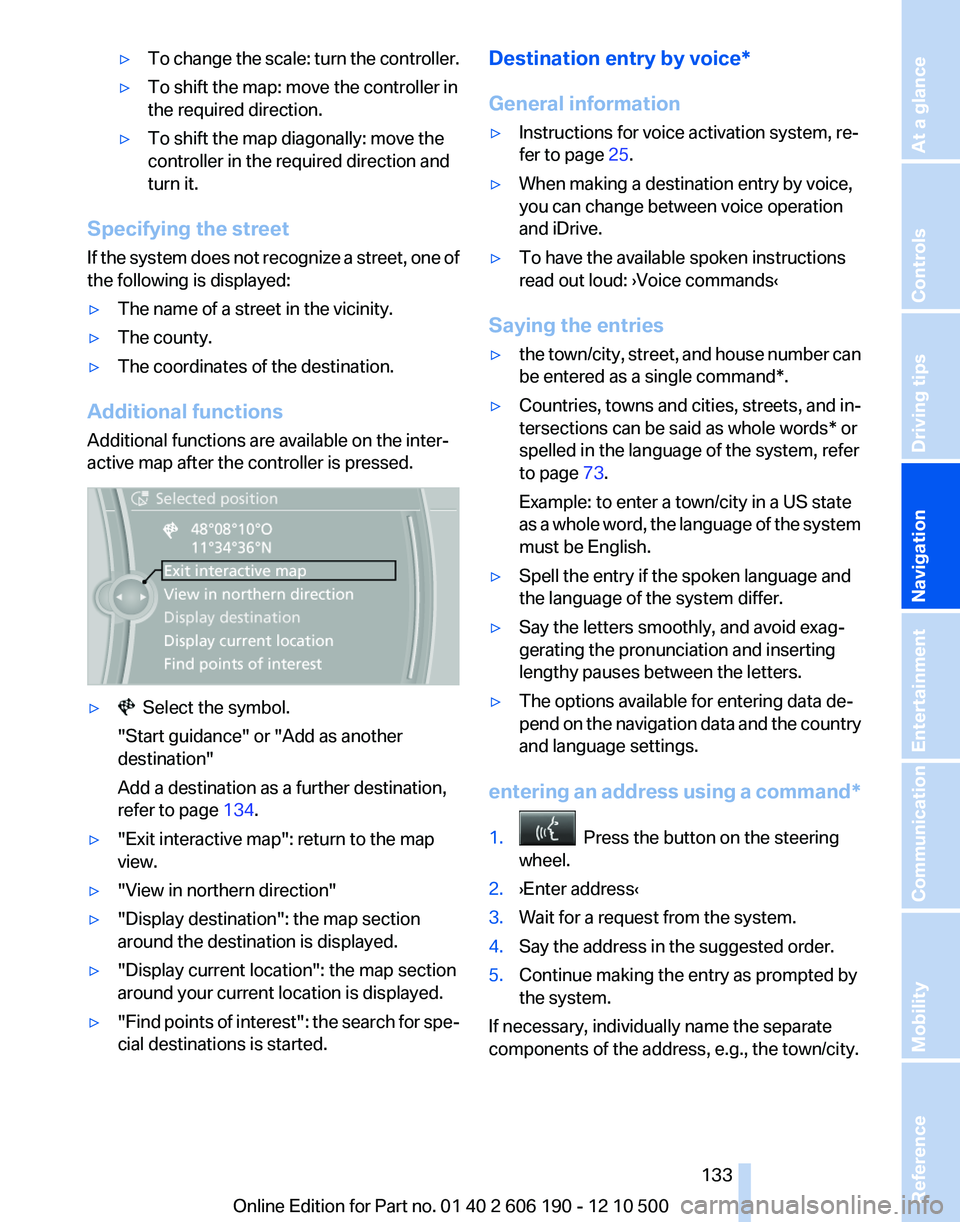
Additional functions are available on the inter‐
active map after the controller is pressed.
▷ Select the symbol.
"Start guidance" or "Add as another
destination"
Add a destination as a further destination,
refer to page 134.▷"Exit interactive map": return to the map
view.▷"View in northern direction"▷"Display destination": the map section
around the destination is displayed.▷"Display current location": the map section
around your current location is displayed.▷" Find points of interest": the search for spe‐
cial destinations is started.Destination entry by voice*
General information▷Instructions for voice activation system, re‐
fer to page 25.▷When making a destination entry by voice,
you can change between voice operation
and iDrive.▷To have the available spoken instructions
read out loud: ›Voice commands‹
Saying the entries
▷the town/city, street, and house number can
be entered as a single command*.▷Countries, towns and cities, streets, and in‐
tersections can be said as whole words* or
spelled in the language of the system, refer
to page 73.
Example: to enter a town/city in a US state
as a whole word, the language of the system
must be English.▷Spell the entry if the spoken language and
the language of the system differ.▷Say the letters smoothly, and avoid exag‐
gerating the pronunciation and inserting
lengthy pauses between the letters.▷The options available for entering data de‐
pend on the navigation data and the country
and language settings.
entering an address using a command*
1. Press the button on the steering
wheel.2.›Enter address‹3.Wait for a request from the system.4.Say the address in the suggested order.5.Continue making the entry as prompted by
the system.
If necessary, individually name the separate
components of the address, e.g., the town/city.
Seite 133133
Online Edition for Part no. 01 40 2 606 190 - 12 10 500
ReferenceMobilityCommunicationEntertainmentNavigationDriving tipsControlsAt a glance
Page 182 of 262
phone number. The connection is being estab‐
lished.
Editing a contact
Changing the entries in "Contacts". When a
contact is changed, the changes are not stored
on the mobile phone. A copy of the entry is
stored in the vehicle.1.Highlight the contact.2.Open "Options".3."Edit entry"
The contact can be edited.
Redialing
General information
The list of dialed numbers in the mobile phone
is transmitted to the vehicle depending on the
mobile phone. The 20 phone numbers dialed
last are displayed. The sorting order of the
phone numbers depends on the particular mo‐
bile phone.
Dialing the number via the instrument
cluster
This is possible when there is no active call.
1. Press the button on the steering
wheel.2.Select the desired phone number.
The connection is established.
Dialing a number via iDrive
1."Telephone"2."Redial"3.Select the desired entry and the phone num‐
ber if necessary.
The connection is established.
Saving an entry in the contacts
1.Highlight the entry.2.Open "Options".3."Store as new contact" or "Add to existing
contact"4.Select " New phone number" or contact.5.Select the type of number: "Home",
"Business", "Mobile" or "Other"6.Complete the entries if necessary.7.If necessary, "Store contact in vehicle".
Received calls
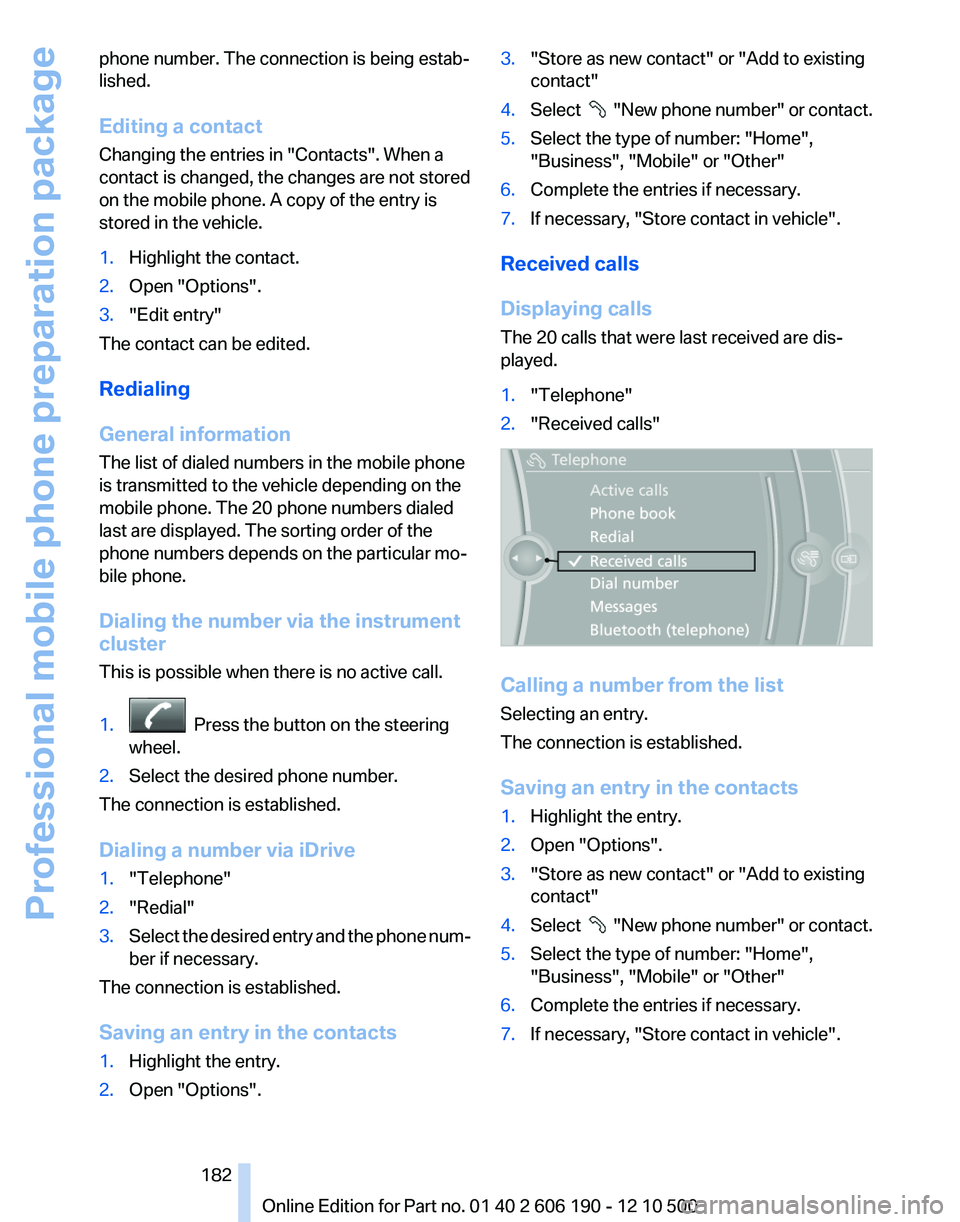
Displaying calls
The 20 calls that were last received are dis‐
played.
1."Telephone"2."Received calls"
Calling a number from the list
Selecting an entry.
The connection is established.
Saving an entry in the contacts
1.Highlight the entry.2.Open "Options".3."Store as new contact" or "Add to existing
contact"4.Select " New phone number" or contact.5.Select the type of number: "Home",
"Business", "Mobile" or "Other"6.Complete the entries if necessary.7.If necessary, "Store contact in vehicle".Seite 182182
Online Edition for Part no. 01 40 2 606 190 - 12 10 500Professional mobile phone preparation package
Page 226 of 262
1.Open the tailgate.2.Pull out the cover at the recessed grip, ar‐
row.3.Detach the connector.4.Detach the bulb holder from the tail lamp.
The backup lamp is the upper lamp and the
brake force display is the lower lamp on the
bulb holder.5.To replace the backup lamp, pull off the bulb
carefully.
To replace the brake lamp, push the bulb
down and turn it to the left.6.Proceed in the reverse order to insert the
new bulb and attach the bulb holder.
Ensure that the bulb holder is firmly at‐
tached.
Changing wheels
Notes
The vehicle equipment does not include a spare
tire.
When using run-flat tires* or tire sealants, a tire
does not need to be changed immediately in the
event of pressure loss due to a flat tire.
The tools for changing wheels are available as
accessories from your service center.
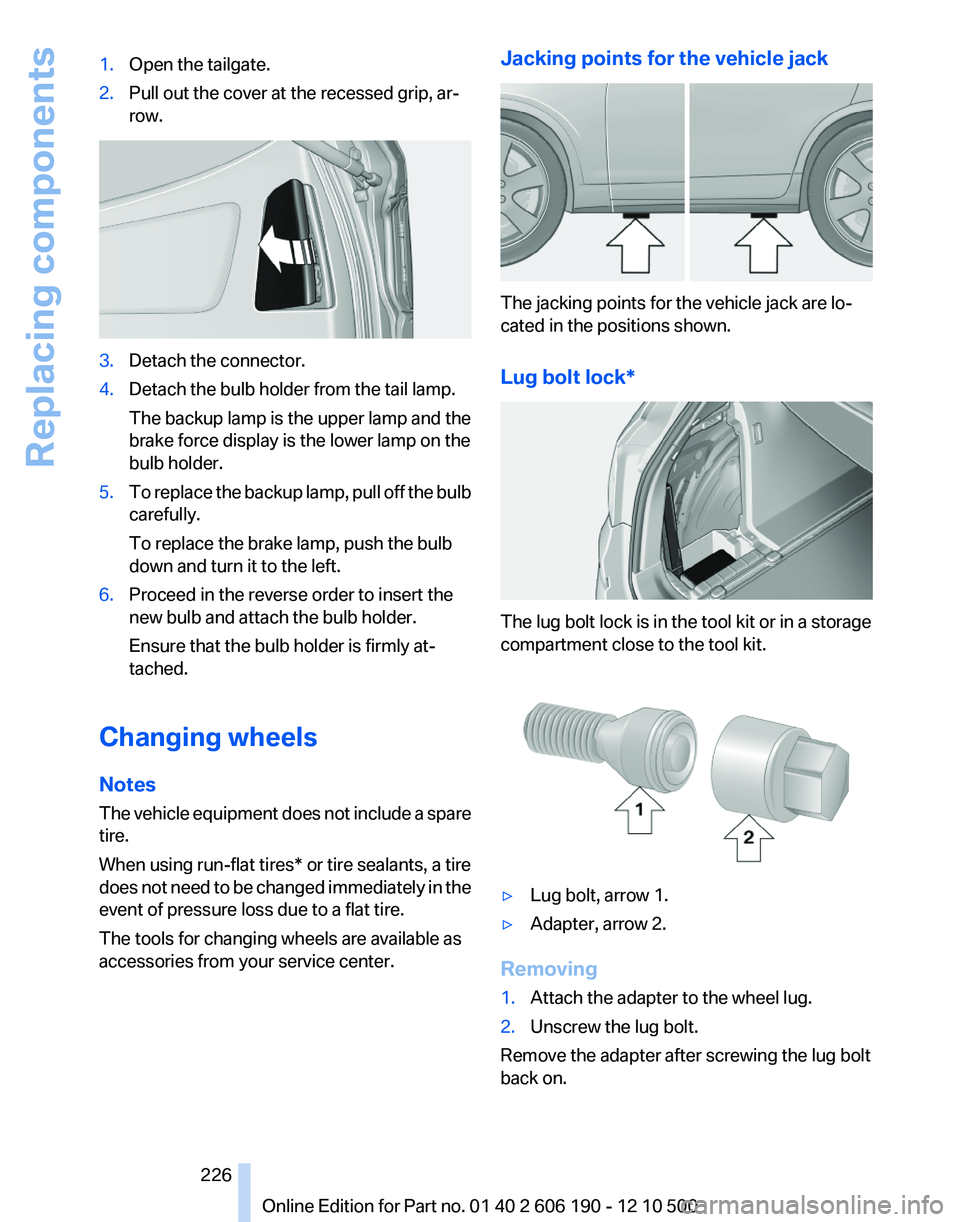
Jacking points for the vehicle jack
The jacking points for the vehicle jack are lo‐
cated in the positions shown.
Lug bolt lock*
The lug bolt lock is in the tool kit or in a storage
compartment close to the tool kit.
▷Lug bolt, arrow 1.▷Adapter, arrow 2.
Removing
1.Attach the adapter to the wheel lug.2.Unscrew the lug bolt.
Remove the adapter after screwing the lug bolt
back on.
Seite 226226
Online Edition for Part no. 01 40 2 606 190 - 12 10 500Replacing components
Page 253 of 262
Brake force display 85
Brake lamps, brake force dis‐ play 85
Brake lights, adaptive 85
Brake pads, breaking in 120
Braking, notes 121
Breakdown assis‐ tance 228, 229
Breaking in 120
Brightness of Control Dis‐ play 73
Bulb replacement 221
Bulb replacement, front 222
Bulb replacement, rear 225
Bulbs and lamps 221
Button, Start/Stop 58
C
Calendar 189
California Proposition 65 Warning 7
Camera, backup camera 97
Camera, care 235
Camera, Top View 99
Can holder, refer to Cu‐ pholder 115
Car battery 227
Car care products 234
Care, displays 235
Care, vehicle 234
Cargo 122
Cargo area 110
Cargo area, enlarg‐ ing 110 , 111
Cargo area lid 39
Cargo area, storage compart‐ ments 116
Cargo straps, securing cargo 123
Car key, refer to Remote con‐ trol 32
Carpet, care 235
Car wash 233
Catalytic converter, refer to Hot exhaust system 120
CBS Condition Based Serv‐ ice 219 CD/DVD 155
CDs, storing 162
Cell phone 176
Center armrest 114
Center console 17
Central locking system 35
Central screen, refer to Control Display 19
Changes, technical, refer to Safety 6
Changing parts 221
Changing wheels/tires 212
Check Control 74
Children, seating position 55
Children, transporting safely 55
Child restraint fixing sys‐ tem 55
Child restraint fixing system LATCH 56
Child restraint fixing systems, mounting 55
Child-safety locks 57
Child seat, mounting 55
Child seats 55
Chrome parts, care 234
Cigarette lighter 108
Cleaning, displays 235
Climate control 101, 103
Clock 69
Closing/opening from in‐ side 38
Closing/opening via door lock 38
Closing/opening with remote control 36
Clothes hooks 115
Combination instrument 13
Combination instrument, elec‐ tronic displays 15
Combination switch, refer to Turn signals 61
Combination switch, refer to Wiper system 62
Comfort Access 41
Computer 70
Concierge service 196 Condensation on win‐
dows 102, 105
Condensation under the vehi‐ cle 122
Condition Based Service CBS 219
Confirmation signal 37
Contacts 185
Control Display 19
Control Display, settings 72
Controller 19
Control systems, driving sta‐ bility 86
Convenient opening 36
Coolant 218
Cooling function 102, 105
Cooling, maximum 104
Cooling system 218
Corrosion on brake discs 122
Cruise control 91
Cruising range 67
Cupholder 115
Current fuel consumption 68
Current location, storing 130
Customer Relations 200
D
Damage, tires 211
Damping control, dynamic 88
Data, technical 238
Date 69
Daytime running lights 77
Defrosting, refer to Windows, defrosting 102, 105
Destination distance 70
Destination guidance 135
Destination guidance with in‐ termediate destinations 134
Destination input, naviga‐ tion 128
Digital clock 69
Digital radio 149
Dimensions 238
Dimmable mirrors 54
Direction indicator, refer to Turn signals 61
Displacement, engine 240 Seite 253253
Online Edition for Part no. 01 40 2 606 190 - 12 10 500
ReferenceMobilityCommunicationEntertainmentNavigationDriving tipsControlsAt a glance
Page 254 of 262
Display in front windshield 99
Display, instrument cluster 67
Display lighting, refer to Instru‐ ment lighting 79
Displays 13
Displays, cleaning 235
Disposal, coolant 218
Disposal, vehicle battery 227
Distance control, refer to PDC 93
Distance to destination 70
Divided screen view, split screen 23
Door lock, refer to Remote control 32
Downhill control 87
Drive-off assistant, refer to DSC 86
Driving instructions, breaking in 120
Driving notes, general 120
Driving stability control sys‐ tems 86
Driving tips 120
DSC Dynamic Stability Con‐ trol 86
DTC Dynamic Traction Con‐ trol 86
DTMF suffix dialing 181
DVD/CD 155
DVD/CD notes 161
DVD changer 159
DVD settings 158
DVDs, storing 162
DVD, video 157
Dynamic Damping Control 88
Dynamic destination guid‐ ance 141
Dynamic Driving Control 89
Dynamic Stability Control DSC 86
Dynamic Traction Control DTC 86
E
EfficientDynamics, refer to Saving fuel 124 Electronic displays, instru‐
ment cluster 15
Electronic engine oil level check 217
Electronic Stability Program ESP, refer to DSC 86
Emergency detection, remote control 33
Emergency release, door lock 38
Emergency release, fuel filler flap 204
Emergency Request 228
Emergency service, refer to Roadside Assistance 229
Emergency start function, en‐ gine start 33
Energy Control 68
Energy recovery 68
Engine compartment 215
Engine compartment, working in 215
Engine coolant 218
Engine oil 217
Engine oil, adding 217
Engine oil additives 217
Engine oil filler neck 217
Engine oil temperature 68
Engine oil types, alterna‐ tive 218
Engine oil types, ap‐ proved 217
Engine specifications 240
Engine start, assistance 229
Engine start during malfunc‐ tion 33
Engine start, refer to Starting the engine 58
Engine stop 59
Engine temperature 68
Equalizer 146
Equipment, interior 107
ESP Electronic Stability Pro‐ gram, refer to DSC 86
Exchanging wheels/tires 212
Exhaust system 120
Exterior mirrors 53
External devices 166 External temperature dis‐
play 69
External temperature warn‐ ing 69
Eyes for securing cargo 123
F
Fader 146
Failure message, refer to Check Control 74
False alarm, refer to Uninten‐ tional alarm 43
Fan, refer to Air vol‐ ume 101, 104
Fault displays, refer to Check Control 74
Filler neck for engine oil 217
Fine wood, care 235
First aid kit 229
Fitting for towing, refer to Tow fitting 231
Flat tire, Tire Pressure Monitor TPM 82
Flat tire, warning lamp 83
Flat tire, wheel change 226
Flooding 121
Floor carpet, care 235
Floor mats, care 235
FM/AM station 148
Fold-out position, windshield wipers 64
Foot brake 121
Front airbags 80
Front fog lamps 79
Front fog lamps, front, bulb re‐ placement 223
Front lamps 222
Front passenger airbags, au‐ tomatic deactivation 81
Front passenger airbags, indi‐ cator lamp 82
Front seats, adjusting 47
Fuel cap 204
Fuel consumption, current 68
Fuel consumption, refer to Average fuel consump‐
tion 70 Seite 254254
Online Edition for Part no. 01 40 2 606 190 - 12 10 500Everything from A to Z
Page 257 of 262
NORMAL program, DynamicDriving Control 90
Notes 6, 191
Number of cylinders, en‐ gine 240
Nylon rope for tow-starting/ towing 231
O
OBD Onboard Diagnos‐ tics 219
Obstacle marking, backup camera 96
Odometer 68
Office 185
Oil 217
Oil, adding 217
Oil additives 217
Oil change interval, service re‐ quirements 73
Oil filler neck 217
Oil level check 217
Oil types, alternative 218
Oil types, approved 217
Old batteries, disposal 227
Onboard Diagnostics OBD 219
Onboard monitor, refer to Control Display 19
Opening/closing from in‐ side 38
Opening/closing via door lock 38
Opening/closing with remote control 36
Operating concept, iDrive 19
Outside air, refer to Automatic recirculated-air control 104
P
Paint, vehicle 234
Pairing, mobile phone 176
Panic mode 36
Panoramic glass sunroof 45
Park Distance Control PDC 93 Parked-car ventilation 106
Parked vehicle, condensa‐ tion 122
Parking aid, refer to PDC 93
Parking brake 59
Parking lamps 76
Parking lamps, bulb replace‐ ment 223
Parking with Auto Hold 60
Partition net 112
Passenger side mirror, tilting downward 53
Pathway lines, backup cam‐ era 96
PDC Park Distance Con‐ trol 93
Performance Control 87
Permissible axle load 241
Personal information 185
Personal Profile 33
Phone 176
Pinch protection system, glass sunroof 45
Pinch protection system, win‐ dows 44
Plastic, care 235
Position, storing 130
Postal code, entering in navi‐ gation 128
Power failure 227
Power output, engine 240
Power windows 43
Pressure, tire air pres‐ sure 207
Profile, refer to Personal Pro‐ file 33
Programmable memory but‐ tons, iDrive 23
Protective function, glass sun‐ roof 45
Protective function, win‐ dows 44
Push-and-turn switch, refer to Controller 19
R
Radiator fluid 218 Radio 148
Radio-operated key, refer to Remote control 32
Radio ready state 58
Rain sensor 63
Random 156
Random playback 156
RDS 149
Reading out loud 192
Rear lamps 225
Rear socket 109
Rearview mirror 53
Rear window de‐ froster 102, 105
Recirculated-air filter 105
Recirculated-air mode 102, 104
Recommended tire brands 212
Refueling 204
Release tool 221
Remaining range 67
Reminders 191
Remote control/key 32
Remote control, malfunc‐ tion 37
Remote control, universal 107
Remote inquiry 181
Replacement fuse 227
Replacing parts 221
Replacing wheels/tires 212
Reporting safety defects 8
Reserve warning, refer to Range 67
Resetting, Tire Pressure Mon‐ itor TPM 83
Retaining straps, securing cargo 123
Retreaded tires 212
Roadside Assistance 196
Roadside parking lamps 77
Roller sunblinds 44
Roof load capacity 241
Roof-mounted luggage rack 124
Rope for tow-starting/tow‐ ing 231
Route 136 Seite 257257
Online Edition for Part no. 01 40 2 606 190 - 12 10 500
ReferenceMobilityCommunicationEntertainmentNavigationDriving tipsControlsAt a glance
Page 258 of 262
Route criteria, route 136
Route, displaying 136
Routes, avoiding 136
Route section, bypassing 137
RPM, engine 240
RSC Runflat System Compo‐ nent, refer to Run-flat
tires 213
Rubber components, care 235
Run-flat tires 213
S
Safe braking 121
Safety 6
Safety belt reminder 51
Safety belts 50
Safety belts, care 235
Safety switch, windows 44
Safety systems, airbags 80
Satellite radio 150
Saving fuel 124
Scale, changing during navi‐ gation 139
Screen, refer to Control Dis‐ play 19
Screwdriver 221
Screw thread for tow fit‐ ting 231
Search, refer to BMW Search 197
Seat and mirror memory 52
Seat belts, refer to Safety belts 50
Seat heating, front 49
Seat heating, rear 50
Seating position for chil‐ dren 55
Seats 47
Selection list in instrument cluster 69
Selector lever, automatic transmission 65
Sensors, care 235
Service and warranty 7 Service requirements, CBS
Condition Based Serv‐
ice 219
Service requirements, dis‐ play 73
Service, Roadside Assis‐ tance 229
Settings on Control Dis‐ play 72
Settings, storing for seat, mir‐ ror 52
Shifting, automatic transmis‐ sion 64
Shift paddles on steering wheel 66
Short commands 243
Side airbags 80
Signaling, horn 12
Signals when unlocking 37
Sitting safely 47
Size 238
Slide/tilt glass roof 45
Smallest turning circle 240
Snap-in adapter, mobile phone 183
Snow chains 213
Socket 109
Socket, OBD Onboard Diag‐ nostics 219
Software update 172
Spare fuse 227
Special destinations, naviga‐ tion 131
Specified engine oil types 217
Speed, average 70
Speed limit, setting 71
Speedometer 13
Split screen 23
Split screen map settings 139
Spoken instructions, naviga‐ tion 137
SPORT+ program, Dynamic Driving Control 89
Sport automatic transmis‐ sion 66
SPORT program, Dynamic Driving Control 89 Sport program, transmis‐
sion 65
Sport steering, variable 88
Stability control systems 86
Start/Stop button 58
Start function during malfunc‐ tion 33
Starting assistance 229
Starting the engine 58
State/province, selecting for navigation 128
Stations, stored 154
Station, storing 148
Status information, iDrive 22
Status of Owner's Manual 6
Steering wheel, adjusting 54
Steering wheel heating 54
Steptronic, automatic trans‐ mission 64
Stopping the engine 59
Storage compartments 114
Storage compartments, loca‐ tions 114
Storage, tires 213
Storing the vehicle 235
Street, entering for naviga‐ tion 129
Summer tires, tread 211
Supplementary text mes‐ sages 75
Suspension settings 89
Switch for Dynamic Driving Control 89
Switch-on times, parked-car ventilation 106
Switch, refer to Cockpit 12
Symbols 6
T
Tachometer 68
Tailgate 39
Tailgate, automatic 40
Tailgate via remote control 36
Tail lamps 225
Tasks 190
Technical changes, refer to Safety 6 Seite 258258
Online Edition for Part no. 01 40 2 606 190 - 12 10 500Everything from A to Z
Page 259 of 262
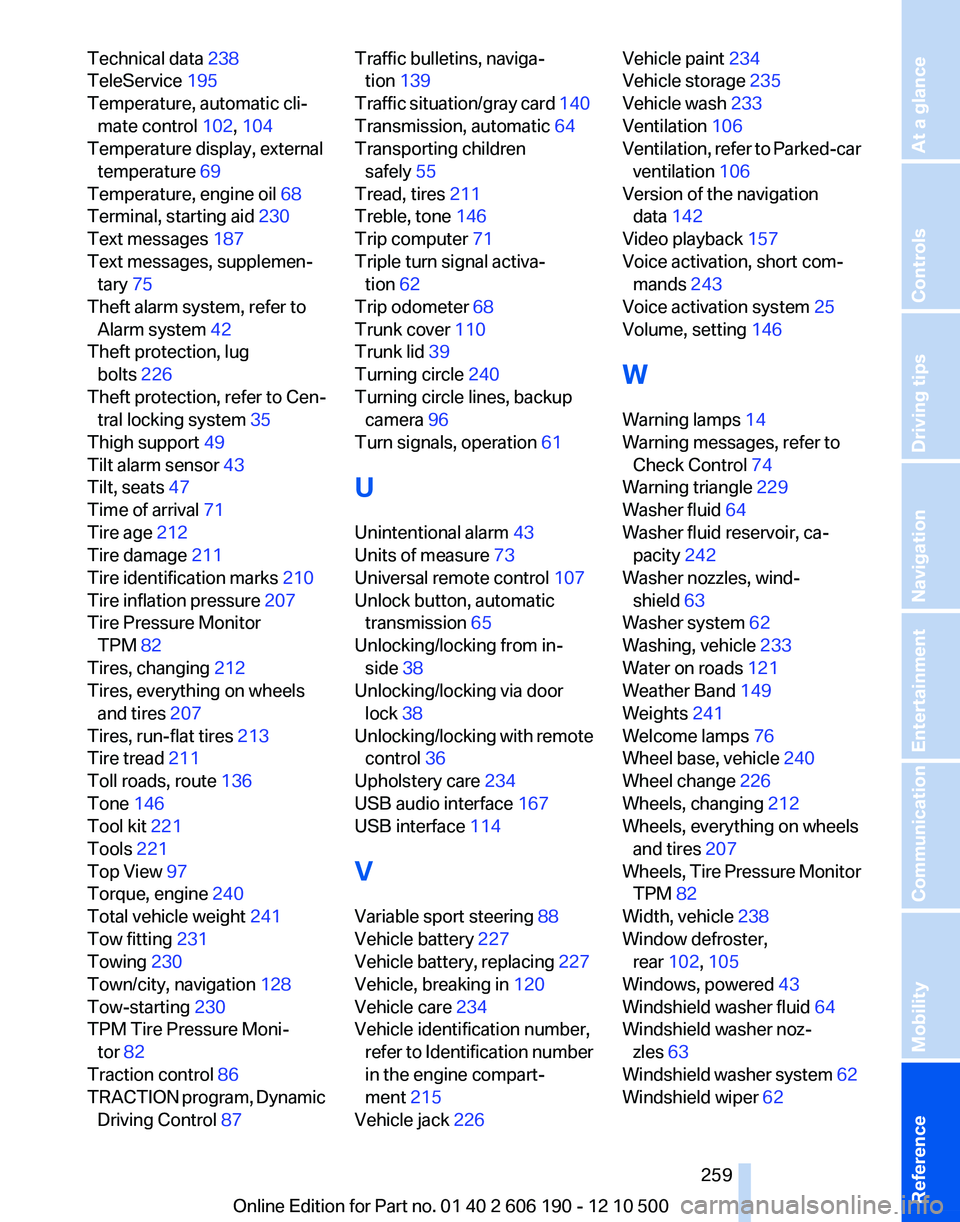
Technical data 238
TeleService 195
Temperature, automatic cli‐ mate control 102, 104
Temperature display, external temperature 69
Temperature, engine oil 68
Terminal, starting aid 230
Text messages 187
Text messages, supplemen‐ tary 75
Theft alarm system, refer to Alarm system 42
Theft protection, lug bolts 226
Theft protection, refer to Cen‐ tral locking system 35
Thigh support 49
Tilt alarm sensor 43
Tilt, seats 47
Time of arrival 71
Tire age 212
Tire damage 211
Tire identification marks 210
Tire inflation pressure 207
Tire Pressure Monitor TPM 82
Tires, changing 212
Tires, everything on wheels and tires 207
Tires, run-flat tires 213
Tire tread 211
Toll roads, route 136
Tone 146
Tool kit 221
Tools 221
Top View 97
Torque, engine 240
Total vehicle weight 241
Tow fitting 231
Towing 230
Town/city, navigation 128
Tow-starting 230
TPM Tire Pressure Moni‐ tor 82
Traction control 86
TRACTION program, Dynamic Driving Control 87 Traffic bulletins, naviga‐
tion 139
Traffic situation/gray card 140
Transmission, automatic 64
Transporting children safely 55
Tread, tires 211
Treble, tone 146
Trip computer 71
Triple turn signal activa‐ tion 62
Trip odometer 68
Trunk cover 110
Trunk lid 39
Turning circle 240
Turning circle lines, backup camera 96
Turn signals, operation 61
U
Unintentional alarm 43
Units of measure 73
Universal remote control 107
Unlock button, automatic transmission 65
Unlocking/locking from in‐ side 38
Unlocking/locking via door lock 38
Unlocking/locking with remote control 36
Upholstery care 234
USB audio interface 167
USB interface 114
V
Variable sport steering 88
Vehicle battery 227
Vehicle battery, replacing 227
Vehicle, breaking in 120
Vehicle care 234
Vehicle identification number, refer to Identification number
in the engine compart‐
ment 215
Vehicle jack 226 Vehicle paint 234
Vehicle storage 235
Vehicle wash 233
Ventilation 106
Ventilation, refer to Parked-car ventilation 106
Version of the navigation data 142
Video playback 157
Voice activation, short com‐ mands 243
Voice activation system 25
Volume, setting 146
W
Warning lamps 14
Warning messages, refer to Check Control 74
Warning triangle 229
Washer fluid 64
Washer fluid reservoir, ca‐ pacity 242
Washer nozzles, wind‐ shield 63
Washer system 62
Washing, vehicle 233
Water on roads 121
Weather Band 149
Weights 241
Welcome lamps 76
Wheel base, vehicle 240
Wheel change 226
Wheels, changing 212
Wheels, everything on wheels and tires 207
Wheels, Tire Pressure Monitor TPM 82
Width, vehicle 238
Window defroster, rear 102, 105
Windows, powered 43
Windshield washer fluid 64
Windshield washer noz‐ zles 63
Windshield washer system 62
Windshield wiper 62 Seite 259259
Online Edition for Part no. 01 40 2 606 190 - 12 10 500
ReferenceMobilityCommunicationEntertainmentNavigationDriving tipsControlsAt a glance