reset BMW X3 XDRIVE 35I 2011 User Guide
[x] Cancel search | Manufacturer: BMW, Model Year: 2011, Model line: X3 XDRIVE 35I, Model: BMW X3 XDRIVE 35I 2011Pages: 262, PDF Size: 11.2 MB
Page 106 of 262
Ventilation
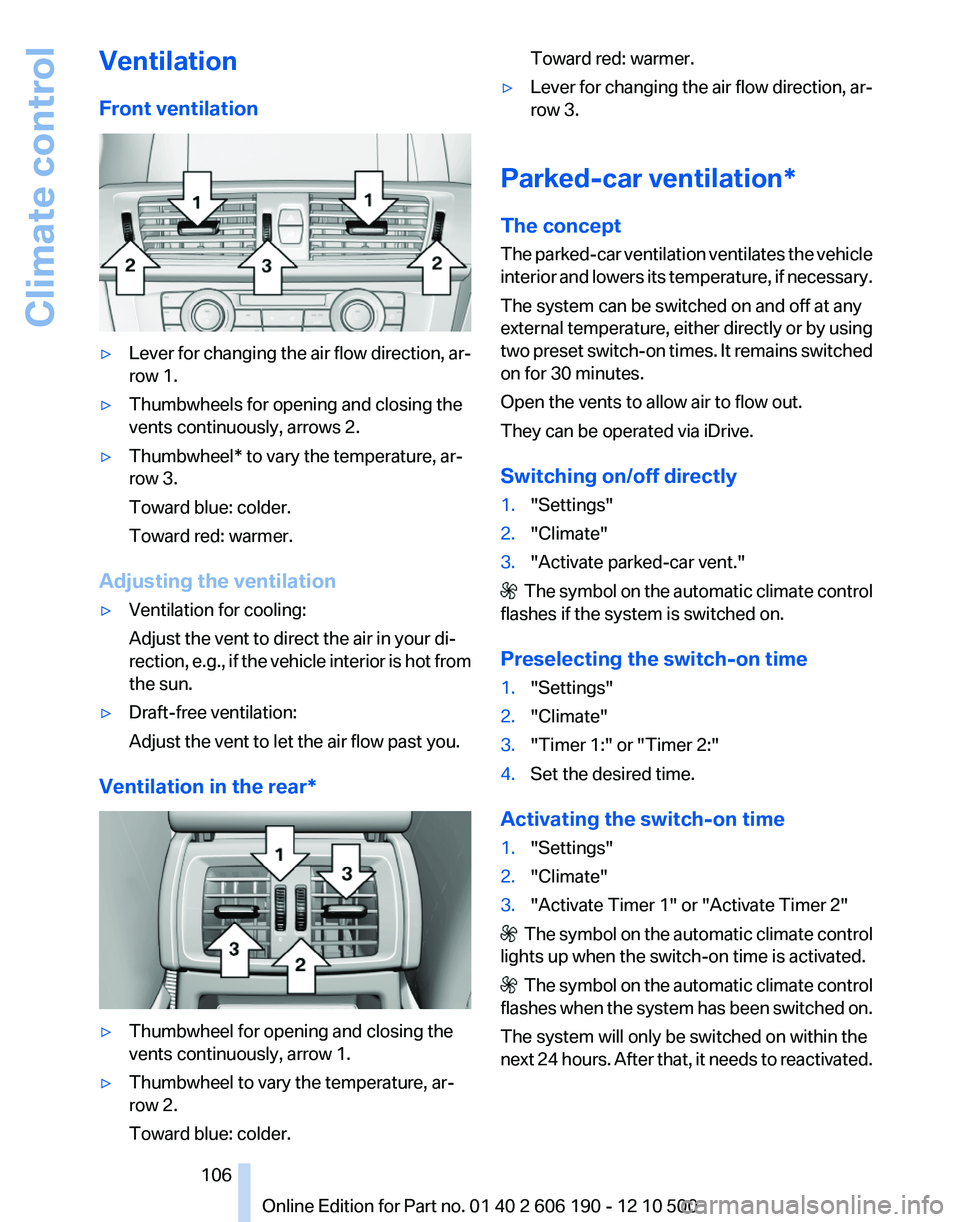
Front ventilation▷Lever for changing the air flow direction, ar‐
row 1.▷Thumbwheels for opening and closing the
vents continuously, arrows 2.▷Thumbwheel* to vary the temperature, ar‐
row 3.
Toward blue: colder.
Toward red: warmer.
Adjusting the ventilation
▷Ventilation for cooling:
Adjust the vent to direct the air in your di‐
rection, e.g., if the vehicle interior is hot from
the sun.▷Draft-free ventilation:
Adjust the vent to let the air flow past you.
Ventilation in the rear*
▷Thumbwheel for opening and closing the
vents continuously, arrow 1.▷Thumbwheel to vary the temperature, ar‐
row 2.
Toward blue: colder.Toward red: warmer.▷Lever for changing the air flow direction, ar‐
row 3.
Parked-car ventilation*
The concept
The parked-car ventilation ventilates the vehicle
interior and lowers its temperature, if necessary.
The system can be switched on and off at any
external temperature, either directly or by using
two preset switch-on times. It remains switched
on for 30 minutes.
Open the vents to allow air to flow out.
They can be operated via iDrive.
Switching on/off directly
1."Settings"2."Climate"3."Activate parked-car vent."
The symbol on the automatic climate control
flashes if the system is switched on.
Preselecting the switch-on time
1."Settings"2."Climate"3."Timer 1:" or "Timer 2:"4.Set the desired time.
Activating the switch-on time
1."Settings"2."Climate"3."Activate Timer 1" or "Activate Timer 2"
The symbol on the automatic climate control
lights up when the switch-on time is activated.
The symbol on the automatic climate control
flashes when the system has been switched on.
The system will only be switched on within the
next 24 hours. After that, it needs to reactivated.
Seite 106106
Online Edition for Part no. 01 40 2 606 190 - 12 10 500Climate control
Page 147 of 262
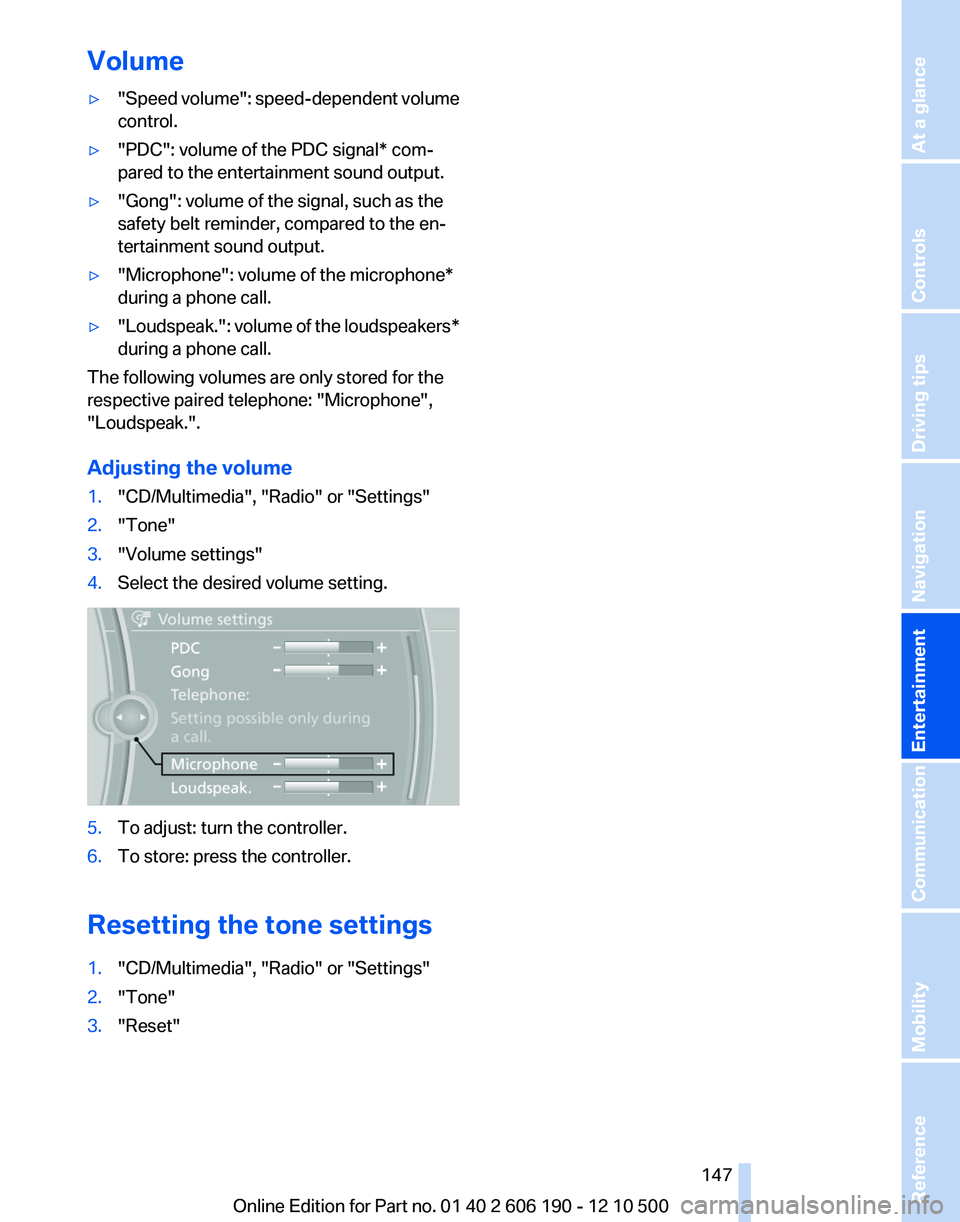
Volume▷"Speed volume": speed-dependent volume
control.▷"PDC": volume of the PDC signal* com‐
pared to the entertainment sound output.▷"Gong": volume of the signal, such as the
safety belt reminder, compared to the en‐
tertainment sound output.▷"Microphone": volume of the microphone*
during a phone call.▷"Loudspeak." : volume of the loudspeakers*
during a phone call.
The following volumes are only stored for the
respective paired telephone: "Microphone",
"Loudspeak.".
Adjusting the volume
1."CD/Multimedia", "Radio" or "Settings"2."Tone"3."Volume settings"4.Select the desired volume setting.5.To adjust: turn the controller.6.To store: press the controller.
Resetting the tone settings
1."CD/Multimedia", "Radio" or "Settings"2."Tone"3."Reset"Seite 147147
Online Edition for Part no. 01 40 2 606 190 - 12 10 500
ReferenceMobilityCommunicationEntertainmentNavigationDriving tipsControlsAt a glance
Page 154 of 262
Stored stations
General information
It is possible to store up to 40 stations.
Calling up a station1."Radio"2."Presets"3.Select the desired station.
Storing a station
The station currently selected is stored.
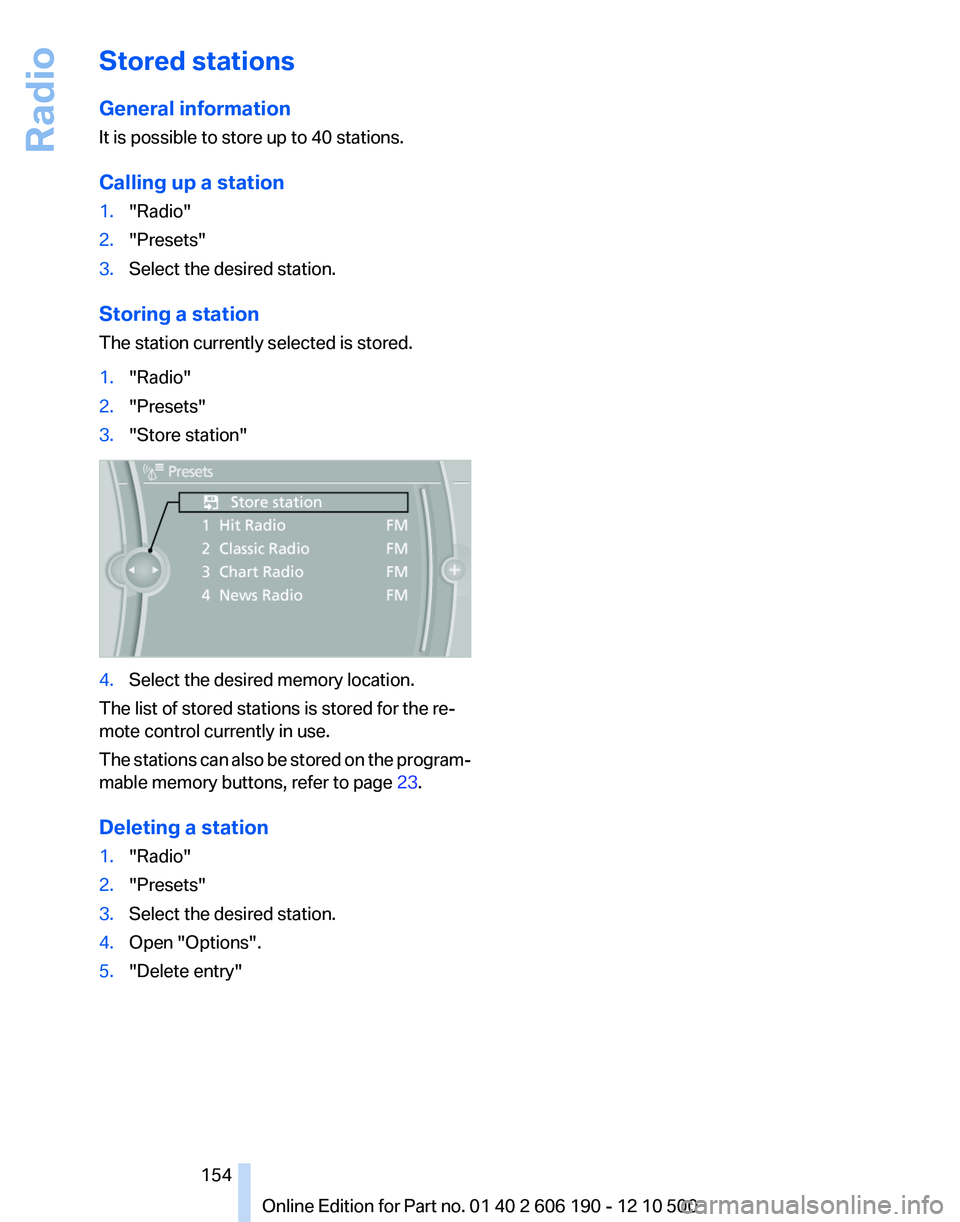
1."Radio"2."Presets"3."Store station"4.Select the desired memory location.
The list of stored stations is stored for the re‐
mote control currently in use.
The stations can also be stored on the program‐
mable memory buttons, refer to page 23.
Deleting a station
1."Radio"2."Presets"3.Select the desired station.4.Open "Options".5."Delete entry"Seite 154154
Online Edition for Part no. 01 40 2 606 190 - 12 10 500Radio
Page 170 of 262
Requirements▷The device is suitable. Information under
www.bmwusa.com/bluetooth.▷The device is ready for operation.▷The ignition is switched on.▷Bluetooth is activated on the vehicle, refer to
page 177, and on the device.▷Bluetooth presettings must be made on the
device, such as for a connection without
confirmation or visibility; refer to the device
operating instructions.▷A number with at least four and a maximum
of 16 digits is defined as the Bluetooth pass‐
key. It is only required once for pairing.
Pairing and connecting
Pairing a device
To avoid becoming distracted and posing
an unnecessary hazard both to your own vehi‐
cle's occupants and to other road users, only
pair the device while the vehicle is stationary.◀
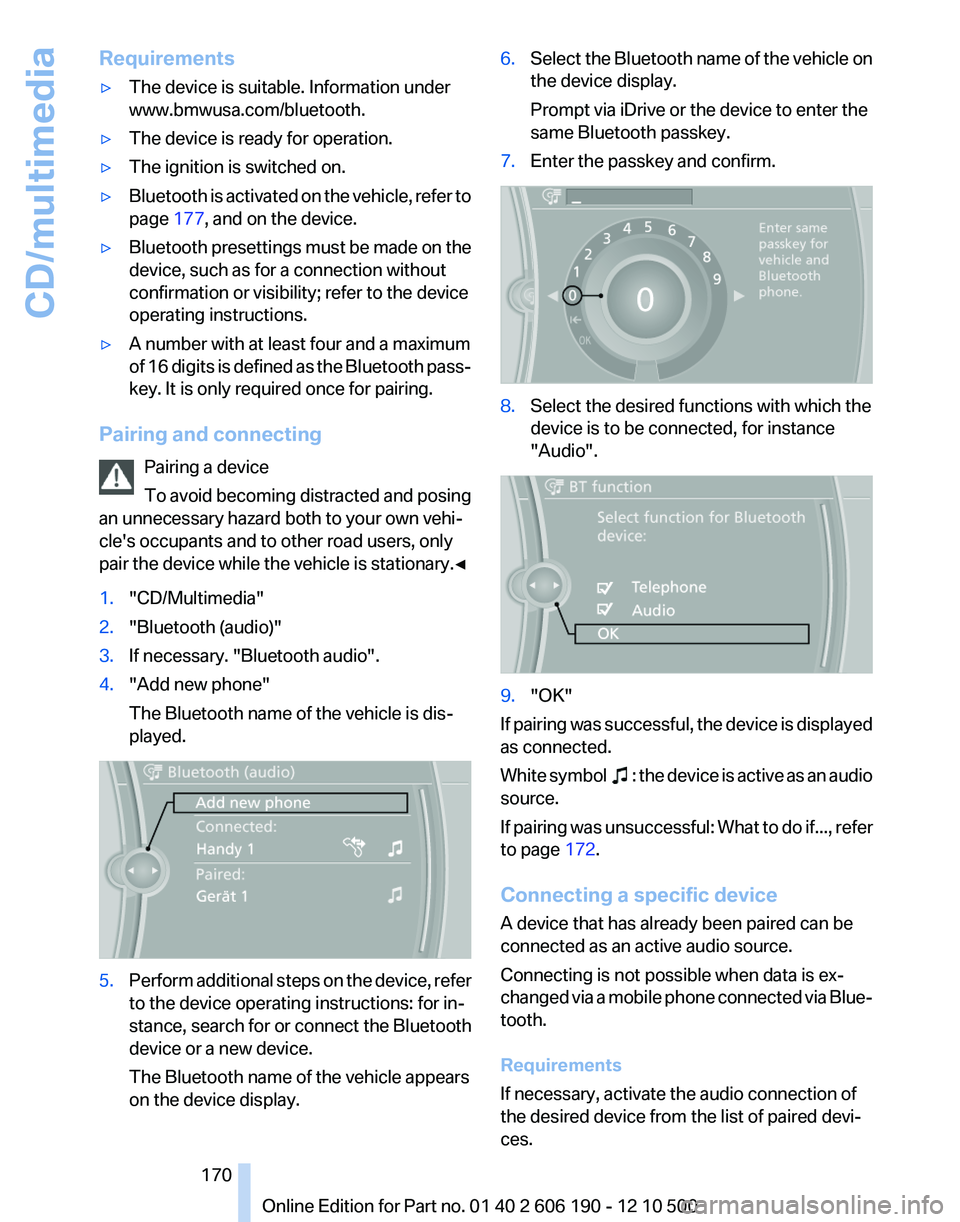
1."CD/Multimedia"2."Bluetooth (audio)"3.If necessary. "Bluetooth audio".4."Add new phone"
The Bluetooth name of the vehicle is dis‐
played.5.Perform additional steps on the device, refer
to the device operating instructions: for in‐
stance, search for or connect the Bluetooth
device or a new device.
The Bluetooth name of the vehicle appears
on the device display.6.Select the Bluetooth name of the vehicle on
the device display.
Prompt via iDrive or the device to enter the
same Bluetooth passkey.7.Enter the passkey and confirm.8.Select the desired functions with which the
device is to be connected, for instance
"Audio".9."OK"
If pairing was successful, the device is displayed
as connected.
White symbol
: the device is active as an audio
source.
If pairing was unsuccessful: What to do if..., refer
to page 172.
Connecting a specific device
A device that has already been paired can be
connected as an active audio source.
Connecting is not possible when data is ex‐
changed via a mobile phone connected via Blue‐
tooth.
Requirements
If necessary, activate the audio connection of
the desired device from the list of paired devi‐
ces.
Seite 170170
Online Edition for Part no. 01 40 2 606 190 - 12 10 500CD/multimedia
Page 177 of 262
Requirements▷The mobile phone is suitable.▷The mobile phone is ready for operation.▷Bluetooth is activated in the vehicle and on
the mobile phone.▷Bluetooth presettings may need to be made
on the mobile phone, e.g., for a connection
without confirmation or visibility, refer to the
mobile phone operating instructions.▷Deactivate Bluetooth audio if necessary.▷A number with at least four and a maximum
of 16 digits was defined as the Bluetooth
passkey. It is only required once for pairing.▷The ignition is switched on.
Activating/deactivating Bluetooth
Bluetooth is not permitted everywhere. Comply
with all safety guidelines and regulations.
1."Telephone"2.Open "Options".3."Bluetooth"
Additional functions
General information
Activate the functions before pairing to be able
to use them in the vehicle. Information on suit‐
able mobile phones, refer to page 176, that sup‐
port these functions.
Additional telephone
A mobile phone can be used as an additional
telephone.
The additional telephone can be used to accept
incoming calls, refer to page 180. While a call is
active on the additional telephone, incoming
calls are displayed on the Control Display.
Audio source
A mobile phone can be used as an audio source.
Activating/deactivating the additional
functions1."Telephone"2."Bluetooth (telephone)"3.Open "Options".4.Select the desired additional function.▷"Additional telephone"▷"Office"▷"Bluetooth audio"
Pairing and connecting a device
Pairing a device
To avoid becoming distracted and posing
an unnecessary hazard both to your own vehi‐
cle's occupants and to other road users, only
pair the device while the vehicle is stationary.◀
1."Telephone"2."Bluetooth (telephone)"3."Add new phone"
The Bluetooth name of the vehicle is dis‐
played.4.To perform additional steps on the mobile
phone, refer to the mobile phone operating
instructions: for instance, search for or con‐
nect the Bluetooth device or a new device.
The Bluetooth name of the vehicle appears
on the mobile phone display.5.Select the Bluetooth name of the vehicle on
the mobile phone display.
Prompt via iDrive or the mobile phone to en‐
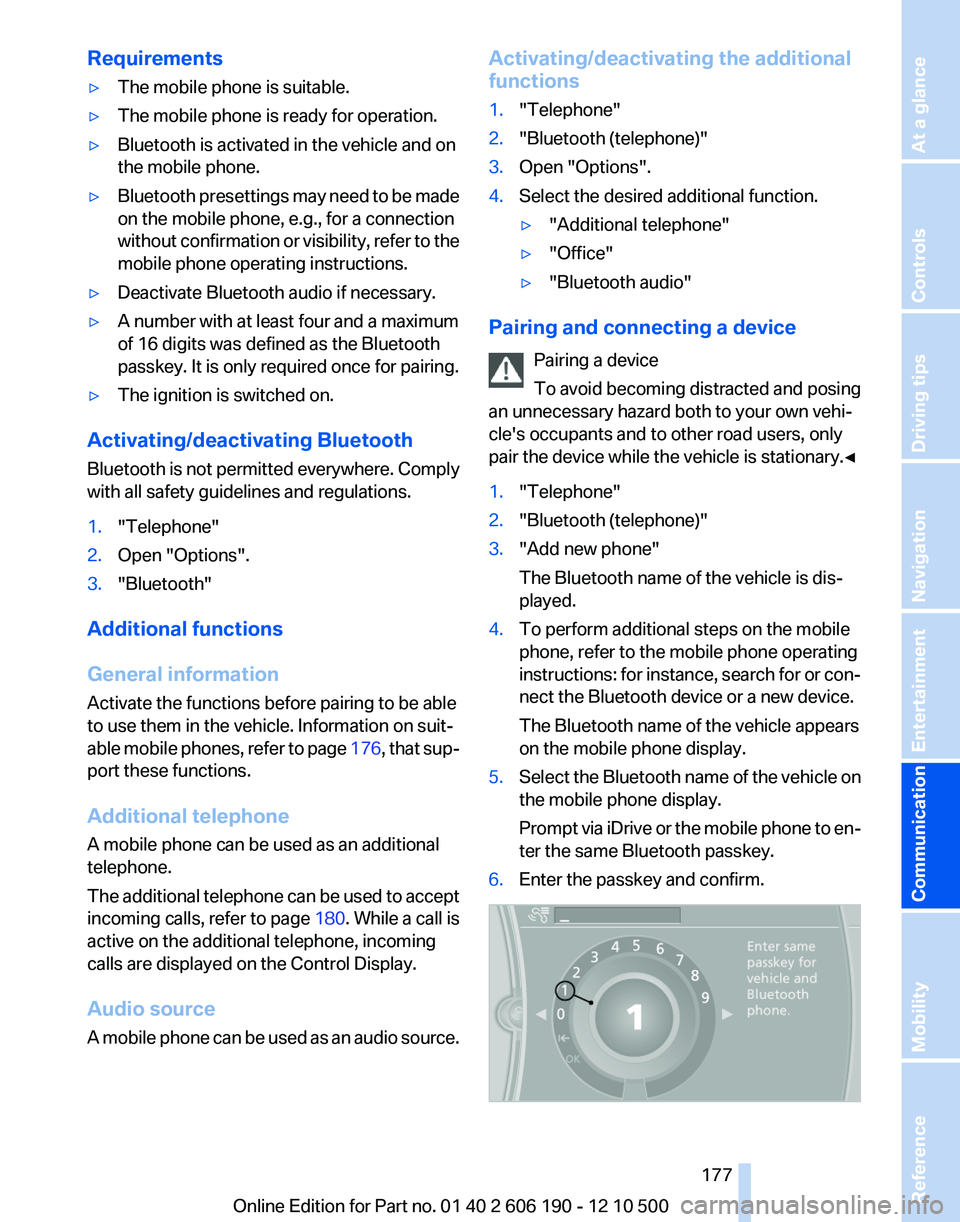
ter the same Bluetooth passkey.6.Enter the passkey and confirm.Seite 177177
Online Edition for Part no. 01 40 2 606 190 - 12 10 500
ReferenceMobilityCommunicationEntertainmentNavigationDriving tipsControlsAt a glance
Page 247 of 262
FunctionCommandSelect a frequency range.›Select frequency‹Open a station.›Select station‹
AM
FunctionCommandOpen a frequency.›Frequency ... Kilohertz‹ e.g., frequency 753 or
753 kilohertzOpen the AM stations.›A M‹Open the manual search.›Manual‹
Weather Band
FunctionCommandOpen the Weather Band.›Weather band‹Switch on the Weather Band.›Weather band on‹Select a Weather Band station.›Select a weather channel‹
Satellite radio*
FunctionCommandOpen the satellite radio.›Satellite radio‹Switch on the satellite radio.›Satellite radio on‹Select a satellite radio channel.› Select satellite radio ‹ e.g., satellite radio channel
2
Stored stations
FunctionCommandOpen the stored stations.›Presets‹Choose a stored station.›Select preset‹Select a stored station.›Preset ...‹ e.g., stored station 2Seite 247247
Online Edition for Part no. 01 40 2 606 190 - 12 10 500
ReferenceMobilityCommunicationEntertainmentNavigationDriving tipsControlsAt a glance
Page 257 of 262
NORMAL program, DynamicDriving Control 90
Notes 6, 191
Number of cylinders, en‐ gine 240
Nylon rope for tow-starting/ towing 231
O
OBD Onboard Diagnos‐ tics 219
Obstacle marking, backup camera 96
Odometer 68
Office 185
Oil 217
Oil, adding 217
Oil additives 217
Oil change interval, service re‐ quirements 73
Oil filler neck 217
Oil level check 217
Oil types, alternative 218
Oil types, approved 217
Old batteries, disposal 227
Onboard Diagnostics OBD 219
Onboard monitor, refer to Control Display 19
Opening/closing from in‐ side 38
Opening/closing via door lock 38
Opening/closing with remote control 36
Operating concept, iDrive 19
Outside air, refer to Automatic recirculated-air control 104
P
Paint, vehicle 234
Pairing, mobile phone 176
Panic mode 36
Panoramic glass sunroof 45
Park Distance Control PDC 93 Parked-car ventilation 106
Parked vehicle, condensa‐ tion 122
Parking aid, refer to PDC 93
Parking brake 59
Parking lamps 76
Parking lamps, bulb replace‐ ment 223
Parking with Auto Hold 60
Partition net 112
Passenger side mirror, tilting downward 53
Pathway lines, backup cam‐ era 96
PDC Park Distance Con‐ trol 93
Performance Control 87
Permissible axle load 241
Personal information 185
Personal Profile 33
Phone 176
Pinch protection system, glass sunroof 45
Pinch protection system, win‐ dows 44
Plastic, care 235
Position, storing 130
Postal code, entering in navi‐ gation 128
Power failure 227
Power output, engine 240
Power windows 43
Pressure, tire air pres‐ sure 207
Profile, refer to Personal Pro‐ file 33
Programmable memory but‐ tons, iDrive 23
Protective function, glass sun‐ roof 45
Protective function, win‐ dows 44
Push-and-turn switch, refer to Controller 19
R
Radiator fluid 218 Radio 148
Radio-operated key, refer to Remote control 32
Radio ready state 58
Rain sensor 63
Random 156
Random playback 156
RDS 149
Reading out loud 192
Rear lamps 225
Rear socket 109
Rearview mirror 53
Rear window de‐ froster 102, 105
Recirculated-air filter 105
Recirculated-air mode 102, 104
Recommended tire brands 212
Refueling 204
Release tool 221
Remaining range 67
Reminders 191
Remote control/key 32
Remote control, malfunc‐ tion 37
Remote control, universal 107
Remote inquiry 181
Replacement fuse 227
Replacing parts 221
Replacing wheels/tires 212
Reporting safety defects 8
Reserve warning, refer to Range 67
Resetting, Tire Pressure Mon‐ itor TPM 83
Retaining straps, securing cargo 123
Retreaded tires 212
Roadside Assistance 196
Roadside parking lamps 77
Roller sunblinds 44
Roof load capacity 241
Roof-mounted luggage rack 124
Rope for tow-starting/tow‐ ing 231
Route 136 Seite 257257
Online Edition for Part no. 01 40 2 606 190 - 12 10 500
ReferenceMobilityCommunicationEntertainmentNavigationDriving tipsControlsAt a glance