lock BMW X3 XDRIVE 35I 2011 Service Manual
[x] Cancel search | Manufacturer: BMW, Model Year: 2011, Model line: X3 XDRIVE 35I, Model: BMW X3 XDRIVE 35I 2011Pages: 262, PDF Size: 11.2 MB
Page 218 of 262
Approved oil types
Your service center can advise you on which en‐
gine oils have been approved by the manufac‐
turer of your vehicle.
The engine oil quality is critical for the life of the
engine.
Only use approved BMW High Performance oil.
Approved oils belong to the viscosity grades
SAE 0W-40, SAE 0W-30, SAE 5W-40 and SAE
5W-30.
Alternative oil types
If the approved engine oils are not available, up
to 1 US quart/liter of another oil with the follow‐
ing specification may be used.
API SM quality standards or higher.
Coolant
General information Danger of burns from hot engine
Do not open the cooling system while the
engine is hot; otherwise, escaping coolant may
cause burns.◀
Suitable additives
Only use suitable additives; otherwise, en‐
gine damage may occur. The additives are
harmful to your health.◀
Coolant consists of water and additives.
Not all commercially available additives are suit‐
able for your vehicle. Ask your service center for
suitable additives.
Coolant level
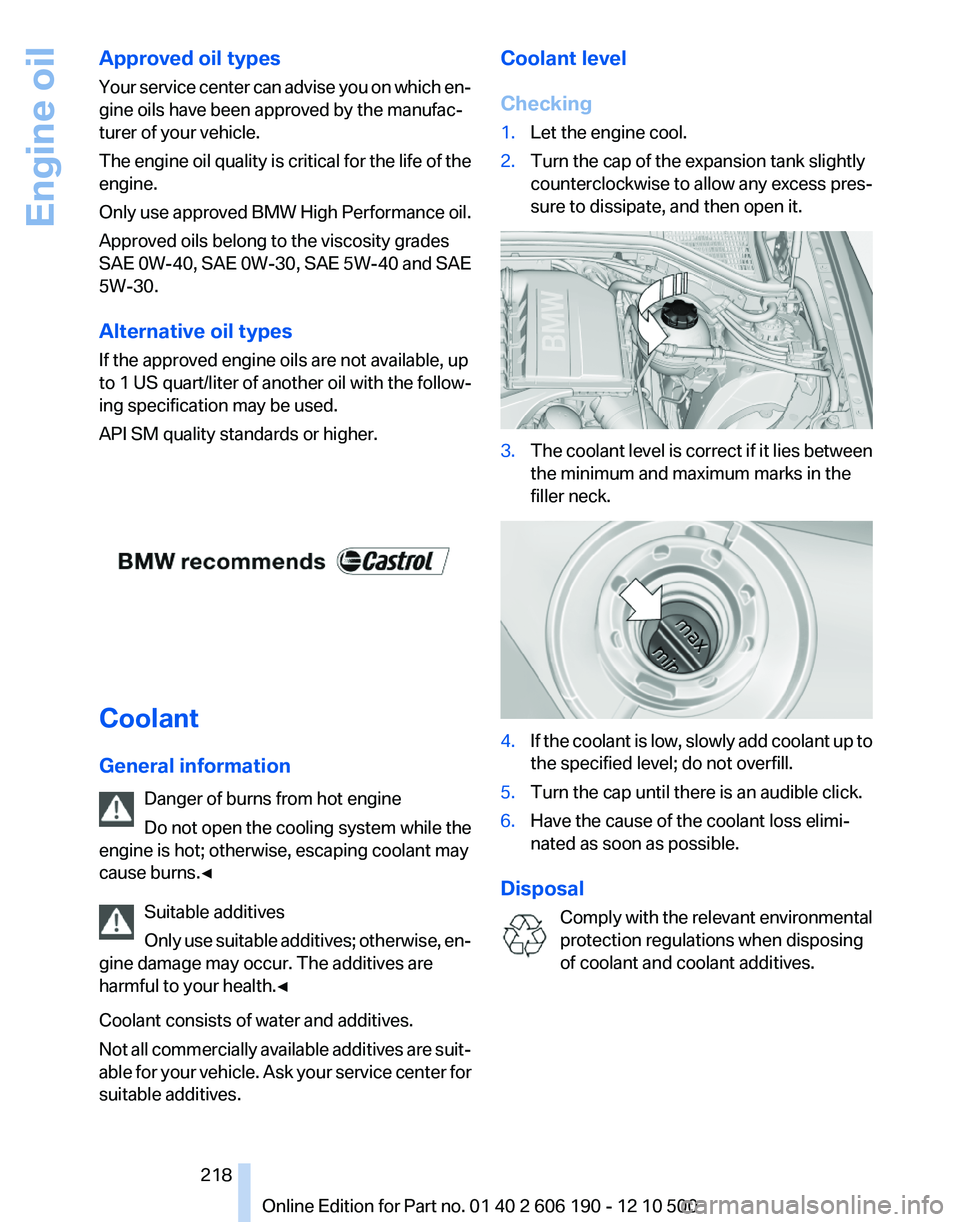
Checking1.Let the engine cool.2.Turn the cap of the expansion tank slightly
counterclockwise to allow any excess pres‐
sure to dissipate, and then open it.3.The coolant level is correct if it lies between
the minimum and maximum marks in the
filler neck.4.If the coolant is low, slowly add coolant up to
the specified level; do not overfill.5.Turn the cap until there is an audible click.6.Have the cause of the coolant loss elimi‐
nated as soon as possible.
Disposal
Comply with the relevant environmental
protection regulations when disposing
of coolant and coolant additives.
Seite 218218
Online Edition for Part no. 01 40 2 606 190 - 12 10 500Engine oil
Page 223 of 262
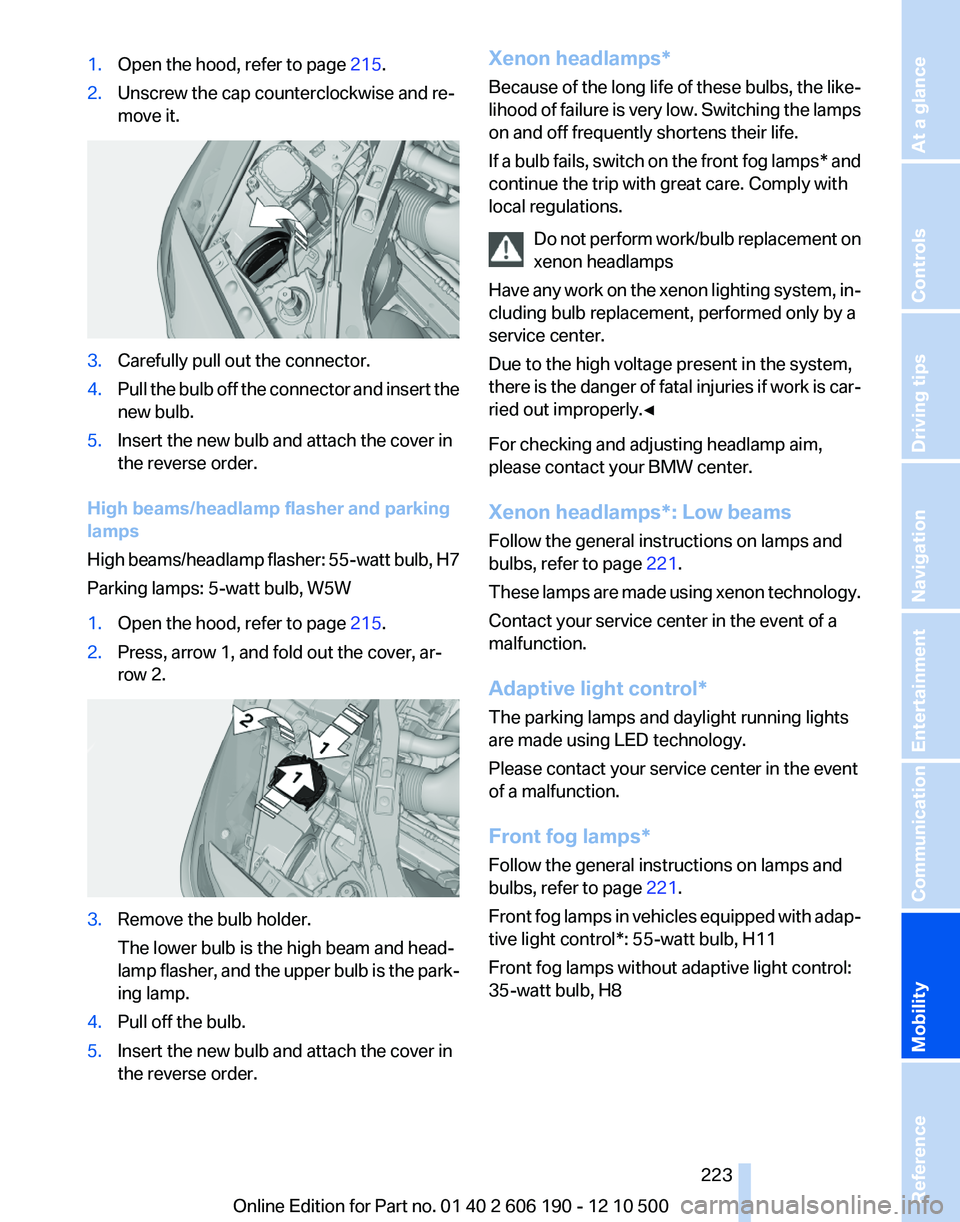
1.Open the hood, refer to page 215.2.Unscrew the cap counterclockwise and re‐
move it.3.Carefully pull out the connector.4.Pull the bulb off the connector and insert the
new bulb.5.Insert the new bulb and attach the cover in
the reverse order.
High beams/headlamp flasher and parking
lamps
High beams/headlamp flasher: 55-watt bulb, H7
Parking lamps: 5-watt bulb, W5W
1.Open the hood, refer to page 215.2.Press, arrow 1, and fold out the cover, ar‐
row 2.3.Remove the bulb holder.
The lower bulb is the high beam and head‐
lamp flasher, and the upper bulb is the park‐
ing lamp.4.Pull off the bulb.5.Insert the new bulb and attach the cover in
the reverse order.Xenon headlamps*
Because of the long life of these bulbs, the like‐
lihood of failure is very low. Switching the lamps
on and off frequently shortens their life.
If a bulb fails, switch on the front fog lamps* and
continue the trip with great care. Comply with
local regulations.
Do not perform work/bulb replacement on
xenon headlamps
Have any work on the xenon lighting system, in‐
cluding bulb replacement, performed only by a
service center.
Due to the high voltage present in the system,
there is the danger of fatal injuries if work is car‐
ried out improperly.◀
For checking and adjusting headlamp aim,
please contact your BMW center.
Xenon headlamps*: Low beams
Follow the general instructions on lamps and
bulbs, refer to page 221.
These lamps are made using xenon technology.
Contact your service center in the event of a
malfunction.
Adaptive light control*
The parking lamps and daylight running lights
are made using LED technology.
Please contact your service center in the event
of a malfunction.
Front fog lamps*
Follow the general instructions on lamps and
bulbs, refer to page 221.
Front fog lamps in vehicles equipped with adap‐
tive light control*: 55-watt bulb, H11
Front fog lamps without adaptive light control:
35-watt bulb, H8Seite 223223
Online Edition for Part no. 01 40 2 606 190 - 12 10 500
ReferenceMobilityCommunicationEntertainmentNavigationDriving tipsControlsAt a glance
Page 224 of 262
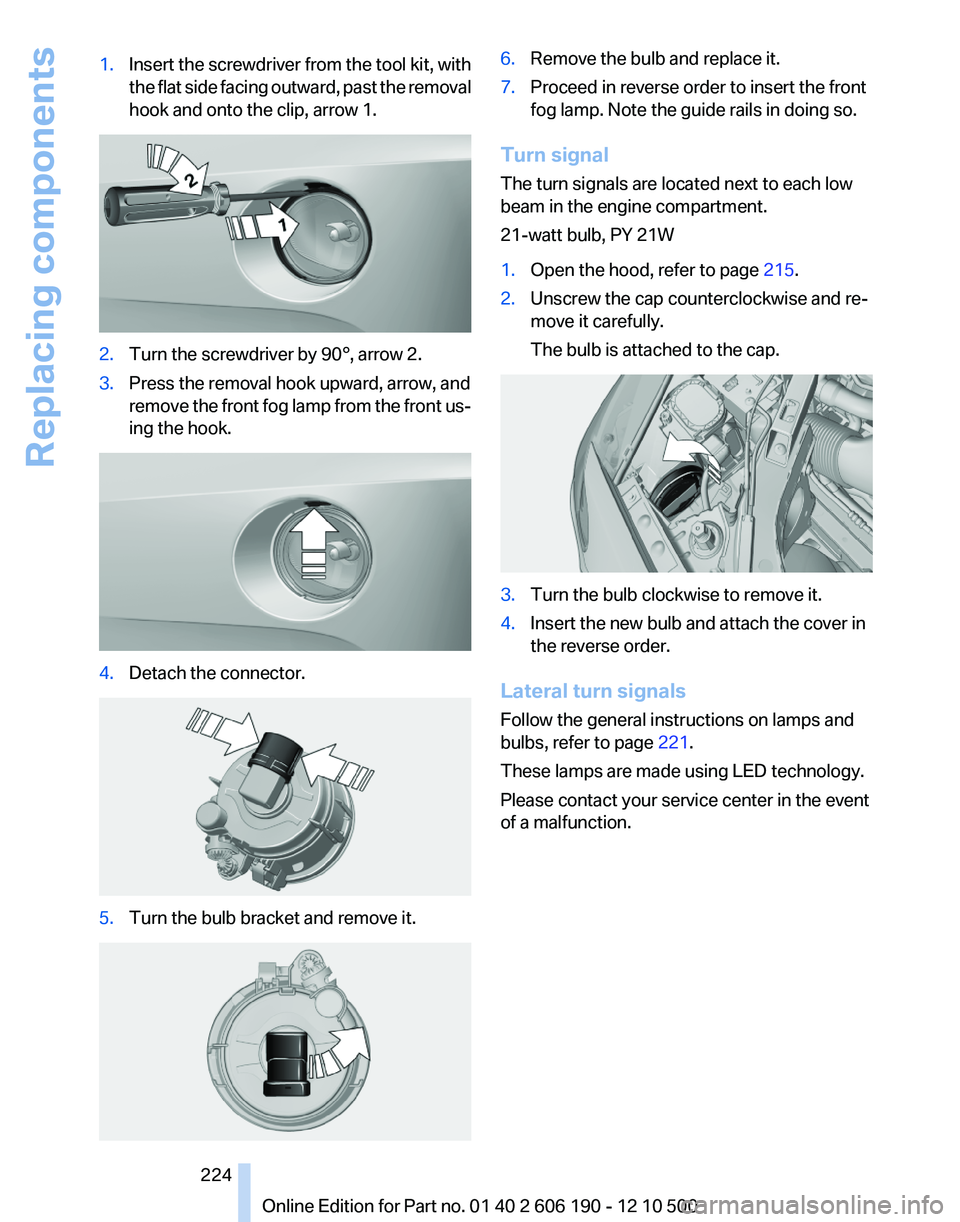
1.Insert the screwdriver from the tool kit, with
the flat side facing outward, past the removal
hook and onto the clip, arrow 1.2.Turn the screwdriver by 90°, arrow 2.3.Press the removal hook upward, arrow, and
remove the front fog lamp from the front us‐
ing the hook.4.Detach the connector.5.Turn the bulb bracket and remove it.6.Remove the bulb and replace it.7.Proceed in reverse order to insert the front
fog lamp. Note the guide rails in doing so.
Turn signal
The turn signals are located next to each low
beam in the engine compartment.
21-watt bulb, PY 21W
1.Open the hood, refer to page 215.2.Unscrew the cap counterclockwise and re‐
move it carefully.
The bulb is attached to the cap.3.Turn the bulb clockwise to remove it.4.Insert the new bulb and attach the cover in
the reverse order.
Lateral turn signals
Follow the general instructions on lamps and
bulbs, refer to page 221.
These lamps are made using LED technology.
Please contact your service center in the event
of a malfunction.
Seite 224224
Online Edition for Part no. 01 40 2 606 190 - 12 10 500Replacing components
Page 226 of 262
1.Open the tailgate.2.Pull out the cover at the recessed grip, ar‐
row.3.Detach the connector.4.Detach the bulb holder from the tail lamp.
The backup lamp is the upper lamp and the
brake force display is the lower lamp on the
bulb holder.5.To replace the backup lamp, pull off the bulb
carefully.
To replace the brake lamp, push the bulb
down and turn it to the left.6.Proceed in the reverse order to insert the
new bulb and attach the bulb holder.
Ensure that the bulb holder is firmly at‐
tached.
Changing wheels
Notes
The vehicle equipment does not include a spare
tire.
When using run-flat tires* or tire sealants, a tire
does not need to be changed immediately in the
event of pressure loss due to a flat tire.
The tools for changing wheels are available as
accessories from your service center.
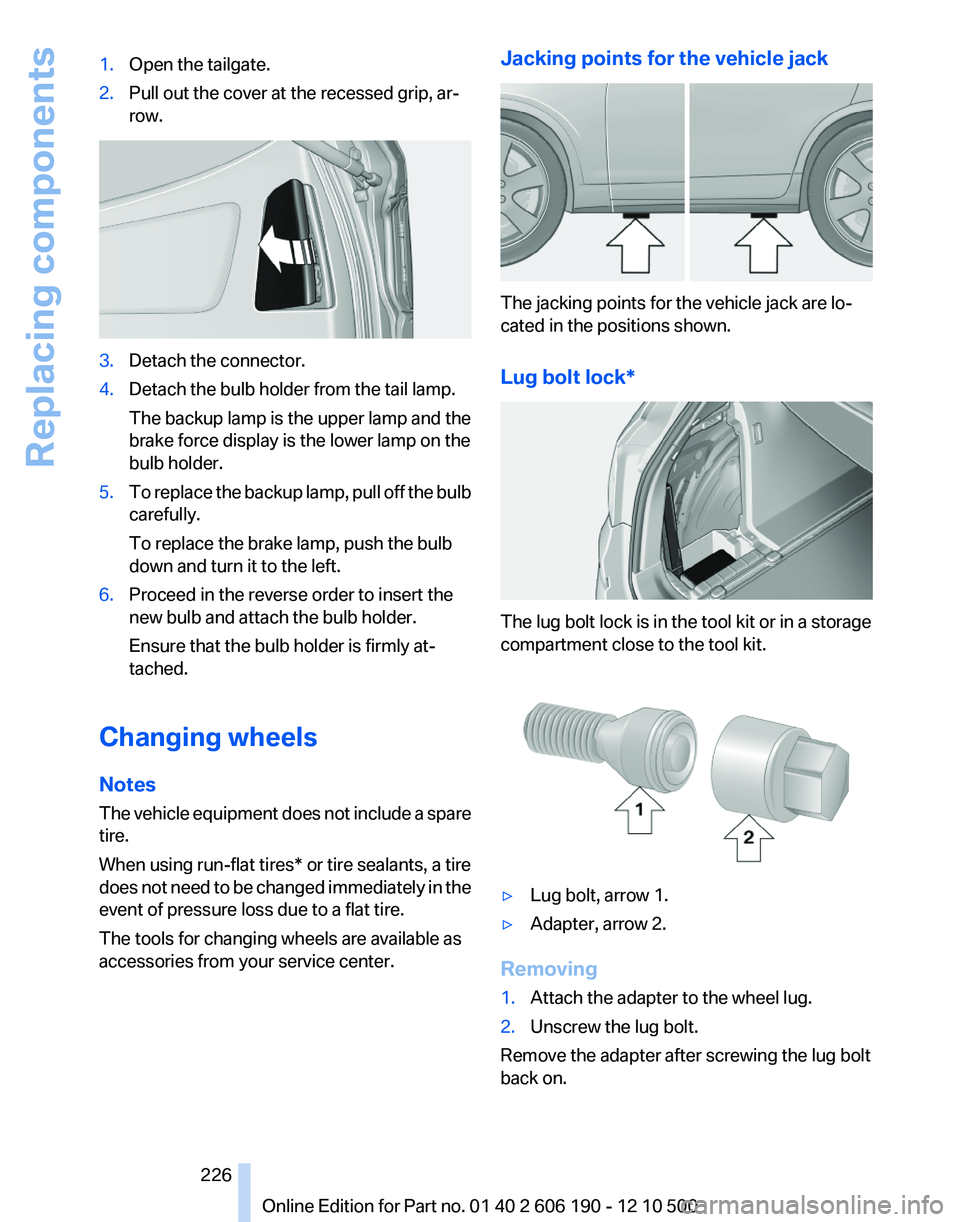
Jacking points for the vehicle jack
The jacking points for the vehicle jack are lo‐
cated in the positions shown.
Lug bolt lock*
The lug bolt lock is in the tool kit or in a storage
compartment close to the tool kit.
▷Lug bolt, arrow 1.▷Adapter, arrow 2.
Removing
1.Attach the adapter to the wheel lug.2.Unscrew the lug bolt.
Remove the adapter after screwing the lug bolt
back on.
Seite 226226
Online Edition for Part no. 01 40 2 606 190 - 12 10 500Replacing components
Page 229 of 262
Assist Response Center may still be able to
hear you.
Initiating an Emergency Request
automatically
Under certain conditions, an Emergency Re‐
quest is automatically initiated immediately after
a severe accident. Automatic Collision Notifica‐
tion is not affected by pressing the SOS button.
Warning triangle*
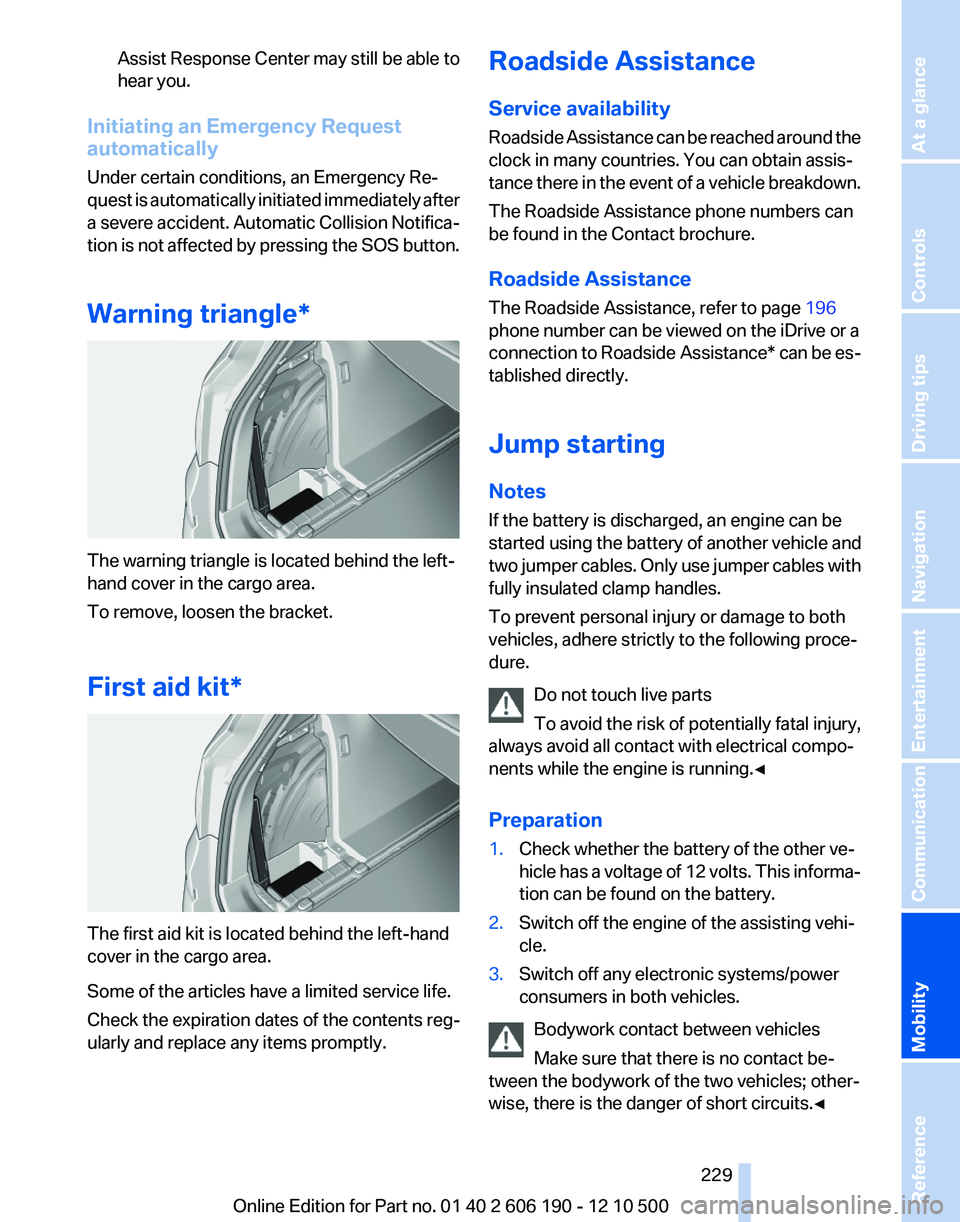
The warning triangle is located behind the left-
hand cover in the cargo area.
To remove, loosen the bracket.
First aid kit*
The first aid kit is located behind the left-hand
cover in the cargo area.
Some of the articles have a limited service life.
Check the expiration dates of the contents reg‐
ularly and replace any items promptly.
Roadside Assistance
Service availability
Roadside Assistance can be reached around the
clock in many countries. You can obtain assis‐
tance there in the event of a vehicle breakdown.
The Roadside Assistance phone numbers can
be found in the Contact brochure.
Roadside Assistance
The Roadside Assistance, refer to page 196
phone number can be viewed on the iDrive or a
connection to Roadside Assistance * can be es‐
tablished directly.
Jump starting
Notes
If the battery is discharged, an engine can be
started using the battery of another vehicle and
two jumper cables. Only use jumper cables with
fully insulated clamp handles.
To prevent personal injury or damage to both
vehicles, adhere strictly to the following proce‐
dure.
Do not touch live parts
To avoid the risk of potentially fatal injury,
always avoid all contact with electrical compo‐
nents while the engine is running.◀
Preparation1.Check whether the battery of the other ve‐
hicle has a voltage of 12 volts. This informa‐
tion can be found on the battery.2.Switch off the engine of the assisting vehi‐
cle.3.Switch off any electronic systems/power
consumers in both vehicles.
Bodywork contact between vehicles
Make sure that there is no contact be‐
tween the bodywork of the two vehicles; other‐
wise, there is the danger of short circuits.◀
Seite 229229
Online Edition for Part no. 01 40 2 606 190 - 12 10 500
ReferenceMobilityCommunicationEntertainmentNavigationDriving tipsControlsAt a glance
Page 233 of 262
CareCar washes
Notes Steam jets or high-pressure washers
When using steam jets or high-pressure
washers, hold them a sufficient distance away
and use a maximum temperature of 140 ℉/
60 ℃.
Holding them too close or using excessively
high pressures or temperatures can cause dam‐
age or preliminary damage that may then lead to
long-term damage.
Follow the operating instructions for the high-
pressure washer.◀
Cleaning sensors/cameras with high-
pressure washers
When using high-pressure washers, do not
spray the exterior sensors and cameras, e.g.,
Park Distance Control*, for extended periods of
time and only from a distance of at least 12 in/
30 cm.◀
Wash your vehicle frequently, particularly in win‐
ter.
Intense soiling and road salt can damage the ve‐
hicle.
Washing in automatic car washes
Your vehicle can be washed in automatic car
washes right from the start.
Give preference to cloth car washes or those
that use soft brushes in order to avoid paint
damage.
Notes
Note the following:▷Make sure that the wheels and tires are not
damaged by the transport mechanisms.▷Fold in the exterior mirrors; otherwise, they
may be damaged, depending on the width of
the vehicle.▷Deactivate the rain sensor*, refer to
page 63, to avoid unintentional wiper acti‐
vation.▷In some cases, an unintentional alarm can be
triggered by the interior motion sensor of the
alarm system*. Follow the instructions on
avoiding an unintentional alarm, refer to
page 43.
Guide rails in car washes
Avoid car washes with guide rails higher
than 4 in/10 cm; otherwise, the vehicle body
could be damaged.◀
Before driving into a car wash
The vehicle is able to roll when the following
steps are taken:
Manual transmission:
Automatic transmission/Sport automatic trans‐
mission*:
1.Depress the brake pedal.2.Engage transmission position N.3.Release the parking brake, refer to page 60,
or deactivate Automatic Hold, refer to
page 61.4.Switch the engine off.
Transmission position P with the igni‐
tion off
When the ignition is switched off, position P
is engaged automatically. When in an auto‐
matic car wash, for example, ensure that the
ignition is not switched off accidentally.◀
The vehicle cannot be locked from the outside
when in transmission position N.
A signal is sounded when an attempt is made to
lock the vehicle.
Transmission position
Transmission position P is engaged automati‐
cally:
Seite 233233
Online Edition for Part no. 01 40 2 606 190 - 12 10 500
ReferenceMobilityCommunicationEntertainmentNavigationDriving tipsControlsAt a glance
Page 243 of 262
Short commands of the voice activation
system*General information
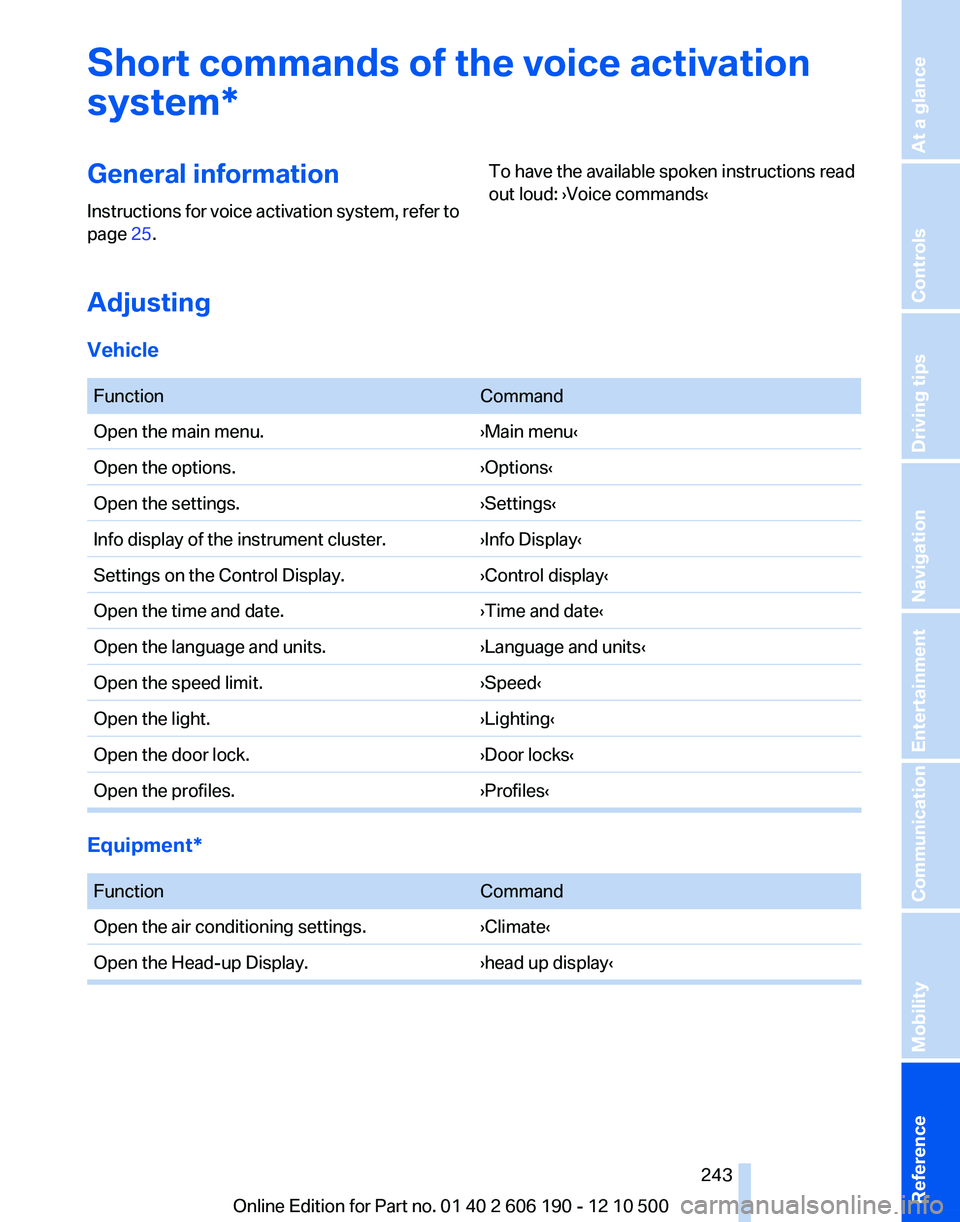
Instructions for voice activation system, refer to
page 25.To have the available spoken instructions read
out loud: ›Voice commands‹
Adjusting
Vehicle
FunctionCommandOpen the main menu.›Main menu‹Open the options.›Options‹Open the settings.›Settings‹Info display of the instrument cluster.›Info Display‹Settings on the Control Display.›Control display‹Open the time and date.›Time and date‹Open the language and units.›Language and units‹Open the speed limit.›Speed‹Open the light.›Lighting‹Open the door lock.›Door locks‹Open the profiles.›Profiles‹
Equipment*
FunctionCommandOpen the air conditioning settings.›Climate‹Open the Head-up Display.›head up display‹Seite 243243
Online Edition for Part no. 01 40 2 606 190 - 12 10 500
ReferenceMobilityCommunicationEntertainmentNavigationDriving tipsControlsAt a glance
Page 252 of 262
Everything from A to Z
IndexA
ABS, Antilock Brake Sys‐ tem 86
Activated-charcoal filter 105
Adaptive brake lights, refer to Brake force display 85
Adaptive light control 77
Adaptive light control, bulb re‐ placement 223
Additional telephone 176
Additives, oil 217
Adjustments, seats/head re‐ straints 47
After washing vehicle 234
Airbags 80
Air circulation, refer to Recir‐ culated-air mode 102, 104
Air distribution, manual 101, 103
Air drying, refer to Cooling function 102, 105
Air pressure, tires 207
Air vents, refer to Ventila‐ tion 106
Air volume, automatic climate control 101, 104
Alarm system 42
Alarm, unintentional 43
All around the center con‐ sole 17
All around the headliner 18
All around the steering wheel 12
ALL program, automatic cli‐ mate control 105
All-season tires, refer to Win‐ ter tires 213
All-wheel-drive 87
Alternating-code hand-held transmitter 108
Alternative oil types 218
AM/FM station 148 Announcement, navigation,
refer to Spoken instruc‐
tions 137
Antifreeze, washer fluid 64
Antilock Brake System, ABS 86
Anti-slip control, refer to DSC 86
Appointments 189
Approved engine oils 217
Armrest, refer to Center arm‐ rest 114
Arrival time 71
Assist 195
Assistance, Roadside Assis‐ tance 229
Audio playback 155
Audio playback, Blue‐ tooth 169
AUTO intensity 104
Automatic car wash 233
Automatic climate con‐ trol 101
Automatic climate control with enhanced features 103
Automatic Curb Monitor 53
Automatic deactivation, front passenger airbags 81
Automatic headlamp con‐ trol 77
Automatic Hold 60
Automatic locking 38
Automatic recirculated-air control 104
Automatic tailgate 40
Automatic transmission with Steptronic 64
AUTO program, automatic cli‐ mate control 104
AUTO program, climate con‐ trol 101
AUTO program, intensity 104
AUX-IN port 166 Average fuel consumption 70
Average speed 70
Axle loads, weights 241
B
Backrest curvature, refer to Lumbar support 49
Backrest, seats 47
Backrest, width 49
Backup camera 95
Balance 146
Band-aids, refer to First aid kit 229
Bar for tow-starting/tow‐ ing 231
Bass 146
Battery replacement, vehicle battery 227
Battery replacement, vehicle remote control 32
Battery, vehicle 227
Before entering the car wash 233
Belts, safety belts 50
Beverage holder, cu‐ pholder 115
Blinds, sun protection 44
Bluetooth audio 169
Bluetooth connection, activat‐ ing/deactivating 177
BMW Assist 195
BMW EfficientDynamics, refer to Saving fuel 124
BMW homepage 6
BMW Internet page 6
BMW Maintenance Sys‐ tem 219
BMW Search 197
Bottle holder, refer to Cu‐ pholder 115
Brake assistant 86
Brake discs, breaking in 120 Seite 252252
Online Edition for Part no. 01 40 2 606 190 - 12 10 500Everything from A to Z
Page 253 of 262
Brake force display 85
Brake lamps, brake force dis‐ play 85
Brake lights, adaptive 85
Brake pads, breaking in 120
Braking, notes 121
Breakdown assis‐ tance 228, 229
Breaking in 120
Brightness of Control Dis‐ play 73
Bulb replacement 221
Bulb replacement, front 222
Bulb replacement, rear 225
Bulbs and lamps 221
Button, Start/Stop 58
C
Calendar 189
California Proposition 65 Warning 7
Camera, backup camera 97
Camera, care 235
Camera, Top View 99
Can holder, refer to Cu‐ pholder 115
Car battery 227
Car care products 234
Care, displays 235
Care, vehicle 234
Cargo 122
Cargo area 110
Cargo area, enlarg‐ ing 110 , 111
Cargo area lid 39
Cargo area, storage compart‐ ments 116
Cargo straps, securing cargo 123
Car key, refer to Remote con‐ trol 32
Carpet, care 235
Car wash 233
Catalytic converter, refer to Hot exhaust system 120
CBS Condition Based Serv‐ ice 219 CD/DVD 155
CDs, storing 162
Cell phone 176
Center armrest 114
Center console 17
Central locking system 35
Central screen, refer to Control Display 19
Changes, technical, refer to Safety 6
Changing parts 221
Changing wheels/tires 212
Check Control 74
Children, seating position 55
Children, transporting safely 55
Child restraint fixing sys‐ tem 55
Child restraint fixing system LATCH 56
Child restraint fixing systems, mounting 55
Child-safety locks 57
Child seat, mounting 55
Child seats 55
Chrome parts, care 234
Cigarette lighter 108
Cleaning, displays 235
Climate control 101, 103
Clock 69
Closing/opening from in‐ side 38
Closing/opening via door lock 38
Closing/opening with remote control 36
Clothes hooks 115
Combination instrument 13
Combination instrument, elec‐ tronic displays 15
Combination switch, refer to Turn signals 61
Combination switch, refer to Wiper system 62
Comfort Access 41
Computer 70
Concierge service 196 Condensation on win‐
dows 102, 105
Condensation under the vehi‐ cle 122
Condition Based Service CBS 219
Confirmation signal 37
Contacts 185
Control Display 19
Control Display, settings 72
Controller 19
Control systems, driving sta‐ bility 86
Convenient opening 36
Coolant 218
Cooling function 102, 105
Cooling, maximum 104
Cooling system 218
Corrosion on brake discs 122
Cruise control 91
Cruising range 67
Cupholder 115
Current fuel consumption 68
Current location, storing 130
Customer Relations 200
D
Damage, tires 211
Damping control, dynamic 88
Data, technical 238
Date 69
Daytime running lights 77
Defrosting, refer to Windows, defrosting 102, 105
Destination distance 70
Destination guidance 135
Destination guidance with in‐ termediate destinations 134
Destination input, naviga‐ tion 128
Digital clock 69
Digital radio 149
Dimensions 238
Dimmable mirrors 54
Direction indicator, refer to Turn signals 61
Displacement, engine 240 Seite 253253
Online Edition for Part no. 01 40 2 606 190 - 12 10 500
ReferenceMobilityCommunicationEntertainmentNavigationDriving tipsControlsAt a glance
Page 254 of 262
Display in front windshield 99
Display, instrument cluster 67
Display lighting, refer to Instru‐ ment lighting 79
Displays 13
Displays, cleaning 235
Disposal, coolant 218
Disposal, vehicle battery 227
Distance control, refer to PDC 93
Distance to destination 70
Divided screen view, split screen 23
Door lock, refer to Remote control 32
Downhill control 87
Drive-off assistant, refer to DSC 86
Driving instructions, breaking in 120
Driving notes, general 120
Driving stability control sys‐ tems 86
Driving tips 120
DSC Dynamic Stability Con‐ trol 86
DTC Dynamic Traction Con‐ trol 86
DTMF suffix dialing 181
DVD/CD 155
DVD/CD notes 161
DVD changer 159
DVD settings 158
DVDs, storing 162
DVD, video 157
Dynamic Damping Control 88
Dynamic destination guid‐ ance 141
Dynamic Driving Control 89
Dynamic Stability Control DSC 86
Dynamic Traction Control DTC 86
E
EfficientDynamics, refer to Saving fuel 124 Electronic displays, instru‐
ment cluster 15
Electronic engine oil level check 217
Electronic Stability Program ESP, refer to DSC 86
Emergency detection, remote control 33
Emergency release, door lock 38
Emergency release, fuel filler flap 204
Emergency Request 228
Emergency service, refer to Roadside Assistance 229
Emergency start function, en‐ gine start 33
Energy Control 68
Energy recovery 68
Engine compartment 215
Engine compartment, working in 215
Engine coolant 218
Engine oil 217
Engine oil, adding 217
Engine oil additives 217
Engine oil filler neck 217
Engine oil temperature 68
Engine oil types, alterna‐ tive 218
Engine oil types, ap‐ proved 217
Engine specifications 240
Engine start, assistance 229
Engine start during malfunc‐ tion 33
Engine start, refer to Starting the engine 58
Engine stop 59
Engine temperature 68
Equalizer 146
Equipment, interior 107
ESP Electronic Stability Pro‐ gram, refer to DSC 86
Exchanging wheels/tires 212
Exhaust system 120
Exterior mirrors 53
External devices 166 External temperature dis‐
play 69
External temperature warn‐ ing 69
Eyes for securing cargo 123
F
Fader 146
Failure message, refer to Check Control 74
False alarm, refer to Uninten‐ tional alarm 43
Fan, refer to Air vol‐ ume 101, 104
Fault displays, refer to Check Control 74
Filler neck for engine oil 217
Fine wood, care 235
First aid kit 229
Fitting for towing, refer to Tow fitting 231
Flat tire, Tire Pressure Monitor TPM 82
Flat tire, warning lamp 83
Flat tire, wheel change 226
Flooding 121
Floor carpet, care 235
Floor mats, care 235
FM/AM station 148
Fold-out position, windshield wipers 64
Foot brake 121
Front airbags 80
Front fog lamps 79
Front fog lamps, front, bulb re‐ placement 223
Front lamps 222
Front passenger airbags, au‐ tomatic deactivation 81
Front passenger airbags, indi‐ cator lamp 82
Front seats, adjusting 47
Fuel cap 204
Fuel consumption, current 68
Fuel consumption, refer to Average fuel consump‐
tion 70 Seite 254254
Online Edition for Part no. 01 40 2 606 190 - 12 10 500Everything from A to Z