climate control BMW X3 XDRIVE 35I 2013 User Guide
[x] Cancel search | Manufacturer: BMW, Model Year: 2013, Model line: X3 XDRIVE 35I, Model: BMW X3 XDRIVE 35I 2013Pages: 211, PDF Size: 8.62 MB
Page 125 of 211
Switching on
Press any button except:▷ALL program.▷Rear window defroster.▷Left side of Air volume button.▷Seat heating.
Microfilter/activated-charcoal filter
In external and recirculated air mode the micro‐
filter/activated charcoal filter filters dust, pollen,
and gaseous pollutants out of the air.
This filter should be replaced during scheduled
maintenance, refer to page 168, of your vehicle.
Ventilation
Front ventilation
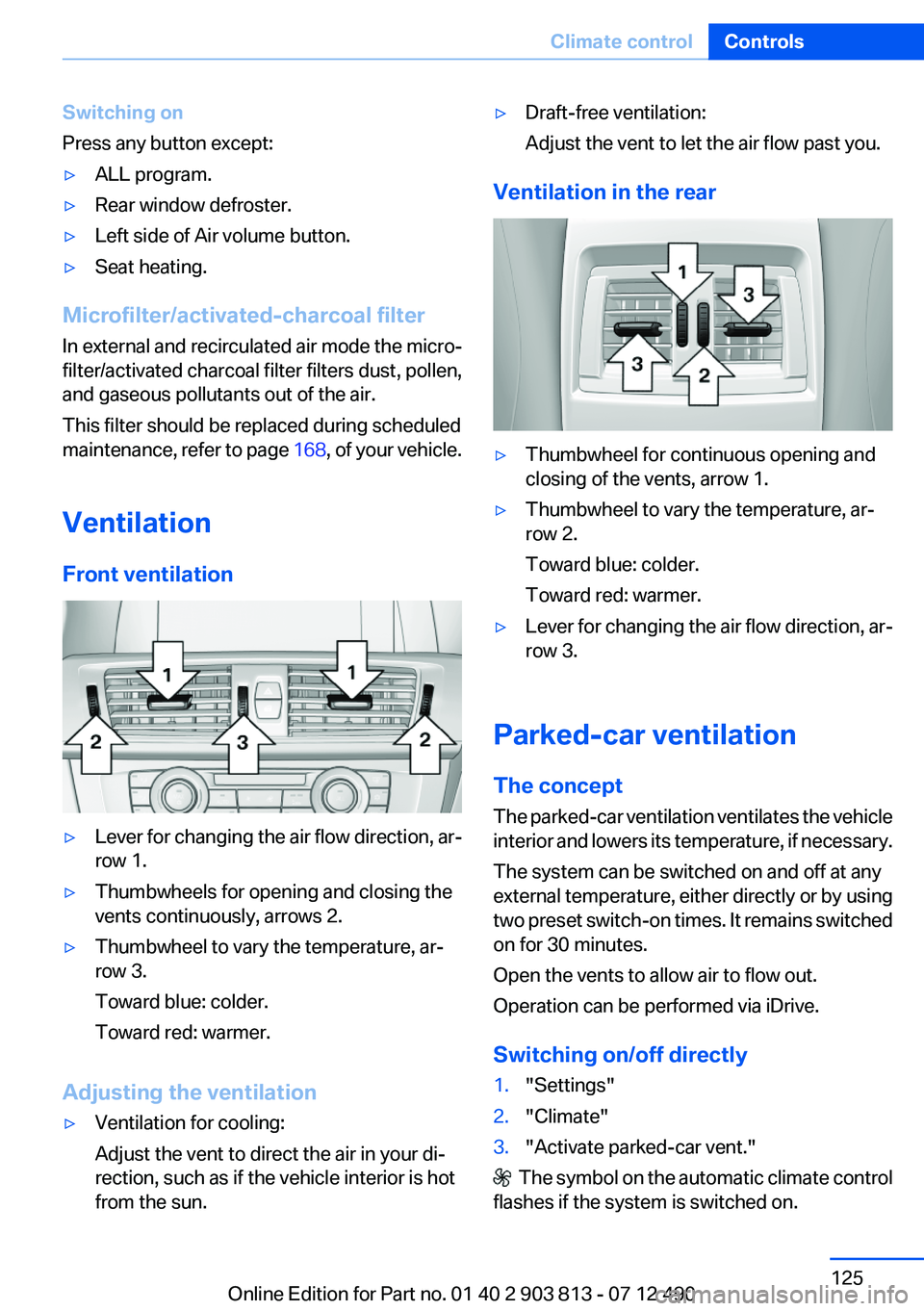
▷Lever for changing the air flow direction, ar‐
row 1.▷Thumbwheels for opening and closing the
vents continuously, arrows 2.▷Thumbwheel to vary the temperature, ar‐
row 3.
Toward blue: colder.
Toward red: warmer.
Adjusting the ventilation
▷Ventilation for cooling:
Adjust the vent to direct the air in your di‐
rection, such as if the vehicle interior is hot
from the sun.▷Draft-free ventilation:
Adjust the vent to let the air flow past you.
Ventilation in the rear
▷Thumbwheel for continuous opening and
closing of the vents, arrow 1.▷Thumbwheel to vary the temperature, ar‐
row 2.
Toward blue: colder.
Toward red: warmer.▷Lever for changing the air flow direction, ar‐
row 3.
Parked-car ventilation
The concept
The parked-car ventilation ventilates the vehicle
interior and lowers its temperature, if necessary.
The system can be switched on and off at any
external temperature, either directly or by using
two preset switch-on times. It remains switched
on for 30 minutes.
Open the vents to allow air to flow out.
Operation can be performed via iDrive.
Switching on/off directly
1."Settings"2."Climate"3."Activate parked-car vent."
The symbol on the automatic climate control
flashes if the system is switched on.
Seite 125Climate controlControls125
Online Edition for Part no. 01 40 2 903 813 - 07 12 490
Page 126 of 211
Preselecting the switch-on time1."Settings"2."Climate"3."Timer 1:" or "Timer 2:"4.Set the desired time.
Activating the switch-on time
1."Settings"2."Climate"3."Activate Timer 1" or "Activate Timer 2"
The symbol on the automatic climate control
lights up when the switch-on time is activated.
The symbol on the automatic climate control
flashes when the system has been switched on.
The system will only be switched on within the
next 24 hours. After that, it needs to reactivated.
Seite 126ControlsClimate control126
Online Edition for Part no. 01 40 2 903 813 - 07 12 490
Page 142 of 211
In this way braking efficiency will be available
when you need it.
Hills
Drive long or steep downhill gradients in the gear
in which the least braking is required. Otherwise,
the brake system may overheat, resulting in a
reduction in the brake system efficiency.
You can increase the engine's braking effect by
shifting down, going all the way to first gear, if
necessary.
Automatic transmission:
You can increase the engine's braking effect by
shifting down in the manual mode of the auto‐
matic transmission.
Avoid load on the brakes
Avoid placing excessive load on the brake
system. Light but consistent brake pressure can
lead to high temperatures, brake wear and pos‐
sibly even brake failure.◀
Do not drive in neutral
Do not drive in neutral or with the engine
stopped, as doing so disables engine braking. In
addition, steering and brake assist is unavailable
with the engine stopped.◀
Brake disc corrosion
Corrosion on the brake discs and contamination
on the brake pads are furthered by:▷Low mileage.▷Extended periods when the vehicle is not
used at all.▷Infrequent use of the brakes.
Corrosion occurs when the minimum pressure
that must be exerted by the pads during brake
applications to clean the discs is not reached.
Should corrosion form on the brake discs, the
brakes will tend to respond with a pulsating ef‐
fect that generally cannot be corrected.
Condensation under the parked vehicle
When using the automatic climate control, con‐
densation water develops that exits underneath
the vehicle.
Therefore, traces of condensed water under the
vehicle are normal.
Roof-mounted luggage rack
Note
Installation only possible with roof rack.
Roof racks are available as special accessories.
Attachment to the rack
Follow the installation instructions of the roof
rack.
Mounting
Be sure that adequate clearance is maintained
for tilting and opening the glass sunroof.
Loading
Because roof racks raise the vehicle's center of
gravity when loaded, they have a major effect on
vehicle handling and steering response.
Therefore, note the following when loading and
driving:▷Do not exceed the approved roof/axle loads
and the approved gross vehicle weight.▷Distribute the roof load uniformly.▷The roof load should not be too large in area.▷Always place the heaviest pieces on the bot‐
tom.▷Secure the roof luggage firmly, e.g., tie with
ratchet straps.▷Do not let objects project into the opening
path of the tailgate.▷Drive smoothly. Avoid sudden acceleration
and braking maneuvers. Take corners gen‐
tly.Seite 142Driving tipsThings to remember when driving142
Online Edition for Part no. 01 40 2 903 813 - 07 12 490
Page 147 of 211
The flow of fuel is interrupted while coasting.
Switch off the engine during
longer stops
Switch off the engine during longer stops, e.g.,
at traffic lights, railroad crossings or in traffic
congestion.
Auto Start/Stop function
The Auto Start/Stop function of your vehicle au‐
tomatically switches off the engine during a
stop.
If the engine is switched off and then restarted
rather than leaving the engine running con‐
stantly, fuel consumption and emissions are re‐
duced. Savings can begin within a few seconds
of switching off the engine.
Using this system can cause certain compo‐
nents of the vehicle to become worn prema‐
turely.
Iin addition, fuel consumption is also determined
by other factors, such as driving style, road con‐
ditions, maintenance or environmental factors.
Switch off any functions that
are not currently needed
Functions such as seat heating and the rear win‐
dow defroster require a lot of energy and con‐
sume additional fuel, especially in city and stop-
and-go traffic.
Therefore, switch off these functions if they are
not actually needed.
Have maintenance carried out
Have vehicles maintained regularly to achieve
optimal vehicle economy and operating life.
Have the maintenance carried out by your serv‐
ice center.Please also note the BMW Maintenance Sys‐
tem, refer to page 168.
ECO PRO
The concept
ECO PRO supports a driving style that saves on
fuel consumption. For this purpose, the engine
control and comfort functions, e. g. the climate
control output, are adjusted.
The extension of the range that is achieved as a
result can be displayed in the instrument cluster.
Activating ECO PRO Press button repeatedly until ECO PRO
is displayed in the instrument cluster.
Display in the instrument cluster
ECO PRO bonus range An extension of the range can be
achieved by an adjusted driving
style.
This may be displayed as the bo‐
nus range in the instrument clus‐
ter.
Display in the instrument display
When ECO PRO mode is activated, the display
switches to a special configuration.
Some of the displays may differ from the display
in the instrument cluster.
Configuring ECO PRO
Via the Driving Experience Switch1.Activate ECO PRO.2."Configure ECO PRO"Seite 147Saving fuelDriving tips147
Online Edition for Part no. 01 40 2 903 813 - 07 12 490
Page 148 of 211
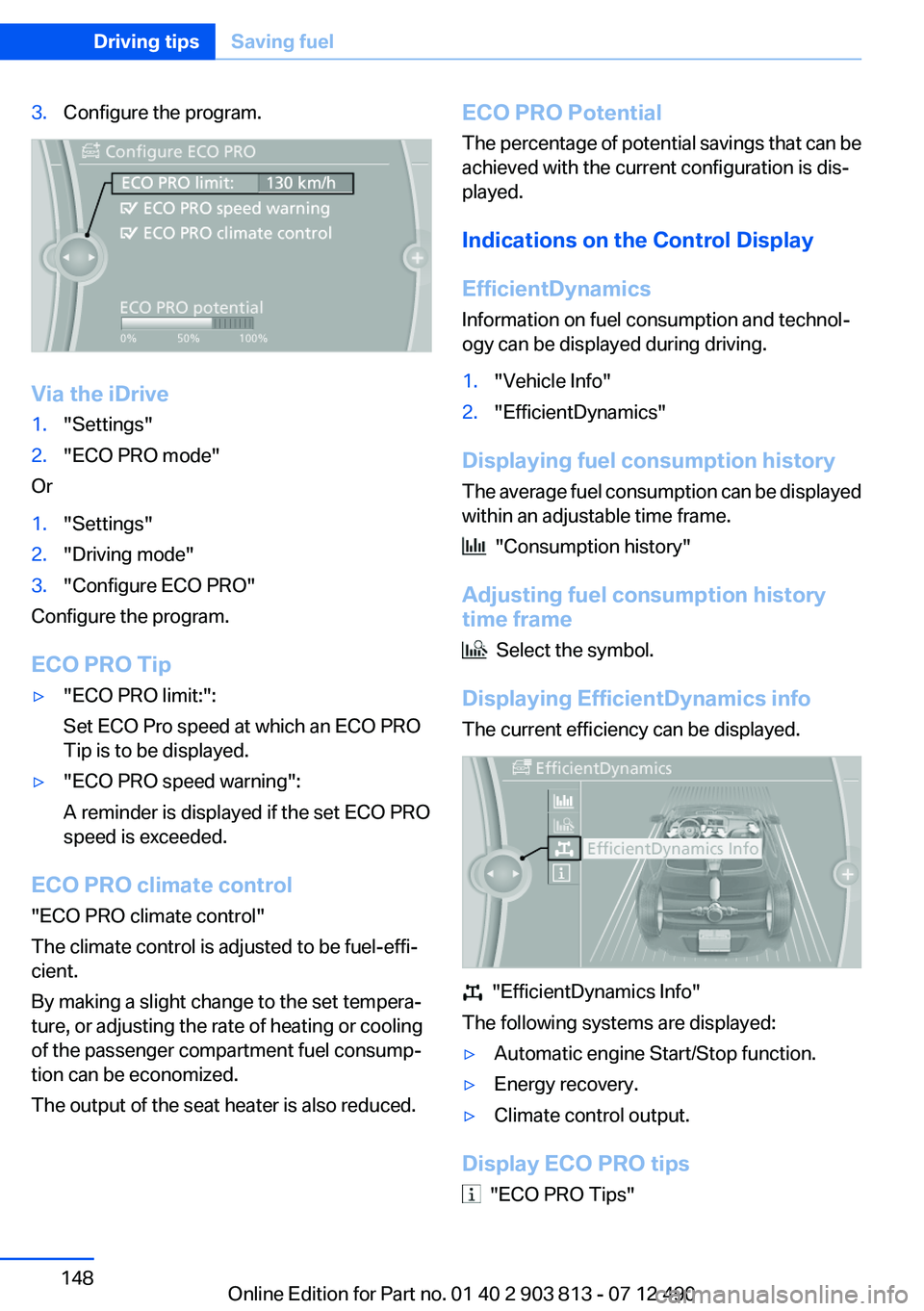
3.Configure the program.
Via the iDrive
1."Settings"2."ECO PRO mode"
Or
1."Settings"2."Driving mode"3."Configure ECO PRO"
Configure the program.
ECO PRO Tip
▷"ECO PRO limit:":
Set ECO Pro speed at which an ECO PRO
Tip is to be displayed.▷"ECO PRO speed warning":
A reminder is displayed if the set ECO PRO
speed is exceeded.
ECO PRO climate control
"ECO PRO climate control"
The climate control is adjusted to be fuel-effi‐
cient.
By making a slight change to the set tempera‐
ture, or adjusting the rate of heating or cooling
of the passenger compartment fuel consump‐
tion can be economized.
The output of the seat heater is also reduced.
ECO PRO Potential
The percentage of potential savings that can be
achieved with the current configuration is dis‐
played.
Indications on the Control Display
EfficientDynamics
Information on fuel consumption and technol‐
ogy can be displayed during driving.1."Vehicle Info"2."EfficientDynamics"
Displaying fuel consumption history
The average fuel consumption can be displayed
within an adjustable time frame.
"Consumption history"
Adjusting fuel consumption history
time frame
Select the symbol.
Displaying EfficientDynamics info
The current efficiency can be displayed.
"EfficientDynamics Info"
The following systems are displayed:
▷Automatic engine Start/Stop function.▷Energy recovery.▷Climate control output.
Display ECO PRO tips
"ECO PRO Tips"
Seite 148Driving tipsSaving fuel148
Online Edition for Part no. 01 40 2 903 813 - 07 12 490
Page 193 of 211
Short commands of the voice act. systemVehicle equipment
All standard, country-specific and optional
equipment that is offered in the model series is
described in this chapter. Therefore, equipment
is also described that is not available in a vehicle,
e. g., because of the selected optional equip‐
ment or country variant. This also applies for
safety-related functions and systems.General information
Instructions for voice activation system, refer to
page 23.
To have the available spoken instructions read
out loud: ›Voice commands‹
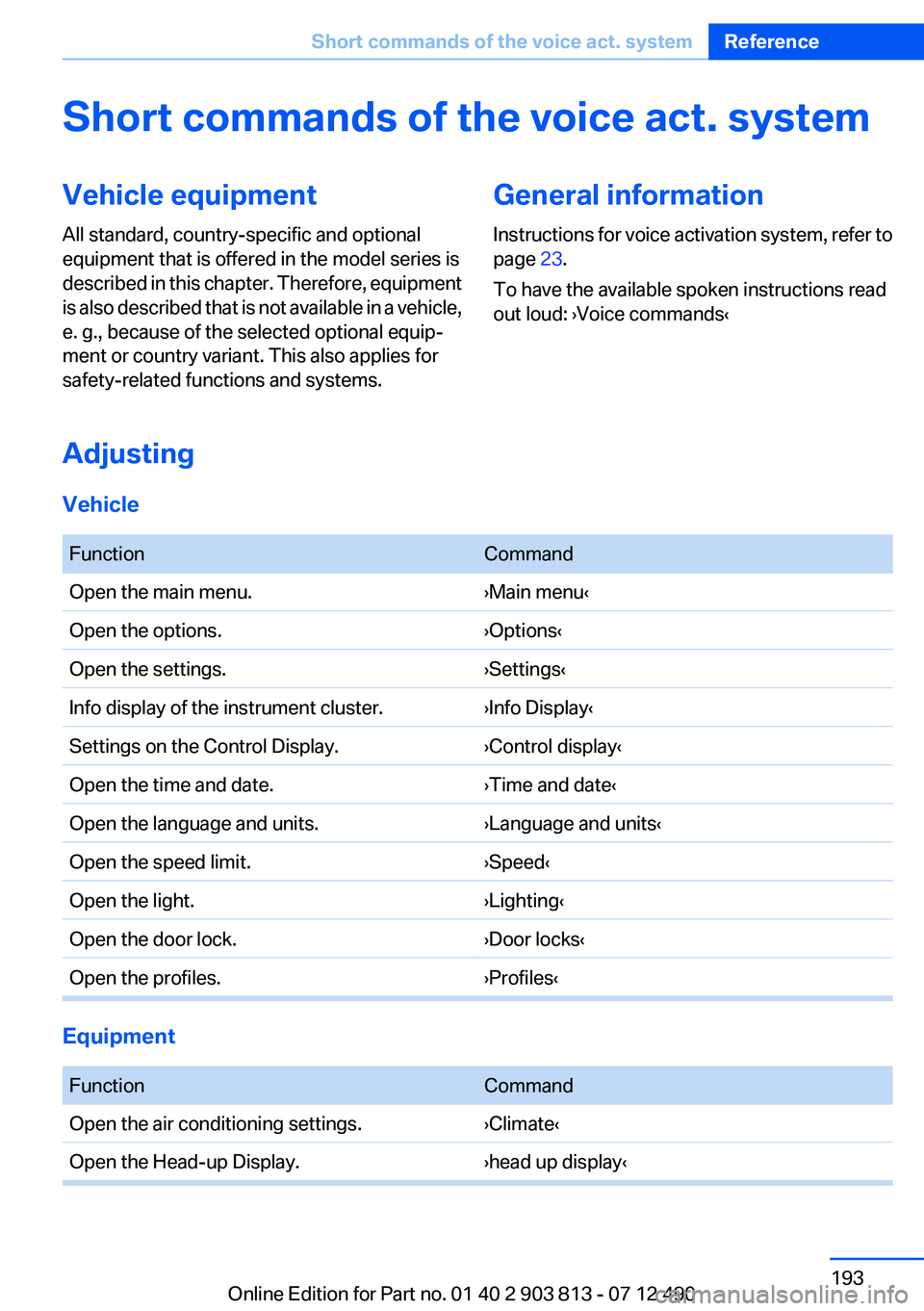
Adjusting
Vehicle
FunctionCommandOpen the main menu.›Main menu‹Open the options.›Options‹Open the settings.›Settings‹Info display of the instrument cluster.›Info Display‹Settings on the Control Display.›Control display‹Open the time and date.›Time and date‹Open the language and units.›Language and units‹Open the speed limit.›Speed‹Open the light.›Lighting‹Open the door lock.›Door locks‹Open the profiles.›Profiles‹
Equipment
FunctionCommandOpen the air conditioning settings.›Climate‹Open the Head-up Display.›head up display‹Seite 193Short commands of the voice act. systemReference193
Online Edition for Part no. 01 40 2 903 813 - 07 12 490
Page 202 of 211
Everything from A to Z
IndexA
ABS, Antilock Brake Sys‐ tem 102
Activated-charcoal filter 125
Adaptive brake lights, refer to Brake force display 101
Adaptive light control 88
Additives, oil 166
Adjustments, seats/head re‐ straints 46
After washing vehicle 184
Airbags 91
Airbags, indicator/warning light 92
Air circulation, refer to Recir‐ culated-air mode 121, 124
Air, dehumidifying, refer to Cooling function 121, 124
Air distribution, manual 120, 123
Air flow, automatic climate control 124
Air pressure, tires 155
Air vents, refer to Ventila‐ tion 125
Air volume, automatic climate control 121
Alarm system 40
Alarm, unintentional 42
All around the center con‐ sole 14
All around the headliner 15
All around the steering wheel 12
ALL program, automatic cli‐ mate control 124
All-season tires, refer to Win‐ ter tires 161
All-wheel-drive 103 Alternating-code hand-held
transmitter 128
Alternative oil types 166
Ambient light 90
Antifreeze, washer fluid 68
Antilock Brake System, ABS 102
Anti-slip control, refer to DSC 102
Approved axle load 191
Approved engine oils 166
Armrest, refer to Center arm‐ rest 135
Arrival time 82
Assistance, Roadside Assis‐ tance 179
AUTO H button, refer to Auto‐ matic Hold 64
AUTO intensity 123
Automatic car wash 183
Automatic climate con‐ trol 120
Automatic climate control with enhanced features 122
Automatic Curb Monitor 53
Automatic deactivation, front passenger airbags 93
Automatic headlamp con‐ trol 87
Automatic Hold 64
Automatic locking 37
Automatic recirculated-air control 124
Automatic tailgate 38
Automatic transmission with Steptronic 68
AUTO program, automatic cli‐ mate control 123
AUTO program, climate con‐ trol 121
AUTO program, intensity 123 Auto Start/Stop function 61
Average fuel consumption 82
Average speed 82
Axle loads, weights 191
B
Backrest curvature, refer to Lumbar support 48
Backrest, width 48
Backup camera 114
Band-aids, refer to First aid kit 179
Bar for tow-starting/tow‐ ing 181
Battery replacement, vehicle battery 176
Battery replacement, vehicle remote control 30
Battery, vehicle 176
Belts, safety belts 49
Beverage holder, cu‐ pholder 135
Blinds, sun protection 43
BMW Assist, see user's manual for Navigation, Enter‐
tainment and Communica‐
tion
BMW Homepage 6
BMW Internet page 6
BMW Maintenance Sys‐ tem 168
Bottle holder, refer to Cu‐ pholder 135
Brake assistant 102
Brake discs, breaking in 140
Brake force display 101
Brake lamps, brake force dis‐ play 101
Brake lights, adaptive 101
Brake pads, breaking in 140 Seite 202ReferenceEverything from A to Z202
Online Edition for Part no. 01 40 2 903 813 - 07 12 490
Page 203 of 211
Braking, notes 141
Breakdown assis‐ tance 178, 179
Breaking in 140
Brightness of Control Dis‐ play 85
Bulb replacement 172
Bulb replacement, front 172
Bulb replacement, rear 175
Bulbs and lamps 172
Button, Start/Stop 59
Bypassing, refer to Jump- starting 179
C
California Proposition 65 Warning 7
Camera, backup camera 114
Camera, care 186
Camera, Top View 117
Can holder, refer to Cu‐ pholder 135
Car battery 176
Car care products 184
Care, displays 186
Care, vehicle 184
Cargo 143
Cargo area 131
Cargo area, enlarging 131
Cargo area lid 37
Cargo area, storage compart‐ ments 136
Cargo cover 131
Cargo straps, securing cargo 144
Car key, refer to Remote con‐ trol 30
Carpet, care 185
Car wash 183
Catalytic converter, refer to Hot exhaust system 140
CBS Condition Based Serv‐ ice 168
CD/Multimedia, see user's manual for Navigation, Enter‐tainment and Communica‐
tion
Center armrest 135
Center console 14
Central locking system 33
Central screen, refer to Control Display 16
Changes, technical, refer to Safety 7
Changing parts 171
Changing wheels 176
Changing wheels/tires 160
Check Control 74
Children, seating position 55
Children, transporting safely 55
Child restraint fixing sys‐ tem 55
Child restraint fixing system LATCH 56
Child restraint fixing systems, mounting 55
Child safety locks 58
Child seat, mounting 55
Child seats 55
Chrome parts, care 185
Cleaning, displays 186
Climate control 120, 122
Clock 77
Closing/opening from in‐ side 37
Closing/opening via door lock 36
Closing/opening with remote control 34
Clothes hooks 136
Collision warning 108
Combination switch, refer to Turn signals 65
Combination switch, refer to Wiper system 66
Comfort Access 39
COMFORT program, Dynamic Driving Control 106
Compartments in the doors 135 Computer 81
Condensation on win‐ dows 121, 124
Condensation under the vehi‐ cle 142
Condition Based Service CBS 168
Confirmation signal 35
ConnectedDrive, see user's manual for Navigation, Enter‐
tainment and Communica‐
tion
Control Display 16
Control Display, settings 83
Controller 16, 17
Control systems, driving sta‐ bility 102
Convenient opening 34
Coolant 167
Coolant temperature 76
Cooling function 121, 124
Cooling, maximum 123
Cooling system 167
Corrosion on brake discs 142
Cruise control 109
Cruising range 77
Cupholder 135
Current fuel consumption 78
D
Damage, tires 160
Damping control, dy‐ namic 104
Data, technical 190
Date 77
Daytime running lights 87
Defrosting, refer to Windows, defrosting 121, 124
Dehumidifying, air 121, 124
Destination distance 82
Digital clock 77
Dimensions 190
Dimmable exterior mirrors 53
Dimmable interior rearview mirror 54 Seite 203Everything from A to ZReference203
Online Edition for Part no. 01 40 2 903 813 - 07 12 490