ECU BMW X3 XDRIVE 35I 2014 Owner's Manual
[x] Cancel search | Manufacturer: BMW, Model Year: 2014, Model line: X3 XDRIVE 35I, Model: BMW X3 XDRIVE 35I 2014Pages: 208, PDF Size: 5.21 MB
Page 168 of 208
Never reach into the engine compart‐
ment
Never reach into the intermediate spaces or
gaps in the engine compartment. Otherwise,
there is risk of injury, e.g., from rotating or hot
parts.◀
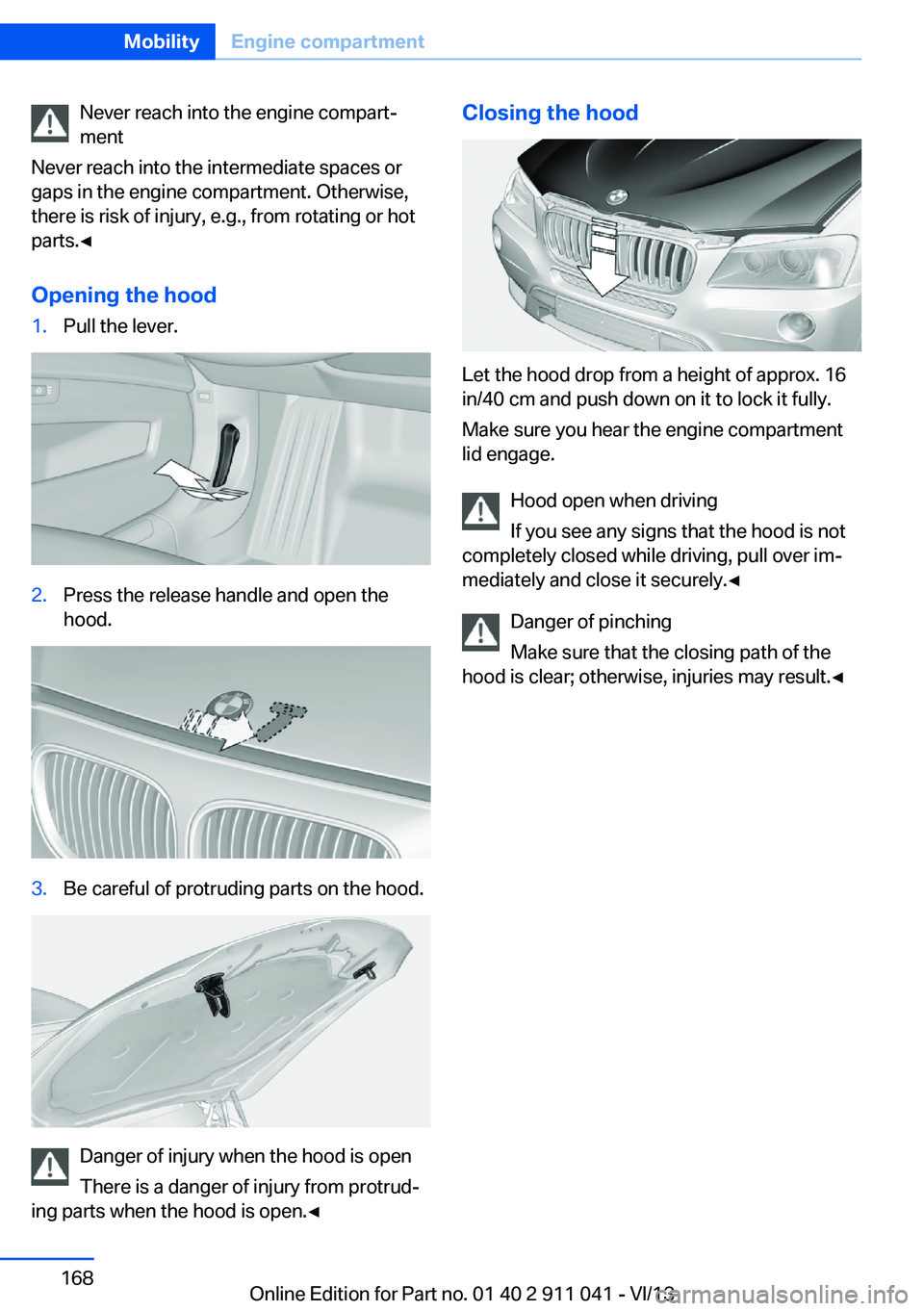
Opening the hood1.Pull the lever.2.Press the release handle and open the
hood.3.Be careful of protruding parts on the hood.
Danger of injury when the hood is open
There is a danger of injury from protrud‐
ing parts when the hood is open.◀
Closing the hood
Let the hood drop from a height of approx. 16
in/40 cm and push down on it to lock it fully.
Make sure you hear the engine compartment
lid engage.
Hood open when driving
If you see any signs that the hood is not
completely closed while driving, pull over im‐
mediately and close it securely.◀
Danger of pinching
Make sure that the closing path of the
hood is clear; otherwise, injuries may result.◀
Seite 168MobilityEngine compartment168
Online Edition for Part no. 01 40 2 911 041 - VI/13
Page 181 of 208
Disposing of old batteriesHave old batteries disposed of by your
service center or bring them to a recy‐
cling center.
Maintain the battery in an upright position for
transport and storage. Secure the battery so
that it does not tip over during transport.
Fuses Notes Replacing fuses
Never attempt to repair a blown fuse and
do not replace a defective fuse with a substi‐
tute of another color or amperage rating; this could lead to a circuit overload, ultimately re‐
sulting in a fire in the vehicle.◀
Plastic tweezers and information on the fuse
types and locations are stored in the fuse box
in the cargo area.
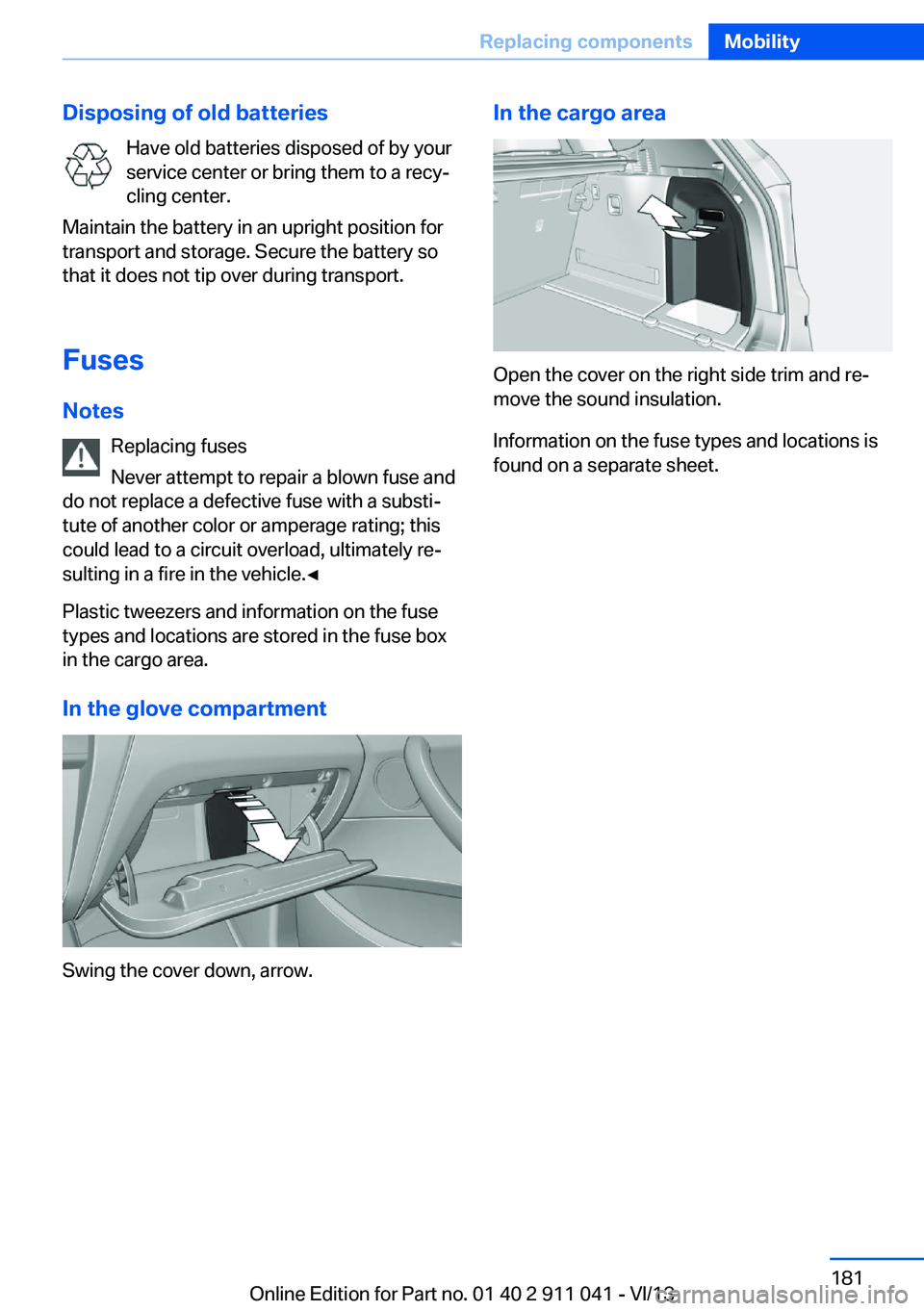
In the glove compartment
Swing the cover down, arrow.
In the cargo area
Open the cover on the right side trim and re‐
move the sound insulation.
Information on the fuse types and locations is
found on a separate sheet.
Seite 181Replacing componentsMobility181
Online Edition for Part no. 01 40 2 911 041 - VI/13
Page 185 of 208
Tow-starting and towingAutomatic transmission: transporting
your vehicle
Note
Your vehicle is not permitted to be towed.
Therefore, contact a service center in the
event of a breakdown.
Do not have the vehicle towed
Have your vehicle transported on a load‐
ing platform only; otherwise, damage may oc‐
cur.◀
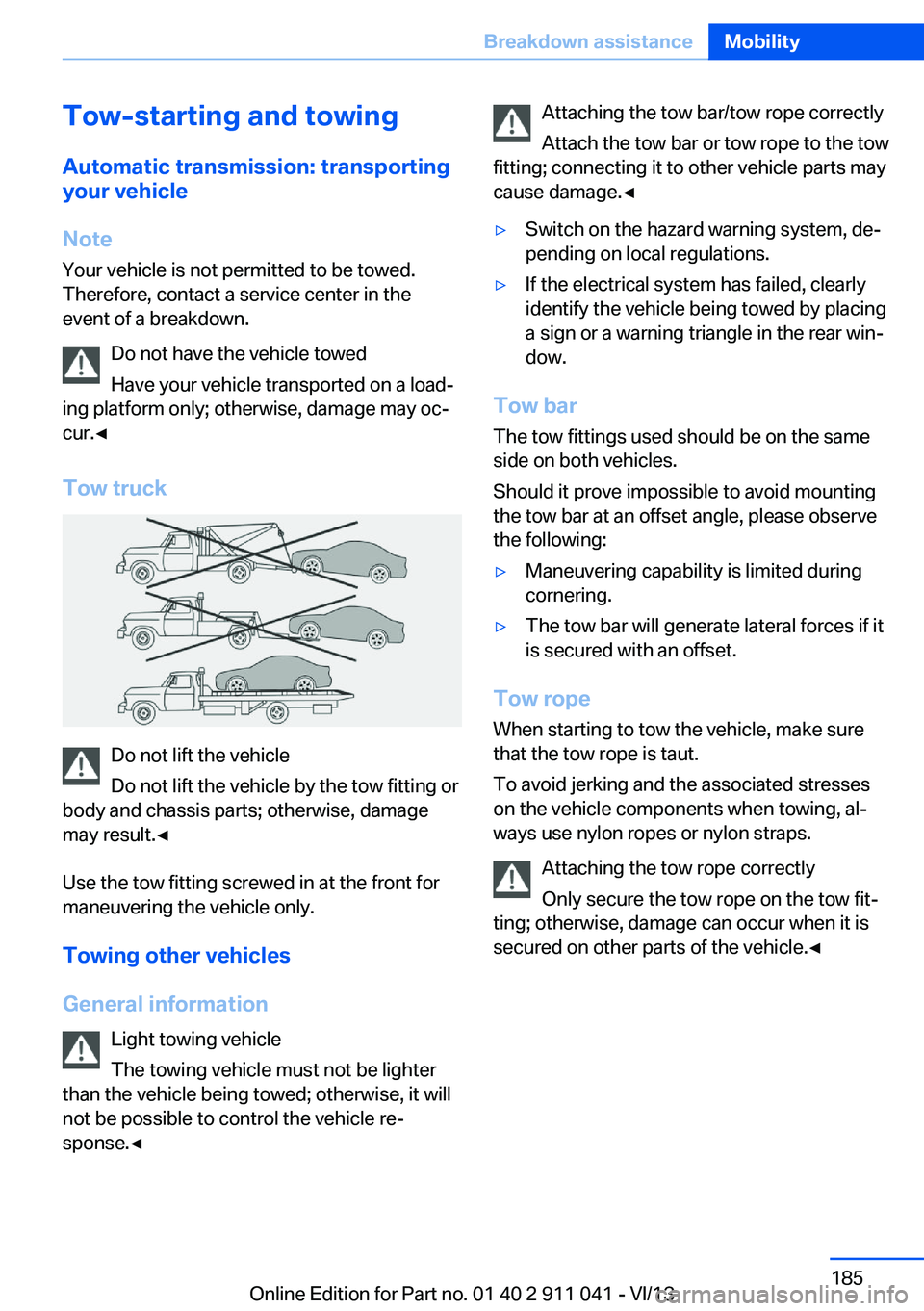
Tow truck
Do not lift the vehicle
Do not lift the vehicle by the tow fitting or
body and chassis parts; otherwise, damage
may result.◀
Use the tow fitting screwed in at the front for
maneuvering the vehicle only.
Towing other vehicles
General information Light towing vehicle
The towing vehicle must not be lighter
than the vehicle being towed; otherwise, it will
not be possible to control the vehicle re‐
sponse.◀
Attaching the tow bar/tow rope correctly
Attach the tow bar or tow rope to the tow
fitting; connecting it to other vehicle parts may
cause damage.◀▷Switch on the hazard warning system, de‐
pending on local regulations.▷If the electrical system has failed, clearly
identify the vehicle being towed by placing
a sign or a warning triangle in the rear win‐
dow.
Tow bar
The tow fittings used should be on the same
side on both vehicles.
Should it prove impossible to avoid mounting
the tow bar at an offset angle, please observe
the following:
▷Maneuvering capability is limited during
cornering.▷The tow bar will generate lateral forces if it
is secured with an offset.
Tow rope
When starting to tow the vehicle, make sure
that the tow rope is taut.
To avoid jerking and the associated stresses
on the vehicle components when towing, al‐
ways use nylon ropes or nylon straps.
Attaching the tow rope correctly
Only secure the tow rope on the tow fit‐
ting; otherwise, damage can occur when it is
secured on other parts of the vehicle.◀
Seite 185Breakdown assistanceMobility185
Online Edition for Part no. 01 40 2 911 041 - VI/13
Page 190 of 208
Carpets and floor matsNo objects in the area around the pedals
Keep floor mats, carpets, and any other
objects out of the area of motion of the pedals;
otherwise, the function of the pedals could be
impeded while driving
Do not place additional floor mats over existing
mats or other objects.
Only use floor mats that have been approved for the vehicle and can be properly fixed in
place.
Ensure that the floor mats are securely fas‐
tened again after they were removed for clean‐
ing, for example.◀
Floor mats can be removed from the passen‐
ger compartment for cleaning.
If the floor carpets are very dirty, clean with a
microfiber cloth and water or a textile cleaner.
To prevent matting of the carpet, rub back and
forth in the direction of travel only.
Sensors/cameras
To clean sensors and cameras, use a cloth moistened with a small amount of glasscleaner.
Displays/screens
Clean the displays with an antistatic microfiber
cloth.
Cleaning displays
Do not use chemical or household
cleansers.
Keep all fluids and moisture away from the
unit.
Otherwise, they could affect or damage surfa‐
ces or electrical components.
Avoid pressing too hard when cleaning and do
not use abrasive materials; otherwise, damage
can result.◀Long-term vehicle storage
Your service center can advise you on what to
consider when storing the vehicle for longer
than three months.Seite 190MobilityCare190
Online Edition for Part no. 01 40 2 911 041 - VI/13
Page 199 of 208
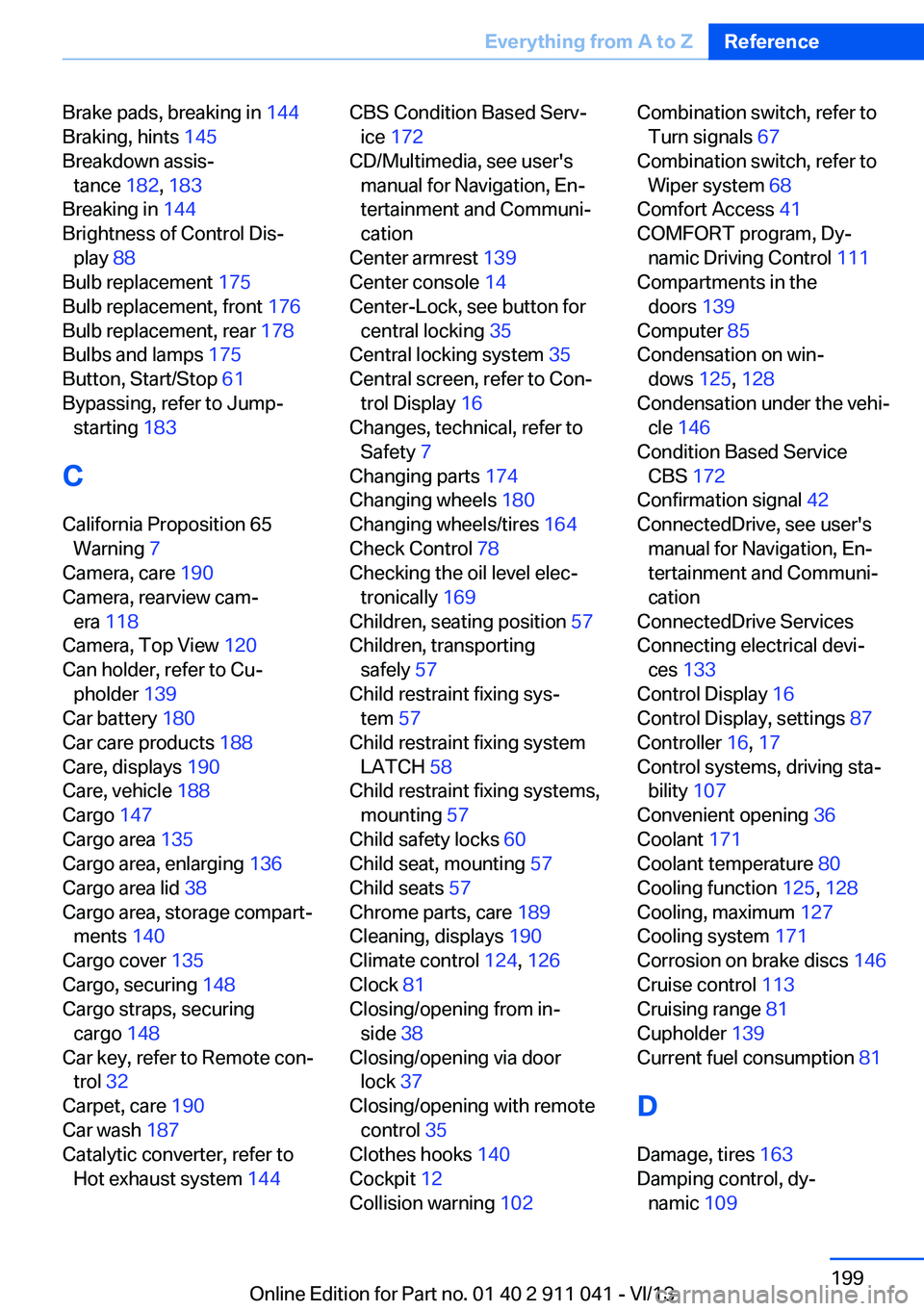
Brake pads, breaking in 144
Braking, hints 145
Breakdown assis‐ tance 182, 183
Breaking in 144
Brightness of Control Dis‐ play 88
Bulb replacement 175
Bulb replacement, front 176
Bulb replacement, rear 178
Bulbs and lamps 175
Button, Start/Stop 61
Bypassing, refer to Jump- starting 183
C
California Proposition 65 Warning 7
Camera, care 190
Camera, rearview cam‐ era 118
Camera, Top View 120
Can holder, refer to Cu‐ pholder 139
Car battery 180
Car care products 188
Care, displays 190
Care, vehicle 188
Cargo 147
Cargo area 135
Cargo area, enlarging 136
Cargo area lid 38
Cargo area, storage compart‐ ments 140
Cargo cover 135
Cargo, securing 148
Cargo straps, securing cargo 148
Car key, refer to Remote con‐ trol 32
Carpet, care 190
Car wash 187
Catalytic converter, refer to Hot exhaust system 144 CBS Condition Based Serv‐
ice 172
CD/Multimedia, see user's manual for Navigation, En‐
tertainment and Communi‐
cation
Center armrest 139
Center console 14
Center-Lock, see button for central locking 35
Central locking system 35
Central screen, refer to Con‐ trol Display 16
Changes, technical, refer to Safety 7
Changing parts 174
Changing wheels 180
Changing wheels/tires 164
Check Control 78
Checking the oil level elec‐ tronically 169
Children, seating position 57
Children, transporting safely 57
Child restraint fixing sys‐ tem 57
Child restraint fixing system LATCH 58
Child restraint fixing systems, mounting 57
Child safety locks 60
Child seat, mounting 57
Child seats 57
Chrome parts, care 189
Cleaning, displays 190
Climate control 124, 126
Clock 81
Closing/opening from in‐ side 38
Closing/opening via door lock 37
Closing/opening with remote control 35
Clothes hooks 140
Cockpit 12
Collision warning 102 Combination switch, refer to
Turn signals 67
Combination switch, refer to Wiper system 68
Comfort Access 41
COMFORT program, Dy‐ namic Driving Control 111
Compartments in the doors 139
Computer 85
Condensation on win‐ dows 125, 128
Condensation under the vehi‐ cle 146
Condition Based Service CBS 172
Confirmation signal 42
ConnectedDrive, see user's manual for Navigation, En‐
tertainment and Communi‐
cation
ConnectedDrive Services
Connecting electrical devi‐ ces 133
Control Display 16
Control Display, settings 87
Controller 16, 17
Control systems, driving sta‐ bility 107
Convenient opening 36
Coolant 171
Coolant temperature 80
Cooling function 125, 128
Cooling, maximum 127
Cooling system 171
Corrosion on brake discs 146
Cruise control 113
Cruising range 81
Cupholder 139
Current fuel consumption 81
D
Damage, tires 163
Damping control, dy‐ namic 109 Seite 199Everything from A to ZReference199
Online Edition for Part no. 01 40 2 911 041 - VI/13
Page 200 of 208
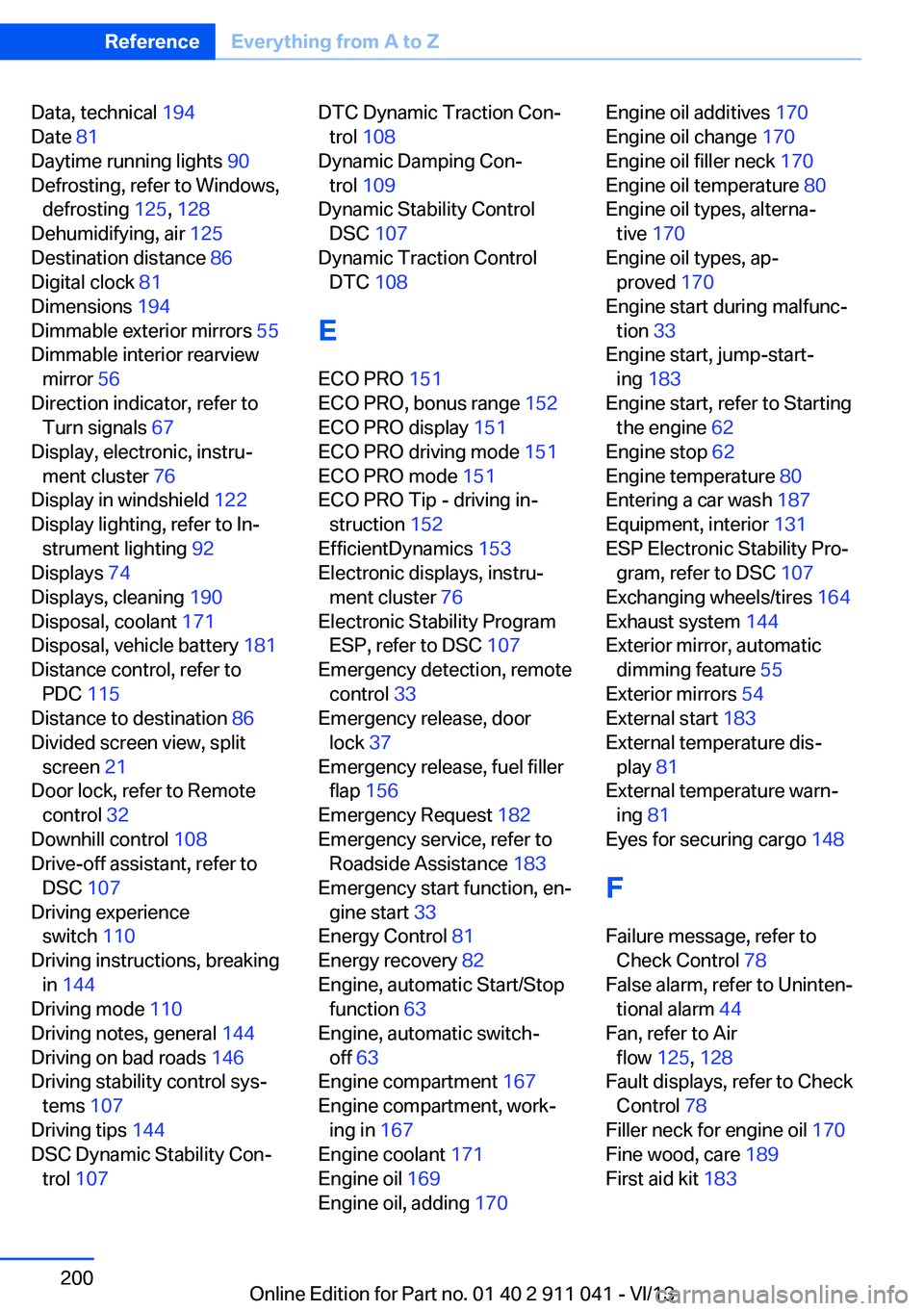
Data, technical 194
Date 81
Daytime running lights 90
Defrosting, refer to Windows, defrosting 125, 128
Dehumidifying, air 125
Destination distance 86
Digital clock 81
Dimensions 194
Dimmable exterior mirrors 55
Dimmable interior rearview mirror 56
Direction indicator, refer to Turn signals 67
Display, electronic, instru‐ ment cluster 76
Display in windshield 122
Display lighting, refer to In‐ strument lighting 92
Displays 74
Displays, cleaning 190
Disposal, coolant 171
Disposal, vehicle battery 181
Distance control, refer to PDC 115
Distance to destination 86
Divided screen view, split screen 21
Door lock, refer to Remote control 32
Downhill control 108
Drive-off assistant, refer to DSC 107
Driving experience switch 110
Driving instructions, breaking in 144
Driving mode 110
Driving notes, general 144
Driving on bad roads 146
Driving stability control sys‐ tems 107
Driving tips 144
DSC Dynamic Stability Con‐ trol 107 DTC Dynamic Traction Con‐
trol 108
Dynamic Damping Con‐ trol 109
Dynamic Stability Control DSC 107
Dynamic Traction Control DTC 108
E
ECO PRO 151
ECO PRO, bonus range 152
ECO PRO display 151
ECO PRO driving mode 151
ECO PRO mode 151
ECO PRO Tip - driving in‐ struction 152
EfficientDynamics 153
Electronic displays, instru‐ ment cluster 76
Electronic Stability Program ESP, refer to DSC 107
Emergency detection, remote control 33
Emergency release, door lock 37
Emergency release, fuel filler flap 156
Emergency Request 182
Emergency service, refer to Roadside Assistance 183
Emergency start function, en‐ gine start 33
Energy Control 81
Energy recovery 82
Engine, automatic Start/Stop function 63
Engine, automatic switch- off 63
Engine compartment 167
Engine compartment, work‐ ing in 167
Engine coolant 171
Engine oil 169
Engine oil, adding 170 Engine oil additives 170
Engine oil change 170
Engine oil filler neck 170
Engine oil temperature 80
Engine oil types, alterna‐ tive 170
Engine oil types, ap‐ proved 170
Engine start during malfunc‐ tion 33
Engine start, jump-start‐ ing 183
Engine start, refer to Starting the engine 62
Engine stop 62
Engine temperature 80
Entering a car wash 187
Equipment, interior 131
ESP Electronic Stability Pro‐ gram, refer to DSC 107
Exchanging wheels/tires 164
Exhaust system 144
Exterior mirror, automatic dimming feature 55
Exterior mirrors 54
External start 183
External temperature dis‐ play 81
External temperature warn‐ ing 81
Eyes for securing cargo 148
F
Failure message, refer to Check Control 78
False alarm, refer to Uninten‐ tional alarm 44
Fan, refer to Air flow 125, 128
Fault displays, refer to Check Control 78
Filler neck for engine oil 170
Fine wood, care 189
First aid kit 183 Seite 200ReferenceEverything from A to Z200
Online Edition for Part no. 01 40 2 911 041 - VI/13
Page 202 of 208
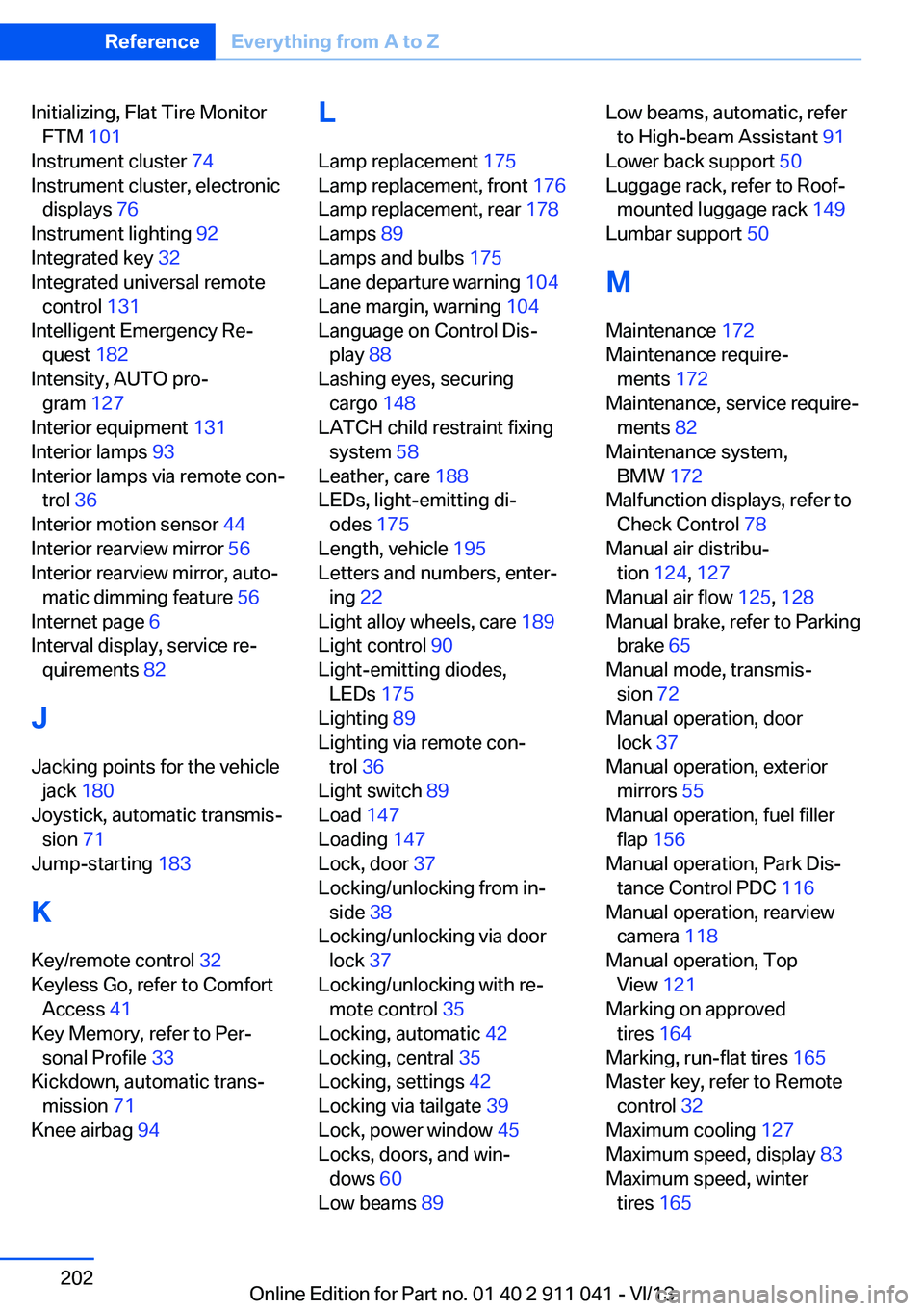
Initializing, Flat Tire MonitorFTM 101
Instrument cluster 74
Instrument cluster, electronic displays 76
Instrument lighting 92
Integrated key 32
Integrated universal remote control 131
Intelligent Emergency Re‐ quest 182
Intensity, AUTO pro‐ gram 127
Interior equipment 131
Interior lamps 93
Interior lamps via remote con‐ trol 36
Interior motion sensor 44
Interior rearview mirror 56
Interior rearview mirror, auto‐ matic dimming feature 56
Internet page 6
Interval display, service re‐ quirements 82
J Jacking points for the vehicle jack 180
Joystick, automatic transmis‐ sion 71
Jump-starting 183
K
Key/remote control 32
Keyless Go, refer to Comfort Access 41
Key Memory, refer to Per‐ sonal Profile 33
Kickdown, automatic trans‐ mission 71
Knee airbag 94 L
Lamp replacement 175
Lamp replacement, front 176
Lamp replacement, rear 178
Lamps 89
Lamps and bulbs 175
Lane departure warning 104
Lane margin, warning 104
Language on Control Dis‐ play 88
Lashing eyes, securing cargo 148
LATCH child restraint fixing system 58
Leather, care 188
LEDs, light-emitting di‐ odes 175
Length, vehicle 195
Letters and numbers, enter‐ ing 22
Light alloy wheels, care 189
Light control 90
Light-emitting diodes, LEDs 175
Lighting 89
Lighting via remote con‐ trol 36
Light switch 89
Load 147
Loading 147
Lock, door 37
Locking/unlocking from in‐ side 38
Locking/unlocking via door lock 37
Locking/unlocking with re‐ mote control 35
Locking, automatic 42
Locking, central 35
Locking, settings 42
Locking via tailgate 39
Lock, power window 45
Locks, doors, and win‐ dows 60
Low beams 89 Low beams, automatic, refer
to High-beam Assistant 91
Lower back support 50
Luggage rack, refer to Roof- mounted luggage rack 149
Lumbar support 50
M
Maintenance 172
Maintenance require‐ ments 172
Maintenance, service require‐ ments 82
Maintenance system, BMW 172
Malfunction displays, refer to Check Control 78
Manual air distribu‐ tion 124, 127
Manual air flow 125, 128
Manual brake, refer to Parking brake 65
Manual mode, transmis‐ sion 72
Manual operation, door lock 37
Manual operation, exterior mirrors 55
Manual operation, fuel filler flap 156
Manual operation, Park Dis‐ tance Control PDC 116
Manual operation, rearview camera 118
Manual operation, Top View 121
Marking on approved tires 164
Marking, run-flat tires 165
Master key, refer to Remote control 32
Maximum cooling 127
Maximum speed, display 83
Maximum speed, winter tires 165 Seite 202ReferenceEverything from A to Z202
Online Edition for Part no. 01 40 2 911 041 - VI/13
Page 204 of 208
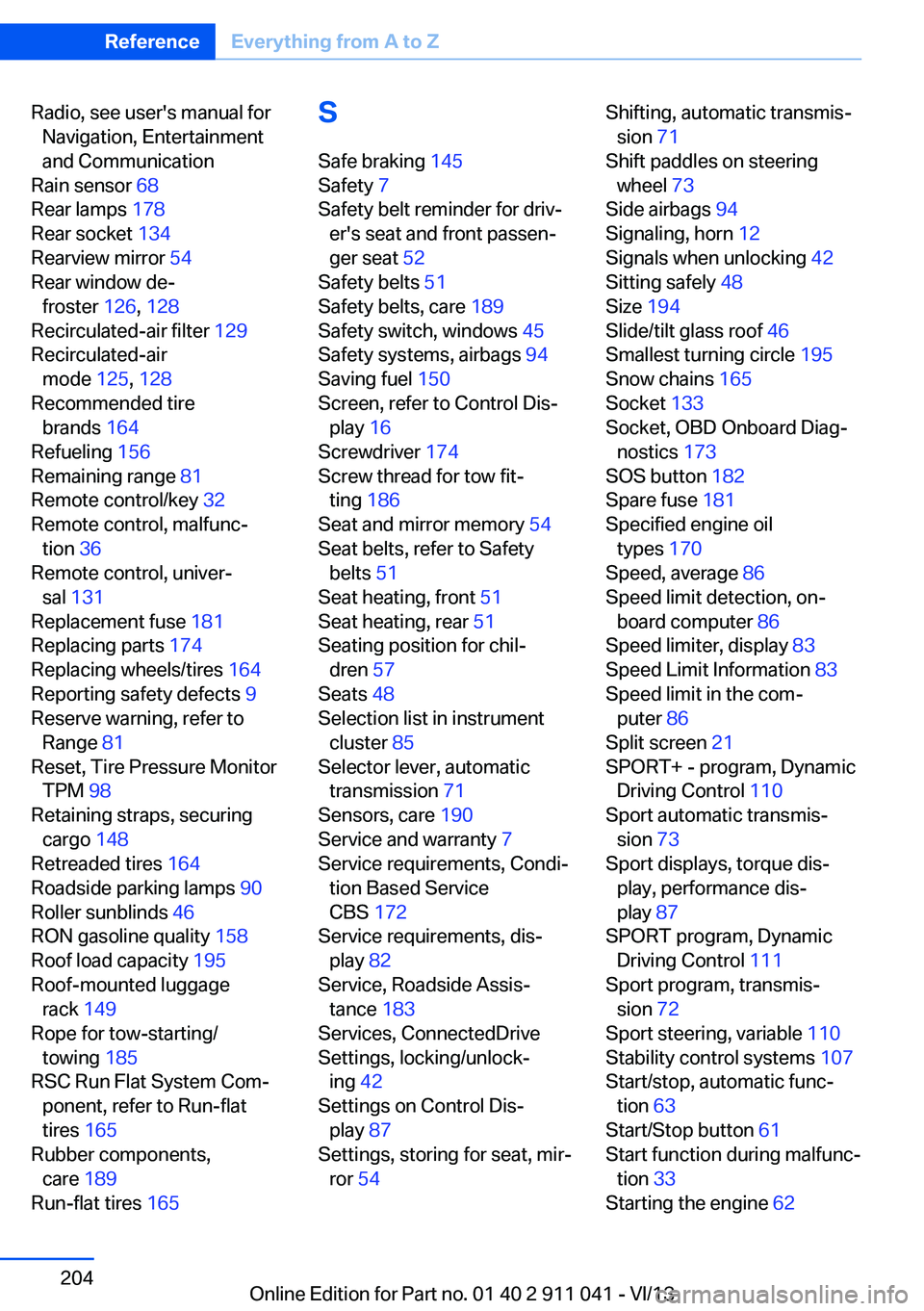
Radio, see user's manual forNavigation, Entertainment
and Communication
Rain sensor 68
Rear lamps 178
Rear socket 134
Rearview mirror 54
Rear window de‐ froster 126, 128
Recirculated-air filter 129
Recirculated-air mode 125, 128
Recommended tire brands 164
Refueling 156
Remaining range 81
Remote control/key 32
Remote control, malfunc‐ tion 36
Remote control, univer‐ sal 131
Replacement fuse 181
Replacing parts 174
Replacing wheels/tires 164
Reporting safety defects 9
Reserve warning, refer to Range 81
Reset, Tire Pressure Monitor TPM 98
Retaining straps, securing cargo 148
Retreaded tires 164
Roadside parking lamps 90
Roller sunblinds 46
RON gasoline quality 158
Roof load capacity 195
Roof-mounted luggage rack 149
Rope for tow-starting/ towing 185
RSC Run Flat System Com‐ ponent, refer to Run-flat
tires 165
Rubber components, care 189
Run-flat tires 165 S
Safe braking 145
Safety 7
Safety belt reminder for driv‐ er's seat and front passen‐
ger seat 52
Safety belts 51
Safety belts, care 189
Safety switch, windows 45
Safety systems, airbags 94
Saving fuel 150
Screen, refer to Control Dis‐ play 16
Screwdriver 174
Screw thread for tow fit‐ ting 186
Seat and mirror memory 54
Seat belts, refer to Safety belts 51
Seat heating, front 51
Seat heating, rear 51
Seating position for chil‐ dren 57
Seats 48
Selection list in instrument cluster 85
Selector lever, automatic transmission 71
Sensors, care 190
Service and warranty 7
Service requirements, Condi‐ tion Based Service
CBS 172
Service requirements, dis‐ play 82
Service, Roadside Assis‐ tance 183
Services, ConnectedDrive
Settings, locking/unlock‐ ing 42
Settings on Control Dis‐ play 87
Settings, storing for seat, mir‐ ror 54 Shifting, automatic transmis‐
sion 71
Shift paddles on steering wheel 73
Side airbags 94
Signaling, horn 12
Signals when unlocking 42
Sitting safely 48
Size 194
Slide/tilt glass roof 46
Smallest turning circle 195
Snow chains 165
Socket 133
Socket, OBD Onboard Diag‐ nostics 173
SOS button 182
Spare fuse 181
Specified engine oil types 170
Speed, average 86
Speed limit detection, on‐ board computer 86
Speed limiter, display 83
Speed Limit Information 83
Speed limit in the com‐ puter 86
Split screen 21
SPORT+ - program, Dynamic Driving Control 110
Sport automatic transmis‐ sion 73
Sport displays, torque dis‐ play, performance dis‐
play 87
SPORT program, Dynamic Driving Control 111
Sport program, transmis‐ sion 72
Sport steering, variable 110
Stability control systems 107
Start/stop, automatic func‐ tion 63
Start/Stop button 61
Start function during malfunc‐ tion 33
Starting the engine 62 Seite 204ReferenceEverything from A to Z204
Online Edition for Part no. 01 40 2 911 041 - VI/13