ad blue BMW X5 2009 E70 User Guide
[x] Cancel search | Manufacturer: BMW, Model Year: 2009, Model line: X5, Model: BMW X5 2009 E70Pages: 317, PDF Size: 9.56 MB
Page 232 of 317
Telephoning
230
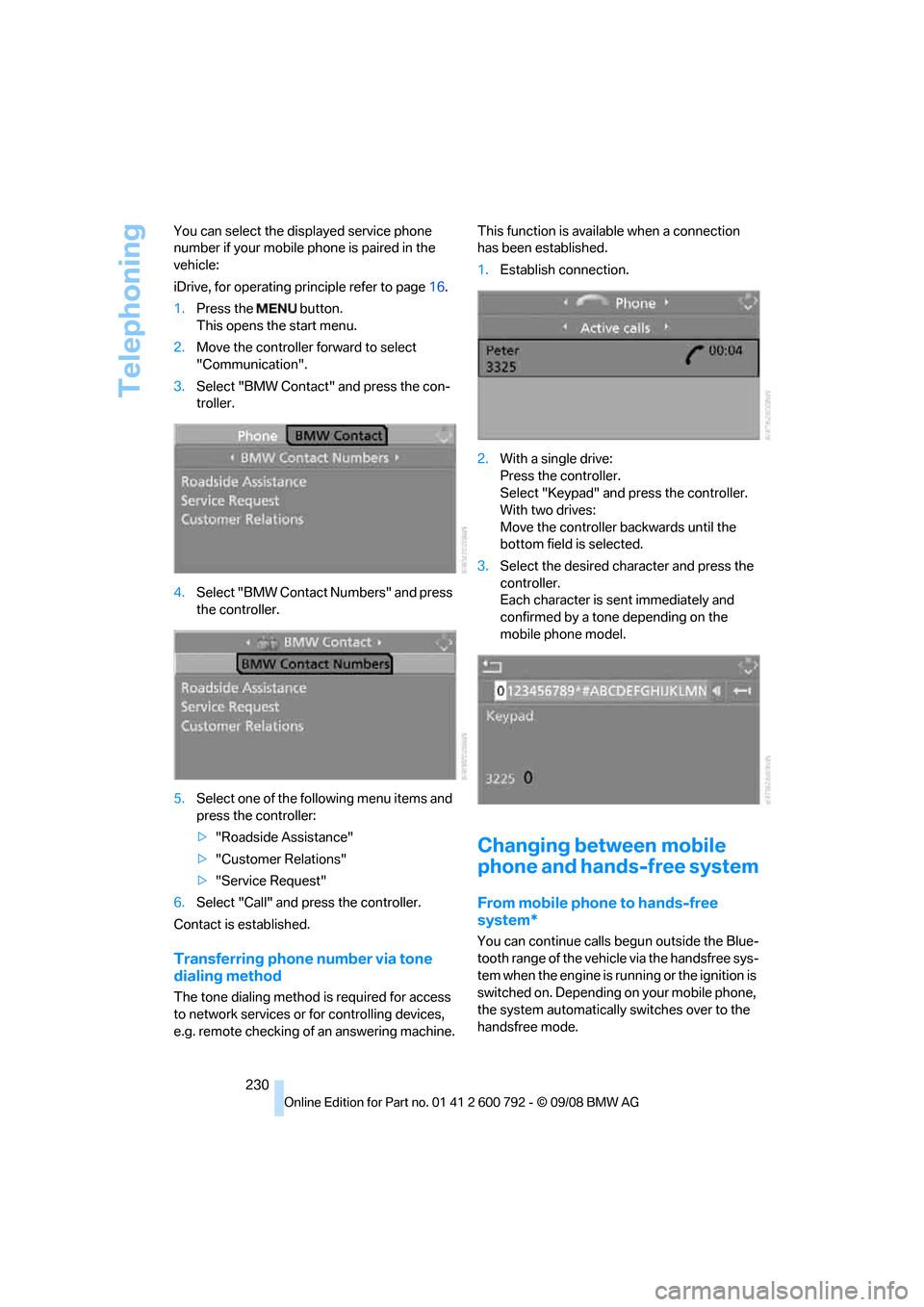
You can select the di
splayed service phone
number if your mobile phone is paired in the
vehicle:
iDrive, for operating pr inciple refer to page16.
1. Press the button.
This opens the start menu.
2. Move the controller forward to select
"Communication".
3. Select "BMW Contact" and press the con-
troller.
4. Select "BMW Contact Numbers" and press
the controller.
5. Select one of the following menu items and
press the controller:
>"Roadside Assistance"
> "Customer Relations"
> "Service Request"
6. Select "Call" and press the controller.
Contact is established.
Transferring phone number via tone
dialing method
The tone dialing method is required for access
to network services or for controlling devices,
e.g. remote checking of an answering machine. This function is ava
ilable when a connection
has been established.
1. Establish connection.
2. With a single drive:
Press the controller.
Select "Keypad" and press the controller.
With two drives:
Move the controller backwards until the
bottom field is selected.
3. Select the desired character
and press the
controller.
Each character is sent immediately and
confirmed by a tone depending on the
mobile phone model.
Changing between mobile
phone and hands-free system
From mobile phone to hands-free
system*
You can continue calls begun outside the Blue-
tooth range of the vehicle via the handsfree sys-
tem when the engine is running or the ignition is
switched on. Depending on your mobile phone,
the system automatically switches over to the
handsfree mode.
Page 233 of 317
231
Entertainment
Reference
At a glance
Controls
Driving tips
Communications
Navigation
Mobility
For mobile phones that do not automatically
switch over to the handsfree mode:
> Depending on the mobile phone model
used, the conversation can be continued via
the hands-free system if necessary. Act
according to what is shown on the mobile
phone display, refer to the operating
instructions of your mobile phone.
> Press the button above the storage
compartment.
From handsfree sy stem to mobile
phone
When you telephone via the handsfree system,
you can also continue the call via the mobile
phone if necessary, depending on the mobile
phone model. Act accord ing to what is shown
on the mobile phone display, refer to the oper-
ating instructions of your mobile phone.
As an alternative, you can deactivate the Blue-
tooth link.
Depending on your mob ile phone model, poor
reception of the wireless communications net-
work can result in the system changing from the
hands-free system to the mobile phone.
Operation by voice*
The concept
You can operate your mobile phone without
having to remove your hands from the steering
wheel. When making your entries, you will be
supported by announceme nts or questions in
many cases.
The same prerequisites as for operation via
iDrive apply, refer to page 226.
Symbols in Owner's Manual Voice commands
Activating system
1.
Briefly press the button on the steering
wheel.
An acoustic signal indicates that you can
say commands.
2. Say the command.
Ending/canceling operation by voice
Press the button on the steering wheel
or
In dialogs where text is spoken, e.g. a name
rather than a command, canceling is only possi-
ble using the button on the steering wheel.
Having possible co mmands read aloud
The system understands default commands
that must be spoken word for word.
You can have the possi ble commands spoken
by the system at any point:
Using alternative commands
There are often a number of commands to run a
function, e.g.:
The system recognizes digits from zero to nine.
You can say each digit individually or group
them into a sequence to accelerate the input.
{ ...} Say the specified commands word for
word.
{{ ...}} Indicates responses of the system.
{Cancel }.
{ Help }
{ Dial name } or {Name }.
Page 241 of 317
239
Entertainment
Reference
At a glance
Controls
Driving tips
Communications
Navigation
Mobility
Concierge service*
When you call the BMW Assist concierge ser-
vice, you can, for example, obtain information
on current events, filling stations or hotels and
have their phone numbers and addresses
transmitted. Many ho tels can be booked
directly through the BMW concierge service.
The concierge service must be enabled sepa-
rately by the BMW Assist Response Center.
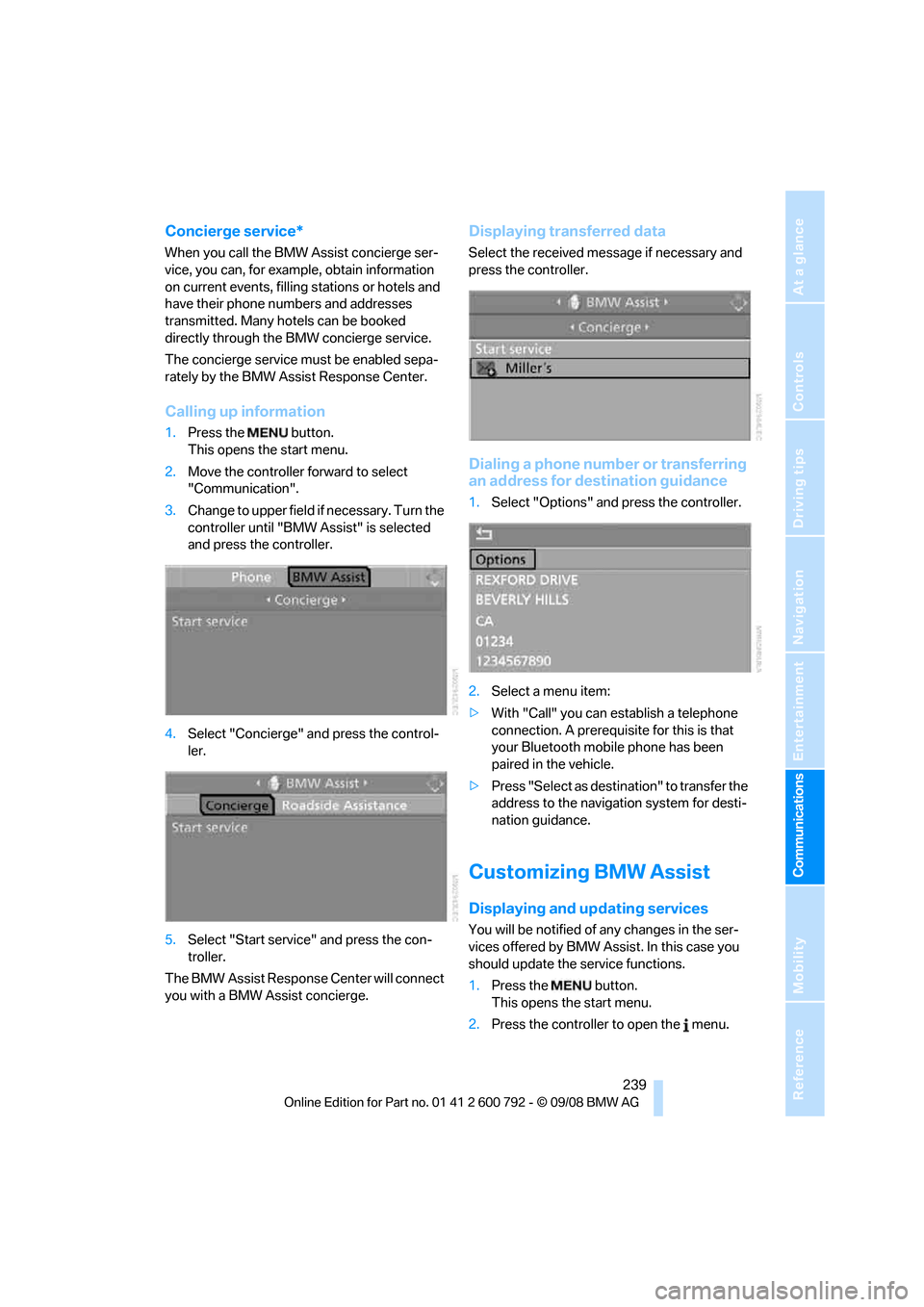
Calling up information
1. Press the button.
This opens the start menu.
2. Move the controller forward to select
"Communication".
3. Change to upper field if necessary. Turn the
controller until "BMW Assist" is selected
and press the controller.
4. Select "Concierge" an d press the control-
ler.
5. Select "Start service" and press the con-
troller.
The BMW Assist Response Center will connect
you with a BMW Assist concierge.
Displaying tr ansferred data
Select the received me ssage if necessary and
press the controller.
Dialing a phone number or transferring
an address for destination guidance
1. Select "Options" and press the controller.
2. Select a menu item:
> With "Call" you can establish a telephone
connection. A prerequisite for this is that
your Bluetooth mobile phone has been
paired in the vehicle.
> Press "Select as destination" to transfer the
address to the navigation system for desti-
nation guidance.
Customizing BMW Assist
Displaying and updating services
You will be notified of any changes in the ser-
vices offered by BMW Assist. In this case you
should update the service functions.
1. Press the button.
This opens the start menu.
2. Press the controller to open the menu.
Page 293 of 317
Reference 291
At a glance
Controls
Driving tips
Communications
Navigation
Entertainment
Mobility
Short commands of voice activation
system
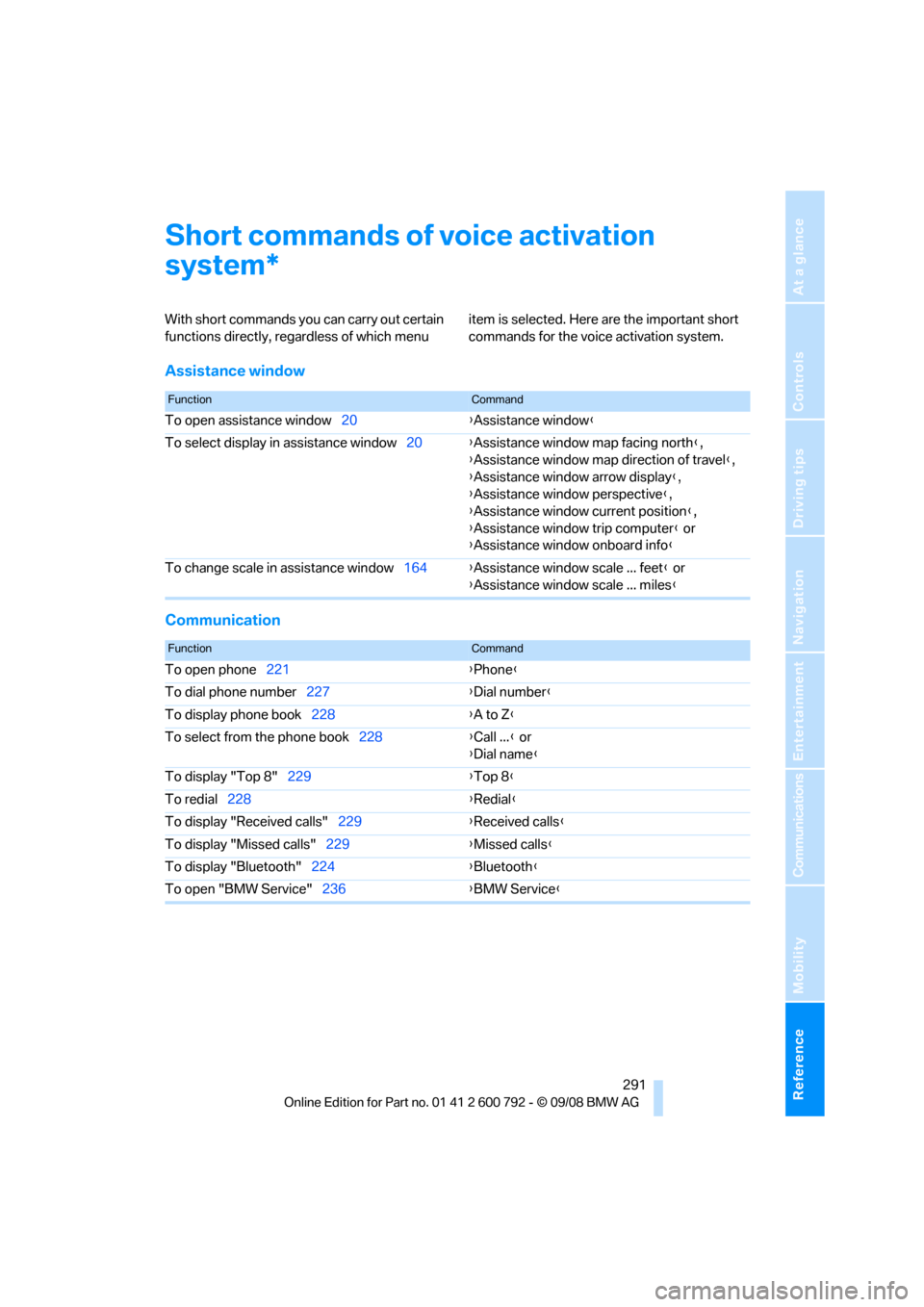
With short commands you can carry out certain
functions directly, rega rdless of which menu item is selected. Here are the important short
commands for the voice activation system.
Assistance window
Communication
*
FunctionCommand
To open assistance window
20{Assistance window }
To select display in assistance window 20{Assistance window map facing north },
{ Assistance window map direction of travel },
{ Assistance window arrow display },
{ Assistance window perspective },
{ Assistance window current position },
{ Assistance window trip computer } or
{ Assistance window onboard info }
To change scale in assistance window 164{Assistance window scale ... feet } or
{ Assistance window scale ... miles }
FunctionCommand
To open phone221 {Phone }
To dial phone number 227 {Dial number }
To display phone book 228 {A to Z }
To select from the phone book 228{Call ... } or
{ Dial name }
To display "Top 8" 229 {Top 8}
To redial 228 {Redial }
To display "Received calls" 229{Received calls }
To display "Missed calls" 229{Missed calls }
To display "Bluetooth" 224 {Bluetooth }
To open "BMW Service" 236{BMW Service }
Page 296 of 317
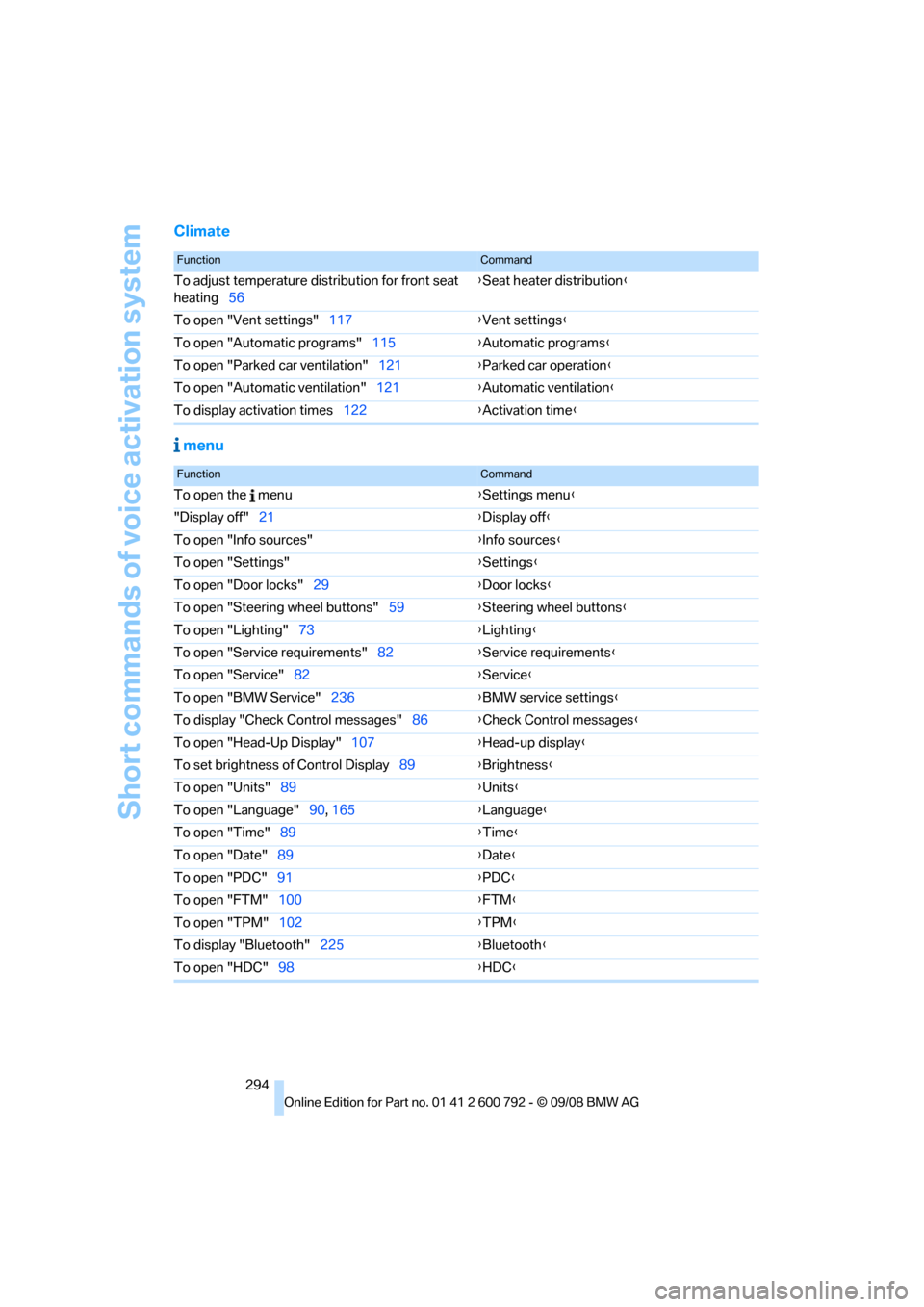
Short commands of voice activation system
294
Climate menu
FunctionCommand
To adjust temperature distribution for front seat
heating 56 {
Seat heater distribution }
To open "Vent settings" 117{Vent settings }
To open "Automatic programs" 115{Automatic programs }
To open "Parked car ventilation" 121{Parked car operation }
To open "Automatic ventilation" 121{Automatic ventilation }
To display activation times 122{Activation time }
FunctionCommand
To open the menu {Settings menu }
"Display off" 21 {Display off }
To open "Info sources" {Info sources }
To open "Settings" {Settings }
To open "Door locks" 29 {Door locks }
To open "Steering wheel buttons" 59{Steering wheel buttons }
To open "Lighting" 73 {Lighting }
To open "Service requirements" 82{Service requirements }
To open "Service" 82 {Service }
To open "BMW Service" 236{BMW service settings }
To display "Check Control messages" 86{Check Control messages }
To open "Head-Up Display" 107{Head-up display }
To set brightness of Control Display 89{Brightness }
To open "Units" 89 {Units }
To open "Language" 90, 165 {Language }
To open "Time" 89 {Time }
To open "Date" 89 {Date }
To open "PDC" 91 {PDC }
To open "FTM" 100 {FTM }
To open "TPM" 102 {TPM }
To display "Bluetooth" 225 {B
luetooth}
To open "HDC" 98 {HDC }