turn signal BMW X5 2009 E70 Owner's Guide
[x] Cancel search | Manufacturer: BMW, Model Year: 2009, Model line: X5, Model: BMW X5 2009 E70Pages: 317, PDF Size: 9.56 MB
Page 273 of 317
Mobility
271Reference
At a glance
Controls
Driving tips
Communications
Navigation
Entertainment
Sports Activity Vehicle Center or a work-
shop that works according to BMW repair
procedures with correspondingly trained
personnel.
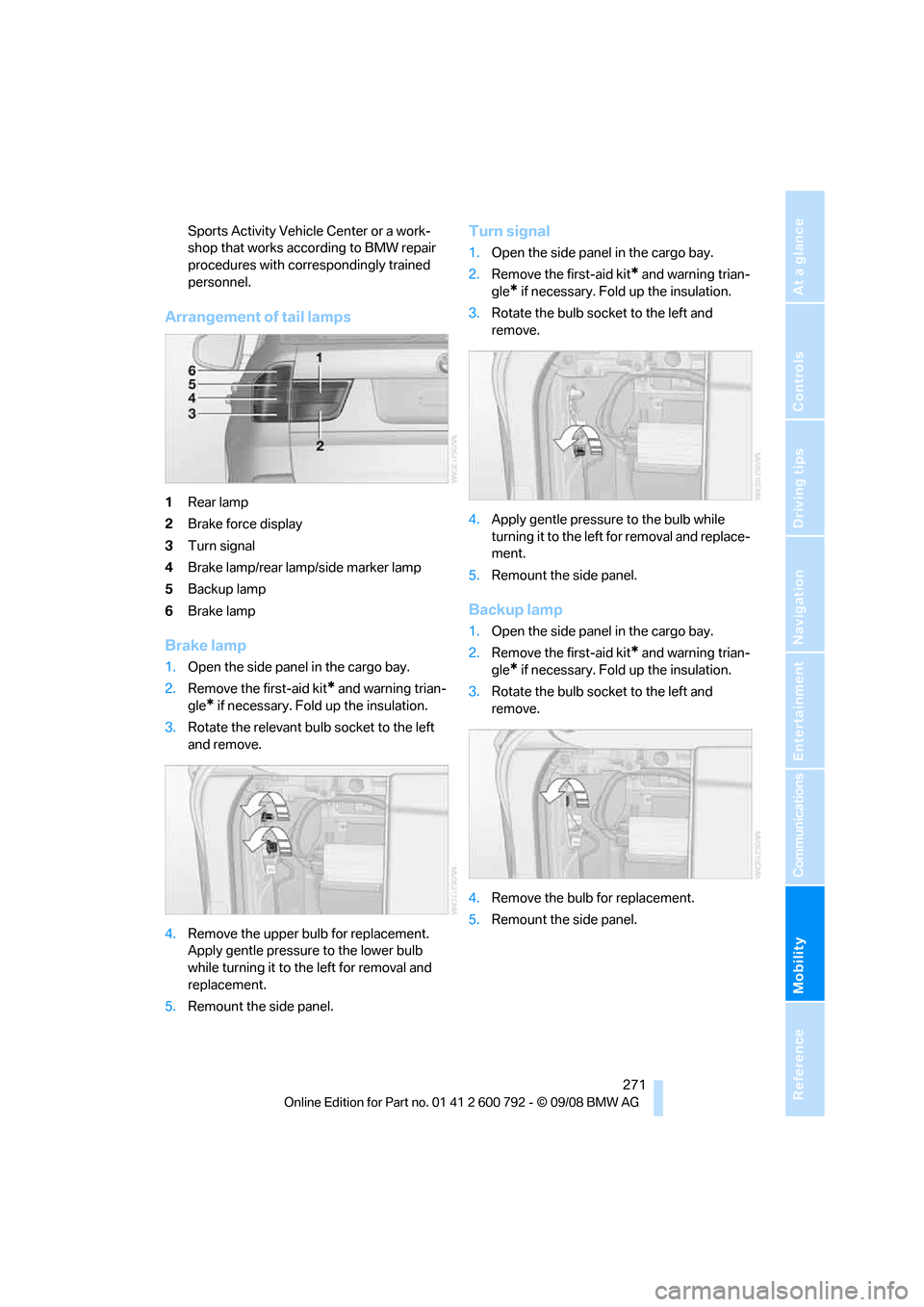
Arrangement of tail lamps
1Rear lamp
2 Brake force display
3 Turn signal
4 Brake lamp/rear lamp/side marker lamp
5 Backup lamp
6 Brake lamp
Brake lamp
1.Open the side panel in the cargo bay.
2. Remove the first-aid kit
* and warning trian-
gle
* if necessary. Fold up the insulation.
3. Rotate the relevant bulb socket to the left
and remove.
4. Remove the upper bulb for replacement.
Apply gentle pressure to the lower bulb
while turning it to the left for removal and
replacement.
5. Remount the side panel.
Turn signal
1.Open the side panel in the cargo bay.
2. Remove the first-aid kit
* and warning trian-
gle
* if necessary. Fold up the insulation.
3. Rotate the bulb sock et to the left and
remove.
4. Apply gentle pressure to the bulb while
turning it to the left for removal and replace-
ment.
5. Remount the side panel.
Backup lamp
1.Open the side panel in the cargo bay.
2. Remove the first-aid kit
* and warning trian-
gle
* if necessary. Fold up the insulation.
3. Rotate the bulb sock et to the left and
remove.
4. Remove the bulb for replacement.
5. Remount the side panel.
Page 275 of 317
Mobility
273Reference
At a glance
Controls
Driving tips
Communications
Navigation
Entertainment
the fog lamps, provided traffic laws in your area
do not prohibit this.
Have work on the xenon light unit includ-
ing changing the bulb carried out only by
your BMW Sports Activity Vehicle Center or a
workshop that works according to BMW repair
procedures with corres pondingly trained per-
sonnel. Due to the high voltage present in the
system, there is a danger of fatal injuries when
work is carried out improperly. <
Parking lamps and roadside parking
lamps, daytime driving lamps
35-Watt bulb, H8
The bulb is pressurized. Therefore, wear
safety glasses and protective gloves.
Otherwise there is a dang er of injuries if the
bulb is accidentally damaged during replace-
ment. <
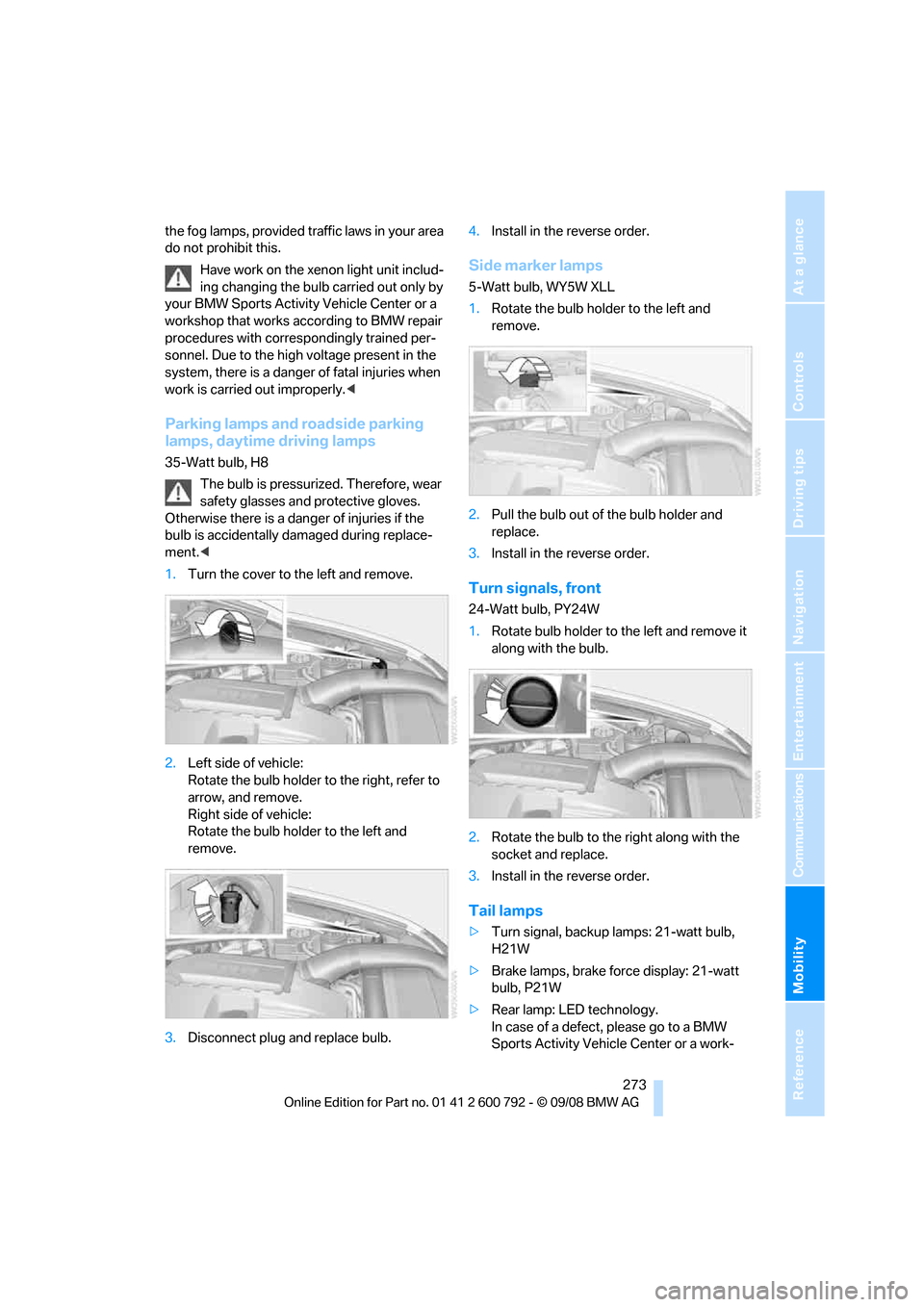
1. Turn the cover to th e left and remove.
2. Left side of vehicle:
Rotate the bulb holder to the right, refer to
arrow, and remove.
Right side of vehicle:
Rotate the bulb hold er to the left and
remove.
3. Disconnect plug and replace bulb. 4.
Install in the reverse order.
Side marker lamps
5-Watt bulb, WY5W XLL
1.Rotate the bulb hold er to the left and
remove.
2. Pull the bulb out of the bulb holder and
replace.
3. Install in the reverse order.
Turn signals, front
24-Watt bulb, PY24W
1.Rotate bulb holder to the left and remove it
along with the bulb.
2. Rotate the bulb to th e right along with the
socket and replace.
3. Install in the reverse order.
Tail lamps
>Turn signal, backup lamps: 21-watt bulb,
H21W
> Brake lamps, brake force display: 21-watt
bulb, P21W
> Rear lamp: LED technology.
In case of a defect, please go to a BMW
Sports Activity Vehicle Center or a work-
Page 276 of 317
Replacing components
274
shop that works according to BMW repair
procedures with correspondingly trained
personnel.
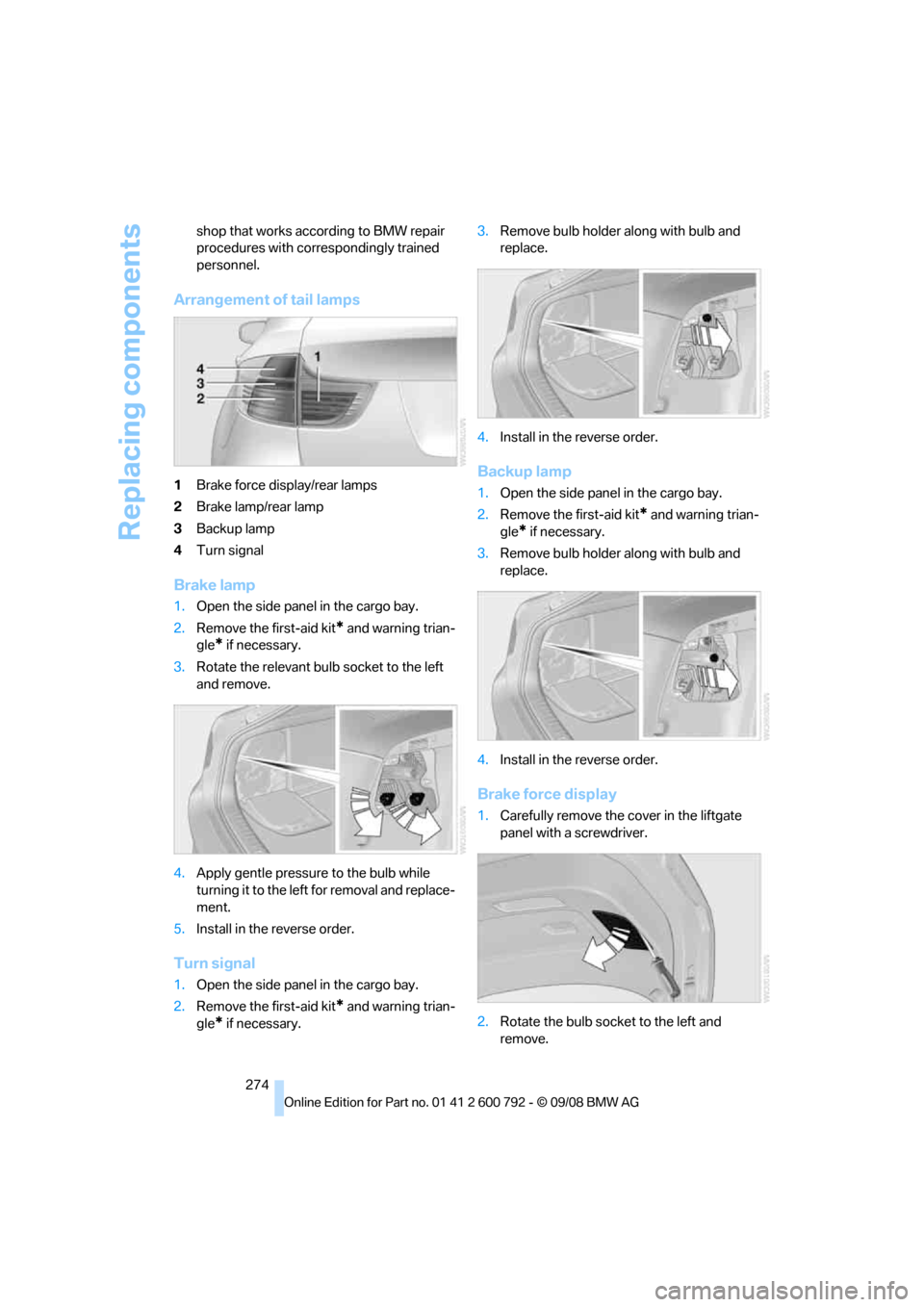
Arrangement of
tail lamps
1Brake force display/rear lamps
2 Brake lamp/rear lamp
3 Backup lamp
4 Turn signal
Brake lamp
1.Open the side panel in the cargo bay.
2. Remove the first-aid kit
* and warning trian-
gle
* if necessary.
3. Rotate the relevant bulb socket to the left
and remove.
4. Apply gentle pressure to the bulb while
turning it to the left for removal and replace-
ment.
5. Install in the reverse order.
Turn signal
1.Open the side panel in the cargo bay.
2. Remove the first-aid kit
* and warning trian-
gle
* if necessary. 3.
Remove bulb holder along with bulb and
replace.
4. Install in the reverse order.
Backup lamp
1.Open the side panel in the cargo bay.
2. Remove the first-aid kit
* and warning trian-
gle
* if necessary.
3. Remove bulb holder along with bulb and
replace.
4. Install in the reverse order.
Brake force display
1.Carefully remove the cover in the liftgate
panel with a screwdriver.
2. Rotate the bulb socket to the left and
remove.
Page 284 of 317
Giving and receiving assistance
282
Being towed
Make sure that the ignition is switched on,
refer to page65, otherwise the low
beams, tail lamps, turn signals and windshield
wipers would not be available. When the engine
is stopped, there is no power assist. This then
requires increased effort for braking and steer-
ing. Active steering is deactivated and larger
steering wheel movements are required.<
Switch on the hazard wa rning flashers depend-
ing on the local regulations. If the electrical sys-
tem fails, mark the vehicle to be towed, e.g. with
a sign or warning triangle in the rear window.
Before towing, manua lly unlock the trans-
mission lock, refer to page 72; failure to
do so can result in damage to the transmis-
sion. <
Do not exceed a towing speed of 45 mph/
70 km/h and a towing distance of
90 miles/150 km, otherwise the automatic
transmission may be damaged. <
Towing methods
Do not lift vehicle by tow fitting or body
and chassis parts, otherwise damage may
result. <
In some countries, towi ng with tow bars or
ropes in public traffic is not permitted. Familiar-
ize yourself with the regu lations on towing in the
respective country.
With tow bar
The towing vehicle may not be lighter
than the vehicle to be towed, otherwise it
will not be possible to reliably control vehicle
response. <
The tow fittings used sh ould be on the same
side on both vehicles. Should it prove impossi-
ble to avoid mounting the tow bar at an offset
angle, observe the following:
> Clearance and maneuvering capability will
be sharply limited during cornering.
> When mounted at an angle, the tow bar will
exert lateral forces, tending to push the
vehicle sideways. Only attach the tow bar to the tow fittings,
as attachment to other vehicle parts can
lead to damage. <
With tow rope
When starting off in the towing vehicle, make
sure that the tow rope is taut.
To avoid jerking and the associated
stresses on vehicle components when
towing, always use nylon ropes or nylon straps.
Only attach tow ropes to the tow fittings, as
attachment to other vehi cle parts can lead to
damage. <
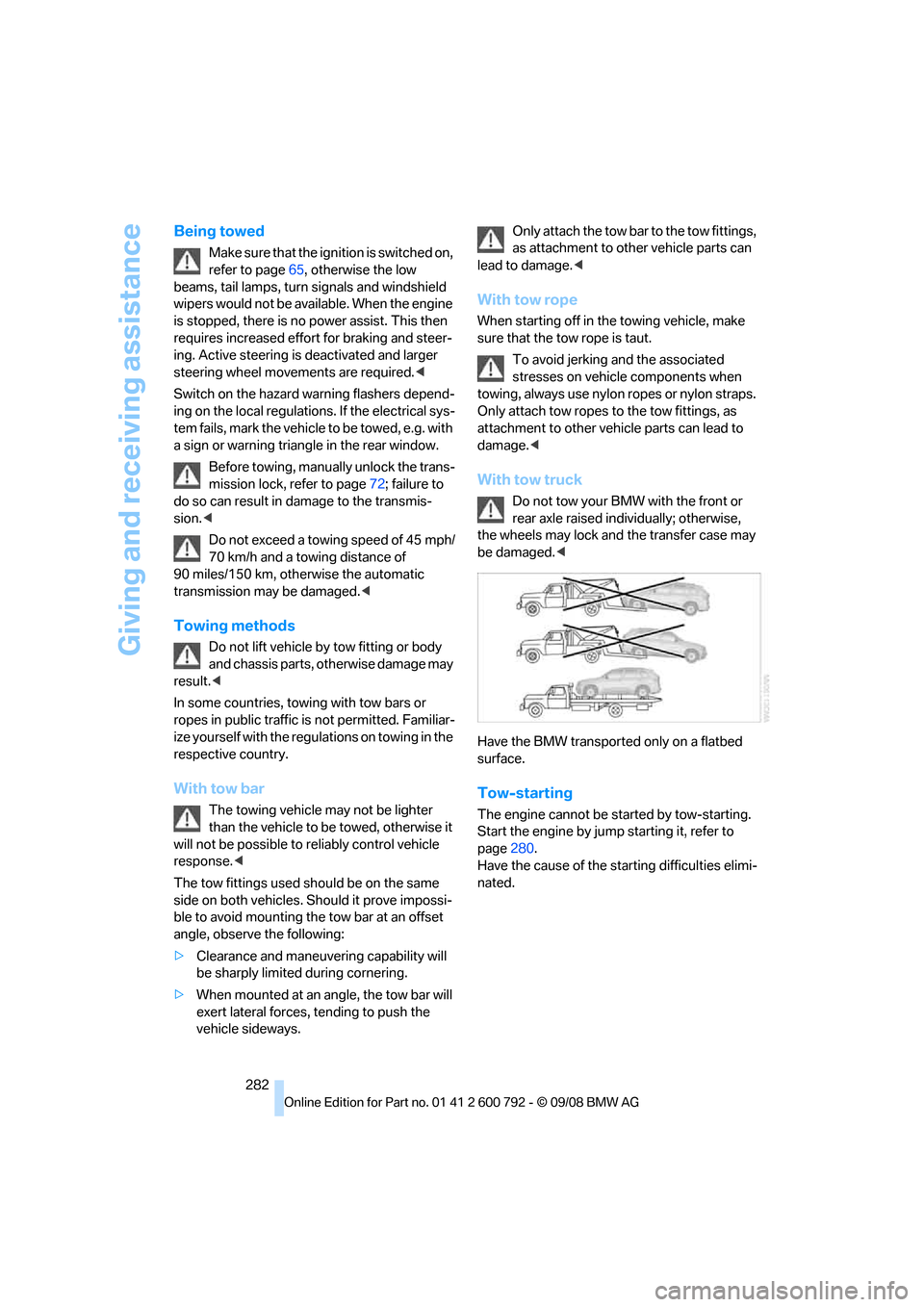
With tow truck
Do not tow your BMW with the front or
rear axle raised indi vidually; otherwise,
the wheels may lock and the transfer case may
be damaged. <
Have the BMW transported only on a flatbed
surface.
Tow-starting
The engine cannot be started by tow-starting.
Start the engine by jump starting it, refer to
page 280.
Have the cause of the st arting difficulties elimi-
nated.
Page 303 of 317
Reference 301
At a glance
Controls
Driving tips
Communications
Navigation
Entertainment
Mobility
Digital Versatile Disc, refer to
– DVD changer193
– Player for navigation DVD 174
Dimensions 287
Directional indicators, refer to Turn signals 73
Direction announcements,
refer to Voice
instructions 165
Direction instructions, refer to
Voice instructions 165
Directory for navigation, refer
to Address book 158
Displacement, refer to Engine data 286
Display, refer to iDrive 16
Displaying images 212
Display lighting, refer to
Instrument lighting 113
"Display off" 21
Displays, refer to Instrument
panel 12
"Display settings" 89,107
Displays on the windshield,
refer to Head-Up
Display 107
Disposal
– battery of remote control with comfort access 41
– remote control battery 206
– vehicle battery 277
Distance, refer to Computer 80
"Distance to dest." 81
Distance to destination, refer to Computer 80
Distance warning, refer to PDC Park Distance
Control 91
Door entry lighting 113
Door key, refer to Keys/ remote control 28
Door lock 32
Door locking, confirmation signals 31 "Door locks"
30,31,83
Doors
– manual operation 32
– remote control 29
DOT Quality Grades 254
Downhill driving assistance, refer to HDC 98
Draft-free ventilation 118
Drinks holder, refer to Cup holders 127
Drive for navigation DVDs 174
"Driver's door only" 30
Driver's seat, calibrating 55
"Driver's seat climate" 56
Dr
iving lamps, refer to Parking
lamps/low beams 110
Driving on poor roads 144
Driving route, refer to Displaying route 163
Driving stability control systems 96
Driving through water 140
Driving tips, refer to General driving notes 138
Dry air, refer to Cooling
function 117
Drying the air, refer to Cooling function 117
DSC Dynamic Stability Control 96
– indicator lamp 13,97
DTC Dynamic Traction Control 97
– activating 97
– indicator lamp 97
"DVD"
– for DVD system in rear 206
– in DVD changer 194
DVD
– DVD changer 193
– DVD system in rear 204
– player for navigation DVD 174 DVD changer
193
– adjusting brightness 196
– adjusting contrast 196
– audio and video playback 194
– audio playback 197
– chapter selection 198
– controls 193
– DVD audio content 198
– DVD control 194
– DVD country codes 194
– DVD-specific menu 197
– fast forward 195
– filling 193
– installation position 193
– malfunctions 194
– removing DVDs 193
– reverse 195
– selecting audio
language 198
– selecting language 196
– selecting subtitles 196
– selecting title 197
– selecting viewing angle 197
– skip chapter 195
– tone control 195,198
– zoom 196
"DVD form
at"
– for DVD system in rear 209
– in DVD changer 196
DVD for navigation 148
DVD system in rear 204
– CD/DVD player 205
– connecting headphones 205
– controls 204
– displaying images from CD/ DVD 212
– DVD country codes 206
– external device 215
– information on CD/DVD
player 214
– playing audio tracks from CD/DVD 210
– playing video from CD/ DVD 206
– remote control 205
– switching on/off 206
Page 308 of 317
Everything from A to Z
306
Malfunction warnings, refer to
Check Control 85
Manual air distribution 116
Manual BMW Teleservice call 237
"Manual" in radio mode 179
Manually releasing transmission lock 72
Manual mode, automatic transmission with
Steptronic 71
Manual operation
– door lock 32
– driver's door 32
– fuel filler door 244
– transmission lock, automatic
transmission 72
Map
– changing scale 164
– destination entry 155
"Map direction of travel" 164
"Map facing north" 164
Map facing north 164
Master key, refer to Keys/ remote control 28
Maximum cooling 117
Maximum speed
– for winter tires 257
– with compact wheel 277
Memory, refer to Seat, mirror and steering wheel
memory 50
"Menu"
– for DVD system in
rear 207,209
– in DVD changer 195,197
Menus, refer to iDrive 16
Message list for traffic information 167
Microfilter 119
Microphone
– for mobile phone 14
– for telephone 14
– for voice activation system 14
Mirror dimming feature 58Mirrors
57
– automatic curb monitor 58
– exterior mirrors 57
– folding in and out 57
– heating 58
– interior rearview mirror 58
– memory, refer to Seat, mirror and steering wheel
memory 50
"Missed calls" 228
Missed calls 229
Mobile phone
– accepted calls 229
– adjusting volume 226
– calling 227
– e
nding call 227
– installation location, refer to Center armrest, front 127
– missed calls 229
– operation via iDrive 226
– redialing 229
– refer to separate operating
instructions
– Top 8 229
– touch tone dialing 230
Monitor, refer to iDrive 16
Monitoring tire pressure, refer to FTM Flat Tire
Monitor 100
"Monitor on / off" 59
MP3, refer to Compressed
audio files 187
Multifunction steering wheel, refer to Buttons on steering
wheel 11
Multifunction switch
– refer to Turn signals/
headlamp flasher/high
beams 73
– refer to Washer/wiper
system 74
Music track, refer to Tracks 188
"Mute on / off" 59
N
"Navigation"80,156
Navigation destination
– entering manually 151,153
– home address 160
– selecting via map 155
Navigation drive, installation
location 148
Navigation DVD 148
– player 174
Navigation instructions, refer to Switching voice
instructions on/off 165
Navigation system 148
– address book 158
– changing route 166
– destination entry 150
– destination guidance in
assistance window 148
– destination list 157
– displaying current
position 169
– displaying route 163
– ending/continuing
destination guidance 162
– entering a destination manually 151,153
– last destinations 157
– navigation DVD 148
– opening 150
– route list 164
– searching for a special destination 156
– selecting destination using information 156
– selecting destination via
map 155
– selecting route criteria 160
– starting destination
guidance 162
– switching off, refer to Ending/continuing
destination guidance 162
– voice instructions 165
– volume adjustment 166
"Navigation voice instructions" 59
Page 314 of 317
Everything from A to Z
312
3rd row seats
54
Tightening torque of the lug
bolts, refer to After
mounting 277
Tilt alarm sensor, switching
off 39
Tilting down passenger-side exterior mirror 58
"Time / Date" 88
"Time format" 89
Timer, refer to Preselecting
activation times 122
"Timer 2" for parked-car
ventilation 122
"Timer 1" for parked-car ventilation 122
Tire inflation pressures 249
– checking 249
– monitoring, refer to Flat Tire
Monitor 100
Tire Pressure Monitor TPM 101
Tire Quality Grading 254
Tires
– age 254
– air loss 101,103
– breaking-in 138
– changing 256
– condition 255
– damage 255
– flat tire, refer to Changing
wheels 275
– inflation pressure 249
– inflation pressure
monitoring, refer to FTM
Flat Tire Monitor 100
– new wheels and tires 256
– pressure loss 101,103
– pressure monitoring, refer to TPM Tire Pressure
Monitor 101
– replacing 275
– retreaded tires 256
– run-flat tires 256
– size 254
– tread 255
– wear indicators 255
– wheel/tire combination 256
– winter tires 257 "Title" for DVD system in
rear 209
TMC station, refer to Traffic information 166
Tone in audio mode
– adjusting 175
– middle setting 177
"Tone" in DVD system in
rear 209
Tone on locking/unlocking 31
To
ols, refer to Onboard
toolkit 269
"Top 8" for mobile phone 228
Torque
– engine 286
– lug bolts, refer to After
mounting 277
Touch tone dialing 230
Tow fitting 281
Towing 281
– tow fitting 281
"Town / City" for destination
entry 151
Town/city for destination entry 151
Tow-starting 281,282
"TPM" 102
TPM Tire Pressure
Monitor 101
– resetting system 102
– system limits 102
– warning lamp 103
Tracks
– finding 189
– random sequence 190
– sampling, scan 189
Traction-assist feature, refer
to DSC Dynamic Stability
Control 96
Traction control, refer to
DSC Dynamic Stability
Control 96
Traffic congestion
– bypassing 169
– displaying traffic information 166 Traffic information for
navigation
– depiction in route map 167
– displaying 167
– during destination
guidance 169
– switching on/off 166
– symbols 168
Transmission
– automatic transmission with Steptronic 70
– manually releasing transmission lock on
automatic transmission with
Steptronic 72
Transmission positions, refer
to Automatic transmission
with Steptronic 70
Transporting children
safely 61
Transport securing device, refer to Securing cargo 143
Tread depth, refer to Minimum tread depth 255
Treble, refer to Tone
control 175
"Treble / Bass" for DVD system in rear 20
9
"Trip computer" 81
Trip computer 81
Trip-distance counter, refer to
Trip odometer 78
Trip odometer 78
Turning circle, refer to
Dimensions 287
Turn signals 73
– indicator lamp 12
– replacing bulbs 270,273
U
Ultra-low sulfur diesel 245
Uniform Tire Quality Grading/
UTQR 254
"Units" 89
Units
– average fuel consumption 89
– temperature 89