height BMW X5 2010 E70 User Guide
[x] Cancel search | Manufacturer: BMW, Model Year: 2010, Model line: X5, Model: BMW X5 2010 E70Pages: 300, PDF Size: 12.41 MB
Page 86 of 300
Technology for comfort, convenience and safety
84 The image of the rear view camera is displayed.
The setting is stored for the remote control cur-
rently in use.
Malfunction
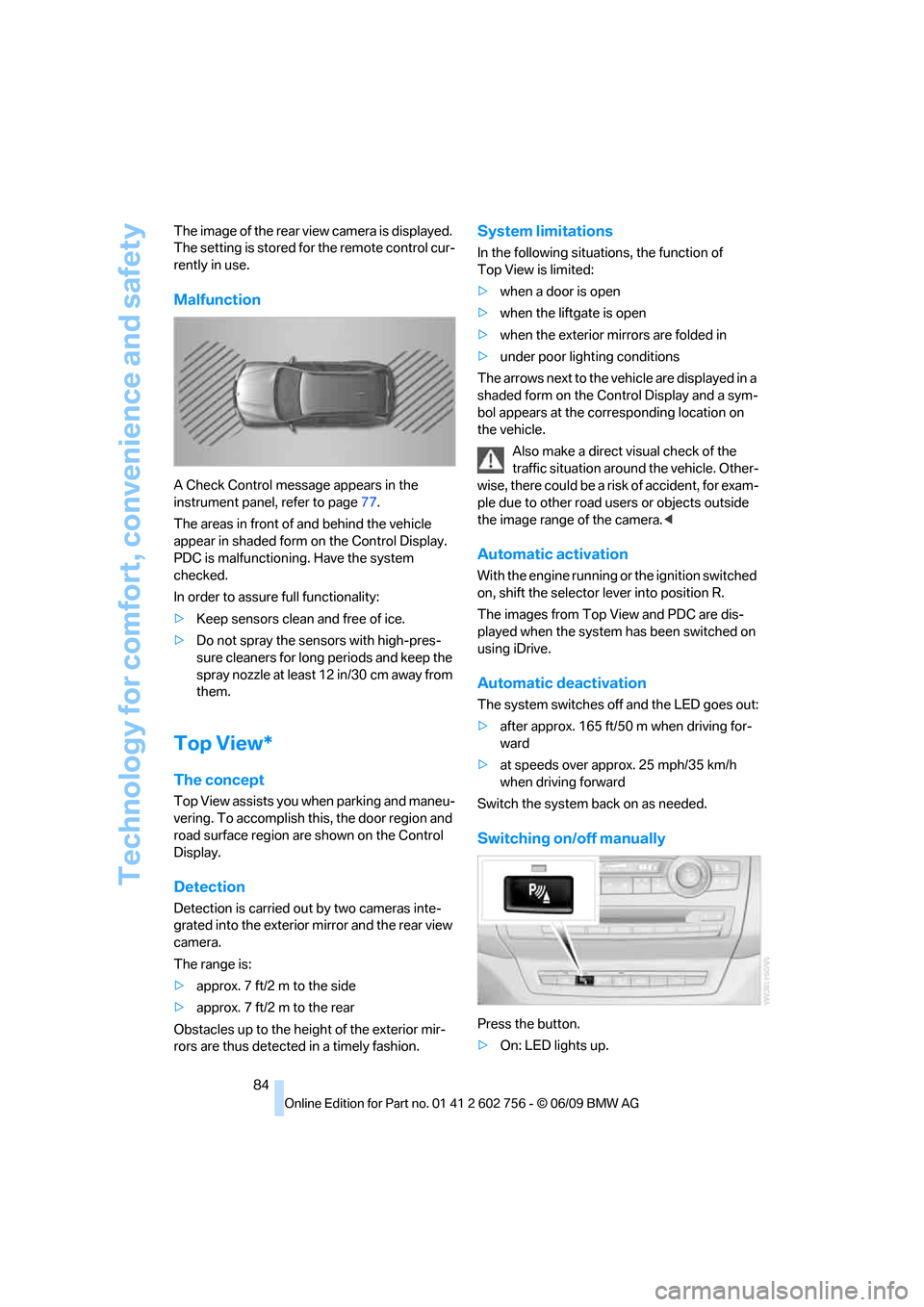
A Check Control message appears in the
instrument panel, refer to page77.
The areas in front of and behind the vehicle
appear in shaded form on the Control Display.
PDC is malfunctioning. Have the system
checked.
In order to assure full functionality:
>Keep sensors clean and free of ice.
>Do not spray the sensors with high-pres-
sure cleaners for long periods and keep the
spray nozzle at least 12 in/30 cm away from
them.
Top View*
The concept
Top View assists you when parking and maneu-
vering. To accomplish this, the door region and
road surface region are shown on the Control
Display.
Detection
Detection is carried out by two cameras inte-
grated into the exterior mirror and the rear view
camera.
The range is:
>approx. 7 ft/2 m to the side
>approx. 7 ft/2 m to the rear
Obstacles up to the height of the exterior mir-
rors are thus detected in a timely fashion.
System limitations
In the following situations, the function of
Top View is limited:
>when a door is open
>when the liftgate is open
>when the exterior mirrors are folded in
>under poor lighting conditions
The arrows next to the vehicle are displayed in a
shaded form on the Control Display and a sym-
bol appears at the corresponding location on
the vehicle.
Also make a direct visual check of the
traffic situation around the vehicle. Other-
wise, there could be a risk of accident, for exam-
ple due to other road users or objects outside
the image range of the camera.<
Automatic activation
With the engine running or the ignition switched
on, shift the selector lever into position R.
The images from Top View and PDC are dis-
played when the system has been switched on
using iDrive.
Automatic deactivation
The system switches off and the LED goes out:
>after approx. 165 ft/50 m when driving for-
ward
>at speeds over approx. 25 mph/35 km/h
when driving forward
Switch the system back on as needed.
Switching on/off manually
Press the button.
>On: LED lights up.
ba8_e70ag.book Seite 84 Freitag, 5. Juni 2009 11:42 11
Page 88 of 300
Technology for comfort, convenience and safety
86
Rear view camera*
The concept
The rear view camera assists you when parking
and maneuvering in reverse. To accomplish
this, the region behind your vehicle is shown on
the Control Display.
System limitations
Also make a direct visual check of the
traffic situation around the vehicle. Other-
wise, there could be a risk of accident, for exam-
ple due to other road users or objects outside
the image range of the rear view camera.<
The rear view camera is not able to detect
objects at greater heights or protruding
objects such as projections from walls.<
Automatic activation
With the engine running or the ignition switched
on, shift the selector lever into position R.
The image of the rear view camera is displayed
when the system has been switched on using
iDrive.
Automatic deactivation
The system switches off and the LED goes out:
>after approx. 33 ft/10 m when driving for-
ward
>at speeds over approx. 9 mph/15 km/h
when driving forward
Switch the system back on as needed.
Switching on/off manually
Press the button.
>On: LED lights up.>Off: LED goes out.
If PDC is displayed, switch on the rear view
camera using iDrive, refer to page83.
Assistance functions
Function requirements
>Rear view camera is switched on.
>Liftgate is completely closed.
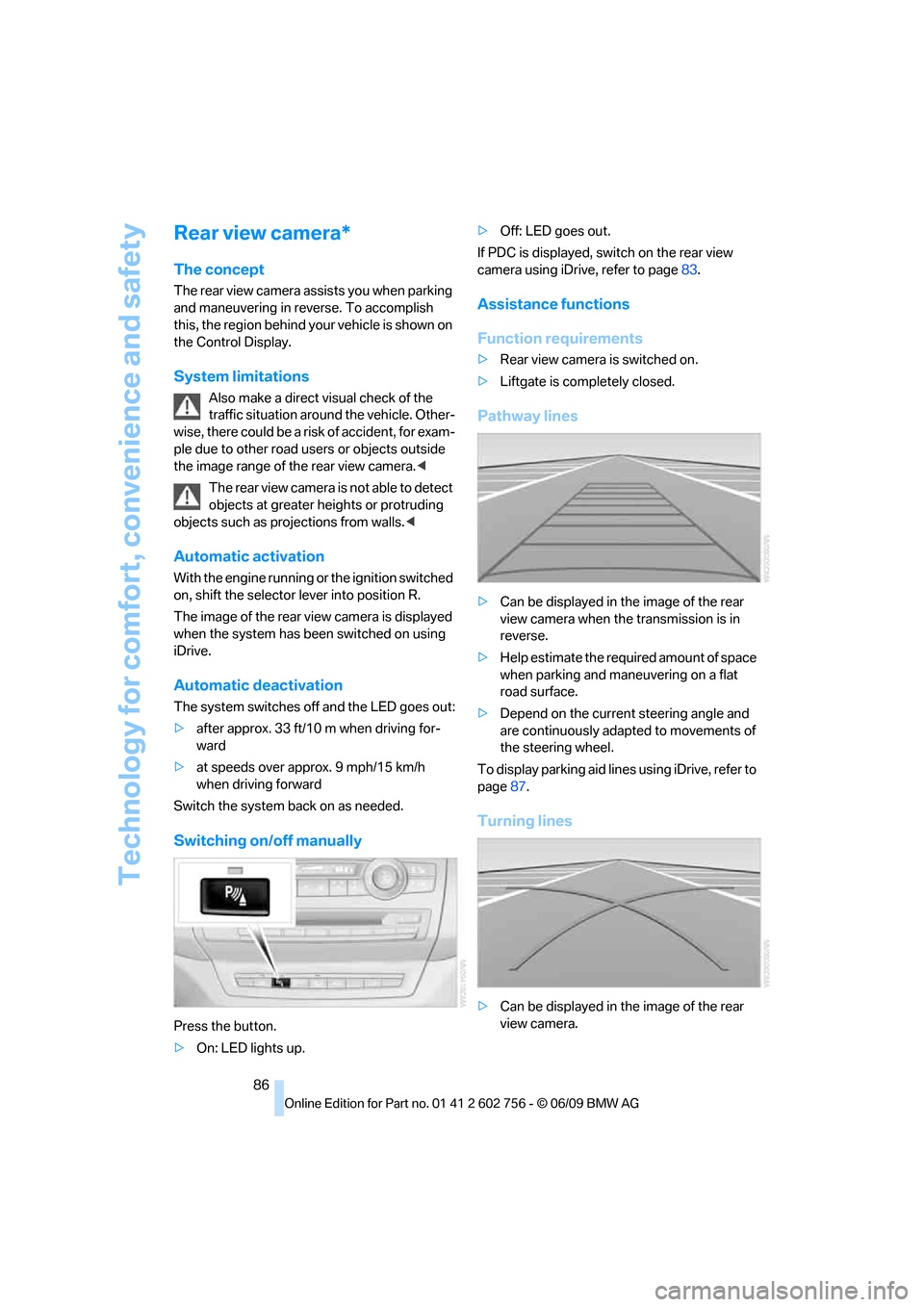
Pathway lines
>Can be displayed in the image of the rear
view camera when the transmission is in
reverse.
>Help estimate the required amount of space
when parking and maneuvering on a flat
road surface.
>Depend on the current steering angle and
are continuously adapted to movements of
the steering wheel.
To display parking aid lines using iDrive, refer to
page87.
Turning lines
>Can be displayed in the image of the rear
view camera.
ba8_e70ag.book Seite 86 Freitag, 5. Juni 2009 11:42 11
Page 94 of 300
Technology for comfort, convenience and safety
92
Selecting chassis and suspension
tuning
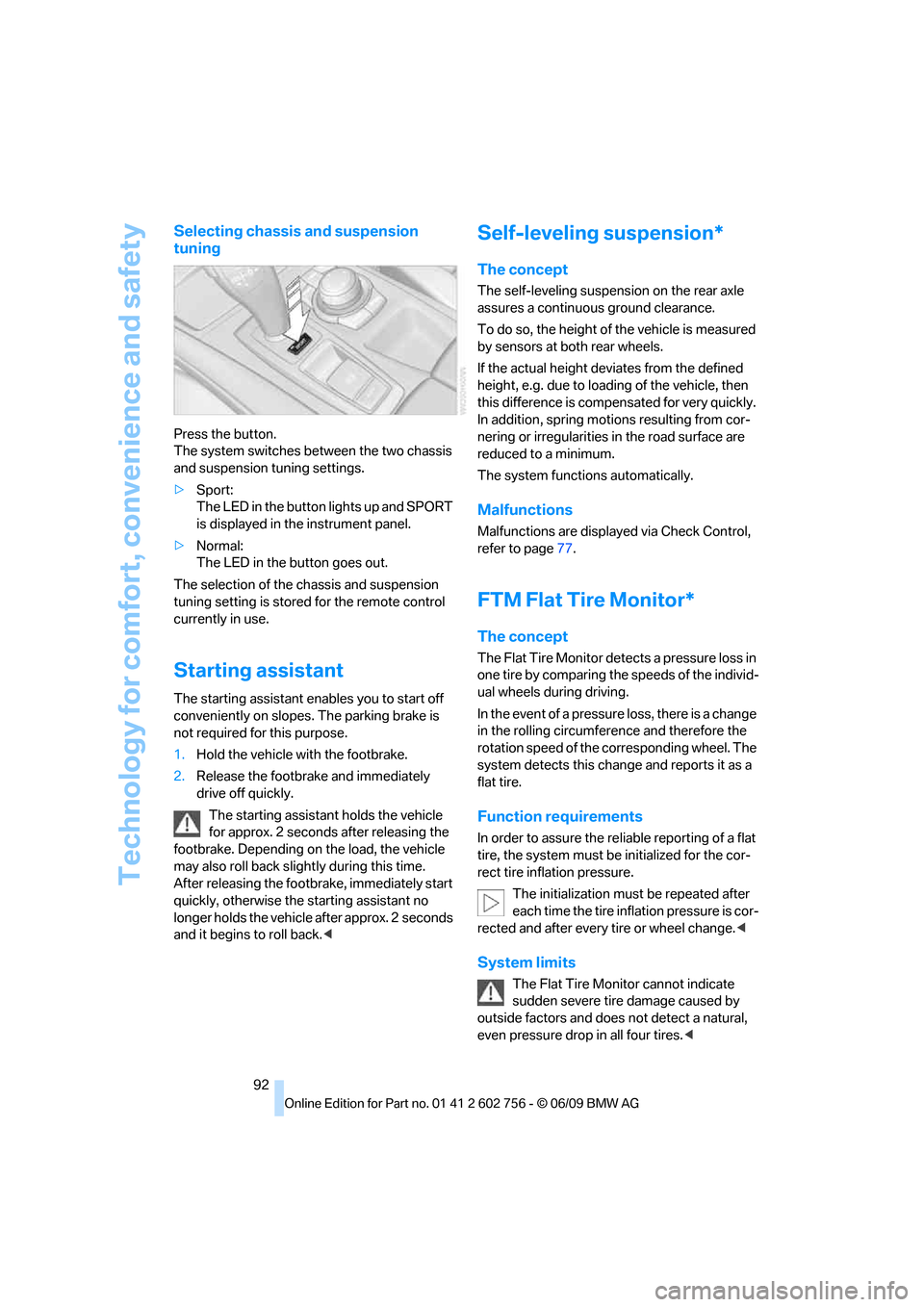
Press the button.
The system switches between the two chassis
and suspension tuning settings.
>Sport:
The LED in the button lights up and SPORT
is displayed in the instrument panel.
>Normal:
The LED in the button goes out.
The selection of the chassis and suspension
tuning setting is stored for the remote control
currently in use.
Starting assistant
The starting assistant enables you to start off
conveniently on slopes. The parking brake is
not required for this purpose.
1.Hold the vehicle with the footbrake.
2.Release the footbrake and immediately
drive off quickly.
The starting assistant holds the vehicle
for approx. 2 seconds after releasing the
footbrake. Depending on the load, the vehicle
may also roll back slightly during this time.
After releasing the footbrake, immediately start
quickly, otherwise the starting assistant no
longer holds the vehicle after approx. 2 seconds
and it begins to roll back.<
Self-leveling suspension*
The concept
The self-leveling suspension on the rear axle
assures a continuous ground clearance.
To do so, the height of the vehicle is measured
by sensors at both rear wheels.
If the actual height deviates from the defined
height, e.g. due to loading of the vehicle, then
this difference is compensated for very quickly.
In addition, spring motions resulting from cor-
nering or irregularities in the road surface are
reduced to a minimum.
The system functions automatically.
Malfunctions
Malfunctions are displayed via Check Control,
refer to page77.
FTM Flat Tire Monitor*
The concept
The Flat Tire Monitor detects a pressure loss in
one tire by comparing the speeds of the individ-
ual wheels during driving.
In the event of a pressure loss, there is a change
in the rolling circumference and therefore the
rotation speed of the corresponding wheel. The
system detects this change and reports it as a
flat tire.
Function requirements
In order to assure the reliable reporting of a flat
tire, the system must be initialized for the cor-
rect tire inflation pressure.
The initialization must be repeated after
each time the tire inflation pressure is cor-
rected and after every tire or wheel change.<
System limits
The Flat Tire Monitor cannot indicate
sudden severe tire damage caused by
outside factors and does not detect a natural,
even pressure drop in all four tires.<
ba8_e70ag.book Seite 92 Freitag, 5. Juni 2009 11:42 11
Page 101 of 300
Controls
99Reference
At a glance
Driving tips
Communications
Navigation
Entertainment
Mobility
indicated by the indicator lamp over the interior
rearview mirror, refer to Operating state of front
passenger airbags in the following.<
Before transporting a child on the front
passenger seat, read the safety informa-
tion and follow the instructions under Trans-
porting children safely, refer to page55.
When teenagers and adults assume certain sit-
ting positions, this can cause the front and side
airbags to deactivate. The indicator lamp for the
front passenger airbags lights up when this
occurs. In these cases, change the sitting posi-
tion so that the front passenger airbags are acti-
vated and the indicator lamp goes out. If the
desired status cannot be produced by changing
the sitting position, transport the correspond-
ing person on the rear seat. Do not fit seat cov-
ers, seat cushion padding, ball mats or other
items onto the front passenger seat unless they
are specifically recommended by BMW. Do not
lay objects under the seat which could press
against the seat from below. Otherwise a cor-
rect evaluation of the occupied seat surface
cannot be ensured.<
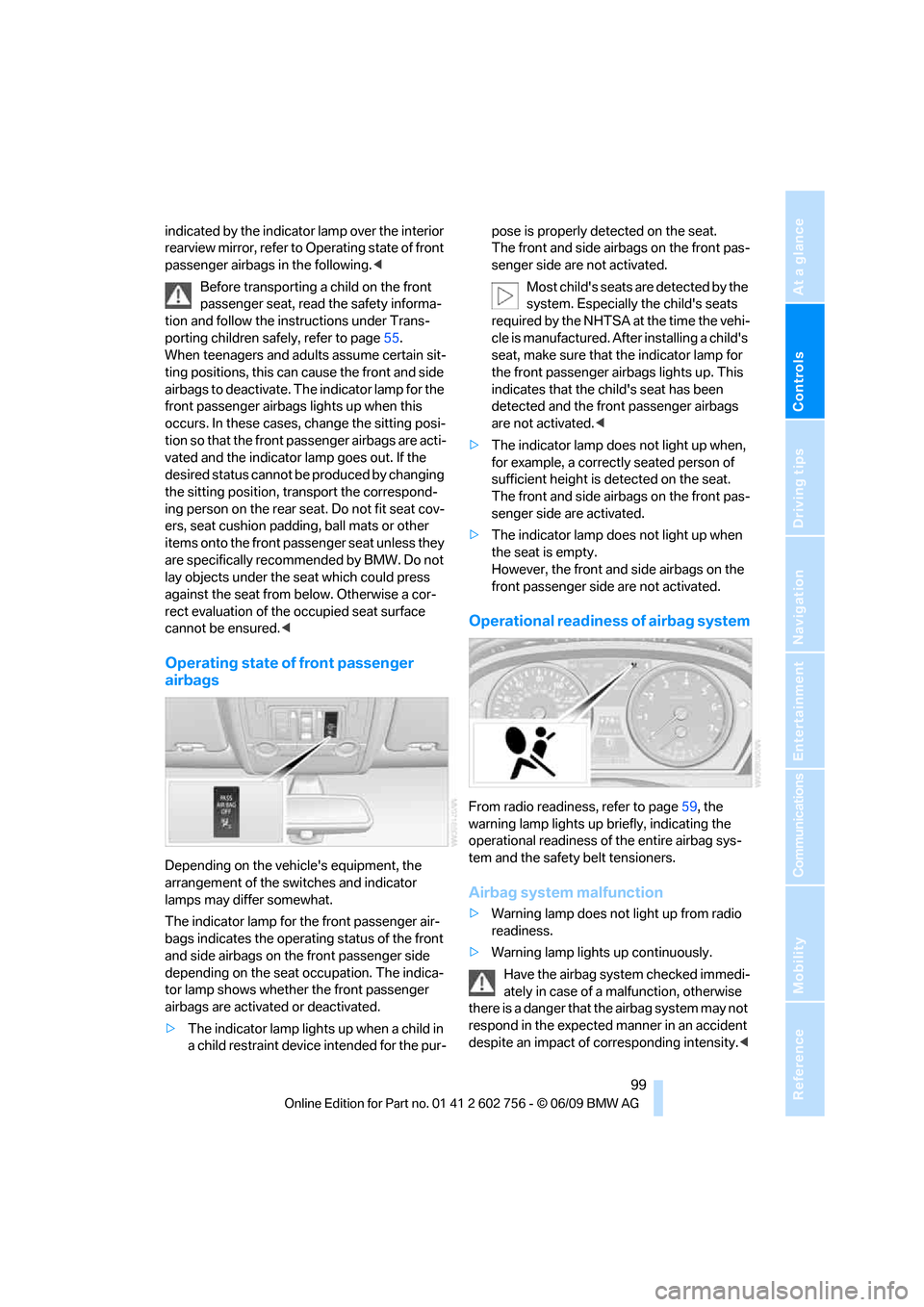
Operating state of front passenger
airbags
Depending on the vehicle's equipment, the
arrangement of the switches and indicator
lamps may differ somewhat.
The indicator lamp for the front passenger air-
bags indicates the operating status of the front
and side airbags on the front passenger side
depending on the seat occupation. The indica-
tor lamp shows whether the front passenger
airbags are activated or deactivated.
>The indicator lamp lights up when a child in
a child restraint device intended for the pur-pose is properly detected on the seat.
The front and side airbags on the front pas-
senger side are not activated.
Most child's seats are detected by the
system. Especially the child's seats
required by the NHTSA at the time the vehi-
cle is manufactured. After installing a child's
seat, make sure that the indicator lamp for
the front passenger airbags lights up. This
indicates that the child's seat has been
detected and the front passenger airbags
are not activated.<
>The indicator lamp does not light up when,
for example, a correctly seated person of
sufficient height is detected on the seat.
The front and side airbags on the front pas-
senger side are activated.
>The indicator lamp does not light up when
the seat is empty.
However, the front and side airbags on the
front passenger side are not activated.
Operational readiness of airbag system
From radio readiness, refer to page59, the
warning lamp lights up briefly, indicating the
operational readiness of the entire airbag sys-
tem and the safety belt tensioners.
Airbag system malfunction
>Warning lamp does not light up from radio
readiness.
>Warning lamp lights up continuously.
Have the airbag system checked immedi-
ately in case of a malfunction, otherwise
there is a danger that the airbag system may not
respond in the expected manner in an accident
despite an impact of corresponding intensity.<
ba8_e70ag.book Seite 99 Freitag, 5. Juni 2009 11:42 11
Page 102 of 300
Technology for comfort, convenience and safety
100
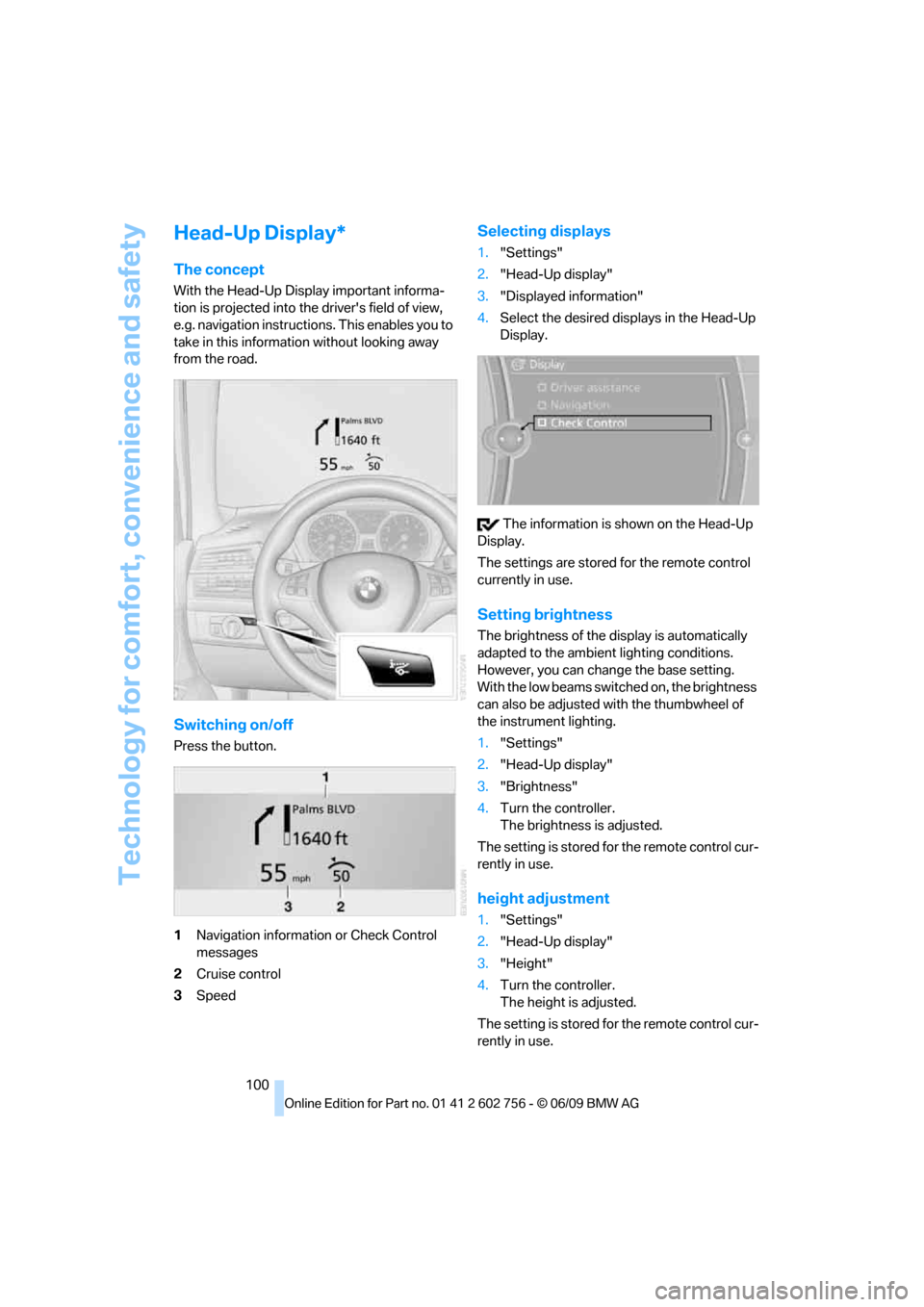
Head-Up Display*
The concept
With the Head-Up Display important informa-
tion is projected into the driver's field of view,
e.g. navigation instructions. This enables you to
take in this information without looking away
from the road.
Switching on/off
Press the button.
1Navigation information or Check Control
messages
2Cruise control
3Speed
Selecting displays
1."Settings"
2."Head-Up display"
3."Displayed information"
4.Select the desired displays in the Head-Up
Display.
The information is shown on the Head-Up
Display.
The settings are stored for the remote control
currently in use.
Setting brightness
The brightness of the display is automatically
adapted to the ambient lighting conditions.
However, you can change the base setting.
With the low beams switched on, the brightness
can also be adjusted with the thumbwheel of
the instrument lighting.
1."Settings"
2."Head-Up display"
3."Brightness"
4.Turn the controller.
The brightness is adjusted.
The setting is stored for the remote control cur-
rently in use.
height adjustment
1."Settings"
2."Head-Up display"
3."Height"
4.Turn the controller.
The height is adjusted.
The setting is stored for the remote control cur-
rently in use.
ba8_e70ag.book Seite 100 Freitag, 5. Juni 2009 11:42 11
Page 241 of 300
Mobility
239Reference
At a glance
Controls
Driving tips
Communications
Navigation
Entertainment
Under the hood
Never attempt to perform any service or
repair operations on your vehicle without
the required professional technical training. If
you do not know what repair procedures to fol-
low, have work on your vehicle done only by
your BMW Sports Activity Vehicle Center or a
workshop that works according to BMW repair
procedures with correspondingly trained per-
sonnel. If this work is not carried out properly,
there is a danger of subsequent damage and
related safety hazards.<
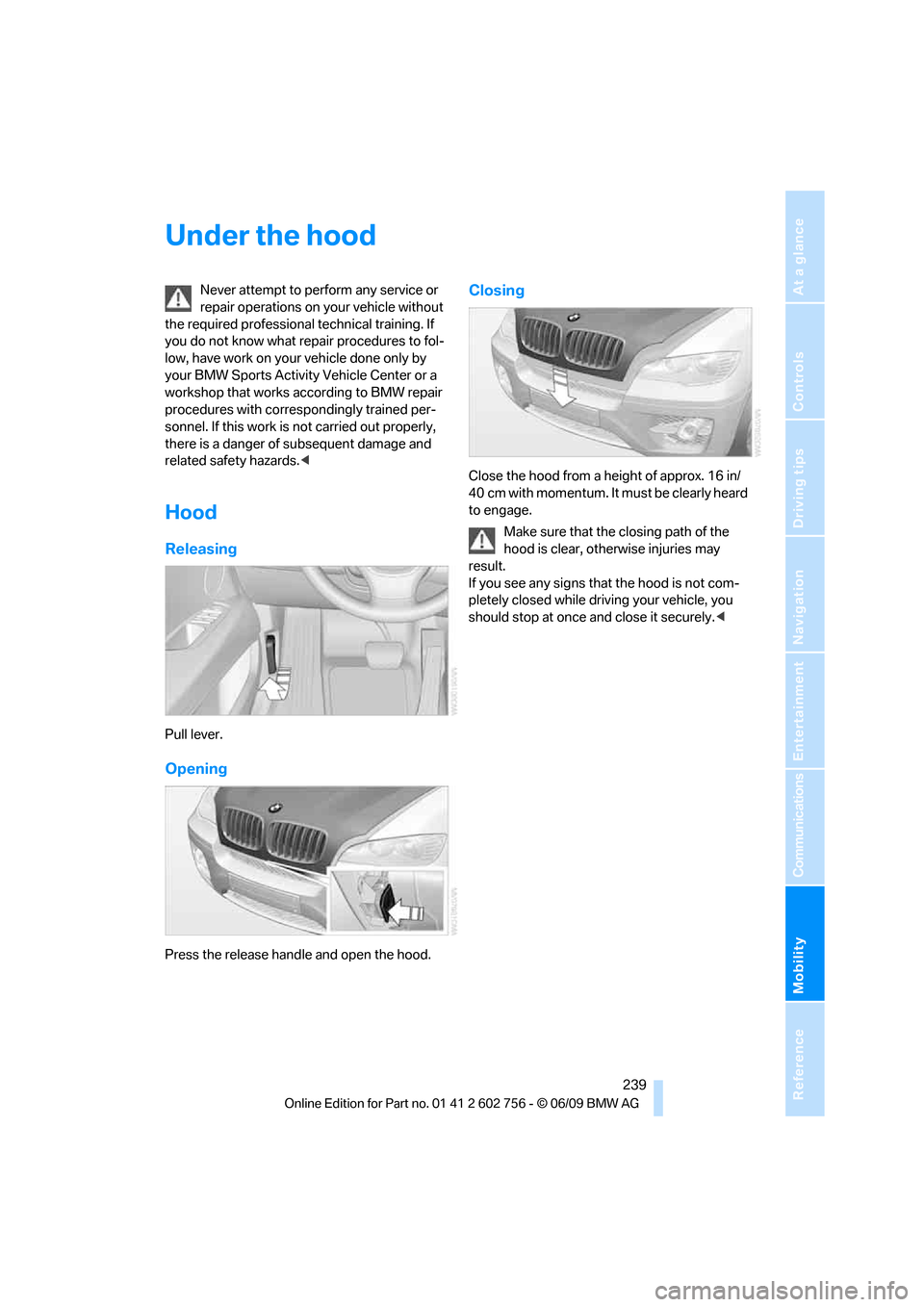
Hood
Releasing
Pull lever.
Opening
Press the release handle and open the hood.
Closing
Close the hood from a height of approx. 16 in/
40 cm with momentum. It must be clearly heard
to engage.
Make sure that the closing path of the
hood is clear, otherwise injuries may
result.
If you see any signs that the hood is not com-
pletely closed while driving your vehicle, you
should stop at once and close it securely.<
ba8_e70ag.book Seite 239 Freitag, 5. Juni 2009 11:42 11
Page 248 of 300
Care
246
Care
Car-care products
For the cleaning and care of your vehicle, BMW
recommends using only products that BMW
has approved for this purpose.
Regular cleaning and care make a significant
contribution to retaining your BMW's value.
The BMW Sports Activity Vehicle Center will be
happy to consult you on products and services
for the cleaning and care of your BMW.
Genuine BMW Care Products are materi-
als tested, laboratory tested, and tested in
actual use. They offer optimum care and pro-
tection for your vehicle.<
Do not use cleaners that contain alcohol
or solvents; they can damage your vehi-
cle.<
Cleaning agents can contain substances
that are dangerous or pose health risks.
You should therefore heed the warnings and
hazard indications on the packaging. Open the
doors or windows on your vehicle whenever
cleaning the interior. Make sure there is suffi-
cient ventilation in enclosed spaces. Use only
products that are formulated for vehicle clean-
ing.<
Exterior care
Washing your vehicle
In the winter months, it is especially
important to ensure that the vehicle is
washed on a regular basis. Otherwise, signifi-
cant soiling and road salt can cause damage to
the vehicle.<
After washing the vehicle, apply the
brakes briefly to dry them. Failure to do so
may lead to a reduction in braking efficiency and
also to corrosion of the brake rotors.<
Car washes
Give preference to cloth car washes.
Before driving into the car wash, make sure that
it is suitable for your BMW. Pay attention to the
following points:
>Dimensions of your vehicle, refer to
page269.
>If necessary, fold in exterior mirrors, refer to
page52.
>Maximum permissible tire width.
Avoid car washes with guide rail heights
over 4 in/10 cm, otherwise there is dan-
ger of damaging chassis parts.<
Preparations for driving into the car wash:
>Deactivate rain sensor
* to prevent
unwanted wiper activation.
>BMW X5: deactivate rear window wiper and
protect it from damage. Take appropriate
protective measures; inquiring with the car
wash operator as needed.
>Remove add-on parts such as spoilers or
phone antennas if they risk being damaged.
Before driving into the car wash, observe the
following so that the vehicle is able to roll:
1.Insert the remote control into the ignition
lock, even with comfort access.
2.Shift into transmission position N.
3.Release the parking brake.
4.Deactivate Automatic Hold, refer to
page62.
5.Switch off the engine.
6.Leave the remote control in the ignition lock
so that the vehicle can roll.
Mixed tires*
Before driving into a car wash, make sure
that the vehicle width is not too large for
the car wash, as otherwise the vehicle and the
car wash could be damaged.<
ba8_e70ag.book Seite 246 Freitag, 5. Juni 2009 11:42 11
Page 259 of 300
Mobility
257Reference
At a glance
Controls
Driving tips
Communications
Navigation
Entertainment
ground. Switch on the hazard warning flashers.
Set the parking brake and engage transmission
position P.
Have all vehicle occupants get out of the vehicle
and ensure that they remain outside the imme-
diate area in a safe place, such as behind a
guardrail.
If a warning triangle
* or portable hazard warning
lamp
* is required, set it up on the roadside at an
appropriate distance from the rear of the vehi-
cle. Comply with all safety guidelines and regu-
lations.
Change the wheel only on a level, firm surface
which is not slippery. The vehicle or the jack
could slip to the side if you attempt to raise the
vehicle on a soft or slippery surface such as
snow, ice, tiles, etc.
Position the jack on a firm support surface.
Do not use a wooden block or similar object as a
support base for the jack, as this would prevent
it from extending to its full support height and
reduce its load-carrying capacity.
To avoid serious or fatal injury: never lie under
the vehicle, and never start the engine while it is
supported by the jack.<
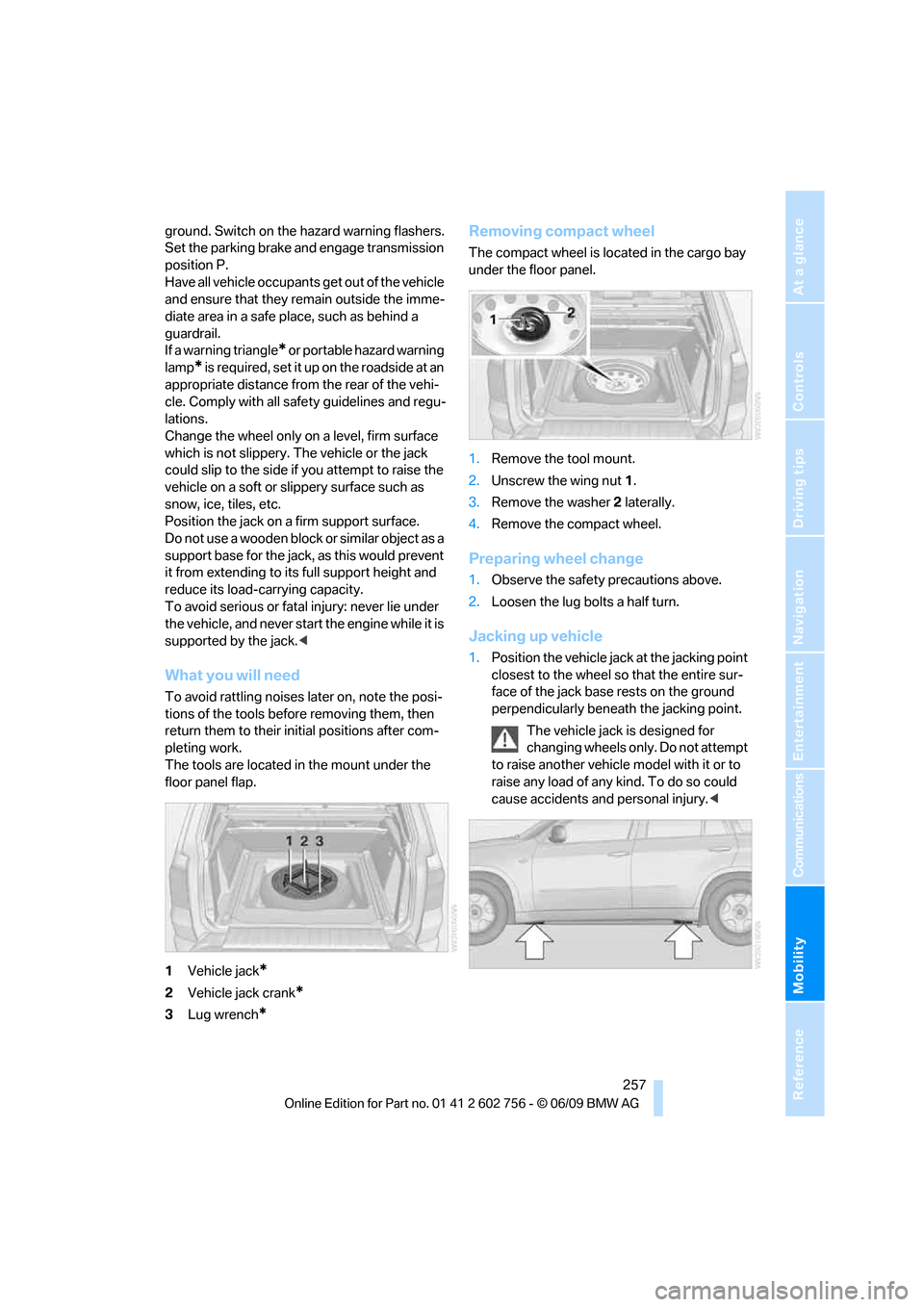
What you will need
To avoid rattling noises later on, note the posi-
tions of the tools before removing them, then
return them to their initial positions after com-
pleting work.
The tools are located in the mount under the
floor panel flap.
1Vehicle jack
*
2Vehicle jack crank*
3Lug wrench*
Removing compact wheel
The compact wheel is located in the cargo bay
under the floor panel.
1.Remove the tool mount.
2.Unscrew the wing nut 1.
3.Remove the washer 2 laterally.
4.Remove the compact wheel.
Preparing wheel change
1.Observe the safety precautions above.
2.Loosen the lug bolts a half turn.
Jacking up vehicle
1.Position the vehicle jack at the jacking point
closest to the wheel so that the entire sur-
face of the jack base rests on the ground
perpendicularly beneath the jacking point.
The vehicle jack is designed for
changing wheels only. Do not attempt
to raise another vehicle model with it or to
raise any load of any kind. To do so could
cause accidents and personal injury.<
ba8_e70ag.book Seite 257 Freitag, 5. Juni 2009 11:42 11
Page 272 of 300
Technical data
270
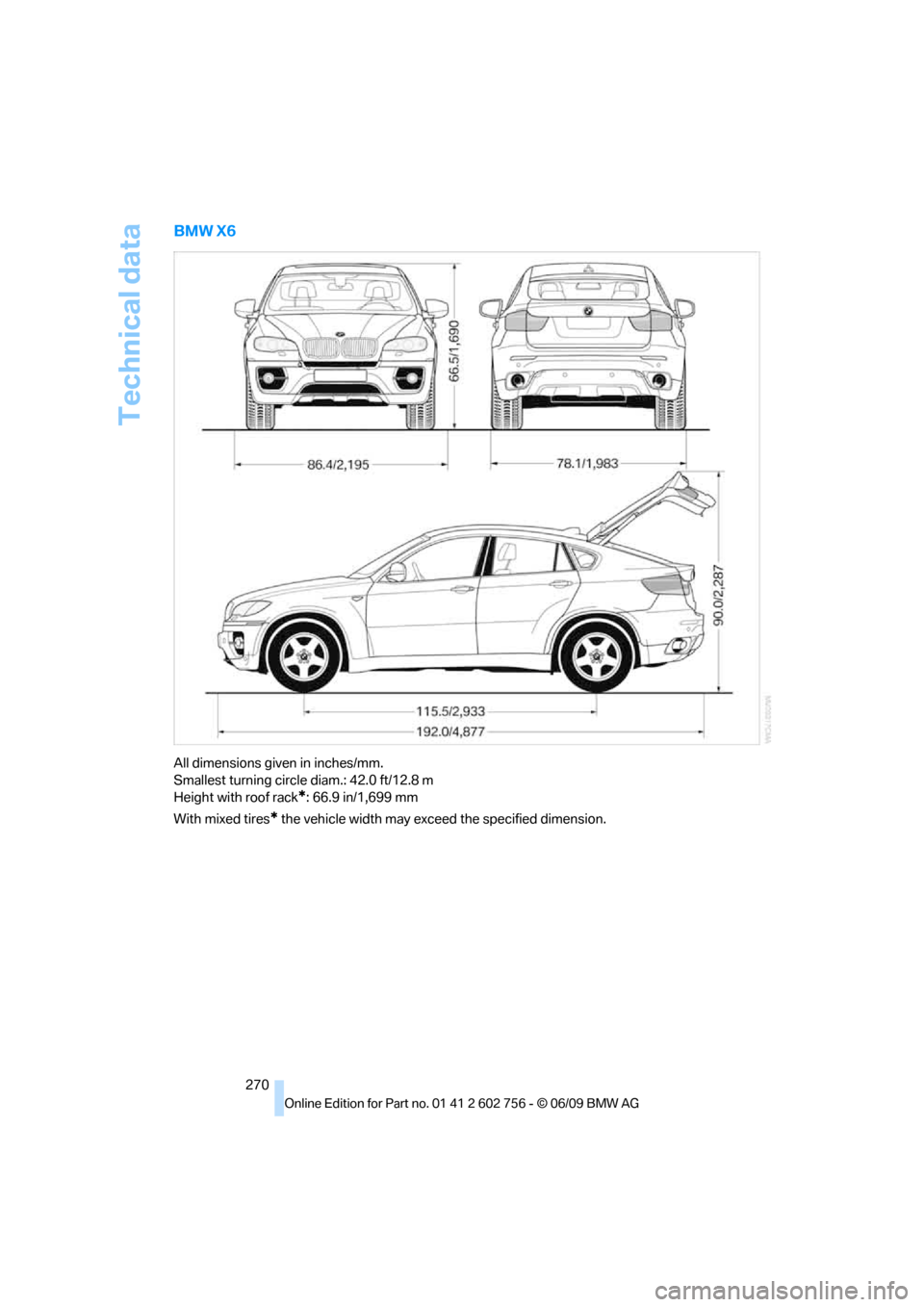
BMW X6
All dimensions given in inches/mm.
Smallest turning circle diam.: 42.0 ft/12.8 m
Height with roof rack
*: 66.9 in/1,699 mm
With mixed tires
* the vehicle width may exceed the specified dimension.
ba8_e70ag.book Seite 270 Freitag, 5. Juni 2009 11:42 11
Page 281 of 300
Everything from A to Z
279
Everything from A to Z
Index
A
ABS Antilock Brake
System88
Accessories5
Access to 3rd row seats48
Acoustic signal, refer to Check
Control77
Activated-charcoal filter112
Active seat52
Active seat ventilation51
Active steering96
– malfunction97
– warning lamp97
Adaptive brake lamp, brake
force display97
Adaptive Drive91
Adaptive fixing system124
Adaptive Head Light103
Address for navigation,
entering141,147
Adjusting confirmation signals
for locking and unlocking28
Adjusting opening
height31,33
Adjusting temperature with
expanded-scope automatic
climate control109
Adjusting the tone during
audio operation, refer to
Tone control160
Adjusting thigh
support44,45
Airbags98
– sitting safely43
– warning lamp99
Air distribution
– automatic108,113
– manual110
Air recirculation110
– AUC Automatic
recirculated-air control110
– recirculated-air mode110Air vents107
– refer to Ventilation111
Air vents of automatic climate
control107
Air volume109,113
AKI, refer to Fuel
specifications225
Alarm system34
– avoiding unintentional
alarms35
– interior motion sensor35
– switching off alarm34
– switching off tilt alarm
sensor and interior motion
sensor35
– tilt alarm sensor35
Albums of music
collection180
Alloy wheels247
All-season tires, refer to
Winter tires238
All-wheel drive, refer to
xDrive90
Alterations, technical, refer to
For your own safety5
AM, waveband163
Antenna for mobile phone202
Antifreeze
– coolant243
– washer fluid69
Antilock Brake System
ABS88
Anti-theft system
– refer to Alarm system34
– refer to Central locking
system27
Approved axle weights, refer
to Weights271
Approved engine oils243
Approved gross vehicle
weight, refer to Weights271
Armrest, refer to Center
armrest, front119Around the center console14
Around the steering wheel10
Arrival time, refer to
Computer74
Ashtray
– front120
– rear120
Assist, refer to separate
operating instructions
Assistance systems, refer to
Driving stability control
systems88
AUC Automatic recirculated-
air control110
Audio160
– controls160
– switching on/off160
– tone control160
– volume160
Audio CDs, DVD system in
rear193
Audio device, external119
Automatic
– air distribution108,113
– air volume108,113
– headlamp control102
– liftgate operation31
– steering wheel adjustment,
refer to Easy entry/exit54
Automatically switching high-
beams on and off, refer to
High-beam assistant104
Automatic car washes246
Automatic climate control
– automatic air
distribution108,113
– in rear112
– switching off111,113
– ventilation in rear111
– with 2-zone control108
– with 4-zone control112
ba8_e70ag.book Seite 279 Freitag, 5. Juni 2009 11:42 11