sunroof BMW X5 2010 E70 User Guide
[x] Cancel search | Manufacturer: BMW, Model Year: 2010, Model line: X5, Model: BMW X5 2010 E70Pages: 300, PDF Size: 12.41 MB
Page 44 of 300
Opening and closing
42 2.Within about 4 seconds, slide the switch
forward again beyond the resistance point
and hold it there. The roof closes without
the pinch protection system.
Following interruptions in electrical
power supply
After a power loss, the sunroof may only
respond to the raise command. Then have the
system initialized. BMW recommends having
this work carried out by your BMW Sports
Activity Vehicle Center.
Moving manually*
In the event of an electrical malfunction, you can
move the sunroof manually:
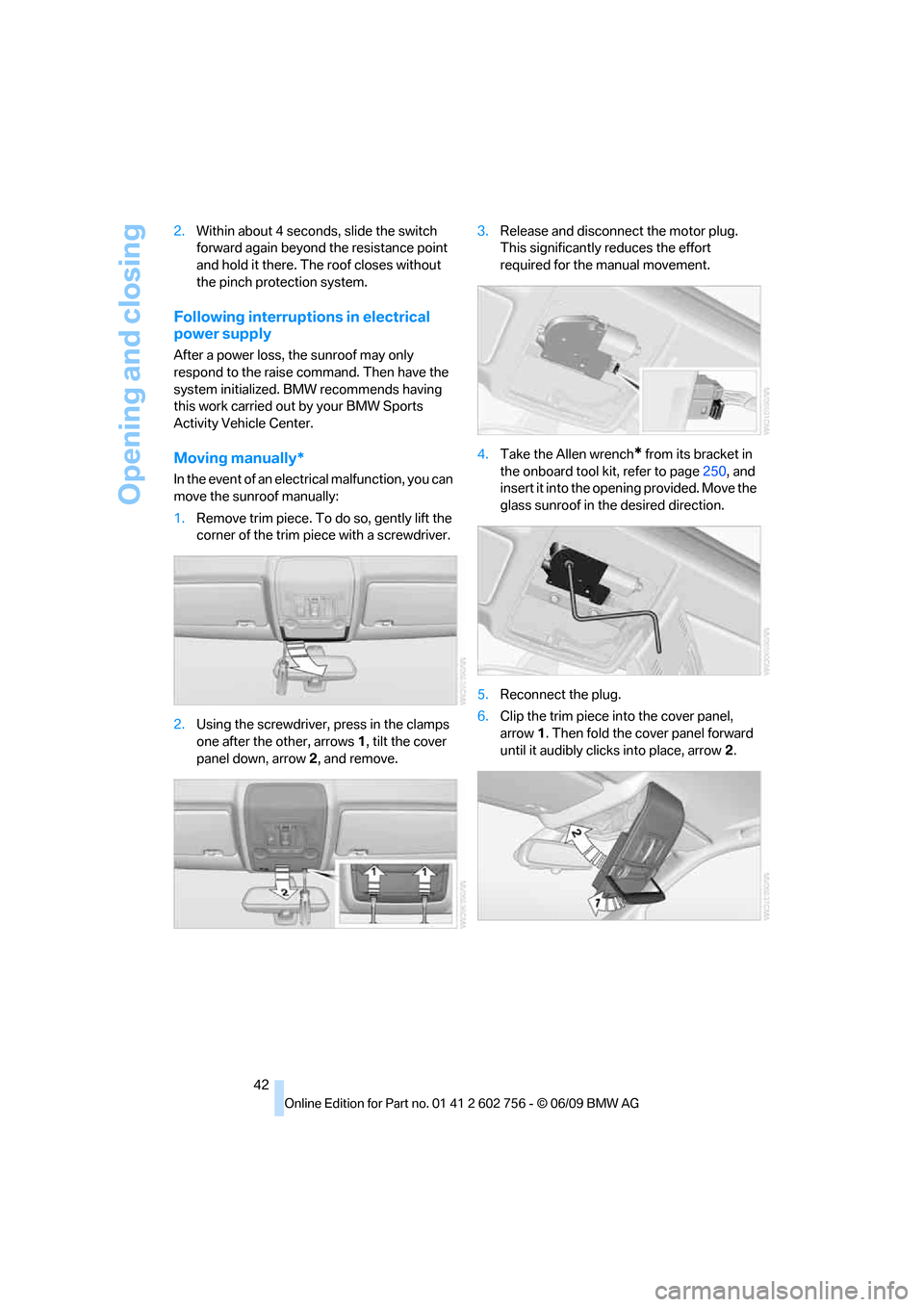
1.Remove trim piece. To do so, gently lift the
corner of the trim piece with a screwdriver.
2.Using the screwdriver, press in the clamps
one after the other, arrows 1, tilt the cover
panel down, arrow 2, and remove.3.Release and disconnect the motor plug.
This significantly reduces the effort
required for the manual movement.
4.Take the Allen wrench
* from its bracket in
the onboard tool kit, refer to page250, and
insert it into the opening provided. Move the
glass sunroof in the desired direction.
5.Reconnect the plug.
6.Clip the trim piece into the cover panel,
arrow1. Then fold the cover panel forward
until it audibly clicks into place, arrow2.
ba8_e70ag.book Seite 42 Freitag, 5. Juni 2009 11:42 11
Page 132 of 300
Things to remember when driving
130
Things to remember when driving
Break-in period
Moving parts need breaking-in time to adjust to
each other. To ensure that your vehicle contin-
ues to provide optimized economy of operation
throughout an extended service life, we request
that you devote careful attention to the follow-
ing section.
Engine and rear axle differential
Always obey all official speed limits.
Up to 1,200 miles/2,000 km
Drive at various engine and vehicle speeds, but
do not exceed:
>Gasoline engine
4,500 rpm or 100 mph/160 km/h
>Diesel engine
3,500 rpm or 90 mph/150 km/h
Avoid full-throttle operation and use of the
transmission's kick-down mode during these
initial miles.
From 1,200 miles/2,000 km
The engine and vehicle speed can gradually be
increased.
Tires
Due to technical factors associated with their
manufacture, tires do not achieve their full trac-
tion potential until after an initial break-in
period. Therefore, drive reservedly during the
first 200 miles/300 km.
Brake system
Brakes require an initial break-in period of
approx. 300 miles/500 km to achieve optimized
contact and wear patterns between brake pads
and rotors. Drive in a reserved manner during
this break-in period.
Following part replacement
Observe the break-in instructions again if com-
ponents mentioned above must be replaced
after subsequent driving operation.
Saving fuel
The fuel consumption of your vehicle depends
on various factors. Through a few simple steps,
your driving style, and regular maintenance, you
can have a positive influence on your fuel con-
sumption and environmental impact.
Removing unnecessary cargo
Additional weight increases fuel consumption.
Removing add-on parts after use
Remove unneeded auxiliary mirrors, roof or rear
luggage racks after use. Add-on parts attached
to the vehicle impede the aerodynamics and
increase the fuel consumption.
Closing windows and glass sunroof*/
panorama glass sunroof*
An open glass sunroof/panorama glass sunroof
or open windows likewise increase the drag
coefficient and therefore the fuel consumption.
Checking tire inflation pressures
regularly
Check and correct the tire inflation pressure as
needed at least twice a month and before long
trips.
An insufficient tire inflation pressure increases
the rolling resistance and thus increases the
fuel consumption and tire wear.
Driving off immediately
Do not allow the engine to warm up by leaving it
running while the vehicle remains stationary.
Instead, begin to drive at a moderate engine
ba8_e70ag.book Seite 130 Freitag, 5. Juni 2009 11:42 11
Page 133 of 300
Driving tips
131Reference
At a glance
Controls
Communications
Navigation
Entertainment
Mobility
speed. This is the fastest way for the cold
engine to reach its operating temperature.
Thinking ahead when driving
Avoid unnecessary acceleration and braking.
To do so, maintain the appropriate distance
from the vehicle in front of you. An anticipatory
and smooth driving style reduces fuel con-
sumption.
Avoiding high engine speeds
Driving at a low engine speed reduces fuel con-
sumption and minimizes wear.
Taking advantage of coasting
The flow of fuel is interrupted when coasting.
Switching off engine during longer
stops
Switch off the engine at longer stops such as
traffic signals, railroad crossings, or in traffic
congestions. You achieve fuel savings even if
the standing time is as short as approx. 4 sec-
onds.
Switching off functions currently not
required
Functions such as air conditioning, seat heat-
ing, or rear window defrosting consume a lot of
energy and require additional fuel. Their influ-
ence is particularly pronounced in city traffic
and stop & go operation. For this reason, it is a
good idea to switch these functions off when
they are not really needed.
Having maintenance carried out
Have the vehicle serviced regularly in order to
achieve the optimum economy and service life
of your vehicle. BMW recommends having the
maintenance performed by a BMW Sports
Activity Vehicle Center. Also pay attention to
the BMW maintenance system, refer to
page244.
General driving notes
Closing liftgate
Operate the vehicle only when the liftgate
is completely closed. Otherwise, exhaust
fumes could enter into the passenger compart-
ment.<
If it is absolutely necessary to drive with the lift-
gate open:
1.Close all windows as well as the glass sun-
roof
*/panorama glass sunroof*.
2.Increase the air volume of the automatic cli-
mate control to a high level, refer to
page109.
Hot exhaust system
As in all vehicles, extremely high temper-
atures are generated on the exhaust sys-
tem. Do not remove the heat shields installed
adjacent to it, and never apply undercoating to
them. When driving, standing at idle and while
parking take care to avoid possible contact
between the hot exhaust system and any highly
flammable materials such as hay, leaves, grass,
etc. Such contact could lead to a fire, and with it
the risk of serious property damage as well as
personal injury. Do not touch hot tailpipes, as
otherwise there is a danger of burns.<
Diesel particulate filter*
Soot particles are collected in the diesel partic-
ulate filter and periodically burned away at high
temperatures. This cleaning process lasts a few
minutes. You will notice it sometimes by the
fact that the engine temporarily runs slightly
less smoothly and requires a slightly higher
engine speed to delivery the usual power. You
may also hear sounds and observe a slight
amount of smoke coming from the exhaust up
to even a few moments after the engine is
switched off.
ba8_e70ag.book Seite 131 Freitag, 5. Juni 2009 11:42 11
Page 137 of 300
Driving tips
135Reference
At a glance
Controls
Communications
Navigation
Entertainment
Mobility
ger the car's occupants, for example if sudden
braking or evasive maneuvers are necessary.
Never exceed either the approved gross vehicle
weight or either of the approved axle weights,
refer to page271, as excessive loads can pose
a safety hazard, and may also place you in viola-
tion of traffic safety laws.
You should never transport unsecured heavy or
hard objects in the passenger compartment, as
they could fly around and pose a safety hazard
to the vehicle's occupants during abrupt brak-
ing or evasive maneuvers.
Use only the lashing eyes pictured to fasten the
heavy-duty cargo straps. Do not secure cargo
with the attachment points for the top tether,
refer to page56; otherwise they could be dam-
aged.<
Roof-mounted luggage rack*
A special rack system is available as an option
for your BMW. Please comply with the precau-
tions included with the installation instructions.
Loading roof-mounted luggage rack
Because roof racks raise the vehicle's center of
gravity when loaded, they have a major effect on
its handling and steering response. You should
therefore always remember not to exceed the
approved roof load capacity, the approved
gross vehicle weight or the axle weights when
loading the rack.
You can find the specified weights under
Weights on page271.
The load on the roof must be evenly distributed
and must not extend outward beyond the limits
of the loading surface. Always stow the heaviest
pieces on the bottom. Be sure that adequate
clearance is maintained for raising the glass
sunroof
*/panorama glass sunroof* and that
objects do not project into the opening path of
the liftgate.
Secure roof-mounted cargo correctly and
securely to prevent it from shifting or falling off
during the trip.
Drive smoothly. Avoid sudden acceleration and
braking maneuvers. Take corners gently.
Driving on poor roads
Y our B MW is at hom e on a ll r oa ds a nd surfac e s.
It combines a 4-wheel drive system with the
advantages of a normal passenger car.
Do not drive on unpaved terrain, as other-
wise the vehicle may be damaged.<
When you are driving on poor roads, there are a
few points which you should strictly observe for
your own safety, for that of your passengers,
and for the safety of the vehicle:
>Familiarize yourself with the vehicle before
driving off and avoid taking risks at all costs.
>Adapt your driving speed to the road condi-
tions. The steeper and rougher the road
surface is, the lower the speed should be.
>If you want to drive on very steep uphill or
downhill gradients, make sure beforehand
that the engine oil and coolant levels are
near the MAX mark, refer to page240.
BMW X5: you can operate your vehicle on
uphill and downhill gradients with a maxi-
mum slope of 50 %.
>On very steep downhill slopes, use Hill
Descent Control HDC, refer to page90.
BMW X5: it is possible to start off on inclines
of up to 33 %. The permissible body roll is
50 %.
>While driving, watch carefully for obstacles
such as rocks or holes. Try to avoid these
obstacles whenever possible.
>Make sure that the undercarriage does not
touch the ground, for example on crests and
bumpy roads. The ground clearance of the
vehicle is a maximum of approx. 8 in/20 cm.
Please note that the ground clearance can
vary depending on loading and the driving
conditions of the vehicle.
>Only drive through road surface water up to
a maximum water depth of
>BMW X5 20 in/50 cm
>BMW X6 17 in/45 cm
and only drive at walking speed; do not
remain stationary.
ba8_e70ag.book Seite 135 Freitag, 5. Juni 2009 11:42 11
Page 213 of 300
211
Entertainment
Reference
At a glance
Controls
Driving tips Communications
Navigation
Mobility
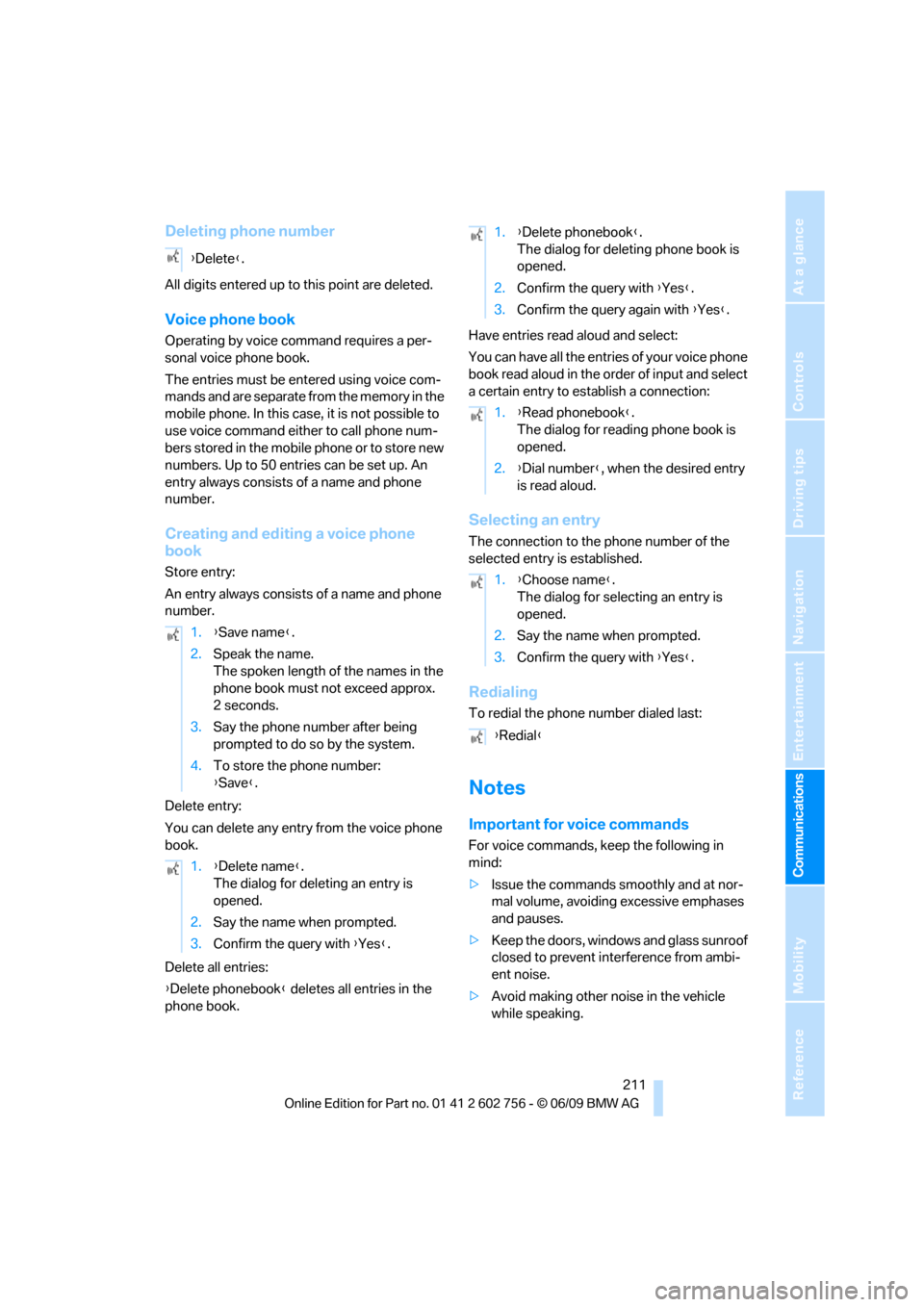
Deleting phone number
All digits entered up to this point are deleted.
Voice phone book
Operating by voice command requires a per-
sonal voice phone book.
The entries must be entered using voice com-
mands and are separate from the memory in the
mobile phone. In this case, it is not possible to
use voice command either to call phone num-
bers stored in the mobile phone or to store new
numbers. Up to 50 entries can be set up. An
entry always consists of a name and phone
number.
Creating and editing a voice phone
book
Store entry:
An entry always consists of a name and phone
number.
Delete entry:
You can delete any entry from the voice phone
book.
Delete all entries:
{Delete phonebook} deletes all entries in the
phone book.Have entries read aloud and select:
You can have all the entries of your voice phone
book read aloud in the order of input and select
a certain entry to establish a connection:
Selecting an entry
The connection to the phone number of the
selected entry is established.
Redialing
To redial the phone number dialed last:
Notes
Important for voice commands
For voice commands, keep the following in
mind:
>Issue the commands smoothly and at nor-
mal volume, avoiding excessive emphases
and pauses.
>Keep the doors, windows and glass sunroof
closed to prevent interference from ambi-
ent noise.
>Avoid making other noise in the vehicle
while speaking. {Delete}.
1.{Save name}.
2.Speak the name.
The spoken length of the names in the
phone book must not exceed approx.
2seconds.
3.Say the phone number after being
prompted to do so by the system.
4.To store the phone number:
{Save}.
1.{Delete name}.
The dialog for deleting an entry is
opened.
2.Say the name when prompted.
3.Confirm the query with {Yes}.
1.{Delete phonebook}.
The dialog for deleting phone book is
opened.
2.Confirm the query with {Yes}.
3.Confirm the query again with {Yes}.
1.{Read phonebook}.
The dialog for reading phone book is
opened.
2.{Dial number}, when the desired entry
is read aloud.
1.{Choose name}.
The dialog for selecting an entry is
opened.
2.Say the name when prompted.
3.Confirm the query with {Yes}.
{Redial}
ba8_e70ag.book Seite 211 Freitag, 5. Juni 2009 11:42 11
Page 261 of 300
Mobility
259Reference
At a glance
Controls
Driving tips
Communications
Navigation
Entertainment
Vehicle Center or bring them to a collection
point. Maintain the battery in an upright position
for transport and storage. Always restrain the
battery to prevent it from tipping over during
transport.<
Power failure
Following a temporary power failure, e.g. due to
a discharged battery, the use of some equip-
ment will be restricted, requiring its reinitializa-
tion. In the same way, individual settings are lost
and must be updated again:
>Seat, mirror and steering wheel memory
The positions must be stored again, refer to
page45.
>Time and Date
The values must be updated again, refer to
pages79, 80.
>Radio
Radio stations must be stored again, refer
to page164.
>Navigation system
You must wait until the system becomes
functional again, refer to page157.
>Glass sunroof/panorama glass sunroof
It may only be possible to raise the glass
sunroof/panorama glass sunroof The sys-
tem must be initialized, refer to page42.
>Digital compass
The system must be calibrated, refer to
page118.
>Active steering
The system automatically initializes for a
short time as you drive. During this time, the
system is deactivated, refer to page97.
>xDrive
The system automatically initializes as you
drive. During this time, indicator lamps light
up. If the lamps do not disappear during the
current trip, have the system checked.
Before removing the vehicle from stor-
age, consult your BMW Sports Activity
Vehicle Center.<
Fuses
Never attempt to repair a blown fuse and
do not replace a defective fuse with a sub-
stitute of another color or amperage rating, as
this could lead to a circuit overload, ultimately
resulting in a fire in the vehicle.<
A pair of plastic tweezers and instructions for
fuse allocation is stored with the fuses in the
cargo bay.
Spare fuses can be obtained from your BMW
Sports Activity Vehicle.
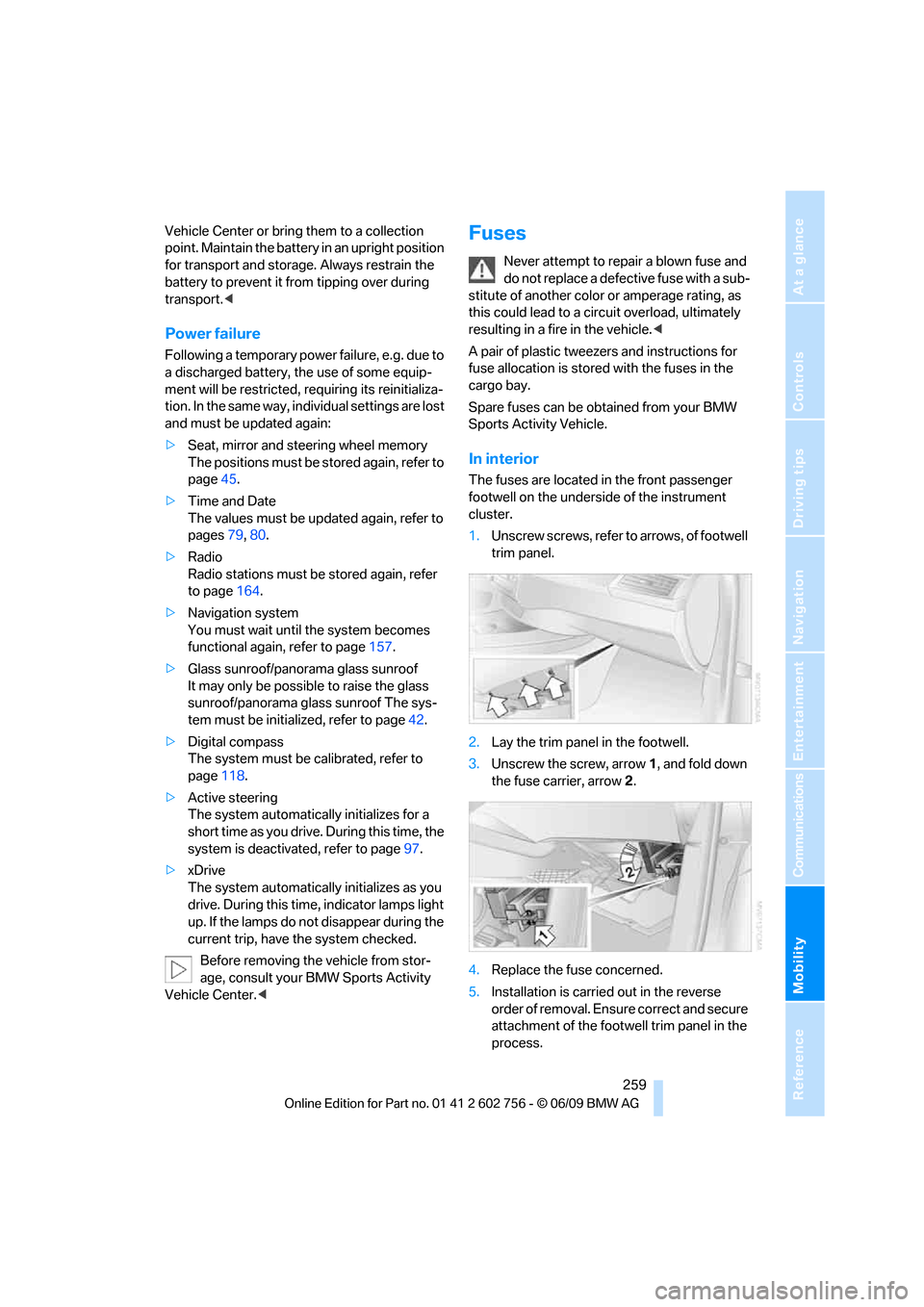
In interior
The fuses are located in the front passenger
footwell on the underside of the instrument
cluster.
1.Unscrew screws, refer to arrows, of footwell
trim panel.
2.Lay the trim panel in the footwell.
3.Unscrew the screw, arrow1, and fold down
the fuse carrier, arrow2.
4.Replace the fuse concerned.
5.Installation is carried out in the reverse
order of removal. Ensure correct and secure
attachment of the footwell trim panel in the
process.
ba8_e70ag.book Seite 259 Freitag, 5. Juni 2009 11:42 11
Page 284 of 300
Everything from A to Z
282 Children, transporting55
Child restraint devices55
Child restraint fixing system
LATCH56
Child-safety locks58
Child seats55
Chime, refer to Check
Control77
Cigarette lighter, refer to
Lighter121
Cleaning your BMW, refer to
Care246
Clock71
– 12h/24h mode80
– setting time79
Closing
– from inside30
– using remote control27
Closing fuel filler cap224
Clothes hooks119
Cockpit10
Cold start, refer to Starting
engine60
Comfort access35
– observe in car wash37
– replacing battery37
Comfort area, refer to Around
the center console14
Comfort start, refer to Starting
engine60
Compact wheel
– inflation pressure231
– wheel change256
Compartment for remote
control, refer to Ignition
lock59
Compartments, refer to
Storage compartments119
Compass, digital116
Computer73
– displays in instrument
panel73
– displays on Control
Display74
Concierge service216
Condition Based Service
CBS244Connecting car vacuum
cleaner, refer to Connecting
electrical devices121
Connecting headphones188
Consumption, refer to
Average fuel
consumption73
Consumption indicator,
energy control72
Consumption statistics, refer
to Average fuel
consumption73
Contacts, creating213
Control Center, refer to
iDrive
16
Control Display, refer to
iDrive16
– setting brightness80
– switching on/off19
Controller, refer to iDrive16
Controls, refer to Cockpit10
Controls DVD system in
rear187
Convenience operation
– glass sunroof28,29
– glass sunroof with comfort
access36
– windows28,29
– windows with comfort
access36
– with comfort access36
Coolant243
– checking level243
– temperature72
Cooling, maximum110
Cornering Brake Control
CBC88
Country codes DVD173
Country information from
BMW Online157
Courtesy lamps, refer to
Interior lamps106
Cradle for telephone or mobile
phone119
Criteria for route150
Cruise control69
Cruising range73
Cup holders119Current playback
– external devices185
– of music collection180
Customer Relations218
Cylinders, refer to Engine
data268
D
Data268
– capacities272
– dimensions269
– engine268
– technical data268
– weights271
Data transfer220
Date71
– display format80
– retrieving71
– setting80
Daytime driving lamps103
Defrosting windows109
Defrosting windows and
removing condensation109
Defrost position, refer to
Defrosting windows109
Deleting a trip149
Deleting special
destinations146
Destination, entering by town/
city name141
Destination address,
entering141,147
Destination entry using BMW
Assist145
Destination for navigation
– entering141
– entering by voice147
– entering via map146
Destination guidance150
– bypassing a route
section151
– changing specified
route150
– continuing150
– starting150
– voice instructions152
– volume of voice
instructions152
ba8_e70ag.book Seite 282 Freitag, 5. Juni 2009 11:42 11
Page 285 of 300
Reference 283
At a glance
Controls
Driving tips
Communications
Navigation
Entertainment
Mobility
Diesel exhaust fluid
– at low temperatures226
– at minimum226
– refilling yourself227
Diesel particulate filter131
Digital clock71
Digital compass116
Digital radio, refer to HD
Radio164
Dimensions269
Directional indicators, refer to
Turn signals67
Direction announcements,
refer to Voice
instructions152
Direction instructions, refer to
Voice instructions152
Directory for navigation, refer
to Address book143
Displacement, refer to Engine
data268
Display, refer to iDrive16
Displaying images195
Displaying special
destinations146
Display lighting, refer to
Instrument lighting105
Displays, refer to Instrument
panel12
Displays on the windshield,
refer to Head-Up
Display100
Disposal
– battery of remote control
with comfort access37
– battery of the remote
control, DVD system in
rear189
– vehicle battery258
Distance, refer to
Computer74
Distance to destination, refer
to Computer74
Distance warning, refer to
PDC Park Distance
Control82
Door entry lighting106Door key, refer to Keys/
remote control26
Door lock29
Door locking, confirmation
signals28
Doors
– manual operation29
– remote control27
DOT Quality Grades235
Downhill driving assistance,
refer to HDC90
Draft-free ventilation111
Drinks holder, refer to Cup
holders119
Driver's seat, calibrating50
Driving lamps, refer to Parking
lamps/low beams102
Driving on poor roads135
Driving stability control
systems88
Driving through water132
Driving tips, refer to General
driving notes130
Dry air, refer to Cooling
function110
Drying the air, refer to Cooling
function110
DSC Dynamic Stability
Control88
– indicator lamp13,89
DSC OFF, refer to Dynamic
Stability Control88
DTC Dynamic Traction
Control89
– activating89
– indicator lamp89
DVD
– country codes173
– settings174
– video playback173
DVD changer, refer to CD
changer171
DVD menu174
DVD player, refer to CD
player171DVD system in rear187
– CD/DVD player188
– connecting headphones188
– controls187
– displaying images from CD/
DVD195
– DVD country codes190
– external device198
– information on CD/DVD
player196
– playing audio tracks from
CD/DVD193
– playing video from CD/
DVD190
– remote control188
– switching on/off189
DVD video173
Dynamic Performance
Control90
Dynamic Stability Control
DSC88
Dynamic Traction, refer to
Dynamic Traction
Control89
Dynamic Traction Control
DTC89
E
Easy entry/exit54
Eject button, refer to Buttons
on the CD/DVD player160
Electrical malfunction
– automatic transmission with
Steptronic66
– door lock29
– driver's door29
– fuel filler door224
– glass sunroof, electric42
– liftgate31
– panorama glass sunroof40
– parking brake63
Electric seat44
Electronic brake-force
distribution88
Electronic oil level check241
ba8_e70ag.book Seite 283 Freitag, 5. Juni 2009 11:42 11
Page 287 of 300
Reference 285
At a glance
Controls
Driving tips
Communications
Navigation
Entertainment
Mobility
Fuel consumption display,
computer, average fuel
consumption73
Fuel display, refer to Fuel
gauge73
Fuel filler door224
– closing224
– opening224
– releasing manually224
Fuses259
G
Garage door opener, refer to
Integrated universal remote
control115
Gasoline, refer to Required
fuel225
Gasoline display, refer to Fuel
gauge73
Gearshifts, automatic
transmission with
Steptronic65
General driving
notes130,131
Glass sunroof
– convenience operation from
outside29
– convenience operation with
comfort access36
– remote control28
Glass sunroof, electric40
– moving manually42
– opening, closing41
– power interruption42
– raising41
Glove compartment118
– lighting118
GPS navigation, refer to
Navigation system140
Grills, refer to Ventilation111
Grills of the automatic climate
control107
Gross vehicle weight, refer to
Weights271
Guided Tours149
H
Handbrake, refer to Parking
brake61
– Automatic Hold61
Hands-free system, refer to
Microphone14
Hand washing247
Having diesel exhaust fluid
refilled226
Hazard warning flashers15
HDC Hill Descent Control90
HD Radio164
Head airbags98
Headlamp control,
automatic102
Headlamp flasher67
Headlamps102
– cleaning, refer to Washer/
wiper system67
– replacing bulbs250
Head Light, refer to Adaptive
Head Light103
Head restraints46
– sitting safely43
Head-Up Display100
Heated
– mirrors52
– rear window109
– seats50,51
– steering wheel54
Heating107
– exterior mirrors52
– interior107
– rear window109
– residual heat110
– seats50,51
– steering wheel54
Heating with engine switched
off, refer to Residual
heat110
Heavy cargo, refer to Securing
cargo134
Height
– on Head-Up Display100
– refer to Dimensions269
Height adjustment
– seats44
– steering wheel53High-beam assistant104
High beams67,104
– automatically switching on
and off, refer to High-beam
assistant104
– headlamp flasher67
– indicator lamp13
High-pressure cleaning
jets247
High water, refer to Driving
through water132
Highway, refer to Route
criteria150
Hill Descent Control HDC90
Hills132
Holder for cups119
Homepage4
Hood239
Horn10
Hot exhaust system131
Hydraulic brake assistant,
refer to Brake assistant88
Hydroplaning132
I
IBOC, refer to HD Radio164
Ice, refer to Outside
temperature warning71
Ice warning, refer to Outside
temperature warning71
Identification, tire238
Identification mark, run-flat
tires237
iDrive16
– changing language81
– changing settings79
– changing units of measure
and display type80
– controller16
– controls16
– main menu17
– setting brightness80
– setting date80
– setting time79
– status information19
Ignition59
– switched off59
– switched on59
ba8_e70ag.book Seite 285 Freitag, 5. Juni 2009 11:42 11
Page 289 of 300
Reference 287
At a glance
Controls
Driving tips
Communications
Navigation
Entertainment
Mobility
Loading133
– securing cargo134
– stowing cargo134
– vehicle133
Load securing equipment,
refer to Securing cargo134
Lock buttons in the doors,
refer to Locking30
Locking
– from inside30
– setting confirmation
signals28
– using remote control27
– without key, refer to Comfort
access35
Locking and unlocking doors
– from inside30
– setting confirmation
signals28
Locking without key, refer to
Comfort access35
Low beams102
– automatic102
Lower back support, refer to
Lumbar support45
Low-sulfur diesel225
Lug bolts257
– tightening torque, refer to
After mounting258
– wrench257
Luggage compartment
capacity, refer to Cargo bay
capacity271
Luggage rack, refer to Roof-
mounted luggage rack135
Lumbar support45
LW, waveband163
M
M+S tires, refer to Winter
tires238
Main menu, iDrive17Maintenance
– refer to Service and
Warranty Information
Booklet for US models244
– refer to Service
requirements74
– refer to Warranty and
Service Guide Booklet for
Canadian models244
Maintenance system244
Malfunction
– door lock29
– driver's door29
– fuel filler door224
– glass sunroof, electric42
– liftgate31
– panorama glass sunroof40
– parking brake63
Malfunction warnings, refer to
Check Control77
Manual air distribution110
Manually releasing
transmission lock66
Manual mode, automatic
transmission with
Steptronic65
Manual operation
– door lock29
– driver's door29
– fuel filler door224
– transmission lock, automatic
transmission66
Map display152
Map for navigation
– changing scale153
– entering destination146
Master key, refer to Keys/
remote control26
Maximum cooling110
Maximum speed
– for winter tires238
– with compact wheel258
Memory, refer to Seat, mirror
and steering wheel
memory45
Menus, refer to iDrive16
Messages208
Microfilter112Microphone
– for mobile phone14
– for telephone14
– for voice activation
system14
Mirror dimming feature53
Mirrors52
– automatic curb monitor53
– exterior mirrors52
– folding in and out52
– heating
52
– interior rearview mirror53
– memory, refer to Seat, mirror
and steering wheel
memory45
Mobile phone
– adjusting volume205
– connecting, refer to Mobile
phone, pairing202
– installation location, refer to
Center armrest, front119
– operation via iDrive205
– pairing202
– refer to separate operating
instructions
– refer to Telephone202
Monitor, refer to iDrive16
Monitoring tire pressure, refer
to FTM Flat Tire Monitor92
MP3 player, connecting
– refer to AUX-IN
connection183
– refer to USB-audio
interface183
Multifunction steering wheel,
refer to Buttons on steering
wheel11
Multifunction switch
– refer to Turn signals/
headlamp flasher/high
beams67
– refer to Washer/wiper
system67
Music
– managing181
– playing179
– storing178
Music collection178
– backup181
ba8_e70ag.book Seite 287 Freitag, 5. Juni 2009 11:42 11