instrument panel BMW X5 2010 E70 Owner's Guide
[x] Cancel search | Manufacturer: BMW, Model Year: 2010, Model line: X5, Model: BMW X5 2010 E70Pages: 300, PDF Size: 12.41 MB
Page 93 of 300
Controls
91Reference
At a glance
Driving tips
Communications
Navigation
Entertainment
Mobility
3Pull beyond the resistance point:
With downhill grade over 10Ξ, reduce
speed to approx. 3 mph/4 km/h.
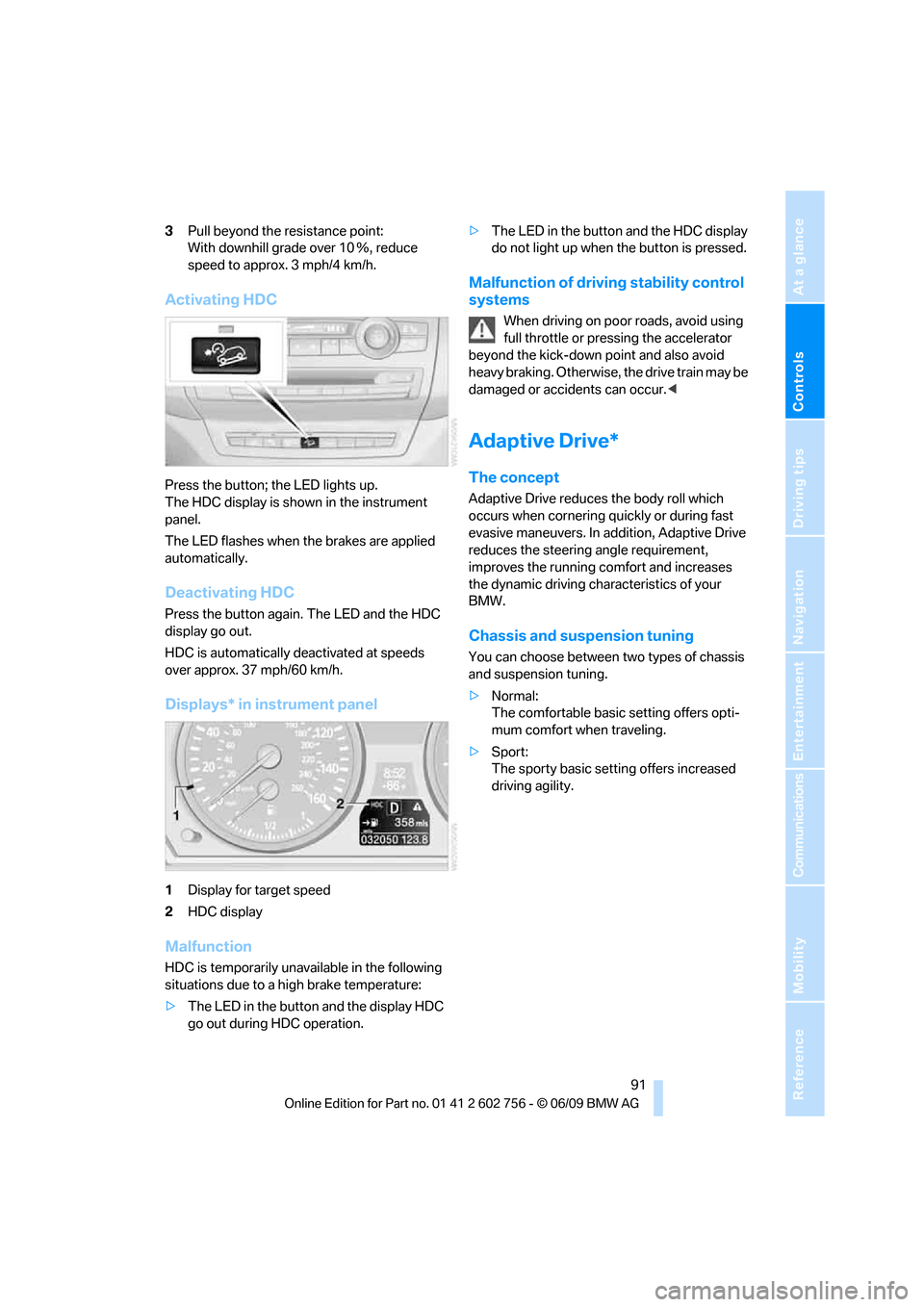
Activating HDC
Press the button; the LED lights up.
The HDC display is shown in the instrument
panel.
The LED flashes when the brakes are applied
automatically.
Deactivating HDC
Press the button again. The LED and the HDC
display go out.
HDC is automatically deactivated at speeds
over approx. 37 mph/60 km/h.
Displays* in instrument panel
1Display for target speed
2HDC display
Malfunction
HDC is temporarily unavailable in the following
situations due to a high brake temperature:
>The LED in the button and the display HDC
go out during HDC operation.>The LED in the button and the HDC display
do not light up when the button is pressed.
Malfunction of driving stability control
systems
When driving on poor roads, avoid using
full throttle or pressing the accelerator
beyond the kick-down point and also avoid
heavy braking. Otherwise, the drive train may be
damaged or accidents can occur.<
Adaptive Drive*
The concept
Adaptive Drive reduces the body roll which
occurs when cornering quickly or during fast
evasive maneuvers. In addition, Adaptive Drive
reduces the steering angle requirement,
improves the running comfort and increases
the dynamic driving characteristics of your
BMW.
Chassis and suspension tuning
You can choose between two types of chassis
and suspension tuning.
>Normal:
The comfortable basic setting offers opti-
mum comfort when traveling.
>Sport:
The sporty basic setting offers increased
driving agility.
ba8_e70ag.book Seite 91 Freitag, 5. Juni 2009 11:42 11
Page 94 of 300
Technology for comfort, convenience and safety
92
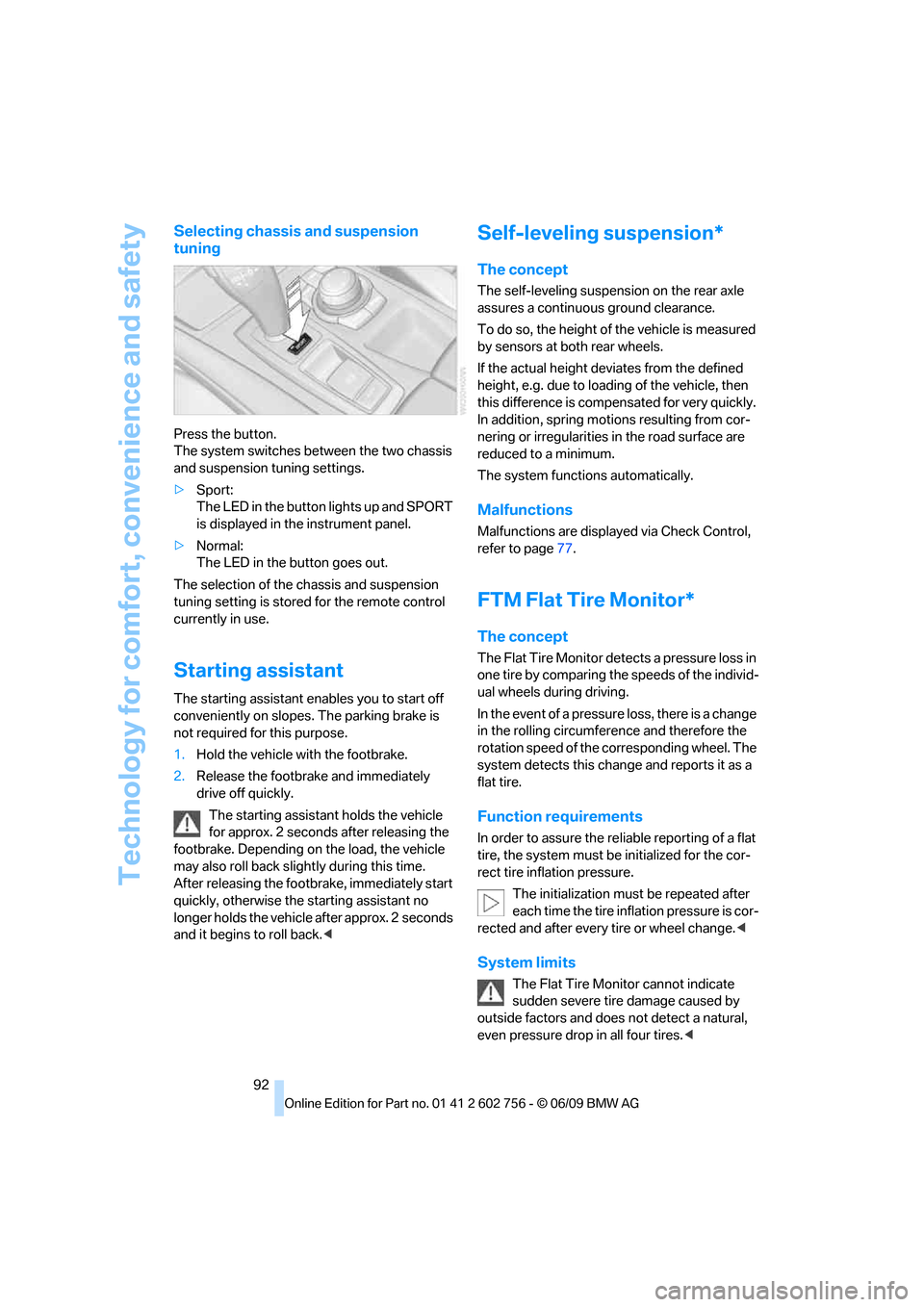
Selecting chassis and suspension
tuning
Press the button.
The system switches between the two chassis
and suspension tuning settings.
>Sport:
The LED in the button lights up and SPORT
is displayed in the instrument panel.
>Normal:
The LED in the button goes out.
The selection of the chassis and suspension
tuning setting is stored for the remote control
currently in use.
Starting assistant
The starting assistant enables you to start off
conveniently on slopes. The parking brake is
not required for this purpose.
1.Hold the vehicle with the footbrake.
2.Release the footbrake and immediately
drive off quickly.
The starting assistant holds the vehicle
for approx. 2 seconds after releasing the
footbrake. Depending on the load, the vehicle
may also roll back slightly during this time.
After releasing the footbrake, immediately start
quickly, otherwise the starting assistant no
longer holds the vehicle after approx. 2 seconds
and it begins to roll back.<
Self-leveling suspension*
The concept
The self-leveling suspension on the rear axle
assures a continuous ground clearance.
To do so, the height of the vehicle is measured
by sensors at both rear wheels.
If the actual height deviates from the defined
height, e.g. due to loading of the vehicle, then
this difference is compensated for very quickly.
In addition, spring motions resulting from cor-
nering or irregularities in the road surface are
reduced to a minimum.
The system functions automatically.
Malfunctions
Malfunctions are displayed via Check Control,
refer to page77.
FTM Flat Tire Monitor*
The concept
The Flat Tire Monitor detects a pressure loss in
one tire by comparing the speeds of the individ-
ual wheels during driving.
In the event of a pressure loss, there is a change
in the rolling circumference and therefore the
rotation speed of the corresponding wheel. The
system detects this change and reports it as a
flat tire.
Function requirements
In order to assure the reliable reporting of a flat
tire, the system must be initialized for the cor-
rect tire inflation pressure.
The initialization must be repeated after
each time the tire inflation pressure is cor-
rected and after every tire or wheel change.<
System limits
The Flat Tire Monitor cannot indicate
sudden severe tire damage caused by
outside factors and does not detect a natural,
even pressure drop in all four tires.<
ba8_e70ag.book Seite 92 Freitag, 5. Juni 2009 11:42 11
Page 100 of 300
Technology for comfort, convenience and safety
98
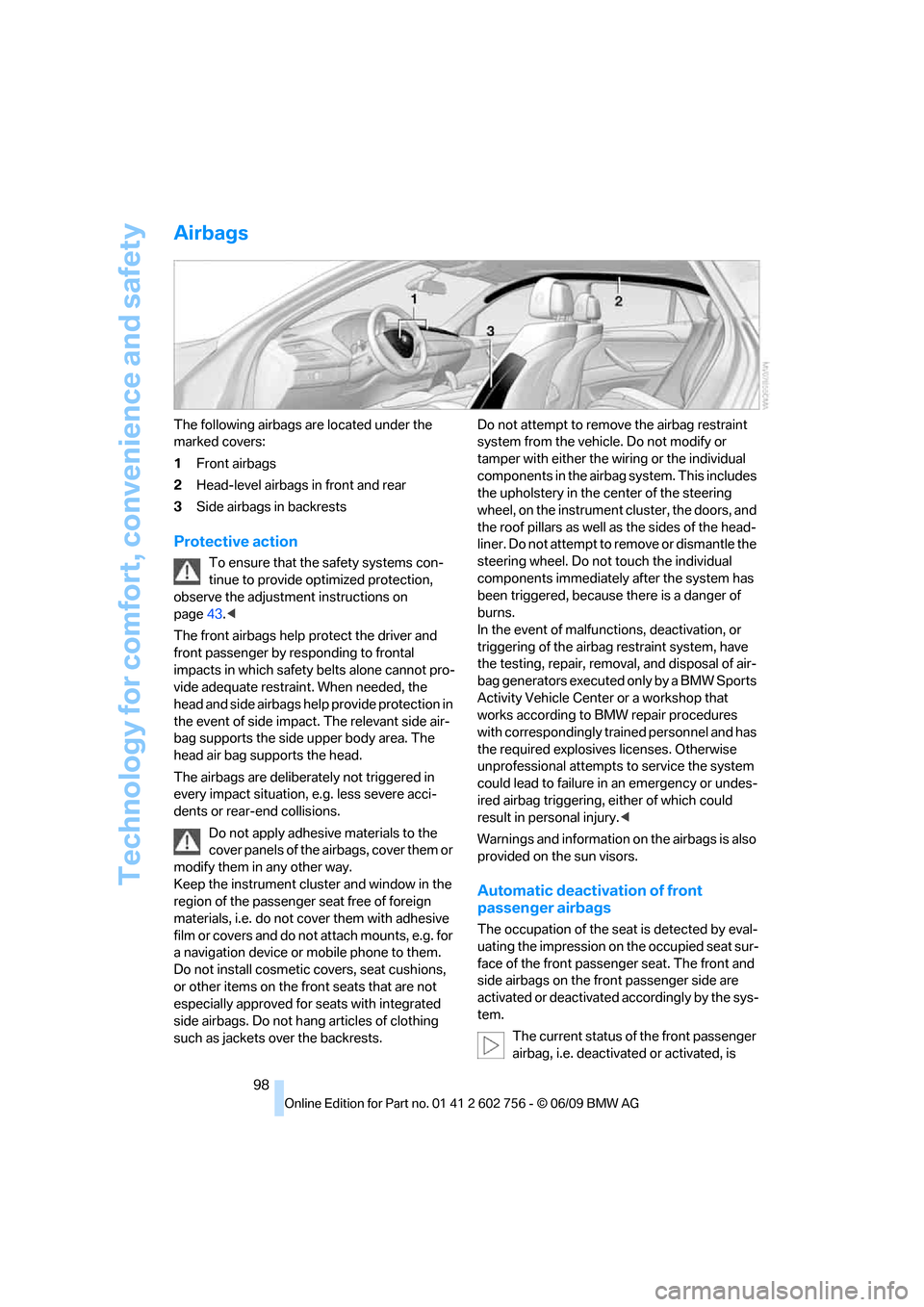
Airbags
The following airbags are located under the
marked covers:
1Front airbags
2Head-level airbags in front and rear
3Side airbags in backrests
Protective action
To ensure that the safety systems con-
tinue to provide optimized protection,
observe the adjustment instructions on
page43.<
The front airbags help protect the driver and
front passenger by responding to frontal
impacts in which safety belts alone cannot pro-
vide adequate restraint. When needed, the
head and side airbags help provide protection in
the event of side impact. The relevant side air-
bag supports the side upper body area. The
head air bag supports the head.
The airbags are deliberately not triggered in
every impact situation, e.g. less severe acci-
dents or rear-end collisions.
Do not apply adhesive materials to the
cover panels of the airbags, cover them or
modify them in any other way.
Keep the instrument cluster and window in the
region of the passenger seat free of foreign
materials, i.e. do not cover them with adhesive
film or covers and do not attach mounts, e.g. for
a navigation device or mobile phone to them.
Do not install cosmetic covers, seat cushions,
or other items on the front seats that are not
especially approved for seats with integrated
side airbags. Do not hang articles of clothing
such as jackets over the backrests.Do not attempt to remove the airbag restraint
system from the vehicle. Do not modify or
tamper with either the wiring or the individual
components in the airbag system. This includes
the upholstery in the center of the steering
wheel, on the instrument cluster, the doors, and
the roof pillars as well as the sides of the head-
liner. Do not attempt to remove or dismantle the
steering wheel. Do not touch the individual
components immediately after the system has
been triggered, because there is a danger of
burns.
In the event of malfunctions, deactivation, or
triggering of the airbag restraint system, have
the testing, repair, removal, and disposal of air-
bag generators executed only by a BMW Sports
Activity Vehicle Center or a workshop that
works according to BMW repair procedures
with correspondingly trained personnel and has
the required explosives licenses. Otherwise
unprofessional attempts to service the system
could lead to failure in an emergency or undes-
ired airbag triggering, either of which could
result in personal injury.<
Warnings and information on the airbags is also
provided on the sun visors.
Automatic deactivation of front
passenger airbags
The occupation of the seat is detected by eval-
uating the impression on the occupied seat sur-
face of the front passenger seat. The front and
side airbags on the front passenger side are
activated or deactivated accordingly by the sys-
tem.
The current status of the front passenger
airbag, i.e. deactivated or activated, is
ba8_e70ag.book Seite 98 Freitag, 5. Juni 2009 11:42 11
Page 106 of 300
Lamps
104
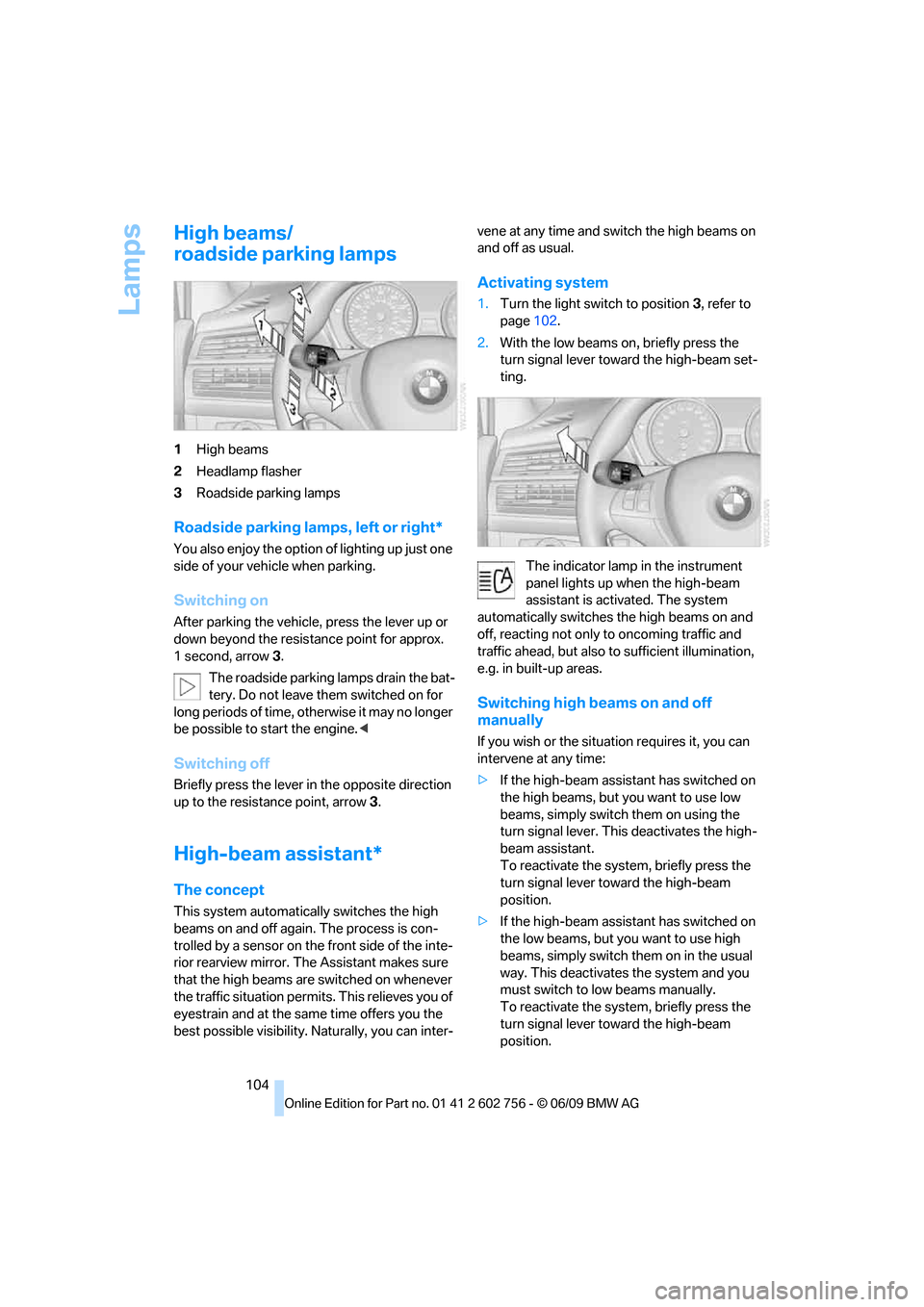
High beams/
roadside parking lamps
1High beams
2Headlamp flasher
3Roadside parking lamps
Roadside parking lamps, left or right*
You also enjoy the option of lighting up just one
side of your vehicle when parking.
Switching on
After parking the vehicle, press the lever up or
down beyond the resistance point for approx.
1 second, arrow3.
The roadside parking lamps drain the bat-
tery. Do not leave them switched on for
long periods of time, otherwise it may no longer
be possible to start the engine.<
Switching off
Briefly press the lever in the opposite direction
up to the resistance point, arrow 3.
High-beam assistant*
The concept
This system automatically switches the high
beams on and off again. The process is con-
trolled by a sensor on the front side of the inte-
rior rearview mirror. The Assistant makes sure
that the high beams are switched on whenever
the traffic situation permits. This relieves you of
eyestrain and at the same time offers you the
best possible visibility. Naturally, you can inter-vene at any time and switch the high beams on
and off as usual.
Activating system
1.Turn the light switch to position3, refer to
page102.
2.With the low beams on, briefly press the
turn signal lever toward the high-beam set-
ting.
The indicator lamp in the instrument
panel lights up when the high-beam
assistant is activated. The system
automatically switches the high beams on and
off, reacting not only to oncoming traffic and
traffic ahead, but also to sufficient illumination,
e.g. in built-up areas.
Switching high beams on and off
manually
If you wish or the situation requires it, you can
intervene at any time:
>If the high-beam assistant has switched on
the high beams, but you want to use low
beams, simply switch them on using the
turn signal lever. This deactivates the high-
beam assistant.
To reactivate the system, briefly press the
turn signal lever toward the high-beam
position.
>If the high-beam assistant has switched on
the low beams, but you want to use high
beams, simply switch them on in the usual
way. This deactivates the system and you
must switch to low beams manually.
To reactivate the system, briefly press the
turn signal lever toward the high-beam
position.
ba8_e70ag.book Seite 104 Freitag, 5. Juni 2009 11:42 11
Page 107 of 300
Controls
105Reference
At a glance
Driving tips
Communications
Navigation
Entertainment
Mobility
>Use the headlamp flasher as usual when the
low beams are on.
System limits
The high-beam assistant cannot replace
personal judgment about the use of high
beams. In situations that require it, you should
therefore switch to low beams manually; failure
to do so can constitute a safety hazard.<
In the following sample situations, the system
will not function or will only function to a limited
degree, possibly requiring the driver to react
personally:
>in extremely unfavorable weather condi-
tions such as fog or heavy precipitation
>when you perceive poorly illuminated road
users such as pedestrians, cyclists, horse-
back riders, carriages, when rail or shipping
traffic is close to the road, or at deer cross-
ings
>in sharp curves, on steep hilltops or dips,
when there cross-traffic, or in the presence
of half-concealed oncoming traffic on the
highway
>in poorly lit areas and in the presence of
highly reflective signs
>in the low speed range
>when the windshield in the region of the
interior rearview mirror is fogged, dirty, or
covered by stickers, decals, etc.
>when the sensor is dirty. Clean the sensor
on the front side of the interior rearview mir-
ror with a cloth moistened with a little glass
cleaner.
Switching off using iDrive
1."Settings"
2."Lighting"
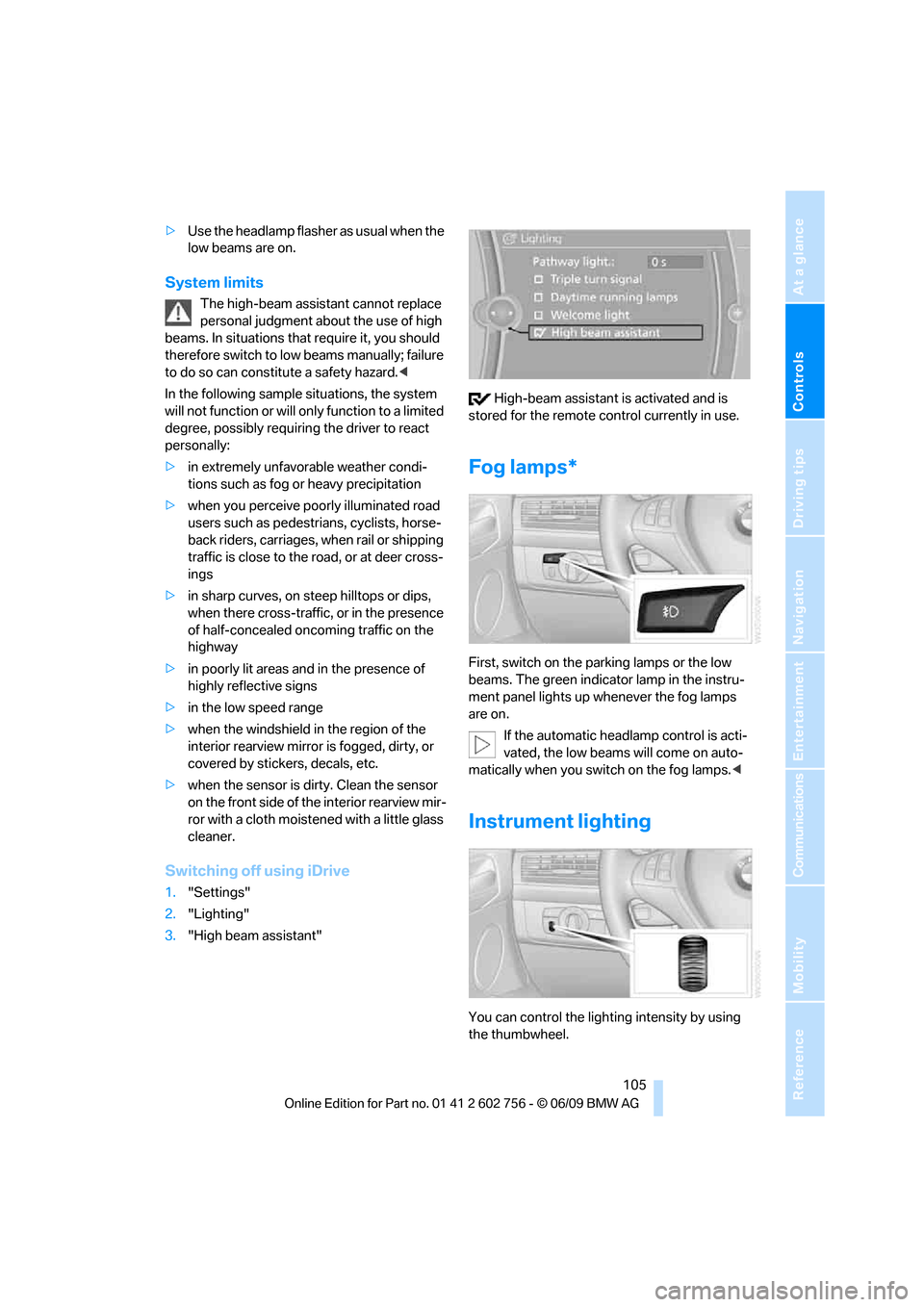
3."High beam assistant" High-beam assistant is activated and is
stored for the remote control currently in use.
Fog lamps*
First, switch on the parking lamps or the low
beams. The green indicator lamp in the instru-
ment panel lights up whenever the fog lamps
are on.
If the automatic headlamp control is acti-
vated, the low beams will come on auto-
matically when you switch on the fog lamps.<
Instrument lighting
You can control the lighting intensity by using
the thumbwheel.
ba8_e70ag.book Seite 105 Freitag, 5. Juni 2009 11:42 11
Page 228 of 300
Refueling
226
BMW X5 with BMW Advanced
Diesel
The concept
BMW Advanced Diesel reduces nitrogen oxides
in the diesel exhaust of your vehicle by injecting
the reducing agent diesel exhaust fluid into the
exhaust line. In the catalytic converter, a chem-
ical reaction occurs that minimizes nitrogen
oxides.
In order to be able to start the engine in the
usual way, there must be a sufficient supply of
diesel exhaust fluid in the separate reservoir.
System heating
In order to bring the system to operating tem-
perature after a cold start of the engine, the
automatic transmission shifts into the next
higher gear at a later point.
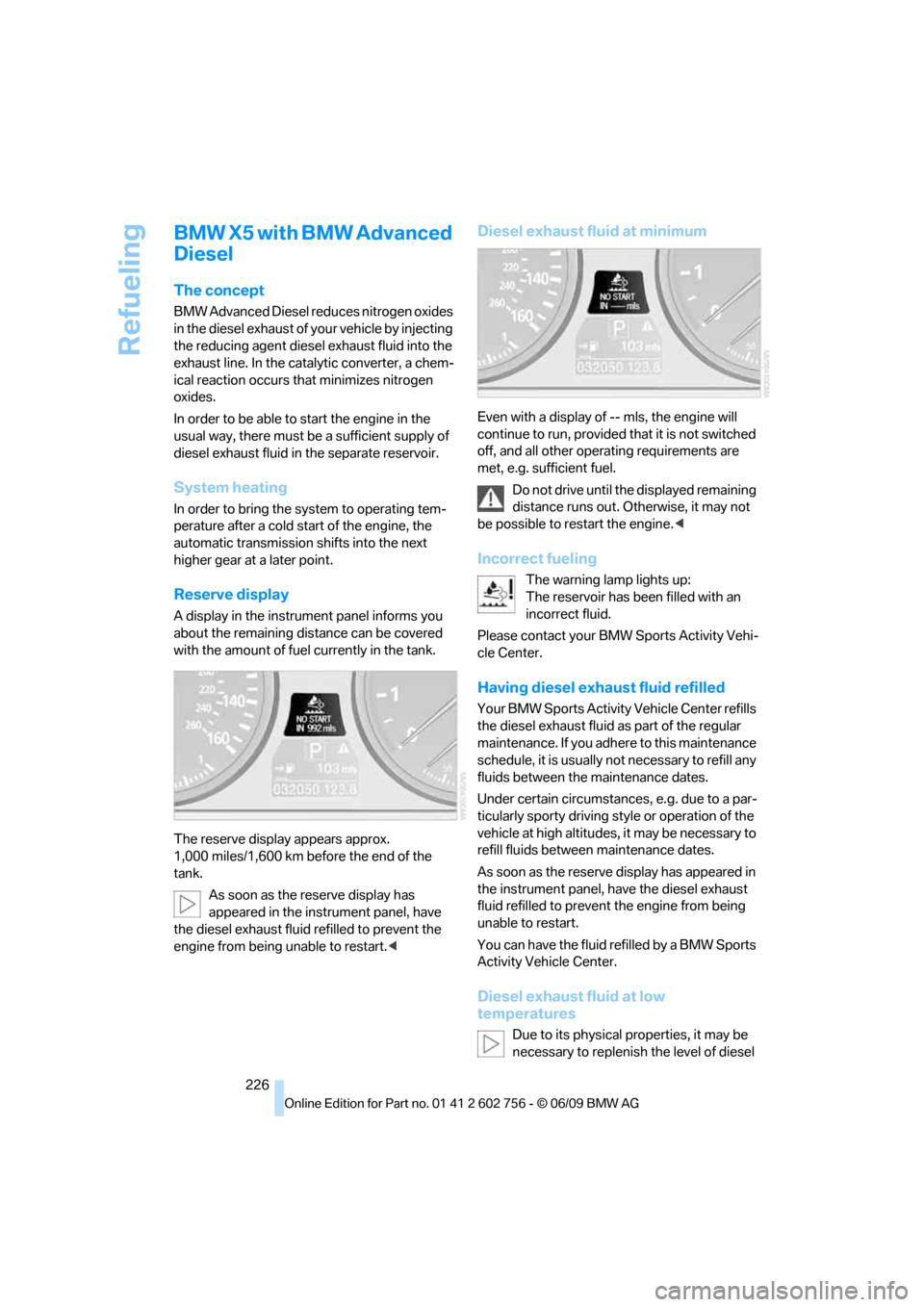
Reserve display
A display in the instrument panel informs you
about the remaining distance can be covered
with the amount of fuel currently in the tank.
The reserve display appears approx.
1,000 miles/1,600 km before the end of the
tank.
As soon as the reserve display has
appeared in the instrument panel, have
the diesel exhaust fluid refilled to prevent the
engine from being unable to restart.<
Diesel exhaust fluid at minimum
Even with a display of -- mls, the engine will
continue to run, provided that it is not switched
off, and all other operating requirements are
met, e.g. sufficient fuel.
Do not drive until the displayed remaining
distance runs out. Otherwise, it may not
be possible to restart the engine.<
Incorrect fueling
The warning lamp lights up:
The reservoir has been filled with an
incorrect fluid.
Please contact your BMW Sports Activity Vehi-
cle Center.
Having diesel exhaust fluid refilled
Your BMW Sports Activity Vehicle Center refills
the diesel exhaust fluid as part of the regular
maintenance. If you adhere to this maintenance
schedule, it is usually not necessary to refill any
fluids between the maintenance dates.
Under certain circumstances, e.g. due to a par-
ticularly sporty driving style or operation of the
vehicle at high altitudes, it may be necessary to
refill fluids between maintenance dates.
As soon as the reserve display has appeared in
the instrument panel, have the diesel exhaust
fluid refilled to prevent the engine from being
unable to restart.
You can have the fluid refilled by a BMW Sports
Activity Vehicle Center.
Diesel exhaust fluid at low
temperatures
Due to its physical properties, it may be
necessary to replenish the level of diesel
ba8_e70ag.book Seite 226 Freitag, 5. Juni 2009 11:42 11
Page 229 of 300
Mobility
227Reference
At a glance
Controls
Driving tips
Communications
Navigation
Entertainment
exhaust fluid at temperatures below +237/
-56 even between the regular maintenance
intervals.
If the fluid needs to be refilled, this will be indi-
cated with the reserve display in the instrument
panel, refer to page226.<
Only refill the diesel exhaust fluid
yourself in exceptional circumstances
In order to get your vehicle to reach the nearest
BMW Sports Activity Vehicle Center, you may
refill the diesel exhaust fluid yourself, making
sure to heed the warning notices.
Do not allow diesel exhaust fluid to come
into contact with you. This can lead to
skin and eye irritation. Wear protective goggles
and gloves as needed. Follow the safety
instructions on the bottle.
When opening the bottle or reservoir, pungent
smelling vapors can escape. Before refilling,
close the vehicle completely so that the vapors
do not get into the interior of the vehicle. When
handling diesel exhaust fluid in enclosed
spaces, make sure to have sufficient ventilation.
After handling diesel exhaust fluid, wash hands
thoroughly. Failure to do so may lead to irrita-
tion, e.g. due to inadvertent contact with the
eyes.
If eye irritation occurs, immediately rinse eyes
with ample water and contact a doctor if neces-
sary.
If diesel exhaust fluid comes into contact with
surfaces of your vehicle, rinse the affected sur-
faces with water or else damage may occur.
Keep diesel exhaust fluid out of reach of chil-
dren.<
Suitable diesel exhaust fluid
>Preferred: BMW Diesel Exhaust Fluid.
This bottle and its special adapter permit
convenient refilling with diesel exhaust
fluid.
>Alternative: NOx reduction agent AUS 32
You can get diesel exhaust fluid at your BMW
Sports Activity Vehicle Center.
Refilling quantity
Refilling quantity at the start of the reserve dis-
play: approx. 0,75 US gal/2.7 liters reserve
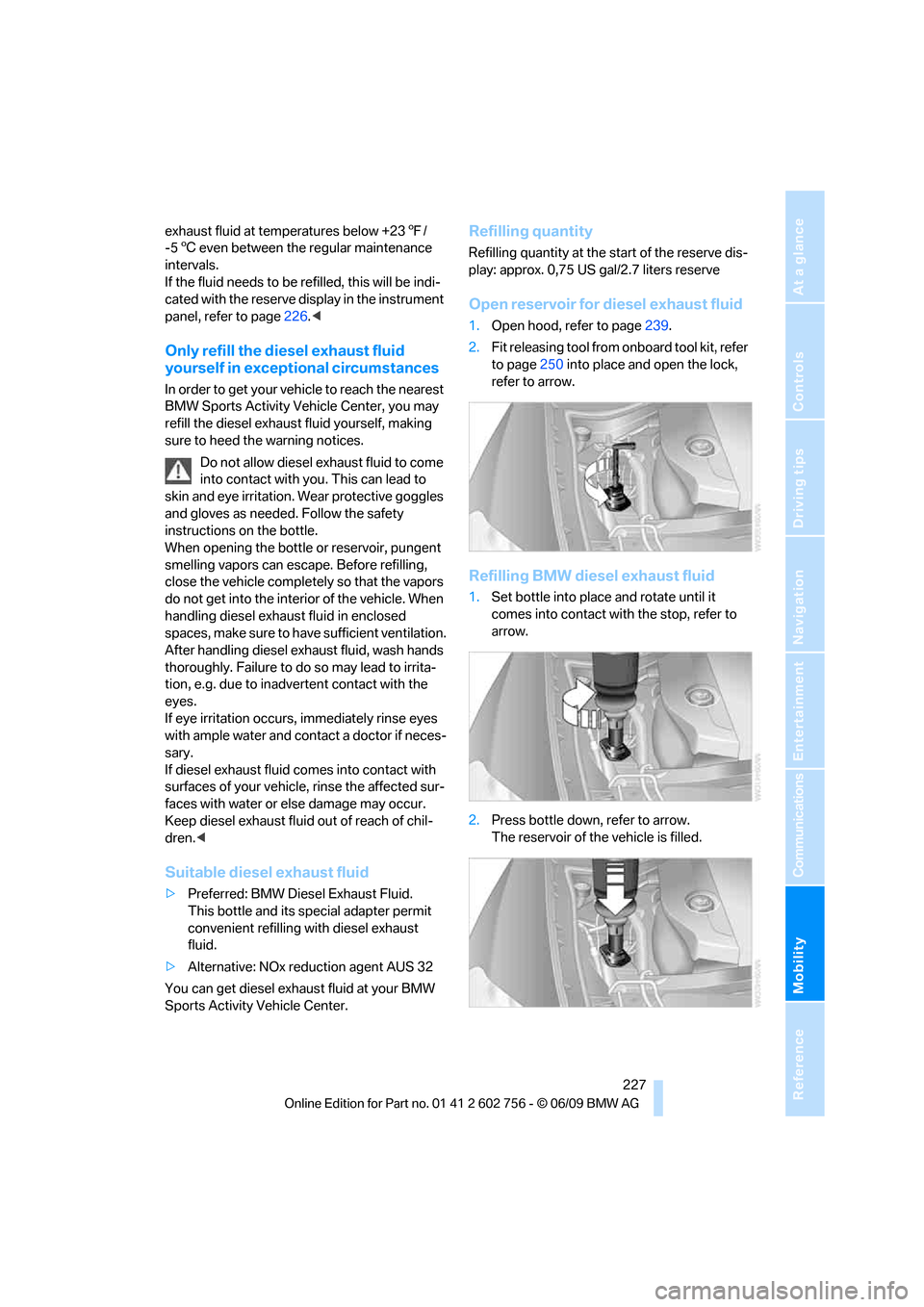
Open reservoir for diesel exhaust fluid
1.Open hood, refer to page239.
2.Fit releasing tool from onboard tool kit, refer
to page250 into place and open the lock,
refer to arrow.
Refilling BMW diesel exhaust fluid
1.Set bottle into place and rotate until it
comes into contact with the stop, refer to
arrow.
2.Press bottle down, refer to arrow.
The reservoir of the vehicle is filled.
ba8_e70ag.book Seite 227 Freitag, 5. Juni 2009 11:42 11
Page 250 of 300
Care
248 Do not use aggressive, acid-containing,
strongly alkaline, or coarse cleansers and
do not use steam cleaners at temperatures
greater than 1407/606; otherwise you may
damage your vehicle.<
Aluminum running boards
A rust film on the aluminum running boards can
be removed with a special cleaning agent.
Outside sensors/cameras
Make sure that sensors and cameras out-
side the vehicle, e.g. Park Distance Con-
trol, Top View, or rear view camera, are kept
clean and free of ice in order to assure full func-
tionality.<
Interior care
Upholstery materials/cloth-covered
paneling
Clean regularly with a vacuum cleaner in order
to remove surface dirt.
In the event of more serious soiling such as bev-
erage stains, use a soft sponge or a lint-free
microfiber cloth in combination with suitable
interior cleaners. Follow the instructions on the
packaging.
Clean upholstery material over a large
area extending out to the seams. Avoid
intense friction.<
Open Velcro fasteners on pants or other
items of clothing can cause damage to
the seat covering. Make sure that the Velcro
fasteners are closed.<
Leather/leather-covered paneling
The leather used by BMW is a high quality
natural product. Slight patterns in the
grain are part of the typical properties of a natu-
ral leather.<
Dust and dirt from the road chafe in pores and
folds and result in considerable wear and cause
the leather surface to become prematurely brit-
tle. We therefore suggest that you clean the leather with a dust cloth or vacuum cleaner at
regular intervals.
Particularly with light-colored leather, make
sure to clean it regularly since it has a greater
tendency to become soiled.
Treat the leather twice a year with a leather
lotion since dirt and grease harm the protective
layer of the leather.
Carpets/cargo bay
Floor carpets and floor mats can be vacuumed
or cleaned with interior cleaner when they are
more heavily soiled.
Floor mats can be removed for cleaning. When
inserting into place, make sure that the seat
rails do not protrude over the floor mats; other-
wise floor mats can be damaged.
Fluff on new floor mats is a result of the produc-
tion process and can be removed by repeated
vacuuming.
Plastic components inside
>Vinyl upholstery surfaces
>Lamp lenses
>Cover glass of instrument cluster
>Matt parts
should be cleaned with water and, if necessary,
solvent-free plastic cleaner.
Fine wooden components
Use a damp cloth to clean fine wooden trim
panels and components. Follow up by drying
with a soft cloth.
Safety belts
Soiled seatbelt straps hinder the reeling, thus
reducing safety.
Do not use chemical cleansers as they
can destroy the webbing.<
Inside sensors/cameras
Clean inside sensors and cameras, such as
those of the high-beam assistant, using a lint-
free cloth moistened with glass cleaner.
ba8_e70ag.book Seite 248 Freitag, 5. Juni 2009 11:42 11
Page 261 of 300
Mobility
259Reference
At a glance
Controls
Driving tips
Communications
Navigation
Entertainment
Vehicle Center or bring them to a collection
point. Maintain the battery in an upright position
for transport and storage. Always restrain the
battery to prevent it from tipping over during
transport.<
Power failure
Following a temporary power failure, e.g. due to
a discharged battery, the use of some equip-
ment will be restricted, requiring its reinitializa-
tion. In the same way, individual settings are lost
and must be updated again:
>Seat, mirror and steering wheel memory
The positions must be stored again, refer to
page45.
>Time and Date
The values must be updated again, refer to
pages79, 80.
>Radio
Radio stations must be stored again, refer
to page164.
>Navigation system
You must wait until the system becomes
functional again, refer to page157.
>Glass sunroof/panorama glass sunroof
It may only be possible to raise the glass
sunroof/panorama glass sunroof The sys-
tem must be initialized, refer to page42.
>Digital compass
The system must be calibrated, refer to
page118.
>Active steering
The system automatically initializes for a
short time as you drive. During this time, the
system is deactivated, refer to page97.
>xDrive
The system automatically initializes as you
drive. During this time, indicator lamps light
up. If the lamps do not disappear during the
current trip, have the system checked.
Before removing the vehicle from stor-
age, consult your BMW Sports Activity
Vehicle Center.<
Fuses
Never attempt to repair a blown fuse and
do not replace a defective fuse with a sub-
stitute of another color or amperage rating, as
this could lead to a circuit overload, ultimately
resulting in a fire in the vehicle.<
A pair of plastic tweezers and instructions for
fuse allocation is stored with the fuses in the
cargo bay.
Spare fuses can be obtained from your BMW
Sports Activity Vehicle.
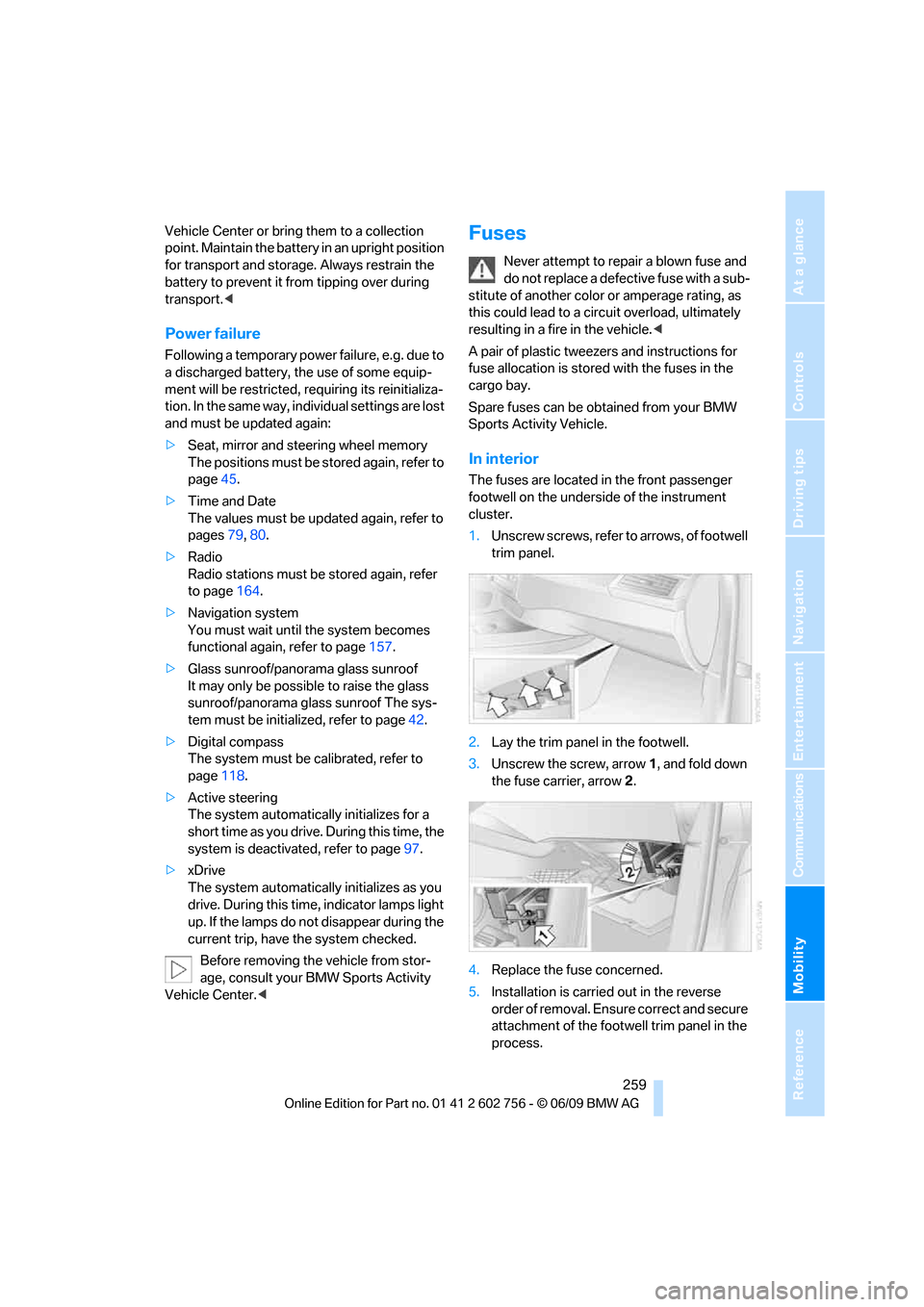
In interior
The fuses are located in the front passenger
footwell on the underside of the instrument
cluster.
1.Unscrew screws, refer to arrows, of footwell
trim panel.
2.Lay the trim panel in the footwell.
3.Unscrew the screw, arrow1, and fold down
the fuse carrier, arrow2.
4.Replace the fuse concerned.
5.Installation is carried out in the reverse
order of removal. Ensure correct and secure
attachment of the footwell trim panel in the
process.
ba8_e70ag.book Seite 259 Freitag, 5. Juni 2009 11:42 11
Page 284 of 300
Everything from A to Z
282 Children, transporting55
Child restraint devices55
Child restraint fixing system
LATCH56
Child-safety locks58
Child seats55
Chime, refer to Check
Control77
Cigarette lighter, refer to
Lighter121
Cleaning your BMW, refer to
Care246
Clock71
– 12h/24h mode80
– setting time79
Closing
– from inside30
– using remote control27
Closing fuel filler cap224
Clothes hooks119
Cockpit10
Cold start, refer to Starting
engine60
Comfort access35
– observe in car wash37
– replacing battery37
Comfort area, refer to Around
the center console14
Comfort start, refer to Starting
engine60
Compact wheel
– inflation pressure231
– wheel change256
Compartment for remote
control, refer to Ignition
lock59
Compartments, refer to
Storage compartments119
Compass, digital116
Computer73
– displays in instrument
panel73
– displays on Control
Display74
Concierge service216
Condition Based Service
CBS244Connecting car vacuum
cleaner, refer to Connecting
electrical devices121
Connecting headphones188
Consumption, refer to
Average fuel
consumption73
Consumption indicator,
energy control72
Consumption statistics, refer
to Average fuel
consumption73
Contacts, creating213
Control Center, refer to
iDrive
16
Control Display, refer to
iDrive16
– setting brightness80
– switching on/off19
Controller, refer to iDrive16
Controls, refer to Cockpit10
Controls DVD system in
rear187
Convenience operation
– glass sunroof28,29
– glass sunroof with comfort
access36
– windows28,29
– windows with comfort
access36
– with comfort access36
Coolant243
– checking level243
– temperature72
Cooling, maximum110
Cornering Brake Control
CBC88
Country codes DVD173
Country information from
BMW Online157
Courtesy lamps, refer to
Interior lamps106
Cradle for telephone or mobile
phone119
Criteria for route150
Cruise control69
Cruising range73
Cup holders119Current playback
– external devices185
– of music collection180
Customer Relations218
Cylinders, refer to Engine
data268
D
Data268
– capacities272
– dimensions269
– engine268
– technical data268
– weights271
Data transfer220
Date71
– display format80
– retrieving71
– setting80
Daytime driving lamps103
Defrosting windows109
Defrosting windows and
removing condensation109
Defrost position, refer to
Defrosting windows109
Deleting a trip149
Deleting special
destinations146
Destination, entering by town/
city name141
Destination address,
entering141,147
Destination entry using BMW
Assist145
Destination for navigation
– entering141
– entering by voice147
– entering via map146
Destination guidance150
– bypassing a route
section151
– changing specified
route150
– continuing150
– starting150
– voice instructions152
– volume of voice
instructions152
ba8_e70ag.book Seite 282 Freitag, 5. Juni 2009 11:42 11