opening and BMW X5 2010 E70 Owner's Guide
[x] Cancel search | Manufacturer: BMW, Model Year: 2010, Model line: X5, Model: BMW X5 2010 E70Pages: 300, PDF Size: 12.41 MB
Page 177 of 300
Navigation
Entertainment
Driving tips
175Reference
At a glance
Controls
Communications
Mobility
4."Brightness", "Contrast" or "Color"
5.Turn the controller until the desired setting
is displayed and then press the controller.
Zoom
Display the video image on the full screen.
1.Turn the controller during playback.
2.Open "Options".
3."Additional options"
4."Zoom mode"
Selecting title
DVD video:
1.Turn the controller during playback.
2.Open "Options".
3."Additional options"
4."Select title"
5.Select the desired track.
VCD/SVCD:
1. "Select track"
2.Select the desired track.
Camera angle*
The camera angle depends on the DVD.1.Turn the controller during playback.
2.Open "Options".
3."Additional options"
4."Viewing angle"
5.Select the desired camera angle.
Opening the main menu, back
These functions are not contained on every
DVD. Therefore, they may not be available for
use.
CD/DVD changer*
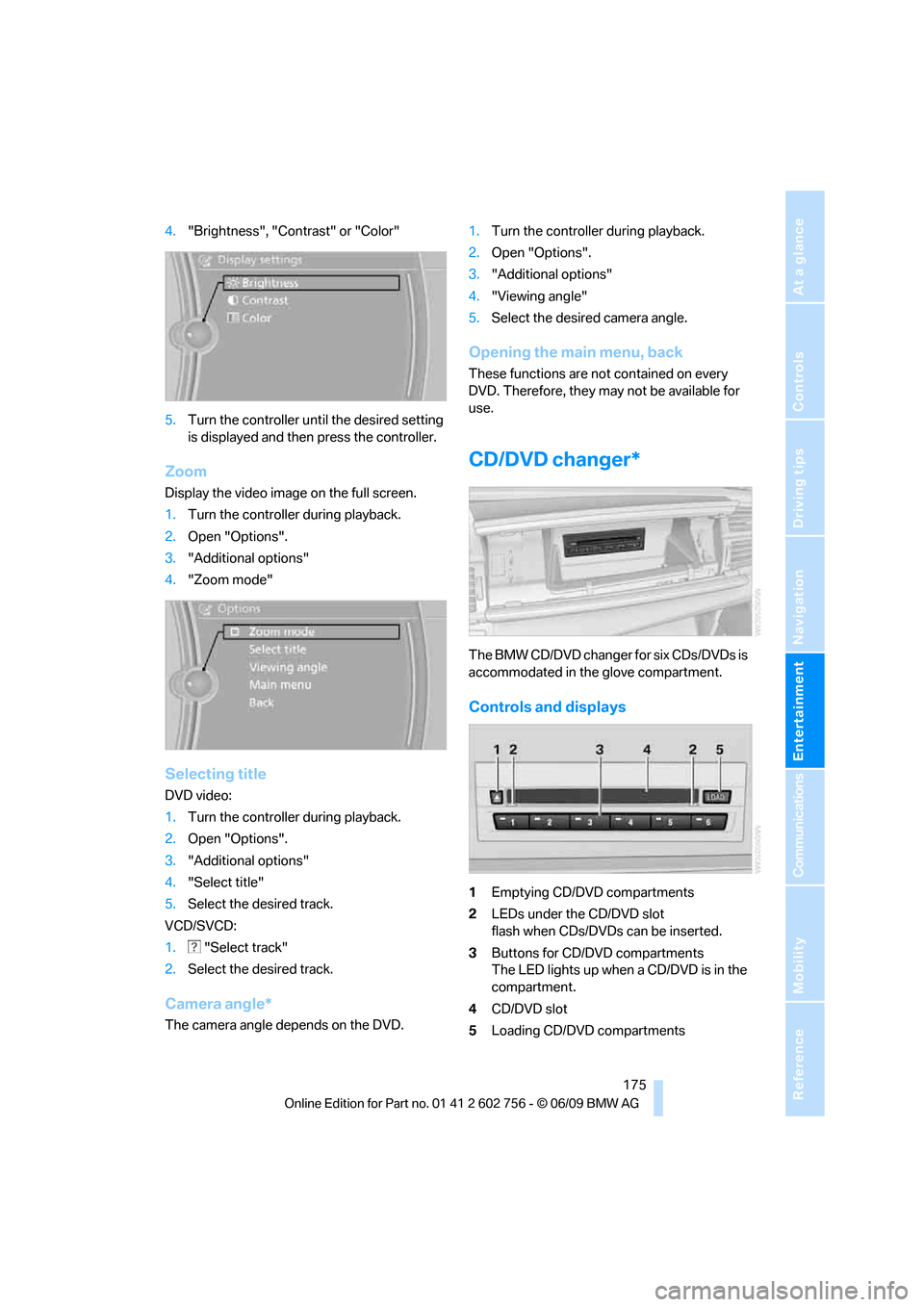
The BMW CD/DVD changer for six CDs/DVDs is
accommodated in the glove compartment.
Controls and displays
1Emptying CD/DVD compartments
2LEDs under the CD/DVD slot
flash when CDs/DVDs can be inserted.
3Buttons for CD/DVD compartments
The LED lights up when a CD/DVD is in the
compartment.
4CD/DVD slot
5Loading CD/DVD compartments
ba8_e70ag.book Seite 175 Freitag, 5. Juni 2009 11:42 11
Page 194 of 300
DVD system in rear
192 The system language of the DVD sys-
tem
"Display": background brightness of
screen.
>"Tone":
>"Treble / Bass" and "Balance":
Separately adjustable for the left and
right-hand headphones and the infrared
headphones.
>"Reset":
The settings are reset to the default
value.
>"DVD format":
>"Standard"
>"Zoom": full-screen playback
>"Language":
Language of the DVD playback. The lan-
guage advances one setting each time the
menu item is selected.
>"Subtitles":
Language of subtitles
or turn off subtitles
>"Title":
Selecting individual tracks on the DVD
>"Angle of view":
Camera angle
Notes or symbols that appear during the
playback of a film generally point out differ-
ent camera angles. These are usually only
briefly available.
>"Menu":
Call up the DVD-specific menu.
>"Return":
Exit menu or:
Press the buttons on the remote con-
trol.
Many DVDs offer dialogs and subtitles in vari-
ous languages or scene descriptions for the
hearing impaired. These functions are stored
on the DVD.
With some DVDs, it is only possible to
select language, subtitles, camera angle,
or title by using the DVD-specific menu.
Consult the information accompanying your
DVD.<
Opening the DVD-specific menu
Additional functions may be available on DVDs.
It is thus possible, for example, to select from
among several possible actions or to access
information about the film.
1.Press the button on the remote con-
trol during playback.
2.Select "Menu".
3.Press the button.
On some DVDs, you can use "Main
menu" and "Title" to access addi-
tional menus in which you can select maga-
zine segments about the music scene, for
example.<
To make a selection:
1.Select the symbol.
2.Press the button until the desired func-
tion is selected.
3.Select the arrow.
4.Press the button.
To return to the start menu:
1.Select the arrow.
2.Press the button.
You can also select language, subtitles,
camera angle, or title in the DVD-specific
menu.
Consult the information accompanying your
DVD.<
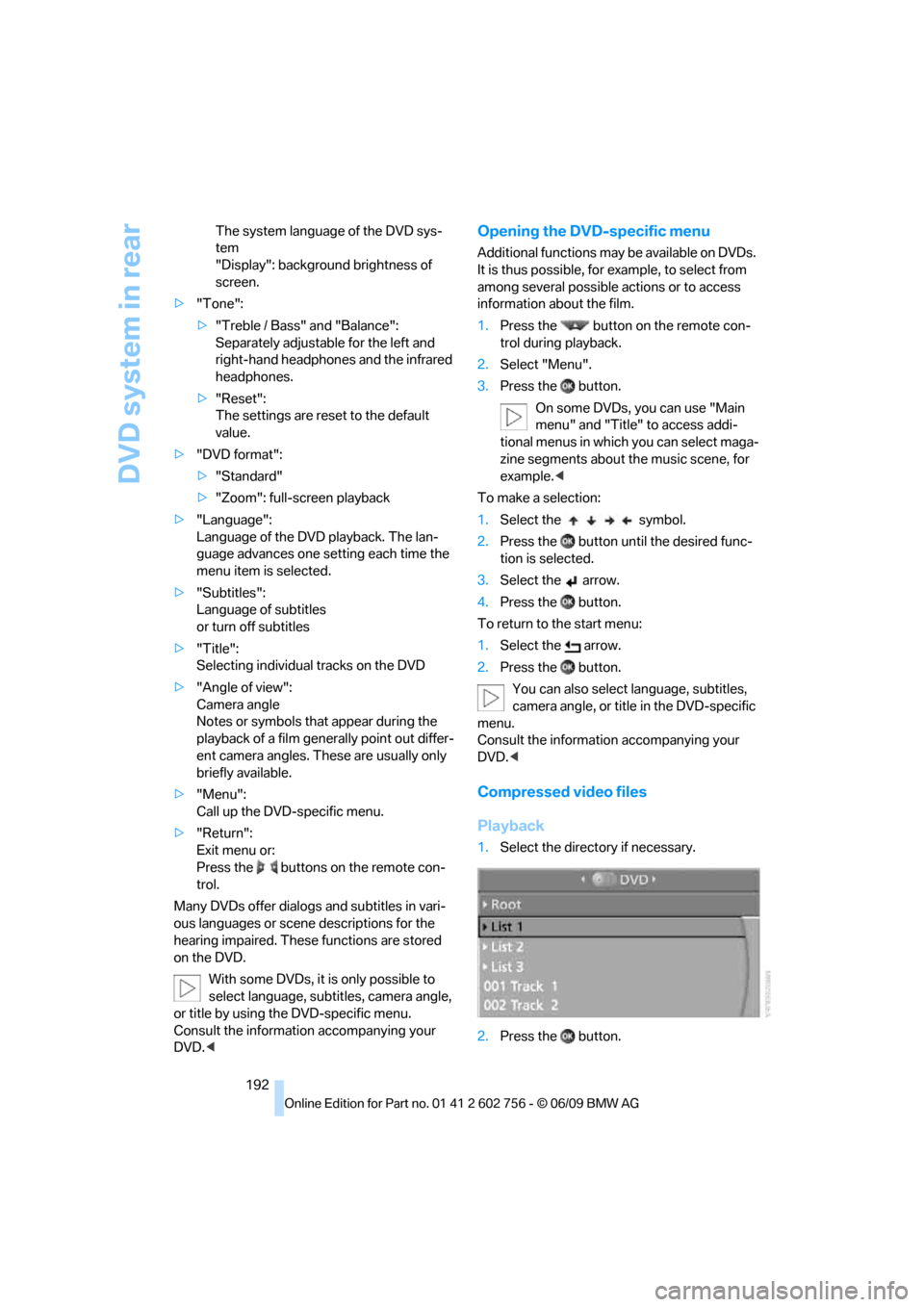
Compressed video files
Playback
1.Select the directory if necessary.
2.Press the button.
ba8_e70ag.book Seite 192 Freitag, 5. Juni 2009 11:42 11
Page 220 of 300
BMW Assist
218
Using BMW Search
To select and display content:
>Turn the controller to highlight an element.
>Press the controller to display an element.
Opening start page
1.Open "Options".
2."Home"
Loading a new page
1.Open "Options".
2."Reload"
Canceling
1.Open "Options".
2."Cancel loading"
Pairing
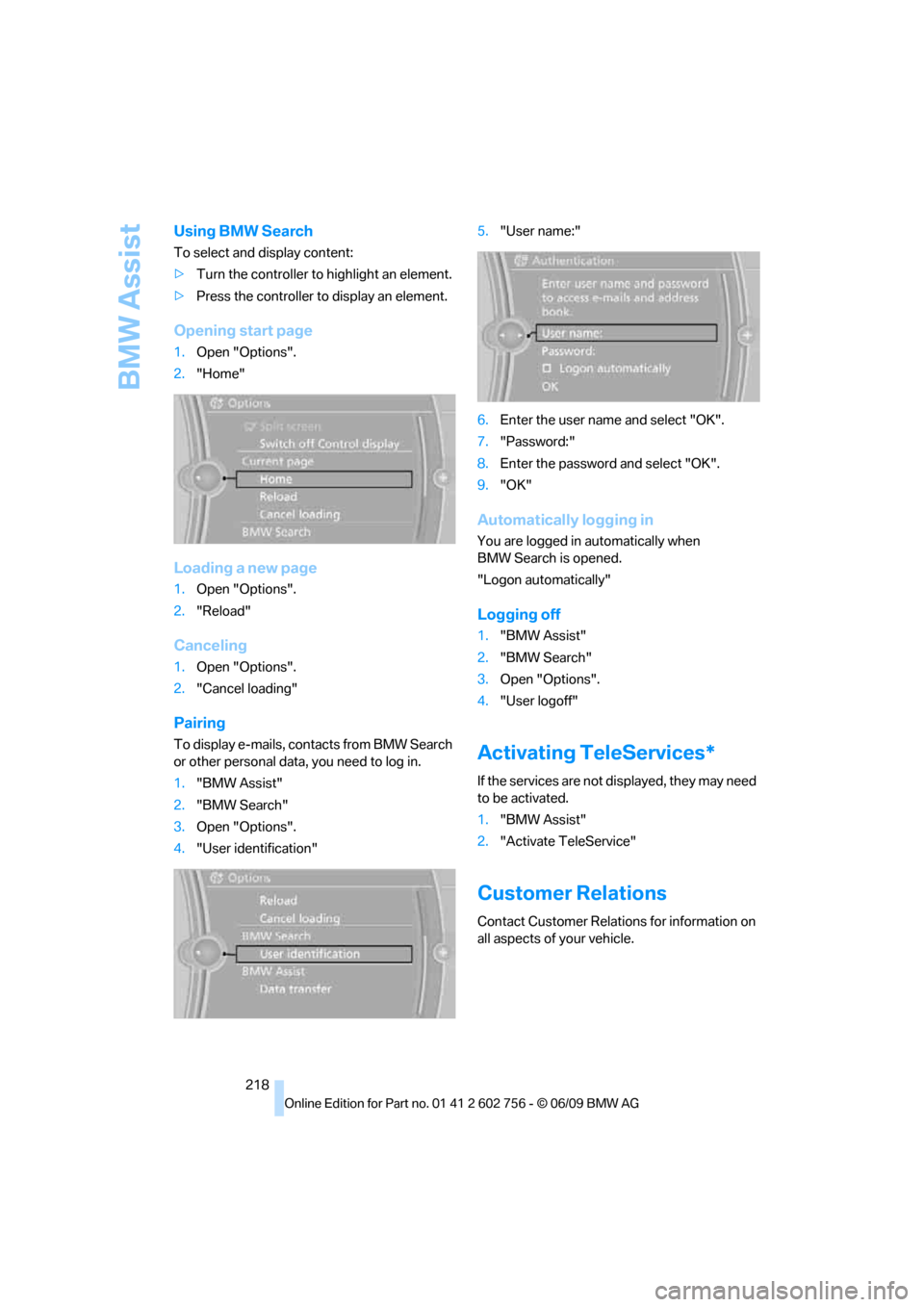
To display e-mails, contacts from BMW Search
or other personal data, you need to log in.
1."BMW Assist"
2."BMW Search"
3.Open "Options".
4."User identification"5."User name:"
6.Enter the user name and select "OK".
7."Password:"
8.Enter the password and select "OK".
9."OK"
Automatically logging in
You are logged in automatically when
BMW Search is opened.
"Logon automatically"
Logging off
1."BMW Assist"
2."BMW Search"
3.Open "Options".
4."User logoff"
Activating TeleServices*
If the services are not displayed, they may need
to be activated.
1."BMW Assist"
2."Activate TeleService"
Customer Relations
Contact Customer Relations for information on
all aspects of your vehicle.
ba8_e70ag.book Seite 218 Freitag, 5. Juni 2009 11:42 11
Page 226 of 300
Refueling
224
Refueling
Switch off the engine before refueling.
When handling fuel, always observe all
applicable precautionary measures and regula-
tions. Never transport reserve fuel containers in
the vehicle. These could become leaky and
cause an explosion or a fire in an accident.<
Fuel filler door
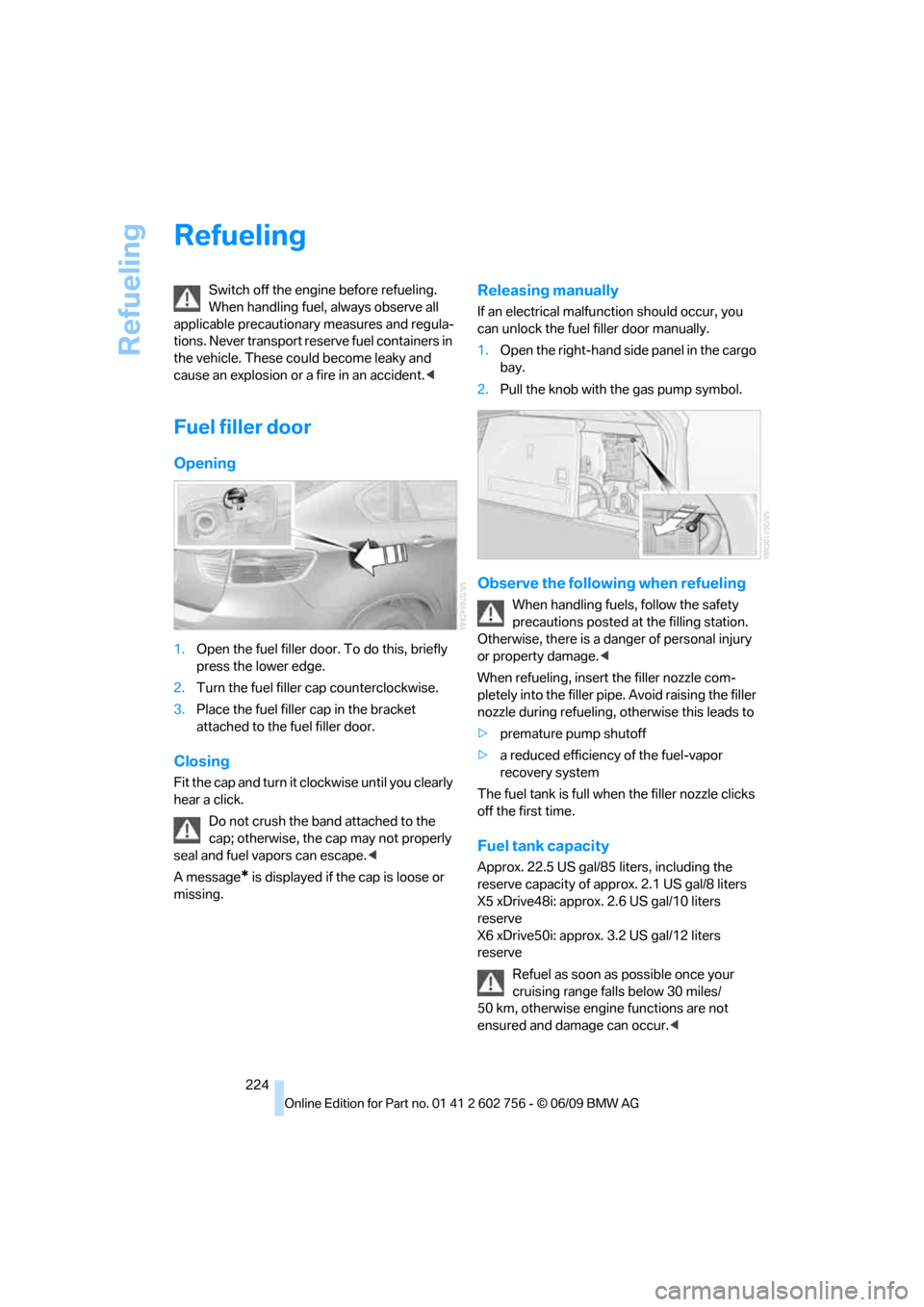
Opening
1.Open the fuel filler door. To do this, briefly
press the lower edge.
2.Turn the fuel filler cap counterclockwise.
3.Place the fuel filler cap in the bracket
attached to the fuel filler door.
Closing
Fit the cap and turn it clockwise until you clearly
hear a click.
Do not crush the band attached to the
cap; otherwise, the cap may not properly
seal and fuel vapors can escape.<
A message
* is displayed if the cap is loose or
missing.
Releasing manually
If an electrical malfunction should occur, you
can unlock the fuel filler door manually.
1.Open the right-hand side panel in the cargo
bay.
2.Pull the knob with the gas pump symbol.
Observe the following when refueling
When handling fuels, follow the safety
precautions posted at the filling station.
Otherwise, there is a danger of personal injury
or property damage.<
When refueling, insert the filler nozzle com-
pletely into the filler pipe. Avoid raising the filler
nozzle during refueling, otherwise this leads to
>premature pump shutoff
>a reduced efficiency of the fuel-vapor
recovery system
The fuel tank is full when the filler nozzle clicks
off the first time.
Fuel tank capacity
Approx. 22.5 US gal/85 liters, including the
reserve capacity of approx. 2.1 US gal/8 liters
X5 xDrive48i: approx. 2.6 US gal/10 liters
reserve
X6 xDrive50i: approx. 3.2 US gal/12 liters
reserve
Refuel as soon as possible once your
cruising range falls below 30 miles/
50 km, otherwise engine functions are not
ensured and damage can occur.<
ba8_e70ag.book Seite 224 Freitag, 5. Juni 2009 11:42 11
Page 229 of 300
Mobility
227Reference
At a glance
Controls
Driving tips
Communications
Navigation
Entertainment
exhaust fluid at temperatures below +237/
-56 even between the regular maintenance
intervals.
If the fluid needs to be refilled, this will be indi-
cated with the reserve display in the instrument
panel, refer to page226.<
Only refill the diesel exhaust fluid
yourself in exceptional circumstances
In order to get your vehicle to reach the nearest
BMW Sports Activity Vehicle Center, you may
refill the diesel exhaust fluid yourself, making
sure to heed the warning notices.
Do not allow diesel exhaust fluid to come
into contact with you. This can lead to
skin and eye irritation. Wear protective goggles
and gloves as needed. Follow the safety
instructions on the bottle.
When opening the bottle or reservoir, pungent
smelling vapors can escape. Before refilling,
close the vehicle completely so that the vapors
do not get into the interior of the vehicle. When
handling diesel exhaust fluid in enclosed
spaces, make sure to have sufficient ventilation.
After handling diesel exhaust fluid, wash hands
thoroughly. Failure to do so may lead to irrita-
tion, e.g. due to inadvertent contact with the
eyes.
If eye irritation occurs, immediately rinse eyes
with ample water and contact a doctor if neces-
sary.
If diesel exhaust fluid comes into contact with
surfaces of your vehicle, rinse the affected sur-
faces with water or else damage may occur.
Keep diesel exhaust fluid out of reach of chil-
dren.<
Suitable diesel exhaust fluid
>Preferred: BMW Diesel Exhaust Fluid.
This bottle and its special adapter permit
convenient refilling with diesel exhaust
fluid.
>Alternative: NOx reduction agent AUS 32
You can get diesel exhaust fluid at your BMW
Sports Activity Vehicle Center.
Refilling quantity
Refilling quantity at the start of the reserve dis-
play: approx. 0,75 US gal/2.7 liters reserve
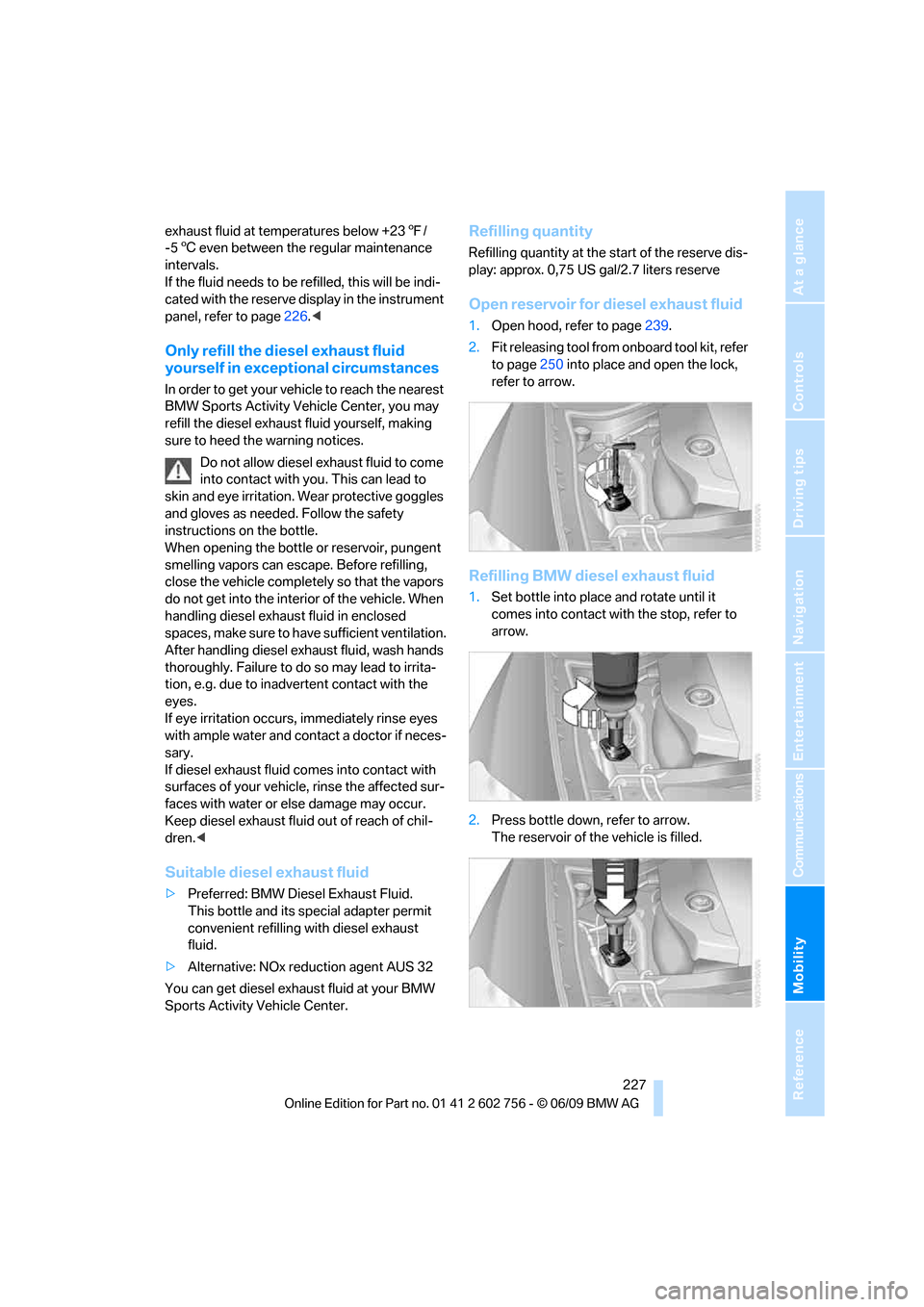
Open reservoir for diesel exhaust fluid
1.Open hood, refer to page239.
2.Fit releasing tool from onboard tool kit, refer
to page250 into place and open the lock,
refer to arrow.
Refilling BMW diesel exhaust fluid
1.Set bottle into place and rotate until it
comes into contact with the stop, refer to
arrow.
2.Press bottle down, refer to arrow.
The reservoir of the vehicle is filled.
ba8_e70ag.book Seite 227 Freitag, 5. Juni 2009 11:42 11
Page 241 of 300
Mobility
239Reference
At a glance
Controls
Driving tips
Communications
Navigation
Entertainment
Under the hood
Never attempt to perform any service or
repair operations on your vehicle without
the required professional technical training. If
you do not know what repair procedures to fol-
low, have work on your vehicle done only by
your BMW Sports Activity Vehicle Center or a
workshop that works according to BMW repair
procedures with correspondingly trained per-
sonnel. If this work is not carried out properly,
there is a danger of subsequent damage and
related safety hazards.<
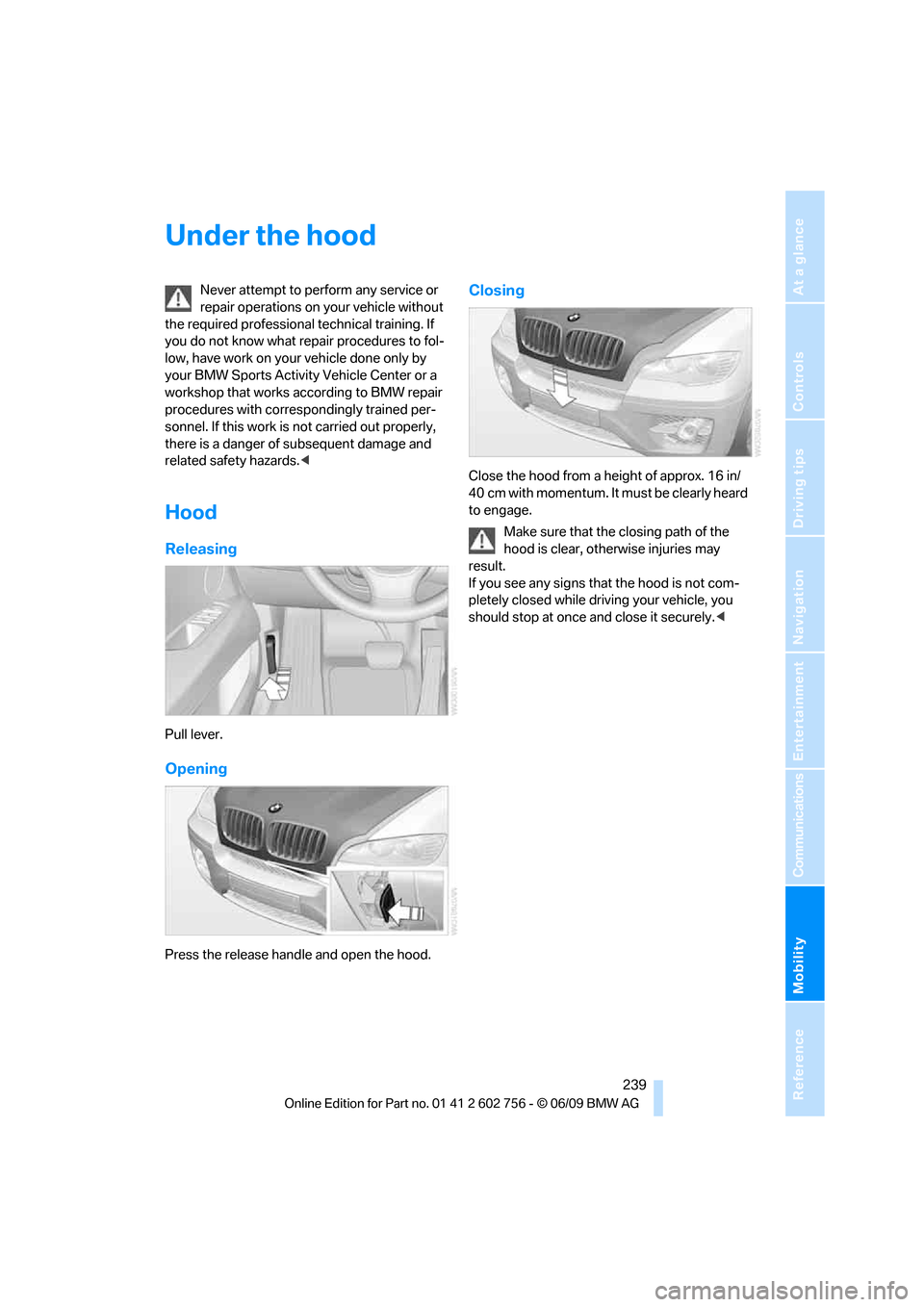
Hood
Releasing
Pull lever.
Opening
Press the release handle and open the hood.
Closing
Close the hood from a height of approx. 16 in/
40 cm with momentum. It must be clearly heard
to engage.
Make sure that the closing path of the
hood is clear, otherwise injuries may
result.
If you see any signs that the hood is not com-
pletely closed while driving your vehicle, you
should stop at once and close it securely.<
ba8_e70ag.book Seite 239 Freitag, 5. Juni 2009 11:42 11
Page 275 of 300
Reference 273
At a glance
Controls
Driving tips
Communications
Navigation
Entertainment
Mobility
Short commands of voice activation
system
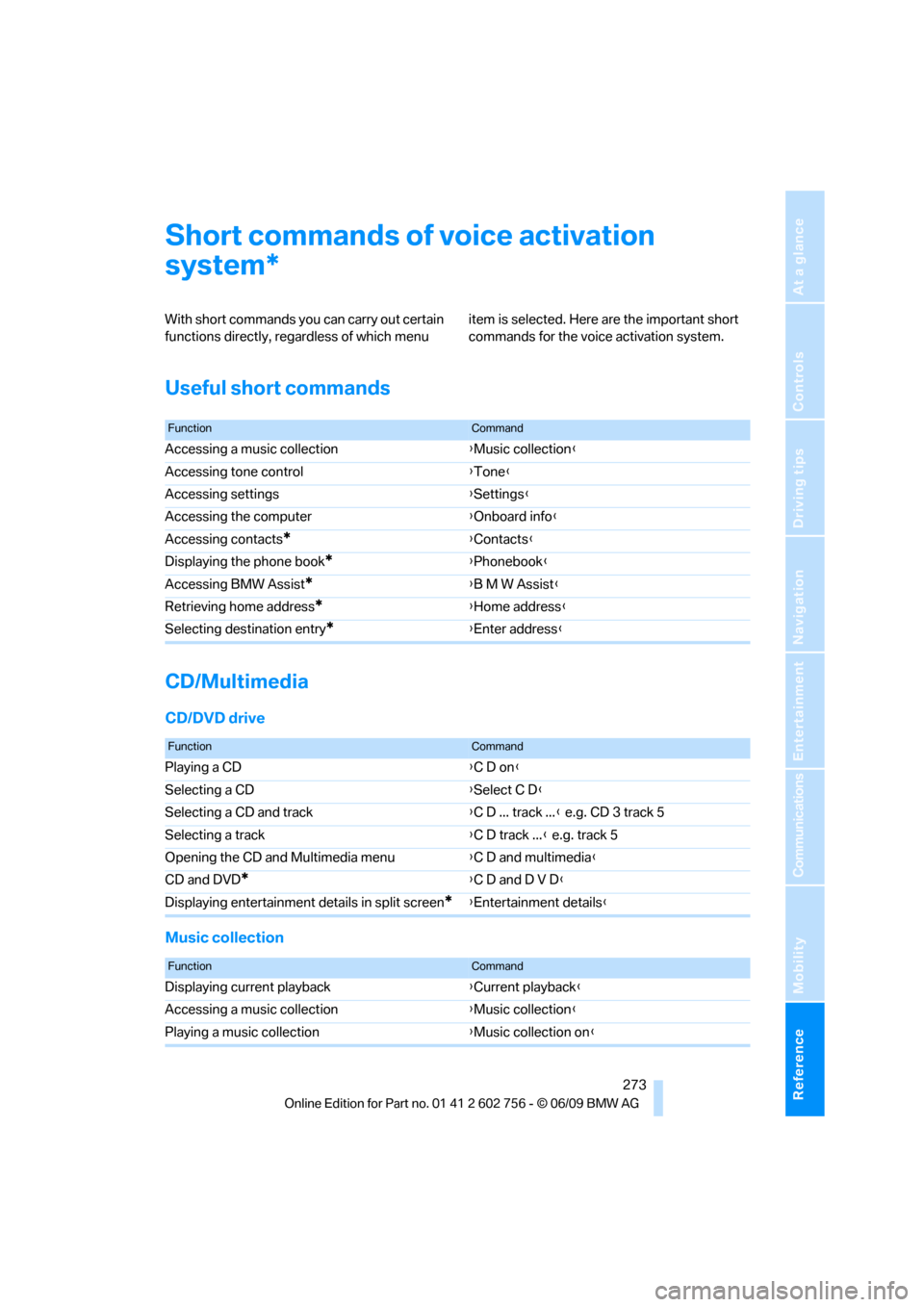
With short commands you can carry out certain
functions directly, regardless of which menu item is selected. Here are the important short
commands for the voice activation system.
Useful short commands
CD/Multimedia
CD/DVD drive
Music collection
*
FunctionCommand
Accessing a music collection{Music collection}
Accessing tone control{Tone}
Accessing settings{Settings}
Accessing the computer{Onboard info}
Accessing contacts
*{Contacts}
Displaying the phone book
*{Phonebook}
Accessing BMW Assist
*{B M W Assist}
Retrieving home address
*{Home address}
Selecting destination entry
*{Enter address}
FunctionCommand
Playing a CD{C D on}
Selecting a CD{Select C D}
Selecting a CD and track{C D ... track ...} e.g. CD 3 track 5
Selecting a track{C D track ...} e.g. track 5
Opening the CD and Multimedia menu{C D and multimedia}
CD and DVD
*{C D and D V D}
Displaying entertainment details in split screen
*{Entertainment details}
FunctionCommand
Displaying current playback{Current playback}
Accessing a music collection{Music collection}
Playing a music collection{Music collection on}
ba8_e70ag.book Seite 273 Freitag, 5. Juni 2009 11:42 11
Page 276 of 300
Short commands of voice activation system
274
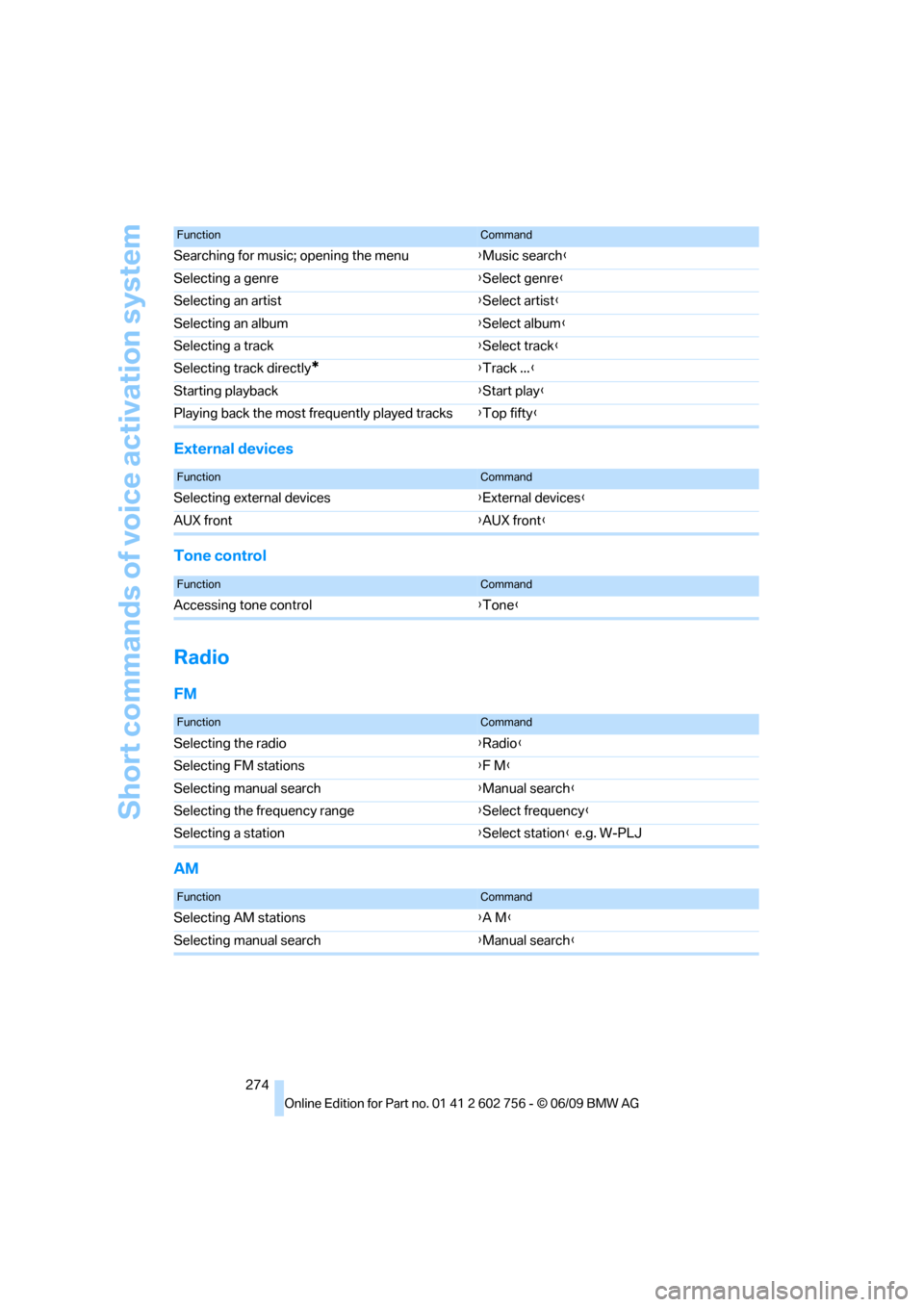
External devices
Tone control
Radio
FM
AM
Searching for music; opening the menu{Music search}
Selecting a genre{Select genre}
Selecting an artist{Select artist}
Selecting an album{Select album}
Selecting a track{Select track}
Selecting track directly
*{Track ...}
Starting playback{Start play}
Playing back the most frequently played tracks{Top fifty}
FunctionCommand
FunctionCommand
Selecting external devices{External devices}
AUX front{AUX front}
FunctionCommand
Accessing tone control{Tone}
FunctionCommand
Selecting the radio{Radio}
Selecting FM stations{F M}
Selecting manual search{Manual search}
Selecting the frequency range{Select frequency}
Selecting a station{Select station} e.g. W-PLJ
FunctionCommand
Selecting AM stations{A M}
Selecting manual search{Manual search}
ba8_e70ag.book Seite 274 Freitag, 5. Juni 2009 11:42 11
Page 277 of 300
Reference 275
At a glance
Controls
Driving tips
Communications
Navigation
Entertainment
Mobility
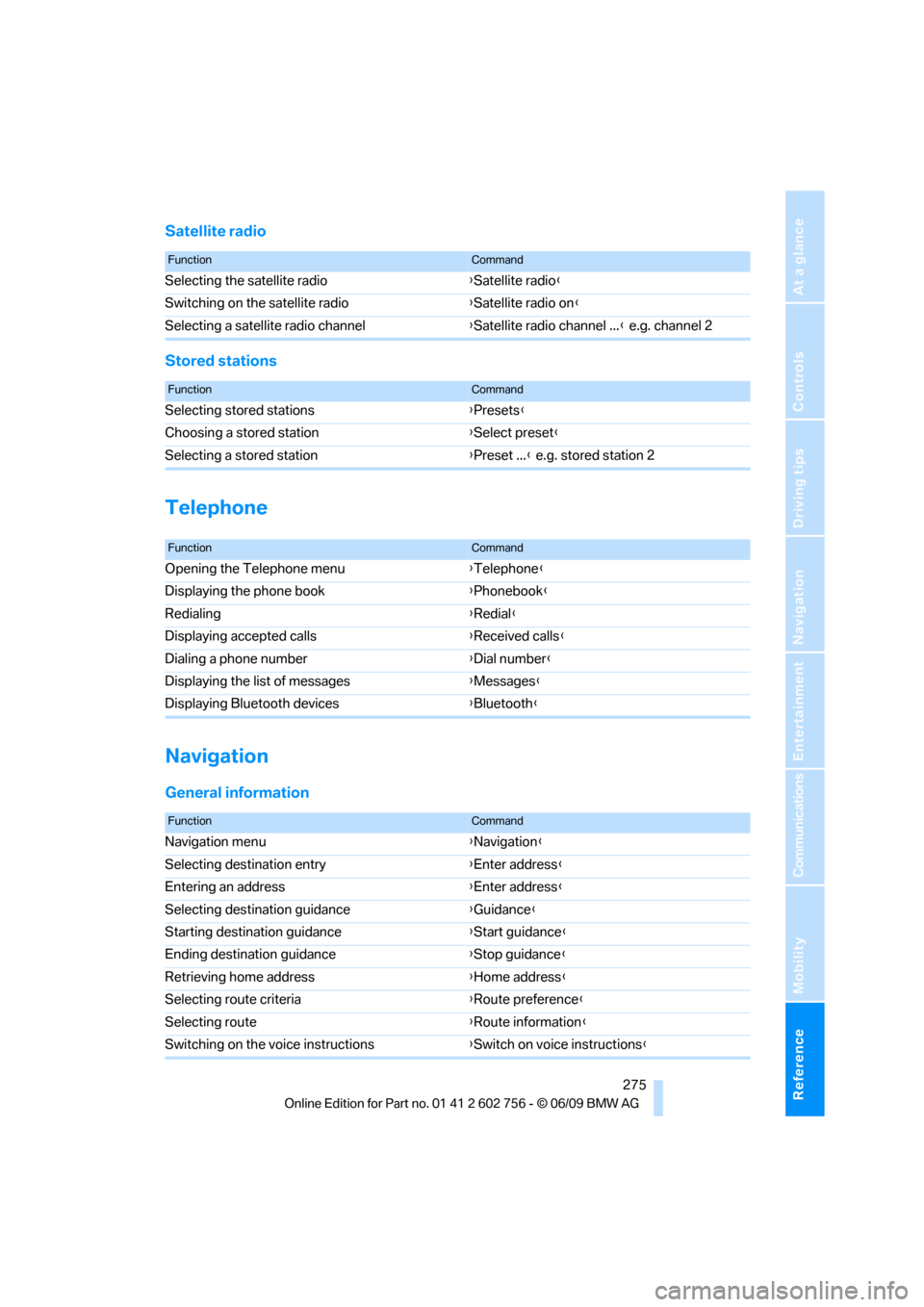
Satellite radio
Stored stations
Telephone
Navigation
General information
FunctionCommand
Selecting the satellite radio{Satellite radio}
Switching on the satellite radio{Satellite radio on}
Selecting a satellite radio channel{Satellite radio channel ...} e.g. channel 2
FunctionCommand
Selecting stored stations{Presets}
Choosing a stored station{Select preset}
Selecting a stored station{Preset ...} e.g. stored station 2
FunctionCommand
Opening the Telephone menu{Telephone}
Displaying the phone book{Phonebook}
Redialing{Redial}
Displaying accepted calls{Received calls}
Dialing a phone number{Dial number}
Displaying the list of messages{Messages}
Displaying Bluetooth devices{Bluetooth}
FunctionCommand
Navigation menu{Navigation}
Selecting destination entry{Enter address}
Entering an address{Enter address}
Selecting destination guidance{Guidance}
Starting destination guidance{Start guidance}
Ending destination guidance{Stop guidance}
Retrieving home address{Home address}
Selecting route criteria{Route preference}
Selecting route{Route information}
Switching on the voice instructions{Switch on voice instructions}
ba8_e70ag.book Seite 275 Freitag, 5. Juni 2009 11:42 11
Page 279 of 300
Reference 277
At a glance
Controls
Driving tips
Communications
Navigation
Entertainment
Mobility
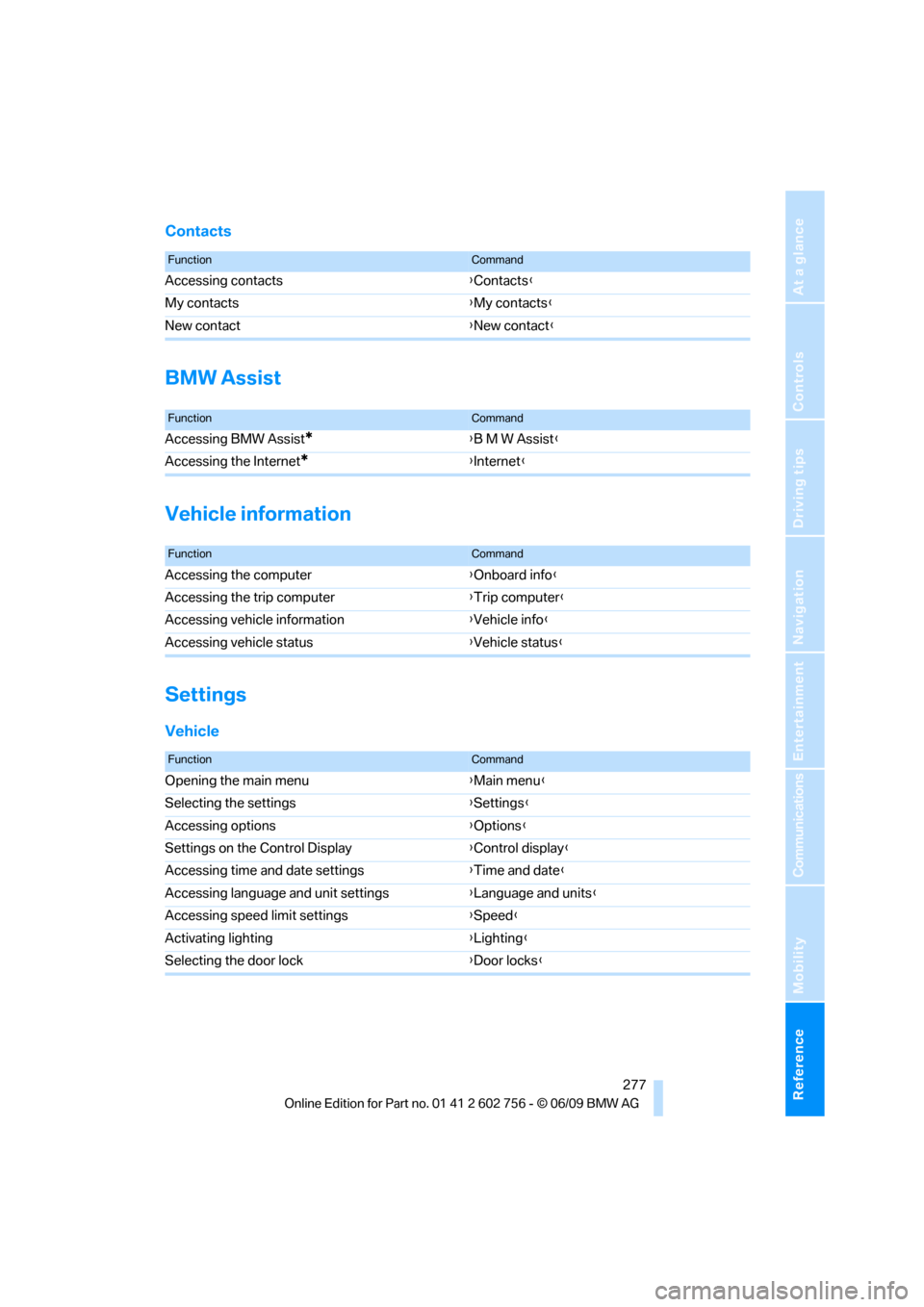
Contacts
BMW Assist
Vehicle information
Settings
Vehicle
FunctionCommand
Accessing contacts{Contacts}
My contacts{My contacts}
New contact{New contact}
FunctionCommand
Accessing BMW Assist*{B M W Assist}
Accessing the Internet
*{Internet}
FunctionCommand
Accessing the computer{Onboard info}
Accessing the trip computer{Trip computer}
Accessing vehicle information{Vehicle info}
Accessing vehicle status{Vehicle status}
FunctionCommand
Opening the main menu{Main menu}
Selecting the settings{Settings}
Accessing options{Options}
Settings on the Control Display{Control display}
Accessing time and date settings{Time and date}
Accessing language and unit settings{Language and units}
Accessing speed limit settings{Speed}
Activating lighting{Lighting}
Selecting the door lock{Door locks}
ba8_e70ag.book Seite 277 Freitag, 5. Juni 2009 11:42 11