lock BMW X5 2010 E70 Service Manual
[x] Cancel search | Manufacturer: BMW, Model Year: 2010, Model line: X5, Model: BMW X5 2010 E70Pages: 300, PDF Size: 12.41 MB
Page 122 of 300
Practical interior accessories
120
Rear
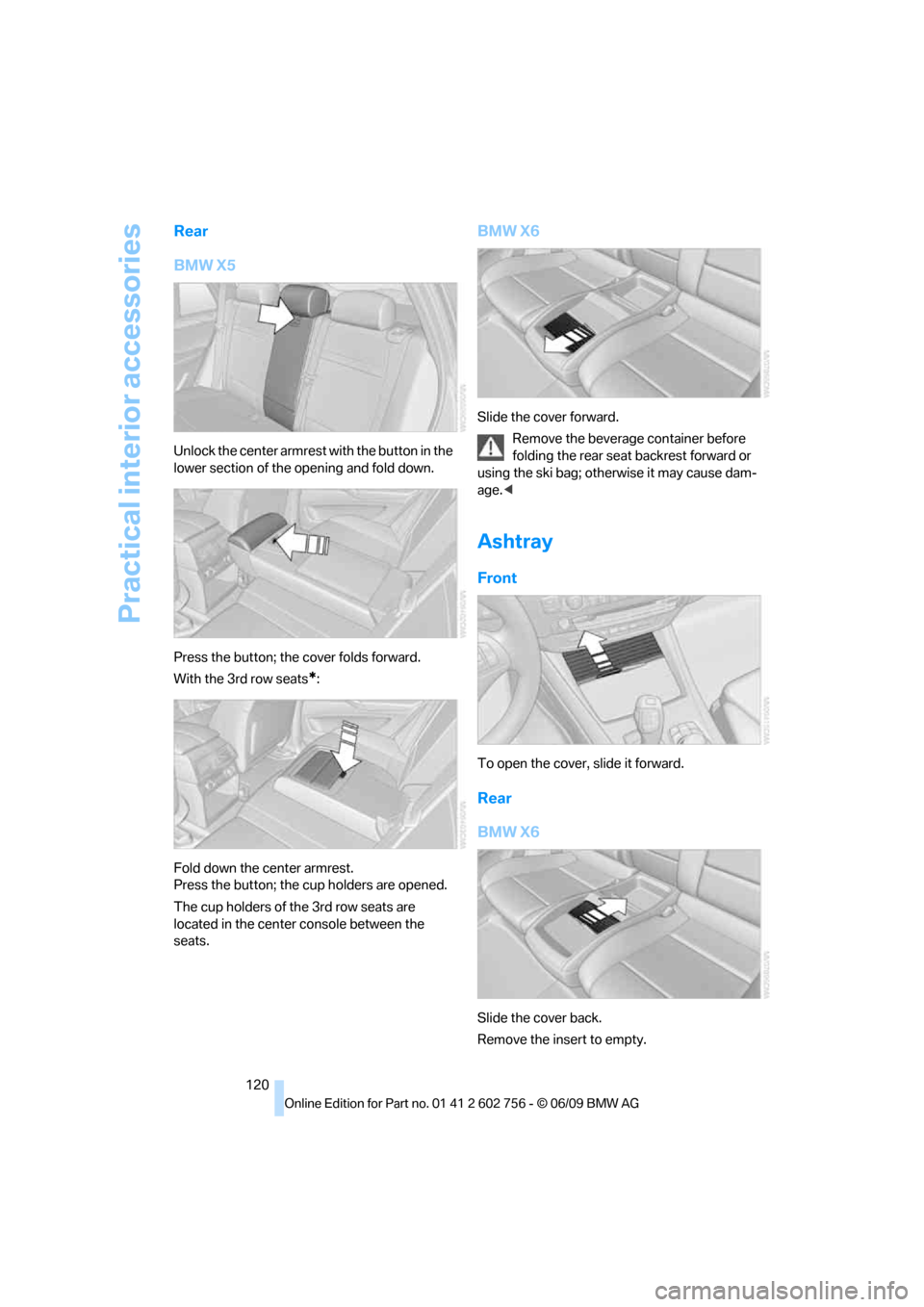
BMW X5
Unlock the center armrest with the button in the
lower section of the opening and fold down.
Press the button; the cover folds forward.
With the 3rd row seats
*:
Fold down the center armrest.
Press the button; the cup holders are opened.
The cup holders of the 3rd row seats are
located in the center console between the
seats.
BMW X6
Slide the cover forward.
Remove the beverage container before
folding the rear seat backrest forward or
using the ski bag; otherwise it may cause dam-
age.<
Ashtray
Front
To open the cover, slide it forward.
Rear
BMW X6
Slide the cover back.
Remove the insert to empty.
ba8_e70ag.book Seite 120 Freitag, 5. Juni 2009 11:42 11
Page 124 of 300
Practical interior accessories
122
In storage compartment under center
armrest
Access to socket*:
Pull off the cover.
BMW X6: in rear console
Slide the cover back.
Access to socket:
Pull off the cover.
Rear center armrest
BMW X6 and BMW X5 with 3rd row
seats*
Pull on the loop and fold down the center arm-
rest.
BMW X5 without 3rd row seats*
Unlock the center armrest with the button in the
lower section of the opening and fold down.
Cargo bay
BMW X5: roll-up cover
Pull out the roll-up cover and hook it into the
brackets.
Do not place heavy or hard objects on the
roll-up cover. If you do so, they may
already pose a danger to vehicle occupants dur-
ing braking or evasive maneuvers.
Do not allow the roll-up cover to snap back, oth-
erwise it can be damaged.<
ba8_e70ag.book Seite 122 Freitag, 5. Juni 2009 11:42 11
Page 125 of 300
Controls
123Reference
At a glance
Driving tips
Communications
Navigation
Entertainment
Mobility
Removing
1.Unlock the case with the button, arrow1.
2.Swing the case somewhat to the left,
arrow2, and remove.
Installing
When installing, proceed in the opposite order
of removal.
1.Lay on the case on the left-hand side and
push it forward, arrow1.
2.Swing the case toward the inside, refer to
arrow2.
3.Push the case forward at the ends until it
engages in the two side brackets.
4.Check whether the case is properly locked
in place by pulling it with a sudden move-
ment.
BMW X6: cargo bay cover
Deploy cargo bay cover by pulling back.
Do not place heavy or hard objects on the
cargo bay cover. If you do so, they may
pose a danger to vehicle occupants during
braking or evasive maneuvers.<
Removing
1.Grasp retracted cargo bay cover under-
neath the upper fold on both sides.
2.Pull the cover back out of the side brackets.
3.Depending on your vehicle's equipment
package, you can store the cover under the
floor panel in the cargo bay.
ba8_e70ag.book Seite 123 Freitag, 5. Juni 2009 11:42 11
Page 126 of 300
Practical interior accessories
124
Installing
When installing, proceed in the opposite order
of removal.
1.Set the cargo bay cover into place on the
left and right sides.
2.Lift the back of the cover slightly and slide
forward until it snaps into the two side
brackets.
Expanding cargo bay
The rear seat backrest is divided. You can fold
down both sides separately in order to expand
the cargo bay.
BMW X6: before folding the rear seat
backrest forward or using the ski bag,
remove beverage containers from the cup
holder and close the cup holder.<
Reach into the recess and pull toward the front.
When you fold back the backrest, be sure
that the catch engages securely. The red
warning indicator disappears in the recess
when the catch is engaged. If it is not properly
engaged, transported cargo could enter the
passenger compartment during braking or eva-
sive maneuvers and endanger the vehicle occu-
pants.<
To ensure that the safety systems con-
tinue to provide optimized protection,
observe the safety belt information on
page43.<
Storage compartments in
cargo bay
Depending on the vehicle's equipment, the fol-
lowing storage compartments are provided in
the cargo bay.
>Storage compartments behind the remov-
able side panels on the right and left side of
the cargo bay
* and under the floor panel
flap, storage compartment
* right side of
cargo bay.
>Storage tray
* under the floor panel flap,
capacity approx. 21 US gal/80 liter.
>Retaining straps
* on the left and right side
panel for securing small objects.
>Lashing rail with lashing eyes
*. You can
secure heavy-duty cargo straps on the lash-
ing eyes.
They can be removed at the notches in the
rails. To move the lashing eyes, press the
button.
Read and comply with the information
enclosed with the heavy-duty cargo
straps.<
Floor panel flap
To access the onboard toolkit etc.
To open, swing up the flap by the handle, refer
to arrow.
The floor panel flap can be locked
*.
Adaptive fixing system*
The adaptive fixing system is used to divide up
the cargo bay. It consists of two brackets with a
telescopic rail and retaining straps. These are
guided into the two rails on the cargo bay floor.
ba8_e70ag.book Seite 124 Freitag, 5. Juni 2009 11:42 11
Page 127 of 300
Controls
125Reference
At a glance
Driving tips
Communications
Navigation
Entertainment
Mobility
Before using the adaptive fixing system,
fold up and lock the rear seat backrest;
otherwise, the cargo could be thrown into the
vehicle interior in an accident.<
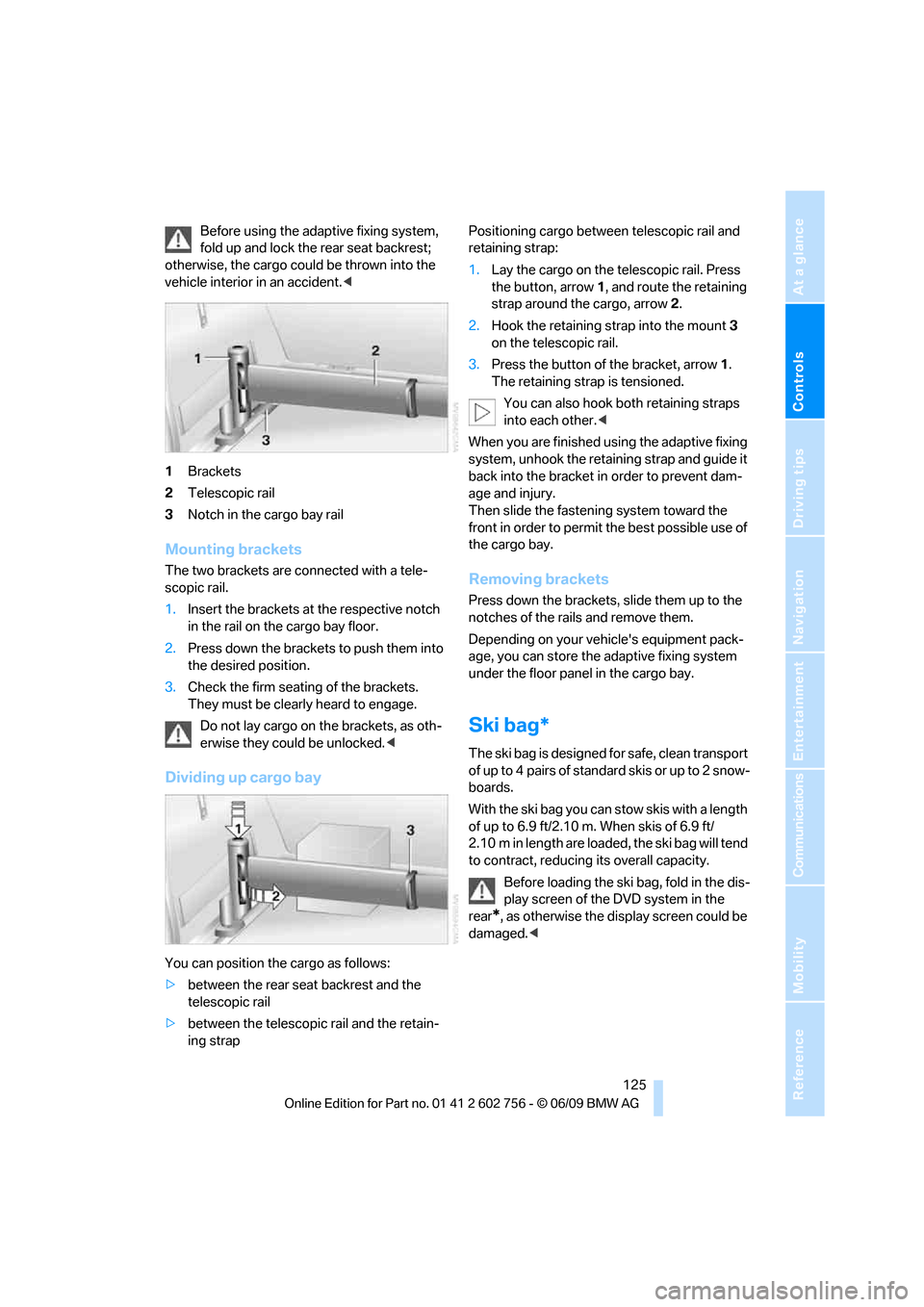
1Brackets
2Telescopic rail
3Notch in the cargo bay rail
Mounting brackets
The two brackets are connected with a tele-
scopic rail.
1.Insert the brackets at the respective notch
in the rail on the cargo bay floor.
2.Press down the brackets to push them into
the desired position.
3.Check the firm seating of the brackets.
They must be clearly heard to engage.
Do not lay cargo on the brackets, as oth-
erwise they could be unlocked.<
Dividing up cargo bay
You can position the cargo as follows:
>between the rear seat backrest and the
telescopic rail
>between the telescopic rail and the retain-
ing strapPositioning cargo between telescopic rail and
retaining strap:
1.Lay the cargo on the telescopic rail. Press
the button, arrow1, and route the retaining
strap around the cargo, arrow2.
2.Hook the retaining strap into the mount3
on the telescopic rail.
3.Press the button of the bracket, arrow1.
The retaining strap is tensioned.
You can also hook both retaining straps
into each other.<
When you are finished using the adaptive fixing
system, unhook the retaining strap and guide it
back into the bracket in order to prevent dam-
age and injury.
Then slide the fastening system toward the
front in order to permit the best possible use of
the cargo bay.
Removing brackets
Press down the brackets, slide them up to the
notches of the rails and remove them.
Depending on your vehicle's equipment pack-
age, you can store the adaptive fixing system
under the floor panel in the cargo bay.
Ski bag*
The ski bag is designed for safe, clean transport
of up to 4 pairs of standard skis or up to 2 snow-
boards.
With the ski bag you can stow skis with a length
of up to 6.9 ft/2.10 m. When skis of 6.9 ft/
2.10 m in length are loaded, the ski bag will tend
to contract, reducing its overall capacity.
Before loading the ski bag, fold in the dis-
play screen of the DVD system in the
rear
*, as otherwise the display screen could be
damaged.<
ba8_e70ag.book Seite 125 Freitag, 5. Juni 2009 11:42 11
Page 142 of 300
Navigation system
140
Navigation system
General information
With the help of satellites, the navigation sys-
tem is able to ascertain the precise position of
the vehicle and guide you reliably to any desti-
nation you enter.
Navigation data are stored in the vehicle and
can be updated.
Enter data only with the vehicle station-
ary, and always give priority to the appli-
cable traffic regulations in the event of any con-
tradiction between traffic and road conditions
and the instructions issued by the navigation
system. Failure to take to this precaution can
place you in violation of the law and put vehicle
occupants and other road users in danger.<
Updating the navigation data
General information
Navigation data and an activation code can be
obtained from your BMW Sports Activity Vehi-
cle Center.
Updating the data can take several hours,
depending on the volume of data.
>The data are updated as you drive.
>The updating process continues automati-
cally when you resume driving.
>All functions remain available as you drive.
>Data are stored on the hard drive or in the
internal memory.
>After the updating process is complete, the
system restarts.
>The medium with the navigation data can
be removed after the update.
Updating the navigation data
Inserting navigation DVD
1.Insert navigation DVDs into the DVD player
with the printed side up.
2.Follow the instructions on the Control Dis-
play.
3.Enter the activation code of the navigation
DVDs and switch DVDs if necessary.
Removing navigation DVD
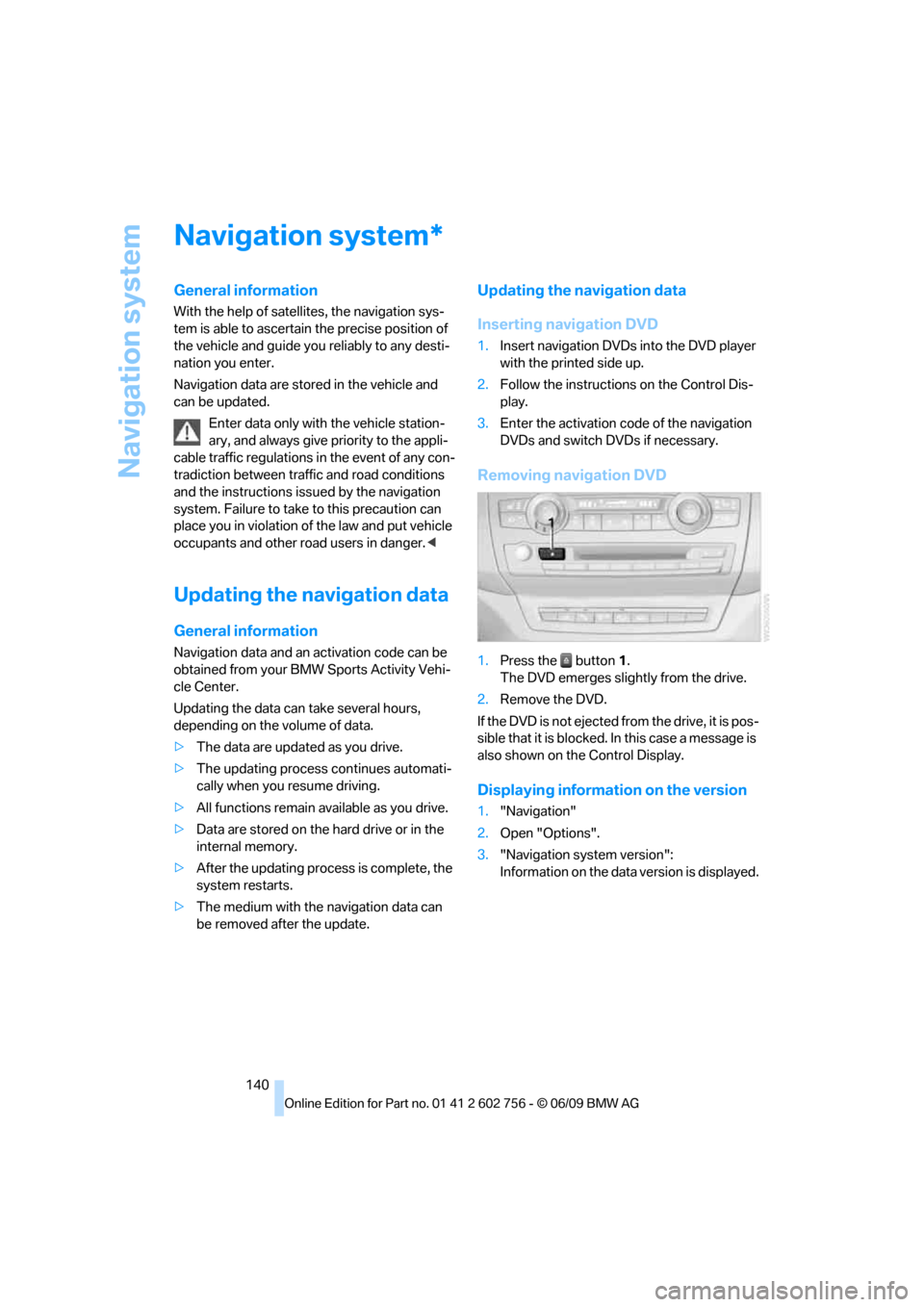
1.Press the button1.
The DVD emerges slightly from the drive.
2.Remove the DVD.
If the DVD is not ejected from the drive, it is pos-
sible that it is blocked. In this case a message is
also shown on the Control Display.
Displaying information on the version
1."Navigation"
2.Open "Options".
3."Navigation system version":
Information on the data version is displayed.
*
ba8_e70ag.book Seite 140 Freitag, 5. Juni 2009 11:42 11
Page 153 of 300
Navigation
Driving tips
151Reference
At a glance
Controls
Communications
Entertainment
Mobility
The setting applies to the current route and to
the planning of future routes.
Dynamic destination guidance
"Dynamic guidance" is switched on:
The route is automatically changed in the event
of traffic obstructions. The system does not
point out traffic obstructions along the original
route.
Depending on the type of road and the nature
and length of the traffic obstruction, the route
can also be calculated so that you travel
through the traffic obstruction.
1."Navigation"
2.Open "Options".
3."Dynamic guidance"
If the "Avoid highways", "Avoid toll roads"
or "Avoid ferries" route criteria are
selected, route calculation may take consider-
ably longer.<
Route
General information
Depending on the equipment in your vehicle,
various views of the route are available during
destination guidance.
>Map display
>Arrow display
>Display of the streets and towns/cities on
the route
Displaying a list of the streets or towns/
cities on the route
When destination guidance is started, a list of
the streets and towns/cities on the route is dis-
played. The driving distances and traffic bulle-
tins are displayed for each route section.
>Display a list of the streets and towns/cities
on the route.
>Display the traffic bulletins and the driving
distance for each route section.1."Navigation"
2."Route information"
3.Highlight a section.
The section is displayed in the preview map.
Bypassing a section of the route
During destination guidance, you can revise the
navigation system's route recommendations to
avoid particular stretches of road. Enter the
number of miles/kilometers that you want to
travel before returning to the original route.
1."Navigation"
2."Route information"
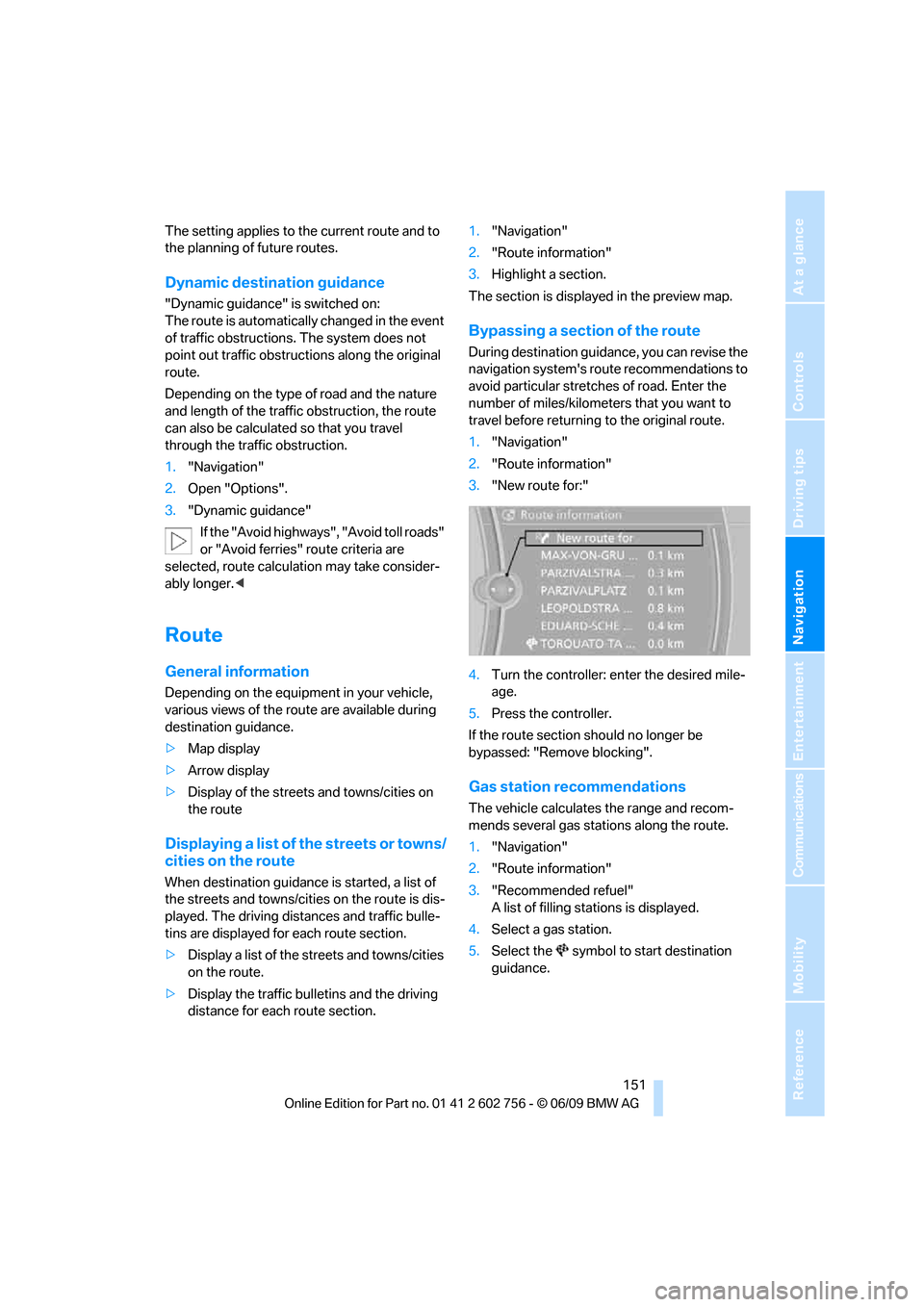
3."New route for:"
4.Turn the controller: enter the desired mile-
age.
5.Press the controller.
If the route section should no longer be
bypassed: "Remove blocking".
Gas station recommendations
The vehicle calculates the range and recom-
mends several gas stations along the route.
1."Navigation"
2."Route information"
3."Recommended refuel"
A list of filling stations is displayed.
4.Select a gas station.
5.Select the symbol to start destination
guidance.
ba8_e70ag.book Seite 151 Freitag, 5. Juni 2009 11:42 11
Page 205 of 300
203
Entertainment
Reference
At a glance
Controls
Driving tips Communications
Navigation
Mobility
>Depending on the mobile phone, certain
settings may be necessary on the mobile
phone, e.g. via the following menu items:
>Bluetooth activated
>Connection must be allowed without
requiring further confirmation
>Reconnect
>Depending on the mobile phone model, the
setting energy saving mode can, for exam-
ple, result in vehicle failing to detect the
paired mobile phone.
>For pairing purposes, define any 4 to 16-
digit number as a Bluetooth passkey,
e.g. 25081107. A long and complex number
offers the best protection against unautho-
rized access. This Bluetooth passkey is no
longer required following successful pair-
ing.
>The ignition is switched on.
Only pair the mobile phone with the vehi-
cle stationary, otherwise the passengers
and other road users can be endangered due to
a lack of attentiveness on the part of the
driver.<
Switching on ignition
1.Insert the remote control as far as possible
into the ignition lock.
2.Switch on ignition without operating the
brake or clutch or pressing the start/stop
button.
Preparation via iDrive
3."Telephone"
4."Bluetooth"
5."Add new phone"The Bluetooth name of the vehicle is dis-
played.
Preparation with mobile phone
6.Further steps must be carried out with the
mobile phone and vary depending on the
model. Please refer to your mobile phone's
operating instructions, e.g. under the topics
of Searching for a Bluetooth device, Linking
or Pairing.
The Bluetooth name of the vehicle appears
on the mobile phone display.
7.Select the Bluetooth name of the vehicle on
the mobile phone display.
Pairing
Depending on your mobile phone, you will first
be requested consecutively via the display of
your mobile phone or iDrive to enter the Blue-
tooth passkey you specified.
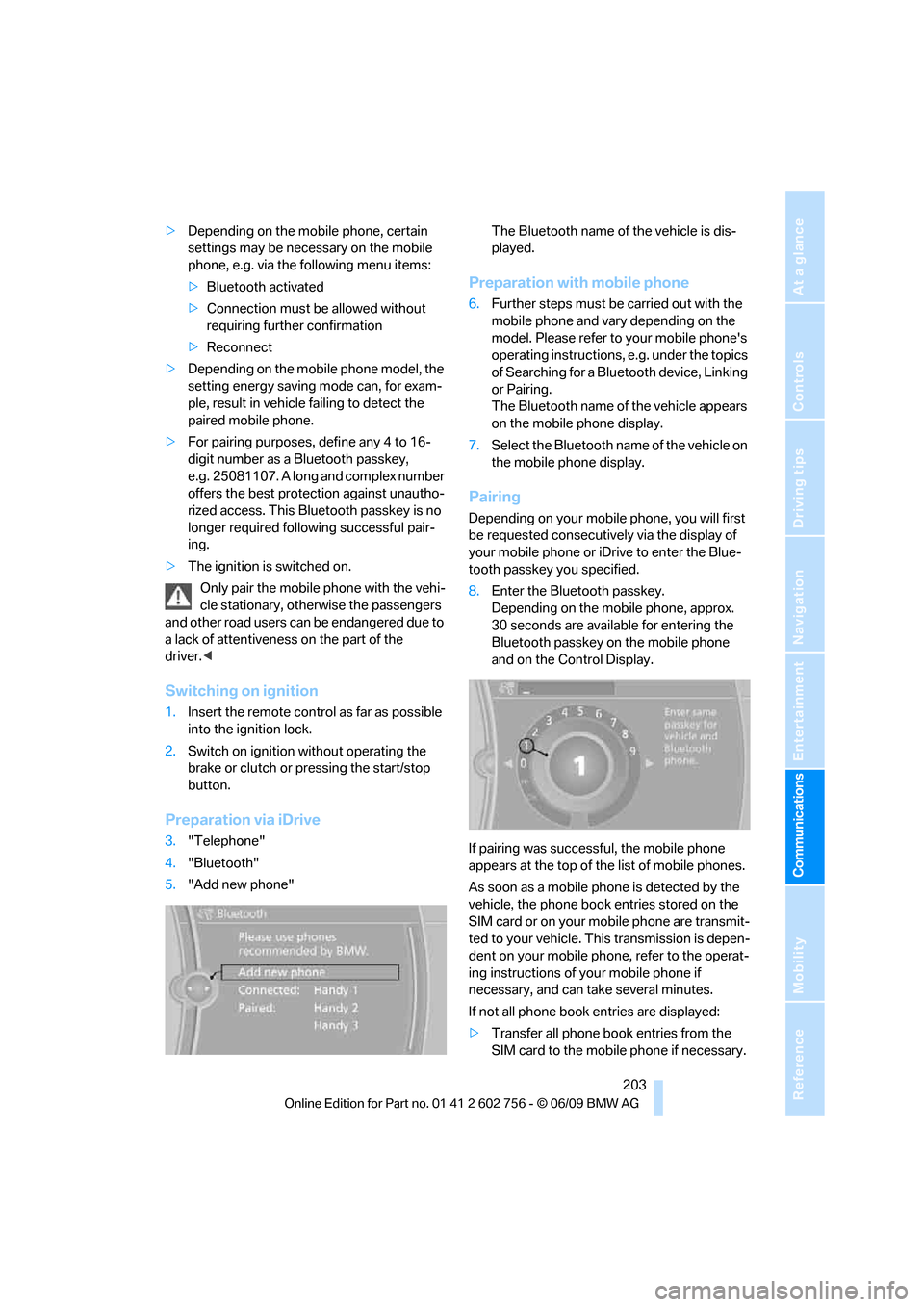
8.Enter the Bluetooth passkey.
Depending on the mobile phone, approx.
30 seconds are available for entering the
Bluetooth passkey on the mobile phone
and on the Control Display.
If pairing was successful, the mobile phone
appears at the top of the list of mobile phones.
As soon as a mobile phone is detected by the
vehicle, the phone book entries stored on the
SIM card or on your mobile phone are transmit-
ted to your vehicle. This transmission is depen-
dent on your mobile phone, refer to the operat-
ing instructions of your mobile phone if
necessary, and can take several minutes.
If not all phone book entries are displayed:
>Transfer all phone book entries from the
SIM card to the mobile phone if necessary.
ba8_e70ag.book Seite 203 Freitag, 5. Juni 2009 11:42 11
Page 214 of 300
Telephone
212
Inserting/removing the snap-
in adapter*
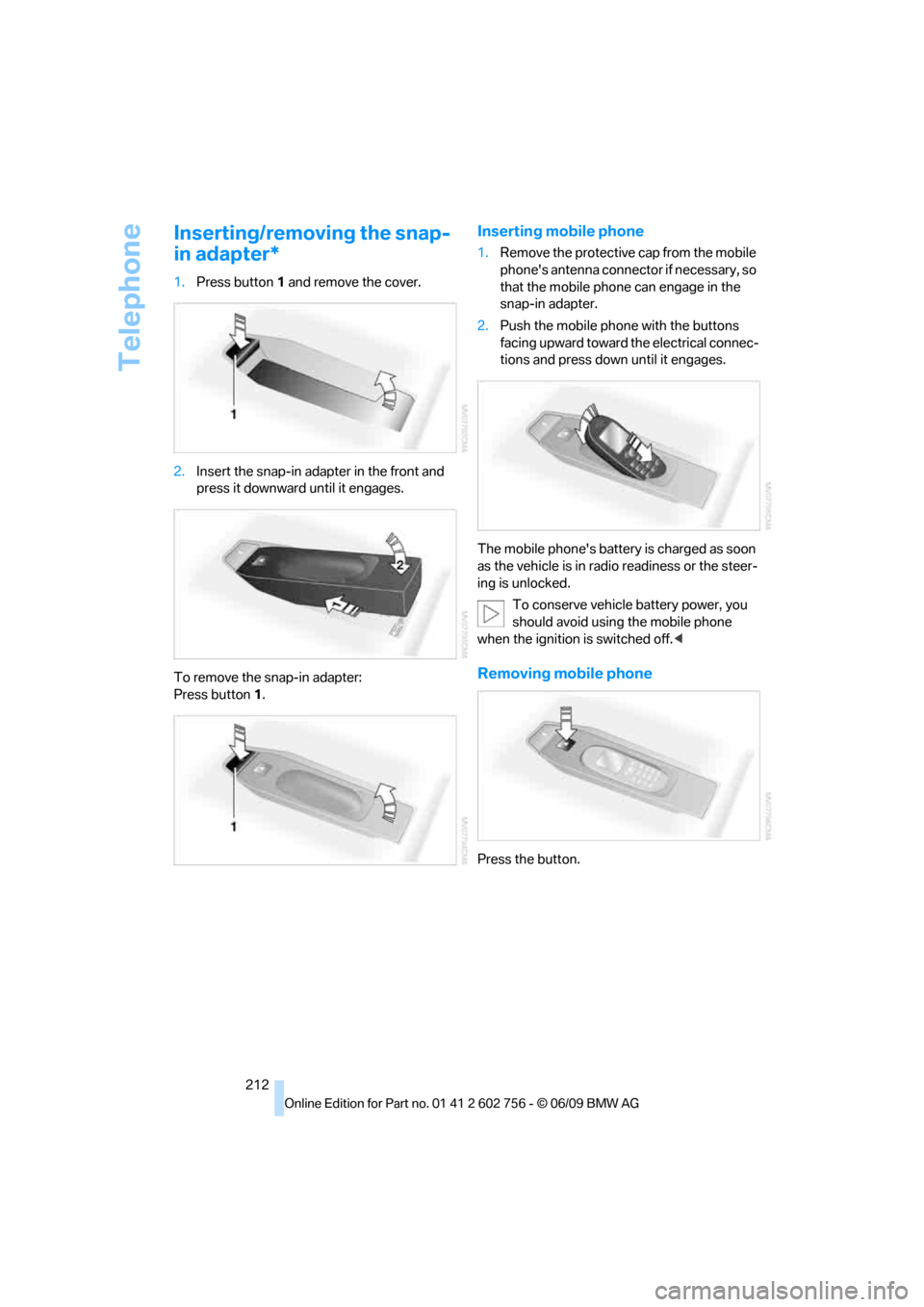
1.Press button1 and remove the cover.
2.Insert the snap-in adapter in the front and
press it downward until it engages.
To remove the snap-in adapter:
Press button1.
Inserting mobile phone
1.Remove the protective cap from the mobile
phone's antenna connector if necessary, so
that the mobile phone can engage in the
snap-in adapter.
2.Push the mobile phone with the buttons
facing upward toward the electrical connec-
tions and press down until it engages.
The mobile phone's battery is charged as soon
as the vehicle is in radio readiness or the steer-
ing is unlocked.
To conserve vehicle battery power, you
should avoid using the mobile phone
when the ignition is switched off.<
Removing mobile phone
Press the button.
ba8_e70ag.book Seite 212 Freitag, 5. Juni 2009 11:42 11
Page 217 of 300
215
Entertainment
Reference
At a glance
Controls
Driving tips Communications
Navigation
Mobility
BMW Assist
BMW Assist*
BMW Assist provides a number of different ser-
vices. For example, the position data of the
vehicle can be transmitted to the BMW Assist
Response Center when an Emergency
Request
* is sent.
Many BMW Assist services depend on the indi-
vidually agreed contract.
After your contract has expired, the BMW
Assist system will be deactivated by the BMW
Assist Response Center without you having to
visit a BMW Sports Activity Vehicle Center.
After the BMW Assist system has been deacti-
vated, no BMW Assist service will be available.
The BMW Assist system can be reactivated by
a BMW Sports Activity Vehicle Center after a
new contract has been signed.
Requirements
>The installed BMW Assist system is logged
in on a wireless communications network.
This network must be capable of transmit-
ting the services.
>To transmit position data, the vehicle must
be able to determine the current position.
>To activate and update BMW Assist, a
GPS signal must be available.
>The BMW Assist service contract was
signed with your BMW Sports Activity Vehi-
cle Center or with the BMW Assist
Response Center. Enabling must have
been completed.
>BMW Assist is activated.
Services offered
>Emergency Request: when you press the
SOS button, a connection to the BMW
Assist Response Center is established. The
BMW Assist Response Center then speaks
with you and takes further steps to help you.>Automatic Collision Notification: under cer-
tain conditions, a connection is established
to the BMW Assist Response Center after a
serious accident. If possible, the BMW
Assist Response Center then speaks with
you and takes further steps to help you.
>Enhanced Roadside Assistance: BMW
Roadside Assistance
* can be contacted if
assistance is needed in the event of a
breakdown. If possible, the vehicle and
position data are transmitted in the process.
>Customer Relations: connection to Cus-
tomer Relations for information on all
aspects of your vehicle.
>TeleServices: data on your vehicle's service
status or required inspections are transmit-
ted to your BMW Sports Activity Vehicle
Center, either automatically before a ser-
vice due date or when you request a BMW
service appointment.
>Remote Door Unlock: the BMW Assist
Response Center provides assistance if, for
example, the remote control is not available
and the vehicle needs to be opened.
>Stolen Vehicle Recovery: after you report to
the police that your vehicle was stolen, the
BMW Assist Response Center can deter-
mine its position.
>In addition, the optional Convenience Plan
offers a concierge service and information
on route planning, the traffic situation and
weather. Using Critical Calling, a limited
number of calls can be made via the BMW
Assist Response Center, for example if the
mobile phone is not available or discharged.
Press the SOS button to contact the BMW
Assist Response Center.
>You can also access the BMW Assist con-
cierge service via the Internet.
*
ba8_e70ag.book Seite 215 Freitag, 5. Juni 2009 11:42 11