jack BMW X5 2010 E70 Owner's Manual
[x] Cancel search | Manufacturer: BMW, Model Year: 2010, Model line: X5, Model: BMW X5 2010 E70Pages: 300, PDF Size: 12.41 MB
Page 37 of 300
Controls
35Reference
At a glance
Driving tips
Communications
Navigation
Entertainment
Mobility
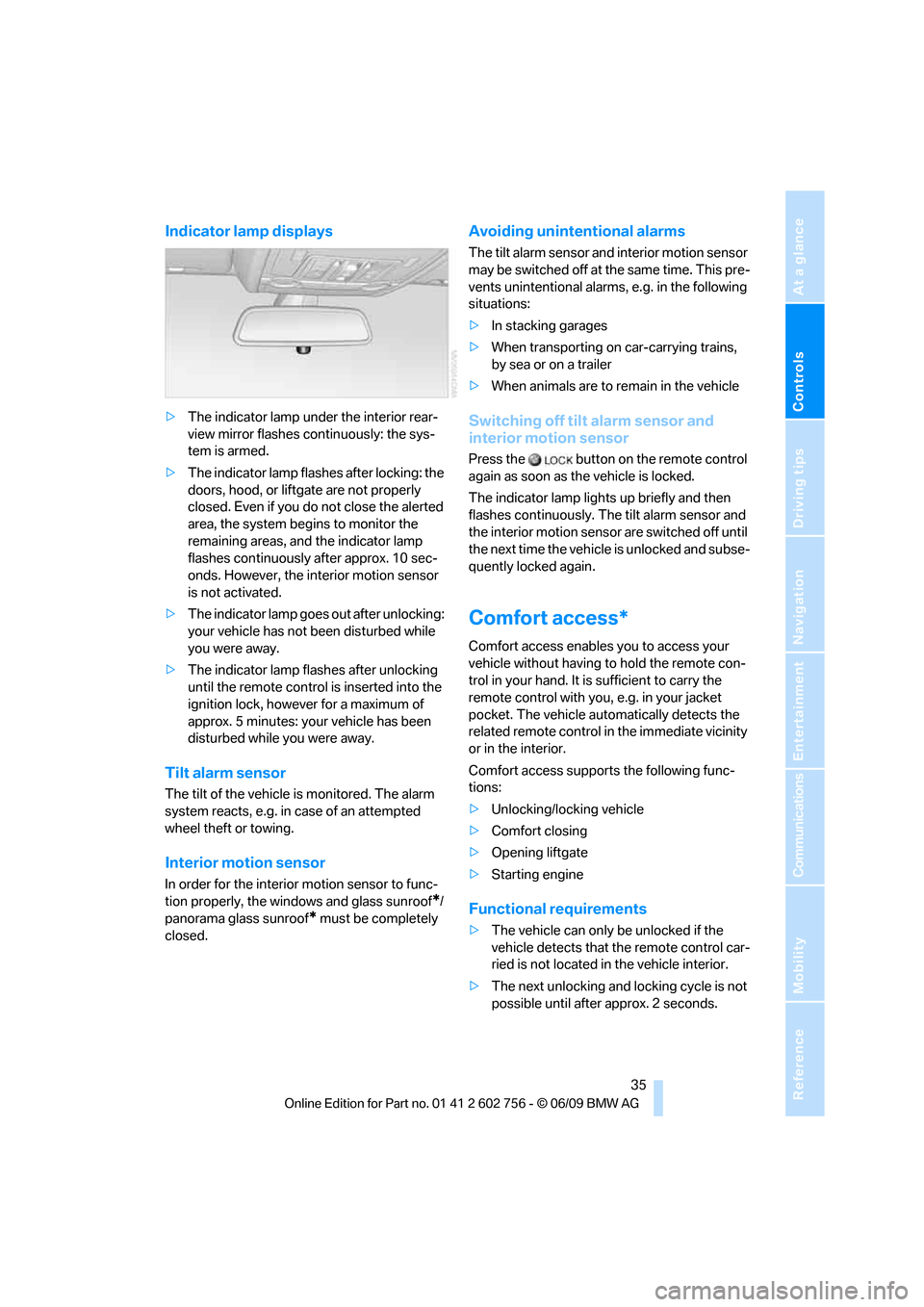
Indicator lamp displays
>The indicator lamp under the interior rear-
view mirror flashes continuously: the sys-
tem is armed.
>The indicator lamp flashes after locking: the
doors, hood, or liftgate are not properly
closed. Even if you do not close the alerted
area, the system begins to monitor the
remaining areas, and the indicator lamp
flashes continuously after approx. 10 sec-
onds. However, the interior motion sensor
is not activated.
>The indicator lamp goes out after unlocking:
your vehicle has not been disturbed while
you were away.
>The indicator lamp flashes after unlocking
until the remote control is inserted into the
ignition lock, however for a maximum of
approx. 5 minutes: your vehicle has been
disturbed while you were away.
Tilt alarm sensor
The tilt of the vehicle is monitored. The alarm
system reacts, e.g. in case of an attempted
wheel theft or towing.
Interior motion sensor
In order for the interior motion sensor to func-
tion properly, the windows and glass sunroof
*/
panorama glass sunroof
* must be completely
closed.
Avoiding unintentional alarms
The tilt alarm sensor and interior motion sensor
may be switched off at the same time. This pre-
vents unintentional alarms, e.g. in the following
situations:
>In stacking garages
>When transporting on car-carrying trains,
by sea or on a trailer
>When animals are to remain in the vehicle
Switching off tilt alarm sensor and
interior motion sensor
Press the button on the remote control
again as soon as the vehicle is locked.
The indicator lamp lights up briefly and then
flashes continuously. The tilt alarm sensor and
the interior motion sensor are switched off until
the next time the vehicle is unlocked and subse-
quently locked again.
Comfort access*
Comfort access enables you to access your
vehicle without having to hold the remote con-
trol in your hand. It is sufficient to carry the
remote control with you, e.g. in your jacket
pocket. The vehicle automatically detects the
related remote control in the immediate vicinity
or in the interior.
Comfort access supports the following func-
tions:
>Unlocking/locking vehicle
>Comfort closing
>Opening liftgate
>Starting engine
Functional requirements
>The vehicle can only be unlocked if the
vehicle detects that the remote control car-
ried is not located in the vehicle interior.
>The next unlocking and locking cycle is not
possible until after approx. 2 seconds.
ba8_e70ag.book Seite 35 Freitag, 5. Juni 2009 11:42 11
Page 100 of 300
Technology for comfort, convenience and safety
98
Airbags
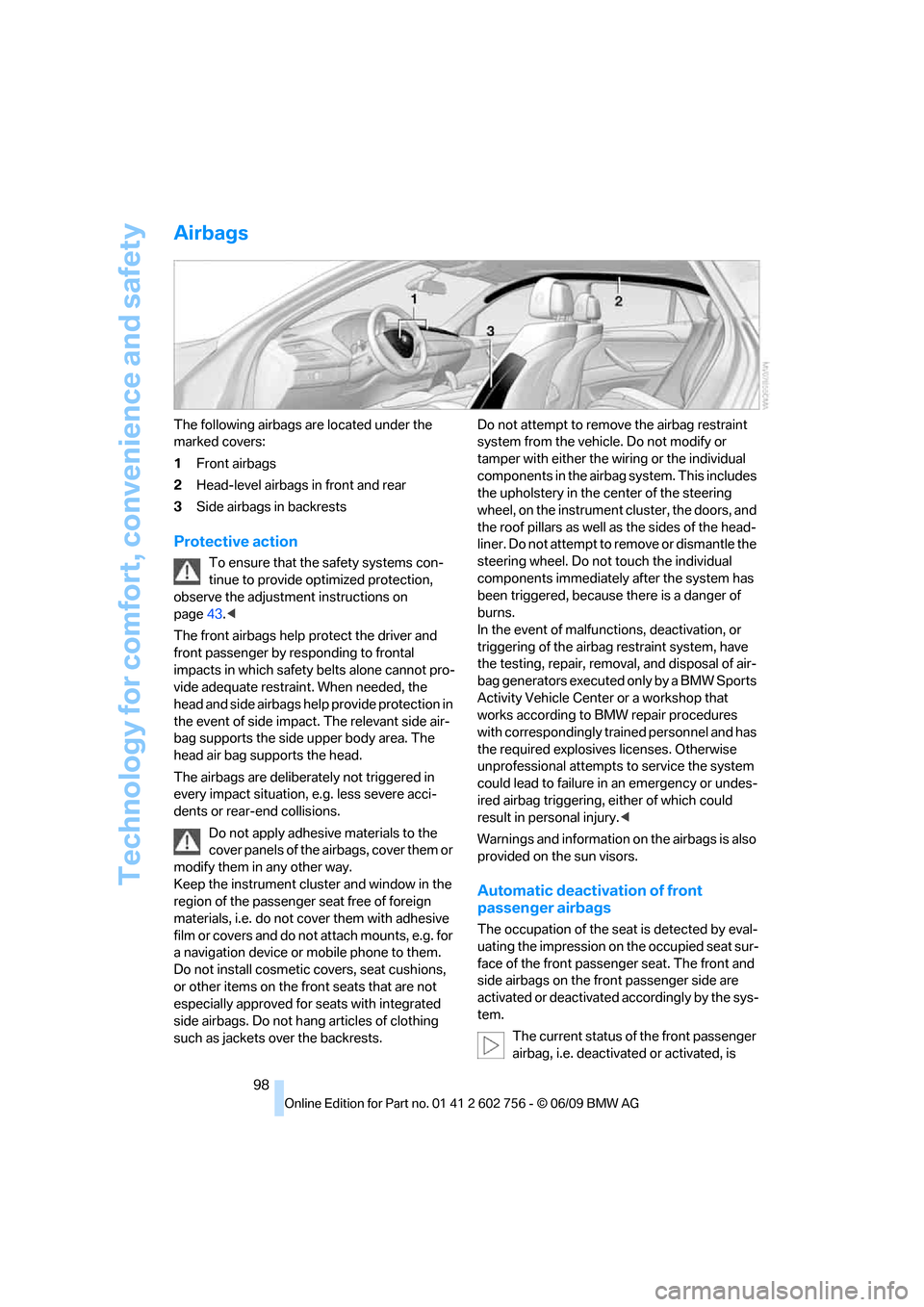
The following airbags are located under the
marked covers:
1Front airbags
2Head-level airbags in front and rear
3Side airbags in backrests
Protective action
To ensure that the safety systems con-
tinue to provide optimized protection,
observe the adjustment instructions on
page43.<
The front airbags help protect the driver and
front passenger by responding to frontal
impacts in which safety belts alone cannot pro-
vide adequate restraint. When needed, the
head and side airbags help provide protection in
the event of side impact. The relevant side air-
bag supports the side upper body area. The
head air bag supports the head.
The airbags are deliberately not triggered in
every impact situation, e.g. less severe acci-
dents or rear-end collisions.
Do not apply adhesive materials to the
cover panels of the airbags, cover them or
modify them in any other way.
Keep the instrument cluster and window in the
region of the passenger seat free of foreign
materials, i.e. do not cover them with adhesive
film or covers and do not attach mounts, e.g. for
a navigation device or mobile phone to them.
Do not install cosmetic covers, seat cushions,
or other items on the front seats that are not
especially approved for seats with integrated
side airbags. Do not hang articles of clothing
such as jackets over the backrests.Do not attempt to remove the airbag restraint
system from the vehicle. Do not modify or
tamper with either the wiring or the individual
components in the airbag system. This includes
the upholstery in the center of the steering
wheel, on the instrument cluster, the doors, and
the roof pillars as well as the sides of the head-
liner. Do not attempt to remove or dismantle the
steering wheel. Do not touch the individual
components immediately after the system has
been triggered, because there is a danger of
burns.
In the event of malfunctions, deactivation, or
triggering of the airbag restraint system, have
the testing, repair, removal, and disposal of air-
bag generators executed only by a BMW Sports
Activity Vehicle Center or a workshop that
works according to BMW repair procedures
with correspondingly trained personnel and has
the required explosives licenses. Otherwise
unprofessional attempts to service the system
could lead to failure in an emergency or undes-
ired airbag triggering, either of which could
result in personal injury.<
Warnings and information on the airbags is also
provided on the sun visors.
Automatic deactivation of front
passenger airbags
The occupation of the seat is detected by eval-
uating the impression on the occupied seat sur-
face of the front passenger seat. The front and
side airbags on the front passenger side are
activated or deactivated accordingly by the sys-
tem.
The current status of the front passenger
airbag, i.e. deactivated or activated, is
ba8_e70ag.book Seite 98 Freitag, 5. Juni 2009 11:42 11
Page 189 of 300
Navigation
Entertainment
Driving tips
187Reference
At a glance
Controls
Communications
Mobility
DVD system in rear
With the DVD system in the rear you can play
CDs and DVDs with audio, video and image
data. The DVD system can also play data from
attached external audio and video devices.
Audio output is possible both via headphones
and via the vehicle speakers.
You can control the DVD system using the but-
tons on the CD-/DVD player or using the remote
control.
You operate some functions using the
remote control.<
Enabling DVD system
The DVD system can be enabled via iDrive.
1."Settings"
2."Allow rear control"
3."Rear DVD system active"
DVD-System is enabled.
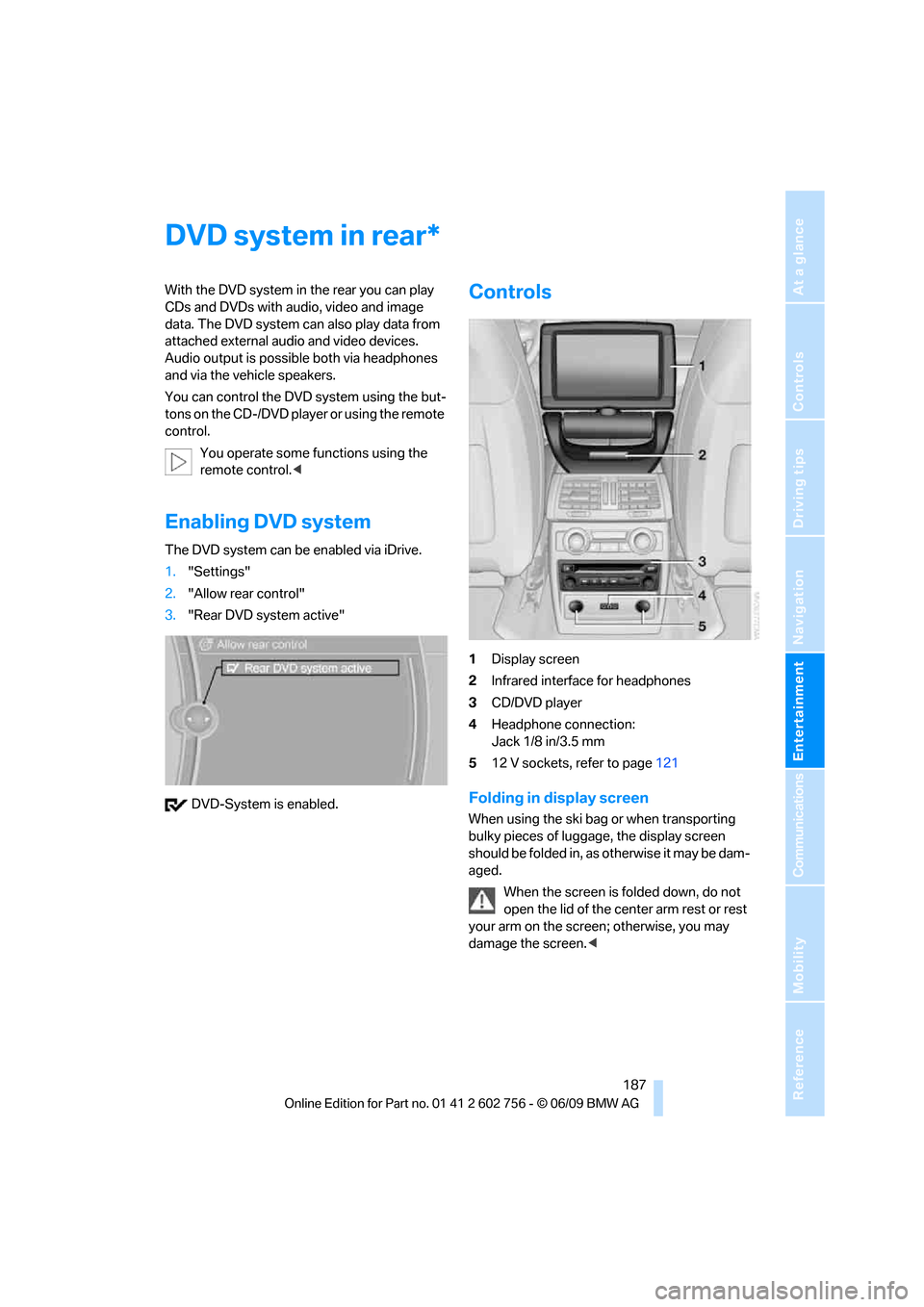
Controls
1Display screen
2Infrared interface for headphones
3CD/DVD player
4Headphone connection:
Jack 1/8 in/3.5 mm
512 V sockets, refer to page121
Folding in display screen
When using the ski bag or when transporting
bulky pieces of luggage, the display screen
should be folded in, as otherwise it may be dam-
aged.
When the screen is folded down, do not
open the lid of the center arm rest or rest
your arm on the screen; otherwise, you may
damage the screen.<
*
ba8_e70ag.book Seite 187 Freitag, 5. Juni 2009 11:42 11
Page 190 of 300
DVD system in rear
188 1.Turn display screen, arrow1.
The display screen switches off.
2.Fold in display screen, arrow2.
The display screen is folded out in the reverse
order.
CD/DVD player
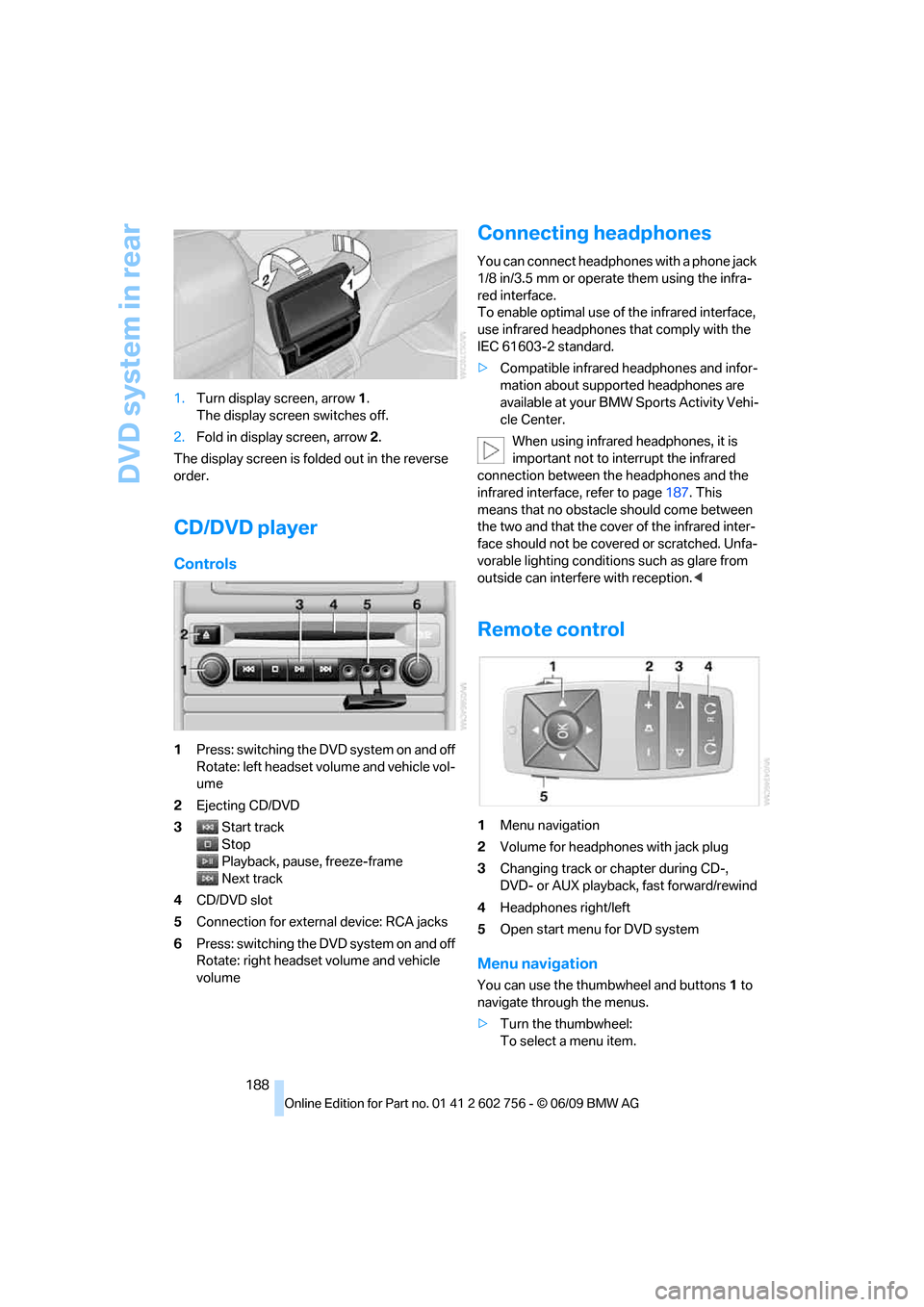
Controls
1Press: switching the DVD system on and off
Rotate: left headset volume and vehicle vol-
ume
2Ejecting CD/DVD
3Start track
Stop
Playback, pause, freeze-frame
Next track
4CD/DVD slot
5Connection for external device: RCA jacks
6Press: switching the DVD system on and off
Rotate: right headset volume and vehicle
volume
Connecting headphones
You can connect headphones with a phone jack
1/8 in/3.5 mm or operate them using the infra-
red interface.
To enable optimal use of the infrared interface,
use infrared headphones that comply with the
IEC 61603-2 standard.
>Compatible infrared headphones and infor-
mation about supported headphones are
available at your BMW Sports Activity Vehi-
cle Center.
When using infrared headphones, it is
important not to interrupt the infrared
connection between the headphones and the
infrared interface, refer to page187. This
means that no obstacle should come between
the two and that the cover of the infrared inter-
face should not be covered or scratched. Unfa-
vorable lighting conditions such as glare from
outside can interfere with reception.<
Remote control
1Menu navigation
2Volume for headphones with jack plug
3Changing track or chapter during CD-,
DVD- or AUX playback, fast forward/rewind
4Headphones right/left
5Open start menu for DVD system
Menu navigation
You can use the thumbwheel and buttons1 to
navigate through the menus.
>Turn the thumbwheel:
To select a menu item.
ba8_e70ag.book Seite 188 Freitag, 5. Juni 2009 11:42 11
Page 258 of 300
Replacing components
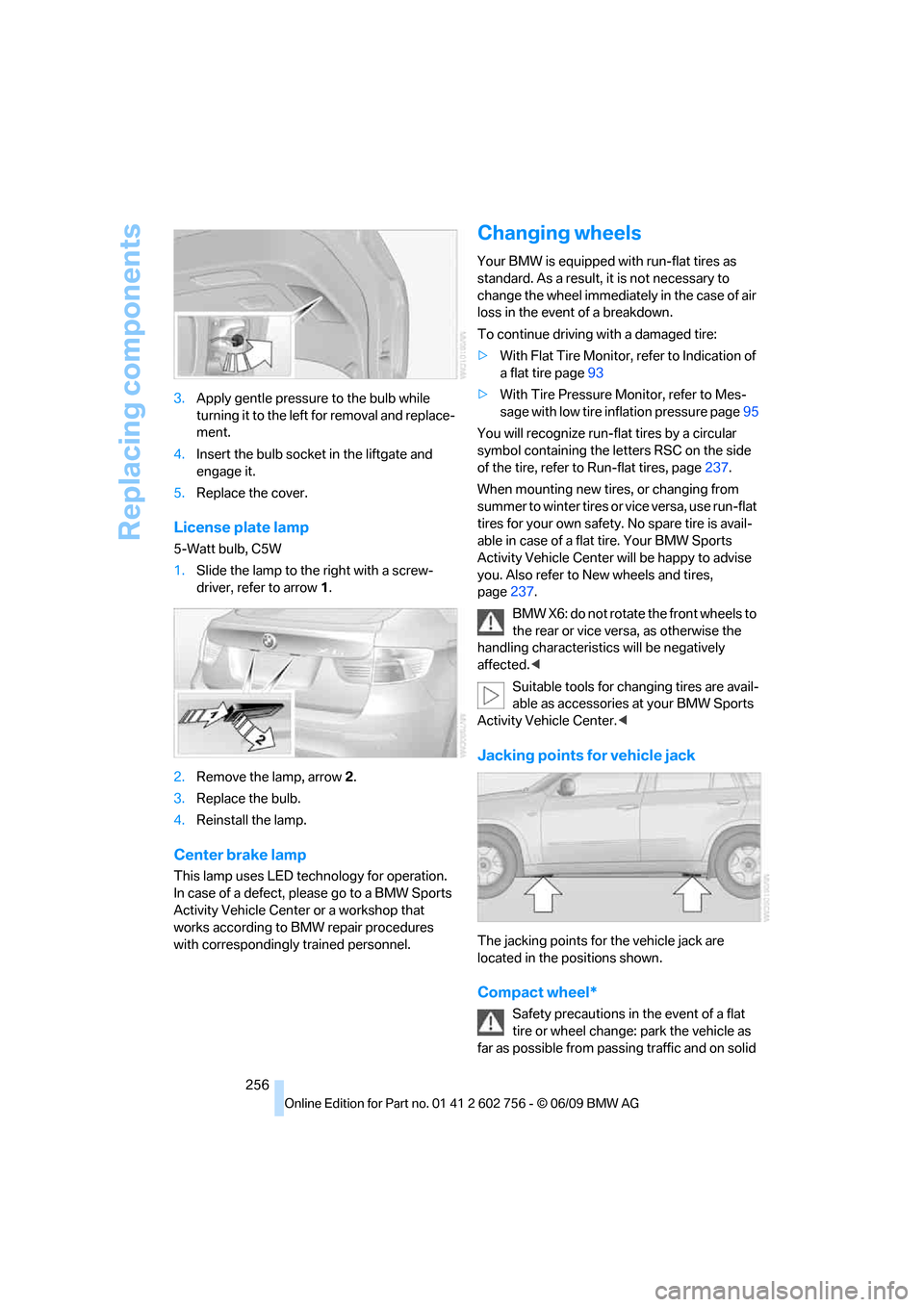
256 3.Apply gentle pressure to the bulb while
turning it to the left for removal and replace-
ment.
4.Insert the bulb socket in the liftgate and
engage it.
5.Replace the cover.
License plate lamp
5-Watt bulb, C5W
1.Slide the lamp to the right with a screw-
driver, refer to arrow1.
2.Remove the lamp, arrow2.
3.Replace the bulb.
4.Reinstall the lamp.
Center brake lamp
This lamp uses LED technology for operation.
In case of a defect, please go to a BMW Sports
Activity Vehicle Center or a workshop that
works according to BMW repair procedures
with correspondingly trained personnel.
Changing wheels
Your BMW is equipped with run-flat tires as
standard. As a result, it is not necessary to
change the wheel immediately in the case of air
loss in the event of a breakdown.
To continue driving with a damaged tire:
>With Flat Tire Monitor, refer to Indication of
a flat tire page93
>With Tire Pressure Monitor, refer to Mes-
sage with low tire inflation pressure page95
You will recognize run-flat tires by a circular
symbol containing the letters RSC on the side
of the tire, refer to Run-flat tires, page237.
When mounting new tires, or changing from
s u m m e r t o w i n t e r t i r e s o r v i c e v e r s a , u s e r u n - f l a t
tires for your own safety. No spare tire is avail-
able in case of a flat tire. Your BMW Sports
Activity Vehicle Center will be happy to advise
you. Also refer to New wheels and tires,
page237.
BMW X6: do not rotate the front wheels to
the rear or vice versa, as otherwise the
handling characteristics will be negatively
affected.<
Suitable tools for changing tires are avail-
able as accessories at your BMW Sports
Activity Vehicle Center.<
Jacking points for vehicle jack
The jacking points for the vehicle jack are
located in the positions shown.
Compact wheel*
Safety precautions in the event of a flat
tire or wheel change: park the vehicle as
far as possible from passing traffic and on solid
ba8_e70ag.book Seite 256 Freitag, 5. Juni 2009 11:42 11
Page 259 of 300
Mobility
257Reference
At a glance
Controls
Driving tips
Communications
Navigation
Entertainment
ground. Switch on the hazard warning flashers.
Set the parking brake and engage transmission
position P.
Have all vehicle occupants get out of the vehicle
and ensure that they remain outside the imme-
diate area in a safe place, such as behind a
guardrail.
If a warning triangle
* or portable hazard warning
lamp
* is required, set it up on the roadside at an
appropriate distance from the rear of the vehi-
cle. Comply with all safety guidelines and regu-
lations.
Change the wheel only on a level, firm surface
which is not slippery. The vehicle or the jack
could slip to the side if you attempt to raise the
vehicle on a soft or slippery surface such as
snow, ice, tiles, etc.
Position the jack on a firm support surface.
Do not use a wooden block or similar object as a
support base for the jack, as this would prevent
it from extending to its full support height and
reduce its load-carrying capacity.
To avoid serious or fatal injury: never lie under
the vehicle, and never start the engine while it is
supported by the jack.<
What you will need
To avoid rattling noises later on, note the posi-
tions of the tools before removing them, then
return them to their initial positions after com-
pleting work.
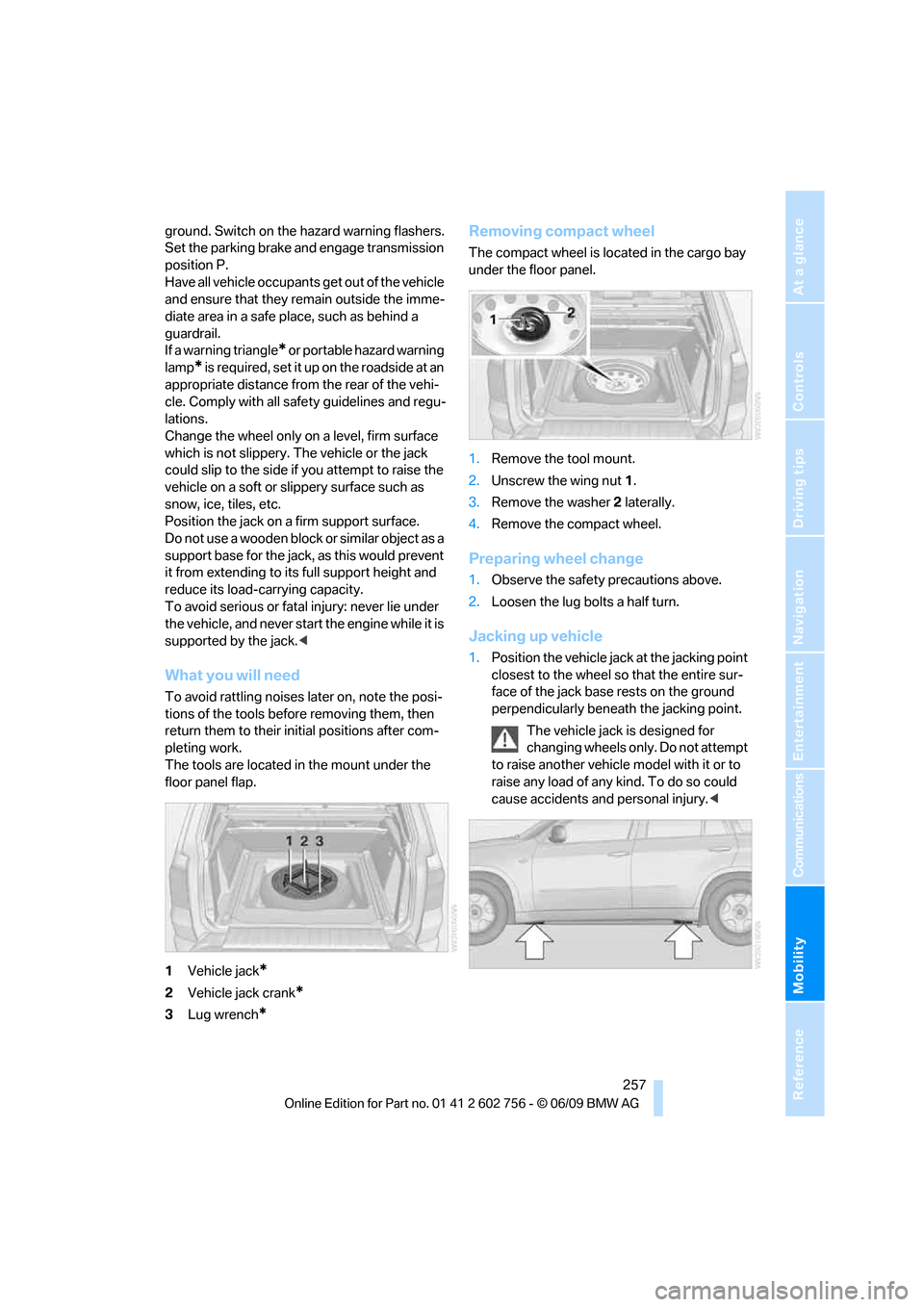
The tools are located in the mount under the
floor panel flap.
1Vehicle jack
*
2Vehicle jack crank*
3Lug wrench*
Removing compact wheel
The compact wheel is located in the cargo bay
under the floor panel.
1.Remove the tool mount.
2.Unscrew the wing nut 1.
3.Remove the washer 2 laterally.
4.Remove the compact wheel.
Preparing wheel change
1.Observe the safety precautions above.
2.Loosen the lug bolts a half turn.
Jacking up vehicle
1.Position the vehicle jack at the jacking point
closest to the wheel so that the entire sur-
face of the jack base rests on the ground
perpendicularly beneath the jacking point.
The vehicle jack is designed for
changing wheels only. Do not attempt
to raise another vehicle model with it or to
raise any load of any kind. To do so could
cause accidents and personal injury.<
ba8_e70ag.book Seite 257 Freitag, 5. Juni 2009 11:42 11
Page 260 of 300
Replacing components
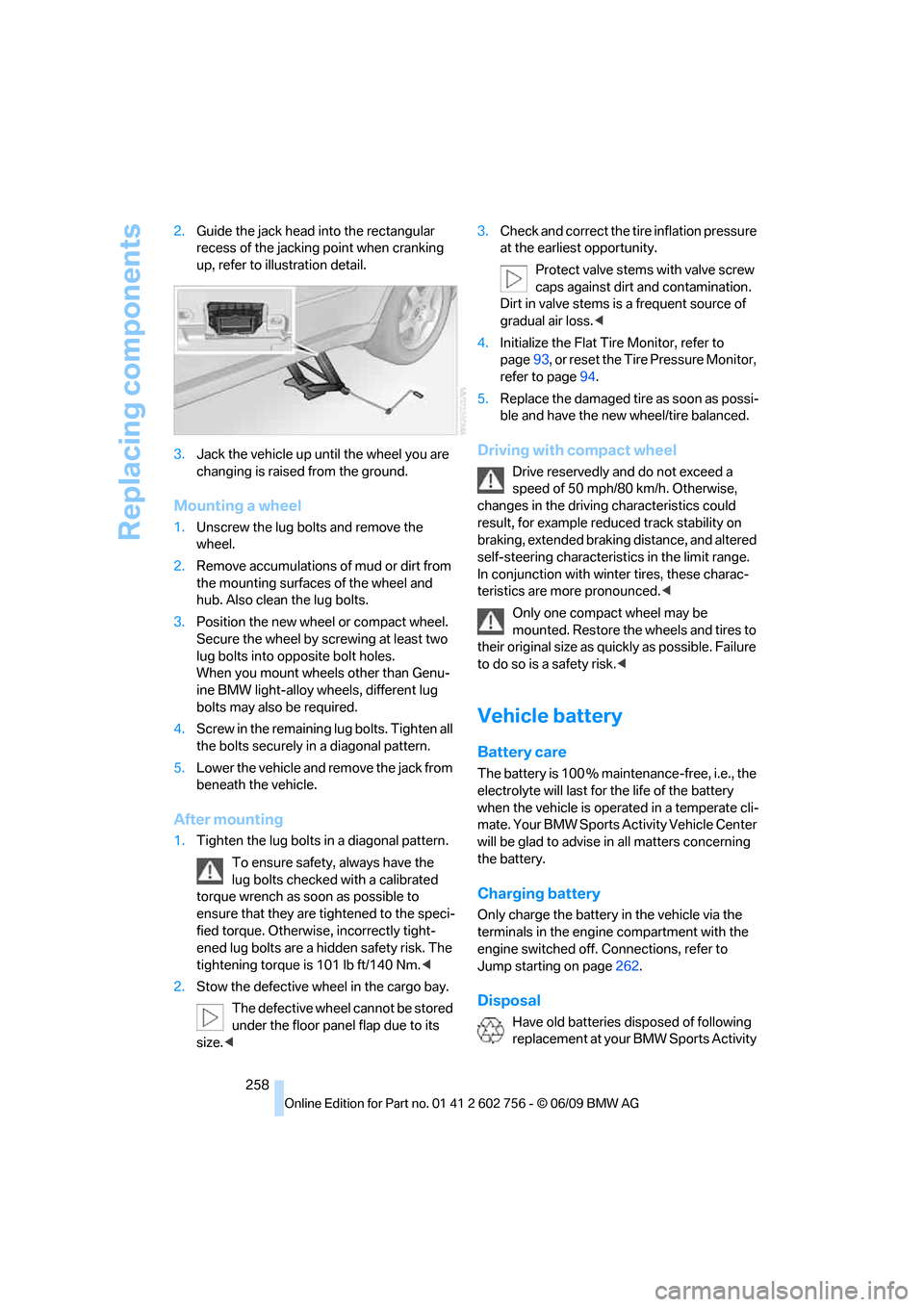
258 2.Guide the jack head into the rectangular
recess of the jacking point when cranking
up, refer to illustration detail.
3.Jack the vehicle up until the wheel you are
changing is raised from the ground.
Mounting a wheel
1.Unscrew the lug bolts and remove the
wheel.
2.Remove accumulations of mud or dirt from
the mounting surfaces of the wheel and
hub. Also clean the lug bolts.
3.Position the new wheel or compact wheel.
Secure the wheel by screwing at least two
lug bolts into opposite bolt holes.
When you mount wheels other than Genu-
ine BMW light-alloy wheels, different lug
bolts may also be required.
4.Screw in the remaining lug bolts. Tighten all
the bolts securely in a diagonal pattern.
5.Lower the vehicle and remove the jack from
beneath the vehicle.
After mounting
1.Tighten the lug bolts in a diagonal pattern.
To ensure safety, always have the
lug bolts checked with a calibrated
torque wrench as soon as possible to
ensure that they are tightened to the speci-
fied torque. Otherwise, incorrectly tight-
ened lug bolts are a hidden safety risk. The
tightening torque is 101 lb ft/140 Nm.<
2.Stow the defective wheel in the cargo bay.
The defective wheel cannot be stored
under the floor panel flap due to its
size.<3.Check and correct the tire inflation pressure
at the earliest opportunity.
Protect valve stems with valve screw
caps against dirt and contamination.
Dirt in valve stems is a frequent source of
gradual air loss.<
4.Initialize the Flat Tire Monitor, refer to
page93, or reset the Tire Pressure Monitor,
refer to page94.
5.Replace the damaged tire as soon as possi-
ble and have the new wheel/tire balanced.
Driving with compact wheel
Drive reservedly and do not exceed a
speed of 50 mph/80 km/h. Otherwise,
changes in the driving characteristics could
result, for example reduced track stability on
braking, extended braking distance, and altered
self-steering characteristics in the limit range.
In conjunction with winter tires, these charac-
teristics are more pronounced.<
Only one compact wheel may be
mounted. Restore the wheels and tires to
their original size as quickly as possible. Failure
to do so is a safety risk.<
Vehicle battery
Battery care
The battery is 100 % maintenance-free, i.e., the
electrolyte will last for the life of the battery
when the vehicle is operated in a temperate cli-
mate. Your BMW Sports Activity Vehicle Center
will be glad to advise in all matters concerning
the battery.
Charging battery
Only charge the battery in the vehicle via the
terminals in the engine compartment with the
engine switched off. Connections, refer to
Jump starting on page262.
Disposal
Have old batteries disposed of following
replacement at your BMW Sports Activity
ba8_e70ag.book Seite 258 Freitag, 5. Juni 2009 11:42 11
Page 288 of 300
Everything from A to Z
286 Ignition key, refer to Keys/
remote control26
Ignition key position 1, refer to
Radio readiness59
Ignition key position 2, refer to
Ignition on59
Ignition lock59
– starting engine with comfort
access36
Importing special
destinations146
Importing trips149
Indicator/warning lamps13
– active steering97
– airbags99
– DSC13,89
– DTC89
– fasten safety belt50
– Flat Tire Monitor93
– fog lamps13
– TPM Tire Pressure
Monitor95
Individual settings, refer to
Personal Profile26
Inflation pressure, refer to Tire
inflation pressure229
Inflation pressure monitoring
– refer to FTM Flat Tire
Monitor92
– refer to TPM Tire Pressure
Monitor94
Initializing
– Flat Tire Monitor93
– radio, refer to Station,
storing164
– refer to Power failure259
– refer to Setting date80
– refer to Setting time79
– seat, mirror and steering
wheel memory45
Installation location, mobile
phone119
Instructions for navigation
system, refer to Voice
instructions152
Instrument cluster
– refer to Cockpit10
– refer to Instrument panel12Instrument illumination, refer
to Instrument lighting105
Instrument lighting105
Instrument panel12
– refer to Cockpit10
Integrated key26
Integrated universal remote
control115
Interactive map147
Interior lamps106
– switching on with remote
control28
Interior motion sensor35
– switching off35
Interior rearview mirror53
– automatic dimming
feature53
– compass116
Intermittent mode of the
wipers68
Intersection, entering,
navigation142
iPod, connecting, refer to
AUX-IN connection183
iPod, connecting, refer to
USB-audio interface183
J
Jacking points257
Joystick
– refer to iDrive16
– refer to Selector lever,
selecting transmission
positions64
Jump starting262
K
Keyless-Go, refer to Comfort
access35
Keyless opening and closing,
refer to Comfort access35
Key Memory, refer to Personal
Profile26
Keys26
– key-related settings, refer to
Personal Profile26Kick-down, automatic
transmission with
Steptronic65
Knock control225
L
Lamps
– refer to High-beam
assistant104
– refer to Parking lamps/low
beams102
Lamps and bulbs250
Lashing eyes, refer to
Securing cargo134
Last destinations144
LATCH child restraint fixing
system56
Leather care248
LEDs light-emitting
diodes251
Length, refer to
Dimensions269
License plate lamp, replacing
bulbs253,256
Liftgate30,33
– adjusting opening
height31,33
– automatic operation31
– closing31,34
– locking and unlocking from
inside30
– manually opening or
closing34
– opening from inside31
– opening from outside31
– opening manually31
Light-emitting diodes
LEDs251
Lighter121
Lighter socket121
Lighting
– instruments105
– lamps and bulbs250
– of the vehicle, refer to
Lamps102
Light switch102
Load133
ba8_e70ag.book Seite 286 Freitag, 5. Juni 2009 11:42 11
Page 295 of 300
Reference 293
At a glance
Controls
Driving tips
Communications
Navigation
Entertainment
Mobility
Transmission positions, refer
to Automatic transmission
with Steptronic64
Transporting children
safely55
Transport securing device,
refer to Securing cargo134
Tread depth, refer to Minimum
tread depth236
Trip-distance counter, refer to
Trip odometer71
Trip odometer71
Turning circle, refer to
Dimensions269
Turn signals67
– indicator lamp12
– replacing bulbs251,254
U
Uniform Tire Quality Grading/
UTQR235
Units
– average fuel
consumption80
– temperature80
Universal garage-door
opener, refer to Integrated
universal remote
control115
Universal remote control115
Unlocking
– from inside30
– liftgate28
– setting behavior28
– using remote control27
– without key, refer to Comfort
access35
Unlocking and locking doors
using remote control27
Unlocking without key, refer to
Comfort access35
Updating the navigation
data140
USB audio interface183
Used batteries
– refer to Disposal258
– refer to Replacing battery37
V
Valve screw caps, refer to
After mounting258
VCD173
Vehicle
– battery258
– breaking-in130
– loading133
– measurements, refer to
Dimensions269
– parking60
– storing249
– weights271
Vehicle care, refer to Care246
Vehicle jack257
– jacking points257
Ventilation111
– draft-free111
– in the rear111
– rear automatic climate
control113
– 3rd row seats112
– while stationary114
Vent outlets of automatic
climate control107
Vents, refer to Ventilation111
Video menu174
Video playback173
Voice, refer to Destination
guidance through voice
instructions152
Voice activation system22
– short commands273
Voice instructions for
navigation system152
– repeating152
– switching on/off152
– volume152
Volume160
– audio sources160
– mobile phone205
– voice instructions152
Volume balance, tone
setting161
Volume of warning tones81
W
Warning lamps, refer to
Indicator and warning
lamps13
Warning messages, refer to
Check Control77
Warning tone, volume81
Warning triangle261
Warranty and Service Guide
Booklet for Canadian
models244
Washer/wiper system67
– rain sensor68
– washer fluid69
– windshield washer
nozzles68
Washer fluid69
– capacity of the reservoir69
Water on roads, refer to
Driving through water132
Water penetration247
Waveband for radio163
Wear indicators in tires, refer
to Minimum tread depth236
Weather reports165
Website4
Weights271
Wheel/tire combination, refer
to New wheels and tires237
Wheel/tire damage236
Wheelbase, refer to
Dimensions269
Wheels and tires229
Width, refer to
Dimensions269
Windows37
– convenience operation28
– convenience operation from
outside29
– convenience operation with
comfort access36
– opening, closing37
– pinch protection system38
– safety switch38
ba8_e70ag.book Seite 293 Freitag, 5. Juni 2009 11:42 11