brake BMW X5 3.0I 2004 E53 User Guide
[x] Cancel search | Manufacturer: BMW, Model Year: 2004, Model line: X5 3.0I, Model: BMW X5 3.0I 2004 E53Pages: 200, PDF Size: 3.91 MB
Page 71 of 200
69n
OverviewControlsMaintenanceRepairsDataIndex
Automatic transmission with SteptronicSport program and M/S manual
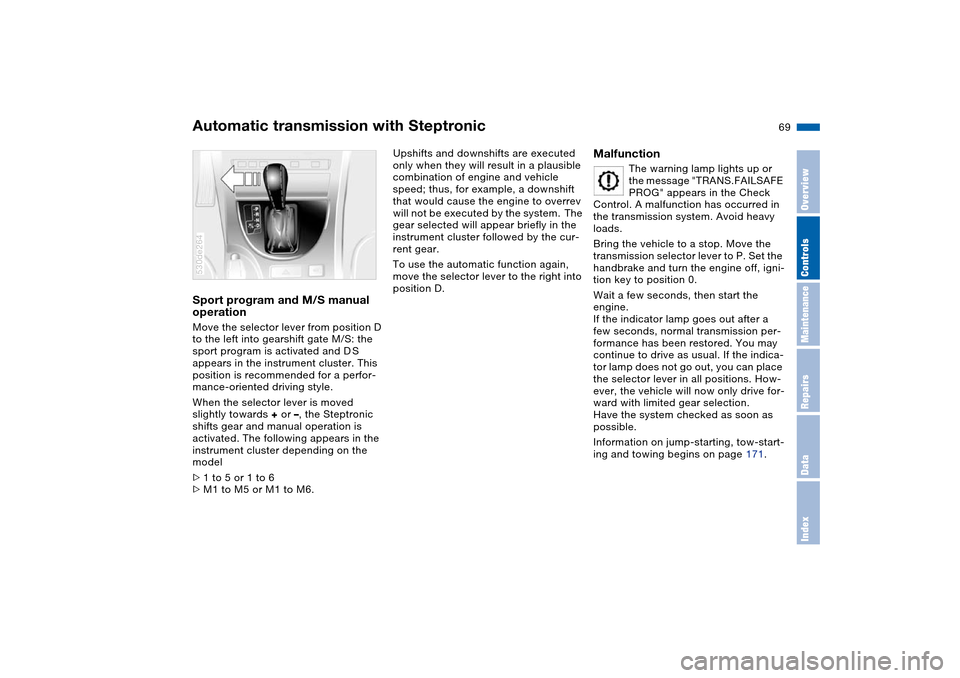
operation Move the selector lever from position D
to the left into gearshift gate M/S: the
sport program is activated and D S
appears in the instrument cluster. This
position is recommended for a perfor-
mance-oriented driving style.
When the selector lever is moved
slightly towards + or –, the Steptronic
shifts gear and manual operation is
activated. The following appears in the
instrument cluster depending on the
model
>1 to 5 or 1 to 6
>M1 to M5 or M1 to M6. 530de264
Upshifts and downshifts are executed
only when they will result in a plausible
combination of engine and vehicle
speed; thus, for example, a downshift
that would cause the engine to overrev
will not be executed by the system. The
gear selected will appear briefly in the
instrument cluster followed by the cur-
rent gear.
To use the automatic function again,
move the selector lever to the right into
position D.
Malfunction
The warning lamp lights up or
the message "TRANS.FAILSAFE
PROG" appears in the Check
Control. A malfunction has occurred in
the transmission system. Avoid heavy
loads.
Bring the vehicle to a stop. Move the
transmission selector lever to P. Set the
handbrake and turn the engine off, igni-
tion key to position 0.
Wait a few seconds, then start the
engine.
If the indicator lamp goes out after a
few seconds, normal transmission per-
formance has been restored. You may
continue to drive as usual. If the indica-
tor lamp does not go out, you can place
the selector lever in all positions. How-
ever, the vehicle will now only drive for-
ward with limited gear selection.
Have the system checked as soon as
possible.
Information on jump-starting, tow-start-
ing and towing begins on page 171.
Page 76 of 200
74n
Cruise control* Deactivating systemPress the button repeatedly until the
indicator lamp in the instrument cluster
goes out.
The cruise control is also deactivated
when the ignition key is turned into
position 0.
The speed stored in the memory is
deleted.Maintaining and storing speed or
accelerating Briefly press button
+:
The system maintains and stores the
current vehicle speed. Every time you
briefly press the button, the speed
increases by approx. 0.6 mph/1 km/h.
Press and hold button +:
The vehicle accelerates without pres-
sure on the accelerator pedal. When
you release the button, the system
maintains and stores the current speed.
If, on a downhill gradient, the
engine's braking effect is not suffi-
cient, the controlled speed can be
exceeded. Speed can drop on uphill
grades if the engine output is insuffi-
cient.<
Decelerating Briefly press button
–:
When cruise control is active, every
brief touch of the button reduces the
speed by approx. 0.6 mph/1 km/h.
Press and hold button –:
With the cruise control active, the sys-
tem automatically reduces the throttle
opening to slow the vehicle. When you
release the button, the system main-
tains and stores the current speed.
Interrupting cruise control When the system is activated, press
button 1. The indicator lamp stays on.
You can use the cruise control again
whenever required by calling up the
speed that was stored last.
In addition, cruise control is interrupted
automatically:
>When you apply pressure to the
brake pedal
>When you apply pressure to the
clutch pedal or when you move the
automatic transmission selector lever
from Drive to Neutral
>If you exceed or fall below the con-
trolled speed for an extended period,
by depressing the accelerator, for
example. Recalling stored setting Press button:
The vehicle accelerates to and main-
tains the last speed stored.
Page 81 of 200
Maintenance
79n
OverviewControlsRepairsDataIndex
Check Control Graphic display
*
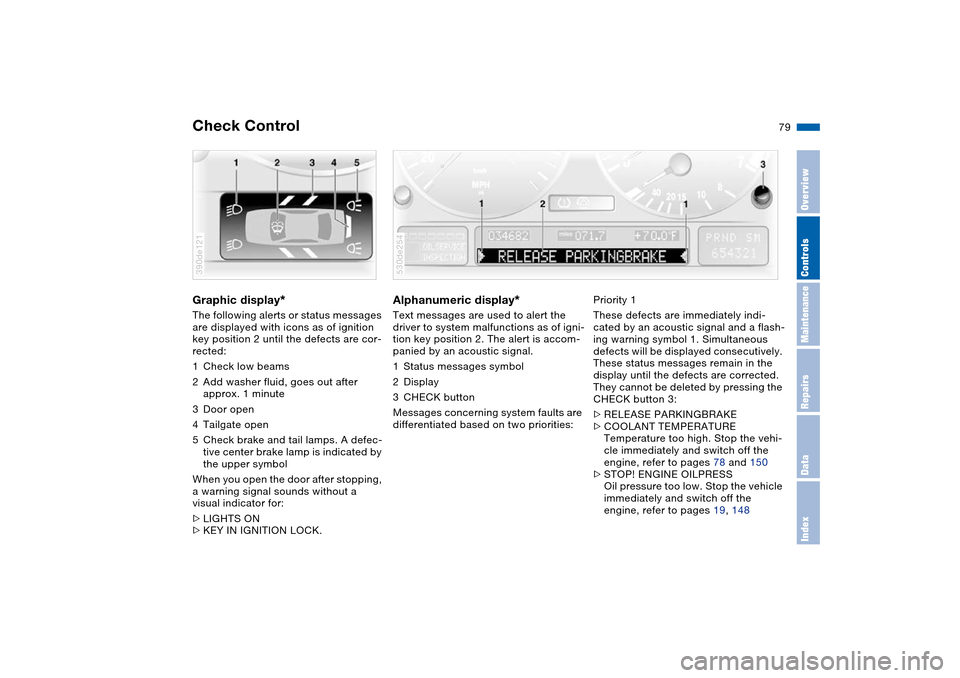
The following alerts or status messages
are displayed with icons as of ignition
key position 2 until the defects are cor-
rected:
1Check low beams
2Add washer fluid, goes out after
approx. 1 minute
3Door open
4Tailgate open
5Check brake and tail lamps. A defec-
tive center brake lamp is indicated by
the upper symbol
When you open the door after stopping,
a warning signal sounds without a
visual indicator for:
>LIGHTS ON
>KEY IN IGNITION LOCK. 390de121
Alphanumeric display
*
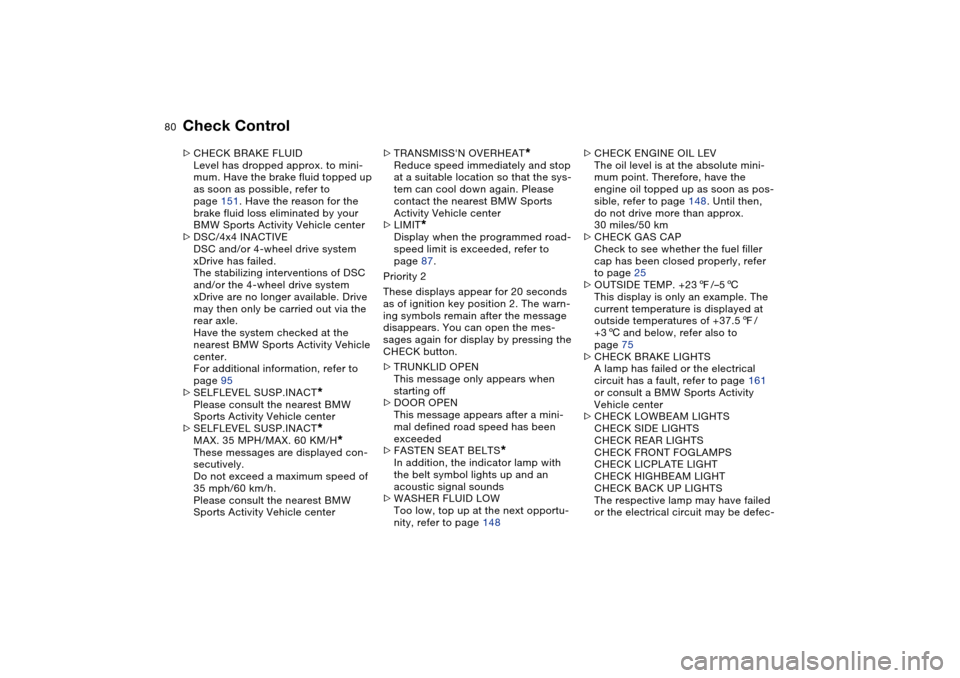
Text messages are used to alert the
driver to system malfunctions as of igni-
tion key position 2. The alert is accom-
panied by an acoustic signal.
1Status messages symbol
2Display
3CHECK button
Messages concerning system faults are
differentiated based on two priorities: 530de254
Priority 1
These defects are immediately indi-
cated by an acoustic signal and a flash-
ing warning symbol 1. Simultaneous
defects will be displayed consecutively.
These status messages remain in the
display until the defects are corrected.
They cannot be deleted by pressing the
CHECK button 3:
>RELEASE PARKINGBRAKE
>COOLANT TEMPERATURE
Temperature too high. Stop the vehi-
cle immediately and switch off the
engine, refer to pages 78 and 150
>STOP! ENGINE OILPRESS
Oil pressure too low. Stop the vehicle
immediately and switch off the
engine, refer to pages 19, 148
Page 82 of 200
80n
Check Control >CHECK BRAKE FLUID
Level has dropped approx. to mini-
mum. Have the brake fluid topped up
as soon as possible, refer to
page 151. Have the reason for the
brake fluid loss eliminated by your
BMW Sports Activity Vehicle center
>DSC/4x4 INACTIVE
DSC and/or 4-wheel drive system
xDrive has failed.
The stabilizing interventions of DSC
and/or the 4-wheel drive system
xDrive are no longer available. Drive
may then only be carried out via the
rear axle.
Have the system checked at the
nearest BMW Sports Activity Vehicle
center.
For additional information, refer to
page 95
>SELFLEVEL SUSP.INACT
*
Please consult the nearest BMW
Sports Activity Vehicle center
>SELFLEVEL SUSP.INACT*
MAX. 35 MPH/MAX. 60 KM/H
*
These messages are displayed con-
secutively.
Do not exceed a maximum speed of
35 mph/60 km/h.
Please consult the nearest BMW
Sports Activity Vehicle center>TRANSMISS'N OVERHEAT
*
Reduce speed immediately and stop
at a suitable location so that the sys-
tem can cool down again. Please
contact the nearest BMW Sports
Activity Vehicle center
>LIMIT
*
Display when the programmed road-
speed limit is exceeded, refer to
page 87.
Priority 2
These displays appear for 20 seconds
as of ignition key position 2. The warn-
ing symbols remain after the message
disappears. You can open the mes-
sages again for display by pressing the
CHECK button.
>TRUNKLID OPEN
This message only appears when
starting off
>DOOR OPEN
This message appears after a mini-
mal defined road speed has been
exceeded
>FASTEN SEAT BELTS
*
In addition, the indicator lamp with
the belt symbol lights up and an
acoustic signal sounds
>WASHER FLUID LOW
Too low, top up at the next opportu-
nity, refer to page 148>CHECK ENGINE OIL LEV
The oil level is at the absolute mini-
mum point. Therefore, have the
engine oil topped up as soon as pos-
sible, refer to page 148. Until then,
do not drive more than approx.
30 miles/50 km
>CHECK GAS CAP
Check to see whether the fuel filler
cap has been closed properly, refer
to page 25
>OUTSIDE TEMP. +237/–56
This display is only an example. The
current temperature is displayed at
outside temperatures of +37.57/
+36 and below, refer also to
page 75
>CHECK BRAKE LIGHTS
A lamp has failed or the electrical
circuit has a fault, refer to page 161
or consult a BMW Sports Activity
Vehicle center
>CHECK LOWBEAM LIGHTS
CHECK SIDE LIGHTS
CHECK REAR LIGHTS
CHECK FRONT FOGLAMPS
CHECK LICPLATE LIGHT
CHECK HIGHBEAM LIGHT
CHECK BACK UP LIGHTS
The respective lamp may have failed
or the electrical circuit may be defec-
Page 83 of 200
Maintenance
81n
OverviewControlsRepairsDataIndex
Check Controltive, refer to page 159 or consult a
BMW Sports Activity Vehicle center
>TRANS. FAILSAFE PROG
*
Please consult the nearest BMW
Sports Activity Vehicle center, refer
to page 69
>CHECK BRAKE LININGS
Have the brake pads inspected by
your BMW Sports Activity Vehicle
center, refer to page 139
>CHECK COOLANT LEVEL
Coolant too low, top off at the next
opportunity, refer to page 150
>ENGINE FAILSAFE PROG
Fault in the engine electronics.
You can continue to drive with
reduced engine output or engine
speed.
Please have the system inspected by
your BMW Sports Activity Vehicle
center.
Displays after completion of trip All of the malfunctions registered during
the trip appear consecutively when the
ignition key is turned to position 0.
The following displays will appear when
appropriate:
>LIGHTS ON
>KEY IN IGNITION LOCK >CHECK ENGINE OIL LEV
Top up engine oil at the next opportu-
nity, e.g. while refueling, refer to
page 148.
This display appears when you open
the driver's door after parking the vehi-
cle. A supplementary acoustic signal is
also heard.
Status messages remain available with
the CHECK button 3 for a period of
approx. three minutes after the display
goes out and the key is removed from
the ignition lock. If there were multiple
messages, press the CHECK button
repeatedly to view them all in
sequence.
Checking Check Control Press the CHECK button 3 with the
ignition key in position 2:
"CHECK CONTROL OK" appears in the
display.
No malfunctions are present in the
monitored systems. Computer You can find a description of the com-
puter on pages 82 and 87 as well as in
the Owner's Manual for Onboard Com-
puter.You can have the Check Control
and computer messages dis-
played in a different language.<
Page 95 of 200
93n
OverviewControlsMaintenanceRepairsDataIndex
PDC Park Distance Control
* Antilock Brake System
Signal tones The distance from an object is indicated
in front with a higher intermittent tone,
and at the rear with a lower intermittent
tone. As the distance between vehicle
and object decreases, the intervals
between the tones become shorter.
The signal tone becomes continuous
once the distance to the nearest object
falls to below roughly 1 ft/30 cm.
The warning signal is canceled after
approx. 3 seconds if you are moving
parallel to a wall.
If there is a malfunction of the system:
The indicator lamp flashes and a short
steady signal tone is sounded
>if you activate PDC with the button
>when you select reverse for the first
time after switching on the ignition
>if a malfunction occurs while the PDC
system is active.
Switch the system off and have the
cause of the malfunction corrected by
your BMW Sports Activity Vehicle cen-
ter. Even with PDC, final responsibility
for estimating the distance
between the vehicle and any obstruc-
tions always remains with the driver.
Even when sensors are involved, there
is a blind spot in which objects cannot
be detected. This applies especially in
those cases where the system
approaches the physical constraints of
ultrasonic measurement, as occurs with
tow bars and trailer couplings, and in
the vicinity of thin or wedge-shaped
objects. Low objects already displayed,
e.g. a curb, can also disappear from the
detection area of the sensors again
before a continuous tone sounds.
Loud sources of sound, inside and out-
side the vehicle, could drown out the
PDC signal tone.<
Keep the sensors clean and free of ice
or snow in order to ensure that they will
continue to operate effectively.
Do not apply high pressure spray to the
sensors for a prolonged period of time.
Keep the spray at least 4 in/10 cm away
from the sensors.
The concept The ABS Antilock Brake System keeps
the wheels from locking during braking,
thereby enhancing active driving safety.
The vehicle continues to be steerable
during hard braking.
ABS also includes EBV Electronic
brake-force distribution.
Safe braking, refer to page 139.EBV Electronic brake-force
distributionEBV controls the brake system's appli-
cation pressure at the rear wheels to
ensure stable deceleration.DBC Dynamic Brake ControlThe Dynamic Brake Control actively
supports the driver in dangerous brak-
ing situations. When you apply the
brake pedal rapidly, the system
increases the braking effect with low
pedal pressure so that the shortest
possible braking distance is achieved.
This system exploits all of the benefits
provided by ABS.
Do not reduce the pressure on the
brake pedal for the duration of the
brake application. DBC is deactivated
when you release the brake pedal.
Page 96 of 200
94n
Antilock Brake System DSC Dynamic Stability Control MalfunctionBe sure to observe the information on
the lamp combination which may light
up on page 20.
The concept DSC maintains vehicle stability, even in
critical driving situations.
The DSC is operational every time you
start the engine.
The system optimizes the driving stabil-
ity during acceleration and when start-
ing from a standstill. The system recog-
nizes any tendency for the vehicle to
assume an unstable attitude such as
oversteer or understeer; it then coun-
teracts this tendency with a combina-
tion of graduated reductions in engine
torque and selective braking interven-
tion at individual wheels. DSC provides
optimized stability within the limits
defined by the laws of physics.
The laws of physics cannot be
repealed, even with DSC. An
appropriate driving style always
remains the responsibility of the driver.
We therefore urge you to avoid using
the additional safety margin of the sys-
tem as an excuse for taking risks.
Do not make any modifications to the
DSC system. Never allow anyone other
than authorized professional techni-
cians to carry out service or repairs on
the system.<
Indicator lamps The indicator lamps in the instrument
cluster goes out shortly after you switch
on the ignition,
The indicator lamp flashes:
DSC is active and governs drive
and braking force.
The indicator lamp stays lit:
DSC has been switched off using the
button and the stabilizing interventions
are no longer available.
Page 97 of 200
95n
OverviewControlsMaintenanceRepairsDataIndex
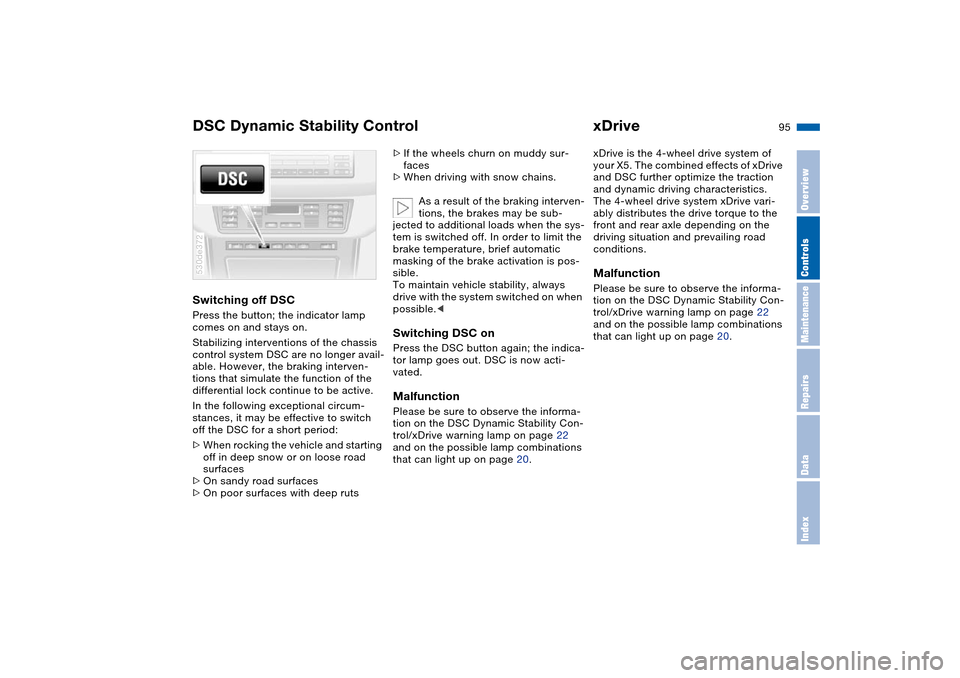
DSC Dynamic Stability Control xDriveSwitching off DSCPress the button; the indicator lamp
comes on and stays on.
Stabilizing interventions of the chassis
control system DSC are no longer avail-
able. However, the braking interven-
tions that simulate the function of the
differential lock continue to be active.
In the following exceptional circum-
stances, it may be effective to switch
off the DSC for a short period:
>When rocking the vehicle and starting
off in deep snow or on loose road
surfaces
>On sandy road surfaces
>On poor surfaces with deep ruts 530de372
>If the wheels churn on muddy sur-
faces
>When driving with snow chains.
As a result of the braking interven-
tions, the brakes may be sub-
jected to additional loads when the sys-
tem is switched off. In order to limit the
brake temperature, brief automatic
masking of the brake activation is pos-
sible.
To maintain vehicle stability, always
drive with the system switched on when
possible.
vated.MalfunctionPlease be sure to observe the informa-
tion on the DSC Dynamic Stability Con-
trol/xDrive warning lamp on page 22
and on the possible lamp combinations
that can light up on page 20.
xDrive is the 4-wheel drive system of
your X5. The combined effects of xDrive
and DSC further optimize the traction
and dynamic driving characteristics.
The 4-wheel drive system xDrive vari-
ably distributes the drive torque to the
front and rear axle depending on the
driving situation and prevailing road
conditions.MalfunctionPlease be sure to observe the informa-
tion on the DSC Dynamic Stability Con-
trol/xDrive warning lamp on page 22
and on the possible lamp combinations
that can light up on page 20.
Page 98 of 200
96n
HDC Hill Descent Control The concept HDC is a system for driving downhill in
steep terrain. This system reduces vehi-
cle speed on steep downhill gradients,
thus allowing you to maintain control of
your BMW under these conditions.
The vehicle moves at slightly more than
walking speed without active interven-
tion from the driver.
HDC is available for activation at vehi-
cle speeds below approx. 20 mph/
35 km/h. When driving down steep hills
with a speed below approx. 20 mph/
35 km/h, the vehicle reduces speed
automatically down to slightly more
than walking speed, approx. 5 mph/
8 km/h, and then maintains this speed
at a constant.
You can use the accelerator or brakes
to vary this automatically controlled
speed within a range extending from
approx. 3 mph/5 km/h to 15 mph/
25 km/h.
You can specify a target speed within
the same range by using the +/– but-
tons of the cruise control.
HDC is automatically deactivated once
vehicle speed again exceeds approx.
35 mph/60 km/h.
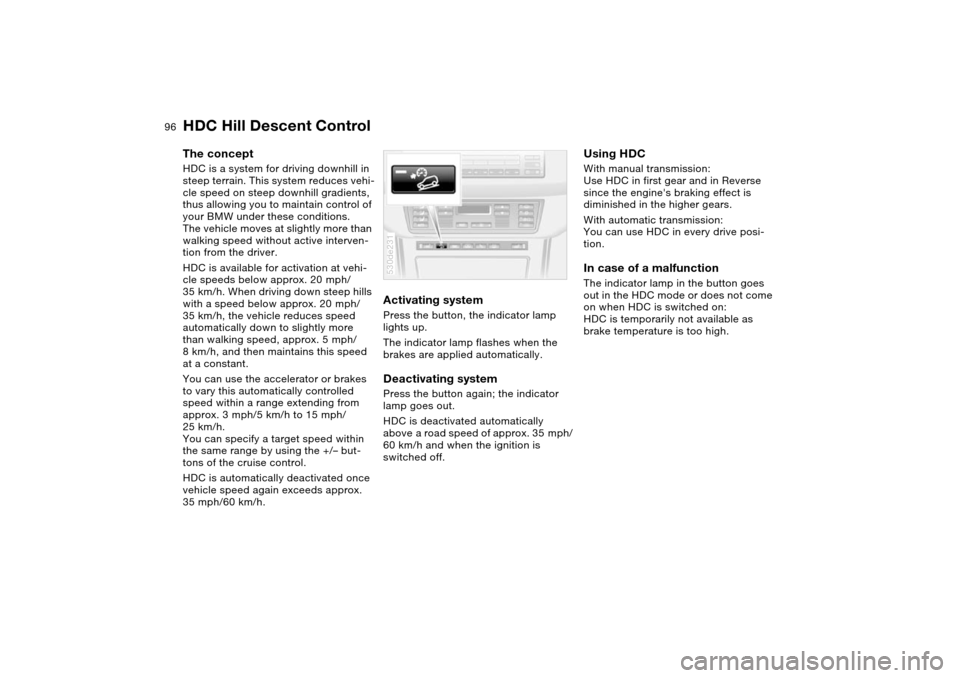
Activating system Press the button, the indicator lamp
lights up.
The indicator lamp flashes when the
brakes are applied automatically. Deactivating system Press the button again; the indicator
lamp goes out.
HDC is deactivated automatically
above a road speed of approx. 35 mph/
60 km/h and when the ignition is
switched off. 530de231
Using HDC With manual transmission:
Use HDC in first gear and in Reverse
since the engine's braking effect is
diminished in the higher gears.
With automatic transmission:
You can use HDC in every drive posi-
tion. In case of a malfunction The indicator lamp in the button goes
out in the HDC mode or does not come
on when HDC is switched on:
HDC is temporarily not available as
brake temperature is too high.
Page 101 of 200
99n
OverviewControlsMaintenanceRepairsDataIndex
2-axle self-leveling suspension
*
Brake Force Display
Lowering Available with ignition key in position 2.
From Standard to Access:
1. Press button 2 while traveling at less
than approx. 50 mph/80 km/h. The
system enters its preselection mode.
The preselection mode is canceled
>by pressing button 1
>automatically once the vehicle
exceeds a speed of approx.
50 mph/80 km/h or approx.
60 seconds after button 2 is
pressed
2. Reduce speed to below approx.
15 mph/25 km/h within approx.
60 seconds after pressing button 2.
When you press button 2 at
speeds below approx. 15 mph/
25 km/h the system automatically low-
ers the vehicle to the Access level.<
From Off-Road to Standard:
>Press button 2 or
>automatically once you exceed a
speed of approx. 30 mph/50 km/h.
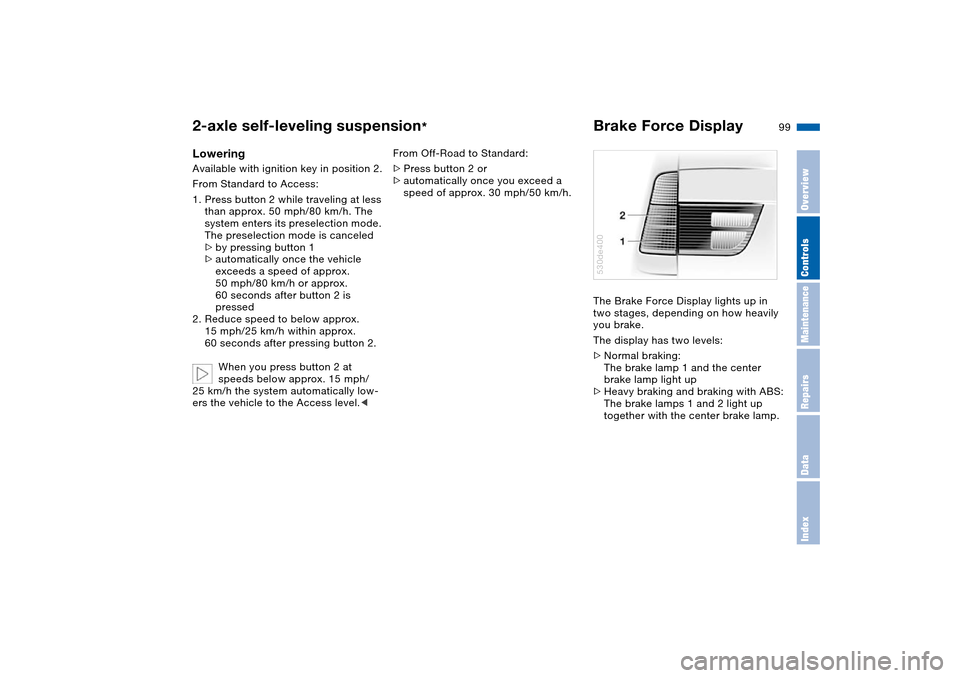
The Brake Force Display lights up in
two stages, depending on how heavily
you brake.
The display has two levels:
>Normal braking:
The brake lamp 1 and the center
brake lamp light up
>Heavy braking and braking with ABS:
The brake lamps 1 and 2 light up
together with the center brake lamp.
530de400