Battery BMW X5 3.0I 2006 E53 User Guide
[x] Cancel search | Manufacturer: BMW, Model Year: 2006, Model line: X5 3.0I, Model: BMW X5 3.0I 2006 E53Pages: 202, PDF Size: 4.13 MB
Page 103 of 202
103n
OverviewControlsMaintenanceRepairsDataIndex
Interior lamps The interior lamps operate automati-
cally. Switching interior lamps on and
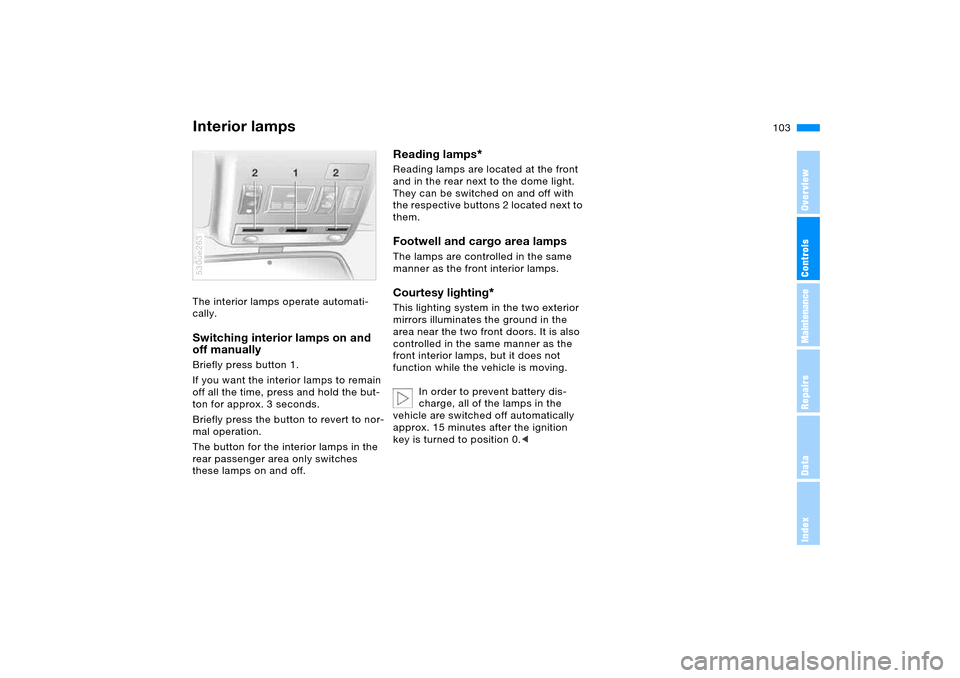
off manually Briefly press button 1.
If you want the interior lamps to remain
off all the time, press and hold the but-
ton for approx. 3 seconds.
Briefly press the button to revert to nor-
mal operation.
The button for the interior lamps in the
rear passenger area only switches
these lamps on and off. 530ue263
Reading lamps
*
Reading lamps are located at the front
and in the rear next to the dome light.
They can be switched on and off with
the respective buttons 2 located next to
them.Footwell and cargo area lamps The lamps are controlled in the same
manner as the front interior lamps.Courtesy lighting
*
This lighting system in the two exterior
mirrors illuminates the ground in the
area near the two front doors. It is also
controlled in the same manner as the
front interior lamps, but it does not
function while the vehicle is moving.
In order to prevent battery dis-
charge, all of the lamps in the
vehicle are switched off automatically
approx. 15 minutes after the ignition
key is turned to position 0.<
Page 110 of 202
110n
Automatic climate control
*
Air conditioning
The air is cooled and
dehumidified and —
depending on the temperature setting —
warmed again. Depending on the
weather, the windshield may fog over
briefly when the engine is started. You
can reduce condensation forming on
the windows by switching on the air
conditioning.
During air conditioning, condensa-
tion forms, which then exits under
the vehicle. That traces of water on the
ground are therefore normal.<
Maximum cooling
Maximally cooled air is
obtained as quickly as possi-
ble from an outside temperature above
327/06 and with the engine running.
The automatic climate control changes
over to the lowest temperature and
switches into the recirculated-air mode.
The maximum air quantity only flows
out of the vents for the upper body.
Therefore, open these vents for maxi-
mum cooling.
AUC Automatic recirculated-air
control
You can respond to
unpleasant odors or pollut-
ants in the immediate environment by
shutting off the supply of outside air.
The system then recirculates the air
currently within the vehicle. In AUC
operating mode, a sensor detects pol-
lutants in the external air and controls
the shut-off automatically.
Press the button repeatedly to run
through the following control sequence
>LEDs off: outside air supply opera-
tional
>Left LED on, AUC mode: the system
detects pollutants in the outside air
and blocks the flow of air when nec-
essary. The system then recirculates
the air currently within the vehicle.
Depending on the air quality, the
automatic system then switches back
and forth between outside air supply
and recirculation of the air within the
vehicle
>Right LED on: the outside air supply
into the vehicle is shut off continu-
ously. The system then recirculates
the air currently within the vehicle.
You can also use the button on the
steering wheel to switch between Off
and recirculated-air mode or between
AUC and recirculated-air mode, refer to
page23.
If the windows fog over in the
recirculated-air mode, switch the
recirculated-air mode off and increase
the air supply as required.< Rear window defroster
When the rear window
defroster is activated, the
LED lights up. The rear window
defroster switches off automatically
after a while.
Residual heat
Press the button when the
motor is switched off, but
warm.
The heat stored in the engine is utilized
for heating the interior when the engine
has been switched off – while waiting at
a railroad crossing, for instance.
This function may be activated when
the outside temperature is below
approx. 597/156, the engine is at
operating temperature, and the battery
Page 113 of 202
113n
OverviewControlsMaintenanceRepairsDataIndex
Roller sun blinds
*
Parked car ventilation
*
Roller sun blinds for rear side
windows
*
Use the strap to pull out the blinds, then
hook them in the attachment provided.
With roller sun blinds attached,
do not open the windows during
travel. The blinds may otherwise be
damaged by the wind.<
You can use this system to ventilate the
interior and lower its temperature, using
the blower of the parked car ventilation
or of the automatic climate control.
The parked car ventilation is operated
via the MID Multi-Information Display,
refer to page84 or via the onboard
computer, refer to the separate
Owner's Manual.
You can set two different times for the
system to start; it will remain active for
30 minutes. You can also switch it on
and off directly. Since the system uses
a substantial amount of electrical cur-
rent, you should refrain from switching
it on twice in succession without allow-
ing the battery to be recharged in nor-
mal operation between uses.When a preselected activation time is
set, the parked car ventilation is opera-
tional at outside temperatures above
approx. 607/166, or by direct switch
activation.
The air enters the passenger compart-
ment through the vent outlets in the
instrument cluster, which can be
adjusted for both direction and airflow.
The vent outlets must therefore be open
for the system to operate.
Page 161 of 202
161n
OverviewControlsMaintenanceRepairsDataIndex
Lamps and bulbs The lamps and bulbs make essential
contributions to the safety of your vehi-
cle. For this reason, follow the instruc-
tions below carefully when replacing a
bulb. If you are not familiar with any of
the procedures, consult your BMW
Sports Activity Vehicle center.
Never touch the glass on new
bulbs with your bare fingers, as
even minute amounts of contamination
will burn into the bulb's surface and
reduce its service life. Use a clean
cloth, paper napkin, or a similar mate-
rial, or hold the bulb by its metallic
base.<
A replacement bulb set is available from
your BMW Sports Activity Vehicle cen-
ter.
To prevent short circuits, before
working on any electrical system,
equipment or accessory you should
always switch it off and disconnect the
cable from the battery's negative termi-
nal before starting.
To avoid possible injury or equipment
damage when replacing bulbs, follow
any instructions provided by the bulb
manufacturer.<
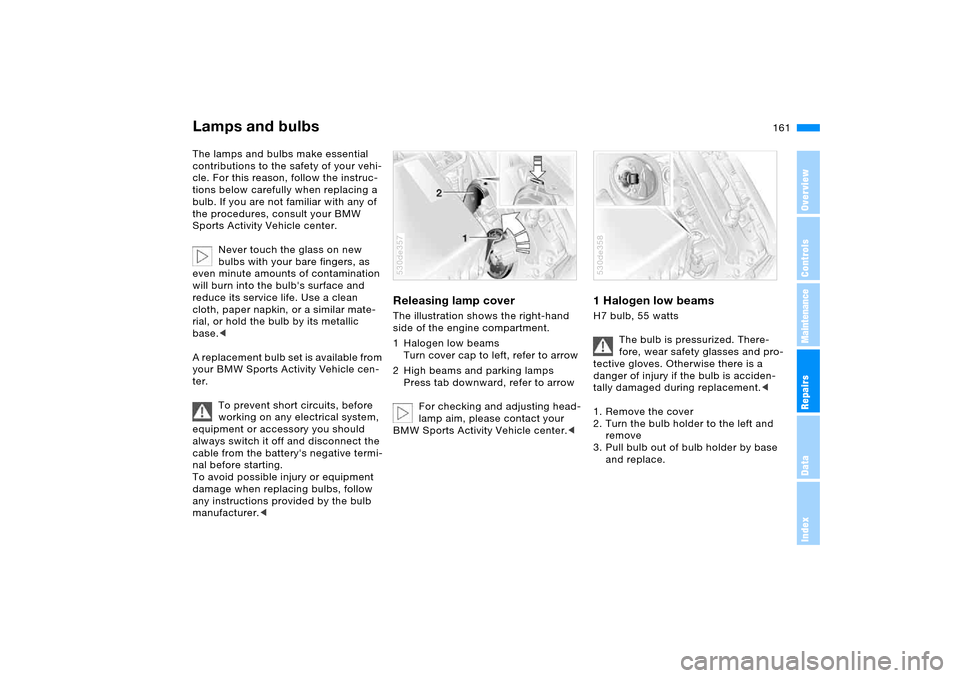
Releasing lamp cover The illustration shows the right-hand
side of the engine compartment.
1 Halogen low beams
Turn cover cap to left, refer to arrow
2 High beams and parking lamps
Press tab downward, refer to arrow
For checking and adjusting head-
lamp aim, please contact your
BMW Sports Activity Vehicle center.< 530de357
1 Halogen low beams H7 bulb, 55 watts
The bulb is pressurized. There-
fore, wear safety glasses and pro-
tective gloves. Otherwise there is a
danger of injury if the bulb is acciden-
tally damaged during replacement.<
1. Remove the cover
2. Turn the bulb holder to the left and
remove
3. Pull bulb out of bulb holder by base
and replace.530de358
Page 171 of 202
171n
OverviewControlsMaintenanceRepairsDataIndex
Changing a wheel Vehicle battery
Only one compact wheel may be
mounted. Wheels and tires of the
original size should be mounted again
as soon as possible.<
Driving with spare wheel
*
Do not exceed a speed of
130 mph/210 km/h, otherwise tire
damage could lead to accidents.<
With certain wheel-and-tire com-
binations the size of the spare
wheel differs from that of the other
wheels. To restore the original state,
the normal wheel should be remounted
as soon as possible.<
Battery posts, terminals and
related accessories contain lead
and lead compounds. Wash hands after
handling.<
Battery care The battery is maintenance-free, that is,
the original electrolyte will normally last
for the service life of the battery under
moderate climatic conditions. Your
BMW Sports Activity Vehicle center will
be glad to advise in all matters con-
cerning the battery.Charging battery Only charge the battery in the vehicle
via the terminals in the engine compart-
ment with the engine off. For correct
connections, refer to Jump starting on
page174. Disposal
Following replacement, have old
batteries disposed of by your
BMW Sports Activity Vehicle center or
turn them over to a recycling center.
Maintain the battery in an upright posi-
tion for transport and storage. Always
restrain the battery to prevent it from
tipping over during transport.<
Power failure Following a temporary power failure,
e.g. in the case of a dead battery, some
equipment is subject to restricted use
and must be reinitialized. Individual set-
tings are also lost and must be updated
again:
>Seat, mirror and steering wheel
memory
The positions must be stored again,
refer to page50
>Time and date
Have to be updated again, refer to
page82
>Activation time for parked car
ventilation
Has to be updated again, refer to
page84.
Page 174 of 202
174n
Jump starting When your battery is discharged, you
can use two jumper cables to start your
vehicle with power from the battery in a
second vehicle. You can also use the
same method to help start another vehi-
cle. Use only jumper cables with fully-
insulated clamp handles.
To avoid the risk of potentially
fatal injury, always avoid all con-
tact with electrical components while
the engine is running. Carefully observe
the following instructions to avoid per-
sonal injury and/or damage to one or
both vehicles.<
Preparing1. Check whether the battery of the
other vehicle has a voltage of
12 Volts and approximately the same
capacitance in Ah. This information
can be found on the battery.
2. Switch off the engine of the support
vehicle.
3. Switch off any electrical systems and
components in both vehicles.
Ensure that no contact exists
between the bodywork on the two
vehicles, otherwise there is a danger of
short circuits.
sparks, always follow this
sequence when connecting jumper
cables.<
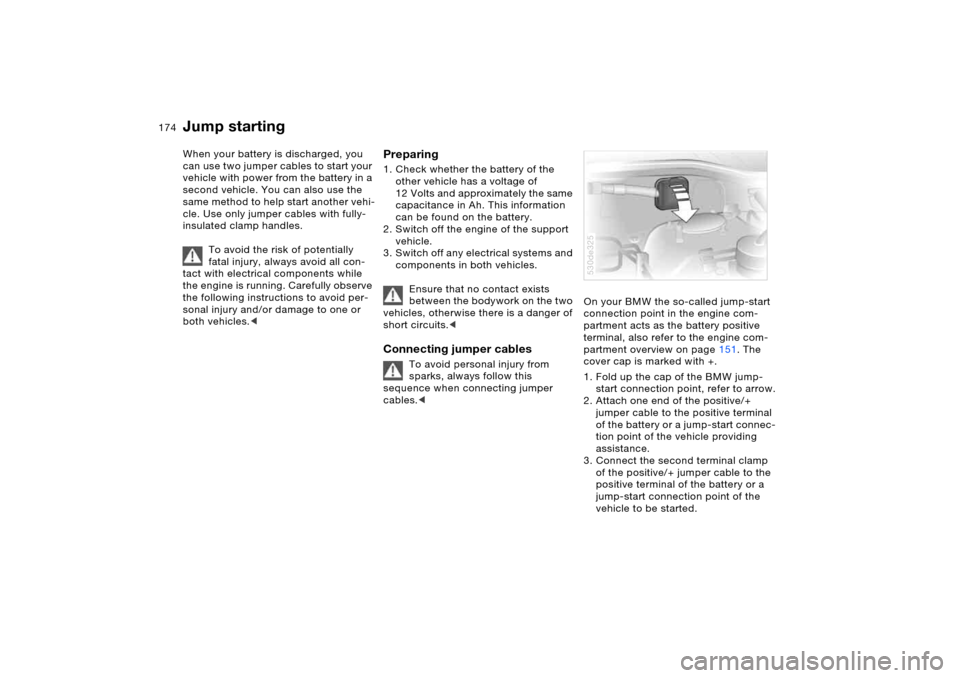
On your BMW the so-called jump-start
connection point in the engine com-
partment acts as the battery positive
terminal, also refer to the engine com-
partment overview on page151. The
cover cap is marked with +.
1. Fold up the cap of the BMW jump-
start connection point, refer to arrow.
2. Attach one end of the positive/+
jumper cable to the positive terminal
of the battery or a jump-start connec-
tion point of the vehicle providing
assistance.
3. Connect the second terminal clamp
of the positive/+ jumper cable to the
positive terminal of the battery or a
jump-start connection point of the
vehicle to be started.530de325
Page 175 of 202
175n
OverviewControlsMaintenanceRepairsDataIndex
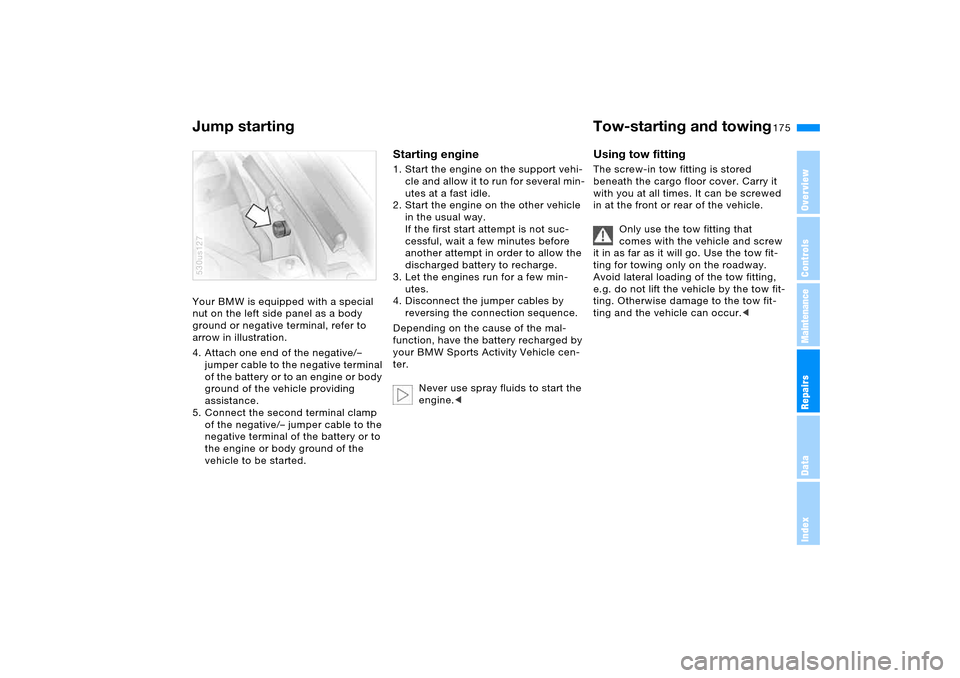
Jump starting Tow-starting and towing Your BMW is equipped with a special
nut on the left side panel as a body
ground or negative terminal, refer to
arrow in illustration.
4. Attach one end of the negative/–
jumper cable to the negative terminal
of the battery or to an engine or body
ground of the vehicle providing
assistance.
5. Connect the second terminal clamp
of the negative/– jumper cable to the
negative terminal of the battery or to
the engine or body ground of the
vehicle to be started.530us127
Starting engine1. Start the engine on the support vehi-
cle and allow it to run for several min-
utes at a fast idle.
2. Start the engine on the other vehicle
in the usual way.
If the first start attempt is not suc-
cessful, wait a few minutes before
another attempt in order to allow the
discharged battery to recharge.
3. Let the engines run for a few min-
utes.
4. Disconnect the jumper cables by
reversing the connection sequence.
Depending on the cause of the mal-
function, have the battery recharged by
your BMW Sports Activity Vehicle cen-
ter.
Never use spray fluids to start the
engine.<
Using tow fitting The screw-in tow fitting is stored
beneath the cargo floor cover. Carry it
with you at all times. It can be screwed
in at the front or rear of the vehicle.
Only use the tow fitting that
comes with the vehicle and screw
it in as far as it will go. Use the tow fit-
ting for towing only on the roadway.
Avoid lateral loading of the tow fitting,
e.g. do not lift the vehicle by the tow fit-
ting. Otherwise damage to the tow fit-
ting and the vehicle can occur.<
Page 187 of 202
Everything from A to Z
187n
OverviewControlsMaintenanceRepairsDataIndex
Automatic transmission with
Steptronic65
interlock62
selector lever interlock66
shiftlock66
towing176
tow-starting176
warning lamp20,21
AUTO program, refer to
Automatic air distribution
and supply109
Average fuel
consumption80,87
Average speed80,88
Avoiding alarms39
Axle loads, refer to
Weights182
B
Backrest contour, refer to
Lumbar support46
Backrests, refer to Adjusting
seats45,46
Backup lamps65
replacing bulbs163
Bandages, refer to First-aid
kit24
Bar, towing176Battery171
disposal171
indicator lamp19
jump starting174
power failure171
remote control30
Belts, refer to Safety belts49
Beverage can holders, refer
to Cup holders120
Beverage holder, refer to
Cup holders120
Blower
air conditioner105
automatic climate
control109
refer to Air supply105,109
BMW High Performance
Synthetic Oil153
BMW Maintenance
System156
Bottle holder, refer to Cup
holders120
Brake fluid155
adding155
level155
replacing155
warning lamp
19
Brake force display98
Brake hydraulic system140
warning lamp19,20
Brake lamps, replacing
bulbs163Brake lights, refer to Brake
lamps163
Brake pads140
breaking-in136
warning lamp19,21
Brake rotors
brake system140
breaking-in136
Brakes140
ABS91
brake fluid155
brake pads140
breaking-in136
handbrake64
indicator/warning
lamp19,20
Brake system
brake fluid155
brake fluid level140,155
brake pads140
breaking-in136
disk brakes140
warning lamp19
Brake wear warning
warning lamp19,21
Breakdown, Flat Tire
Monitor98
Breakdown assistance,
refer to Roadside
Assistance173
Breaking-in136Break wear warning, refer to
Brake pads140
Buttons on steering wheel23
C
California Proposition
65 Warning9
Calling, refer to telephone
Owner's Manual
Can holders, refer to Cup
holders120
Capacities183
Car care, refer to Caring for
your vehicle brochure
Car-care products, refer to
Caring for your vehicle
brochure
Care, refer to Caring for your
vehicle brochure
Care of paintwork, refer to
Caring for your vehicle
brochure
Page 188 of 202
Everything from A to ZCargo area124
capacity182
cover, refer to Roll-up
cover125
emergency operation,
refer to Unlocking
manually35,36
enlarging124
floor cover127
lamps103
lid, refer to Liftgate/
tailgate35,36
opening, remote control31
opening/closing, refer to
Liftgate35
opening/closing, refer to
Tailgate36
opening from inside35
opening from outside35
Cargo-area partition net125
Cargo bay, refer to Cargo
area124
Cargo floor, pull-out128
Cargo loading130
Caring for leather, refer to
Caring for your vehicle
brochure
Caring for the carpet, refer to
Caring for your vehicle
brochure
Car keys, refer to Keys30Car phone, refer to separate
Owner's Manual
Car phone provision116
Car radio, refer to Owner's
Manual for Radio/Onboard
Computer
Car wash, refer to Caring for
your vehicle brochure
Cassette operation, refer to
Owner's Manual for Radio/
Onboard Computer
CD changer, refer to Owner's
Manual for Radio/Onboard
Computer
CD operation, refer to
Owner's Manual for Radio/
Onboard Computer
Center armrest, refer to
Storage
compartments119
Center brake lamp, replacing
bulbs164
Central locking system30
interior34
Changes, technical, refer to
For your own safety9
Changing a wheel165
Changing gears with
automatic transmission
with Steptronic66
Changing tires145Changing wheels
compact wheel167
spare wheel167
Charge-current indicator
lamp19
Charging battery171
CHECK button77
Check Control77
Child's seat, refer to Child-
restraint systems57
Child-restraint fixing system
LATCH59
Child-restraint systems57
Child-safety locks60
Chocks166
Chrome parts, care, refer to
Caring for your vehicle
brochure
Cigarette lighter121,122
Cigarette lighter socket, refer
to Socket121
Circulation of air, refer to
Recirculated-air
mode105,110
Cleaning, vehicle, refer to
Caring for your vehicle
brochure
Cleaning rear window71
Climate control in the rear
passenger area111Clock82
12 or 24-hour mode82
hour signal83
setting82
setting, also refer to
Owner's Manual for Radio/
Onboard Computer
setting time and date82
Closing
from inside34
from outside31
Clothes hooks120
Clutch136
breaking-in136
Cockpit14
Code
activating88
deactivating89
establishing88
Cold starting, refer to
Starting engine63
Combination of wheels/
tires148
Comfort seat46
Comfort starting, refer to
Starting engine63
Compact Disc operation,
refer to Owner's Manual
for Radio/Onboard
Computer
Compact wheel, changing
wheels167
Page 189 of 202
Everything from A to Z
189n
OverviewControlsMaintenanceRepairsDataIndex
Compartments, refer to
Storage
compartments119
Compass interior rearview
mirror117
Computer79,85
also refer to Owner's
Manual for Onboard
Computer
Condensation, refer to
Air conditioning105,110
Connecting vacuum cleaner,
refer to Sockets121,128
Consumption, refer to
Average fuel
consumption80
Fuel consumption87
Consumption display, refer
to Energy control74
Consumption indicator, refer
to Fuel gauge75
Contents4
Controls, refer to Cockpit14
Convenience opening mode
panorama glass roof31
windows31
Convenience operation
from outside33
panorama glass roof33
windows33Coolant154
level154
temperature gauge76
warning lamp76
Coolant temperature76
Coolant temperature
gauge76
Cooling, maximum110
Cooling, refer to
Air conditioning105,110
Temperature105,109
Copyright4
Cornering light, refer to
Adaptive Head Light101
Correct tires
wheel/tire
replacement148
winter tires149
Courtesy illumination, refer
to Courtesy lighting103
Courtesy lighting103
Cruise control71
buttons on steering
wheel23
indicator lamp22
Cruising range80
,87
Cup holders120
Curb weight, refer to
Weights182
Current consumption, refer
to Energy control74Cylinders, refer to Engine
data180
D
Dashboard, refer to
Cockpit14
Dashboard lighting, refer to
Instrument lighting102
Data, technical180
dimensions181
engine180
filling capacities183
weights182
Date
also refer to Owner's
Manual for Onboard
Computer
changing82
displaying82
Daytime driving lamps100
DBC Dynamic Brake
Control91
indicator lamp21
Deactivating the alarm in an
emergency89
Defective lamp161
Defrosting windows106,109
air conditioner106
automatic climate
control109Defrosting windows and
removing condensation
air conditioner106
automatic climate
control109
Defrost position, refer to
Defrosting
windows106,109
Digital clock82
also refer to Owner's
Manual for Onboard
Computer
Digital compass117
Dimensions181
Dimming feature, interior
mirror138
Dipstick, engine oil152
Directional indicators, refer
to Turn signals68
Disk brakes140
Displacement, refer to
Engine specifications180
Display, refer to Instrument
cluster15,17,18
Display lighting, refer to
Instrument lighting102
Disposal, vehicle battery171
Distance to destination86
Distance warning, refer to
PDC Park Distance
Control90