ad blue BMW X5 3.0I 2007 E70 User Guide
[x] Cancel search | Manufacturer: BMW, Model Year: 2007, Model line: X5 3.0I, Model: BMW X5 3.0I 2007 E70Pages: 272, PDF Size: 9.03 MB
Page 208 of 272
BMW Assist
206
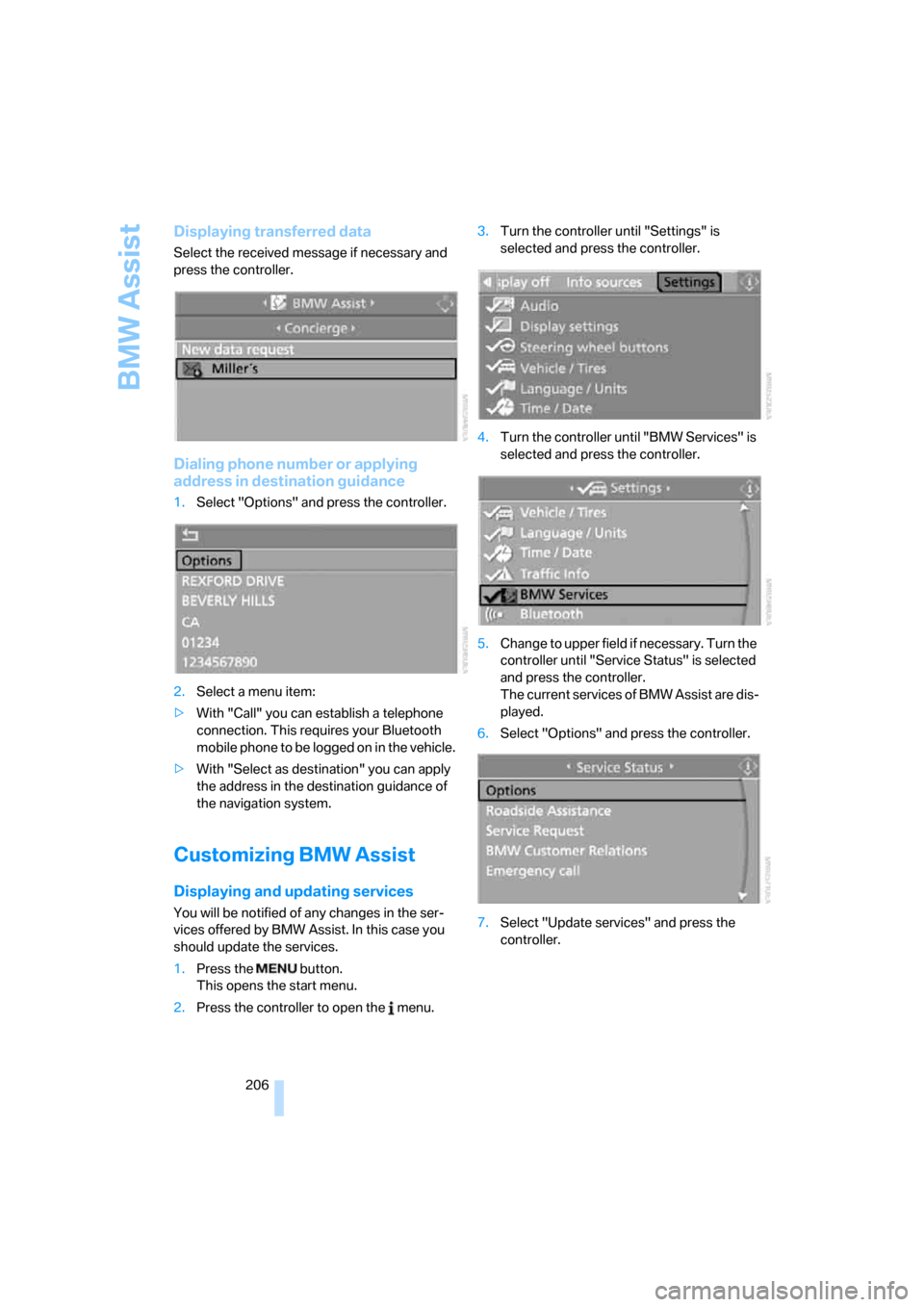
Displaying transferred data
Select the received message if necessary and
press the controller.
Dialing phone number or applying
address in destination guidance
1.Select "Options" and press the controller.
2.Select a menu item:
>With "Call" you can establish a telephone
connection. This requires your Bluetooth
mobile phone to be logged on in the vehicle.
>With "Select as destination" you can apply
the address in the destination guidance of
the navigation system.
Customizing BMW Assist
Displaying and updating services
You will be notified of any changes in the ser-
vices offered by BMW Assist. In this case you
should update the services.
1.Press the button.
This opens the start menu.
2.Press the controller to open the menu.3.Turn the controller until "Settings" is
selected and press the controller.
4.Turn the controller until "BMW Services" is
selected and press the controller.
5.Change to upper field if necessary. Turn the
controller until "Service Status" is selected
and press the controller.
The current services of BMW Assist are dis-
played.
6.Select "Options" and press the controller.
7.Select "Update services" and press the
controller.
Page 247 of 272
Reference 245
At a glance
Controls
Driving tips
Communications
Navigation
Entertainment
Mobility
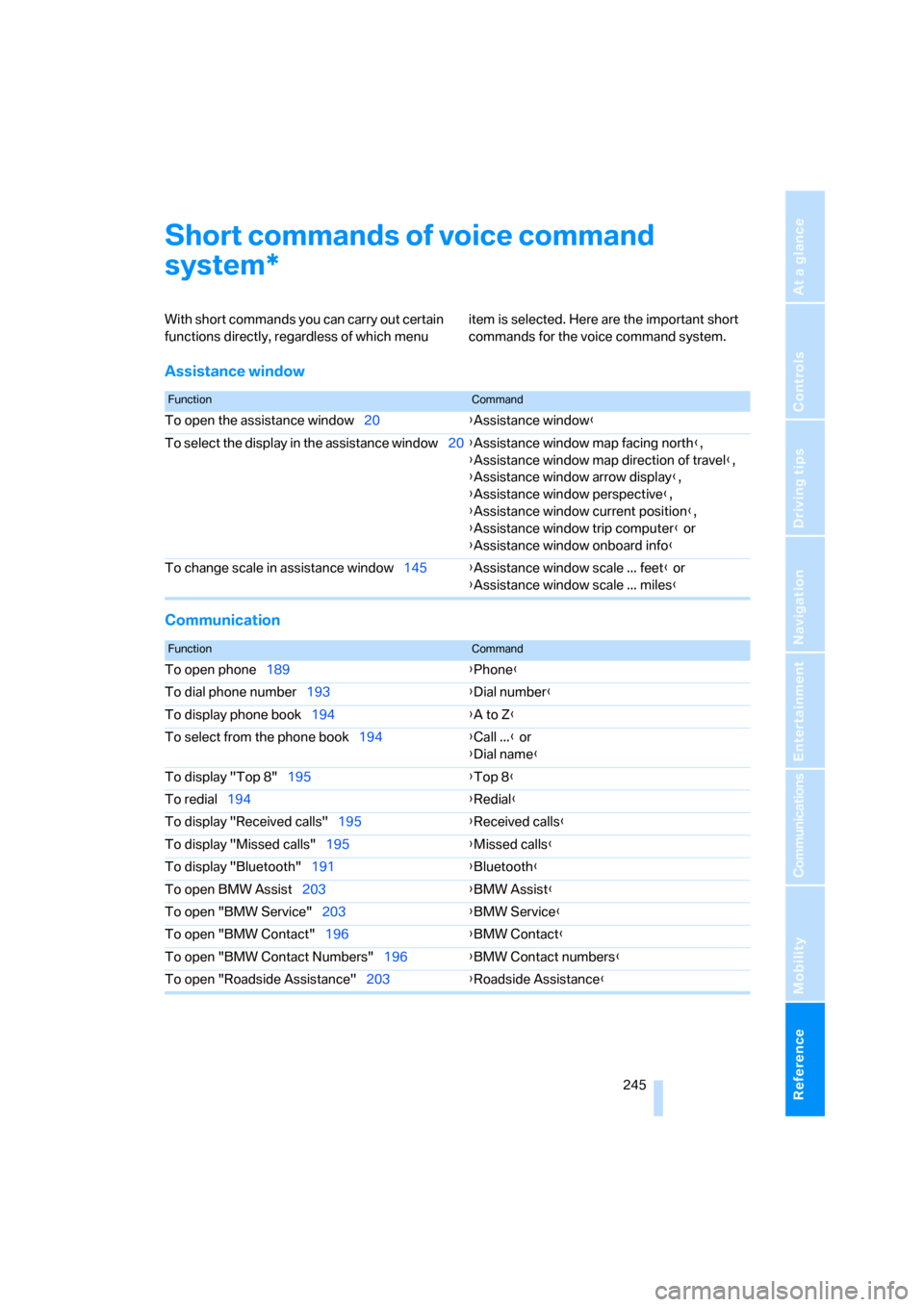
Short commands of voice command
system
With short commands you can carry out certain
functions directly, regardless of which menu item is selected. Here are the important short
commands for the voice command system.
Assistance window
Communication
*
FunctionCommand
To open the assistance window20{Assistance window}
To select the display in the assistance window20{Assistance window map facing north},
{Assistance window map direction of travel},
{Assistance window arrow display},
{Assistance window perspective},
{Assistance window current position},
{Assistance window trip computer} or
{Assistance window onboard info}
To change scale in assistance window145{Assistance window scale ... feet} or
{Assistance window scale ... miles}
FunctionCommand
To open phone189{Phone}
To dial phone number193{Dial number}
To display phone book194{A to Z}
To select from the phone book194{Call ...} or
{Dial name}
To display "Top 8"195{Top 8}
To redial194{Redial}
To display "Received calls"195{Received calls}
To display "Missed calls"195{Missed calls}
To display "Bluetooth"191{Bluetooth}
To open BMW Assist203{BMW Assist}
To open "BMW Service"203{BMW Service}
To open "BMW Contact"196{BMW Contact}
To open "BMW Contact Numbers"196{BMW Contact numbers}
To open "Roadside Assistance"203{Roadside Assistance}
Page 250 of 272
Short commands of voice command system
248
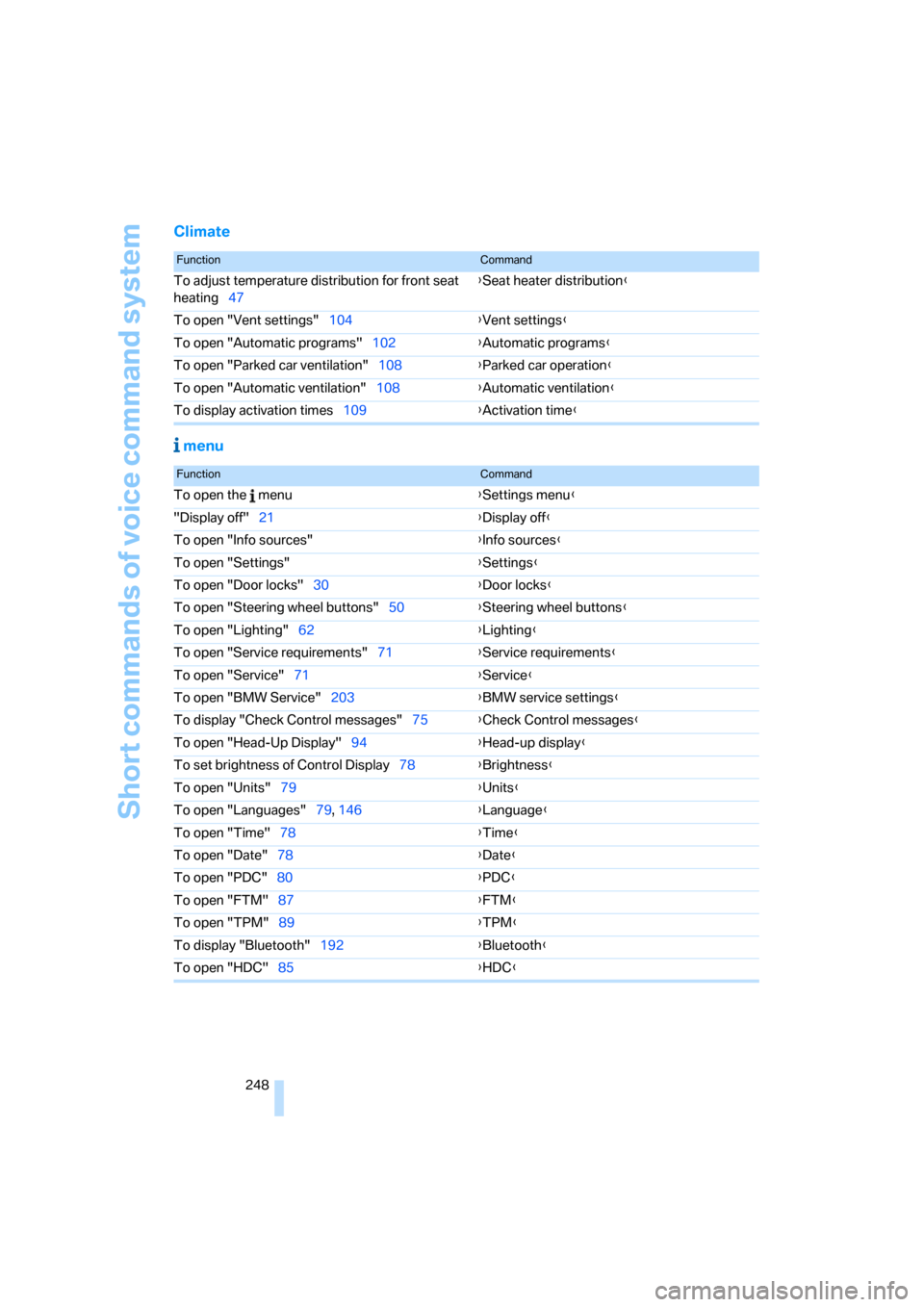
Climate
menu
FunctionCommand
To adjust temperature distribution for front seat
heating47{Seat heater distribution}
To open "Vent settings"104{Vent settings}
To open "Automatic programs"102{Automatic programs}
To open "Parked car ventilation"108{Parked car operation}
To open "Automatic ventilation"108{Automatic ventilation}
To display activation times109{Activation time}
FunctionCommand
To open the menu{Settings menu}
"Display off"21{Display off}
To open "Info sources"{Info sources}
To open "Settings"{Settings}
To open "Door locks"30{Door locks}
To open "Steering wheel buttons"50{Steering wheel buttons}
To open "Lighting"62{Lighting}
To open "Service requirements"71{Service requirements}
To open "Service"71{Service}
To open "BMW Service"203{BMW service settings}
To display "Check Control messages"75{Check Control messages}
To open "Head-Up Display"94{Head-up display}
To set brightness of Control Display78{Brightness}
To open "Units"79{Units}
To open "Languages"79, 146{Language}
To open "Time"78{Time}
To open "Date"78{Date}
To open "PDC"80{PDC}
To open "FTM"87{FTM}
To open "TPM"89{TPM}
To display "Bluetooth"192
{Bluetooth}
To open "HDC"85{HDC}