belt BMW X5 3.0I 2007 E70 User Guide
[x] Cancel search | Manufacturer: BMW, Model Year: 2007, Model line: X5 3.0I, Model: BMW X5 3.0I 2007 E70Pages: 272, PDF Size: 9.03 MB
Page 96 of 272
Technology for comfort, convenience and safety
94
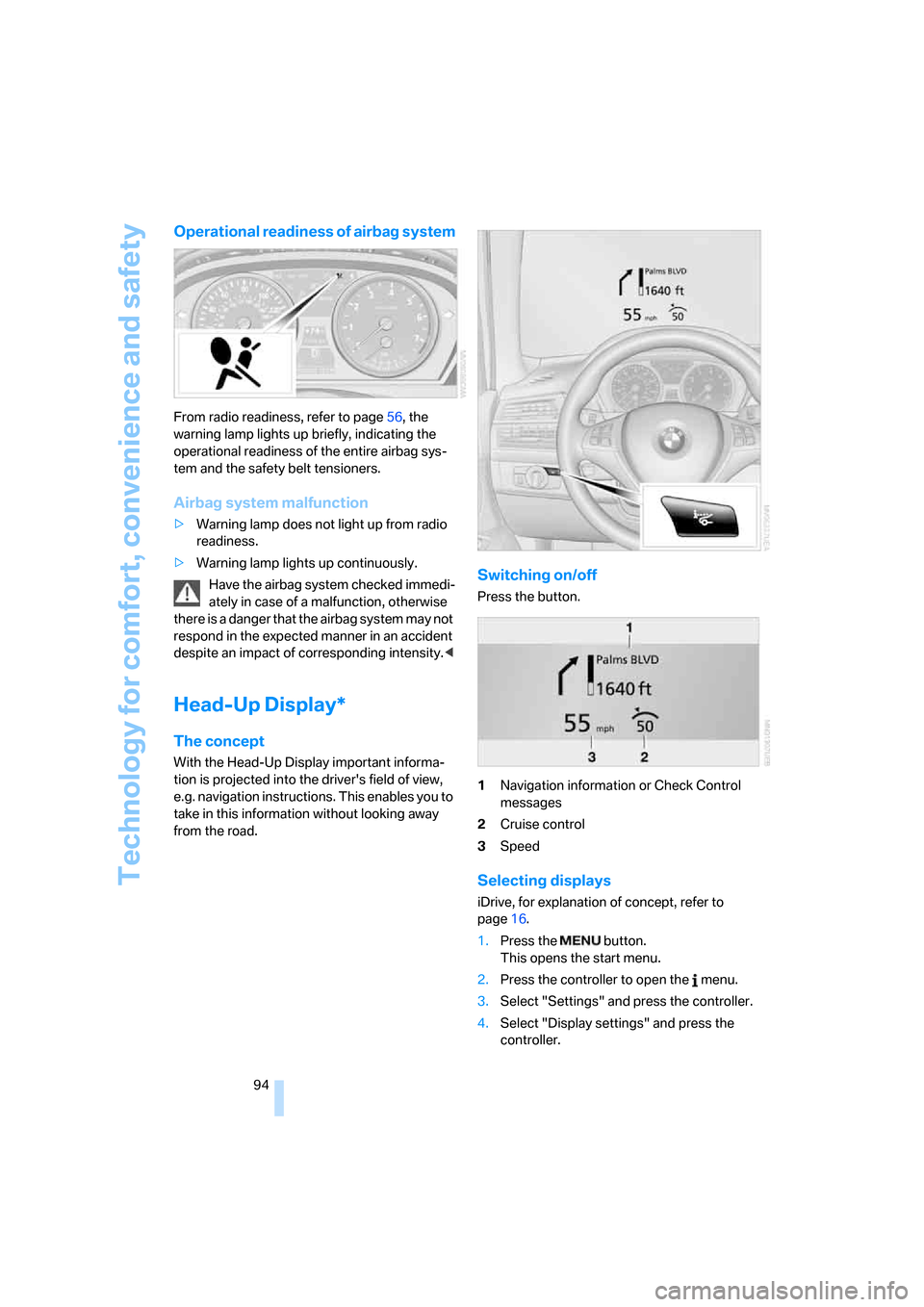
Operational readiness of airbag system
From radio readiness, refer to page56, the
warning lamp lights up briefly, indicating the
operational readiness of the entire airbag sys-
tem and the safety belt tensioners.
Airbag system malfunction
>Warning lamp does not light up from radio
readiness.
>Warning lamp lights up continuously.
Have the airbag system checked immedi-
ately in case of a malfunction, otherwise
there is a danger that the airbag system may not
respond in the expected manner in an accident
despite an impact of corresponding intensity.<
Head-Up Display*
The concept
With the Head-Up Display important informa-
tion is projected into the driver's field of view,
e.g. navigation instructions. This enables you to
take in this information without looking away
from the road.
Switching on/off
Press the button.
1Navigation information or Check Control
messages
2Cruise control
3Speed
Selecting displays
iDrive, for explanation of concept, refer to
page16.
1.Press the button.
This opens the start menu.
2.Press the controller to open the menu.
3.Select "Settings" and press the controller.
4.Select "Display settings" and press the
controller.
Page 119 of 272
Controls
117Reference
At a glance
Driving tips
Communications
Navigation
Entertainment
Mobility
Do not allow the separation net to snap
back, otherwise there is a risk of injury
and the separation net may be damaged.<
Expanding cargo bay
The rear seat backrest is divided. You can fold
down both sides separately in order to expand
the cargo bay.
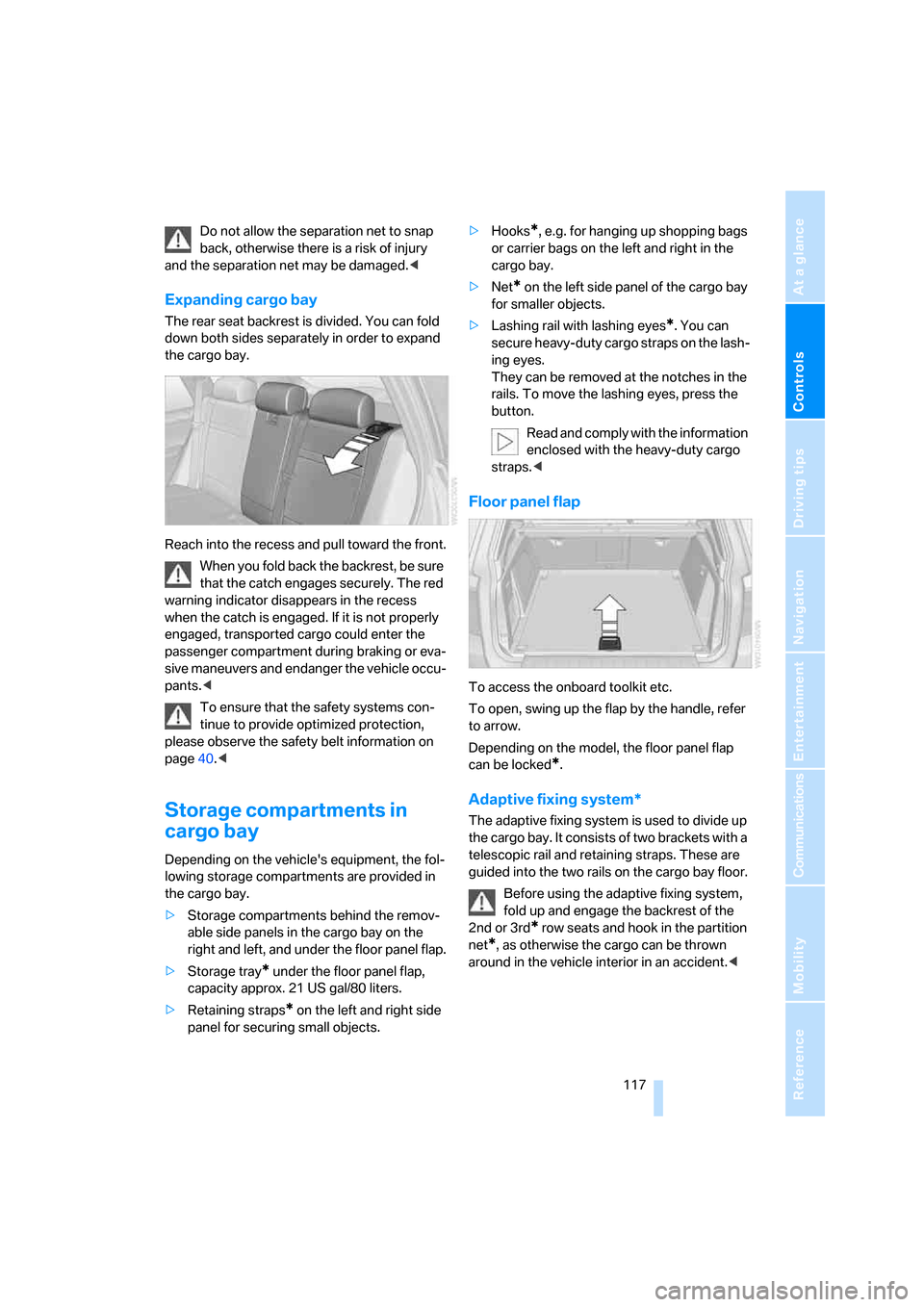
Reach into the recess and pull toward the front.
When you fold back the backrest, be sure
that the catch engages securely. The red
warning indicator disappears in the recess
when the catch is engaged. If it is not properly
engaged, transported cargo could enter the
passenger compartment during braking or eva-
sive maneuvers and endanger the vehicle occu-
pants.<
To ensure that the safety systems con-
tinue to provide optimized protection,
please observe the safety belt information on
page40.<
Storage compartments in
cargo bay
Depending on the vehicle's equipment, the fol-
lowing storage compartments are provided in
the cargo bay.
>Storage compartments behind the remov-
able side panels in the cargo bay on the
right and left, and under the floor panel flap.
>Storage tray
* under the floor panel flap,
capacity approx. 21 US gal/80 liters.
>Retaining straps
* on the left and right side
panel for securing small objects.>Hooks
*, e.g. for hanging up shopping bags
or carrier bags on the left and right in the
cargo bay.
>Net
* on the left side panel of the cargo bay
for smaller objects.
>Lashing rail with lashing eyes
*. You can
secure heavy-duty cargo straps on the lash-
ing eyes.
They can be removed at the notches in the
rails. To move the lashing eyes, press the
button.
Read and comply with the information
enclosed with the heavy-duty cargo
straps.<
Floor panel flap
To access the onboard toolkit etc.
To open, swing up the flap by the handle, refer
to arrow.
Depending on the model, the floor panel flap
can be locked
*.
Adaptive fixing system*
The adaptive fixing system is used to divide up
the cargo bay. It consists of two brackets with a
telescopic rail and retaining straps. These are
guided into the two rails on the cargo bay floor.
Before using the adaptive fixing system,
fold up and engage the backrest of the
2nd or 3rd
* row seats and hook in the partition
net
*, as otherwise the cargo can be thrown
around in the vehicle interior in an accident.<
Page 121 of 272
Controls
119Reference
At a glance
Driving tips
Communications
Navigation
Entertainment
Mobility
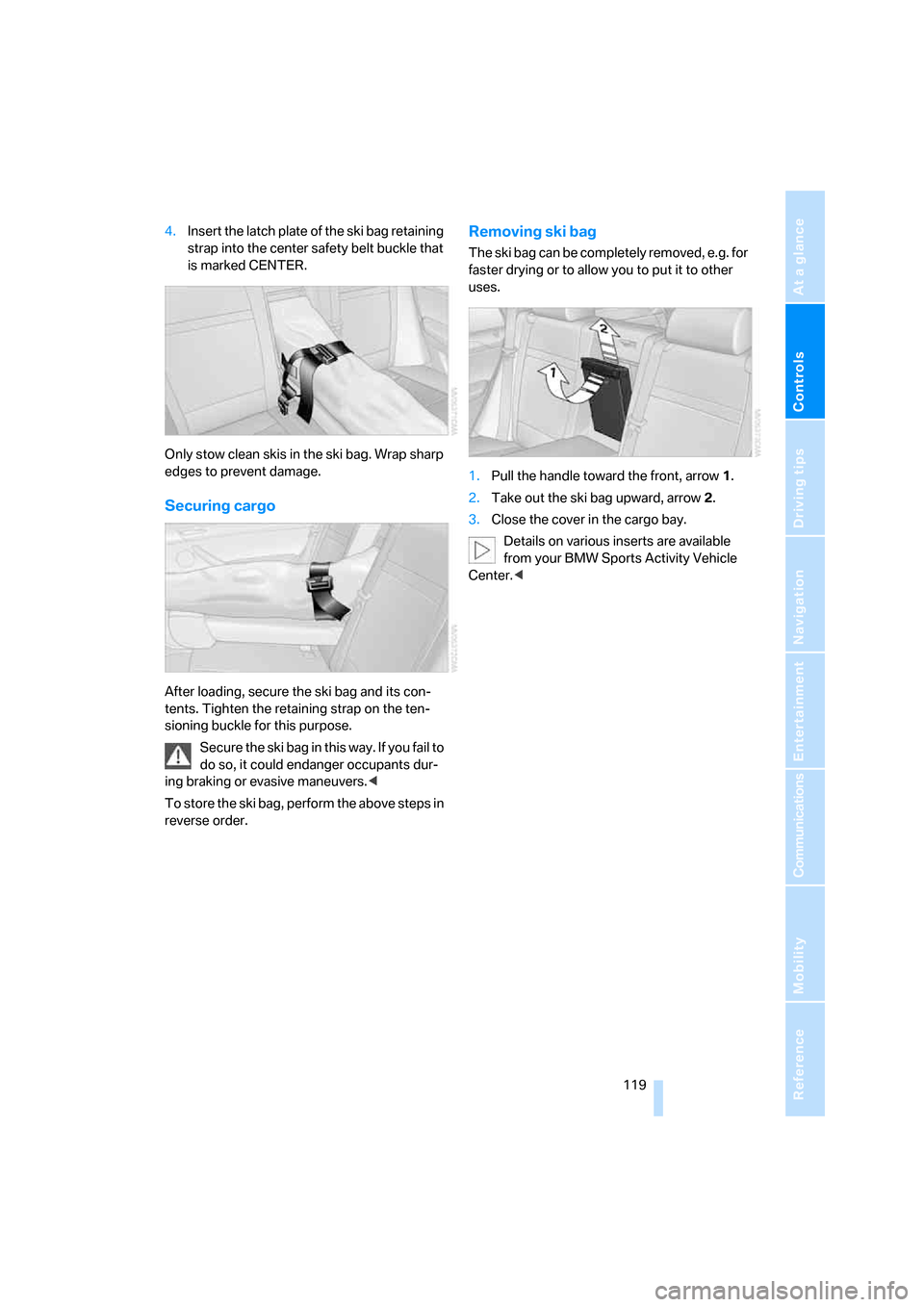
4.Insert the latch plate of the ski bag retaining
strap into the center safety belt buckle that
is marked CENTER.
Only stow clean skis in the ski bag. Wrap sharp
edges to prevent damage.
Securing cargo
After loading, secure the ski bag and its con-
tents. Tighten the retaining strap on the ten-
sioning buckle for this purpose.
Secure the ski bag in this way. If you fail to
do so, it could endanger occupants dur-
ing braking or evasive maneuvers.<
To store the ski bag, perform the above steps in
reverse order.
Removing ski bag
The ski bag can be completely removed, e.g. for
faster drying or to allow you to put it to other
uses.
1.Pull the handle toward the front, arrow1.
2.Take out the ski bag upward, arrow2.
3.Close the cover in the cargo bay.
Details on various inserts are available
from your BMW Sports Activity Vehicle
Center.<
Page 127 of 272
Driving tips
125Reference
At a glance
Controls
Communications
Navigation
Entertainment
Mobility
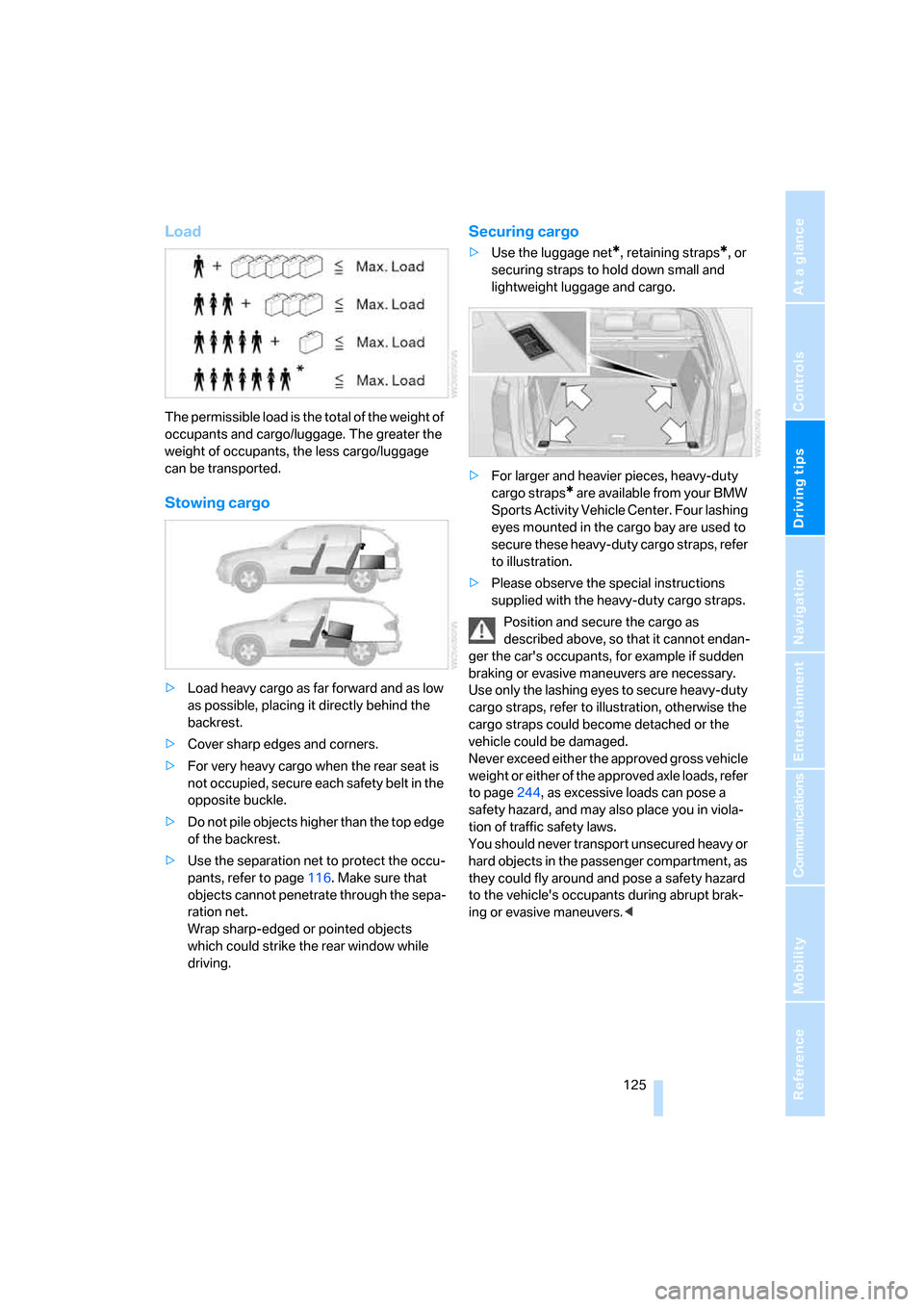
Load
The permissible load is the total of the weight of
occupants and cargo/luggage. The greater the
weight of occupants, the less cargo/luggage
can be transported.
Stowing cargo
>Load heavy cargo as far forward and as low
as possible, placing it directly behind the
backrest.
>Cover sharp edges and corners.
>For very heavy cargo when the rear seat is
not occupied, secure each safety belt in the
opposite buckle.
>Do not pile objects higher than the top edge
of the backrest.
>Use the separation net to protect the occu-
pants, refer to page116. Make sure that
objects cannot penetrate through the sepa-
ration net.
Wrap sharp-edged or pointed objects
which could strike the rear window while
driving.
Securing cargo
>Use the luggage net*, retaining straps*, or
securing straps to hold down small and
lightweight luggage and cargo.
>For larger and heavier pieces, heavy-duty
cargo straps
* are available from your BMW
Sports Activity Vehicle Center. Four lashing
eyes mounted in the cargo bay are used to
secure these heavy-duty cargo straps, refer
to illustration.
>Please observe the special instructions
supplied with the heavy-duty cargo straps.
Position and secure the cargo as
described above, so that it cannot endan-
ger the car's occupants, for example if sudden
braking or evasive maneuvers are necessary.
Use only the lashing eyes to secure heavy-duty
cargo straps, refer to illustration, otherwise the
cargo straps could become detached or the
vehicle could be damaged.
Never exceed either the approved gross vehicle
weight or either of the approved axle loads, refer
to page244, as excessive loads can pose a
safety hazard, and may also place you in viola-
tion of traffic safety laws.
You should never transport unsecured heavy or
hard objects in the passenger compartment, as
they could fly around and pose a safety hazard
to the vehicle's occupants during abrupt brak-
ing or evasive maneuvers.<
Page 220 of 272
Wheels and tires
218
Tire identification marks
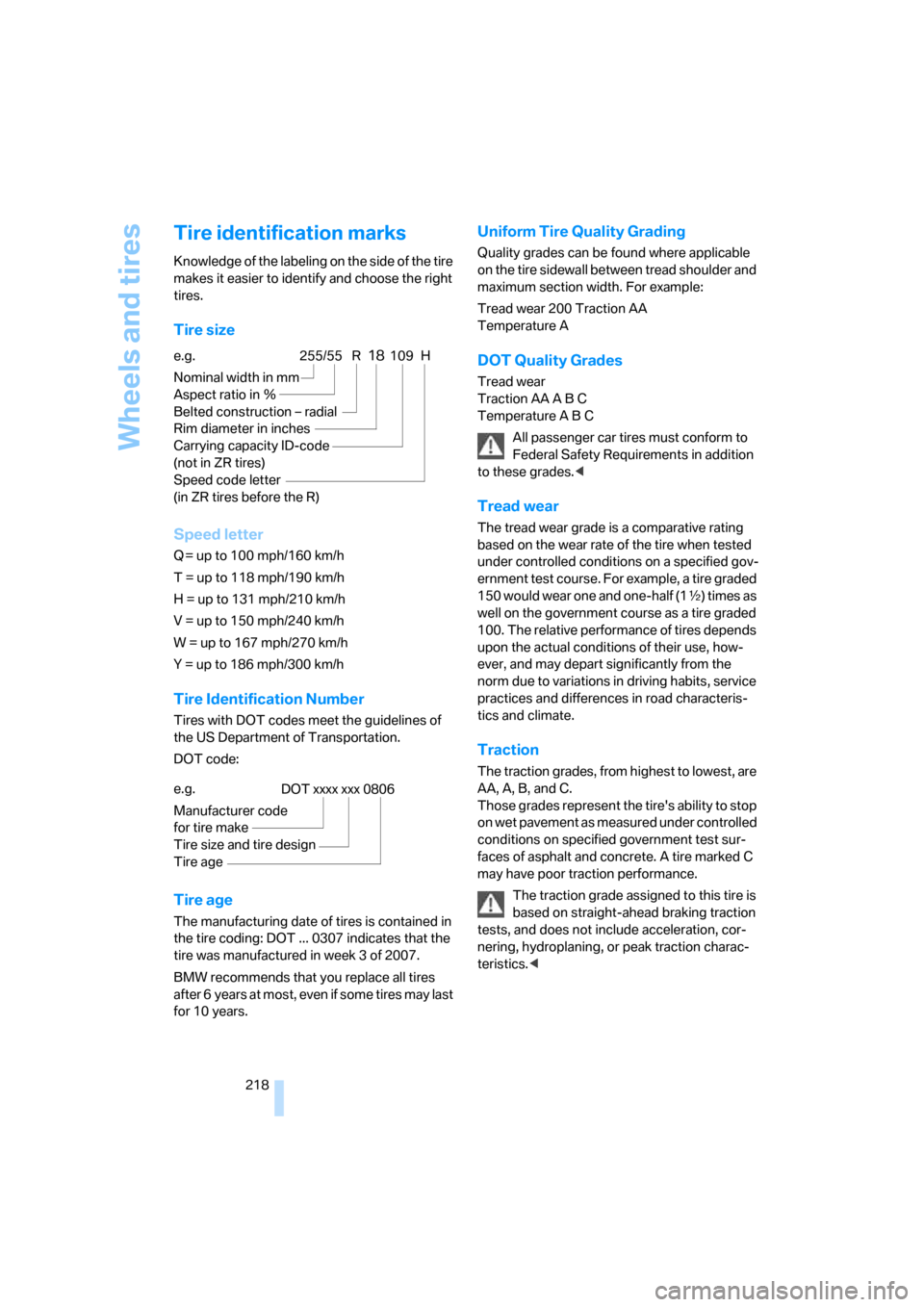
Knowledge of the labeling on the side of the tire
makes it easier to identify and choose the right
tires.
Tire size
Speed letter
Q = up to 100 mph/160 km/h
T = up to 118 mph/190 km/h
H = up to 131 mph/210 km/h
V = up to 150 mph/240 km/h
W = up to 167 mph/270 km/h
Y = up to 186 mph/300 km/h
Tire Identification Number
Tires with DOT codes meet the guidelines of
the US Department of Transportation.
DOT code:
Tire age
The manufacturing date of tires is contained in
the tire coding: DOT ... 0307 indicates that the
tire was manufactured in week 3 of 2007.
BMW recommends that you replace all tires
after 6 years at most, even if some tires may last
for 10 years.
Uniform Tire Quality Grading
Quality grades can be found where applicable
on the tire sidewall between tread shoulder and
maximum section width. For example:
Tread wear 200 Traction AA
Temperature A
DOT Quality Grades
Tread wear
Traction AA A B C
Temperature A B C
All passenger car tires must conform to
Federal Safety Requirements in addition
to these grades.<
Tread wear
The tread wear grade is a comparative rating
based on the wear rate of the tire when tested
under controlled conditions on a specified gov-
ernment test course. For example, a tire graded
150 would wear one and one-half (1γ) times as
well on the government course as a tire graded
100. The relative performance of tires depends
upon the actual conditions of their use, how-
ever, and may depart significantly from the
norm due to variations in driving habits, service
practices and differences in road characteris-
tics and climate.
Traction
The traction grades, from highest to lowest, are
AA, A, B, and C.
Those grades represent the tire's ability to stop
on wet pavement as measured under controlled
conditions on specified government test sur-
faces of asphalt and concrete. A tire marked C
may have poor traction performance.
The traction grade assigned to this tire is
based on straight-ahead braking traction
tests, and does not include acceleration, cor-
nering, hydroplaning, or peak traction charac-
teristics.< e.g.
Nominal width in mm
Aspect ratio in Ξ
Belted construction – radial
Rim diameter in inches
Carrying capacity ID-code
(not in ZR tires)
Speed code letter
(in ZR tires before the R)
255/55 R18109 H
e.g.
Manufacturer code
for tire make
Tire size and tire design
Tire ageDOT xxxx xxx 0806
Page 253 of 272
Reference 251
At a glance
Controls
Driving tips
Communications
Navigation
Entertainment
Mobility
Ashtray
– front114
– rear115
Assistance systems, refer to
Driving stability control
systems84
Assistance window20
"Assist. window off"21
AUC Automatic recirculated-
air control105
"Audio"157
Audio154
– controls154
– switching on/off154
– tone control155
– volume155
Audio CD with DVD system in
rear178
Audio device, external113
"Audio" for DVD system in
rear184
Automatic
– air distribution102,107
– air volume102,107
– headlamp control97
– service notification204
– steering wheel adjustment,
refer to Easy entry/exit50
– storing stations159
Automatic car washes124
– also refer to Caring for your
vehicle brochure
Automatic climate control102
– automatic air
distribution102,107
– switching off105,108
– with 4-zone control107
Automatic curb monitor49
Automatic garage door
opener110
Automatic lighting
– refer to Automatic headlamp
control97
– refer to Daytime running
lamps98
– refer to Interior lamps100
– refer to Pathway lighting97"Automatic programs"103
Automatic recirculated-air
control AUC105
Automatic station search159
Automatic transmission with
Steptronic59
– kick-down61
– manually releasing
transmission lock61
– tow-starting
239
– with comfort access36
"Automatic ventilation"109
AUTO program for automatic
climate control102,107
"Autostore" on the radio160
"AUX"155,171,174
– for DVD system in rear183
– with external audio
device171
AUX-In
– connection113
– refer to External audio
device171
Average fuel consumption69
– setting units79
Average speed, refer to
Computer69
"Avoid ferries" for
navigation142
"Avoid highways" for
navigation141
Avoiding highways for
navigation141
Avoiding unintentional
alarms35
"Avoid tollroads" for
navigation142
Axle loads, refer to
Weights244
"A - Z"194,195
B
Backrest contour, refer to
Lumbar support42
Backrests, refer to Seats41
Backrest width adjustment41Backup camera81
– cleaning83
– displays83
– driver assistance
functions82
– switching off82
– switching on81
Backup lamps, replacing
bulbs230
Balance, refer to Tone
control156
"Balance" for DVD system in
rear177
Band-aids, refer to First-aid
kit237
Bass, refer to Tone
control155
Battery
– jump starting237
– refer to Vehicle battery234
Battery disposal
– remote control with comfort
access37
– vehicle battery234
Battery replacement
– remote control for DVD
system in rear174
– remote control with comfort
access37
Being towed239
Belts, refer to Safety belts45
Beverage holder, refer to Cup
holders114
Blower, refer to Air
volume103,108
"BMW Assist"203,204,205
BMW Assist
– activating207
– breakdown assistance203
– contacting BMW
Hotline205
– information service205
– services offered202
– TeleService204
"BMW Contact"196
"BMW Contact
Numbers"196
Page 258 of 272
Everything from A to Z
256 Entering country of
destination132
Entering destination132
Entering house number or
intersection133
Entering intersection133
Entering street133
"Entertainment"154
Entertainment sound output
on/off155
"Equalizer", refer to Tone
control157
Equalizer, refer to Tone
control157
"ESN"162
ESP Electronic Stability
Program, refer to DSC
Dynamic Stability
Control84
Event Data Recorders227
Exhaust system, refer to Hot
exhaust system122
Exterior mirrors48
– automatic dimming
feature49
– automatic heating49
– folding in and out48
– tilting down passenger-side
exterior mirror49
External audio
device113,171
Eye for tow-starting and
towing, refer to Tow
fitting238
F
Fader, refer to Tone
control156
Failure messages, refer to
Check Control74
False alarm, refer to Avoiding
unintentional alarms35
Fastening safety belts, refer to
Safety belts45
– warning lamp46Fastest route for
navigation141
Fast forward
– CD changer169
– CD player169
"Fast route" for
navigation141
First aid, refer to First-aid
kit237
First-aid kit237
Fixing system, adaptive117
Flashing during locking/
unlocking, refer to Setting
confirmation signals31
Flashlight, refer to
Rechargeable flashlight113
Flat tire
– changing wheels232
– compact wheel232
– Flat Tire Monitor87
– run-flat tires88,90,220
– TPM Tire Pressure
Monitor89
Flat Tire Monitor87
– false alarms87
– initializing system87
– show chains221
– system limits87
– warning lamp88
"FM", reception
range155,158
FM, waveband158
Fog lamps99
– indicator lamp13,99
Folding display screen open/
closed, DVD system in
rear172
Folding rear seat back117
Fold-over rear seat
backrest117
Footbrake, refer to Braking
safely123
Footwell lamps100
For your own safety5
4-wheel drive system, refer to
xDrive85Fresh-air nozzles, refer to Air
vents101
Front airbags92
Front passenger airbags
– deactivating93
– refer to Exception of front
passenger seat52
Front seat adjustment41
"FTM"88
FTM, refer to Flat Tire
Monitor87
Fuel213
– capacity244
– display68
– high-quality brands213
– quality213
– specifications213
Fuel clock, refer to Fuel
gauge68
Fuel consumption display,
computer, average fuel
consumption69
Fuel display, refer to Fuel
gauge68
Fuel filler door212
– closing212
– opening212
– releasing in the event of
electrical malfunction212
Fuses234
G
Garage door opener, refer to
Integrated universal remote
control110
Gasoline, refer to Required
fuel213
Gasoline display, refer to Fuel
gauge68
General driving notes122
Glass sunroof, electric
– comfort operation from
outside32
– comfort operation with
comfort access36
– remote control30
Page 259 of 272
Reference 257
At a glance
Controls
Driving tips
Communications
Navigation
Entertainment
Mobility
Glove compartment113
– lighting113
GPS navigation, refer to
Navigation system130
Grills, refer to Ventilation105
Grills of the automatic climate
control101
Gross vehicle weight, refer to
Weights244
H
Handbrake, refer to Parking
brake57
Hand lamp, refer to
Rechargeable flashlight113
Hands-free system, refer to
Microphone14
Hazard warning flashers15
HDC Hill Descent Control85
Head airbags92
Headlamp control,
automatic97
Headlamp flasher62
Headlamps97
– care, refer to Caring for your
vehicle brochure
– cleaning, refer to Washer/
wiper system63
Head Light, refer to Adaptive
Head Light98
Head restraints43
– removing43
– sitting safely40
"Head-Up Display"95
Head-Up Display94
Heated
– mirrors49
– rear window103
– seats47
– steering wheel50
Heating101
– exterior mirrors49
– interior101
– rear window103
– residual heat105
– seats47
– steering wheel50Heating with engine switched
off, refer to Residual
heat105
Heavy cargo, refer to Securing
cargo125
Height, refer to
Dimensions243
Height adjustment
– seats41
– steering wheel49
High beams62,99
– headlamp flasher99
– indicator lamp13
Highs, refer to Treble and
bass155
High water, refer to Driving
through water123
Highway, refer to Route
criteria141
Hill Descent Control HDC85
Hills123
Holder for cups114
Home address141
"Home address" for
navigation141
Homepage4
Hood222
Horn10
Hot exhaust system122
"Hour memo"78
"House number" for
destination entry134
Hydraulic brake assistant,
refer to DBC Dynamic Brake
Control84
Hydroplaning123
I
Ice, refer to Outside
temperature warning67
ID3 tag, refer to Information on
track167iDrive16
– assistance window20
– changing language79
– changing menu page19
– changing settings77
– changing units of measure
and display type79
– confirming selection or
entry19
– controller16
– controls16
– displays, menus17
– selecting menu item19
– setting brightness78
– setting date78
– setting time77
– start menu17
– status information20
– symbols18
Ignition56
– switched off56
– switched on56
Ignition key, refer to Keys/
remote control28
Ignition key position 1, refer to
Radio readiness56
Ignition key position 2, refer to
Ignition on56
Ignition lock56
– starting engine with comfort
access36
Independent ventilation, refer
to Parked car ventilation108
Indicator/warning lamps13
– active steering91
– airbags94
– DSC13,84
– DTC13,85
– fasten safety belt46
– Flat Tire Monitor88
– fog lamps13
– TPM Tire Pressure
Monitor90
Individual air distribution104
Individually programmable
buttons on steering
wheel50
Individual settings, refer to
Personal Profile28
Page 264 of 272
Everything from A to Z
262 "Received calls"194
Recent numbers in mobile
phone195
Reception level of mobile
phone, refer to Status
information20
Rechargeable flashlight113
Recirculated-air mode105
– air recirculation105
– AUC Automatic
recirculated-air control105
Recording times, refer to
Stopwatch76
"Redial" for mobile phone194
Reflectors, refer to Tail
lamps230
Refueling212
Releasing
– hood222
– refer to Unlocking35
"Relock door if not
opened"32
Remaining distance, refer to
Cruising range69
Remaining distance to
destination, refer to
Computer69
Remote control28
– comfort access35
– DVD system in rear173
– garage door opener110
– liftgate30
– malfunction31,36
– replacing battery37
Removing condensation on
the windows103
"Repeat"
– for DVD system in rear179
– in audio mode168
"Repeat directory"
– for DVD system in
rear178,181
– in audio mode168
"Repeat track"
– for DVD system in
rear178,180
– in audio mode168
Replacement fuses234Replacement of tires, refer to
Changing wheels232
Replacing bulbs, refer to
Lamps and bulbs228
Replacing tires220
Replacing wheels/tires, refer
to New wheels and tires220
Replacing wiper blades228
Reporting an accident, refer to
Initiating an emergency
call236
Reporting safety defects
7
Reserve warning, refer to Fuel
gauge68
Reservoir for washer
systems64
"Reset"88,90
– for DVD system in
rear176,177
– stopwatch76
– tone settings157
Reset, refer to Resetting tone
settings157
"resetting FTM …"88
Residual heat105
Restraint systems
– for children52
– refer to Safety belts45
Retreaded tires220
"Return" for DVD system in
rear177
Reverse
– CD changer169
– CD player169
Reverse gear, automatic
transmission with
Steptronic60
Road map145
"Roadside Assistance"203
Roadside Assistance237
Roadside parking lamps99
Roller sun blinds113
Roll-up cover116
Roof load capacity244
Roof-mounted luggage
rack126
Rope, refer to Tow-starting
and towing238Rotary pushbutton, refer to
iDrive16
Route141
– changing147
– displaying144
– displaying arrow display144
– displaying map view145
– displaying streets and
towns/cities145
– displaying towns/cities145
– list145
– selecting141
– selecting criteria141
RSC, refer to Run-flat
tires220
Run-flat tires220
– continuing driving with a
damaged tire88,90
– flat tire88,
90
– new wheels and tires220
– tire inflation
pressure88,90,214
– tire replacement220,221
S
Safety5
Safety belts45
– damage46
– sitting safely40
– warning lamp46
Safety belt tensioners
– refer to Airbags92
– refer to Safety belts45
Safety systems
– ABS Antilock Brake
System84
– airbags92
– DSC Dynamic Stability
Control84
– safety belts45
"SAT"155,162
Satellite radio162
– displaying additional
information163
– enabling162
– selecting channel163
– storing channel163
Page 265 of 272
Reference 263
At a glance
Controls
Driving tips
Communications
Navigation
Entertainment
Mobility
"Scan"
– for DVD system in rear179
– sampling stations with
radio159
– sampling tracks with CD167
Scan
– CD changer167
– CD player167
– radio159
"Scan all"
– for DVD system in rear180
– in audio mode167
"Scan directory"
– for DVD system in rear180
– in audio mode167
Screen, refer to iDrive16
"Screen brightness" for DVD
system in rear176
Screw thread for tow
fitting238
SDARS, refer to Satellite
radio162
"Seat heater distribution"47
Seats41
– adjusting41
– comfort seat41
– heating47
– lumbar support42
– memory, refer to Seat, mirror
and steering wheel
memory42
– sitting safely40
– storing the setting42
– thigh support41
– ventilation, refer to Active
seat ventilation47
2nd row seats44
Securing load
– refer to Securing cargo125
– with ski bag, refer to
Securing cargo119
"Select as
destination"138,206
"Select current speed"76
Selecting audio source154
Selecting country for
navigation132Selecting frequency
manually159
Selecting menu items19
Selecting new scale for
navigation145
Selector lever, automatic
transmission with
Steptronic60
Selector lever lock, refer to
Reverse gear60
Self-leveling suspension87
Separation net116
"Service"72
,204,223
Service, refer to Roadside
Assistance237
Service and Warranty
Information Booklet for
US models226
Service interval indicator, refer
to Service requirements71
"Service notification"204
"Service Request"196,204
"Service
requirements"72,204,224
Service requirements71
– also refer to CBS Condition
Based Service226
"Service Status"208
"Set date"78
"Set" on trip computer70
"Set service date"73
"Set time"77
"Settings"206,207
Settings
– changing on Control
Display77
– clock, 12h/24h mode78
– configuring, refer to
Personal Profile28
"Settings" for unlocking30
Setting speed limit76
Setting time, refer to
Preselecting activation
times109
"SET" with rear
entertainment175Shifting, automatic
transmission with
Steptronic61
Short commands of voice
command system245
Shortest route in navigation,
refer to Selecting route141
"Short route" for
navigation141
Shoulder support41
"Show current position"137
"Show destination
position"137
Shuffled, refer to Random
– CD changer168
– CD player168
Side airbags92
Side marker lamps, replacing
bulbs229
Signal horn, refer to Horn10
Sitting safely40
– with airbags40
– with head restraint40
– with safety belts40
Ski bag118
Slide show, refer to Displaying
images181
Sliding/tilt sunroof, refer to
Panorama glass sunroof38
Slope assistant, refer to
Starting assistant123
Smokers' package, refer to
Ashtray114
Snow chains221
Socket for Onboard
Diagnostics interface227
Socket for remote control,
refer to Ignition lock56
Sockets, refer to Connecting
electrical devices115
Song search, refer to
Sampling tracks167
SOS, refer to Initiating an
emergency call236
Spare fuses234
Spare key28
– adapter28