heating BMW X5 3.0I 2007 E70 User Guide
[x] Cancel search | Manufacturer: BMW, Model Year: 2007, Model line: X5 3.0I, Model: BMW X5 3.0I 2007 E70Pages: 272, PDF Size: 9.03 MB
Page 105 of 272
Controls
103Reference
At a glance
Driving tips
Communications
Navigation
Entertainment
Mobility
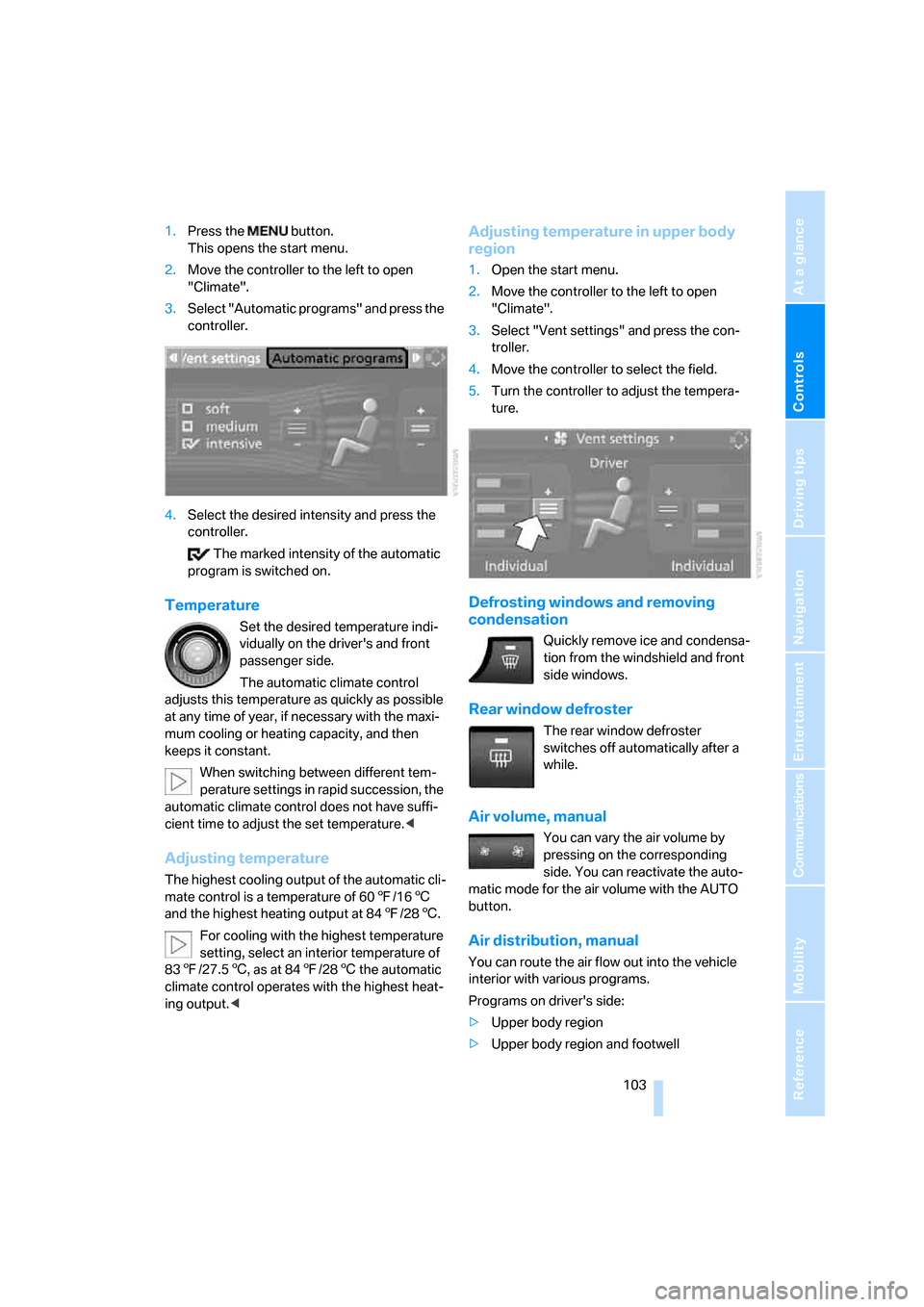
1.Press the button.
This opens the start menu.
2.Move the controller to the left to open
"Climate".
3.Select "Automatic programs" and press the
controller.
4.Select the desired intensity and press the
controller.
The marked intensity of the automatic
program is switched on.
Temperature
Set the desired temperature indi-
vidually on the driver's and front
passenger side.
The automatic climate control
adjusts this temperature as quickly as possible
at any time of year, if necessary with the maxi-
mum cooling or heating capacity, and then
keeps it constant.
When switching between different tem-
perature settings in rapid succession, the
automatic climate control does not have suffi-
cient time to adjust the set temperature.<
Adjusting temperature
The highest cooling output of the automatic cli-
mate control is a temperature of 607/166
and the highest heating output at 847/286.
For cooling with the highest temperature
setting, select an interior temperature of
837/27.56, as at 847/286 the automatic
climate control operates with the highest heat-
ing output.<
Adjusting temperature in upper body
region
1.Open the start menu.
2.Move the controller to the left to open
"Climate".
3.Select "Vent settings" and press the con-
troller.
4.Move the controller to select the field.
5.Turn the controller to adjust the tempera-
ture.
Defrosting windows and removing
condensation
Quickly remove ice and condensa-
tion from the windshield and front
side windows.
Rear window defroster
The rear window defroster
switches off automatically after a
while.
Air volume, manual
You can vary the air volume by
pressing on the corresponding
side. You can reactivate the auto-
matic mode for the air volume with the AUTO
button.
Air distribution, manual
You can route the air flow out into the vehicle
interior with various programs.
Programs on driver's side:
>Upper body region
>Upper body region and footwell
Page 106 of 272
Climate
104 >Footwell
>Windows and footwell
>Individual program
Programs on front passenger side:
>Upper body region
>Upper body region and footwell
>Footwell
>Individual program
Selecting program
Press the button repeatedly until
the desired program is shown on
the display of the automatic climate control.
Individually adjusting air distribution
The settings are stored in the individual pro-
gram.
iDrive, for explanation of concept, refer to
page16.
1.Open the start menu.
2.Move the controller to the left to open
"Climate".
3.Select "Vent settings" and press the con-
troller.
The driver's and front passenger side can
be adjusted separately with the fields on the
right or left side.
4.Select the driver's or front passenger side
if necessary.
Move the controller to the right or left
repeatedly until the driver's or front passen-
ger side is selected.
5.Select the desired field by moving the con-
troller.
6.Turn the controller to adjust the air distribu-
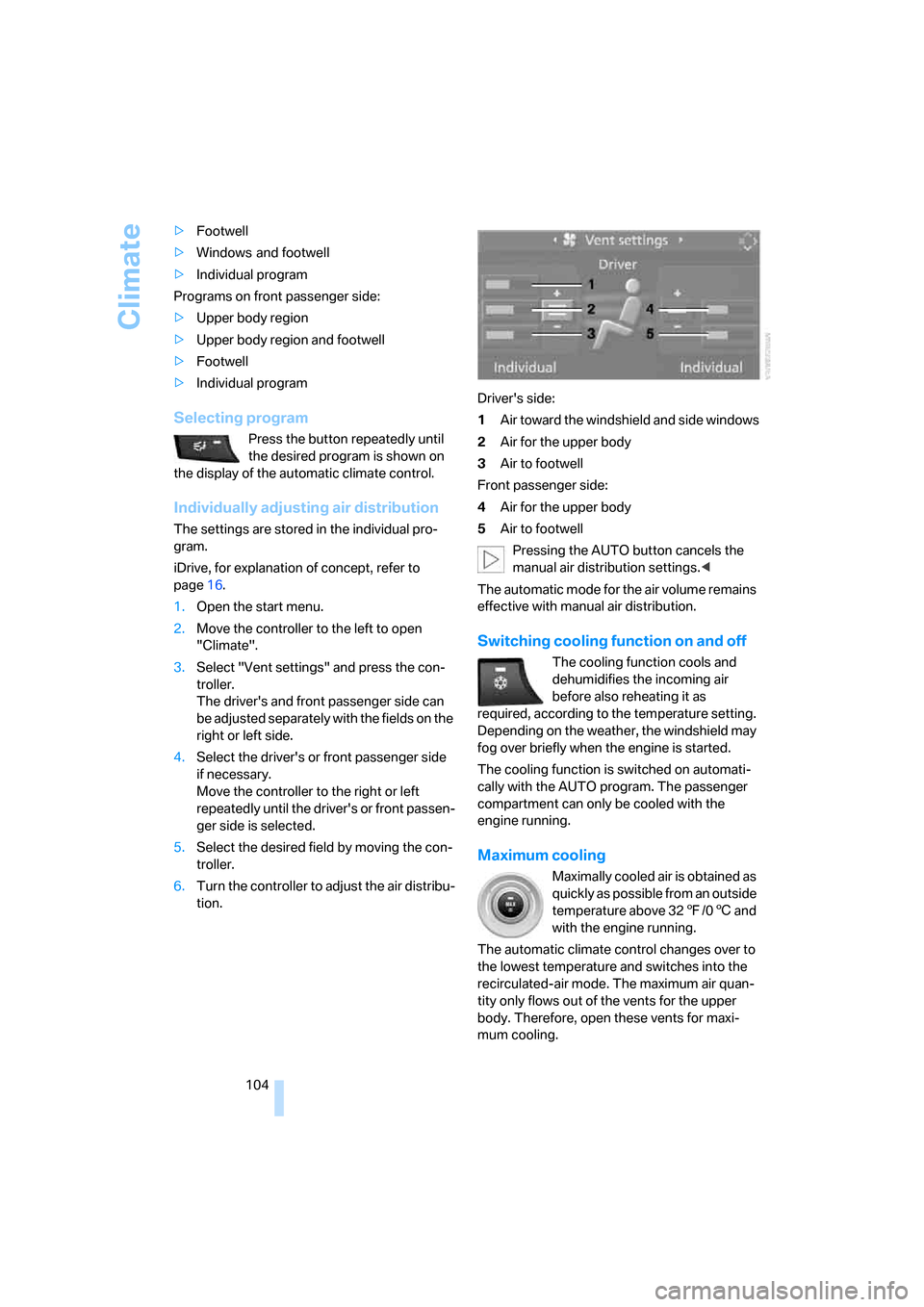
tion.Driver's side:
1Air toward the windshield and side windows
2Air for the upper body
3Air to footwell
Front passenger side:
4Air for the upper body
5Air to footwell
Pressing the AUTO button cancels the
manual air distribution settings.<
The automatic mode for the air volume remains
effective with manual air distribution.
Switching cooling function on and off
The cooling function cools and
dehumidifies the incoming air
before also reheating it as
required, according to the temperature setting.
Depending on the weather, the windshield may
fog over briefly when the engine is started.
The cooling function is switched on automati-
cally with the AUTO program. The passenger
compartment can only be cooled with the
engine running.
Maximum cooling
Maximally cooled air is obtained as
quickly as possible from an outside
temperature above 327/06 and
with the engine running.
The automatic climate control changes over to
the lowest temperature and switches into the
recirculated-air mode. The maximum air quan-
tity only flows out of the vents for the upper
body. Therefore, open these vents for maxi-
mum cooling.
Page 108 of 272
Climate
106
Ventilation for cooling
Adjust the air vents to direct the flow of cool air
in your direction, for instance, if the interior has
become too warm, etc.
Draft-free ventilation
Set the air vents so that the air flows past you
and is not directed straight at you.
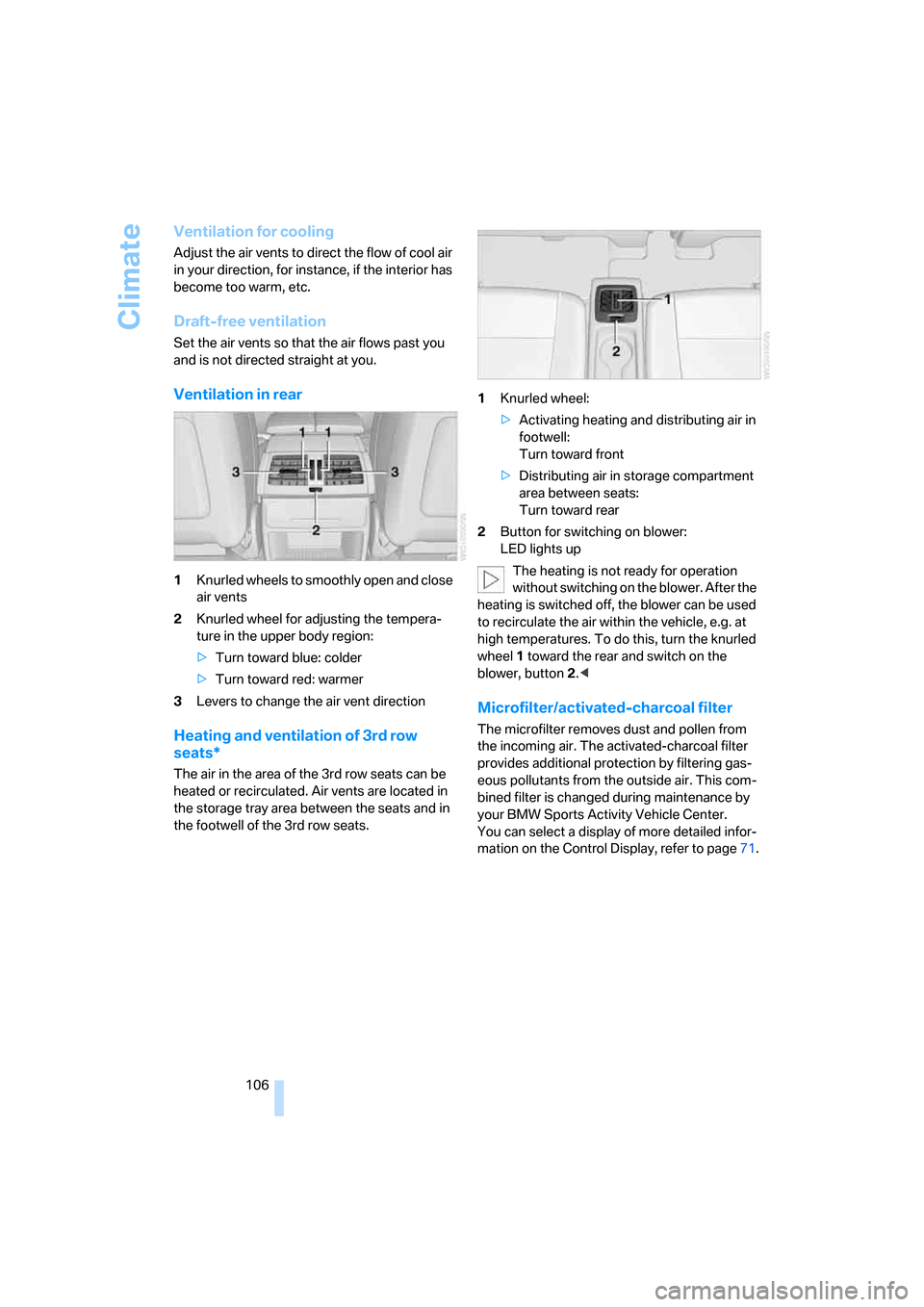
Ventilation in rear
1Knurled wheels to smoothly open and close
air vents
2Knurled wheel for adjusting the tempera-
ture in the upper body region:
>Turn toward blue: colder
>Turn toward red: warmer
3Levers to change the air vent direction
Heating and ventilation of 3rd row
seats*
The air in the area of the 3rd row seats can be
heated or recirculated. Air vents are located in
the storage tray area between the seats and in
the footwell of the 3rd row seats.1Knurled wheel:
>Activating heating and distributing air in
footwell:
Turn toward front
>Distributing air in storage compartment
area between seats:
Turn toward rear
2Button for switching on blower:
LED lights up
The heating is not ready for operation
without switching on the blower. After the
heating is switched off, the blower can be used
to recirculate the air within the vehicle, e.g. at
high temperatures. To do this, turn the knurled
wheel1 toward the rear and switch on the
blower, button2.<
Microfilter/activated-charcoal filter
The microfilter removes dust and pollen from
the incoming air. The activated-charcoal filter
provides additional protection by filtering gas-
eous pollutants from the outside air. This com-
bined filter is changed during maintenance by
your BMW Sports Activity Vehicle Center.
You can select a display of more detailed infor-
mation on the Control Display, refer to page71.
Page 109 of 272
Controls
107Reference
At a glance
Driving tips
Communications
Navigation
Entertainment
Mobility
Rear automatic climate
control*
The control unit of the rear automatic climate
control is located in the center console in the
rear. The following settings and operating
modes can be selected and adjusted separately
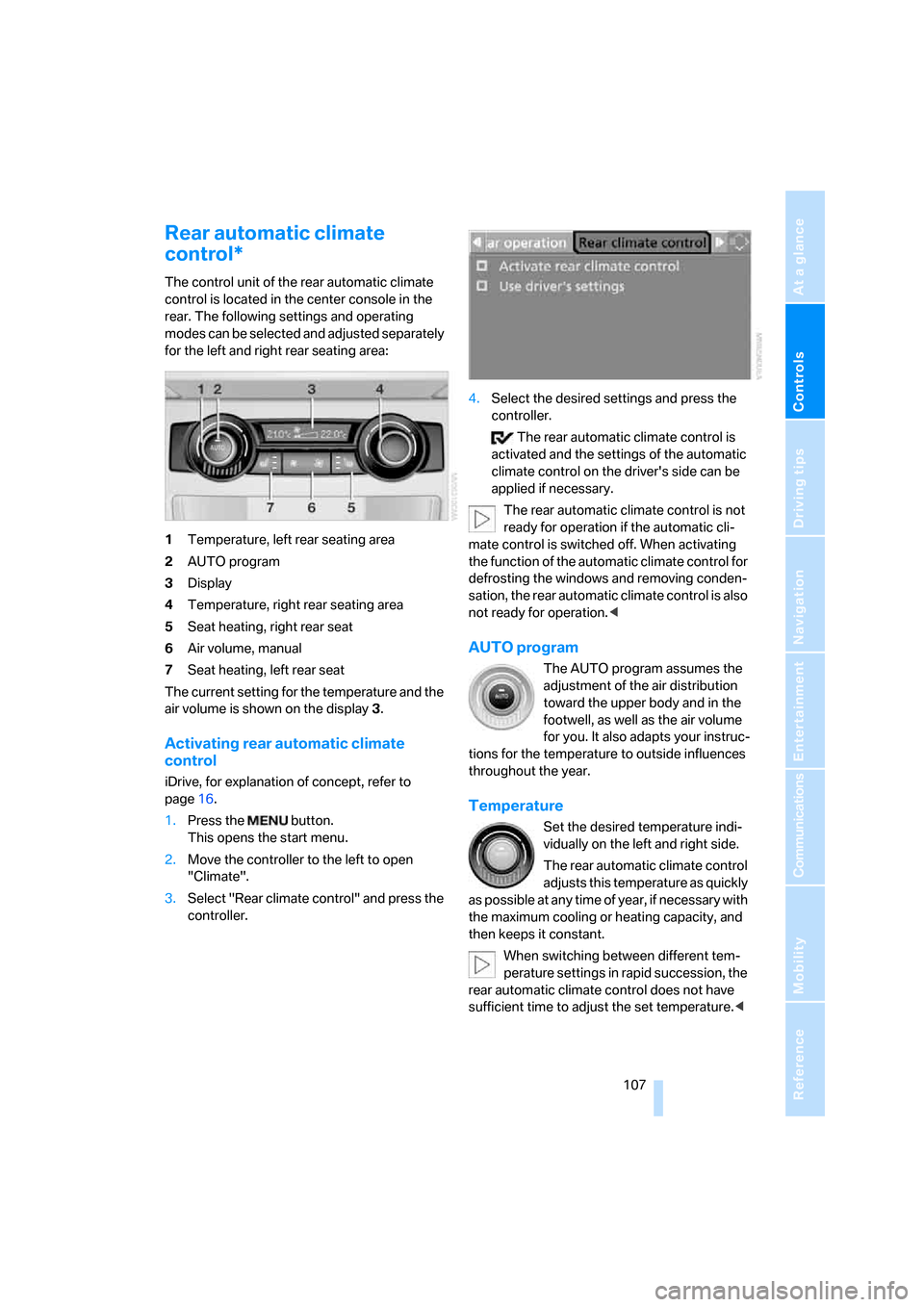
for the left and right rear seating area:
1Temperature, left rear seating area
2AUTO program
3Display
4Temperature, right rear seating area
5Seat heating, right rear seat
6Air volume, manual
7Seat heating, left rear seat
The current setting for the temperature and the
air volume is shown on the display3.
Activating rear automatic climate
control
iDrive, for explanation of concept, refer to
page16.
1.Press the button.
This opens the start menu.
2.Move the controller to the left to open
"Climate".
3.Select "Rear climate control" and press the
controller.4.Select the desired settings and press the
controller.
The rear automatic climate control is
activated and the settings of the automatic
climate control on the driver's side can be
applied if necessary.
The rear automatic climate control is not
ready for operation if the automatic cli-
mate control is switched off. When activating
the function of the automatic climate control for
defrosting the windows and removing conden-
sation, the rear automatic climate control is also
not ready for operation.<
AUTO program
The AUTO program assumes the
adjustment of the air distribution
toward the upper body and in the
footwell, as well as the air volume
for you. It also adapts your instruc-
tions for the temperature to outside influences
throughout the year.
Temperature
Set the desired temperature indi-
vidually on the left and right side.
The rear automatic climate control
adjusts this temperature as quickly
as possible at any time of year, if necessary with
the maximum cooling or heating capacity, and
then keeps it constant.
When switching between different tem-
perature settings in rapid succession, the
rear automatic climate control does not have
sufficient time to adjust the set temperature.<
Page 125 of 272
Driving tips
123Reference
At a glance
Controls
Communications
Navigation
Entertainment
Mobility
Hydroplaning
When driving on wet or slushy roads,
reduce road speed. If you do not, a wedge
of water can form between tires and road sur-
face. This phenomenon is referred to as hydro-
planing, and is characterized by a partial or
complete loss of contact between the tires and
the road surface, ultimately undermining your
ability to steer and brake the vehicle.<
The risk of hydroplaning increases as the tread
depth of the tires decreases, refer also to Mini-
mum tread depth on page219.
Driving through water
Do not drive through water on the road if it
is deeper than 20 in/50 cm, and then only
at walking speed at the most. Otherwise, the
vehicle's engine, the electrical systems and the
transmission may be damaged.<
Starting assistant
The starting assistant enables you to start off
conveniently on slopes. The parking brake is
not required for this purpose.
1.Hold the vehicle with the footbrake.
2.Release the footbrake and immediately
drive off quickly.
The starting assistant holds the vehicle
for approx. 2 seconds after releasing the
footbrake. Depending on the load, the vehicle
may also roll back slightly during this time.
After releasing the footbrake, immediately start
quickly, otherwise the starting assistant no
longer holds the vehicle after approx. 2 seconds
and it begins to roll back.<
Braking safely
Your BMW is equipped with ABS as a standard
feature. In situations that require it, it is best to
brake with full force. Since the vehicle maintains
steering responsiveness, you can still avoid
possible obstacles with a minimum of steering
effort.
Pulsation of the brake pedal, combined with
sounds from the hydraulic circuits, indicate that
ABS is in its active mode.Do not drive with your foot resting on the
brake pedal. Even light but consistent
pedal pressure can lead to high temperatures,
brake wear and possibly even brake failure.<
Driving in wet conditions
When roads are wet or there is heavy rain,
briefly exert gentle pressure on the brake pedal
every few miles. Monitor traffic conditions to
ensure that this maneuver does not endanger
other road users. The heat generated in this
process helps dry the pads and rotors to ensure
that full braking efficiency will then be available
when you need it.
Hills
To prevent overheating and the resulting
reduced efficiency of the brake system,
drive long or steep downhill gradients in the
gear in which the least braking is required. Even
light but consistent pressure on the brake pedal
can lead to high temperatures, brake wear and
possibly even brake failure.<
The braking effect of the engine can be further
increased by downshifting in the manual mode
of the automatic transmission, if necessary into
first gear, refer to page61. This prevents an
excessive strain on the brakes.
Do not drive in idle or with the engine
stopped, otherwise there will be no
engine braking action or support of the braking
force and steering.
Never allow floor mats, carpets or any other
objects to protrude into the area of movement
of the pedals and impair their operation.<
Corrosion on brake rotors
When the vehicle is driven only occasionally,
during extended periods when the vehicle is not
used at all, and in operating conditions where
brake applications are less frequent, there is an
increased tendency for corrosion to form on
rotors, while contaminants accumulate on the
brake pads. This occurs because the minimum
pressure which must be exerted by the pads
during brake applications to clean the rotors is
not reached.
Page 126 of 272
Things to remember when driving
124 Should corrosion form on the brake rotors, the
brakes will tend to respond with a pulsating
effect that even extended application will fail to
cure.
When vehicle is parked
Condensation forms in the automatic climate
control system during operation, and then exits
under the vehicle. Traces of condensed water
under the vehicle are therefore normal.
Before driving into a car wash
Fold in the exterior mirrors, refer to page48,
otherwise they could be damaged due to the
width of the vehicle.
General information on the care and mainte-
nance of your BMW is contained in the Caring
for your vehicle brochure.
Rear window wiper
The rear window wiper can be damaged in car
washes. Take appropriate protective measures;
ask the car wash operator if necessary.
With comfort access*
Insert the remote control into the ignition lock.
The engine can be switched off in transmission
position N. Also refer to page36.
Loading
To avoid loading the tires beyond their
approved carrying capacity, never over-
load the vehicle. Overloading can lead to over-
heating and increases the rate at which damage
develops inside the tires. The ultimate result
can assume the form of a sudden blow-out.<
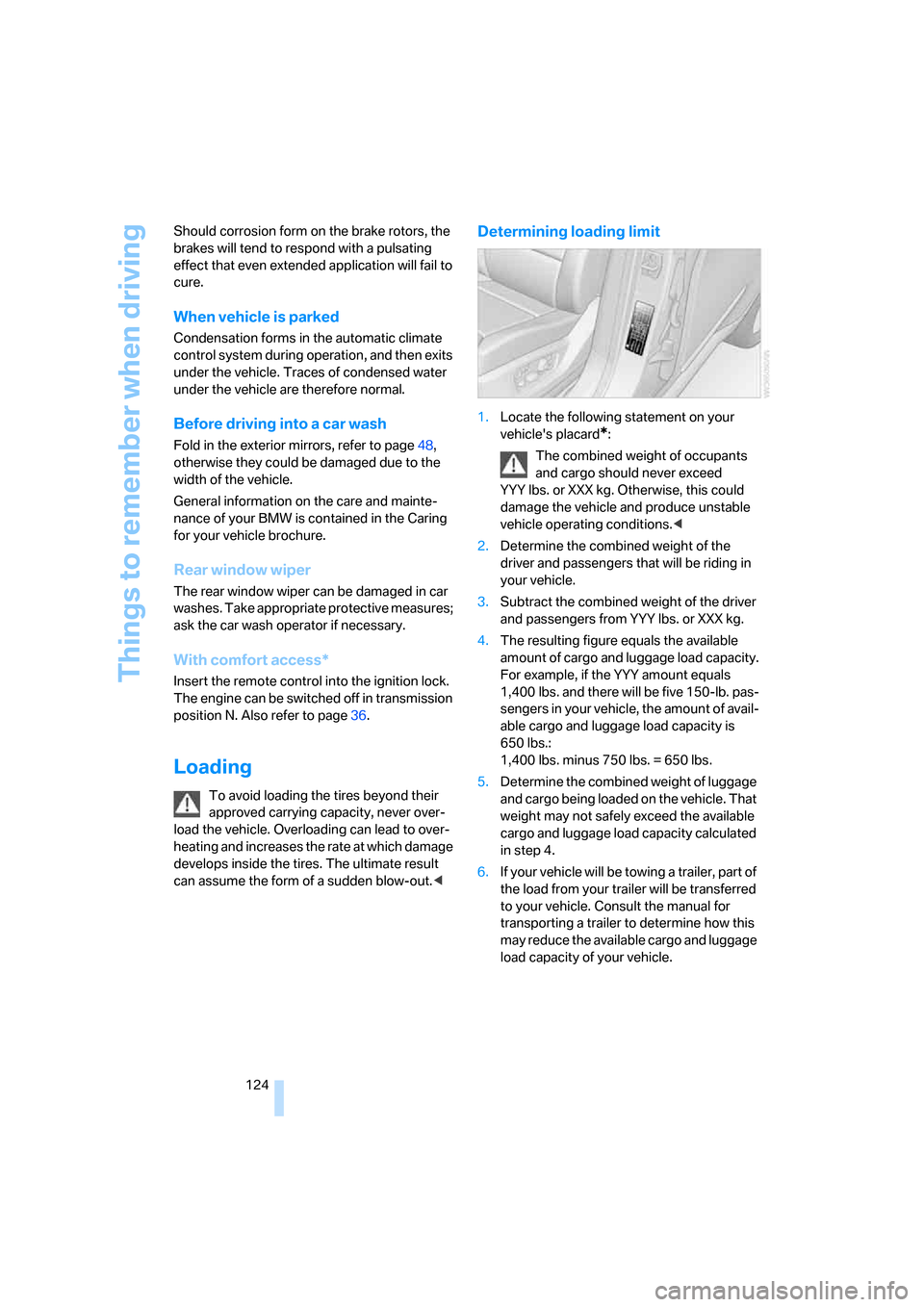
Determining loading limit
1.Locate the following statement on your
vehicle's placard
*:
The combined weight of occupants
and cargo should never exceed
YYY lbs. or XXX kg. Otherwise, this could
damage the vehicle and produce unstable
vehicle operating conditions.<
2.Determine the combined weight of the
driver and passengers that will be riding in
your vehicle.
3.Subtract the combined weight of the driver
and passengers from YYY lbs. or XXX kg.
4.The resulting figure equals the available
amount of cargo and luggage load capacity.
For example, if the YYY amount equals
1,400 lbs. and there will be five 150-lb. pas-
sengers in your vehicle, the amount of avail-
able cargo and luggage load capacity is
650 lbs.:
1,400 lbs. minus 750 lbs. = 650 lbs.
5.Determine the combined weight of luggage
and cargo being loaded on the vehicle. That
weight may not safely exceed the available
cargo and luggage load capacity calculated
in step 4.
6.If your vehicle will be towing a trailer, part of
the load from your trailer will be transferred
to your vehicle. Consult the manual for
transporting a trailer to determine how this
may reduce the available cargo and luggage
load capacity of your vehicle.
Page 250 of 272
Short commands of voice command system
248
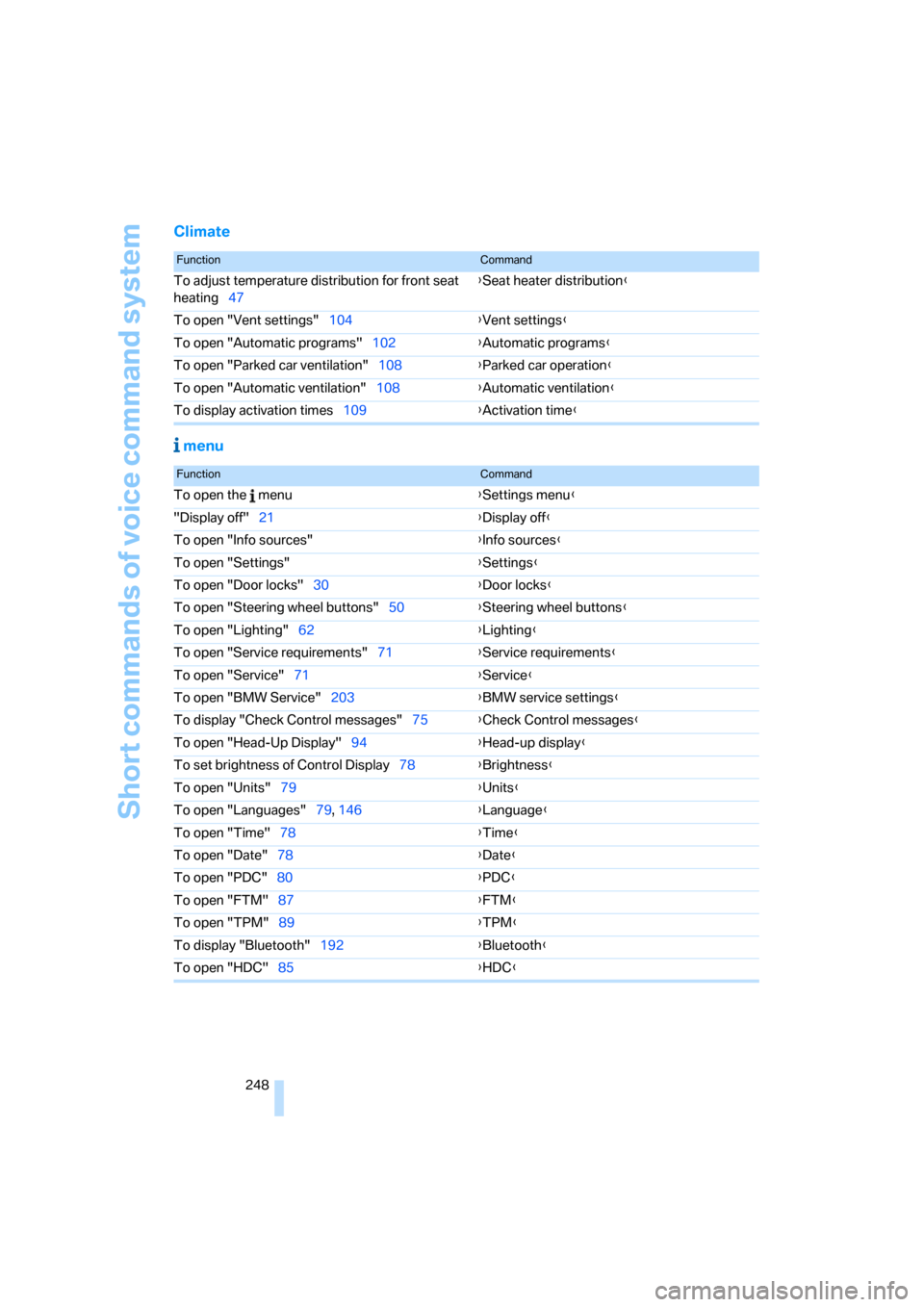
Climate
menu
FunctionCommand
To adjust temperature distribution for front seat
heating47{Seat heater distribution}
To open "Vent settings"104{Vent settings}
To open "Automatic programs"102{Automatic programs}
To open "Parked car ventilation"108{Parked car operation}
To open "Automatic ventilation"108{Automatic ventilation}
To display activation times109{Activation time}
FunctionCommand
To open the menu{Settings menu}
"Display off"21{Display off}
To open "Info sources"{Info sources}
To open "Settings"{Settings}
To open "Door locks"30{Door locks}
To open "Steering wheel buttons"50{Steering wheel buttons}
To open "Lighting"62{Lighting}
To open "Service requirements"71{Service requirements}
To open "Service"71{Service}
To open "BMW Service"203{BMW service settings}
To display "Check Control messages"75{Check Control messages}
To open "Head-Up Display"94{Head-up display}
To set brightness of Control Display78{Brightness}
To open "Units"79{Units}
To open "Languages"79, 146{Language}
To open "Time"78{Time}
To open "Date"78{Date}
To open "PDC"80{PDC}
To open "FTM"87{FTM}
To open "TPM"89{TPM}
To display "Bluetooth"192
{Bluetooth}
To open "HDC"85{HDC}
Page 257 of 272
Reference 255
At a glance
Controls
Driving tips
Communications
Navigation
Entertainment
Mobility
Displays on the windshield,
refer to Head-Up Display94
Disposal
– battery of remote control
with comfort access37
– remote control battery174
– vehicle battery234
Distance, refer to
Computer69
"Distance to dest."70
Distance to destination, refer
to Computer69
Distance warning, refer to
PDC Park Distance
Control80
Door entry lighting100
Door key, refer to Keys/
remote control28
Door lock31
Door locking, confirmation
signals31
"Door locks"30,31,72
Doors
– manual operation32
– remote control30
DOT Quality Grades218
Draft-free ventilation106
Drinks holder, refer to Cup
holders114
"Driver's door only"30
Driver's seat, calibrating46
"Driver's seat climate"48
Driving lamps, refer to Parking
lamps/low beams97
Driving on poor roads126
Driving route, refer to
Displaying route144
Driving stability control
systems84
Driving through water123
Driving tips, refer to General
driving notes122
Dry air, refer to Cooling
function104
DSC Dynamic Stability
Control84
– indicator lamp13,84DTC Dynamic Traction
Control85
– activating85
– indicator lamp13,85
"DVD" DVD system in
rear174
"DVD format" for DVD system
in rear177
DVD for navigation130
DVD system in rear172
– CD/DVD player
173
– connecting headphones173
– controls172
– displaying images from CD/
DVD181
– DVD country codes174
– external device183
– information on CD/DVD
player182
– playing audio tracks from
CD/DVD178
– playing video from CD/
DVD174
– remote control173
– switching on/off174
Dynamic Brake Control
DBC84
"Dynamic route" for
navigation142
Dynamic Stability Control
DSC84
Dynamic Traction Control
DTC85
E
Easy entry/exit50
Electrical malfunction
– door lock32
– driver's door32
– fuel filler door212
– liftgate33
– panorama glass sunroof39
Electric steering wheel
adjustment49
Electronic brake-force
distribution84Electronic oil level check223
Emergency call236
Emergency operation, refer to
Manual operation
– door lock32
– driver's door32
– fuel filler door212
– liftgate33
– panorama glass sunroof39
– transmission lock, automatic
transmission61
Emergency services, refer to
Roadside Assistance237
"Enable services"208
"End call"194
Energy-conscious driving,
refer to Energy Control68
Energy Control68
Engine
– breaking-in122
– data242
– overheated, refer to Coolant
temperature68
– speed242
– starting56
– starting, comfort access36
– starting difficulties57
– switching off57
Engine compartment223
Engine coolant225
Engine oil
– adding224
– additives, refer to Approved
engine oils224
– approved engine oil224
– checking oil level223
– electronic oil level check223
"Engine oil level"224
Engine output, refer to Engine
data242
Engine overheating, refer to
Coolant temperature68
Engine speed242
Engine starting, refer to
Starting engine56
"Enter address"132
Page 258 of 272
Everything from A to Z
256 Entering country of
destination132
Entering destination132
Entering house number or
intersection133
Entering intersection133
Entering street133
"Entertainment"154
Entertainment sound output
on/off155
"Equalizer", refer to Tone
control157
Equalizer, refer to Tone
control157
"ESN"162
ESP Electronic Stability
Program, refer to DSC
Dynamic Stability
Control84
Event Data Recorders227
Exhaust system, refer to Hot
exhaust system122
Exterior mirrors48
– automatic dimming
feature49
– automatic heating49
– folding in and out48
– tilting down passenger-side
exterior mirror49
External audio
device113,171
Eye for tow-starting and
towing, refer to Tow
fitting238
F
Fader, refer to Tone
control156
Failure messages, refer to
Check Control74
False alarm, refer to Avoiding
unintentional alarms35
Fastening safety belts, refer to
Safety belts45
– warning lamp46Fastest route for
navigation141
Fast forward
– CD changer169
– CD player169
"Fast route" for
navigation141
First aid, refer to First-aid
kit237
First-aid kit237
Fixing system, adaptive117
Flashing during locking/
unlocking, refer to Setting
confirmation signals31
Flashlight, refer to
Rechargeable flashlight113
Flat tire
– changing wheels232
– compact wheel232
– Flat Tire Monitor87
– run-flat tires88,90,220
– TPM Tire Pressure
Monitor89
Flat Tire Monitor87
– false alarms87
– initializing system87
– show chains221
– system limits87
– warning lamp88
"FM", reception
range155,158
FM, waveband158
Fog lamps99
– indicator lamp13,99
Folding display screen open/
closed, DVD system in
rear172
Folding rear seat back117
Fold-over rear seat
backrest117
Footbrake, refer to Braking
safely123
Footwell lamps100
For your own safety5
4-wheel drive system, refer to
xDrive85Fresh-air nozzles, refer to Air
vents101
Front airbags92
Front passenger airbags
– deactivating93
– refer to Exception of front
passenger seat52
Front seat adjustment41
"FTM"88
FTM, refer to Flat Tire
Monitor87
Fuel213
– capacity244
– display68
– high-quality brands213
– quality213
– specifications213
Fuel clock, refer to Fuel
gauge68
Fuel consumption display,
computer, average fuel
consumption69
Fuel display, refer to Fuel
gauge68
Fuel filler door212
– closing212
– opening212
– releasing in the event of
electrical malfunction212
Fuses234
G
Garage door opener, refer to
Integrated universal remote
control110
Gasoline, refer to Required
fuel213
Gasoline display, refer to Fuel
gauge68
General driving notes122
Glass sunroof, electric
– comfort operation from
outside32
– comfort operation with
comfort access36
– remote control30
Page 259 of 272
Reference 257
At a glance
Controls
Driving tips
Communications
Navigation
Entertainment
Mobility
Glove compartment113
– lighting113
GPS navigation, refer to
Navigation system130
Grills, refer to Ventilation105
Grills of the automatic climate
control101
Gross vehicle weight, refer to
Weights244
H
Handbrake, refer to Parking
brake57
Hand lamp, refer to
Rechargeable flashlight113
Hands-free system, refer to
Microphone14
Hazard warning flashers15
HDC Hill Descent Control85
Head airbags92
Headlamp control,
automatic97
Headlamp flasher62
Headlamps97
– care, refer to Caring for your
vehicle brochure
– cleaning, refer to Washer/
wiper system63
Head Light, refer to Adaptive
Head Light98
Head restraints43
– removing43
– sitting safely40
"Head-Up Display"95
Head-Up Display94
Heated
– mirrors49
– rear window103
– seats47
– steering wheel50
Heating101
– exterior mirrors49
– interior101
– rear window103
– residual heat105
– seats47
– steering wheel50Heating with engine switched
off, refer to Residual
heat105
Heavy cargo, refer to Securing
cargo125
Height, refer to
Dimensions243
Height adjustment
– seats41
– steering wheel49
High beams62,99
– headlamp flasher99
– indicator lamp13
Highs, refer to Treble and
bass155
High water, refer to Driving
through water123
Highway, refer to Route
criteria141
Hill Descent Control HDC85
Hills123
Holder for cups114
Home address141
"Home address" for
navigation141
Homepage4
Hood222
Horn10
Hot exhaust system122
"Hour memo"78
"House number" for
destination entry134
Hydraulic brake assistant,
refer to DBC Dynamic Brake
Control84
Hydroplaning123
I
Ice, refer to Outside
temperature warning67
ID3 tag, refer to Information on
track167iDrive16
– assistance window20
– changing language79
– changing menu page19
– changing settings77
– changing units of measure
and display type79
– confirming selection or
entry19
– controller16
– controls16
– displays, menus17
– selecting menu item19
– setting brightness78
– setting date78
– setting time77
– start menu17
– status information20
– symbols18
Ignition56
– switched off56
– switched on56
Ignition key, refer to Keys/
remote control28
Ignition key position 1, refer to
Radio readiness56
Ignition key position 2, refer to
Ignition on56
Ignition lock56
– starting engine with comfort
access36
Independent ventilation, refer
to Parked car ventilation108
Indicator/warning lamps13
– active steering91
– airbags94
– DSC13,84
– DTC13,85
– fasten safety belt46
– Flat Tire Monitor88
– fog lamps13
– TPM Tire Pressure
Monitor90
Individual air distribution104
Individually programmable
buttons on steering
wheel50
Individual settings, refer to
Personal Profile28