seats BMW X5 3.0Si 2008 E70 User Guide
[x] Cancel search | Manufacturer: BMW, Model Year: 2008, Model line: X5 3.0Si, Model: BMW X5 3.0Si 2008 E70Pages: 292, PDF Size: 9.32 MB
Page 113 of 292
Controls
111Reference
At a glance
Driving tips
Communications
Navigation
Entertainment
Mobility
Ventilation in rear
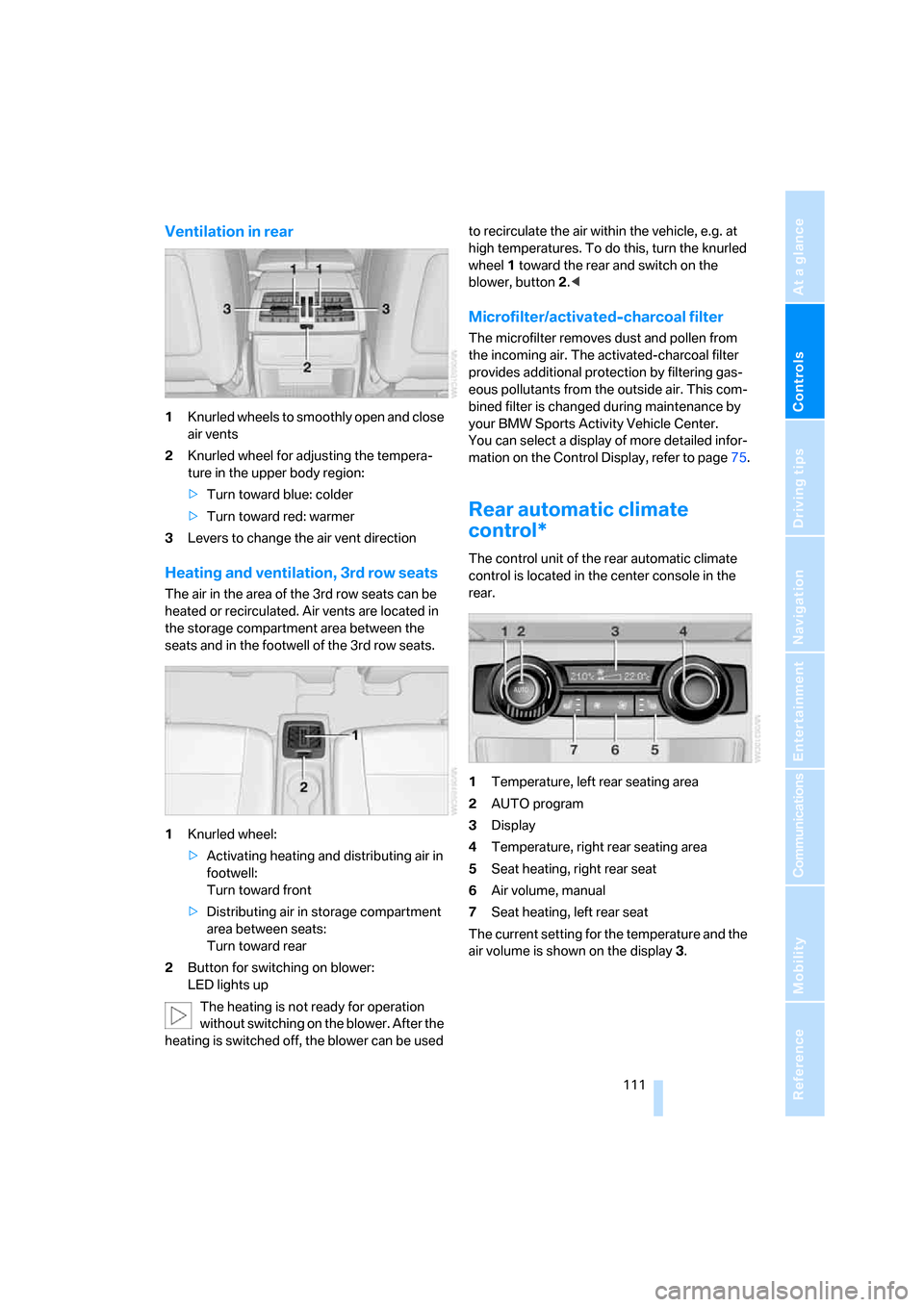
1Knurled wheels to smoothly open and close
air vents
2Knurled wheel for adjusting the tempera-
ture in the upper body region:
>Turn toward blue: colder
>Turn toward red: warmer
3Levers to change the air vent direction
Heating and ventilation, 3rd row seats
The air in the area of the 3rd row seats can be
heated or recirculated. Air vents are located in
the storage compartment area between the
seats and in the footwell of the 3rd row seats.
1Knurled wheel:
>Activating heating and distributing air in
footwell:
Turn toward front
>Distributing air in storage compartment
area between seats:
Turn toward rear
2Button for switching on blower:
LED lights up
The heating is not ready for operation
without switching on the blower. After the
heating is switched off, the blower can be used to recirculate the air within the vehicle, e.g. at
high temperatures. To do this, turn the knurled
wheel1 toward the rear and switch on the
blower, button2.<
Microfilter/activated-charcoal filter
The microfilter removes dust and pollen from
the incoming air. The activated-charcoal filter
provides additional protection by filtering gas-
eous pollutants from the outside air. This com-
bined filter is changed during maintenance by
your BMW Sports Activity Vehicle Center.
You can select a display of more detailed infor-
mation on the Control Display, refer to page75.
Rear automatic climate
control*
The control unit of the rear automatic climate
control is located in the center console in the
rear.
1Temperature, left rear seating area
2AUTO program
3Display
4Temperature, right rear seating area
5Seat heating, right rear seat
6Air volume, manual
7Seat heating, left rear seat
The current setting for the temperature and the
air volume is shown on the display3.
Page 115 of 292
Controls
113Reference
At a glance
Driving tips
Communications
Navigation
Entertainment
Mobility
Ventilation in rear
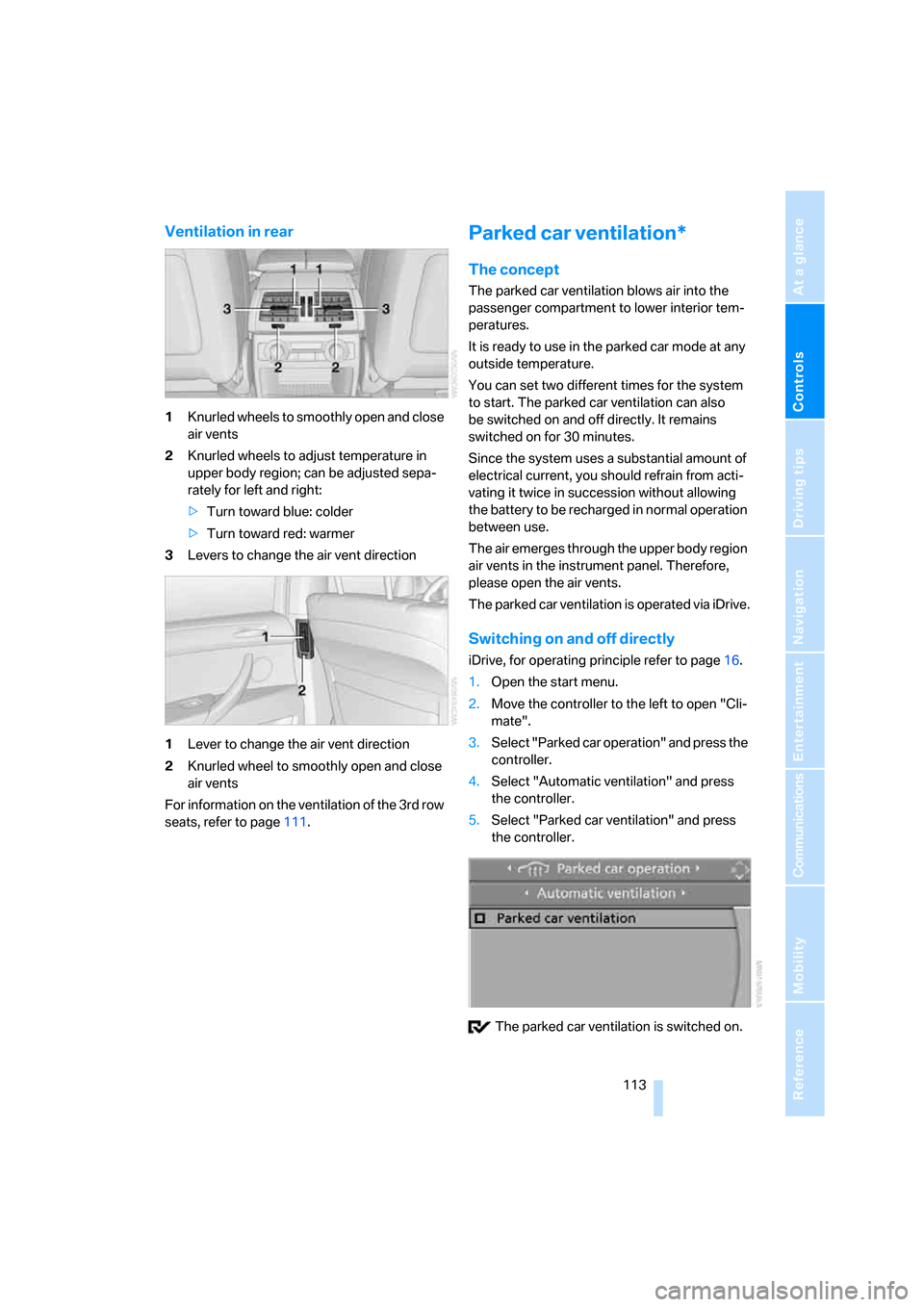
1Knurled wheels to smoothly open and close
air vents
2Knurled wheels to adjust temperature in
upper body region; can be adjusted sepa-
rately for left and right:
>Turn toward blue: colder
>Turn toward red: warmer
3Levers to change the air vent direction
1Lever to change the air vent direction
2Knurled wheel to smoothly open and close
air vents
For information on the ventilation of the 3rd row
seats, refer to page111.
Parked car ventilation*
The concept
The parked car ventilation blows air into the
passenger compartment to lower interior tem-
peratures.
It is ready to use in the parked car mode at any
outside temperature.
You can set two different times for the system
to start. The parked car ventilation can also
be switched on and off directly. It remains
switched on for 30 minutes.
Since the system uses a substantial amount of
electrical current, you should refrain from acti-
vating it twice in succession without allowing
the battery to be recharged in normal operation
between use.
The air emerges through the upper body region
air vents in the instrument panel. Therefore,
please open the air vents.
The parked car ventilation is operated via iDrive.
Switching on and off directly
iDrive, for operating principle refer to page16.
1.Open the start menu.
2.Move the controller to the left to open "Cli-
mate".
3.Select "Parked car operation" and press the
controller.
4.Select "Automatic ventilation" and press
the controller.
5.Select "Parked car ventilation" and press
the controller.
The parked car ventilation is switched on.
Page 121 of 292
Controls
119Reference
At a glance
Driving tips
Communications
Navigation
Entertainment
Mobility
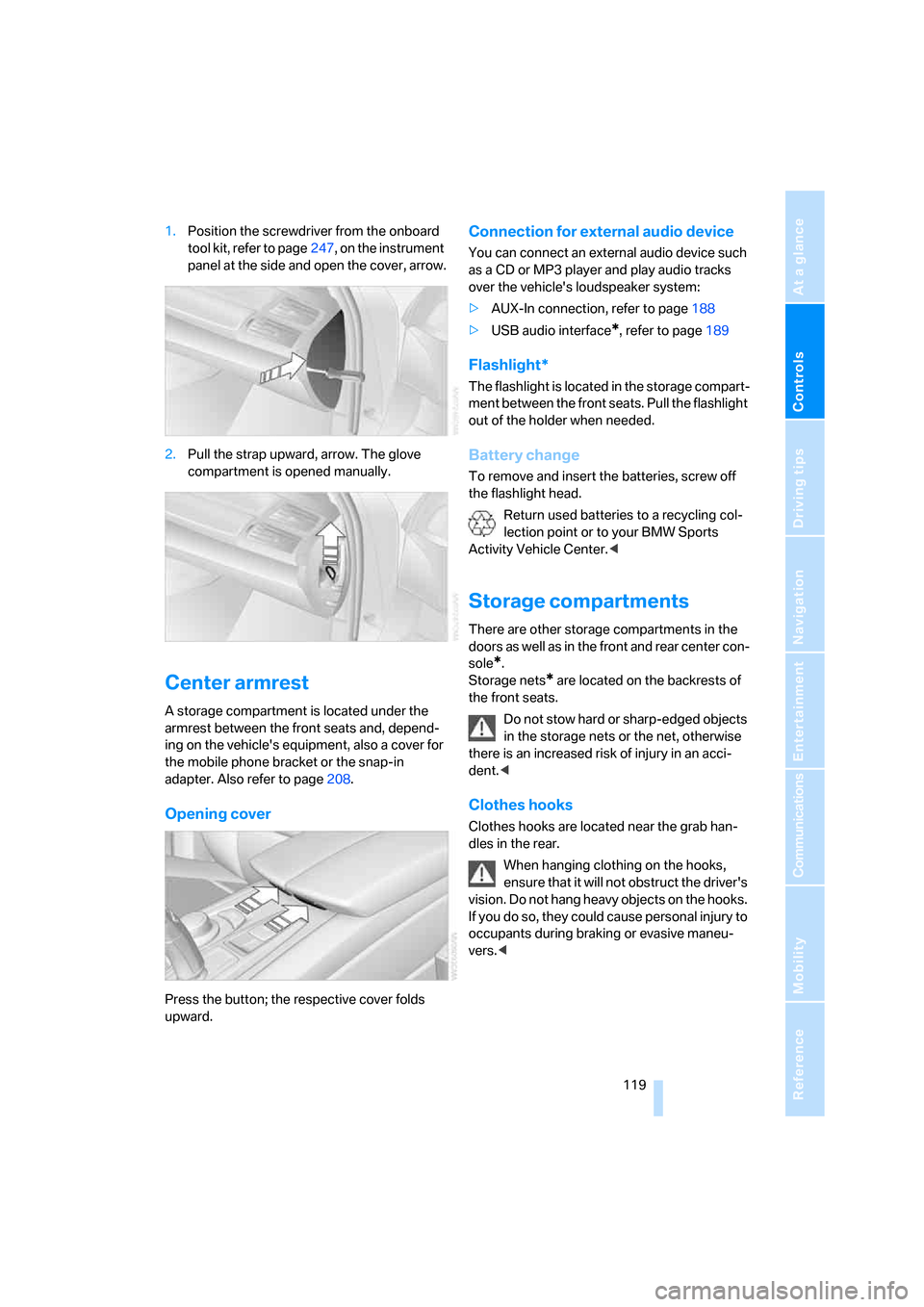
1.Position the screwdriver from the onboard
tool kit, refer to page247, on the instrument
panel at the side and open the cover, arrow.
2.Pull the strap upward, arrow. The glove
compartment is opened manually.
Center armrest
A storage compartment is located under the
armrest between the front seats and, depend-
ing on the vehicle's equipment, also a cover for
the mobile phone bracket or the snap-in
adapter. Also refer to page208.
Opening cover
Press the button; the respective cover folds
upward.
Connection for external audio device
You can connect an external audio device such
as a CD or MP3 player and play audio tracks
over the vehicle's loudspeaker system:
>AUX-In connection, refer to page188
>USB audio interface
*, refer to page189
Flashlight*
The flashlight is located in the storage compart-
ment between the front seats. Pull the flashlight
out of the holder when needed.
Battery change
To remove and insert the batteries, screw off
the flashlight head.
Return used batteries to a recycling col-
lection point or to your BMW Sports
Activity Vehicle Center.<
Storage compartments
There are other storage compartments in the
doors as well as in the front and rear center con-
sole
*.
Storage nets
* are located on the backrests of
the front seats.
Do not stow hard or sharp-edged objects
in the storage nets or the net, otherwise
there is an increased risk of injury in an acci-
dent.<
Clothes hooks
Clothes hooks are located near the grab han-
dles in the rear.
When hanging clothing on the hooks,
ensure that it will not obstruct the driver's
vision. Do not hang heavy objects on the hooks.
If you do so, they could cause personal injury to
occupants during braking or evasive maneu-
vers.<
Page 122 of 292
Practical interior accessories
120
Cup holders
Do not place containers made of glass in
the cup holders. This would lead to an
increased risk of injury in the event of an acci-
dent. Do not force unsuitable containers into
the cup holders, as otherwise damage can
result.<
Front
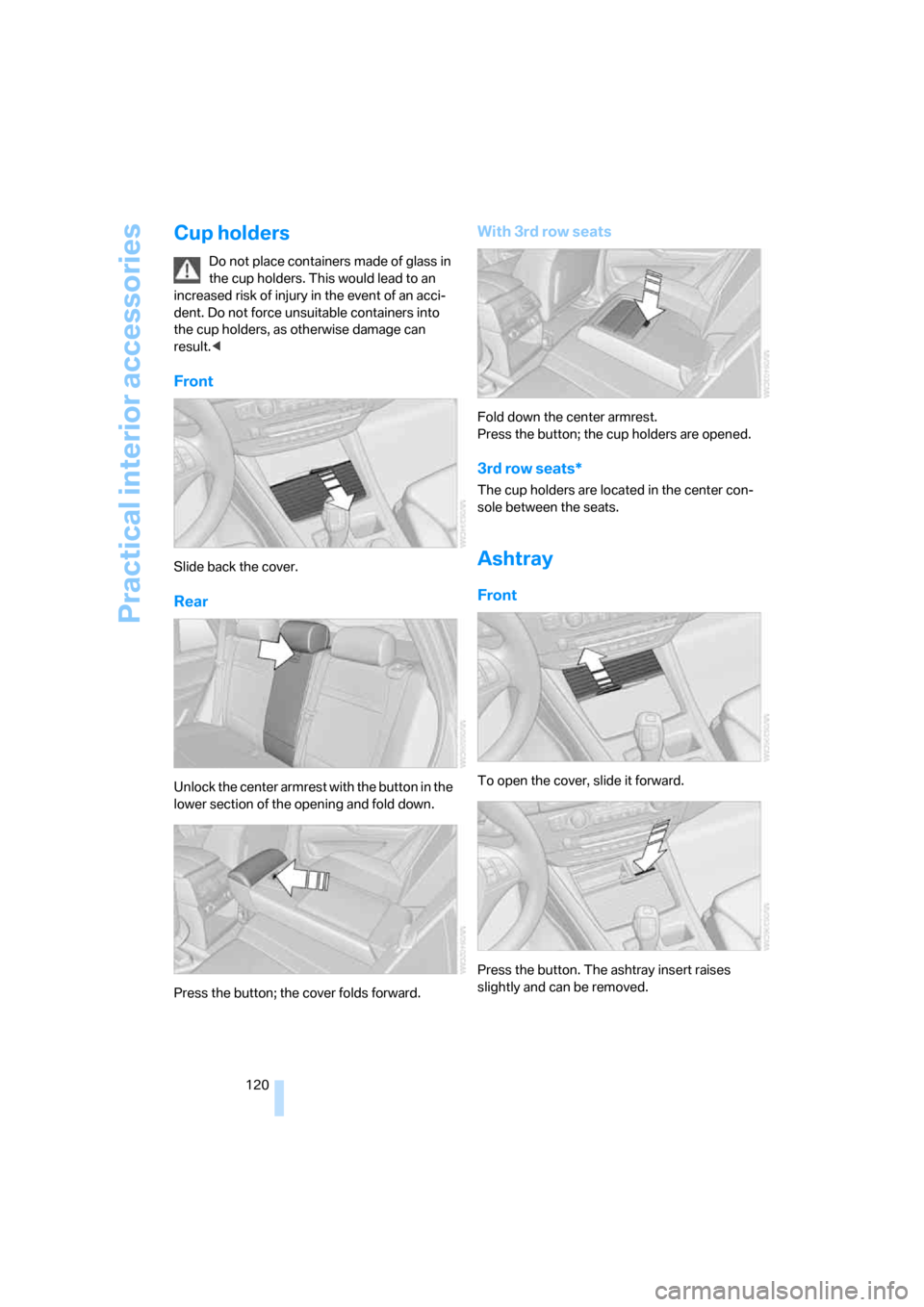
Slide back the cover.
Rear
Unlock the center armrest with the button in the
lower section of the opening and fold down.
Press the button; the cover folds forward.
With 3rd row seats
Fold down the center armrest.
Press the button; the cup holders are opened.
3rd row seats*
The cup holders are located in the center con-
sole between the seats.
Ashtray
Front
To open the cover, slide it forward.
Press the button. The ashtray insert raises
slightly and can be removed.
Page 126 of 292
Practical interior accessories
124
Adaptive fastening system*
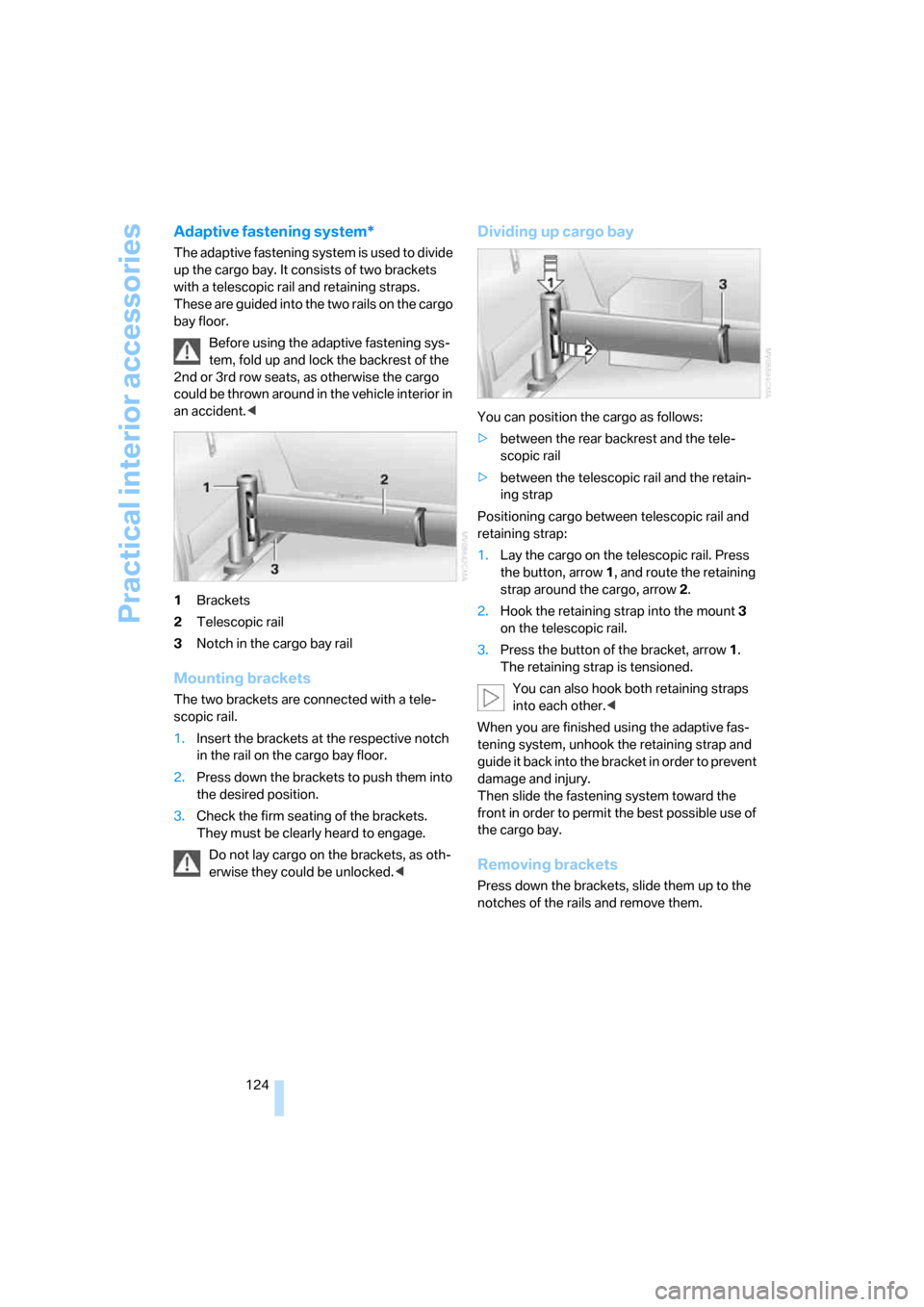
The adaptive fastening system is used to divide
up the cargo bay. It consists of two brackets
with a telescopic rail and retaining straps.
These are guided into the two rails on the cargo
bay floor.
Before using the adaptive fastening sys-
tem, fold up and lock the backrest of the
2nd or 3rd row seats, as otherwise the cargo
could be thrown around in the vehicle interior in
an accident.<
1Brackets
2Telescopic rail
3Notch in the cargo bay rail
Mounting brackets
The two brackets are connected with a tele-
scopic rail.
1.Insert the brackets at the respective notch
in the rail on the cargo bay floor.
2.Press down the brackets to push them into
the desired position.
3.Check the firm seating of the brackets.
They must be clearly heard to engage.
Do not lay cargo on the brackets, as oth-
erwise they could be unlocked.<
Dividing up cargo bay
You can position the cargo as follows:
>between the rear backrest and the tele-
scopic rail
>between the telescopic rail and the retain-
ing strap
Positioning cargo between telescopic rail and
retaining strap:
1.Lay the cargo on the telescopic rail. Press
the button, arrow1, and route the retaining
strap around the cargo, arrow2.
2.Hook the retaining strap into the mount3
on the telescopic rail.
3.Press the button of the bracket, arrow1.
The retaining strap is tensioned.
You can also hook both retaining straps
into each other.<
When you are finished using the adaptive fas-
tening system, unhook the retaining strap and
guide it back into the bracket in order to prevent
damage and injury.
Then slide the fastening system toward the
front in order to permit the best possible use of
the cargo bay.
Removing brackets
Press down the brackets, slide them up to the
notches of the rails and remove them.
Page 127 of 292
Controls
125Reference
At a glance
Driving tips
Communications
Navigation
Entertainment
Mobility
Ski bag*
The ski bag is designed for safe, clean transport
of up to 4 pa irs of s tandard s kis or up to 2 snow-
boards.
With the ski bag you can stow skis with a length
of up to 6.9 ft/2.10 m. When skis of 6.9 ft/2.10 m
in length are loaded, the ski bag will tend to con-
tract, reducing its overall capacity.
Before loading the ski bag, fold in the dis-
play screen of the DVD system in the
rear
*, as otherwise the display screen could be
damaged.<
Loading
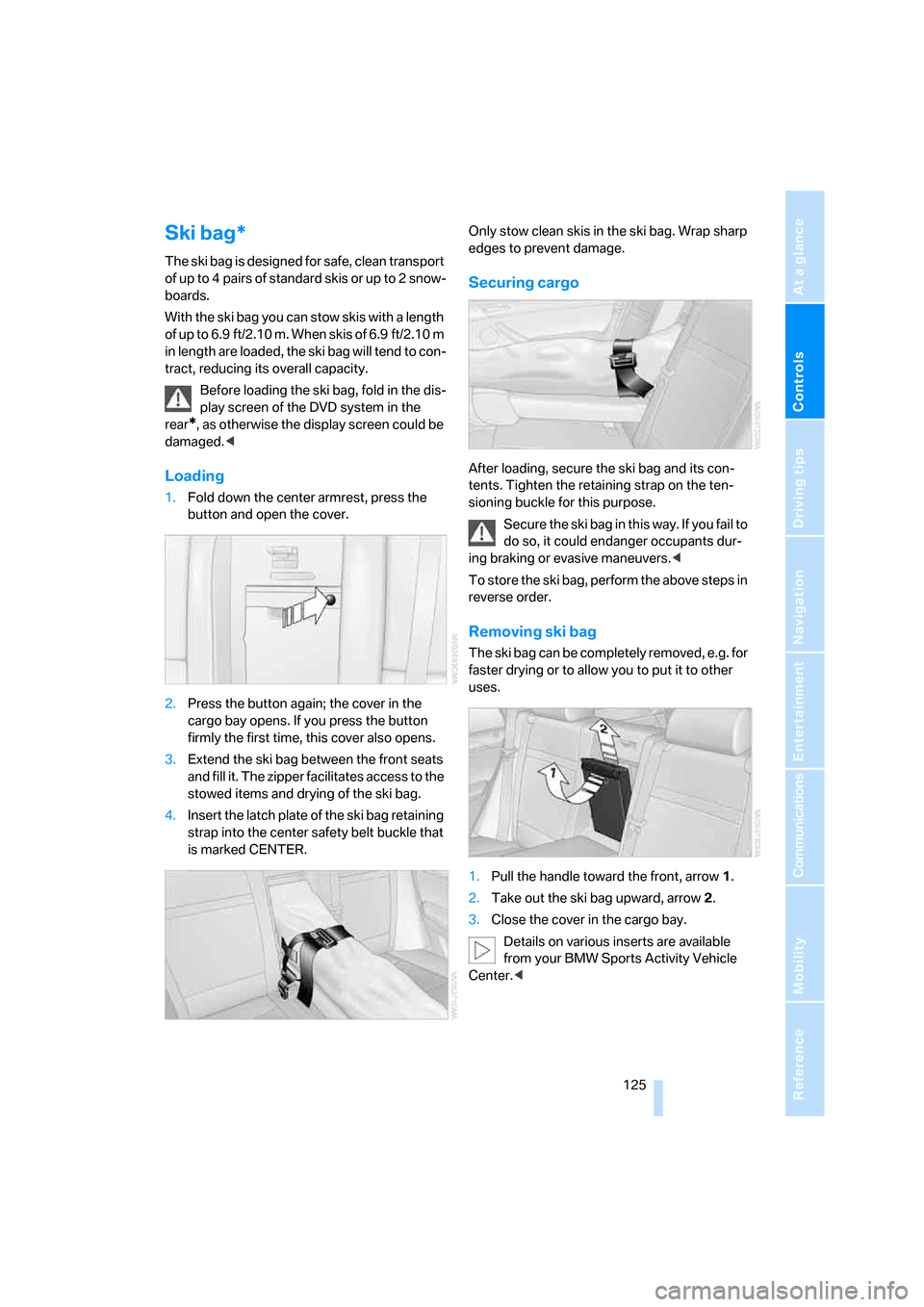
1.Fold down the center armrest, press the
button and open the cover.
2.Press the button again; the cover in the
cargo bay opens. If you press the button
firmly the first time, this cover also opens.
3.Extend the ski bag between the front seats
and fill it. The zipper facilitates access to the
stowed items and drying of the ski bag.
4.Insert the latch plate of the ski bag retaining
strap into the center safety belt buckle that
is marked CENTER.Only stow clean skis in the ski bag. Wrap sharp
edges to prevent damage.
Securing cargo
After loading, secure the ski bag and its con-
tents. Tighten the retaining strap on the ten-
sioning buckle for this purpose.
Secure the ski bag in this way. If you fail to
do so, it could endanger occupants dur-
ing braking or evasive maneuvers.<
To store the ski bag, perform the above steps in
reverse order.
Removing ski bag
The ski bag can be completely removed, e.g. for
faster drying or to allow you to put it to other
uses.
1.Pull the handle toward the front, arrow1.
2.Take out the ski bag upward, arrow2.
3.Close the cover in the cargo bay.
Details on various inserts are available
from your BMW Sports Activity Vehicle
Center.<
Page 237 of 292
Mobility
235Reference
At a glance
Controls
Driving tips
Communications
Navigation
Entertainment
Observe all national and local maximum speed
limits, otherwise violations of the law could
occur.
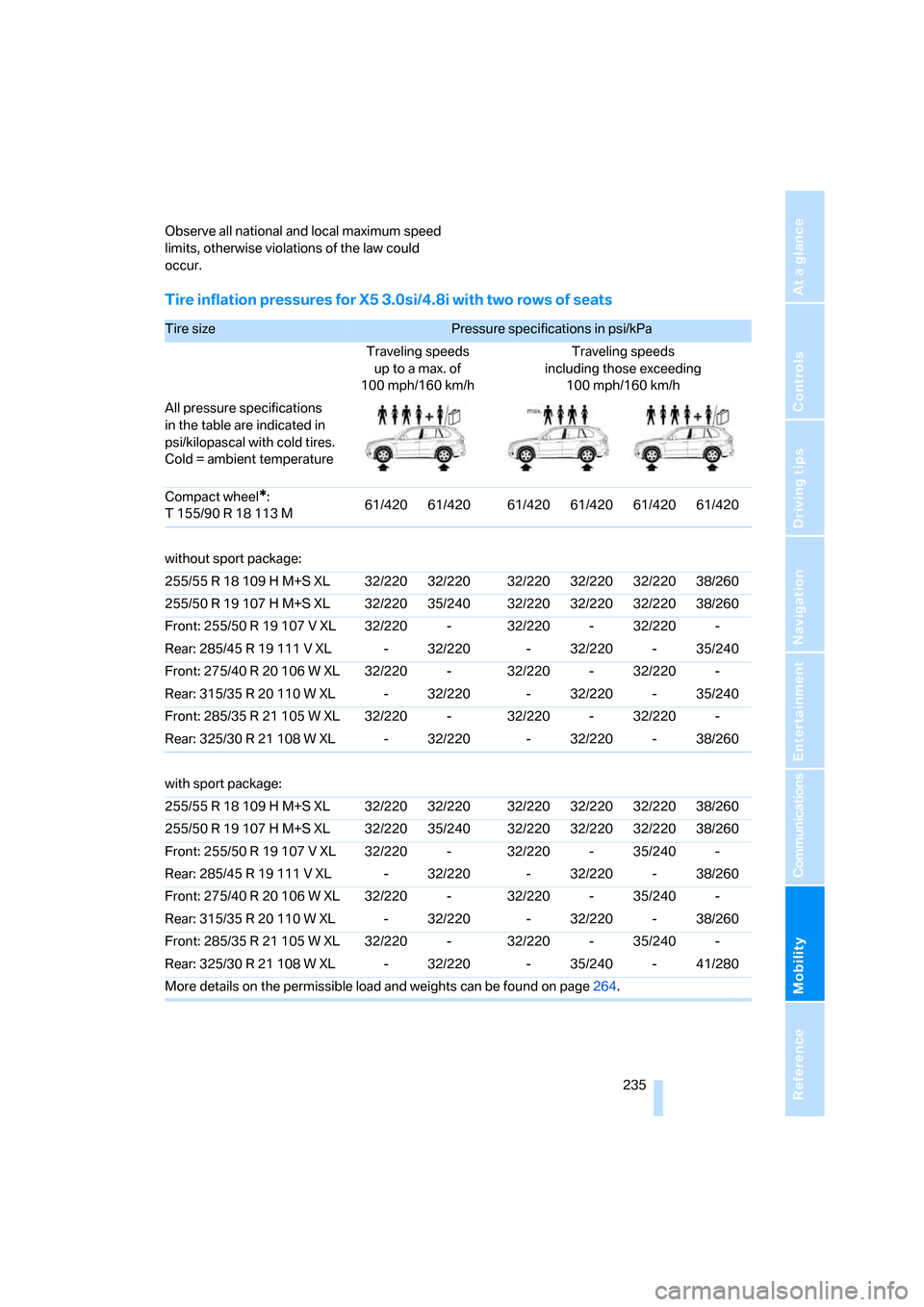
Tire inflation pressures for X5 3.0si/4.8i with two rows of seats
Tire size Pressure specifications in psi/kPa
Traveling speeds
up to a max. of
100 mph/160 km/hTraveling speeds
including those exceeding
100 mph/160 km/h
All pressure specifications
in the table are indicated in
psi/kilopascal with cold tires.
Cold = ambient temperature
Compact wheel
*:
T 155/90 R 18 113 M61/420 61/420 61/420 61/420 61/420 61/420
without sport package:
255/55 R 18 109 H M+S XL 32/220 32/220 32/220 32/220 32/220 38/260
255/50 R 19 107 H M+S XL 32/220 35/240 32/220 32/220 32/220 38/260
Front: 255/50 R 19 107 V XL 32/220 - 32/220 - 32/220 -
Rear: 285/45 R 19 111 V XL - 32/220 - 32/220 - 35/240
Front: 275/40 R 20 106 W XL 32/220 - 32/220 - 32/220 -
Rear: 315/35 R 20 110 W XL - 32/220 - 32/220 - 35/240
Front: 285/35 R 21 105 W XL 32/220 - 32/220 - 32/220 -
Rear: 325/30 R 21 108 W XL - 32/220 - 32/220 - 38/260
with sport package:
255/55 R 18 109 H M+S XL 32/220 32/220 32/220 32/220 32/220 38/260
255/50 R 19 107 H M+S XL 32/220 35/240 32/220 32/220 32/220 38/260
Front: 255/50 R 19 107 V XL 32/220 - 32/220 - 35/240 -
Rear: 285/45 R 19 111 V XL - 32/220 - 32/220 - 38/260
Front: 275/40 R 20 106 W XL 32/220 - 32/220 - 35/240 -
Rear: 315/35 R 20 110 W XL - 32/220 - 32/220 - 38/260
Front: 285/35 R 21 105 W XL 32/220 - 32/220 - 35/240 -
Rear: 325/30 R 21 108 W XL - 32/220 - 35/240 - 41/280
More details on the permissible load and weights can be found on page264.
Page 238 of 292
Wheels and tires
236
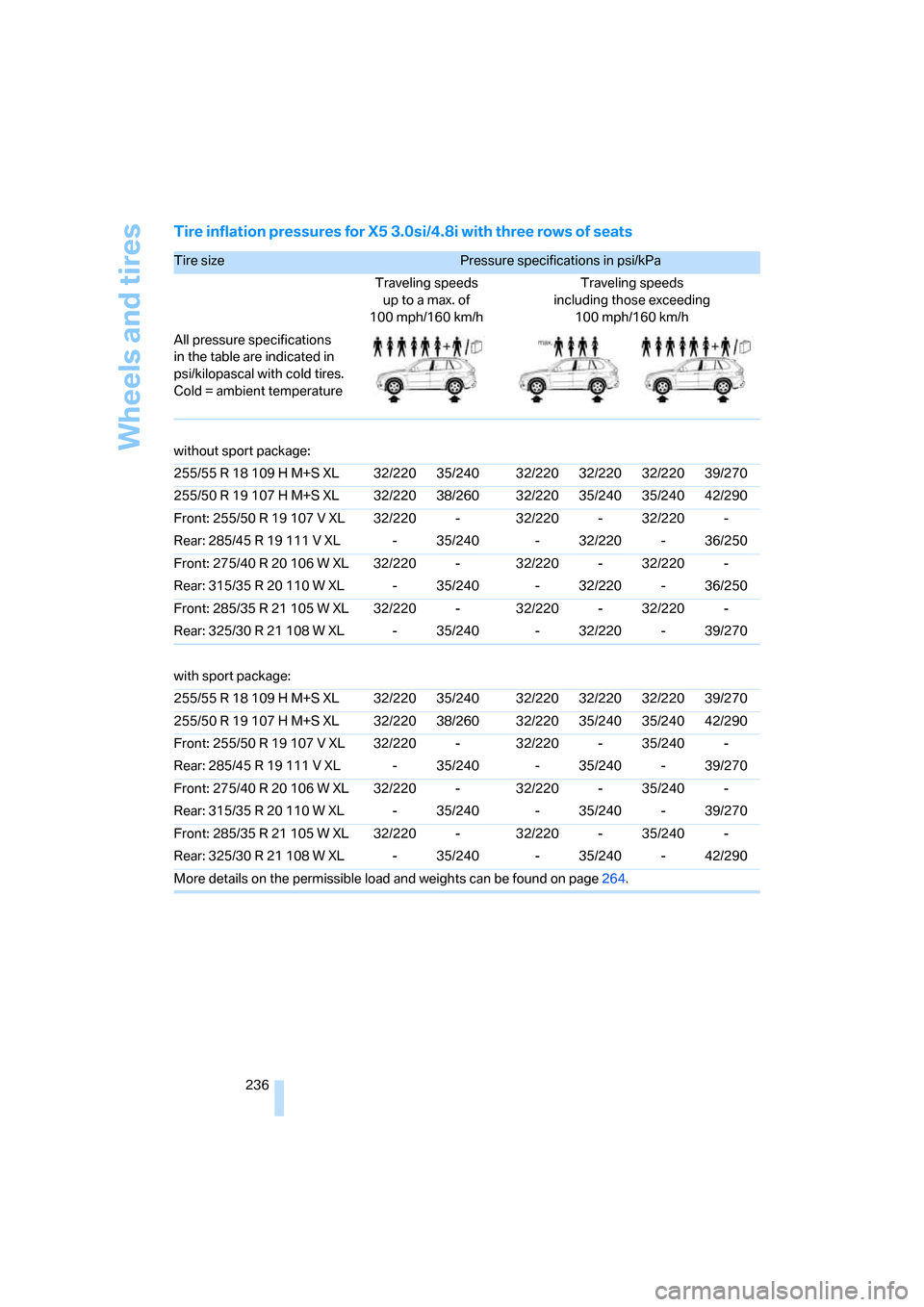
Tire inflation pressures for X5 3.0si/4.8i with three rows of seats
Tire size Pressure specifications in psi/kPa
Traveling speeds
up to a max. of
100 mph/160 km/hTraveling speeds
including those exceeding
100 mph/160 km/h
All pressure specifications
in the table are indicated in
psi/kilopascal with cold tires.
Cold = ambient temperature
without sport package:
255/55 R 18 109 H M+S XL 32/220 35/240 32/220 32/220 32/220 39/270
255/50 R 19 107 H M+S XL 32/220 38/260 32/220 35/240 35/240 42/290
Front: 255/50 R 19 107 V XL 32/220 - 32/220 - 32/220 -
Rear: 285/45 R 19 111 V XL - 35/240 - 32/220 - 36/250
Front: 275/40 R 20 106 W XL 32/220 - 32/220 - 32/220 -
Rear: 315/35 R 20 110 W XL - 35/240 - 32/220 - 36/250
Front: 285/35 R 21 105 W XL 32/220 - 32/220 - 32/220 -
Rear: 325/30 R 21 108 W XL - 35/240 - 32/220 - 39/270
with sport package:
255/55 R 18 109 H M+S XL 32/220 35/240 32/220 32/220 32/220 39/270
255/50 R 19 107 H M+S XL 32/220 38/260 32/220 35/240 35/240 42/290
Front: 255/50 R 19 107 V XL 32/220 - 32/220 - 35/240 -
Rear: 285/45 R 19 111 V XL - 35/240 - 35/240 - 39/270
Front: 275/40 R 20 106 W XL 32/220 - 32/220 - 35/240 -
Rear: 315/35 R 20 110 W XL - 35/240 - 35/240 - 39/270
Front: 285/35 R 21 105 W XL 32/220 - 32/220 - 35/240 -
Rear: 325/30 R 21 108 W XL - 35/240 - 35/240 - 42/290
More details on the permissible load and weights can be found on page264.
Page 266 of 292
Technical data
264
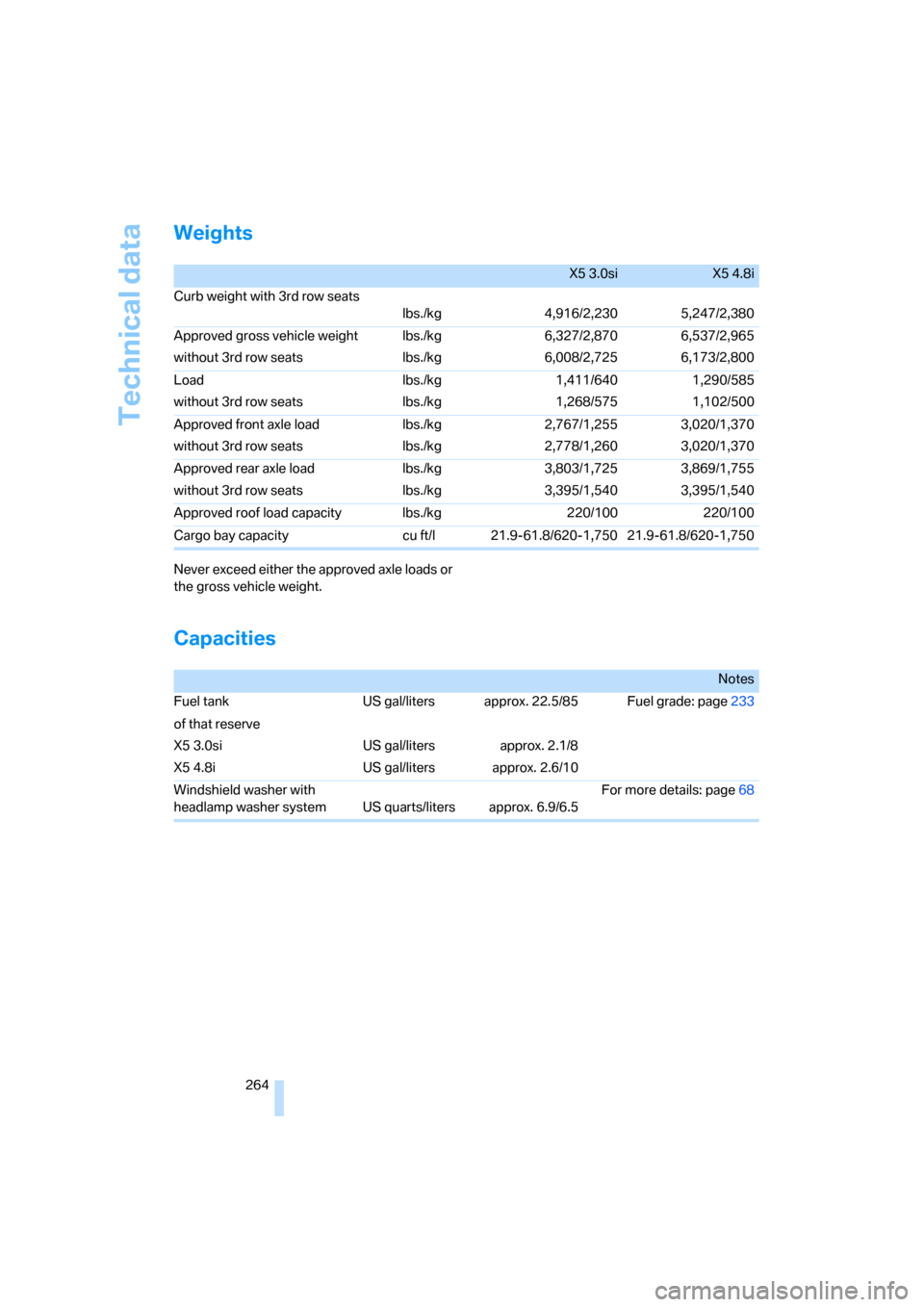
Weights
Never exceed either the approved axle loads or
the gross vehicle weight.
Capacities
X5 3.0siX5 4.8i
Curb weight with 3rd row seats
lbs./kg 4,916/2,230 5,247/2,380
Approved gross vehicle weight
without 3rd row seatslbs./kg
lbs./kg6,327/2,870
6,008/2,7256,537/2,965
6,173/2,800
Load
without 3rd row seatslbs./kg
lbs./kg1,411/640
1,268/5751,290/585
1,102/500
Approved front axle load
without 3rd row seatslbs./kg
lbs./kg2,767/1,255
2,778/1,2603,020/1,370
3,020/1,370
Approved rear axle load
without 3rd row seatslbs./kg
lbs./kg3,803/1,725
3,395/1,5403,869/1,755
3,395/1,540
Approved roof load capacity lbs./kg 220/100 220/100
Cargo bay capacity cu ft/l 21.9-61.8/620-1,750 21.9-61.8/620-1,750
Notes
Fuel tank US gal/liters approx. 22.5/85 Fuel grade: page233
of that reserve
X5 3.0si
X5 4.8iUS gal/liters
US gal/litersapprox. 2.1/8
approx. 2.6/10
Windshield washer with
headlamp washer system US quarts/liters approx. 6.9/6.5For more details: page68
Page 272 of 292
Everything from A to Z
270
Everything from A to Z
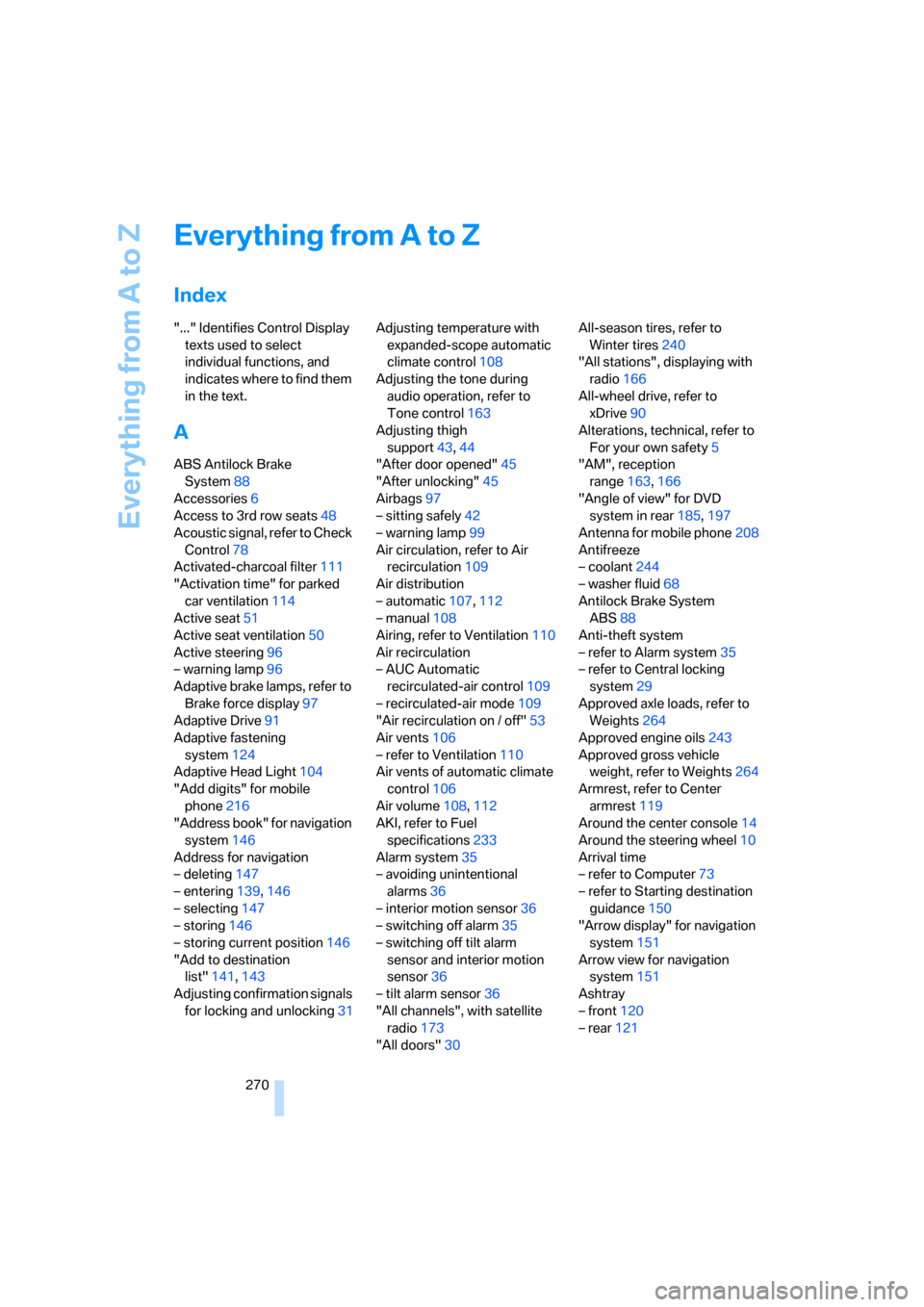
Index
"..." Identifies Control Display
texts used to select
individual functions, and
indicates where to find them
in the text.
A
ABS Antilock Brake
System88
Accessories6
Access to 3rd row seats48
Acoustic signal, refer to Check
Control78
Activated-charcoal filter111
"Activation time" for parked
car ventilation114
Active seat51
Active seat ventilation50
Active steering96
– warning lamp96
Adaptive brake lamps, refer to
Brake force display97
Adaptive Drive91
Adaptive fastening
system124
Adaptive Head Light104
"Add digits" for mobile
phone216
"Address book" for navigation
system146
Address for navigation
– deleting147
– entering139,146
– selecting147
– storing146
– storing current position146
"Add to destination
list"141,143
Adjusting confirmation signals
for locking and unlocking31Adjusting temperature with
expanded-scope automatic
climate control108
Adjusting the tone during
audio operation, refer to
Tone control163
Adjusting thigh
support43,44
"After door opened"45
"After unlocking"45
Airbags97
– sitting safely42
– warning lamp99
Air circulation, refer to Air
recirculation109
Air distribution
– automatic107,112
– manual108
Airing, refer to Ventilation110
Air recirculation
– AUC Automatic
recirculated-air control109
– recirculated-air mode109
"Air recirculation on / off"
53
Air vents106
– refer to Ventilation110
Air vents of automatic climate
control106
Air volume108,112
AKI, refer to Fuel
specifications233
Alarm system35
– avoiding unintentional
alarms36
– interior motion sensor36
– switching off alarm35
– switching off tilt alarm
sensor and interior motion
sensor36
– tilt alarm sensor36
"All channels", with satellite
radio173
"All doors"30All-season tires, refer to
Winter tires240
"All stations", displaying with
radio166
All-wheel drive, refer to
xDrive90
Alterations, technical, refer to
For your own safety5
"AM", reception
range163,166
"Angle of view" for DVD
system in rear185,197
Antenna for mobile phone208
Antifreeze
– coolant244
– washer fluid68
Antilock Brake System
ABS88
Anti-theft system
– refer to Alarm system35
– refer to Central locking
system29
Approved axle loads, refer to
Weights264
Approved engine oils243
Approved gross vehicle
weight, refer to Weights264
Armrest, refer to Center
armrest119
Around the center console14
Around the steering wheel10
Arrival time
– refer to Computer73
– refer to Starting destination
guidance150
"Arrow display" for navigation
system151
Arrow view for navigation
system151
Ashtray
– front120
– rear121