Ventilation BMW X5 3.0Si 2010 E70 Owner's Manual
[x] Cancel search | Manufacturer: BMW, Model Year: 2010, Model line: X5 3.0Si, Model: BMW X5 3.0Si 2010 E70Pages: 300, PDF Size: 12.41 MB
Page 17 of 300
At a glance
15Reference
Controls
Driving tips
Communications
Navigation
Entertainment
Mobility
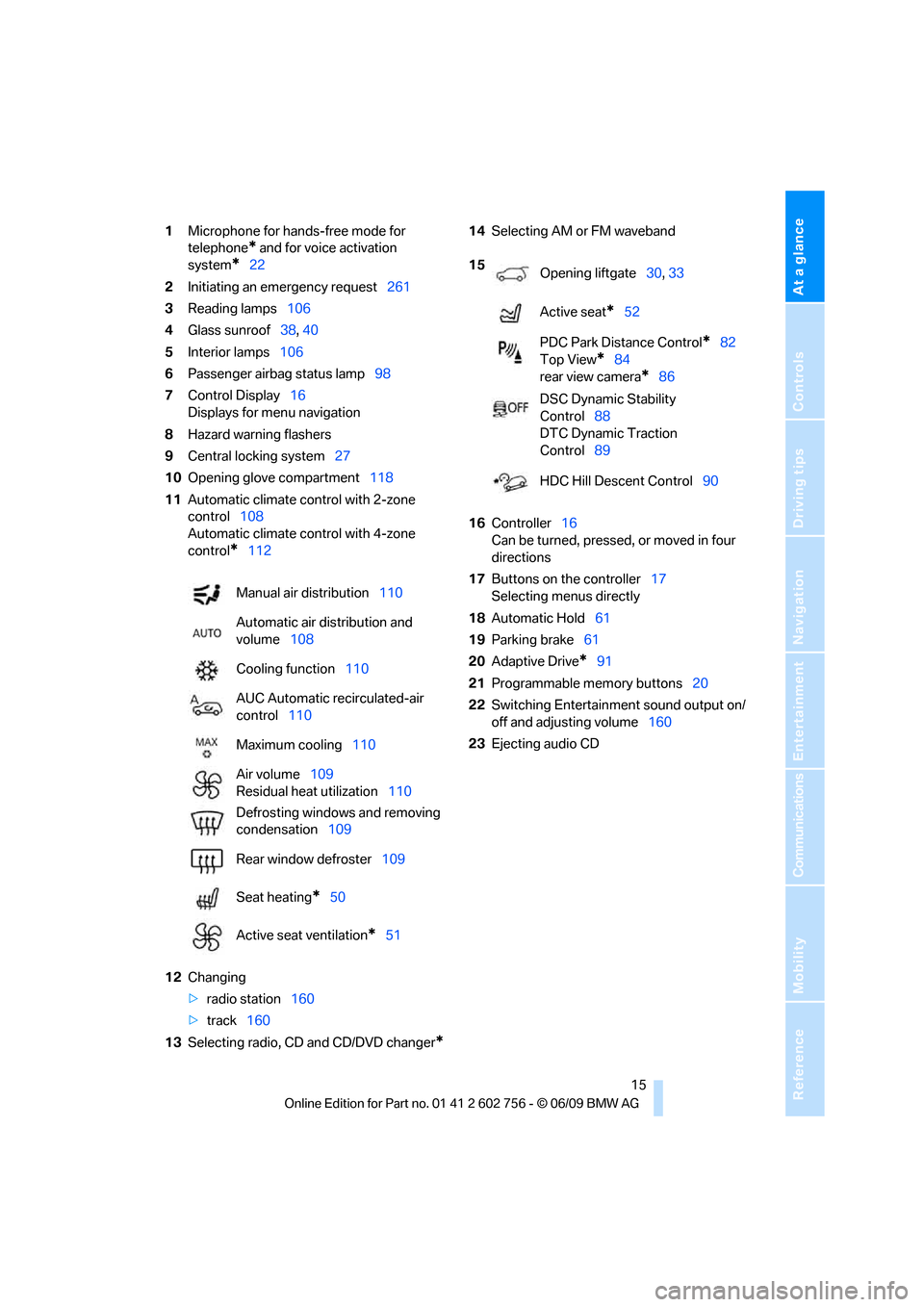
1Microphone for hands-free mode for
telephone
* and for voice activation
system
*22
2Initiating
an emergency request261
3Reading lamps106
4Glass sunroof38, 40
5Interior lamps106
6Passenger airbag status lamp98
7Control Display16
Displays for menu navigation
8Hazard warning flashers
9Central locking system27
10Opening glove compartment118
11Automatic climate control with 2-zone
control108
Automatic climate control with 4-zone
control
*112
12Changing
>radio station160
>track160
13Selecting radio, CD and CD/DVD changer
*
14Selecting AM or FM waveband
16Controller16
Can be turned, pressed, or moved in four
directions
17Buttons on the controller17
Selecting menus directly
18Automatic Hold61
19Parking brake61
20Adaptive Drive
*91
21Programmable memory buttons20
22Switching Entertainment sound output on/
off and adjusting volume160
23Ejecting audio CD Manual air distribution110
Automatic air distribution and
volume108
Cooling function110
AUC Automatic recirculated-air
control110
Maximum cooling110
Air volume109
Residual heat utilization110
Defrosting windows and removing
condensation109
Rear window defroster109
Seat heating
*50
Active seat ventilation
*51
15
Opening liftgate30, 33
Active seat
*52
PDC Park Distance Control
*82
Top View
*84
rear view camera
*86
DSC Dynamic Stability
Control88
DTC Dynamic Traction
Control89
HDC Hill Descent Control90
ba8_e70ag.book Seite 15 Freitag, 5. Juni 2009 11:42 11
Page 53 of 300
Controls
51Reference
At a glance
Driving tips
Communications
Navigation
Entertainment
Mobility
Rear
Operation similar to front seat heating; without
temperature distribution.
Active seat ventilation* and
seat heating*
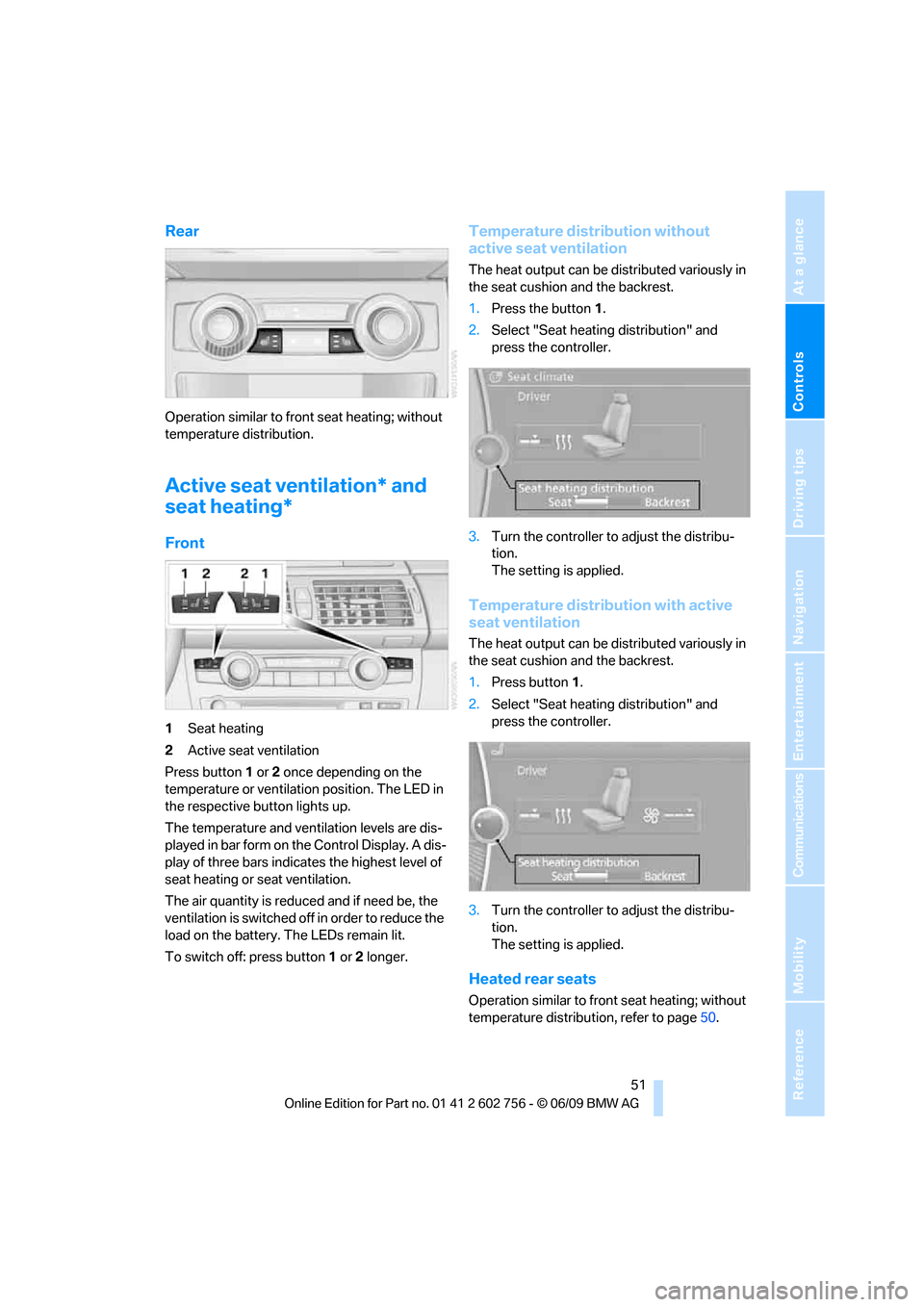
Front
1Seat heating
2Active seat ventilation
Press button1 or 2 once depending on the
temperature or ventilation position. The LED in
the respective button lights up.
The temperature and ventilation levels are dis-
played in bar form on the Control Display. A dis-
play of three bars indicates the highest level of
seat heating or seat ventilation.
The air quantity is reduced and if need be, the
ventilation is switched off in order to reduce the
load on the battery. The LEDs remain lit.
To switch off: press button1 or 2 longer.
Temperature distribution without
active seat ventilation
The heat output can be distributed variously in
the seat cushion and the backrest.
1.Press the button1.
2.Select "Seat heating distribution" and
press the controller.
3.Turn the controller to adjust the distribu-
tion.
The setting is applied.
Temperature distribution with active
seat ventilation
The heat output can be distributed variously in
the seat cushion and the backrest.
1.Press button1.
2.Select "Seat heating distribution" and
press the controller.
3.Turn the controller to adjust the distribu-
tion.
The setting is applied.
Heated rear seats
Operation similar to front seat heating; without
temperature distribution, refer to page50.
ba8_e70ag.book Seite 51 Freitag, 5. Juni 2009 11:42 11
Page 109 of 300
Controls
107Reference
At a glance
Driving tips
Communications
Navigation
Entertainment
Mobility
Climate
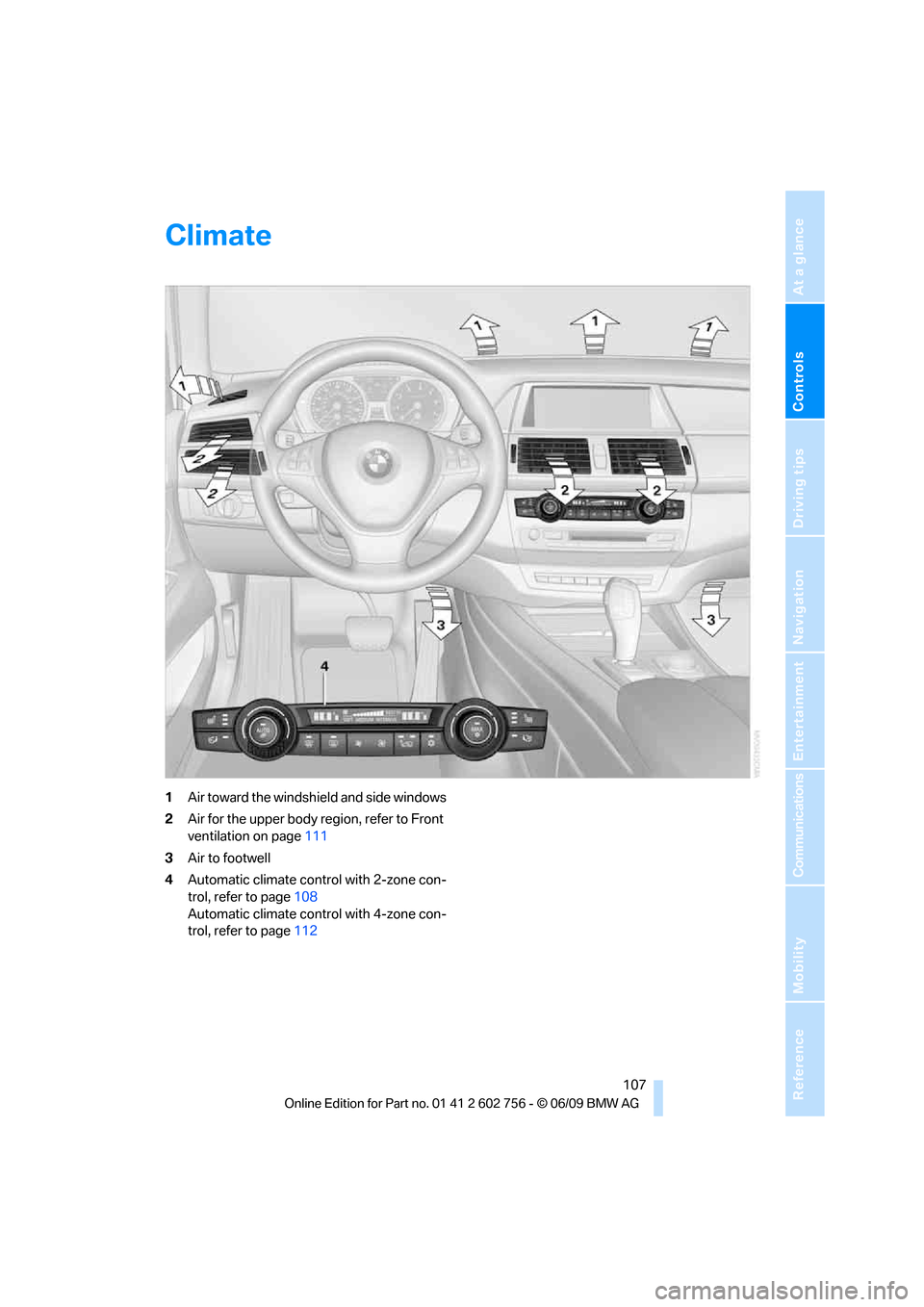
1Air toward the windshield and side windows
2Air for the upper body region, refer to Front
ventilation on page111
3Air to footwell
4Automatic climate control with 2-zone con-
trol, refer to page108
Automatic climate control with 4-zone con-
trol, refer to page112
ba8_e70ag.book Seite 107 Freitag, 5. Juni 2009 11:42 11
Page 110 of 300
Climate
108
Automatic climate control with 2-zone control
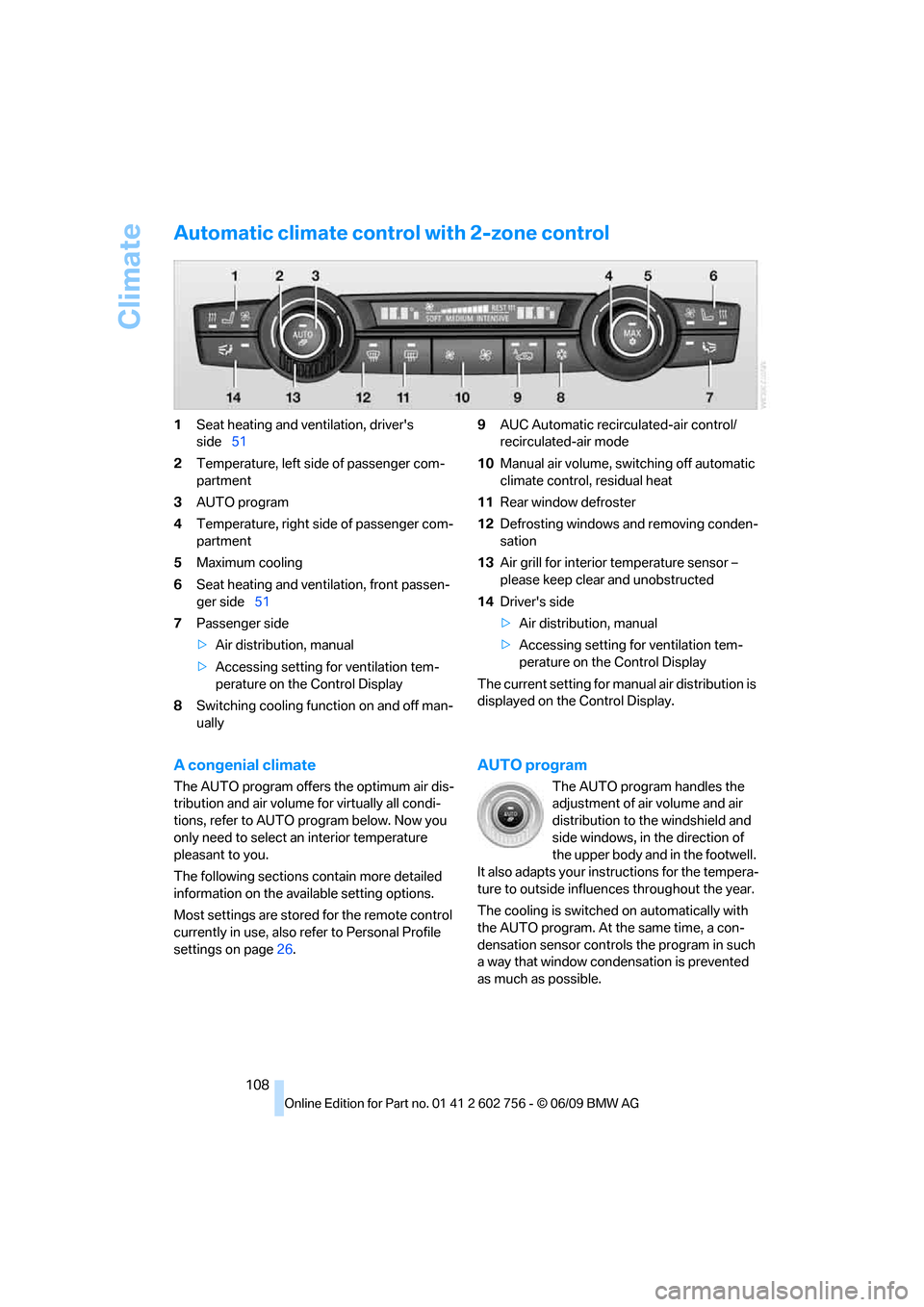
1Seat heating and ventilation, driver's
side51
2Temperature, left side of passenger com-
partment
3AUTO program
4Temperature, right side of passenger com-
partment
5Maximum cooling
6Seat heating
and ventilation, front passen-
ger side51
7Passenger side
>Air distribution, manual
>Accessing setting for ventilation tem-
perature on the Control Display
8Switching cooling function on and off man-
ually9AUC Automatic recirculated-air control/
recirculated-air mode
10Manual air volume, switching off automatic
climate control, residual heat
11Rear window defroster
12Defrosting windows and removing conden-
sation
13Air grill for interior temperature sensor –
please keep clear and unobstructed
14Driver's side
>Air distribution, manual
>Accessing setting for ventilation tem-
perature on the Control Display
The current setting for manual air distribution is
displayed on the Control Display.
A congenial climate
The AUTO program offers the optimum air dis-
tribution and air volume for virtually all condi-
tions, refer to AUTO program below. Now you
only need to select an interior temperature
pleasant to you.
The following sections contain more detailed
information on the available setting options.
Most settings are stored for the remote control
currently in use, also refer to Personal Profile
settings on page26.
AUTO program
The AUTO program handles the
adjustment of air volume and air
distribution to the windshield and
side windows, in the direction of
the upper body and in the footwell.
It also adapts your instructions for the tempera-
ture to outside influences throughout the year.
The cooling is switched on automatically with
the AUTO program. At the same time, a con-
densation sensor controls the program in such
a way that window condensation is prevented
as much as possible.
ba8_e70ag.book Seite 108 Freitag, 5. Juni 2009 11:42 11
Page 111 of 300
Controls
109Reference
At a glance
Driving tips
Communications
Navigation
Entertainment
Mobility
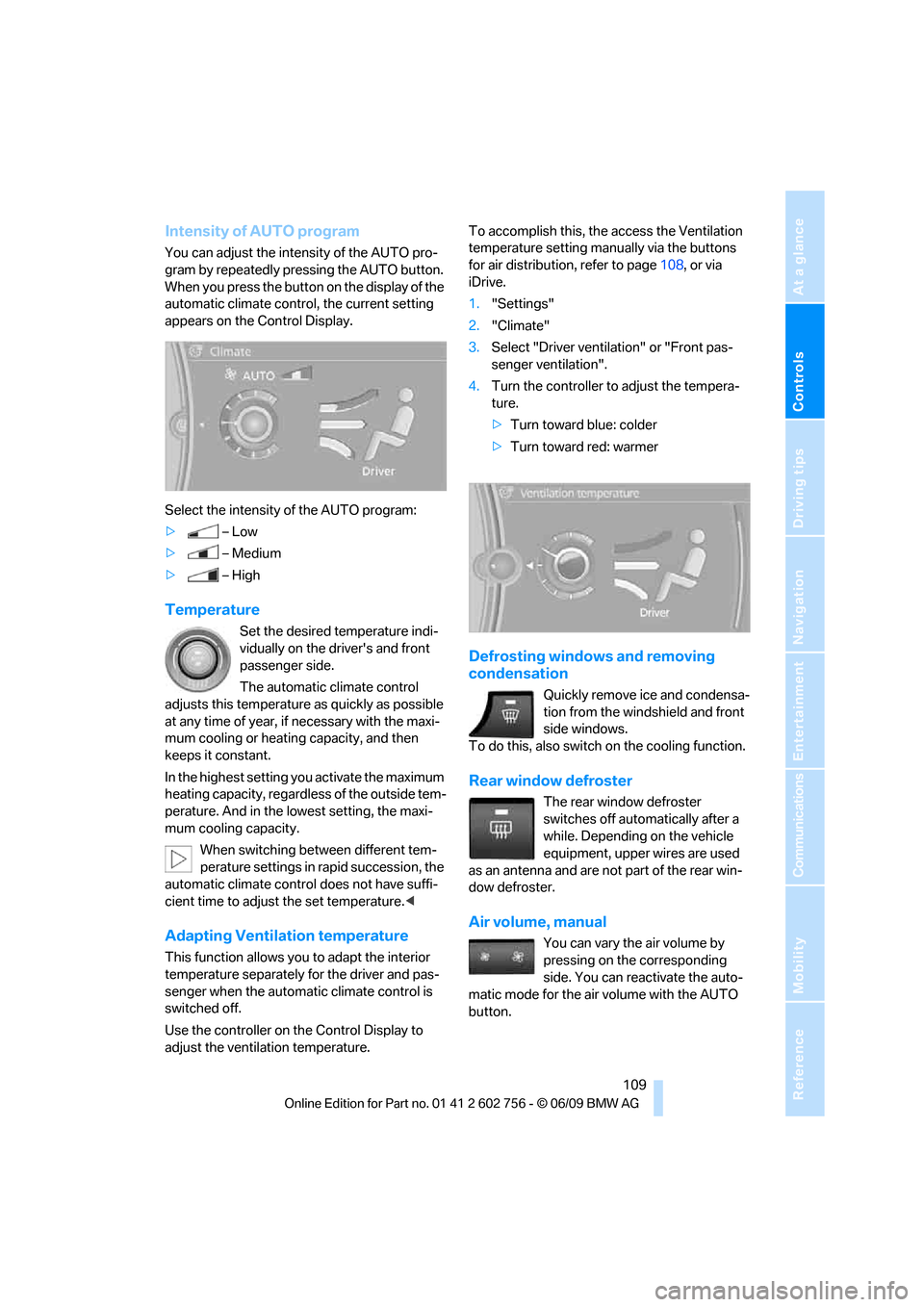
Intensity of AUTO program
You can adjust the intensity of the AUTO pro-
gram by repeatedly pressing the AUTO button.
When you press the button on the display of the
automatic climate control, the current setting
appears on the Control Display.
Select the intensity of the AUTO program:
>–Low
>–Medium
>–High
Temperature
Set the desired temperature indi-
vidually on the driver's and front
passenger side.
The automatic climate control
adjusts this temperature as quickly as possible
at any time of year, if necessary with the maxi-
mum cooling or heating capacity, and then
keeps it constant.
In the highest setting you activate the maximum
heating capacity, regardless of the outside tem-
perature. And in the lowest setting, the maxi-
mum cooling capacity.
When switching between different tem-
perature settings in rapid succession, the
automatic climate control does not have suffi-
cient time to adjust the set temperature.<
Adapting Ventilation temperature
This function allows you to adapt the interior
temperature separately for the driver and pas-
senger when the automatic climate control is
switched off.
Use the controller on the Control Display to
adjust the ventilation temperature.To accomplish this, the access the Ventilation
temperature setting manually via the buttons
for air distribution, refer to page108, or via
iDrive.
1."Settings"
2."Climate"
3.Select "Driver ventilation" or "Front pas-
senger ventilation".
4.Turn the controller to adjust the tempera-
ture.
>Turn toward blue: colder
>Turn toward red: warmer
Defrosting windows and removing
condensation
Quickly remove ice and condensa-
tion from the windshield and front
side windows.
To do this, also switch on the cooling function.
Rear window defroster
The rear window defroster
switches off automatically after a
while. Depending on the vehicle
equipment, upper wires are used
as an antenna and are not part of the rear win-
dow defroster.
Air volume, manual
You can vary the air volume by
pressing on the corresponding
side. You can reactivate the auto-
matic mode for the air volume with the AUTO
button.
ba8_e70ag.book Seite 109 Freitag, 5. Juni 2009 11:42 11
Page 113 of 300
Controls
111Reference
At a glance
Driving tips
Communications
Navigation
Entertainment
Mobility
Switching on
Pressing the right side switches on
the residual heat utilization when
the following conditions are met:
>up to 15 minutes after switching off the
engine
>with the engine at operating temperature
>with sufficient battery voltage
>at an outside temperature below 777/
256
REST appears on the display of the automatic
climate control when the residual heat utiliza-
tion is switched on.
From radio readiness the interior temperature,
the air volume and the air distribution can be
set.
Switching off
You can select the lowest blower speed by
pressing and holding the left side. Pressing
again switches off the residual heat utilization.
REST disappears from the display of the auto-
matic climate control.
Switching automatic climate control on
and off
You can select the lowest blower
speed by pressing and holding the
left side. Pressing again switches
off the automatic climate control.
You switch on the system again by pressing any
button of the automatic climate control.
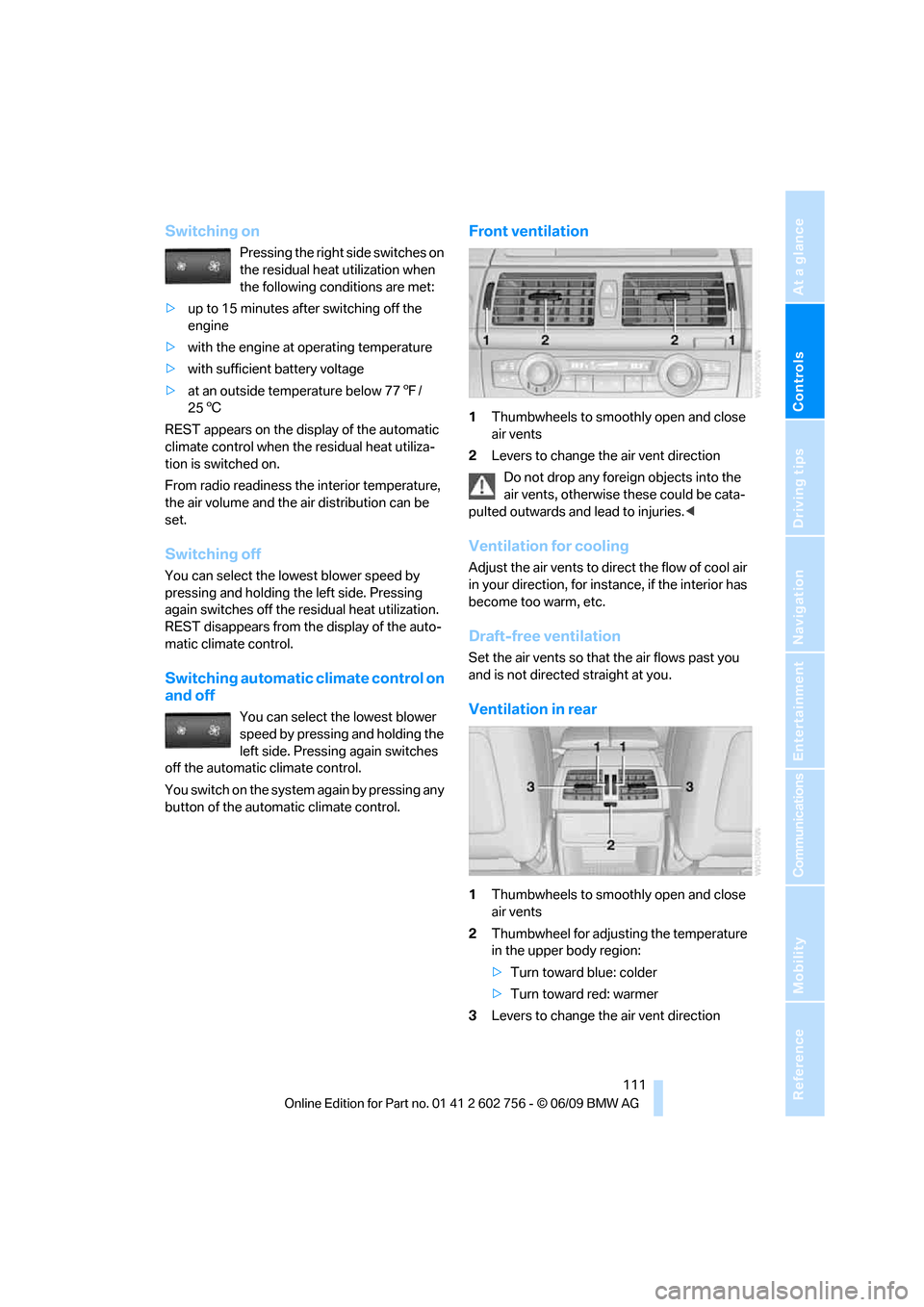
Front ventilation
1Thumbwheels to smoothly open and close
air vents
2Levers to change the air vent direction
Do not drop any foreign objects into the
air vents, otherwise these could be cata-
pulted outwards and lead to injuries.<
Ventilation for cooling
Adjust the air vents to direct the flow of cool air
in your direction, for instance, if the interior has
become too warm, etc.
Draft-free ventilation
Set the air vents so that the air flows past you
and is not directed straight at you.
Ventilation in rear
1Thumbwheels to smoothly open and close
air vents
2Thumbwheel for adjusting the temperature
in the upper body region:
>Turn toward blue: colder
>Turn toward red: warmer
3Levers to change the air vent direction
ba8_e70ag.book Seite 111 Freitag, 5. Juni 2009 11:42 11
Page 114 of 300
Climate
112
BMW X5: heating and ventilation,
3rd row seats
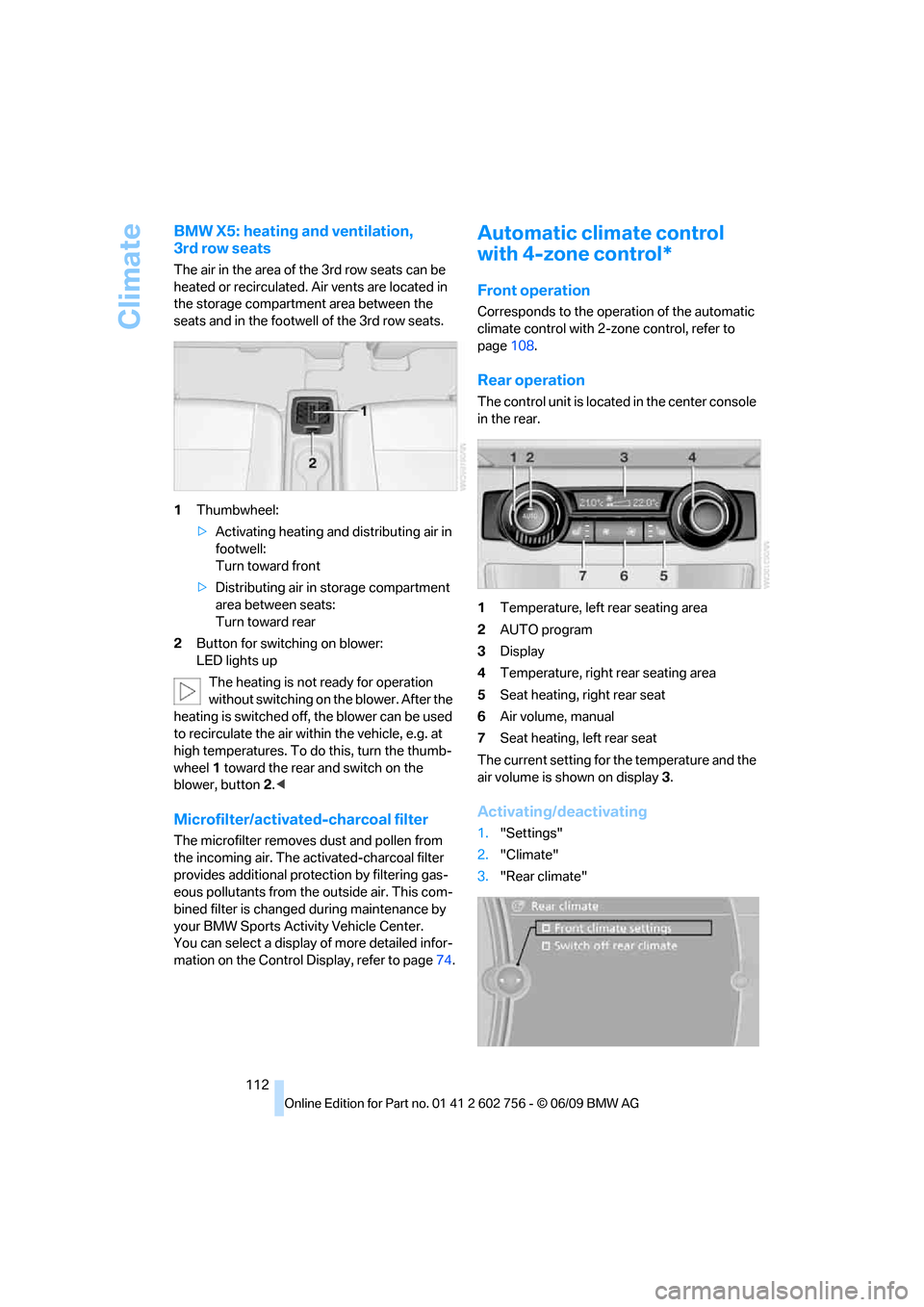
The air in the area of the 3rd row seats can be
heated or recirculated. Air vents are located in
the storage compartment area between the
seats and in the footwell of the 3rd row seats.
1Thumbwheel:
>Activating heating and distributing air in
footwell:
Turn toward front
>Distributing air in storage compartment
area between seats:
Turn toward rear
2Button for switching on blower:
LED lights up
The heating is not ready for operation
without switching on the blower. After the
heating is switched off, the blower can be used
to recirculate the air within the vehicle, e.g. at
high temperatures. To do this, turn the thumb-
wheel 1 toward the rear and switch on the
blower, button2.<
Microfilter/activated-charcoal filter
The microfilter removes dust and pollen from
the incoming air. The activated-charcoal filter
provides additional protection by filtering gas-
eous pollutants from the outside air. This com-
bined filter is changed during maintenance by
your BMW Sports Activity Vehicle Center.
You can select a display of more detailed infor-
mation on the Control Display, refer to page74.
Automatic climate control
with 4-zone control*
Front operation
Corresponds to the operation of the automatic
climate control with 2-zone control, refer to
page108.
Rear operation
The control unit is located in the center console
in the rear.
1Temperature, left rear seating area
2AUTO program
3Display
4Temperature, right rear seating area
5Seat heating, right rear seat
6Air volume, manual
7Seat heating, left rear seat
The current setting for the temperature and the
air volume is shown on display3.
Activating/deactivating
1."Settings"
2."Climate"
3."Rear climate"
ba8_e70ag.book Seite 112 Freitag, 5. Juni 2009 11:42 11
Page 115 of 300
Controls
113Reference
At a glance
Driving tips
Communications
Navigation
Entertainment
Mobility
4.Select the desired settings and press the
controller.
Function is activated.
The rear automatic climate control
cannot be operated if the front auto-
matic climate control is switched off. With
the defrost windows and eliminate conden-
sation function activated, the rear automatic
climate control is also not ready for opera-
tion.<
AUTO program
The AUTO program assumes the
adjustment of the air distribution
toward the upper body and in the
footwell, as well as the air volume
for you. It also adapts your instruc-
tions for the temperature to outside influences
throughout the year.
Temperature
Set the desired temperature indi-
vidually on the left and right side.
The automatic climate control
adjusts this temperature as quickly
as possible at any time of year, if necessary with
the maximum cooling or heating capacity, and
then keeps it constant.
When switching between different tem-
perature settings in rapid succession, the
automatic climate control does not have suffi-
cient time to adjust the set temperature.<
Air volume, manual
You can vary the air volume by
pressing on the corresponding
side. You can reactivate the auto-
matic mode for the air volume with the AUTO
button.
Switching off rear automatic climate
control
You can select the lowest blower
speed by pressing and holding the
left side. Pressing again switches
off the automatic climate control.The automatic climate control can also be
switched off with iDrive. To switch on the
automatic climate control again, the system
must first be reactivated, refer to Activating/
deactivating.<
You switch on the system again by pressing any
button of the rear automatic climate control.
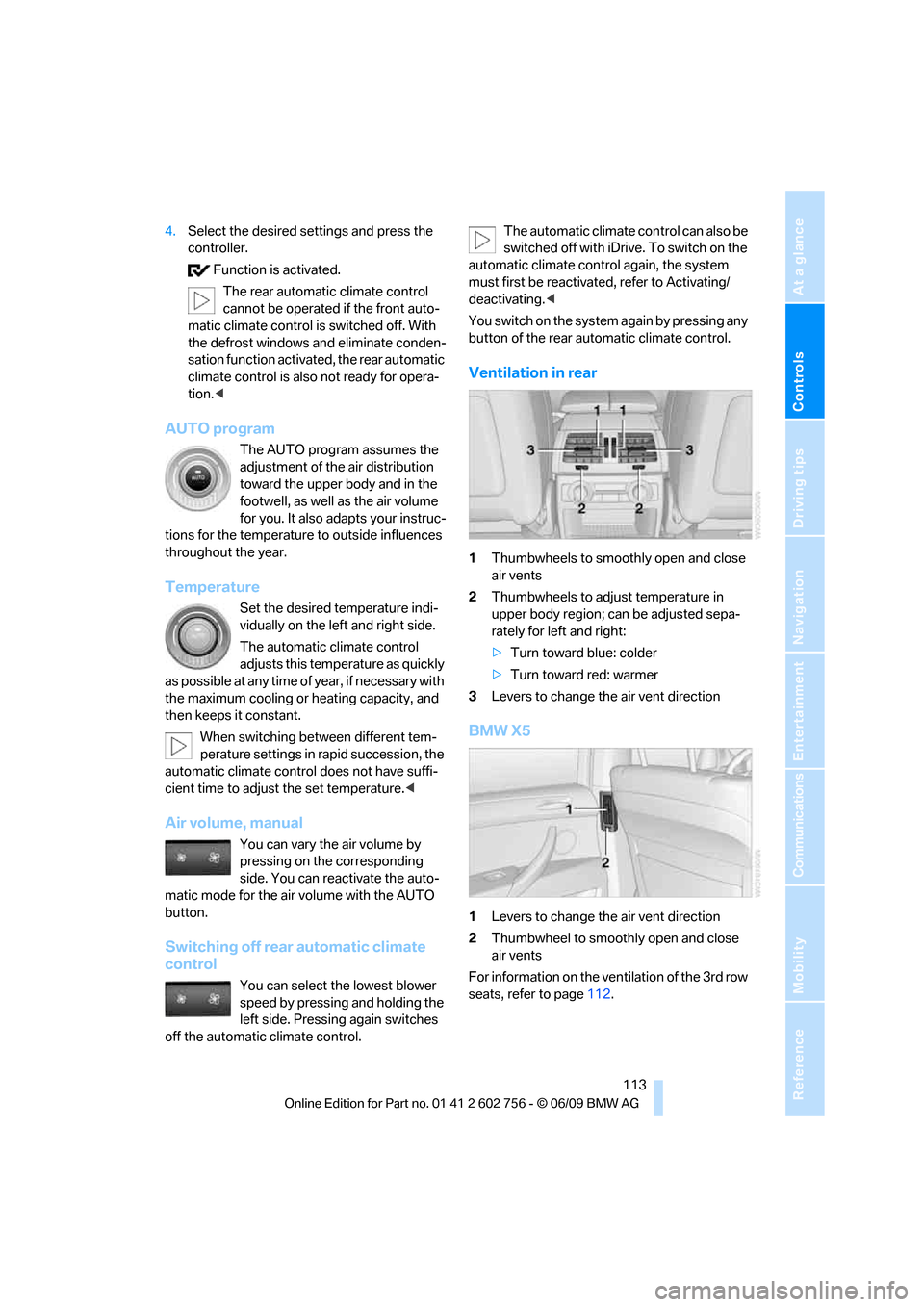
Ventilation in rear
1Thumbwheels to smoothly open and close
air vents
2Thumbwheels to adjust temperature in
upper body region; can be adjusted sepa-
rately for left and right:
>Turn toward blue: colder
>Turn toward red: warmer
3Levers to change the air vent direction
BMW X5
1Levers to change the air vent direction
2Thumbwheel to smoothly open and close
air vents
For information on the ventilation of the 3rd row
seats, refer to page112.
ba8_e70ag.book Seite 113 Freitag, 5. Juni 2009 11:42 11
Page 116 of 300
Climate
114
Parked-car ventilation*
The concept
The parked-car ventilation blows air into the
passenger compartment to lower interior tem-
peratures.
It is ready to use in the parked car mode at any
outside temperature.
You can set two different times for the system
to start. The parked-car ventilation can also be
switched on and off directly. It remains
switched on for 30 minutes.
Since the system uses a substantial amount of
electrical current, you should refrain from acti-
vating it twice in succession without allowing
the battery to be recharged in normal operation
between use.
The air emerges through the upper body region
air vents in the instrument cluster. Therefore,
please open the air vents.
The parked-car ventilation is operated via
iDrive.
Switching on and off directly
1."Settings"
2."Climate"
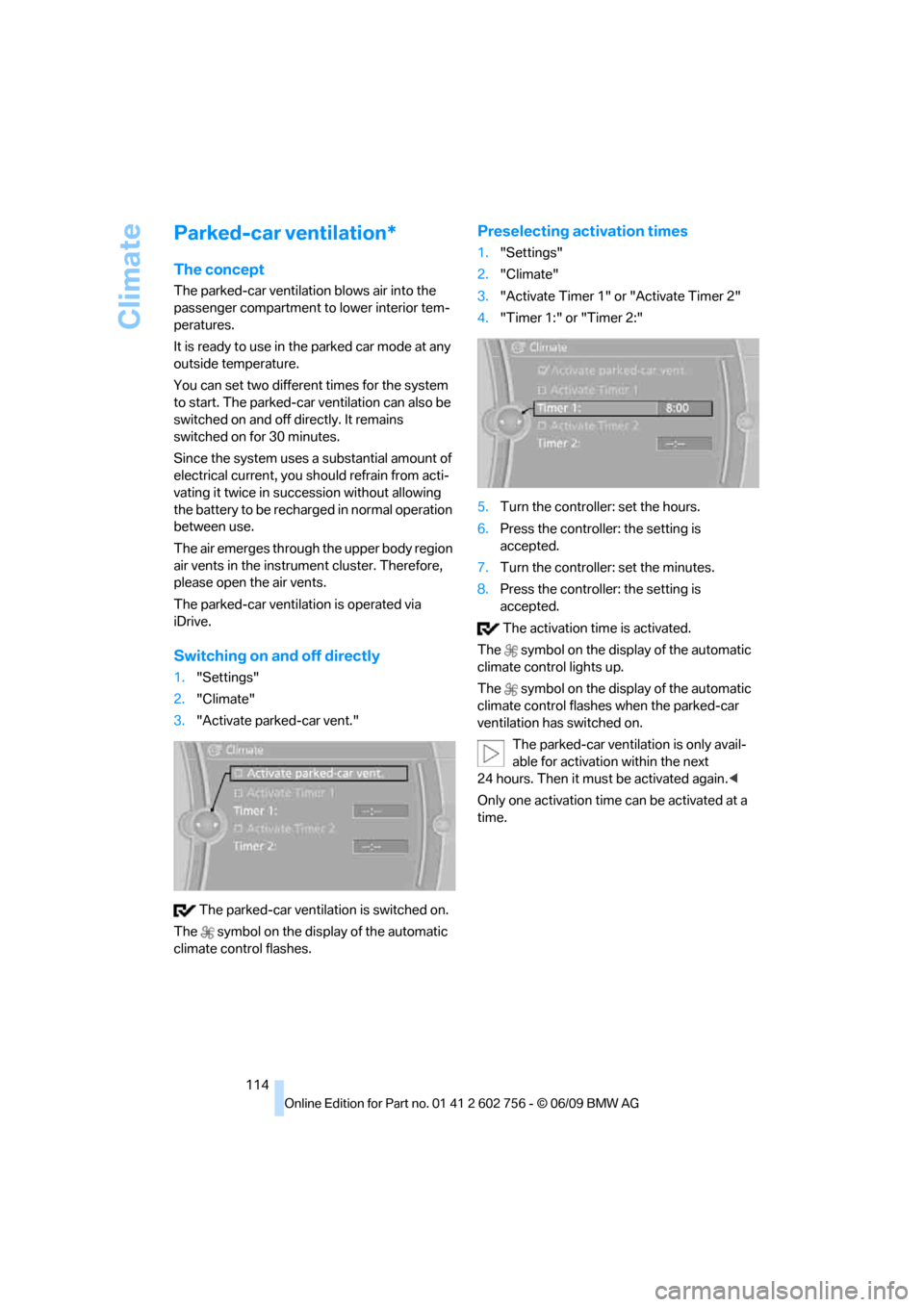
3."Activate parked-car vent."
The parked-car ventilation is switched on.
The symbol on the display of the automatic
climate control flashes.
Preselecting activation times
1."Settings"
2."Climate"
3."Activate Timer 1" or "Activate Timer 2"
4."Timer 1:" or "Timer 2:"
5.Turn the controller: set the hours.
6.Press the controller: the setting is
accepted.
7.Turn the controller: set the minutes.
8.Press the controller: the setting is
accepted.
The activation time is activated.
The symbol on the display of the automatic
climate control lights up.
The symbol on the display of the automatic
climate control flashes when the parked-car
ventilation has switched on.
The parked-car ventilation is only avail-
able for activation within the next
24 hours. Then it must be activated again.<
Only one activation time can be activated at a
time.
ba8_e70ag.book Seite 114 Freitag, 5. Juni 2009 11:42 11
Page 229 of 300
Mobility
227Reference
At a glance
Controls
Driving tips
Communications
Navigation
Entertainment
exhaust fluid at temperatures below +237/
-56 even between the regular maintenance
intervals.
If the fluid needs to be refilled, this will be indi-
cated with the reserve display in the instrument
panel, refer to page226.<
Only refill the diesel exhaust fluid
yourself in exceptional circumstances
In order to get your vehicle to reach the nearest
BMW Sports Activity Vehicle Center, you may
refill the diesel exhaust fluid yourself, making
sure to heed the warning notices.
Do not allow diesel exhaust fluid to come
into contact with you. This can lead to
skin and eye irritation. Wear protective goggles
and gloves as needed. Follow the safety
instructions on the bottle.
When opening the bottle or reservoir, pungent
smelling vapors can escape. Before refilling,
close the vehicle completely so that the vapors
do not get into the interior of the vehicle. When
handling diesel exhaust fluid in enclosed
spaces, make sure to have sufficient ventilation.
After handling diesel exhaust fluid, wash hands
thoroughly. Failure to do so may lead to irrita-
tion, e.g. due to inadvertent contact with the
eyes.
If eye irritation occurs, immediately rinse eyes
with ample water and contact a doctor if neces-
sary.
If diesel exhaust fluid comes into contact with
surfaces of your vehicle, rinse the affected sur-
faces with water or else damage may occur.
Keep diesel exhaust fluid out of reach of chil-
dren.<
Suitable diesel exhaust fluid
>Preferred: BMW Diesel Exhaust Fluid.
This bottle and its special adapter permit
convenient refilling with diesel exhaust
fluid.
>Alternative: NOx reduction agent AUS 32
You can get diesel exhaust fluid at your BMW
Sports Activity Vehicle Center.
Refilling quantity
Refilling quantity at the start of the reserve dis-
play: approx. 0,75 US gal/2.7 liters reserve
Open reservoir for diesel exhaust fluid
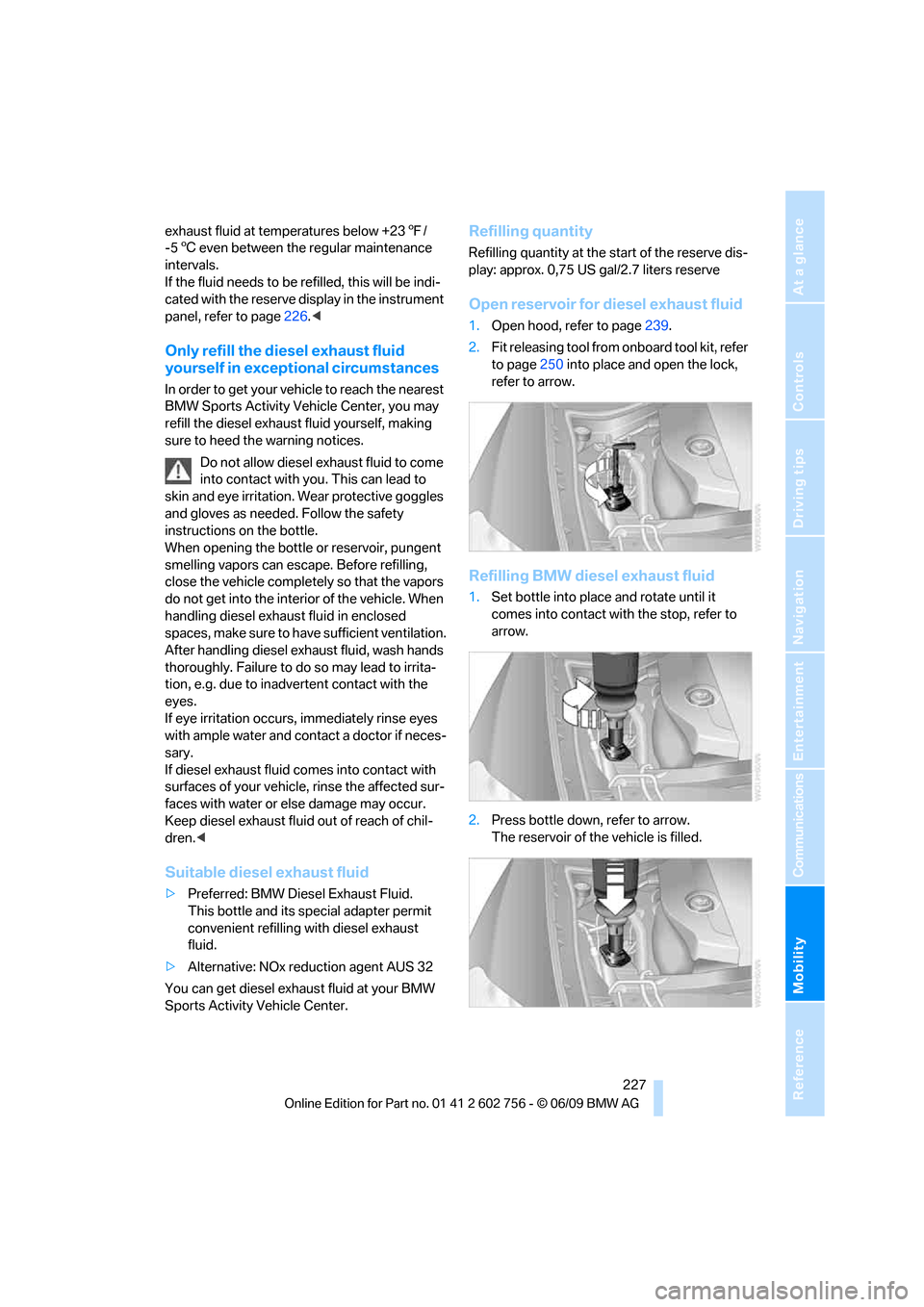
1.Open hood, refer to page239.
2.Fit releasing tool from onboard tool kit, refer
to page250 into place and open the lock,
refer to arrow.
Refilling BMW diesel exhaust fluid
1.Set bottle into place and rotate until it
comes into contact with the stop, refer to
arrow.
2.Press bottle down, refer to arrow.
The reservoir of the vehicle is filled.
ba8_e70ag.book Seite 227 Freitag, 5. Juni 2009 11:42 11